

Page 1
S 80
PROFESSIONAL MICROPHONE SYSTEMS
A low profile through table microphone base designed specifically for Clockaudio through table microphones
www.clockaudio.com
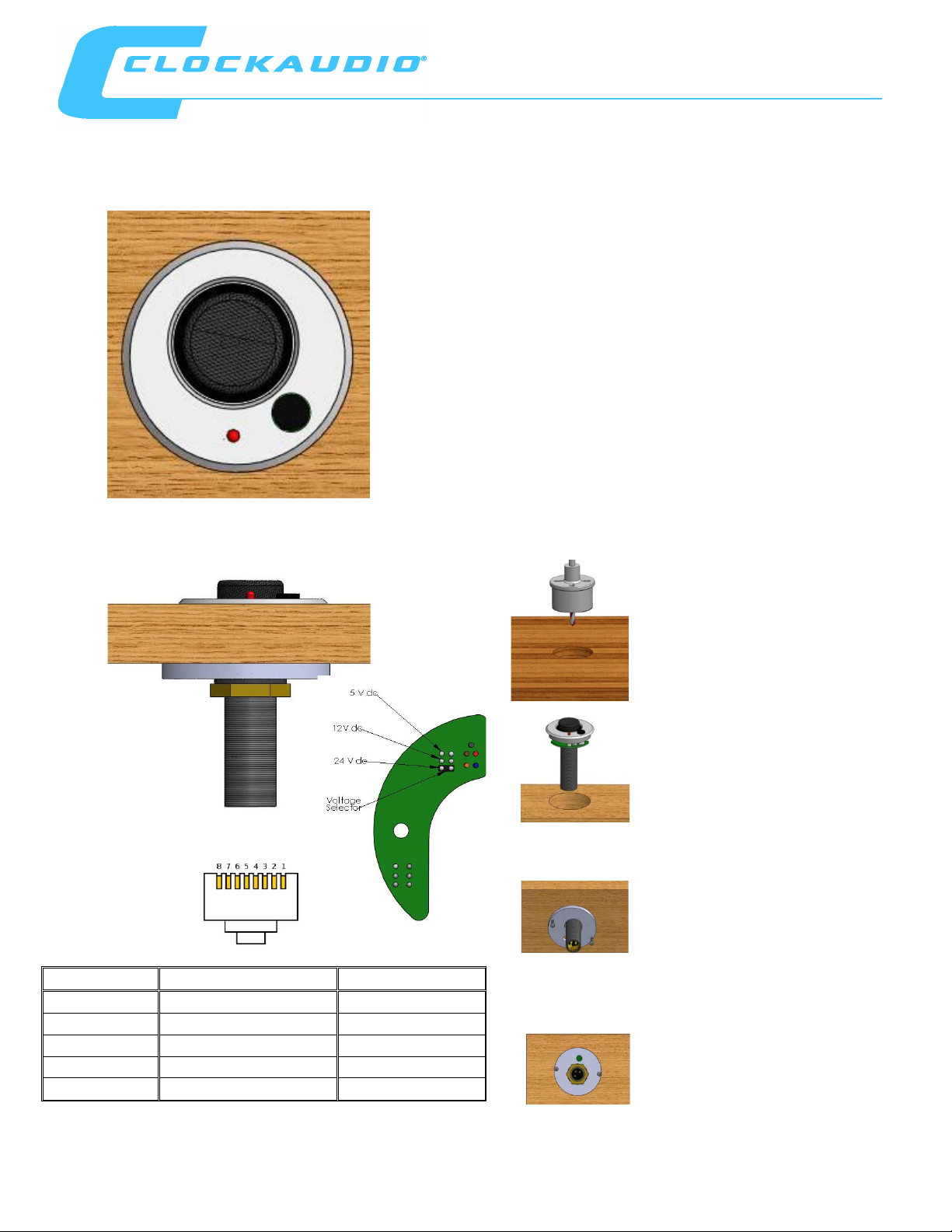
• Designed for remote switching.
Cable colour
Function
RJ 45 Pin number
Red
Red LED cathode
2
Blue
COM switch
3
Brown
LED anode
4
Yellow
PTT switch
5
Green
Green LED cathode
6
Pre drill 50mm (2”) hole in table
Remove nut and 1 shock mount from
With the S 80 top and mic in desired
base plate.
Fit remaining shock mount and
(C 003E-RF, C 004E-RF, C 011E-RF and C 012E-RF)
• Low profile table mounted microphone base.
• Designed to be used with C 003E-RF,
C 004E-RF, C 011E-RF and C 012E-RF.
• Uses the shock mounts from the microphone
to eliminate surface bound noise.
• Fitted with latching or momentary PTT switch.
• Bi-colour common anode LED to confirm
status
• Terminated with RJ 45 connector and supplied
with RJ 45 coupler which allows connection via
RJ 12 or RJ 45 plug back to dsp.
the microphone and place into S 80
top.
position use the 2 self tapping screws
supplied to fit the S 80 base plate.
Ensure wires run free through hole in
hand tighten nut to secure mic and
S 80 top plate.
 Loading...