

Page 1
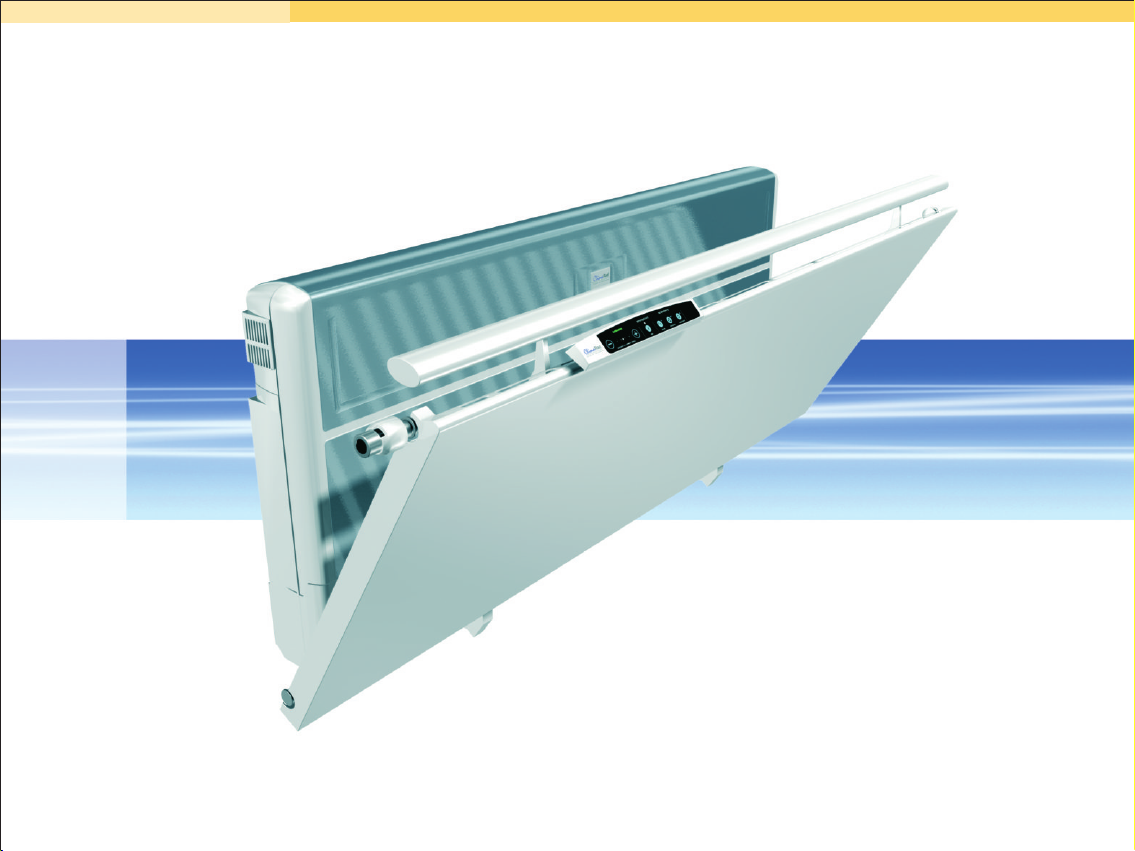
Local load-balanced ventilation
system with heat recovery
combined with CH-system
User manual
Warranty
Page 2
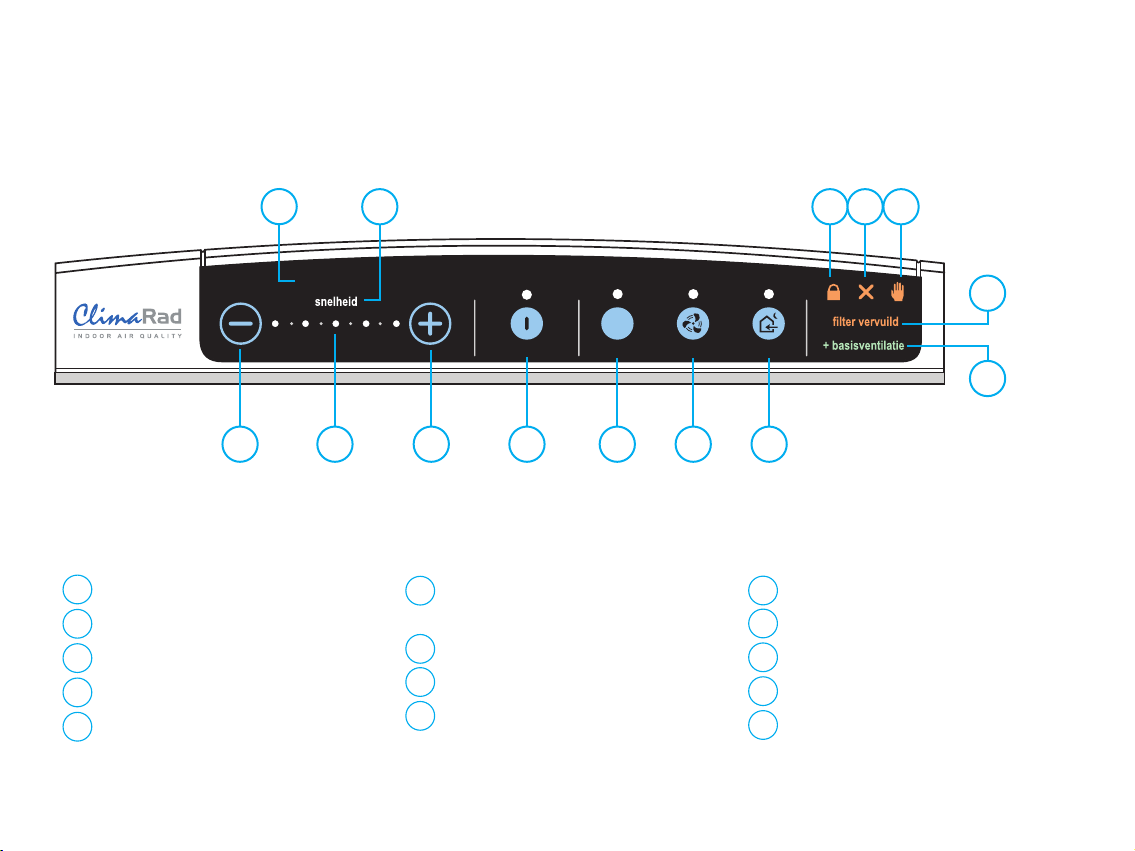
ClimaRad Sensotronic – control panel
3 4
1
sign ‘air quality’
2
sign ‘fan speed’
3
button ‘decrease’
settings scale (5 positions)
4
button ‘increase’
5
1
luchtkwaliteit
INTELLIGENT CO + HUMIDITY CONTROL
2
2
sensorgestuurd
5
button ‘sensor control
6
6
+/- base ventilation’
on/off button ‘pause’
7
8
on/off button ‘maximum’
9
on/off button ‘cool air’
z
z
z
pauze koele luchtmaximumaan
7
handbediening
1u
10
11
14
6u30"
12
13
8
9
sign ‘locked’
10
11
sign ‘malfunction’
12
sign ‘filter polluted’
13
sign ‘base ventilation’
14
sign ‘manual control’
Page 3

ClimaRad
User Manual
®
Page 4

ClimaRad User Manual
© Copyright 2005 ClimaRad B.V.
All rights reserved. Nothing of this publication may be multiplied or published by means of print, photocopy, microfilm, or any other
way without prior permission of ClimaRad B.V.
ClimaRad is a patented climate system.
ClimaRad is a registered trademark of ClimaRad B.V.
Disclaimer
Specifications can change without prior notice. No liability whatsoever is accepted for any direct or indirect damage from using the
information presented in this publication.
Page 5

Preface
Dear ClimaRad-user,
The ClimaRad heating- and ventilation system will supply
your home with warm and clean, fresh air for many years
to come.
This manual tells you why a good indoor climate is
important and how ClimaRad will help you to create it.
The manual shows you how to control and maintain the
ClimaRad and provides a small troubleshooting-guide.
Finally, together with a copy of your invoice, this manual
is a necessary document for your warranty. Therefore,
keep it in a safe place.
To get the most of your ClimaRad and to operate the unit
safely, we recommend that you read this manual carefully.
We are confident that you will be very satisfied with your
purchase of the ClimaRad.
On behalf of the management,
ClimaRad
Page 6

Page 7

Contents
1 - Why ClimaRad ventilation? . . . . . . . . . . . . . . . . . . . 2
2 - How does the ClimaRad work? . . . . . . . . . . . . . . . . . 5
3 - Installation . . . . . . . . . . . . . . . . . . . . . . . . . . . . . . 8
4 - Operating instructions . . . . . . . . . . . . . . . . . . . . . . 9
5 - Maintenance . . . . . . . . . . . . . . . . . . . . . . . . . . . . 18
6 - Trouble shooting . . . . . . . . . . . . . . . . . . . . . . . . . 25
Technical specifications . . . . . . . . . . . . . . . . . . . . . . . 28
1
Page 8

11
Why ClimaRad ventilation?
Ventilations is a pure necessity. Unfortunately some people
tend to forget! Insufficient ventilation can cause serious
damage in a building. Fungi and woodrot can cause
permanent deterioration of the construction (In the
Netherlands alone, this type of damage accounts for many
tenths of millions of Euro).
Allergenic and hazardous substances in too high
concentrations-- are perhaps an even more serious threat
with severe consequences for your health.
Ergo, you can never have enough fresh air. But there is a
snag. Ventilation also requires energy, not only to run the
fans but especially because fresh air is also cold air that
needs to be heated to room temperature. In modern
buildings these so-called 'ventilation losses' may account to
as much as 50% of the total heating costs. Because of this,
modern or refurbished houses are usually as air-tight as
possible and the inhabitants are stuck with a dilemma:
“How do I get a good indoor air quality without wasting
energy?
ClimaRad is your answer! It provides healthy ventilation
and it saves energy.
CO , Indoor Air Quality and ClimaRad
2
People produce CO and humidity through breathing. In
occupied, badly vented rooms the CO -concentration will
increase rapidly. High concentrations of CO are not
damaging on the short term, but they create a damp and
smelly indoor climate. If people stay in such a climate for a
2
2
2
longer period it may irritate eyes, throat and nose. Also,
most obvious at work or school, higher CO concentrations
are known to affect the ability to concentrate.
Apart from that, CO is an important indicator for the
presence of other hazardous substances (VOCs, solvents,
formaldehyde, radon, fine dust particles, etc.) that can be
detrimental to your health. In other words, a CO concen-
tration below certain threshold values usually guarantees a
good indoor air quality overall.
The table below shows threshold values for CO
concentration that are used in practice.
Desired CO -concentrations indoor climate:
Nominal : 1200 ppm CO
80% satisfied : 1000 ppm CO
People with respiratory
problems : 800 ppm CO
The ClimaRad Sensotronic features a CO sensor that
measures the CO level and automatically adjusts the fan
speed to maintain the desired level. Thus the ClimaRad
always provides the adequate ventilation.
2
2
2
2
2
2
2
2
2
2
2
Page 9

Humidity and ClimaRad
Every day several litres of condense and humidity are
released in a house because of the presence of people and
certain activities like cooking, washing and cleaning. Apart
from that, in new homes, humidity may stem from the
building construction.
Mites, fungi and rot thrive on a high humidity level in the
house. The mites and fungi can cause allergies and wood
rot can be detrimental to the building construction.
Adequate ventilation can prevent high humidity. The
ClimaRad has a humidity sensor that will react to high
humidity levels and try to lower it in an intelligent way. For
instance, if in (rare) cases the absolute outdoor humidity is
higher, no extra ventilation will occur.
Outside Air and ClimaRad
Depending on where you live, outdoor air may be polluted
with allergenics (pollen), exhaust fumes (benzene), lead
and fine dust particles. Obviously these substances are not
desired indoors.
There are two types of filters available for the intake-duct
of a ClimaRad to remove these substances:
!
A fine dust and pollen filter and
!
a combi-filter for fine dust with an additional active coal
filter
Energy Use and ClimaRad
By far the most popular way of ventilation is opening
windows and ventilation-grids.
A considerable drawback of this “method” is that it is
unpredictable whether the ventilation is too little,
unnecessary or just enough. On top of that, the warm
indoor air is lost before its heat content (energy) being put
to good use. This energy waste is not only bad for your
wallet, but also for the environment.
ClimaRad has an air-to-air heat exchanger that transfers
the heat of the outgoing air to the ingoing cold air. This
saves a bundle on your heating costs, but also the
ClimaRad is especially equipped to perform its function with
a minimum consumption of electricity. It uses DC fans in
combination with a highly efficient power supply. At a
ventilation rate of 40 m³ per hour the electricity
consumption is as low as 7 W. At 80 m³/h it is a mere 25
W. The stand-by power use (fans-off but sensors still
working) is as low as 1.5W.
3
Page 10

ClimaRad: Energy Saving and Healthy
ClimaRad has solved the dilemma: A healthy indoor climate
and saving energy at the same time is possible.
Any dwelling with at least one outside wall can have an
optimal indoor air quality. You set the desired level of air
quality and the intelligent Sensotronic automatically takes
care of the rest. If you leave the room, the ClimaRad
Sensotronic detects the decreased CO2-level and will
automatically reduce the fanspeed. Even opening a window
doesn't escape the attention of the Sensotronic and it will
cut back the fan-speed without the user having to lift a
finger!
Always a good indoor air quality at the lowest possible
energy bill. That is what the ClimaRad has to offer!
4
Page 11
22
How does the ClimaRad work?
Sensotronic
4
3
2
1
The ClimaRad-system is a combined heating and
ventilation-system, especially developed for individual
dwellings in residential and commercial buildings. In every
dwelling the ClimaRad takes care of the indoor climate,
independently of the number of people present. Its very
short intake- and exhaust ducts do not require a complex
air duct network in the home, making it the ideal system to
install and maintain in both new and renovated houses.
The ClimaRad Parts
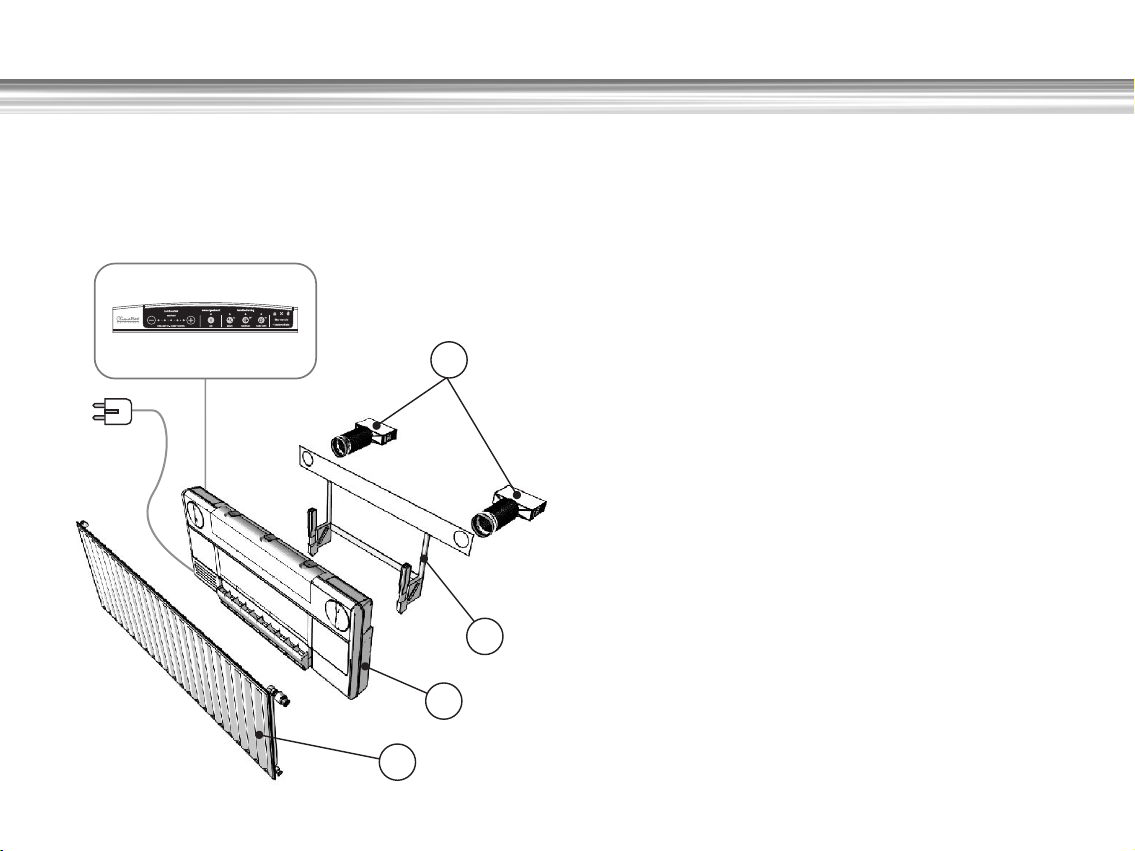
The ClimaRad-system consists of the following parts:
1 the ClimaRad radiator;
2 the ClimaRad balanced ventilation unit;
3 the ClimaRad mounting frame and radiator-supports;
4 the ClimaRad wall-ducts.
Depending on the configuration you ordered, a control
panel is also part of your ClimaRad.
ClimaRad radiator
The ClimaRad is shipped with a specially developed one- or
two-panel radiator. This radiator is connected to a
conventional CH-system with flexible piping. Once mounted
on its special supports, it can be tilted forward to allow for
easy access to the ClimaRad balanced ventilation unit, e.g.
for cleaning. The control of the ClimRad radiator is identical
to what you are familiar with: a normal or a thermostatic
valve. And should the situation require, there is no problem
to install even motor-valves.
5
Page 12
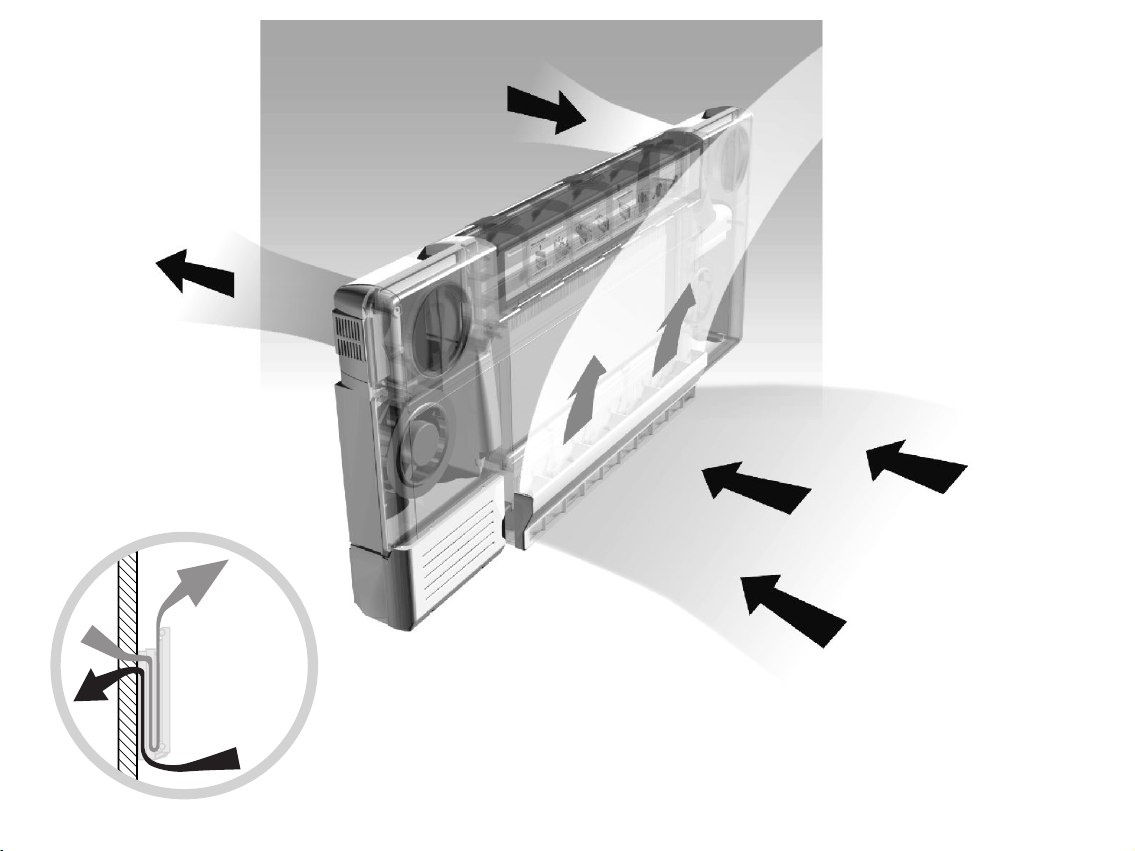
Exhaust of
used air
Intake of fresh air
Inflow of filtered
and pre-heated
fresh air
Exhaust of
used (polluted)
air
6
Page 13

ClimaRad (balanced) ventilation unit
The ventilation-unit is located behind the radiator and
consists of two maintenance-free DC fans (for air-intake
and exhaust), a plastic heat exchanger, air-filters and an
electronic control-unit; all this in a sturdy plastic housing.
Three types of ClimaRad balanced ventilation units are
available:
!
The Sensotronic features CO - and humidity sensors
continuously measuring the air quality. The ventilation
rate is PID-controlled on the basis of the desired air
quality level. The user sets the desired air quality level
through the control panel.
!
The Slave-Unit has no sensor, no central processing
unit and no control panel en must always receive its
settings from a Sensotronic version.
Air Filters
Every ClimaRad has a HAF (High Air Flow) air filters for the
air-intake and the exhaust air. At the air intake side the
filter cleans the incoming fresh air. Used air from the room
is also passed through a filter to keep the ClimaRad heat
exchanger clean. An light on the control panel indicates
when the air intake filter needs inspection. The filter for the
outgoing air needs some regular cleaning with a vacuum
cleaner from the outside (no need to dismount the filter).
In principle this filter can be replaced. Both the intake and
exhaust filters can be easily exchanged by the user and
require no special tools (see chapter ‘Maintenance’).
Energy Saving
The ClimaRad is a balanced ventilation system with waste
heat recovery. 'Balanced' implies that per time period-- the
2
amount of air that is extracted from the room equals the
amount of fresh air. Waste heat recovery means that the
heat of the used exhaust air is used as much as possible to
preheat the incoming fresh air. This saves on your energy
costs and prevents cold draughts from the incoming fresh
air.
The automatic control of the ClimaRad Sensotronic also
saves energy, because no unnecessary ventilation occurs.
Finally, the DC fans, the efficient power supply and the low
stand-by consumption contribute to minimal electricity
consumption. (see technical specifications for typical use
data).
7
Page 14
33
Installation Operating Instructions
Your ClimaRad needs to be installed by a qualified
ClimaRad installer, who also has taken the additional
ClimaRad installation-training. Only in that way, an optimal
operation of your ClimaRad can be guaranteed.
Note: The power cord should only be
replaced by qualified personnel. This product
needs to be connected to a grounded wall
socket (230V, 50 Hz).
Because ClimaRad requires no in-house system of air ducts
it offers unique possibilities for installation.
For instance, in older existing homes and buildings you can
start installing one ClimaRad in a room with critical air
quality (e.g. a children's bedroom) and then expand the
system gradually to other rooms in the house.
Also in new houses and commercial buildings the fact that
you don't need an in-house duct system offers big
advantages like lower installation costs, appropriate
ventilation per room and ease of maintenance.
To optimise the energy saving potential of the ClimaRad it
is recommended to use the ClimaRad units in the rooms
and combine them with discontinuous extraction fans in the
“wet” areas of the house (shower, toilet). 'Discontinuous'
means for instance timer or humidity controlled.
After the installation, the installer is also responsible for
testing en preparation for first use of the ClimaRad.
8
Page 15
44
Instructions for first use
Check if the power supply cord is correctly
connected to a grounded wall socket (230V,
50 Hz)
The control panel allows you to check and alter the
ventilation-settings. Check whether the control panel is
properly connected. The ClimaRad also works without a
control panel, but in that case settings cannot be checked
or altered.
Switching on
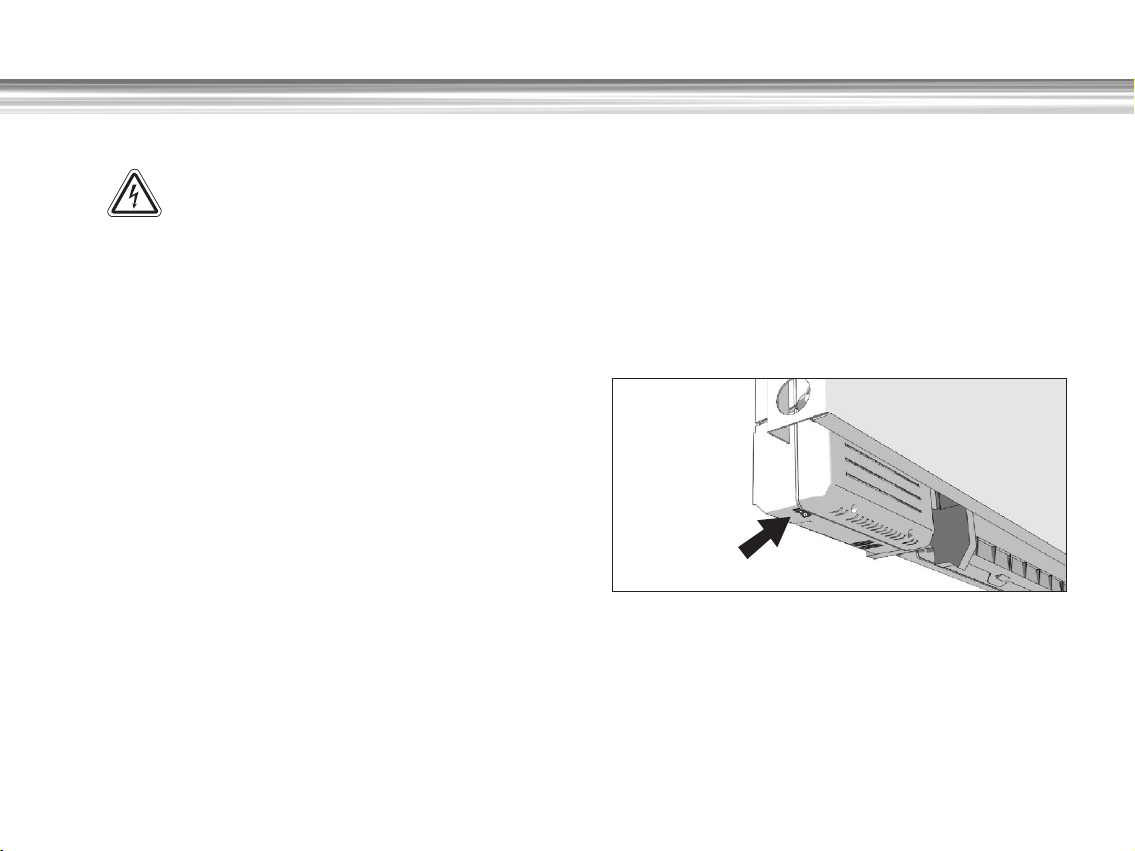
You turn on the ClimaRad by switching on the on/off switch
at the left lower bottom of the ventilation unit. The control
panel indicators will light up and the electronics will
perform a self-test during the first seconds.
Note: the ventilation-unit must always remain switched on.
It may only be switched off during servicing and
maintenance.
9
Page 16
Functions - Sensotronic Functions - Sensotronic
Control panel
See the illustration of the control panel on the inside cover.
The Sensotronic control panel allows the setting of the
following parameters:
!Desired air quality
!Base ventilation (on/off)
!Pause button (max. 60 minutes fans off)
!Boost button (max. 30 minutes at max. rate)
!Night cooling button (max. 6 hours)
Also the panel has indicator lights for
!Filter inspection and
!Malfunction
Setting Desired Air Quality
The Sensotronic default setting is “sensor controlled”, which
means that the unit is automatically trying to realize the
desired air quality level. With the help of the “+ “ (increase
air quality) and “-“ (allow lower air quality) you can set the
desired air quality.
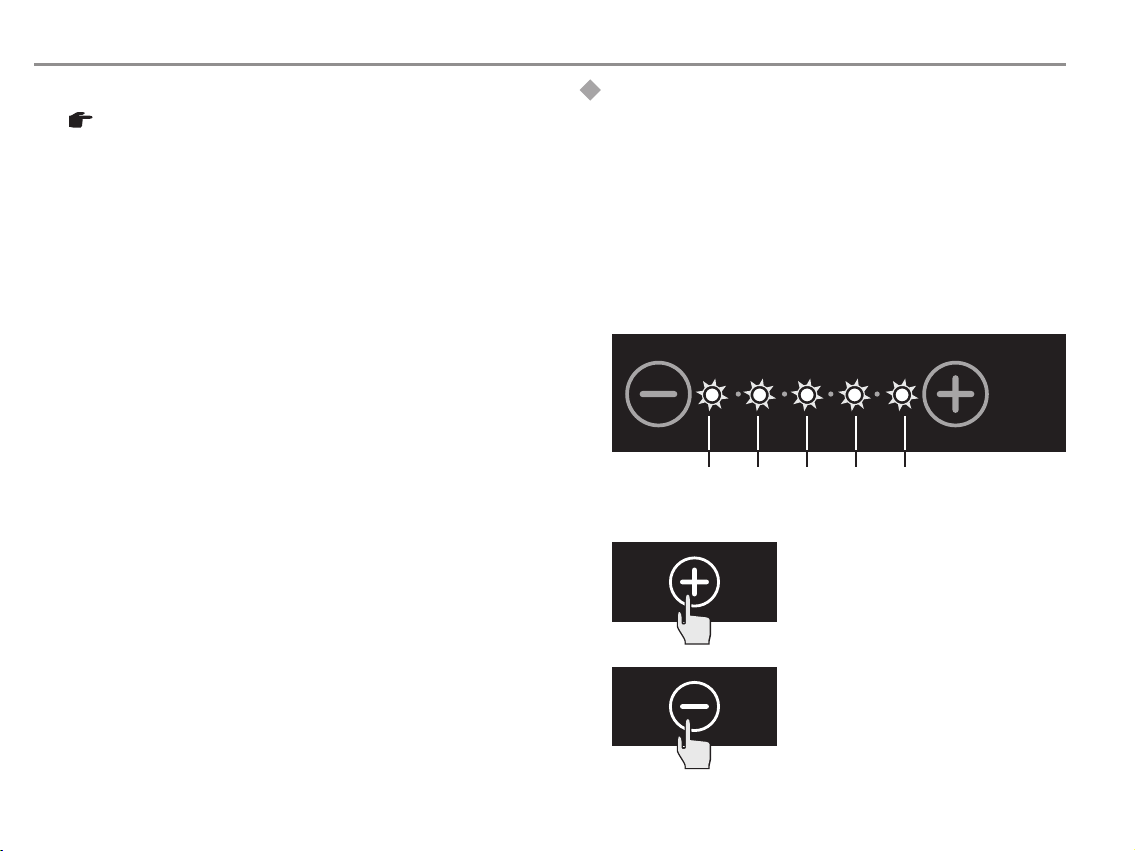
The scale of the 5 indicator lights on the control panel of
the Sensotronic corresponds to the following CO2
concentrations. (lower CO2 levels mean higher air quality
level).
1600
ppm
1400
ppm
1000
1200
ppm
!
Increase air quality: press the +
button until the desired air quality
is reached
ppm
800
CO -concentration
ppm
2
10
!
Decrease air quality: press the
button until the desired air quality
is reached
Page 17
Base Ventilation
By switching the base ventilation 'on' you make sure there
is always a minimum ventilation rate (even at correct CO2
level). Factory setting of the ventilation rate for the base
ventilation is set at 5 m3 per hour. This means the
ClimaRad ventilation unit will vent a few times per hour at
the lowest ventilation rate.
!
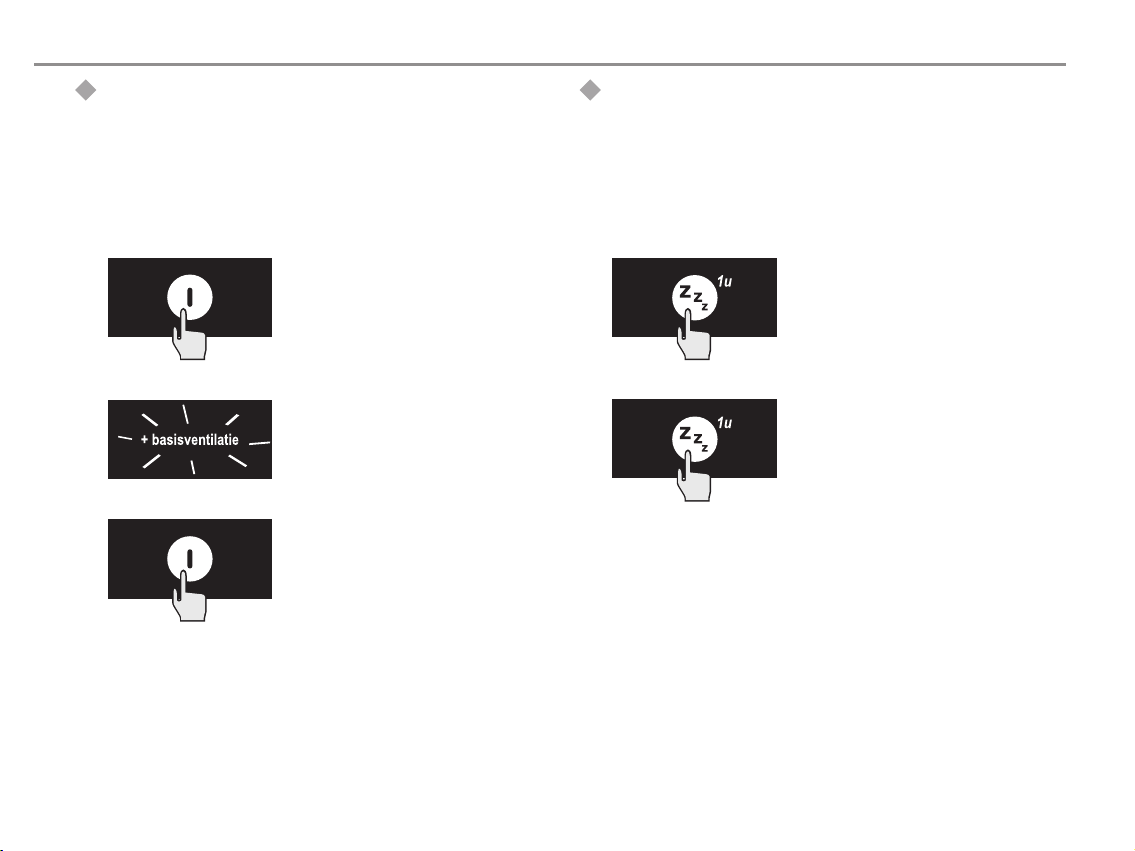
Base ventilation 'on': press the
base ventilation button
!
The text '+basisventilatie' will
light up on the panel
!
Base ventilation 'off': press the
base ventilation button again.
The text '+basisventilatie' will
disappear.
Pause
If you want to stop the ClimaRad fans for a short time (e.g.
when there is a stench outside), you can use the 'Pause'
button to temporarily deactivate the unit for an hour. After
60 minutes the ClimaRad control-unit will take over and
resume venting as appropriate.
!
Start Pause: press the pause-
button once. The ClimaRad will
pause for 60 minutes.
!
End Pause: after 60 minutes the
ClimaRad will automatically end the
pause. To end the pause
immediately press the pause-
button again.
11
Page 18
Functions - Sensotronic
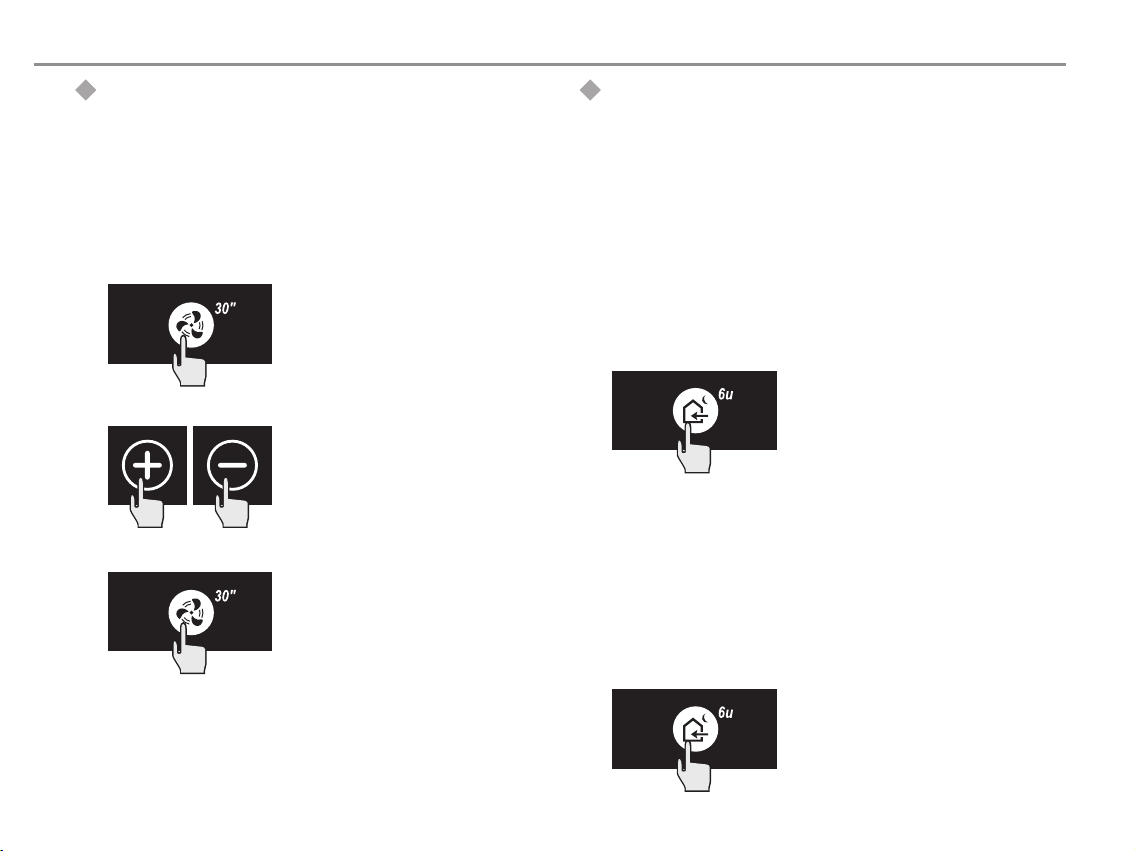
Boost
If you want to get rid of nasty smells or cigarette smoke,
you can run the ClimaRad fans temporarily on maximum
speed using the boost-button. After 30 minutes the
ClimaRad automatically returns to sensor controlled mode
and vent accordingly.
!
Boost 'on': press the boost-
button. The ClimaRad will run both
its fans at maximum speed for 30
minutes
!
The default maximum flow rate is
100 m3/h. Using the ‘+’ and ‘-’
buttons you can change this value.
OF
!
Boost 'off': press the boostbutton. This will immediately stop
the boost-mode and the unit
returns to the sensor controlled
mode and vent accordingly.
Night Cooling
During the summer months it is often cool in the evening
and at night. You can use this fresh air to cool your house
by using the Night Cooling mode. When this mode is
activated, the ClimaRad compares the inside and outside
temperature and if the outside air is sufficiently colder, the
ClimaRad will blow the cold outside air into your room for 6
hours. No room air is extracted. After 6 hours the ClimaRad
automatically returns to the sensor controlled mode and
vent accordingly. The default factory setting for the
ventilation rate is 100 m3/h. Using the ‘+’ and ‘-’ buttons
you can change this ventilation rate.
!
Night Cooling 'on': press the
Cool Air button. The ClimaRad unit
will run both fans for a short while
to measure inside and outside air
temperature. During this
preparatory stage the Cool Air
indicator light will blink. If the
temperature difference is high
enough, the cooling phase will start
and last for 6 hours. If there is not
enough temperature difference the
ClimaRad unit will wait for 15
minutes before doing another
measurement.
!
Night Cooling 'off': press the
Cool Air button again. This
immediately ends the Night Cooling
mode.
12
Page 19
Functions - Sensotronic
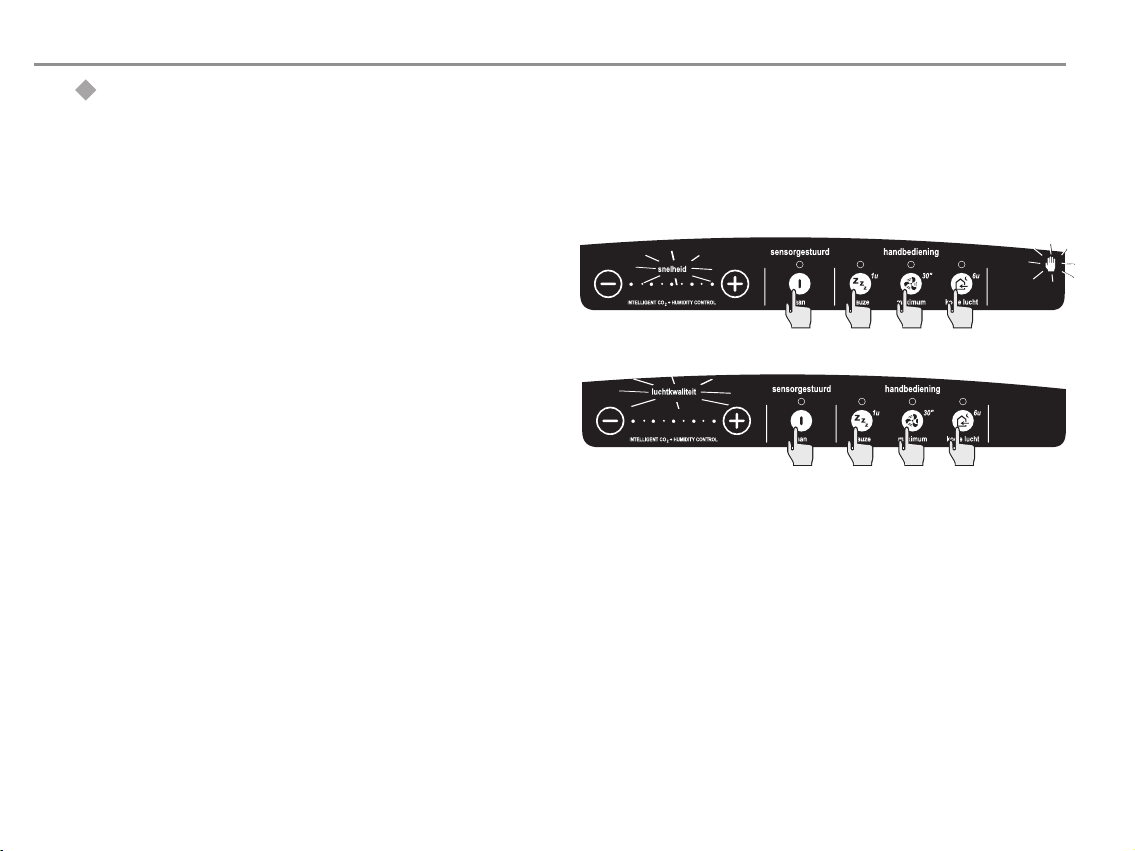
Switch to manual operation
The Sensotronic automatically controls the ventilation rate
on the basis of input from the sensors and the desired air
quality settings. Should you, for whatever reason, prefer to
temporarily switch to manual operation, please follow these
instructions:
!
Switch to manual operation: simultaneously press
the 'on', 'pause', 'boost' and 'Cool Air' buttons for 4
seconds. The word “luchtkwaliteit” (air quality) will
disappear. A hand symbol and the word
“snelheid”(speed) will now light up.
!
Switch back to sensor controlled operation:
simultaneously press --again during 4 seconds-- the
'on', 'pause', 'boost' and 'Cool Air' buttons. The hand
symbol and the word “snelheid”(speed) will disappear.
13
Page 20
Functions - Sensotronic
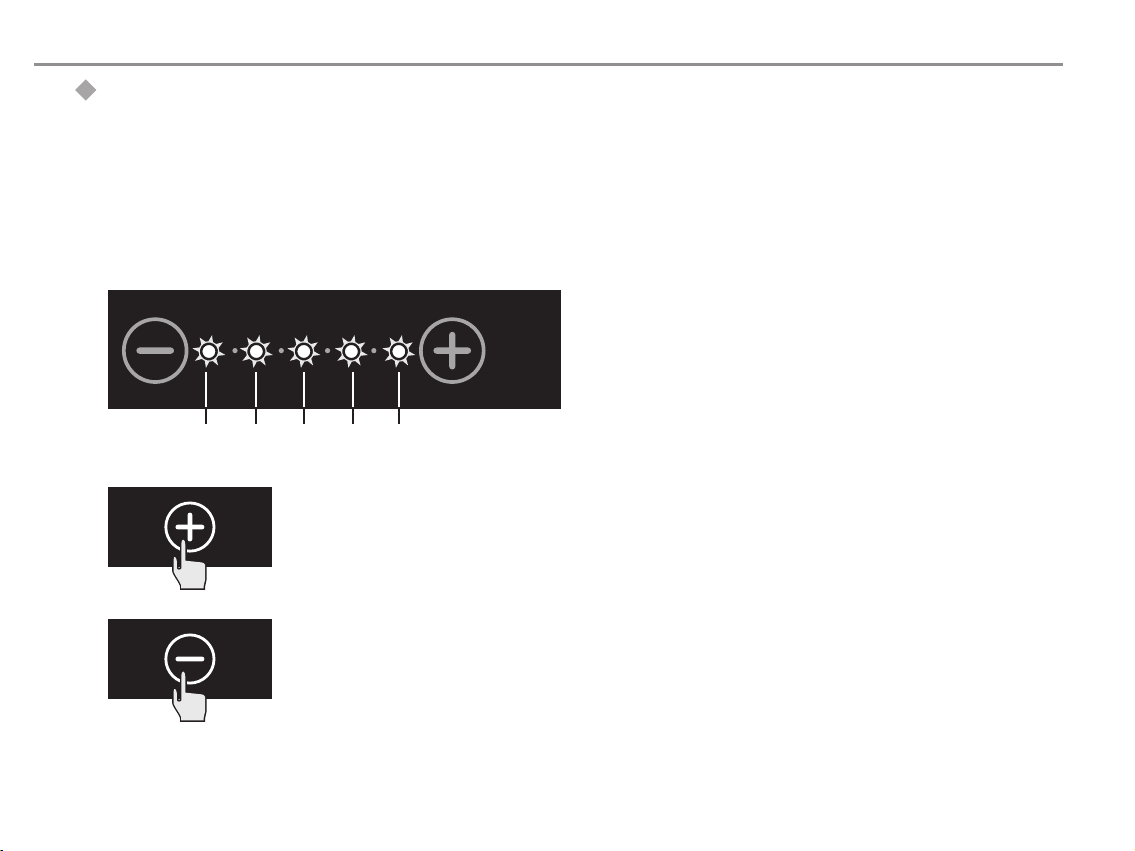
Adjusting the ventilation rate
In manual mode the ClimaRad will operate on the first
ventilation rate setting by default. This first setting equals
to a rate of 20 m³/hr. By using the + (“raise air quality”)
and — (“lower air quality”) keys you can adjust the indoor
air quailiy.
The scale of five lights on the control panel shows the
ventilation rate ranging from 20 m³/hr to 100m³/hr.
14
20 40 60 80 100
!
Raise ventilation capacity:
press the + key until you have
reached the desired setting.
!
Lower ventilation capacity:
press the — key until you have
reached the desired setting.
ventilation capacity
in m³/hr
Page 21
Special functions - Sensotronic
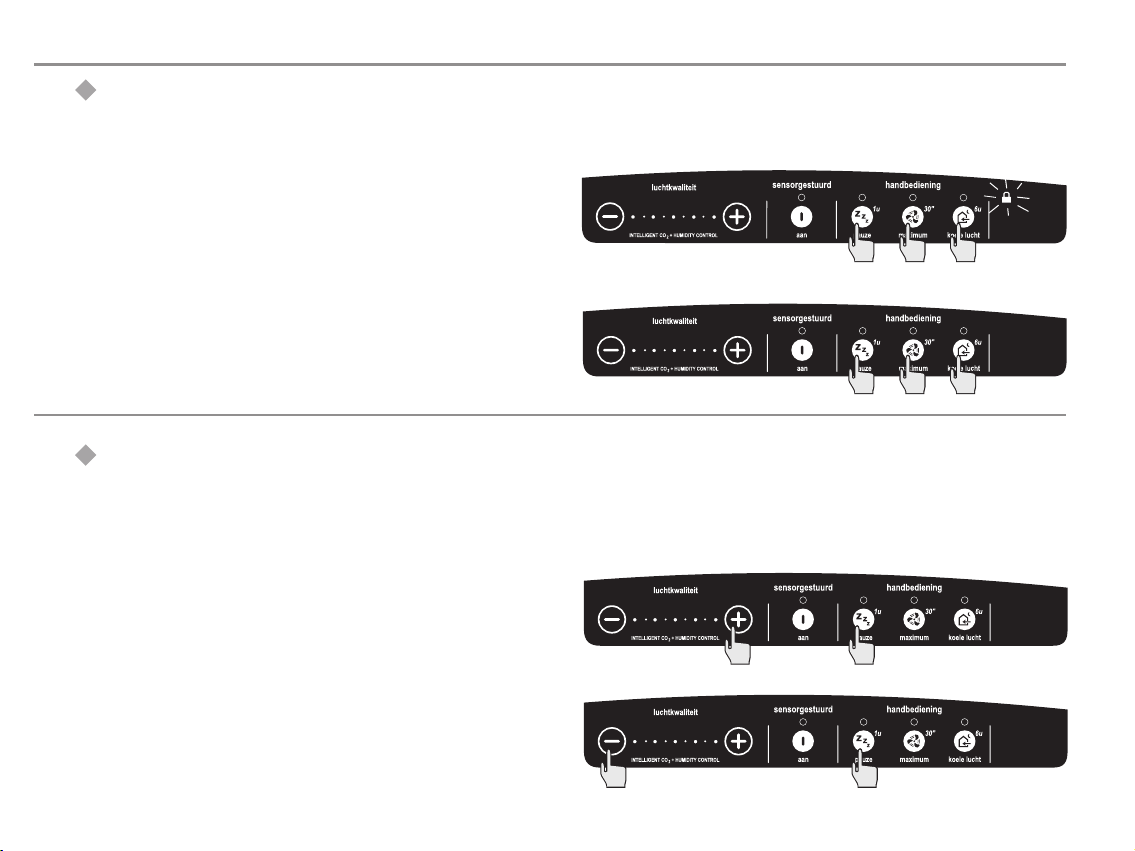
Lock control panel ( 'Child lock')
The control panel can be locked, so the pressing of any
button has no effect.
!
Lock control: simultaneously press on the 'pause',
'maximum' and 'Cool Air' button for 4 seconds. The
Lock-symbol will light up.
!
Unlock control: simultaneously press on the 'pause',
'maximum' and 'Cool Air' button again for 4 seconds.
The Lock-symbol will diappear.
Set backlight luminance
The luminance of the control panel's backlight can be set.
You can choose between 5 luminance levels using the '+'
and '-' buttons.
!
Increase luminance: simultaneously press the 'pause'
and '+' button until the desired luminance level is
reached. The scale with the 5 LED lights indicates the
luminance level.
!
Decrease luminance: simultaneously press the
'pause' and '-' button until the desired luminance level
is reached. The scale with the 5 LED lights indicates the
luminance level.
15
Page 22
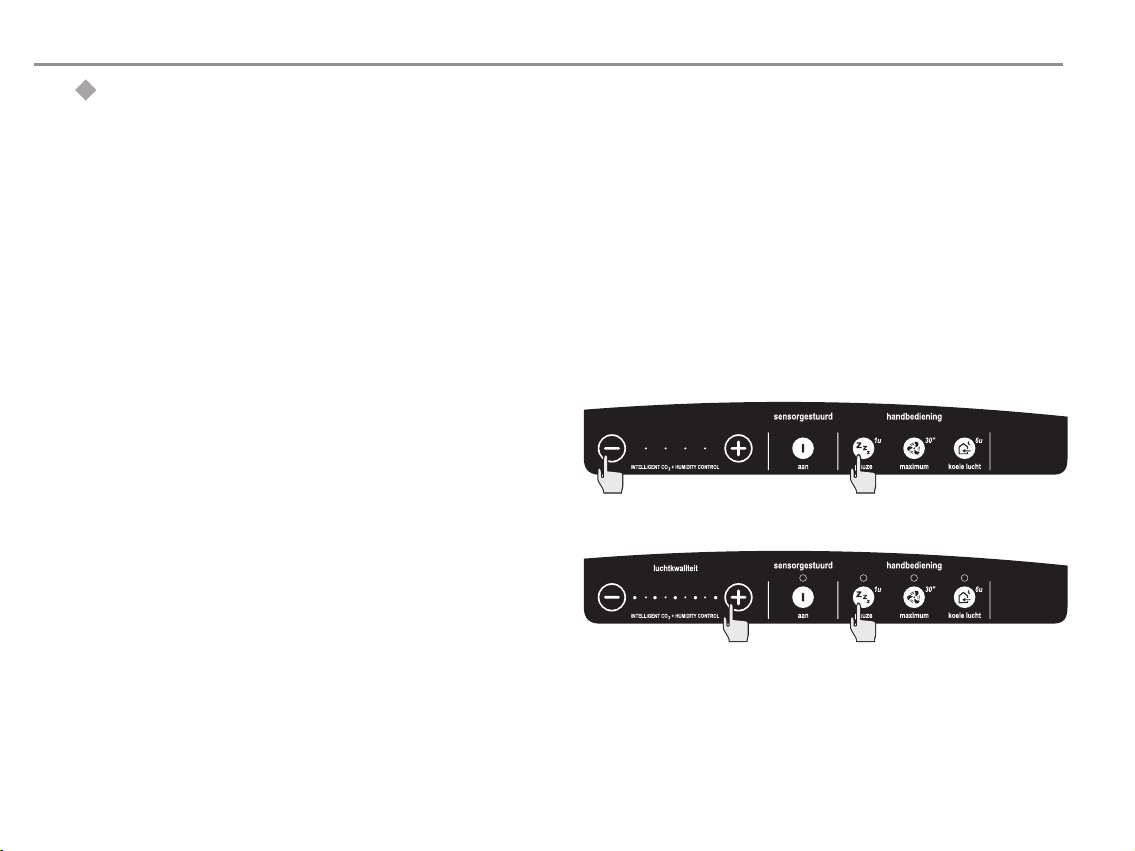
Special functions - Sensotronic
Turn the backlight on/off
Turning on/off
As a default factory setting the backlight of the control
panel is turned on. But it is also possible to turn the
backlight off completely if a continuously lit panel is not
desired. In this turned-off mode it is still possible to
activate the backlight to check the settings by pressing a
button any buttonbriefly. The backlight will stay on for one
minute after the last button is pressed and then returns to
its turned-off mode.
!
Turn off the backlight: simultaneously press the
'-' and the 'pause' button until the last light on the left
hand side of the indicator scale is turned off. The
backlight will now be turned off after 1 minute.
!
Turn on the backlight: simultaneously press the
'+'and 'pause' button until the desired luminance level
is reached (see also 'set backlight luminance').
16
Page 23
Indicators - Sensotronic
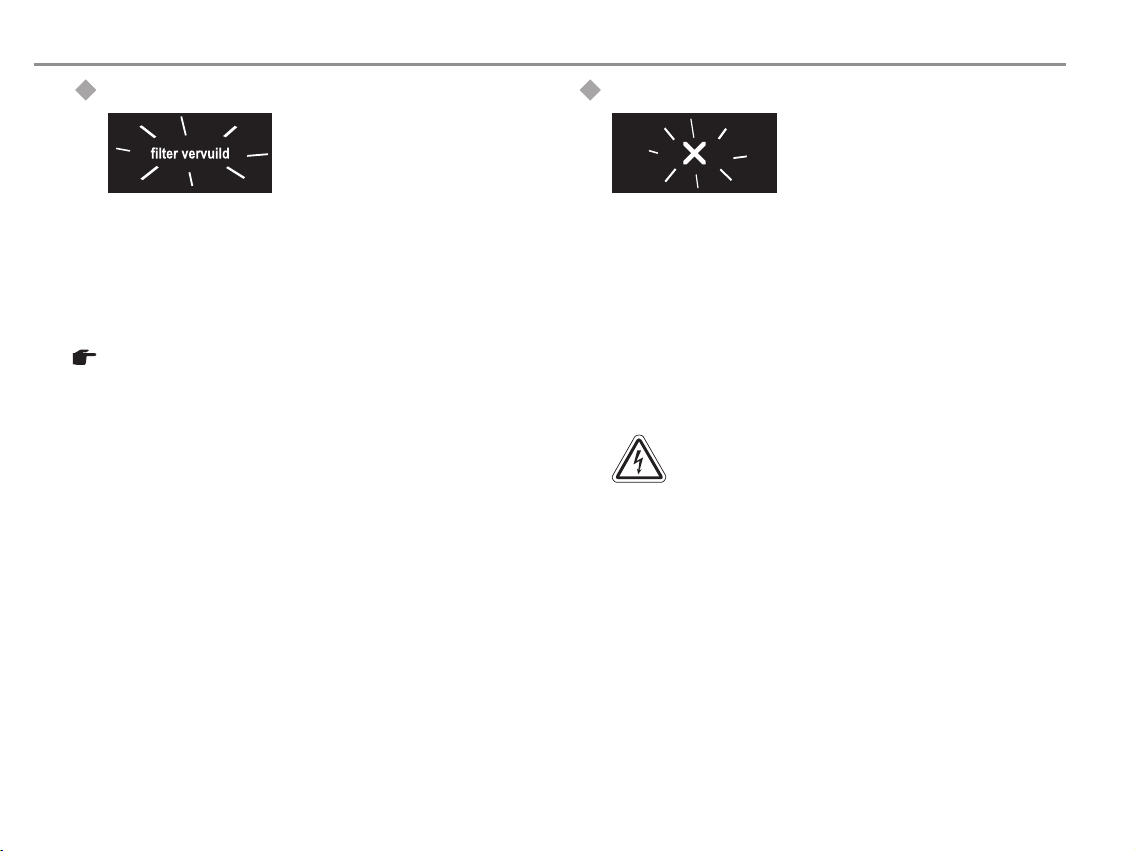
Filter polluted
!
After about 125.000 m3 of air has
passed the filter (factory setting), a
text saying 'filter vervuild' (filter
polluted) will light up to prompt
you to check the pollution level of
the air-intake filter.
This indication does not influence the functionality of the
ClimaRad. It is merely intended to make you aware of a
possible pollution of the filter.
For inspection and replacement of the filter see the chapter
on Maintenance.
Malfunction
!
If there is a malfunction in the
ClimaRad the 'X'symbol will light up
on the control panel.
Using the Trouble Shooting guide (Chapter 6) you can try
to find the cause of the malfunction and what you can do to
repair the malfunction.
Please limit yourself to simple and easy inspections of the
air-ducts, filters and electrical connections. If this does not
help, you should ask a qualified ClimaRad installer for
assistance.
Warning:
Never remove bolted parts of the housing or
the wiring. Opening the ClimaRad can lead to
electric shocks and irreparable damage to
the device.
17
Page 24
55
Maintenance
As every ventilation system the ClimaRad needs
maintenance to guarantee a problem-free operation.
The maintenance on the ClimaRad is limited to a periodical
inspection and occasional replacement of air filters as well
as cleaning of the air-ducts.
Warning:
Never unscrew any parts of the ClimaRad
housing. This can lead to electric shocks and
irreparable damage to the device.
Air Filters
The ClimaRad ventilation unit has two filters: an air-intake
filter and an exhaust filter.
The air-intake filter is very important, because it removes
pollen, dust and several allergenic substances from the
incoming air. In other words, substances you would rather
not have in your longs.
The function of the exhaust filter is to guarantee an
appropriate operation and efficiency of the heat exchanger,
also on the long run. It filters dust and dirt particles from
the air going out of the room.
It is important to inspect these filters regularly and if
needed- replace them. It is not possible to prescribe a
standard period for inspection and/or filter-replacement. It
very much depends on the outdoor air quality in the area
and the way the ClimaRad is used.
Brugman advices a filter inspection at least every 3
months. If it turns out that the pollution level is low, the
frequency of filter-inspection can be lowered. In all cases
the filters should be inspected at least every 6 months.
18
Page 25
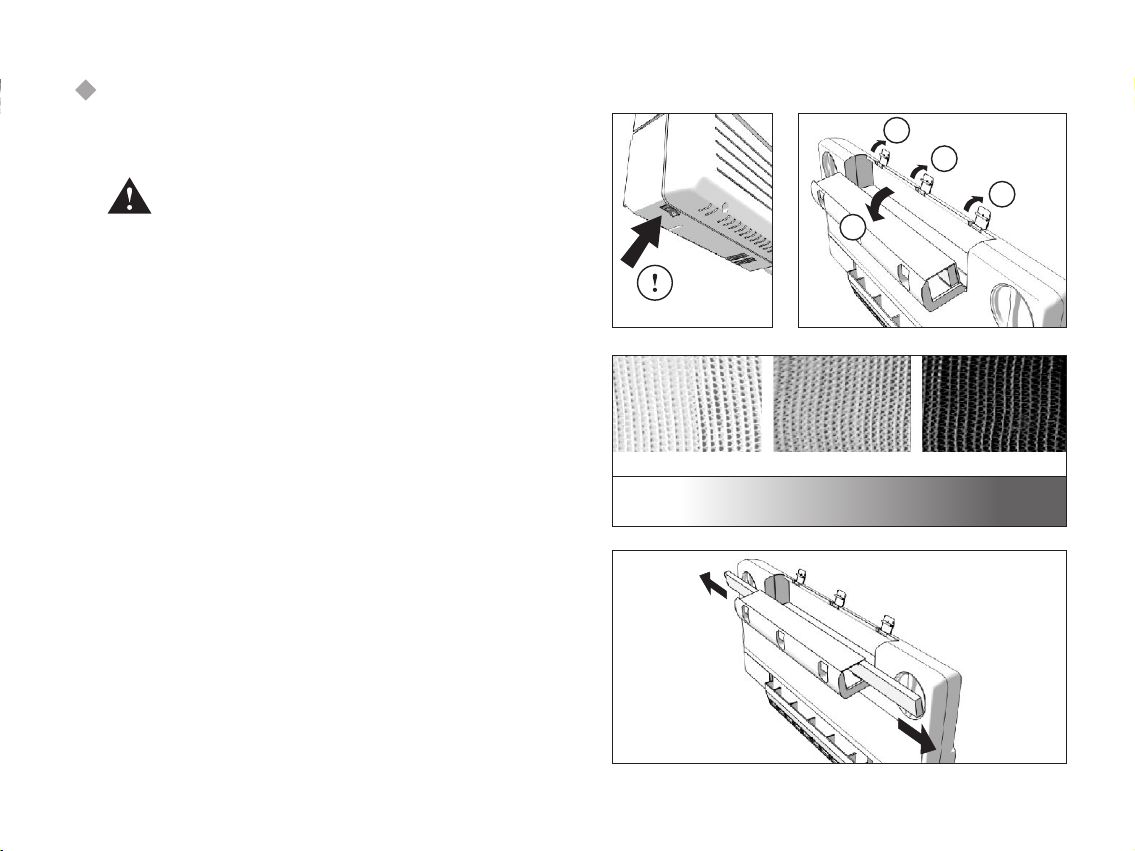
Inspection/replacement of the air-intake
filter
1. Accessing the filter-holder
First switch off the ClimaRad using the main
switch at lower bottom of the device.
Tilt the radiator forward and remove the metal dust cover
on top of the ventilation unit. Unclip the three blue clamps
on top of the ventilation unit (1). This allows the filterholder (2) to be tilted forward.
2. Visible filter-inspection
Looking from the sides of the filter-holder, the colour of the
filter can be checked. The original color is white. A lightgray color indicates some pollution. When the color is dark
gray or black, replacement is highly recommended.
3. Filter replacement
The filter consists of two parts that can be removed by the
filter-parts pulling sideways. Remove any packaging from
the new filter-parts and slide them back in the appropriate
slots. No tools are required.
1
1
1
2
schoon zwaar vervuild
19
Page 26
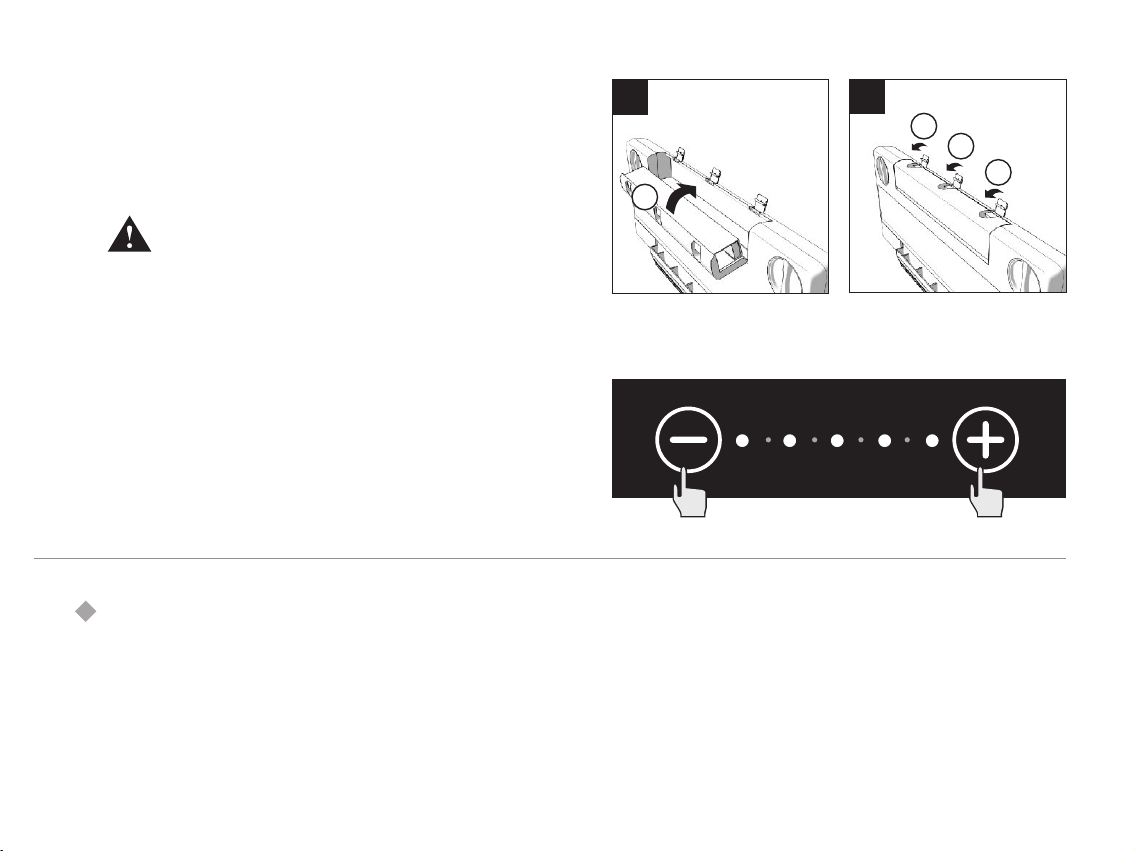
4. Closing the filter-holder
A. Tilt the filter-holder upwards (1).
B. Close the filter-holder clipping on the three clamps
Please make sure the filters are completed
inserted in the filter-holder and are not
sticking out. Also make sure that the area
between the filter-holder and the housing is
completely free of any tools or other objects.
This can damage the filter-holder and cause
air-leakage.
Once the filter-holder is closed, put the metal dust cover
back on top of the ventilation unit, tilt the radiator back
into vertical position and turn the ClimaRad back on.
5. Reset the filter-inspection counter
To reset the filter-inspection counter to zero after the filter
is replaced, press the '+' and '-' button on the control panel
simultaneously during 4 seconds. The text 'filter vervuild'
(filter polluted) will now disappear from the control panel.
Inspection and cleaning (replacement) of the
air-exhaust filter
This filter is positioned at the bottom of the ClimaRad,
where the air is extracted from the room. For a visible
inspection e.g. using a torch light-- you can see the filter
and assess the filter's colour that indicates the degree of
pollution (compare picture on previous page).
A
B
2
2
2
1
20
Page 27
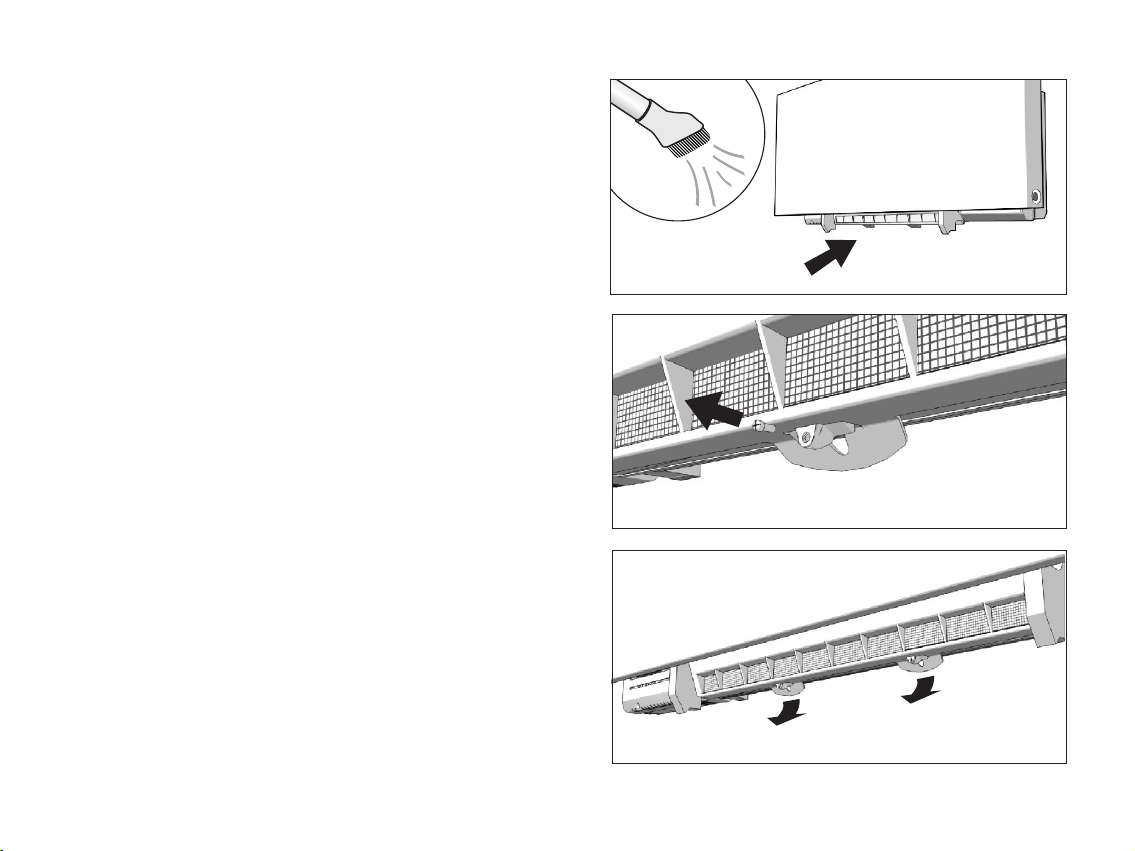
1. Cleaning the air-exhaust filter
Regularly remove dust and other dirt particles in front of
the exhaust filter with a vacuum cleaner, to guarantee free
passage of the room air. To do this you do not have to
remove the filter (see illustration).
When the filter colour is dark-grey (almost black), it is
better to replace it, because at that stage fine dust
particles might pollute the heat exchanger and affect its
performance.
2. Release the filter-holder security
First switch off the ClimaRad using the main switch at the
lower bottom. The filter-holder of the exhaust filter is
secured with 2 screws that need to be removed. The filterholder still stays in place because of 2 clamps that are
positioned behind the screws.
3. Tilt the filter-frame
Unclip the two clamps by gently pulling them forward. The
filter-frame will tilt upward. It stays hinged at the top.
There is no need to dismount the filter-frame completely !
21
Page 28
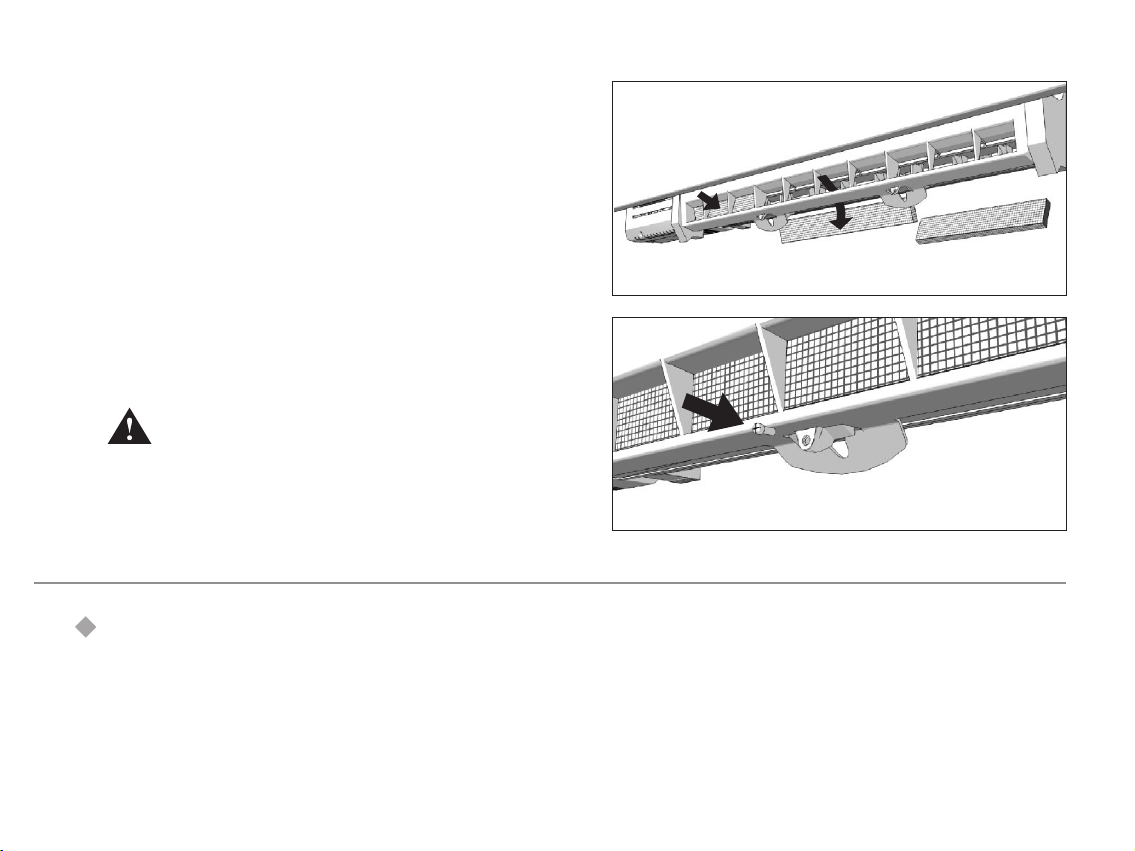
4. Replace the filter-elements
The exhaust filter consists of three separate filter-elements,
each positioned in their own frame within the filter-holder.
While keeping the filter-holder tilted upwards, press on
each old filter-frame to remove it from its frame. And put a
new filter-element back in.
5. Closing the filter-holder.
Tilt the filter-holder downwards until the two clamps snap
back into position. Secure the filter-holder using the 2
screws.
Please make sure the filter-holder is closed
correctly. This is very important for a proper
functioning of the unit.
Finally turn the ClimaRad back on (main switch).
Inspection and cleaning of air-ducts
Your ClimaRad has two air-ducts that go through the
facade: One intake duct for fresh air and an exhaust duct
to expel room air. The round air-ducts connect to the
backside of the ClimaRad ventilation unit and go straight
through the outside wall.
22
Page 29
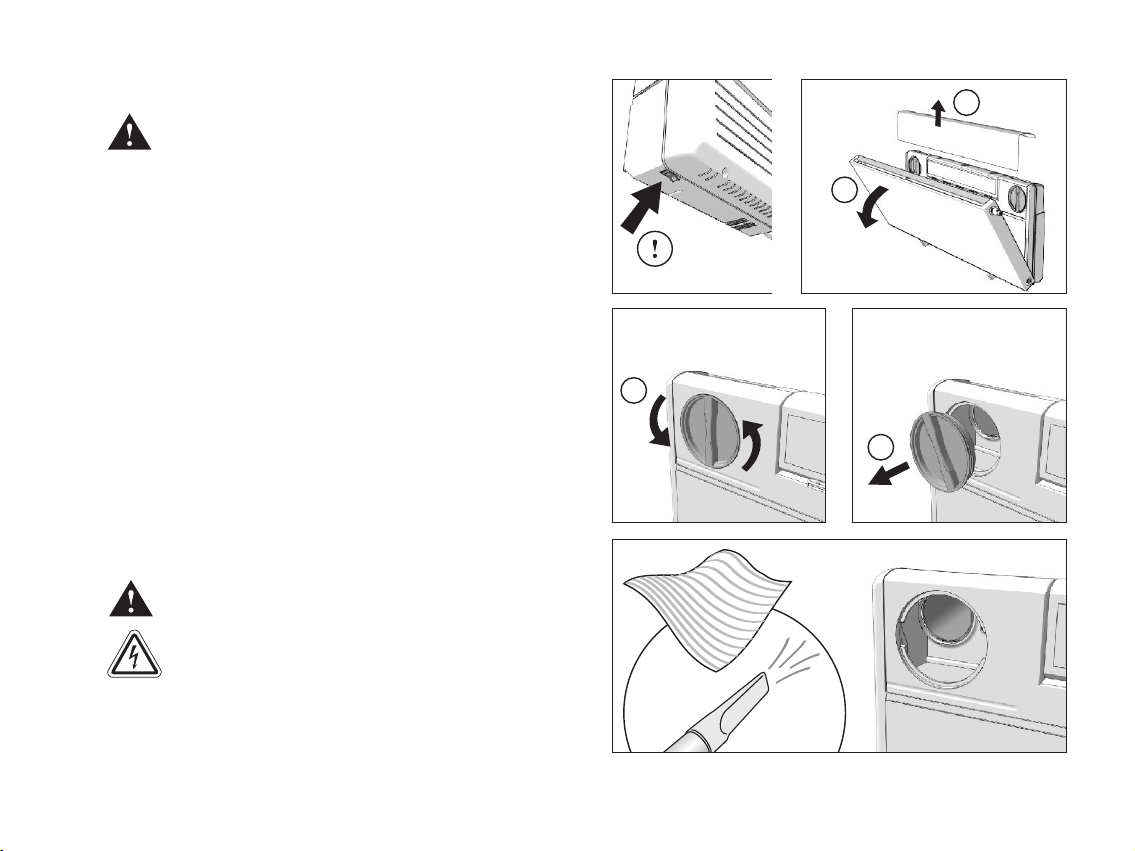
Inspection of the air-ducts
First switch the ClimaRad off (switch at the
bottom left)
2
Tilt the ClimaRad radiator forward (1)
Remove the metal dust cover on top of the ClimaRad
ventilation unit (2)
Remove the two blue and round inspection covers by
turning them 350 degrees counter clockwise (1) and pulling
them out (2).
This gives access to the air-ducts for inspection and
cleaning.
Cleaning the air-ducts
Do not sharp or pointed objects for cleaning,
as they may damage the air-ducts..
Do not use water directly, because this may
short-circuit the electric and electronic parts
of the unit. A humid cloth is allowed.
Parts of the air-ducts that are accessible by hand can be
cleaned using a soft, dry or humid cleaning cloth. If the
ducts are very polluted with dust it is advisable to use a
vacuum cleaner.
1
1
2
23
Page 30

Inspection and cleaning of facade-outlets
If possibel, regularly check the intake and exhaust grills on the
facade, especially on the ground-floor. Dirt, leaves and insects
may block the air-passage. If necessary, dismount the grills and
clean the anti-insect grid.
In some cases, where you cannot access the facade openings from
the outside, it is possible to clean the duct and anti-insect grill from
the inside using a vacuum cleaner, that can blow out air. Some
vacuum cleaners have the option to connect the hose to the outlet
and thereby allowing cleaning the air-ducts by blowing.
If this is not possible, please request the ClimaRad installer to clean
the anti-insect grids in a maintenance visit. The installer can apply a
compressor to blow clean the anti-insect grids and the grills from the
inside.
24
Page 31

66
Trouble shooting
There is no light showing on the control panel
The unit isn't connected to the electric mains. Check
a
whether the plug is connected to the wall socket (230 V,
50 Hz).
The unit is switched off. Switch it on using the on/off
a
switch at the left-bottom side of the ClimaRad ventilation
unit.
The wire of the control panel is damaged or not
a
connected. Check the connectors of the wire to both the
control panel and the ClimaRad ventilation unit. Make
sure the connectors are snapped in correctly. If the wire
is damaged, have it replaced by your ClimaRad-installer.
The backlight of the control panel is switched of. See
a
chapter on “Turn Backlight On/Off”
The fans don't work (Sensotronic)
The air quality is high enough. When the desired air
a
quality is reached, the fans don't work. This is normal
operation behaviour. If you want to activate the fans
anyway:
Increase the desired air quality, pressing the '+' button
a
on your control panel. After a while the ClimaRad fans will
start to work.
Press the boost button. The ClimaRad will now run at
a
maximum speed for 30 minutes (unless you press the
boost button again to make it return to normal
operation).
Press the 'on' button to activate the base-ventilation. This
a
forces the ClimaRad to switch on a couple of times per
hour to maintain a minimum overall ventilation rate of 5
m³/hr, independently of the air quality level.
The fans are turning, but I don't feel much air
coming out of the unit.
Fans are running at a low speed. To avoid discomfort
a
(draughts, noise) the ClimaRad's air-inlet and outlet have a
large surface area which makes low ventilation rates hard
to detect.
The air-filters and/or air-ducts are blocked. Check the
a
filters and air-ducts. See instructions in the appropriate
chapters.
If the filters and air-ducts are free, the heat exchanger
a
may be polluted. In that case, contact your ClimaRadinstaller.
The fans are running very fast (Sensotronic)
The air quality is bad. The ClimaRad Sensotronic tries to
a
achieve the desired air quality by turning up the flow rate.
You can influence this by setting a lower desired air quality.
This will cause the ClimaRad to turn down its flow rate
after a while. Also you can press the 'pause' button to stop
the fans from running for 60 minutes, irrespectively of the
air quality.
S
25
Page 32

The ClimaRad control panel doesn't react to
S
pushing buttons
The control panel is locked (the 'Lock' indicator is lit).
a
Unlock the control panel (see appropriate chapter)
The wire between control panel and ClimaRad is damaged
a
or the connectors to both are faulty. Check and correct
There is a technical malfunction. Please contact a
a
qualified ClimaRad-installer.
The ClimaRad doesn't react to nasty smells
The Sensotronic sensors just register CO - and humidity
a
2
levels. A nasty smell in itself will not trigger ventilation. If
you want to vent the room, use the boost button.
I hear an unfamiliar noise coming from the
ClimaRad ventilation unit.
The air ducts are polluted. Inspect and clean.
a
The noise is caused by an off-balance fan. Please contact
a
a qualified ClimaRad-installer.
It is difficult to tilt the ClimaRad-radiator
forward
The weight of a ClimaRad-radiator tilting forward is
a
compensated by a patented construction in the radiator
supports to ensure safe and easy tilting action. Turn the
appropriate bolts in the radiator-supports (see
illustration on the right) counter clockwise to lower the
compensation-energy.
The ClimaRad-radiator tilts forward too fast
The weight of a ClimaRad-radiator tilting forward is
a
compensated by a patented construction in the radiator
supports to ensure safe and easy tilting action. Turn the
appropriate bolts in the radiator-supports (see
illustration on the right) clockwise to increase the
compensation-energy.
De ClimaRad-radiator cannot tilt forward at all.
The hinges of the radiator supports are blocked. Check
a
for any objects blocking the mechanism.
26
Page 33
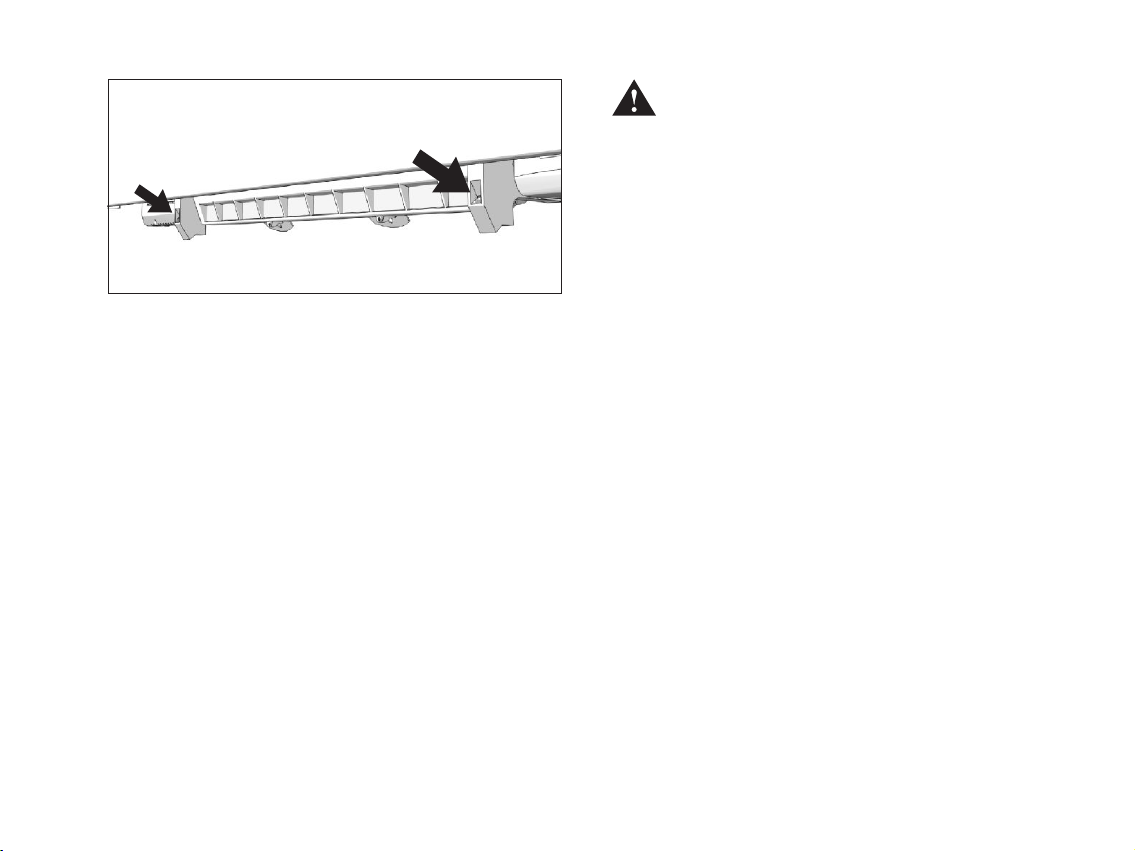
Position of the two adjustmnent bolts
If you don't succeed in solving the problem
in an easy way, ask for the assistance of a
qualified ClimaRad installer.
For your own safety and possible damage to
the unit, (dis)mounting and opening of the
ClimaRad housing should be left to a
qualified ClimaRad-installer.
27
Page 34

Technical specifications
ClimaRad ventilation-unit
Power supply: 230 V, 50 Hz.
Fans: 28 V DC motors (2x)
Flow rate: in 6 steps from 0 to max 100 m³/h
Rated power: 65 W
Electricity consumption: at 20 m³/hr ca. 7 W
Stand-by el. consumption: < 1,5 W
Noise*: ca. 28 dBA at 40 m³/uur
Heat exchanger: efficiency > 80%, material PP
Air filters: standard 2 x HAF filter (3M™),
Dimensions unit: height 512 mm
Weight unit: 16 kg (including mounting frame,
Material of the housing: talcum filled PP
Housing of electronics: talcum filled PP with halogen free flame
Sensotronic
Control: Automatic control of indoor air quality. Option
Indicators: Filter polluted, Malfunction, Lock, Base
Range of air quality settings in sensor-controlled operation:
at 40 m³/hr ca. 10 W
at 60 m³/hr ca. 15 W
at 80 m³/hr ca. 25 W
at 100 m³/hr ca. 37 W
other filters available on request
length 1135 mm
depth 104 mm
excluding wall duct kit)
retardants
to switch to manual control. Timer-controlled
functions: Pause, Boost and Night Cooling.
ventilation.
800 - 1000 - 1200 - 1400 - 1600 ppm
CO (if needed, other values can be
2
programmed)
CO sensor: non-dispersive infra-red (self-calibrating)
2
Range of ventilation capacity settings in manual control:
20, 40, 60, 80 en 100 m³/hr or
ClimaRad-radiator
Type 11: single panel with single convector.
Type 22s: double panel with double convector.
Models Balance and Tec: type 11 (759 - 1973 watt**) and type 22S
(1524 - 3893 watt**)
Model Classic: type 11 (1018 - 2220 watt**)
Model Wing: type 11 (759 - 1973 watt**)
* sound source measured in a soundproof room, with uninstalled
but operational ventilation-unit and no radiator.
** thermal power rating according to EN442 at 75/65/20 °C
range: 0-2000 ppm
Base ventilation (5 m³/hr on average)
height 480 mm - length 1280 to 2400 mm
height 515 mm - length 1280 to 2400 mm
height 615 mm - length 1280 to 2400 mm
height 500 mm - length 1280 to 2400 mm
height 600 mm - length 1280 to 2400 mm
height 500 mm - length 1280 to 2400 mm
height 550 mm - length 1280 to 2400 mm
height 650 mm - length 1280 to 2400 mm
28
Page 35

Page 36

ClimaRad BV
Reutummerweg 18
7651 KL Tubbergen - NL
Telephone: +31 (0) 546 - 622 127
Fax: +31 (0) 546 - 622 385
E-mail: [email protected]
Website: www.climarad.com
Air filters can be ordered at:
www.climarad.com
or at your ClimaRad installer
© 2005 ClimaRad BV 2005.005EN.w
 Loading...