

Page 1

USER GUIDE
ACTIVE WALL SPEAKERS
MODEL NO.: 1050035
Page 2

Sahara Presentation Systems Plc Williams House, Hailey Road, Erith Kent DA18 4AA
ACTIVE WALL SPEAKERS
Thank you for buying this product. We are confident it will provide you with a long reliable
service, but just in case you experience a problem, it is supplied with a 1-year return to base
warranty.
This warranty and the product to which it relates applies to the original purchaser only and
its not transferable (for the avoidance of doubt, this will be taken from the information held
by the appointed national distributor at the point of sale).
The liability of the manufacturer and its appointed service company is limited to the cost of
repair and or replacement of the faulty unit under warranty.
This warranty protects you against the following:
• Failure of any components.
• Damage when the product is first removed from its packaging if reported within 24 hours
of purchase.
If you find you do have a problem with this product, you should contact the AV reseller you
purchased this product from. The original purchaser is responsible for shipment of the
product to the manufacturer’s appointed service company for repair.
The manufacturer endeavours to replace the faulty parts of the product rather than replacing
the whole unit.
This warranty does not protect this product against faults caused by abuse, misuse, incorrect
installation, unstable or faulty power input, which might be caused by ignoring the guidelines
set out in this guide.
WARNINGS
CAUTION: To reduce the risk of electric shock, do not remove cover (or back panel). There are
no user-serviceable parts inside. Please refer servicing to qualified service personnel.
Power supply: 230 volt 50 Hz
SAFETY INSTRUCTIONS
• The product shall be connected to a power supply only of the type described.
• To reduce the risk of fire or electric shock, do not expose this product to rain or moisture.
• Unplug the product from the wall socket when the speaker is not being used..
• Adequate care shall be taken so that foreign objects do not fall, or liquids are not spilled
into the enclosure through openings.
• Do not remove the cover or back, as there are no user-serviceable parts inside.
CONTENTS
1.1x Active Speaker
2.1x Passive Speaker
3.4x Wall security brackets and screws
4.1x 10 meter speaker cable to connect the Active to the Passive speaker
5.1x Audio input cables with RCA to 3.5 Mini Jack plug
6.1x Audio input cable with RCA to RCA connectors
7.1x Euro power lead
8.1x UK/Euro adapter
9.1x User Guide
Page 3
Sahara Presentation Systems Plc Williams House, Hailey Road, Erith Kent DA18 4AA
DESCRIPTION AND FUNCTIONS
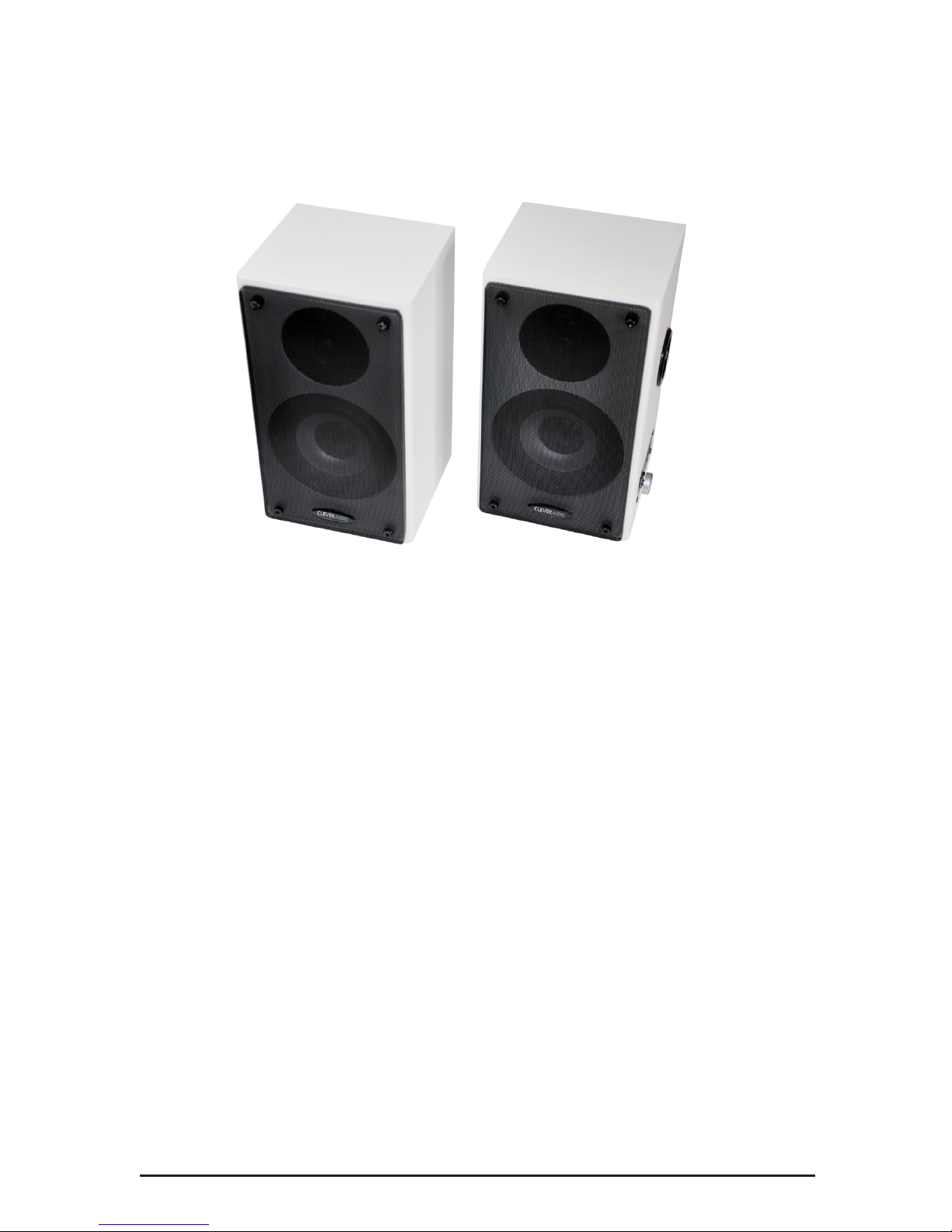
This wall mounted speaker system is suitable for mounting either side of an Interactive
whiteboard in a classroom environment
Key Features
• 30 Watt Amplifier with two audio inputs
• The system has secure wall fixings and steel mesh grille as added protection in the
classroom
• Inputs are included for PC and DVD or VCR
• The system is supplied with all cables and speaker connections
• Full RoHS, REACH compliance and CE approval
Basic features
• The wall mounted speaker system is supplied with wall fixing brackets and screws plus
cables needed to connect the speaker to a PC, Phone, Tablet, DVD player etc.
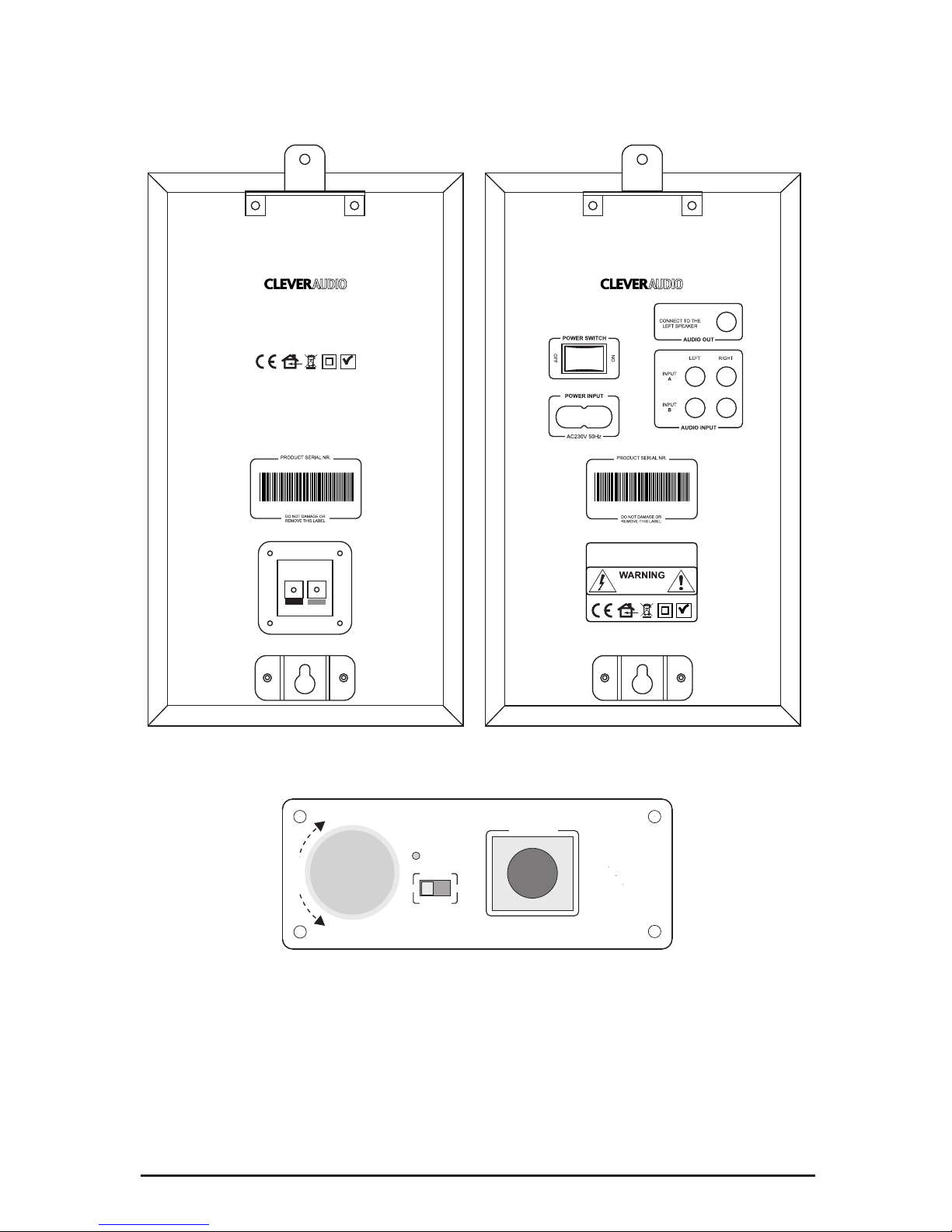
• The Power on/off switch is positioned at the rear of the active speaker
• The amplifier volume control is on side panel of the active speaker
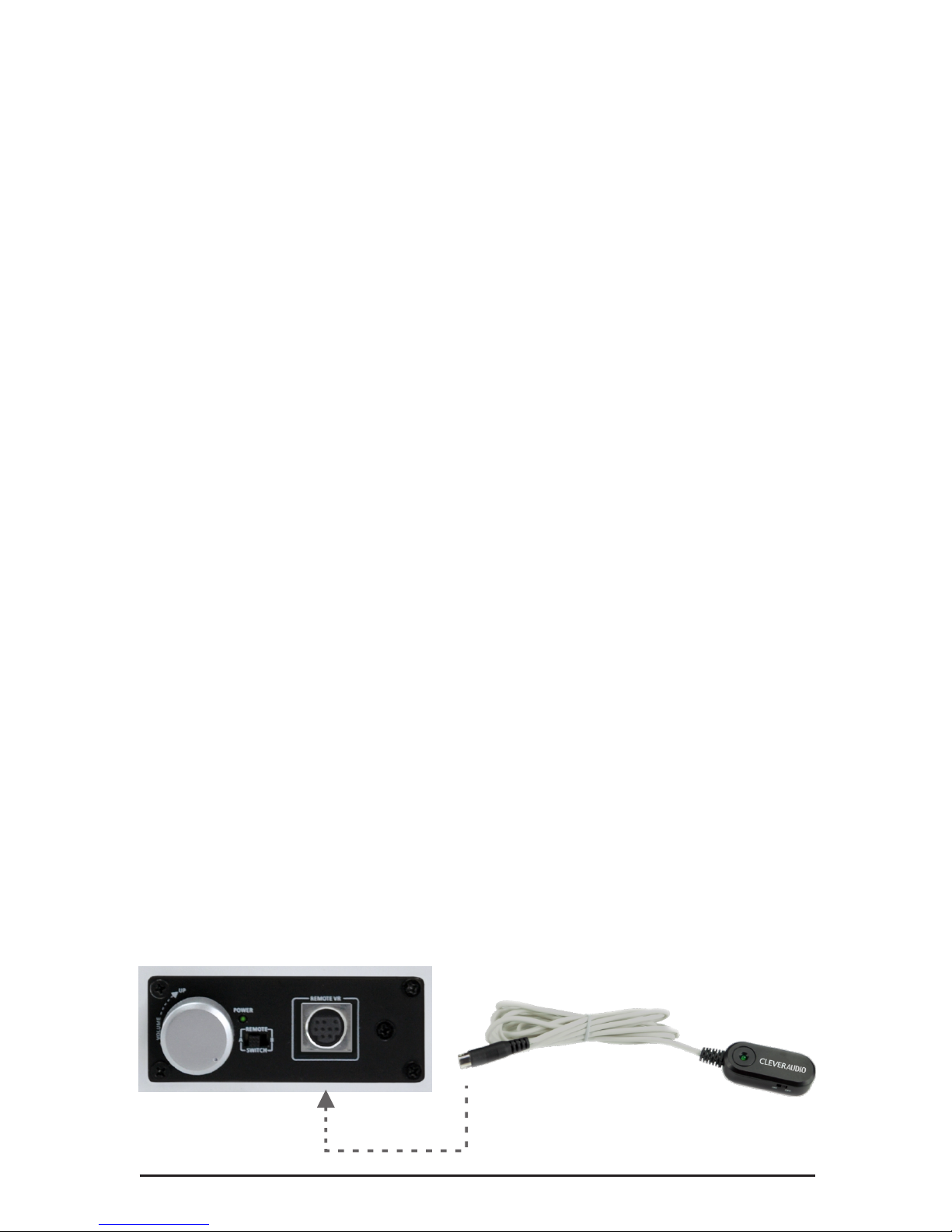
• Optional remote volume control DIN connector and VR select switch on the active speaker
Active speaker connections
• Two RCA female sockets are provided at the rear of the amplifier for PC/DVD audio input
to the amplifier
• The 3.5mm Mini Jack female output socket on the amplifier rear panel is for connecting
the amplifier to the passive speaker
• A 2M euro mains lead and adapter to BS5732
Page 4
Sahara Presentation Systems Plc Williams House, Hailey Road, Erith Kent DA18 4AA
Passive speaker rear view
Active speaker volume control panel
Active speaker rear view
CONNECTIONS PASSIVE SPEAKER
1. Bare wire connectors are provided on the passive speaker to enable the passive speaker to
be connected up to 10 meters away from the amplifier by cutting the speaker cable to the
length required.
RoHS
RISK OF ELECTRIC SHOCK
DO NOT OPEN
Product code: 1050035
32549 00001
32549 00001
RoHS
Product code: 1050035
REMOTE VR
REMOTE
POWER
UP
DOWN
SWITCH
A
B
VOLUME
CONNECTORS & CONTROL LAYOUT
5055067335560
5055067335560
Page 5
Sahara Presentation Systems Plc Williams House, Hailey Road, Erith Kent DA18 4AA
INSTALLATION GUIDE
1. Screw the two speaker brackets to each of the speakers. Pre-drilled holes are provided.
2. Select a suitable position for each speaker at either side of the interactive whiteboard.
3. Fix wall mounting screw into a suitable wall plug position at the wall that the speaker
can be hung on this screw using the central “keyhole” wall mount. Hang the speaker unit
on this fixing and mark a holeposition on the wall for the speaker’s top security bracket
4. Drill and install a suitable wall plug for the top security bracket.
5. Hang the speakers using the central “keyhole” wall mount and secure the speaker to the
wall with the screws provided into the top wall plug position.
6. Connect the 10m speaker cable provided into the active speaker using the RCA connector
in the base of the active speaker. Measure and cut the end of the cable to the length
required to join the passive speaker to the amplifier. Strip off 7mm of insulation from the cut
end and insert into the speaker connections on the passive speaker.
7. Connect the audio cables with the RCA connectors into the rear of the active speaker unit
and into the audio sources (or cable termination box if used).
8. Plug the power cable to the mains supply and switch the supply on.
9. Follow the operating instructions on the following page.
Usage of the optional available remote control cable, product Nr. 1050035R.
1. Switch the power on/off switch at the rear panel in to its OFF position.
2. Place the DIN connector in the side panel position marked with “remote VR”
3. Place the switch marked “remote select” to the position of select remote control.
4. Switch the power button at the rear panel to the ON position.
5. Switch the on/off switch at the remote Volume Control unit in to the ON position.
The green LED on the remote control unit will light up to show it’s functional.
Once the remote control cable is inserted and selected, the volume control on the speaker
will be functional until the switch marked “remote select” is set to its correct position
Page 6

Sahara Presentation Systems Plc Williams House, Hailey Road, Erith Kent DA18 4AA
OPERATING INSTRUCTIONS
Turn the volume control to it’s off position.
Switch on the power using the on/off switch on the Active speaker rear panel.
Adjust the volume control to increase the output sound level to your preferred level.
WARNING: Always turn the unit on and wait for a moment before turning the volume
control up. High signal levels can damage the system on startup.
The system accepts line-level audio signals from sources such as PC’s, notebooks, CD/DVD
players, disc players, iPod, amplifiers, tuners etc
After use, turn off the volume control which disconnects the amplifier, and turn off the power
switch on the rear plate turning of the internal power supply.
TROUBLE SHOOTING
If the system is not operating correctly, please check the table below: If the problem persists
contact your AV reseller immediately and disconnect the system from the power.
PROBLEM CHECKS TO BE MADE
No sound from Passive speaker
• Check that the mains supply is switched on at
the wall socket
• Check that the power switch at the amplifier
rear panel of the active speaker is switched on
• Check that the volume control is turned up
• Check that the audio cables to your audio
source are connected properly
• Check that the audio source is active and
playing
SPECIFICATIONS
• Check the mini jack cable connection at the
active speaker and the connection at the passive
speaker end
Output Power 15 Watts x 2
Drive Units 4” x 2 + 1.5” x 2
Impedance 6 Ohms
Frequency Response 80Hz~20kHz
Separation >35 dB
Signal/noise ratio >60 dB
Distortion THD <0.3%
Dimensions (mm) 130 x 142 x 250 mm (L x W x H)
Power Supply 230 Volt/50Hz
No sound from either speaker
Page 7

Sahara Presentation Systems Plc Williams House, Hailey Road, Erith Kent DA18 4AA
STANDARDS
CE Approved product
BS 5732 standard for Electrical Plug alternatively a Europlug to CEE 7/16 plug rated at
3A/230VAC
Restriction of the Use of Certain Hazardous Substances in Electrical and Electronic
Equipment Regulations 2005 (RoHS)
Waste Electrical and Electronic Equipment (WEEE) Directive (2002/96/EC).
REACH compliant.
Page 8

MODEL NO.: 1050035
 Loading...