

Page 1
S.A. au capital de 167 200 €
R.C.S. Saint Brieuc TGI 450 570 767
Siège social : 8 rue Bourseul 22300 Lannion France
Tél. : +33 (0) 2 96 48 68 18 – Fax : +33 (0) 2 96 48 19 11
ZigBee™ Network Expander
ZXPAND
User Manual
Revision: 1.0
Document: UM_ZXPAND_20110919_001_01_00
Page 2

ZigBee command of door lock – User Manual
UM_ZXPAND_20110919_001_01_00 CLEODE Page 2 sur 14
WARRANTY
The device supplied to the buyer and/or the recipient is guaranteed by CLEODE against any
malfunctions originating from a design and/or manufacturing flaw, for a period of twelve (12)
months following delivery. The buyer and/or recipient is (are) responsible for proving the
existence of the said defects or flaws. This warranty is applicable in accordance with articles
1641 to 1648 of the French Civil Code and in compliance with the French statutory warranty.
The warranty covers the replacement free of charge of devices and parts affected by a design
and/or manufacturing flaw excluding conspicuous defects in the device that are covered by
the buyer and/or the recipient.
In order to invoke the warranty, the buyer must immediately send written notice to CLEODE
of the flaws that it attributes to the device. It must enable CLEODE to have access to the
device to observe these defects and repair them. The warranty provided by CLEODE is
strictly limited to the equipment provided and shall only have for effect the replacement or
repair, at CLEODE’s expense, on its own premises, of all devices or parts that are not
functioning as a result of defects or flaws. CLEODE reserves the right to modify the devices
in order to comply with the warranty.
The warranty does not apply to replacement or repairs that may result from normal wear and
tear of devices, systems or products, damage or accidents resulting from negligence, failure to
supervise or maintain, or incorrect use of the devices, systems and/or products.
The maintenance service is provided by CLEODE with all reasonable care possible and in
compliance with the current state of the arts.
The exchange of parts or repairs performed under the warranty cannot result in extending the
length of the warranty. In no event can the unavailability of the device due to servicing give
rise to compensation for any reason whatsoever. The seller is released from all obligations
relating to the warranty if the product or device has been modified without prior written
consent, or if original parts have been replaced by parts which it has not manufactured
without prior consent. If unforeseen damage is caused by the device, it is expressly agreed
that the seller can only be liable for the reimbursement of monies received for the purchase of
the device if it has been destroyed. Under no circumstances can the seller be held liable for
indirect or contingent damage. The seller is released from any liability and the buyer waives
any rights against it if an accident or direct or indirect damage is caused to the buyer
following a defect, incorrect usage, incorrect maintenance or normal wear of the device sold.
Page 3

ZigBee command of door lock – User Manual
UM_ZXPAND_20110919_001_01_00 CLEODE Page 3 sur 14
TABLE OF CONTENT
WARRANTY ......................................................................................................................................... 2
TABLE OF REVISIONS ...................................................................................................................... 4
REFERENCE DOCUMENTS ............................................................................................................. 5
I INTRODUCTION ........................................................................................................................... 6
I.1 ZXPAND PRESENTATION ............................................................................................................... 6
I.2 COPYRIGHT .................................................................................................................................... 6
II ZXPAND DESCRIPTION ............................................................................................................ 7
II.1 ZIGBEE PRESENTATION ............................................................................................................... 7
II.2 APPLICATION ................................................................................................................................ 7
II.2.1 APPLICATION DESCRIPTION ......................................................................................................... 7
II.2.2 CLUSTERS DESCRIPTION ............................................................................................................. 8
III INSTALLATION AND NETWORK ASSOCIATION ............................................................. 9
III.1 INSTALLATION ............................................................................................................................ 9
III.1.1 DOUBLE-SIDED TAPE INSTALLATION ......................................................................................... 9
III.1.2 RACCORDEMENT ....................................................................................................................... 9
III.2 STARTING UP ZXPAND .......................................................................................................... 10
III.3 RESTART OF THE ASSOCIATION PHASE ................................................................................... 10
III.4 RESET ........................................................................................................................................ 11
IV TECHNICAL FEATURES ........................................................................................................ 12
REPAIR AND MAINTENANCE ...................................................................................................... 13
Page 4

ZigBee command of door lock – User Manual
UM_ZXPAND_20110919_001_01_00 CLEODE Page 4 sur 14
TABLE OF REVISIONS
Version
Authors(s)
Version description
Date
0.1
CLEODE
Initial version
19/09/2011
1.0
CLEODE
Validated document
22/09/2011
Page 5

ZigBee command of door lock – User Manual
UM_ZXPAND_20110919_001_01_00 CLEODE Page 5 sur 14
REFERENCE DOCUMENTS
N°
Document
Description
[1]
ZigBee_Cluster_Library_Public
Zigbee Cluster Library Specification
[2]
ZigBee_Home_Automation_Profile
Home Automation Profil Specification
[3]
ZigBee_Specification
ZigBee Specification
Page 6
ZigBee command of door lock – User Manual
UM_ZXPAND_20110919_001_01_00 CLEODE Page 6 sur 14
I INTRODUCTION
I.1 ZXPAND PRESENTATION
The network expander ZXPAND allows expanding the range of a zigbee network.
The ZXPAND also integrates the function of router ZigBee ™.
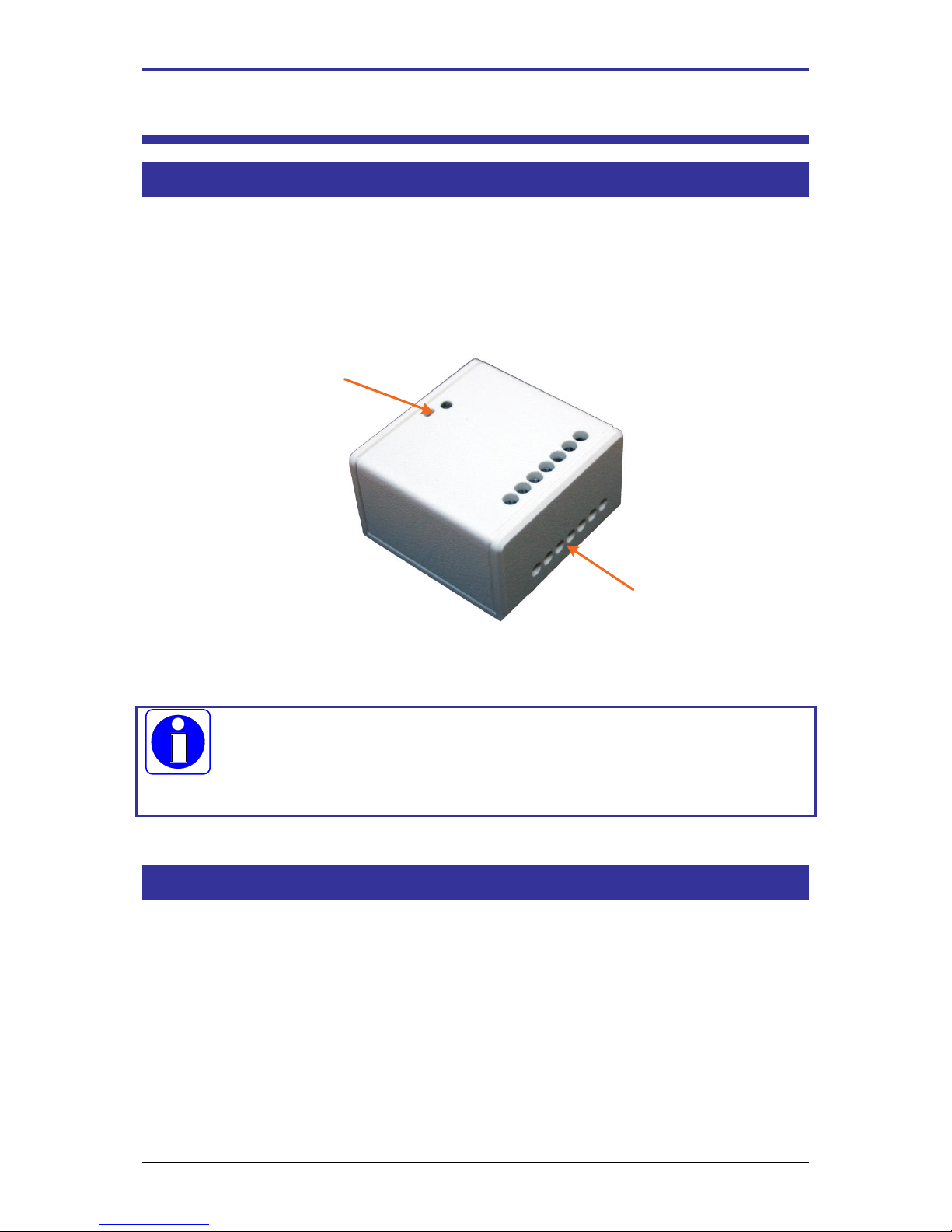
The ZXPAND has this form:
Connecting
Button and light of
association
The module ZXpand works in conjunction with a Zigbee coordinator ™
compatible stack pro 2007.
CLEODE also markets Coordinators Zigbee™.
Contact : [email protected] ou Web : www.cleode.fr for more information
I.2 COPYRIGHT
The CLEODE trademark and the CLEODE logo are properties of CLEODE SA, France. This
document also refers to trademarks and other product names that are registered trademarks of
their respective owners.
Copyright © 2009 CLEODE SA. All rights reserved.
Page 7
ZigBee command of door lock – User Manual
UM_ZXPAND_20110919_001_01_00 CLEODE Page 7 sur 14
II ZXPAND DESCRIPTION
II.1 ZIGBEE PRESENTATION
The network expander ZigBee ™ contains application type Range Extender defined in the
standard Home Automation (Cf. document [2]).
This node is fully compliant with the ZigBee™ PRO 2007 and Home Automation profile. For
more detail on the data exchange between device and network, see documents [1], [2] and [3].
II.2 APPLICATION
II.2.1 APPLICATION DESCRIPTION
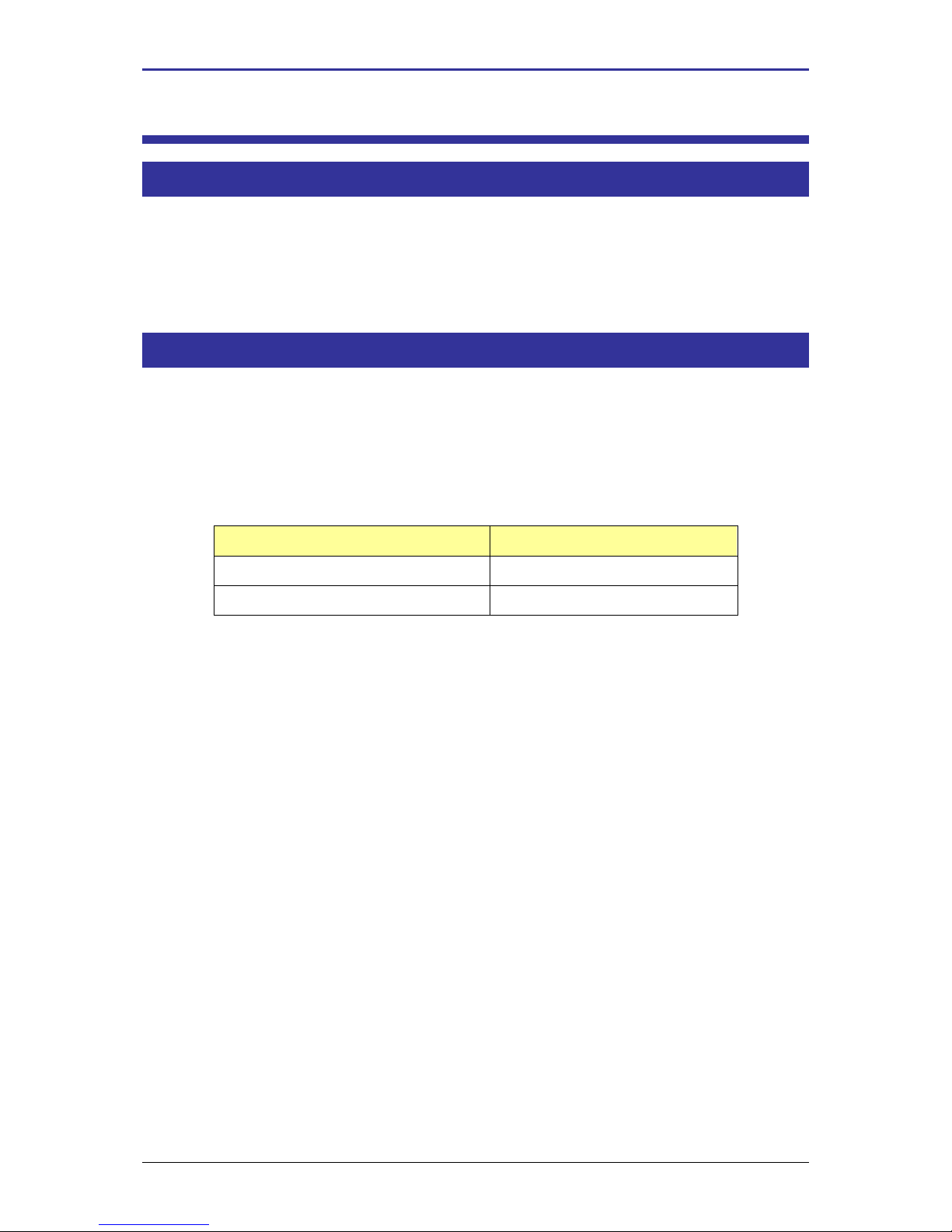
Device ID : Range Extender
Endpoint number: 1
Clusters :
Server
Client
Basic (0x0000)
/
Identify (0x0003)
/
Page 8
ZigBee command of door lock – User Manual
UM_ZXPAND_20110919_001_01_00 CLEODE Page 8 sur 14
II.2.2 CLUSTERS DESCRIPTION
This is a terse description of clusters and attributes which are implemented in the ZXPAND.
For more detail on these, see document [1].
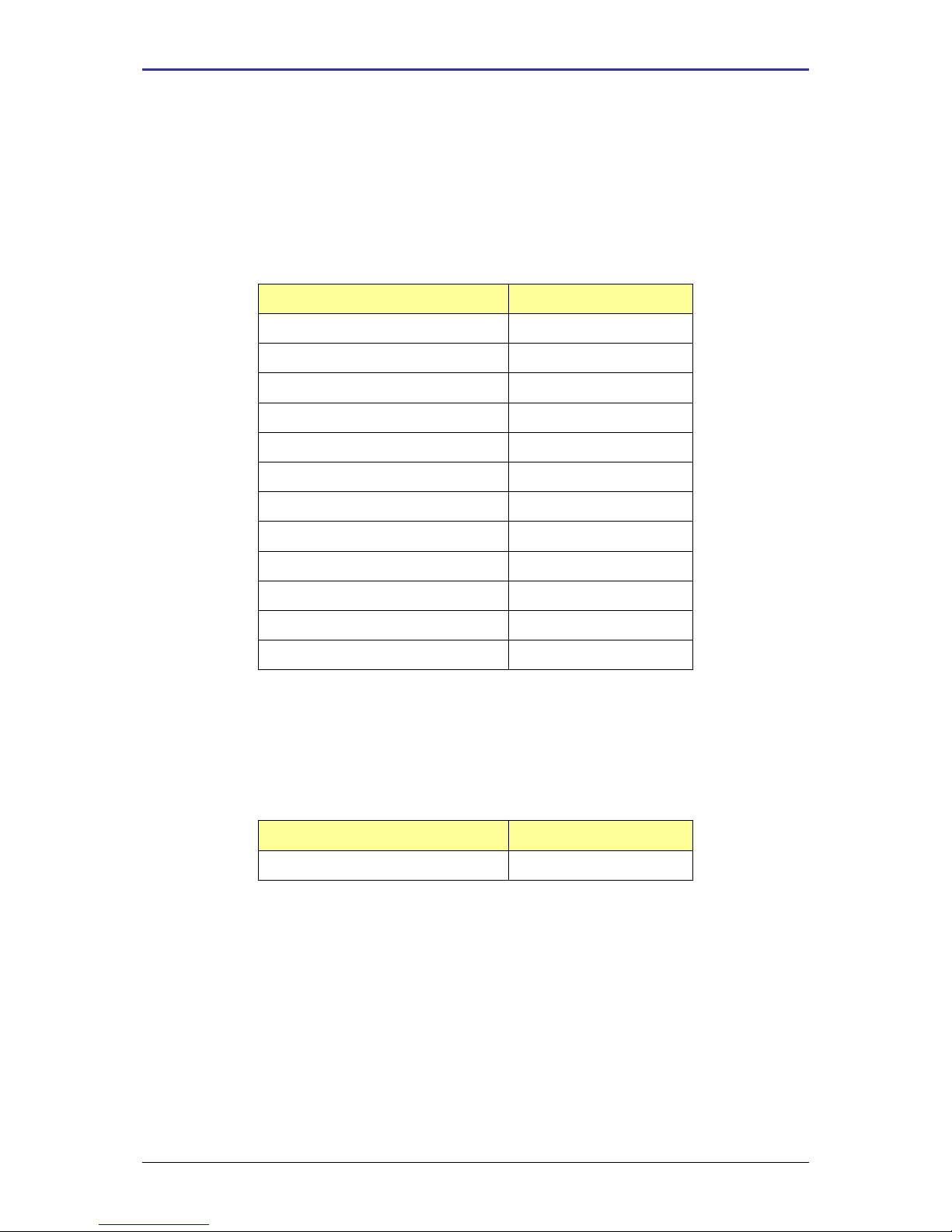
Basic cluster :
This cluster is used to determine basic information about the device.
Attribute
Attribute ID
ZCLVersion
0x0000
ApplicationVersion
0x0001
StackVersion
0x0002
HWVersion
0x0003
ManufacturerName
0x0004
ModelIdentifier
0x0005
DateCode
0x0006
PowerSource
0x0007
LocationDescription
0x0010
PhysicalEnvironment
0x0011
DeviceEnabled
0x0012
AlarmMask
0x0013
Identify cluster :
This cluster is used to put a device into an identification mode. By writing the
IdentifyTime attribute value, the user asks the device to blink the light, during a number of
seconds specified by this value.
Attribute
Attribute ID
IdentifyTime
0x0000
Page 9
ZigBee command of door lock – User Manual
UM_ZXPAND_20110919_001_01_00 CLEODE Page 9 sur 14
III INSTALLATION AND NETWORK ASSOCIATION
III.1 INSTALLATION
III.1.1 DOUBLE-SIDED TAPE INSTALLATION
To mount the ZXPAND with a double-sided tape, follow this:
1) Stick a double-sided tape on the ZXPAND bottom
2) Dust the wall
3) Mount the ZXPAND on the wall
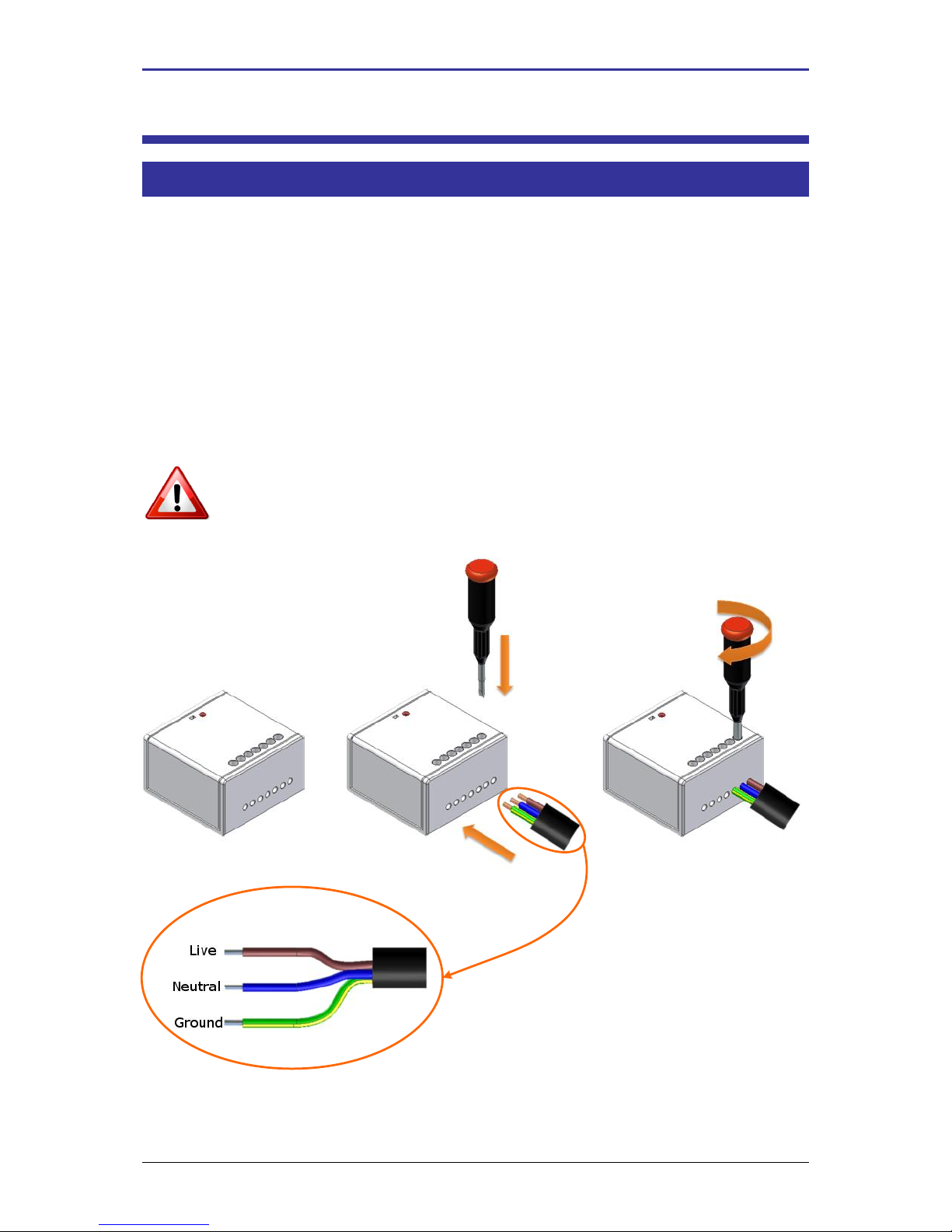
III.1.2 RACCORDEMENT
To connect the ZXPAND, follow the procedure this below.
Connect the supply of the ZXPAND s indicated below.
Attention: Shut down the power supply before any intervention and it till the end
the manipulations.
Page 10
ZigBee command of door lock – User Manual
UM_ZXPAND_20110919_001_01_00 CLEODE Page 10 sur 14
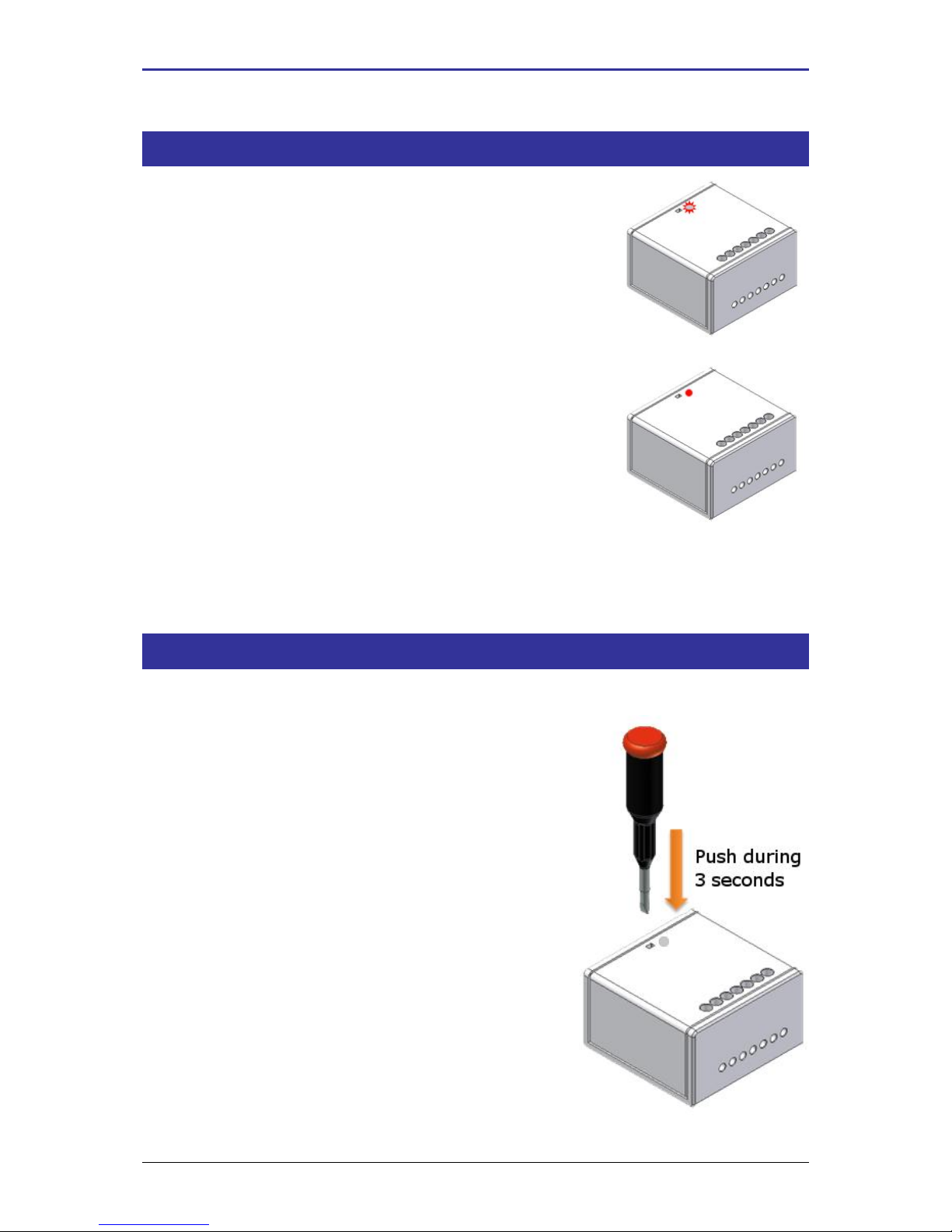
III.2 STARTING UP ZXPAND
In the switched on of the object, it tries to
join during about seconds and flashes
twice.
If a coordinator is present and what it
authorizes the ZXPAND to join the
network, the light of the ZXPAND flashing
during 2 seconds then turn off.
In the cases where the association is not possible, the object is going to put itself in sleep and
to try automatically to join at the end of 15 minutes. This time will increase twofold in every
new failure of the association.
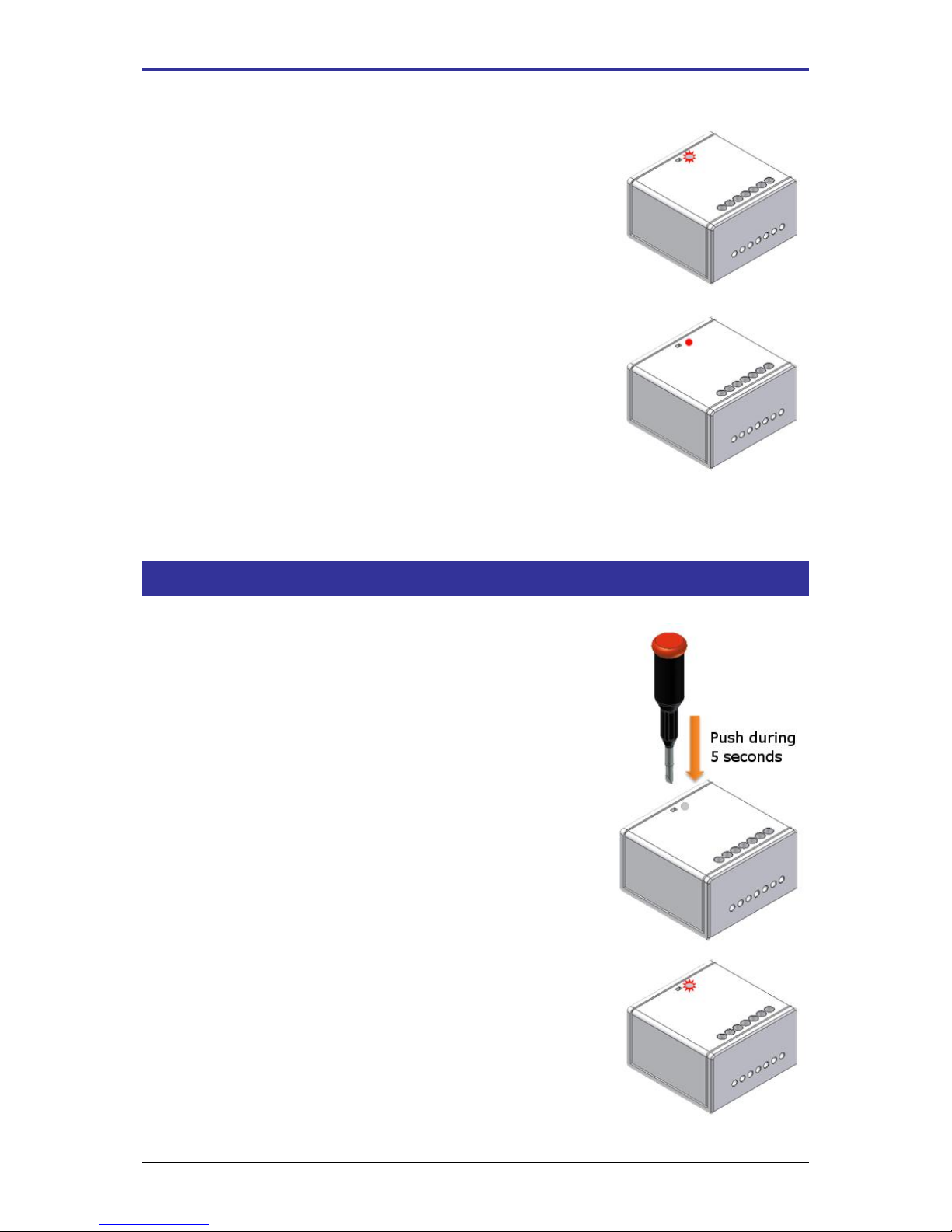
III.3 RESTART OF THE ASSOCIATION PHASE
If the ZXPAND is not associated, the user can ask him at any time to join a network.
For this, the user has to press during 3
seconds on the button.
Page 11
ZigBee command of door lock – User Manual
UM_ZXPAND_20110919_001_01_00 CLEODE Page 11 sur 14
If the ZXPAND was not associated it begins
flashing quickly during 20 seconds. The
ZXPAND looks for a coordinator during
this blinking.
If the association is success, the light of the
ZXPAND flashing during 2 seconds and
turn off.
If the light of the ZXPAND does not flash after to have press on the button during 3 seconds, this
means that he is already associated in a network.
III.4 RESET
If need, the user can reset of the ZXPAND.
For this, he has to press on the button during
5 seconds.
When the ZXPAND reset, the LED flashes
twice and turn off.
Page 12
ZigBee command of door lock – User Manual
UM_ZXPAND_20110919_001_01_00 CLEODE Page 12 sur 14
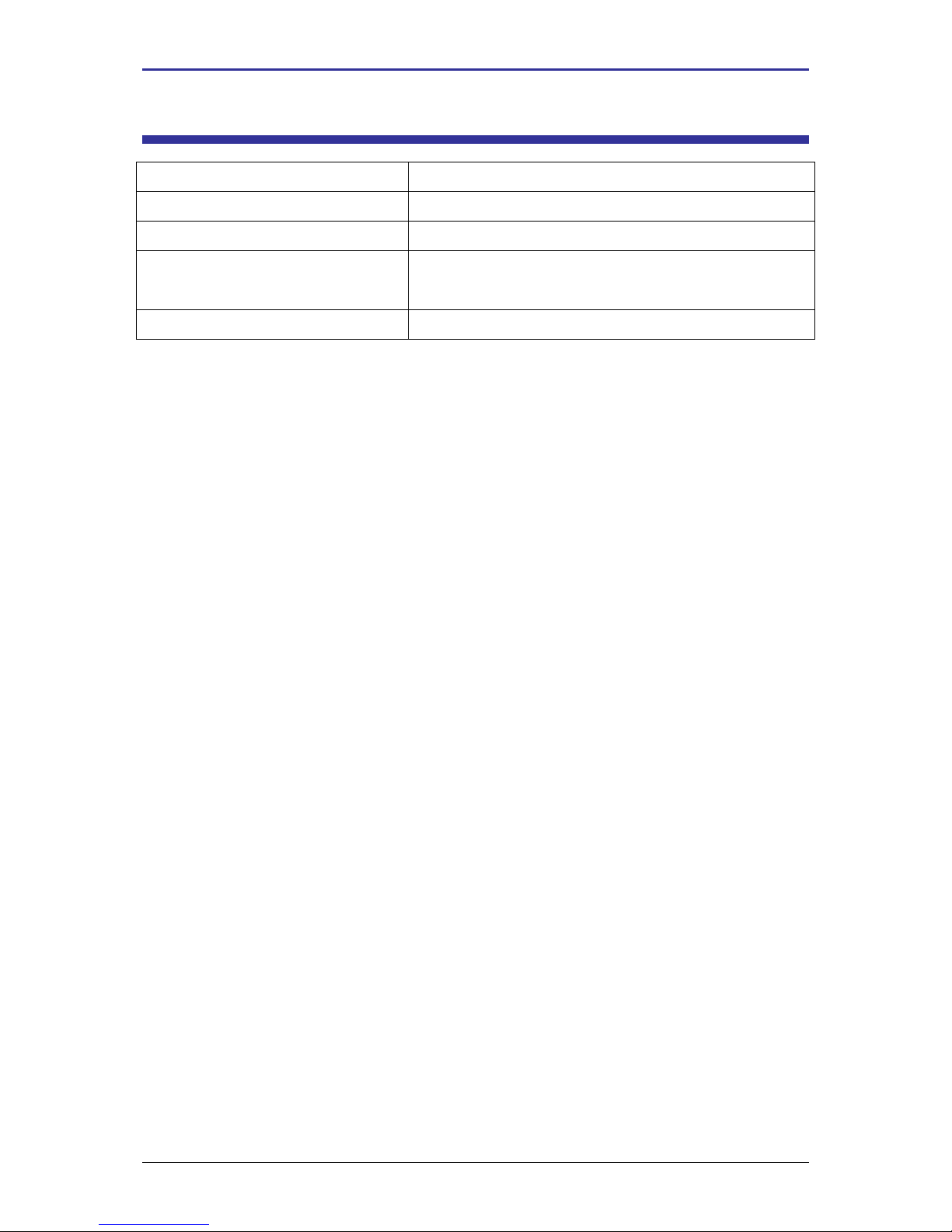
IV TECHNICAL FEATURES
Weight
100 g
Power supply
85-263 V / 50-60 Hz
Measurement
54 x 52 x 32 mm
Transmission range
100 m outdoor
30 m indoor
Managed channels (frequency)
16 ZigBee™ channels (2.405 to 2.480 GHz)
Page 13

ZigBee command of door lock – User Manual
UM_ZXPAND_20110919_001_01_00 CLEODE Page 13 sur 14
REPAIR AND MAINTENANCE
Defective equipments shall be first reported to the CLEODE support team in order to be
assigned an RMA number. Be prepared to state your name, company and the serial number of
the defective item to the support personnel.
The item shall then be returned to CLEODE with the following documents:
The RMA number
A copy of the delivery slip
A detailed description of the default and the test context
The maintenance period is typically four (4) weeks starting from the date of reception of the
equipment at the CLEODE headquarters.
Page 14

ZigBee command of door lock – User Manual
UM_ZXPAND_20110919_001_01_00 CLEODE Page 14 sur 14
CLEODE S.A.
Technical Support Division
8, rue Bourseul
22300 Lannion
France
Phone : +33 (0) 2 96 48 68 18
Fax : +33 (0) 2 96 48 19 11
E-mail : [email protected]
Web : http://www.cleode.com
 Loading...