

Page 1

Clearline Aura
Wireless Solar Display
Clearline Aura
V210, V212
v1.0
80024
viridian
s o l a r
R
Clearline
R
T
Clearline
V 2 1 0
Page 2
1
Clearline
R
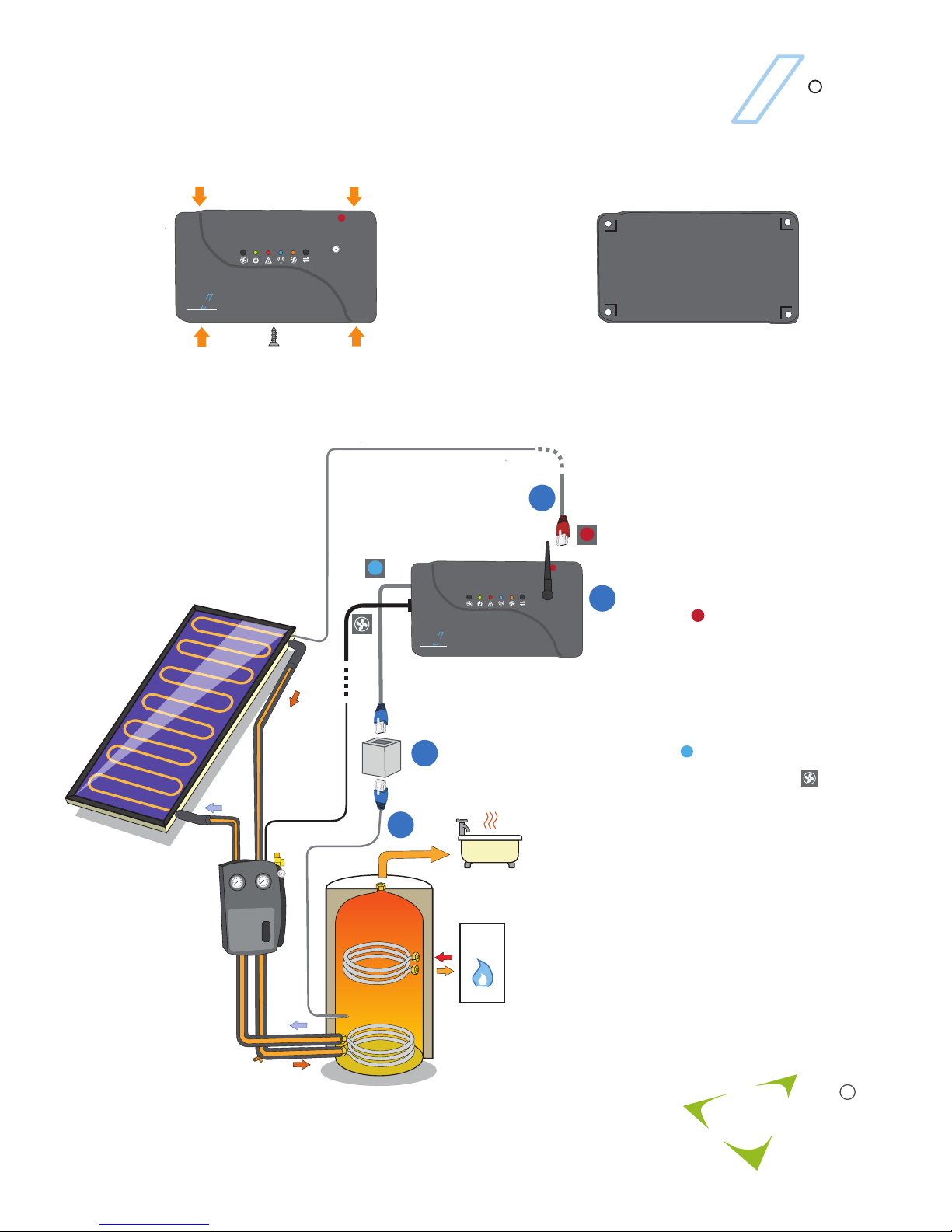
V210 DT Controller
viridian
s o l a r
R
1 2
3
Install the panel sensor (3) close to
the solar panel outlet and secure in
place. Run the 20m cable to the
V210 controller and insert the
connector into the high temperature
socket.
Install the cylinder sensor (4) to
measure the temperature of the
solar section of the hot water
cylinder and secure in place. Run
the 5m cable to the V210 controller
and use the in-line connector (5) to
connect to the low temperature flying
lead.
Wire the pump power cable
to the pump live, neutral and earth.
The controller is supplied complete
with a plug-in power cable. For
some installations (mains pressure
cylinders) it will be necessary to
bring power to the V210 unit via a
high-limit thermostat on the hot
water cylinder.
Remove the cover. Unscrew the retaining screw.
Squeeze in the four tabs to release.
Fix in place with four screws through the mounting
holes. Replace the cover.
Boiler
Solar
Panel
Hot Water Cylinder
Solar
Pump
Set
T
Clearline
V 2 1 0
T
T
2
3
4
5
T
T
T
Clearline
V 2 1 0
Page 3
Clearline
R
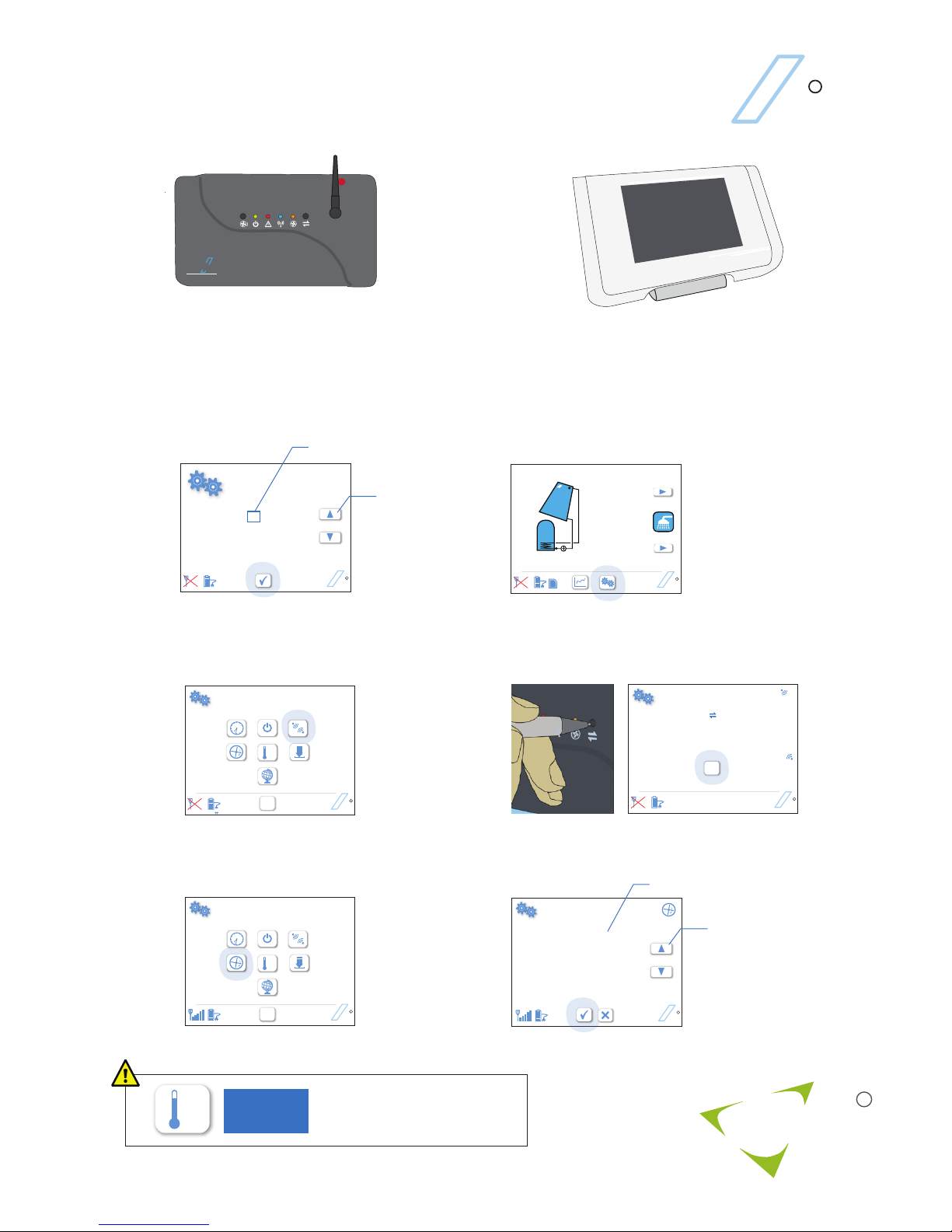
Clearline Aura Quick-start
3
a
HH: MM
12 01
DD/MM/YY
01 01 10
Clearline
R
Clearline
R
0.0
Today
Clearline
R
SD
Tap when finished
Clearline
R
OK
Clearline
R
˚C
OK
Panel Area
3.0 m
Flow Rate
2.5 l/min
Clearline
R
Tap when finished
Tap to select
Glycol
40 %
2
f
Set either panel area (rated flow will be used), or set
a measured flow rate
˚C
2
viridian
s o l a r
R
1
Fix aerial onto V210 solar controller.
T
Clearline
V 2 1 0
2
Connect the power supply to the micro-USB port on the
base of the display. Clearline Aura can be either fixed to
a wall or free standing.
Touch the screen to start. Set date
and time
Tap to select
Tap arrows
to increase
or decrease
b
Tap gears button to go to setup screen
˚C
OK
c
Select wireless connection
d
Press connect button on V210 Controller, then tap OK
Link to V210 controller
Press the connect botton on the Controller
e
Select to input solar flow rate
Tap arrows
to increase
or decrease
Setting the temperature control
affects the performance and
safety of the solar system.
3817
PASSWORD
Page 4
Viridian Solar
Atlas Building, 68 Stirling Way
Papworth, Cambridge.
CB23 3GY
T 01480 831 501
F 01480 831 831
www.viridiansolar.co.uk
Clearline
R
viridian
s o l a r
R
Blinks per
10 sec.
1
2
3
4
5
10
V210 Error Messages
Error
Pump Error
Cylinder Sensor Open Circuit
Cylinder Sensor Closed Circuit
Panel Sensor Open Circuit
Panel Sensor Closed Circuit
Microcontroller Error
Remedial Action
Check pump, check for airlock or blockage
Reconnect sensor cable to controller
Power down 10 seconds, then on again
Reconnect sensor cable to controller
Reconnect sensor cable to controller
Reconnect sensor cable to controller
An error is indicated by the red light. The number of times the light blinks off per ten
second period identifies the error.
 Loading...