

Page 1
20140320
Chronograph Watch
Art.no 36-4850 Model SLZ800
Please read the entire instruction manual before using the product and save it
for future reference. We reserve the right for any errors in text or images and any
necessary changes made to technical data. If you have any questions regarding
technical problems please contact our Customer Services.
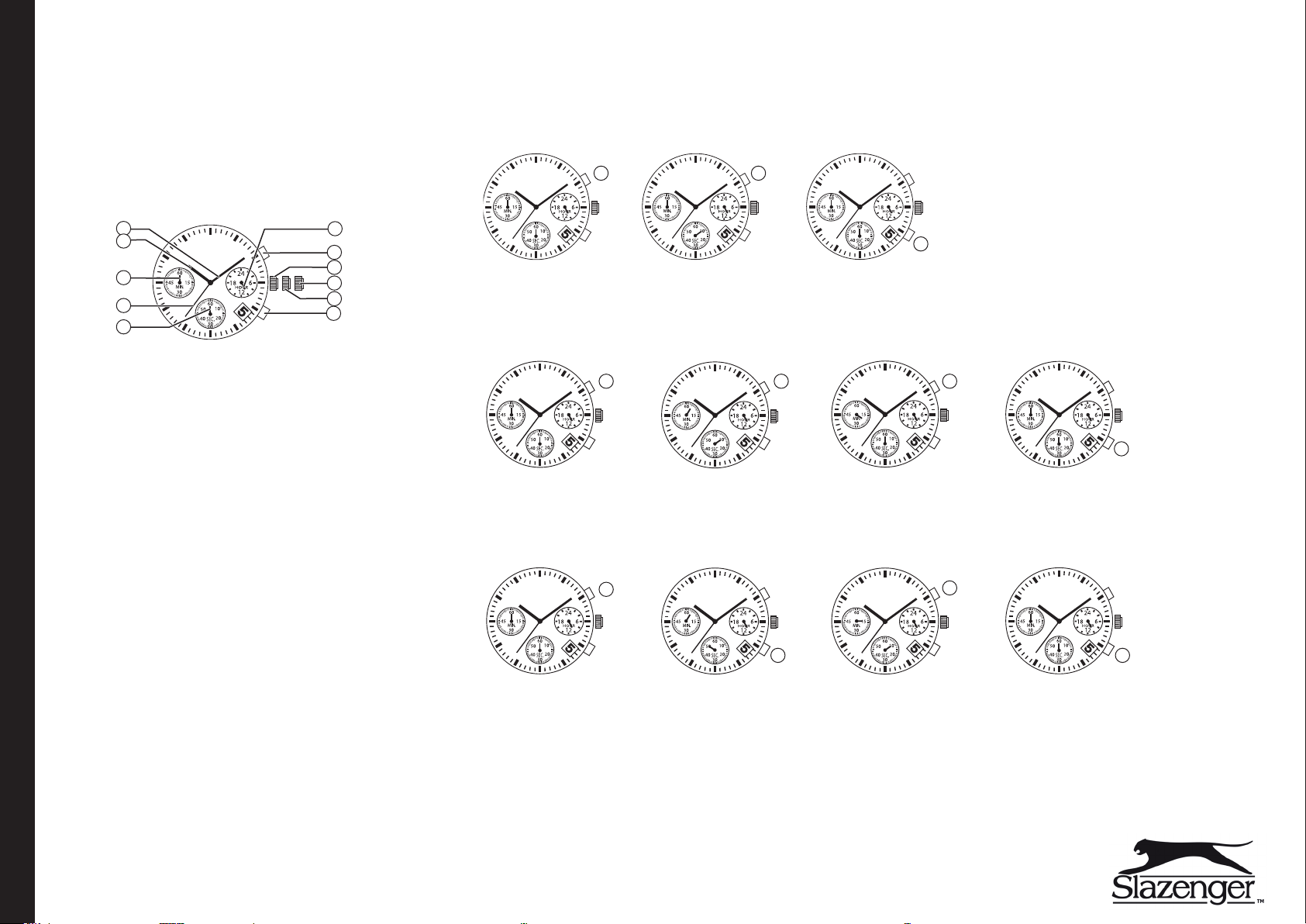
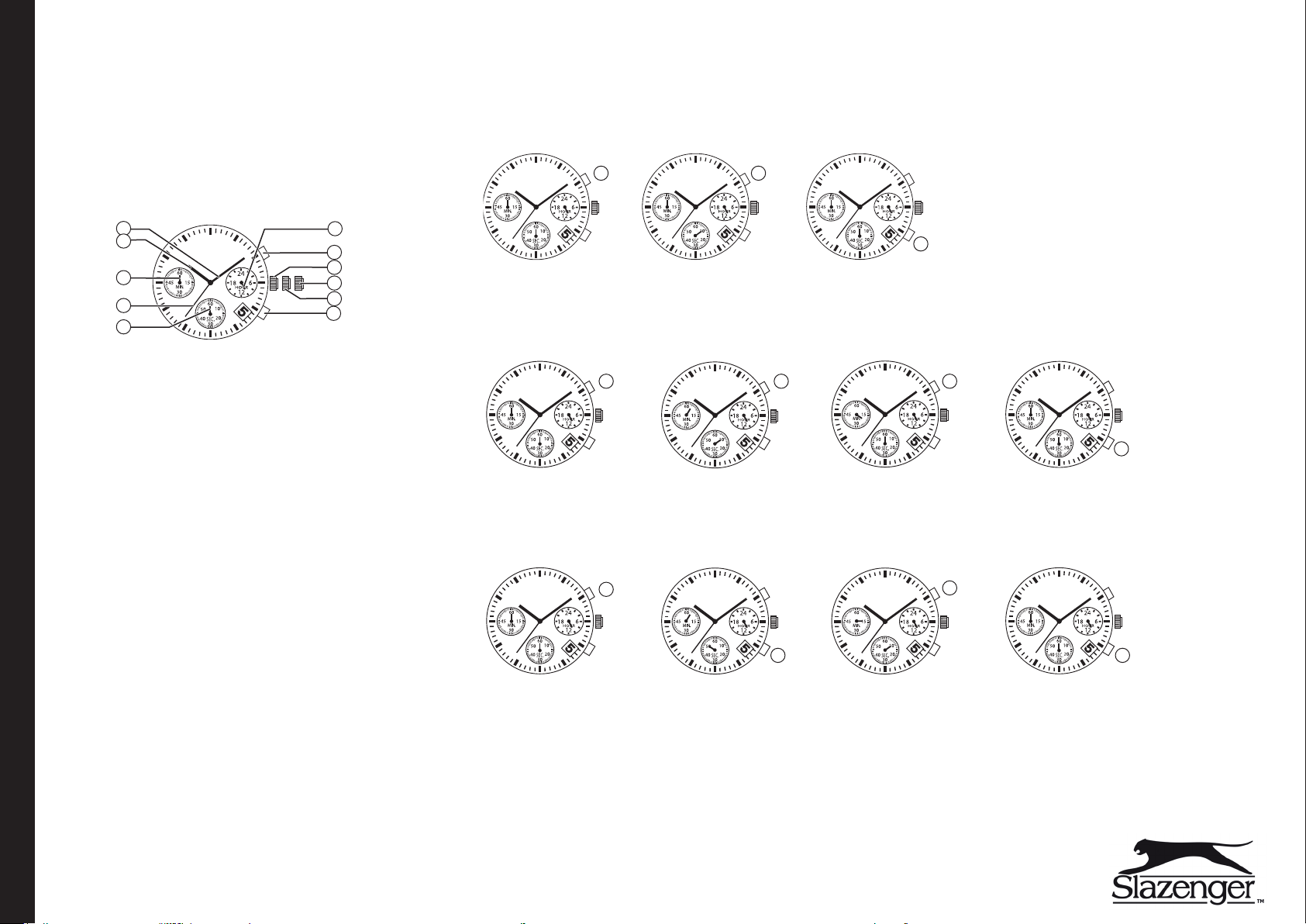
Buttons and functions
1
2
3
4
5
1. Minute hand
2. Hour hand
3. Stopwatch minute hand
4. Second hand
5. Stopwatch second hand
6. 24-hour hand
7. Start/Stop stopwatch button
8. Crown at normal position
9. Crown at second position: Time setting
10. Crown at first position: Date setting
11. Split-time/Reset stopwatch button
6
7
8
9
10
11
Stopwatch - Timekeeping
Example 1: A 100 m race
Press: (7) to start – (7) to stop at finish – (11) to reset.
Start
7 7
Example 2: A basketball game
Press: (7) to start – (7) to stop for a timeout – (7) to restart after a timeout – (7) stop at end of game – (11) to reset.
Note: The stopwatch can be started and stopped as many times as necessary by pressing button (7).
Start
7 7 7
Example 3: A 5,000 m race
Press: (7) to start – (11) for split-time – (11) to release split-time – (7) to stop at finish – (11) to reset.
Note: Split-times can be measured and released as many times as necessary by pressing button (11).
Start Split-time
Stop (finish) Reset
11
Stop (end of game) ResetTimeout/Restart after timeout
Stop
11
Reset
Operation
7
Activating the watch
Remove the plastic tab isolating the crown from the case.
Setting the time and date
Note: Before setting the time: Reset the minute and second hands of the stopwatch by pulling out the crown to the second position and pressing button (7)
or (11). Push the crown back in to its normal position.
1. Pull the crown out to the first position.
2. Turn the crown clockwise until the previous day’s date appears. Do not set
the date between 9 p.m and 12 a.m. Otherwise, the day might not
change properly.
3. Pull out the crown to the second position when the second hand is in
the 12 o’clock position.
4. Turn the crown clockwise to set the desired time.
5. Push the crown back in to the normal position when the correct time has
been set.
GREAT BRITAIN • CUSTOMER SERVICE Tel: 0845 300 9799, E-mail: [email protected] INTERNET www.clasohlson.com/uk
Disposal
This product should be disposed of in accordance with local regulations.
If you are unsure how to proceed, contact your local authority.
Specifications
Size Ø 44 mm
Battery 1×SR626 (included)
Water resistance 5 ATM
11 11
7
Page 2
20140320
Armbandsklocka kronograf
Art.nr 36-4850 Modell SLZ800
Läs igenom hela bruksanvisningen före användning och spara den sedan för
framtida bruk. Vi reserverar oss för ev. text- och bildfel samt ändringar av
tekniska data. Vid tekniska problem eller andra frågor, kontakta vår kundtjänst.
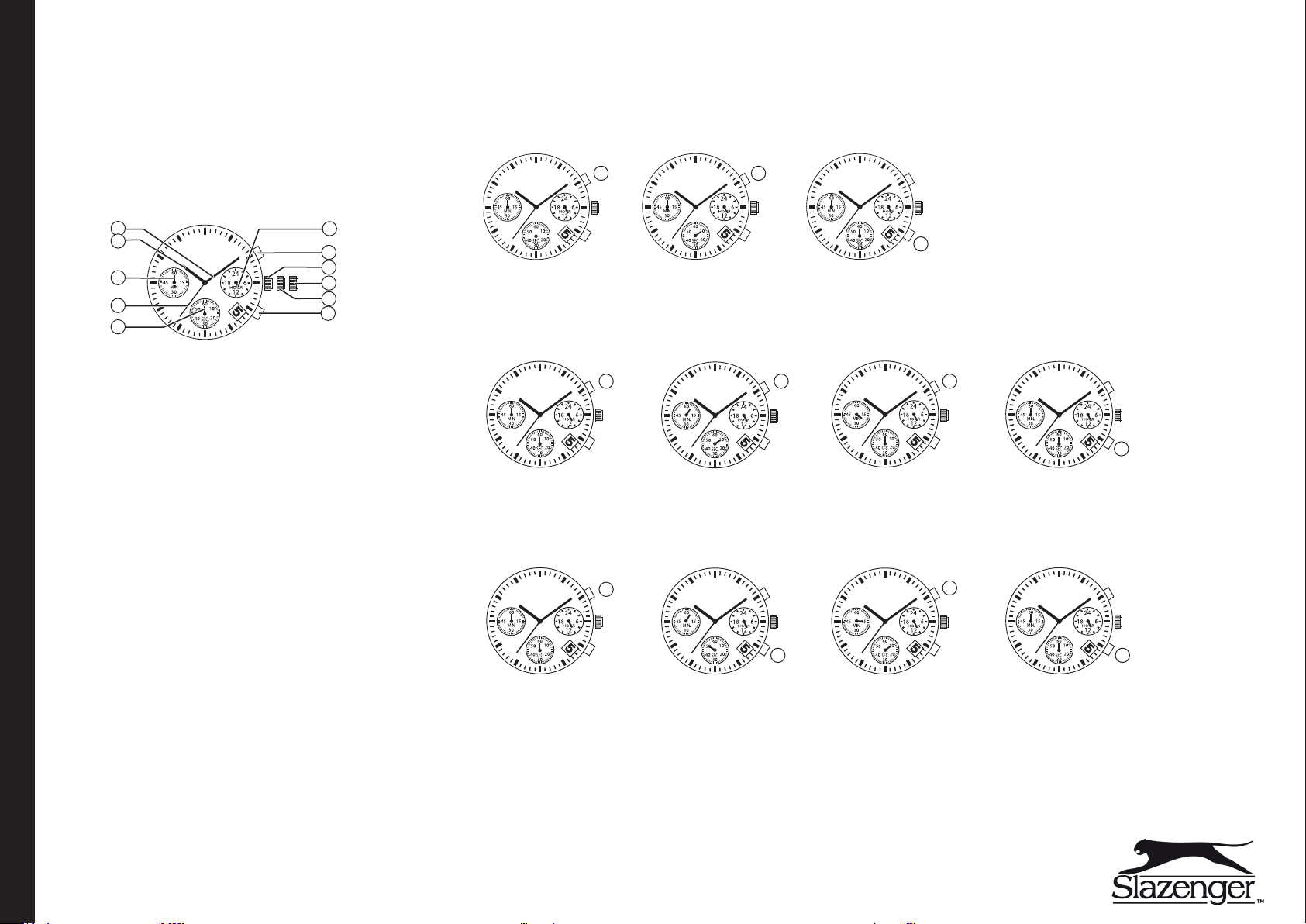
Knappar och funktioner
1
2
3
4
5
1. Minutvisare
2. Timvisare
3. Stoppurets minutvisare
4. Sekundvisare
5. Stoppurets sekundvisare
6. 24-timmarsvisare
7. Stoppur, start/stopp
8. Kronans normalläge
9. Kronans andraläge: Tidsinställning
10. Kronans förstaläge: Datuminställning
11. Stoppur, mellantid/reset
6
7
8
9
10
11
Stoppur - Tidtagning
Exempel 1: 100 m-lopp
Tryck: (7) start – (7) stopp, målgång – (11) reset.
Start
7 7
Exempel 2: Basketmatch
Tryck: (7) start – (7) stopp-timeout – (7) start, matchen startar efter timeout – (7) stopp – (11) reset.
Obs! Tiden kan stoppas så många gånger som önskas genom att trycka (7).
Start
7 7 7
Exempel 3: 5000 m-lopp
Tryck: (7) start – (11) mellantid – (11) fortsätt tidtagning – (7) stopp, målgång – (11) reset.
Obs! Mellantid kan tas så många gånger som önskas genom att trycka (11).
Start Mellantid
Stopp (målgång) Reset
11
Stopp (matchen slut) ResetTime out/matchen startar
Stopp
11
Reset
Användning
7
Starta
Dra bort plaststoppet som sitter mellan kronan och klockan.
Inställning av datum och tid
Obs! Innan inställning utförs: Nollställ stoppurets minut- och sekundvisare
genom att dra ut kronan till andraläget och tryck (7) eller (11). Tryck tillbaka
kronan till normalläge.
1. Dra ut kronan till förstaläget.
2. Vrid kronan medurs tills föregående dags datum visas. Tänk på att
datumvisningen kan bli fel om aktuellt datum ställs in samtidigt som
tiden ställs in till en tid mellan 21.00–24.00.
3. Dra ut kronan till andraläget när sekundvisaren pekar mot 12.00.
4. Vrid kronan medurs för att ställa in önskad tid.
5. Tryck tillbaka kronan till normalläge när önskat klockslag infaller.
SVERIGE • KUNDTJÄNST Tel: 0247/445 00, Fax: 0247/445 09, E-post: [email protected] INTERNET www.clasohlson.se
Avfallshantering
När du ska göra dig av med produkten ska detta ske enligt lokala föreskrifter.
Är du osäker på hur du ska gå tillväga, kontakta din kommun.
Specifikationer
Mått Ø 44 mm
Batteri 1×SR626 (ingår)
Vattenskyddad 5 ATM
7
11 11
Page 3
20140320
Armbåndsur kronograf
Art.nr. 36-4850 Modell SLZ800
Les brukerveiledningen nøye før produktet tas i bruk, og ta vare på den for framtidig
bruk. Vi reserverer oss mot ev. tekst- og bildefeil, samt forandringer av tekniske
data. Ved tekniske problemer eller spørsmål, ta kontakt med vårt kundesenter.
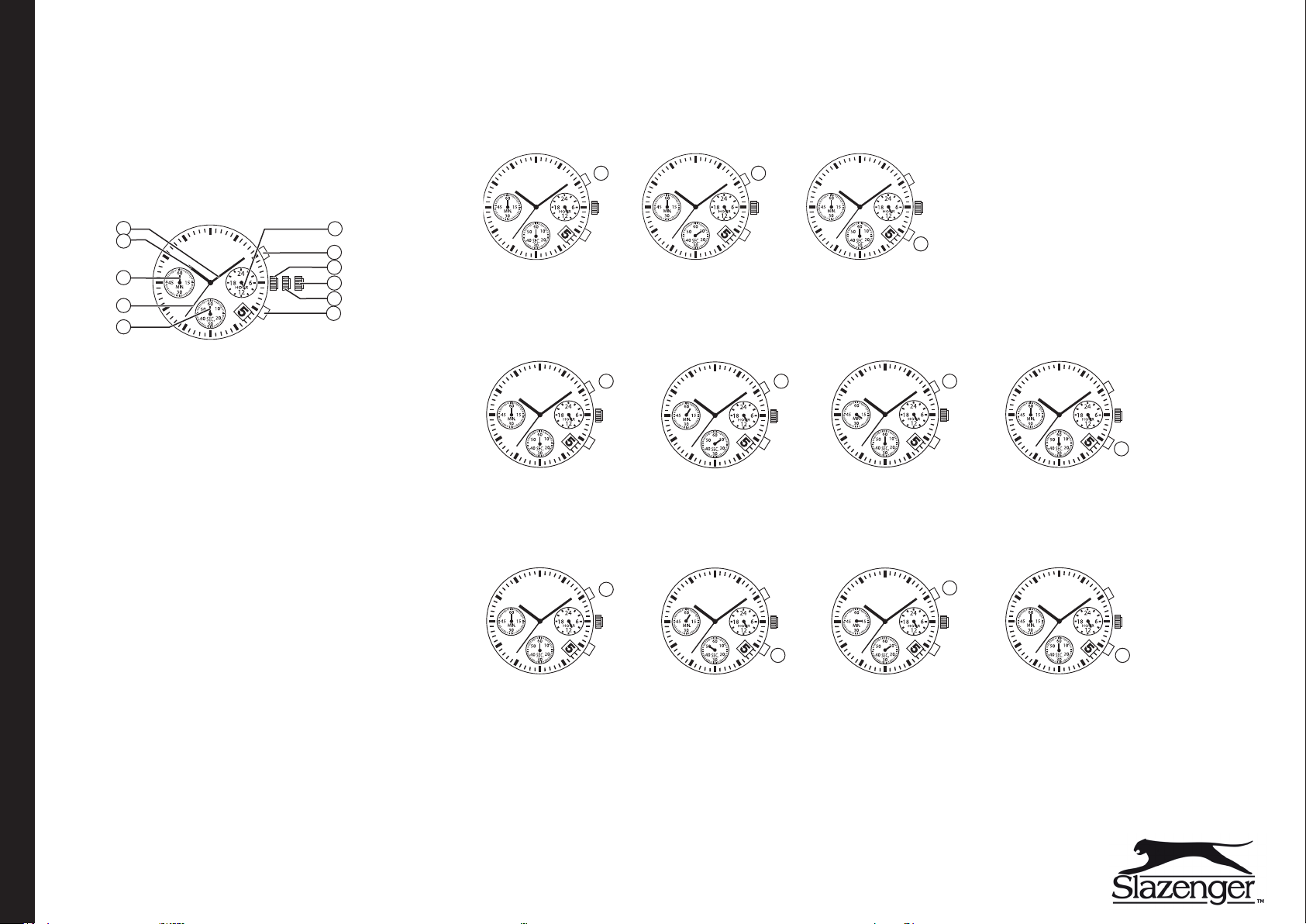
Knapper og funksjoner
1
2
3
4
5
1. Minuttviser
2. Timeviser
3. Stoppeklokkens minuttviser
4. Sekundviser
5. Stoppeklokkens sekundviser
6. 24-timersviser
7. Stoppeklokke, start/stopp
8. Kronens normalposisjon
9. Kronens annenposisjon: Tidsinnstilling
10. Kronens førsteposisjon: Datoinnstilling
11. Stoppeklokke, mellomtid/reset
6
7
8
9
10
11
Stoppeklokke - Tidtaking
Eksempel 1: 100 m løp
Trykk: (7) start – (7) stopp, mål – (11) reset.
Start
7 7
Eksempel 2: Basketmatch
Trykk: (7) start – (7) stopp/timeout – (7) start, matchen starter etter timeout – (7) stopp – (11) reset.
Obs! Tiden kan stoppes så mange ganger man ønsker, ved å trykke på (7).
Start
7 7 7
Eksempel 3: 5 000 m løp
Trykk: (7) start – (11) mellomtid – (11) fortsett tidtaking – (7) stopp, mål – (11) reset.
Obs! Mellomtiden kan stoppes så mange ganger man ønsker ved å trykke på (11).
Start Mellomtid
Stopp (mål) Reset
11
Stopp (matchen slut) ResetTime out/matchen starter
Stopp
11
Reset
Bruk
7
Start
Dra bort plastbiten som sitter mellom kronen og klokken.
Innstilling av dato og tid
Obs! Før innstillingene utføres: Nullstill stoppeklokkens minutt- og sekundviser
ved å trekke ut kronen til andreposisjon og trykk (7) eller (11). Trykk så kronen
inn til normalposisjon igjen.
1. Trekk kronen ut til førsteposisjon.
2. Drei kronen medurs til foregående dags dato vises. Der er viktig å være
klar over at datovisningen kan bli feil dersom den aktuelle datoen stilles inn
samtidig som tiden stilles inn til en tid mellom 21.00 og 24.00.
3. Trekk kronen ut til andreposisjon når sekundviseren peker på 12.00.
4. Drei kronen medurs for å stille inn ønsket tid.
5. Trykk kronen tilbake til normalposisjon når ønsket klokkeslett er innstilt.
NORGE • KUNDESENTER Tel: 23 21 40 00, Fax: 23 21 40 80, E-post: [email protected] INTERNETT www.clasohlson.no
Avfallshåndtering
Når produktet skal kasseres, må det skje i henhold til lokale forskrifter.
Ved usikkerhet, ta kontakt med lokale myndigheter.
Spesifikasjoner
Mål Ø 44 mm
Batteri 1×SR626 (medfølger)
Vannbeskyttet 5 ATM
7
11 11
Page 4
20140320
Rannekello kronografi
Tuotenro 36-4850 Malli SLZ800
Lue käyttöohjeet ennen tuotteen käyttöönottoa ja säilytä ne tulevaa tarvetta varten.
Pidätämme oikeuden teknisten tietojen muutoksiin. Emme vastaa mahdollisista
teksti- tai kuvavirheistä. Jos laitteeseen tulee teknisiä ongelmia, ota yhteys
myymälään tai asiakaspalveluun.
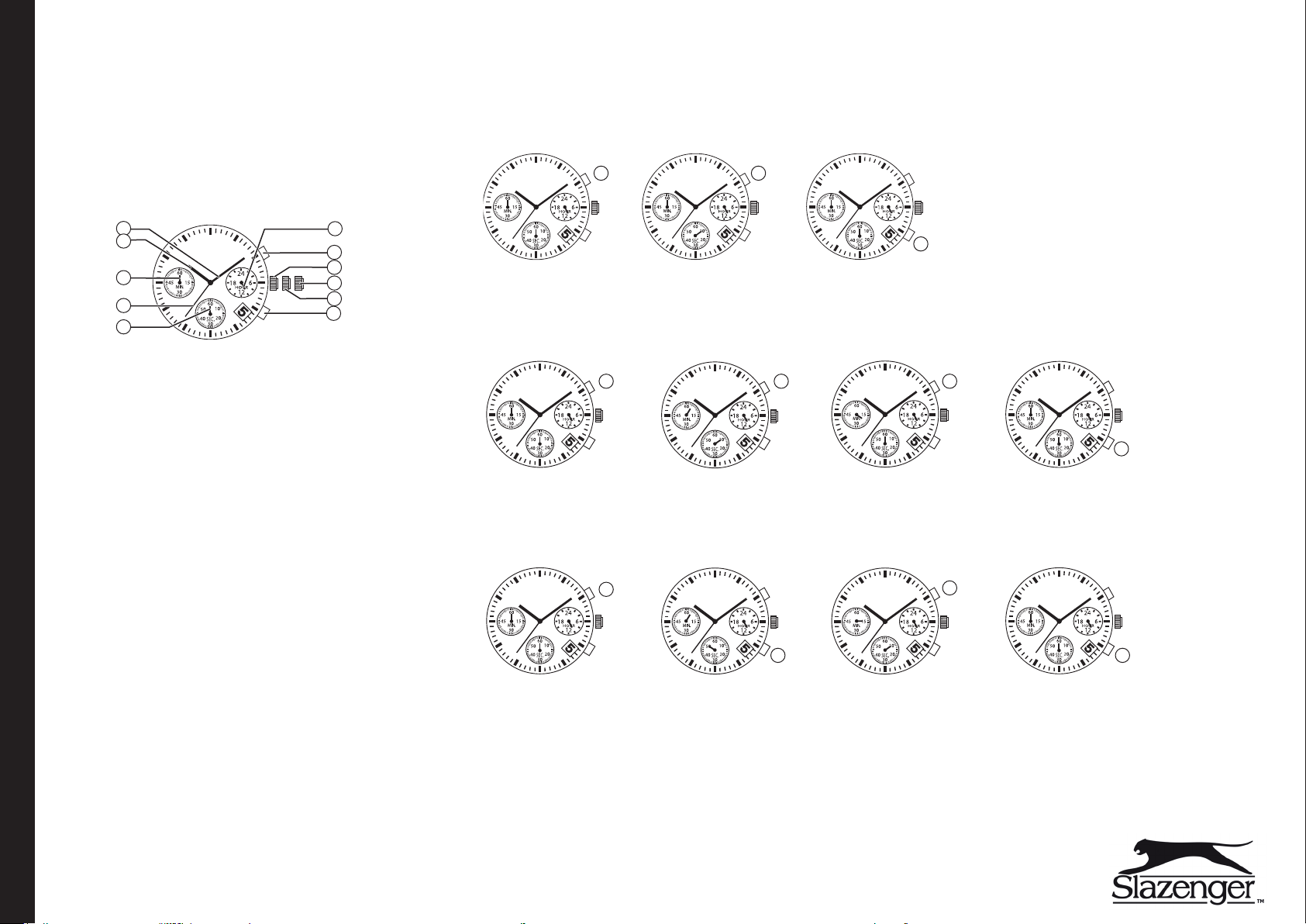
Painikkeet ja toiminnot
1
2
3
4
5
1. Minuuttiviisari
2. Tuntiviisari
3. Ajanottokellon minuuttiviisari
4. Sekuntiviisari
5. Ajanottokellon sekuntiviisari
6. 24 tunnin viisari
7. Ajanotto, käynnistys/pysäytys
8. Nupin normaaliasento
9. Nupin asento 2: Ajan asettaminen
10. Nupin asento 1: Päivämäärän asettaminen
11. Ajanotto, väliajat/nollaus
6
7
8
9
10
11
Ajanottokello - Ajanotto
Esimerkki 1: 100 metrin juoksu
Paina: (7) käynnistys – (7) pysäytys, maalin tulo – (11) nollaus.
Käynnistys
Esimerkki 2: Koripallo-ottelu
Paina: (7) käynnistys – (7) pysäytys-aikalisä – (7) käynnistys, ottelu käynnistyy uudelleen aikalisän jälkeen – (7) pysäytys – (11) nollaus.
Huom! Ajan voi pysäyttää niin monta kertaa kuin on tarvetta painamalla (7).
Käynnistys
Esimerkki 3: 5000 metrin juoksu
Paina: (7) käynnistys – (11) väliaika – (11) paluu ajanottoon – (7) pysäytys, maaliintulo – (11) nollaus.
Huom! Väliajan voi katsoa niin monta kertaa kuin on tarvetta painamalla (11).
Käynnistys Väliaika
Pysäytys (maalin tulo) Nollaus
7 7
11
Pysäytys NollausAikalisä/Käynnistys
7 7 7
Pysäytys
Nollaus
11
Käyttö
7
Aloitus
Irrota nupin ja kellon välissä oleva muoviliuska.
Päivämäärän ja ajan asettaminen
Huom! Ennen asetusten tekemistä: Nollaa ajanottokellon minuutti- ja
sekuntiviisarit vetämällä nuppi asentoon 2 ja painamalla (7) tai (11).
Paina nuppi takaisin normaaliasentoon.
1. Vedä nuppi asentoon 1.
2. Kierrä nuppia myötäpäivään, kun kellossa näkyy edellinen päivämäärä.
Ota huomioon, että päivämäärästä voi tulla väärä, jos päivämäärä asetetaan
samalla kun asetat kellonajan, joka on 21.00–24.00 välisenä aikana.
3. Vedä nuppi asentoon 2, kunnes sekuntiviisari osoittaa kello 12.00.
4. Aseta aika kiertämällä nuppia myötäpäivään.
5. Paina nuppi takaisin normaaliasentoon, kun oikea kellonaika on valittu.
SUOMI • ASIAKASPALVELU Puh: 020 111 2222, Sähköposti: [email protected] KOTISIVU www.clasohlson.fi
Kierrättäminen
Kierrätä tuote asianmukaisesti, kun poistat sen käytöstä.
Kysy tarkempia kierrätysohjeita kuntasi jäteneuvonnasta.
Tekniset tiedot
Mitat Ø 44 mm
Paristo 1×SR626
Vesitiiviys 5 ATM
7
11 11
Page 5
20140320
Armbanduhr Chronograph
Art.Nr. 36-4850 Modell SLZ800
Vor Inbetriebnahme diekomplette Bedienungsanleitung durchlesen und aufbewahren.
Irrtümer, Abweichungen und Änderungen behalten wir uns vor. Bei technischen
Problemen oder anderen Fragen freut sich unser Kundenservice über eine
Kontaktaufnahme.
Tasten und Funktionen
1
2
3
4
5
1. Minutenzeiger
2. Stundenzeiger
3. Minutenzeiger der Stoppuhr
4. Sekundenzeiger
5. Sekundenzeiger der Stoppuhr
6. 24-Stundenanzeige
7. Stoppuhr, Start/Stopp
8. Normalposition der Krone
9. Höchste Position der Krone: Einstellen der Zeit
10. Mittlere Position der Krone: Einstellen des Datums
11. Stoppuhr, Zwischenzeit/Reset
6
7
8
9
10
11
Stoppuhr – Zeit stoppen
Beispiel 1: 100-m-Lauf
Folgende Knöpfe betätigen: (7) Start – (7) Stopp, Ziel – (11) Reset.
Starten
7 7
Beispiel 2: Basketballspiel
Folgende Knöpfe betätigen: (7) Start – (7) Stopp-Time out – (7) Start, dasSpiel beginnt nach dem Time out – (7) Stopp – (11) Reset.
Achtung: DieZeit kann beliebig oft durch Betätigen von (7) gestoppt werden.
Starten
7 7 7
Beispiel 3: 5000-m-Lauf
Folgende Knöpfe betätigen: (7) Start – (11) Zwischenzeit – (11) Zeitnahme fortsetzen – (7) Stopp, Ziel – (11) Reset.
Achtung: DieZwischenzeit kann beliebig oft durch Betätigen von (11) gestoppt werden.
Starten Zwischenzeit
Stop (Ziel) Reset
Stop (Spiel beendet) ResetTime out/Spielbeginn
Stop
11
Reset
11
Bedienung
7
Starten
DasKunststoffstück zwischen Krone und Uhr herausziehen.
Einstellen von Datum und Uhrzeit
Achtung: Vor dem Einstellen: Den Sekunden- und Minutenzeiger der Stoppuhr
auf Null stellen, indem dieKrone auf diehöchste Position herausgezogen und
(7) oder (11) betätigt wird. Die Krone in ihre Normalposition zurück drücken.
1. Die Krone auf ihre mittlere Position herausziehen.
2. Die Krone im Uhrzeigersinn drehen, bis dasDatum des vorigen Tages
angezeigt wird. Unbedingt beachten, dass dieDatumanzeige falsch
sein kann, wenn dasaktuelle Datum eingestellt wird, bei gleichzeitiger
Einstellung derZeit auf eine Uhrzeit zwischen 21.00–24.00 Uhr.
3. DieKrone in ihre höchste Position ziehen, wenn der Sekundenzeiger auf
12.00 Uhr steht.
4. Die Krone im Uhrzeigersinn drehen, um diegewünschte Zeit einzustellen.
5. Die Krone wieder in ihre Normalposition drücken, wenn diegewünschte
Uhrzeit erreicht ist.
DEUTSCHLAND • KUNDENSERVICE Unsere Homepage www.clasohlson.de besuchen und auf Kundenservice klicken.
Hinweise zur Entsorgung
Bitte dasProdukt entsprechend den lokalen Bestimmungen entsorgen.
Weitere Informationen sind von der Gemeinde oder den kommunalen
Entsorgungsbetrieben erhältlich.
Technische Daten
Abmessung Ø 44 mm
Batterie 1×SR626 (im Lieferumfang enthalten)
Wasserdichte 5 ATM
7
11 11
 Loading...