

Page 1
English
Selfie stick/tripod
Art. no. 39-3574 Model APL-D11
Please read the entire instruction manual before using the
product and then keep it for future reference. We accept no
liability for any errors in the text or images and we reserve the
right to make any necessary changes to technical data. If you
have technical problems or other questions, please contact our
customer service team.
Safety
• Never expose the product to powerful
vibration, impacts, moisture or water.
• Do not let children play with the product.
Using the product
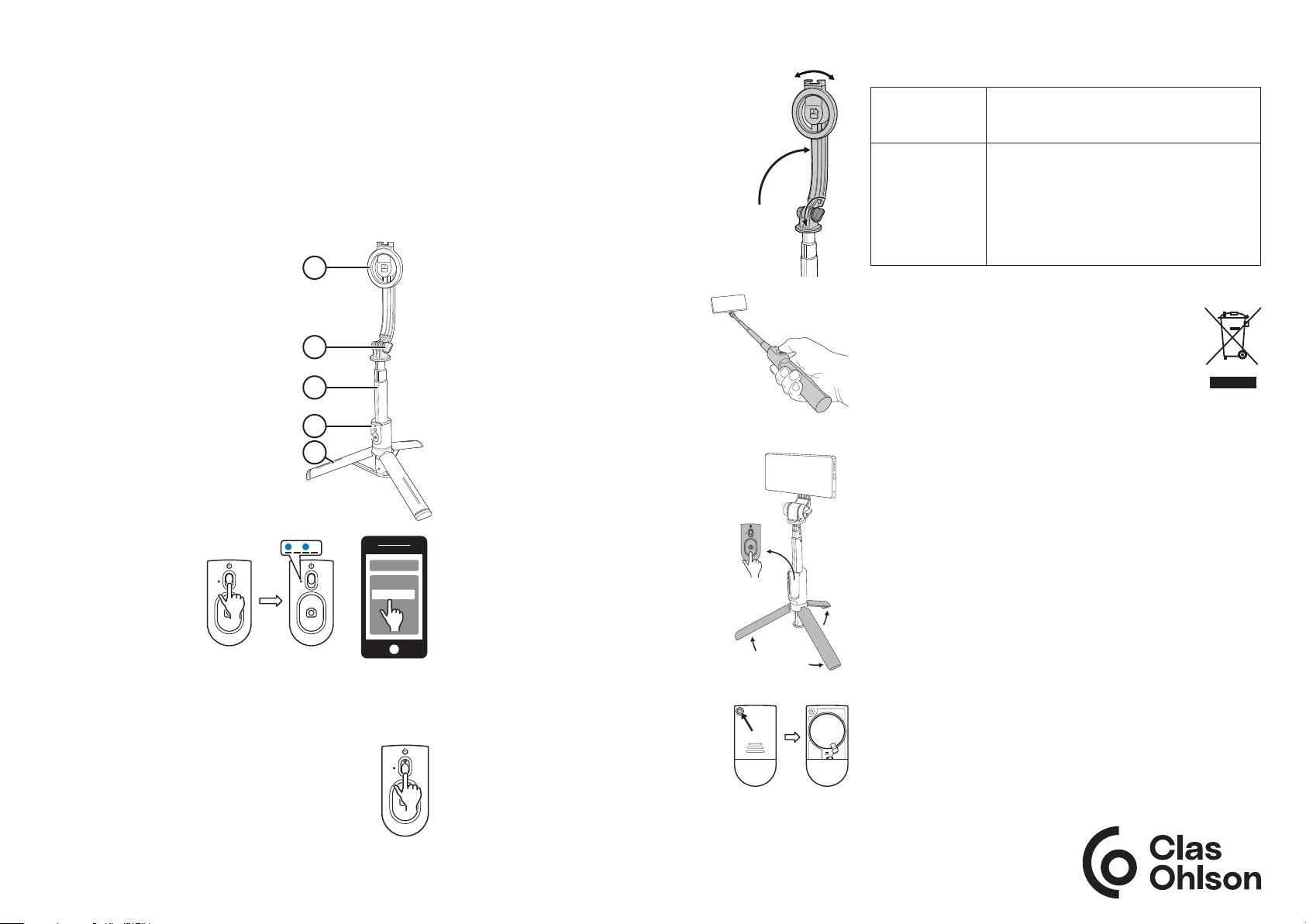
1. Rotatable magnetic phone holder
2. Locking knob for the holder
3. Telescopic arm
4. Detachable remote control
5. Fold-out tripod legs
Remote control
Pairing
1. Activate the remote
control by pushing
the on/off switch
upwards. The LED
indicator light will
begin to flash blue.
2. Activate Bluetooth on
the smartphone that
you want to pair and begin scanning for the remote control.
3. The remote control is called Selife. Select "Connect". When
the devices have been paired, the LED indicator
light will go out.
• When the remote control is switched on, it will
automatically connect to the Bluetooth device that
it was last connected to.
• If the remote control is not used for about 5
minutes, it will automatically go into standby mode.
Switch the remote control off completely by pushing
the on/off switch downwards.
ON
1
2
3
4
5
Bluetooth
Devices
Selfie
OFF
Attaching a smartphone
1. Loosen the locking knob and fold out
the smartphone holder. Undo the locking
knob.
2. Remove the cover from the phone, if it
has one, and attach the phone to the
magnetic holder. Make sure that the
phone is held securely in place.
3. Activate the camera on the phone and
check that the volume button is set to
work as a shutter release button.
Taking photos or videos
• Extend the telescopic shaft to the
length you want.
• Rotate/angle the phone towards you.
• You can take selfies or videos of
yourself by leaving the remote control
on the handle.
• Fold out the tripod legs to use the
selfie stick as a stand.
• Remove the remote control from
the handle and press the shutter
release button to take photos from a
distance of up to 10 m.
Cleaning and maintenance
Clean the product by wiping it with a
damp cloth. Use only mild detergents.
Never use solvents or corrosive
chemicals.
Replacing the battery
1. Undo the screw on the battery cover on
the back of the remote control.
2. Remove the cover by sliding it upwards.
3. Take out the old battery and insert a
new CR1632 battery. Make sure that the
positive side of the battery is facing the
battery cover.
4. Screw the cover back on.
CR1632
Troubleshooting guide
The remote
control will not
switch on.
The camera will
not take photos.
The battery might be flat. Replace the
battery.
• Make sure that it has been paired
correctly. See the section Pairing.
• Is the camera on your smartphone
switched on?
• Make sure that the volume button on the
phone is set to work as a shutter release
button.
Responsible disposal
This symbol indicates that the product should not be
disposed of with general household waste. This applies
throughout the entire EU. To prevent any harm to the
environment or health hazards caused by incorrect
waste disposal, the product must be handed in for
recycling so that the materials can be disposed of in
a responsible way. To recycle the product, take it to your local
recycling facility or contact the retailer. They will ensure that
the product is disposed of in a way that does not harm the
environment.
Specifications
Remote control
Baery CR1632
Bluetooth
Range 10 m
Output max. 10 dBm
Frequency range 2402−2480 MHz
Sele sck/tripod
Dimensions Retracted – 54×58×210 mm
Extended – 54×58×1045 mm
Weight 186 g
+
Simplified EU Declaration Of Conformity
Clas Ohlson AB hereby declares that the radio equipment type
APL-D11 is in compliance with Directive 2014/53/EU.
The full text of the EU declaration of conformity is available on
the following website: www.clasohlson.com
Ver. 20240610
Page 2
Svenska
Selfiestick/Tripod
Art.nr 39-3574 Modell APL-D11
Läs igenom hela bruksanvisningen före användning och spara
den sedan för framtida bruk. Vi reserverar oss för ev. text- och
bildfel samt ändringar av tekniska data. Vid tekniska problem eller
andra frågor, kontakta vår kundtjänst.
Säkerhet
• Utsätt aldrig produkten för starka
vibrationer, stötar, fukt eller väta.
• Låt inte barn leka med produkten.
Användning
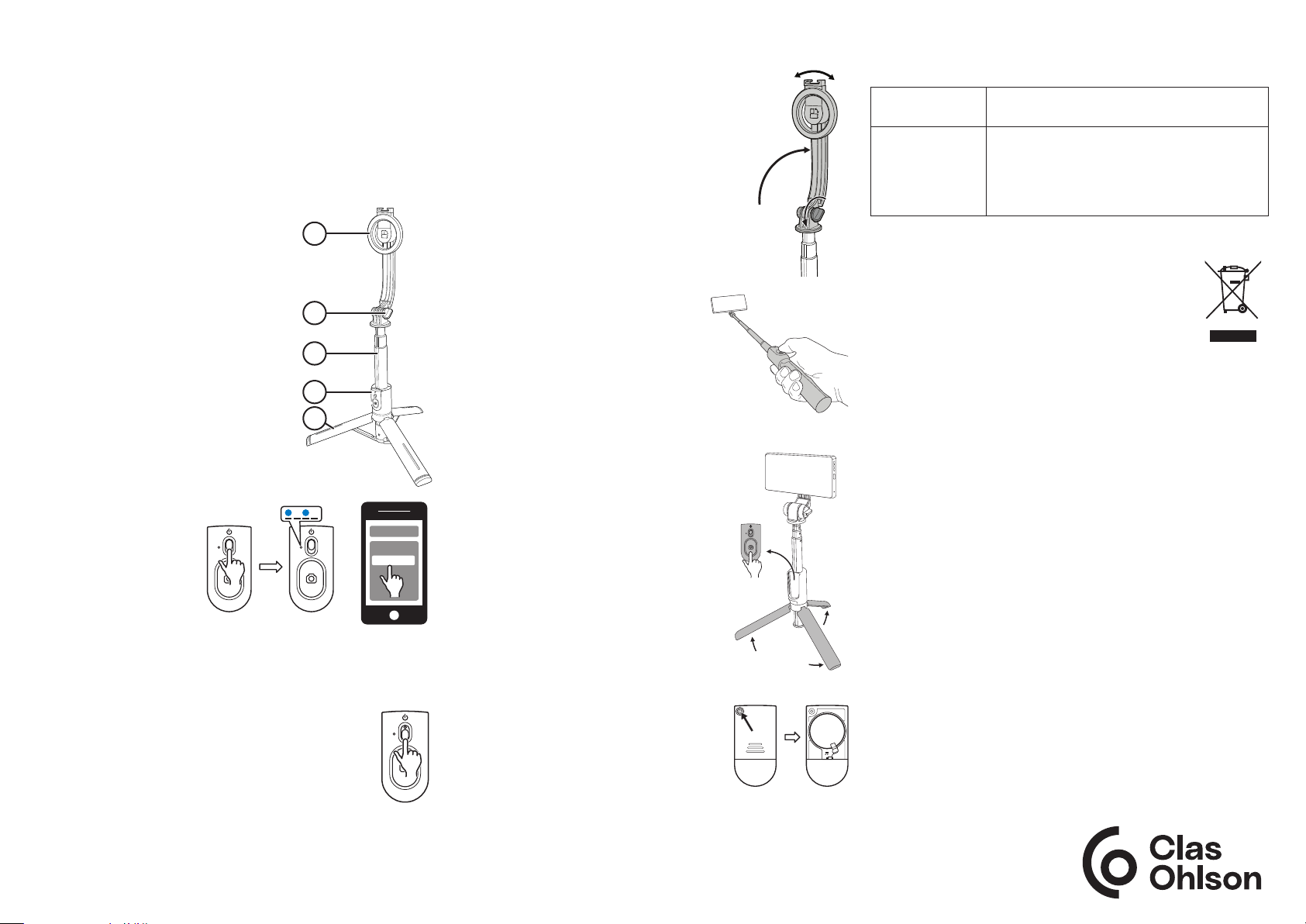
1. Roterbar magnetisk telefonhållare
2. Låsvred för telefonhållare
3. Teleskopisk arm
4. Löstagbar fjärrkontroll
5. Utfällbara tripod-ben
Fjärrkontroll
Parkoppling
1. Aktivera fjärr kontrollen
genom att föra på/
av reglaget uppåt.
LED-indikatorn börjar
blinka blått.
2. Aktivera Bluetooth på
den mobiltelefon som
ska anslutas och sök
sedan efter fjärrkontrollen.
3. Fjärrkontrollen visas som Selife, välj anslut. När anslutningen
upprättats slocknar LED-indikatorn.
• När fjärrkontrollen slås på ansluter den automatiskt
till den senast anslutna bluetooth-enheten.
• Fjärrkontrollen går automatiskt ner i standby-läge
efter 5 minuters inaktivitet.
Stäng av fjärrkontrollen helt genom att föra reglaget
nedåt.
ON
1
2
3
4
5
Bluetooth
Devices
Selfie
OFF
Fäst mobiltelefonen
1. Lossa låsvredet och fäll upp
telefonhållaren. Dra åt vredet.
2. Ta av ev. skal från mobiltelefonen och
fäst telefonen på den magnetiska
hållaren. Försäkra dig om att telefonen
sitter fast ordentligt.
3. Aktivera kameran på telefonen och
kontollera att volymknappen är inställd
att fungera som utlösare.
Fotografera/filma
• Dra ut teleskop-armen till
önskad längd.
• Rotera/vinkla telefonen mot dig
efter behov.
• Ta selfies eller filma dig själv genom låta fjärrkontrollen sitta kvar
på handtaget.
• Använd selfiepinnen som stativ
genom att fälla ut tripod-benen.
• Ta loss fjärrkontrollen från handtaget
och tryck på utlösaren för att ta kort
på avstånd (upp till 10 m).
Skötsel och underhåll
Rengör produkten med enlätt fuktad
trasa. Använd ettmilt rengöringsmedel,
aldrig lösningsmedel eller frätande
kemikalier.
Batteribyte
1. Skruva ur skruven som håller
batterilocket på fjärrkontrollens baksida.
2. Ta bort locket genom att dra det uppåt.
3. Ta ur det gamla batteriet och sätt i ett
nytt CR1632-batteri. Se till att pluspolen hamnar mot batterilocket.
4. Skruva tillbaka locket.
CR1632
Felsökningsschema
Fjärrkontrollen
går inte att starta.
Det går inte att
fotografera.
Batteriet kan vara urladdat. Byt ut batteriet.
• Försäkra dig om att parkopplingen är
korrekt utförd. Se avsnittet Parkoppling.
• Är kameran aktiverad på din telefon?
• Kontrollera att volymknappen på telefonen
är inställd att fungera som utlösare.
Avfallshantering
Denna symbol innebär att produkten inte får kastas
tillsammans med annat hushållsavfall. Detta gäller
inom hela EU. För att förebygga eventuell skada på
miljö och hälsa, orsakad av felaktig avfallshantering,
ska produkten lämnas till återvinning så att
materialet kan tas omhand på ettansvarsfullt sätt.
När du lämnar produkten till återvinning, använd dig av de
returhanteringssystem som finns där du befinner dig eller
kontakta inköpsstället. De kan se till att produkten tas om hand
på ettför miljön tillfredställande sätt.
Specifikationer
Fjärrkontroll
Baeri CR1632
Bluetooth
Räckvidd 10 m
Uteekt max 10 dBm
Frekvensområde 2402−2480 MHz
Selesck/tripod
Må Inskjuten - 54×58×210 mm
Utdragen - 54×58×1045 mm
Vikt 186 g
Simplified EU Declaration Of Conformity
Hereby, Clas Ohlson AB declares that the radio equipment type
APL-D11 is in compliance with Directive 2014/53/EU.
+
The full text of the EU declaration of conformity is available at
the following internet address: www.clasohlson.com
Ver. 20240610
Sverige • kundtjänst, tel. 0247/445 00 e-post: [email protected]
internet: www.clasohlson.se brev: Clas Ohlson AB, 793 85 Insjön
Page 3
Norsk
Selfiestick/Tripod
Art.nr. 39-3574 Modell APL-D11
Les gjennom hele bruksanvisningen før produktet tas i bruk og ta
vare på den for fremtidig bruk. Vi tar forbehold om eventuelle feil
i tekst og bilder, samt endringer av tekniske data. Ved tekniske
problemer eller spørsmål, ta kontakt med vårt kundesenter.
Sikkerhet
• Utsett aldri produktet for sterke
vibrasjoner, støt eller fuktighet.
• La ikke barn leke med produktet.
Bruk
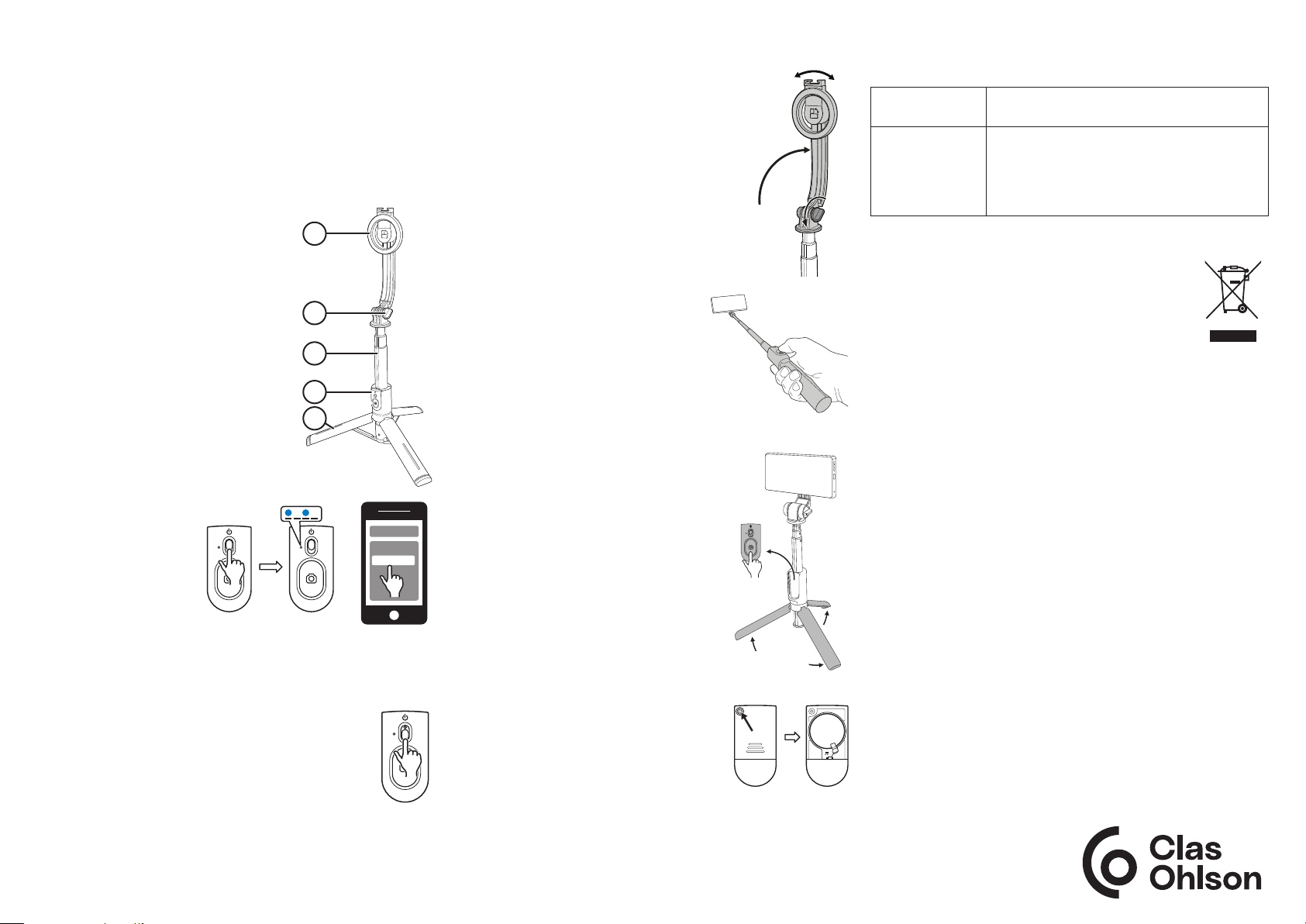
1. Roterbar, magnetisk telefonholder
2. Låseratt for telefonholder
3. Teleskoparm
4. Avtagbar fjernkontroll
5. Utfellbare tripodbein
Fjernkontroll
Paring
1. Fjernkontrollen
aktiveres ved at
bryteren på kameraets
forside føres oppover.
LED-indikatoren
begynner å blinke blått.
2. Aktiver Bluetooth på
mobiltelefonen som
skal kobles til og søk deretter etter fjernkontrollen.
3. Fjernkontrollen vises som Selife, velg å koble til. Når
tilkoblingen er ferdig vil LED-indikatoren slukkes.
• Når fjernkontrollen slås på, kobler den seg automatisk
til den sist tilkoblede Bluetooth-enheten.
• Fjernkontrollen går automatisk til standby-modus
etter 5 minutters inaktivitet.
Fjernkontrollen skrus av ved at bryteren på forsiden
føres nedover.
ON
1
2
3
4
5
Bluetooth
Devices
Selfie
OFF
Fest mobiltelefon
1. Løsne låserattet og fell opp
telefonholderen. Skru igjen rattet.
2. Fjern eventuelt deksel fra mobiltelefonen
og fest telefonen på den magnetiske
holderen. Forsikre deg om at telefonen
sitter godt festet.
3. Aktiver kameraet på telefonen og
kontroller at volumknappen er innstilt
som utløser.
Fotografere/filme
• Dra teleskoparmen ut til ønsket
lengde.
• Rotere/vinkle mobilen mot deg.
• Ta selfies eller film deg selv
ved å la fjernkontrollen sitte på
håndtaket.
• Benytt selfiestangen som stativ ved å
felle ut tripodbena.
• Løsne fjernkontrollen fra håndtaket
og trykk på utløseren for å ta bilde på
avstand (opptil 10 meter).
Vedlikehold
Rengjør produktet med en lett fuktet
klut. Bruk et mildt rengjøringsmiddel,
aldri løsemidler eller etsende kjemikalier.
Batteribytte
1. Skru ut skruen som holder fast
batterilokket på undersiden av
fjernkontrollen.
2. Fjern lokket ved å trekke det oppover.
3. Ta ut det gamle batteriet og sett i et nytt
CR1632-batteri. Påse at plusspolen
vender mot batterilokket.
4. Skru lokket på igjen.
CR1632
Feilsøkingsskjema
Får ikke startet
fjernkontrollen.
Det går ikke å
fotografere.
Batteriet kan være utladet. Bytt batteri.
• Påse at paringen er
riktig utført. Se avsnittet Paring.
• Er kameraet aktivert på telefonen din?
• Kontroller at volumknappen på telefonen
er stilt inn som utløser.
Avfallshåndtering
Symbolet betyr at produktet ikke skal kastes sammen
med øvrig husholdningsavfall. Dette gjelder i hele EØS.
For å forebygge eventuelle skader på helse og miljø
som følge av feil håndtering av avfall, skal produktet
leveres til gjenvinning, slik at materialet blir tatt hånd
om på en tilfredsstillende måte. Benytt eksisterende
systemer for returhåndtering eller kontakt forhandler når
produktet skal kasseres. De vil sørge for at produktet tas hånd
om på en miljømessig tilfredsstillende måte.
Spesifikasjoner
Fjernkontroll
Baeri CR1632
Bluetooth
Rekkevidde 10 m
Uteekt maks. 10 dBm
Frekvensområde 2402−2480 MHz
Selesck/Tripod
Mål Innskjøvet – 54×58×210 mm
Trukket ut – 54×58×1045 mm
Vekt 186 g
Simplified EU Declaration Of Conformity
Hereby, Clas Ohlson AB declares that the radio equipment type
APL-D11 is in compliance with Directive 2014/53/EU.
The full text of the EU declaration of conformity is available at
+
the following internet address: www.clasohlson.com
Ver. 20240610
Norge • kundesenter, tlf. 23 21 40 00 e-post: [email protected]
internett: www.clasohlson.no post: Clas Ohlson AS, Postboks 485 Sentrum, 0105 Oslo
Page 4
Suomi
Selfietikku/Kolmijalka
Tuotenro 39-3574 Malli APL-D11
Lue koko käyttöohje ja säästä se tulevaa käyttöä varten.
Pidätämme oikeuden teknisten tietojen muutoksiin. Emme vastaa
mahdollisista teksti- tai kuvavirheistä. Jos tuotteeseen tulee
teknisiä ongelmia, ota yhteys asiakaspalveluun.
Turvallisuus
• Älä altista tuotetta voimakkaalle tärinälle,
iskuille, kosteudelle tai nesteille.
• Älä anna lasten leikkiä tuotteella.
Käyttö
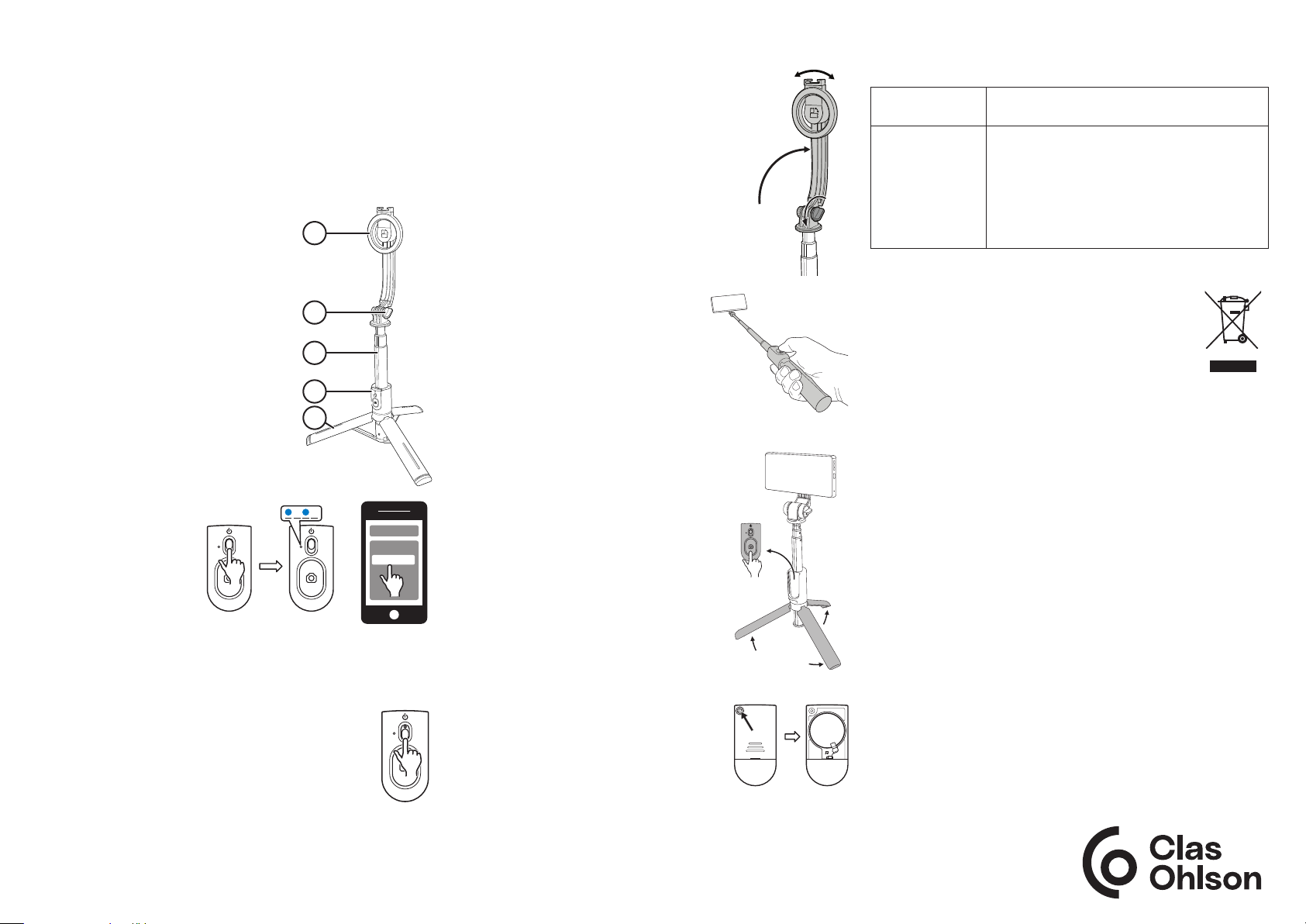
1. Kääntyvä magneettinen puhelinpidike
2. Puhelinpidikkeen lukitusvipu
3. Teleskooppivarsi
4. Irrotettava kaukosäädin
5. Ulostaitettavat kolme jalkaa
Kaukosäädin
Yhdistäminen
1. Aktivoi kaukosäädin
laittamalla päälle-/
pois päältä -säädin
yläasentoon. LEDmerkkivalo alkaa
vilkkua sinisenä.
2. Aktivoi yhdistettävän
puhelimen Bluetooth
ja etsi kaukosäädin,
joka näkyy nimellä Sele. Valitse liitä. LED-valo sammuu, kun
yhteys on muodostettu.
• Kun kaukosäädin laitetaan päälle, se muodostaa
automaattisesti yhteyden viimeisimpänä liitettyyn
bluetooth-laitteeseen.
• Kaukosäädin menee automaattisesti valmiustilaan,
jos sitä ei käytetä viiteen minuuttiin.
Sammuta kaukosäädin kokonaan laittamalla säädin
alkuasentoon.
ON
1
2
3
4
5
Bluetooth
Devices
Selfie
OFF
Puhelimen kiinnittäminen
1. Avaa lukitusvipu ja avaa puhelinpidike.
Kiristä lukitusvipu.
2. Poista puhelimesta mahdollinen suojakuori
ja kiinnitä puhelin magneettipidikkeeseen.
Varmista, että puhelin on kunnolla kiinni.
3. Aktivoi puhelimen kamera ja varmista, että
puhelimen äänenvoimakkuuspainike on
asetettu toimimaan laukaisimena.
Valokuvaus/videokuvaus
• Vedä teleskooppivarsi sopivan
pituiseksi.
• Kierrä/kallista puhelinta itseäsi kohti
tarpeen mukaan.
• Ota itsestäsi selfieitä tai videoita
pitämällä kaukosäädin kiinni kahvassa.
• Käytä selfietikkua jalustana
taittamalla kolme jalkaa auki.
• Irrota kaukosäädin kahvasta ja paina
laukaisinta ottaaksesi kuvan etäisyyden
päästä (enintään 10 metriä).
Huolto ja kunnossapito
Pyyhi tuote kevyesti kostutetulla liinalla.
Käytä mietoa puhdistusainetta. Älä käytä
liuottimia tai syövyttäviä kemikaaleja.
Pariston vaihtaminen
1. Ruuvaa paristolokeron ruuvi irti
kaukosäätimen takaa.
2. Irrota kansi vetämällä sitä ylöspäin.
3. Poista vanha paristo ja aseta tilalle uusi
CR1632-paristo. Varmista, että plusnapa on paristolokeron kantta kohti.
4. Kiinnitä kansi takaisin paikalleen.
CR1632
Vianhakutaulukko
Kaukosäädin ei
käynnisty.
Valokuvaaminen
ei onnistu.
Paristo saattaa olla tyhjä. Vaihda paristo.
• Varmista, että yhteys on muodostettu
oikein. Katso luku Yhdistäminen.
• Varmista, että puhelimen kamera on
aktivoitu.
• Varmista, että puhelimen äänenvoimakkuuspainike on asetettu toimimaan
laukaisimena.
Kierrättäminen
Tämä kuvake tarkoittaa, että tuotetta ei saa hävittää
kotitalousjätteen seassa. Tämä koskee koko EU-aluetta.
Virheellisestä hävittämisestä johtuvien mahdollisten
ympäristö- ja terveyshaittojen ehkäisemiseksi tuote
tulee viedä kierrätettäväksi, jotta materiaali voidaan
käsitellä vastuullisella tavalla. Kierrätä tuote käyttämällä
paikallisia kierrätysjärjestelmiä tai ota yhteys ostopaikkaan.
Ostopaikassa tuote kierrätetään vastuullisella tavalla.
Tiedot
Kaukosäädin
Paristo CR1632
Bluetooth
Kantama 10 m
Lähtöteho enint. 10 dBm
Taajuusalue 2402−2480 MHz
Selekku/Tripodi
Mitat Kokoontaitettuna - 54×58×210 mm
Avattuna - 54×58×1045 mm
Paino 186 g
Simplified EU Declaration Of Conformity
Hereby, Clas Ohlson AB declares that the radio equipment type
APL-D11 is in compliance with Directive 2014/53/EU.
+
The full text of the EU declaration of conformity is available at
the following internet address: www.clasohlson.fi
Ver. 20240610
Suomi • asiakaspalvelu puh. 020 111 2222 sähköposti: [email protected]
kotisivu: www.clasohlson.fi osoite: Clas Ohlson Oy, Kaivokatu 10 B, 00100 Helsinki
 Loading...