

Page 1
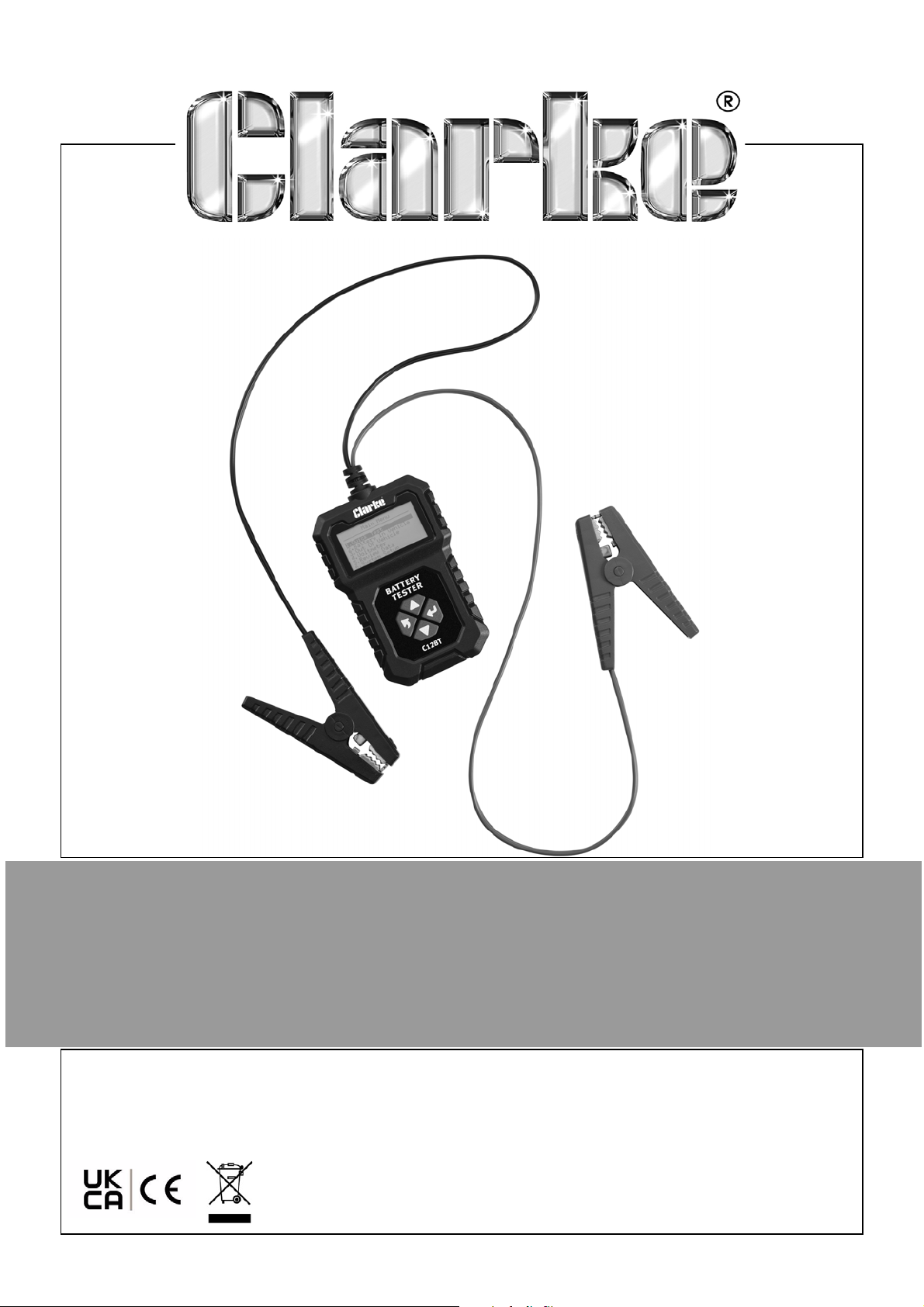
12V BATTERY TESTER
MODEL NO: C12BT
PART NO: 6260108
OPERATION & MAINTENANCE
INSTRUCTIONS
ORIGINAL INSTRUCTIONS DL0424
Page 2
INTRODUCTION
Thank you for purchasing this CLARKE Battery Tester.
Before attempting to use this product, please read this manual thoroughly and
follow the instructions carefully. In doing so you will ensure the safety of yourself
and that of others around you, and you can look forward to your purchase
giving you long and satisfactory service.
GUARANTEE
This product is guaranteed against faulty manufacture for a period of 12
months from the date of purchase. Please keep your receipt which will be
required as proof of purchase.
This guarantee is invalid if the product is found to have been abused or
tampered with in any way, or not used for the purpose for which it was
intended.
Faulty goods should be returned to their place of purchase, no product can
be returned to us without prior permission.
This guarantee does not effect your statutory rights.
ENVIRONMENTAL RECYCLING POLICY
Through purchase of this product, the customer is taking on the
obligation to deal with the WEEE in accordance with the WEEE
regulations in relation to the treatment, recycling & recovery and
environmentally sound disposal of the WEEE.the laws governing Waste
Electrical and Electronic Equipment (WEEE) at a recognised disposal facility.
2
Parts & Service: 020 8988 7400 / E-mail: [email protected] or [email protected]
Page 3
SAFETY INSTRUCTIONS
WARNING: PLEASE READ THESE INSTRUCTIONS AS WELL AS THOSE IN
YOUR VEHICLE HANDBOOK VERY CAREFULLY BEFORE USING THE TESTER
KEEP THEM IN A SAFE PLACE FOR FUTURE REFERENCE.
WARNING: HIGH VOLTAGES ARE PRESENT AT THE FOLLOWING POINTS: THE IGNITION COIL, DISTRIBUTOR CAP, IGNITION CABLE, SPARK PLUGS.
1. CLARKE International are not liable for any damages or consequences
resulting from:
• Connection and installation errors.
• Damage to the device due to mechanical influences or voltage surges
or any modification to the device.
• Any unauthorized manipulation to the product which would lead to
cancellation of the guarantee.
• Use of the device for purposes other than described in this instruction
manual.
• Any influence of fluids.
2. DO NOT use the device in a moist or wet environment.
3. DO NOT smoke, strike a match or cause a spark near the vehicle while
testing.
4. DO NOT use the tester close to flammable materials.
5. DO NOT use the tester in an explosive environment.
6. Make sure the device is always positioned in a safe place.
• The device must be placed out of reach of children.
• DO NOT expose the device to direct sunlight or other heat source.
7. Store the tester in a safe, dry place after use.
8. DO NOT try to use other cables with this product.
9. DO NOT open the case. There are no replaceable parts inside the product.
10. If the device malfunctions, please consult your CLARKE dealer.
3
Parts & Service: 020 8988 7400 / E-mail: [email protected] or [email protected]
Page 4

11. DO NOT test a battery within a short period of time after charging or use, as
the result maybe inaccurate.
12. Perform the test when the battery is in a cold state, when the voltage is
stable.
13. Make sure all electrical equipment is turned off when testing.
14. DO NOT use the device while the vehicle is in motion. The tester is not
suitable for permanent installation in a motor vehicle.
15. Make sure the vehicle is securely parked and the handbrake applied
before using the tester. For vehicles with automatic transmission the “park
position” must be engaged and the hand brake must be engaged.
16. DO NOT use other measuring devices when using the tester.
17. Seek professional help if you are unsure about anything related to the
electrical system in your vehicle.
18. When using the crocodile clips for testing, the red clip must be clamped to
the positive pole (+ or Red) of the battery, and the black clip must be
clamped to the negative pole (- or black).
DO NOT
reverse the
connections.
19. If the outer insulation of the cable is damaged, it may cause a short circuit.
Stop using it immediately and contact your CLARKE dealer.
OTHER INFORMATION
1. The Battery Tester is suitable for all types of 12V lead acid batteries (vehicle
batteries).
4
Parts & Service: 020 8988 7400 / E-mail: [email protected] or [email protected]
Page 5
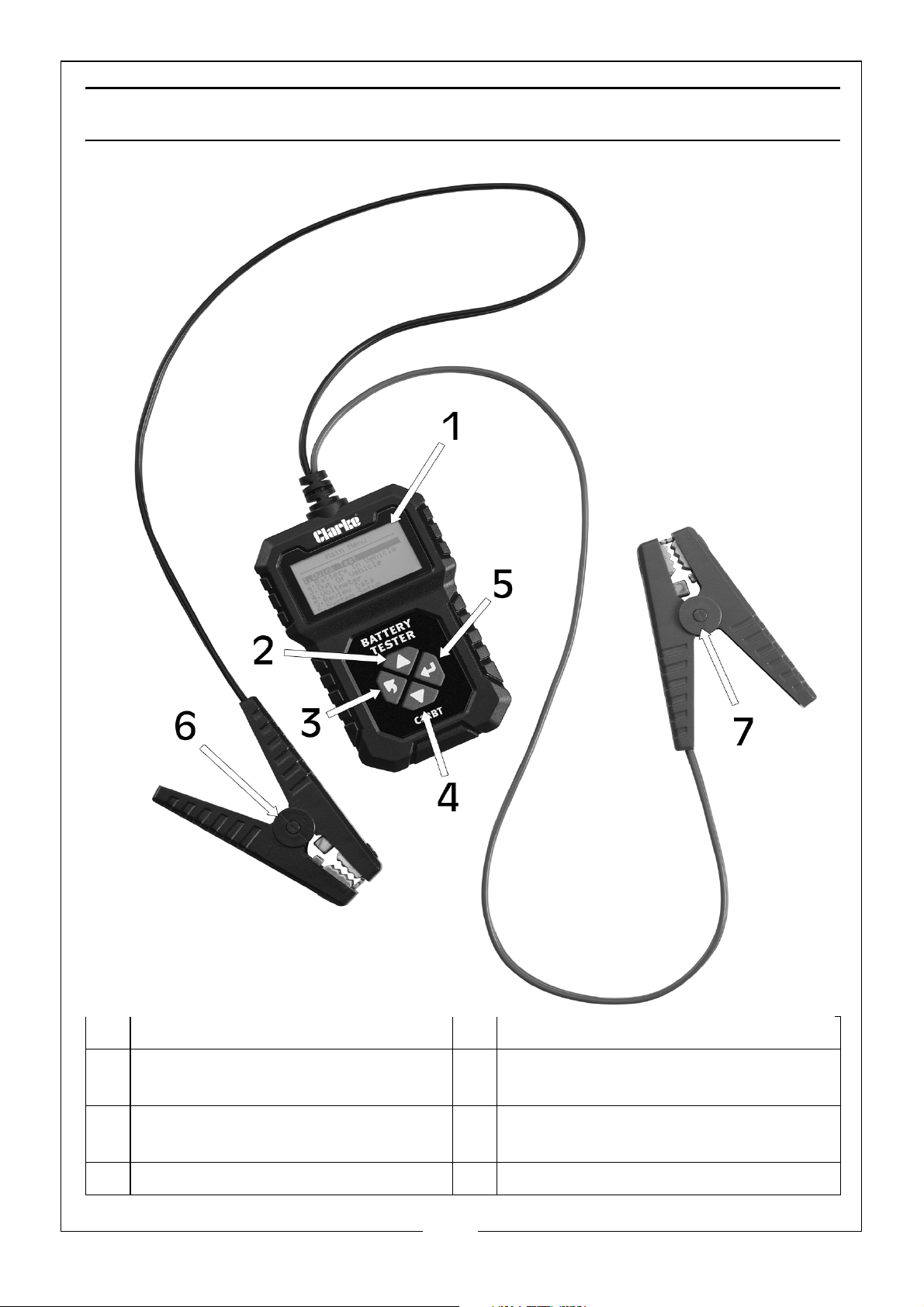
PRODUCT IDENTIFICATION
1 LCD Display Screen 5 Exit/Back Button
2 Up Button 6 Black/Negative Crocodile Clip
Test Lead
3 Enter/Select Button 7 Red/Positive Crocodile Clip Test
Lead
4 Down Button
5
Parts & Service: 020 8988 7400 / E-mail: [email protected] or [email protected]
Page 6

PRODUCT DESCRIPTION
PRODUCT PROFILE
This battery tester adopts currently the worlds most advanced conductance
testing technology to easily, quickly and accurately measure the actual cold
cranking amps capacity of the vehicle starting battery, healthy state of the
battery itself and common fault of the vehicle starting and charging systems.
This will help maintenance personnel find the problem quickly and accurately
to achieve a quick vehicle repair.
1. Test all automotive cranking lead acid batteries, including ordinary lead
acid batteries, AGM flat plate batteries, AGM spiral batteries, GEL
batteries, EFB batteries, etc.
2. Directly detect a bad cell battery.
3. Polarity reverse connection protection, reverse connection will not
damage the tester or affect the vehicle or battery.
4. Directly test the battery for loss of electricity (no need to fully charge
before testing).
5. Supports multi-languages. You can select from the following languages:
Chinese Simple, Chinese Traditional, English, Japanese, Russian, Spanish,
French, Italian, German.
6. Testing standards include currently the worlds majority of battery standards:
CCA, BCI, CA, MCA, JIS, DIN, IEC, EN, SAE, GB (See Technical Parameters
section for measurement range).
FUNCTION DESCRIPTION
The main functions of this battery tester include: Battery Test, Cranking Test,
Charging Test and other additional functions.
1. Battery Test: Analyses the battery health status to calculate the actual cold
cranking capability of the battery and the aging extent, which provides
reliable analysis for the testing and maintenance of the battery. It helps
identify the need to replace the battery in advance when the battery is
becoming aged.
2. Cranking Test: This is to test and analyse the starter motor. Through testing
the actual required cranking current and cranking voltage of the starter
motor. It can identify whether the starter motor works correctly. There are
several reasons why the starter motor maybe abnormal, for example: a
lubricating system fault causing the starting loaded torque to increase or
rotor friction of the starter motor causing increasing friction of the starter
motor itself.
6
Parts & Service: 020 8988 7400 / E-mail: [email protected] or [email protected]
Page 7
3. Charging Test: This is to check and analyse the charging system, including
the generator, rectifier, rectifier diode, etc., to find out whether the output
voltage of the generator is normal, the rectifier diode works correctly and
the charging current is normal. If one of the above mentioned parts is not
operating normally, it will lead to over charging or incomplete charging of
the battery, this will damage and also greatly shorten the life of other
loaded electrical appliances.
4. Additional Functions: These include set language, voltmeter and screen
brightness adjustment.
TECHNICAL PARAMETERS
BATTERY SYSTEM STANDARD AND RATING
This tester will test each battery according to the selected system and rating
as follows:
1. System Standards
• CCA: Cold Cranking Amps, specified by SAE & BCI, most frequently used
value for starting batteries at 0
o
F (-18oC)
• BCI: Battery Council International standard.
• CA: Cranking Amps standard.
• MCA: Marine Cranking Amps standard.
• JIS: Japan Industrial Standard.
• DIN: German Institute of Standardization standard.
• IEC: Internal Electro Technical Commission standard.
• EN: European Automobile Industry Association standard.
• SAE: Society of Automotive Engineers standard.
• GB: China National standard.
2. Cold Cranking Amps Measurement Range:
Measurement
Standard
Measurement
Range
Measurement
Standard
Measurement
Range
CCA 100 - 2000 DIN 100 - 1400
BCI 100 - 2000 IEC 100 - 1400
CA 100 - 2000 EN 100 - 2000
MCA 100 - 2000 SAE 100 - 2000
JIS 26A17 - 245H52 GB 30 - 220Ah
3. Voltage Measure Range: 8 - 30V DC
7
Parts & Service: 020 8988 7400 / E-mail: [email protected] or [email protected]
Page 8
PRODUCT SETUP
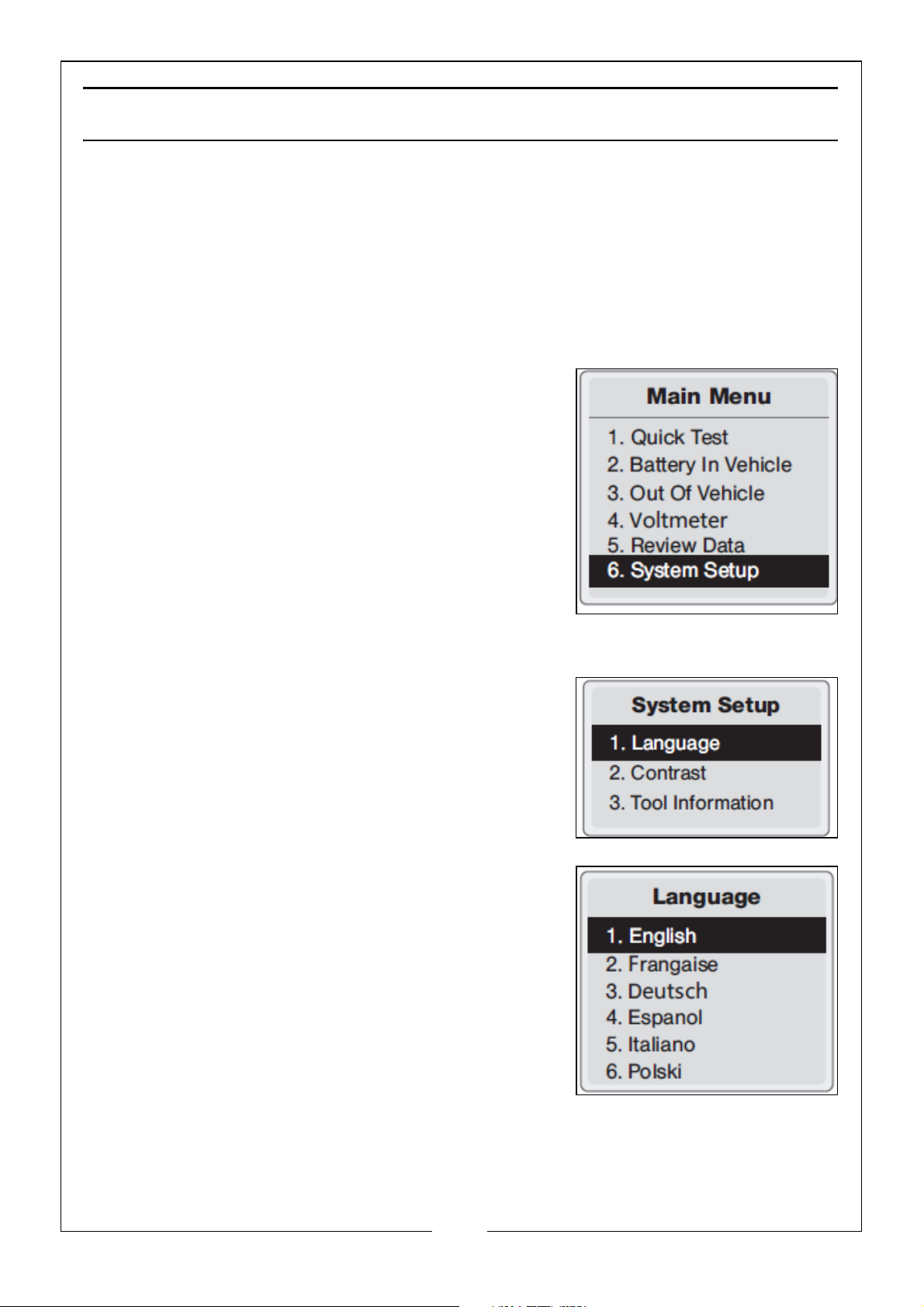
This tester allows you to make the following adjustments and settings:
• Language: Selects desired language.
• Contrast Adjustment: Adjusts the contrast of the LCD display.
• Tool Information: The tester shows the latest software & hardware
versions.
TESTER SETUP
1. From the main menu, select the system setup,
and press the ‘ENTER’.button.
LANGUAGE
1. From the System Setup menu, use the ‘ENTER’
button to select Language.
2. Use the ‘UP’ and ‘DOWN’ buttons to select
the desired language and then press the
‘ENTER’ button to save your selection and
return to the previous menu.
8
Parts & Service: 020 8988 7400 / E-mail: [email protected] or [email protected]
Page 9
CONTRAST
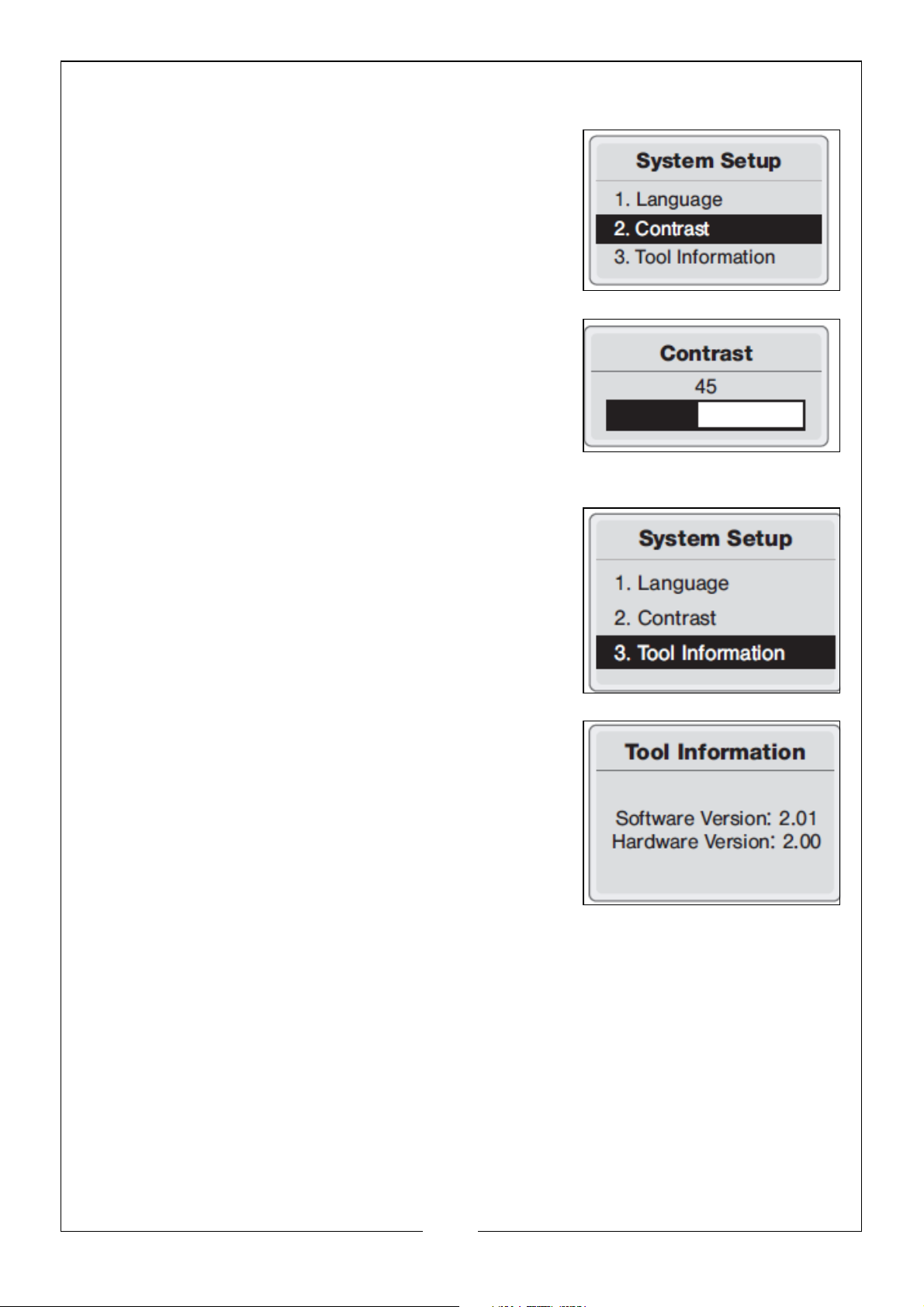
1. From the System Setup menu, use the ‘ENTER’
button to select contrast.
2. Use the ‘UP’ and ‘DOWN’ buttons to select
the contrast value and press the ‘ENTER’
button to save your selection and return to
the previous menu.
TOOL (TESTER) INFORMATION
1. From the System Setup menu, use the ‘ENTER’
button to select Tool Information.
2. Press the ‘EXIT’ button to return to the previous
menu.
9
Parts & Service: 020 8988 7400 / E-mail: [email protected] or [email protected]
Page 10
BATTERY TESTER OPERATION
QUICK TEST
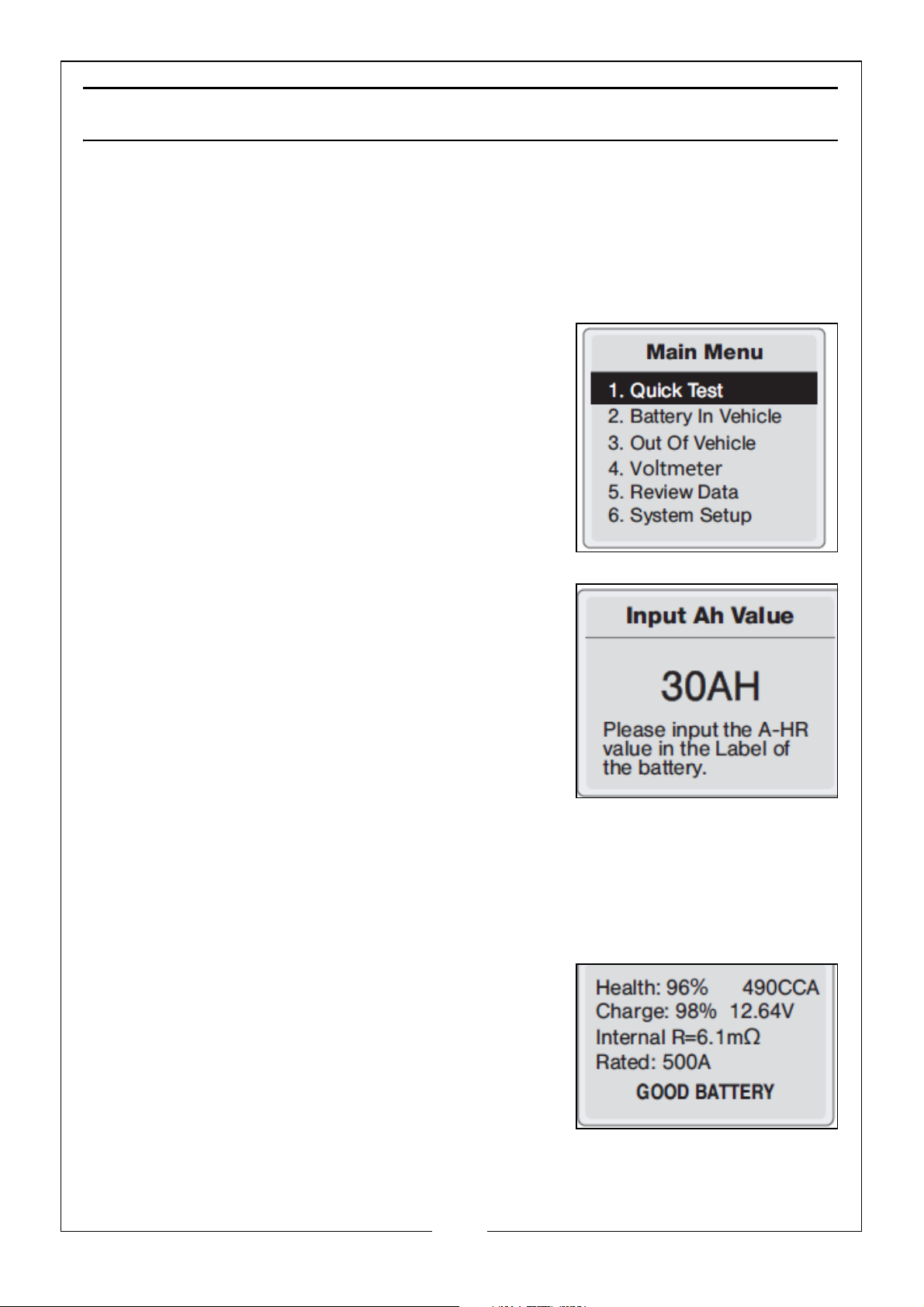
The tester can confirm of the battery status, including voltage, CCA,
electronic resistance, rated CCA, charging value, healthy value and testing
result in one second, once the AH value of the battery rated capacity has
been inputted. This can been found on the label of the battery.
1. Press the ‘UP’ or ‘DOWN’ button to select the
quick test, then press the ‘ENTER’ button to
confirm.
2. Input the rated battery capacity by pressing
the ‘UP’ or ‘DOWN’ button to the appropriate
valve, then press the ‘ENTER’ button to
confirm.
NOTE: In general, the battery capacity for a 12V
vehicle is above 30AH.
3. The test results will show one of the following 5 test results (examples
shown).
• Good Battery: The battery is without any
problems.
10
Parts & Service: 020 8988 7400 / E-mail: [email protected] or [email protected]
Page 11
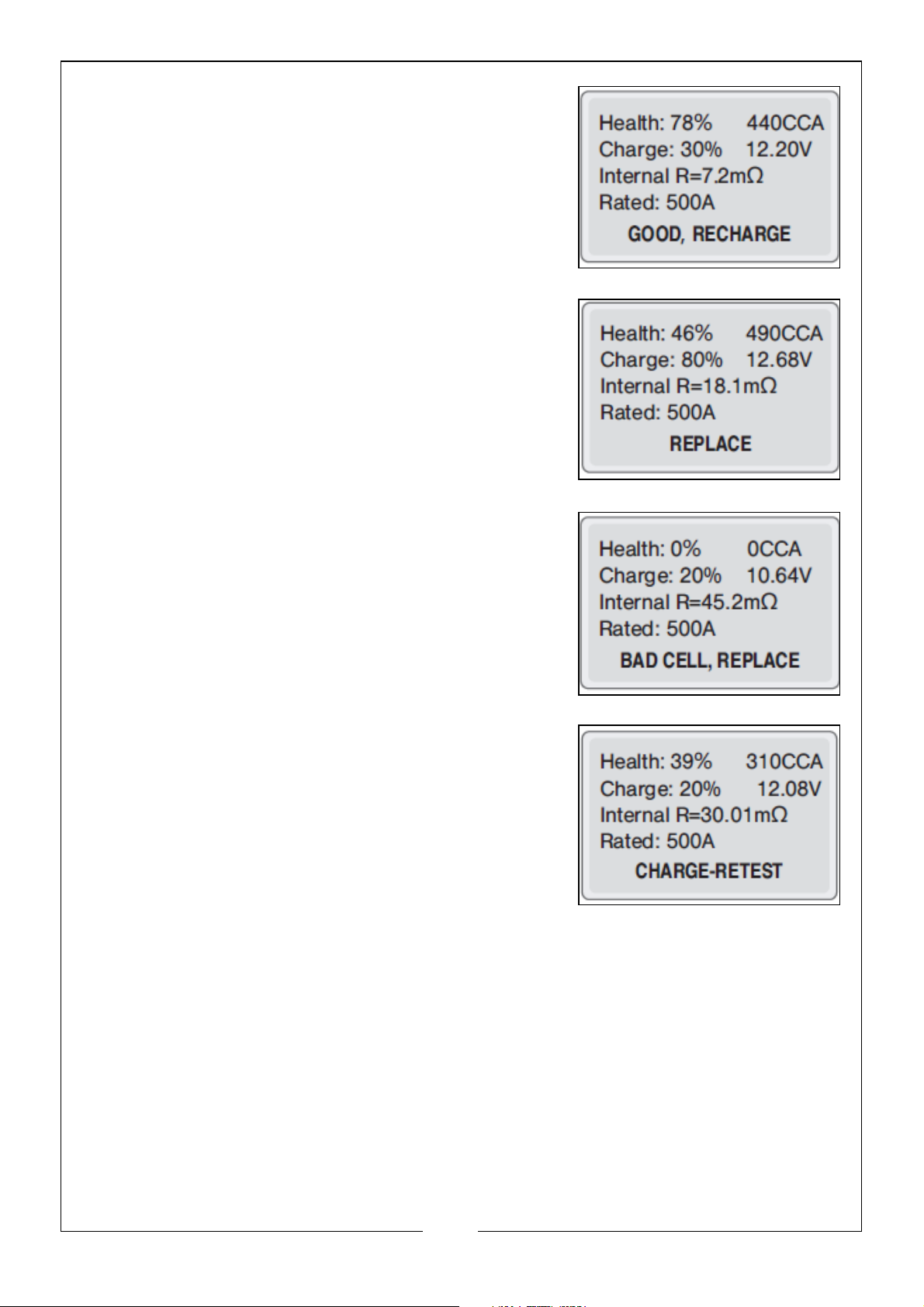
• Good Recharge: Good battery but low
current, recharge before using.
• Replace: The battery is near to or already
reached the end of its useful life, replace
battery.
• Bad Cell Replace: Battery interior
damaged, bad cell or short circuit.
Replace the battery.
• Charge, Retest: Unstable battery should be
recharged and retested to avoid error. If
same test result appears after recharge
and retest, the battery should be regarded
as damaged, replace the battery.
11
Parts & Service: 020 8988 7400 / E-mail: [email protected] or [email protected]
Page 12
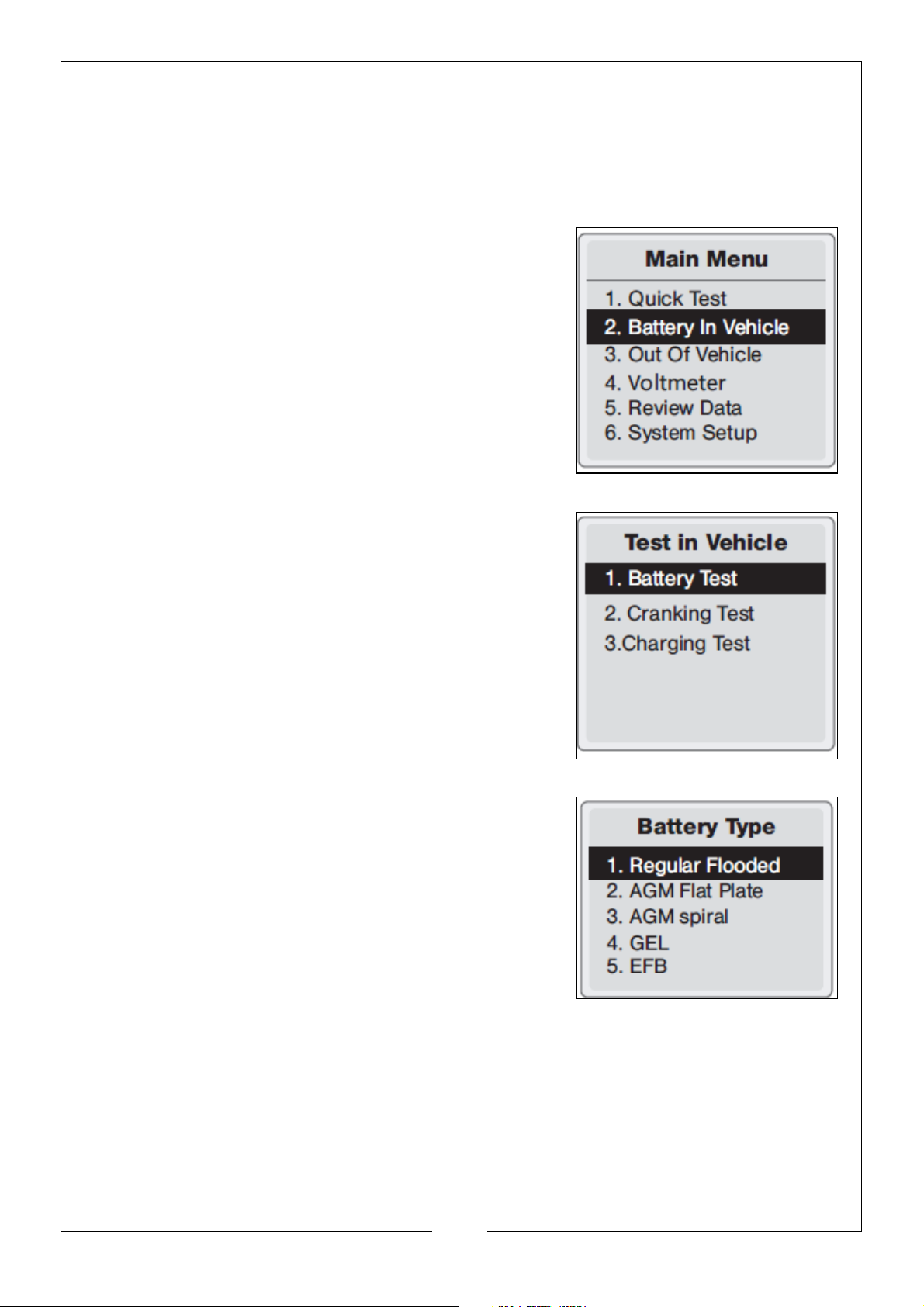
BATTERY TEST IN VEHICLE
‘Battery in vehicle’ means the battery is connected with the vehicle generator
or vehicle electrical appliances.
BATTERY TEST
1. From the main menu, choose the ‘Battery in
Vehicle’ and press the ‘ENTER’ button,
2. Choose the ‘Battery Test’ and press the
‘ENTER’ button.
3. Select Battery Type: The tester will prompt you
to select the battery type, Regular Flooded,
AGM Flat Plate, AGM Spiral, GEL or EFB
battery. Press ‘UP’ or ‘DOWN’ button to select
battery type, then press the ‘ENTER’ button to
confirm.
12
Parts & Service: 020 8988 7400 / E-mail: [email protected] or [email protected]
Page 13
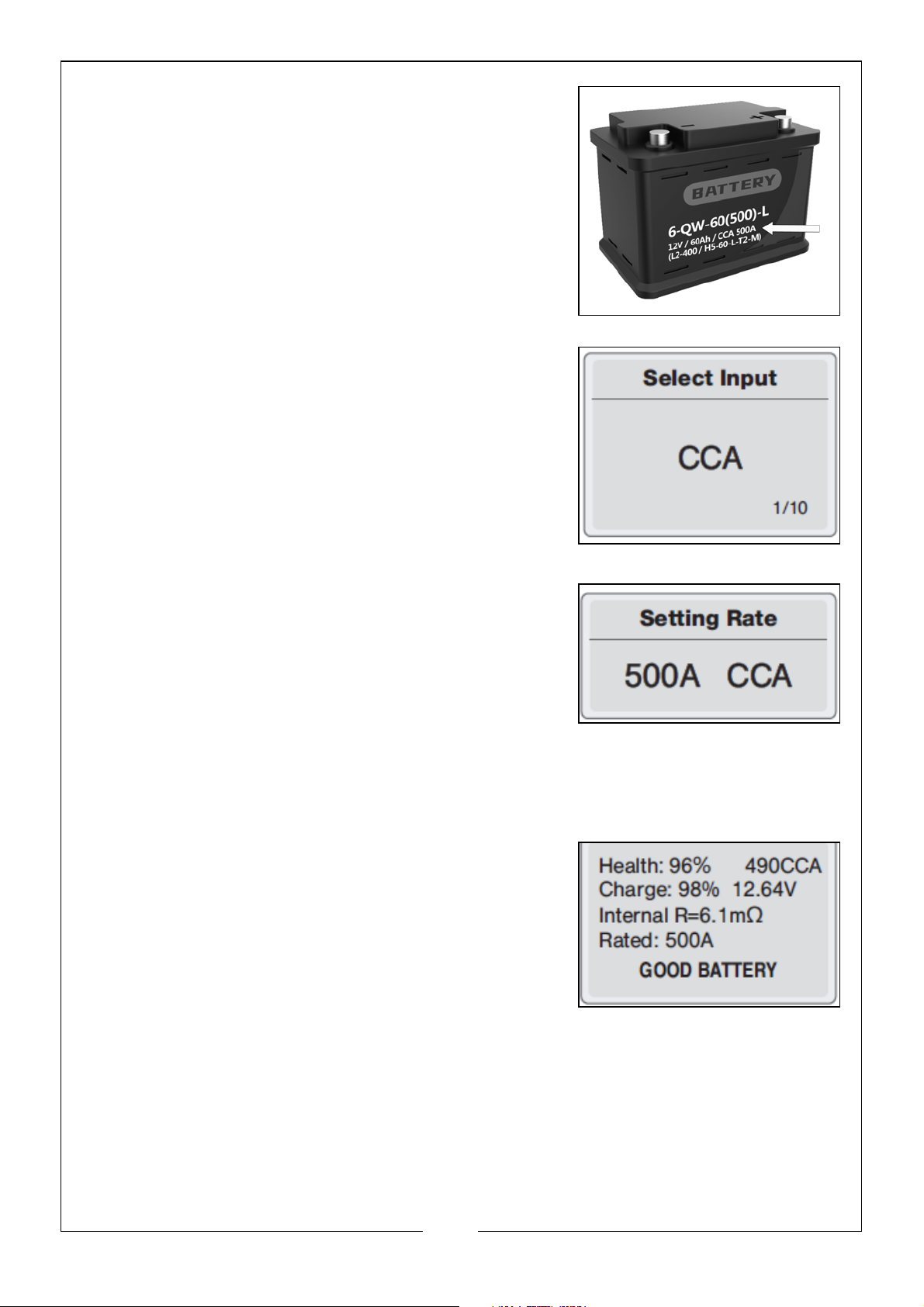
4. Battery System Standard and Rating: The
tester will test each battery according to the
selected system and rating, which can be
found on the battery, see example.
5. Use the ‘UP’ or ‘DOWN’ buttons to select the
correct system standard and press the
‘ENTER’ button.
6. Use the ‘UP’ or ‘DOWN’ buttons to select the
correct rating and press the ‘ENTER’ button
7. The tester will start the test and a dynamic
interface will appear with ‘TESTING’
prompted.
NOTE: It takes around 5 seconds to display the
battery test result.
8. The testing results will show one of the following 5 test results (examples
shown).
• Good Battery: The battery is without any
problems.
13
Parts & Service: 020 8988 7400 / E-mail: [email protected] or [email protected]
Page 14
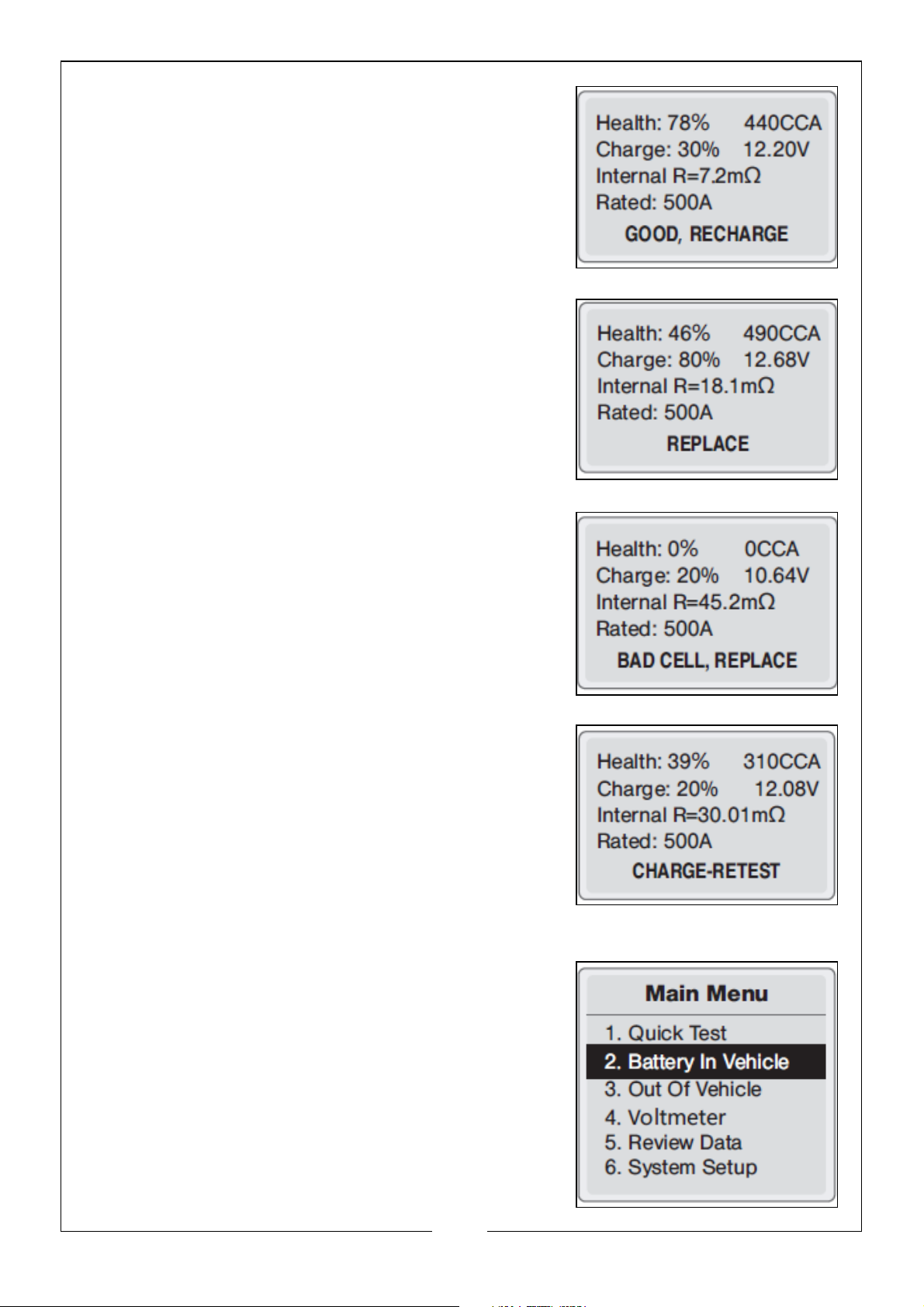
• Good Recharge: Good battery but low
current, recharge before using.
• Replace: The battery is near to or already
reached the end of its useful life, replace
battery.
• Bad Cell Replace: Battery interior
damaged, bad cell or short circuit.
Replace the battery
• Charge, Retest: Unstable battery should be
recharged and retested to avoid error. If
same test result appears after recharge
and retest, the battery should be regarded
as damaged, replace the battery.
CRANKING TEST
1. From the main menu, choose the battery in
vehicle and press the ‘ENTER’ button,
14
Parts & Service: 020 8988 7400 / E-mail: [email protected] or [email protected]
Page 15
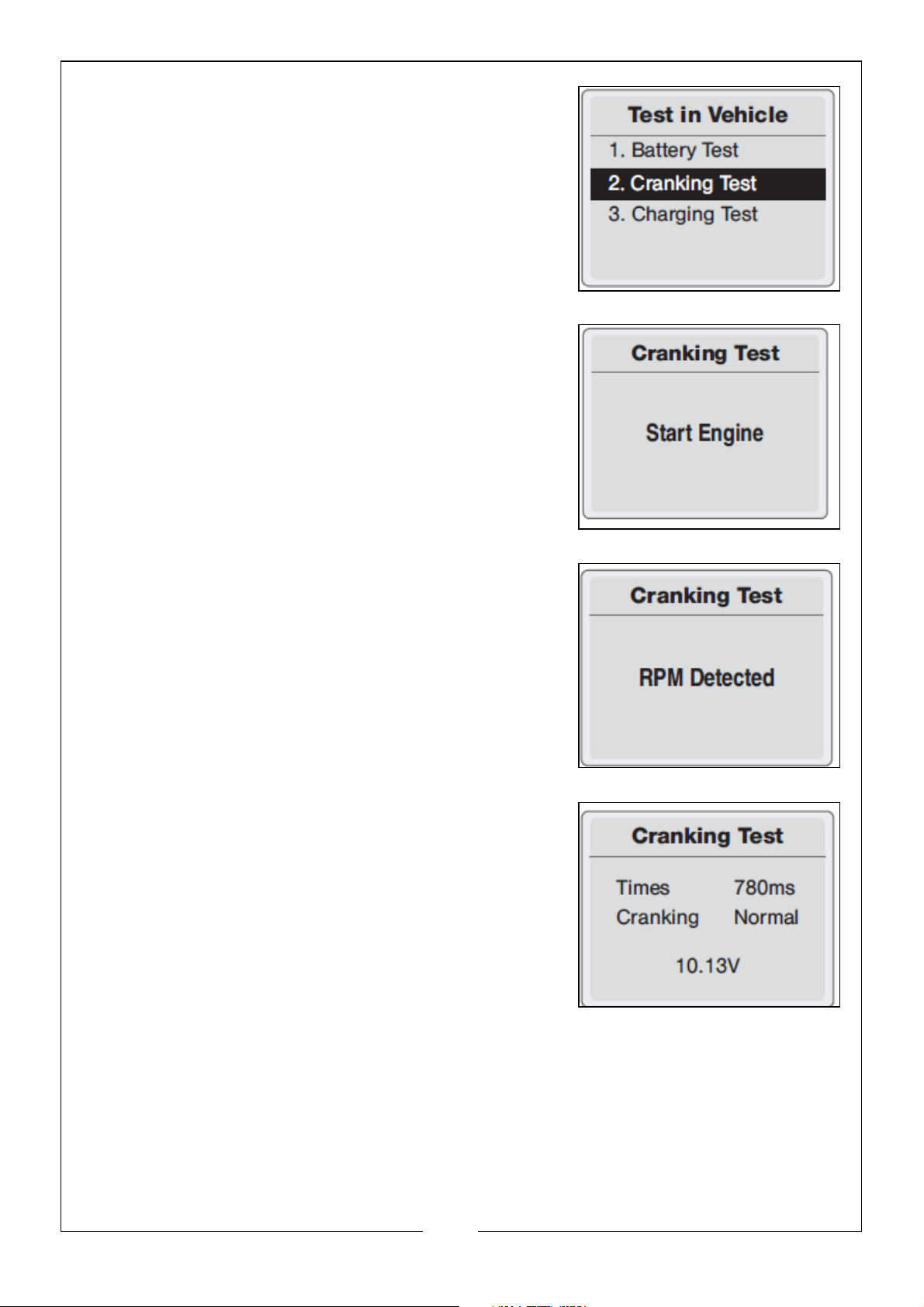
2. Choose the cranking test and press the
‘ENTER’ button.
3. Start the engine as prompted.
4. The tester will automatically complete the
cranking test and display the results.
5. The test results include actual cranking
voltage and cranking time.
• Normally a cranking voltage value lower
than 9.6V is regarded as abnormal.
• This is for the convenience of the
maintenance personnel to quickly know
the whole state of the starting system
according to the data.
6. After testing has finished, do not shut down the engine, press the ‘ENTER’
button to enter Charging Test.
15
Parts & Service: 020 8988 7400 / E-mail: [email protected] or [email protected]
Page 16
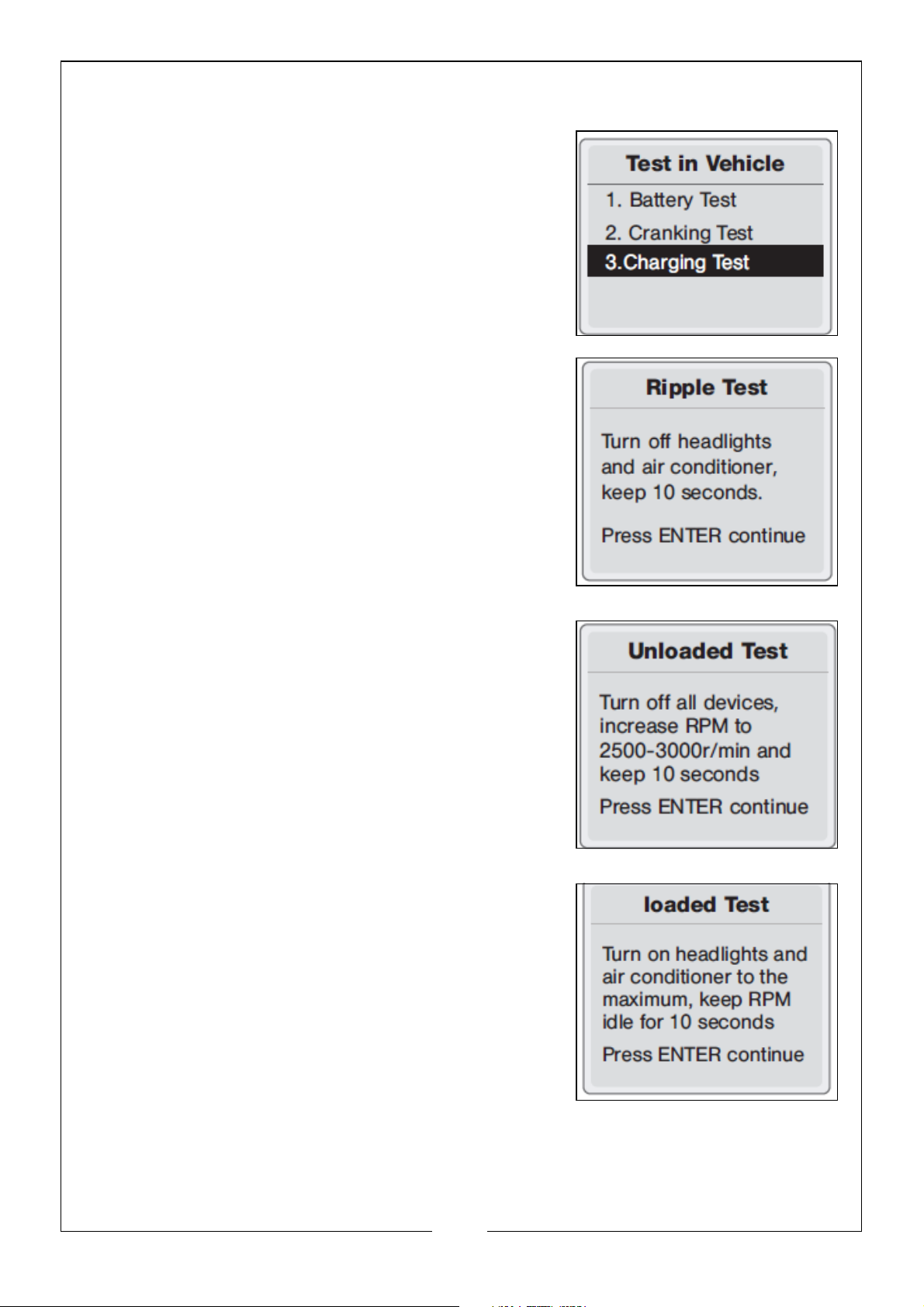
CHARGING TEST
1. Choose the charging test and press the
‘ENTER’ button.
NOTE: DO NOT shut down the engine during the
test. Follow the steps according to the
following on screen instructions
2. Ripple Test.
3. Unloaded Test.
4. Loaded Test.
16
Parts & Service: 020 8988 7400 / E-mail: [email protected] or [email protected]
Page 17
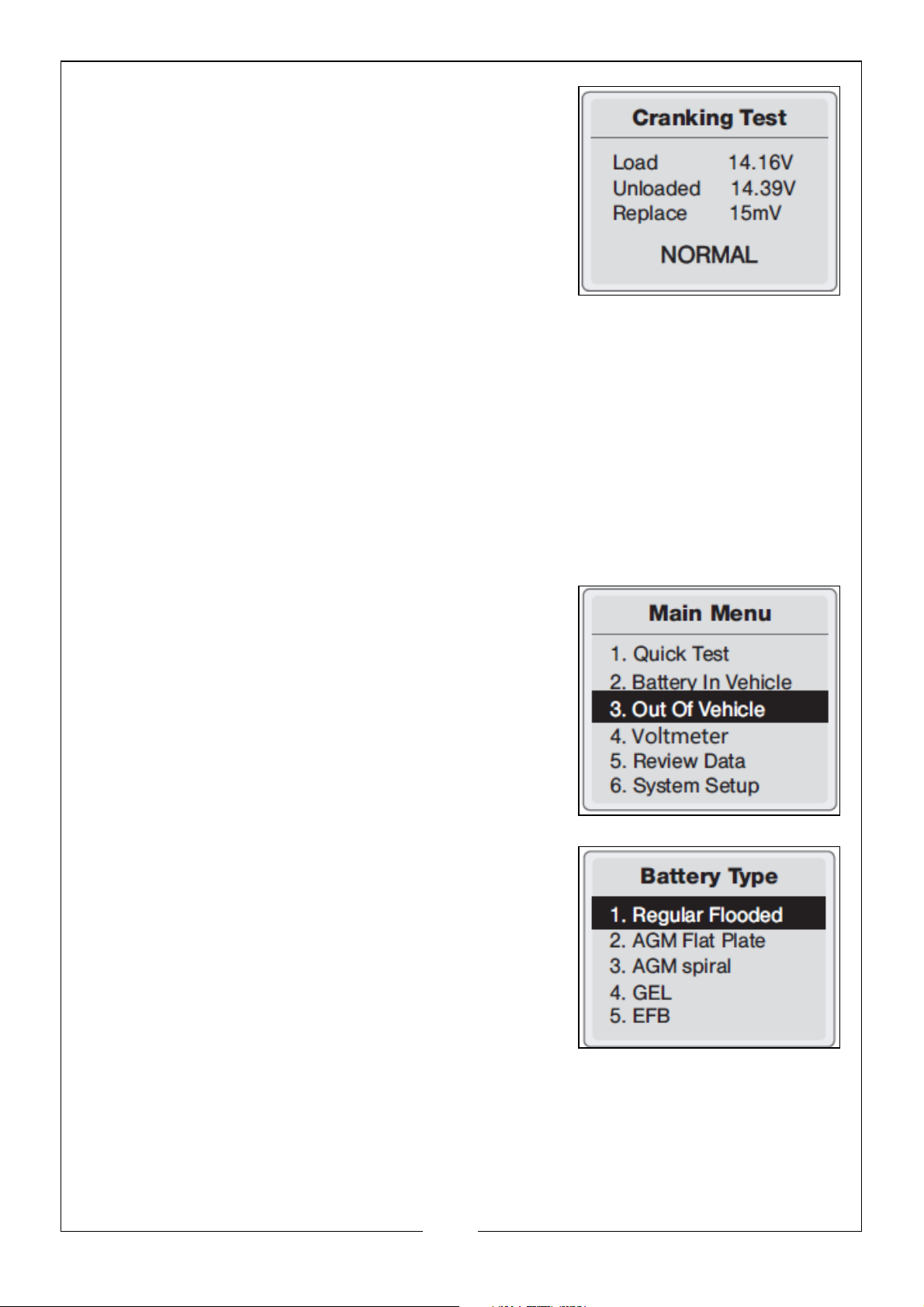
5. After the test has finished, the tester will
display the loaded and unloaded charging
voltages, ripple voltage and charging test
results.
NOTE: ‘NO OUTPUT’ means the charging system
has no output. The vehicle will stop
working when the battery is exhausted.
Please check the alternator or contact a
vehicle mechanic immediately.
BATTERY OUT OF VEHICLE TEST
‘Out of Vehicle ‘means the battery is not connected with any of the vehicle’s
systems.
BATTERY TEST
1. From the main menu, choose the ‘Out of
Vehicle’ and press the ‘ENTER’ button,
2. Select Battery Type: The tester will prompt you
to select the battery type: Regular Flooded,
AGM Flat Plate, AGM Spiral, GEL or EFB
battery. Press ‘UP’ or ‘DOWN’ button to select
battery type, then press the ‘ENTER’ button to
confirm.
17
Parts & Service: 020 8988 7400 / E-mail: [email protected] or [email protected]
Page 18
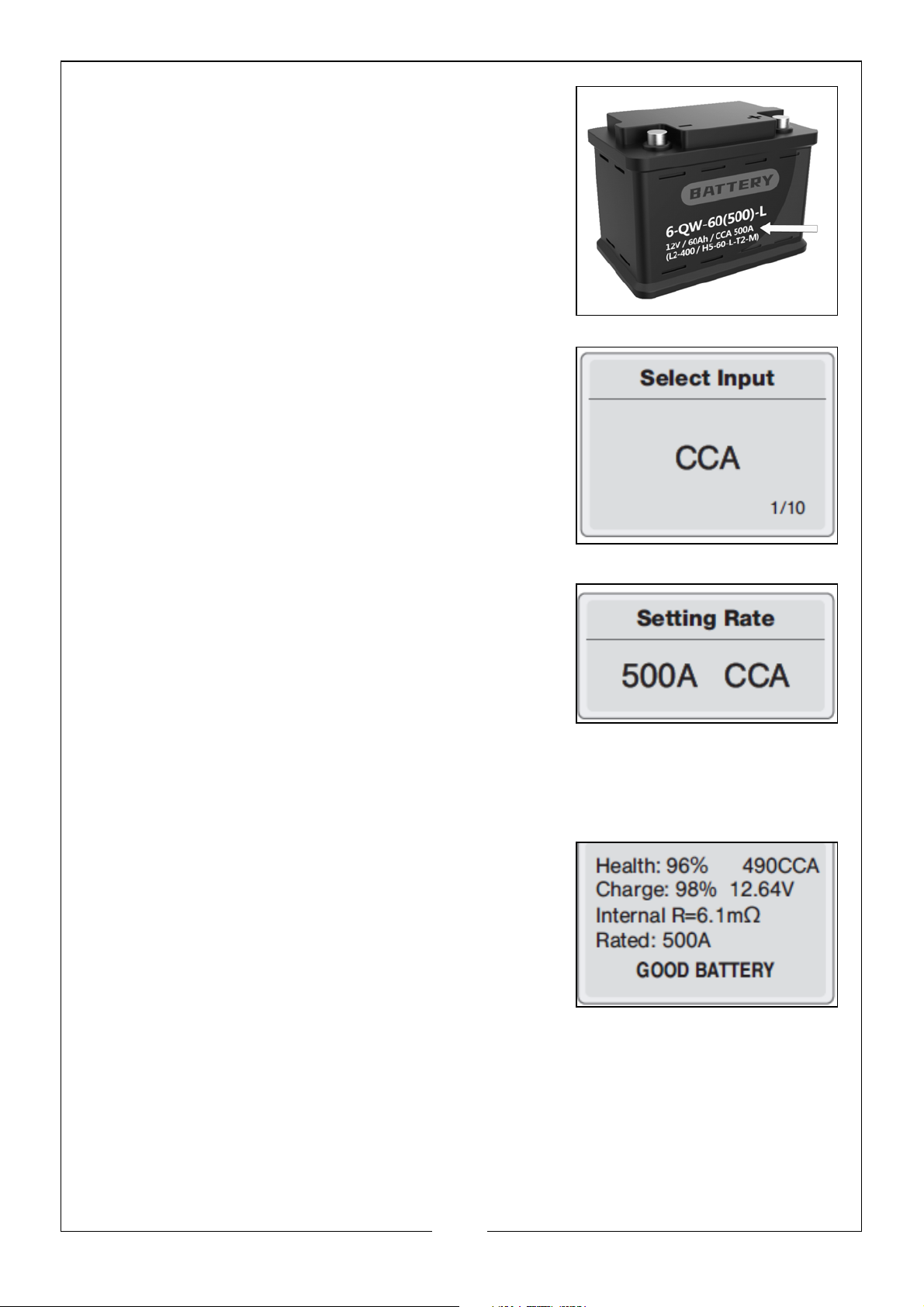
3. Battery System Standard and Rating: The
tester will test each battery according to the
selected system and rating, which can be
found on the battery, see example.
4. Use the ‘UP’ or ‘DOWN’ buttons to select the
correct system standard and press the
‘ENTER’ button
5. Use the ‘UP’ or ‘DOWN’ buttons to select the
correct rating and press the ‘ENTER’ button
6. Tester will start the test and a dynamic
interface will appear with ‘TESTING’
prompted.
NOTE: It takes around 5 seconds to display the
battery test result.
7. The testing results will show one of the following 5 test results (examples
shown).
• Good Battery: The battery is without any
problems.
18
Parts & Service: 020 8988 7400 / E-mail: [email protected] or [email protected]
Page 19
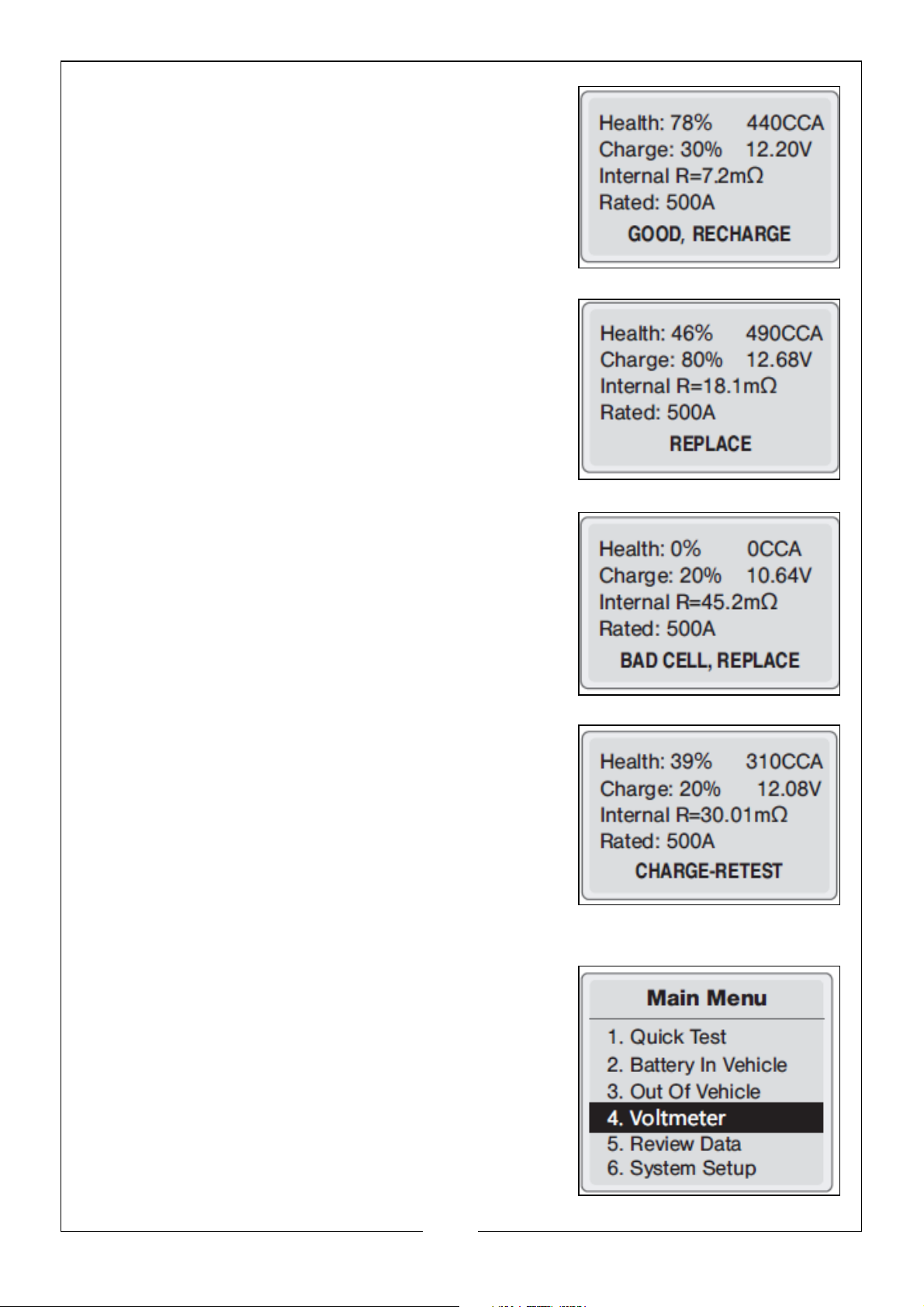
• Good Recharge: Good battery but low
current, recharge before using.
• Replace: The battery is near to or already
reached the end of its useful life, replace
battery.
• Bad Cell Replace: Battery interior
damaged, bad cell or short circuit.
Replace the battery.
• Charge, Retest: Unstable battery should be
recharged and retested to avoid error. If
same test result appears after recharge
and retest, the battery should be regarded
as damaged, replace the battery.
VOLTMETER
1. From the main menu, choose the voltmeter
and press the ‘ENTER’ button,
19
Parts & Service: 020 8988 7400 / E-mail: [email protected] or [email protected]
Page 20
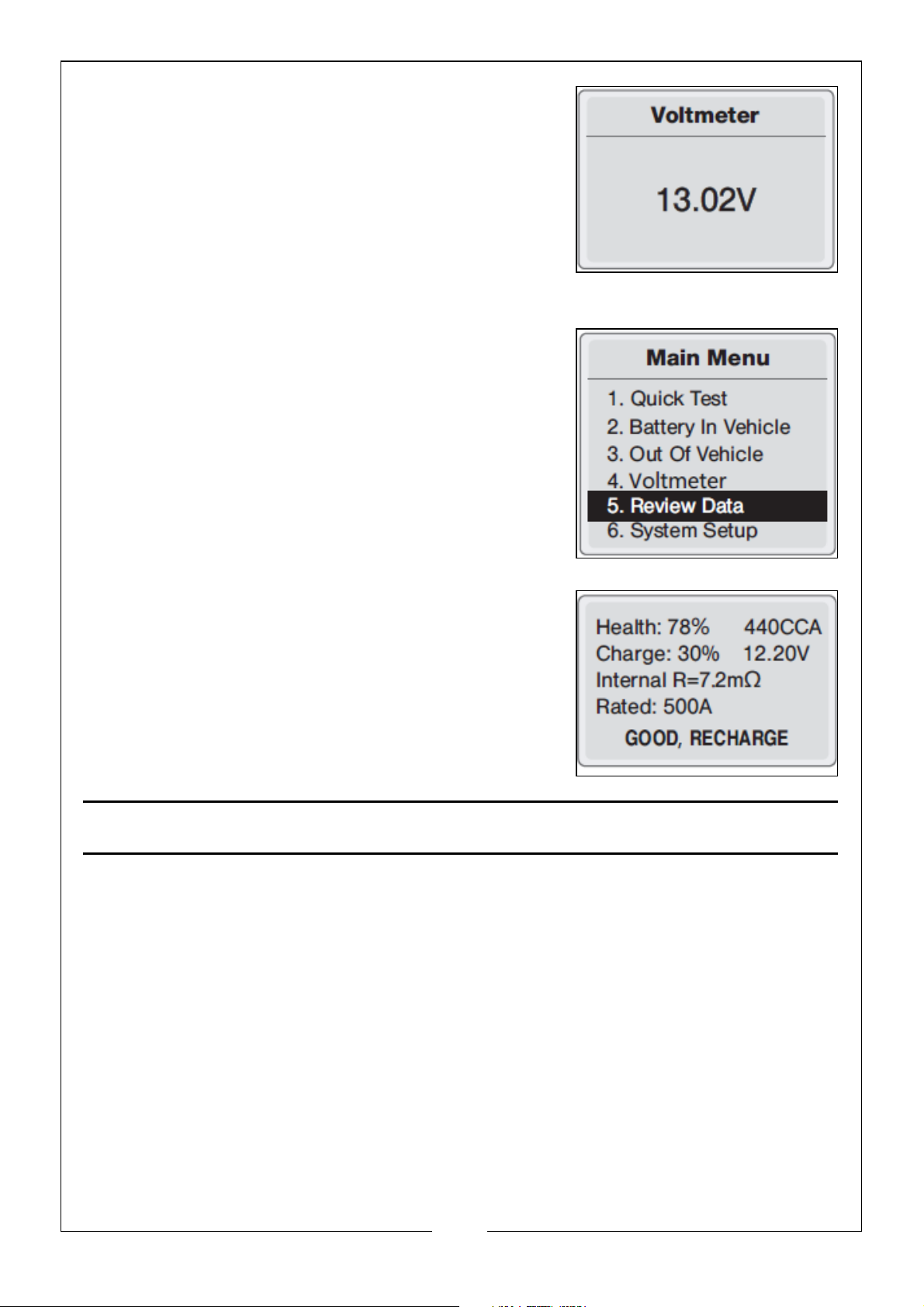
2. This will display real-time voltage value of the
battery.
REVIEW DATA
1. From the main menu, choose the review data
and press the ‘ENTER’ button,
2. This will display the history of the battery
testing results.
MAINTENANCE & CLEANING
• Before cleaning, disconnect the device from the electrical system.
• DO NOT use any liquid cleaning product.
• DO NOT use any flammable cleaning product.
• DO NOT submerge the device or spill any liquid over it.
• AV O ID engine oil, petrol, antifreeze and electrolyte from contacting the
tester as they may cause surface deterioration of the product.
• If needed, clean the device with a light, damp, soft cloth.
20
Parts & Service: 020 8988 7400 / E-mail: [email protected] or [email protected]
Page 21
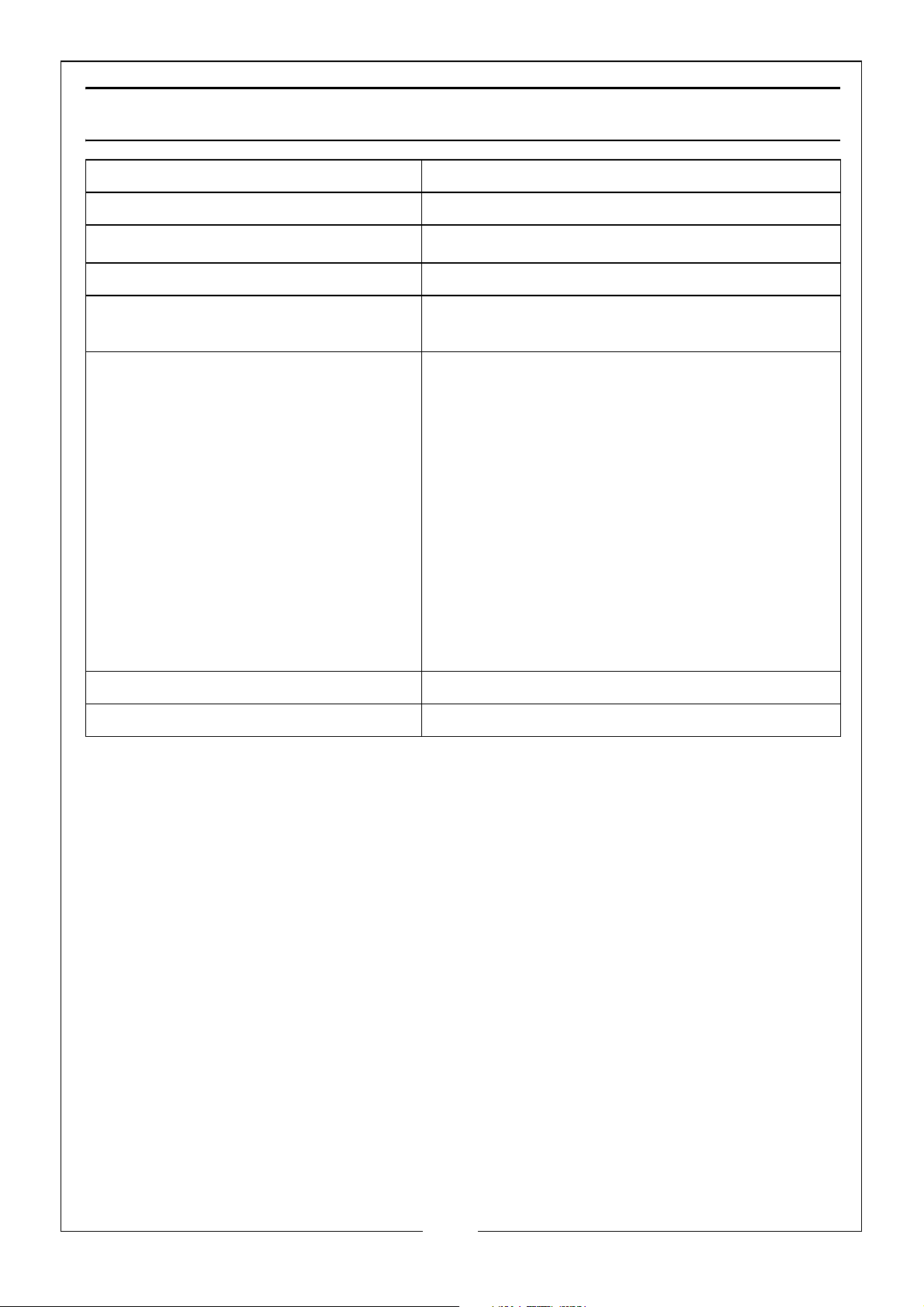
SPECIFICATION
Product Description 12V Battery Tester
Part number 6260108
Operating Temp. Range
Input Voltage 8V -30V DC (12V Nominal)
Minimum/Maximum Battery Size
(Ah/CCA)
Rating System Types CCA - Cold Cranking Amps
Measurement (H x W x D) 122 x 80 x 20mm
o
C - 60oC
-10
30-220Ah/100 - 2000 CCA
BCI - Battery Council International
CA - Cranking Amps Standard
MCA - Marine Cranking Amps Standards
JIS - Japan Industrial Standard
DIN - German Institute of Standardization
IEC - Internal Electro Technical
Commission Standard
EN - European Automobile Industry
Association Standard
SAE - Society of Automotive Engineers
Standard
GB - China National Standard
Product Weight 180g
21
Parts & Service: 020 8988 7400 / E-mail: [email protected] or [email protected]
Page 22
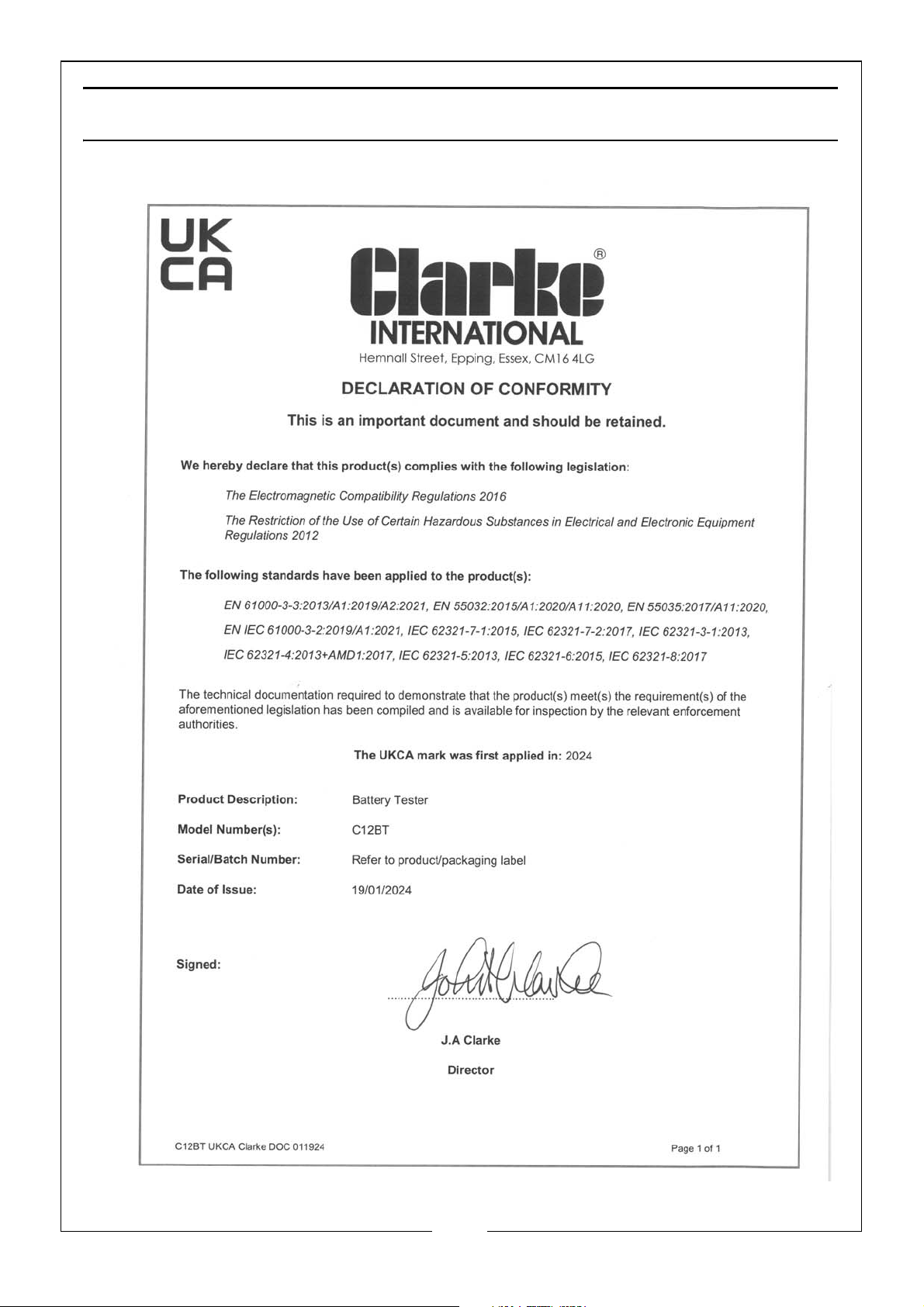
DECLARATION OF CONFORMITY - UKCA
22
Parts & Service: 020 8988 7400 / E-mail: [email protected] or [email protected]
Page 23
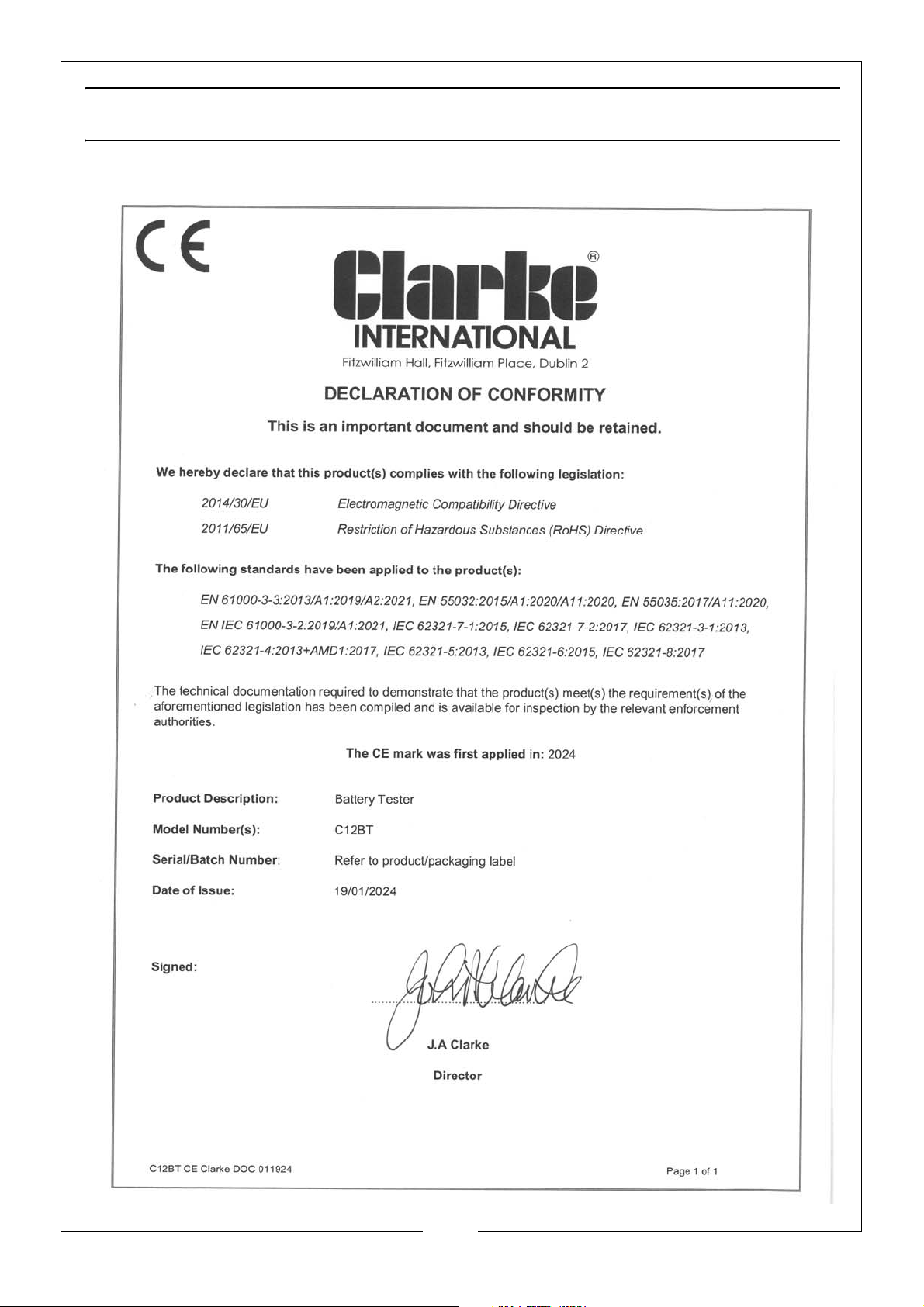
DECLARATION OF CONFORMITY - CE
23
Parts & Service: 020 8988 7400 / E-mail: [email protected] or [email protected]
Page 24

 Loading...