

Page 1
CU-POD
Item ref: 173.632UK
Podcast Microphone Set
User Manual
Setting up
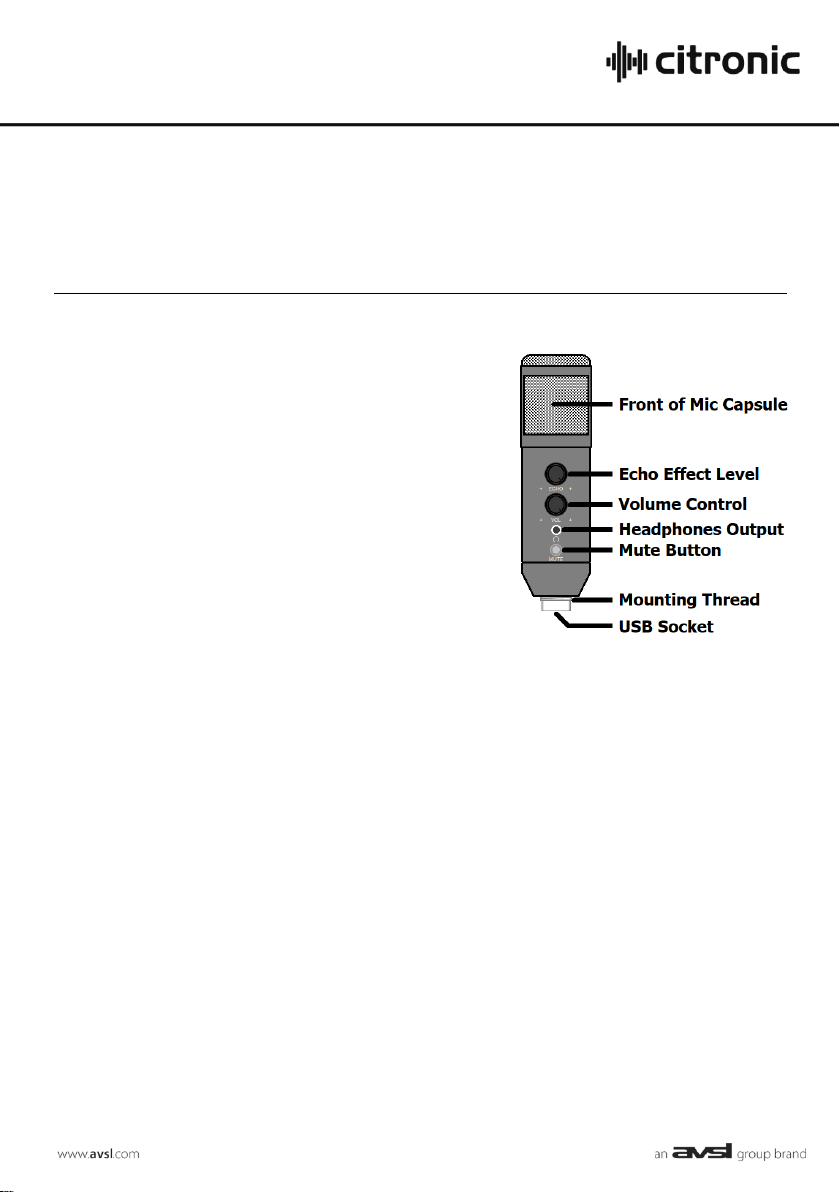
Mo unt the CU-POD to the supplied angle-adjustable holder
by rotating it onto the Mo unting Thread at the b as e of the
microphone, s urrounding the USB socket.
This ho lder can be attached to the supplied mini tripod stand
fo r tab letop use or attached to a s tandard microphone s tand
or b o om arm
(an adap tor is provided for s tands wit h 3/8” thread s)
A fo am pop shield is p rovided, which may be used if air noise
or p o pping is obtrusive when reco rding the microphone.
Co nnect the supplied U SB lead to the typ e B So cket at the
base of the microphone housing and the o ther end to an
available USB port on a PC o r Mac co mp uter.
The computer will recognise the CU-POD as a USB Audio Device for both input and output o f audio.
Co nnect headphones to the 3.5mm Headphones Output on the front of the CU-POD
Operation
Selecting the CU-POD (usually ap pearing as “USB Audio Device”) as the input and output d evice
within the recording software will set the microphone as the input source and the headphones o utput
fo r the output for monitoring.
All audio that would no rmally come from the computer speakers will no w b e routed to the
headphones output of the CU -POD.
Set the VOL (volume) control to the required lev el s o that the s o und is clear and not distorted.
Speak into the f ront of the grille (the front side is with the controls facing you) approximately 5cm
away from the grille.
Pressing MU TE will mute the microphone – p ressing this again will un-mute the microphone.
If an echo effect is required, this can b e intro duced by turning up the ECHO control, otherwise,
turning this co ntrol fully down removes this effect.
The CU-POD can be disconnected and re-connected to USB as a hot-swappable device.
Disconnect from U SB after use to p reserve the computer b attery or power s upply.
Page 2
173.632UK U s er Manual
Specifications
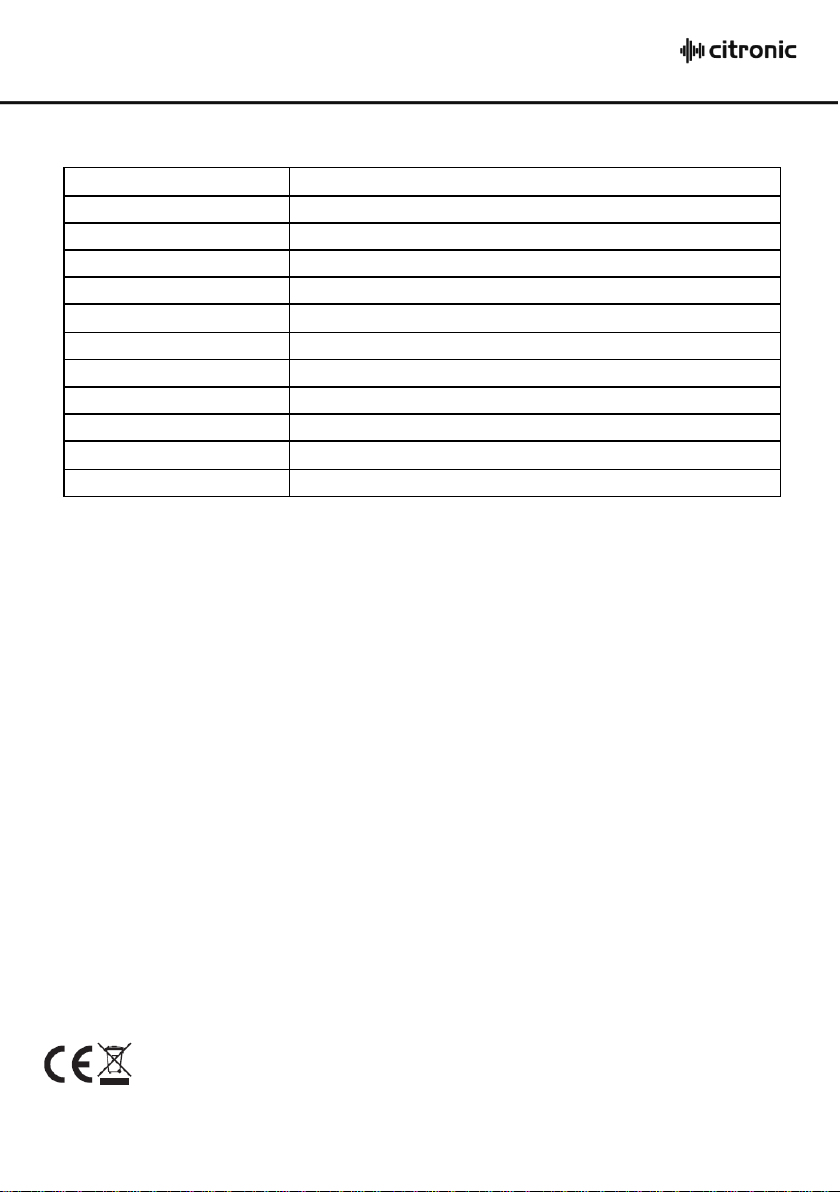
Cap s ule
15mmØ b ack-electret condenser
Polar pattern
Card ioid
Co nnection
USB type B (po wer & d igital audio)
Lead length
1.4m
Headphone: connector
3.5mm stereo jack
Freq uency response
30Hz - 20kHz
Co ntrols
Echo, Volume & Mute
Max. SPL
120dB
SNR
10dB
Sensitivity
25mV/Pa (-32d B±2dB)
Dimensions
158 x 45mmØ
Weig ht
228g
Disposal: T he “Crossed Wheelie Bin” symbol on the product means that the product is classed as El ectric al or
Electronic equipment and should not be disposed with other household or commercial waste at the end of its useful life.
The goods must be disposed of according to your local c ouncil guidelines.
Errors and omissions excepted.
Copyright© 2020. AVSL Group L td.
 Loading...