

Page 1

CONTROL BOARD FOR MLT-288/MLT-289
CONTROL BOARD FOR MLT-388/MLT-389
MODEL
BD2-2880/2890
MODEL
BD2-3880/3890
Rev. 1.01 Newly Issued on December 15th, 2005
Command Reference
Page 2

i
REVISION
Rev. No. Date Content
0.00 2002.07.02 Newly authored
BD2-2880 command part modified.
0.01 2003.06.10 2-34 Range changed.
2-37 Ranges of CODE39/ITF/CODABAR/CODE128 changed.
2-40 Ranges of CODE39/ITF/CODABAR/CODE128 changed.
1.00 2003.06.23 First version as 1.00.
1.01 2005.12.15 Numbers of reference page changed.
Page 3

BD2-3880/3890 Command Reference
1
1. PRINT CONTROL FUNCTIONS
1.1 Command List
Print Control Commands
Print Character Commands
Print Position Commands
Line Feed Span Commands
LF
CR
ESC J
ESC d
0Ah
0Dh
1Bh4Ah n
1Bh64h n
5
6
7
8
Control Code
Printing and paper feed
Print command
Printing and feeding paper n/203 inch
Printing and feeding the paper by n lines
Function Code Page
HT
ESC $
ESC D
ESC
ESC a
09h
1Bh24Ah n1 n2
1Bh44[n]k 00h
1Bh 5C n1 n2
1Bh 61h n
Control Code
Horizontal tab command
Specifying the absolute positions
Setting horizontal tab position
Specifying the relative positions
Aligning the characters
Function Code
22
23
24
25
26
Page
/
ESC 2
ESC 3
1Bh 32h
1Bh 33h n
Control Code
Specifying 1/6-inch line feed rate
Setting line feed rate of minimum pitch
Function Code
27
28
Page
ESC SP
ESC !
ESC %
ESC &
ESC –
ESC E
ESC G
ESC R
ESC V
ESC t
ESC {
1Bh20h n
1Bh21h n
1Bh25h n
1Bh26h s n m
[ap1...ps×a]m–n+1
1Bh2Dh n
1Bh45h n
1Bh47h n
1Bh52h n
1Bh56h n
1Bh74h n
1Bh7Bh n
Control Code
Setting the right space amount of the character
Collective specifying printing mode
Specifying/canceling douwnload character set
Defining download characters
Specifying/canceling underline
Specifying/canceling highlighting
Specifying/canceling double printing
Selecting the international character set
Specifying/Canceling 90°-right- turned Characters
Selecting the character code table
Specifying/canceling the inverted characters
Function Code
9
10
12
13
15
16
17
18
19
20
21
Page
Page 4

BD2-3880/3890 Command Reference
2
Bit Image Commands
Status Command
Panel Switch Command
Macro Commands
Cutter Commands
Bar Code Commands
ESC *
GS *
GS /
1Bh 2Ah m n1 n2[d]k
1Dh 2Ah n1 n2
1Dh 2F
Control Code
Specifying the bit image mode
Defining the download, bit image
Printing the download, bit image
Function Code
29
31
33
Page
ESC v 1Bh 76h
Control Code
Transmitting the printer status (Serial type)
Function Code
34
Page
ESC c5 1Bh 63h 35h n
Control Code
Enabling/disabling the panel switches
Function Code
35
Page
GS :
GS ^
1Bh 63h 35h n
1Dh 5Eh n1 n2 n3
Control Code
Starting/ending macro definition
Executing the macro
Function Code
36
37
Page
ESC i
ESC m
1Bh 69h
1Bh 6Dh
Control Code
Activating auto cutter (Full cut)
Activating auto cutter (Partial cut)
Function Code
38
39
Page
GS H
GS f
GS h
GS k
GS w
1Dh 48H n
1Dh 66H n
1Dh 68H n
1Dh 6Bh n[‘d’]k 00h (1)
1Dh 6Bh m n[d1...dn] (2)
1Dh 77H n
Control Code
Selecting of print position of HRI code
Selecting the font of HRI code
Selecting the height of the bar code
Printing the bar code
Selecting the horizontal size (scale factor) of bar code
Function Code
40
41
42
43
47
52
Page
Page 5

BD2-3880/3890 Command Reference
3
Other Commands
NOP Commands
ESC =
ESC @
DC2 A
1Bh 3Dh n
1Bh 40h
12h 41h n
Control Code
Data input control
Initializing the Printer
Selecting the Print drive system
Function Code
53
54
55
Page
ESC c 3
ESC c 4
ESC p
ESC u
–
–
–
–
Control Code
NOP
NOP
NOP
NOP
Function Code
–
–
–
–
Page
Page 6

BD2-3880/3890 Command Reference
4
1.2 Command Details
1.2.1 Description of Items
XXXX ALL
Command Function
A sequence of code constituting a command is represented in hexadecimal number for <
>H, binary number for < >B, and decimal number for < >, respectively; [ ]k represents a
repeat count of k-times.
Describes an argument value(setting range) for the command.
Describes a command outline.
Describes a caution as required.
Describes an initial value for the command when accompanied by an argument.
Describes the associated commands for use.
Describes a coding example in the Q-BASIC sample program.
* This example is only for your reference and differs depending on the language
used, version, and so on. For details, see the ma
nual for the language used.
[Function]
[Code]
[Range]
[Outline]
[Caution]
[Default]
[See Also]
[Sample Program]
Page 7

BD2-3880/3890 Command Reference
5
LF
Printing and Paper Feed Command
<0A>H
Prints data inside the input buffer and feeds lines based on the line feed amount having been set.
• The head of the line becomes the next print starting position.
ESC 2, ESC 3
[Print Results]
LPRINT "AAA" + CHR$ (&HA);
LPRINT "BBB" + CHR$ (&HA);
LPRINT CHR$ (&HA);
LPRINT "CCC" + CHR$ (&HA
);
Print and line feed
Print and line feed
Line feed only
Print and line feed
[Function]
[Code]
[Outline]
[See Also]
[Sample Program]
Page 8

BD2-3880/3890 Command Reference
6
CR
Print Command
<0D>H
1) When DS 1-2 is OFF:
This command is ignored.
2) When DS 1- 2 is ON:
With data held inside the internal print buffer, printing and line feed are performed.
Without data inside the internal print buffer, however, no printing is performed.
LF
LPRINT "AAA" + CHR$ (&HD);
LPRINT "BBB" + CHR$ (&HD);
LPRINT CHR$ (&HD);
LPRINT "CCC" + CHR$
(&HD);
Print and line feed
Print and line feed
Line feed only
Print and line feed
[Function]
[Code]
[Outline]
[See Also]
[Sample Program]
[Print Results]
Page 9

BD2-3880/3890 Command Reference
7
ESC J n
Printing and feeding paper n/203 inch
<1B>H<4A>H<n>
{0 =< n =< FF} Data is described in Hex code.
Prints data inside the print buffer and feeds paper by n/360 inch. Since an actual mechanical
pitch is 1/203 inch, it is internally converted approximate to the value specified with this
command.
•
Specified volume does not remain.
•
The beginning of the line is to be considered as the next printing start position.
•
Initial value is not defined.
See Sample Program and Print Results for ESC 2 on Page
48.
[Function]
[Code]
[Range]
[Outline]
[Sample Program]
[Print Results]
Page 10

BD2-3880/3890 Command Reference
8
ESC d n
Printing and Feeding the paper by n lines
<1B>H<64>H<n>
* {0 =< n =< FF} Data is described in Hex code.
Prints data inside the buffer and feeds paper by n lines.
•
Specified line does not remain.
•
The beginning of the line is to be considered as the next printing start position.
•
The initial value is not defined.
LPRINT "AAAAA"
LPRINT CHR$ (&H1B) + "d" + CHR$ (2);
LPRINT "AAAAA" + CHR$ (&HA);
2/6-inch line feed
[Function]
[Code]
[Range]
[Outline]
[Default]
[Sample Program]
[Print Results]
Page 11

BD2-3880/3890 Command Reference
9
ESC SP n
Setting the right space amount of the character
<1B>H<20>H<n>
{0 =< n =< 20} (MLT-2880) Data is described in Hex code.
{0 =< n =< 30} (MLT-38x0) Data is described in Hex code.
The rightward space amount is set in dot unit (1/203 inch unit). In the initial value, it is n=0.
The rightward space amount in doublewide mode is made double of the set volume.
n = 0
LPRINT CHR$ (&H1B) + " " + CHR$ (0);
LPRINT "AAAAA" + CHR$ (&HA);
LPRINT CHR$ (&H1B) + " " + CHR$ (1);
LPRINT "AAAAA" + CHR$ (&HA);
LPRINT CHR$ (&H1B) + " " + CHR$ (12);
LPRINT "AAAAA" + CHR$ (&HA);
0-dot space
1-dot space
12-dot space
[Function]
[Code]
[Range]
[Outline]
[Caution]
[Default]
[Sample Program]
[Print Results]
Page 12

BD2-3880/3890 Command Reference
10
ESC ! n
Collective Specifying Printing Mode
<1B>H<21>H<n>
{0 =< n=< FF} Data is described in Hex code.
Printing mode is assigned. Each n bit indicates the following:
Va lu e
Bit Function 0 1
0 Character Font Font A Font B
1 Undefined
2 Undefined
3 High-lighting Canceled Specified
4 Double height Canceled Specified
5 Double width Canceled Specified
6 Undefined
7 Underline Canceled Specified
• With double height and double width being specified simultaneously, double wide and
double high characters are consisted.
• An underline is attached to the full character width, which, however, is not attached to
the part having been skipped by the horizontal tab.
Neither is it attached to 90°-right-turned characters.
• The underline width is as having been specified by <ESC ->.
(The default setting is 1 dot width. )
• Specification with this command is invalid to Kanji, except specification and cancellation
of highlighting
• In case that double wide character and normal character exist in same one line, the layout
of underline is consistent one.
n = 0
ESC E, ESC
–
[Function]
[Code]
[Range]
[Outline]
[Caution]
[Default]
[See Also]
Page 13
BD2-3880/3890 Command Reference
11
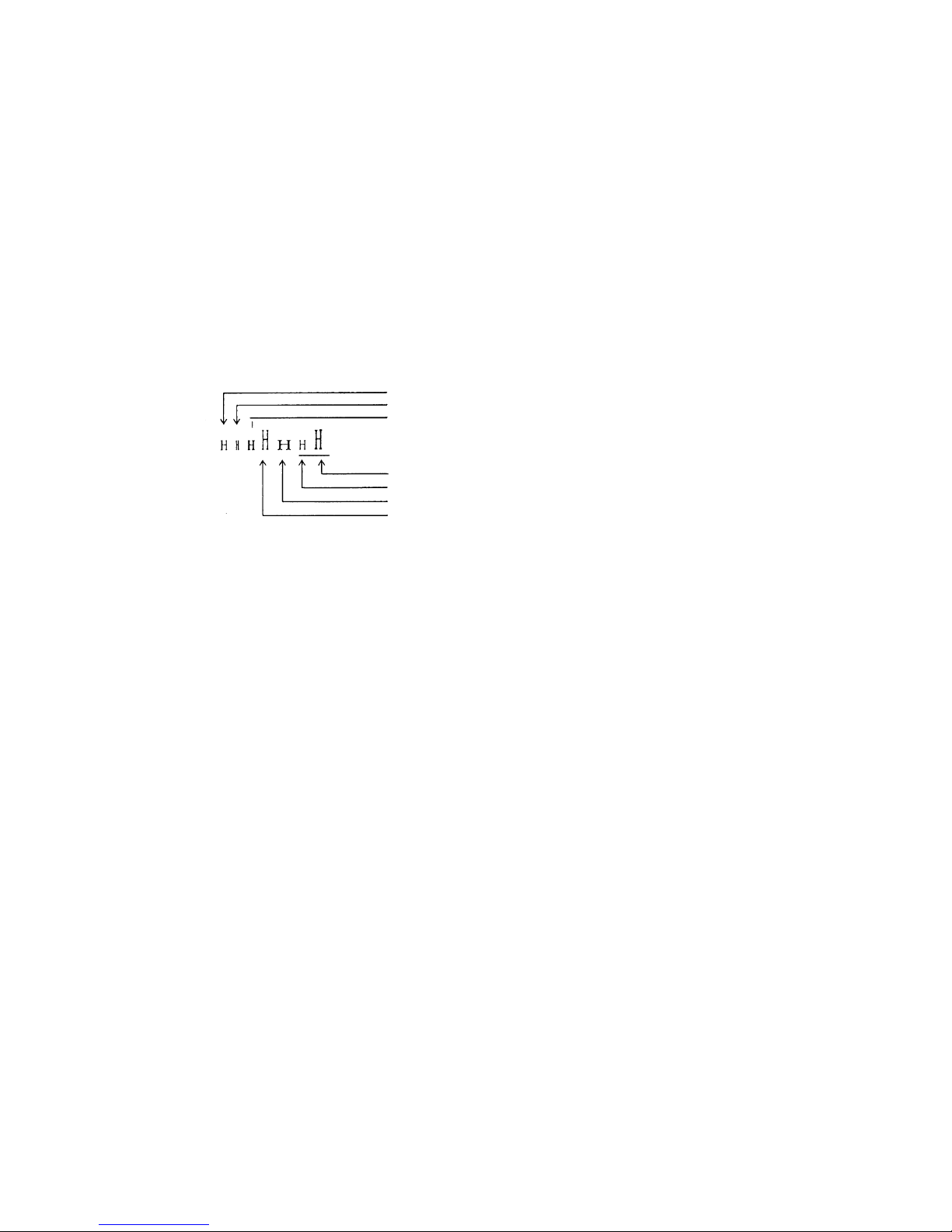
LPRINT CHR$ (&H1B) + " ! " + CHR$ (&H00) + "H" ;
LPRINT CHR$ (&H1B) + " ! " + CHR$ (&H01) + "H";
LPRINT CHR$ (&H1B) + " ! " + CHR$ (&H08) + "H";
LPRINT CHR$ (&H1B) + " ! " + CHR$ (&H10) + "H";
LPRINT CHR$ (&H1B) + " ! " + CHR$ (&H20) + "H";
LPRINT CHR$ (&H1B) + " ! " + CHR$ (&H80) + "H";
LPRINT CHR$ (&H1B) + " ! " + CHR$ (&HB9) + "H";
LPRINT CHR$ (&HA);
Font A
Font B
Font A + Highlighting
Font B + Highlighting + Quadruple + Underline
Font A + Underline
Font A + Double Width
Font A + Double Height
[Sample Program]
[Print Results]
Page 14
BD2-3880/3890 Command Reference
12
ESC % n
Specifying/Canceling Download Character Set
<1B>H<25>H<n>
{0 =< n =< FF} data is described in Hex code.
Specifying/canceling download characters.
Further, only the lowest bit (n0) is valid for n.
The lowest bit (n0) indicates the following.
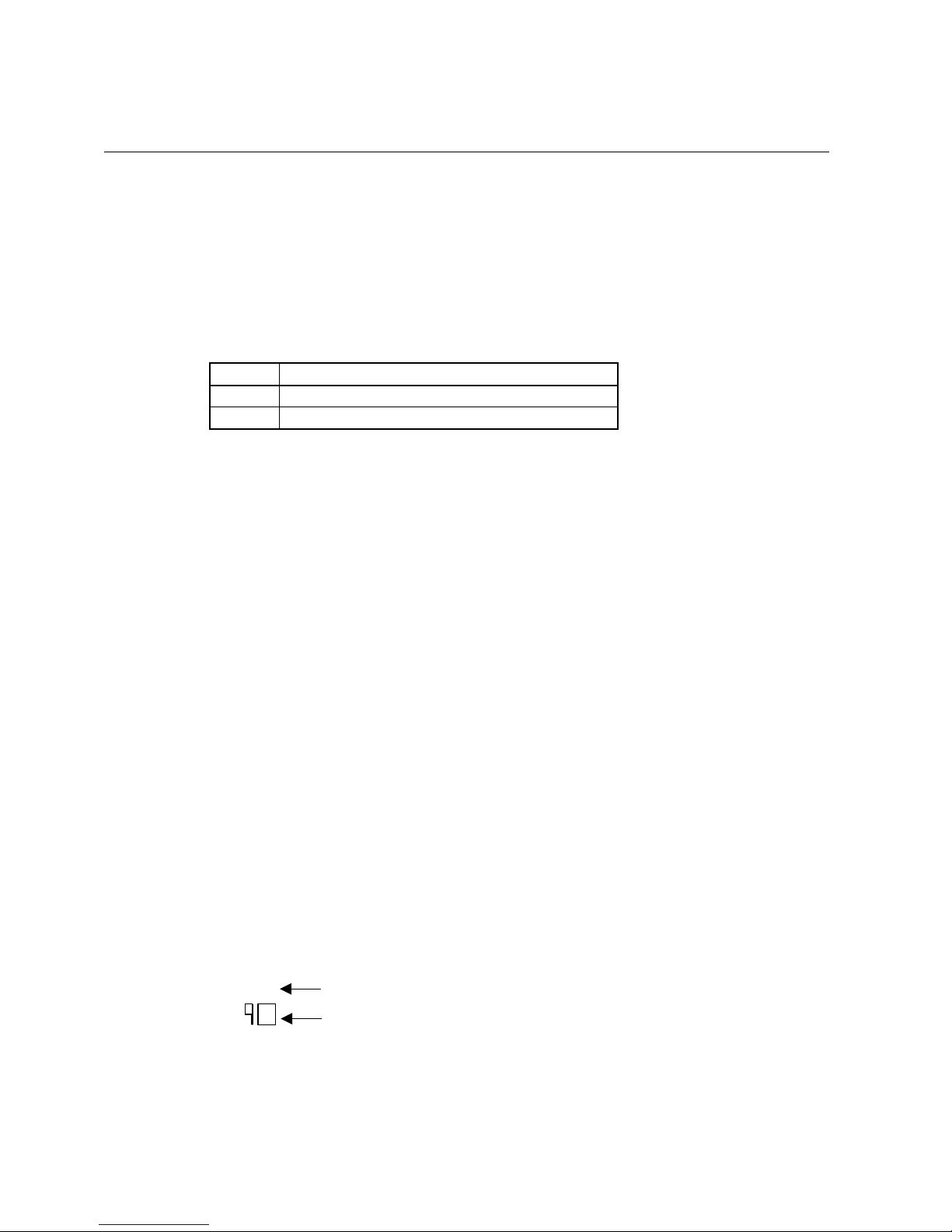
n0 Function
0 Canceling download character set
1 Specifying download character set
Download characters and download bit images cannot be defined simultaneously.
n = 0
ESC &
GOSUB SETCHR DATA 6
LPRINT CHR$ (&H1B) + "%" + CHR$ (0); DATA &HFF, &H80, &H00
LPRINT "@A" + CHR$ (&HA); DATA &H80, &H80, &H00
LPRINT CHR$ (&H1B) + "%" + CHR$ (1); DATA &H80, &H80, &H00
LPRINT "@A" + CHR$ (&HA); DATA &H80, &H80, &H00
END DATA &HFF, &HFF, &HFF
SETCHR: DATA &HFF, &HFF, &HFF
LPRINT CHR$ (&H1B) + "&”; DATA 12
LPRINT CHR$ (3) + "@" + "A”; DATA &HFF, &HFF, &HFF
FOR J=1 TO 2 DATA &H80, &H07, &HF9
READ REP DATA &H80, &HFF, &HF9
LPRINT CHR$ (REP); DATA &H87, &HFE, &H01
FOR I=1 TO REP*3 DATA &H9F, &H06, &H01
READ D DATA &HF8, &H06, &H01
LPRINTCHR$ (D); DATA &HF8, &H06, &H01
NEXT I DATA &H9F, &H06, &H01
NEXT J DATA &H87, &HFE, &H01
RETURN DATA &H80, &HFF, &HF9
DATA &H80, &H07, &HF9
DATA &HFF, &HFF, &HFF
Internal Character Set
Download Character
[Function]
[Code]
[Range]
[Outline]
[Caution]
[Default]
[See Also]
[Sample Program]
[Print Results]
@A
A
Page 15

BD2-3880/3890 Command Reference
13
ESC & s n m [a [p] s a] m – n +1
Defining Download Character
<1B>H<26>H<s><n><m> [<a><p1><p2><ps a>]m-n+1
{s = 03}
{20 (Hex) =< n =< m =< 7E (Hex)}
{0 =< a =< 0C(Hex)} (Font A)
{0 =< a =< 09(Hex)} (F ont B)
Defines the font of download characters of alphanumeric characters.
• "s" indicates the number of bytes in vertical direction.
• "n" indicates the start character code and m the end character code. To define only one character,
set n=m.
• Character codes definable includes 95 ASCII codes in total between <20>H~<7E>H.
• "a" indicates the number of dots in horizontal direction for definition.
• "p" is the data to be defined, which indicate a pattern equal to "a" dot in horizontal direction from
the left end. The rest of the pattern on the right side is filled with space.
The rest of data to be defined is s x a.
• Download characters thus defined remain valid until redefinition, ESC @ execution,
GS * execution, or power OFF is practiced.
Download characters and download bit images can not be defined simultaneously.
Running this command clears the definition of the download bit image.
Same
as the internal character set
×
×
[Function]
[Code]
[Range]
[Outline]
[Caution]
[Default]
Page 16

BD2-3880/3890 Command Reference
14
[Example]
Create each data bit by setting "1" for a printed dot and "0" for an unprinted dot.
[Print Results]
See Sample Program and Print Results for ESC % on Pa
ge 33.
[Sample Program]
p1
p2
p3
p4
p5
p6 p36
p35
p34
12 dot
MSB
LSB
24 dot
p1
p2
p3
p4
p5
p6 p27
p26
p25
MSB
LSB
FONT A
FONT B
9 dot
24 dot
Page 17

BD2-3880/3890 Command Reference
15
ESC – n
Specifying/ Canceling Underline
<1B>H<2D>H<n>
{0 =< n =< 02} data is described in Hex code.
Specifying/canceling an underline.
• Types of underlines by n value are shown below:
n (Hex) Type
0 Canceling an underline.
1 Specifying an underline for 1-dot width.
2 Specifying an underline for 2-dots width.
• An underline is attached to the full character width. It is, however, not attached to
the part having been skipped by horizontal tab command.
• An underline is not attached to a 90 °- right-turned characters.
• Specification/cancellation with this command is invalid to Kanji.
ESC !, FS
–
LPRINT CHR$ (&H1B) + "–" + CHR$ (0);
LPRINT "AAAAA" ;
LPRINT CHR$ (&H1B) + "
–
" + CHR$ (1);
LPRINT "AAAAA" + CHR$ (&HA);
[Print Re
sults]
Underline Canceled
Underline Specified
[Function]
[Code]
[Range]
[Outline]
[Caution]
[See Also]
[Sample Program]
Page 18

BD2-3880/3890 Command Reference
16
ESC E n
Specifying/canceling highlighting
<1B>H<45>H<n>
{0 =< n =<FF} Data is described in Hex code.
Specifying/canceling the highlighting characters.
•
"n" is valid only for the lowest bit (n0).
•
Control by the lowest bit (n0) is shown as follows:
n0 Type
0 Canceling highlighting.
1 Specifying highlighting.
•
This is effective to all characters.
•
Dot configuration of a highlighted character includes one extra dot added at its side.
•
The print result of Double printing and highlight character printing is completely same.
ESC !
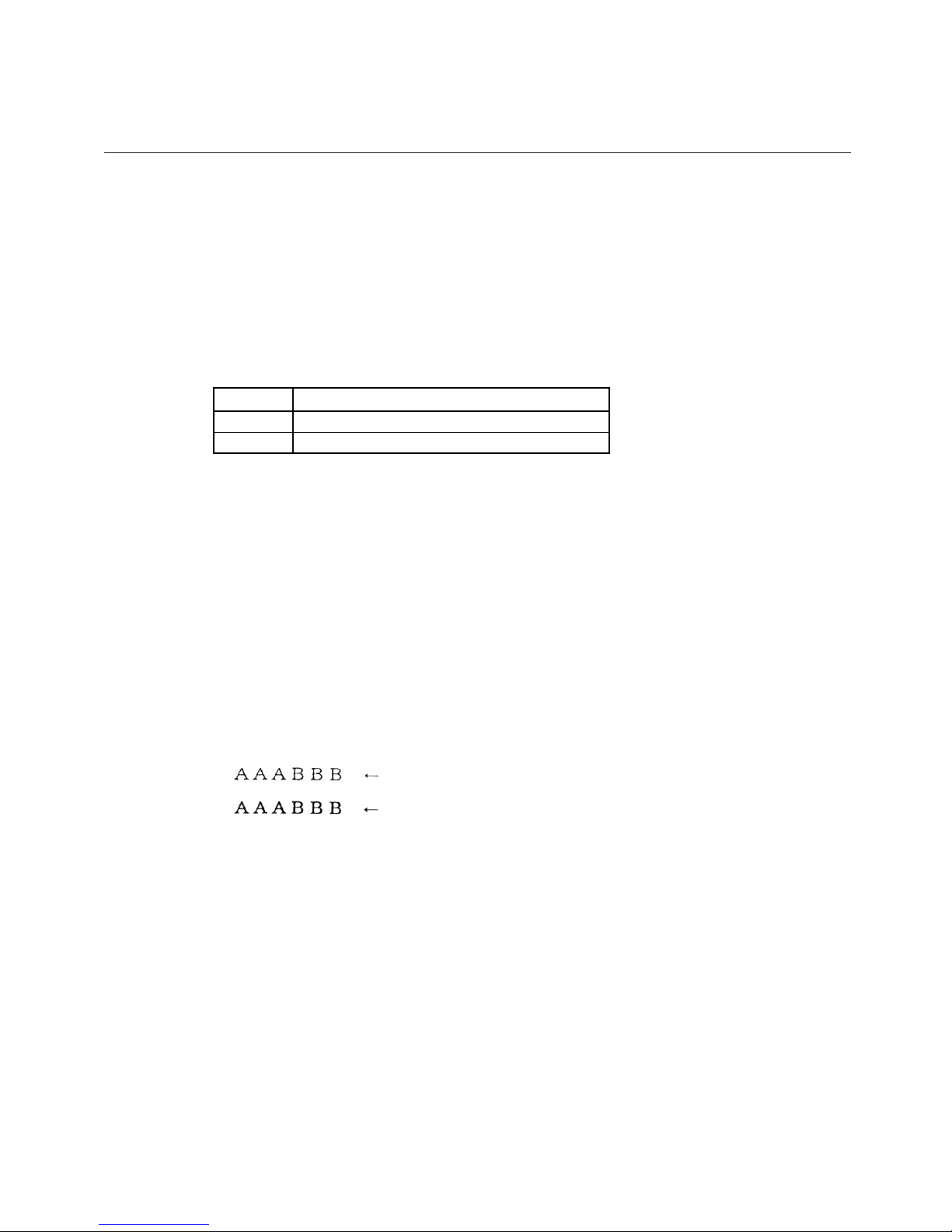
LPRINT CHR$ (&H1B) + "E" + CHR$ (0);
LPRINT "AAABBB" + CHR$ (&HA);
LPRINT CHR$ (&H1B) + "E" + CHR$ (1);
LPRINT "AAABBB" + CHR$ (&HA);
Highlighting canceled
Highlighting canceled
[Function]
[Code]
[Range]
[Outline]
[Caution]
[See Also]
[Sample Program]
[Print Results]
Page 19
BD2-3880/3890 Command Reference
17
ESC G n
Specifying/canceling Double Printing
<1B>H<47>H<n>
{0 =< n =< FF} Data is described in Hex code.
Specifying/canceling the double printing.
•
"n" is valid only for the lowest bit (n0).
•
Control by n is shown as follows.
n0 Type
0 Canceling double printing.
1 Specifying double printing.
•
This is effective to all characters.
•
The print result of Double printing and highlight character printing is completely same.
ESC E
LPRINT CHR$ (&H1B) + "G" + CHR$ (0);
LPRINT "AAABBB" + CHR$ (&HA);
LPRINT CHR$ (&H1B) + "G" + CHR$ (1);
LPRINT "AAABBB" + CHR$ (&HA);
Highlighting canceled
Highlighting canceled
[Function]
[Code]
[Range]
[Outline]
[Caution]
[See Also]
[Sample Program]
[Print Results]
Page 20
BD2-3880/3890 Command Reference
18
ESC R n
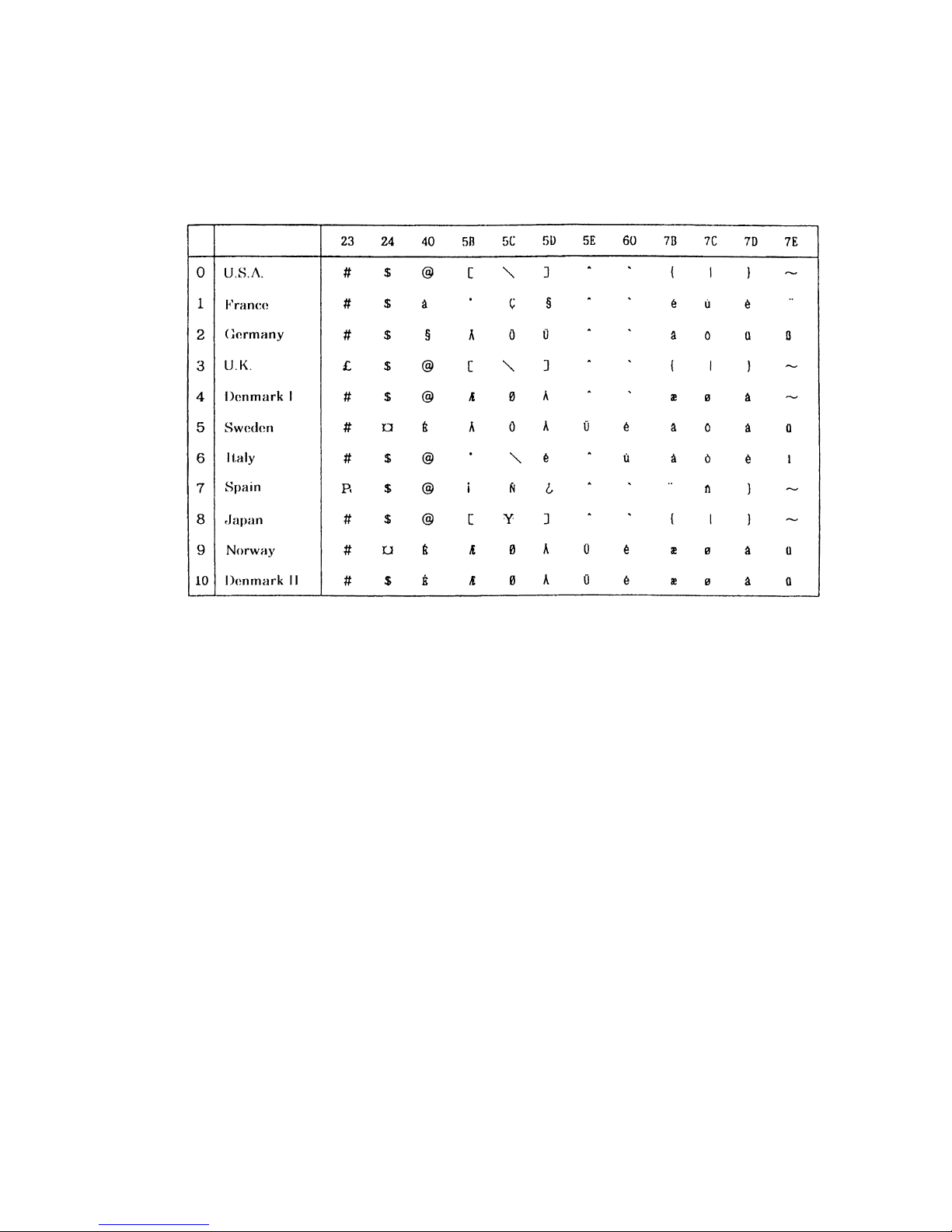
Selecting the International Character set
<1B>H<52>H<n>
{0 =< n =< 0A) Data is described in Hex code.
Depending on the value of n, following character sets are specified.
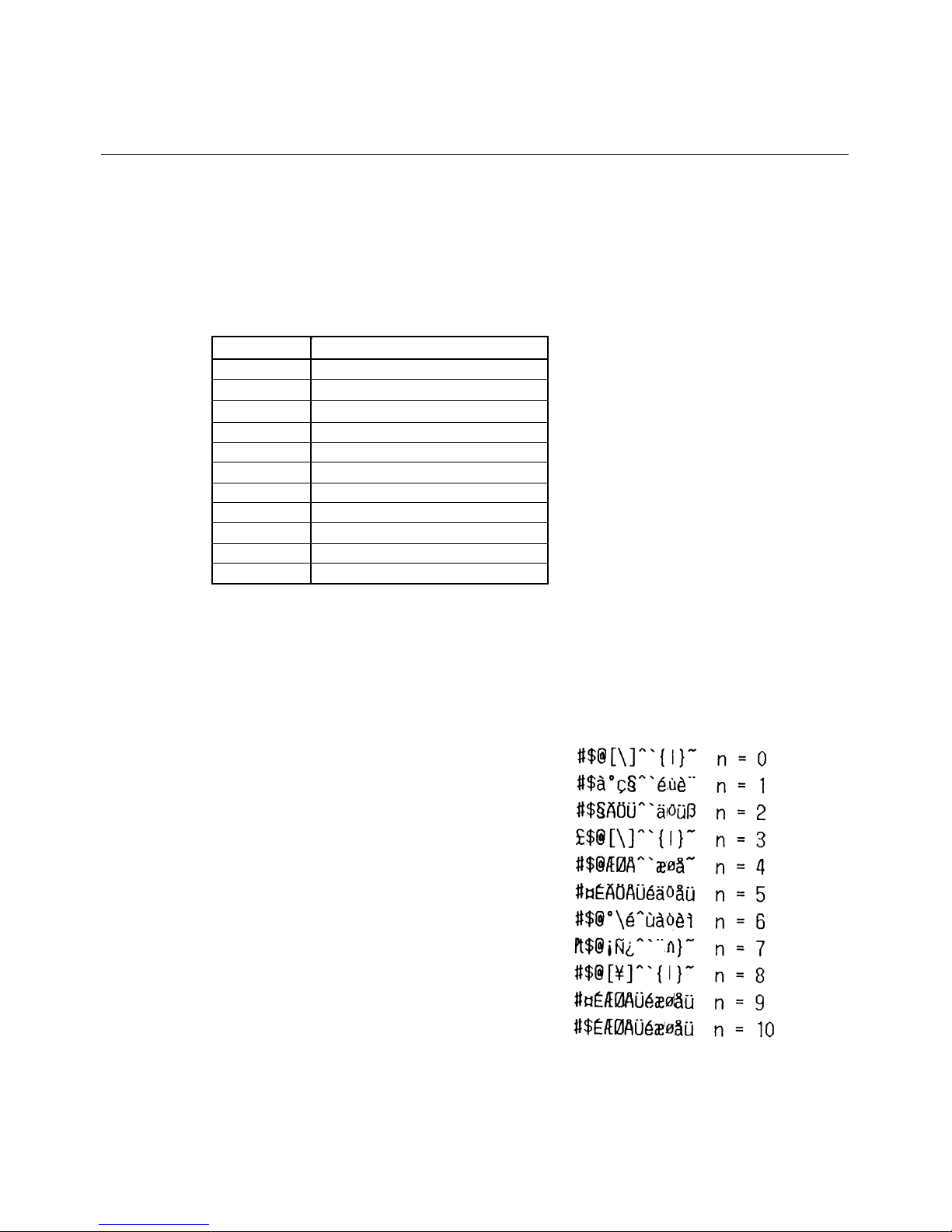
n(Hex) Character Set
0 U.S.A.
1 France
2 Germany
3 U.K.
4 DenmarkI
5 Sweden
6 Italy
7 Spain
8 Japan
9 Norway
A DenmarkII
•
The initial value of n indicates the character set specified by Jumper (J1~J3).
Character Code Table (International Character Set)
FOR I=0 TO 10
LPRINT CHR$ (&H1B) + "R" + CHR$ (I);
LPRINT " #$@[¥]^”;
LPRINT CHR$ (&H60) + "{¥} ˜";
LPRINT "n=" + STR$ (I);
LPRINT CHR$ (&HA);
NEXT
I
[Function]
[Code]
[Range]
[Outline]
[Default]
[See Also]
[Sample Program]
[Print Results]
Page 21
BD2-3880/3890 Command Reference
19
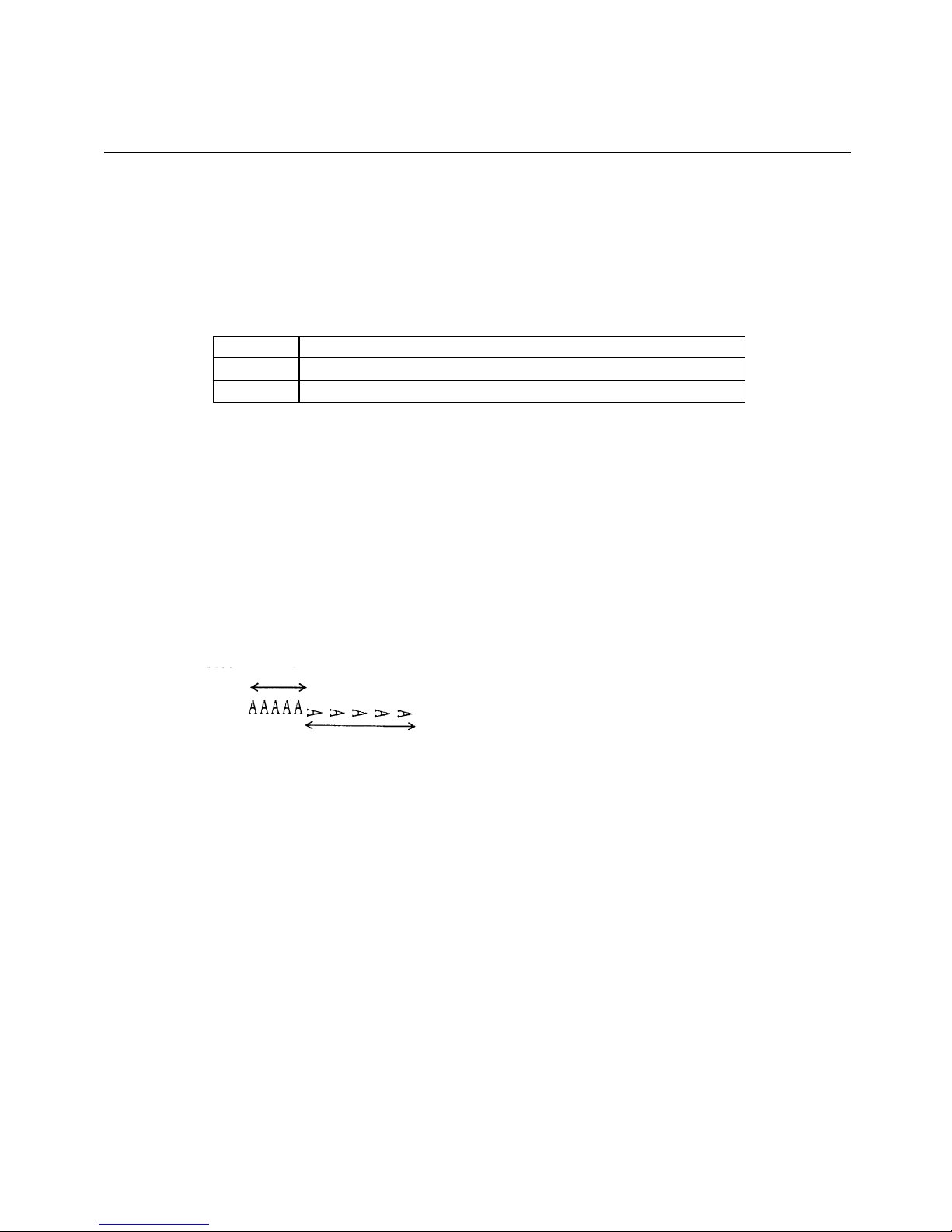
ESC V n
Specifying/Canceling 90°-right- turned Characters
<1B>H<56>H<n>
{0 =< n =< 1} Data is described in Hex code.
Specifying/canceling characters 90°-right- turned character.
•
"n" means the followings.
n (Hex) Condition
0
Canceling
90°-right- turned Characters
1
Specifying
90°-right- turned Characters
•
No underlines are attached to 90°-right- turned characters.
•
The initial value of n is "0".
LPRINT CHR$ (&H1B) + "V" + CHR$ (0);
LPRINT "AAAAA”;
LPRINT CHR$ (&H1B) + "V" + CHR$ (1);
LPRINT "AAAAA" + CHR$ (&HA);
90° Rotation Canceled
90° Rotation Specified
[Function]
[Code]
[Range]
[Outline]
[Caution]
[Default]
[Sample Program]
[Print Results]
Page 22
BD2-3880/3890 Command Reference
20
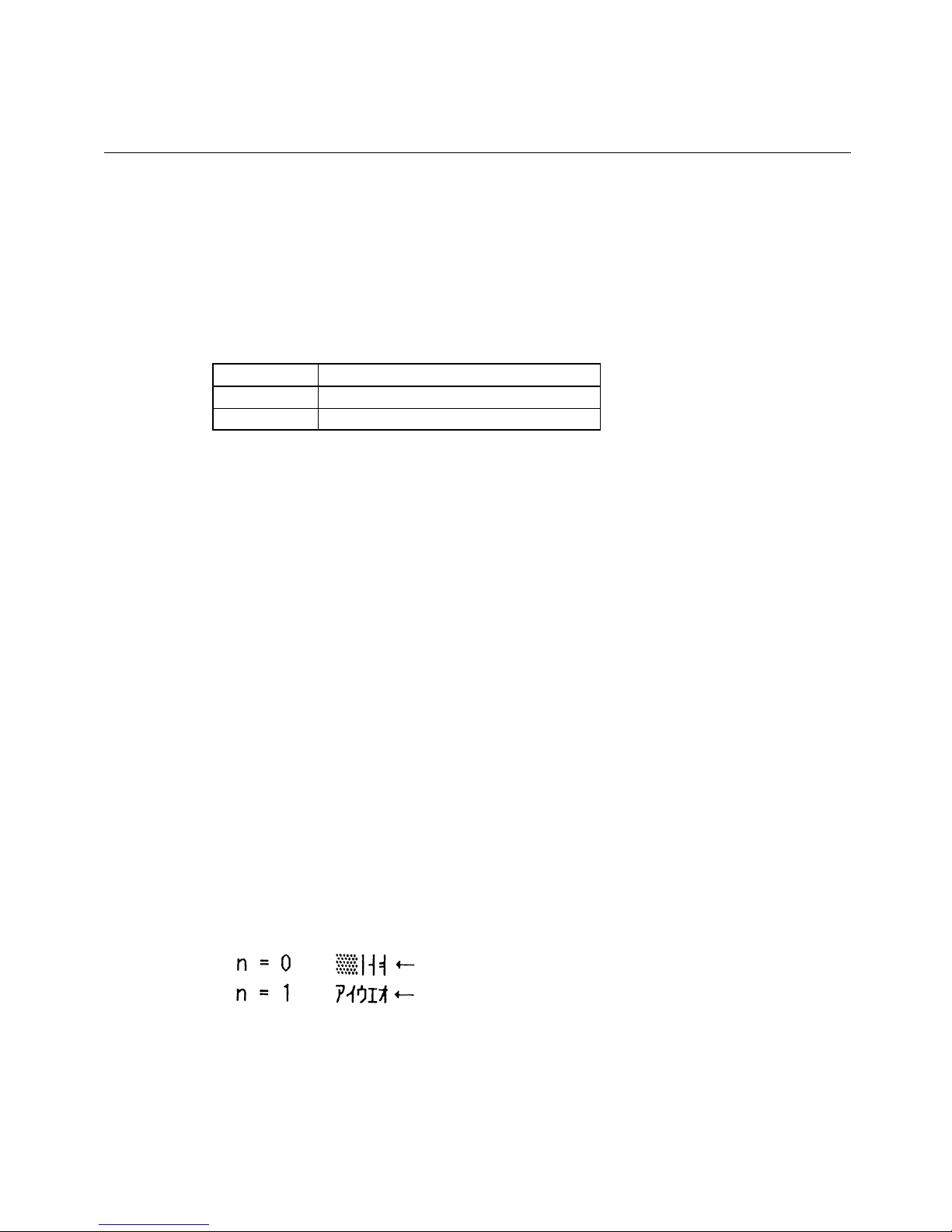
ESC t n
Selecting Character Code Table
<1B>H<74>H<n>
{0 =< n =< 1} Data is described in Hex code.
Selecting Page n on the character code table:
The character code table is selected depending on the value of n.
"n" means the followings.
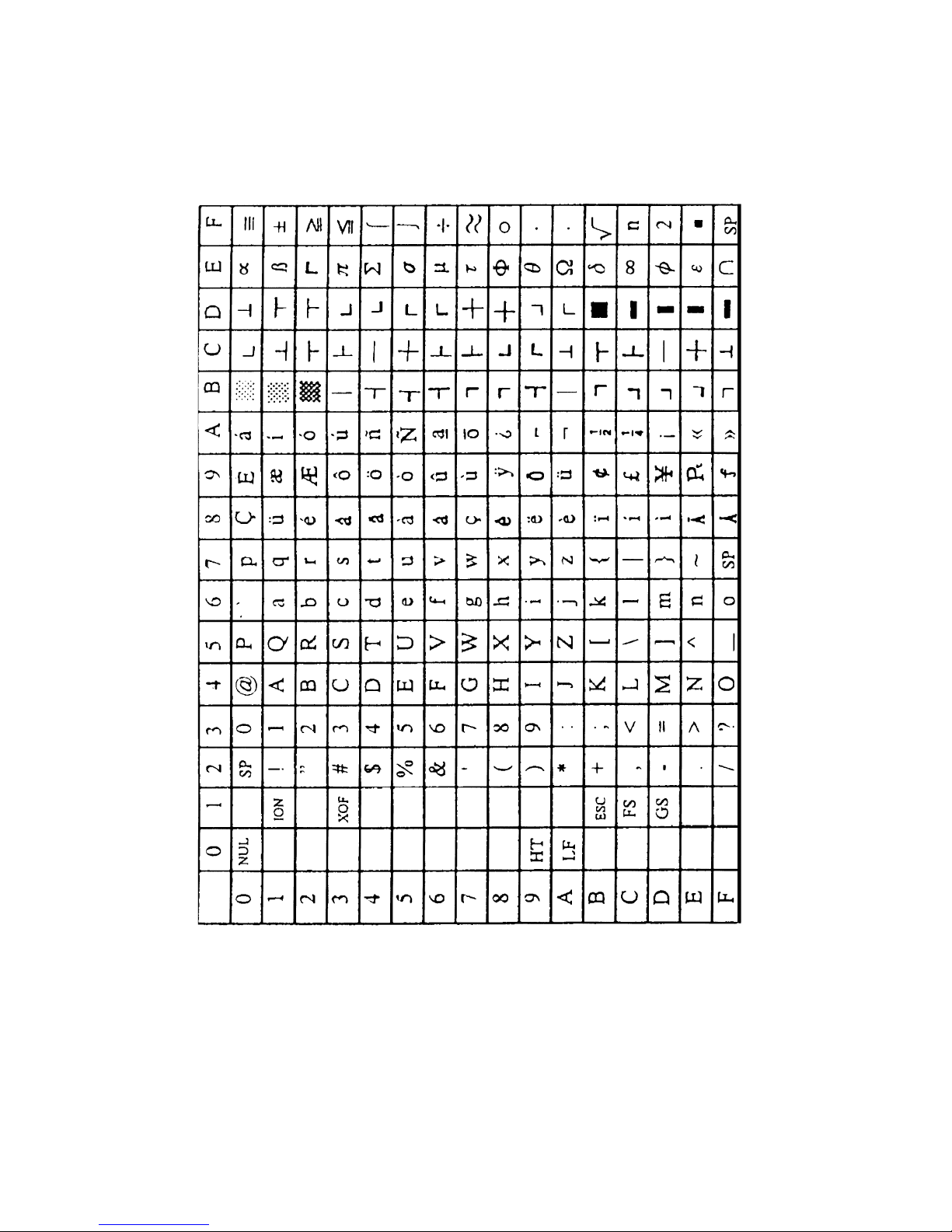
n (Hex) Condition
0 Page0(IBM Character #2)
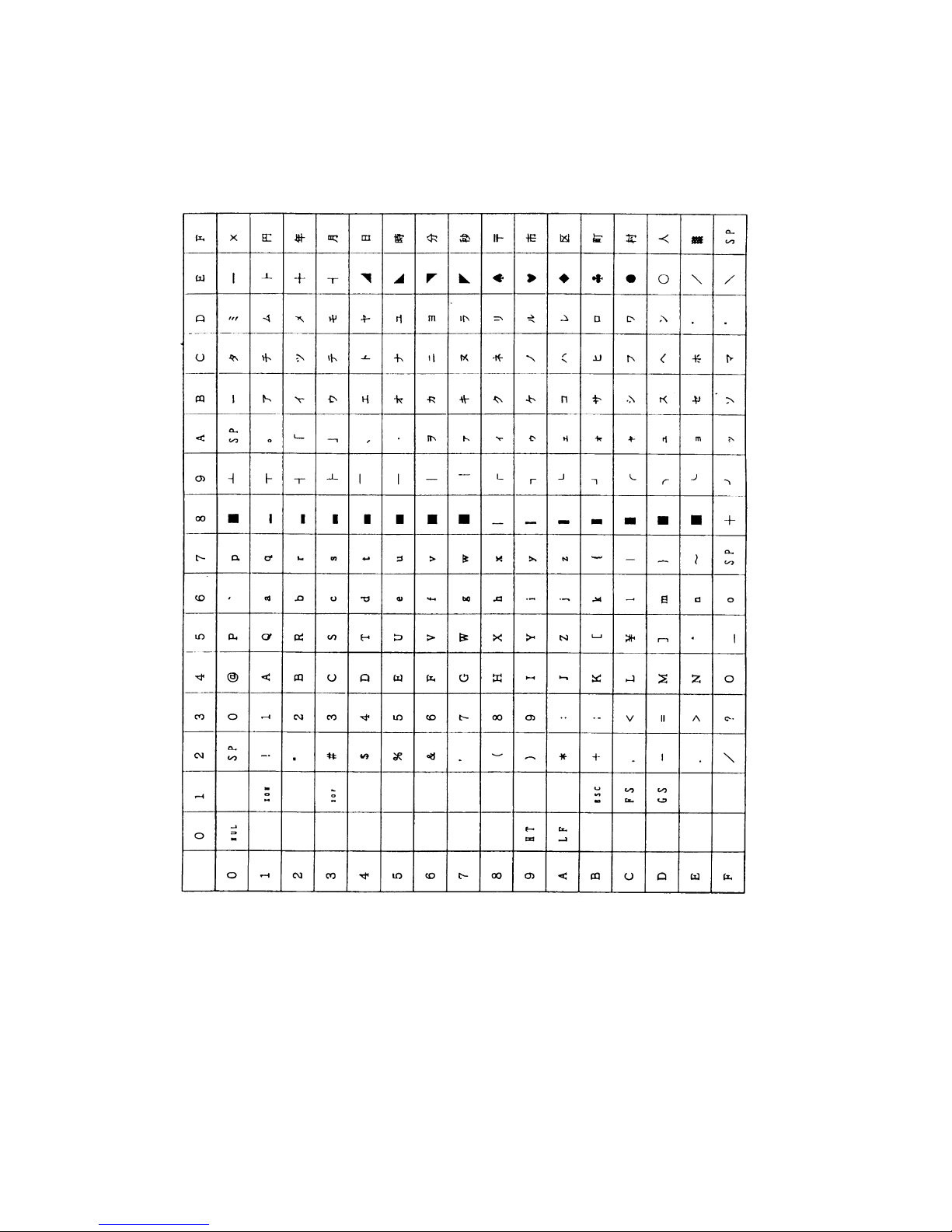
1 Page1(Domestic Character)
The initial value of n is subject to the character set for the country specified
by the Jumper(J1~J3).
•
When Japan is selected: Domestic characters
•
When non-Japan is selected: IBM characters #2
Character Code Table
LPRINT CHR$ (&H1B) + "t" + CHR$ (0);
LPRINT " n=0 “;
FOR C=&HB1 TO &HB5
LPRINT CHR$ (C);
NEXT C
LPRINT CHR$ (&HA);
LPRINT CHR$ (&H1B) + "t" + CHR$ (1);
LPRINT " n=1 “;
FOR C=&HB1 TO &HB5
LPRINT CHR$ (C);
NEXT C
LPRINT CHR$ (&HA);
Page 0
Page 1
[Function]
[Code]
[Range]
[Default]
[See Also]
[Sample Program]
[Print Results]
Page 23
BD2-3880/3890 Command Reference
21
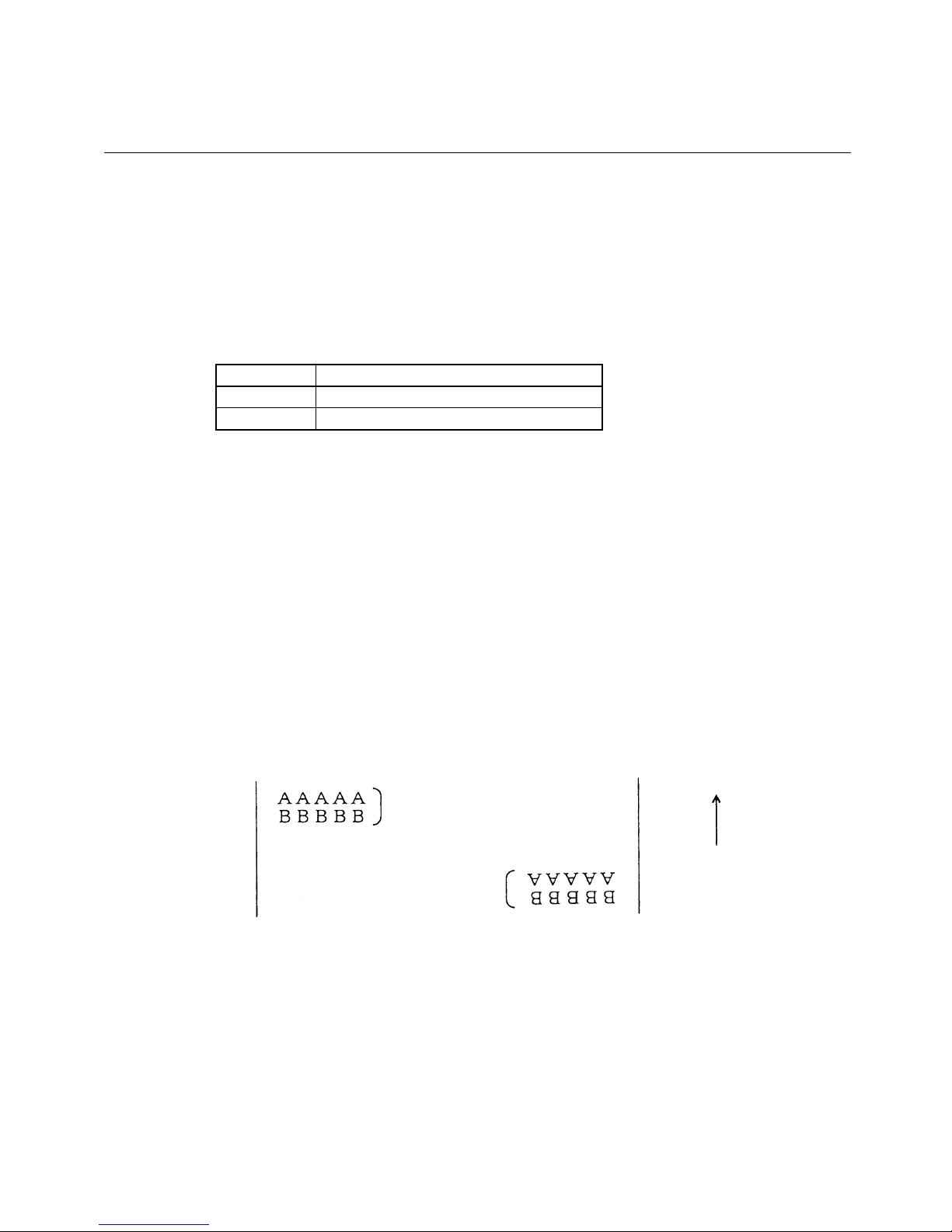
ESC { n
Specifying/Canceling the Inverted Characters
<1B>H<7B>H<n>
{0 =< n =< FF} Data is described in Hex code.
Specifying/canceling inverted characters.
•
"n" is valid only for the lowest bit (n0).
•
Bit n (n0) means the followings.
n0 Condition
0 Canceling inv rted characters.
1 Specifying inverted characters.
•
Inverted-printing means printing the line at 180°turned.
•
This is valid only when this is specified at the beginning of a line.
•
The initial value of n is "0".
LPRINT CHR$ (&H1B) + "{" + CHR$ (0);
LPRINT "AAAAA" + CHR$ (&HA);
LPRINT "BBBBB" + CHR$ (&HA);
LPRINT CHR$ (&H1B) + "{" + CHR$ (1);
LPRINT "AAAAA" + CHR$ (&HA);
LPRINT "BBBBB" + CHR$ (&HA);
Inversion Canceled
Inversion Specified
Paper Feed Direction
[Function]
[Code]
[Range]
[Outline]
[Caution]
[Default]
[Sample Program]
[Print Results]
Page 24
BD2-3880/3890 Command Reference
22
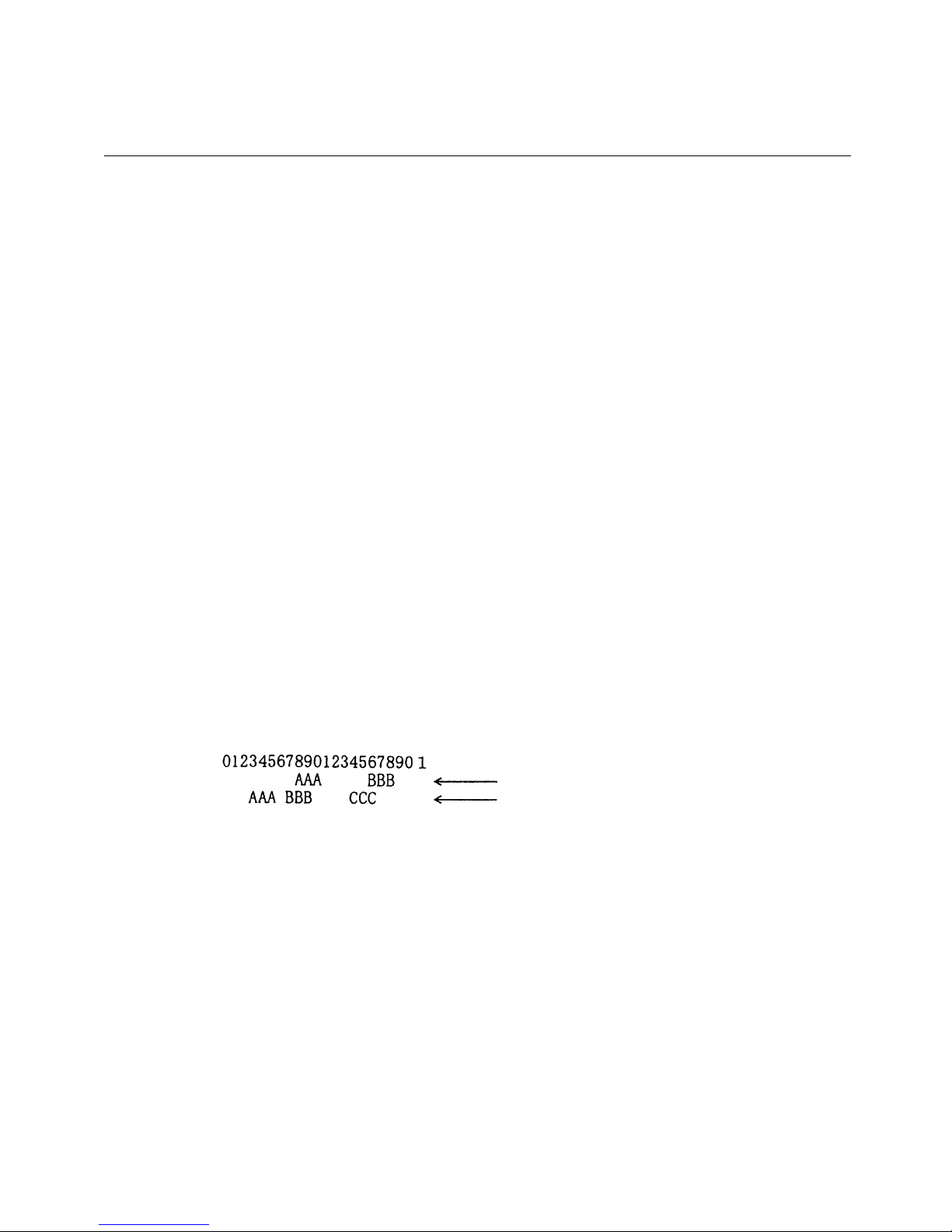
HT
Horizontal Tab Command
<09>H
Shifts the printing position to the next horizontal tab position.
• Ignored when the next horizontal tab position has not been set.
• The horizontal tab position is set by ESC D.
• Initial setting of the horizontal tab position is each 8 characters in 9th, 17th,
25th,columns.
ESC D
LPRINT "0123456789012345678901”;
LPRINT CHR$ (&HA);
LPRINT CHR$ (&H9) + "AAA”;
LPRINT CHR$ (&H9) + "BBB”;
LPRINT CHR$ (&HA);
LPRINT CHR$ (&H1B) + "D”;
LPRINT CHR$ (3) + CHR$ (7) + CHR$ (14) + CHR$ (0);
LPRINT CHR$ (&H9) + "AAA”;
LPRINT CHR$ (&H9) + "BBB”;
LPRINT CHR$ (&H9) + "CCC" + CHR$ (&HA);
Initially set horizontal tab
When set to the 4th, 8th, and 15th digits
[Function]
[Code]
[Outline]
[Caution]
[See Also]
[Sample Program]
[Print Results]
Page 25

BD2-3880/3890 Command Reference
23
ESC $ n1 n2
Specifying the Absolute Positions
<1B>H<24>H<n1><n2>
{0 =< n1 =< FF}
{0 =< n2 =< 1} (BD2-2880)
{0 =< n2 =< 2} (BD2-38x0) Data is described in Hex code.
The printing start position is specified in the number of dots (1/203 inch unit) from
the beginning of line.
•
The number of dots is divided by 256, whose quotient is taken as n2 and the residual as n1.
•
Therefore, the printing start position is equal to n1+n2 x 256 from the beginning of line.
•
Specifying beyond the line end is ignored.
•
The initial value is not specified.
ESC \
LPRINT CHR$ (&H1B) + "$”;
LPRINT CHR$ (0) + CHR$ (0) + "A”;
LPRINT CHR$ (&H1B) + "$”;
LPRINT CHR$ (50) + CHR$ (0) + "B”;
LPRINT CHR$ (&H1B) + "$”;
LPRINT CHR$ (0) + CHR$ (1) + "C”;
LPRINT CHR$ (&HA);
LPRINT CHR$ (&H1B) + "$”;
LPRINT CHR$ (100) + CHR$ (0) + "A”;
LPRINT CHR$ (&H1B) + "¥”;
LPRINT CHR$ (&HC2) + CHR$ (&HFF) + "B”;
LPRINT CHR$ (&HA);
Absolute Position Specified
Relative Position Specified – 62
[Function]
[Code]
[Range]
[Outline]
[Caution]
[Default]
[See Also]
[Sample Program]
[Print Results]
Page 26

BD2-3880/3890 Command Reference
24
ESC D [ n ] k NUL
Setting Horizontal Tab Position
<1B>H<44>H [ <n> ] k<00>H
{0 =< n =< FFH} Data is described in Hex code.
{0 =< k =< 20H} Data is described in Hex code.
Specifying a horizontal tab position.
•
"n" indicates the no. of columns from the beginning to the horizontal tab position.
At this time, n= set position
–
1 is to be specified. For example, to set the position at 9th
column, n=8 is to be specified.
•
k denotes the number of horizontal tab positions you want to set.
•
The tab position is set at position where it is "character width x n" from the line beginning.
The character width, at this time, includes the rightward space amount.
In double wide characters, it is made double of the ordinary case.
•
Tab positions can be specified are maximum 32. Specifying exceeding this is ignored.
•
<n> k, which denotes a setting position, is input in the increasing order and ends at <00> H.
•
ESC D NUL clears all the set tab positions. Following clearing, horizontal tab command is
ignored.
When the data, <n> k, is equal to or smaller than its preceding data, <n> k-1, it is assumed
that tab setting is finished. If this is the case, the next data onward will be processed as normal
data.
When the data, <n> k, exceeds a 1-line print area, set the horizontal tab position, assuming
"Set digit position = Maximum print digits + 1." The horizontal tab position does not
change even if the character width is altered after setting the horizontal tab position.
•
Initial value is specified for each eight characters(9th.17th.25th column) of ANK characters.
HT
See Sample Program and Print Results for HT on Page
43.
[Function]
[Code]
[Range]
[Outline]
[Caution]
[Default]
[See Also]
[Sample Program]
[Print Results]
Page 27

BD2-3880/3890 Command Reference
25
ESC n1 n2
Specifying the Relative Positions
<1B>H<5C>H<n1>< n2>
{0 =< n1 =< FF}
{0 =< n2 =< FF} Data is described in Hex code.
The printing start position is specified in the number of dots(1/203 inch unit) from
the current position.
•
Rightward direction is taken as plus and leftward direction as minus.
•
To specify N dot in minus (left) direction, use a complement of N for assignment.
–
N dots = 65536 – N
•
The number of dots is divided by 256, whose quotient is taken as n2 and the residual as n1.
•
Specifying exceeding the top of line or the end of line is ignored.
•
The initial value is not specified.
ESC $
See Sample Program and Print Results for ESC $ on Page
44.
\
[Function]
[Code]
[Range]
[Outline]
[Caution]
[Default]
[See Also]
[Sample Program]
[Print Results]
Page 28
BD2-3880/3890 Command Reference
26
ESC a n
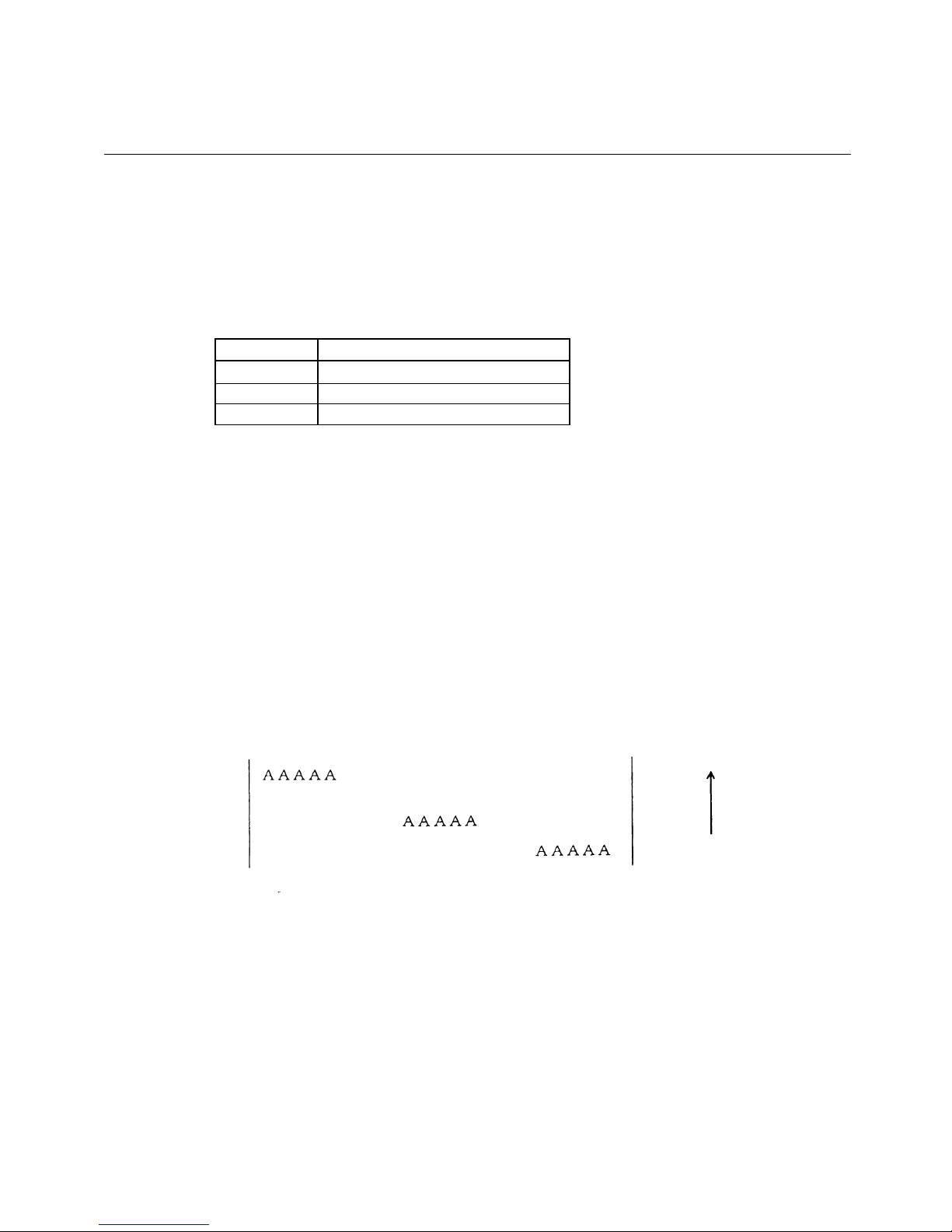
Aligning the characters
<1B>H<61>H<n>
{0 =< n =< 2} Data is described in Hex code.
All the printed data within one line are aligned in the specified position.
•
Depending on n value, positional alignment is carried out as in the table below:
n (Hex) Position
0 Left end alignment
1 Centering
2 Right end alignment
•
This is valid only when n is inputted at the beginning of line.
•
The initial value of n is "0".
LPRINT CHR$ (&H1B) + "a" + CHR$ (0);
LPRINT "AAAAA" + CHR$ (&HA);
LPRINT CHR$ (&H1B) + "a" + CHR$ (1);
LPRINT "AAAAA" + CHR$ (&HA);
LPRINT CHR$ (&H1B) + "a" + CHR$ (2);
LPRINT "AAAAA" + CHR$ (&HA);
Left-justified Centered Right-justified
Paper Feed Direction
[Function]
[Code]
[Range]
[Outline]
[Caution]
[Sample Program]
[Print Results]
Page 29
BD2-3880/3890 Command Reference
27
ESC 2
Specifying 1/6-inch line feed rate
[Code] <1B>H<32>H
The line feed rate per line is specified by 1/6 inch.
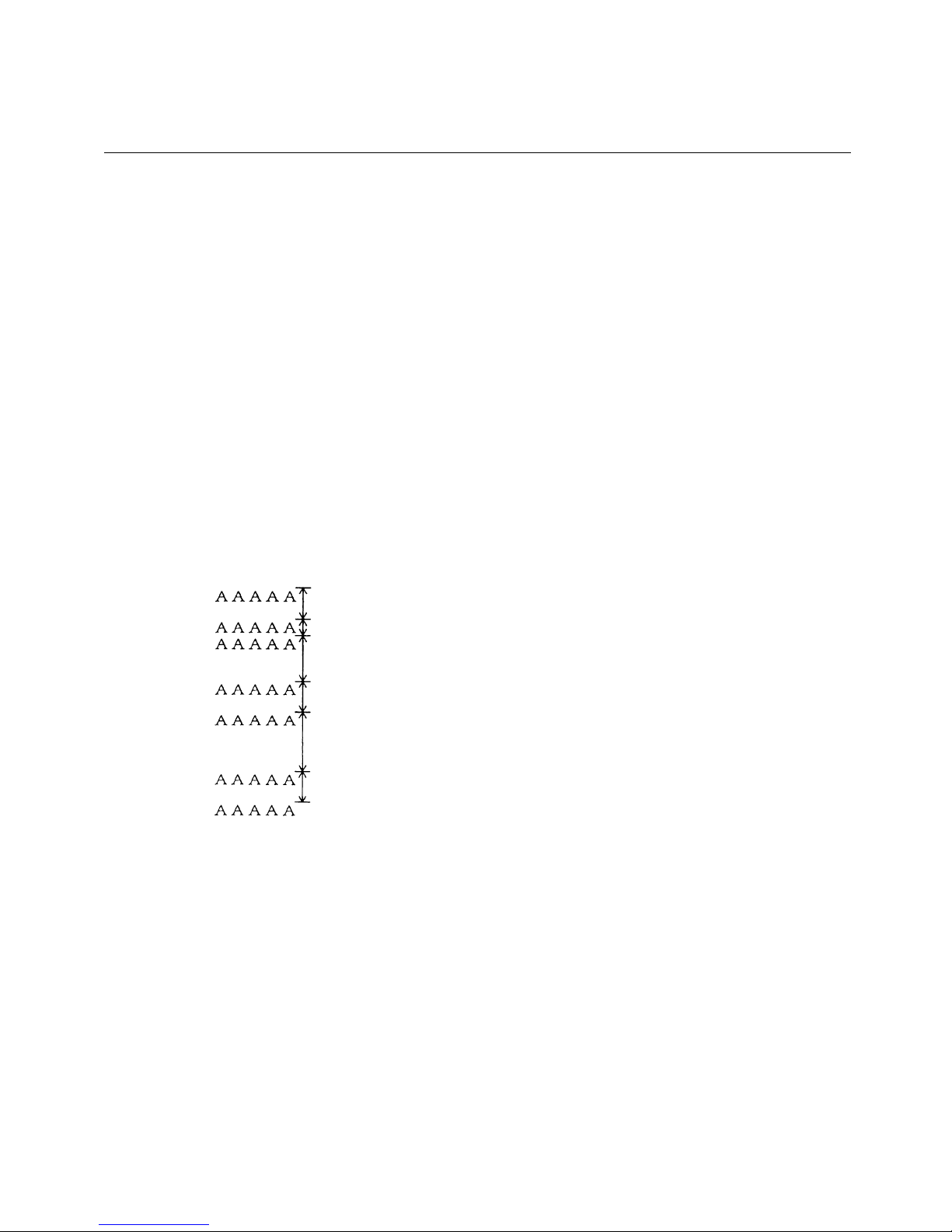
LPRINT "AAAAA" + CHR$ (&HA);
LPRINT CHR$ (&H1B) + "3" + CHR$ (0);
LPRINT "AAAAA" + CHR$ (&HA);
LPRINT CHR$ (&H1B) + "3" + CHR$ (50);
LPRINT "AAAAA" + CHR$ (&HA);
LPRINT CHR$ (&H1B) + "2”;
LPRINT "AAAAA" + CHR$ (&HA);
LPRINT "AAAAA”;
LPRINT CHR$ (&H1B) + "J" + CHR$ (100);
LPRINT "AAAAA" + CHR$ (&HA);
LPRINT "AAAAA" + CHR$ (&HA);
1/6-inch line feed
0/360-inch line feed
50/360-inch line feed
1/6-inch line feed
100/360-inch line feed
1/6-inch line feed
[Function]
[Code]
[Outline]
[Sample Program]
[Print Results]
Page 30

BD2-3880/3890 Command Reference
28
ESC 3 n
Setting line feed rate of minimum pitch
<1B>H<33>H<n>
{0 =< n =< FF} Data is described in Hex code.
The line feed rate per line is specified by n/360 inch.
Since an actual mechanical pitch is 1/203 inch, it is internally converted approximate
to the value specified with this command.
• The initial value is n = 60 (1/6 inch) (18H), being 4.23 mm line feed rate.
See Sample Program and Print Results for ESC 2 on Pa
ge 48.
[Function]
[Code]
[Range]
[Outline]
[Default]
[Sample Program]
[Print Results]
Page 31
BD2-3880/3890 Command Reference
29
ESC * m n1 n2 [ d ] k
Specifying the Bit Image Mode
<1B>H<2A>H<m><n1><n2> [ <d> ] k
{m= 0, 1, 32, 33 bit image mode (See the table below.)}
{0 =< n1 =< FF(Hex)}
{0 =< n2 =< 01(Hex)}
{0 =< n2 =< 02(Hex)}
{0 =< d =< FF(Hex)}
{k = n1 + FF(Hex) n2 (m
(BD2-38x0)
(BD2-2880)
= 0, 1)
{k = (n1+ FF(Hex) n2) 3} (m = 32, 33)
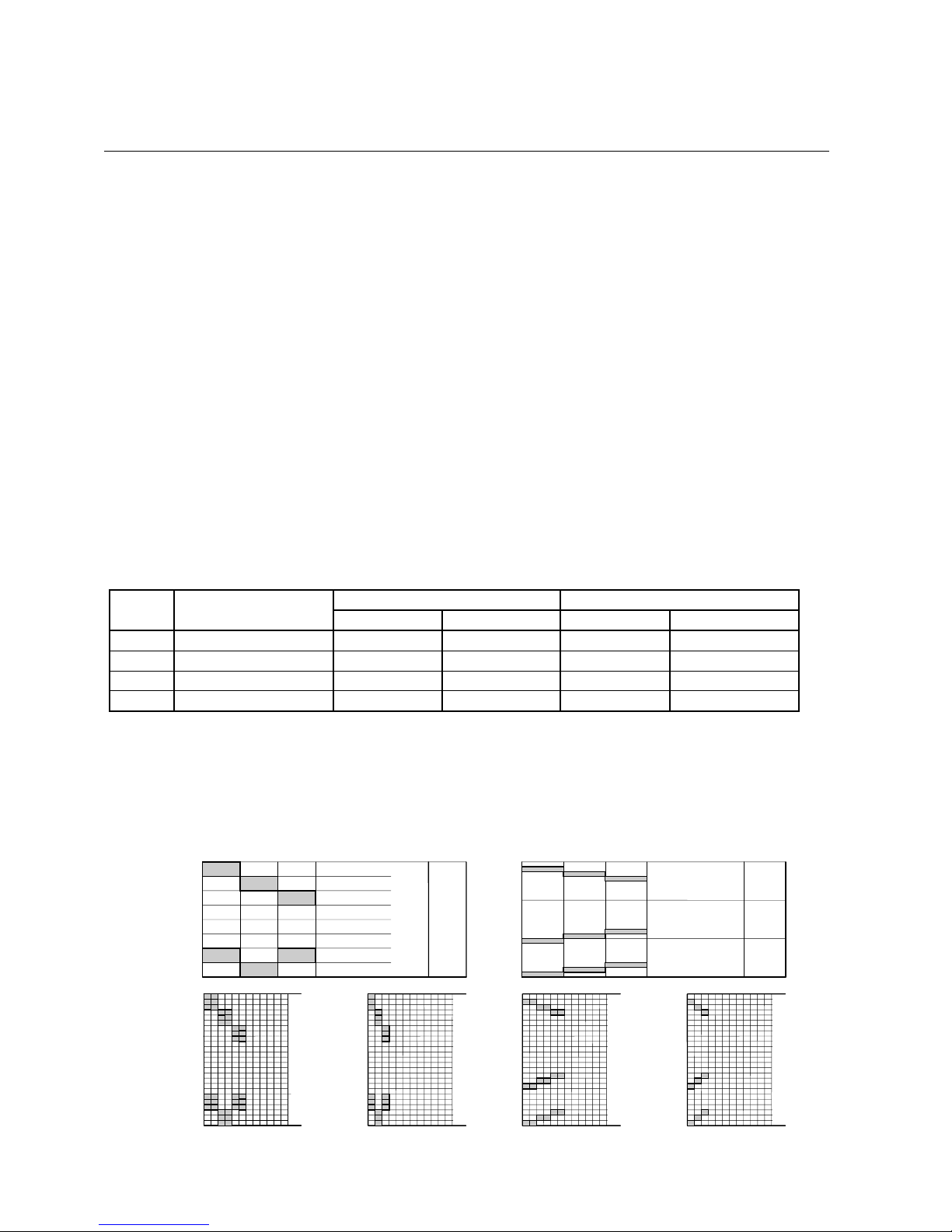
According to the number of dots specified in n1, n2, specify the bit image of mode n.
• The No. of dots printed is divided by 256, whose quotient is taken as n2 and residual as n1.
• The total no. of dots printed in the bit image is equal to n1 + (256 x n2).
• When bit image data have been input in excess of dot position of one line (448 dots) ,
the excess data are discarded.
• d is bit image data, the bits subject to printing are taken as "1" and those not as "0".
• The bit image modes specified by m are shown as follows:
Vertical Direction Horizontal Direction
m(Hex) Mode
No. of Dots Dot Density Dot Density Max. No. of Dots
0 8-dot single density 8 67 DPI 101 DPI 192
1 8-dot double density 8 67 DPI 203 DPI 384
32 24-dot single density 24 203 DPI 101 DPI 192
33 24-dot double density 24 203 DPI 203 DPI 384
• When the values set in m (bit image mode) are out of the above range, the data
following after n1 is processed as normal printing data.
• After completion of bit image printing, printer returns to normal data processing mode.
[Examp
le]
×
××
[Function]
[Code]
[Range]
[Outline]
[Caution]
For 8-dot Mode For 24-dot Mode
MSB
d1 d3 • • • dnd2
dn
LSB
Sin
g
le Densit
y
Double Densit
y
Single Densit
y
Double Densit
y
MSB
LSB
MSB
MSB
LSB
LSB
d7d4d1
• • •
d8d5d2
d9d6d3
• • •
• • •
Page 32

BD2-3880/3890 Command Reference
30
[Sample Program]
LPRINT CHR$ (&H1B) + "*”;
LPRINT CHR$ (0) + CHR$ (20) + CHR$ (0); IMG1 :
GOSUB IMG1 LPRINT CHR$ (&HFF) ;
LPRINT CHR$ (&HA); FOR I=1 TO 18
LPRINT CHR$ (&H1B) + "*”; LPRINT CHR$ (&H85) ;
LPRINT CHR$ (1) + CHR$ (20) + CHR$ (0); NEXT I
GOSUB IMG1 LPRINT CHR$ (&HFF) ;
LPRINT CHR$ (&HA); RETURN
LPRINT CHR$ (&H1B) + "*”; IMG2 ;
LPRINT CHR$ (32) + CHR$ (20) + CHR$ (0); LPRINT CHR$ (&HFF) ;
GOSUB IMG2 LPRINT CHR$ (&HFF) ;
LPRINT CHR$ (&HA); LPRINT CHR$ (&HFF) ;
LPRINT CHR$ (&H1B) + "*”; FOR I=1 TO 18
LPRINT CHR$ (33) + CHR$ (20) + CHR$ (0); LPRINTCHR$ (&H80) ;
GOSUB IMG2 LPRINTCHR$ (&H00) ;
LPRINT CHR& (&HA); LPRINTCHR$ (&H05) ;
END NEXT I
LPRINT CHR$ (&HFF) ;
LPRINT CHR$ (&HFF) ;
LPRINT CHR$ (&HFF) ;
RETURN
[Print Results]
Page 33
BD2-3880/3890 Command Reference
31
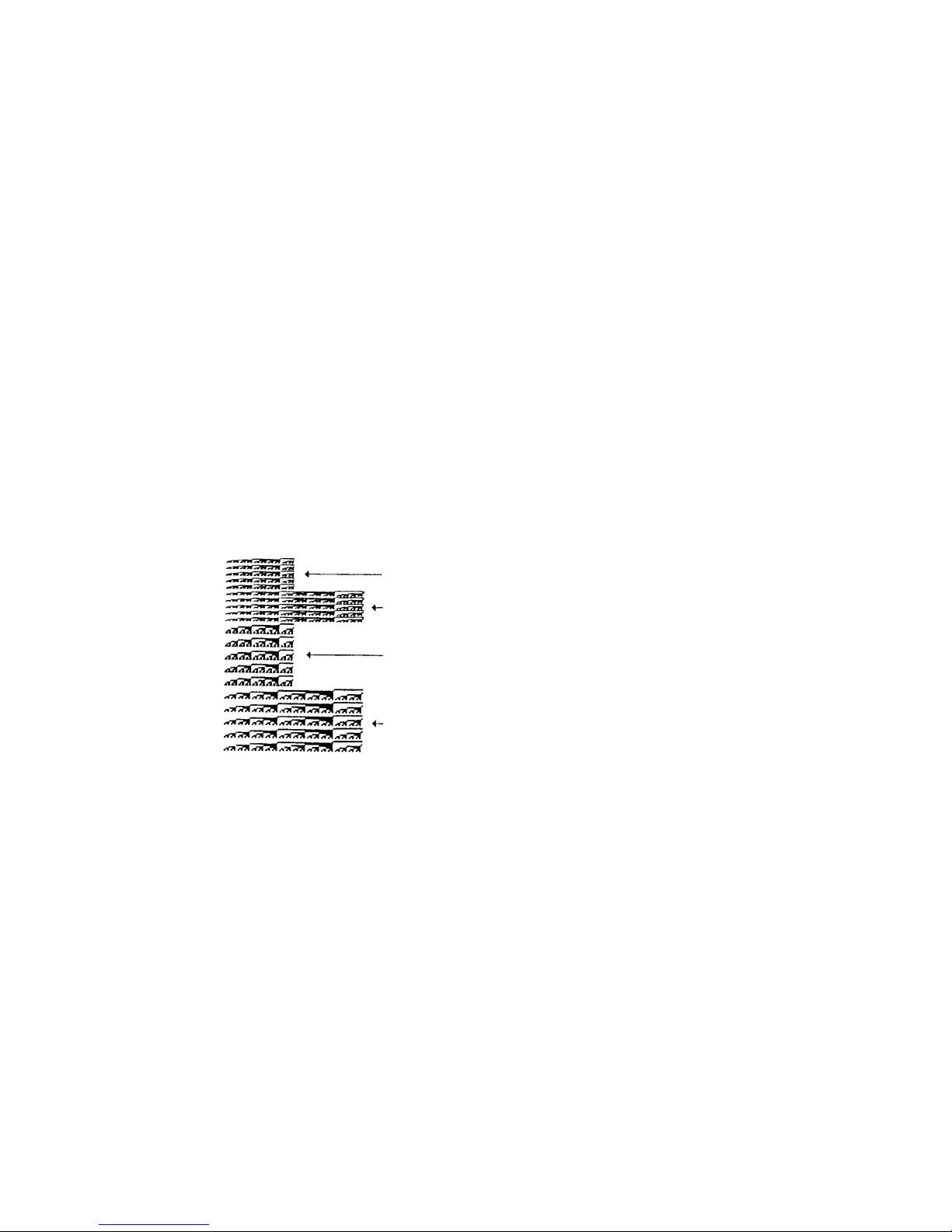
GS * n1 n2 [ d ] n1 n2 8
Defining the Download Bit Image
<1D>H<2A>H<n1><n2> [ < d > ] n1 n2 8
{1 =< n1}
{1 =< n2}
{n1 x n2 =< 1311} (BS2-2880)
{n1 x n2 =< 1536} (BS2-38x0)
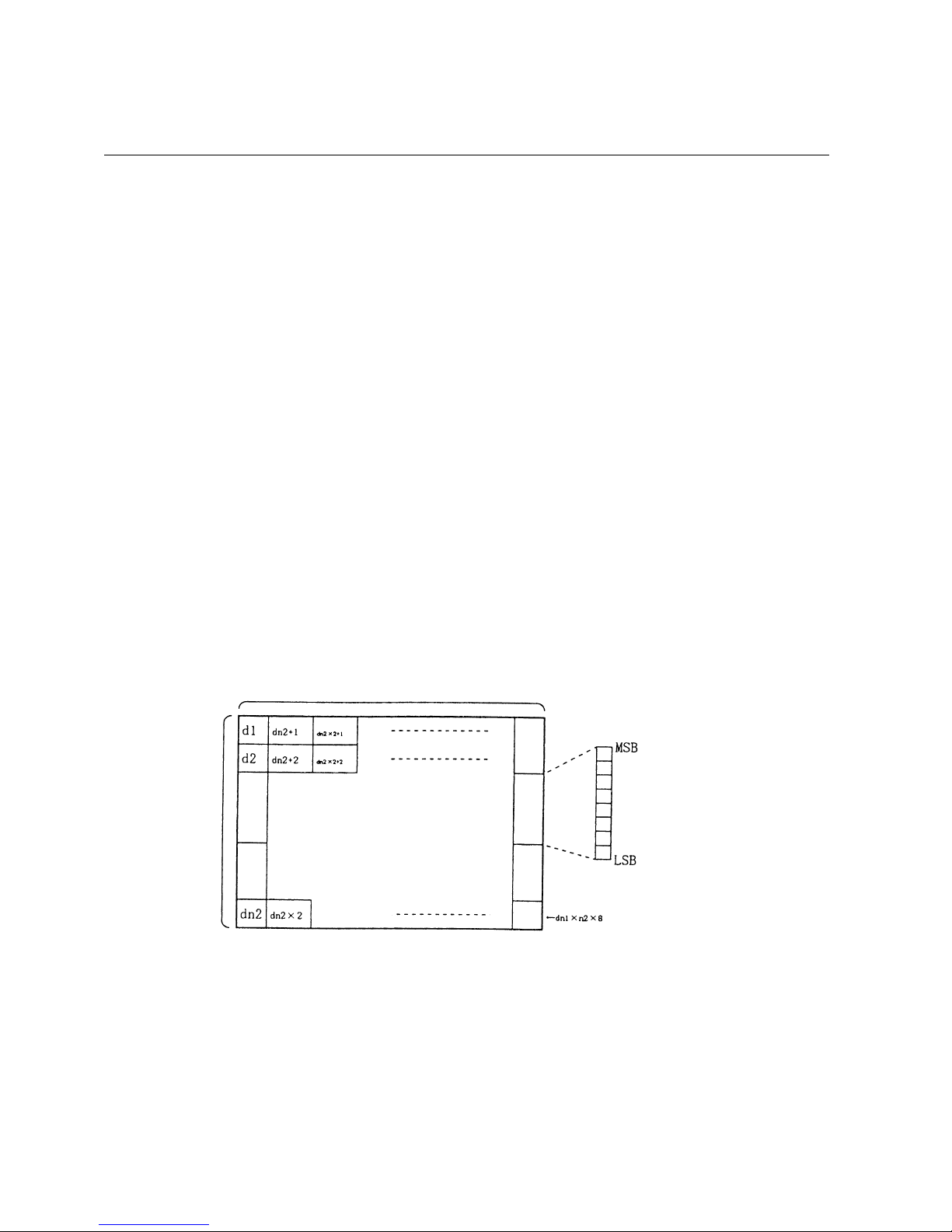
Defines downloading bit images of the number of dots specified by n1/n2.
•
The numbers of dots are n1 x 8 in horizontal direction and n2 x 8 in vertical direction.
•
d indicates bit image data.
•
The download bit image thus defined remains effective until redefinition,
ESC @ execution, ESC &, or power OFF takes place.
•
A download character and a download bit image can not be defined simultaneously.
With this command executed, defined content of a download character is cleared.
•
Relations between the bit image data and the dot defined are shown below:
GS
/
××
××
If a download bit image is defined with this command while it is being printed (GS/) ,
printing operation may become unstable (fluctuating print pitch).
•
[Function]
[Code]
[Range]
[Outline]
[Caution]
[See Also]
Page 34
BD2-3880/3890 Command Reference
32
GOSUB IMG
LPRINT CHR$ (&H1D) + "/" + CHR$ (0);
LPRINT CHR$ (&H1D) + "/" + CHR$ (1);
LPRINT CHR$ (&H1D) + "/" + CHR$ (2);
LPRINT CHR$ (&H1D) + "/" + CHR$ (3);
END
IMG:
n 1 = 10 : n 2= 5
LPRINT CHR$ (&H1D) + "*”;
LPRINT CHR$ (n1) + CHR$ (n2);
FOR J=1 TO n1*8
FOR I=1 TO n2
LPRINT CHR$ (J);
NEXT I
NEXT J
RETURN
Nomal Mode
Double Width Mode
Double Height Mode
Quadruple Mode
[Sample Program]
[Print Results]
Page 35
BD2-3880/3890 Command Reference
33
GS / m
Printing the Download, Bit Image
<1D>H<2F>H<m>
{0 =< m =< 03} Data is described in Hex code.
Prints download bit image in a mode specified by m.
•
Modes can be selected by m are shown below.
m Mode Name Dot Density in
Vertical Direction
Dot Density in
Horizontal Direction
0 Normal mode 203 DPI 203 DPI
1 Double wide mode 203 DPI 101 DPI
2 Double high mode 101 DPI 203 DPI
3 Double wide/double high mode 101 DPI 101 DPI
•
When data exist inside the print buffer, this command is ignored.
•
When a download bit image has not been defined, this command is ignored.
•
A portion of a download bit image exceeding one line length is not printed.
•
A download character and a download bit image cannot be defined simultaneously.
•
The initial value is not specified.
GS *
See Sample Program and Print Results for GS * on Page
52.
If a download bit image data is defined while it is being printed with this command,
printing operation may become unstable (fluctuating print pitch).
•
[Function]
[Code]
[Range]
[Outline]
[Caution]
[Default]
[See Also]
[Sample Program]
[Print Results]
Page 36
BD2-3880/3890 Command Reference
34
ESC v (Serial Interface Only)
Transmitting the printer status (Serial Type)
<1B>H<76>H
Current printer status is transmitted.
•
Status sent out consists of 1 byte whose content is as in the table below.
•
In DTR/DSR control, after revertible state of the host (DSR signal being in SPACE
state) is confirmed, only 1 byte is transmitted. In XON/XOFF control, DSR signal state
not being confirmed, only 1 byte is transmitted.
•
In DTR/DSR control, when the host is in unrespectable state (DSR signal being in
MARK state), it waits until receptacle state is created.
•
In paper end (paper near end) status, this command may be unrespectable state due to
BUSY state.
Remarks. This command is valid only for serial interface model.
Va l ue Bit Function
0 1
0 Not defined
1 Not defined
2 Paper end With paper Without paper
3 Not defined
4 Not used Fixed to 0
–
5 Not defined
6 Not defined
7 Not defined
OPEN "COM1: N81NN" AS #1;
PRINT #1, CHR$ (&H1B) + "v”;
A$ = INPUT$ (1, #1);
CLOS
E #1
[Function]
[Code]
[Outline]
[Caution]
[Sample Program]
Page 37
BD2-3880/3890 Command Reference
35
ESC c5 n
Enabling/Disabling Panel Switches
<1B>H<63>H<35>H<n>
{0 =< n =< FF} Data is described in Hex code.
Selecting the LF switch valid/invalid.
•
"n" is valid only in the lowest bit (n0).
•
"n" bit means the followings.
n0
Condition
0 LFSW valid.
1 LFSW invalid.
When the panel switch is disabled with this command, the LF switch is disabled. Therefore,
the paper cannot be fed by operating the LF switch.
•
The initial value of n is "0".
LPRINT CHR$ (&H1B) + "c5" + CHR$ (0);
………
When enabling the LF switch
LPRINT CHR$ (&H1B) + "c5" + CHR$ (1);
………
When disabling the LF switch
[Function]
[Code]
[Range]
[Outline]
[Caution]
[Default]
[Sample Program]
Page 38
BD2-3880/3890 Command Reference
36
GS :
Starting / Ending Macro Definition
<1D>H<3A>H
Specifying starting / ending macro definition.
Means termination when received while defining a macro.
Maximum content available for macro definition is 2048 bytes.
A portion exceeding 2048 bytes is not defined.
•
Even with ESC @ (initialization of the printer) having been executed, defined content is not
cleared. Therefore, it is possible to include ESC @ into the content of macro definition.
•
Normal printing operation is carried out even while in macro definition
•
Initially, Macro is not specified.
GS ^
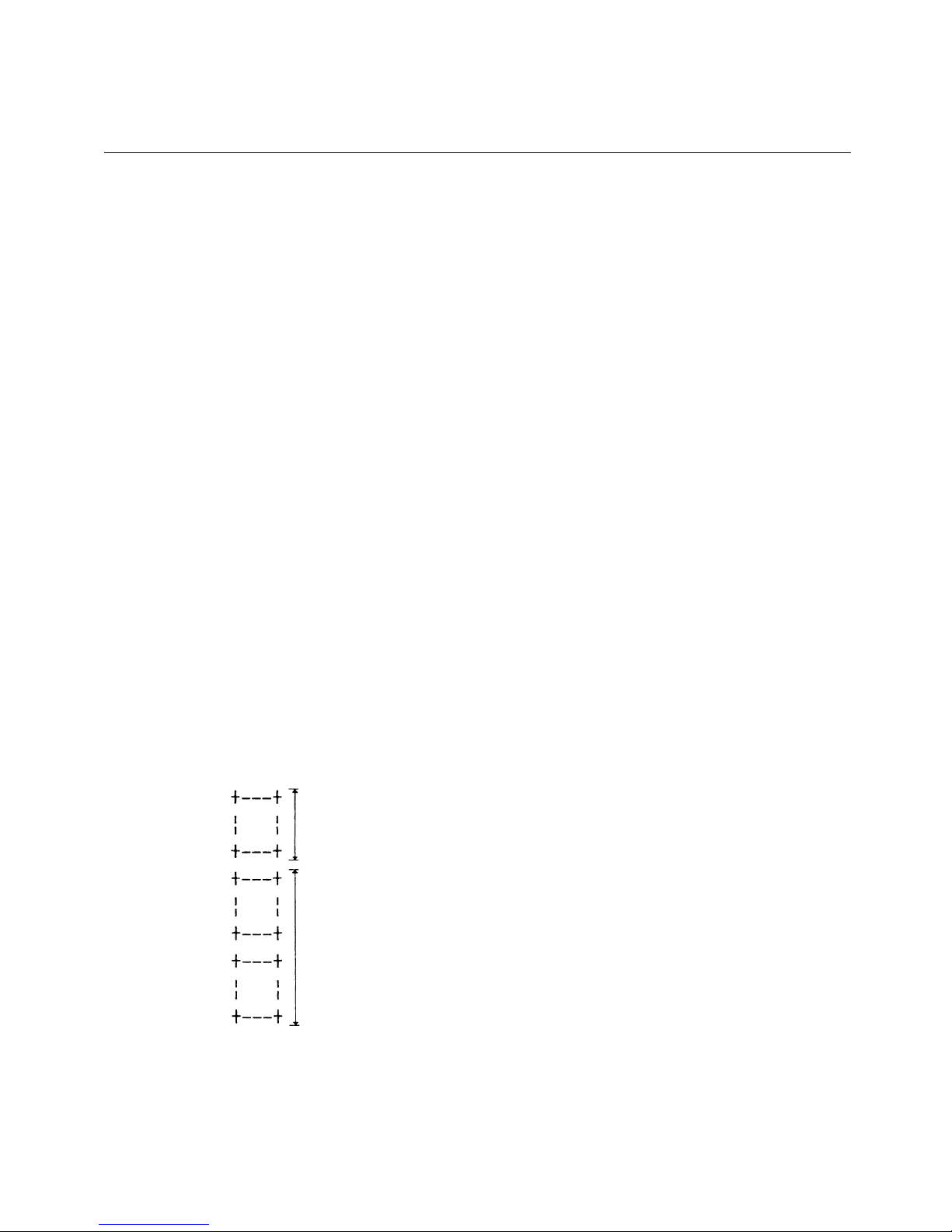
LPRINT CHR$ (&H1D) + “: " ;
LPRINT "+
–––
+" + CHR$ (&HA);
LPRINT " | | " + CHR$ (&HA);
LPRINT "+
–––
+" + CHR$ (&HA);
LPRINT CHR$ (&H1D) + “: “;
LPRINT CHR$ (&H1D) + " ^ “;
LPRINT CHR$ (2) + CHR$ (10);
LPRINT CHR$ (0);
Nomal Printing during
Macro Definition
Printing during Macro Execution
[Function]
[Code]
[Outline]
[Caution]
[Default]
[See Also]
[Sample Program]
[Print Results]
Page 39
BD2-3880/3890 Command Reference
37
GS ^ n1 n2 n3
Executing the Macro
<1D>H<5E>H<n1><n2><n3>
{0 =< n1 =< FF}
{0 =< n2 =< FF}
{0 =< 3 =< 1} Data is described in Hex code.
Executing contents defined in macro.
•
"n1~ n3" indicate as follows:
n1 : The number of times of macro execution
n2 : Waiting time on macro execution
Waiting time of n2 x 100msec is given for every execution.
n3 : Macro execution mode
n3 Mode
0 Continuous execution
1 Execution by LFSW
Continuous execution: The Macro is executed n1 times continuously at the time
intervals specified by n2.
Execution by FEED S: After waiting for lapse of time specified by n2, the ALAME
LED flickers and the LF switch is waited to be pressed. When
it is pressed, the macro is executed once.
This action is repeated n1 times.
•
When this command is received while in macro definition, suspension of macro definition is
indicated. At this time, the defined content is cleared.
•
No execution takes place when macro is held undefined or n1=0.
•
While in macro execution with n3=1, paper feed with the LF SW is not available.
•
Initially, this command is not specified.
GS :
See Sample Program and Print Results for GS : on Page
57.
[Function]
[Code]
[Range]
[Outline]
[Caution]
[Default]
[See Also]
[Sample Program]
[Print Results]
Page 40
BD2-3880/3890 Command Reference
38
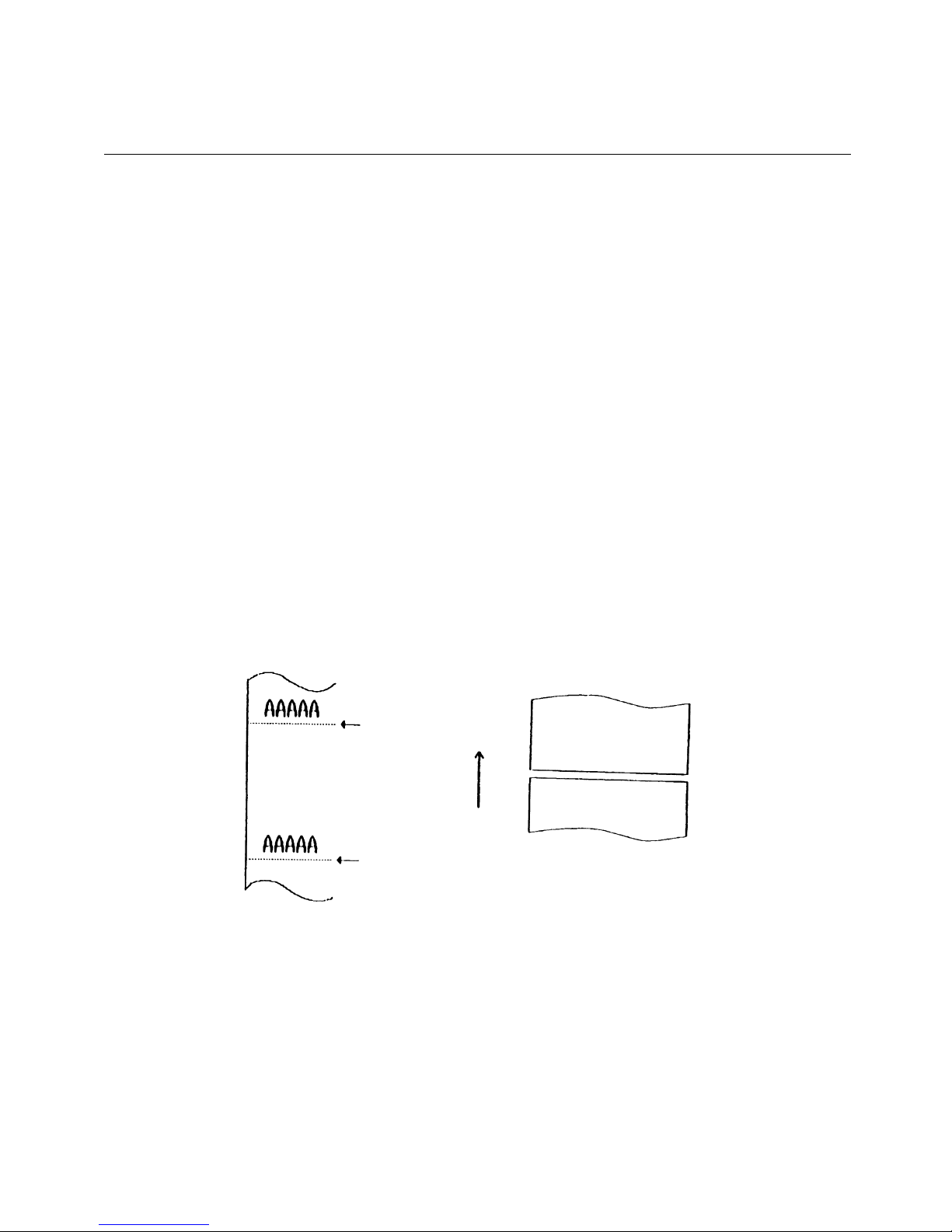
ESC i (When Using Auto Paper Cutter)
Full Cut
<1B>H<69>H
Activating auto cutter unit (Full cut)
•
This is valid only when n is inputted at the beginning of line.
•
Prior to cutting the paper, feed the paper from the printing position to beyond the
paper cutting position of the cutter. Otherwise, the character just after print will
remain on this side of the cutter.
LPRINT "AAAAA”;
LPRINT CHR$ (&H1B) + "J”;
LPRINT CHR$ (150);
LPRINT CHR$ (&H1B) + "i”;
LPRINT "AAAAA”;
LPRINT CHR$ (&H1B) + "J”;
LPRINT CHR$ (150);
LPRINT CHR$ (&H1B) + "i”;
Cut Position
Paper Feed Direction
Cutting Condition
Cut Position
[Function]
[Code]
[Outline]
[Caution]
[Sample Program]
[Print Results]
Page 41
BD2-3880/3890 Command Reference
39
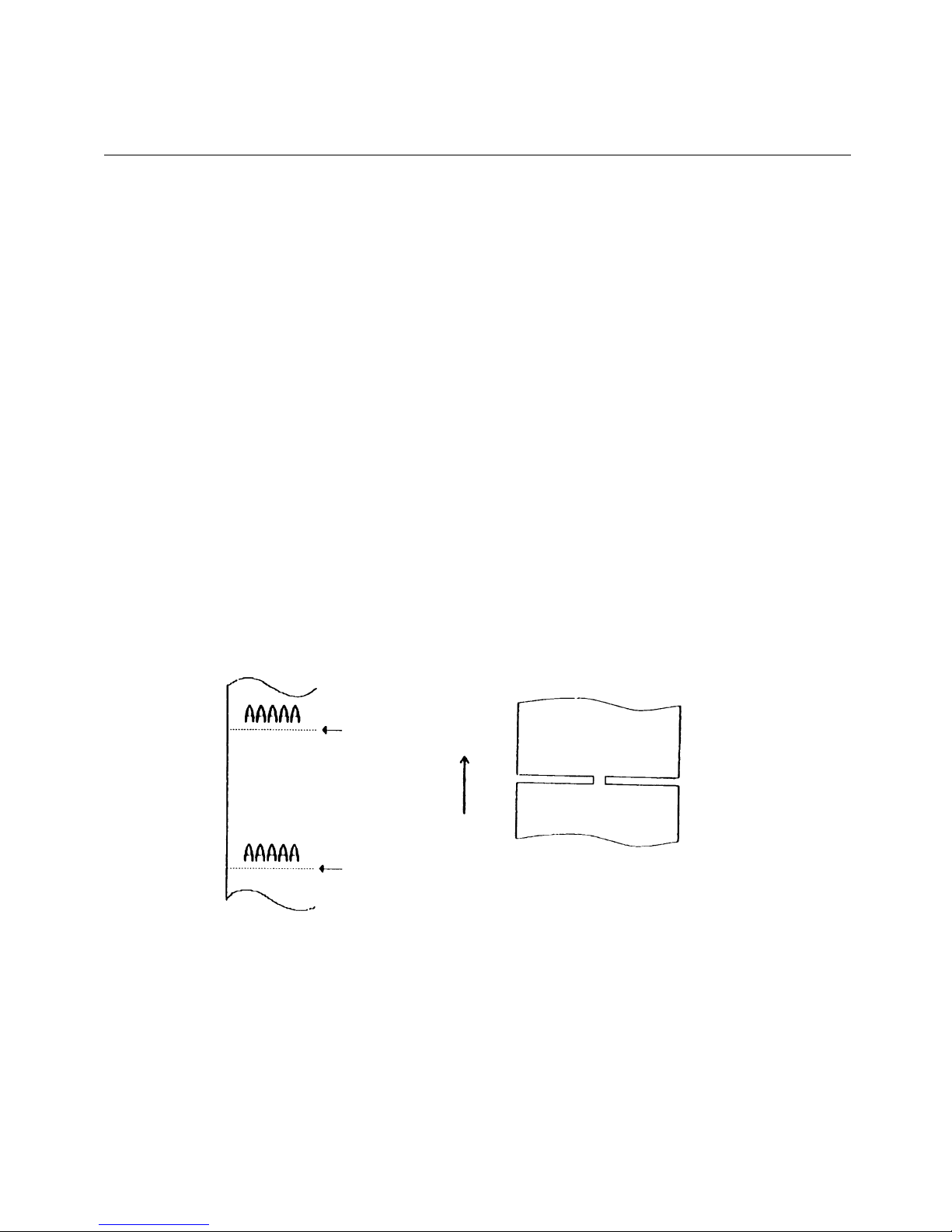
ESC m (When Using Auto Paper Cutter)
Partial Cut
<1B>H<6D>H
Activating auto cutter unit (Partial cut)
•
This is valid only when n is inputted at the beginning of line.
•
Prior to cutting the paper, feed the paper from the printing position to beyond the paper
cutting position of the cutter. Otherwise, the character just after print will remain on this side
of the cutter.
LPRINT "AAAAA”;
LPRINT CHR$ (&H1B) + "J”;
LPRINT CHR$ (150);
LPRINT CHR$ (&H1B) + "m”;
LPRINT "AAAAA”;
LPRINT CHR$ (&H1B) + "J”;
LPRINT CHR$ (150);
LPRINT CHR$ (&H1B) + "m”;
Cut Position
Paper Feed Direction
Cutting Condition
Cut Position
[Function]
[Code]
[Outline]
[Caution]
[Sample Program]
[Print Results]
Page 42
BD2-3880/3890 Command Reference
40
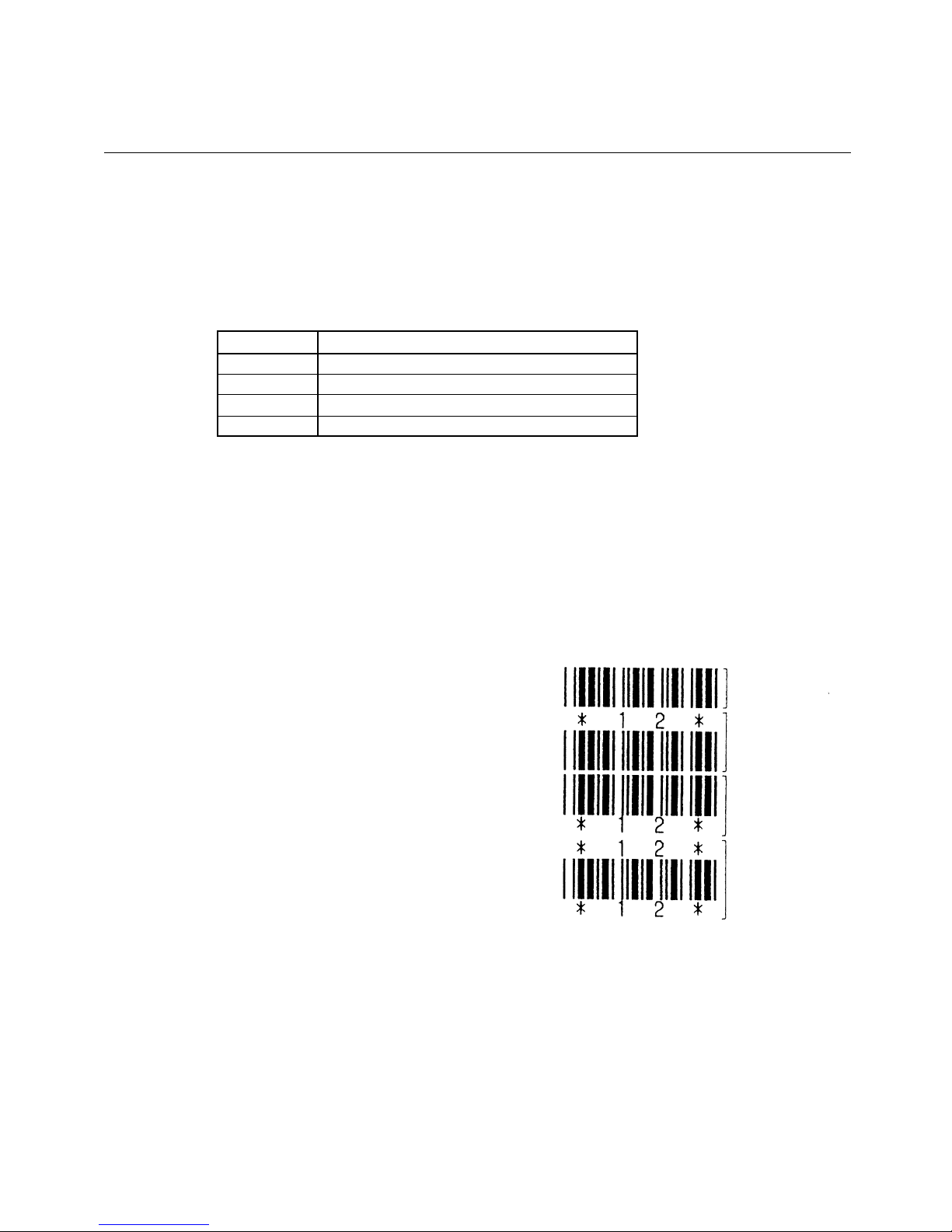
GS H n
Selecting of Printing Position of HRI Code
<1D>H<48>H<n>
{0 =< n =< 3} Data is described in Hex code.
Selecting printing position of HRI code in printing bar codes.
•
"n" means the followings.
n (Hex) Printing Position
0 No printing
1 Above the bar code
2 Below the bar code
3 Both above and below the bar code
The HRI code refers to the bar code-turned characters so that you can read them.
The HRI code is printed in the font selected with GS f. Specify before the GS k command.
•
The initial value of n is "0".
GS f
LPRINT CHR$ (&H1B) + "3" + CHR$ (5);
LPRINT CHR$ (&H1D) + "h" + CHR$ (50);
LPRINT CHR$ (&H1D) + "H" + CHR$ (0);
GOSUB BC
LPRINT CHR$ (&H1D) + "H" + CHR$ (1);
GOSUB BC
LPRINT CHR$ (&H1D) + "H" + CHR$ (2);
GOSUB BC
LPRINT CHR$ (&H1D) + "H" + CHR$ (3);
GOSUB BC
END
BC:
LPRINT CHR$ (&H1D) + "k”;
LPRINT CHR$ (4);
LPRINT "12" + CHR$ (0);
LPRINT CHR$ (&HA);
RETU
RN
No Visible Code
Printed above
Printed below
Printed above
and below
[Function]
[Code]
[Range]
[Outline]
[Caution]
[Default]
[See Also]
[Sample Program]
[Print Results]
Page 43
BD2-3880/3890CommandReference
41
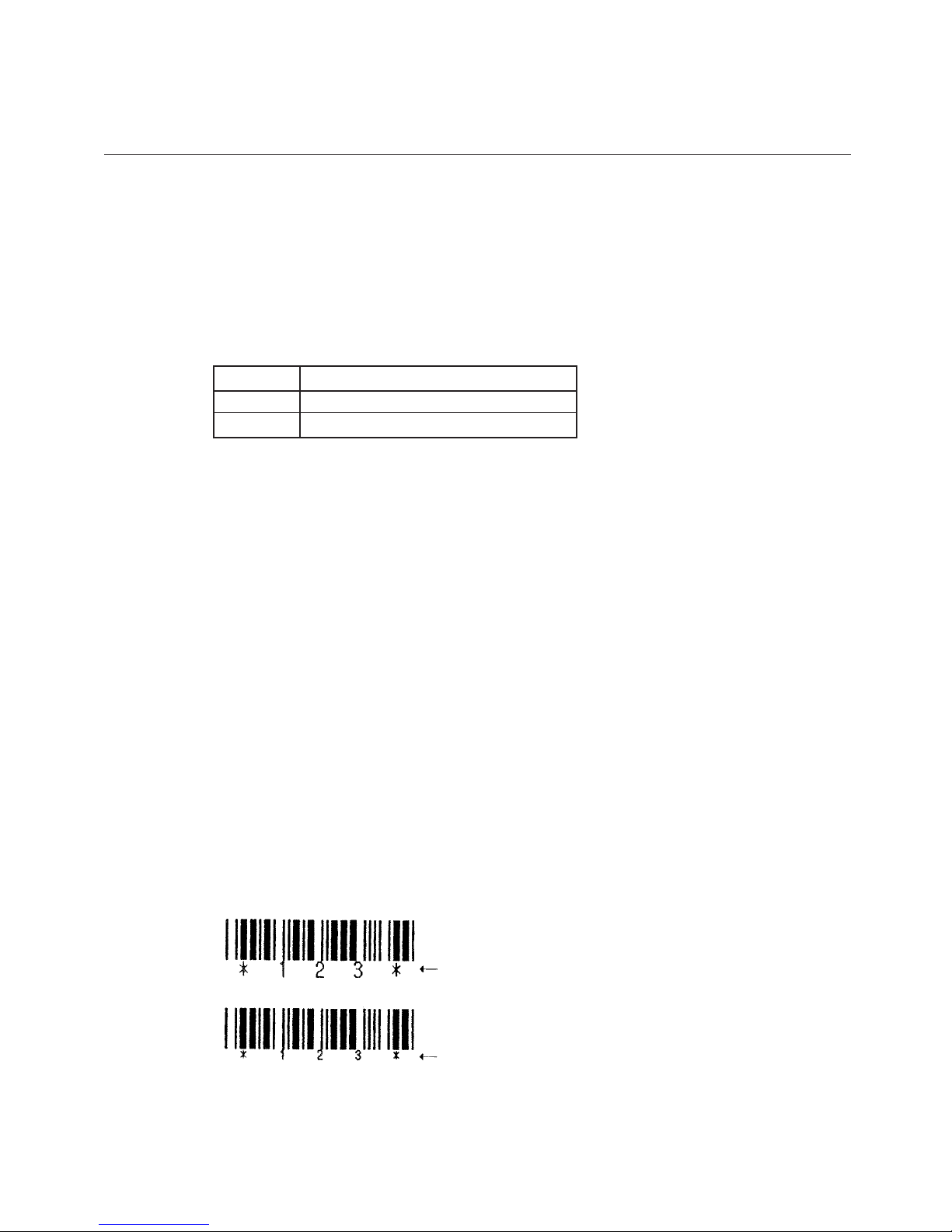
GS f n
Selecting the font of HRI code
<1D>H<66>H<n>
n = 0, 1
Selecting the font of HRI code in printing bar code.
The type of font can be printed by selecting n is as follows.
The HRI code refers to the bar code-turned characters so that you can read them.
n Font
0 Font A
1 Font B
The HRI code is printed at the position specified with GS h on page 42.
The initial value of n is “0”.
GS H
L
PRINT CHR$ (&H1D) + "h" + CHR$ (50);
LPRINT CHR$ (&H1D) + "H" + CHR$ (2);
LPRINT CHR$ (&H1D) + "f" + CHR$ (0);
GOSUB BC
LPRINT CHR$ (&H1D) + "f" + CHR$ (1);
GOSUB BC
END
BC:
LPRINT CHR$ (&H1D) + "k”;
LPRINT CHR$ (4);
LPRINT "123" + CHR$ (0);
LPRINT CHR$ (&HA);
RETURN
FONT A
FONT B
[Function]
[Code]
[Range]
[Outline]
[Caution]
[Default]
[See Also]
[Sample Program]
[Print Results]
Page 44

BD2-3880/3890CommandReference
42
GS h n
Selecting the height of the Bar Code
<1D>H<68>H<n>
{1 =< n =< FF} Data is described in Hex code.
Selecting bar code height.
n denotes the number of dots in the vertical direction.
•
The initial value of n is "162".
See Sample Program and Print Results for GS w on page
52.
[Function]
[Code]
[Range]
[Outline]
[Default]
[Sample Program]
[Print Results]
Page 45
BD2-3880/3890 Command Reference
43
GS k n [ d ] k NUL
Printing the Bar Code (1)
<1D>H<6B>H<n> [ < d> ] k <00>H
{0 =< n =< 7} Data are described in Hex code.
Specifying a type of bar code and printing bar codes.
•
The beginning of line is considered as the next printing start position.
•
Depending on the value of n, the following bar code can be selected.
d indicates a character code to be printed and k indicates the number of character to be
printed.
n (Hex) Bar Code System Maximum Columns
0 UPC-A --1 UPC-E --2 JAN13 (EAN) --3 JAN 8 (EAN) --4 CODE 39 13
5 ITF 22
6 CODABAR (NW-7) 17
7 CODE 128 15
•
When data being held in the print buffer, this command is ignored.
•
Regardless of the specified feed pitch, this command feeds the paper to be required to
print a bar code.
•
If the character code d cannot be printed in the respective bar code system, the bar
code so far will be printed, processing the subsequent data as normal data.
•
When a bar code whose number of characters to be printed is fixed has been selected,
the number of characters k have to be always made equal to the number of characters
to be printed. (The bar code is not printed when not matching.)
•
When the horizontal direction exceeds one line length, the excess part is not printed.
•
The initial va
lue is not specified.
[Function]
[Code]
[Range]
[Outline]
[Caution]
[Default]
Page 46

BD2-3880/3890CommandReference
44
[Description of Bar Codes] <For print examples, see Page 46. >
UPC-A This bar code, consisting of numerals only, has a fixed length of 12 column; a 11-columns
number entered from the host or application software plus a check column(12th column)
automatically calculated inside the printer. If the 12th-column numeral is sent from the host,
the entire bar code will be printed as it is.
UPC-E This bar code, consisting of numerals only, has a fixed length of 8 column; the first
number system character is "0" stationary. A 12-column numeral entered from the host or
application software is compressed to 8 columns with a check column and printed. The 12thcolumn check column is automatically calculated inside the printer and sent from the host, the
entire bar code will be printed, compressed to 8 columns.
JAN-13(EAN) T his bar code, consisting of numerals only, has a fixed length of 13 column; a 12-column
number entered from the host or application software plus a check column(13th column)
automatically calculated inside the printer. If the 13th-column numeral is sent from the host,
the entire bar code will be printed as it is.
JAN-8(EAN) T his bar code, consisting of numerals only, has a fixed length of 8 column; a 7-column number
entered from the host or application software plus a check column(8th column) automatically
calculated inside the printer. If the 8th-column numeral is sent from the host, the entire bar
code will be printed as it is.
CODE39 This bar code, consisting of uppercase alphabets and numerals, has a variable length of column.
A start/stop code "*" is automatically added by the printer. Available characters include a
space and "$, %, +, -, ·
,
/, 0, 1, 2, 3, 4, 5, 6, 7, 8, 9," and uppercase alphabets.
ITF This bar code, consisting of numerals only, has a variable length of even column. If an odd-
column code is transferred, nothing will be printed.
CODABAR (NW-7)
This bar code, consisting of alpha numerals, has a variable length of column. Available
characters include "0, 1, 2, 3, 4, 5, 6, 7, 8, 9, A, B, D, D, $, +, -,., /, :." A start/stop code is
required; any one of A, B, C, and D is used.
CODE128 ·This bar code consists of all of 128 ASCII code characters and has a variable length of
column. This printer supports the code subsets A, B, and C. By prefixing a transfer
code with any one character of A, B, and C, you can select the code subset to start from.
If not prefixed with A, B, or C, the code subset B will be selected.
·
The code subset A is the bar code consisting of standard uppercase alphabets, numerals,
symbols, and special codes.
·
The code subset B is the bar code consisting of standard uppercase/lowercase alphabets,
numerals, symbols, control codes, and special codes.
·
The code subset C is the bar code consisting of special characters and 100 kinds of
numbers ranging from 00 to 99.
·
The check column automatically calculated inside the printer is added to the end of the
entered column
to be printed.
Page 47
BD2-3880/3890 Command Reference
45
•
Processing of the special characters
The characters above the ASCII code number 96 are considered special characters. The
following lists the converted characters for entering these characters.
ASCII Code Converted Character Subset Code Subset Code B Subset Code C
96 80h FNC 3 FNC 3 -N/A-
97 81h FNC 2 FNC 2 -N/A-
98 82h SHIFT SHIFT -N/A-
99 83h CODE C CODE C -N/A-
100 84h CODE B FNC 4 CODE B
101 85h FNC 4 CODE A CODE A
102 86h FNC 1 FNC 1 FNC 1
The following exemplifies a selection of the code subset as a method to utilize the special
characters.
<Selection of Code Subset>
•
Initial selection: Enter any one character of A, B, and C.
•
Conversion on the way: Enter any one character of 82h through 85h
Example) When initially testing with the code subset B, and then, printing the bar code,
"123," with the code subset A
•
Input code : B TEST <85> 123
•
Bar code data : <CODE B>TEST<CODE A>123
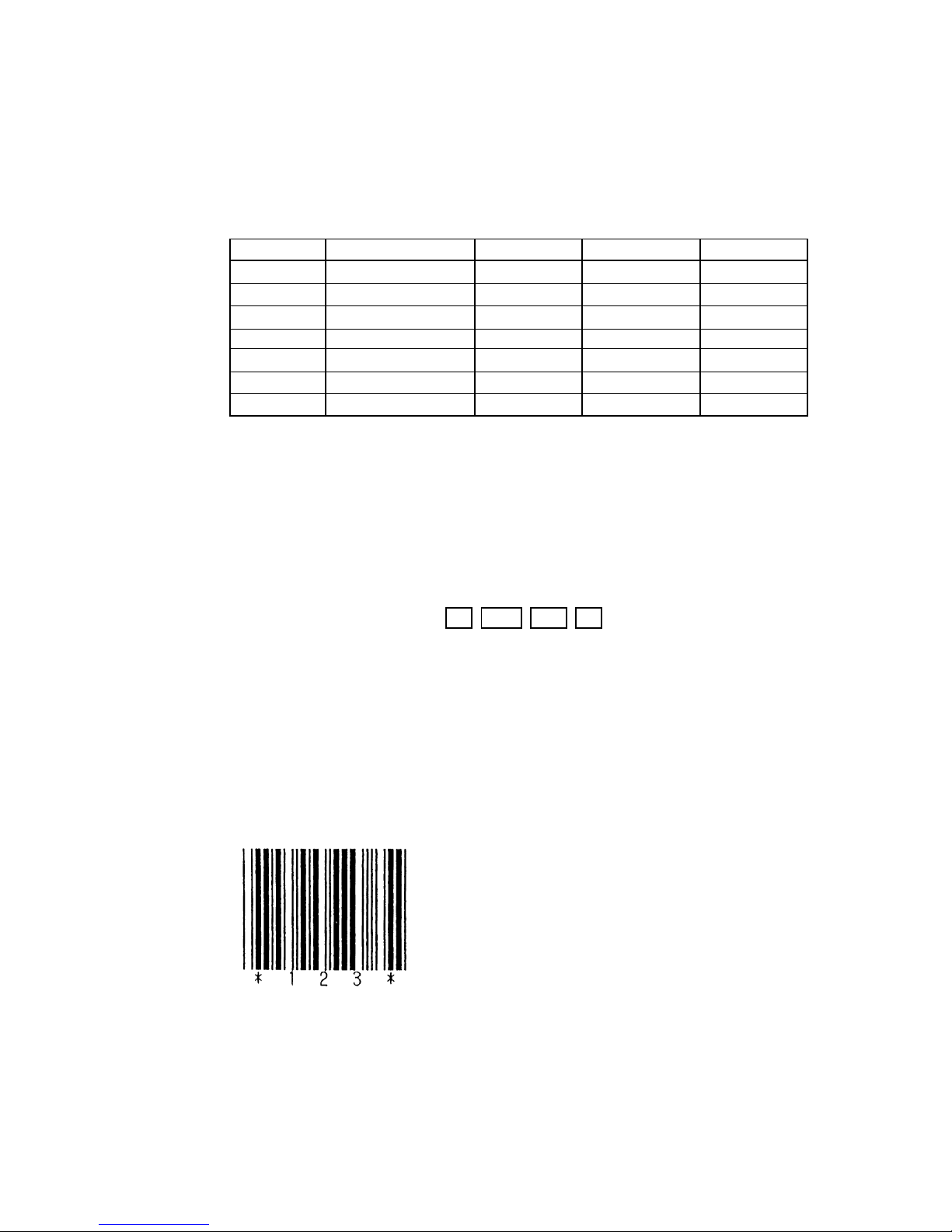
LPRINT CHR$ (&H1D) + "H" + CHR$ (2);
LPRINT CHR$ (&H1D) + "k”;
LPRINT CHR$ (4);
LPRINT "123" + CHR$ (0);
When the data "123" is printed with the code 39
[Sample Program]
[Print Results]
Page 48
BD2-3880/3890 Command Reference
46
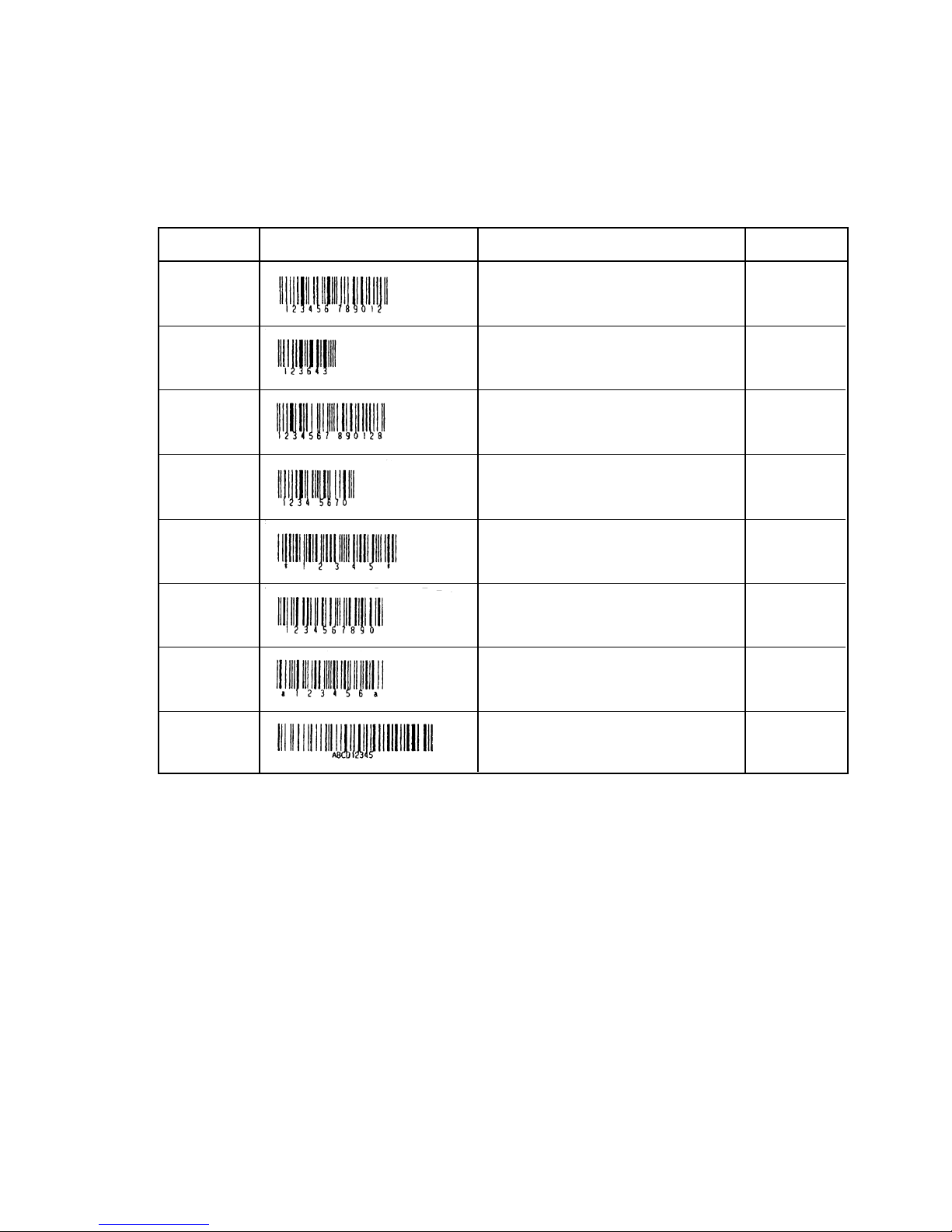
[Description of Bar Codes]
UPC-A, UPC-E, JAN-13 (EAN), JAN-8 (EAN), CODE39, ITF, CODABAR, CODE128
Type Print Sample Outline of Symbol Max. column
UPC-A
12-column fixed-length bar code consisting
of numerals only
–
UPC-E
8-column fixed-length bar code consisting
of numerals only. Abbreviated version of
UPC-A
–
JAN-13
13-column fixed-length bar code consisting
of numerals only
–
JAN-8
8-column fixed-length bar code consisting
of numerals only
–
CODE39
Variable-length bar code consisting of
alphabets and numerals. The start/stop code
"*" is automatically added.
13
ITF
Even-column variable-length bar code
consisting of numerals only
22
CODABAR
(NW-7)
Variable-length bar code consisting of
alpha numerals. Any one of A, B, C, and D
is required as the start/stop code.
17
CODE128
Variable-length bar code consisting of all
128 ASCII code characters.
15
Printing is done depending on bar code specification type, number of print column, bar code
height, width (Magnification), vi
sible code presence, and bar code data specification.
Page 49
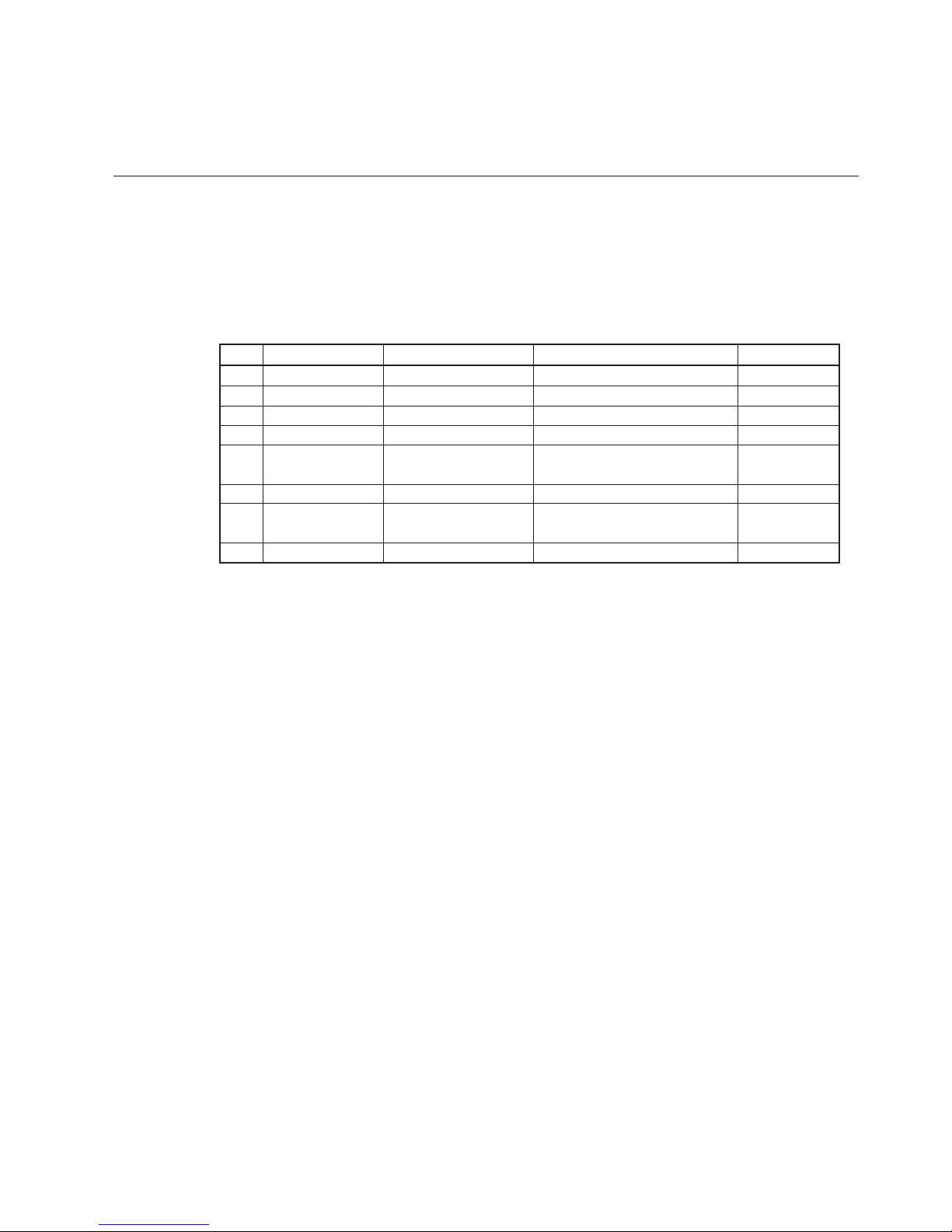
GS k m n [d1 ... dn]
Printing the Bar Code (2)
<1D>H<6B>H<m><n>[d1...dn]
65 =< m =< 73 Ranges of n and d differ depending on the barcode system.
Specifying a type of bar code and printing bar codes.
Max. Column
* Maximum number of digits is the maximum number with this printer.
Bar Code System
—
—
—
—
17
34
25
23
m
65
66
67
68
69
70
71
73
Range of n
11 =< n =< 12
11 =< n =< 12
12 =< n =< 13
7 =< n =< 8
1 =< n =< 255
1 =< n =< 255 (even)
1 =< n =< 255
2 =< n =< 255
Range of d
48 =< d =< 57
48 =< d =< 57
48 =< d =< 57
48 =< d =< 57
48 =< d =< 57, 65 =< d =< 90
32, 36, 43, 45, 46, 47
48 =< d =< 57
48 =< d =< 57, 65 =< d =< 68
36, 43, 45, 46, 47, 58
0 =< d =< 127
UPC-A
UPC-E
JAN13 (EAN)
JAN8 (EAN)
CODE39
ITF
CODABAR
CODE128
•
•
•
•
•
•
•
•
n indicates number of data and treats the n bytes from next data as barcode data.
When n is outside the range, command processing is stopped and next data is processed as
normal data.
When d is outside the range, only paper feed is executed and next data is processed as
normal data.
Executes paper feeding as much as the height of barcode (including visible code when visible
code printing is designated) regardless of the line feed amount set by <ESC 2>, <ESC 3>, etc.
Valid only when data is not present in the print buffer. When data is present in the print buffer,
data from m and on is processed as normal data.
After printing barcode, the top of a line is specified as the next print position.
Printing mode except overturned character (bold printing, double-strike printing, underline,
character size) has no effect.
This command is ignored when 90° clockwise turn of character is specified.
The initial value is not defined.
[Function]
[Code]
[Range]
[Outline]
[Caution]
[Default]
47
Page 50

BD2-3880/3890CommandReference
48
[Description of Bar Codes]
UPC-A This bar code, consisting of numerals only, has a fixed length of 12 column; a 11-columns
number entered from the host or application software plus a check column (12th column)
automatically calculated inside the printer. If the 12th-column numeral is sent from the host,
the entire bar code will be printed as it is.
UPC-E This bar code, consisting of numerals only, has a fixed length of 8 column; the first number
system character is “0” stationary. A 12-column numeral entered from the host or application
software is compressed to 8 columns with a check column and printed. The 12th column check
column is automatically calculated inside the printer and sent from the host, the entire bar code
will be printed, compressed to 8 columns.
JAN-13 (EAN)
This bar code, consisting of numerals only, has a fixed length of 13 column; a 12-column number
entered from the host or application software plus a check column (13th column) automatically
calculated inside the printer. If the 13th-column numeral is sent from the host, the entire bar
code will be printed as it is.
CODABAR (NW-7)
This bar code, consisting of alpha numerals, has a variable length of column. Available
characters include “0123456789$+–./:”. A start/stop code is required; any one of A, B, C,
and D is used.
JAN-8 (EAN)
This bar code, consisting of numerals only, has a fixed length of 8 column; a 7-column number
entered from the host or application software plus a check column (8th column) automatically
calculated inside the printer. If the 8th column numeral is sent from the host, the entire bar code
will be printed as it is.
CODE39 This bar code, consisting of uppercase alphabets and numerals, has a variable length of column.
A start/stop code “*” is automatically added by the printer. Available characters include a space
and “$%+–./0123456789”, and uppercase alphabets.
ITF This bar code, consisting of numerals only, has a variable lenght of even column.
If an odd-column code is transferred, nothing will be printed.
Page 51
BD2-3880/3890 Command Reference
49
•
•
•
•
•
•
In addition to the above characters, special characters are printed.
CODE128 This barcode consists of 103 kinds of barcode characters and three code subsets with a variable
length. It can print 128 ASCII characters.
When sending print data, note the following matters.
(1)
(2)
The top of barcode data must be any one of code set selection characters (CODE A, CODE B,
CODE C) which selects the first code set.
Special character is designated by two characters : “{” and the succeeding one character.
Or, two characters of “{” are sent consecutively.
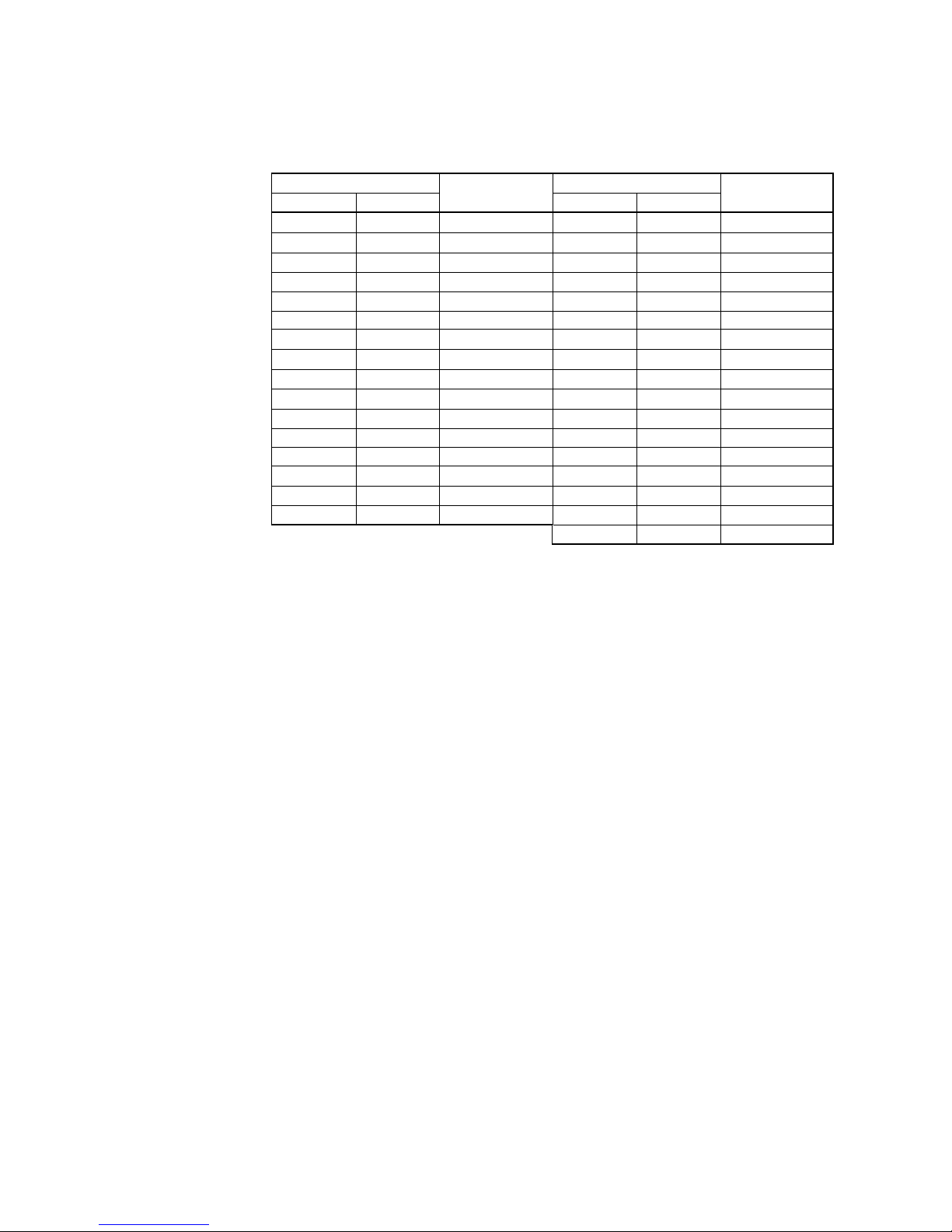
Control Character
NUL
SOH
STX
ETX
EOT
ENQ
ACK
BEL
ASCII
00
01
02
03
04
05
06
07
■U
■A
■B
■C
■D
■E
■F
■G
Hex.
HRI Code
Control Character
DLE
DC1
DC2
DC3
DC4
NAK
SYN
ETB
ASCII
10
11
12
13
14
15
16
17
■P
■Q
■R
■S
■T
■U
■V
■W
BS
HT
LF
VT
FF
CR
SO
08
09
0A
0B
0C
0D
0E
■H
■I
■J
■K
■L
■M
■N
CAN
EM
SUB
ESC
FS
GS
RS
18
19
1A
1B
1C
1D
1E
■X
■Y
■Z
■A
■B
■C
■D
SI 0F ■O
US 1F ■E
DEL 7F ■T
Hex.
HRI Code
Code set A can print ASCII characters of 00H through 5FH.
Code set B can print ASCII characters of 20H through 7FH.
Code set C can print two digits of 00 through 99 with one character.
Shift character (SHIFT)
With code set A, one character just after SHIFT is treated as a character of code set B.
With code set B, one character just after SHIFT is treated as a character of code set A.
No such character can be treated with code set C.
Switches the code sets after code set selecting characters (CODE A, CODE B, CODE C) to
A, B, C, respectively.
Use of function characters (FNC1, FNC2, FNC3, FNC4) differ depending on the application.
Only FNC1 is usable with code C.
Page 52
BD2-3880/3890 Command Reference
50
Example: Transmitting data for printing “No” with code set B first and then “123456”with
code set C.
GS k <73> <10> <7B>H <42>H, “ No.” <7B>H <43>H <12> <34> <56>
•
•
•
When the top of barcode data raw is not code set selection character, the command processing
stops at that point and the succeeding data is processed as normal data.
When receiving a character that cannot be used by the selected code set, the command
processing stops at that point and the succeeding data is processed as normal data.
Visible codes corresponding to shift character and code set selection character are not printed.
In addition, visible codes of function character and control character are treatedas space
characters.
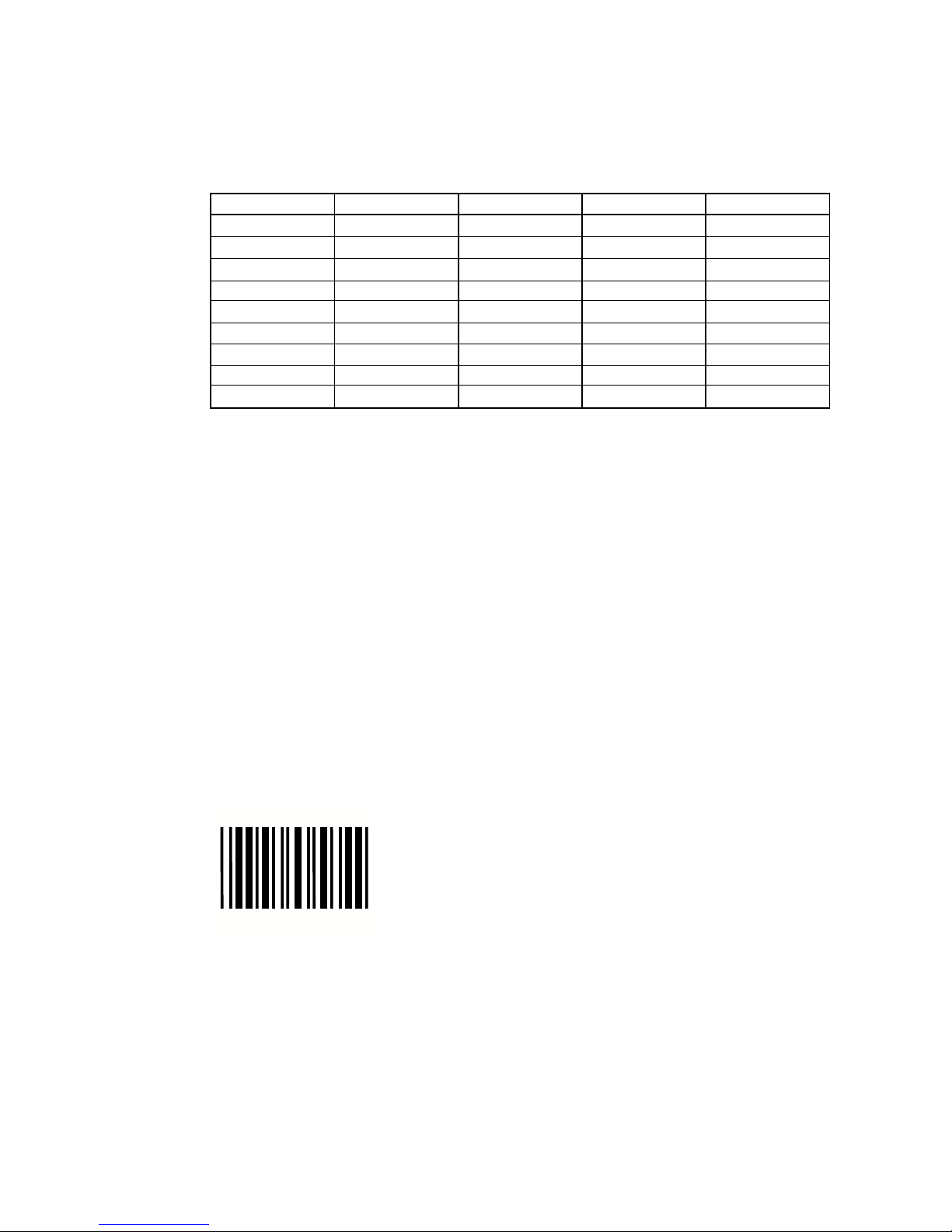
LPRINT CHR$(&H1D);"H";CHR$(2);
LPRINT CHR$(&H1D);"k";
LPRINT CHR$(4);
LPRINT "123";CHR$(0);
When the data "123" is printed with the code 39
[Sample Program]
[Special Characters]
[Print Results]
7B31
7B43
7B42
7B41
7B53
Hex. Code
7B32
7B33
7B7B
7B34
{1
{C
{B
{A
{S
ASCII Code
{2
{3
{{
{4
FNC1
CODE C
CODE B
–N/A
SHIFT
Code Set A
FNC2
FNC3
‘{ ’
FNC4
FNC1
CODE C
–N/A
CODE A
SHIFT
Code Set B
FNC2
FNC3
‘{ ’
FNC4
FNC1
–N/A
CODE B
CODE A
–N/A
Code Set C
–N/A
–N/A
‘{ ’
–N/A
*
*
Page 53
BD2-3880/3890 Command Reference
51
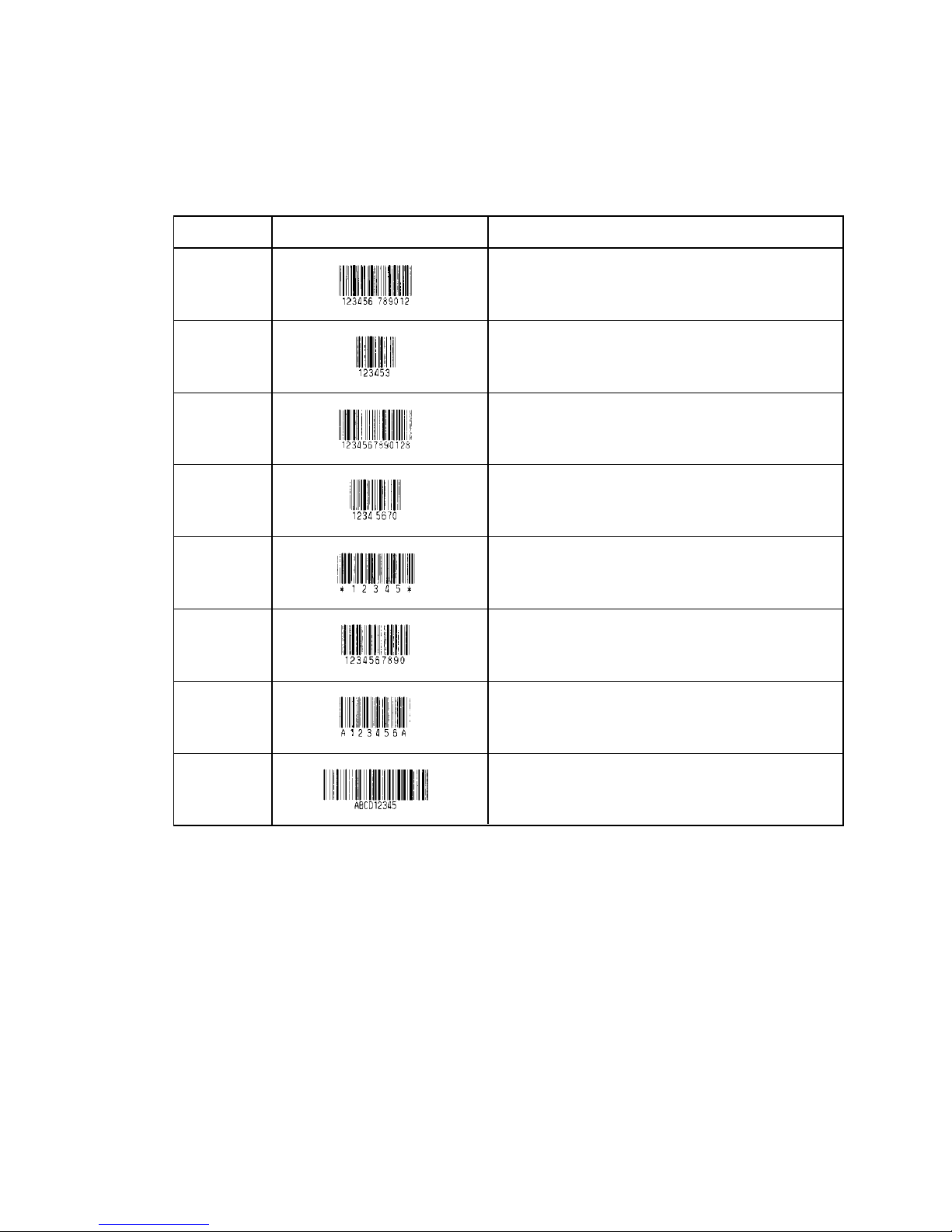
Type Outline of SymbolPrint Sample
12-column fixed-length bar code consisting of
numerals only.
8-column fixed-length bar code consisting of
numerals only. Abbreviated version of UPC-A.
13-column fixed-length bar code consisting of
numerals only.
8-column fixed-length bar code consisting of
numerals only.
Variable-length bar code consisting of alphabets and
numerals. The start/stop code “*” is automatically
added.
Even-column variable-length bar code consisting of
numerals only.
Variable-length bar code consisting of alpha
numerals. Any one of A, B, C, and D is required as
the start/stop code.
Variable-length bar code consisting of all 128 ASCII
code characters.
Printing is done depending on bar code specification type, number of print column, bar code
height, width (Magnification), visible code presence, and bar code data specification.
[Barcode Designation]
UPC-A, UPC-E, JAN13 (EAN), JAN8 (EAN), CODE39, ITF, CODABAR, CODE128
[Description of Bar Codes]
UPC-A
UPC-E
JAN13
JAN8
CODE39
ITF
CODABAR
(NW-7)
CODE128
Page 54
BD2-3880/3890 Command Reference
52
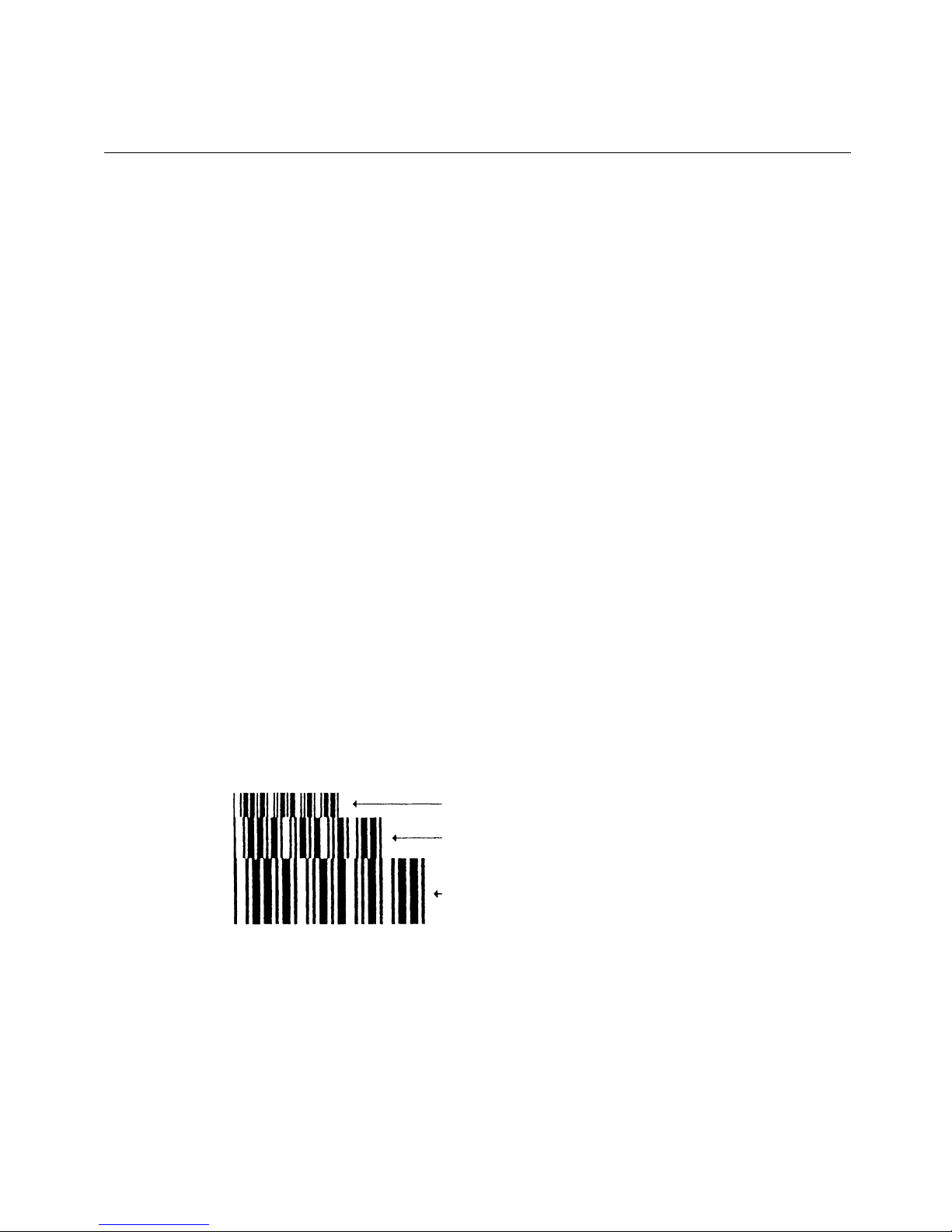
GS w n
Selecting the horizontal size (Scale factor) of the Bar Code
<1D>H <77>H<n>
{2 =< n =< 4} Data is described in Hex code.
Selecting bar code width.
n denotes the number of dots in fine element width.
•
The initial value of this width is "3".
LPRINT CHR$ (&H1D) + "h" + CHR$ (30);
LPRINT CHR$ (&H1D) + "w" + CHR$ (2);
GOSUB BC
LPRINT CHR$ (&H1D) + "h" + CHR$ (50);
LPRINT CHR$ (&H1D) + "w" + CHR$ (3);
GOSUB BC
LPRINT CHR$ (&H1D) + "h" + CHR$ (80);
LPRINT CHR$ (&H1D) + "w" + CHR$ (4);
GOSUB BC
END
BC:
LPRINT CHR$ (&H1D) + "k”;
LPRINT CHR$ (4);
LPRINT "12" + CHR$ (0);
RETURN
Height 30,
Magnification 2
Height 50,
Magnification 3
Height 80,
Magnification 4
[Function]
[Code]
[Range]
[Outline]
[Default]
[Sample Program]
[Print Results]
Page 55
BD2-3880/3890 Command Reference
53
ESC = n
Data Input Control
<1B>H<3D>H<n>
{0 =< n =< FF} Data is described in Hex code.
Selecting equipment in which data input from the host is effective.
• Each bit of n indicates as follows:
Va l ue Bit Equipment
0 1
0 Printer Invalid Valid
1 Not defined
2 Not defined
3 Not defined
4 Not defined
5 Not defined
6 Not defined
7 Not defined
• When the printer has not been selected, this printer abandons all the received data
until it is selected by this command.
• Even when the printer has not been selected, it can become BUSY state through
printer operation.
• When the printer is deselected, this printer discards all the data until it is selected
with this command.
• The initial value of n is "1".
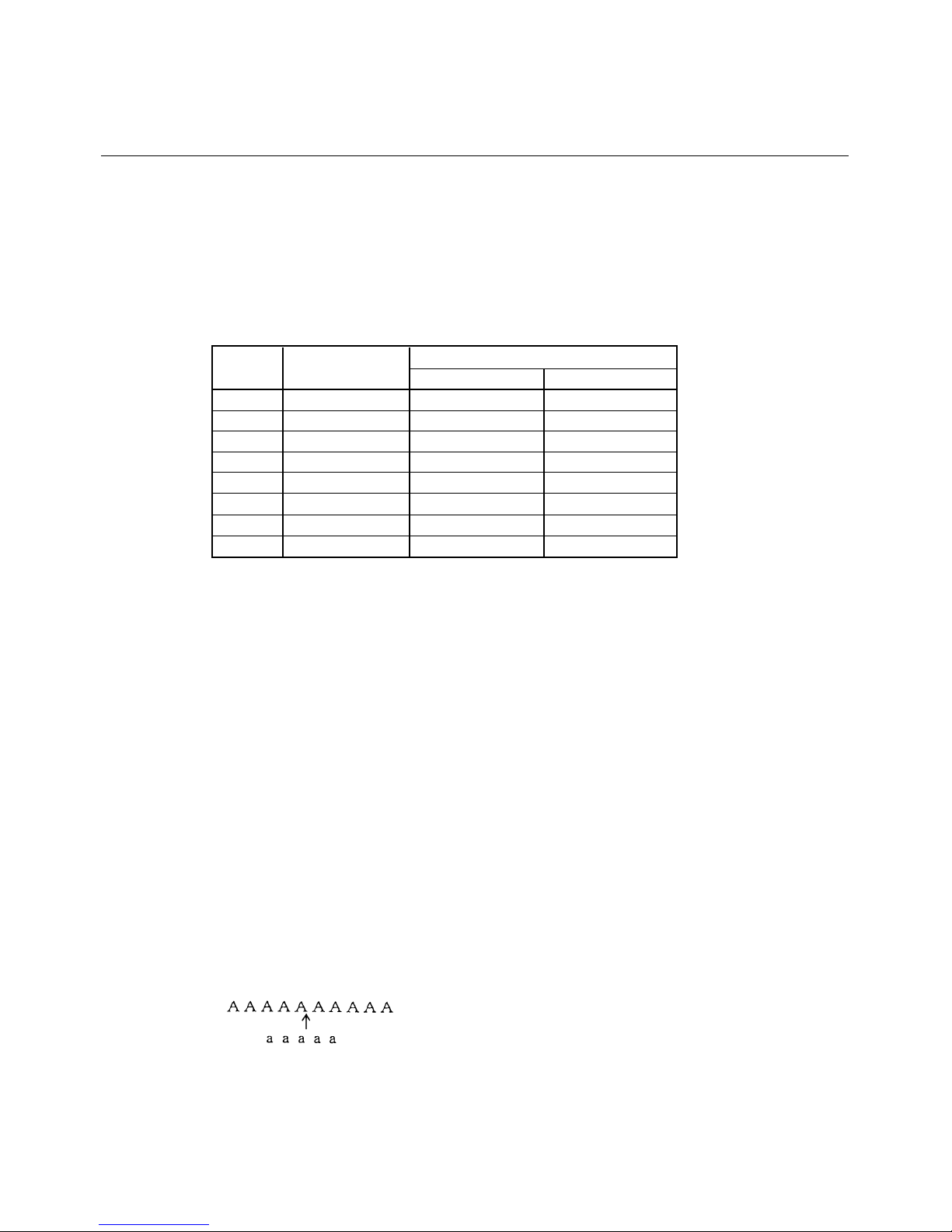
LPRINT "AAAAA”;
LPRINT CHR$ (&H1B) + "=" + CHR$ (0);
LPRINT "aaaaa" + CHR$ (&HA);
LPRINT CHR$ (&H1B) + "=" + CHR$ (1);
LPRINT "AAAAA" + CHR$ (&HA);
is not printed
[Function]
[Code]
[Range]
[Outline]
[Caution]
[Default]
[Sample Program]
[Print Results]
Page 56
BD2-3880/3890 Command Reference
54
ESC @
Initializing the Printer
<1B>H<40>H
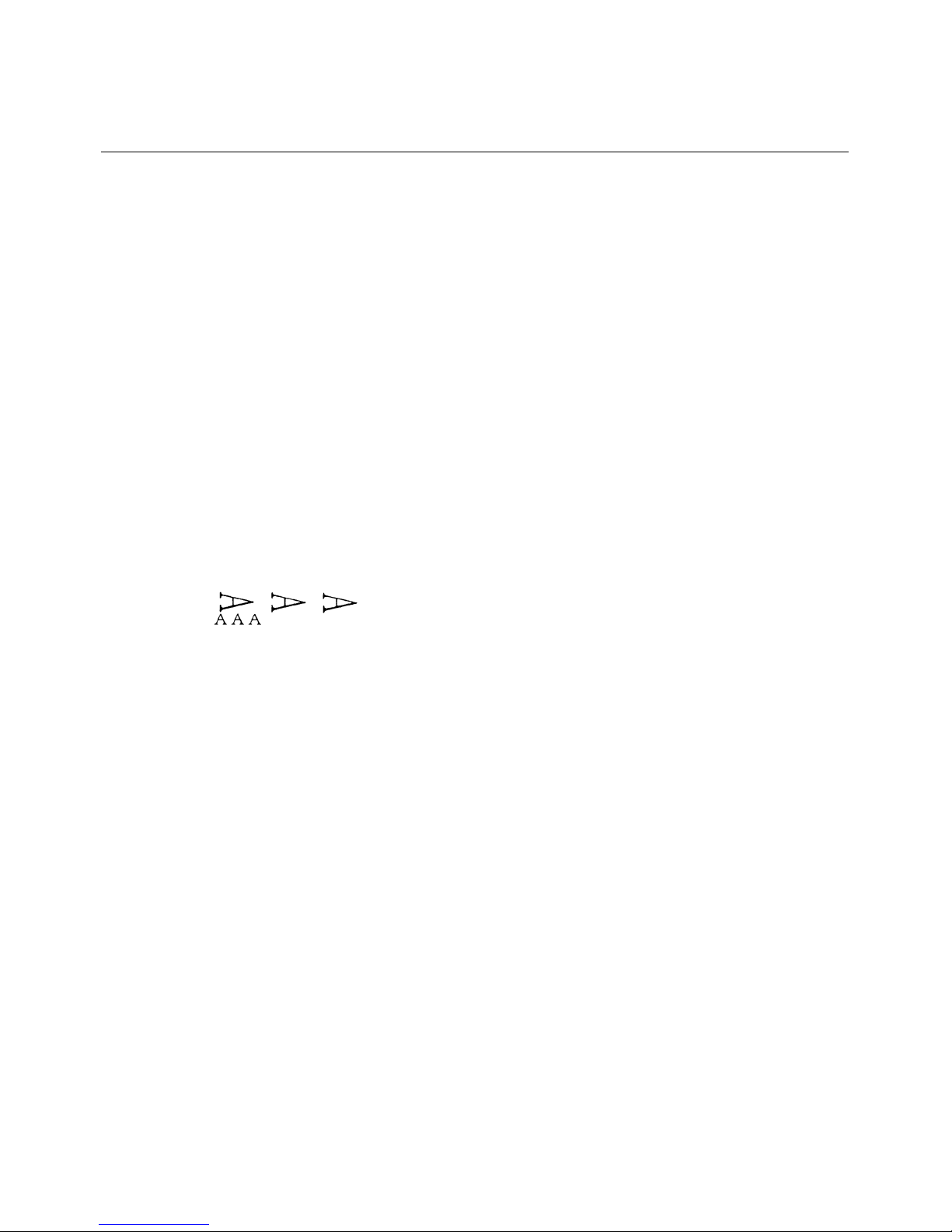
Clears data stored in the print buffer and brings various settings to the initial state (Default state).
•
Data inside the internal input buffer are not cleared.
•
Dip switches setting are red once again.
LPRINT CHR$ (&H1B) + " ! " + CHR$ (&H30) ;
LPRINT CHR$ (&H1B) + "V" + CHR$ (1);
LPRINT "AAA" + CHR$ (&HA);
LPRINT CHR$ (&H1B) + "@”;
LPRINT "AAA" + CHR$ (&HA);
[Function]
[Code]
[Range]
[Caution]
[Sample Program]
[Print Results]
Page 57
BD2-3880/3890 Command Reference
55
DC2 A n
Selecting the Print drive system
<12>H<41>H<n>
{0 =< n =< FF}
Selecting the Fixed division system or the Variable division system.
•
"n" is valid only for the lowest bit (n0).
n0 Print Drive System
0 Fixed division number system
1 Variable division number system
The initial value of n is specified by Jumper (J
5).
[Function]
[Code]
[Range]
[Outline]
[Default]
Page 58
BD2-3880/3890 Command Reference
56
2. CHARACTER CODE TABLE
2.1 International
Page 59
BD2-3880/3890 Command Reference
57
2.2 Japanese
Page 60
BD2-3880/3890 Command Reference
58
2.3 International Character Set
COUNTRY
 Loading...