

Page 1

© 2014 Cisco and/or its affiliates. All rights reserved. This document is Cisco Public Information. Page 1 of 7
Data Sheet
Cisco Video Surveillance 6400E IP Camera
The Cisco® Video Surveillance 6400E IP Camera is an outdoor, high-definition, fullfunctioning video endpoint with an integrated infrared illuminator and industry-leading
image quality and processing power. The camera is capable of full 1080p resolution at
30 frames per second (fps) while optimizing network usage with either H.264 or
MJPEG compression. Contact closures and two-way audio allow integration with
microphones, speakers, and access control systems. With its open, standards-based
design, the camera, shown in Figure 1, provides an ideal platform for integration and
operation as an independent device or as part of a Cisco Video Surveillance network.
The Cisco Video Surveillance 6400E IP Camera offers a variety of benefits.
●
True high-definition video: The camera streams crisp and clear 1080p (1920 x 1080) (2.1 megapixel)
video at 30 fps while maintaining low network bandwidth.
●
Motorized focus and zoom: The lens on the 6400E IP Camera allows the focus and zoom to be controlled
remotely, greatly simplifying installations and field-of-view adjustments.
●
Integrated infrared illuminator: The infrared illuminator can light an area up to 30 meters away.
●
Outdoor-ready: An IK10 and IP67-rated enclosure and an included mounting bracket allow for outdoor
mounting straight out of the box.
●
Dual streaming: The camera can stream H.264 and MJPEG video simultaneously. Each video stream can
be configured with individual resolution, quality, and frame-rate settings.
●
Application-ready platform: You can easily add functions by installing and running applications directly on
the camera.
●
Day and night operation: The camera provides true day or night functionality and includes an infrared filter
that automatically switches to night mode in low-light scenes. This function can be set to manual, automatic,
or scheduled control.
●
Privacy regions: The camera supports up to four user-defined privacy regions. Any video within a privacy
region is masked in the video stream.
●
Local storage: Video data can automatically be recorded to an SD card continuously or when the camera
loses network connectivity.
●
Bidirectional audio: The camera supports full-duplex audio and options for half-duplex operation.
●
Open API: Support for Open Network Video Interface Forum (ONVIF) 2.0 and Profile S allows for
standards-based interoperability and communications with other ONVIF appliances.
●
Flexible power options: The camera supports Power over Ethernet (PoE) 802.3af, 12 VDC, or 24 VAC
power through an optional external power supply.
●
Mounting options: The camera can be installed with a fixed mount or with an optional external pan-tilt
mount and motorized zoom lens.
Page 2

© 2014 Cisco and/or its affiliates. All rights reserved. This document is Cisco Public Information. Page 2 of 7
Item
Specification
Imaging device
1/2.7-in. progressive-scan complementary metal oxide semiconductor (CMOS)
Image control
Automatic white balance (AWB), automatic gain control (AGC), automatic exposure shutter (AES), and
auto and manual iris
Wide dynamic range
Approximately 69 dB
Minimum illumination
●
Color: 0.5 lux
●
Black and white: 0 lux w/illuminator active
Lens
3.6-9 mm
DC-Iris
Remote focus and zoom
Field of view
37.5° to 95.98° (horizontal)
21.6° to 53.80° (vertical)
42.6° to 109.46° (diagonal)
Shutter speed
1/5 to 1/32,000 sec
Video compression
H.264 and MJPEG
Audio compression
G.711 A-Law, G.711 U-Law
Resolution and frame rate (H.264)
Refer to Tables 2 and 3
Resolution and frame rate (MJPEG)
Refer to Tables 2 and 3
Video streaming
●
Single-stream H.264 or MJPEG up to 1080p (1920 x 1080) at 30 fps
●
Dual-stream H.264 and MJPEG
◦ Primary stream programmable up to 1280 x 720 at 30 fps
◦ Secondary stream programmable up to 960 x 544 at 15 fps
Protocols
Dynamic Host Control Protocol (DHCP), Hypertext Transfer Protocol (HTTP), Secure HTTP (HTTPS),
Network Time Protocol (NTP), Real-Time Transport Protocol (RTP), Real-Time Streaming Protocol
(RTSP), Simple Mail Transfer Protocol (SMTP), Secure Sockets Layer/Transport Layer Security
(SSL/TLS), TCP/IP, Cisco Discovery Protocol, Bonjour, Simple Network Management Protocol (SNMP),
and Secure Shell (SSH) Protocol
Quality of service (QoS)
Differentiated-services-code-point (DSCP) marking and class-of-service (CoS) marking
Power
12 VDC or 24 VAC through optional external power supply, available separately
PoE (802.3af)
Power consumption (maximum)
DC: 9.6 W
AC: 12.5 W
PoE: 12.2 W
●
Medianet support: The camera supports the Cisco Medianet interface. When connected to a Cisco switch
that also supports Medianet, the switch recognizes the camera as a video endpoint and then uses
SmartPort macros to set the right network parameters for the video stream on the network. In addition, the
camera can be automatically discovered and configured when connected to Cisco Video Surveillance
Manager 7.0, thereby reducing installation time and cost.
Features
Table 1 describes the features of the Cisco Video Surveillance 6400E IP Camera.
Table 1. Cisco Video Surveillance 6400E IP Camera Features
Page 3

© 2014 Cisco and/or its affiliates. All rights reserved. This document is Cisco Public Information. Page 3 of 7
Primary (H.264)
Maximum fps
Secondary (H.264 or MJPEG)
Maximum fps
1920 x 1080
30
NA
-
1920 x 1080
15
1024 x 576
960 x 544
768 x 432
704 x 400
640 x 368
352 x 208
320 x 192
192 x 112
160 x 96
15
1536 x 864
30
1024 x 576
960 x 544
768 x 432
704 x 400
640 x 368
352 x 208
320 x 192
192 x 112
160 x 96
15
1472 x 832
30
1024 x 576
960 x 544
768 x 432
704 x 400
640 x 368
352 x 208
320 x 192
192 x 112
160 x 96
15
1280 x 720
30
1024 x 576
960 x 544
768 x 432
704 x 400
640 x 368
352 x 208
320 x 192
192 x 112
160 x 96
15
1024 x 576
30
1024 x 576
960 x 544
768 x 432
704 x 400
640 x 368
352 x 208
320 x 192
192 x 112
160 x 96
15
Table 2 lists the video stream support for the Cisco Video Surveillance 6400E IP Camera for 16:9 aspect ratios.
Table 2. Cisco Video Surveillance 6400E IP Camera Video Stream Support for 16:9 Aspect Ratios
Page 4

© 2014 Cisco and/or its affiliates. All rights reserved. This document is Cisco Public Information. Page 4 of 7
Primary (H.264)
Maximum fps
Secondary (H.264 or MJPEG)
Maximum fps
960 x 544
30
960 x 544
768 x 432
704 x 400
640 x 368
352 x 208
320 x 192
192 x 112
160 x 96
15
768 x 432
30
768 x 432
704 x 400
640 x 368
352 x 208
320 x 192
192 x 112
160 x 96
15
704 x 400
30
704 x 400
640 x 368
352 x 208
320 x 192
192 x 112
160 x 96
15
640 x 368
30
640 x 368
352 x 208
320 x 192
192 x 112
160 x 96
15
352 x 208
30
352 x 208
320 x 192
192 x 112
160 x 96
15
320 x 192
192 x 112
160 x 96
30
320 x 192
192 x 112
160 x 96
15
192 x 112
160 x 96
30
192 x 112
160 x 96
15
160 x 96
30
160 x 96
15
Primary (H.264)
Maximum fps
Secondary (H.264 or MJPEG)
Maximum fps
720 x 480/576
30/25
720 x 480/576
704 x 480/576
352 x 240/288
15
704 x 480/576
30/25
704 x 480/576
352 x 240/288
15
352 x 240/288
30/25
352 x 240/288
15
Table 3 lists the video stream support for the Cisco Video Surveillance 6400E IP Camera for 4:3 aspect ratios.
Table 3. Cisco Video Surveillance 6400E IP Camera Video Stream Support for 4:3 Aspect Ratios
Page 5

© 2014 Cisco and/or its affiliates. All rights reserved. This document is Cisco Public Information. Page 5 of 7
Item
Specification
Network connectivity
100 BASE-TX Ethernet with RJ-45 connector
Alarm input
One logic level programmable
Alarm output*
One logic level programmable
Storage
SD card slot
Audio ● 3.5-mm audio jack: Audio input for optional external microphone and audio output for optional external
speaker supported through Y-cable adapter
●
Two-way (full- and half-duplex), one-way, or audio off
Power input
Terminal block
Item
Specification
Activity detection
User-definable alerts with configurable sensitivities and thresholds, email alert, and HTTP notifications
Camera-tamper detection
User-definable alerts, email alert, and HTTP notifications
Video format
NTSC and PAL
Image settings
Configurable brightness, sharpness, contrast, saturation, hue, and white balance
Overlay capabilities
Time, date, and text
Selectable bit rate
Support for constant bit rate or variable bit rate
IP filtering
Users can enter a list of allowed or blocked IP addresses for viewing video and configuring camera settings
Discovery
Cisco Discovery Protocol and Bonjour Zero-Configuration discovery
Configuration
●
Browser-based using Internet Explorer 8.0 or later
●
Two levels of user access with password protection
Security
Support for IEEE 802.1X authentication
Item
Specification
Housing
Aluminum
LEDs
Power and activity
Dimensions
(D x L)
3.2 x 7.8 in. (81 x 199 mm)
Weight
1296 g
Connectors
Table 4 describes the connectivity and connectors of the Cisco Video Surveillance 6400E IP Camera.
Table 4. Cisco Video Surveillance 6400E IP Camera Connectors
*
Not supported when the camera is used with Cisco Video Surveillance Manager.
Software
Table 5 describes the primary features of the Cisco Video Surveillance 6400E IP Camera software.
Table 5. Cisco Video Surveillance 6400E IP Camera Primary Software Features
Specifications
Table 6 provides mechanical specifications of the Cisco Video Surveillance 6400E IP Camera.
Table 6. Cisco Video Surveillance 6400E IP Camera Mechanical Specifications
Page 6
© 2014 Cisco and/or its affiliates. All rights reserved. This document is Cisco Public Information. Page 6 of 7
Item
Specification
Certifications
Safety:
UL60950-1 2nd edition
CSA22.2-No.60950-1
IEC/EN60950-1 2nd edition
IEC/EN60825
EMC-Requirements:
CISPR22 Class B
ICES-003
EN55022
EN55024
EN61000-3-2/-3-3 Class A
VCCI Class B
KN22 Class B
KN24
Operating temperature
-40 to 122°F (-40 to 50°C)
Cold startup: -40°C
Item
Cisco Video Surveillance 6400E IP Camera
Mounting arm and bracket
Installation template
Documentation reference card
Regulatory documentation
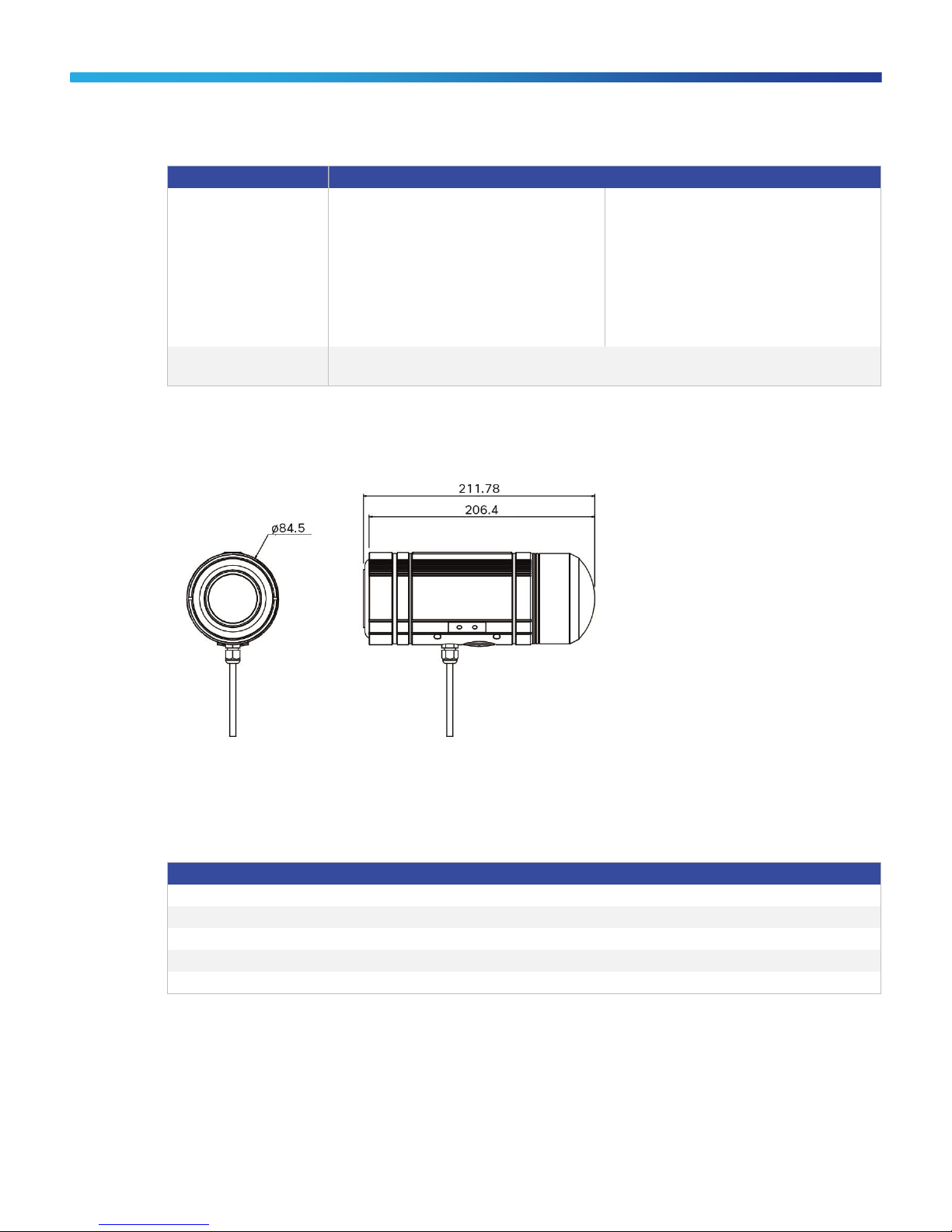
Figure 1 shows the dimensions of the Cisco Video Surveillance 6400E IP Camera.
Figure 1. Cisco Video Surveillance 6400E IP Camera Dimensions
Package Contents
Table 7 describes the items that ship with the Cisco Video Surveillance 6400E IP Camera.
Table 7. Package Contents
Availability
The Cisco Video Surveillance 6400E IP Camera is available through Cisco Authorized Technology Provider (ATP)
Partners.
Page 7

© 2014 Cisco and/or its affiliates. All rights reserved. This document is Cisco Public Information. Page 7 of 7
Part Number
Description
CIVS-IPC-6400E
Cisco Video Surveillance IP Camera, HD Bullet Camera, VR, IR
CIVS-IPCA-PWR12V
12 VDC power supply
Printed in USA C78-731622-00 05/14
Ordering Information
Table 8 lists the part numbers for the Cisco Video Surveillance 6400E IP Camera.
Table 8. Ordering Information
Using the Camera with Cisco Video Surveillance Manager
Features that are marked with an asterisk (*) are not supported when using the camera with Cisco Video
Surveillance Manager.
Services and Support
Cisco and our certified partners can help you accelerate success and improve the return on your investment in a
Cisco Physical Security solution. The Cisco lifecycle approach to services defines the requisite activities at each
phase of the solution lifecycle. This approach allows you to:
●
Reduce deployment costs by identifying the features that will best meet your business requirements
●
Accelerate migration by assessing the readiness of your network to support the system and by developing a
sound design
●
Support smooth implementation through effective planning and expert installation, configuration, and
integration
●
Increase operational efficiency and extend the value of your investment with award-winning technical
support
For more information about Cisco services, visit http://www.cisco.com/go/services.
For More Information
For more information about the Cisco Video Surveillance 6400E IP Camera, visit http://www.cisco.com/go/physec
or contact your local Cisco account representative.
 Loading...