

Page 1

!
Trackpad Development Kit User Guide
Using Arduino-Compatible Teensy 3.2 Hardware
!
!
!
!
Version 1.0
!
!
!
!
!
!
!
!
!
!
!
MAY!2017!
!
!
!
!
!
!
!
!
!
!
!
!
!
!
!
!
! !
Page 2

Trackpad(Development(Users(Guide(–(Document(Version(v1.0( (
2!
!
!"#$%&'()*&+,-"').-,("+/)
)
!0(&)
1$++&'()*&+,-"')
!&,#+-2(-"')
MAY!2017!
1.0!
Initial!Document!C re at io n!
!
3"(-#&!
This!document!is!the!sole!property!of!Cirque!Corporation.!The!information!contained!within!is!
proprietary!to!Cirque!Corporation.!The!holder!of!this!document!shall!treat!all!information!contained!
herein!as!confidential,!shall!use!the!information!only!for!its!intended!purpose,!and!shall!protect!the!
information!in!whole !o r!in !p a rt!fro m!duplication,!disclosure !to !an y !o th e r!p ar ty,!o r!d is se mination!in!
any!media!without!written!permission!from!Cirque!Corporation.!
!
3"(&)(")4$+#50,&+,6!All!specifications!subject!to!change!without!notice.!Cirque!shall!not!be!liable!
for!any!damages!whether!non-specified,!direct,!indirect,!special,!incidental!or!consequential!
(including!downtime,!loss!of!profit!or!go od w ill)!regard les s!of!th e!lega l!theo ry!as se rted .!This!
document!supersedes!all!previous!versions.!
!
1"2/+-75(8)9+0:&%0+;8)0':)40(&'()<'="+%0(-"')
!
Copyright!©!2017!Cirque!Corporation.!All!Rights!Reserved.!Cirque®,!the!Cirque!logo,!GlidePoint®!
and!the!GlidePoint!are!trademarks!of!Cirque!Corporation.!All!other!brand!names!or!trademarks!are!
the!property!of!their!respective!owners.!
!
Cirque's!touch!controller!platforms!and!technology!solutions!are!protected!by!patents!and!
additional!U.S.!and!International!patents!pending.!Contact!Cirque!for!more!information.!
!
! !
Page 3

Trackpad(Development(Users(Guide(–(Document(Version(v1.0( (
3!
Table of Contents
90>?&)"=)1"'(&'(,)@@@@@@@@@@@@@@@@@@@@@@@@@@@@@@@@@@@@@@@@@@@@@@@@@@@@@@@@@@@@@@@@@@@@@@@@@@@@@@@@@@@@@@@@@@@@@@@@@@@@@@@@@@@@@@@@@@@)A!
BC&+C-&D)0':)E&()F2)@@@@@@@@@@@@@@@@@@@@@@@@@@@@@@@@@@@@@@@@@@@@@@@@@@@@@@@@@@@@@@@@@@@@@@@@@@@@@@@@@@@@@@@@@@@@@@@@@@@@@@@@@@@@@@)G!
4+&+&H$-,-(&,)@@@@@@@@@@@@@@@@@@@@@@@@@@@@@@@@@@@@@@@@@@@@@@@@@@@@@@@@@@@@@@@@@@@@@@@@@@@@@@@@@@@@@@@@@@@@@@@@@@@@@@@@@@@@@@@@@@@@@@@@@@@@@@@@@@@@)G!
<',(0??-'7)(5&)!&C&?"2%&'()I'C-+"'%&'()@@@@@@@@@@@@@@@@@@@@@@@@@@@@@@@@@@@@@@@@@@@@@@@@@@@@@@@@@@@@@@@@@@@@@@@@@@@@@@@@@@@@@@@@@@)G!
E&((-'7)$2)(5&).0+:D0+&)@@@@@@@@@@@@@@@@@@@@@@@@@@@@@@@@@@@@@@@@@@@@@@@@@@@@@@@@@@@@@@@@@@@@@@@@@@@@@@@@@@@@@@@@@@@@@@@@@@@@@@@@@@@@@@@@@@@)J!
Connection!Details!...............................................................................................................................!7!
K$''-'7)(5&)9+0#;20:)E;&(#5)@@@@@@@@@@@@@@@@@@@@@@@@@@@@@@@@@@@@@@@@@@@@@@@@@@@@@@@@@@@@@@@@@@@@@@@@@@@@@@@@@@@@@@@@@@@@@@@@@)L!
1"'(0#()<'="+%0(-"')@@@@@@@@@@@@@@@@@@@@@@@@@@@@@@@@@@@@@@@@@@@@@@@@@@@@@@@@@@@@@@@@@@@@@@@@@@@@@@@@@@@@@@@@@@@@@@@@@@@@@@@@@@@@@@)MN!
O22&':-P)O)Q)!&C&?"2%&'()R"0+:)E#5&%0(-#)@@@@@@@@@@@@@@@@@@@@@@@@@@@@@@@@@@@@@@@@@@@@@@@@@@@@@@@@@@@@@@@@@@@@@@@@)MA!
O22&':-P)R)Q)9&&',/)R"0+:)4-')B$()@@@@@@@@@@@@@@@@@@@@@@@@@@@@@@@@@@@@@@@@@@@@@@@@@@@@@@@@@@@@@@@@@@@@@@@@@@@@@@@@@@@@@@@)MJ!
!
!
! !
Page 4

Trackpad(Development(Users(Guide(–(Document(Version(v1.0( (
4!
Overview and Set Up
!
This!document!will!describe!how!to!get!up!and!running!with!the!Cirque!circle!sensor!development!
kit.!This!kit!utilizes!a!hardware!platform!based!on!Arduino
1
!for!easy!development.!
Prerequisites
At!a!minimum,!the!following!components!are!required:!!
• PC!(Windows!or!Mac!OS)!with!available!USB!port.!!
• Cirque!GlidePoint!Dev!Board!(p/n:!02-000620-00).!This!board!should!have!the!Teensy!3.2!
Arduino!compatible!module!pre-mounted.!If!this!Teensy!3.2!is!not!pre-mounted!it!will!need!
to!be!attached!to!the!board!using!pluggable!header!pins!(see!Figure!1).!!
• Cirque!trackpad!modules!with!12-pin!connector!(for!example,!the!TM040040!Pinnacle!Circle!
Trackpad).!!
• USB-micro!cable!for!connecting!the!Teensy!3.2!to!the!computer.!
• 12-pin!flat!flex!cable!for!connecting!the!trackpad!to!the!dev!board.!!
• Optional!circle!sensor!holder.!
!
Certain!development!kits!from!Cirque,!such!as!the!Circle!Trackpad!Dev!Kit!(p/n:!DK-000013-xx),!
provide!a!complete!package!with!these!components.!Contact!a!Cirque!sales!representative!for!
details!on!how!to!obtain!a!development!kit.!!
Installing the Development Environment
1. If!not!already!installed ,!yo u !must!download!an d !in st a ll!th e !A rd u in o !IDE:!
!
a. Arduino!IDE!Download!Link:!https://www.arduino.cc/en/Main/Software!
!
b. The!Arduino!IDE!does!not!support!the!Teensy!development!board!by!default.!It!will!
be!necessary!to!install!a!plug-in!called!“Teensyduino”!for!Teensy!support.!
!
i. Teensyduino!Download!Link:!
https://www.pjrc.com/teensy/td_download.html.!Follow!the!instructions!
on!this!page!for!the!installation!of!Teensyduino!for!your!operating!system.!!
ii. NOTE:!The!Teensyduino!installer!modifies!the!Ardunio!IDE!installation,!
which!may!cause!some!anti-virus!programs!to!flag!it!as!malicious.!It!may!be!
necessary!to!disable!anti-virus!software!prior!to!this!installation.!!
!
2. Next!you!will!need!to!download!the!example!code!file!for!the!trackpad!you!are!using.!
Cirque!makes!example!code!available!at!GitHub!(https://github.com/cirque-corp).!For!a!
direct!link!to!the!specific!project!you!are!working!on,!consult!the!documentation!or!the!web!
page!for!that!trackpad.!For!example,!a!link!to!the!Circle!Trackpad!GitHub!sample!code!can!
be!found!at!http://www.cirque.com/glidepoint-circle-trackpads.!You!will!need!to!locate!the!
specific!.ino!file!for!the!trackpad!project!you!are!working!on.!Arduino!uses!the!file!extension!
!!!!!!!!!!!!!!!!!!!!!!!!!!!!!!!!!!!!!!!!!!!!!!!!!!!!!!!!!!!!!
1
!Arduino!is!a!trademark!of!Ardunio!AG.!!
Page 5

Trackpad(Development(Users(Guide(–(Document(Version(v1.0( (
5!
“.ino”!for!source!files.!These!files!are!text-only!and!contain!C/C++!source.!!These!are!also!
called!sketches”!in!Arduino!termino lo gy .!
Setting up the Hardware
1. If!your!dev!kit!came!w it h !a !trackpad!holder,!you!may!attach!it!to!the!development!board!for!
ease!of!use.!The!holder!attaches!to!the!m o u nt ing !ho le s!in !th e!c o rn er!o f!th e !de v!b o a rd .!
There!may!be!a!second!smaller!piece!that!connects!to!the!other!side!to!help!level!the!board!
(see!below).!The!use!of!this!holder!is!optional,!but!it!will!assist!with!the!orientation!of!the!
trackpads!during!development.!!
!
!
Figure(1:(Slide(the(holder(so(that(it(clips(into(the(corner(mounting(holes(as(shown(above.((
(
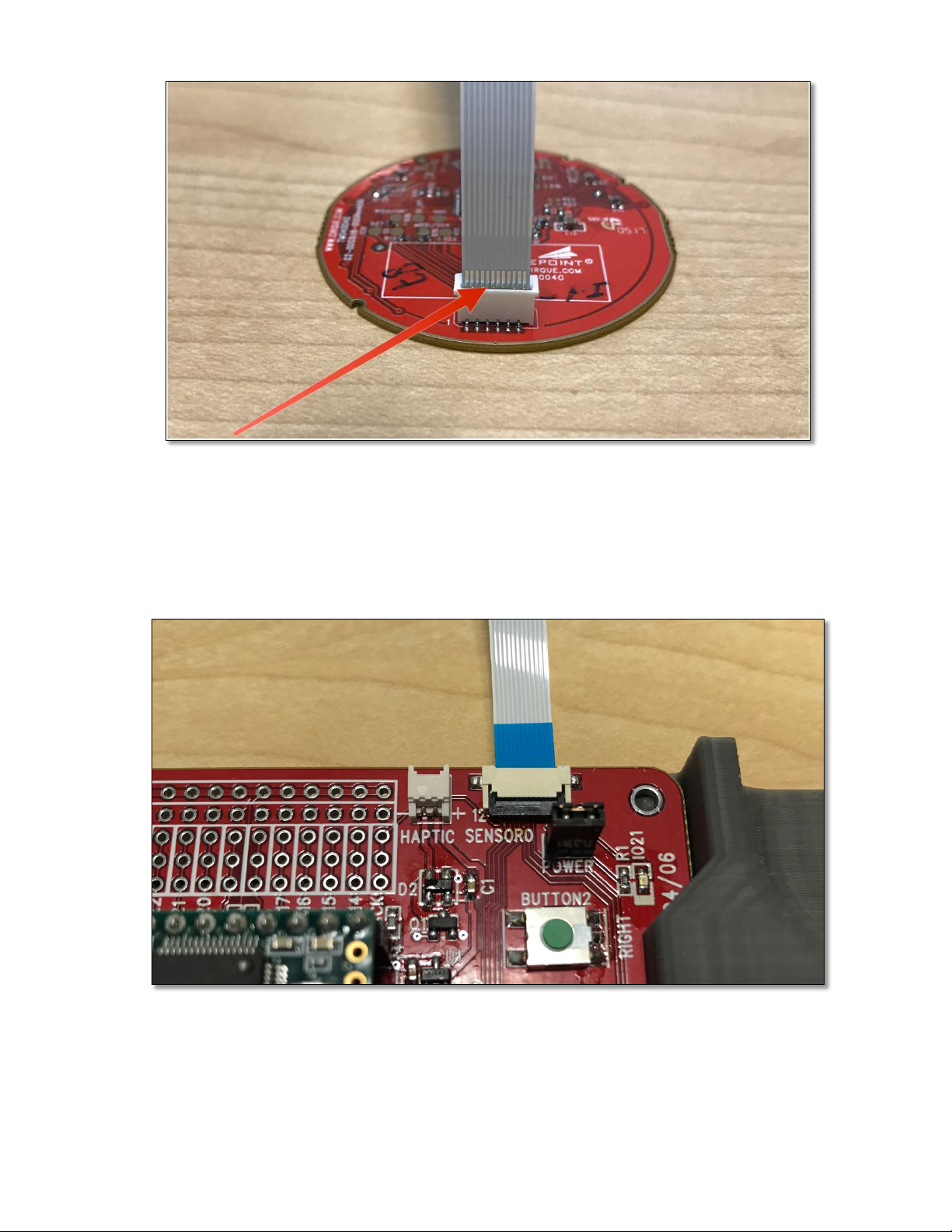
2. Next,!connect!one!or!more!trackpad!modules!to!the!development!board.!Insert!t h e !12 -pin!
flat!flex!cable!(FFC)!to!the!connector!on!the!trac kp ad !with !the !cab le!con d ucto rs!fa cing !
down,!then!fold!the!latc h !d o wn!to!lock!it!in.!NOTE:!The!sample!code!provided!by!Cirque!
only!provides!support!for!ONE!sensor!and!it!must!be!connected!to!the!SENSOR_0!
connector.!Support!for!two!sensors!is!coming!soon.!
!!
Page 6
Trackpad(Development(Users(Guide(–(Document(Version(v1.0( (
6!
!
Figure(2:(Note(the(orientation(of(the(exposed(FFC(conductors.((
!
3. On!the!development!board!the!FFC!connects!to!the!SENSOR0!and!SENSOR1!connectors.!
Note!that!the!exposed!conductors!should!be!facing!downward!on!this!side!of!the!
connection!as!well.!!
!
(
!
Figure(3:(Connection(to(the(development(board.(!
!
Page 7
Trackpad(Development(Users(Guide(–(Document(Version(v1.0( (
7!
Connection Details
!
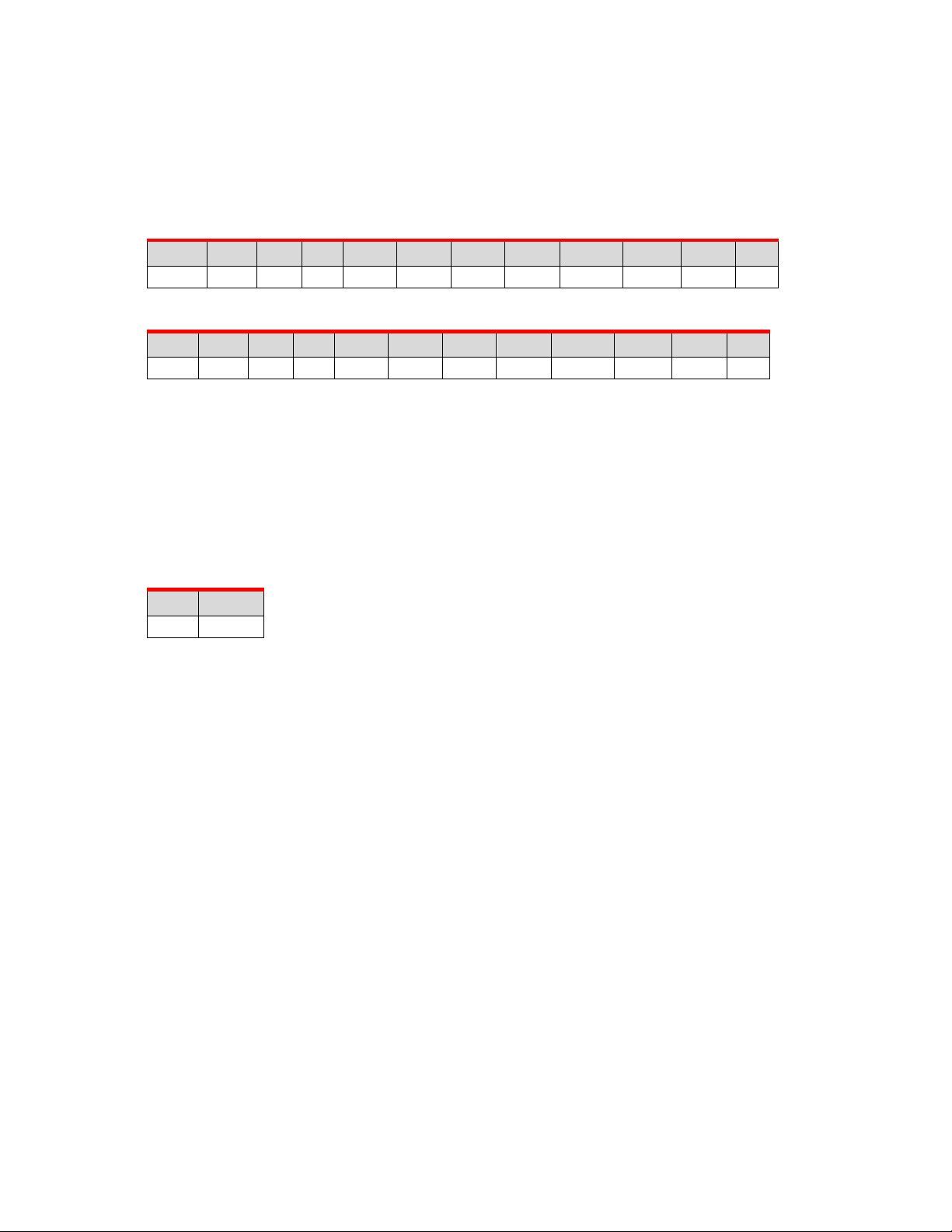
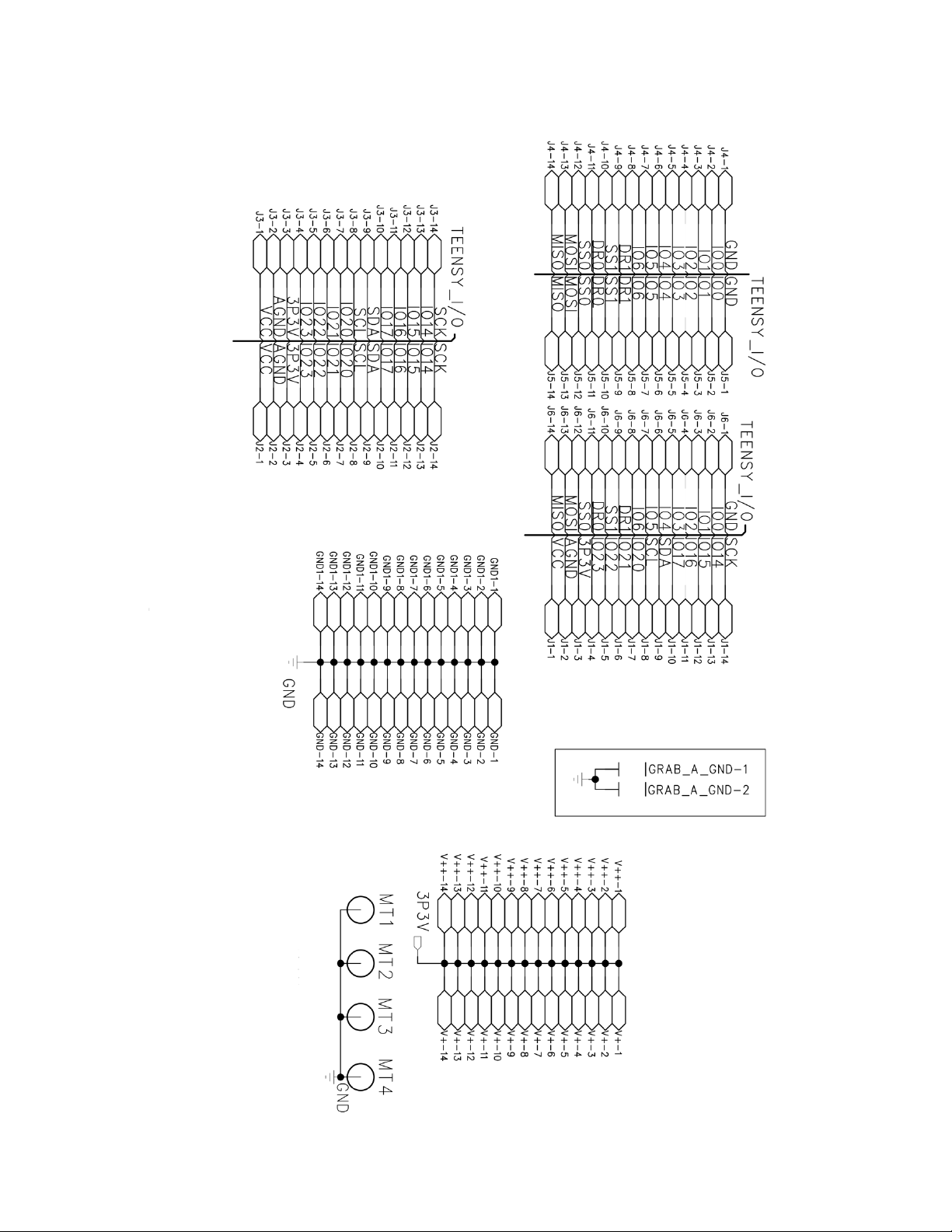
The!full!schematic!for!the!development!board!can!be!found!in!Appendix!A.!Key!details!can!be!found!
below.!Connections!for!both!SPI!and!I
2
C!trackpads!are!supported.!!
!
Table(1:(SENSOR0(Pin(Out(
M)N)A)G)J)S)T)L)U)
MV)
MM)
MN)
3.3!V*!
GND!
SDA!
SCL!
BTN1!
BTN3!
BTN2!
MOSI!
DR0**!
SS0**!
MISO!
SCK!
!
Table(1:(SENSOR1(Pin(Out(
M)N)A)G)J)S)T)L)U)
MV)
MM)
MN)
3.3!V!
GND!
SDA!
SCL!
BTN1!
BTN3!
BTN2!
MOSI!
DR1**!
SS1**!
MISO!
SCK!
!
*NOTE:!A!header!for!the!power!connection!on!SENSOR0!is!provided!so!that!developers!can!monitor!
power!consumption!(labeled!POWER).!Check!to!ensure!that!the!jumper!is!in!place!to!properly!
power!SENSOR0.!
!
**NOTE:!For!the!purposes!of!identifying!the!correct!trackpad !m od ule, !pins!9!and!10!are!used!(DATA!
READY!and!SLAVE!SELECT).!It!will!be!necessary!to!target!the!correct!module!(either!0!or!1)!in!the!
sample!code.!!!
!
Table(3:(HAPTIC(Pin(Out(
M)
N)
PLUS!
MINUS!
!
A!connector!is!made!available!for!experimenting!with!haptic!devices!such!as!the!Alps®!
HAPTIC™Reactor.!For!full!details!see!the!schematic!in!Appendix!A.!!
!
NOTE:!Do!not!exceed!80!mA!current!on!the!haptic!connector.!!
!
!
!
!
! !
Page 8
Trackpad(Development(Users(Guide(–(Document(Version(v1.0( (
8!
Running the Trackpad Sketch
!
Once!the!hardware!is!assembled!and!the!Arduino!software!has!been!installed!you!are!ready!to!
connect!the!hardware!to!a!computer!to!begin!comm un icating!with!the!trac kp ad .!!
!
The!example!below!will!use!a!sketch!that!outputs!X,!Y,!Z!data!over!a!serial!port!monitor!to!the!
computer.!
1. Connect!the!dev!board!to!the!computer!using!a!USB!to!Micro!USB!cable.!!
2. Open!the!Arduino!IDE!
3. Open!the!example!code!“sketch”!(.ino!file)!you!want!to!load.!!
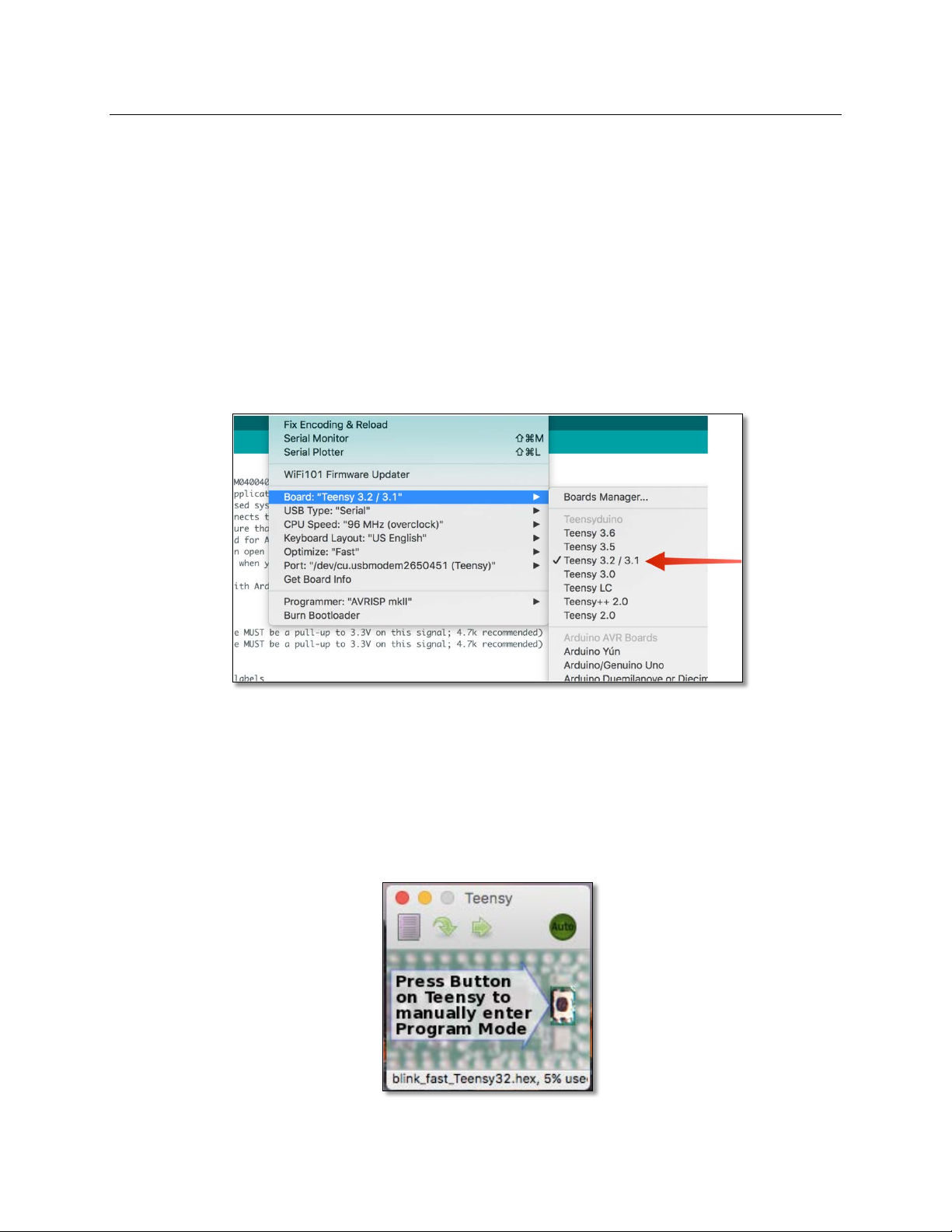
4. Check!to!make!sure!that!the!Teensy!3.2!is!selected!under!the!“Tools!>!Boards”!
menu.!!
5. Check!to!make!sure!CPU!Speed!is!set!to!“96!MHz!(overclock)”!
!
!
!
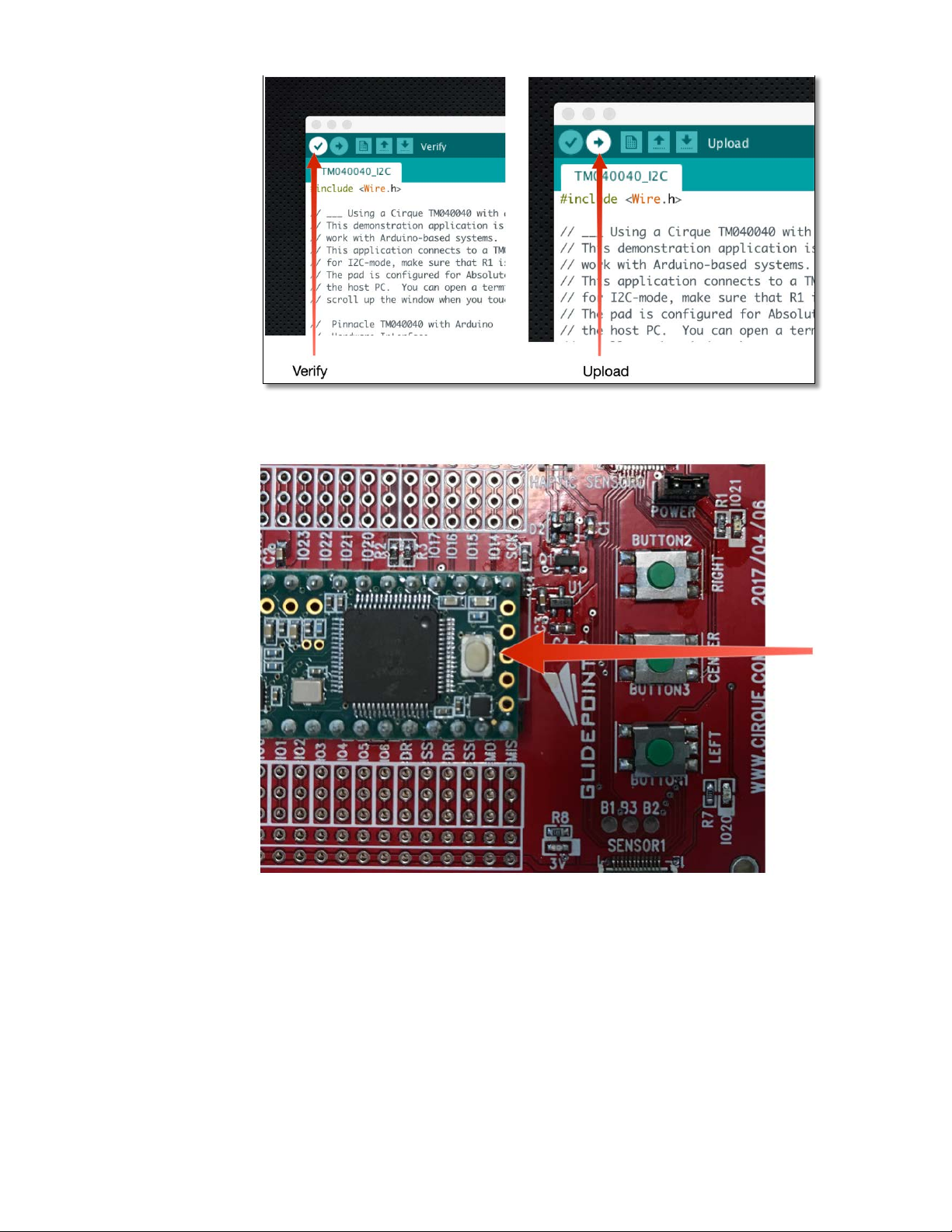
6. Click!the!“Verify”!button!to!check!the!code!and!compile!it.!Then!select!“U p loa d ”!to !
program!the!Teensy!board.!Once!the!upload!is!complete,!press!the!white!button!on!
the!Teensy!3.2!module!to!force!a!program-lo ad !(t h is!is !th e !on ly !w a y!t o !en s u re !ne w!
code!is!uploaded)!NOTE:!the!first!time!compiling!the!code!may!take!a!while.!
Subsequent!compilations!are!much!faster.!Also!note!that!an!additional!window!will!
open!showing!the!TeensyLoader!window!which!will!also!direct!you!to!push!the!
white!button!on!the!Teensy!module.!!
!
Page 9
Trackpad(Development(Users(Guide(–(Document(Version(v1.0( (
9!
!
!
!
!
!
!
!
!
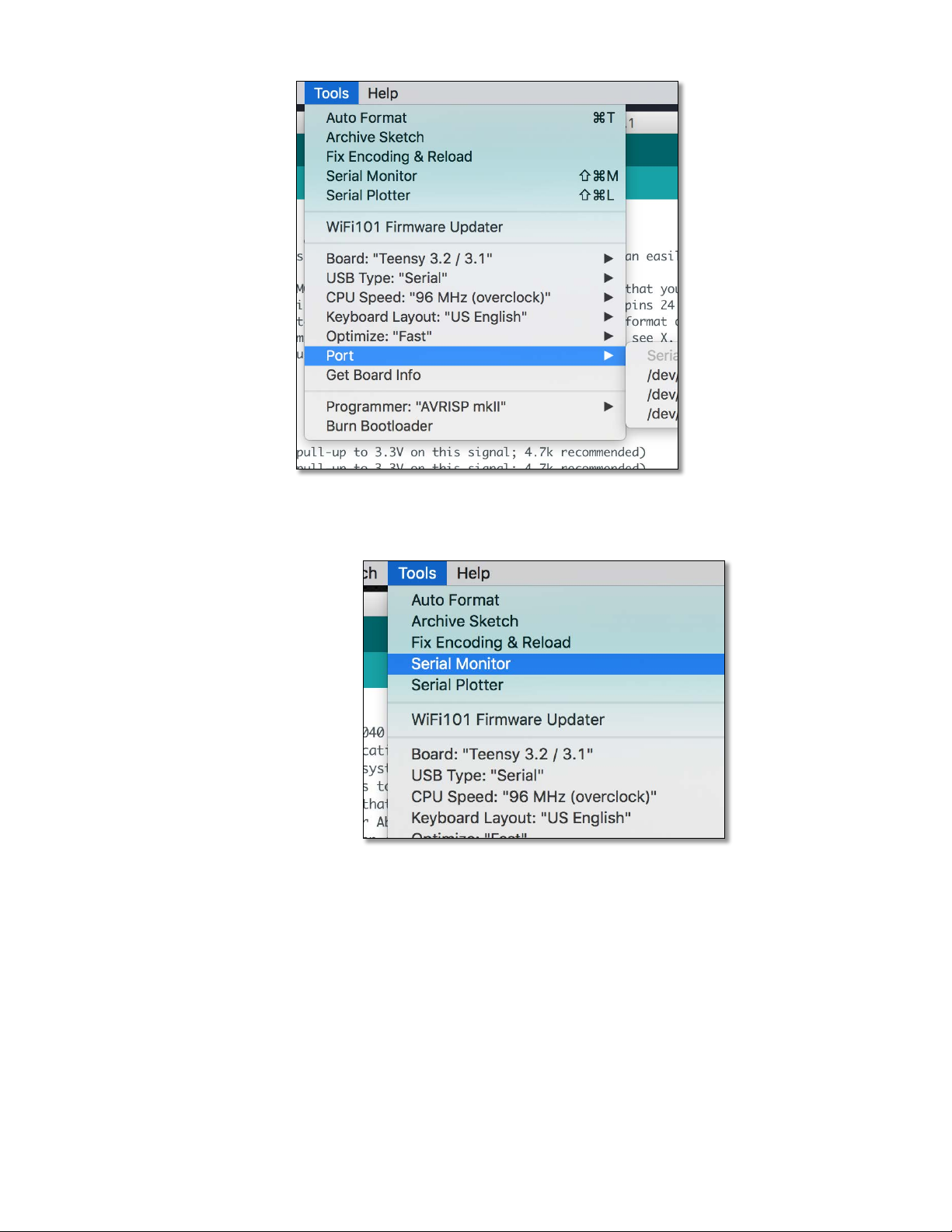
7. Once!the!loading!is!complete,!select!Tools!>!Port!and!make!sure!that!the!Teensy!is!
selected!as!the!serial!port.!!
Page 10
Trackpad(Development(Users(Guide(–(Document(Version(v1.0( (
10!
!
!
8. Next,!select!Tools!>!Serial!Monitor.!
!
!
!
9. This!will!open!the!serial!monitor!window.!In!the!example!sketch,!X,Y,Z!data!packets!
are!displayed!in!this!window.!You!may!want!to!select!“Autoscroll”!so!that!the!most!
current!information!is!always!displayed!in!the!window.!NOTE:!any!serial!monitor!
software!should!work.!Because!this!device!enumerate!as!USB!CDC,!the!“baud!rate”!
settings!have!no!effect.!
!
!
Page 11

Trackpad(Development(Users(Guide(–(Document(Version(v1.0( (
11!
!
!
!
This!example!sketch!provides!the!fundamentals!for!connecting!and!reading!data!from!the!trackp ad .!
Additional!sketches!for!more!functionality!(such!as!certain!gestures!or!overlay!types)!are!available!
from!cirque.com!or!the!Cirque!GitHub!repository.!
!
The!dev!board!also!supports!additional!hardware!experimentation!via!a!“breadboard”!style!
structure.!Using!this,!it!is!easy!to!connect!and!develop!with!other!hardware!com p on en ts!for!yo ur!
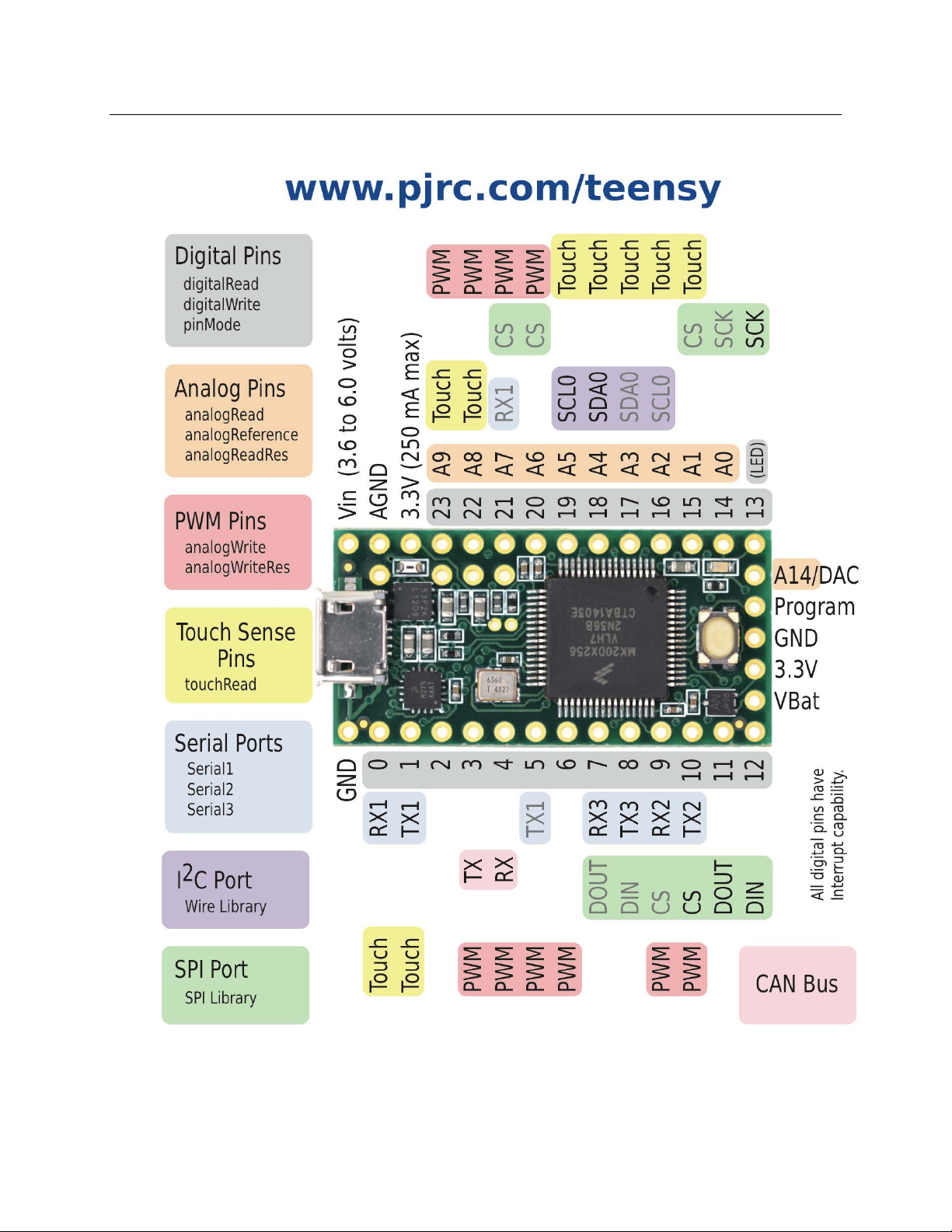
project!as!well!as!connect!a!logic!analyzer!to!see!how!SPI!and!I2C!communication!is!handled.!See!
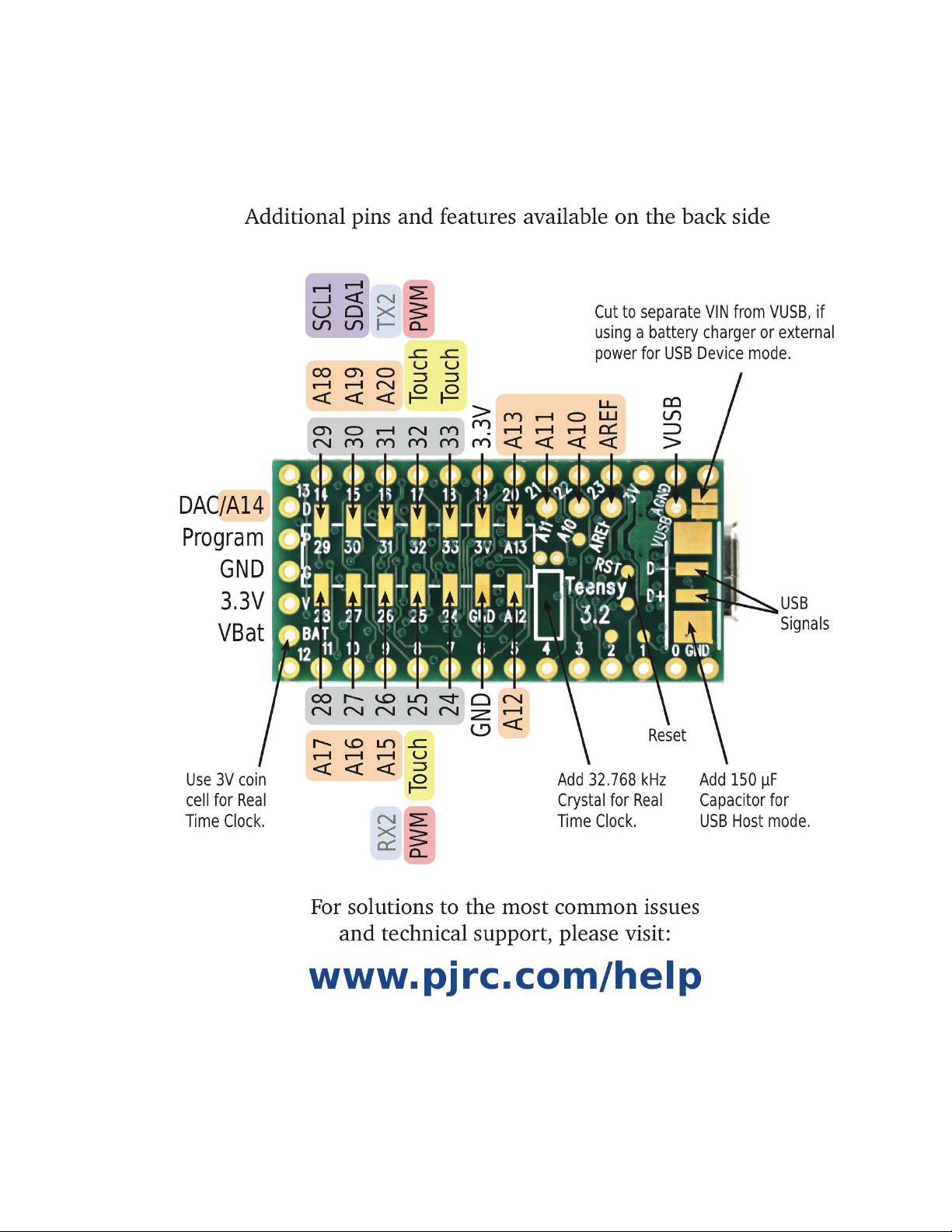
the!schematic!in!Appendix!A!for!more!information.!A!pin!out!for!the!Teensy!module!is!also!provided!
in!Appendix!B.!!
!
If!additional!suppo rt!is !n e ed e d !p le a se !contact!us!at!our!webs ite ,!o r!v ia !yo u r !C irq u e !sa le s!
representative.!
!
! !
Page 12

Trackpad(Development(Users(Guide(–(Document(Version(v1.0( (
12!
Contact Information
!
Contact!a!Cirque!sales!representative!for!a!technical!support!or!a!complete!list!of!Cirque's!OEM!
products.!
!
! Website:! ! !! ! DDD@#-+H$&@#"%!
! In!the!United!States !an d !C a n a d a!:! WLVVX)YZ<!I[TJ)WGJG[AATJX)
! Outside!US!&!Canada:! ! ! WLVMX)GST[MMVV)
! Fax:! ! ! ! ! WLVMX)GST[VNVL)
)
)
) )
Page 13

Trackpad(Development(Users(Guide(–(Document(Version(v1.0( (
13!
Appendix A – Development Board Schematic
!
!
Page 14
Trackpad(Development(Users(Guide(–(Document(Version(v1.0( (
14!
!
Page 15
Trackpad(Development(Users(Guide(–(Document(Version(v1.0( (
15!
Appendix B – Teensy Board Pin Out
!
!
!
!
!
!
Page 16
Trackpad(Development(Users(Guide(–(Document(Version(v1.0( (
16!
!
!
!
!
!
!
!
Page 17

Mouser Electronics
Authorized Distributor
Click to View Pricing, Inventory, Delivery & Lifecycle Information:
Cirque:
DK13-000013-02 DK13-000013-03 DK-000013-03 DK-000013-02
 Loading...