

Page 1

CIRCLE
BLUETOOTH™ WIRELESS HANDSFREE CAR KIT
USER’S GUIDE (DRAFT 5B)
Table of Contents
Introduction....................................................................................................................................2
Feature Highlights..........................................................................................................................4
About Bluetooth.............................................................................................................................4
Identifying the Parts .......................................................................................................................5
Package Contents............................................................................................................................7
Set-Up and Installation ...................................................................................................................8
Pairing.............................................................................................................................................9
Adjusting the Speaker Volume .....................................................................................................10
Placing and Receiving Calls.........................................................................................................10
Call Transferring from a Bluetooth Mobile Phone to the CIRCLE Car Kit................................. 11
Privacy Mode................................................................................................................................12
Charging your Mobile Phone: (Optional) .....................................................................................12
Troubleshooting............................................................................................................................12
Important Consumer Information.................................................................................................14
1 Bluetooth Wireless Hands Free Car Kit User’s Guide
Page 2
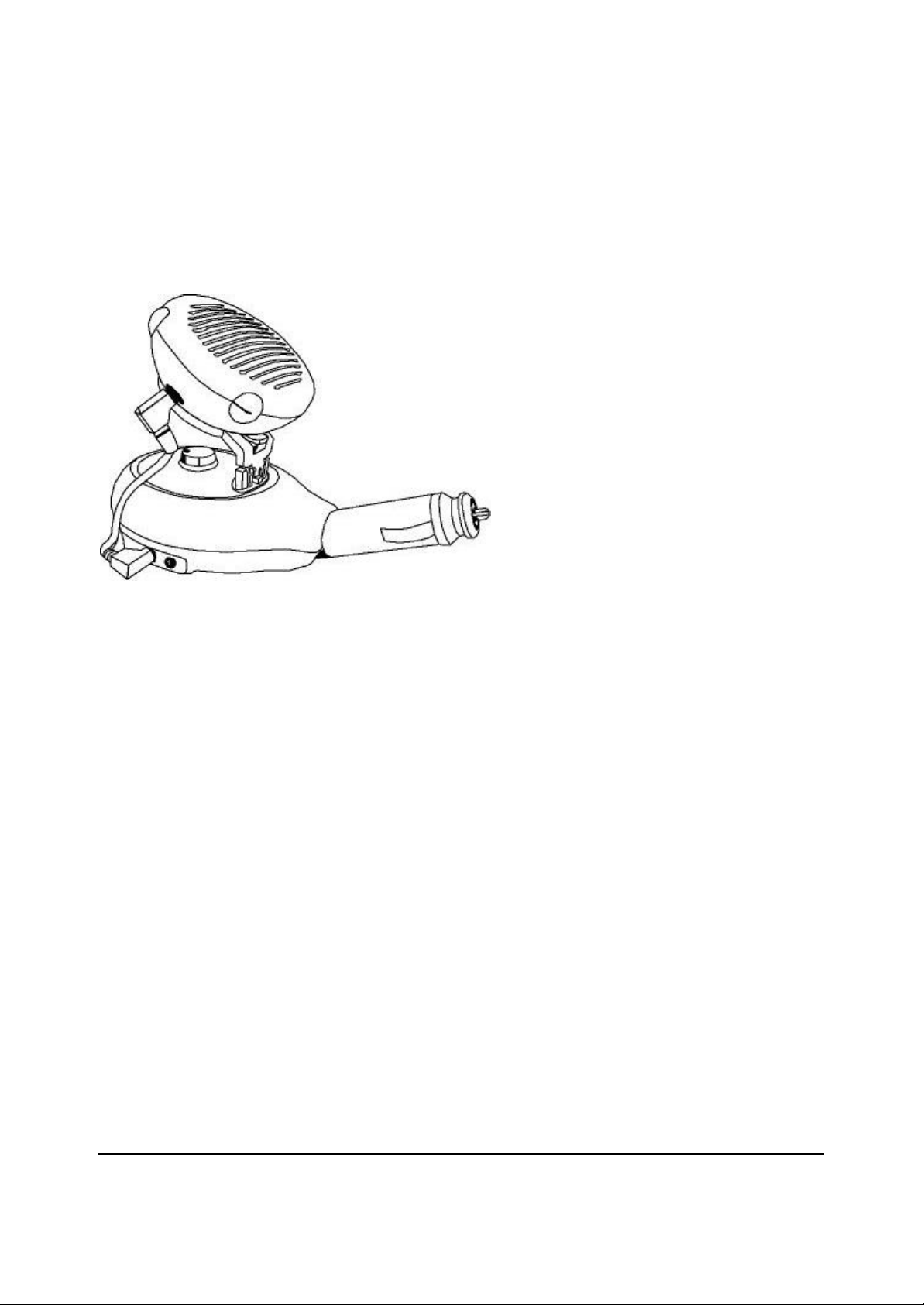
CIRCLE Bluetooth™ Wireless Hands Free Car Kit
CIRCLE1000
Introduction
Your CIRCLE Bluetooth Wireless Hands Free Car Kit CIRCLE1000 is a hand sfree
communication device built on BluetoothTM wireless technology which was designed and
manufactured in accordance with Bluetooth specification v1.1. Bluetooth wireless technology
is a global specification for personal area wireless connectivity to ens ure communication
compatibility worldwide. It was designed to connect Bluetooth equipped portable and
stationary communication devices easily and without any cables.
This User's Guide shows you how to use your CIRCLE Car Kit with Bluetooth devices such as
mobile phones. It also explains how to handle incoming and outgoing calls, call transfers, and
adjusting the listening volume simply by using two buttons and the volume control.
2 Bluetooth Wireless Hands Free Car Kit User’s Guide
Page 3

Finally, A True Handsfree Solution For Your Car**
Ultimate Convenience, Safety, and Security
Employing the latest Bluetooth technology, this revolutionary cellular phone handsfree car kit
incorporates many features to help you send and receive important calls while driving, all
without the need for any cords being attached to your phone!
BluetoothTM Wireless Technology - guarantees a secured signal for clear conversations- without
the need for any physical connection between the phone and handsfree set.
Clarity CVC ™ Technology – CVCTM state of the art voice capture technology was designed in
for clearest sound quality, typically found only in products costing hundreds of dollars more.
CVCTM allows you to conduct full duplex, noise free conversation in the typically noisy car
interior environment.
Simply plug in and Set Up – Plug the handsfree module into the 12V Power Outlet Plug,
connect the microphone and speaker, set your phone’s Bluetooth channel, then press “Talk”. It’s
that simple! You are now ready to go! No professional installation is required.
Flexible placement options to suit your needs – Using the speaker extension cord and
microphone clip provided, you can place the speaker or microphone virtually anywhere in your
car to optimise performance, convenience or appearance.
One touch to receive calls – with Bluetooth technology, your cellular phone can be used
whether it is in your pocket or handbag. You will no longer need to locate your phone to receive
incoming calls. Just press “Talk” button on your handsfree kit and you will be connected.
Privacy jack – The handsfree module features a built in jack – make it easy to conduct a
conversation in private.
**Note: You need to have a Bluetooth enabled phone or a phone with a Bluetooth adaptor connected to it.
“ BLUETOOTH is trademark owned by Bluetooth SIG, Inc ., USA and licensed to Circle
Communication Product Inc.”
CVC is trademark owned by CLARITY LLC
3 Bluetooth Wireless Hands Free Car Kit User’s Guide
Page 4

Feature Highlights
l Bluetooth Wireless Technology
l Clarity CVCTM Voice Capture technology
l Simple set up. No professional installation required
l Portable from vehicle to vehicle
l Flexible placement options for microphone and speaker
l One touch operation to receive calls
l Privacy Jack
About Bluetooth
Compatibility
You can use your CIRCLE Car Kit with any device that is compatible with Bluetooth wireless
technology and supports the Headset Profile (as an audio gateway). To use your CIRCLE Car
Kit together with a mobile phone, you must have a Bluetooth-enabled phone or a phone with a
Bluetooth adapter connected to it.
Definitions
1. Headset Profile – Defined by the Bluetooth Special Interest Group (SIG), it describes how
manufactures should implement various features supported by a Bluetooth Car Kit.
2. Audio Gateway – The device that is the gateway of the audio, both for input and output.
Typical Audio Gateways are mobile phones and personal computers.
3. Bluetooth Trademark - The Bluetooth trademarks are owned by Bluetooth SIG, Inc. USA.
4 Bluetooth Wireless Hands Free Car Kit User’s Guide
Page 5
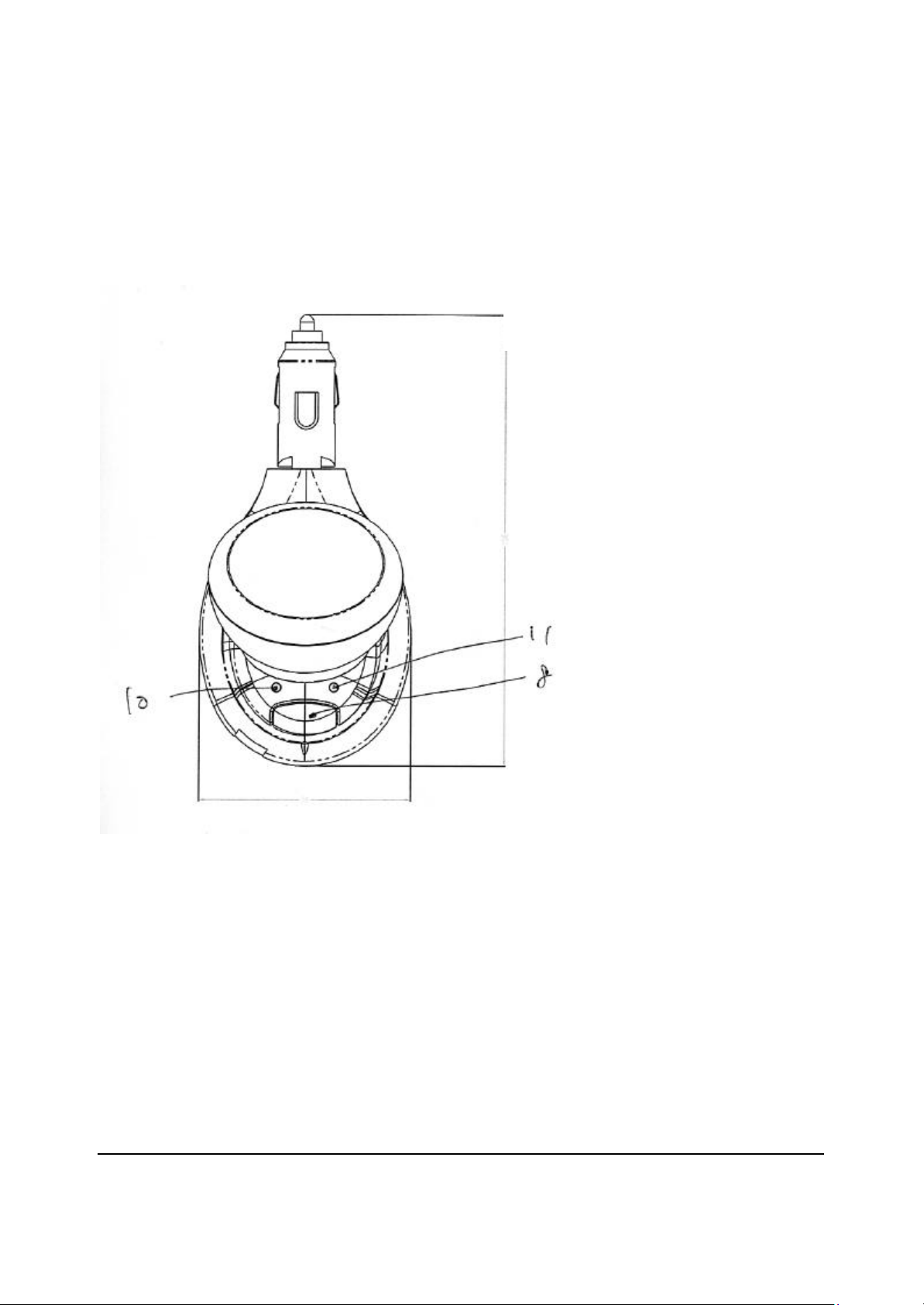
Top View
Identifying the Parts
13
5 Bluetooth Wireless Hands Free Car Kit User’s Guide
Page 6
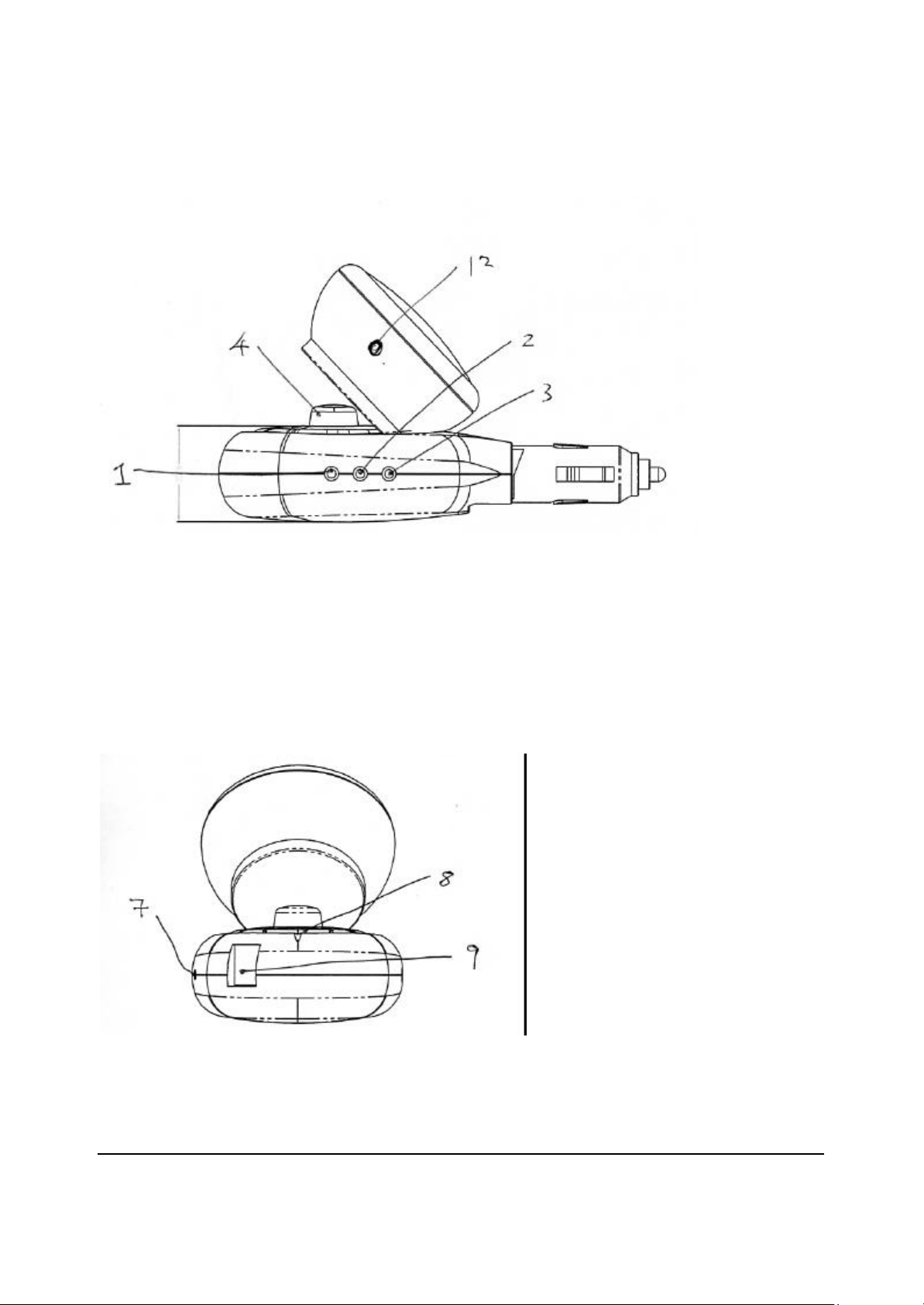
Side View 1
Side View 2
6 Bluetooth Wireless Hands Free Car Kit User’s Guide
Page 7

Item Description Function
1 Earphone Jack Connection to Earphone
2 Loudspeaker Jack Connection to the Speaker via cable
3 External Microphone Jack Connection to the External Microphone
via cable
4 Volume Control Knob Controls the listening volume of the
Speaker
5 Speaker Jack For connection to the body via
Loudspeaker cable
6 Green Indicator Lamp Power on indicator
7 Blue Indicator Lamp Flashes when in pairing mode. Lights up
when a call is in progress
8 TALK button Answers incoming calls, terminates calls,
or switches voice from Mobile Phone to
handsfree car kit
9 Earphone volume control Controls the listening volume of the
Speaker
10 Mobile Phone Charger Jack Connection for Charger Cable (optional)
to charge Mobile Phones
11 PAIR button Used for pairing with a Mobile Phone
Package Contents
Car Kit Packing Material
1. Car Kit (Main Body)
2. Speaker (Main Body)
3. External Speaker Rotate Mount
4. External Speaker Fix Mount
5. Microphone (With Cable Wire)
7 Bluetooth Wireless Hands Free Car Kit User’s Guide
Page 8

6. Speaker Connector Cable (Long Cable Wire)
7. Speaker Connector Cable (Cord Cable Wire)
8. Support Foam 4pcs (2 for speaker 28x13x12mm / 2 for microphone 28x13x4mm)
9. Microphone Mount Plate
10. User's Guide
Set-Up and Installation
Quick Set-Up
1. Plug your CIRCLE Car Kit module into the cigarette lighter socket of the car. Power on
your CIRCLE Car Kit by following the instructions for powering the cigarette lighter or
power socket in your vehicle. The Green indicator on your CIRCLE Car Kit should light
up.
2. Plug the External Microphone into the external microphone jack on your CIRCLE Car Kit.
(See instructions for mounting the External Microphone)
3. Plug the Speaker into the speaker jack on your CIRCLE Car Kit. (See instructions for
mounting the Speaker)
4. If privacy mode is desired, plug the Earphone into the earphone jack on your CIRCLE Car
Kit.
5. Pair your CIRCLE Car Kit with your mobile phone (See instructions on Pairing)
Mounting the External Microphone
The CIRCLE Car Kit comes with a built-in microphone primarily used if frequently moving the
Car Kit from vehicle to vehicle however, for better performance it is recommended that the
external microphone be mounted on the dash, windshield pillar, overhead counsel or visor with
adhesive tape. Reducing the distance between the vehicle operator’s mouth and the
microphone will generally result in better sound quality. Make sure the microphone is mounted
pointing towards the vehicle operator’s mouth.
8 Bluetooth Wireless Hands Free Car Kit User’s Guide
Page 9

Mounting the Speaker
The CIRCLE Car Kit comes with a Speaker which can be connected directly to the body of your
CIRCLE Car Kit, primarily used if frequently moving the Car Kit from vehicle to vehicle, or
mounted externally in the vehicle. It is recommended that for better performance care should
be taken to mount the Speaker in an appropriate location to provide good acoustical performance.
Ensure that there is as much distance between the Microphone and Speaker as possible making
sure that they are not pointed at or facing each other.
Pairing
Bluetooth Passkey
The process of creating a secure relationship between two Bluetooth devices is called “Pairing”
(see next section). Pairing prevents the use of an unauthorized Bluetooth device with your
CIRCLE Car Kit. A Bluetooth Passkey (or PIN) is used to Pair the CIRCLE Car Kit with
another Bluetooth device and create a secure relationship between them.
Each Car Kit has a default Passkey [0000], which is stored in its internal memory. Whether
you need to input the pass-key during pairing depends on the kind of Bluetooth phone that your
CIRCLE Car Kit will be connected to.
If you plan to use your CIRCLE Car Kit with a Bluetooth mobile phone or other device with
built-in Bluetooth capability, you will probably be required to enter the CIRCLE Car Kit
Passkey on that device during pairing. Please refer to the user’s guide of the other device for
specific Pairing instructions.
Pairing your CIRCLE Car Kit
Before using your CIRCLE Car Kit with a Bluetooth-enabled device for the first time, you must
Pair your CIRCLE Car Kit with that device.
Different devices may require different pairing procedures. The pairing procedure for your
CIRCLE Car Kit is described in this user’s guide. Please refer to the user manual of the other
9 Bluetooth Wireless Hands Free Car Kit User’s Guide
Page 10

device for specific pairing instructions.
To complete the pairing process you will need to enter the correct CIRCLE Car Kit Passkey
when required by the other device.
The CIRCLE Car Kit shall remember the most recent paired device only.
Pairing your CIRCLE Car Kit with the Phone
1. Activate the Bluetooth function in the phone. If necessary, please refer to the user manual
of the p hone for specific pairing instructions.
2. Plug your CIRCLE Car Kit into the cigarette lighter socket in the vehicle. The Green
indicator lamp should be on.
3. Press and hold the PAIR button on your CIRCLE Car Kit for six seconds until the Blue
indicator lamp flashes. Your CIRCLE Car Kit is now ready for pairing. Make sure your
CIRCLE Car Kit and the phone are not too far apart, (i.e. within 30 feet or 10 meters of each
other).
4. Initiate Bluetooth pairing in the phone to pair it with your CIRCLE Car Kit. Please refer to
the user manual of the phone for specific pairing instructions.
5. When asked by the phone, enter your CIRCLE Car Kit Passkey and then confirm, if
necessary. If pairing is successful, your CIRCLE Car Kit will now be ready to use.
6. If, pairing is unsuccessful, after approximately two minutes the blue indicator of Car Kit will
be off. Previous pairing (if any) will be erased. You may need to repeat steps 2 to 4 until
pairing is successful. (Note: Before pairing with a Bluetooth mobile phone, it is
recommended to first reset the phone by turning it off then on again).
Adjusting the Speaker Volume
To adjust your CIRCLE Car Kit listening volume during a call use the VOLUME control knob.
Placing and Receiving Calls
All of the instructions below pertaining to use of the CIRCLE Car Kit with a mobile phone
apply only to Bluetooth enabled mobile phones which have already been paired with your
10 Bluetooth Wireless Hands Free Car Kit User’s Guide
Page 11

CIRCLE Car Kit (see pairing instructions above).
Placing a Call using a Bluetooth enabled mobile phone
1. Make sure the phone is turned on, that your CIRCLE Car Kit has been plugged into the
cigarette lighter socket with power on, and that the phone and Car Kit are within range of
each other.
2. If the mobile phone supports voice dialing, press the TALK button of your CIRCLE Car Kit
once. After hearing a beep from your CIRCLE Car Kit, you can voice dial as you normally
would do.
3. If the mobile phone does not support voice dialing, enter the number to be called using the
phone's keypad or recall it from the phone’s memory as you normally would do.
4. After the call has gone through it should transfer to your CIRCLE Car Kit automatically.
5. To end the call press the TALK button of your CIRCLE Car Kit once.
Answering a Call using a Bluetooth enabled mobile phone
1. When you hear your CIRCLE Car Kit ring, press the TALK button of the CIRCLE Car Kit
once.
2. If you hear the phone ring first, wait until your CIRCLE Car Kit rings, then press the TALK
button of the CIRCLE Car Kit once.
3. To end the call press the TALK button of your CIRCLE Car Kit once or press the NO key (or
any key with equivalent function) on the phone.
Call Transferring from a Bluetooth Mobile Phone to the CIRCLE Car Kit
1. At any time during a call you can transfer it from your phone to your CIRCLE Car Kit.
Make sure that your Car Kit has been paired with the phone.
2. To transfer the call from the phone to your CIRCLE Car Kit, press the TALK button of
your
CIRCLE Car Kit once.
Note: Make sure the Bluetooth function in the mobile phone has been activated.
11 Bluetooth Wireless Hands Free Car Kit User’s Guide
Page 12

Call Transferring from the CIRCLE Car Kit to a Bluetooth Mobile Phone
To transfer a call from your CIRCLE Car Kit to the phone please refer to the user manual of the
phone for specific instructions.
Privacy Mode
1. For private conversations, connecting a Nokia 8390 compatible earphone to the earphone
jack on your CIRCLE Car Kit will disable the external Speaker and put your CIRCLE Car
Kit into privacy mode.
2. When switching to Privacy Mode first adjust the volume control knob of your CIRCLE Car
Kit to its minimum setting.
3. Speak in the direction of your CIRCLE Car Kit microphone and listen through the Earphone.
4. To return to normal hands free mode, unplug the earphone and re-adjust the volume of your
CIRCLE Car Kit to the desired level.
Charging your Mobile Phone: (Optional)
Charging your mobile phone while using the CIRCLE Car Kit requires an optional adaptor cable.
Make sure the correct adaptor cable for your mobile phone is used. When the proper adaptor
cable is connected, the charging cycle begins automatically.
Troubleshooting
This section lists the most common problems you might encounter while using your CIRCLE
Car Kit
No Sound
Your CIRCLE Car Kit and the phone you are using with it have to be paired to recognize each
other.
They also have to be within range of each other. Make sure your CIRCLE Car Kit and the
phone you are using it with are no more than 10m./30ft.apart with no solid objects in between.
Re-check the cable connections for the external microphone and speaker.
12 Bluetooth Wireless Hands Free Car Kit User’s Guide
Page 13

Pairing Unsuccessful
If pairing has not succeeded after several attempts you may have to re-set your CIRCLE Car Kit.
To re-set your CIRCLE Car Kit, first unplug it from the cigarette lighter socket and then plug it
in again. The Green light should be on when there is power from the cigarette lighter so cket.
After re-setting the CIRCLE Car Kit try the pairing procedure again.
Some Car Kit Functions Do Not Work
If you notice that you can't make use of all the features in your CIRCLE Car Kit please check
that your mobile phone has the right software version.
If there is an Echo
Try relocating the microphone and/or Speaker and adjusting the volume of Speaker
13 Bluetooth Wireless Hands Free Car Kit User’s Guide
Page 14

Important Consumer Information
(Note: Please read all this information before using your Bluetooth Car Kit )
1. Check for any national or local requirements, limitations, exceptions or rules on the usage of
this Bluetooth Car Kit or any other Bluetooth devices.
2. Check the laws and regulations on the use of mobile phones and/or handsfree equipment in
the areas where you drive.
3. Please note that only a CIRCLE authorized dealer or service partner should remove and/or
replace any components.
4. Please use only CIRCLE original accessories. Use of non-CIRCLE original accessories
may result in damage to the product, loss of performance, injury, electric shock or even fire.
5. Please do not expose the product to extreme high or low temperatures, moisture or fluids.
6. Please do not drop, throw or bend the product as rough treatment will damage it.
7. If you do not intend to use your CIRCLE Car Kit for an extended period of time, please store
it in a place that is free from moisture, dust, and extremes of temperature.
8. RF frequency and energy may affect certain electronic systems in a motor vehicle. Please
check with the manufacturer of your vehicle to ensure that your CIRCLE Car Kit will not
affect the electronic systems in the motor vehicle.
9. Certain medical electronic equipment may not be shielded from RF energy. Therefore,
please do not use your CIRCLE Car Kit near medical equipment without requesting
permission.
10. Please do not allow children to play with your CIRCLE Car Kit since it contains small parts.
11. When connecting your CIRCLE Car Kit with a mobile phone or any electronic device using
radio frequency signals it is not possible to guarantee that a connection will be maintained
under all conditions or circumstances. Therefore, please never rely solely upon your
CIRCLE Car Kit for essential or emergency communications.
Disclaimer
The information contained in this User's Guide from CIRCLE Technology Ltd. is published
without any warranties either expressed or implied. Improvements and/or changes to this User's
Guide necessitated by typographical errors, inaccuracies of current information, or
improvements to programs and/or equipment, may be made by CIRCLE Technology Ltd. at any
time and without notice.
14 Bluetooth Wireless Hands Free Car Kit User’s Guide
Page 15

IMPORTANCE NOTICE:
To comply with FCC RF exposure compliance requirements, the antenna must be installed
to provide at least 20cm separation distance between the antenna of the is device to all
people.
FCC Statement
This device complies with Part 15 of the FCC rules. Operation is subject to the following two
conditions: (1) This device may not cause harmful interference, and (2) This device must accept
any interference received, including interference that may cause undesired operation.
Caution:
The changes or modifications not expressly approved by the party
responsible for compliance could void the user's authority to operate the
equipment.
Product manufactured by Hong Kong Communication Equipment Co., Ltd.
15 Bluetooth Wireless Hands Free Car Kit User’s Guide
 Loading...