

Page 1
USER GUIDE
AV150 -10
ACOUSTIC / VOCAL AMPLIFIER
Page 2

CONGRATULATIONS
on your new Circa 74
and Amp Stand. Getting great-sounding amplified acoustic tone
is as easy as plugging in your guitar.
If you have any questions about your amplifier, please contact
Circa 74 Customer Service at 1-800-943-6782 in North America
or +31 (0) 20 667 6033 in Europe.
®
2-in-1 Acoustic Guitar/Vocal Amplifier
Page 3

CONTENTS
Safety Advisories
4
Control Panel Tour
6
Back Panel Tour
7
Bluetooth Instructions
8
Suggested Settings
9
Stand Assembly
11
Technical Specifications
12
Fuse Replacement
14
Certifications
15
All trademarks and registered trademarks mentioned herein are recognized as the
property of their respective holders.
Page 4
SAFETY ADVISORIES
This symbol is intended to alert the user to the
presence of non-insulated “dangerous voltage”
within the product’s enclosure.
This symbol is intended to alert the user to
the presence of important operating and
maintenance (servicing) instructions in the
literature accompanying the unit.
Do not expose the device to dripping or splashing.
Objects filled with liquids, such as vases or beverage
containers, should not be placed on the device.
4
Page 5

SAFETY ADVISORIES
READ all safety and operating instructions before using this product.
1.
KEEP all safety and operating instructions for future reference.
2.
READ and understand all warnings listed in the operating instructions.
3.
FOLLOW all operating instructions to use this product.
4.
WARNING: To reduce the risk of electric shock, do not expose this
5.
apparatus to rain or moisture. This product should not be used near
water, i.e., bathtub, sink, swimming pool, wet basement, etc.
Only use a dry cloth to clean this product.
6.
DO NOT place this product near any heat sources such as radiators, heat
7.
registers, stoves or other apparatus (including amplifiers) that produce heat.
DO NOT alter any safety mechanism or remove the ground terminal of the
8.
grounding-type plug. Do not use an ungrounded power cable.
Protect the power cord from being walked on or pinched, particularly at plugs,
9.
convenience receptacles, and the point where they exit from the apparatus.
DO NOT remove the ground pin from the power supply cord.
Unplug this apparatus during lightning storms or when unused for a long
10.
period of time.
Care should be taken so that objects do not fall on the unit and liquids are
11 .
not spilled into the unit or any other openings.
Refer all servicing to qualified service personnel. Servicing is required when
12 .
the amplifier has been damaged in any way.
When a main plug or an appliance coupler is used as the disconnect device,
13.
the disconnect device shall remain readily operable.
DO NOT plug any input jack from the amplifier directly into any output
14 .
connection on the same amplifier, for risk of damage to the amplifier.
5
Page 6
Page 7
Page 8

BLUETOOTH INSTRUCTIONS
The only control on the amplifier that affects the Bluetooth Audio is the Master
Volume, which also affects the volume level of the two physical XLR & 1/4-inch inputs.
You control the individual level of the Bluetooth Audio, with respect to the two
physical amplifier input channels, using the volume controls on the Input Device.
The range of the Bluetooth connection varies depending on your Input Device
and material properties of any walls or barriers between the Input Device and the
amplifier. Test the connected range of the Input Device before any performance.
TO CONNECT
1. Enable Bluetooth on your Input Device and confirm it is not already connected
to a device.
2. Turn volume on Input Device to maximum.
3. Turn amplifier Master Volume to “0.”
4. Remain within 3 feet of amplifier while attempting to connect device.
5. Press and hold Bluetooth button on amplifier until the blue light flashes.
If at this point the light goes from flashing to solid, it means it is already
connecting to a device.
6. On your Input Device, look for the Bluetooth device labeled “Circa 74.”
7. When the light stops flashing and remains solid blue, the amplifier is connected.
8. On your Input Device, select and play your audio source, such as a streaming
service or audio file.
9. On the Amplifier, slowly increase the Master Volume until you hear the audio
source playing on your Input Device.
10. Adjust Input Device audio source volume with the volume controls on the Input Device.
TO DISCONNECT
(EITHER)
1. On your input device, follow the device instructions to disconnect a
Bluetooth Device.
2. On the amplifier, hold the Bluetooth Button until the blue light shuts off.
8
Page 9
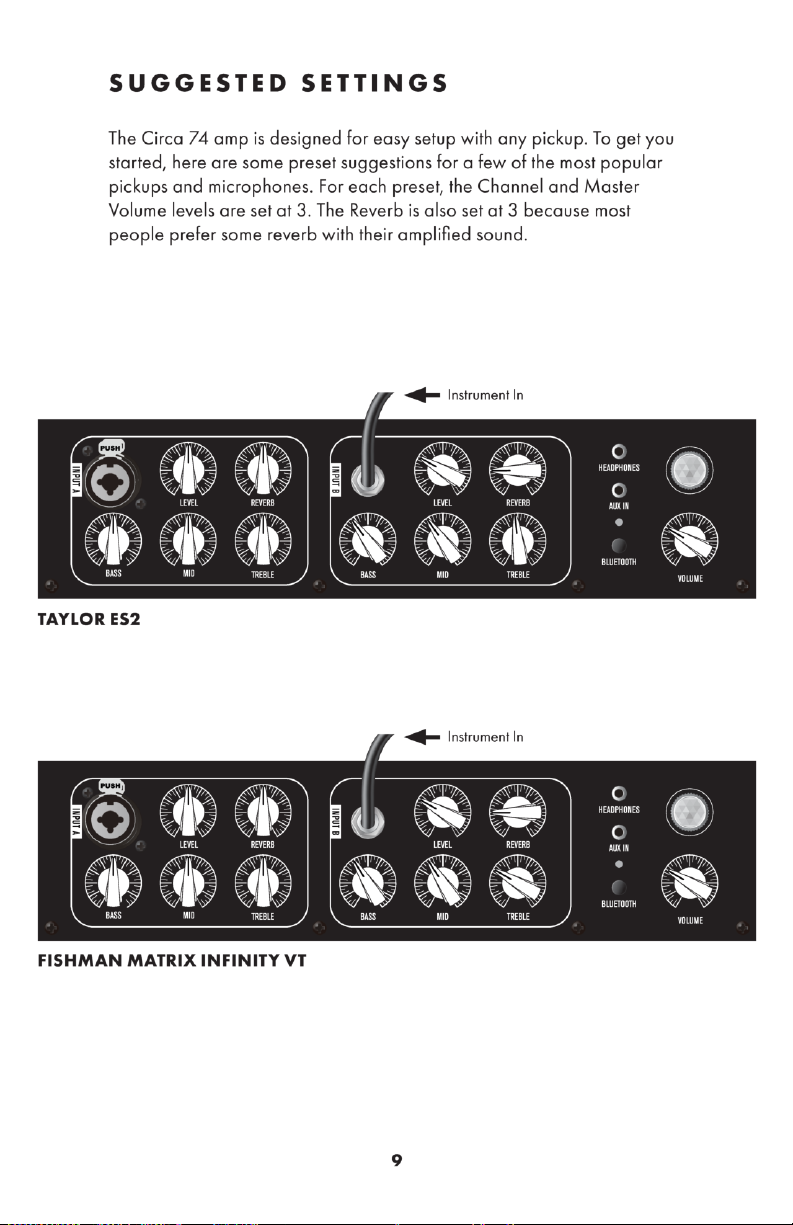
Page 10
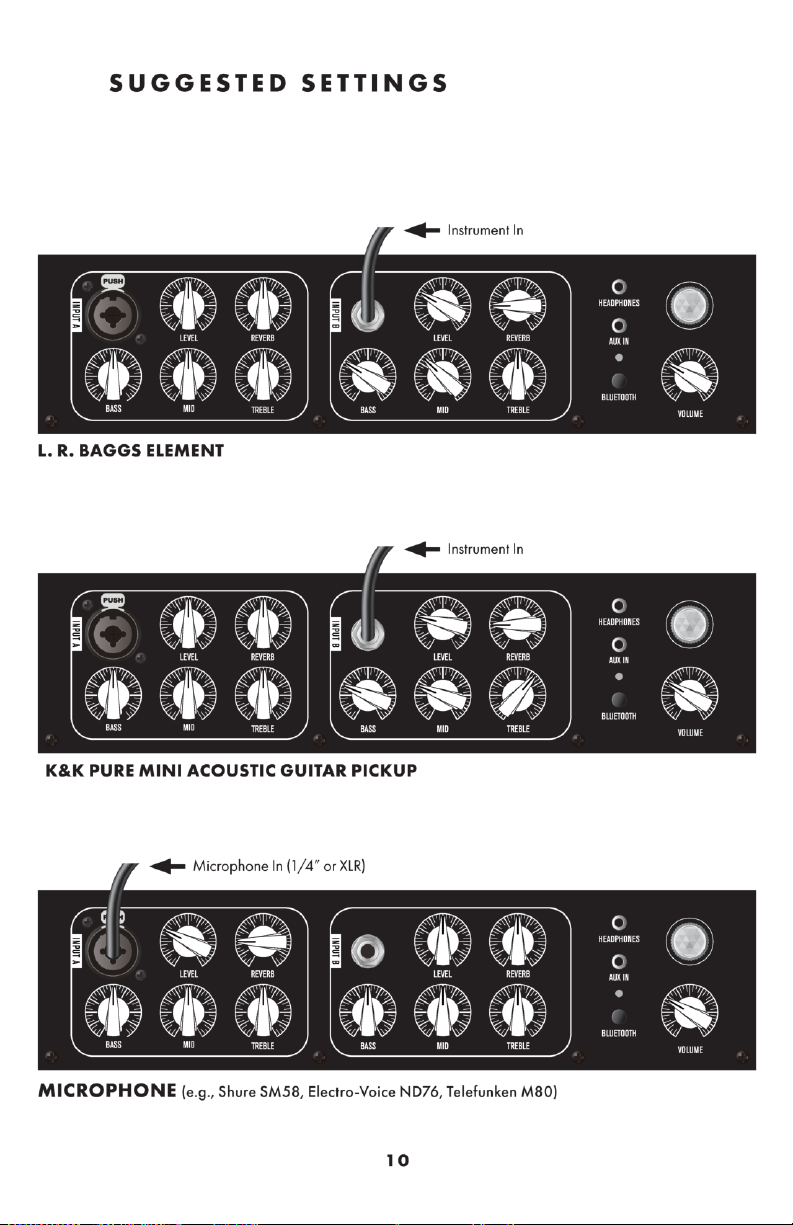
Page 11
STAND ASSEMBLY
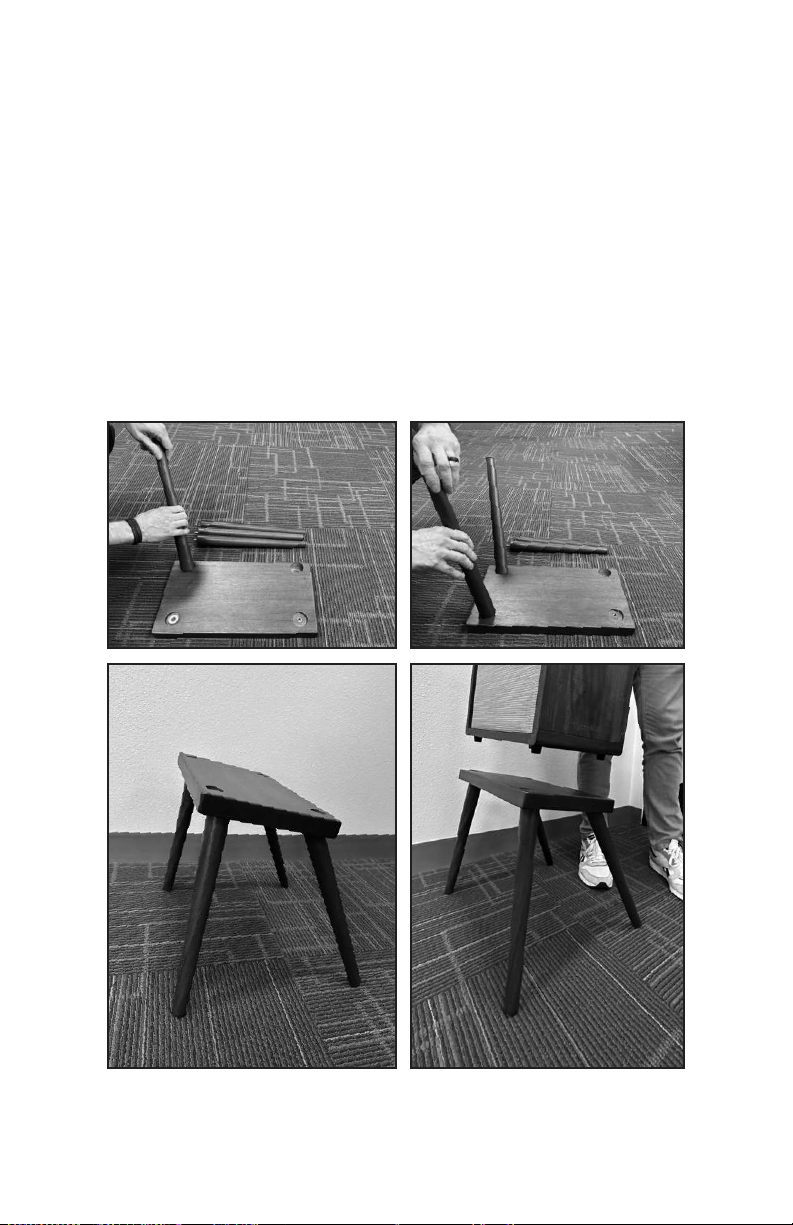
Your Circa 74 amp comes with its own custom stand. Simply screw each
of the four legs into one of the threaded holes in the bottom of the base.
All of the legs are identical, so it doesn’t matter which leg goes where.
After you’ve assembled the legs into the base, set the stand upright and
notice that the stand tilts up, which is the front. Gently place your amp on
the stand, setting the amp’s rubber feet into each of the shallow holes on
the top of the base. That’s it. You’re ready to play.
11
Page 12

TECHNICAL SPECIFICATIONS
AC POWER
100 - 240 V AC ~ 50 / 60 Hz
11 5 V AC 60 HZ All power measurements taken at 115 V AC 60 Hz
Max Current Draw 1.97 A max (at full output power)
Nominal Current Draw 230 mA
Fuse Recommended Type 250 V AC 2 A TL - Slow Blow Time Lag
(5 mm X 20 mm)
Power Consumption
(Idle)
Power Consumption
(Full Power)
230 V AC 50 HZ All power measurements taken at 230 VAC 50 Hz
Max Current Draw 1.1 A max (at full output power)
Nominal Current Draw 148 mA
Fuse Recommended Type 250 V AC 2 A TL - Slow Blow Time Lag
Power Consumption
(Idle)
Power Consumption
(Full Power)
12 W (No input signal, controls full
C.C.W. position)
152 W (100 Hz Sine wave 30 mV,
controls full C.W. position)
(5 mm X 20 mm)
15 W (no input signal, controls full
C.C.W. position)
143 W (100 Hz Sine wave 30mV,
controls full C.W. position)
12
Page 13

TECHNICAL SPECIFICATIONS
AUDIO POWER
RMS Power 125 W (8 Ω resistive load)
Input Sensitivity 30 mV (1000 Hz Sine wave controls full
C.W. position)
INPUT RESISTANCE
Input Resistance
Balanced
Input Resistance
Unbalanced
PHYSICAL
Nominal Weight 10 kg / 22 lbs. *Depends slightly
Depth 234 mm / 9.21 in.
Width 375 mm / 14.76 in.
Height 422 mm / 16.61 in.
3.6 kΩ @ 100 Hz (approximate)
110 kΩ @ 100 Hz (approximate)
on wood type and density
Specifications are subject to change without notice.
13
Page 14

FUSE REPLACEMENT
Turn off power.
1
Unplug the power cable.
2
Unscrew fuse holder with flathead screwdriver.
3
Replace blown fuse with new T2L250V fuse.
4
T : Denoting time lag; L : Denoting low breaking capacity
Reinstall fuse holder.
5
Keep a spare fuse ready for future use.
If fuse continues to blow, contact an amplifier repair professional
FCC STATE MENT
Changes or modifications not expressly approved by the party responsible
for compliance could void the user’s authority to operate the equipment.
NOTE: This equipment has been tested and found to comply with the limits
for a Class B digital device, pursuant to Part 15 of the FCC Rules. These
limits are designed to provide reasonable protection against harmful
interference in a residential installation. This equipment generates uses
and can radiate radio frequency energy and, if not installed and used in
accordance with the instructions, may cause harmful interference to radio
communications. However, there is no guarantee that interference will
not occur in a particular installation. If this equipment does cause harmful
interference to radio or television reception, which can be determined by
turning the equipment off and on, the user is encouraged to try to correct
the interference by one or more of the following measures:
• Reorient or relocate the receiving antenna.
• Increase the separation between the equipment and receiver.
• Connect the equipment into an outlet on a circuit different from that
to which the receiver is connected.
• Consult the dealer or an experienced radio/TV technician for help.
FCC RADIATION EXPOSURE STATEMENT
This equipment complies with FCC radiation exposure limits set forth for
an uncontrolled environment. This equipment should be installed and
operated with minimum distance 20cm between the radiator & your body.
14
Page 15

CALIFORNIA PROP 65 WARNING
WARNING: This product can expose you to chemicals including
Chromium (hexavalent compounds), which is known to the State of
California to cause cancer, birth defects, or other reproductive harm.
For more information, go to www.P65Warnings.ca.gov.
15
Page 16

1980 Gillespie Way, El Cajon, CA 92020 USA (800) 943-6782
 Loading...