

Page 1

802.11b CF WLAN Module
User's Guide
(Version 1.0)
1/9 Version 1.1
Page 2
ඔ碁ઝݾٝڶૻֆ
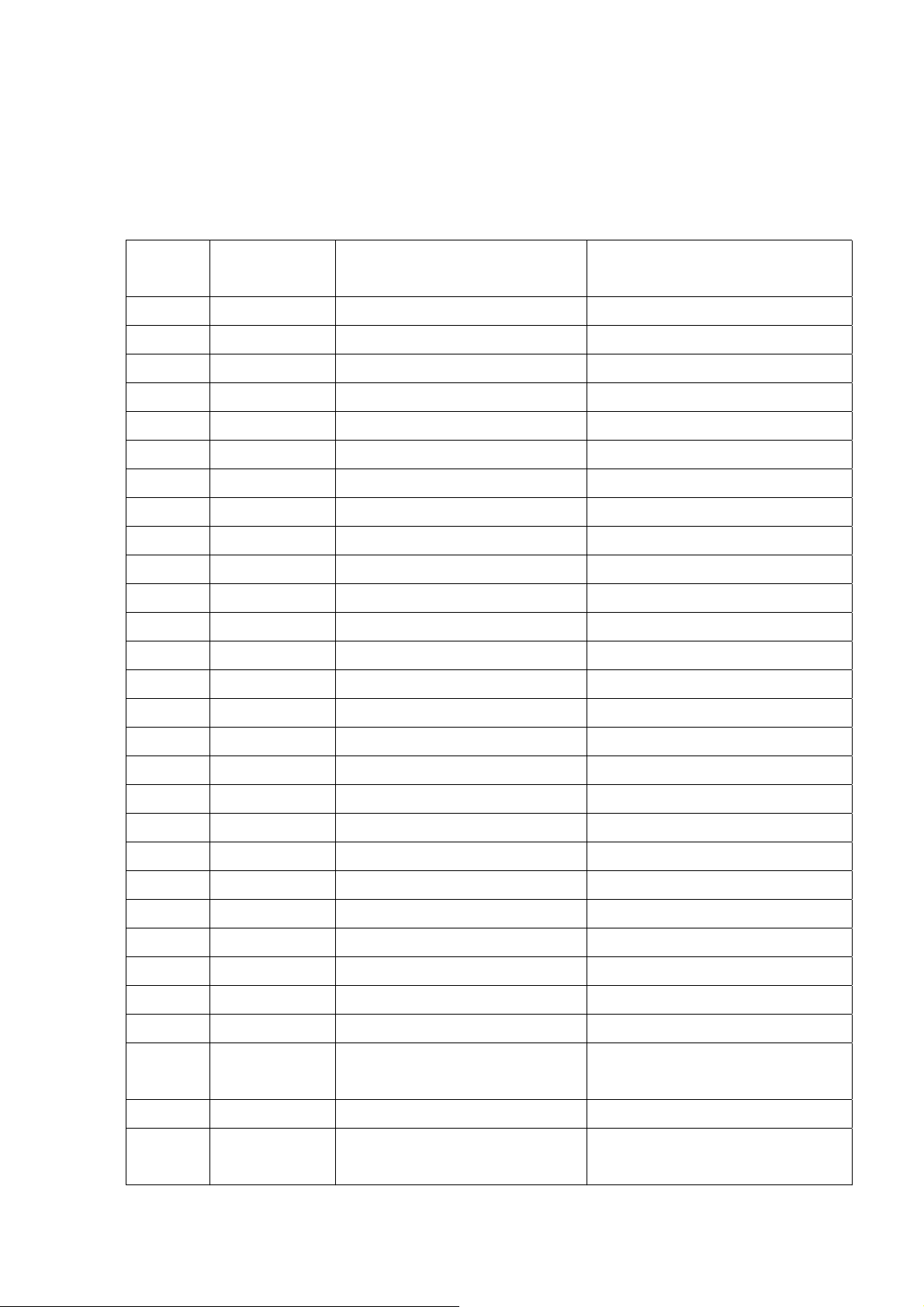
1.0 Pin Define:
No. 10-1 , Li-hsin Road I
Science-based Industrial Park ,
Hsinchu 300,Taiwan, R.O.C.
Tel: 886-3-6667799
Fax: 886-3-6667711
Web site: www.wneweb.com
Pin
Number
1
2
3
4
5
6
7
8
9
10
11
12
13
14
Pin Name Pin I/O Type Description
RF_VCC
RF_VCC
RF_VCC
RF_VCC
A00
D00
A01
D01
A02
D02
A03
D03
A04
D04
Power, 0.3A
Power, 0.3A
Power, 0.3A
Power, 0.3A
5V tol, BiDir, 2mA, 50K Pull Down Host PC Card Address Input, Bits 0
5V tol, BiDir, 2mA, 50K Pull Down Host PC Card Data Bus, Bits 0
5V tol, BiDir, 2mA, 50K Pull Down Host PC Card Address Input, Bits 1
5V tol, BiDir, 2mA, 50K Pull Down Host PC Card Data Bus, Bits 1
5V tol, BiDir, 2mA, 50K Pull Down Host PC Card Address Input, Bits 2
5V tol, BiDir, 2mA, 50K Pull Down Host PC Card Data Bus, Bits 2
5V tol, BiDir, 2mA, 50K Pull Down Host PC Card Address Input, Bits 3
5V tol, BiDir, 2mA, 50K Pull Down Host PC Card Data Bus, Bits 3
5V tol, BiDir, 2mA, 50K Pull Down Host PC Card Address Input, Bits 4
5V tol, BiDir, 2mA, 50K Pull Down Host PC Card Data Bus, Bits 4
DC Power Supply 3.3V 5%
DC Power Supply 3.3V 5%
DC Power Supply 3.3V 5%
DC Power Supply 3.3V 5%
15
16
17
18
19
20
21
22
23
24
25
26
27
28
29
A05
D05
A06
D06
A07
D07
A08
GND
A09
D08
GND
D09
OE#
D10
WE#
5V tol, BiDir, 2mA, 50K Pull Down Host PC Card Address Input, Bits 5
5V tol, BiDir, 2mA, 50K Pull Down Host PC Card Data Bus, Bits 5
5V tol, BiDir, 2mA, 50K Pull Down Host PC Card Address Input, Bits 6
5V tol, BiDir, 2mA, 50K Pull Down Host PC Card Data Bus, Bits 6
5V tol, BiDir, 2mA, 50K Pull Down Host PC Card Address Input, Bits 7
5V tol, BiDir, 2mA, 50K Pull Down Host PC Card Data Bus, Bits 7
5V tol, BiDir, 2mA, 50K Pull Down Host PC Card Address Input, Bits 8
Ground Digital Ground
5V tol, BiDir, 2mA, 50K Pull Down Host PC Card Address Input, Bits 9
5V tol, BiDir, 2mA, 50K Pull Down Host PC Card Data Bus, Bits 8
Ground Digital Ground
5V tol, BiDir, 2mA, 50K Pull Down Host PC Card Data Bus, Bits 9
Host PC Card Memory Attribute Space
5V tol, BiDir, 2mA, 50K Pull Up
Output Enable
5V tol, BiDir, 2mA, 50K Pull Down Host PC Card Data Bus, Bits 10
Host PC Card Memory Attribute Space
5V tol, COMS, Input, 50K Pull Up
Write Enable
2/9 Version 1.1
Page 3
ඔ碁ઝݾٝڶૻֆ
No. 10-1 , Li-hsin Road I
Science-based Industrial Park ,
Hsinchu 300,Taiwan, R.O.C.
Tel: 886-3-6667799
Fax: 886-3-6667711
Web site: www.wneweb.com
30
31
32
33
34
35
36
37
38
39
40
41
42
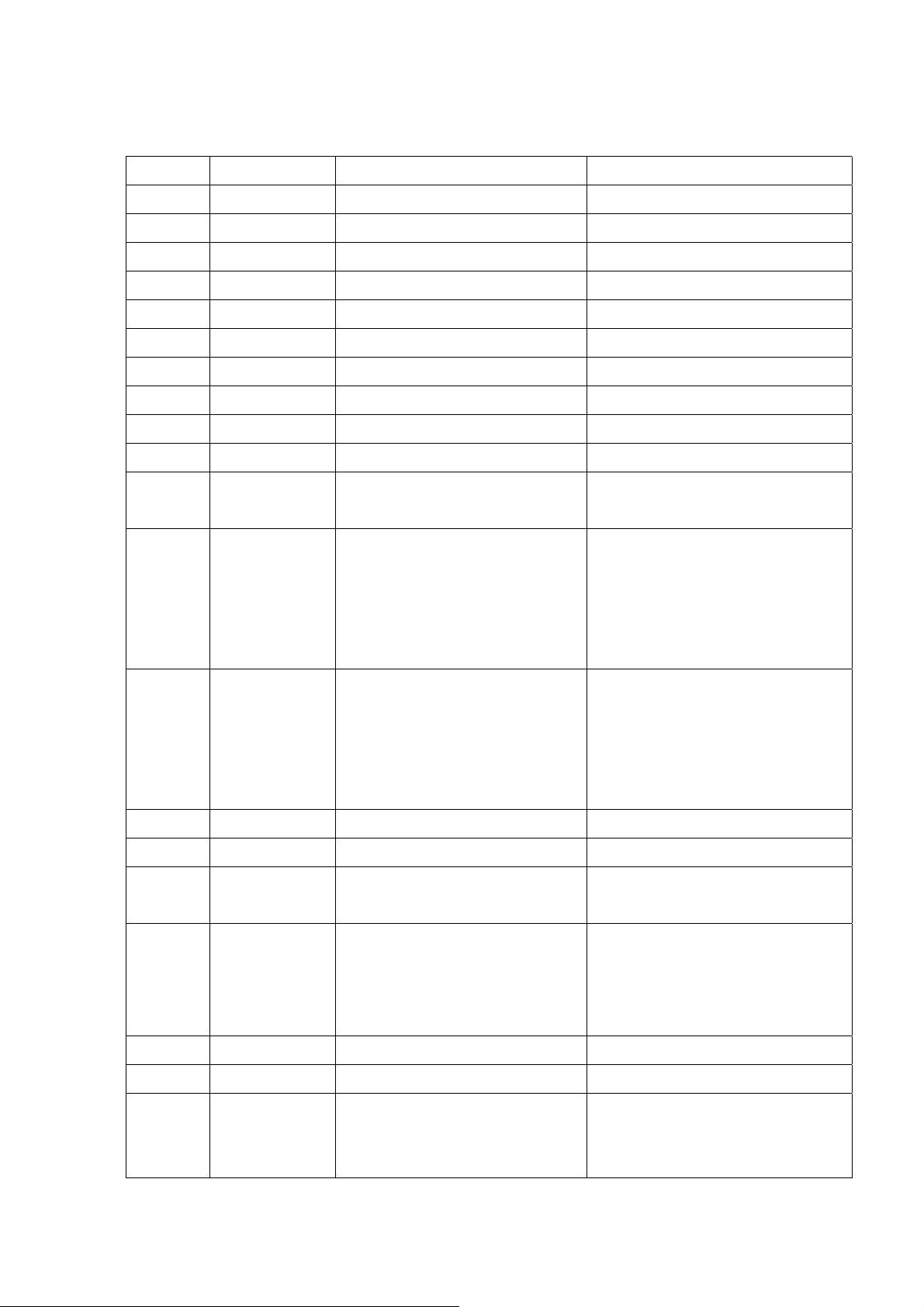
D11
IORD#
D12
IOWR#
D13
CE1#
D14
CE2#
D15
GND
GND
RESET
IREQ#
5V tol, BiDir, 2mA, 50K Pull Down Host PC Card Data Bus, Bits 11
5V tol, BiDir, 2mA, 50K Pull Up Host PC Card I/O Space Read Strobe
5V tol, BiDir, 2mA, 50K Pull Down Host PC Card Data Bus, Bits 12
5V tol, BiDir, 2mA, 50K Pull Up Host PC Card Space I/O Write Strobe
5V tol, BiDir, 2mA, 50K Pull Down Host PC Card Data Bus, Bits 13
5V tol, BiDir, 2mA, 50K Pull Up Host PC Card Select, Low Byte
5V tol, BiDir, 2mA, 50K Pull Down Host PC Card Data Bus, Bits 14
5V tol, BiDir, 2mA, 50K Pull Up Host PC Card Select, High Byte
5V tol, BiDir, 2mA, 50K Pull Down Host PC Card Data Bus, Bits 15
Ground Digital Ground
Ground Digital Ground
5V tol, COMS, ST (Schmitt Trigger)
Hardware Reset,
Input, 50K Pull Up
Host PC Card interrupt Request (I/O
Mode), also used as WLAN module
5V tol, BiDir, 2mA, 50K Pull Up
Ready (Memory Mode) output which is
43
44
45
46
47
48
REG#
WA I T#
RF_LED#
IOIS16#
STSCHG#
CD1#
asserted to indicate module initialization
is complete
Host PC Card Attribute Space Select
Memory mode: H for common memory,
5V tol, BiDir, 2mA, 50K Pull Up
L for attribute memory.
The signal must be low during I/O cycles
when the I/O address is on the bus.
COMS Output, 4mA, 50K Pull Up Host Wait,
Input, 9mA LED cathode
8 Bits or 16 Bits I/O Card selected
Pull Low, Output
L: 16 bit or odd byte only operation
Host PC Card Status Change
To show the BVD1 (Battery Voltage
COMS Output, 4mA 50K Pull Up
Detect), BVD2, WP (Write Protect), or
Ready status changed.
Pull Low, Output Card Detect
49
GND
Ground Digital Ground
Host PC Card I/O Decode Confirmation
50
INPACK#
CMOS BiDir, 2mA, 50K Pull Up
It is asserted by the module when it is
selected and responding to an I/O read
3/9 Version 1.1
Page 4

ඔ碁ઝݾٝڶૻֆ
No. 10-1 , Li-hsin Road I
Science-based Industrial Park ,
Hsinchu 300,Taiwan, R.O.C.
Tel: 886-3-6667799
Fax: 886-3-6667711
Web site: www.wneweb.com
cycle.
It is used to control the HBA (Host Bus
Adaptor) tri-state buffer on/off)
4/9 Version 1.1
Page 5

ඔ碁ઝݾٝڶૻֆ
2.0 Pin Define Circuit Diagram:
No. 10-1 , Li-hsin Road I
Science-based Industrial Park ,
Hsinchu 300,Taiwan, R.O.C.
Tel: 886-3-6667799
Fax: 886-3-6667711
Web site: www.wneweb.com
2.1 LED connection suggestion:
5/9 Version 1.1
Page 6
ඔ碁ઝݾٝڶૻֆ
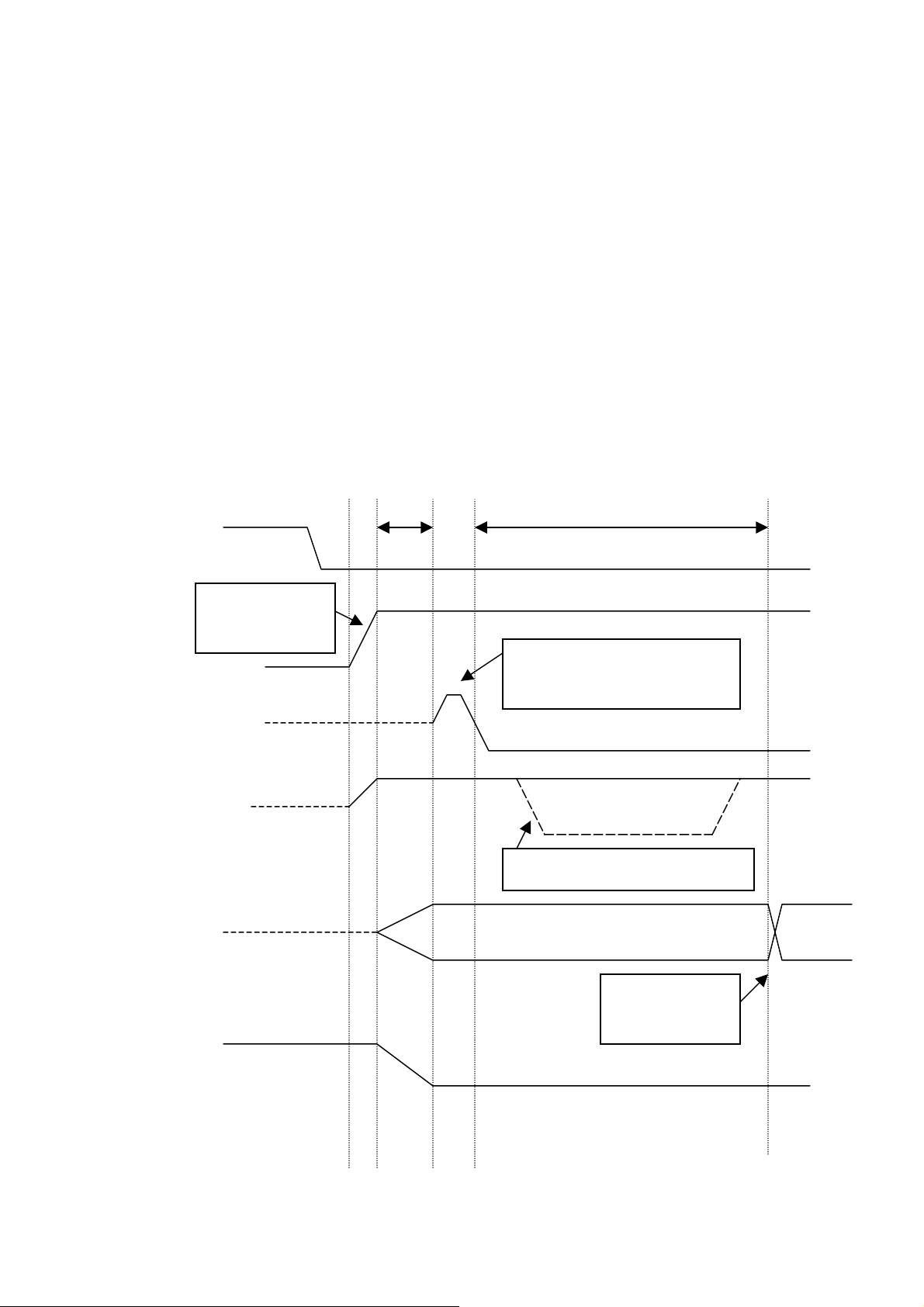
3.0 Timing Specification:
3.1 Power On Reset Configuration:
Power on reset was issued from Host to the ISL3871IK18 MAC/BB through the
RESET pin or via the soft reset bit. The Host system applies RESET at least [1ms
after VCC has reached 90% of its end value] and the hold time is at least 1ms. (see
PC-Card standard, Vol.2, CH.4.12.1). Please see ISL3871IK18 MAC/BB datasheet
page 20 for the detail.
3.2 WLAN module initial procedure:
No. 10-1 , Li-hsin Road I
Science-based Industrial Park ,
Hsinchu 300,Taiwan, R.O.C.
Tel: 886-3-6667799
Fax: 886-3-6667711
Web site: www.wneweb.com
48 CD1#
Rising time between
0.1ms to 300ms
1,2,3,4, RF_VCC
41 RESET
42 IREQ#
Interface
signal
>1ms >20ms
RESET at least 1ms after VCC
has reached 90% of its value
If WLAN is not ready in 20ms
WLAN module is
System
ready
Buffer_EN#
6/9 Version 1.1
Page 7

ඔ碁ઝݾٝڶૻֆ
No. 10-1 , Li-hsin Road I
Science-based Industrial Park ,
Hsinchu 300,Taiwan, R.O.C.
Tel: 886-3-6667799
Fax: 886-3-6667711
Web site: www.wneweb.com
3.3 Suggestion:
All interface of Host to MAC/BB (control pin, address bus, data bus…) need to add
tri-state buffers in system side. To avoid the latch-up appearance this method should be
implemented.
For Example:
PDA
Host
System
WLAN
POWER
SWITCH
Control
Signals
Buffer_EN#
Address
Bus
Buffer_EN#
Regulator
Buffer IC
Buffer IC
RF_VCC
Control
WLAN
Signals
CF
module
Address
Bus
Data
Bus
Data
Bus
Buffer IC
Buffer_EN#
Signal Pin Number Total Pins
RF_VCC 1,2,3,4 4
Control
27,29,31,33,35,37,41,42,43,44,45,46,47,48,50 15
signals
Address
5,7,9,11,13,15,17,19,21,23 10
Bus
Data Bus 6,8,10,12,14,16,18,20,24,26,28,30,32,34,36,38 16
7/9 Version 1.1
Page 8

No. 10-1 , Li-hsin Road I
Country Code selection feature to be disabled for products marketed to the US/CANADA
Science-based Industrial Park ,
Hsinchu 300,Taiwan, R.O.C.
Tel: 886-3-6667799
Fax: 886-3-6667711
ඔ碁ઝݾٝڶૻֆ
Web site: www.wneweb.com
4.0 Brief specification:
z Frequency band: 2400 ~ 2483.5 MHz (for US, Canada, and ETSI)
2471 ~ 2497 MHz (for Japan)
z Channel Spacing 5MHz
z Modulation: DSSS with DBPSK, DQPSK, and CCK
z Host interface: (Proprietary) CF V1.4
z Channels Support: US/Canada: 11 (1~11)
ETSI: 13 (1~13)
France: 4 (10~13)
Japan: 14 (1~14)
z Supply Voltage: 3.3±5% DC
z Current Consumption: Tx: 280mA (typical)~310mA (max)
Rx: 260mA (typical)~290mA (max)
Idle: 230 (typical)~270mA (max)
Power saving: 25mA (typical)~40mA (max)
z Radio Power: +14.59dBm
z Sensitivity: -82±1dBm @ 11Mbps
4.1 Mechanical Diagram: see attachment (for reference)
8/9 Version 1.1
Page 9

L
A
B
E
L
BASEBAND
AREA
Page 10

Federal Communication Commission Interference Statement
This equipment has been tested and found to comply with the limits for a Class B digital device, pursuant
to Part 15 of the FCC Rules. These limits are designed to provide reasonable protection against harmful
interference in a residential installation. This equipment generates, uses and can radiate radio frequency
energy and, if not installed and used in accordance with the instructions, may cause harmful interference
to radio communications. However, there is no guarantee that interference will not occur in a particular
installation. If this equipment does cause harmful interference to radio or television reception, which can
be determined by turning the equipment off and on, the user is encouraged to try to correct the interference
by one of the following measures:
- Reorient or relocate the receiving antenna.
- Increase the separation between the equipment and receiver.
- Connect the equipment into an outlet on a circuit different from that to which the receiver is
connected.
- Consult the dealer or an experienced radio/TV technician for help.
FCC Caution: Any changes or modifications not expressly approved by the party responsible for
compliance could void the user's authority to operate this equipment.
This device complies with Part 15 of the FCC Rules. Operation is subject to the following two conditions: (1)
This device may not cause harmful interference, and (2) this device must ac cept any interference received,
including interference that may cause undesired operation.
IMPORTANT NOTE: FCC Radiation Exposure Statement:
This equipment complies with FCC radiation exposure limits set forth for an uncontrolled environment.
In order to avoid the possibility of exceeding the FCC radio frequency exposure limits, human proximity
to the antenna shall not be less than 20cm (8 inches) during normal
This device can not be worn on the body and at least keep it 20 cm away from body parts other than
hand, wrists, feet and ankles.
The antenna used for this transmitter must not be colocated or operating in conjunction with any other
transmitter/antenna except
The OEM integrator will be responsible for re-evaluating the end product (including the transmitter) and
obtaining a separate FCC authorization.
The final end product must be labeled in a visible area with the following:
“Contains TX FCC ID: Q3N-8300W”.
This device complies with Part 15 of the FCC Rules. Operation is subject to the following two conditions: (1)
This device may not cause harmful interference, and (2) this device must accept any interference received,
CIPHERLAB 8300 series terminal.
operation.
including interference that may cause undesired operation.
The OEM integrator is still responsible for testing their end-product for any additional compliance requirements
required with this module installed (for example, digital device emissions, PC peripheral requirements, etc.).
Limited Module Approval Statement:
This device is intended only for OEM Integrators.The module should be equipped within CIPHERLAB 8XXX
series terminal.
 Loading...