

Page 1
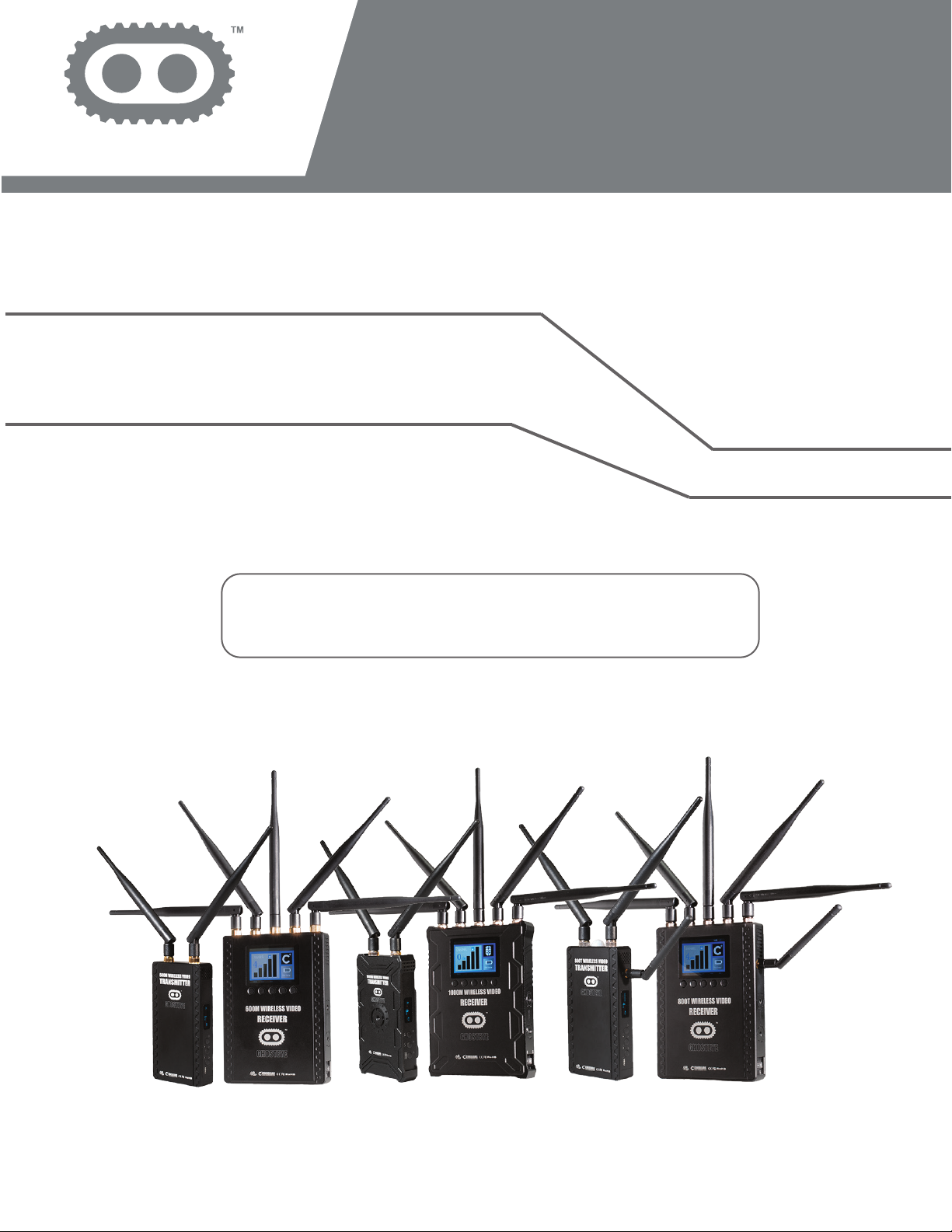
GHOST EYE WIRELESS HDMI/SDI
VIDEO TRANSMISSION SYSTEM
GHOST EYE
600M/1000M/800T
MANUAL BOOK
© 2016 Cine Gears INC. All Rights Reserved.
Page 2

Trademarks
Ghost-Eye Wireless Video Transmission SystemsTM are trademarks of Cine Gears
Inc. Web Interface.
Statement of Conditions
In the interest of improving internal design, operational function, and/or reliability, Cine
Gears Inc. reserves the right to make changes to the products described in this document without notice.
Cine Gears Inc. does not assume any liability that may occur due to the use or application of the product(s) or circuit layout(s) described herein.
FCC Compliance Notice: Radio Frequency Notice
The device has met the FCC 15.247 requirement. In order to comply with the FCC RF
exposure requirement, the user must keep 20cm away from the antenna.
This device has been tested and found to comply with the limits for a Class B digital
device, pursuant to part 15 of the FCC Rules. These limits are designed to provide
reasonable protection against harmful interference in a residential installation. This
device generates, uses, and can radiate radio frequency energy and, if not installed
and used in accordance with the instructions, may cause harmful interference to radio
communications. However, there is no guarantee that interference will not occur in a
particular installation. If this device does cause harmful interference to radio or television reception, which can be determined by turning the equipment off and on, the user
is encouraged to try to correct the interference by one or more of the following measures:
• Reorient or relocate the receiving antenna.
• Increase the separation between the equipment and receiver.
• Connect the equipment into an outlet on a circuit different from that to which the
receiver is connected.
• Consult the dealer or an experienced radio/TV technician for help.
© 2016 Cine Gears INC. All Rights Reserved.
Page 3

Information to the user
The user’s manual or instruction manual for an intentional or unintentional radiator
shall caution the user that changes or modifications not expressly approved by the
party responsible for compliance could void the user’s authority to operate the equipment. In cases where the manual is provided only in a form other than paper, such as
on a computer disk or over the Internet, the information required by this section may
be included in the manual in that alternative form, provided the user can reasonably be
expected to have the capability to access information in that form.
© 2016 Cine Gears INC. All Rights Reserved.
Page 4
Contents
Cautions
Ghost Eye Wireless Video Transmission Systems
Specifications
M-Series Transmitter
M-Series Receiver
T-Series Transmitter
T-Series Receiver
Product Features
User Manual
Setting Up the Unit
2
3
4
6
8
11
14
17
18
18
Fan Motor Controls
Channel Settings
Setting Up the Intercom (800T)
Troubleshooting
Disclaimers
About Cinegears
19
20
21
22
24
26
© 2016 Cine Gears INC. All Rights Reserved.
1
Page 5

Cautions
Warning
Please read this user introduction manual to become familiar with the features of the Ghost-Eye series
products before operation. Failure to operate the product correctly can result in damage to the product,
or interference with other devices. This is a sophisticated product which must be operated with caution and
common sense. Failure to operate this product properly might result in disturbing other film equipment on set.
This product is not intended for use bychildren without direct adult supervision. Do not use with incompatible
components, or alter this product in any way outside of the documents provided by Ghost-Eye. These safety
guidelines contain instructions for installation, operation, and maintenance. It is essential to read and follow
all of the instruction in the manual, and all the notices and warnings regarding Ghost-Eye series products
prior to assembly, setup, or use to prevent any damage or interference.
1. Do not use this product in extreme heat, cold, dusty, or humid environments.
2. Prevent friction against hard objects.
3. Prevent jarring, such as from falling from high places, or from improper packaging during transportation.
4. These products are not waterproof; prevent moisture from getting in, on, or around the unit(s).
5. Do not dismantle, assemble, or otherwise alter the product(s) arbitrarily.
Electrical Considerations
1. When this device is sharing a power supply or battery with other equipment, please make sure all signal
and power cables are well connected before turning on the Ghost-Eye unit power.
2. When this device is sharing a power supply or battery with other equipment, please make cables from the
Ghost-Eye unit.
3. When this device is sharing a power supply or battery with other equipment, please check the polarity of
the power connectors of all equipment to ensure the inside conductor is positive. If the polarity of the power
connector is unknown, please check the user manual to make sure the outer conductor of the SDI or HDMI
connector is connected to the negative of the power supply. Otherwise, the equipment will not be able to
share the same power supply withthe Ghost-Eye unit.
© 2016 Cine Gears INC. All Rights Reserved. 2
Page 6

Ghost Eye Wireless Video Transmission Systems
Here at Cine Gears Inc., we supply some of the best wireless HD video transmitters and receivers available.
During the development of Ghost-Eye units, we subjected our prototypes to rigorous testing on set with
professional film crews, and took customer feedback and suggestions into serious consideration. After careful
consideration, Ghost-Eye products have integrated all the in-demand wireless video transmission features
recommended by you, the user. The fruit of our efforts are catalogued below in the form of our unique
Ghost-Eye Wireless Video Transmission kits, across the affordable price range spectrum.
Ghost Eye wireless video transmission kits each fit a different set of wireless HD video transmission needs.
The most powerful video transmitters and receivers will satisfy even the most high end profesional film crew,
and our lightweight models fit a more versatile brand of film set. Ghost-Eye transmission kits transmit and
receive 10 bit, 4:4:4 video, support both HD and SD, and can broadcast with less than 1ms latency.
© 2016 Cine Gears INC. All Rights Reserved. 3
Page 7
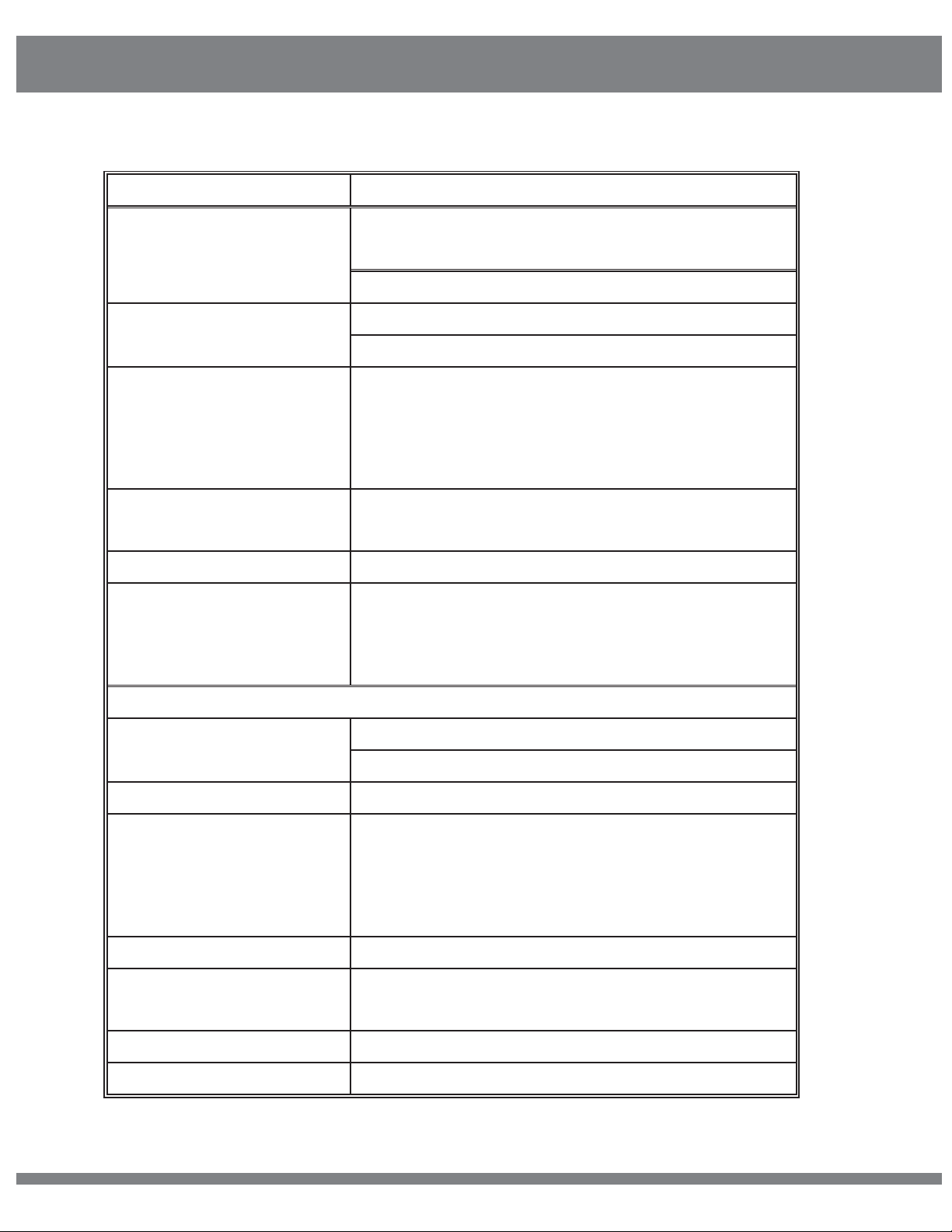
Specifications
OFDM/40MHz for video
ITEM SPECIFICATION
5.1-5.9(GHz)*Subject to different RF
Frequency range
regulations in different regions.
2.4-2.483GHz with ISM band
Modulation method and
Bandwidth
Video Formats
Supported
GFSK/1MHz for intercom system
1080p
1080i 50/59.94/60
30/50/60
720p 50/59.94/60
576p 576i 480p 480i
Audio Formats
PCM, DTS-HD, Dolby TrueHD
Supported
Time Code SMPTE-12M
Transmission Range
(Line of Sight)
600M: 600 meters (2000ft)
1000M: 1000 meters (3250ft)
800T: 800 meters (2500ft)
800TC: 800 meters (2500ft)
Transmitter
External Antenna 5G × 2pcs
Antenna
External Antenna 2.4G x1pcs
Transmission Power 18dBm
HDMI Input; SDI Input; SDI Loop Output; Mini
USB; LEMO Power IN; Antenna RPSMA
Functional Interface
Socket; Power ON/OFF,3.5mm HP/MIC socket
TALLY output for Wrist
(T series)
Mounting Structure 1/4” Hot-shoe connection
Channel Info; Video status; Battery capacity;
OLED Display
Status Menu, Audio Volume
Power Source 9-18V for DC input, F550/F970 battery
Power Consumption 7.5-8.5W
© 2016 Cine Gears INC. All Rights Reserved. 4
Page 8
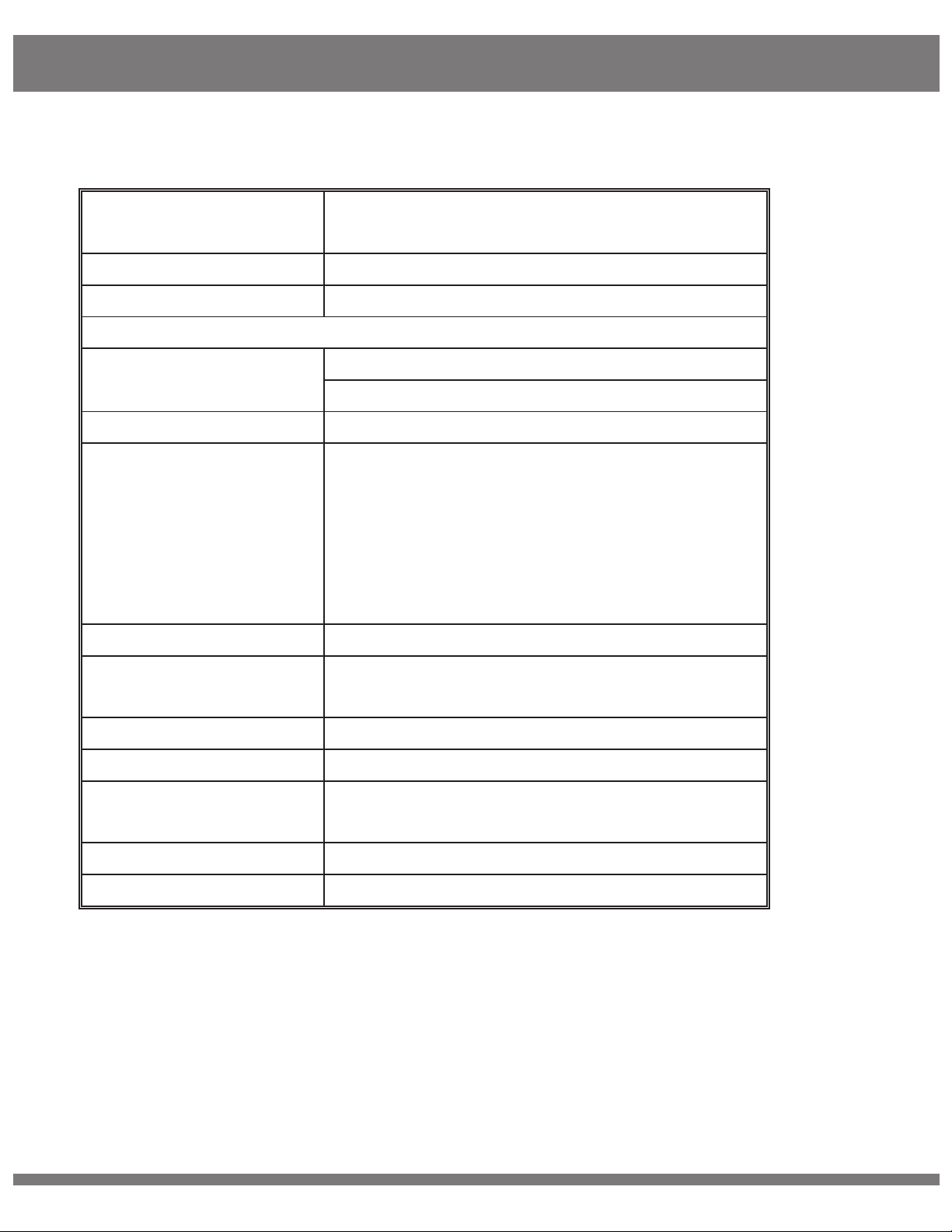
Specifications
Dimensions
142.5×76×24.3mm
External Antenna 5G × 5pcs
,
Power Consumption
7.5-8.5W
Dimensions
169.5×122×25.2mm
Net Weight(with
400g
antenna)
Temperature
-10-50 (Operating); -40-80 (Storage)
Receiver
Antenna
External Antenna 2G x1pcs
(T series)
Receiving Sensitivity -70dBm
SDI Dual Output; HDMI Output; Mini USB;
LEMO Power IN; Antenna RPSMA Socket;
Functional Interface
Power ON/OFF
800T and 800TC:
3.5mm HP/MIC socket;3.5mm
TALLY socket; LEMO 6 needle
Locating Structure 1/4” Hot-shoe connection
OLED Display
Channel Info; Signal Strength; Power Info;
TALLY indicator
(T series)
Power Source 9-18V for DC input; SONY V-mount battery
Net Weight(with
800g
antenna)
Temperature
*Since the product’s improving process, all the performance, design and specifications
of our products are subject to minor change without prior notice.
*Information followed by “(T series)” indicates specification applies to 800T and 800TC
only.
-10-50 (Operating); -40-80 (Storage)
© 2016 Cine Gears INC. All Rights Reserved. 5
Page 9
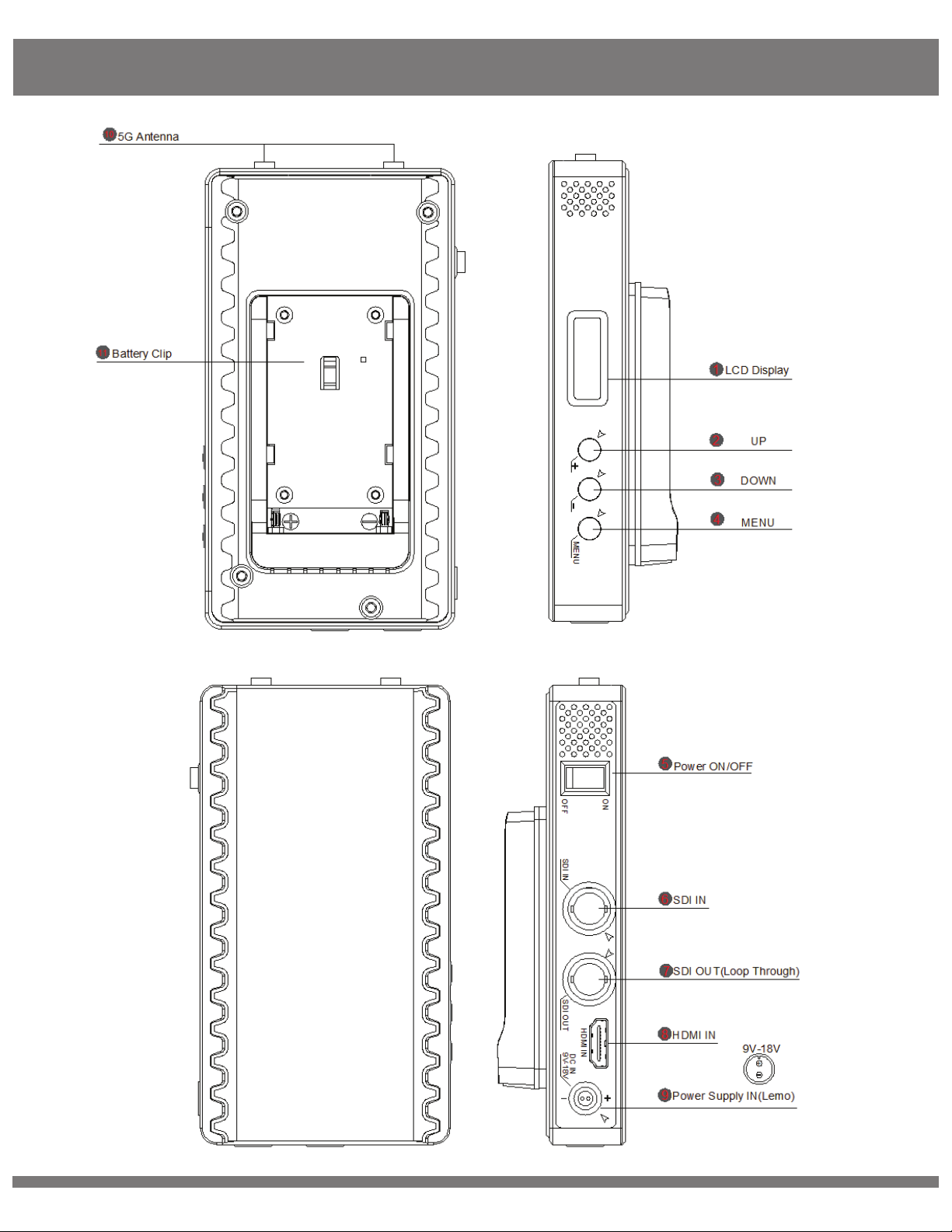
M-Series Transmitter
© 2016 Cine Gears INC. All Rights Reserved.
6
Page 10
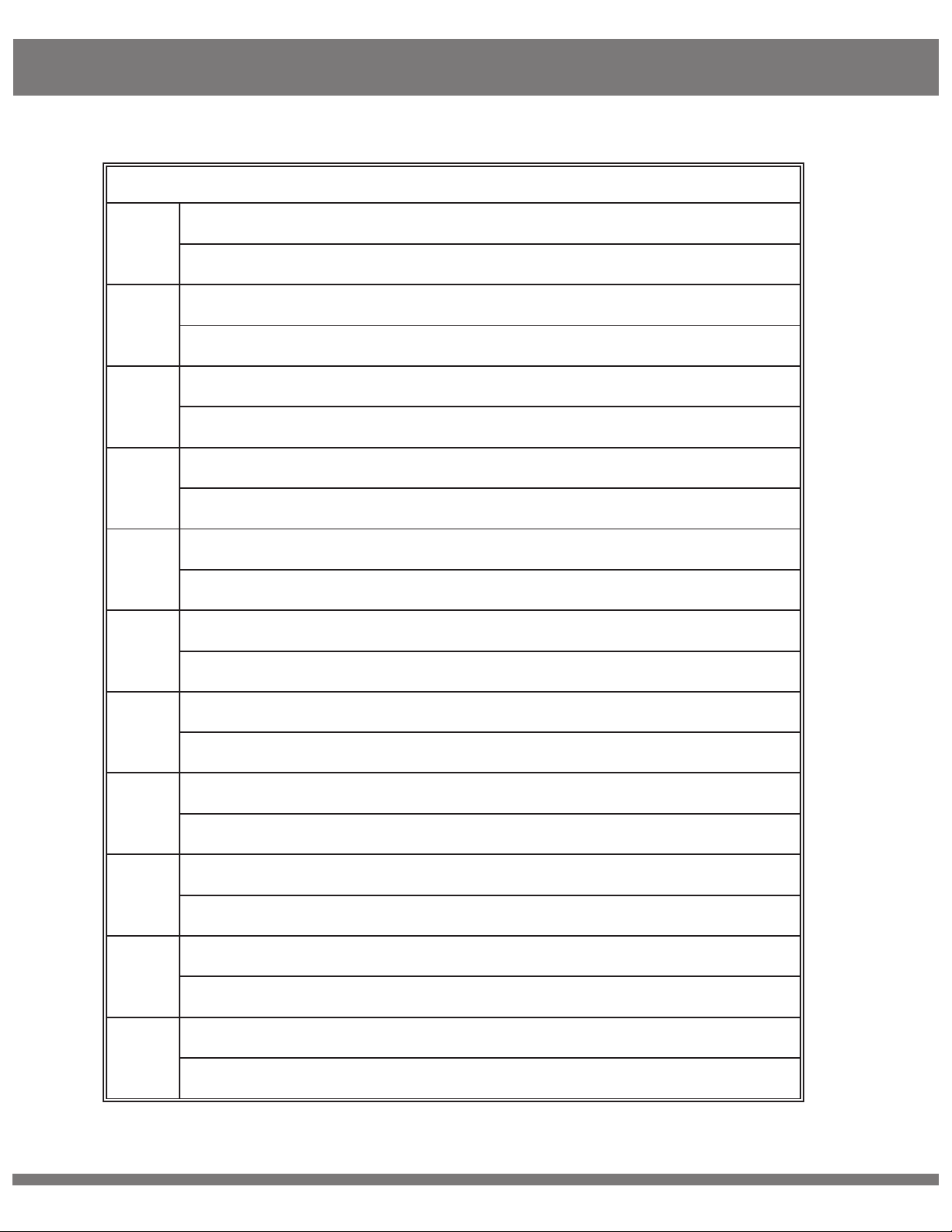
M-Series Transmitter
STRUCTURE
OLED Display
1
Displays information of channel, Video status and battery capacity.
UP Button
2
Channel +
DOWN Button
3
Channel -
MENU Button
4
Unlock the channel and Confirm the Selection
5
6
7
8
9
10
Power ON/OFF
Turn ON or OFF the transmitter
SDI IN
Connect to SDI Video Source
SDI OUT(Loop Through)
Connect to the your monitor or other
HDMI IN
Connect to HDMI Video source
DC IN(Lemo)
Support 9-18V
Antenna Connector x2
Fix antennas
Battery Clip
11
Battery compartment, for F550/F970 battery
© 2016 Cine Gears INC. All Rights Reserved.
7
Page 11

M-Series Receiver
© 2016 Cine Gears INC. All Rights Reserved.
8
Page 12
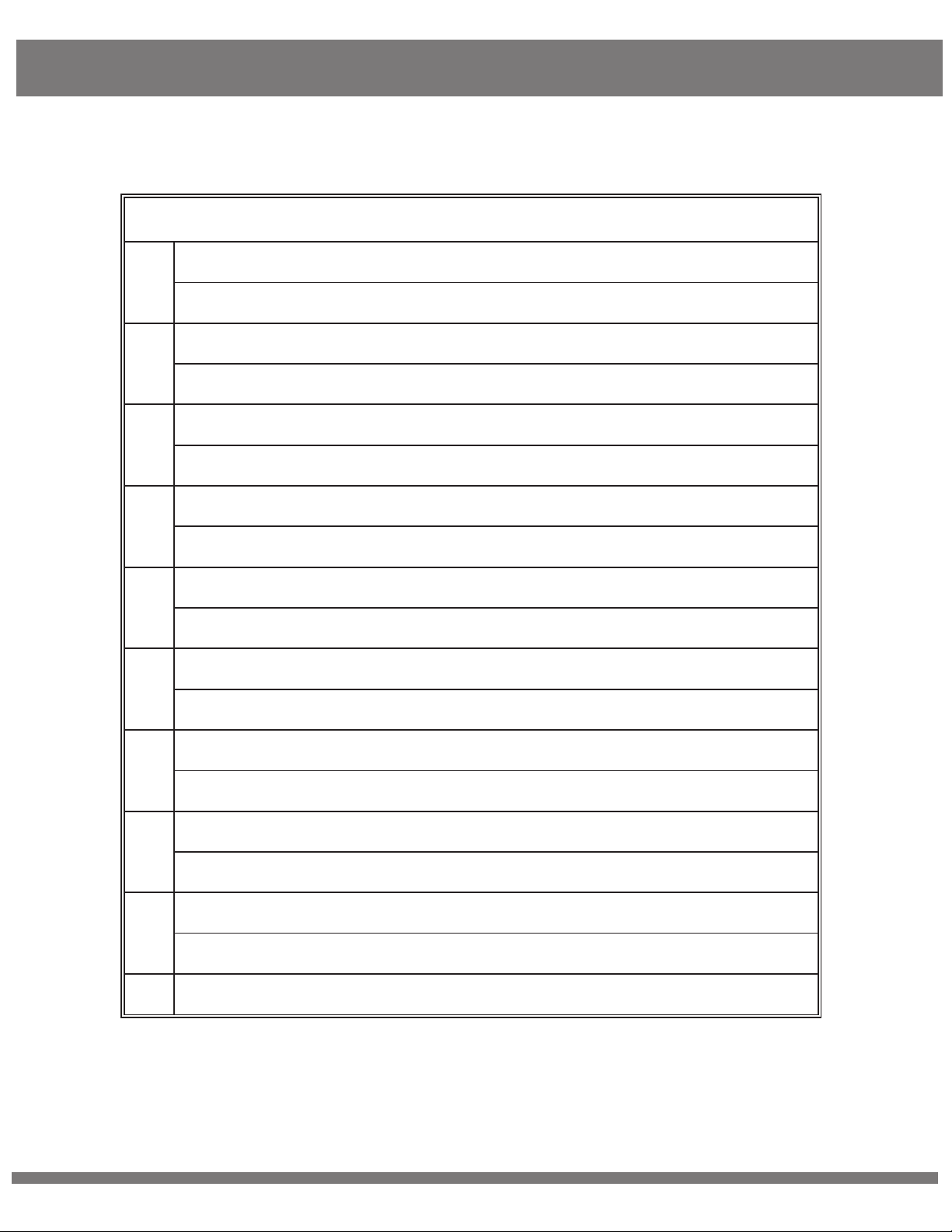
M-Series Receiver
STRUCTURE
1 Antenna Connector x5
RPSMA connectors for antennas
2 OLED Display
Displays information of channel, signal strength and battery capacity.
3 MENU Button
Unlock and Confirm the Selection
4 LEFT Button
Channel -
5 RIGHT/DOWN Button
Channel +
6 V+/UP Button
Volume +, not use on this version
7 V-/DOWN Button
Volume -, not use on this version
8 BAT-OUT
Provide DC power supply from the battery for external equipment
9 HDMI OUT
Connect to your HDMI monitor or other
10 SDI OUTx2
© 2016 Cine Gears INC. All Rights Reserved.
9
Page 13
M-Series Receiver
Connect to your SDI monitor or other
11 DC IN(Lemo) *Support 9-18V
Support 9-18V
12 Battery Clip
Support V-Mount battery
13 Power ON/OFF
Power on or OFF the receiver
© 2016 Cine Gears INC. All Rights Reserved. 10
Page 14
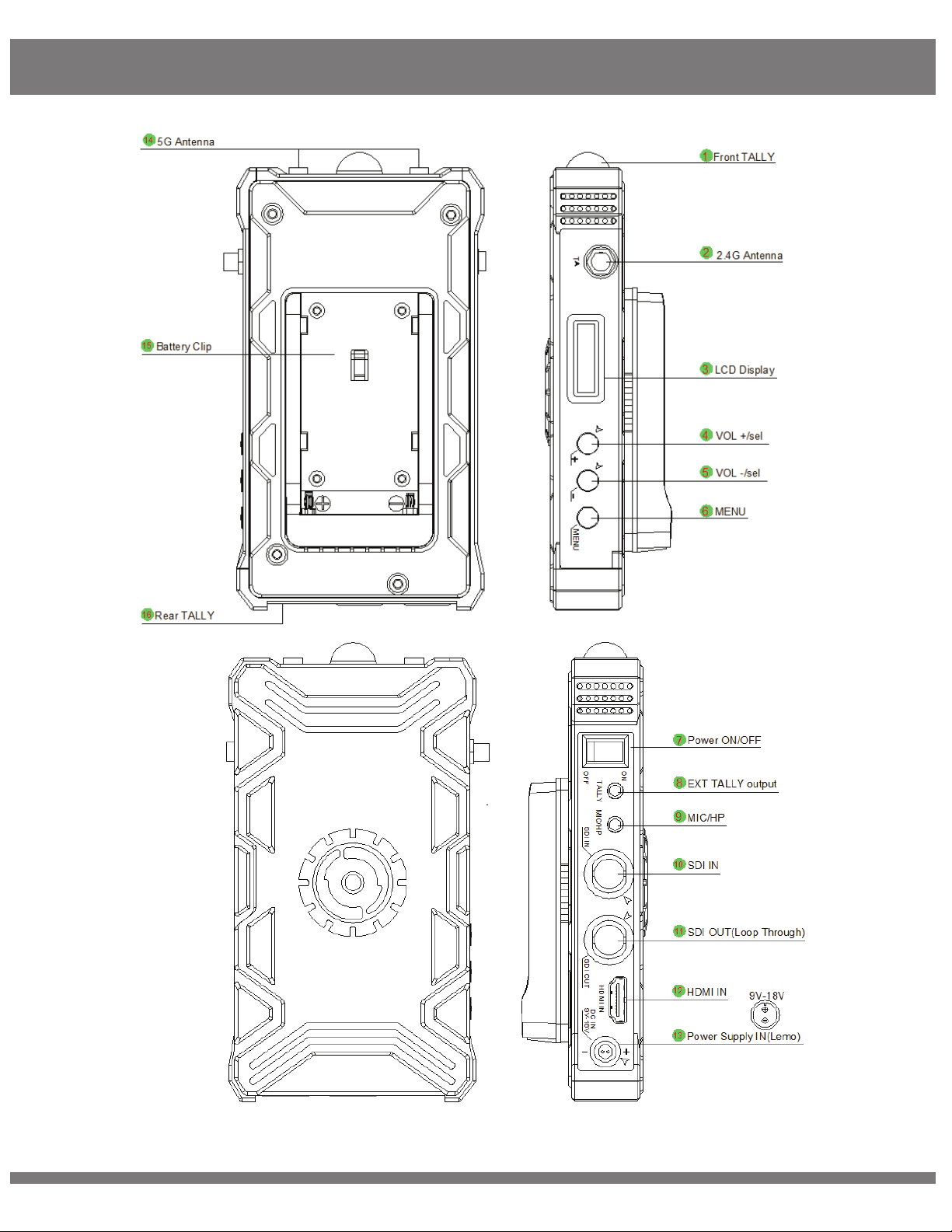
T-Series Transmitter
© 2016 Cine Gears INC. All Rights Reserved. 11
Page 15
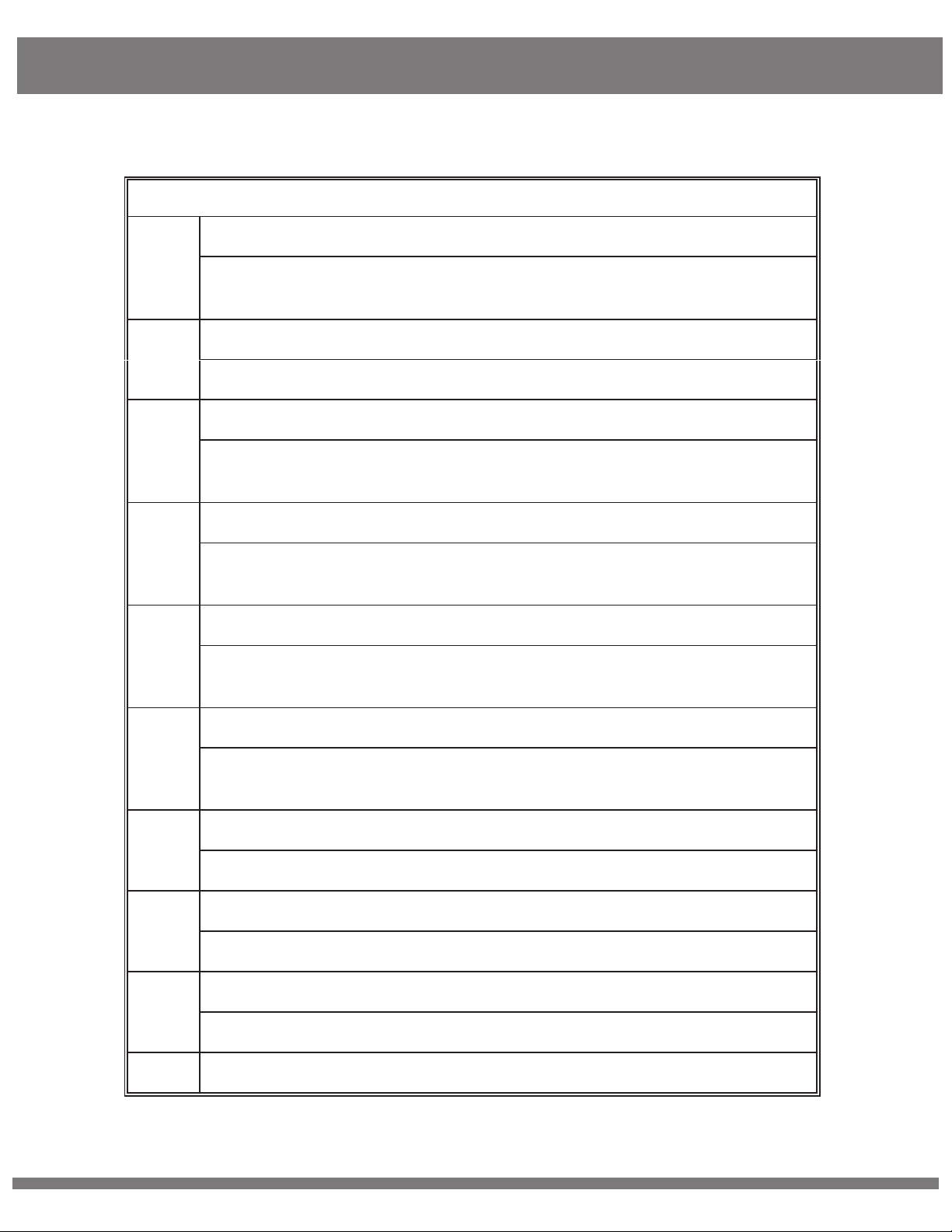
T-Series Transmitter
STRUCTURE
and external TALLY
Battery voltage indicator, MENU information
15mm Front TALLY indicator(Red/Yellow)
1
2
3
4
5
The indicator color will be same(RED/YELLOW) for Rear/ front
2G Antenna Connector
SMA connector for 2.4G antenna
OLED Display
Displays information of channel, Video status, signal strength;
VOL +/UP Button
Normally, it is a Volume +. It will be UP function when system is in
MENU mode
VOL -/DOWN Button
Normally, it is a Volume -. It will be DOWN function when system is
in MENU mode
6
7
8
9
10
MENU Button
MENU select, it is also be confirmed function when one MENU
was selected
Power ON/OFF
Power ON or OFF the Transmitter
3.5mm External TALLY Output Interface
Its maximum output current is 20mA, i.e, it can support LED
3.5mm MIC/HP Interface
Connect to an external CONVERTOR BOX
SDI IN
© 2016 Cine Gears INC. All Rights Reserved. 12
Page 16

T-Series Transmitter
and external TALLY
Connect to Video Source which supports 3G-SDI, HD-SDI,SD-SDI
SDI OUT(Loop Through)
11
Connect to other SDI equipment if need
HDMI IN
12
Connect to HDMI video source
DC power IN(Lemo)
13
Support 9-18V
5G Antenna Connectors
14
RPSMA connectors for 5G antennas
15
16
Battery Clip
Battery compartment, for F550/F970 battery
Rear TALLY(RED/YELLOW)
The indicator color will be same(RED/YELLOW) for Rear/ front
© 2016 Cine Gears INC. All Rights Reserved. 13
Page 17
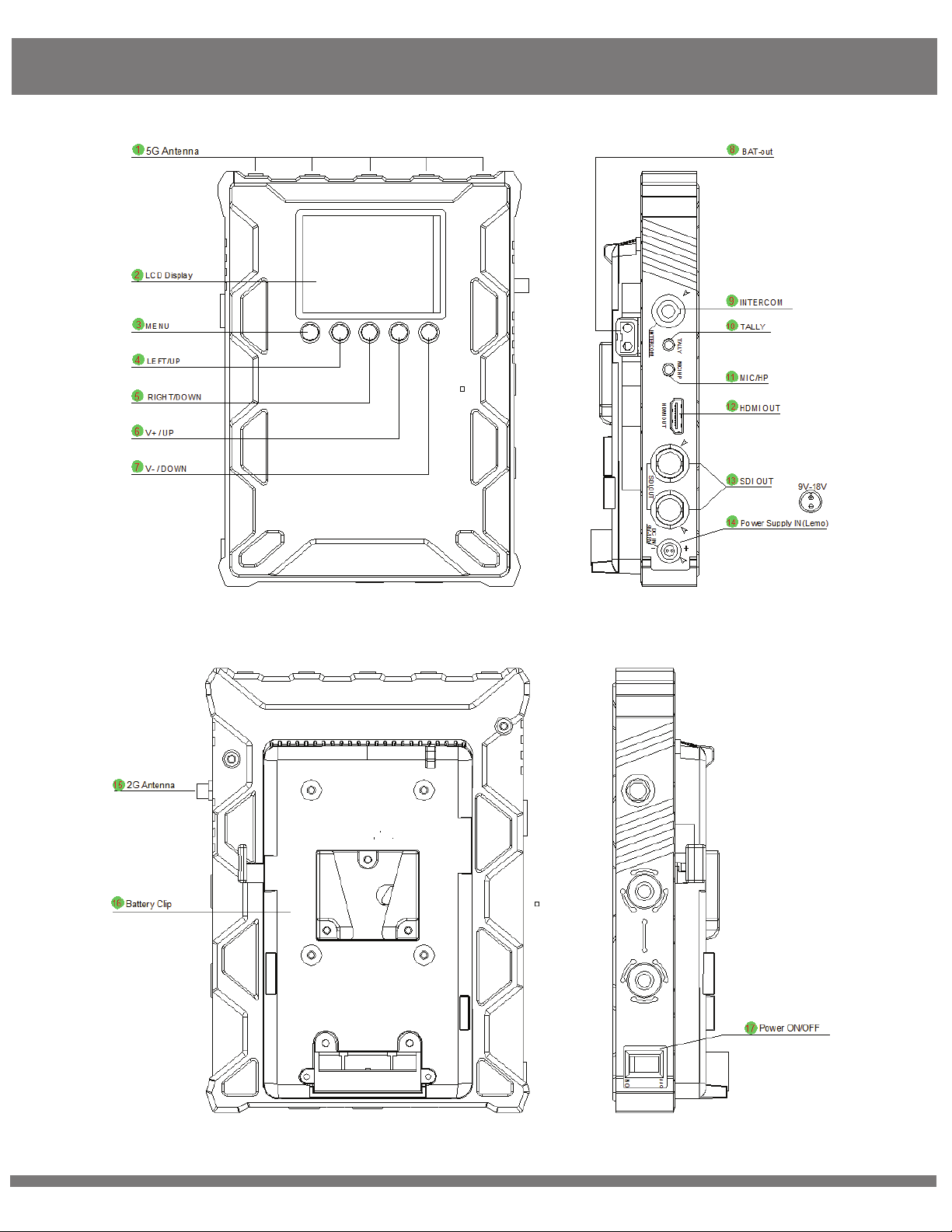
T-Series Receiver
© 2016 Cine Gears INC. All Rights Reserved.
14
Page 18
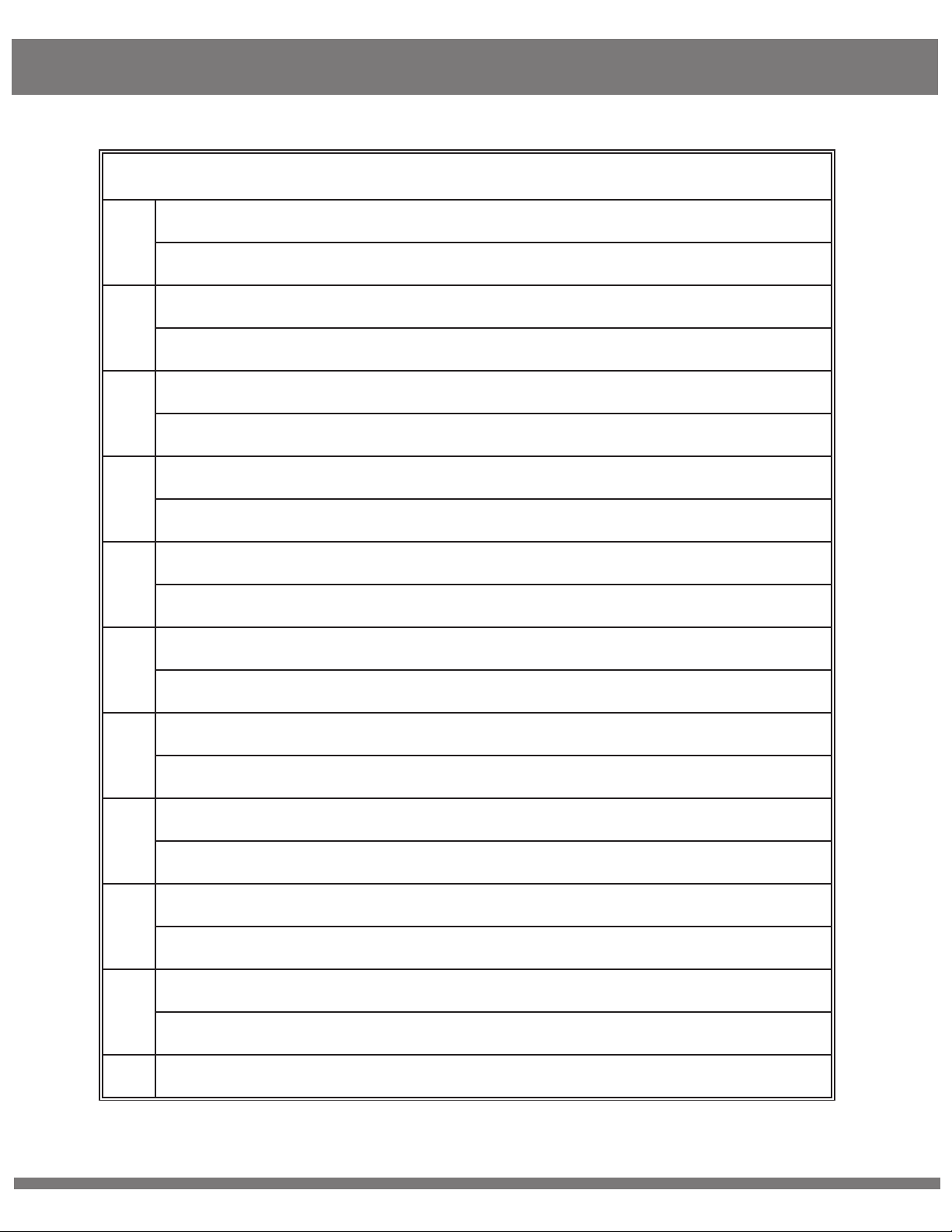
T-Series Receiver
STRUCTURE
5G Antenna Connectors
1
RPSMA connectors for antennas
OLED Display
2
Channel, signal strength, battery voltage, audio Volume and MENU.
MENU Button
3
Unlock and Confirm the Selection
LEFT/UP Button
4
Select Channels
5
6
7
8
9
10
RIGHT/DOWN Button
Select Channels
V+/UP Button
Volume +
V-/DOWN Button
Volume -
BAT-OUT
Provide DC power from the battery for external device
INTERCOM
6pin LEMO for Tally and Intercom system
3.5mm External TALLY Output Interface
Its maximum output current is 20mA, i.e, it just drive a LED
11
© 2016 Cine Gears INC. All Rights Reserved. 15
3.5mm MIC/HP Interface
Page 19
T-Series Receiver
Connect to an external headphone
HDMI OUT
12
Video output, connect to HDMI receiver or device
SDI OUT
13
14
15
16
17
Video output(the video output is same from the two SDI interface),
connect to SDI receiver or device
DC Power IN(Lemo)
Support 9-18V
2.4G Antenna Connector
SMA connector for 2.4G antenna
Battery Clip
V-Mount(default) battery plate
Power ON/OFF
Power ON or OFF the receiver
© 2016 Cine Gears INC. All Rights Reserved.
16
Page 20

Product Features
Uncompressed 3G/HD/SD-SDI and HDMI Transmission
Up to 1080p 50/60 uncompressed HDMI and SDI.
Less than 1 millisecond latency
There is no discernible video delay and can be used for real time on-location monitoring.
Multicast support
Support one transmitter to multiple receiver. Users can set the channel to pair the transmitter and
receivers.
License free operation frequency
The wireless frequency is 5.2-5.9GHz and 2.4G ISM band, license free operated.
Built-in fan
TX side built-in high efficiency ventilation fan that runs quietly.
AES 128 Encryption
Front and rear tally indicator (T-Series)
A 3.5mm jack tally output for external wrist (not included in the kit, maximum output currency of 20mA)
6-pin LEMO connector for intercom system (T-Series)
All-metal shell
Both the transmitter and the receiver are made of durable, solid metal.
Simple connection
The wirelesss system is plug-and-play designed, without any software confguration required.
© 2016 Cine Gears INC. All Rights Reserved. 17
Page 21

User Manual
1. Fix the three antennas to the transmitter and arrange them to be a right angle as below figure
to get better performance.
2. On transmitter side, when both SDI and HDMI source are inputted, the transmitter will
automatically select the SDI source for transmission
3. Fix the five antennas to receiver and arrange them to a right angle as figure to get better
performance.
4. Setting the receiver higher will enhance the transmission distance.
© 2016 Cine Gears INC. All Rights Reserved. 18
Page 22

User Manual
Transmitter
Fix the three antennas (5G x2, 2.4G x1) respectively.
Connect the SDI or HDMI video source to the “SDI IN”/”HDMI IN” of transmitter (when both SDI and
HDMI video are inputted, it will auto select the SDI video for transmission).
If needed, you can connect the SDI out (loop through) to other equipment as well.
Connect the DC power to the transmitter or use a F550/F970 battery on the battery plate.
Power on the transmitter.
Set the Channel (must set both transmitter and receiver to the same channel)
Receiver
Fix the six antennas (5Gx5, 2.4Gx1) respectively.
Connect the “SDI OUT”/”HDMI OUT” port of the receiver to the monitor or other device.
Connect DC power via power cable or use V-lock battery on the battery plate.
Power on the receiver.
Set the Channel (must set both transmitter and receiver to the same channel).
After 5-10s, the video transmission will be shown on the monitor.
Turning Fan On or Off
Hold the “+” and “-” buttons down on the transmitter.
Select “+” to toggle between fan motor speed and fan on/off controls.
Press “MENU” to select fan on/off controls.
Use “+” or “-” to turn fan on or off.
Press ”MENU” to confirm.
© 2016 Cine Gears INC. All Rights Reserved. 19
Page 23

User Manual
Channel Settings
Both Transmitter and Receiver are set to the same channel by default. If you want to change to a new
channel, please follow the instructions below.
Note: Both transmitter and receiver must be set to the same channel to work.
Changing Channel on Transmitter
Power on the Transmitter
Press the “MENU” button, then press “UP” or “DOWN” to choose “Channel Set”
on screen.
Press “UP” or “DOWN” to choose channel, then press “MENU” to confirm.
Transmitter channel setting accomplished.
Changing the Channel on Receiver
Power on the Receiver.
Press and hold “MENU” button until display unlock icon appears
Click “LEFT” or “RIGHT” buttons to choose channel, then click “MENU” to confirm.
Receiver channel setting accomplished.
© 2016 Cine Gears INC. All Rights Reserved.
20
Page 24

User Manual
Setting Up the Intercom (for 800T only)
After connecting the units, power on both Transmitter and Receiver.
On the Transmitter side, you will hear sound from the receiver end if “TALK” is not
pressed on converter box.
When the “TALK” button is pressed and held, both the receiver end and the transmitter end
can conversation normally.
The receiver end can hear “call sound” when the operators on the Transmitter side
press down the “CALL” button on CALL box.
When TALLY is triggered via a professional broadcast switcher, the OLED area on the receiver
glow red. At the same time, the “TALLY” LED will be lit on the Transmitter (You can also insert
your wrist indicator if desired).
Note: The external TALLY ( wrist LED) interface only supports LED lights at 3.3V@20mA.
Intercom System Pairing
Transmitter (TX) side: Press “MENU” button first, then press “UP” or “DOWN” buttons to choose
“Talk Pair” on screen and press “MENU” button again to confirm.
Receiver (RX) side: Press “VOL-” button first, then press “RIGHT” button to start intercom pairing.
Transmitter (TX) side will auto restart, Receiver(RX) side should be manually restarted.
When both sides are restarted, Intercom system pairing is complete.
© 2016 Cine Gears INC. All Rights Reserved. 21
Page 25
User Manual
Troubleshooting
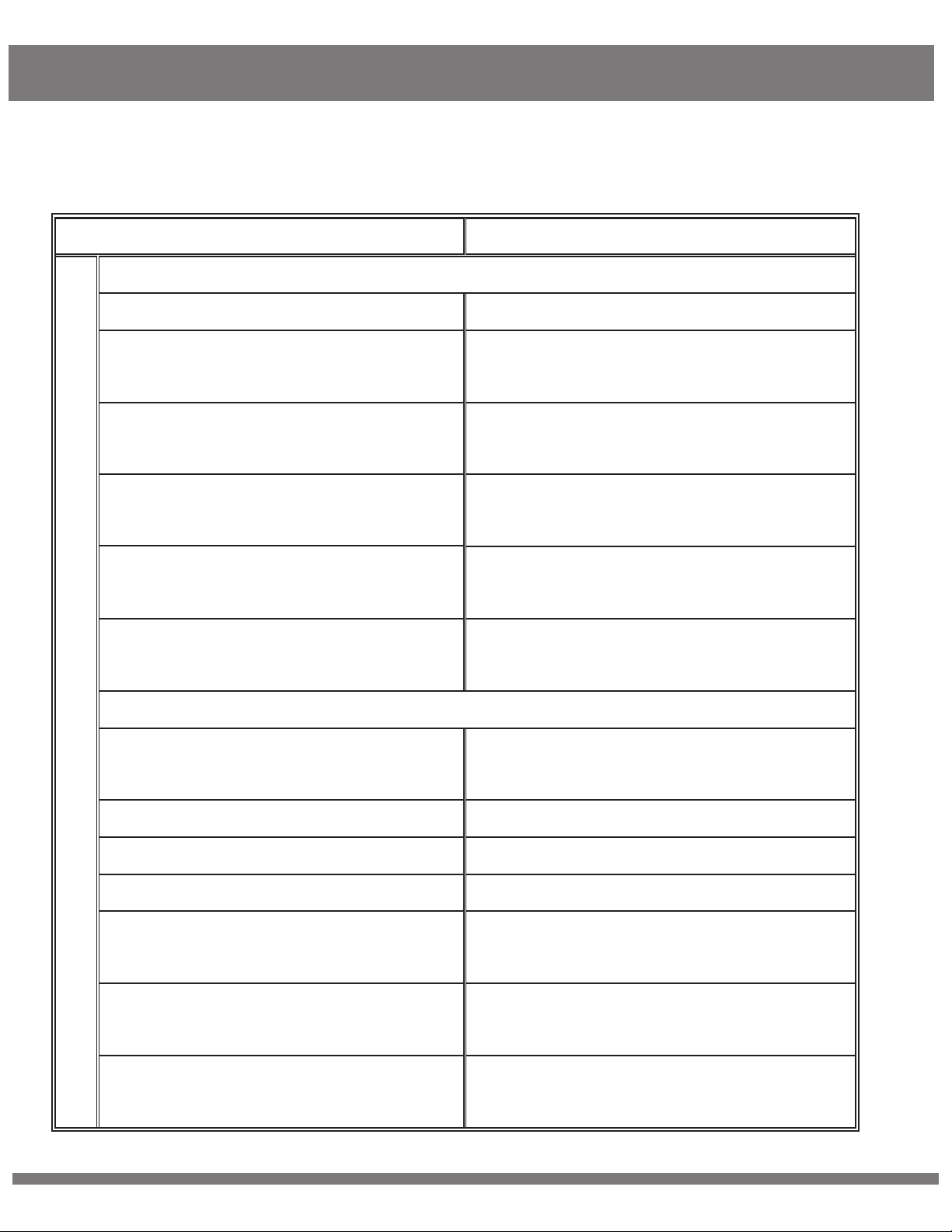
If the Receiver fails to output video correctly, follow the chart below to find possible causes and solutions.
ISSUE
SOLUTION
Displaying “Waiting for Connection...” for a Prolonged Period
Transmitter is not powered up. Turn on the transmitter.
Transmitter or receiver is not placed
correctly.
The transmitter and receiver are too
far away.
Several solid wall partition on TX and
RX.
There are too many obstacles between
TX and RX.
Other transmitter is working on the
same or adjacent channel
Place the TX or RX correctly.
Move the receiver closer to the
transmitter.
Reduce the number of obstructions
between the TX and RX.
Move the receiver closer to the
transmitter.
Turn off other transmitter, or
change channel.
No Video Signal Received
Transmitter and video source are not
connected.
OSD Information on TV
The video source is turned OFF
Bad connection of transmitter cable
Transmitter is working abnormally
Problem with the cable between TX
and video source
Player does not support the output
resolution format
The TV/Monitor does not support
HDCP authentication
Connect the transmitter to video source
by SDI/HDMI cable.
Turn on the video source.
Disconnect and re-connect the transmitter.
Restart the transmitter.
Change the SDI/HDMI cable.
Switch the output video resolution to
other modes.
Replace TV/Monitor with HDCP-Certified
TV/Monitor.
© 2016 Cine Gears INC. All Rights Reserved. 22
Page 26
User Manual
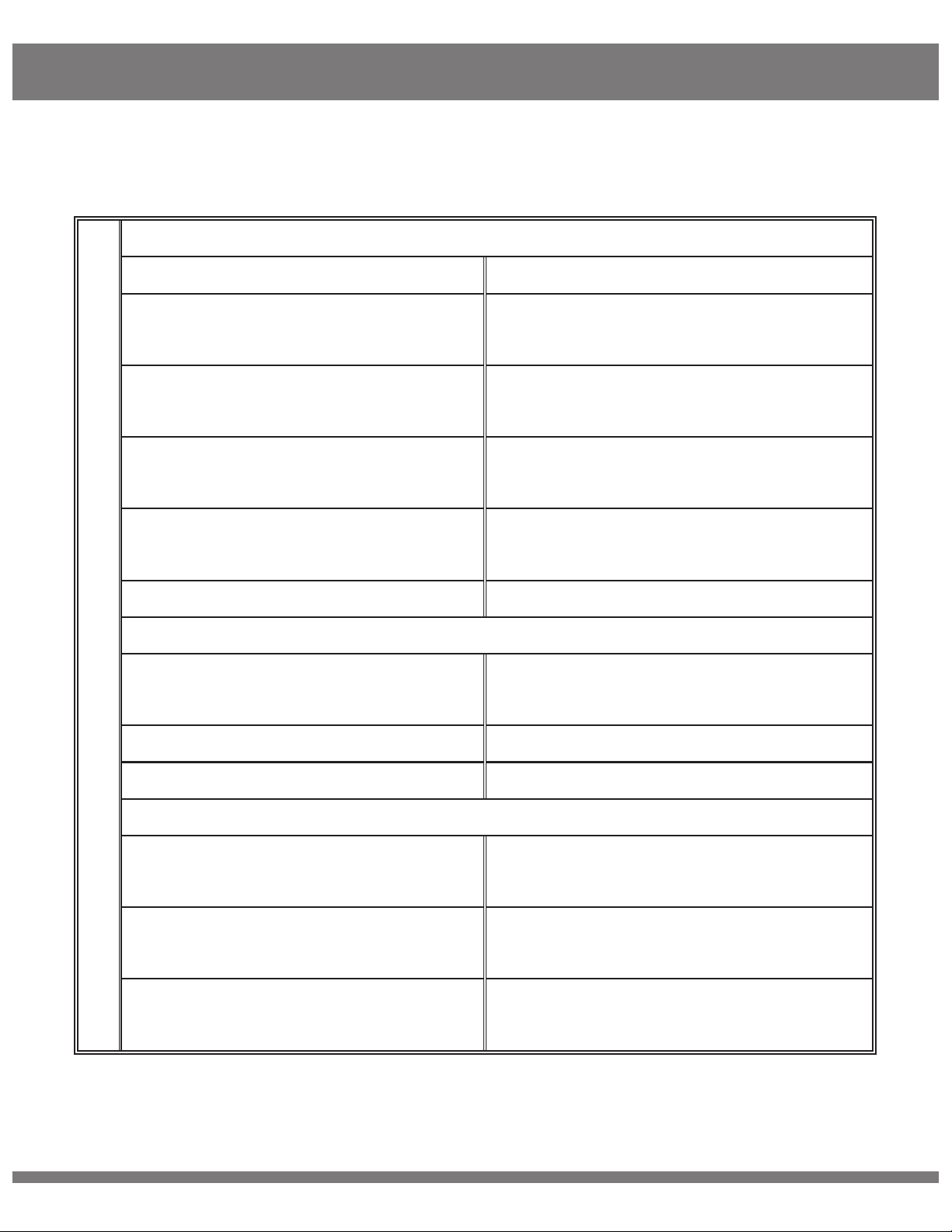
Receiver is turned off. Turn on the receiver.
No Signal Input to Receiver or TV/Monitor
Receiver and TV are not connected.
TV/Monitor not switched to SDI/HDMI
input
Bad cable connection of receiver or
TV/Monitor.
TV/Monitor turned to standby mode.
Receiver is working abnormally.
No Image Appears on the TV/Monitor
Image
Bad connection from receiver or
cable.
Receiver is working abnormally.
Connect receiver and TV/Monitor
via SDI/HDMI input.
Switch TV/Monitor to SDI/HDMI input.
Disconnect and re-connect the SDI/HDMI
cable.
Switch the TV/Monitor to normal
operation mode.
Restart the receiver.
Reconnect the cable of the receiver or
TV/Monitor.
Restart the receiver.
Receiver failure.
Please contact your retailer.
Abnormal Color on TV Screen
Bad connection from receiver cable
or TV/Monitor.
Bad connection from transmitter cable
or video source.
Transmitter or receiver working
abnormally.
© 2016 Cine Gears INC. All Rights Reserved. 23
Disconnect and re-connect the HDMI
cable of the receiver or TV.
Disconnect and re-connect the HDMI
cable of the transmitter and player.
Restart transmitter and receiver.
Page 27

Disclaimers
FCC Statement
This equipment has been tested and found to comply with the limits for a Class B digital device,
pursuant to part 15 of the FCC rules. These limits are designed to provide reasonable protection against
harmful interference in a residential installation. This equipment generates, uses and can radiate radio
frequency energy and, if not installed and used in accordance with the instructions, may cause harmful
interference to radio communications. However, there is no guarantee that interference will not occur in
a particular installation. If this equipment does cause harmful interference to radio or television reception,
which can be determined by turning the equipment off and on, the user is encouraged to try to correct
the interference by one or more of the following measures:
-Reorient or relocate the receiving antenna.
Increase the separation between the equipment and receiver.
Connect the equipment into an outlet on a circuit different from that to which the receiver is connected.
Consult the dealer or an experienced radio/TV technician for help.
To assure continued compliance, any changes or modifications not expressly approved by the party
responsible for compliance could void the user’s authority to operate this equipment. (Example use only
shielded interface cables when connecting to computer or peripheral devices).
FCC Radiation Exposure Statement
This equipment complies with FCC RF radiation exposure limits set forth for an uncontrolled environment.
This transmitter must not be co-located or operating in conjunction with any other antenna or transmitter.
This equipment complies with part 15 of the FCC Rules.
Operation is subject to the following two conditions:
(1) This device may not cause harmful interference.
(2) This device must accept any interference received, including interference that may cause undesired
operation.
Cautions
The manufacturer is not responsible for any radio or TV interference caused by unauthorized
modifications to this equipment. Such modifications could void the user authority to operate the
equipment.
© 2016 Cine Gears INC. All Rights Reserved. 24
Page 28

Disclaimers
Terms and Conditions
Congratulations on purchasing your new CINEGEARS product. Please read this manual carefully before
using the product. By using this product, you hereby agree to this disclaimer and signify that you have read
it in full. You agree that you are responsible for your own conduct and any content created while using
CINEGEARS products, and for any consequence thereof. You agree to use this product only for purposes
that are proper and in accordance with local regulations, terms and any applicable polices and guidelines.
By reading this disclaimer, you also agree:
1. Any part of this disclaimer is subject to change without prior notice. Refer to
WWW.CINEGEARS.COM for the latest version.
2. CINEGEARS reserves the right of final interpretation of this disclaimer.
CINEGEARS and the Follow Focus Kit are registered trademarks of Littlecent International Trading Corp. as
names of product, brand, etc., appearing in this manual are trademarks or registered trademarks of their
respective owner companies. This product and manual are copyrighted by CINEGEARS with all rights
reserved. No part of this product or manual shall be reproduced in any form without the prior written consent
or authorization of CINEGEARS.
© 2016 Cine Gears INC. All Rights Reserved. 25
Page 29
About Cinegears
Cine Gears Inc. is an industry leading company that designs and manufactures digital wireless follow focus
systems, lens control systems, camera motion control systems and accessories for film and broadcast
industry. As a big believer in the power of creativity and ideas, we designed the Pegasus cablecam, the
wireless motor drive that integrated a built in wireless transmitter, and the wireless finger wheel controller.
The Cine Gears Inc. wireless lens control system has the international CE certification on all its equipment.
Cine Gears lens control system can achieve the finest minutia of focus pulling, with extreme accuracy and
control. This very same technology is what drives the Pegasus for ultra-smooth, highly controlled,
programmed movement.
We have been working from Vancouver, B.C. for five years and our equipment has been used on hundreds
of movies. Filmmakers of all experience levels will benefit greatly from a simple, professional, and well
rounded follow focus system. The Single Axis and Multi Axis models provide greater ease, with less
crew, and less wires. You can achieve professional film quality scenes on a shoestring budget. Camera
operators, assistant camera operators, and jib operators can use the wireless follow focus to attain that
perfect shot.
Customer Support
If you encounter any issues with any of our products please contact us directly
via the details provided below. DO NOT CONTACT THE RETAIL STORE.
CINE GEARS INC. (USA)
47 East South Street, Suite 401
Frederick, Maryland 21701, USA
Tel: 1 206 462 2858
Toll Free: 1 800 693 8883
© 2016 Cine Gears INC. All Rights Reserved. 26
CINE GEARS INC. (Canada)
2nd floor 2010-9111 Beckwith Road
Richmond, BC V6X 1V7, Canada
Tel: 1 604 243 9995
 Loading...