

Page 1
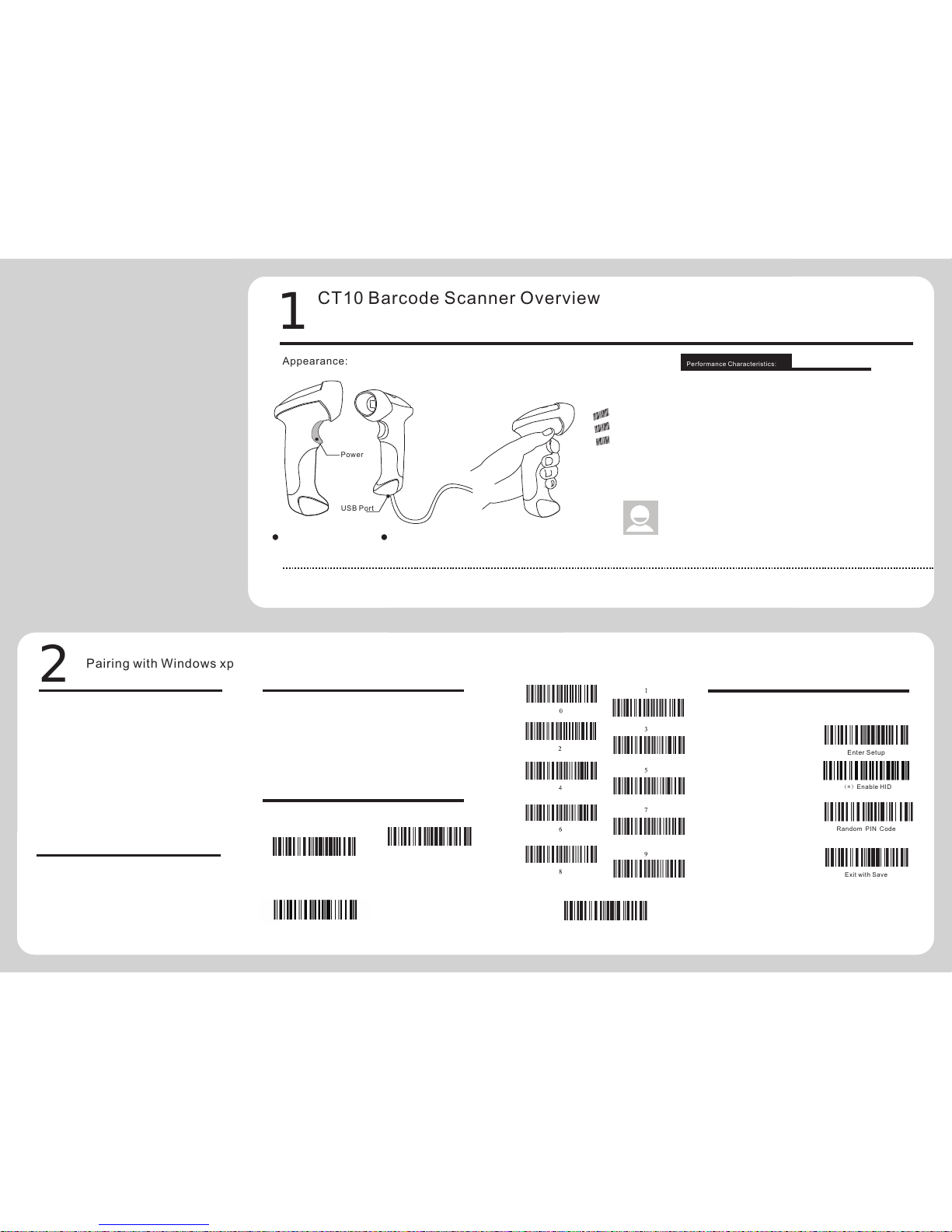
Exi t with Sa ve
Ran dom PIN C ode
(*)Ena ble HID
Ent er Setu p
1
CT10 Barcode Scanner Overv
iew
Pow er
USB P ort
Per forma nce Cha racte risti cs:
Appear anc e:
2
Pairi ng wi th Windows xp
USB wi red + Blu etoot h wirel ess com munic ation
Buil t-in FL ASH mem ory, sup ports b reakp oint re sume
Can st ore 135 0 piece s of Code -128 co des und er offl ine sta te
Supp orts Wi ndows X P/7/8 /CE, Mo bile OS P C and Andr oid, iO S devic es
Pac kin g list:
CT10 -> 1 unit
USB ca ble -> 1 pi ece.
Quic k Start G uide
Cert ifica te of Appr oval
Warra nty Car d
CT10 Barcode Scanner
Quick S tart Guide
Not e: The dev ice is no t equip ped wit h a charg ing dev ice. Pl ease
cha rge the d evice v ia USB ou tput ch argin g equip ment.
CT10
CT10 integrates high-performance processor and decoding board, it has fast decoding, high-precision reading ability, and high anti-interference ability. It can easily
rea d barco des on pa per, go ods and o ther me dia. Th e DOF is a gr eat imp rovem ent com pared w ith sim ilar pr oduct s. It als o boost s high sc annin g speed a nd powe rful
rea ding ab ility w ith hig h accur acy.
Blu etoot h Wirel ess mod e
USB W ired mo de
Functi ons S etup:
CT10 Barcode Scanner can setup all default
functions through reading the setup barcodes.
Ent er Setu p
Rea d funct ion bar code
Exi t with Sa ve
Blu etoot h
Lig ht Sour ce (Las er)
Dec ode Cap abili ty
Res oluti on
Nom inal Wor king Di stanc e
Dec ode Rat e
Sca n width
Dec ode mod e
Sca n mode
Pri nt Cont rast Mi nimum
Sca n angle s
Cyl inder H orizo ntal Sc an
Ind icati on
Rad io Rang e
Int erfac es Supp orted
Pro cesso r
EEP ROM
Wir eless C ommun icati on
Bat tery
Blu etoot h class 2 .1, Vers ion +ED R
Las er LED 65 0+/-2 0nm
3mi l
6~3 0cm
100 d ecode s per sec ond
30m m
Sin gle-L ine Aimi ng
Aut o off mode / M anual m ode
30%
Rol l 30° Pit ch 75° Yaw6 5°
Dia meter 3 5mm
Bee per, LED
10m Vi sual ra nge
SPP, HID , USB2. 0
ARM 7 7 2MHz
128 K, can st ore tho usand s of barc odes
140 0mAh li thium b atter y
Cod e bar, Cod e 11, Code 93 , MSI, Co de 128,
UCC /EAN- 128, Co de 39, EA N-8, EA N-13,
UPC -A, ISB N, Indu stria l 25, Int erlea ved 25,
Sta ndard 2 5, 2/5 Ma trix
HID a nd SPP dua l mode da ta tran smiss ion
und er Blue tooth c lass 2. 1 proto col
1.If you want to setup the function of CT10. Read 'Enter Setup' barcode, then 'Function Setup' barcode, and close with the 'Exit with Save' bar code.
2.If the device has been paired with a Bluetooth device and needs to be paired with another Bluetooth devices, please restore factory settings and then re-pair.
Not e:
4
Pairi ng wi th Android devi ces
6
Pairi ng wi th Windows 7/8
Exi t witho ut Save
ww w. cilico.us
1.S tart CT 10 barc ode sca nner.
2.O pen Blu etoot h panel i n the PC, c lick ‘Ad d a devic e…’.
3.C lick ‘Ne xt’ to se archi ng for th e devic es.
4.T he comp uter wi ll sear ch Blue tooth d evice s autom atica lly, A
few s econd s later , you wil l find CT 10 in the a vaila ble dev ices li st.
5.D ouble c lick CT 10 devi ce or cli ck ‘Next ’, sele ct ‘Ente r the
dev ice’s pa ring co de’, an d input t he pair ing cod e 10010 , click
‘Nex t’.
6.You w ill fin d a promp ting at t he lowe r right c orner o f your
com puter d eskto p for add ing a dev ice. Af ter aro und 5 sec onds,
you w ill hea r a beep fr om CT10 , and the i ndica tor fro m red to bl ue,
cli ck ‘Fini sh’.
7.P airin g succe ssful ly, the i ndica tor of CT 10 beco mes blu e.
3
Pairi ng wi th Windows 7/8
1.S tart CT 10 barc ode sca nner, t he indi cator i s red.
2.I n the PC wi th Win7 O S, clic k ‘Start > D evice s and pri nters >
Add a d evice ’, sear ch for CT 10.
3.D ouble c lick CT 10 devi ce, inp ut the pa ring co de 1001 0 in the
Blu etoot h pairi ng requ est dia log.
4.C lick ‘Ne xt’ or ‘OK ’ butto n, you wi ll hear a b eep fro m CT10,
the p aring s ucces sfull y, and th e indic ator be comes b lue.
(Fi rst way : data tr ansmi ssion s peed is s lower )
1.S tart CT 10 barc ode sca nner, t he indi cator i s red.
2.Tu rn on the B lueto oth in An droid d evice s, sear ch for CT 10
3.I nput th e parin g code 10 010 in th e Bluet ooth pa iring r eques t
dia log
4.C lick ‘Ne xt’ or ‘OK ’ butto n, you wi ll hear a b eep fro m CT10,
the p aring s ucces sfull y. You will f ind CT1 0 in the pa ired de vices
and i s will sh ow conn ected . The ind icato r becom es blue .
5
Pairi ng wi th iOS devices
1.R ead ‘Ent er Setu p’ barc ode, th e
ind icato r becom e purpl e.
Ent er Setu p
One -clic k IOS con necti on Setu p
Exi t with Sa ve
2.R ead ‘One -clic k iOS Con necti on’
bar code.
3.R ead ‘Exi t with Sa ve’ bar code, t he
ind icato r becom e red.
4.R estar t CT10 ba rcode s canne r.
5.Tu rn on the B lueto oth in iO S devic es,
sea rch for C T10.
6.C lick CT 10 in ava ilabl e devic es, it
wil l popup B lueto oth par ing req uest
dia log wit h the PIN c ode
7.F ind abo ve ment ioned n umber s in
fol lowin g barco des, re ad them
con tinuo usly, a nd then r ead ‘Exi t
wit hout Sa ve’ bar code, f inish t he
pai ring. T he indi cator b ecome s blue.
(Se cond wa y: data t ransm issio n speed i s faste r)
1.R ead ‘Ent er Setu p’ barc ode, th e indic ator be come pu rple.
2.R ead ‘ena ble HID ’ barco de.
3.R ead ‘Ran dom PIN C ode’ ba rcode .
4.R ead ‘Exi t with Sa ve’ bar code, t he indi cator b ecome r ed.
5.R estar t CT10 ba rcode s canne r.
6.Tu rn on the B lueto oth in Wi n8, sea rch for C T10.
7.C lick CT 10 in ava ilabl e devic es, it wi ll popu p Bluet ooth pa ring
req uest di alog wi th the PI N code
8.F ind abo ve ment ioned n umber s in abov e barco des, re ad them
con tinuo usly, a nd then r ead ‘Con firm’ b arcod e, fini sh the pa iring .
The i ndica tor bec omes bl ue.
Page 2
E-m ail:s ales@ cilic o.com
Web site: Http: //www. cilic o.us
1.Pl ease re move th e power a nd USB ca ble und er thun derst orm wea ther
cond ition s, to avo id dama ge from t hunde r and lig htnin g.
2.Ke ep away f rom hea t sourc es, ple ase ens ure suf ficie nt air ci rcula tion.
3.Pa y atten tion th at the sc anner i s water proof d uring s torag e, tran sport ation a nd
runn ing.
4.Pl ease us e a match ing pow er supp ly adap ter off ered by t he auth orise d produ cer.
War ning:
LED Ind ica tors
Indicator Colour
Gre en LED on (1s) an d off quic kly
Pur ple, Fl ashin g (On/O ff ratio 1 :1)
Blu e, Flas hing (O n/Off ra tio 1:1 )
Blu e, Flas hing (O n/Off ra tio 20m s:3s)
Red , Flash ing (On /Off rat io 1:1)
Beepe r
Beeping
Meaning
One l ong bee p, high t one
One s hort be ep, hig h tone
One l ong bee p, low to ne
Two sh ort bee ps, hig h tone
Two sh ort bee ps, low -high t one
Two sh ort bee ps, hig h-low t one
Thr ee shor t beeps , tone de scend ing
fro m high to l ow
Thr ee shor t beeps , tone as cendi ng
fro m low to hi gh
Pow er on.
Rea d barco de, wit h green L ED on (1s ) and off qu ickly
Con figur ation e rror, wi th purp le flas hing;
Or tr ansmi t buffer f ull, wi th gree n LED on an d off qui ckly
Pow er off.
BT con necti on esta blish ed, wit h blue LE D flash ing
(On /Off rat io 20ms :3s).
BT con necti on out of r ange or s uspen ded, wi th blue L ED
fla shing ( On/Off r atio 1: 1).
Ent er or Exi t Setti ng mode , with pu rple LE D flash ing.
Con figur ation c orrec t, with p urple L ED flas hing;
Blu etoot h Appli catio n:
PIN Cod e:100 10
CT-10B arcod e Colle ct devi ce
PIN Cod e:100 10
Data Term inal
PIN Cod e:100 10
CT-10B arcod e Colle ct devi ce
PIN Cod e:100 10
Data Term inal
PIN Cod e:100 10
CT-10B arcod e Colle ct devi ce
BT Adapt er
PIN Cod e:100 10
Data Term inal
!
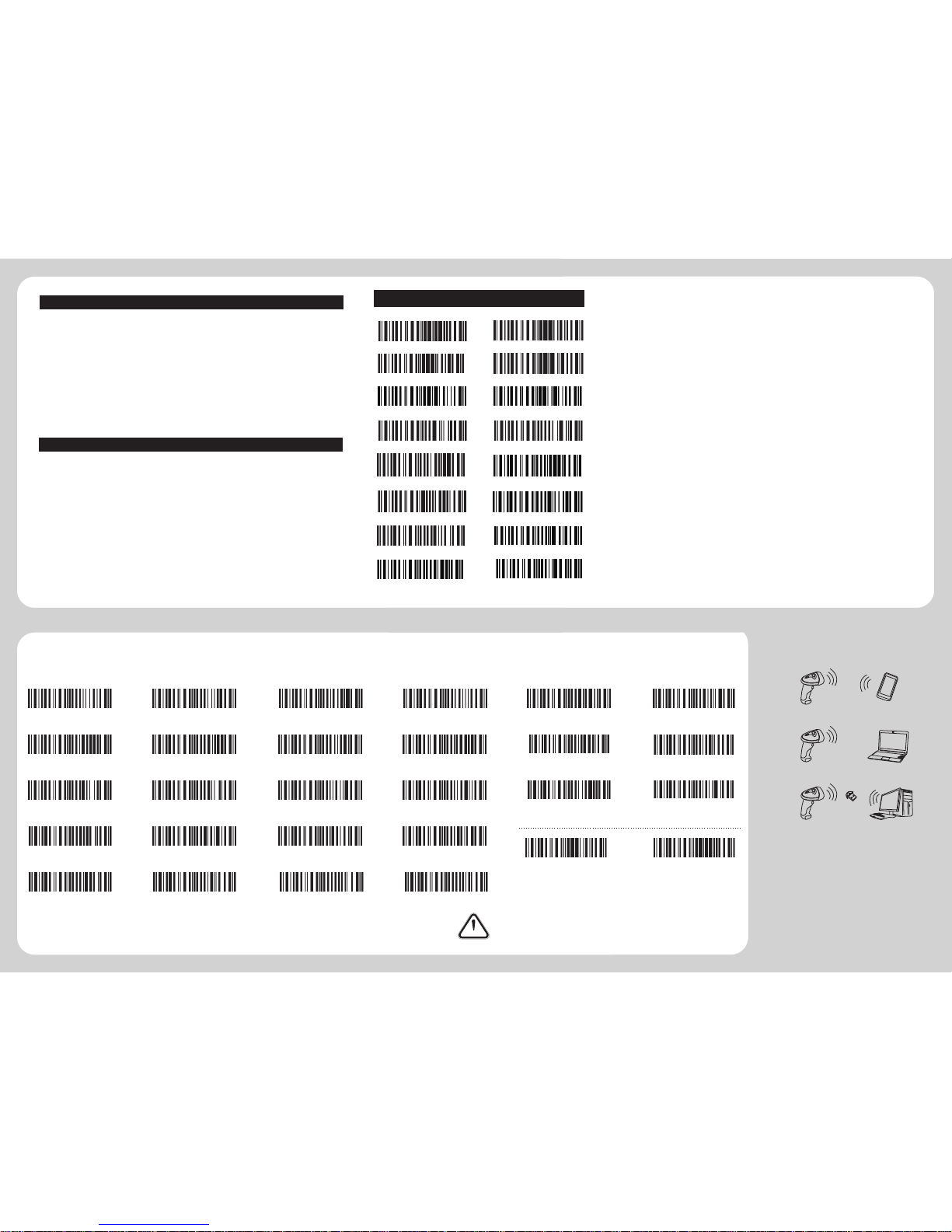
Funct ion S etup Barcodes
(Note: the barcode with * is default setting of CT10)
Enab le Cod
e bar
(*)Disabl e Cod
e bar
Enab le Indu stria l 25 (*)Disa ble Ind ustri al 25
Enab le Inte rleav ed 25 (*)Disa ble Int erlea ved25
Enab le Matr ix 25
(*)Disabl e Matri x 25
Enab le Stan dard 25 *)Disa ble Sta ndard 2 5
(*)Enab le Code 3 9
Disa ble Cod e 39
Enab le Code 93
(*)Disa ble Cod e93
(*)Enable Code12 8
Disa ble Cod e128
(*)Enab le EAN-8
Disa ble EAN- 8
Ente r Setup
Exit w ith Sav e
Disa ble EAN -13
*)Enab le EAN-13(
(*)Enab le UPC-E
Disa ble UPC -E
Enab le MSI
(*)Disabl e MSI
Enab le C ode11
(*)Disab le Code 11
100 10
(*)Ena ble HID
SPP B atch Up load
Dis able Au to Uplo ad
Blu etoot h Input M ethod
Exi t witho ut Save
Fac tory Re set
Ena ble Aut o-ind uctio n Mode
Do no t Apply E nter fo r suffix (*)App ly Ente r for suff ix
Exi t Auto Po wer Off
Ena ble SPP
Sav e Custo m Setti ngs
Res tore Cu stoms S ettin gs
Exi t with Sa ve
Ent er Setu p
Commo n Fun ction Barcode s
Ct10 ca n’t conn ect wit h Andro id devi ces?
1.I f the dev ice is an droid 4 .0 or abo ve vers ion, it c an conn ect dir ectly .
2.I f the dev ice is an droid 2 .2 or 2.3 v ersio n, it nee ds Blue tooth I nput Me thod off ered by s uppli er.
CT10 ca n’t rec ognize s ome typ e of
bar codes ?
Som e inact ive typ e barco des are d isabl ed as fac tory de fault . So you sh ould en able th is type v ia read
the e nable b arcod e. If you d on’t kn ow the ty pe, ple ase con tact ou r techn ical su pport .
Bar codes c an’t upl oad to PC o r mobil e after p aired ?
1.P lease c heck is t he pair ing suc cessf ully? T he indi cator o f the CT1 0 shoul d be blue .
2.P lease c heck if y ou enab le inve ntory m ode (un der inv entor y mode, t he barc odes ne ed uplo ad
man ually o r read th e Uploa d barco de for up load) .
3.P lease c heck if y ou Disa ble Aut o Uploa d.
PC or m obile ca n’t sea rch out C t10?
1.C onfir m CT10 is p ower on .
2.T he CT10 c an pair o nly whe n the red i ndica tor is fl ashin g.
3.R estar t the Blu etoot h Adapt er (or PC ) or chan ge a USB po rt. If pa ir with t he mobi le, ple ase res tart th e
Blu etoot h of the mo bile.
Can C T10 connec t with mo bile or t ablet a fter co nnect ing wit h PC?
CT1 0 just ca n conne ct with o ne devi ce, if yo u want to c hange d evice , pleas e clear t he pair ing
inf ormat ion on th e devic e first , and res et CT10 . The met hod is ac cordi ng to fro nt step s.
Ct10 ca n’t conn ect aut omati cally a fter r estar t the PC?
1.C onfir m CT10 is p ower on .
2.P lease c heck if t he indi cator o f CT10 is b lue. If y ou long p ress 7s econd s when po wer on, t he pari ng
inf ormat ion wil l be clea red, ne ed to pai r again .
Can C T10 auto li nefee d during b arcod e scann ing?
The u ser can s et appl y Enter f or suffi x of barc ode dat a or not. P lease r efer to t he USER M ANUAL ,
Cha pter 4, 4 .2.
It is s hown pai red, bu t not con necte d when co nnect wi th mobi le?
Tha t shoul d cause d from fo llowi ng two
1.U sing Bl uetoo th Inpu t Metho d, plea se refe r to the co nnect i nstru ction , conti nue the s tep 3 and s tep 4,
it wi ll conn ect suc cessf ully.
2.U sing SP P mode, y ou need i nstal l Bluet ooth Ch at in you r mobil e, and co nnect i n Bluet ooth Ch at tool .
Yello w, Flas hing (O n/Off r atio 1: 1)
Meaning
Good Read, with one short beep (high tone) Indicates the
CT10 Scanner in Setting mode Indicates the BT is waiting
for connection or CT10 is
out of transmission range
Indicates the CT10 Scanner establish a BT connection
successfully, or it is reconnect with BT. Indicates the
CT10 Scanner has no address of BT which connects with
before.
Indicates the battery of CT10 is lower.
Page 3
 Loading...