

Page 1
Color Block 2 Plus Nano Quick Start Guide V2.2 Color Block 2 Plus Nano Quick Start Guide V2.2 PN: 603-0505
Approvals & Disclaimer
Approvals & DisclaimerApprovals & Disclaimer
Approvals & Disclaimer
The information contained herein is offered in good faith and is believed to be accurate. However,
because conditions and methods of use of our products are beyond our control, this information should
not be used in substitution for customer's tests to ensure that Chroma-Q products are safe, effective,
and fully satisfactory for the intended e nd use. Suggestions of use shall not be taken as inducements to
infringe any patent. Chroma-Q sole warranty is that the product will meet the Chroma-Q sales
specifications in effect at the time of shipment. Your exclusive remedy for breach of such warranty is
limited to refund of purchase price or replacement of any product shown to be other than as warranted.
Chroma-Q reserves the right to change or make alteration to devices and their functionality without notice
due to on-going research and development.
The Chroma-Q Color Block 2 Plus Nano has been designed specifically for the lighting industry. Regular
maintenance should be performed to ensure that the products perform well in the entertainment
environment.
If you experience any difficulties with any Chroma-Q products please contact your selling dealer. If your
selling dealer is unable to help please contact [email protected]. If the selling dealer is unable to
satisfy your servicing needs, please contact the following for full factory service:
Outside No rth Americ a:
Outside No rth Americ a:Outside No rth Americ a:
Outside No rth Americ a: Nort h Amer ica:
Nort h Amer ica:Nort h Amer ica:
Nort h Amer ica:
Tel: +44 (0)1494 446000 Tel: +1 416-255-9494
Fax: +44 (0)1494 461024 Fax: +1 416-255-3514
[email protected] [email protected]
For further information please visit the Chroma-Q website at www.chroma-com.
Chroma-Q and Color Block 2 Plus Nano is a trademark, for more information on this visit
www.chroma-q.com/trademarks.
The rights and ownership of all trademarks are recognised.
Quick Start Guide
Chroma-Q®
Color Block 2 Plus Nano™
For a full product manual please visit www.chroma-q.com
Software version 2.2
Page 2
Color Block 2 Plus Nano Quick Start Guide V2.2 Color Block 2 Plus Nano Quick Start Guide V2.2 PN: 603-0505
1.
1.1.
1. Overview
OverviewOverview
Overview
The Chr oma
ChromaChroma
Chroma ----Q® Color Bl ock 2 P lus Nano ™
Q® C olor Block 2 Plus Nan o™Q® C olor Block 2 Plus Nan o™
Q® C olor Block 2 Plus Nan o™ is an ultra compact, low-profile and versatile s ingle cell version of the
Color Block 2 Plus™ fixture, which shares the unit’s single colour RGBA optics, high light output and theatrical grade
dimming to create an exceptional all-round feature set.
2.
2.2.
2. Safe
SafeSafe
Safe ty
tyty
ty
Cautio n
Cautio nCautio n
Cautio n
• This product is for professional use only. It is NOT intended for domestic or outdoor use.
• The bright flash of light during power-up and continuous strobe effect may cause epileptic seizure.
•
This product must be used with safety cable.
3.
3.3.
3. Cabl
CablCabl
Cabling
inging
ing
• PSU Power Input: PSU05B: IEC Power Cord; PSU30: Trailing Lead
• DMX Input control data from an external control console is through an XLR 5-pin cable
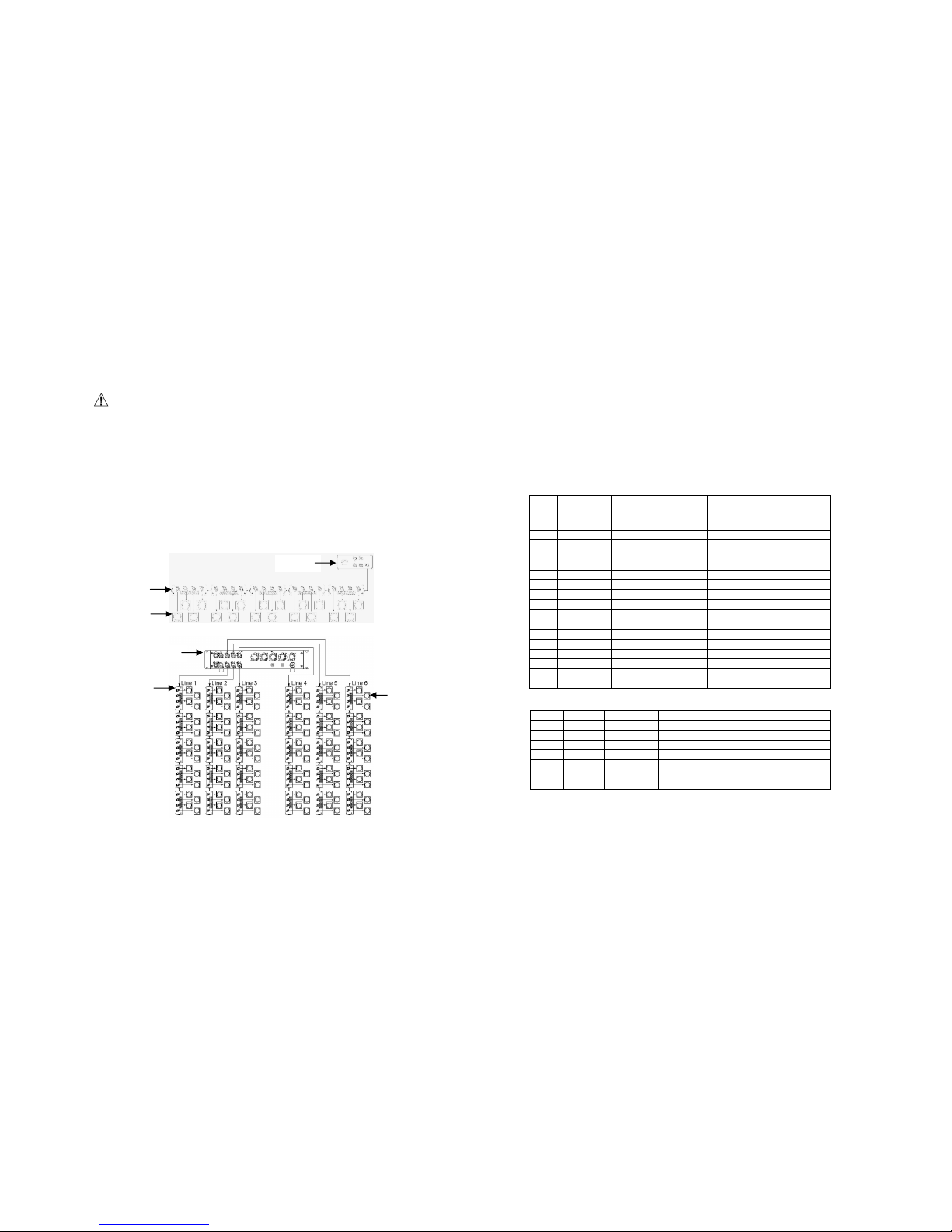
• Power and control data outputs from the Color Block power supply to the Color Block 2 Plus Nano Fan Out Box
is through an XLR 4-pin cable. The drain wire should be connected to the chassis of the XLR.
• Power and control data outputs from the Color Block 2 Plus Nano Fan Out Box is through 4 x RJ45 connections.
The total cable length from the Fan Out Box to a fixture must not exceed 3m/10ft.
• The total cable length of each chain must not exceed 60m/~200ft, and t he cable for e ach adjacent unit must
not exceed 20m.
System Diagrams
System DiagramsSystem Di agrams
System Diagrams ::::
4.
4.4.
4. Mounting
MountingMounting
Mounting
The Color Block 2 Plus Nano fixture is shipped with a yoke kit for mounting on the floor, wall and overhead
applications. Secure the fixture with a safety bond.
5.
5.5.
5. Control
ControlControl
Control
The Chroma-Q Color Block 2 Plus Nano is controlled via two models of addressable ANSI E1.11 USITT DMX512-A
power supply units, the 5 way Color Block PSU05B and the 30 way Color Block PSU30.
Control Options:
• 3 channels x Hue, Saturation and Intensity (HSI)
• 3 channels x Red, Green and Blue with *Magic Amber (RGB)
• 4 channels x Red, Green, Blue with *Magic Amber and Intensity (RGBI)
• 4 channels x Red, Green, Blue and Amber
Grouping Options:
• “Single” assigns RGBA channels in a single fixture as individual channels
• “Block” assigns RGBA channels of 4 fixtures from 1 Fan Out Box as 1 group with 4 channels
• “All” assigns RGBA channels in all fixtures connected to a power supply as 1 group with 4 channels
Control Modes:
Mode
ModeMode
Mode Group
GroupGroup
Group Ch
ChCh
Ch
PSU05B
PSU05BPSU05B
PSU05B
Syste m: CB2
Syste m: CB2Syste m: CB2
Syste m: CB2
Ch
ChCh
Ch
PSU30
PSU30PSU 30
PSU30
Syste m: CB2
Syste m: CB2Syste m: CB2
Syste m: CB2
1 Variable 67 7FX + 20 x HSI 367 7FX + 120 x HSI
2 Cell 60 20 x HSI 360 120 x HSI
3 Cell 60 20 x RGB (with *Magic Amber) 360 120 x RGB (with *Magic Amber)
4 Block 21 6FX + 5 x HSI 96 6FX + 30 x HSI
5 Block 15 5 x HSI 90 30 x HSI
6 Block 15 5 x RGB (with *Magic Amber) 90 30 x RGB (with *Magic Amber)
7 All 9 6FX + HSI 9 6FX + HSI
8 All 3 1 x HSI 3 HSI
9 All 3 1 x RGB (with *Ma gic Amber) 3 RGB (with *Magic Amber)
10 Cell 80 20 x RGBA 480 120 x RGBA
11 Cell 80 20 x RGBI (with *Magic Amber) 480 120 x RGBI (with *Magic Amber)
12 Block 20 5 x RGBA 120 30 x RGBA
13 Block 20 5 x RGBI (with *Magic Amber) 120 30 x RGBI (with *Magic Amber)
14 All 4 RGBA 4 RGBA
15 All 4 RGBI (with *Magic Amber) 4 RGBI (wi th *Magic Amber)
16 Any 1 Look Select 1 Look Select
Internal FX engine: Modes 1, 4, and 7 incorporate an internal FX engine with 7 variable parameters:
Mode 1
Mode 1Mode 1
Mode 1 Mode 4 /7
Mode 4 /7Mode 4 /7
Mode 4 /7 Ef
EfEf
Effec ts
fectsfects
fects Descr iption
Descr iptionDescrip tion
Descr iption
Ch 1 Grouping variable grouping facility to run FX between / within groups
Ch 2 Ch 1 Colour Speed va riable speed of colour scrolling
Ch 3 Ch 2 Colour Fan variable fan of colour between / within groups
Ch 4 Ch 3 Colour Range variable limit o f spectrum range for colour scrolling
Ch 5 Ch 4 Colour Step variable control of smoothness of colour scrolling
Ch 6 Ch 5 Intensity Effects wide selection of intensity fading and snapping ef fect
Ch 7 Ch 6 Intensity Fan variable fan of intensity effects
Note: All internal FX are referenced back to the group base HSI colour and intensity levels.
* Magic Amber is the term used for the unit's ability to bring in amber when mixing colors that require it with the use of only 3
control channels.
6.
6.6.
6. Further Information
Further InformationFurther Information
Further Information
Please refer to the Chroma-Q Color Block 2 Plus Na no manual f or more detailed information. A copy o f the manual
can be found at the Chroma-Q website – www.chroma-q.com – under Support.
PSU05B
FAN OUT
NANO
PSU30
FAN OUT
NANO
 Loading...