

Page 1

Chorus B2B Gateway
User Guide
22 May 2009
Version 0.4.3
Page 2
Chorus B2B User Guide
22 May 2009 Page 2
Version 0.4.3 © Copyright Telecom 2009
Document Control
Document Authorities
Document Details Name Title
Document Owner Jacqui Barclay
Implementation Manager
Customer Service, Chorus
Author(s) Dane Moodie Integration Specialist
Approval to publish Date Name Approval By
Approver Email
Version History
This table shows a record of significant changes to the document.
Version Date Author Description
0.1 10 February
2009
Dane Moodie First draft for review by Chorus.
0.2 23 February
2009
Dane Moodie Updated based on feedback from Jacqui Barclay.
Updated CPA example based on IBM feedback.
0.3 4 March 2009 Dane Moodie Updated based on feedback from Karen Ellis.
0.4 7 April 2009 Dane Moodie Updated information on timeframes and connectivity testing.
0.4.1 16 April 2009 Dane Moodie Updated based on feedback from Stephen Thomson
0.4.2 19 May 2009 Dane Moodie Updated section on message correlation to incorporate
changes in the B2B
0.4.3 22 May Dane Moodie Changes to reflect the new templa te. Inclusion of glossary
and intended audience
Document
Review
This document will be subject to periodic review. It is the responsibility of the
Document Owner to initiate and control the review process.
Copyright
Copyright © 2009 Telecom New Zealand Limited
All rights reserved
No part of this publication may be reproduced, stored in a retrieval system, or transmitted in any form or
by any means, electronic, mechanical, photocopying, recording or otherwise without the prior written
permission of Telecom New Zealand Limited.
This document is the property of Telecom New Zealand Limited and may not be disclosed to a third party,
other than to any wholly owned subsidiary of Telecom Corporation of New Zealand Limited, or copied
without consent.
Page 3

Chorus B2B User Guide
22 May 2009 Page 3
Version 0.4.3 © Copyright Telecom 2009
Table of Contents
1. INTRODUCTION.............................................................................................................4
1.1.1. Objectives of Manual..................................................................................................4
1.1.2. Contractual Reference................................................................................................4
1.1.3. Use Of The Name Telecom..........................................................................................4
1.1.4. Limitations ...............................................................................................................4
1.1.5. Intended Audience ....................................................................................................4
1.2. RELATED REFERENCE MATERIAL ..............................................................................................4
1.3. GLOSSARY OF TERMS USED...................................................................................................4
1.4. WHAT IS THE CHORUS B2B GATEWAY? .....................................................................................6
1.4.1. Message Service Protocol ...........................................................................................6
1.4.2. Relationship Definition ...............................................................................................6
1.5. ASSUMPTIONS..................................................................................................................7
1.6. SUPPORT........................................................................................................................7
2. GETTING STARTED........................................................................................................8
2.1. OVERVIEW ......................................................................................................................9
2.2. INFORMATION REQUIRED BY CHORUS ...................................................................................... 10
2.3. COLLABORATION PROTOCOL AGREEMENT DOCUMENT..................................................................... 11
2.4. CUSTOMER CERTIFICATE..................................................................................................... 20
2.4.1. Production Keys ......................................................................................................20
2.4.2. Test Keys.............................................................................................................. 21
2.5. CHORUS CERTIFICATE .......................................................................................................21
3. TESTING YOUR IMPLEMENTATION.................................................................................. 21
3.1. TESTING INTERNALLY ........................................................................................................21
3.1.1. Sending Messages ................................................................................................... 21
3.1.2. Receiving Acknowledgements from Chorus.................................................................. 24
3.1.3. Receiving Messages from Chorus ............................................................................... 25
3.2. CHORUS CONNECTIVITY TEST............................................................................................... 26
3.3. TESTING AGAINST THE CHORUS TEST GATEWAY ..........................................................................26
4. MOVING TO PRODUCTION ............................................................................................27
5. PAYLOAD DATA........................................................................................................... 27
6. TROUBLE SHOOTING ................................................................................................... 28
7. SECURITY................................................................................................................... 28
7.1. MESSAGE ENCRYPTION ......................................................................................................28
7.2. NON-REPUDIATION ..........................................................................................................29
Page 4
Chorus B2B User Guide
22 May 2009 Page 4
Version 0.4.3 © Copyright Telecom 2009
1. Introduction
1.1.1. Objectives of Manual
The Chorus B2B Gateway is intended to allow Chorus’ customers to access our
products and services utilising a business to business document exchange
mechanism. This User Guide will define the technical steps that should be
followed to allow your business to begin trading with us through our B2B
Gateway.
1.1.2. Contractual Reference
This document is provided to Telecom Partners, Service Companies, Access
Seekers and 3rd party service providers for use alongside the relevant contracts
for service or the relevant Standard Terms Determination.
1.1.3. Use Of The Name Telecom
Throughout this document, Telecom New Zealand is referred to as Telecom.
1.1.4. Limitations
This document does not, in any way, vary the terms of the main contract between
Telecom and the service provider. If there is any conflict between the relevant
contract and statements made in this document, the terms of the relevant
contract shall prevail.
1.1.5. Intended Audience
This document is primarily intended as a technical reference. The intended
audience is:
• Software Architects
• Infrastructure Designers
• Network Engineers
• Security Engineers
• Software Developers
1.2. Related Reference Material
Although the following documents provide related reference material, they may or may
not be referenced directly in this document:
Location Document Title
http://www.chorus.co.nz/industry-
reports
Telecom B2B Assure Example XML Messages
http://www.chorus.co.nz/industryreports
Chorus B2B Fulfill Example XML Messages
1.3. Glossary of Terms Used
The following list describes some of the terms used in this document:
Page 5
Chorus B2B User Guide
22 May 2009 Page 5
Version 0.4.3 © Copyright Telecom 2009
Term Description
B2B Business-to-Business: electronic communications between two or
more businesses
DSA An algorithm for creating digital signatures
ebMS ebXML Message Service: one of the ebXML protocols utilised by
the Chorus B2B Gateway
ebXML The suite of protocols implemented on the Chorus B2B Gateway
HTTP Hypertext Transfer Protocol: The application layer protocol used
for communicating with the Chorus B2B Gateway
HTTPS Hypertext Transfer Protocol Secure: The combination of SSL/TLS
and HTTP
MSH ebXML Message Service Handler: the Chorus B2B Gateway is an
implementation of a MSH
OSS Operational Support System; computer systems used by
telecommunications service providers
RSA An algorithm for public key cryptography
SHA-1 A digital hashing algorithm
SOAP A protocol for exchanging XML documents via Web Services
SSL Secure Socket Layer (also known as Transport Layer Security):
cryptographic protocol allowing secure communication over the
Internet
XML eXtensible Mark-up Language: the mar k -up language utilised by
documents exchanged via the B2B Gateway
XSD XML Schema Definition: expresses the rules to which an XML
document must conform
Page 6

Chorus B2B User Guide
22 May 2009 Page 6
Version 0.4.3 © Copyright Telecom 2009
1.4. What is the Chorus B2B Gateway?
The Chorus B2B Gateway is a secure and reliable document exchange mechanism that
can be used by your business to exchange business documents with us. The business
documents exchanged will typically be in the form of XML documents.
The Chorus B2B Gateway is based on the ebXML suite of specifications
1
. The following
ebXML Specifications are utilised by the Chorus B2B Gateway:
• Message Service Protocol: An XML based protocol and envelope structure used for
sending and receiving messages
• Collaboration Protocol Agreement: A format for defining a relationship between
trading partners (e.g. between Chorus and your business) in an XML document
The sections below offer a brief introduction to these specifications, while subsequent
sections will provide specific details on how these specifications are used by Chorus.
1.4.1. Message Service Protocol
The Chorus B2B Gateway is based on the ebMS 2.02 message service protocol. This
specification defines the manner in which two or more ebXML based Message Service
Handlers
3
(MSH) can exchange business documents with the following key features4:
Guaranteed Delivery: Once messages are sent they are guaranteed to be delivered
once and only once.
Non-Repudiation: The identity of the sending party, and the fact that the message has
not been tampered with, can be proven via digital signatures.
Encryption:5 Data can be protected to ensure it cannot be viewed by third parties.
You may utilise any ebMS 2.0 compliant ebXML Message Service Handler product when
interacting with the Chorus B2B Gateway. The Chorus B2B Gateway does not utilise any
bespoke features, and is intended to be interoperable across ebMS 2.0 implementations.
This User Guide will provide sample ebXML messages that allow you to verify your
Message Service Handler implementation against the Chorus B2B Gateway
implementation.
1.4.2. Relationship Definition
Before two parties can begin exchanging business documents with each via the ebMS
protocol, they must agree a variety of information that allows their respective Message
Service Handlers to communicate with each other.
1
The ebXML specifications are broader than the details presented here. This document will focus solely on the ebXML features
utilised by Chorus.
2
The ebMS 2.0 specification, which also provides additional background information, can be found at http://www.oasis-
open.org/committees/ebxml-msg/documents/ebMS_v2_0.pdf
3
Message Service Handler (MSH) is the generic term used in this document for a Service capable of sending and receiving
ebXML Messages. The Chorus B2B Gateway is the Chorus Message Service Handler.
4
These features are expressed as an extension to the SOAP with Attachments specification. The SOAP envelope contains all the
header information necessary to support these services, while the actual business document being exchanged is added as an
attachment.
5
Encryption will be achieved via the use of HTTPS with the Chorus B2B Gateway rather than XML Encryption. Essentially this
moves encryption outside the realm of the ebXML layer, and into the communication lay er.
Page 7

Chorus B2B User Guide
22 May 2009 Page 7
Version 0.4.3 © Copyright Telecom 2009
The ebXML specifications define a manner for capturing this information in a document
called a Collaboration Protocol Agreement (CPA)6. CPA documents are XML documents
conforming to a specified schema.
This User Guide will describe the process to follow in order to obtain a CPA document
from Chorus, and how to understand the contents within the CPA document.
1.5. Assumptions
This guide assumes that
• your business has been accepted to trade via the Chorus B2B Gateway. This guide
will not provide information on legal agreements that must be signed, or accounts
that must be established.
• you have selected a Message Handler System, and implemented it within your
company.
• your business has some background knowledge of the relevant ebXML specifications.
1.6. Support
Any questions relating to the material contained in this User Guide should be emailed to
[email protected].
6
The CPA specification is defined at: http://www.oasis-open.org/committees/ebxml-cppa/documents/ebcpp-2.0.pdf
Page 8
Chorus B2B User Guide
22 May 2009 Page 8
Version 0.4.3 © Copyright Telecom 2009
2. Getting Started
In order to begin communicating with us via the Chorus B2B Gateway, you must
implement an ebMS 2.0 compliant Message Service Handler (MSH). This MSH will
typically be exposed to other applications within your company allowing these
applications to send business documents through it to Chorus, and receive business
documents from Chorus.
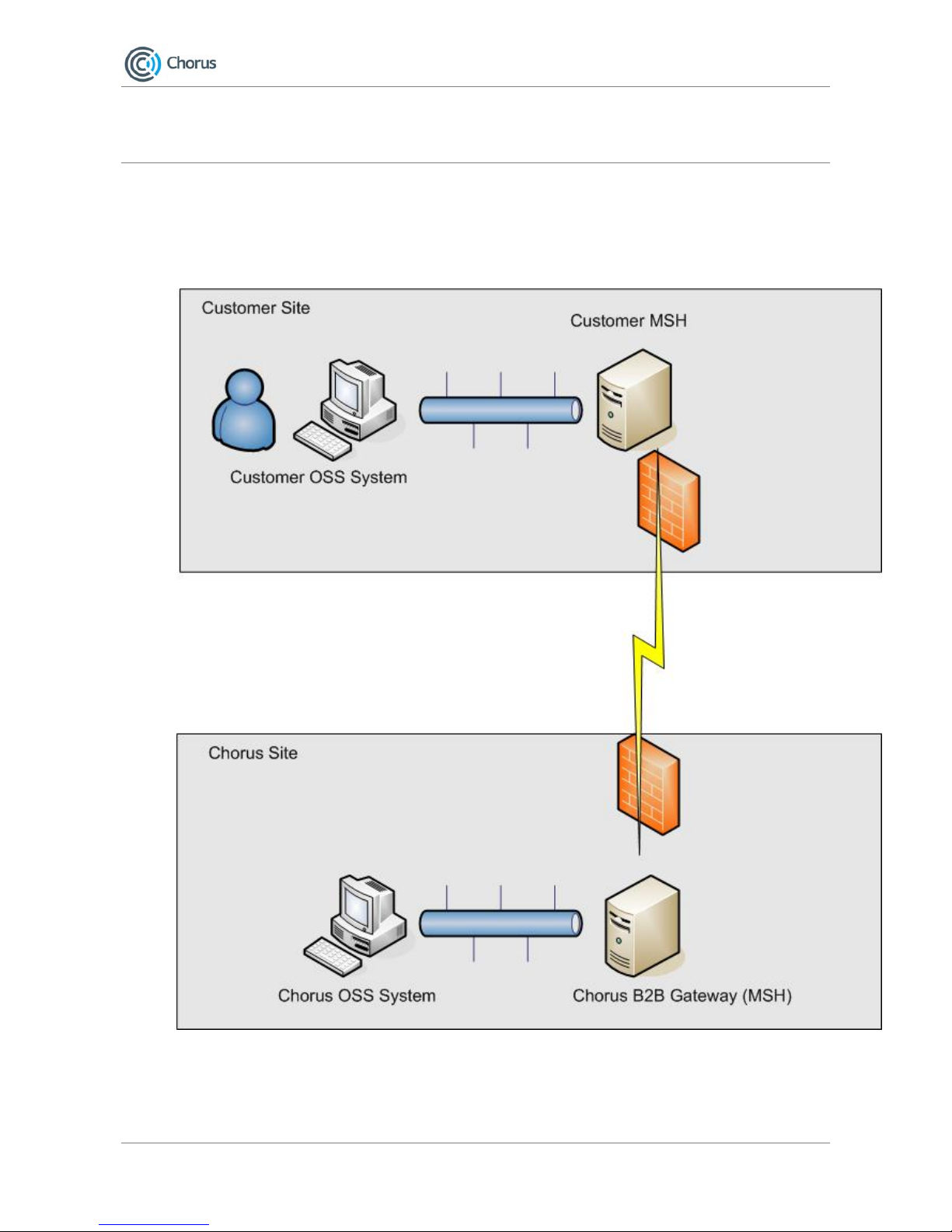
The diagram below shows a typical usage pattern for the Chorus B2B Gateway:
1. A user performs an activity in your Operational Support System (OSS). This
activity requires information to be exchanged with Chorus (e.g. Submit Sales
Order).
Page 9
Chorus B2B User Guide
22 May 2009 Page 9
Version 0.4.3 © Copyright Telecom 2009
2. Your OSS sends a message to your Message Service Handler detailing the
information that needs to be exchanged.
3. Your Message Service Handler sends a message over the Internet to Chorus B2B
Gateway.
4. Our B2B Gateway sends an acknowledgment confirming that the message has
been received.
5. The Chorus B2B Gateway delivers the message to its OSS where the activity
requested is performed.
Messages are returned to your OSS using this pattern in reverse.
All business documents exchanged via the Chorus B2B Gateway will be asynchronous in
nature. Even in cases where a response is required to a submitted document (e.g. Sales
Order Confirmation for a Sales Order Request); this will be sent via a separate
connection. In such cases, we will provide information that allows business responses to
be correlated with business requests.
2.1. Overview
In order to begin using the Chorus B2B Gateway, the following steps need to be followed.
These will be defined in detail in the remainder of this document:
1. Implement and test your MSH internally
2. Provide Chorus with required technical information
3. Provide your security certificates to Chorus
4. Receive CPA documents from Chorus
5. Receive security certificates from Chorus
6. Perform a connectivity test with Chorus
7. Test your MSH against the Chorus Test B2B Gateway
8. Begin using the Production Chorus B2B Gateway
This process is referred to as the on-ramping process. The following timeframes should
be adhered to within this process:
Time Frame Description
2 weeks prior to testing Provide Chorus required information regarding your test MSH.
Provide Chorus with your test security certificate
1 week prior to testing Chorus will provide you a CPA document for use against the Chorus
Test B2B Gateway.
Chorus will provide you their test security certificate for use against
the Chorus Test B2B Gateway.
1 week prior to testing Perform connectivity testing between your test MSH and the Chorus
Test B2B Gateway
4 weeks prior to production Begin testing against the Chorus Test B2B Gateway. This is based on
the assumption that it will take approximately 2 weeks to pass the
tests required to begin using the production B2B Gateway.
2 weeks prior to production Provide Chorus required informati o n regarding your production MSH.
Provide Chorus with your production security certificate
1 week prior to production Chorus will provide you a CPA document for use against the Chorus
B2B Gateway.
Chorus will provide you their production security certificate for use
Page 10
Chorus B2B User Guide
22 May 2009 Page 10
Version 0.4.3 © Copyright Telecom 2009
against the Chorus B2B Gateway.
1 week prior to production Perform connectivity testing between your production MSH7 and
Chorus
2.2. Information Required by Chorus
We require information from you that will be used to create the CPA documents (for both
test and production) defining your relationship with us. The following information is
required:
Information Required Description
Contact Details Contact information for the following resources:
Primary Technical Resource: the person responsible
for all technical issues relating to your MSH and its
integration with the Chorus B2B Gateway
Primary Commercial Resource: the person
responsible for all commercial/contractual issues
The email address for alerts generated from the
B2B
Any alerts generated by the Chorus B2B Gateway
will be sent to this email address. If this is not
included, alerts will not be sent via email. The list
of alerts that will be sent is described in section 6.
Your preferred testing date The date when you would like to start testing your
Message Service Handler against the Chorus Test
B2B Gateway.
Your preferred production date The date when you would like to start using the
Chorus Production B2B Gateway.
The URL of your B2B Gateway This is the URL that Chorus should utilise for
sending messages to your gateway. A separate
URL can be use during the test phase.
The URL provided must utilised HTTPS rather than
HTTP, since HTTPS is the mechanism that will be
used to implement encryption of messages.
The IP addresses (or addresses) from which your
MSH will send and receive traffic
The IP address that will be used for connecting to
the Chorus B2B Gateway.
You may provide multiple IP addresses if
necessary. Separate IP addresses may also be
provided for the Test Phase.
This is not necessarily the IP address of the server
hosting your MSH if you are using Network Address
Translation internally; it is the public IP address
Chorus will see when receiving messages from you.
The Algorithm you will use for Signing Messages8 Messages must be signed using one of the
following:
DSA with SHA1
RSA with SHA1
Chorus will assume customers will utilise RSA with
SHA1 if no preference is provided.
7
This step is only necessary if you are using a separate MSH for your test and production gateways
Page 11

Chorus B2B User Guide
22 May 2009 Page 11
Version 0.4.3 © Copyright Telecom 2009
More information on digital signature and security
certificates is provided below.
A spreadsheet will be provided to you by Chorus where you must specify this
information. Once complete, the spreadsheet should be returned by email to
This information will form the basis of the two Collaboration Protocol Agreement (CPA)
documents that will be provided to you during the on-ramping process:
1. A CPA document that can be utilised for testing your MSH against the Chorus
Test B2B Gateway.
2. A CPA document that can be utilised when against the production B2B Gateway.
This information will be emailed to the primary technical resource identified above.
2.3. Collaboration Protocol Agreement Document
The Collaboration Protocol Agreement documents you receive from Chorus will be in the
following format:
<?xml version="1.0" encoding="UTF-8"?>
<tp:CollaborationProtocolAgreement tp:cpaid="Chorus_UniversalExports" tp:version="2.0b"
xmlns:tp="http://www.oasis-open.org/committees/ebxml-cppa/schema/cpp-cpa-2_0.xsd"
xmlns:xsi="http://www.w3.org/2001/XMLSchema-instance"
xmlns:xlink="http://www.w3.org/1999/xlink"
xmlns:ds="http://www.w3.org/2000/09/xmldsig#"
xmlns:xsd="http://www.w3.org/XML/2001/XMLSchema"
xsi:schemaLocation="http://www.oasis-open.org/committees/ebxml-cppa/schema/cpp-cpa2_0.xsd cpp-cpa-2_0b.xsd">
<tp:Status tp:value="agreed"/>
<tp:Start>2008-12-14T07:21:00Z</tp:Start>
<tp:End>2010-12-14T07:21:00Z</tp:End>
<tp:ConversationConstraints tp:invocationLimit="1000000"
tp:concurrentConversations="20"/>
<tp:PartyInfo tp:partyName="Chorus" tp:defaultMshChannelId="Chorus_DC"
tp:defaultMshPackageId="MshSignalPackage">
<tp:PartyId tp:type="urn:nzl:telecom:b2b:uid">987987987</tp:PartyId>
<tp:PartyRef xlink:href="http://www.telecom.co.nz/Chorus/"
xlink:type="simple"/>
<tp:CollaborationRole>
<tp:ProcessSpecification tp:name="ChorusProcess" tp:version="1.0"
xlink:type="simple"
xlink:href="http://www.accord.com.sg/processes/ChorusService.xml"/>
<tp:Role tp:name="ServiceProvider" xlink:type="simple"
8
This is explained further below in the Customer Certificate section
Page 12

Chorus B2B User Guide
22 May 2009 Page 12
Version 0.4.3 © Copyright Telecom 2009
xlink:href="http://www.accord.com.sg/processes/ChorusService.xml#ServiceProvider"/>
<tp:ServiceBinding>
<tp:Service tp:type="type">Fulfill Message$1.0</tp:Service>
<tp:CanSend>
<tp:ThisPartyActionBinding tp:id="Chorus_CanSend"
tp:action="Fulfill
Message" tp:packageId="BusinessPackage">
<tp:BusinessTransactionCharacteristics
tp:isNonRepudiationRequired="true" tp:isNonRepudiationReceiptRequired="false"
tp:isAuthorizationRequired="true"
tp:isIntelligibleCheckRequired="false" tp:timeToAcknowledgeReceipt="PT60S"
tp:timeToAcknowledgeAcceptance="PT60S"/>
<tp:ChannelId>Chorus_DC</tp:ChannelId>
</tp:ThisPartyActionBinding>
<tp:OtherPartyActionBinding>UniversalExports_CanRecv</tp:OtherPartyActionBinding>
</tp:CanSend>
<tp:CanReceive>
<tp:ThisPartyActionBinding tp:id="Chorus_CanRecv"
tp:action="Fulfill
Message" tp:packageId="BusinessPackage">
<tp:BusinessTransactionCharacteristics
tp:isNonRepudiationRequired="true" tp:isNonRepudiationReceiptRequired="false"
tp:isAuthorizationRequired="true"
tp:isIntelligibleCheckRequired="false" tp:timeToAcknowledgeReceipt="PT60S"
tp:timeToAcknowledgeAcceptance="PT60S"
tp:retryCount="0"/>
<tp:ChannelId>Chorus_DC</tp:ChannelId>
</tp:ThisPartyActionBinding>
<tp:OtherPartyActionBinding>UniversalExports_CanSend</tp:OtherPartyActionBinding>
</tp:CanReceive>
</tp:ServiceBinding>
</tp:CollaborationRole>
<tp:CollaborationRole>
<tp:ProcessSpecification tp:name="ChorusProcess" tp:version="1.0"
xlink:type="simple"
xlink:href="http://www.accord.com.sg/processes/ChorusService.xml"/>
Page 13

Chorus B2B User Guide
22 May 2009 Page 13
Version 0.4.3 © Copyright Telecom 2009
<tp:Role tp:name="ServiceProvider" xlink:type="simple"
xlink:href="http://www.accord.com.sg/processes/ChorusService.xml#ServiceProvider"/>
<tp:ServiceBinding>
<tp:Service tp:type="type">Fulfill Error
Message$1.0</tp:Service>
<tp:CanSend>
<tp:ThisPartyActionBinding tp:id="Chorus_CanSend_Error"
tp:action="Fulfill
Error Message" tp:packageId="BusinessPackage">
<tp:BusinessTransactionCharacteristics
tp:isNonRepudiationRequired="true" tp:isNonRepudiationReceiptRequired="false"
tp:isAuthorizationRequired="true"
tp:isIntelligibleCheckRequired="false" tp:timeToAcknowledgeReceipt="PT60S"
tp:timeToAcknowledgeAcceptance="PT60S"/>
<tp:ChannelId>Chorus_DC</tp:ChannelId>
</tp:ThisPartyActionBinding>
<tp:OtherPartyActionBinding>UniversalExports_CanRecv_Error</tp:OtherPartyActionBinding>
</tp:CanSend>
<tp:CanReceive>
<tp:ThisPartyActionBinding tp:id="Chorus_CanRecv_Error"
tp:action="Fulfill
Error Message" tp:packageId="BusinessPackage">
<tp:BusinessTransactionCharacteristics
tp:isNonRepudiationRequired="true" tp:isNonRepudiationReceiptRequired="false"
tp:isAuthorizationRequired="true"
tp:isIntelligibleCheckRequired="false" tp:timeToAcknowledgeReceipt="PT60S"
tp:timeToAcknowledgeAcceptance="PT60S"
tp:retryCount="0"/>
<tp:ChannelId>Chorus_DC</tp:ChannelId>
</tp:ThisPartyActionBinding>
<tp:OtherPartyActionBinding>UniversalExports_CanSend_Error</tp:OtherPartyActionBinding>
</tp:CanReceive>
</tp:ServiceBinding>
</tp:CollaborationRole>
<tp:Certificate tp:certId="Chorus_SSL">
<ds:KeyInfo>
Page 14

Chorus B2B User Guide
22 May 2009 Page 14
Version 0.4.3 © Copyright Telecom 2009
<ds:KeyName>Chorus_ssl</ds:KeyName>
</ds:KeyInfo>
</tp:Certificate>
<tp:Certificate tp:certId="Chorus_DSIG">
<ds:KeyInfo>
<ds:KeyName>Chorus_dsig</ds:KeyName>
</ds:KeyInfo>
</tp:Certificate>
<tp:SecurityDetails tp:securityId="Chorus_Security">
<tp:TrustAnchors>
<tp:AnchorCertificateRef tp:certId="UniversalExports_SSL"/>
<tp:AnchorCertificateRef tp:certId="UniversalExports_DSIG"/>
</tp:TrustAnchors>
</tp:SecurityDetails>
<tp:DeliveryChannel tp:channelId="Chorus_DC" tp:transportId="Chorus_TP"
tp:docExchangeId="Chorus_DE">
<tp:MessagingCharacteristics tp:syncReplyMode="none"
tp:ackRequested="always"
tp:ackSignatureRequested="never" tp:duplicateElimination="always"/>
</tp:DeliveryChannel>
<tp:Transport tp:transportId="Chorus_TP">
<tp:TransportSender>
<tp:TransportProtocol
tp:version="1.1">HTTPS</tp:TransportProtocol>
<tp:AccessAuthentication>basic</tp:AccessAuthentication>
</tp:TransportSender>
<tp:TransportReceiver>
<tp:TransportProtocol
tp:version="1.1">HTTPS</tp:TransportProtocol>
<tp:AccessAuthentication>basic</tp:AccessAuthentication>
<tp:Endpoint
tp:uri="https://www.UniversalExports.co.nz/corvus/httpd/ebms/inbound"
tp:type="allPurpose"/>
</tp:TransportReceiver>
</tp:Transport>
<tp:DocExchange tp:docExchangeId="Chorus_DE">
<tp:ebXMLSenderBinding tp:version="2.0">
<tp:ReliableMessaging>
<tp:Retries>10</tp:Retries>
<tp:RetryInterval>PT60S</tp:RetryInterval>
<tp:MessageOrderSemantics>NotGuaranteed</tp:MessageOrderSemantics>
</tp:ReliableMessaging>
Page 15

Chorus B2B User Guide
22 May 2009 Page 15
Version 0.4.3 © Copyright Telecom 2009
<tp:PersistDuration>P1D</tp:PersistDuration>
<tp:SenderNonRepudiation>
<tp:NonRepudiationProtocol>http://www.w3.org/2000/09/xmldsig#</tp:NonRepudiationProtocol>
<tp:HashFunction>http://www.w3.org/2000/09/xmldsig#sha1</tp:HashFunction>
<tp:SignatureAlgorithm>http://www.w3.org/2000/09/xmldsig#rsa-sha1</tp:SignatureAlgorithm>
<tp:SigningCertificateRef tp:certId="Chorus_DSIG"/>
</tp:SenderNonRepudiation>
</tp:ebXMLSenderBinding>
<tp:ebXMLReceiverBinding tp:version="2.0">
<tp:ReliableMessaging>
<tp:Retries>10</tp:Retries>
<tp:RetryInterval>PT60S</tp:RetryInterval>
<tp:MessageOrderSemantics>NotGuaranteed</tp:MessageOrderSemantics>
</tp:ReliableMessaging>
<tp:PersistDuration>P1D</tp:PersistDuration>
</tp:ebXMLReceiverBinding>
</tp:DocExchange>
</tp:PartyInfo>
<tp:PartyInfo tp:partyName="UniversalExports"
tp:defaultMshChannelId="UniversalExports_DC"
tp:defaultMshPackageId="MshSignalPackage">
<tp:PartyId tp:type="urn:nzl:telecom:b2b:uid">123456789</tp:PartyId>
<tp:PartyRef xlink:href="http://www.UniversalExports.co.nz/"
xlink:type="simple"/>
<tp:CollaborationRole>
<tp:ProcessSpecification tp:name="ChorusProcess" tp:version="1.0"
xlink:type="simple"
xlink:href="http://www.accord.com.sg/processes/ChorusService.xml"/>
<tp:Role tp:name="ServiceConsumer" xlink:type="simple"
xlink:href="http://www.accord.com.sg/processes/ChorusService.xml#ServiceConsumer"/>
<tp:ServiceBinding>
<tp:Service tp:type="type">Fulfill Message$1.0</tp:Service>
<tp:CanSend>
<tp:ThisPartyActionBinding
tp:id="UniversalExports_CanSend"
tp:action="Fulfill Message" tp:packageId="BusinessPackage">
<tp:BusinessTransactionCharacteristics
Page 16

Chorus B2B User Guide
22 May 2009 Page 16
Version 0.4.3 © Copyright Telecom 2009
tp:isNonRepudiationRequired="true" tp:isNonRepudiationReceiptRequired="false"
tp:isAuthorizationRequired="true"
tp:isIntelligibleCheckRequired="false" tp:timeToAcknowledgeReceipt="PT60S"
tp:timeToAcknowledgeAcceptance="PT60S"
tp:retryCount="0"/>
<tp:ChannelId>UniversalExports_DC</tp:ChannelId>
</tp:ThisPartyActionBinding>
<tp:OtherPartyActionBinding>Chorus_CanRecv</tp:OtherPartyActionBinding>
</tp:CanSend>
<tp:CanReceive>
<tp:ThisPartyActionBinding
tp:id="UniversalExports_CanRecv"
tp:action="Fulfill Message" tp:packageId="BusinessPackage">
<tp:BusinessTransactionCharacteristics
tp:isNonRepudiationRequired="true" tp:isNonRepudiationReceiptRequired="false"
tp:isAuthorizationRequired="true"
tp:isIntelligibleCheckRequired="false" tp:timeToAcknowledgeReceipt="PT60S"
tp:timeToAcknowledgeAcceptance="PT60S"/>
<tp:ChannelId>UniversalExports_DC</tp:ChannelId>
</tp:ThisPartyActionBinding>
<tp:OtherPartyActionBinding>Chorus_CanSend</tp:OtherPartyActionBinding>
</tp:CanReceive>
</tp:ServiceBinding>
</tp:CollaborationRole>
<tp:CollaborationRole>
<tp:ProcessSpecification tp:name="ChorusProcess" tp:version="1.0"
xlink:type="simple"
xlink:href="http://www.accord.com.sg/processes/ChorusService.xml"/>
<tp:Role tp:name="ServiceConsumer" xlink:type="simple"
xlink:href="http://www.accord.com.sg/processes/ChorusService.xml#ServiceConsumer"/>
<tp:ServiceBinding>
<tp:Service tp:type="type">Fulfill Error
Message$1.0</tp:Service>
<tp:CanSend>
<tp:ThisPartyActionBinding
tp:id="UniversalExports_CanSend_Error"
tp:action="Fulfill Error Message" tp:packageId="BusinessPackage">
<tp:BusinessTransactionCharacteristics
Page 17

Chorus B2B User Guide
22 May 2009 Page 17
Version 0.4.3 © Copyright Telecom 2009
tp:isNonRepudiationRequired="true" tp:isNonRepudiationReceiptRequired="false"
tp:isAuthorizationRequired="true"
tp:isIntelligibleCheckRequired="false" tp:timeToAcknowledgeReceipt="PT60S"
tp:timeToAcknowledgeAcceptance="PT60S"
tp:retryCount="0"/>
<tp:ChannelId>UniversalExports_DC</tp:ChannelId>
</tp:ThisPartyActionBinding>
<tp:OtherPartyActionBinding>Chorus_CanRecv_Error</tp:OtherPartyActionBinding>
</tp:CanSend>
<tp:CanReceive>
<tp:ThisPartyActionBinding
tp:id="UniversalExports_CanRecv_Error"
tp:action="Fulfill Error Message" tp:packageId="BusinessPackage">
<tp:BusinessTransactionCharacteristics
tp:isNonRepudiationRequired="true" tp:isNonRepudiationReceiptRequired="false"
tp:isAuthorizationRequired="true"
tp:isIntelligibleCheckRequired="false" tp:timeToAcknowledgeReceipt="PT60S"
tp:timeToAcknowledgeAcceptance="PT60S"/>
<tp:ChannelId>UniversalExports_DC</tp:ChannelId>
</tp:ThisPartyActionBinding>
<tp:OtherPartyActionBinding>Chorus_CanSend_Error</tp:OtherPartyActionBinding>
</tp:CanReceive>
</tp:ServiceBinding>
</tp:CollaborationRole>
<tp:Certificate tp:certId="UniversalExports_SSL">
<ds:KeyInfo>
<ds:KeyName>UniversalExports_ssl</ds:KeyName>
</ds:KeyInfo>
</tp:Certificate>
<tp:Certificate tp:certId="UniversalExports_DSIG">
<ds:KeyInfo>
<ds:KeyName>UniversalExports_dsig</ds:KeyName>
</ds:KeyInfo>
</tp:Certificate>
<tp:SecurityDetails tp:securityId="UniversalExports_Security">
<tp:TrustAnchors>
<tp:AnchorCertificateRef tp:certId="Chorus_SSL"/>
Page 18

Chorus B2B User Guide
22 May 2009 Page 18
Version 0.4.3 © Copyright Telecom 2009
<tp:AnchorCertificateRef tp:certId="Chorus_DSIG"/>
</tp:TrustAnchors>
</tp:SecurityDetails>
<tp:DeliveryChannel tp:channelId="UniversalExports_DC"
tp:transportId="UniversalExports_TP"
tp:docExchangeId="UniversalExports_DE">
<tp:MessagingCharacteristics tp:syncReplyMode="none"
tp:ackRequested="always"
tp:ackSignatureRequested="never" tp:duplicateElimination="always"/>
</tp:DeliveryChannel>
<tp:Transport tp:transportId="UniversalExports_TP">
<tp:TransportSender>
<tp:TransportProtocol
tp:version="1.1">HTTPS</tp:TransportProtocol>
<tp:AccessAuthentication>basic</tp:AccessAuthentication>
</tp:TransportSender>
<tp:TransportReceiver>
<tp:TransportProtocol
tp:version="1.1">HTTPS</tp:TransportProtocol>
<tp:AccessAuthentication>basic</tp:AccessAuthentication>
<tp:Endpoint
tp:uri="https://b2b.chorus.co.nz/bcgreceiver/ebMSReceiver"
tp:type="allPurpose"/>
</tp:TransportReceiver>
</tp:Transport>
<tp:DocExchange tp:docExchangeId="UniversalExports_DE">
<tp:ebXMLSenderBinding tp:version="2.0">
<tp:ReliableMessaging>
<tp:Retries>10</tp:Retries>
<tp:RetryInterval>PT60S</tp:RetryInterval>
<tp:MessageOrderSemantics>NotGuaranteed</tp:MessageOrderSemantics>
</tp:ReliableMessaging>
<tp:PersistDuration>P1D</tp:PersistDuration>
<tp:SenderNonRepudiation>
<tp:NonRepudiationProtocol>http://www.w3.org/2000/09/xmldsig#</tp:NonRepudiationProtocol>
<tp:HashFunction>http://www.w3.org/2000/09/xmldsig#sha1</tp:HashFunction>
<tp:SignatureAlgorithm>http://www.w3.org/2000/09/xmldsig#rsa-sha1</tp:SignatureAlgorithm>
<tp:SigningCertificateRef
tp:certId="UniversalExports_DSIG"/>
Page 19

Chorus B2B User Guide
22 May 2009 Page 19
Version 0.4.3 © Copyright Telecom 2009
</tp:SenderNonRepudiation>
</tp:ebXMLSenderBinding>
<tp:ebXMLReceiverBinding tp:version="2.0">
<tp:ReliableMessaging>
<tp:Retries>10</tp:Retries>
<tp:RetryInterval>PT60S</tp:RetryInterval>
<tp:MessageOrderSemantics>NotGuaranteed</tp:MessageOrderSemantics>
</tp:ReliableMessaging>
<tp:PersistDuration>P1D</tp:PersistDuration>
</tp:ebXMLReceiverBinding>
</tp:DocExchange>
</tp:PartyInfo>
<tp:SimplePart tp:id="MessageHeader" tp:mimetype="text/xml">
<tp:NamespaceSupported
tp:location="http://www.oasis-open.org/committees/ebxml-msg/schema/msg-header-2_0.xsd"
tp:version="2.0">
http://www.oasis-open.org/committees/ebxml-msg/schema/msg-header-2_0.xsd
</tp:NamespaceSupported>
</tp:SimplePart>
<tp:SimplePart tp:id="Payload" tp:mimetype="application/xml"/>
<tp:Packaging tp:id="MshSignalPackage">
<tp:ProcessingCapabilities tp:parse="true" tp:generate="true"/>
<tp:CompositeList>
<tp:Composite tp:id="MshSignal" tp:mimetype="multipart/related">
<tp:Constituent tp:idref="MessageHeader"/>
</tp:Composite>
</tp:CompositeList>
</tp:Packaging>
<tp:Packaging tp:id="BusinessPackage">
<tp:ProcessingCapabilities tp:parse="true" tp:generate="true"/>
<tp:CompositeList>
<tp:Composite tp:id="Business" tp:mimetype="multipart/related">
<tp:Constituent tp:idref="MessageHeader"/>
<tp:Constituent tp:idref="Payload"/>
</tp:Composite>
</tp:CompositeList>
</tp:Packaging>
</tp:CollaborationProtocolAgreement>
Depending on the Message Service Handler product you have selected, you may be able
to import this document directly into your MSH in order to configure the partnership
between us.
If your Message Service Handler does not support CPA import you must manually create
a partnership in accordance with the information provided in this document.
Page 20

Chorus B2B User Guide
22 May 2009 Page 20
Version 0.4.3 © Copyright Telecom 2009
The CPA provided will not contain security certificates: these must be configured
separately.
2.4. Customer Certificate
In order to interact with us, we need to prove that messages you send us genuinely
originate from you, and that they have not been tampered with in flight. This also allows
you to be confident that no third party can send messages pretending to be from you.
This process is referred to as non-repudiation. It should not be confused with encryption,
which is a separate process entirely, and deals with ensuring third parties cannot view
the contents of a message.
Non-repudiation in the Chorus B2B is performed via digital signatures
9
.
In order to produce Digital Signatures that can be verified by us, you will need to
generate a pair of keys:
• A private key that you protect and do not make available to anyone else
• A public key/certificate that can be shared with Chorus
These can be created using the same process commonly used for creating Server SSL
certificates.
2.4.1. Production Keys
You will be responsible for generating the public/private pair of encryption keys
internally for use against the production Chorus B2B Gateway. These may either
be RSA or DSA based keys. The keys used for Digital Signatures may be the same
as those utilised for implementing SSL within your MSH.
Once a pair of keys has been generated, the public key needs to be si gned by a
recognised Certificate Authority
10
in order to verify that it is genuinely your public
key. The output of this process is an x.509 certificate that binds together your
public key along with a signature signed by the CA verifying that the key bel ongs
to you. This certificate will be provided to Chorus.
Your MSH must be configured to sign all messages sent to us containing business
documents with the private key created. When we receive messages from you,
we will use the certificate you have provided us to check the signature in each
ebXML message. Since no one else will have access to your private key, a valid
signature allows us to prove that
• the message did emanate from you
• the message has not been tampered with
The certificate must be provided to Chorus on a CD or DVD in the DER
(Distinguished Encoding Rules) format. You must email Chorus at
to arrange delivering the DVD/CD to us in person. You should
never expose your private key to Chorus or any one else. You must notify Chorus
immediately if the integrity of your private key is ever compromised.
9
ebXML utilises the XML Signatures specification for signing documents. The specification for XML Signature can be found at this
location http://www.w3.org/TR/xmldsig-core/
10
Telecom will accept certificates signed by any of the root CAs recognised by the internet Explorer web browsers. Please send
an email to Chorus at [email protected] if you have any doubts about the CA you have utilised.
Page 21

Chorus B2B User Guide
22 May 2009 Page 21
Version 0.4.3 © Copyright Telecom 2009
2.4.2. Test Keys
You will be required to use a separate set of keys against the Chorus Test B2B
Gateway from that used against the Production B2B Gateway. Exactly the same
rules and instructions apply as above, except the certificate may be a self-signed
certificate rather than a certificate signed by a CA.
2.5. Chorus Certificate
In order for you to perform non-repudiation on messages sent from us, we will provide
you with our security certificates. These should be used to check the signature on
messages containing business documents that you receive from us. We will provide you
with two certificates:
1. A certificate that can be used to check the signature of messages sent from the
Chorus Test B2B Gateway
2. A certificate that can be used to check the signature of messages sent from the
Production Chorus B2B Gateway
By checking the signature on each ebXML message, you can prove that
• the message did emanate from Chorus
• the message has not been tampered with in flight
We will email your primary technical resource to arrange delivering these certificates on a
CD in person.
3. Testing Your Implementation
The testing of your Message Service Handler should be a two phase process. The first
phase involves internal testing designed to ensure your Message Service Handler is
generating ebXML messages compliant with those specified. Once you have confidence
that your Message Service Handler has been implemented appropriately, you can then
test your implementation against the Chorus Test B2B Gateway.
3.1. Testing Internally
Your Message Service Handler implementation must be tested internally before
connecting to the Chorus Test B2B Gateway. This testing must verify (at a minimum)
that your MSH is capable of producing and receiving messages in the format e xpected by
the Chorus B2B Gateway.
This testing must also verify that all business payloads produced by your MSH conform to
the schemas specified by Chorus. Schema packs for defining business payloads may be
downloaded from the Chorus website: http://www.chorus.co.nz/industry-reports
3.1.1. Sending Messages
ebXML Messages generated by your Message Service Handler should conform to
the following structure:
<?xml version="1.0" encoding="UTF-8"?>
<soapenv:Envelope xmlns:soapenv="http://schemas.xmlsoap.org/soap/envelope/"
xmlns:SOAP="http://schemas.xmlsoap.org/soap/envelope/" xmlns:eb="http://www.oasisopen.org/committees/ebxml-msg/schema/msg-header-2_0.xsd"
xmlns:soapenc="http://schemas.xmlsoap.org/soap/encoding/"
xmlns:xlink="http://www.w3.org/1999/xlink" xmlns:xsd="http://www.w3.org/2001/XMLSchema"
xmlns:xsi="http://www.w3.org/2001/XMLSchema-instance"
xsi:schemaLocation="http://schemas.xmlsoap.org/soap/envelope/ http://www.oasisopen.org/committees/ebxml-msg/schema/envelope.xsd http://www.oasisopen.org/committees/ebxml-msg/schema/msg-header-2_0.xsdhttp://www.oasisopen.org/committees/ebxml-msg/schema/msg-header-2_0.xsd">
<soapenv:Header>
<eb:MessageHeader eb:version="2.0" soapenv:mustUnderstand="1">
Page 22

Chorus B2B User Guide
22 May 2009 Page 22
Version 0.4.3 © Copyright Telecom 2009
<eb:From>
<eb:PartyId eb:type="urn:nzl:telecom:b2b:uid">987654325</eb:PartyId>
<eb:Role>http://www.accord.com.sg/processes/ChorusService.xml#ServiceConsumer</eb:Role>
</eb:From>
<eb:To>
<eb:PartyId eb:type="urn:nzl:telecom:b2b:uid">123456789</eb:PartyId>
<eb:Role>http://www.accord.com.sg/processes/ChorusService.xml#ServiceProvider</eb:Role>
</eb:To>
<eb:CPAId>Chorus_TradingP4</eb:CPAId>
<eb:ConversationId>bf0cf8db6fec6aee</eb:ConversationId>
<eb:Service eb:type="type">Fulfill Message$1.0</eb:Service>
<eb:Action>Fulfill Message</eb:Action>
<eb:MessageData>
<eb:MessageId>123326527165700144FFBB5C30066399501C6A1DB0D8178@sv2886.www.chorus.com</eb:M
essageId>
<eb:Timestamp>2009-01-29T21:41:13</eb:Timestamp>
<eb:TimeToLive>2009-01-30T21:41:13</eb:TimeToLive>
</eb:MessageData>
</eb:MessageHeader>
<eb:AckRequested SOAP:actor="http://schemas.xmlsoap.org/soap/actor/next"
eb:signed="false" eb:version="2.0" soapenv:mustUnderstand="1"/>
<ds:Signature xmlns:ds="http://www.w3.org/2000/09/xmldsig#">
<ds:SignedInfo>
<ds:CanonicalizationMethod Algorithm="http://www.w3.org/TR/2001/REC-xml-
c14n-20010315#WithComments"/>
<ds:SignatureMethod Algorithm="http://www.w3.org/2000/09/xmldsig#rsa-
sha1"/>
<ds:Reference URI="">
<ds:Transforms>
<ds:Transform
Algorithm="http://www.w3.org/2000/09/xmldsig#enveloped-signature"/>
<ds:Transform Algorithm="http://www.w3.org/TR/1999/REC-xpath-
19991116">
<ds:XPath>not(ancestor-or-
self::node()[@SOAP:actor="urn:oasis:names:tc:ebxml-msg: actor:nextMSH"] | ancestor-orself::node()[@SOAP:actor="http://schemas.xmlsoap.org/soap/actor/next"])</ds:XPath>
</ds:Transform>
<ds:Transform Algorithm="http://www.w3.org/TR/2001/REC-xml-c14n-
20010315"/>
</ds:Transforms>
<ds:DigestMethod Algorithm="http://www.w3.org/2000/09/xmldsig#sha1"/>
<ds:DigestValue>YA25yXSUlwcou0KhQa14spDWXC8=</ds:DigestValue>
</ds:Reference>
<ds:Reference
URI="cid:123326527200100144FFBB5C3006639FBCDE353B782407B@sv2886.uname.telecom.co.nz">
Page 23

Chorus B2B User Guide
22 May 2009 Page 23
Version 0.4.3 © Copyright Telecom 2009
<ds:DigestMethod Algorithm="http://www.w3.org/2000/09/xmldsig#sha1"/>
<ds:DigestValue>K1L4qrHyDN6M97JZvLYCYc5idf0=</ds:DigestValue>
</ds:Reference>
</ds:SignedInfo>
<ds:SignatureValue>dEYe1QIpMeor9ItnDuCtjdf/KrbFa47Ml3eWCKV/PjNfkWUd1sbF8spfvkfgOKK+ayekxK
eGqUAQC0faZ48LWVjbgMICdZ1b+A5pGAH8KLleRfi+k3G9t5mhxmp8i9OSYl+YUedTd2eFrkCJx9gt3OS+kJ5+XVg
8jEnUltO4plg=</ds:SignatureValue>
<ds:KeyInfo>
<ds:KeyValue>
<ds:RSAKeyValue>
<ds:Modulus>iBZQJpB+Qiw+eTwU8Bf1HtE2+t4TA+PQ8ikftbkD2qGNAZqfyV4MNTHU8+89uFoH+pFu0RIcvNvse
+9Pr20q12E0waRHtuY3mimoggsD80UYLu1vQ3eFG6NIeO/cjEMVrPWD2ECea2B8D1oOEjKEOSLAQi1bljGwfAZBzm
Vj3uU=</ds:Modulus>
<ds:Exponent>AQAB</ds:Exponent>
</ds:RSAKeyValue>
</ds:KeyValue>
</ds:KeyInfo>
</ds:Signature>
</soapenv:Header>
<soapenv:Body>
<eb:Manifest eb:version="2.0">
<eb:Reference
xlink:href="cid:123326527200100144FFBB5C3006639FBCDE353B782407B@sv2886.uname.telecom.co.n
z"/>
</eb:Manifest>
</soapenv:Body>
</soapenv:Envelope>
The following points must be checked:
1. Your ID (as provided by Chorus) appears correctly in
<eb:From><eb:partyID> element. The type attribute must be
urn:nzl:telecom:b2b:uid
2. Your role appears as
http://www.accord.com.sg/processes/ChorusService.xml#ServiceCo
nsumer
3. The <eb:CPAId> value corresponds to the tp:cpaid attribute in the CPA
document provided by Chorus.
4. Chorus’ ID (as provided by Chorus) appears correctly in
<eb:To><eb:partyID> element. The type attribute must be
urn:nzl:telecom:b2b:uid
5. Chorus’ role appears as
http://www.accord.com.sg/processes/ChorusService.xml#ServicePr
ovider
6. <eb:Service> value is one of those defined in the Payload Data section
below
7. <eb:Action> value is one of those defined in the Payload Data section
below
8. You may optionally provide a <eb:ConversationId> element. If this is
provided, this will also be provided by Chorus in any responses to this
Page 24

Chorus B2B User Guide
22 May 2009 Page 24
Version 0.4.3 © Copyright Telecom 2009
message (both receipt acknowledgements and business level responses).
If you do not provide a Conversation ID, the Chorus B2B will generate a
Conversation ID on your behalf.
9. An <eb:MessageData> section exists, and at least 1 message is present.
The message id utilised can be any alphanumeric string and it must be
unique across our customers. In order to ensure this is unique, each
message id must contain customer specific information such as your
domain name.
10. An <eb:AckRequested> section exists.
11. A <ds:Signature> section must exist. This should conform to the
structure of the Signature seen in the example above.
12. A Manifest must be present with a link to the file added as an attachment
to the message.
In addition to the ebXML envelope, one (and only one) attachment should be
present. This should have a content type of application/xml, and should
conform to one of the schemas defined for business payloads.
3.1.2. Receiving Acknowledgements from Chorus
When a message is received by us, you will receive an ebXML response to confirm
that the message has been received. The acknowledgement message will conform
to the following structure:
<?xml version="1.0" encoding="utf-8"?>
<soapenv:Envelope xsi:schemaLocation="http://schemas.xmlsoap.org/soap/envelope/
http://www.oasis-open.org/committees/ebxml-msg/schema/envelope.xsd
http://www.oasis-open.org/committees/ebxml-msg/schema/msg-header-2_0.xsdhttp://www.oasis-
open.org/committees/ebxml-msg/schema/msg-header-2_0.xsd"
xmlns:soapenv="http://schemas.xmlsoap.org/soap/envelope/"
xmlns:soapenc="http://schemas.xmlsoap.org/soap/encoding/"
xmlns:xsd="http://www.w3.org/2001/XMLSchema" xmlns:xsi="http://www.w3.org/2001/XMLSchemainstance" xmlns:SOAP="http://schemas.xmlsoap.org/soap/envelope/"
xmlns:eb="http://www.oasis-open.org/committees/ebxml-msg/schema/msg-header-2_0.xsd"
xmlns:xlink="http://www.w3.org/1999/xlink">
<soapenv:Header>
<eb:MessageHeader eb:version="2.0" soapenv:mustUnderstand="1">
<eb:From>
<eb:PartyId eb:type="urn:nzl:telecom:b2b:uid">123456789</eb:PartyId>
<eb:Role>http://www.accord.com.sg/processes/ChorusService.xml#ServiceProvider</eb:Role>
</eb:From>
<eb:To>
<eb:PartyId eb:type="urn:nzl:telecom:b2b:uid">987654325</eb:PartyId>
<eb:Role>http://www.accord.com.sg/processes/ChorusService.xml#ServiceConsumer</eb:Role>
</eb:To>
<eb:CPAId>Chorus_TradingP4</eb:CPAId>
<eb:ConversationId>bf0cf8db6fec6aee</eb:ConversationId>
<eb:Service>urn:oasis:names:tc:ebxml-msg:service</eb:Service>
<eb:Action>Acknowledgment</eb:Action>
<eb:MessageData>
Page 25

Chorus B2B User Guide
22 May 2009 Page 25
Version 0.4.3 © Copyright Telecom 2009
<eb:MessageId>[email protected]</eb:MessageI
d>
<eb:Timestamp>2009-01-29T21:56:34</eb:Timestamp>
<eb:RefToMessageId>123326527165700144FFBB5C30066399501C6A1DB0D8178@sv2886.uname.telecom.c
o.nz</eb:RefToMessageId>
</eb:MessageData>
</eb:MessageHeader>
<eb:Acknowledgment SOAP:actor="http://schemas.xmlsoap.org/soap/actor/next"
eb:version="2.0" soapenv:mustUnderstand="1">
<eb:Timestamp>2009-01-29T21:56:34</eb:Timestamp>
<eb:RefToMessageId>123326527165700144FFBB5C30066399501C6A1DB0D8178@sv2886.uname.telecom.c
o.nz</eb:RefToMessageId>
<eb:From>
<eb:PartyId>123456789</eb:PartyId>
</eb:From>
</eb:Acknowledgment>
</soapenv:Header>
<soapenv:Body/>
</soapenv:Envelope>
The following points must be checked:
1. The party information is identical to that in the initial request, except that
the from and to parties are reversed.
2. There will be an eb:Acknowledgment section detailing the message that is
being acknowledged.
3. The eb:RefToMessageId element defines the message that this is an
acknowledgment of.
This acknowledgement should be handled directly by your Message Service
Handler, and will not require any specific implementation on your part. Digital
signatures will not be present in acknowledgements.
3.1.3. Receiving Messages from Chorus
In addition to the ebXML acknowledgment, you may receive one or more business
level responses to an input message. For instance, when you send a Sales Order,
you will receive a response containing the Order Number assigned to the order,
along with confirmation the order has been placed.
You may also receive messages that are not responses to specific messages.
Messages received will be identical to the ones you send, exce pt the to and from
parties will be swapped.
If the message is part of a conversation (e.g. it is a notification that a Sales Order
has been fulfilled), and you provided a conversation id in your initial message, a
<eb:ConversationId> element will be present.
If the message is a direct response to a previous message i n a request/response
type model, the message can be correlated via the <eb:RefToMessageId>
provided in the message from us. This will contain the message id from the
original message you sent to us
An example message is as follows:
Page 26

Chorus B2B User Guide
22 May 2009 Page 26
Version 0.4.3 © Copyright Telecom 2009
<eb:RefToMessageId>987654321</eb:RefToMessageId>
In this example 987654321 represents the Message ID from your original
message to us.
It should be noted that even though certain message flows conform to a broad
request/response paradigm, these are still asynchronous responses.
The Chorus Message Flow documents will define the messages you may send and
the messages you will receive in response.
3.2. Chorus Connectivity Test
One week prior to testing your implementation against the Chorus Test B2B Gateway a
connectivity test will be performed with Chorus to ensure connectivity in both directions.
In addition, one week prior to production, a connectivity test will be performed to ensure
connectivity from Chorus to your production MSH.
The connectivity test is designed to ensure that there are no connectivity issues
preventing your MSH from connecting to the Chorus Test B2B Gateway. Specifically, it
ensures that no firewalls are restricting necessary traffic. The connectivity test is not an
ebXML specific test.
The connectivity test requires that a listener is configured at the hostname specified for
your MSH on port 443
11
. If your MSH is not available at this point, Chorus can provide
you a simple harness that can listen on this port. You must email [email protected] at
least one week prior to testing confirming that this listener is in place.
One week prior to testing, Chorus will attempt to create a connection to your listener.
Your technical contact will be notified with the results of this test.
In addition, you will be expected to execute the following command from your MSH
server:
telnet b2b.chorus.co.nz 443
Your telnet client should successful establish a connection to our B2B server. Once this
test has been completed, please email [email protected] and confi rm connectivity has
been established.
One week prior to production, a connectivity test will be made to your production MSH if
this is located at a different hostname from your test MSH. This test is NOT necessary if
your MSH is located on the same host as your test MSH.
You must email [email protected]
at least one week prior to production confirming a
listener is in place on port 443 on your production host. One week prior to production,
Chorus will perform a connectivity test, and email your technical contact with the results.
In addition, you must perform the same connectivity test against the Chorus B2B and
email [email protected]
confirming connectivity.
3.3. Testing against the Chorus Test Gateway
Once you have confirmed that your Message Service Handler can create and receive valid
messages, you must test your implementation against the Chorus Test B2B Gateway. It
is recommended that this testing begins at least 4 weeks before you intend to use th e
production Chorus B2B Gateway.
This Chorus Test B2B Gateway mimics the behaviour of the Production B2B Gateway. It
is located along side the production Gateway, and therefore also provides a realistic
simulation of the network connectivity you will encounter in Production.
Before beginning the testing phase, you must email [email protected] and reconfirm the
date you will begin this testing.
We will provide a series of messages that can be sent to the Chorus Test B2B Gateway,
together with the responses that can be expected. By verifying that the messages
received in response correspond to those expected you can verify that your Message
Service Handler is configured correctly.
11
The hostname must match the hostname specified in the details provided to Chorus above
Page 27
Chorus B2B User Guide
22 May 2009 Page 27
Version 0.4.3 © Copyright Telecom 2009
Once you have verified your Message Service Handler against the Chorus Test B2B
Gateway you should send an email to [email protected] detailing the tests performed,
and the date/time the tests were performed. Chorus will examine the messages produced
by your Message Service Handler and determine whether your MSH is compliant.
If Chorus detect any issues with your tests, your primary technical contact will be
emailed with the relevant information, and you will be required to redo the tests.
4. Moving to Production
Once we are satisfied your MSH is compliant we will email your primary technical contact
and primary commercial contact to notify you that your tests have been completed
successfully. We will also confirm the date you may begin using the Chorus Production
B2B Gateway.
The following steps should be taken when moving to production:
1) Ensure you have received the production CPA document from Chorus, and configured
this appropriately within your production MSH.
2) Ensure Chorus have been provided with your production x.509 security certificate.
3) Ensure that you have received and installed Chorus’ production x.509 security
certificate.
4) Ensure Chorus have been notified of the IP addresses that connections will be
established from.
You may not send test messages to the Production Chorus B2B Gateway, however we do
support the Ping service specified in the ebMS 2.0 specification. You may invoke our Ping
service as a final connectivity test before using genuine services.
5. Payload Data
The definition of the payloads (business documents) exchanged over the B2B Gateway is
beyond the scope of this document
12
. Schema packs defining the messages supported by
Chorus can be downloaded from http://www.chorus.co.nz/industry-reports. These
schema packs will contain the following:
1. XSD Schemas defining the XML messages that can be sent/received
2. Sample XML Messages showing typical messages that will be sent/received
3. A document describing the XSD Schema
Messages relating to the various schema packs will also utilise separate ebXML actions
and services, and it is important that these are reflected in the ebXML messages sent.
Schema Pack Description
Fulfil Sales Orders requested from
Chorus
Fulfil Message$1.0
Fulfil Message
Assure Trouble Tickets sent to
Chorus
Assure Message$1.0
Assure Message
12
Business payloads are largely outside the scope of ebXML. ebXML defines how business documents can be attached
to ebXML messages, but it does not define what the payloads should be.
Page 28
Chorus B2B User Guide
22 May 2009 Page 28
Version 0.4.3 © Copyright Telecom 2009
The example ebXML messages above demonstrate the usage of service and action
elements.
As schema packs are delivered over time, Service and Action names will also be defined
and provided to customers.
Each ebXML Message sent can contain at most one business document as a payload. In
addition, messages you receive will contain at most one business document as a payload
6. Trouble Shooting
The following alerts may be generated by the Chorus B2B Gateway. Alerts can be
delivered via email to the address specified as the Primary Technical Contact if required.
The following alerts can be emailed:
Event code Event Name
BCG210052 Duplicate Document Received
BCG210065 Destination Determination Failure
BCG210066 Package and Content Business Id’s map to
different partners
BCG240013 Partner Certificate Did Not Match Signer
BCG240026 Certificate is Not Valid Yet
BCG240027 Certificate Is Expired
BCG240028 Certificate is Revoked
BCG240029 Certificate Not Found
BCG240030 No Valid Signing Certificate was found
BCG240031 Packager Instance Error
BCG240033 No Valid SSL client certificate found
BCG250001 Document Delivery Failed
BCG250002 Delivery Scheduler Failed
These alerts represent communication or processing exceptions rather than business rule
validation problems.
These alerts will also be included in ebXML level responses; the email provides an extra
level of notification. You may decide whether you wish to receive email alerts or not.
7. Security
Security and security keys play a crucial role in ensuring that non-repudiation and
privacy are achieved. This section provides more information on the various aspects of
security.
7.1. Message Encryption
Messages sent between your Message Service Handler and the Chorus B2B Gateway will
be encrypted with SSL. This ensures that no third parties can view the contents of the
messages exchanged.
You are also required to implement SSL on the endpoint of your MSH when receiving
messages from Chorus. This ensures that any message sent by us can not be viewed by
other third parties.
Page 29

Chorus B2B User Guide
22 May 2009 Page 29
Version 0.4.3 © Copyright Telecom 2009
If you do not wish to implement SSL inside your Message Service Handler, you may implement
SSL in a proxy layer in front of your Message Service Handler. Our requirement is that any
traffic routed over the Internet must be encrypted; there is no requirement that messages must
be encrypted once inside your network.
You are required to use an SSL certificate bound to your domain, and signed by a recognised
Certificate Authority.
7.2. Non-Repudiation
Non-repudiation must be enforced whenever messages are exchanged between parties.
This proves that the sender of a message is the genuine sender, and that th e message
has not been tampered with.
Non-Repudiation is implemented via Digital Signatures, which are based on public key
cryptography. With public key cryptography, an entity creates 2 keys: a public key and a
private key. Any data encrypted with the public key can only be unencrypted with the
private key. Conversely, any data encrypted with the private key can only be
unencrypted with the public key (although many people may have a copy of this public
key). Message Encryption utilises the first approach (encrypting with public key,
decrypting with private key), Message Signatures utilise the second approach (encrypting
with private key, decrypting with public key),
The owner of the keys will ensure that no outside entity has access to the private key,
but they can distribute the public key to anyone they wish.
Non-Repudiation is performed as follows:
1) The sender creates a signature by encrypting a piec e of text with their private key.
The text encrypted will be a hash of the remainder of the message, and is defined in
the XML Signature
13
specifications.
2) The receiver unencrypts the hash value in the signature using the sender’s public
key. Anyone who has this key can unencrypt the signature and check the hash value
against the message. The fact that the hash value can be unencrypted and matched
to a hash of the message proves that the sender sent the message: si nce only they
have access to their private key, only they could have created the signature that can
be unencrypted with their public key. In addition, it also proves that the message has
not been tampered with; otherwise the unencrypted hash would not match a hash of
the message.
SSL also requires public key cryptography as part of its handshake mechanism, therefore
the same key/certificate may be used for both SSL and Digital Signatures.
13
The XML Signature specification is available at www.w3.org /TR/xmldsig-core/
 Loading...