

Page 1
DHP-2000/DT-200 Wireless digital noise reduction headphone
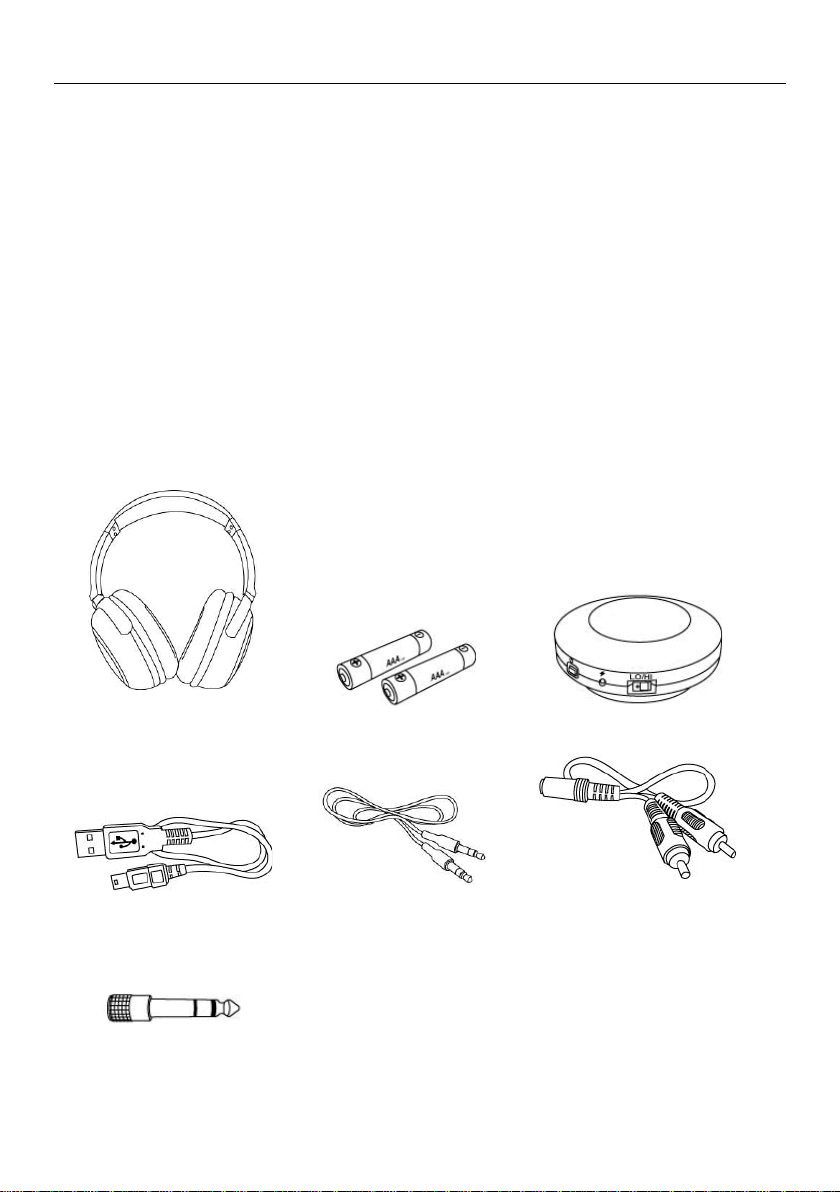
DHP-2000 Digital Wireless
Headphone
Alkaline Battery 1.5V AAA x 2.
DT-200 Digital Transmitter
USB Connection Cable
ψ3.5mm Plug-pin Double Head
Cable
RCA Audio Source Adaptor
Cable
ψ3.5mm→ψ6.3mm Adaptor
Features
● 2.4GHz wireless digital technology make music and movies more enjoyable and
personal.
● USB and 3.5mm/6.3mm Analog audio inputs to work with various players.
● Up to 30-meter working distance. You could do anything while listening to the music
indoor.
● Multi-headphone (DHP-2000) operation with only one transmitter (DT-200).
● Low power consumption. 2 AKLN batteries offer over-20 hours operation.
● 40mm speaker system delivers heavy and distinct bass quality, bright mediant and
treble sound.
● The transmitter can use rechargeable battery to last 3-6 hours of operation.
● The transmitter battery can be recharged by connecting to a USB port or the adaptor.
● Power off automatically after 10 minute pause.
● Suitable for any device with USB input, e.g TV, audio equipment, DVD/CD player, PC,
notebook, iPod, iPhone, MP3 and mobile phones.
● Storage case available for easy protection and carrying.
Components and Accessories
-1-
Page 2
DHP-2000/DT-200 Wireless digital noise reduction headphone
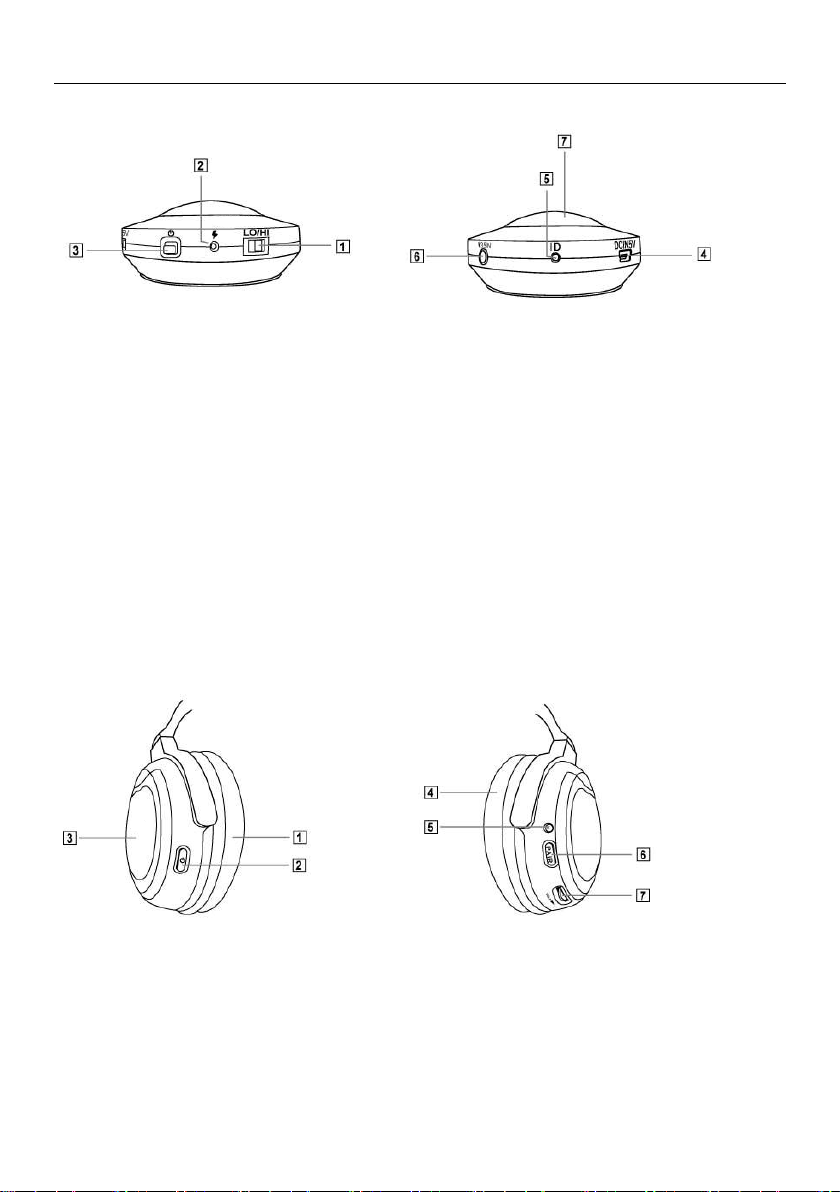
Location and Function of Parts
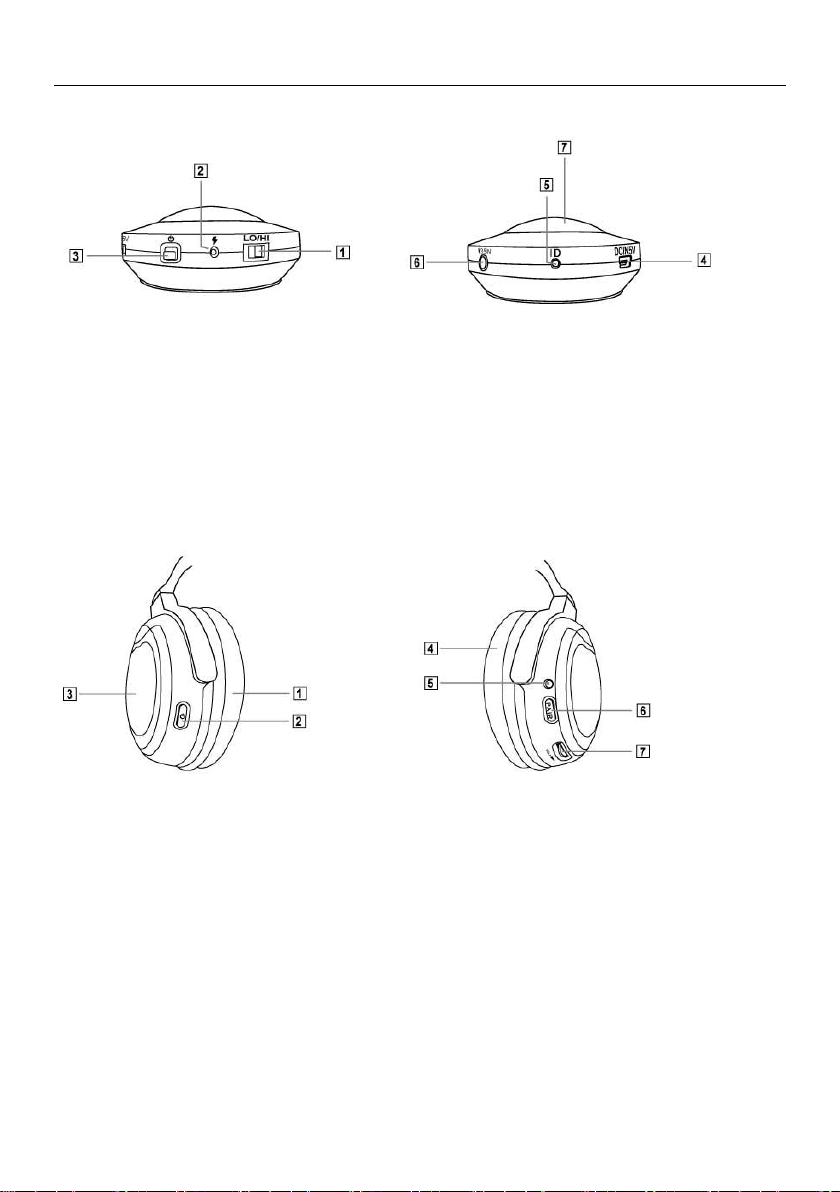
DT-200 Digital Transmitter
1. LO/HI:Frequency Transmit Strength Adjust Button, LO Effective Distance about 10
meters, HI Effective Distance about 30 meters, Higher Power Consumption on HI
simultaneously.
2. Battery Charging Indicator: Indicator will light up red while charging, it will turn off
when charging completes.
3. Power Switch, press and hold lightly for 3 seconds to turn on or shut off.
4. DC IN 5V:USB Connection Port for power charging, or being used simultaneously for
power charging and audio source input operation.
5. ID:Frequency Verification Push Button, it is used for verifying with headphones
frequency.
6. ψ3.5 IN:ψ3.5mm Audio Source Input Hole.
7. Power and Frequency Verification Indicator (Blue): After turning on the power, if the
audio source cable is not connected, it will blink in slow pace, if connected, it lights up
continuingly.
Location and Function of Parts
DHP-2000 Digital Wireless Headphone
1. Ear Pad (Left)
2. Power Switch, press and hold lightly for 3 seconds to turn on or shut off.
3. Battery Cover: please use AAA 1.5V*2 alkaline batteries
4. Ear Pad (Right)
5. Power and Frequency Verification Indicator (Green): it blinks in slow pace after turning
on the power, it keeps on lighting up after frequency verification completes.
6. PAIR: Frequency Verification Push Button, it is used for frequency verifying with the
transmitter.
7. VOL: Volume Adjust Button to adjust the volume level.
-2-
Page 3
DHP-2000/DT-200 Wireless digital noise reduction headphone
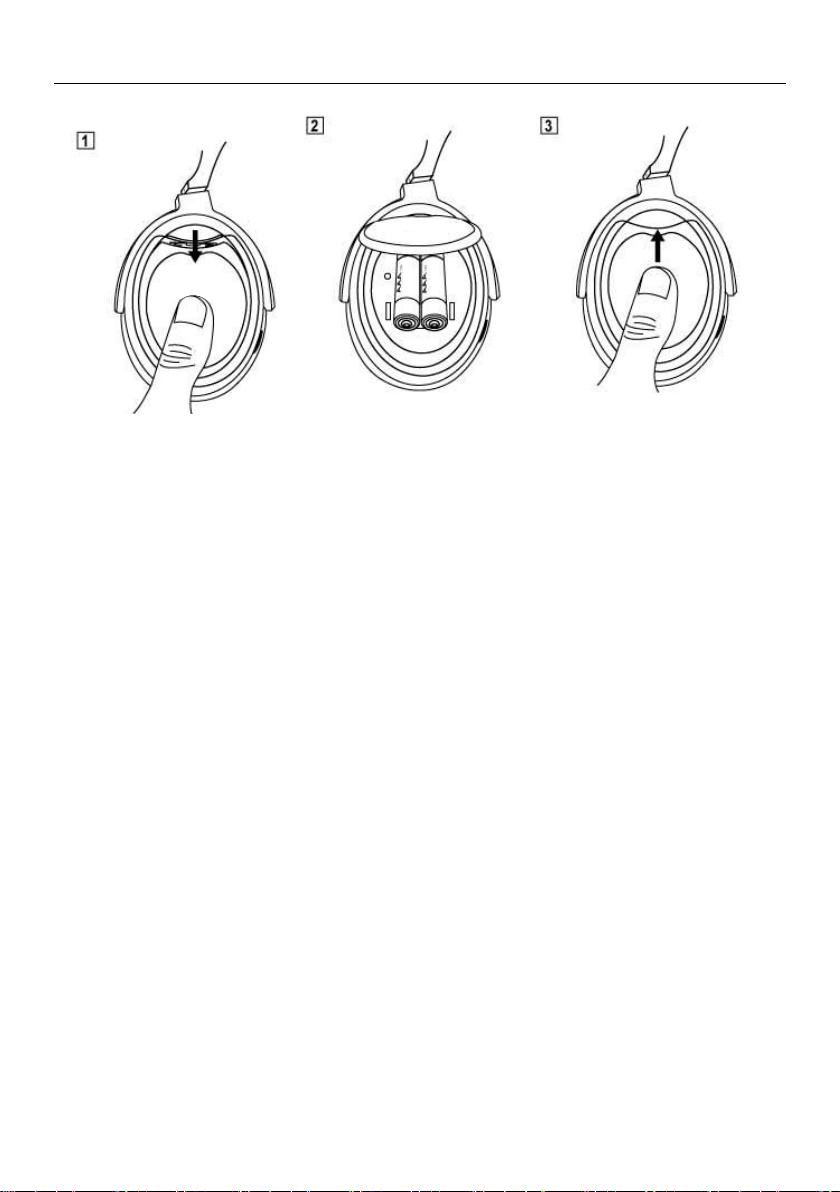
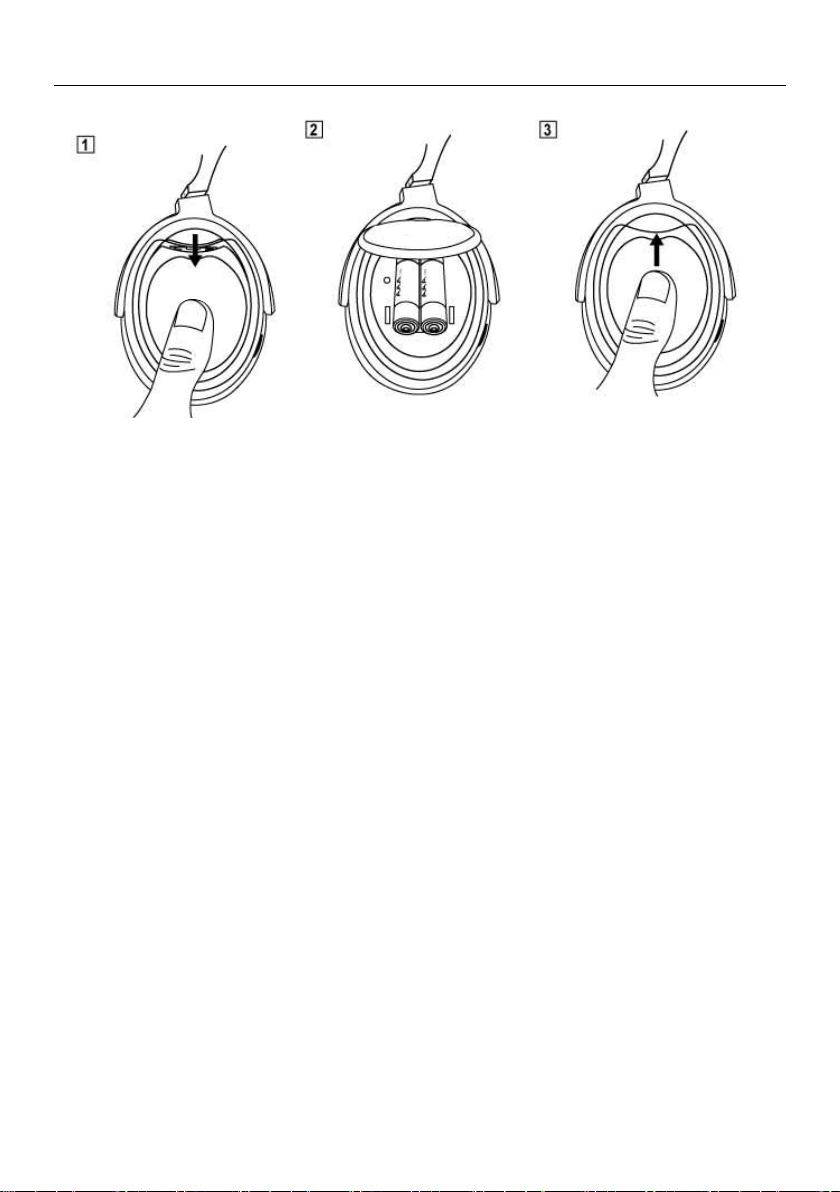
Battery Inserting (Installation)
1. Pressing down lightly the battery cover and opening the cover.
2. Inserting the batteries (AAA 1.5V x 2 Alkaline Batteries)
3. Restoring the battery cover and pushing up lightly and close up the battery cover.
Transmitter and Headphone Frequency Verification as well as Usage
Frequency verification for transmitter and the headphones has already been completed
before delivery from the factory, please follow the operation instructions below:
1. Connecting the transmitter with connection cable to the player device (iPod, iPhone,
MP3, PC, NB, etc.,), proceed to input audio source and confirm that the player has
been turned on for music playing.
2. Pressing lightly on the transmitter power switch () for 3 seconds to turn on the
transmitter power, now, the power and frequency verification indicator (Blue) will light
up continuingly.
3. Pressing lightly on the headphones power switch () for 3 seconds to turn on the
headphones power, now, the power and frequency verification indicator (Green) will
light up continuingly.
4. Wearing on properly the headphones and enjoying cozily and happily the wireless
freedom and relaxation.
If there are other factors of requirement to add more headphones for using transmitter
concurrently, it will be necessary to proceed with the frequency verification between the
transmitter and the headphones, please follow the operation procedure below:
1. Connecting the transmitter with connection cable to the player device (iPod, iPhone,
MP3, PC, NB, etc.,), proceed to input audio source and confirm that the player has
been turned on for music playing.
2. Pressing lightly on the transmitter power switch () for 3 seconds to turn on the
transmitter power, now, the power and frequency verification indicator (Blue) will be
kept constant on.
3. Using pen tip to press lightly on the transmitter frequency verification button (ID) for 3
seconds, now, the power and frequency verification indicator (Blue) will blink in quick
pace.
-3-
Page 4

DHP-2000/DT-200 Wireless digital noise reduction headphone
4. Press lightly on the headphones power switch for 3 seconds to turn on headphones
power, now, the power and frequency verification indicator (Green) will blink in slow
pace.
5. Hand-pressing on the headphones frequency verification push button (PAIR) to
proceed the frequency verification (pairing) operation with the transmitter (for about
more than 3 seconds), until one hears the “bi” sound in the headphones and the
transmitter frequency verification indicator has been kept constant on, it indicates that
frequency verification (pairing) has been completed.
6. When it has been connected for frequency verification, if the frequency verification
indicator blinks in slow pace, it indicates it is in the progress of channel searching,
quick blinking means in the progress of frequency verifying, if it is constant on, it
represents the frequency verification has been completed and the device is ready for
use.
Other Instructions:
1. After completing the frequency verification and the product is set to normal use, when
the audio source stops playing, the power and pairing indicator will blink in slow pace;
if the audio source turns to normal playing, the indicator will be reset to constant on.
2. After completing the frequency verification, if the device is enabled for re-operation
after being turned off, it is not necessary to perform the frequency verification and the
device is ready for direct use by turning it on. When stop using, please turn off both
the power switches of the transmitter and headphones to avoid unnecessary power
consumption.
3. When the transmitter is connected at the same time to USB connection cable and
ψ3.5mm plug pin double head connection cable, theψ3.5mm IN connection cable will
be selected with priority for audio input; the USB connection cable input will then be
automatically transferred into charging function.
4. When using on TV, DVD player, please use RCA audio adaptor connection cable to
connect to ψ3.5mm plug-pin double-head connection cable for connecting the
transmitter to proceed with audio input.
Troubleshooting
Weak headphones volume or no sound at all
1. Adjusting headphones volume switch
2. Checking whether the audio source playing is stopped or the volume is too low.
3. Moving the headphones near to the wireless transmitter
4. Performing the frequency verification between the headphones and transmitter once
again
Headphones indicator (Green) is not on
1. Shutting off the headphones power and restart it.
2. Replacing batteries (AAA 1.5V*2 Alkaline Batteries)
Headphone connection can not be set up (Indicator blinks)
1. Moving the headphones near to the wireless transmitter
2. Making sure whether the connection of the wireless transmitter and the audio source
player are properly connected and whether the audio source is playing normally.
-4-
Page 5

DHP-2000/DT-200 Wireless digital noise reduction headphone
3. Shutting off the headphones power and restart it.
Transmitter indicator (Blue) is not on
1. Confirming that the wireless transmitter has been properly connected to PC or NB via
the USB transmission
2. When using ψ3.5mm plug pin double head connection cable to perform the audio
source input, the indicator is still not on
3. Using USB connection cable to perform the charging by connecting to PC or NB or
plugging the USB power adaptor in the AC socket for charging
Precautions
1. It may impact your hearing when wearing the headphones with high volume or for
long-time usage
2. Do not use and store the device in high temperature, high humidity and dusty places
and keep the device at a place not reachable by children under three.
3. Do not drop off or hit with force to prevent from the damage of the internal circuit
board
4. Do not place heavy object or apply pressure on the headphones, otherwise, it may be
deformed in shape after long-time storage.
5. Using soft cloth for wiping when it gets dirty, do not wipe with chemical organic
solvent
6. Dirtiness or dust on all kinds of plugs will impact the transmission quality of the audio
source, please use soft cloth for clean wiping.
7. Do not use when it is stained by water, it could only be reused after it has been
completely dried.
8. Aging may occur if the ear pad has been stored for long time or because of wearing.
-5-
Page 6

DHP-2000/DT-200 Wireless digital noise reduction headphone
Federal Communication Commission Interference Statement
This equipment has been tested and found to comply with the limits for a Class B digital
device, pursuant to Part 15 of the FCC Rules. These limits are designed to provide
reasonable protection against harmful interference in a residential installation. This
equipment generates, uses and can radiate radio frequency energy and, if not installed
and used in accordance with the instructions, may cause harmful interference to radio
communications. However, there is no guarantee that interference will not occur in a
particular installation. If this equipment does cause harmful interference to radio or
television reception, which can be determined by turning the equipment off and on, the
user is encouraged to try to correct the interference by one of the following measures: (1)
Reorient or relocate the receiving antenna. (2) Increase the separation between the
equipment and receiver. (3) Connect the equipment into an outlet on a circuit different
from that to which the receiver is connected. (4) Consult the dealer or an experienced
radio/TV technician for help.
FCC Caution
To assure continued compliance, any changes or modifications not expressly approved by
the party responsible for compliance could void the user's authority to operate this
equipment. (Example - use only shielded interface cables when connecting to computer
or peripheral devices). This device complies with Part 15 of the FCC Rules. Operation is
subject to the following two conditions: (1) This device may not cause harmful
interference, and (2) This device must accept any interference received, including
interference that may cause undesired operation.
FCC Radiation Exposure Statement
This equipment complies with FCC RF radiation exposure limits set forth for an
uncontrolled environment.
This transmitter must not be co-located or operating in conjunction with any other
antenna or transmitter.
-6-
Page 7
DHP-2000/DT-200 數位無線抗噪頭戴式耳機
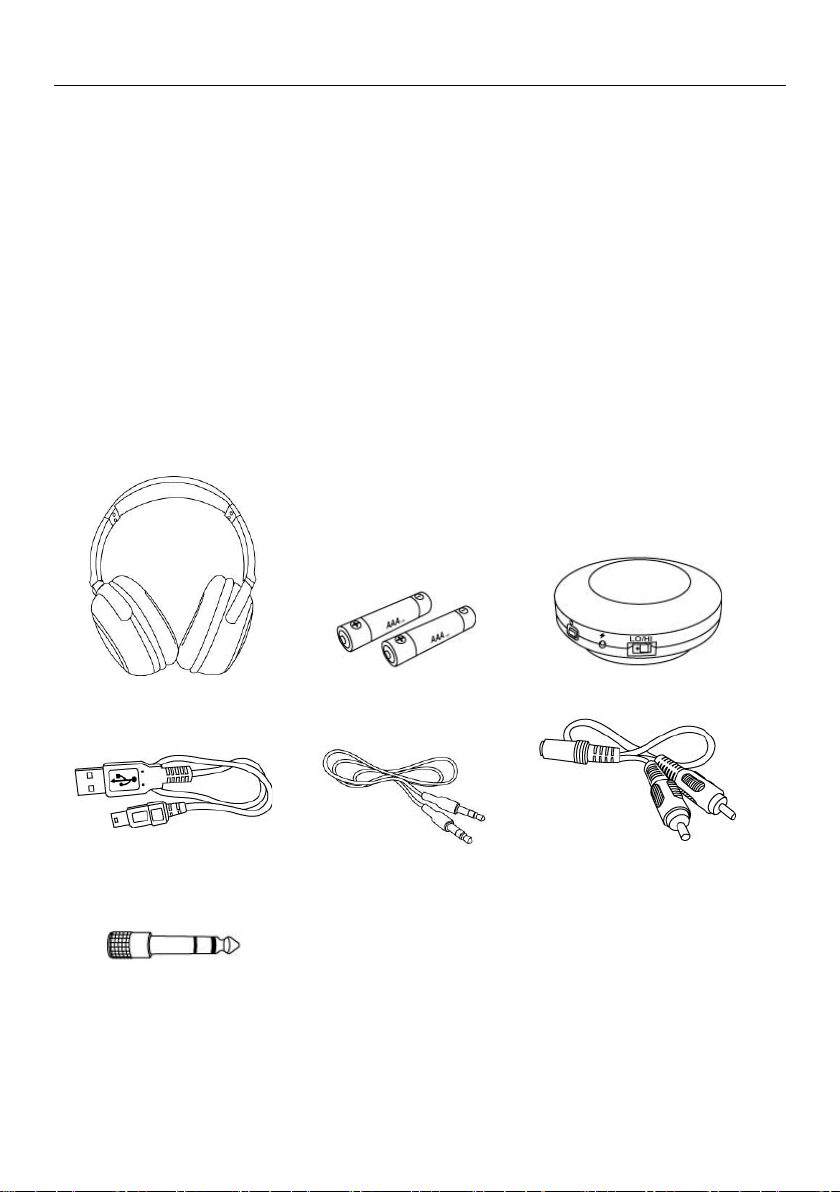
DHP-2000 數位無線耳機
鹼性電池 1.5V AAA x 2 顆
DT-200 數位發射器
USB 連接線
ψ3.5mm 插針雙頭連接線
RCA 音源轉接線
ψ3.5mm→ψ6.3mm 轉接頭
特色
● 2.4GHz 無線數位傳輸,讓聽音樂、看電影更自由與個人化,不干擾到別人。
● USB / Analog(3.5mm & 6.3mm 插針)雙重的音源輸入方式,方便各種播放器的配用。
● 有效接收距離 30 公尺,你可以在室內邊聽音樂邊做你想做的事情。
● 一個發射器(DT-200)可以使用多支耳機(DHP-2000)同時接收聲音。
● 耳機耗電量低,一般鹼性電池(1.5V AAA x2)可以使用 20 小時以上。
● 耳機採用大口徑 40mm 喇叭單元,低音渾厚分明,中高音清澈、明亮,忠實呈現出中低音
效果及原音的重現。
● 發射器採用充電式電池,可以使用 3-6 小時,方便於外出時使用。
● 發射器也可以使用 USB 連接線直接連結 USB 連接埠供電使用,或是選擇 USB 電源轉換器連
結 USB 連接線供電使用。
● 自動睡眠裝置,音源中斷約 10 分鐘後,耳機及發射器將自動關機。
● 適用於電視、音響、DVD/CD 播放機,桌上電腦、手提電腦,iPod、iPhone、MP3、手機等
有 USB 連接埠,以及 φ3.5mm 插針或 φ6.3mm 插針的音源輸出孔的任何播放器。
● 收納便攜盒,提供貼心的商品保存與攜帶的方便。
內容
-7-
Page 8
DHP-2000/DT-200 數位無線抗噪頭戴式耳機
各部名稱介紹
DT-200 數位發射器
1. LO/HI:頻率發射強度調整鈕,LO 有效距離約 10 公尺,HI 有效距離約 30 公尺,HI 耗電量
較大。
2. 電池充電指示燈,充電時紅燈亮,充電完成紅燈不亮。
3. 電源開關,輕按三秒啟動或關閉。
4. DC IN 5V:USB 連接埠,電池充電用,或是同時進行電池充電與音源輸入的操作使用。
5. ID:對頻按鍵,與耳機對頻時使用。
6. ψ3.5 IN:ψ3.5mm 音源輸入孔。
7. 電源與對頻指示燈(藍燈):電源開啟後,若音源線未連線則慢閃,連線後恆亮。
DHP-2000 數位無線耳機
1. 耳墊(左)。
2. 電源開關,輕按三秒啟動或關閉。
3. 電池蓋:使用 AAA 1.5V*2 鹼性電池。
4. 耳墊(右)。
5. 電源與對頻指示燈(綠燈):電源開啟時慢閃,對頻完成恆亮。
6. PAIR:對頻按鍵,與發射器對頻時使用。
7. VOL:音量調整鈕,調整耳機音量的大小。
-8-
Page 9
DHP-2000/DT-200 數位無線抗噪頭戴式耳機
電池安裝
1. 輕壓下推電池蓋,打開電池蓋。
2. 放入電池(AAA 1.5V x 2 鹼性電池)。
3. 蓋上電池蓋及輕壓上推關閉電池蓋。
發射器與耳機對頻與使用
發射器與耳機在出廠時就已經完成對頻,請依如下作業使用就可以。
1. 發射器以連接線連接好播音器(iPod、iPhone、MP3, PC, NB ---),進行音源的輸入,並且確認
播音器已經開啟播放音源。
2. 輕壓發射器的電源開關三秒鐘,啟動發射器電源,此時電源與對頻指示燈(藍燈)恒亮。
3. 輕壓耳機的電源開關三秒鐘,啟動耳機電源,此時電源與對頻指示燈(綠燈)恒亮。
4. 正確的配戴上耳機,輕鬆愉快的享受無線的自由自在。
若有其他因素需要或新增耳機共用發射器時,需要進行發射器與耳機的對頻,請依如下作業
程序:
1. 發射器已經連接線連接好播音器(iPod、iPhone、MP3, PC, NB ---),進行音源的輸入,並且確
認播音器已經開啟播放音源。
2. 輕壓發射器的電源開關()三秒鐘,啟動發射器電源,此時電源與對頻指示燈(藍燈)恒亮。
3. 以筆尖輕壓發射器對頻按鍵(ID)三秒鐘,此時電源與對頻指示燈(藍燈)快閃。
4. 輕壓耳機的電源開關()三秒鐘,啟動耳機電源,此時電源與對頻指示燈(綠燈)為慢閃。
5. 手按住耳機對頻按鍵(PAIR)進行與發射器的對頻作業(約 3 秒以上),直到耳機”嗶”一聲及發
射器的對頻指示燈都恒亮為止,此時表示對頻完成。
6. 已經連線對頻時,對頻指示燈慢閃表示搜尋頻道中,快閃表示對頻中,恒亮表示對頻完成
可以使用。
其他說明
1. 對頻完成後,產品在正常使用中,當音源停止播放時,電源與對頻指示燈將顯示慢閃,音
源正常播放後恢復恒亮。
2. 完成對頻之後,關機之後的再使用,不需再進行對頻就可以直接開機使用。
3. 停止使用時,請將發射器與耳機電源開關關閉,避免電池不必要的電力損耗。
4. 當發射器同時連結 USB 連接線與 ψ3.5mm 插針雙頭連接線時,音源輸入將優先選擇ψ3.5 IN
之 ψ3.5mm 連接線,此時 USB 連接線輸入自動轉成充電功能。
-9-
Page 10

DHP-2000/DT-200 數位無線抗噪頭戴式耳機
5. 當使用於電視、DVD 播放機時,請以 RCA 音源轉接線連結 ψ3.5mm 插針雙頭連接線,連接
發射器進行音源的輸入。
疑難排解
耳機聲音微弱或沒聲音
1. 調整耳機音量開關。
2. 檢查音源播放是否停止或音量過小。
3. 將耳機移近無線發射器。
4. 將耳機與發射器重新對頻一次。
耳機指示燈(綠燈)沒亮
1. 關閉耳機電源並重新啟動。
2. 更換電池(AAA 1.5V*2 鹼性電池)。
耳機無法建立連接(指示燈閃爍)
1. 將耳機移近無線發射器。
2. 確認無線發射器與音源播放器的聯接是否正常?而且音源正常播放中。
3. 關閉耳機電源並重新啟動。
發射器指示燈(藍燈)沒亮
1. 確認無線發射器已透過 USB 傳輸線,完成與 PC 或 NB 的正確連結。
2. 以 ψ3.5mm 插針雙頭連接線進行音源輸入時,指示燈仍然沒亮。
3. 透過 USB 連接線與 PC 或 NB 連結進行充電,或是以 USB 電源轉換器插在 AC 插座進行充電。
注意事項
1. 佩戴耳機以高音量、過長使間使用,可能會影響你的聽力。
2. 不要在高溫、高濕、多灰塵的地方使用與保存,並放置三歲以下幼兒拿不到的地方。
3. 不可重力摔落、撞擊,以免傷害內部的電路板。
4. 請勿在耳機上放置重物或施加壓力,否則在長期存放中會造成耳機變形。
5. 髒污時以柔軟的布擦拭,不可以用化學品類的有機溶劑擦拭。
6. 各種插頭髒污或有灰塵會影響音源的傳輸品質,請用柔軟的布擦拭。
7. 沾到水時不可使用,需待完全乾燥之後才可以使用。
8. 耳墊可能會由於長期存放或使用而老化。
-10-
Page 11

DHP-2000/DT-200 數位無線抗噪頭戴式耳機
-11-
Page 12

DHP-2000/DT-200 數位無線抗噪頭戴式耳機
12I0028
-12-
 Loading...