

Page 1

Audio User Guide
MODEL#: W100-41
SAVE THESE INSTRUCTIONS
All Rights Reserved. Page 1 of 19
Page 2

Table of Contents
Table of Contents ....................................................................................2
1 Components List ...............................................................................3
2 Notice ................................................................................................4
2.1 Notice of Compliance ...................................................................................... 4
2.2 Trademark ........................................................................................................ 5
3 Important ...........................................................................................5
2.1 Important safety instructions ........................................................................... 5
2.2 Care of the environment .................................................................................. 9
4 Your product ....................................................................................10
4.1 Main unit ........................................................................................................ 10
4.1.1 Top panel of main unit .......................................................................... 10
4.1.2 Back connectors of main unit ............................................................... 10
4.2 Remote control .............................................................................................. 11
4.2.1 Replace battery.....................................................................................12
5 Connect and set up ..........................................................................12
5.1 Position the product....................................................................................... 12
5.2 Connections ................................................................................................... 13
5.3 Connect audio from other device ..................................................................14
6 Use your product ..............................................................................15
6.1 Adjust the volume ......................................................................................... 15
6.2 Choose your sound ........................................................................................ 15
6.3 Equalizer ........................................................................................................15
6.4 Play audio through Bluetooth......................................................................... 15
6.5 Night mode .................................................................................................... 16
6.6 USB storage devices ..................................................................................... 16
6.7 Set display brightness....................................................................................17
6.8 Auto standby..................................................................................................17
6.9 Apply factory settings .................................................................................... 17
7 Product specifications ....................................................................18
8 Troubleshooting ...............................................................................19
MODEL#: W100-41 Page 2 of 19
Page 3

MODEL#: W100-41 Page 3 of 19
1 Components List
The product package should include the following items, contact with your dealers
if any component is missing or damaged:
Figure Descripon Quanty
Main Unit
Power Adapter
Power Cord
Remote Control
AAA Baery
User Guide
1PC
1PC
1PC
1PC
1PAIR
1PC
Page 4

2 Notice
This section contains the legal and trademark notices.
2.1 Notice of Compliance
This device complies with Part 15 of the FCC Rules. Operation is subject to the following
two conditions:
a this device may not cause harmful interference, and
b this device must accept any interference received, including interference that may
cause undesired operation.
FCC rules
This equipment has been tested and found to comply with the limits for a Class B digital
device, pursuant to part 15 of the FCC Rules. These limits are designed to provide
reasonable protection against harmful interference in a residential installation. This
equipment generates uses and can radiate radio frequency energy and, if not installed
and used in accordance with the instructions, may cause harmful interference to radio
communications. However, there is no guarantee that interference will not occur in
a particular installation. If this equipment does cause harmful interference to radio or
television reception, which can be determined by turning the equipment off and on, the
user is encouraged to try to correct the interference by one or more of the following
measures:
• Reorient or relocate the receiving antenna.
• Increase the separation between the equipment and receiver.
• Connect the equipment into an outlet on a circuit different from that to which the
receiver is connected.
• Consult the dealer or an experienced radio/TV technician for help.
This transmitter must not be co-located or operated in conjunction with any other antenna
or transmitter.
FCC Warning: Any changes or modications made to this device that are not expressly
approved by Cheron Technologies Limited may void the user’s authority to operate the
equipment.
Model number: W100-41
Trade name: CHERON
Canada:
CAN ICES-3 (B)/NMB-3(B)
The device meets the exemption from the routine evaluation limits in section 2.5 of RSS
102 and compliance with RSS-102 RF exposure, users can obtain Canadian information on
RF exposure and compliance.
This device complies with Industry Canada licence-exempt RSS standard(s). Operation is
subject to the following two conditions:
MODEL#: W100-41 Page 4 of 19
Page 5

MODEL#: W100-41 Page 5 of 19
(1) this device may not cause interference, and
(2) this device must accept any interference, including interference that may cause
undesired operation of the device.
2.2 Trademarks
Manufactured under license from Dolby Laboratories. Dolby and the double-D symbol are
trademarks of Dolby Laboratories.
The Bluetooth® word mark and logos are registered trademarks owned by Bluetooth SIG,
Inc. and any use of such marks by Cheron Technologies Limited is under license. Other
trademarks and trade names are those of their respective owners.
The terms HDMI and HDMI High-Denition Multimedia Interface, and the HDMI Logo are
trademarks or registered trademarks of HDMI Licensing LLC in the United States and other
countries.
3 Important
Read and understand all instructions before you use your product. If damage is caused by
failure to follow instructions, the warranty does not apply.
3.1 Important safety instructions
WARNING
It is very important that you read, understand and carefully follow all
portions of this User Guide as well as all safety instruction, warnings and related information.
Failure to do so could result in serious injury, death or property damage. Not for use by
children. Never let children operate or play with this product or leave children around the
product unsupervised.
• Read these instructions.
• Keep these instructions.
• Heed all warnings.
• Follow all instructions.
Page 6

MODEL#: W100-41 Page 6 of 19
• Do not use this apparatus near water.
• Clean only with dry cloth.
• Do not block any ventilation openings. Install in accordance with the
manufacturer’s instructions.
• Do not install near any heat sources such as radiators, heat registers, stoves,
or other apparatus (including ampliers) that produce heat.
• Do not defeat the safety purpose of the polarized or grounding-type plug. A
polarized plug has two blades with one wider than the other. A grounding type plug has
two blades and a third grounding prong. The wide blade or the third prong are provided
for your safety. If the provided plug does not t into your outlet, consult an electrician
for replacement of the obsolete outlet.
• Protect the power cord from being walked on or pinched, particularly at plugs,
convenience receptacles, and the point where they exit from the apparatus.
• Only use attachments/accessories specied by the manufacturer.
• Use only with the cart, stand, tripod, bracket or table specied by the
manufacturer, or sold with the apparatus. When a cart is used, use caution when
moving the cart/apparatus combination to avoid injury from tip-over.
•
WARNING
Unplug this apparatus during lightning storm or when
unused for long periods of time.
• Refer all servicing to qualified service personnel. Servicing is required
when the apparatus has been damaged in any way, such as powersupply cord or plug is damaged, liquid has been spilled or objects have
fallen into the apparatus, the apparatus has been exposed to rain or
moisture, does not operate normally, or has been dropped.
* Denition of a convenience plug, it is the same as an electrical outlet.
Page 7

• In order to avoid the risk of fire, electric shock, serious bodily injury,
death or property damage, this product must not be stored or used in or
around water or any other type of liquid.
•
WARNING
To avoid the risk of fire, serious bodily injury, death or
property damage, do not block any ventilation openings on the unit.
The unit must be carefully installed and operated according to the
manufacturer’s instructions.
• Do not alter or attempt to defeat the polarized or grounding-type plug. A
polarized plug has two blades with one wider than the other. A grounding type plug has
two blades and a third grounding prong. The wide blade or the third prong are provided
for your safety. If the grounded plug does not t into your outlet, do not attempt to
plug in or use the product. Instead, please contact a properly trained and licensed
electrician to install an appropriate outlet made to be used with the grounded plug
on this product. Altering or defeating the grounded plug may result in electric shock,
serious bodily injury, death or property damage.
• It is important to prevent any part of the cord from being walked
on, covered, pinched, crushed, cut or otherwise damaged. Failure to
prevent such damage to the cord could result in fire, shock, serious
bodily injury, death or property damage.
•
WARNING
Battery usage CAUTION - To prevent battery leakage
which may result in serious bodily injury, property damage, death or
damage to the unit:
• Install all batteries correctly, + and - as marked on the unit.
• Remove batteries when the unit is not used for a long time.
• The batteries (battery pack or batteries installed) shall not be
exposed to excessive heat.
•
WARNING
DO NOT INGEST BATTERY, CHEMICAL BURN HAZARD
OR OTHER SERIOUS BODILY INJURY OR DEATH.
•
CAUTION
Danger of explosion if battery is incorrectly replaced.
Replace only with the same or equivalent type.
•
CAUTION
Explosion, death, serious bodily injury, fire or other
property damage may occur if an improper battery is placed in this unit.
Be sure to replace with the (insert AAA battery specs here) battery only.
MODEL#: W100-41 Page 7 of 19
Page 8
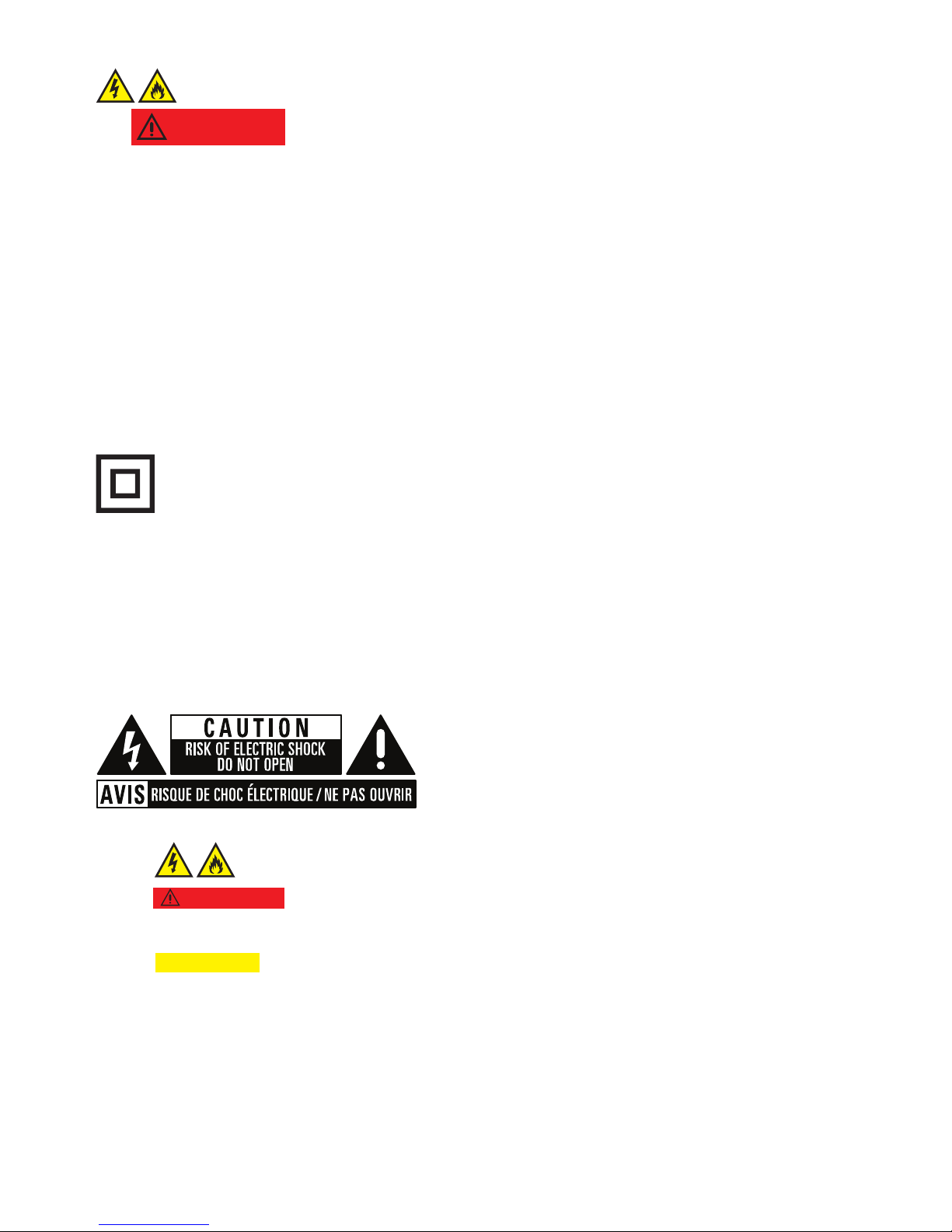
Class II equipment symbol
This symbol indicates that the unit has a double insulation system.
~
AC voltage
•
WARNING:
To reduce the risk of re or electric shock, this apparatus should not be
exposed to rain or moisture and objects lled with liquids, such as vases, should not be
placed on this apparatus.
•
CAUTION:
To prevent electric shock, serious bodily injury or death, do not open or
disassemble the unit.
MODEL#: W100-41 Page 8 of 19
•
WARNING
To reduce the risk of fire, shock, death, serious bodily
injury or property damage, do not place any candles on the unit or items
containing any liquid.
• Where the MAINS plug or an appliance coupler is used as the disconnect
device, the disconnect device shall remain readily operable.
* Denition of a MAINS : It is the principal pipe, conduit, duct, or line in a system used to
distribute electricity, the MAINS Plug is the Plug at the end of the wire.
• Magnetized cards, watches, etc., can be damaged if installed too close
to this unit.
Page 9

3.2 Care of the environment
Your product is designed and manufactured with high quality materials and components,
many of which can be recycled and reused.
The batteries supplied do not contain the heavy metals mercury and cadmium.
Nevertheless, in many areas batteries may not be disposed of with your household waste.
Please ensure you dispose of batteries according to local regulations.
MODEL#: W100-41 Page 9 of 19
Page 10
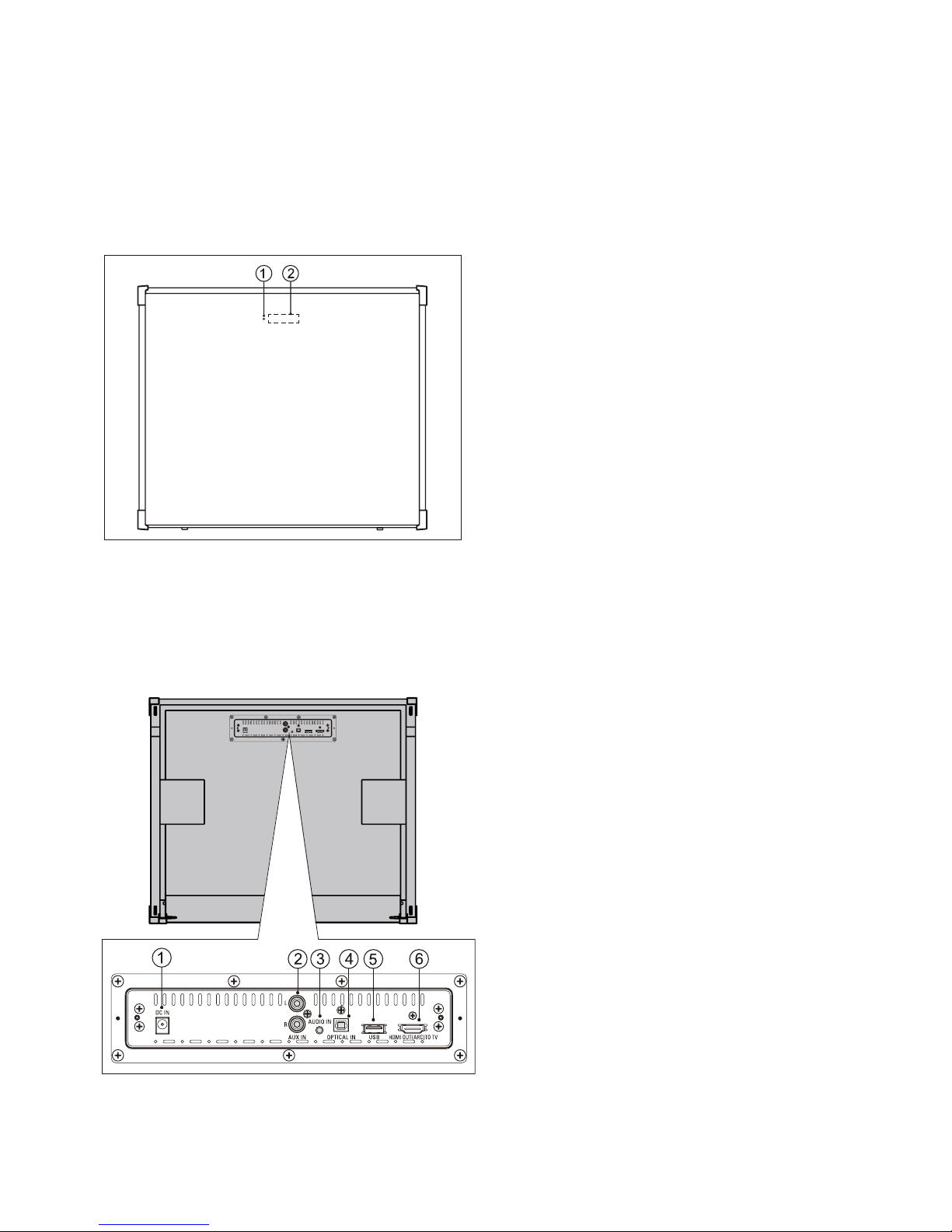
4 Your product
Congratulations on your purchase.
4.1 Main unit
4.1.1 Top panel of main unit
4.1.2 Back connectors of main unit
Connect other devices to your product.
a DC IN
Connect to AC power supply.
b AUX IN
Connect to an analog audio output on
TV or an analog device.
c AUDIO IN
Connect to TV or a MP3 player.
d OPTICAL IN
Connect to an optical audio output on
TV or a digital device.
e USB
Connect to an optical audio output on
TV or a digital device.
• Audio input from a USB storage
device.
f HDMI OUT (ARC) TO TV
Connect to the HDMI input on TV.
a Standby indicator
Standby indicator turn on red when unit
is standby mode.
b Display panel
MODEL#: W100-41 Page 10 of 19
Page 11
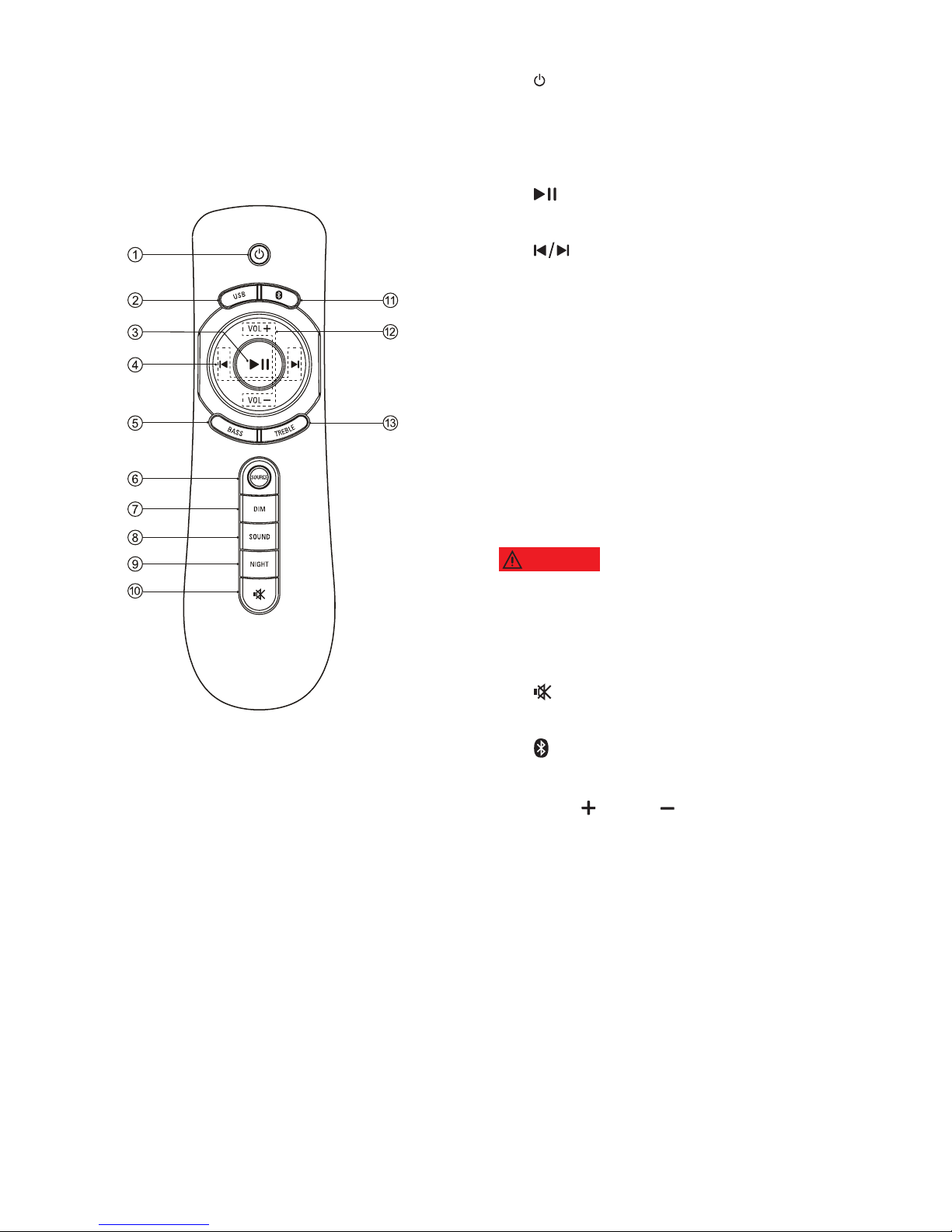
a (Standby-On)
Turn main unit on or off.
b USB
Switch to USB mode.
c (Play/Pause)
Start, pause or resume play.
d (Previous/Next)
Skip to the previous or next track.
e BASS
Increase or decrease bass.
f SOURCE
Select an input source for the product.
g DIM
Select brightness of the display panel
for this product.
h SOUND
Select a sound mode.
WARNING
Listening to music at a high volume
may cause temporary or permanent damage to your
hearing.
i NIGHT
Turn night mode on or off.
j (MUTE)
Mute or restore volume.
k (Bluetooth)
Select to Bluetooth mode.
l VOL / VOL
Increase or decrease volume.
m TREBLE
Increase or decrease treble.
4.2 Remote control
MODEL#: W100-41 Page 11 of 19
Page 12
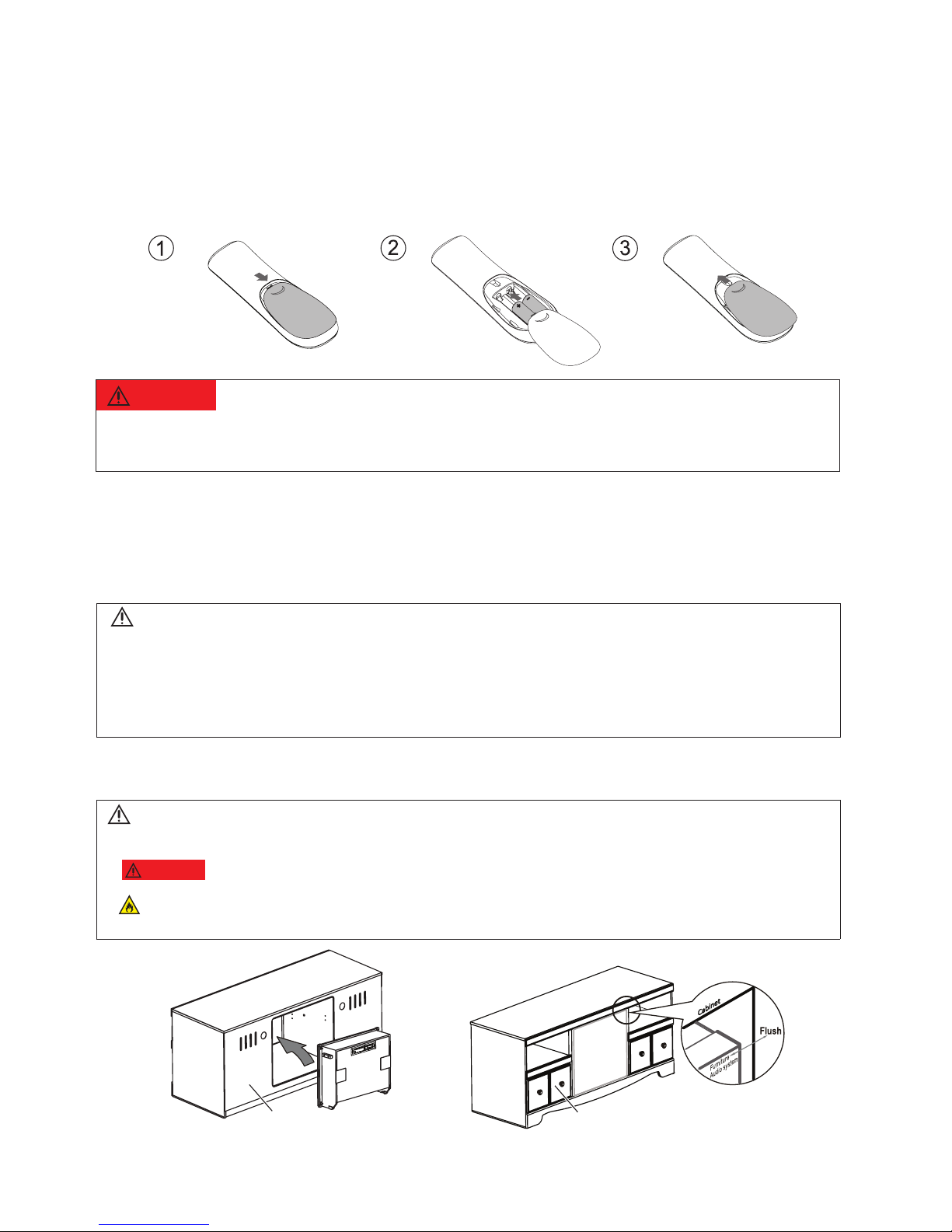
4.2.1 Replace battery
a Open the battery compartment.
b Insert “2 x AAA-R03-1.5 V” batteries, with the polarity (+/-) as indicated.
c Close the battery compartment.
5 Connect and set up
This section guide you to connect to TV and other signal device for set up.
5.1 Position the product
Note
• For identication and supply ratings, see the type plate at the back or bottom of the product.
• Before you make or change any connections, make sure that all devices are disconnected from the power
outlet.
• If the product is transported in temperatures below 43
˚
F (5
˚
C), unpack the product and wait until its
temperature matches room temperature before connecting it to the power outlet.
BACK
FRONT
Warning
• Danger of explosion included serious bodily injury, property damage, death or damage, if battery is incorrectly
replaced. Replace only with the same or equivalent type.
Note
• Please gently push the product from the back of the furniture, until the surface is ush with furniture.
•
WARNING
Never install this product in a conned space. Always leave a space of at least 4 inches back the
product for ventilation. Ensure other objects never cover the ventilation slots on the product.
Failure to ensure at least 4 inches of space back the product may cause re, property damage, serious bodily
injury, or death.
MODEL#: W100-41 Page 12 of 19
Page 13
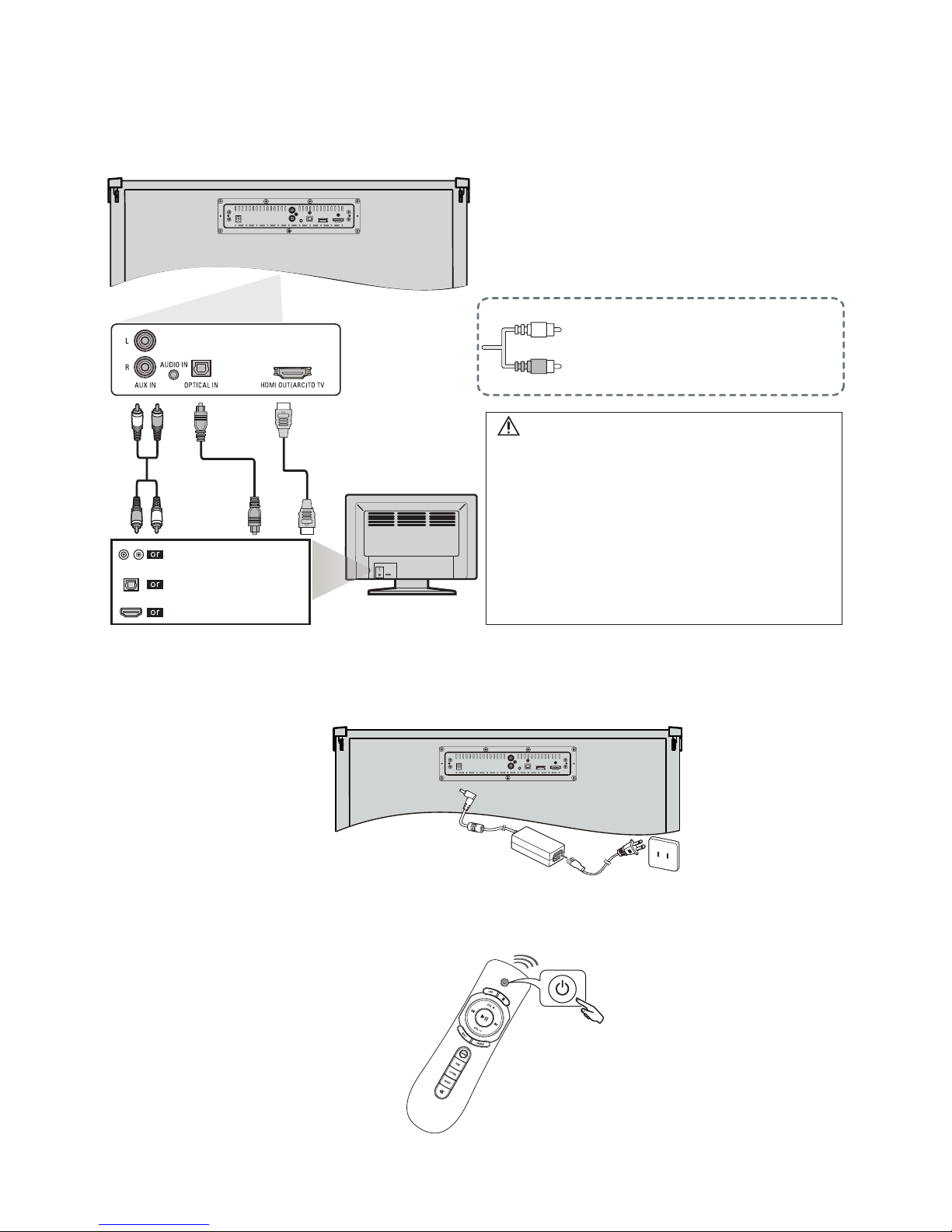
5.2 Connections
5.2.1 Connect To TV
5.2.2 Connect AC plug into AC outlet.
5.2.3 Turn on the product.
Please refer to “Play audio through
Bluetooth” on 6.4 when you use
Bluetooth.
HDMI Cable
OPTICAL Cable
AUDIO Cable
AUDIO OUTPUT
HDMI IN
OPTICAL OUTPUT
DIGITAL AUDIO OUT (OPTICAL)
If your TV does not have audio outputs
shown left, to connect the product
directly to your other devices (Blu-Ray
player, game system, etc.) see your
device’ s user manual.
Note
• Make sure the unit is Turned Off when connecting.
• Check whether the connection for all cables are
connected tightly.
• If you connect with a Audio in cable, make sure the
volume for the headphone output is appropriate for
the product input.
• If the Audio in volume is too soft, the product may
not output sounds with appropriate volume.
• If the TV provides an ARC port, connect the HDMI
cable to the HDMI IN (ARC) port.
MODEL#: W100-41 Page 13 of 19
Page 14
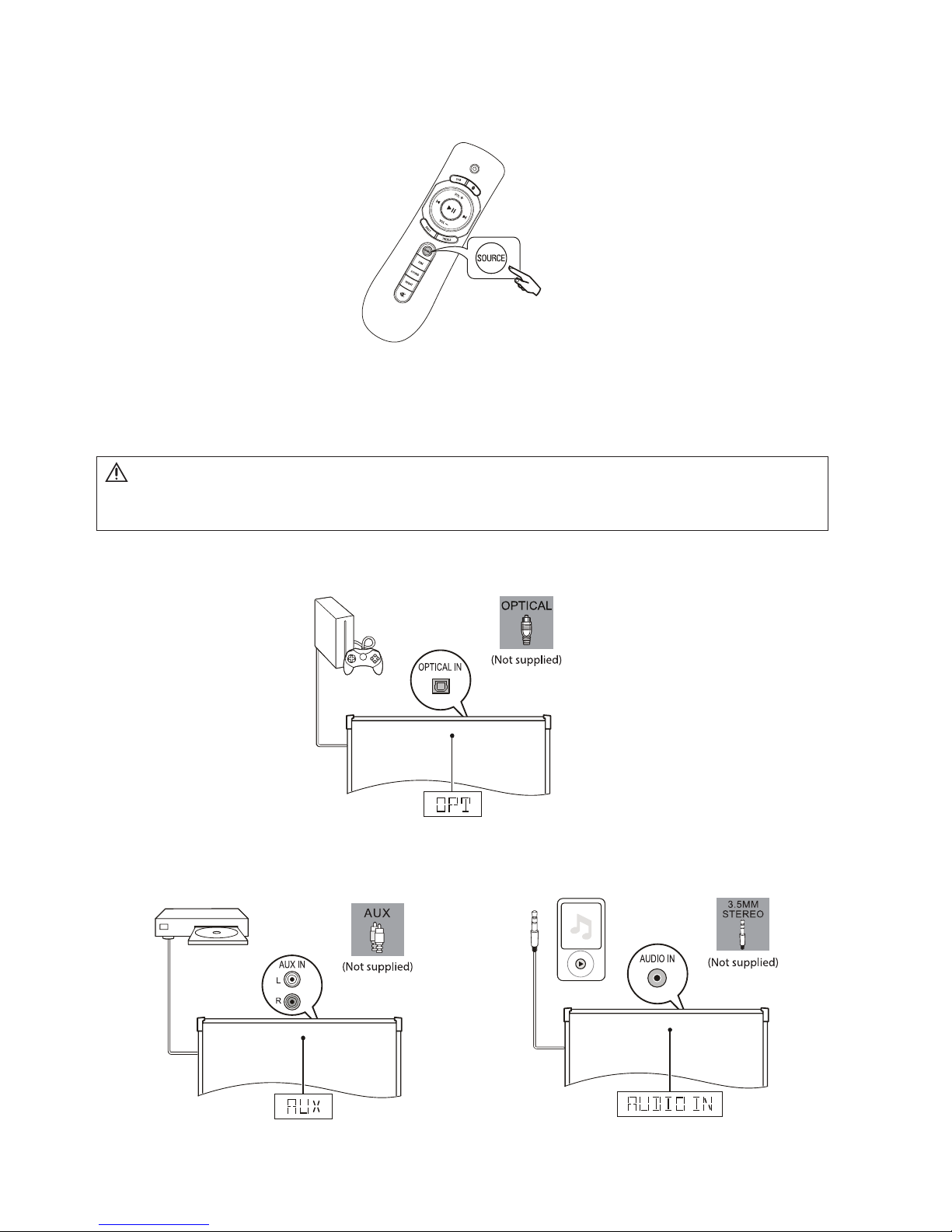
5.2.4 Press repeatedly SOURCE on the remote control to
select the audio output of the connected device.
5.3 Connect audio from other device
Play audio other devices through your product.
Connect audio through a digital optical cable (Not supplied).
Connect audio through analog audio cables (Not supplied).
Note
• During play, do not plug out the audio cable.
MODEL#: W100-41 Page 14 of 19
Page 15

6 Use your product
This section guides you to play audio from connected devices.
Before you start
• Make necessary connections described in this User Manual at previous section,
connect and set up.
• Use remote control to select correct signal source for audio.
6.1 Adjust the volume
1 Press VOL +/- to increase or decrease a volume level.
• To mute sound, press on remote control.
• To restore the sound, press again or press VOL +/-.
WARNING
Listening to music at a high volume may cause temporary or permanent damage to your hearing.
6.2 Choose your sound
Select predened sound modes to suit your video or music.
Sound mode
1 Press SOUND repeatedly to select a sound option from the display panel.
• MUSIC: Recreate the original recording environment of you music, in the studio or
at a concert.
• MOVIE: Enjoy a cinematic audio experience, specially enhanced for movies.
• NEWS: Hear every word with optimized speech and clear vocals.
• CLASSIC: Flat and pure sound mode. Ideal for listening to classical music.
6.3 Equalizer
Change the high frequency (treble) and low frequency (bass) settings of the product.
• Press TREBLE on the remote control, within two seconds, press VOL+/- to increase
or decrease the treble level.
• Press BASS on the remote control, within two seconds, press VOL+/- to increase or
decrease the bass level.
6.4 Play audio through Bluetooth
Connect your product with a Bluetooth device wirelessly (such as an iPad, iPhone, iPod
touch, Android phone, or laptop), and then you can listen to the audio les stored on the
device through the speakers of this product.
MODEL#: W100-41 Page 15 of 19
Page 16
What you need
• A Bluetooth device which supports version as 4.1 + EDR.
1 Press on the remote control to switch the product to Bluetooth mode.
» BT is displayed on the display panel, blinking.
2 On the Bluetooth device, switch on Bluetooth, search for and select W100-41 (see the
User Manual of the Bluetooth device on how to enable Bluetooth).
» During connection, BT on the display panel blinks.
3 Wait until you hear a beep sound from this product.
» When the Bluetooth connection succeeds, BT is displayed on the display panel.
» If the connection fails, BT on the display panel blinks continuously.
4 Select and play audio les or music on your Bluetooth device.
• During play, if a call is coming, music play is paused. Play resumes when the call
ends.
• If your Bluetooth device supports AVRCP prole, on the remote control you can
press / to skip to a track, or press to pause/resume play.
5 To exit Bluetooth, select other source.
• When your switch back to Bluetooth mode, Bluetooth connection remains active.
6.5 Night mode
For quiet listening, night mode decreases the volume of loud sounds when audio is played.
Night mode is only available for Dolby Digital soundtracks.
1 Press NIGHT to turn night mode on or off.
6.6 USB storage devices
Enjoy audio on a USB storage device, such as an MP3 player and USB ash memory, etc.
What you need
• A USB storage device that is formatted for FAT or NTFS le systems, and complies
with the Mass Storage Class.
1 Connect a USB storage device to this product.
2 Press USB on the remote control.
3 Use the remote control to control play.
• Press to start, pause or resume play.
• Press / to skip to the previous or next track.
Note
• The music streaming may be interrupted by obstacles between the device and this product, such as wall,
metallic casing that covers the device, or other devices nearby that operate in the same frequency.
• If you want to connect your product with another Bluetooth device, press and hold on the remote control to
disconnect the currently connected Bluetooth device.
MODEL#: W100-41 Page 16 of 19
Page 17

• During USB play, Press and hold to select one repeat, all repeat, shufe or off
repeat mode.
6.7 Set display brightness
You can press DIM repeatedly to select a different brightness level of the display panel on
this product.
6.8 Auto standby
When playing media from a connected device, the product automatically switches to
standby after 15 minutes if no audio/video signal is received from a connected device.
6.9 Apply factory settings
You can reset this product to the default settings programmed at the factory.
1 Press repeatedly SOURCE on the remote control, until the AUX on the display
panel. In AUX IN mode, on the remote control press VOL -, BASS, and TREBLE in
sequence within three seconds.
» When the factory setting restore is complete, the system shuts down into standby
mode and restart.
Note
• This product may not be compatible with certain types of USB storage device.
• Digital camera PTP and MTP protocols are not supported.
• Do not remove the USB storage device while it is being read.
• DRM-protected music les (MP3, WMA) are not supported.
• Support a USB port: 5V , 1A.
MODEL#: W100-41 Page 17 of 19
Page 18
7 Product
specifications
Specications and design are subject to change without notice.
Specifications
Amplifier
RMS Total output power: 70 W RMS (+/- 0.5 dB, 10% THD)
Frequency response: 20 Hz-20 kHz / ±3 dB
Signal-to-noise ratio: > 65 dB (CCIR) / (A-weighted)
Input sensitivity:
• AUX: 850mV
• AUDIO IN: 400mV
Bluetooth
• Bluetooth proles: A2DP, AVRCP
• Bluetooth version: 4.1 + EDR
USB
•Compatibility: Hi-Speed USB (2.0)
•Class support: USB Mass Storage Class (MSC)
•File system: FAT16, FAT32, NTFS
•Supports MP3 and WMA le formats
Main unit
•Power supply:
• Model (DYS branded AC power adapter): DYS602-210309W;
Manufacture: Dongguan Dongsong Electronic Co., Ltd.
• Input: 100-240 V~, 50/60 Hz 1.5 A
• Output: 21V , 3.09A
• Efciency level:
•Standby power consumption: ≤ 0.5 W
•Speaker impedance: L/R channel 8 ohm & Sub 4 ohm
•Dimensions (WxHxD): 603 x 509 x 216 mm
•Weight: 13.3 kg
•Operating temperature range: +41°F (5°C) to + 95°F (35°C)
Remote control battery
•2 x AAA-R03-1.5 V
MODEL#: W100-41 Page 18 of 19
Page 19

8 Troubleshooting
To keep the warranty valid, never try to repair the product yourself.
Malfunctions may occur with any electrical equipment. This must not always involve a
defect of the device. Therefore, check the following table to see if you can eliminate the
problem yourself.
Malfunction Possible cause/ Elimination
The product does not work.
• Disconnect the product from the power
supply for a few minutes, then reconnect.
No sound from the product
speakers.
• Connect the correct audio cable from your
product to your TV or other devices.
• On your product remote control, press the
Source buttons to select the correct audio
input.
• Make sure that the product is not muted.
Press VOL +/- to restore the sound (see
‘Adjust the volume’ on page 15).
• Switch or set to other audio signal of your
connected external device (This product
support for Dolby Digital and LPCM).
A device cannot connect with the
product via Bluetooth.
• The device does not support the compatible
proles required for the product.
• You have not enabled the Bluetooth function
of the device. See the User Manual of the
device on how to enable the function.
• The device is not correctly connected.
Connect the device correctly.
• The product is already connected with
another Bluetooth device. Disconnect the
connected device, then try again.
Quality of audio play from a
connected Bluetooth device is
poor.
• The Bluetooth reception is poor. Move the
device closer to the product, or remove any
obstacle between the device and the product.
The connected Bluetooth device
connects and disconnects
constantly.
• The Bluetooth reception is poor. Move the
device closer to the product, or remove any
obstacle between the device and the product.
• For some Bluetooth, the Bluetooth
connection can be deactivated automatically
to save power. This does not indicate any
malfunction of the product.
No reaction to the remote control
• The battery has been exhausted, please
change new.
• Ensure the battery placed correctly.
MODEL#: W100-41 Page 19 of 19
Page 20
Integrated Audio Specifications and Information Large Integrated Audio Small Integrated Audio
Model Numbe
r
W100-41 W100-31
Product Brand Cheron Cheron
UPC # 0 24052352184 0 24052352177
Power Supply Volta
g
e / Line Frequency 100-240V 50/60HZ 100-240V 50/60HZ
AC Power Cord (Detachable) Included Yes 2m USA UL Power Cord Yes 2m USA UL Power Cord
AC/DC Adaptor Included Yes Yes
Stand-By Power Consumption ≤0.5W ≤0.5W
Unit Dimensions
(mm)
W x H X D (Including Jack and Rubber Foot
)
603 x 509 x 216 578 x 128 x 289.2
Net Wei
g
ht (kg) 13.79 k
g
5.95 k
g
Speaker - Amplifier Channel System Design 2.1 System (Left & Right Spkr + Sub) 2.0 System (Left & Right Spkr)
Total RMS Power Output with Less Than 10% Total Harmonic Distortion (THD) 70 Watts Total RMS 70 Watts Total RMS Powe
r
L/R Speaker Output Power (RMS Power ) 17.5W each Channel * 2 (35 watts RMS) 35W each Channel * 2 (35 watts RMS)
Subwoofer Output Power (RMS Power ) 35 Watts RMS Power N/A
Front Firin
g
Speaker Design
Driver Size 2 * 2.5" Driver 2 * (4" Full Ran
g
e + 1" Tweeter)
Ma
g
netic Shielded No No
Subwoofer Desi
g
n Built In N/A
Driver Size 5.25" Sub N/A
State of the Art Di
g
ital Amplifier and Signal Processin
g
4 Preset Sound Performance Modes Music, Movie, News, Classic Music, Movie, News, Classic
Tone Control Bass and Treble Bass and Treble
Dolby Di
g
ital Signal Processor & Tonal Control EQ Yes Yes
PCM (Stereo) Yes Yes
Dolby Di
g
ital Night listening (Low Volume Enhance) Yes Yes
IR Remote Control Included 15 Keys Remote Control Included 15 Keys Remote Control
Power Switch On/Of
f
Standby (via RC) Standby (via RC)
Source Selection Key Input (via RC Source Key) Input (via RC Source Key)
Volume (+/-) Volume Up/Down (via RC) Volume Up/Down (via RC)
LED Bri
g
htness Control Low-Med-High via RC Low-Med-High via RC
Direct BT Connect Button Yes Yes
Direct USB Input Connect Button Yes Yes
Track Play/Pause Fwd and Back Control Yes Yes
Bass and Treble Control Yes Yes
Mute Button Yes Yes
Bluetooth
Bluetooth v4.1 + Enhanced Data Rate ( EDR ) Yes (via RC) Yes (via RC)
A2DP (Advanced Audio Distribution Profile) compatibility Yes Yes
AVRCP Audio/Video Remote Control Profile Yes Yes
USB Hi
g
h Speed USB 2.0 Port Yes on Back Panel Yes on Back Panel
Page 21

USB Mass Storage Class MSC - Files Compatibilit
y
MP3 and WMA Playback MP3 and WMA Playback
USB Mobile Device Char
ging
via Back Panel Yes in Standby Mode .5M
A
Yes in Standby Mode .5M
A
USB File System FAT 16, FAT32, NTFS Yes Yes
Wired Back Panel Connectivity and Inputs
HDMI-Input Audio Return Channel (ARC) Yes, 1x HDMI ARC Yes, 1x HDMI ARC
HDMI-Output No No
AUDIO Line-Input: 3.5mm Stereo Plu
g
Yes (3.5mm Jack for Audio In) Yes (3.5mm Jack for Audio In)
AUX Audio Input: RCA Stereo Jac
k
Yes L & R Inpu
t
Yes AUX L & R Inpu
t
Digital Optical IN Yes Yes
AC Inlet DC Adapter Inle
t
DC Adapter Inle
t
Included with Main Unit Audio Product
Instruction Manual User Guide Yes Yes
Warranty Card Yes Yes
Remote Control Yes Yes
Batteries Included for (Remote Control) Yes 2x AA
A
Yes 2x AA
A
AC/DC Adapter and Power Cord
Audio Cables Included No No
License, Certificates, Royalties, and Trade Marks Cheron W100-41 Cheron W100-31
UL Listed Yes Yes
FCC Compliance Yes Yes
Canadian RSS Compliance Yes Yes
Dolby Di
g
ital Licensed and Trademark Complianc
e
Yes Yes
Bluetooth - Licensed and Trademark and Complianc
e
Yes Yes
HDMI License and Trademark Compliance Yes Yes
 Loading...