

Page 1

1
HCE320
Handheld GNSS Data Collector
User Guide
Revision 1.0
March 2018
Page 2
2
HCE320 Data Controller Manual
Copyright
Copyright 2015-2016 CHC | Shanghai
Huace Navigation Tec hnology Ltd. All rights
reserved. The CHC are trademark of
Shanghai Huace Navigation Technology
Limited. All other trademarks are the
property of their respec ti ve owners.
Trademarks
All product and brand names mentioned in
this publication are trademarks of their
respective holders.
Safety Warnings
The Global Positioning System (GPS) is
operated by the U.S. Government, which is
solely responsible for the accuracy and
maintenance of the GPS net work. Accuracy
can also be affected
b
y poor satellite
geometry and obstructions, like buildings
and heavy canopy.
FCC interferen ce statement
This equipment has been designed to comply
with the limits for a class B digital device,
pursuant to part 15 of the FCC Rules in the
Portable Mode. Th es e li mi ts are designed to
provide reasonable protection against harmful
interference in a residential installation.
Operation is subject to the following two
conditions: (1) this device may not cause
harmful interference and (2) this device must
accept any interference that may cause
undesired oper ation.
HCE320 User Guide – Revision 1.0 March
2018
Page 3

HCE320 Data Controller Manual
3
Table of contents
1 Product Introduction .................................................................... 4
1.1
Brief Introduction ............................................................................ 4
1.2
Product Accessories ...................................................................... 4
1.3
Display Icon Introduction ............................................................... 5
1.4
LandStar 7 Software Introduction ................................................ 5
2 Getting Started ............................................................................. 7
2.1
Switch On/Off 7
2.2
SIM/SD Card Installation
............................................................. 7
2.3
Keyboard Introduction ................................................................... 8
2.4
Data Controller Charging .............................................................. 8
2.5
Important Notification ..................................................................... 9
3 Basic Functions ......................................................................... 10
3.1 Data Storage and Data Transmission ....................................... 10
3.2 Network Type Switch ................................................................... 10
3.3 Restore Factory Setting .............................................................. 12
3.4 Data Controller Function ............................................................. 13
4 Data Controller Core Upgrade ................................................... 15
Page 4
HCE320 Data Controller Manual
4
1 Product Introduction
1.1
Brief Introduction
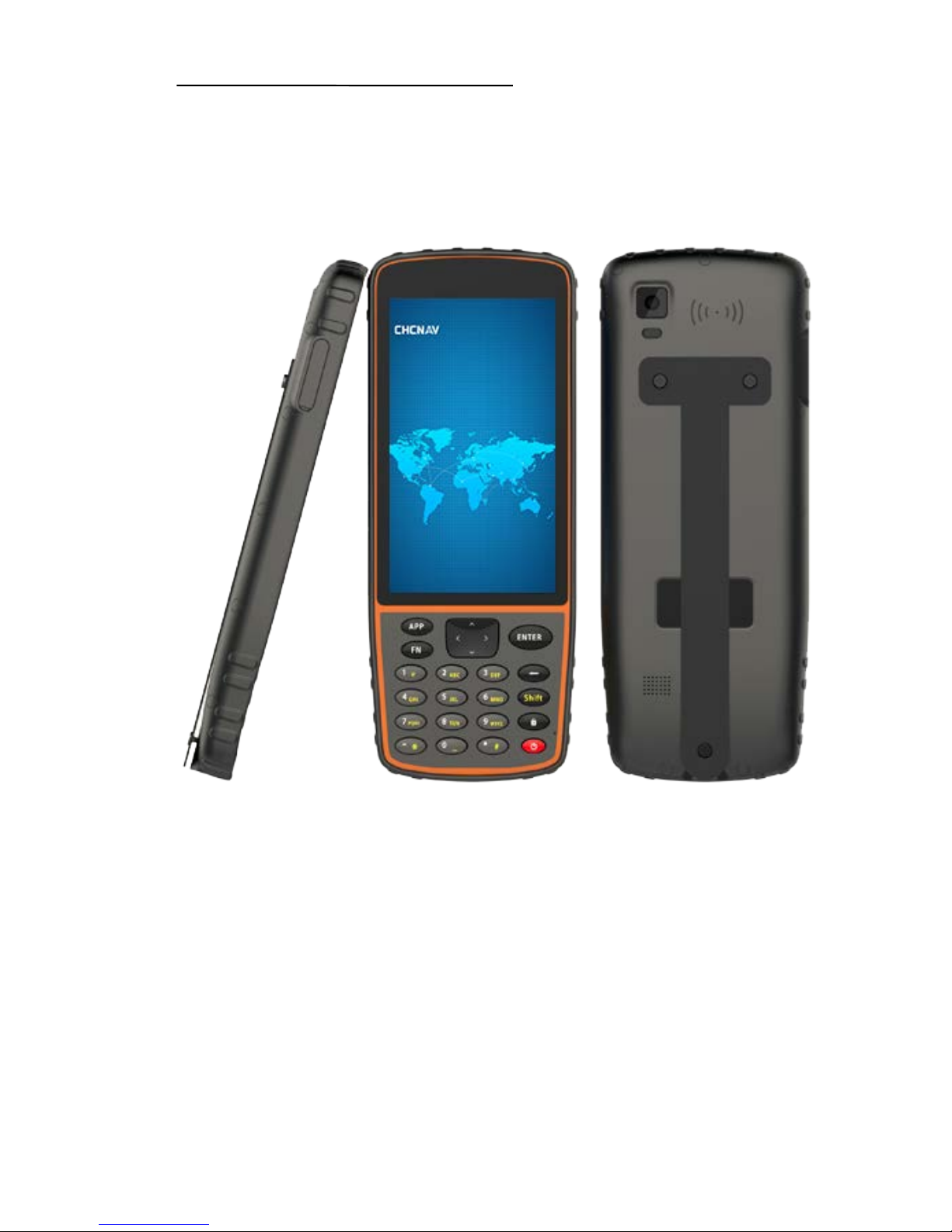
Virtual function key:
[Home]: Touch for returning to main screen when in any
interface.
[Back]: Touch for ret ur ni ng to previous interfa ce.
[Menu]: Touch for displaying current programs, users can click
to open the program.
1.2
Product Accessories
HCE320 data controller
Page 5
HCE320 Data Controller Manual
5
Stylus
Screen protection foil
Strap
USB data cable
DC power adapter
1.3
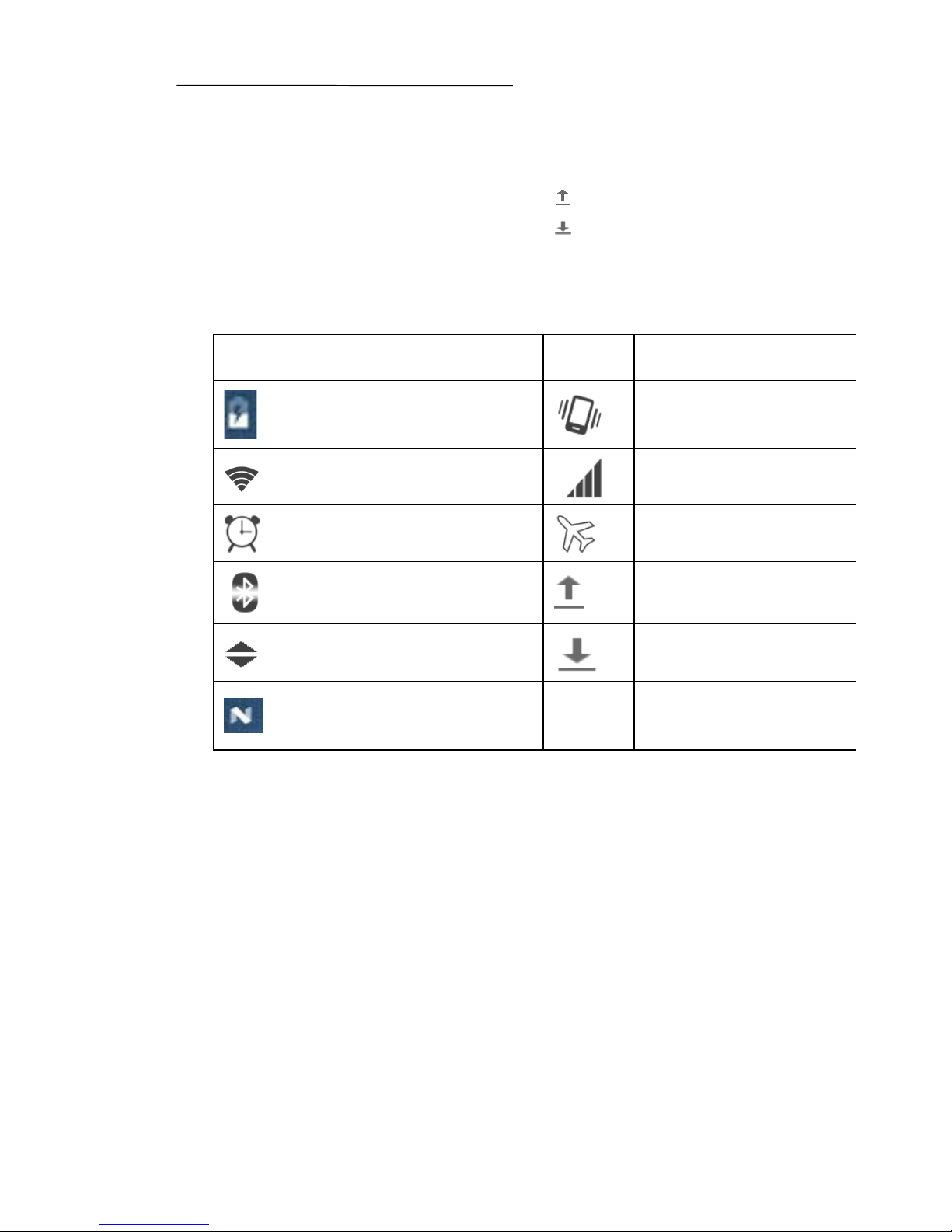
Display Icon Introduction
I
Description
I
Description
The current
battery status
Vibrate mode
Wifi status
Mobile signal
strength
Alarm clock
Airplane
mode
Bluetooth
status
Upload
application
WiFi sync
download
Download
application
USB
connected
1.4
LandStar 7 Software Introduc tion
LandStar 7 is CHC latest field-proven software solution for Android.
Designed for high precision surveying and mapping tasks for your
daily work. Provides seamless work mode management, easy-to-use
and easy-to-learn graphical user interface with simple operation.
Extensive data import/export formats, multiple types of measurement
and stakeout metho ds ensure instant productivity.
Following picture shows the interface:
Page 6

HCE320 Data Controller Manual
6
Note: Users can call out E-manual by clicking the question mark at
top-right corner of LandStar 7, please make sure you’ve installed
LandstarHelp in HCE3 20 before.
Page 7
HCE320 Data Controller Manual
7
2 Getting Started
2.1
Switch On/Off
Long press [Power] key fo r sw it ch on H CE320.
In the state of power-on, short press [Power] key to enter sleep mode,
long press [Power] key will pop-up select screen, select [ Pow er Off]
option to switch off.
2.2
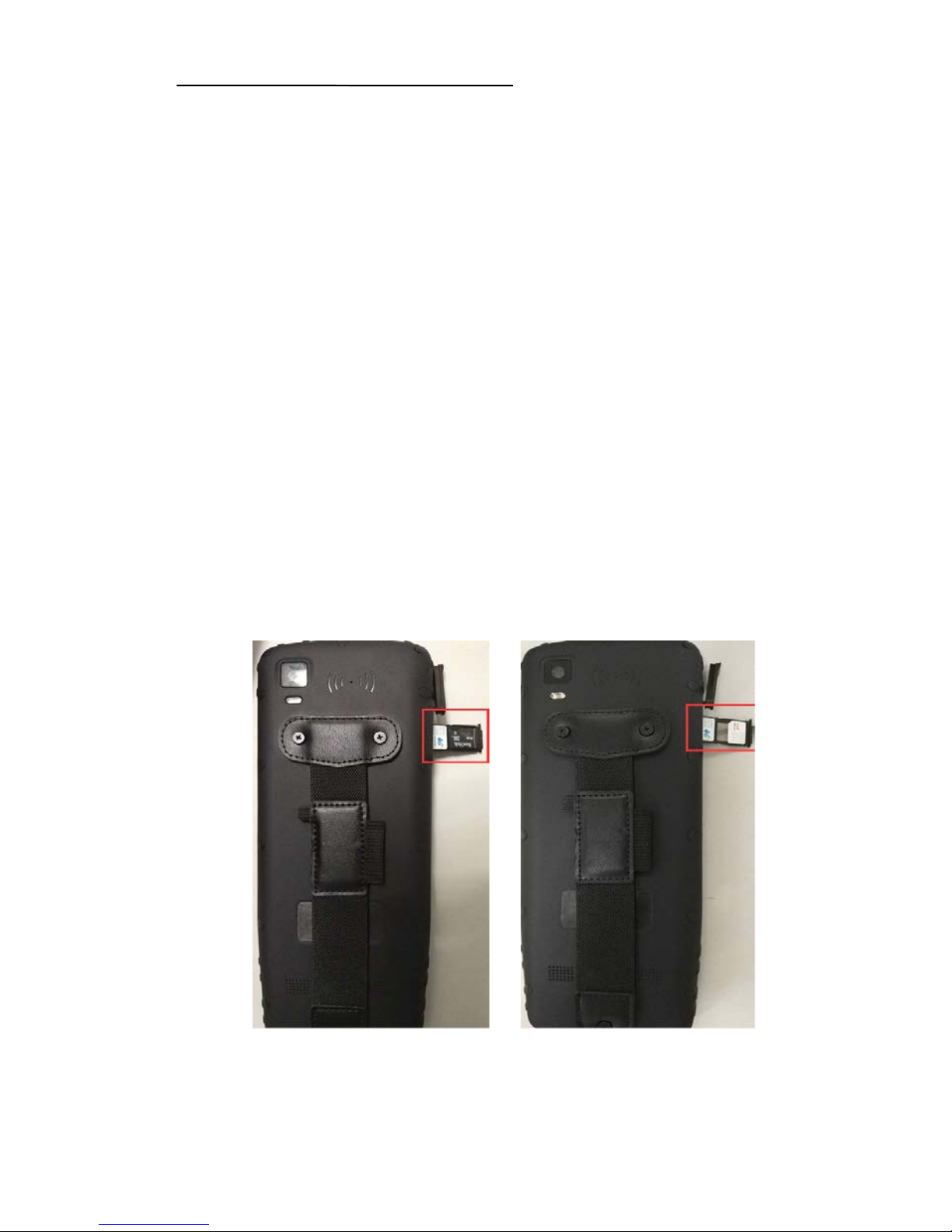
SIM/SD Card Insta llation
Single SIM card and SD card installation
User the head of stylus t o t ake out the slot, put SIM card and SD card
in the position as shown in left picture, and then inser t t he slot .
Dual SIM card instal lation
User the head of stylus t o t ake out the slot, put SIM card in the
position as shown in rig ht pict ur e, and then insert the slot .
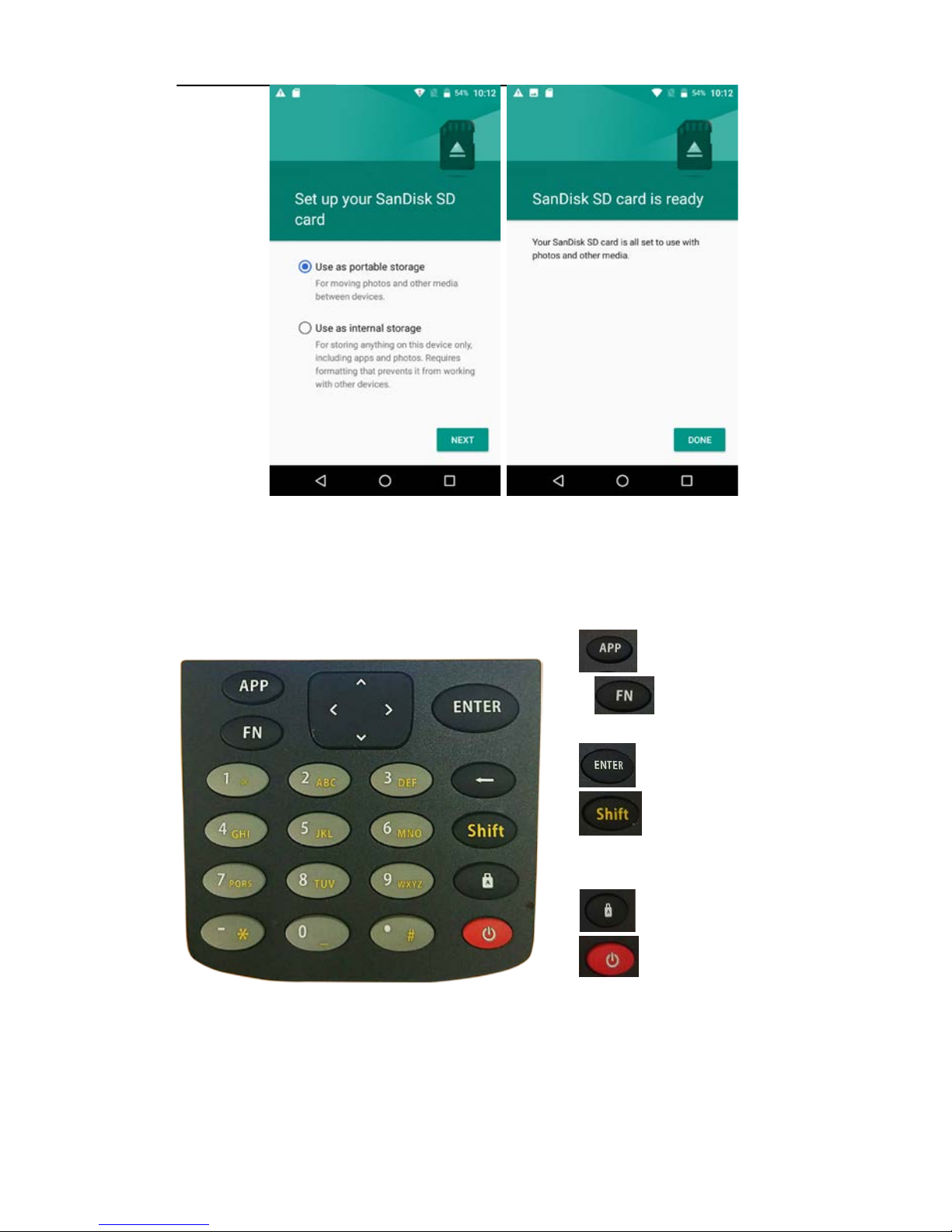
SD card activate proc ess
Page 8
HCE320 Data Controller Manual
8
Note: HCE320 suppor t s t o receive data not only via receiver networ k,
but also PDA network.
2.3
Keyboard Introduction
1 Open LandStar 7
2
Switch language
input methods
3
Confirm
4
Switch between
current input method a nd
number
5
Caps lock
6
Power
2.4
Data Controller Charging
Page 9

HCE320 Data Controller Manual
9
2.5
Important Notification
Please use standard DC power adapter a nd U SB data cable to
charge HCE320.
When HCE320 has low power, it has sound prompts, and then
please charge it.
When HCE320 has muc h low er pow er , it has secondly sound
prompts, and then H C E320 will switch off auto matically.
HCE320 has shoc k and vibration proof, and su ppor ts 1.2 m fall
onto concrete.
Page 10
HCE320 Data Controller Manual
10
3 Basic Functions
3.1 Data Storag e an d Data Tr an sm ission
Data storage
HCE320 supports ex t er nal SD card, users can copy data of internal
storage in SD card.
Data transmission
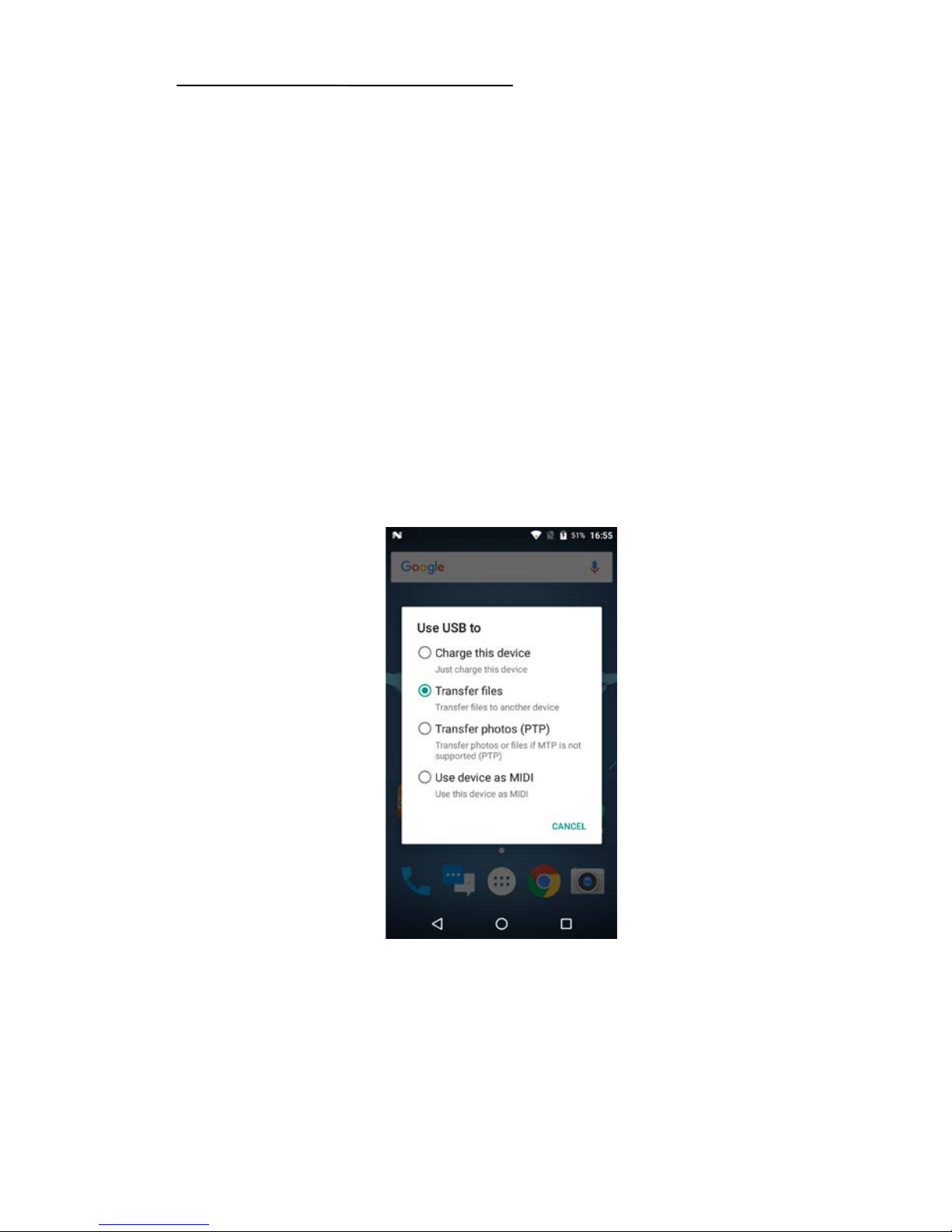
Pull down menu list and f ind [USB] icon, choose t o t r ansmit file.
Or double click [Co mp ut er ] in computer desktop and double click
[HCE320], users ca n see and operate in both internal and external SD
card storage.
3.2 Network Type Switch
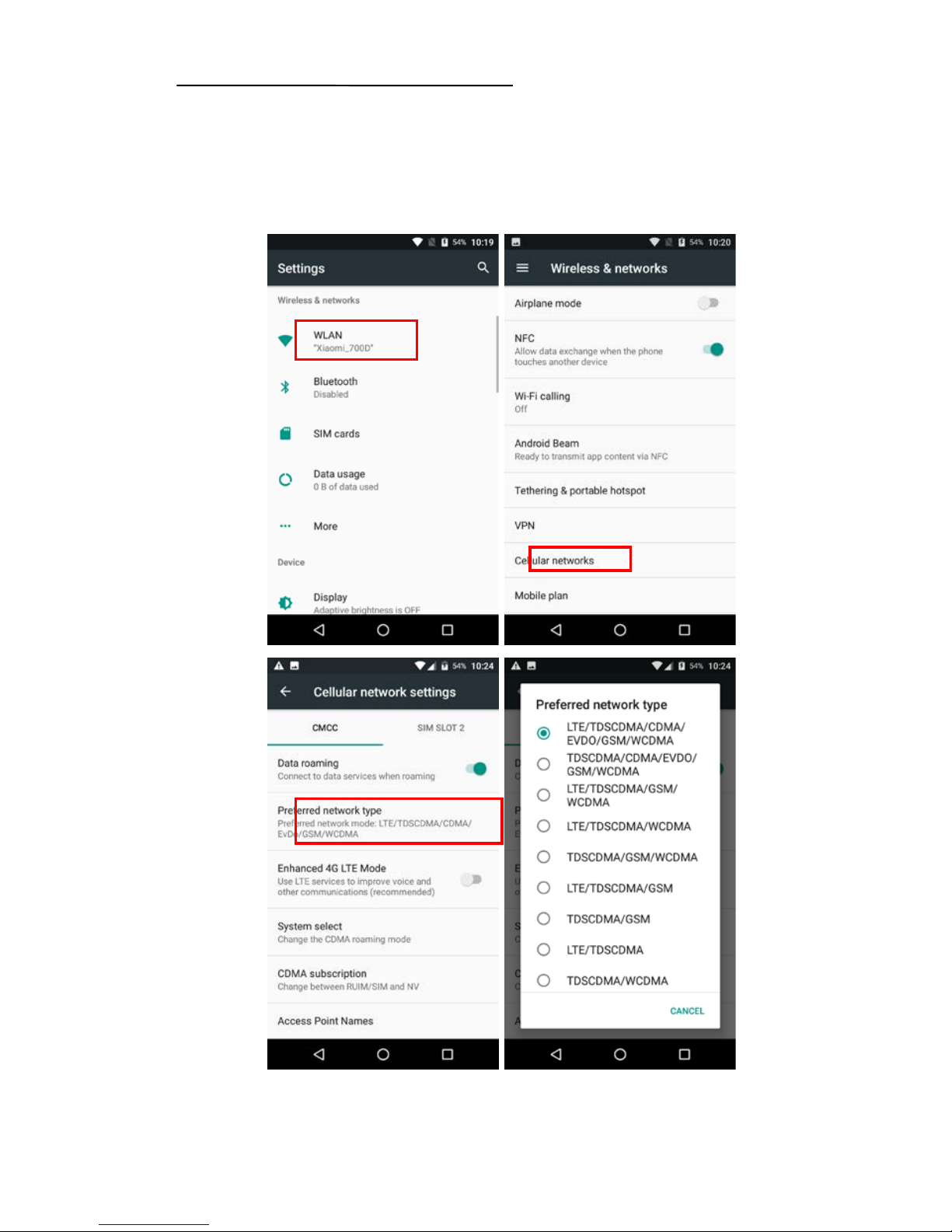
Click [Setting] to enter s et ting interface, an d cl ick [More] to find the
[Mobile Networ k]. Finally, click [Preferred Net w ork Type] and choose the
Page 11
HCE320 Data Controller Manual
11
one you need.
Note: In general, HCE320 will automatically choose the network type
based on SIM card, user s only need to switch network type while using
intranet.
Page 12
HCE320 Data Controller Manual
12
3.3 Restore Factory Setting
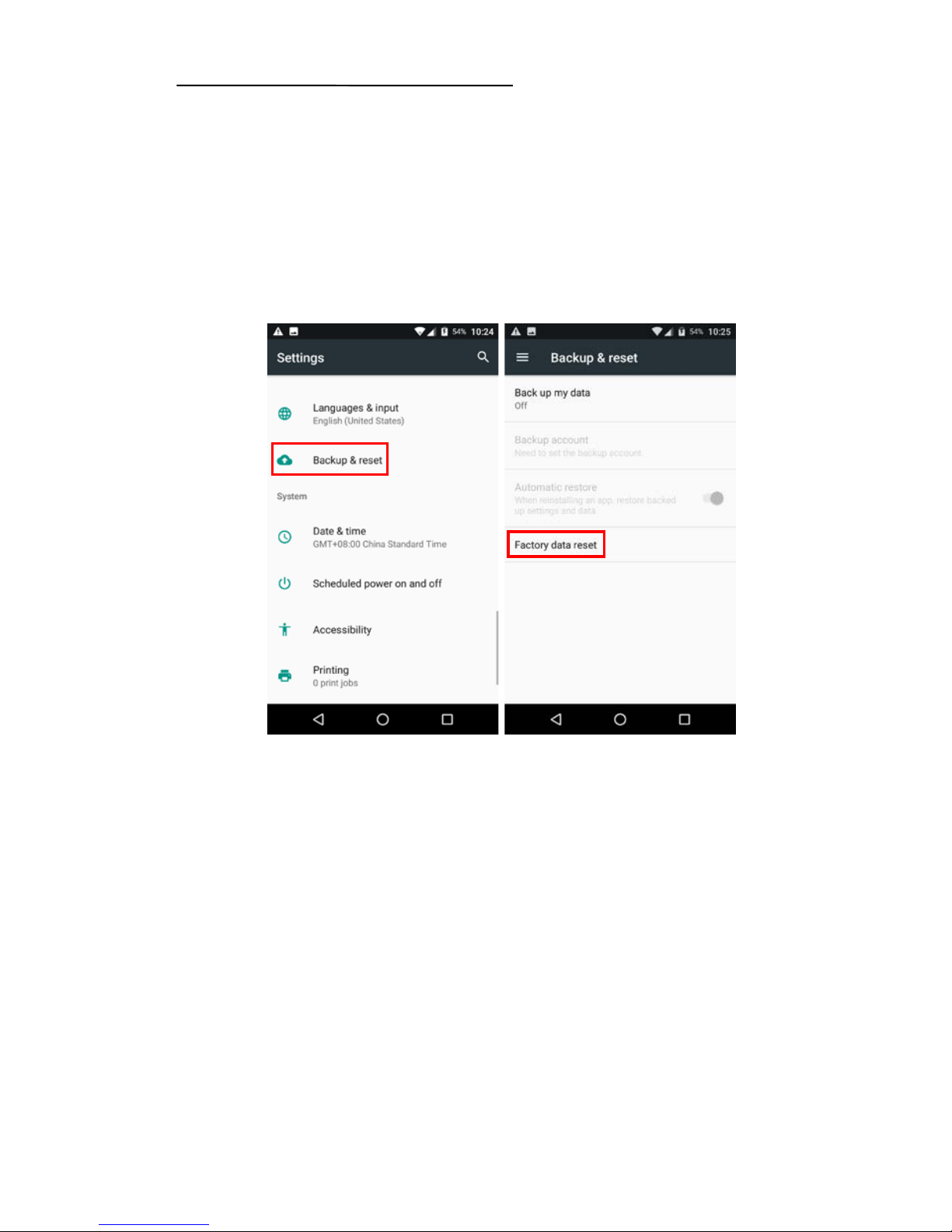
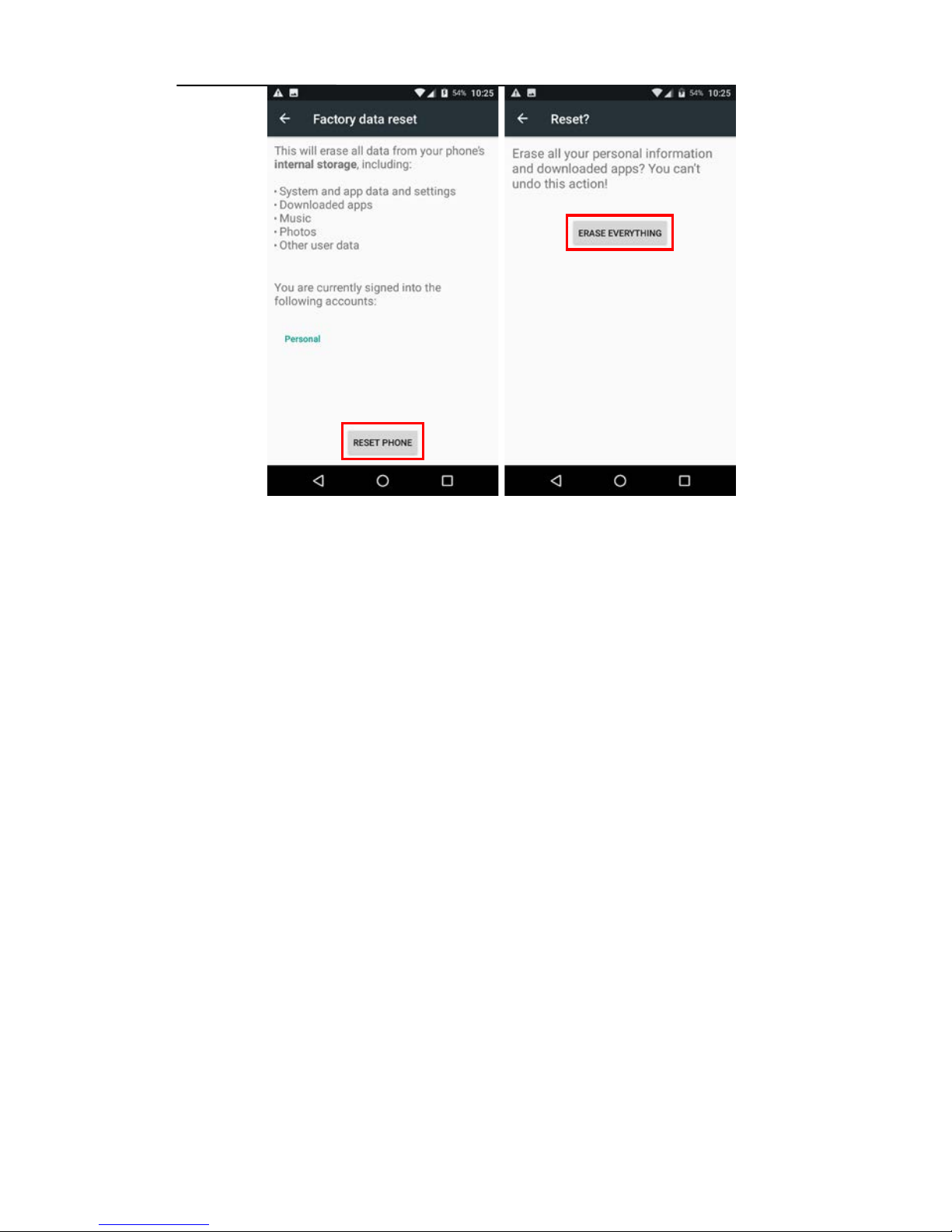
Enter the [Settings] → [Backup & Reset] → [ Factory
data reset]
Press [Factory data reset] → [Reset phone], data controller will
automatically shut down and restart.
Note
:
after choosing [Erase everything], the memory data in data
controller will be cleared!
Page 13
HCE320 Data Controller Manual
13
3.4 Data Controller Function
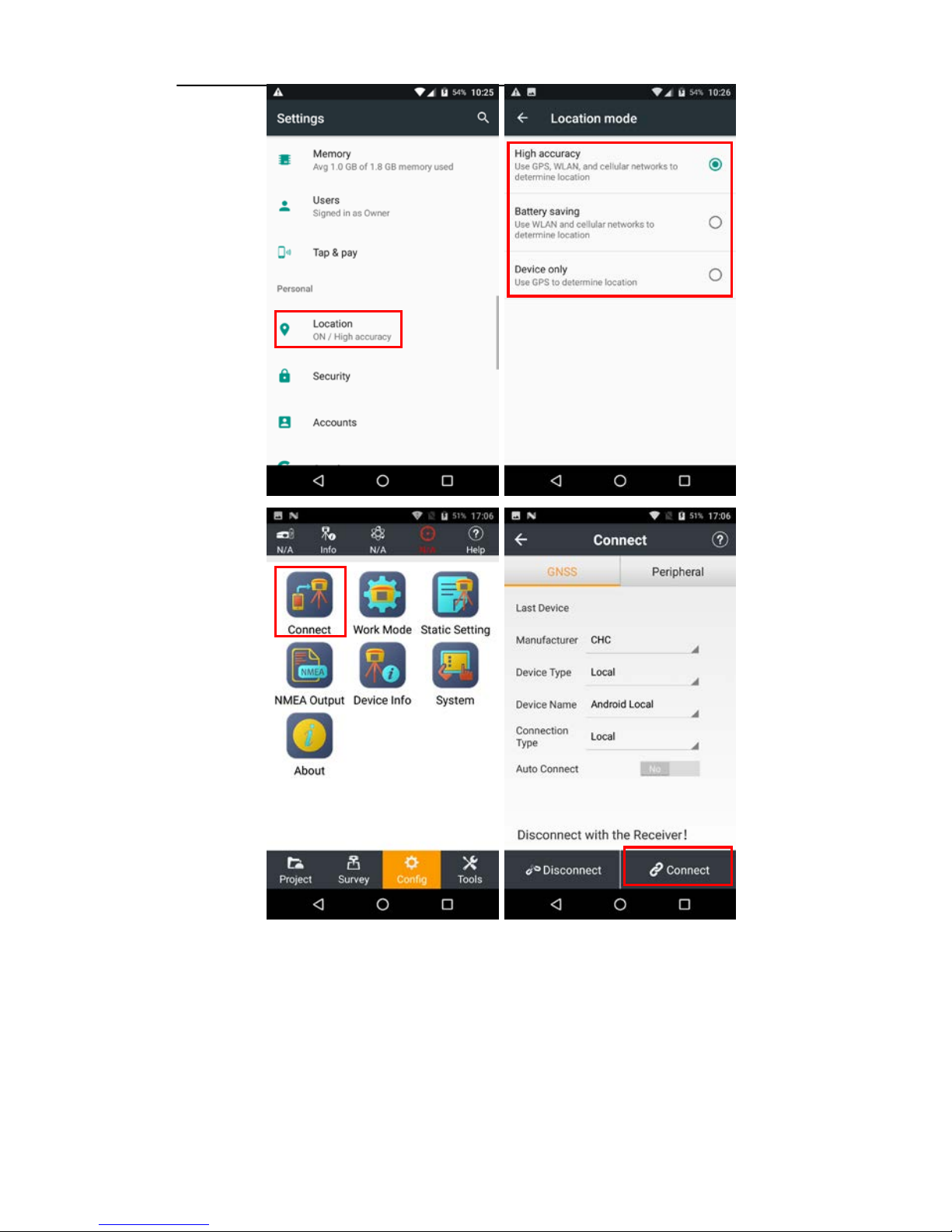
Enter the
[Settings],
find
[Location],
choose one positioning mode and
open it;
Open LandStar7 software, tap
[
Connect
] in the [Configure],
choose
[Local] in the [Device Type], [Android Local] in the [Device Name],
[Local] in the [Connection Type], tap [Connect]. It can be used to
measure when the co nnection is successful.
Note: Must enlarge tolerance and untick [Fixed solution] in the
measurement because the precision of handheld controller is meterlevel.
Page 14
HCE320 Data Controller Manual
14
Page 15
HCE320 Data Controller Manual
15
4 Data Controller Core Upgrade
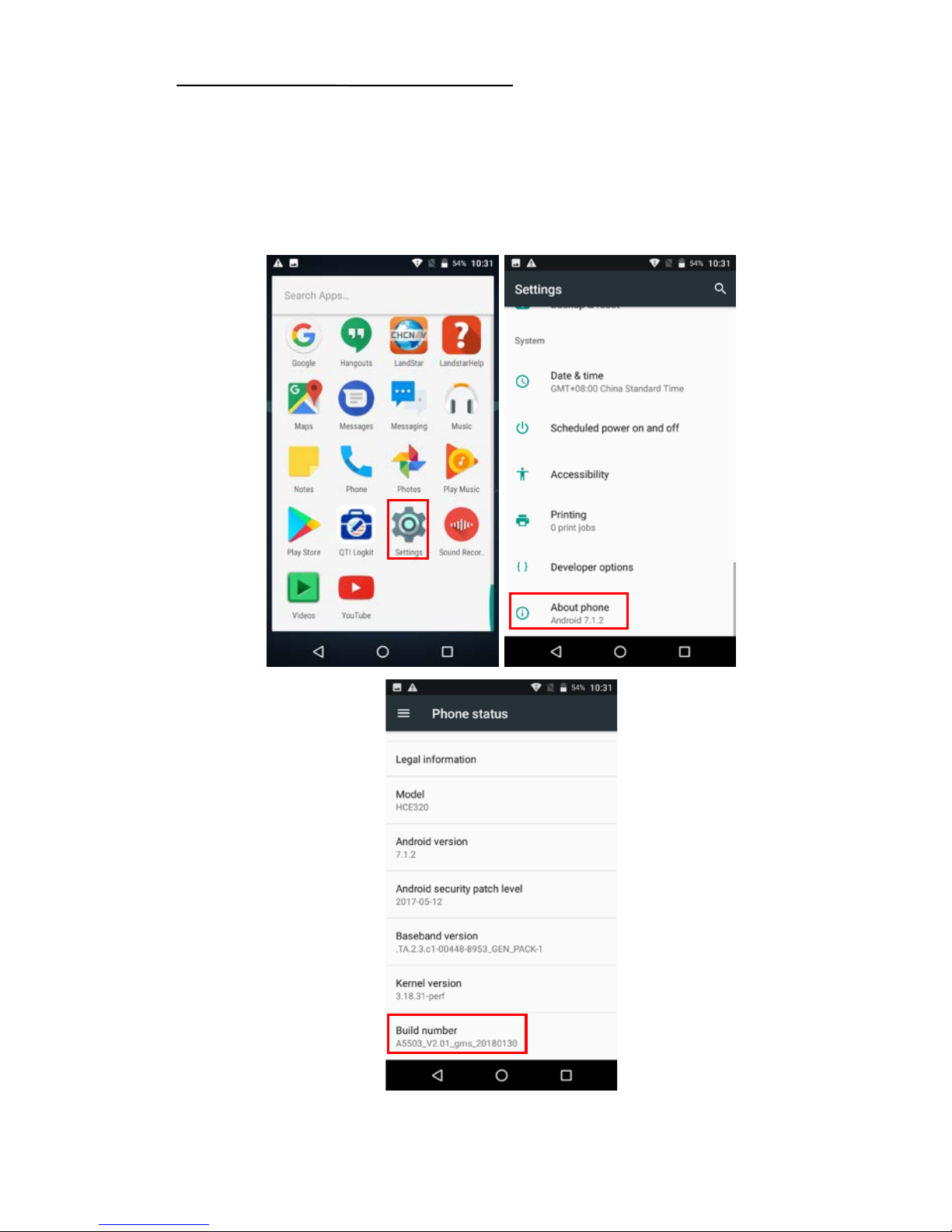
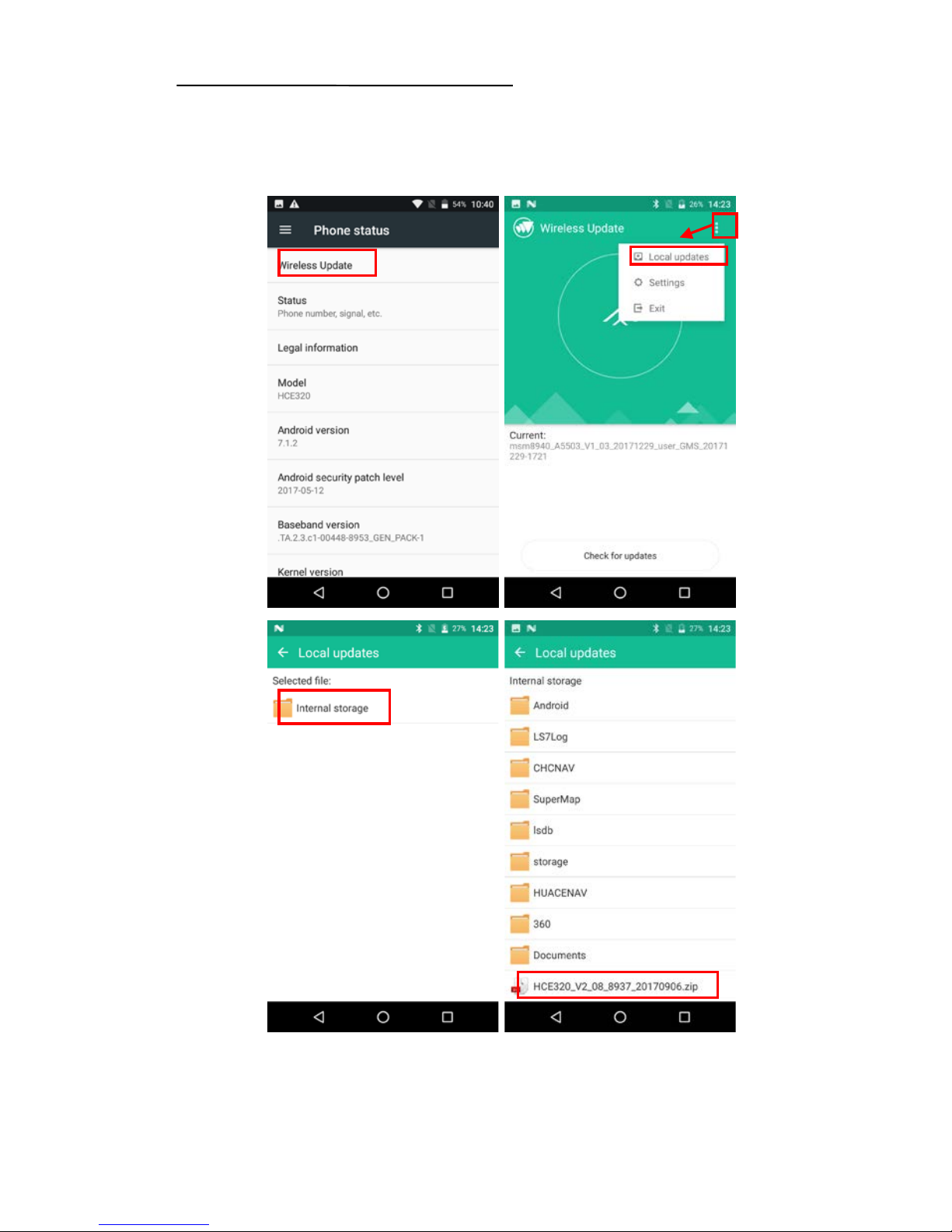
Enter the
[Settings], find and tap [About Phone], check data
controller core version firstly.
Page 16
HCE320 Data Controller Manual
16
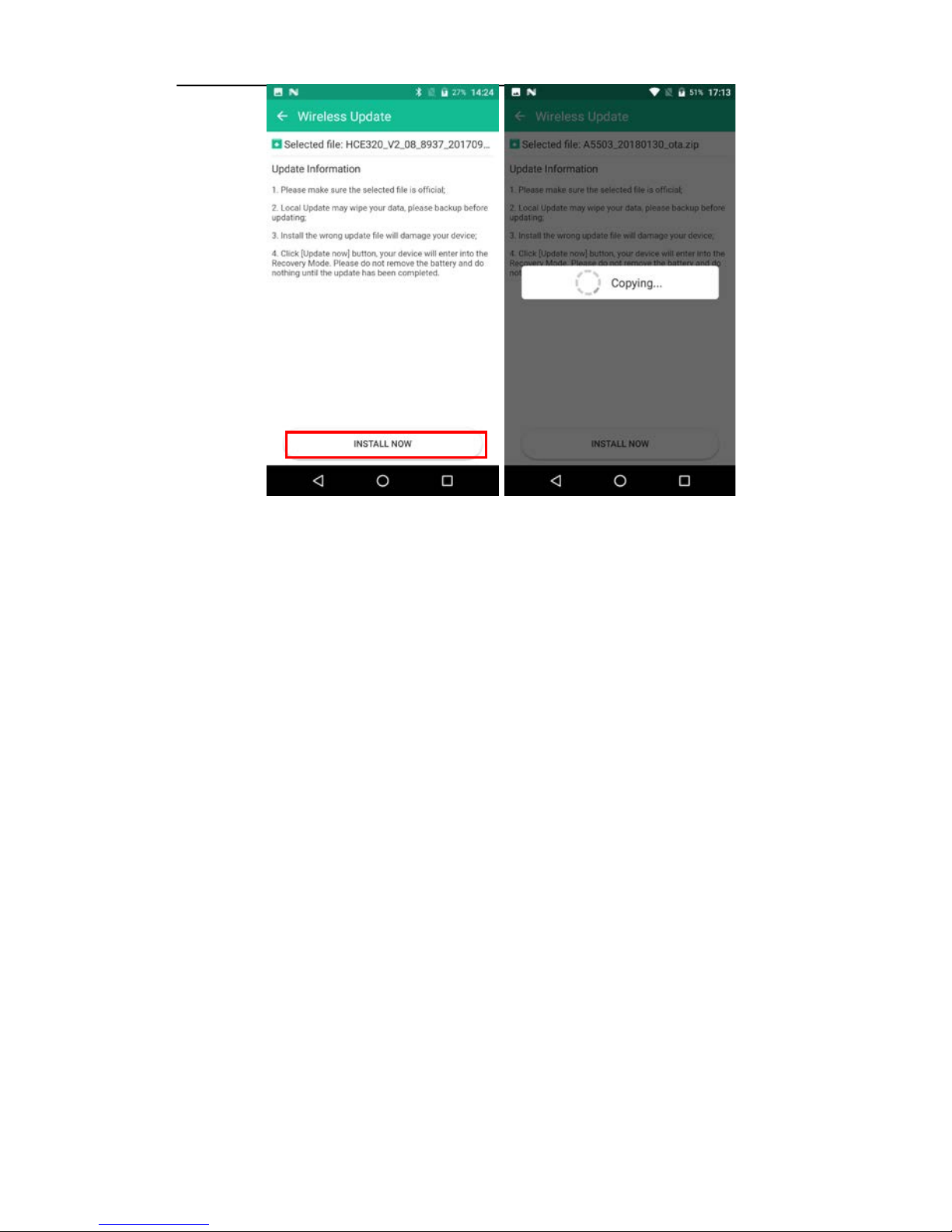
Then tap [Wireless upgrade], tap upper right corner, choose
[Local upgrade], choose the core version to be upgraded.
Page 17
HCE320 Data Controller Manual
17
Controller will restart automatically after upgrading, return to
the mobile status interface to see the core version and check
whether the upgrade is successful.
Page 18

HCE320 Data Controller Manual
18
Shanghai Huace Navigation Technology Co., Ltd
Building C, NO. 599 Gaojing Road, Qingpu District,
201702 Shanghai, China
Tel: +86 21 542 60 273
Tel: +86 21 649 50 963
Website:www.chcnav.com
Page 19

Changes or modifications not expressly approved by the party responsible for
compliance could void the user's authority to operate the equipment。
Note: This equipment has been tested and found to comply with the limits for a Class
B digital device, pursuant to part 15 of the FCC Rules. These limits are designed to
provide reasonable protection against harmful interference in a residential installation.
This equipment generates, uses and can radiate radio frequency energy and, if not
installed and used in accordance with the instructions, may cause harmful interference
to radio communications. However, there is no guarantee that interference will not
occur in a particular installation. If this equipment does cause harmful interference to
radio or television reception, which can be determined by turning the equipment off
and on, the user is encouraged to try to correct the interference by one or more of the
following measures:
—Reorient or relocate the receiving antenna.
—Increase the separation between the equipment and receiver.
—Connect the equipment into an outlet on a circuit different from that to which the
receiver is connected.
—Consult the dealer or an experienced radio/TV technician for help.
FCC ID:
SY4-B01010
Shanghai Huace Navigation Technology LTD.
Model name: Handheld GNSS Data Collector
Model No.: HCE320
This device complies with Part 15 of the FCC Rules.
Operation is subject to the following two conditions: (1) this
device may not cause harmful interference, and (2) this device
must accept any interference received, including interference
that may cause undesired operation.
Caution: Any changes or modifications to this device not explicitly approved by manufacturer could
void your authority to operate this equipment.
This device complies with part 15 of the FCC Rules. Operation is subject to the following two conditions:
(1) This device may not cause harmful interference, and (2) this device must accept any interference received,
including interference that may cause undesired operation.
Specific Absorption Rate (SAR) information:
This Smart Phone meets the government's requirements for exposure to radio waves. The guidelines are based
on standards that were developed by independent scientific organizations through periodic and thorough
evaluation of scientific studies. The standards include
a substantial safety margin designed to assure the
safety of all persons regardless of age or health.
FCC RF Exposure Information and Statement The SAR limit of USA (FCC) is 1.6 W/kg averaged over one gram of
tissue. Device types: Smart Phone (FCC ID: ) has also been tested against this SAR limit. The highest SAR
value reported under this standard during product
certification is 0.962W/kg when properly worn on the body. This device was tested for typical body-worn
operations with the back of the Smart Phone kept 00mm from the body. To maintain compliance with FCC RF
exposure requirements, use accessories that maintain a 00cm separation distance between the user's body and
the back of the Tablet PC. The use of belt clips, holsters and similar accessories should not contain
metallic components in its assembly. The use of accessories that do not satisfy these requirements may
not comply with FCC RF exposure requirements, and should be avoided.
very high volume, prolonged listening to a mobile phone can damage your hearing.
 Loading...