

Page 1
Quick Reference Guide
Page 2
RotoSphere™ LED QRG
Page 2 of 8
About this
Guide
The RotoSphere™ LED Quick Reference Guide (QRG) only contains the
product
’s connection and mounting information as well as the menu options
and the DMX values.
Disclaimer
• This Quick Reference Guide DOE S NOT re place the product’s user
manual, which you can download from the CHAUVET® Web site
(www.chauvetlighting.com).
•
You must read ALL the disclaimers and safety notes in this document as
well as those in the product’s user manual before installing, operating, or
maintaining this product.
Safety Notes
Please read the following notes carefully before starti ng to work with this
product. They include important safety information about its
installation,
usage, and maintenance.
• Always connect this product to a grounded circuit to avoid the risk of
electrocution.
• Always disconne ct thi s produ ct fr om the power source before cleaning it
or repl acing the fuse.
• Avoid di r ect eye exp osur e t o the light s ource w hile t he fixture i s on.
• Ma ke sure the p ow e r cord i s not crimped or da m aged.
• Make sure there are no flammable mate rials close to the uni t whi le
operating.
• Do not touch this product’s housing when operating because it may be
very hot.
• Always ma ke sure that the voltage of the ou tlet t o which you are
connecting this product is within the rang e stated on the d ecal or rear
panel of the fixture.
• This product i s for indoor u se only! (IP20) T o prevent ri sk of fi re or
sh ock, d o not expose this fi xture to ra in or moi sture.
• Never connect this product to a dimmer pack.
• Make sure to replac e the fuse with another of the same type and rating.
• Never carry this product from the power cord or any moving part.
Always use the hanging/mounting bracket or the handles.
• The maximum ambient temperature (Ta) is 104° F (40° C). Do not
operate this product at higher temperatures.
• In the event of a serious operating problem, stop using the unit
immediately.
• Never try to repair this product. Repairs carried out by unskilled people
can lead to damage or malfunction. Please contact the nearest authorized
technical assistance center.
What is
Included
• One R otoSp here ™ LE D
• One P ow er Cor d
• One Hanging Bracket
• One Warranty Card
• One Quick Reference Guide
Page 3
RotoSphere™ LED QRG
Page 3 of 8
Product
Description
The Rot oSph er e™ LED is a mirror ball simulator with five, high-powered
tri color LEDs. Usin g DMX or stan d-alone cont rol modes, it utilizes userse l ectable colors and variable rotation speeds and is easily mountable.
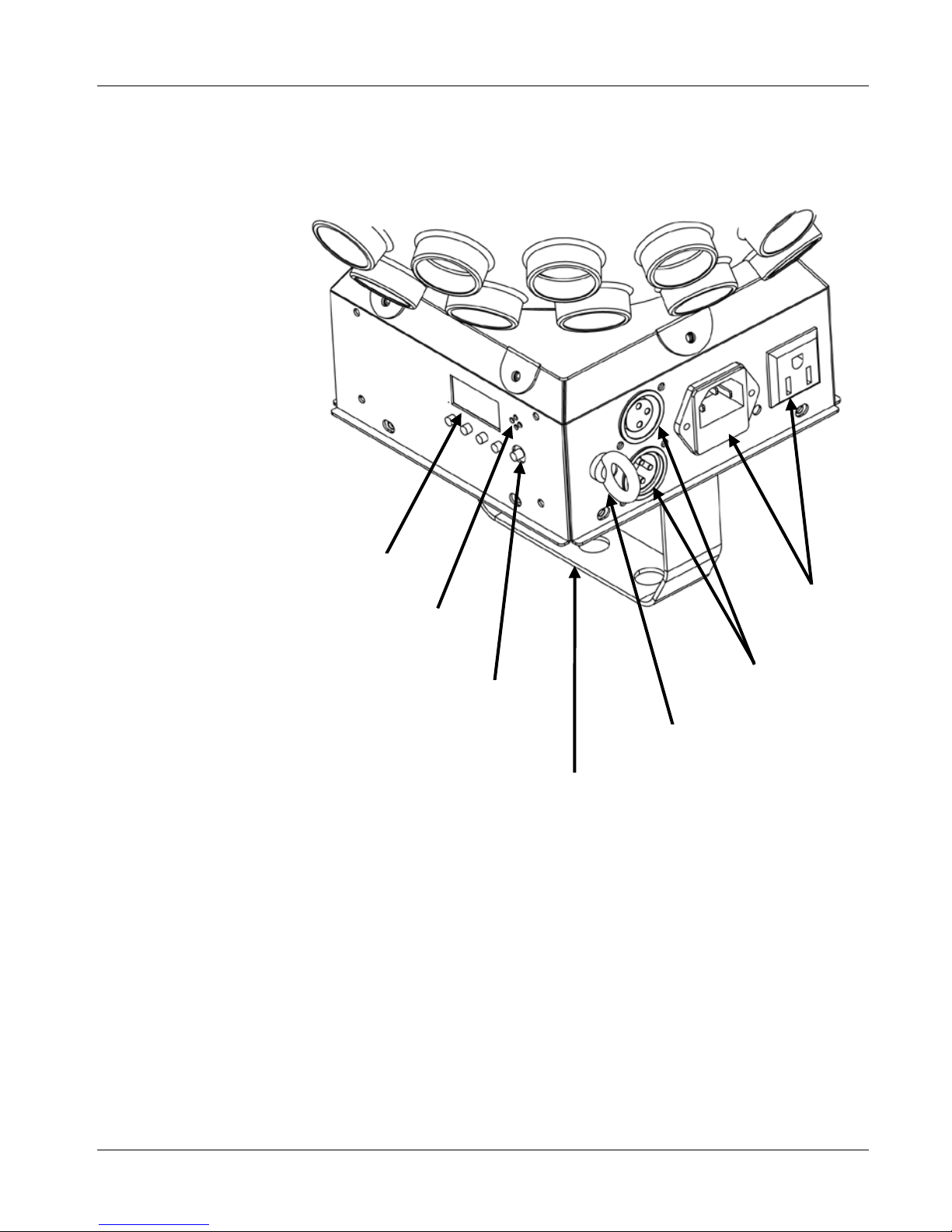
Product Overview
LED Display
Microphone
Microphone
Sensitivity Kno b
Safety Hook
DMX In/Out
Power In/Out
Mounting Bracket
Page 4

RotoSphere™ LED QRG
Page 4 of 8
AC Power
This product has an auto-ranging power supply that can work with an input
voltage ran ge of 100~ 240 VAC, 50/60 Hz.
Power Li nk ing
You can link up to 20 RotoSphere™ LED units to this fixtu re at 120 VAC or
40 RotoSphere™ LED units at 230 VAC
. Make sure to never exceed this
number.
Fuse
Replacement
1) Disconnect this fixture/product from the power outlet.
2) Wedge the tip of a flat head screwdriver into the slot of the fuse holder
and pry the safety cap out of its housing. It will pull the installed fus e
with it.
3)
Remove the blown fuse from its safety cap and replace it with a fuse of
the exact same type and rating (F 1 A, 250 V).
4) Insert the fuse holder back in its place, and reconnect power.
DMX Linking
The RotoSphere™ LED can work with a DMX controller when linked using
a re gu lar DM X s erial con nect ion.
If you are not familiar with the DMX standard, please download the
DMX
Primer document from www.chauvetlighting.com.
DMX Connection
The RotoSphere™ LED uses a regular DMX data connection for its 4-
channel DMX persona l ity.
Download the RotoSphere™ LED user manual and refer to the Setup
chapter to learn how to connect this fixture for DMX operation, and the
Operation Instr uc tio ns
chapter to learn in detail how to configure this fixture
for D MX operation.
Master/Slave
Connection
The RotoS ph e re ™ LED uses the DMX data connection for its Master/Slave
mode.
Download the RotoSphere™ LED user manual and refer to the Setup
chapter to l earn how t o con ne ct t his fi xtur e for Mas ter /Sl ave opera ti on, and
the Operation
chapter to learn in detail how to configure this fixture for
Master/Slave operation.
Page 5
RotoSphere™ LED QRG
Page 5 of 8
Mounting
Before mounting this product, read the safety notes at the beginning of this
guide and in the product’s user manual. Then, follow the mounting
procedure indic ated in the Setup chapter of the user manual.
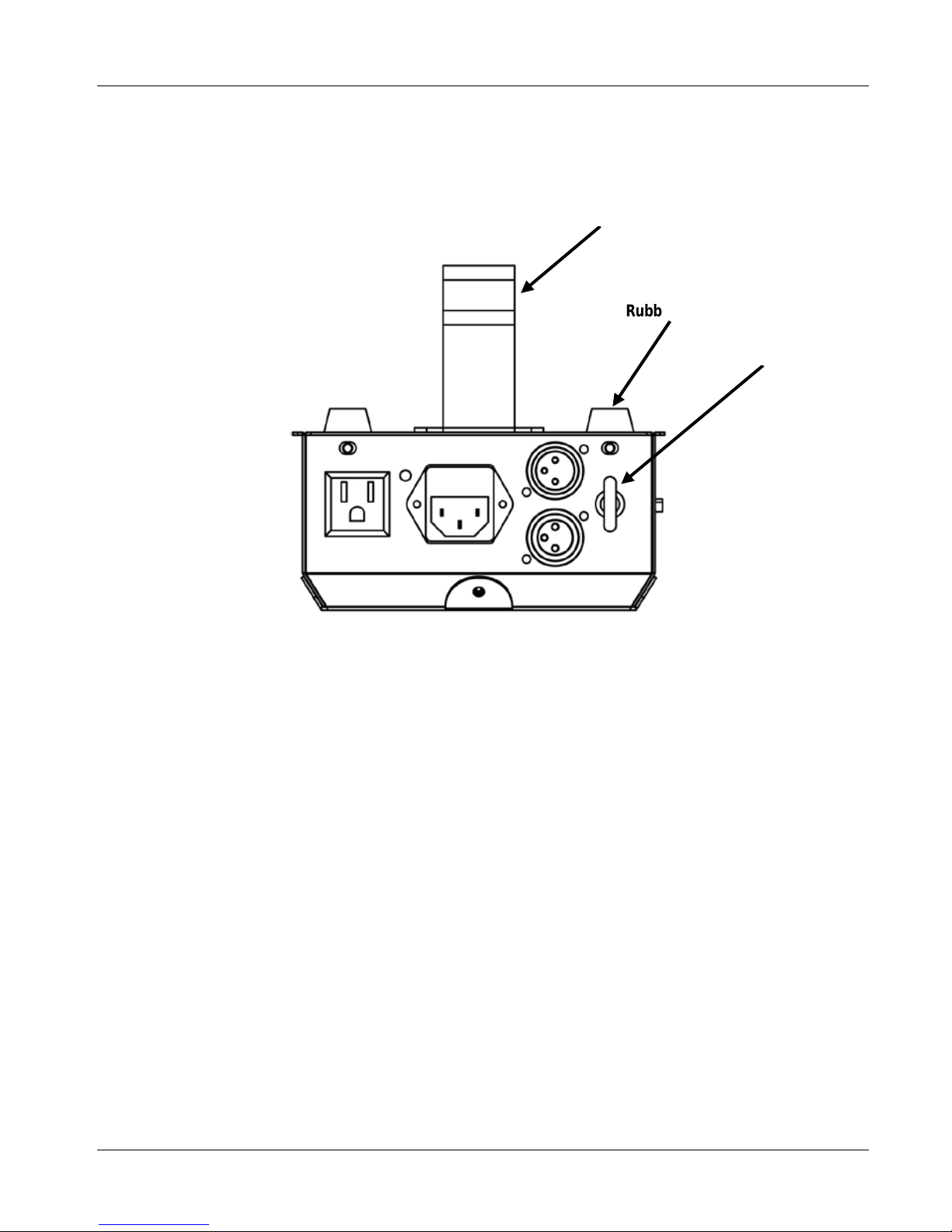
Product
Mounting
Diagram
Mounting Bracket
Rubber Feet (x4)
Safety Hook
Page 6
RotoSphere™ LED QRG
Page 6 of 8
Programming
For deta i ls on how to program this produc t, ple ase refer to the produ ct’s user
manual.
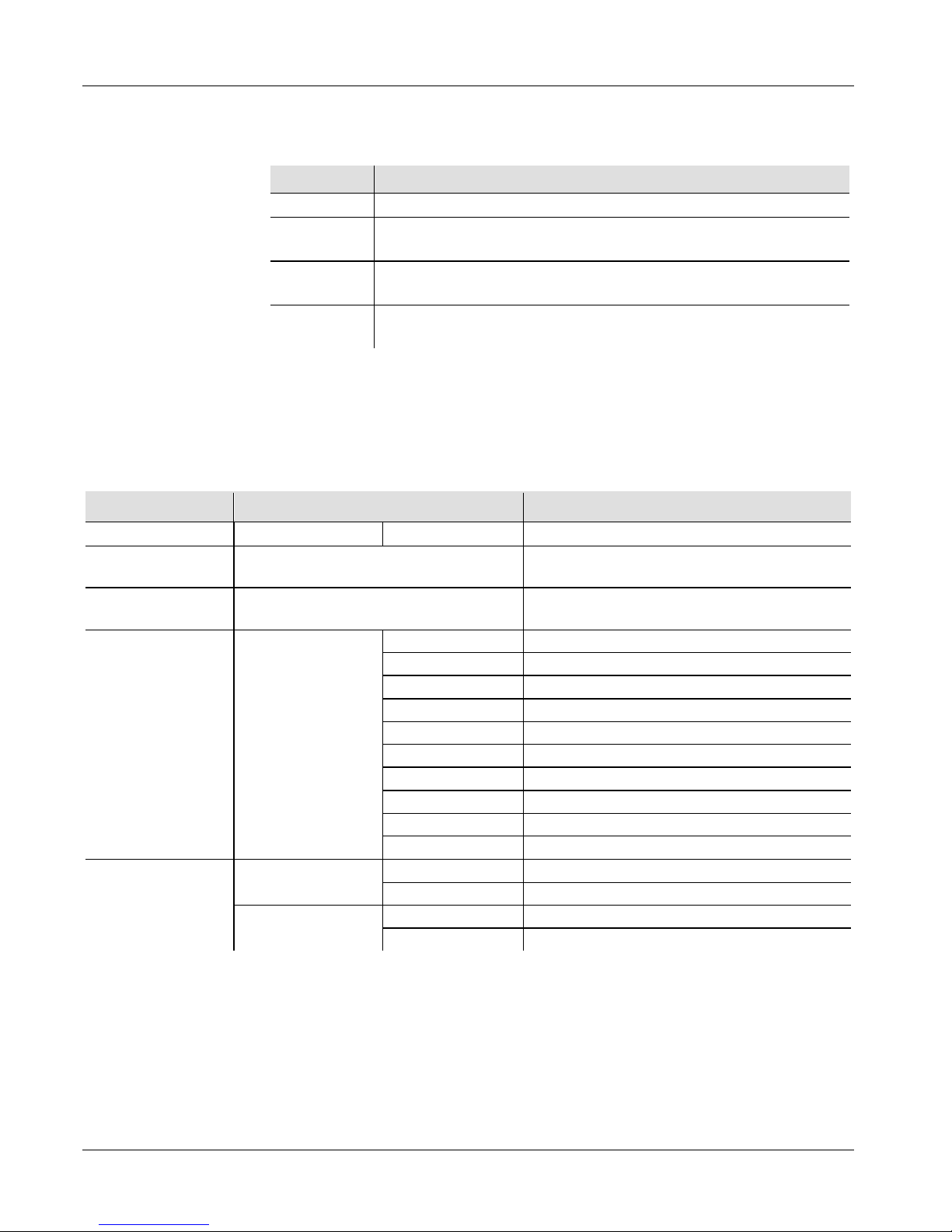
Control Panel
Description
Button Function
<MENU>
Exits fr om the current menu or fu nction
<UP>
Navigates upwa rd s th ro ugh the menu list and inc rea ses the
num eric value when in a function
<DOWN>
Navigates d ow nwards through the menu lis t and d ecreases the
num eric value when in a function
<ENTER>
Enables th e curren tly displayed menu or sets the currently
selected value into the selected function
Start Address
To ensure full access to all channels in each DMX mode, the highest
recomm ended D MX address is 509.
Menu Options (Stand-Alone)
Mode Programming Steps Description
1. DMX Address
d 1
001~512
Sets the DMX starting address
2. Soundactivated Mode
SOUd Selects Sound-activated Mode
3. Automatic
Mode
AUTO Selects Automatic Mode
4. Color Mode c 1
c 1
Red
c 2
Green
c 3
Blue
c 4
Red + Green
c 5
Red + Blue
c 6
Green + Blue
c 7
Red + Green + Blue
c 8
All colors in chase mode (fast speed)
c 9
All colors in chase mode (normal speed)
c 10
All colors in chase mode (slow speed)
5. Motor rotation
F 0 (forward)
F 0
Static
F 1-99
Clockwise rotation (slow to fast)
r 0 (reverse)
r 0
Static
r 1-99
Counter clockwise (slow to fast)
Page 7
RotoSphere™ LED QRG
Page 7 of 8
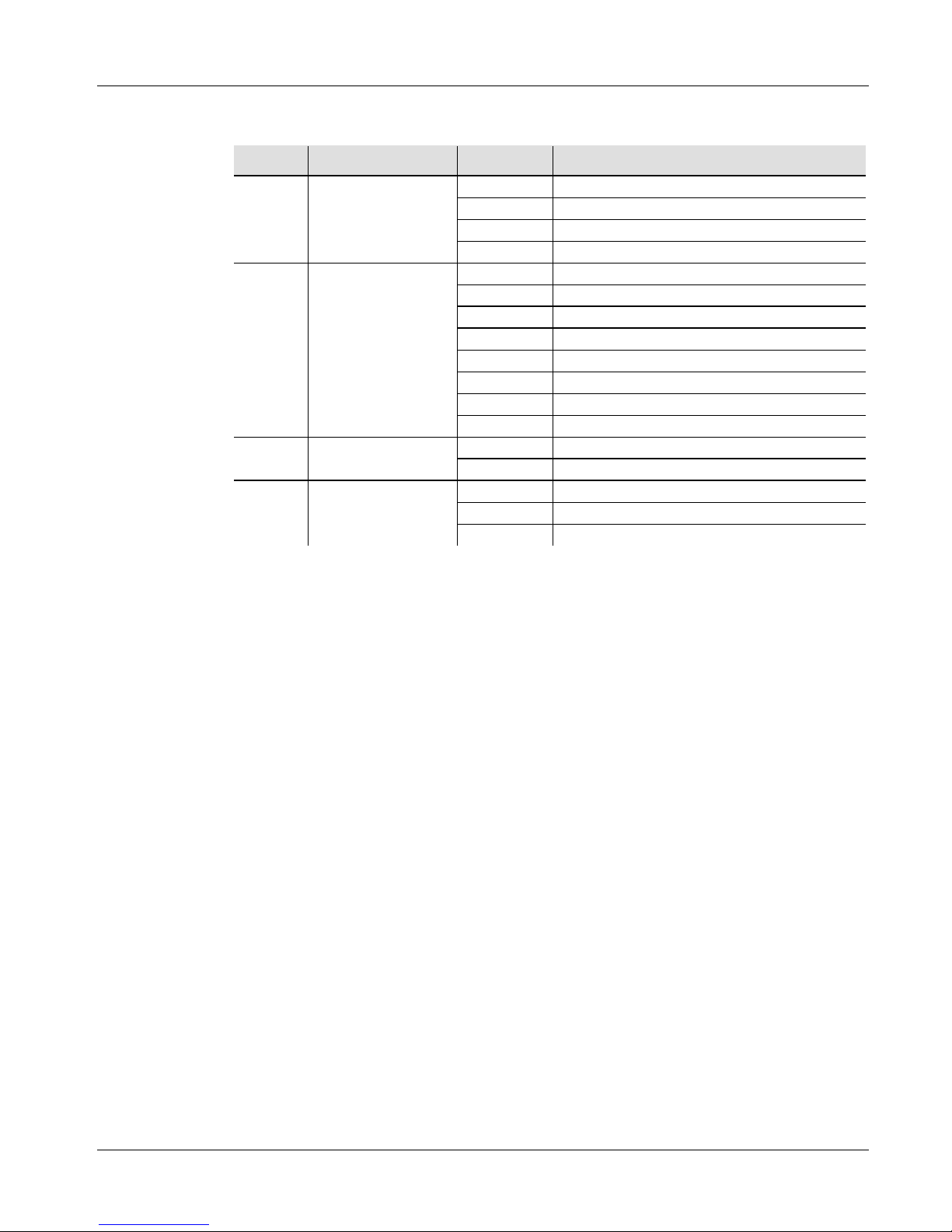
DMX Values
4-CH
Channel Function Value
Percent/Setting
1 Motor Rotation
000 ó 009
No function
010 ó 127
Counter cloc k w i s e rotat ion ( slow to fast)
128 ó 137
No function
138 ó 255
Cloc k wi se rotation ( s low to fast )
2 Colors
000 ó 031
No function
032 ó 063
Red
064 ó 095
Green
096 ó 127
Blue
128 ó 159
Red + Green
160 ó 191
Red + Blue
192 ó 223
Green + Blue
224 ó 255
Red + Green + B l ue
3 Strobe
000 ó 009
No function
010 ó 255
Strobe effect (slow to fast)
4
Automatic and
Sound Modes
000 ó 010
No function
011 ó 249
Automatic programs
250 ó 255
Sound-activated Mode
Page 8

RotoSphere™ LED QRG
Page 8 of 8
Contact Us
World Head quart ers
CHAUVET®
General Infor m atio n
Address: 5200 NW 108th Avenue
Sunrise, FL 33351
Voice: (954) 577-4455
Fax: (954) 929-5560
Toll free: (800) 762-1084
United Kingdom and Ireland
CHAUVET® Europe Ltd.
General Information
Address: Unit 1C
Brookhill Road Industrial Estate
Pinxton, Nottingham, UK
NG16 6NT
Voice: +44 (0)1773 511115
Fax: +44 (0)1773 511110
Technica l Supp ort
Technica l Supp ort
World Wide Web
www.chauvetlighting.com
World Wide Web
www.chauvetlighting.co.uk
Outside the US, United Kingdom, or Ireland, contact your distributor of
record. Follow their instructions to request support or to return a product.
Visit our Web site for cont act de tails.
RotoSphere ™ L E D QRG – Rev. 01b
© Copyright 2011 CHAUVET®
All rights reserved
Printed in the P. R. C.
 Loading...