

Page 1
Quick Reference Guide
Page 2
Minisphere™ 3.1 QRG EN
2
About This
Guide
The Minisphere™ 3.1 Quick Reference Guide (QRG) has basic product
information such as mounting, menu opt ion s, and DMX values. Down loa d th e
User Manual from www.chauvetlighting.com for more detail s.
Disclaimer
The information and specifications contained in this QRG are subject to change
without notice.
Safety Notes
These Safety Notes include important information about installation, use, and
maintenance.
• This pro d u ct is not inte nded fo r permanen t in stallation.
• O N LY conn ect this produc t to a gr ounded an d protected c ircuit.
• Always di sconn ect f rom power bef ore clean ing or replacin g t he fuse.
• DO NOT look at the light source when the product is on.
• M ake sure the power cord is not crimped or damaged.
• Never disconnect this product from power by pulling on the cord.
• When mounting this product overhead, use a safety cable.
• DO NOT allow flammable materials close to the unit while operating.
• DO NOT touch this product when it is operating because it may be hot.
•
The voltage of the outlet to which you are connecting this product must be
within t he ran ge stated on the de c al or rear panel of the produc t.
•
This product is for indoor use only! (IP20) To prevent risk of fire or shock,
do not expose this pr oduct to rai n or moi sture.
•
Always mount this product in a location with adequate ventilation, at least
20 in (50 cm) from adjacent surfaces.
• Be sure that no ventilation slots on the unit’s housing are blocked.
• Never connect this product to a dimmer or rheostat.
• Replace the fuse with the same type and rating.
• ONLY use the mounting bracket or the base to carry this product.
•
The maximum ambient temperature is 104° F (40° C). Do not operate this
product at higher temperatures.
• In the event of a serious oper ating prob l em, stop using im m ediately.
• D O NOT open thi s prod uct. It cont ains no use r-ser viceable par t s.
Contact
Outside the U.S., United Kingdom, or Ireland, contact your distributor to
request support or return a product. Visit www.chauvetlighting.com
for con t a ct
information.
What Is
Included
• Minisph e re™ 3. 1
• Power Cor d
• Warranty Card
• Quick Reference Guide
To Begin
Unpack your Minisphere™ 3.1 and make sure you have received all parts in
good condition. If the box or contents appear damaged, notify the carrier
immed ia tely, not CHAUVET®.
Page 3
EN Minisphere™ 3.1 QRG
3
Product
Description
The Minisphere™ 3.1 is a bright, compact centerpiece with red, green, and
blue rotating and strobing LEDs that provide huge room coverage and a
festive atmosphere at any event. DMX functions and built-in sound-active
pr ograms provide easy, customizable w ays to u s e the Minisphere™ 3.1.
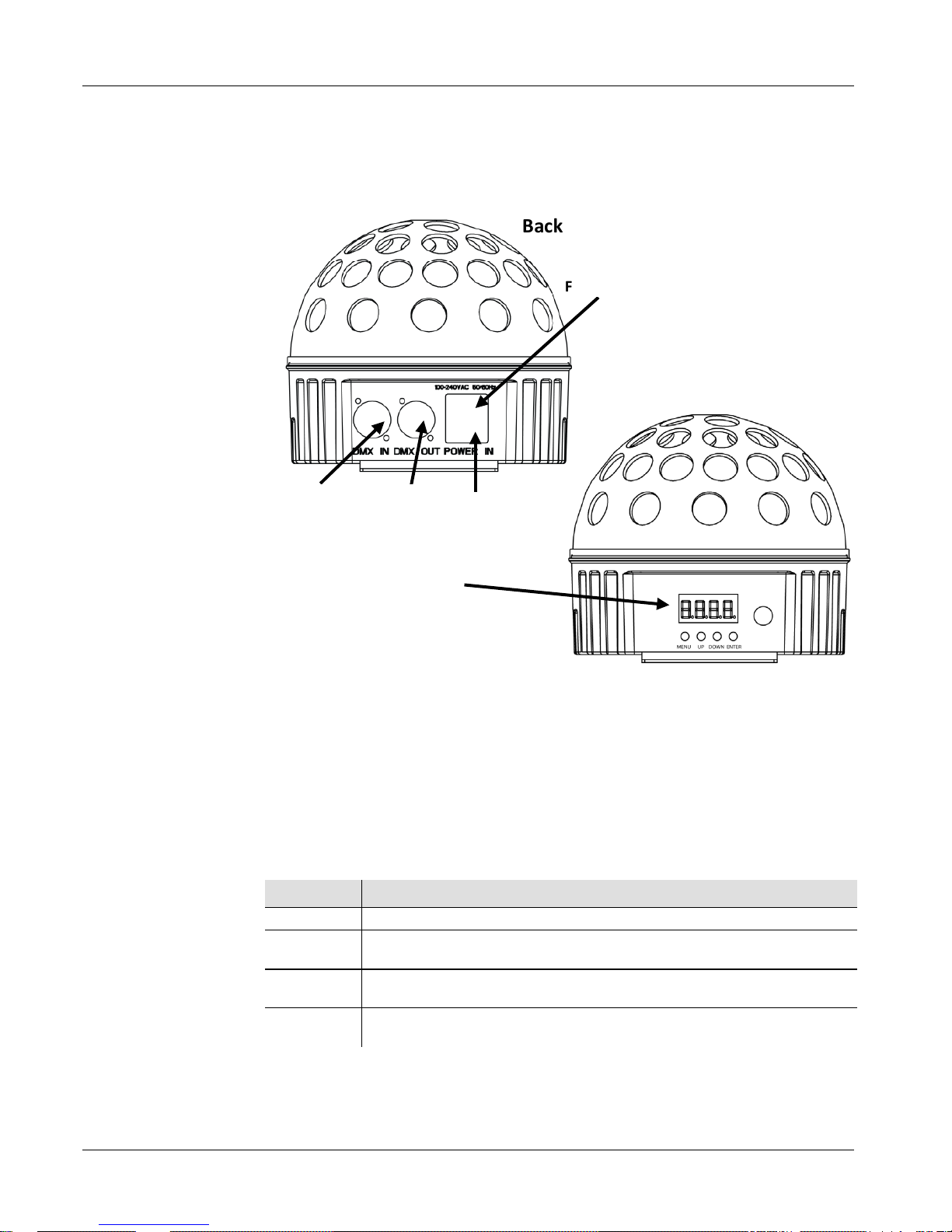
Product Overview
AC Power
This product has an auto-ranging power supply that can work with an input
voltage ran ge of 100~ 240 VAC, 50/60 Hz.
Fuse Replacement
1. Disconnect the product from power.
2. Wed ge the t i p of a fl at-head screwdriver into the slot of the fuse holder.
3. Pry the safety cap out of the housing.
4. Rem ove th e blown fuse f rom the cli p on the f ront of the safety cap an d
replace with a fuse of the exact same type and rating.
5. Re-insert the fuse holder and reconnect power.
Control Panel
Description
Button Function
<MENU>
Exits from the current m enu or function
<UP>
Navigates upwards through the menu list and increases the
numer ic val u e wh en in a function
<DOWN>
Navigates downwards through the menu list and decreases the
numer ic val u e wh en in a func t i on
<ENTER>
Enables the currently displayed menu or sets the currently
selected value
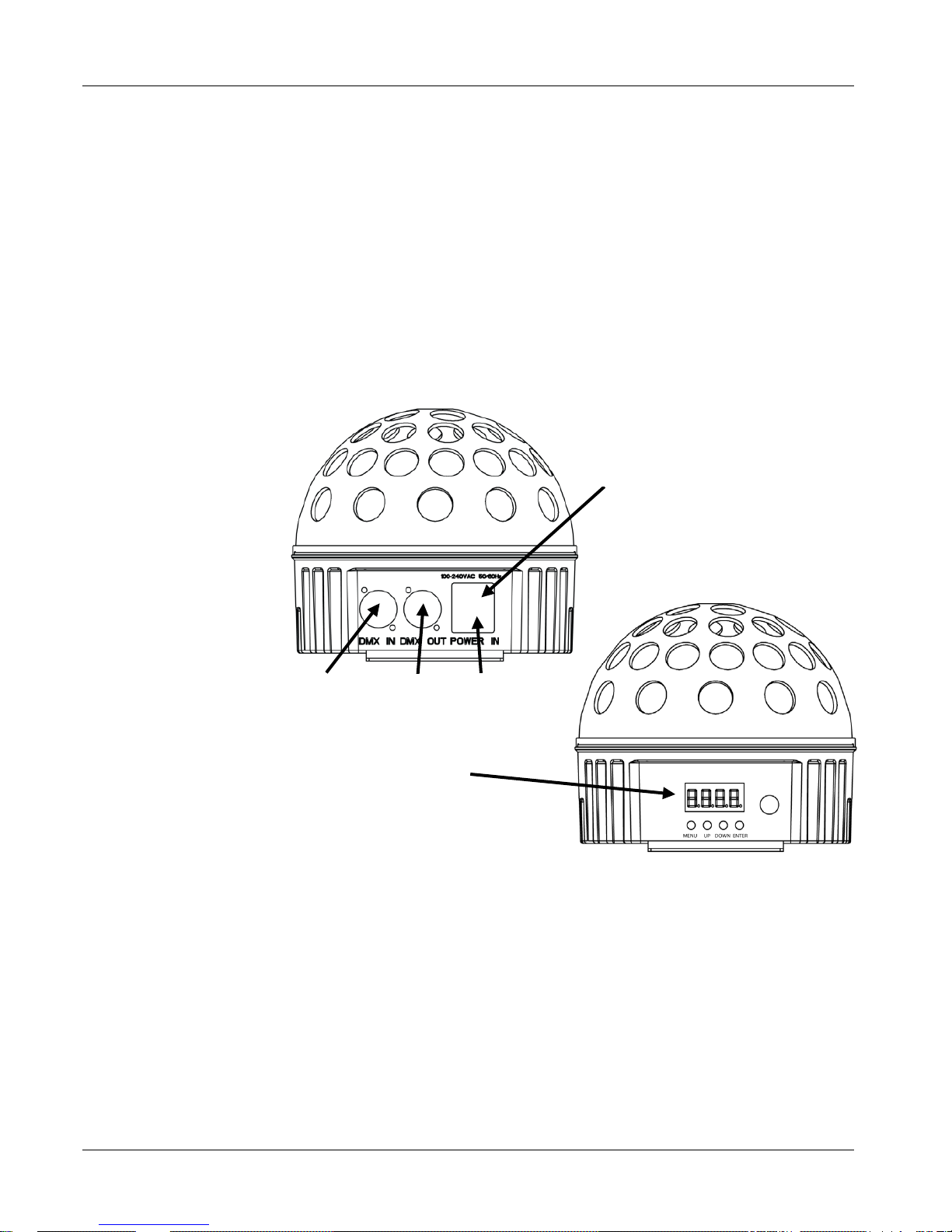
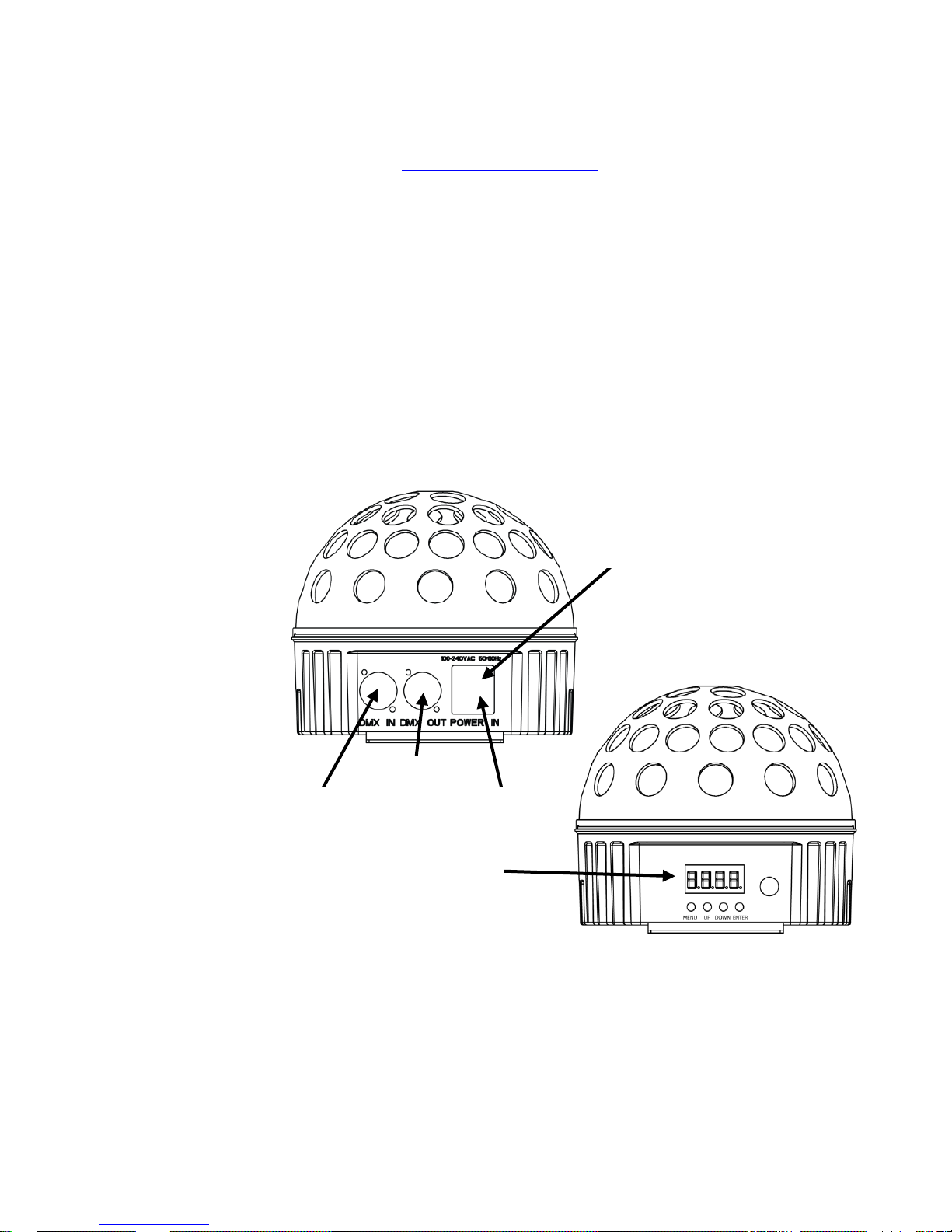
Back Panel View
Power In
Fuse Holder
Menu Display
DMX Out
DMX In
Front Panel View
Page 4
Minisphere™ 3.1 QRG EN
4
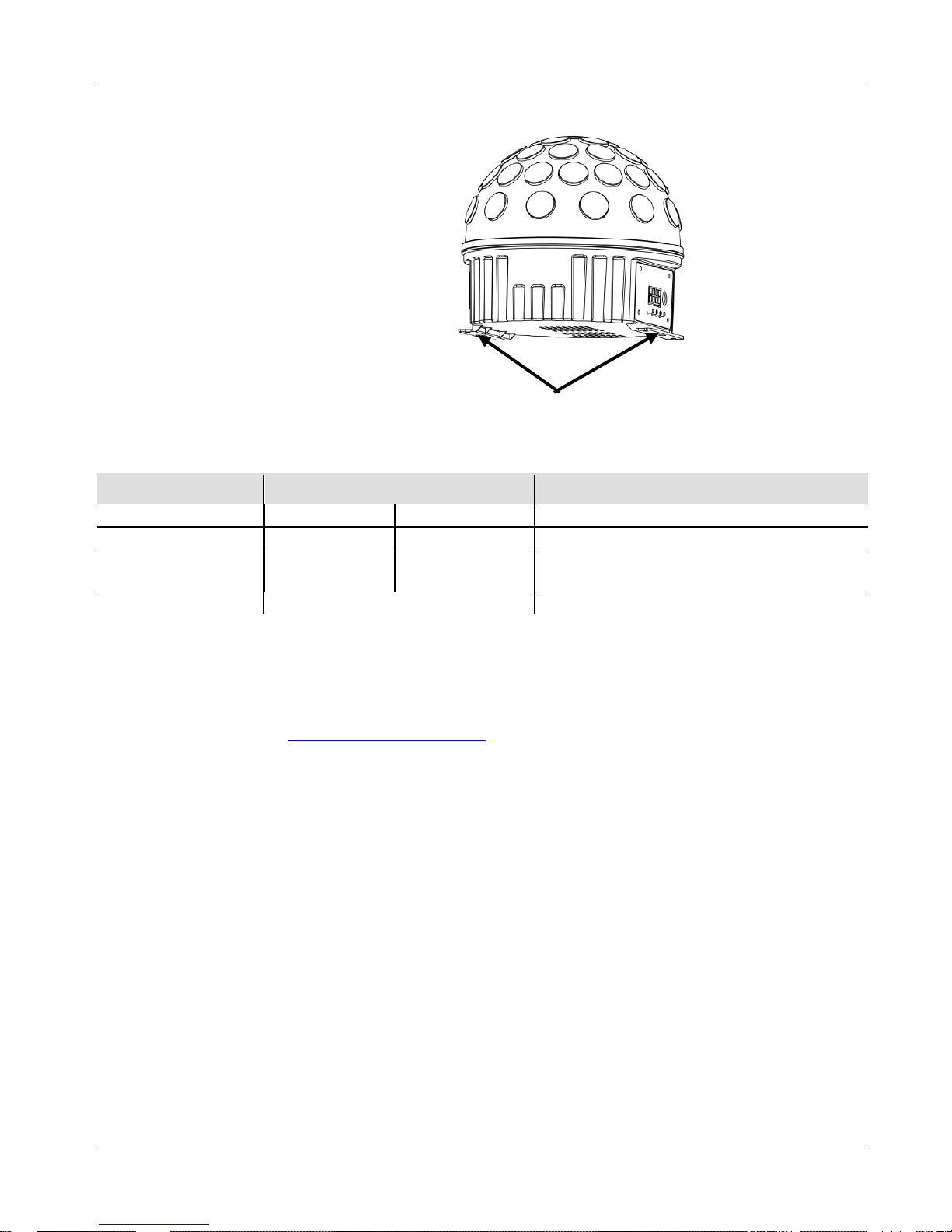
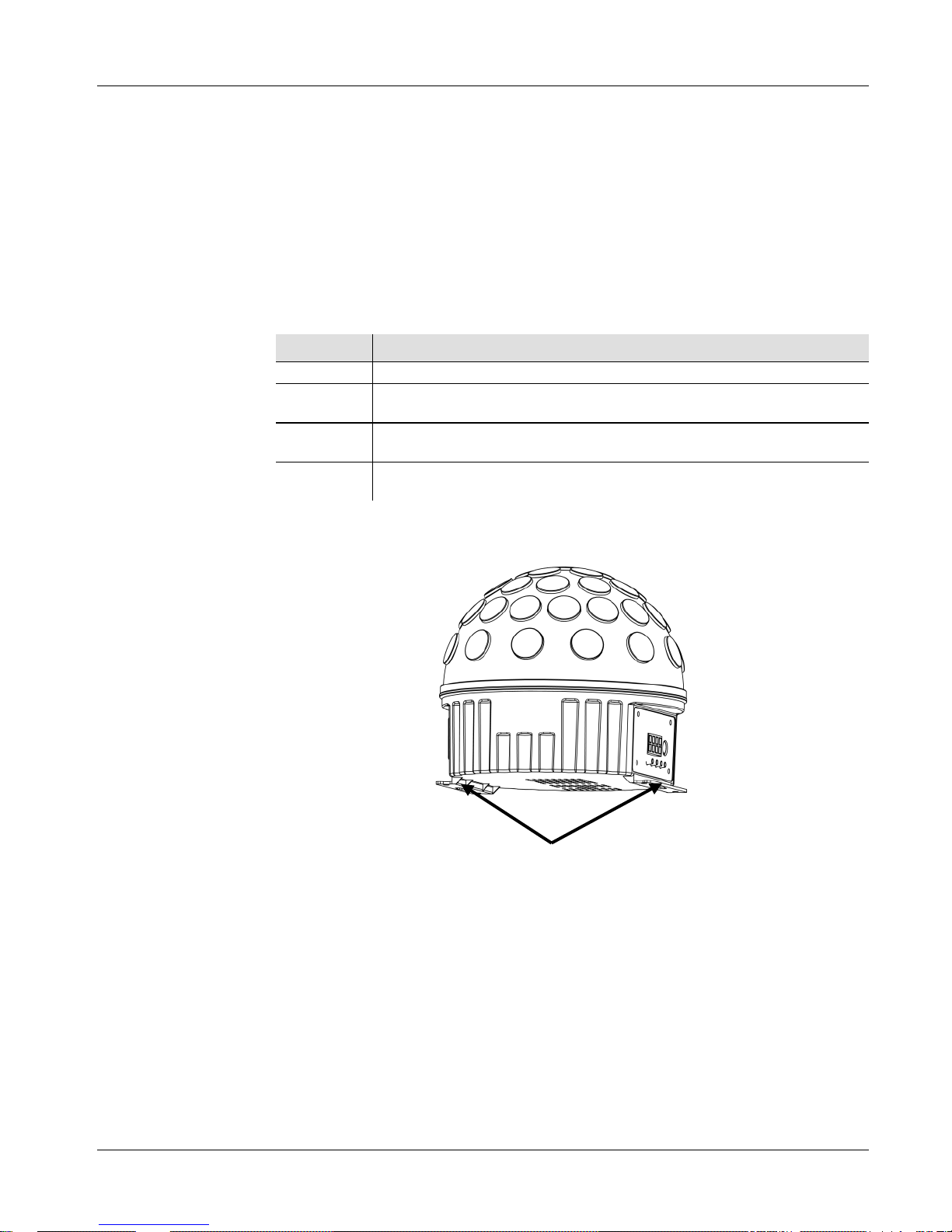
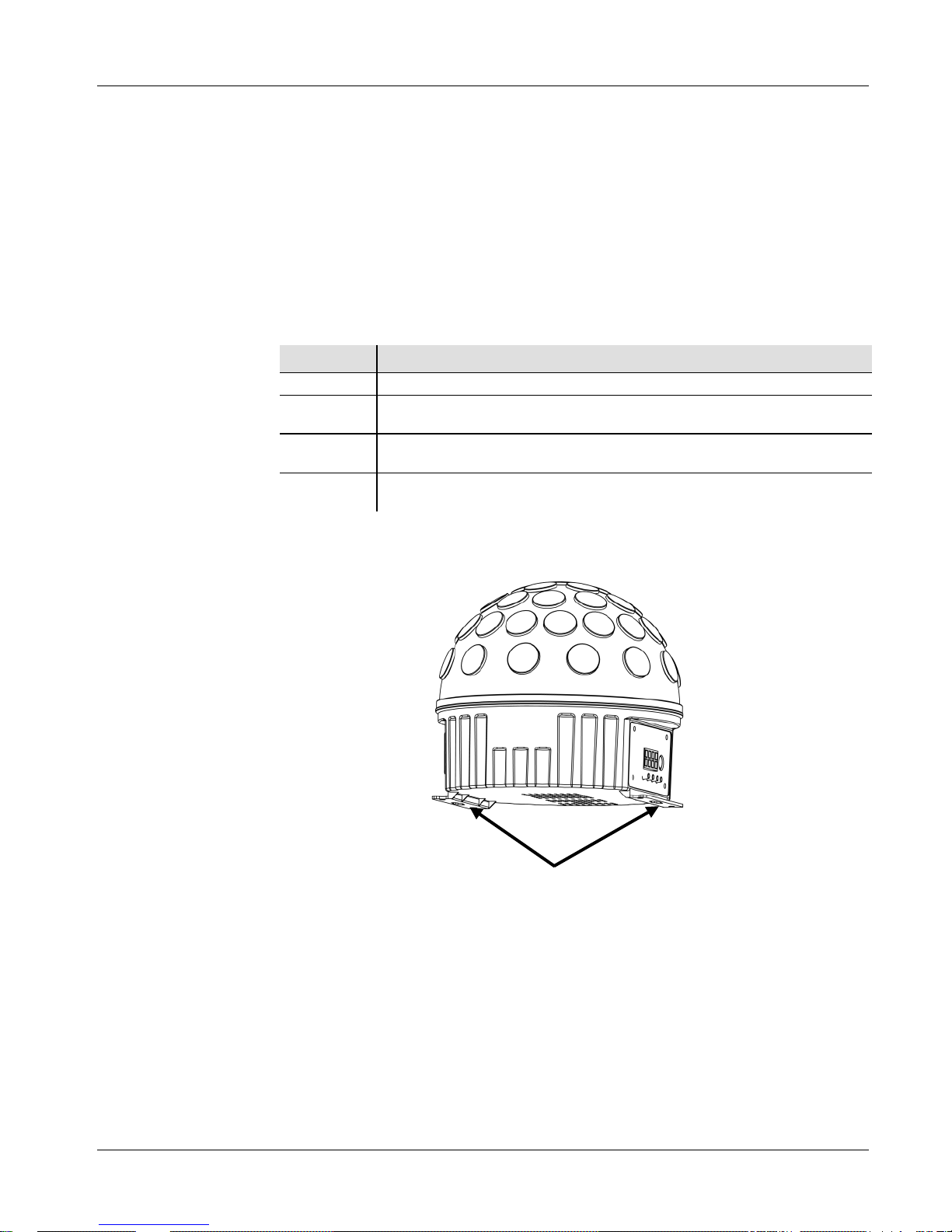
Mounting
Bef ore mount i ng this prod uct, r ead the Saf ety Note s.
Product
Mounting
Diagram
Menu Options
Main Level Programming Levels Description
DMX Mode
512
d 1-d512
Sets DMX starting address
Auto Progr ams
P--
P1-P9
Sets Auto program
Auto Progr am
Speed
S-- S 1-S100 Sets Auto program speed
Sound Active Mode
SNd
Sets Sound Active Mode
DMX Linking
and
Connection
The Minisphere™ 3.1 can work with a DMX controller when linked by
DMX serial connections and has a 6-Channel personality. Instructions for
connecting and configuring this product for DMX operation are in the User
Manual. If you are n ot fam iliar with DMX, d ow nloa d the D M X Primer
from
www.chauvetlighting.com.
Starting Address
To ensure full access to all channels in each DMX mode, the highest
recomm ended D MX address is 507.
Master/Slave
Connection
The Minisphere™ 3.1 uses the DMX data connection for its Master/Slave
mode. Instructions for connecting and configuring this product for
Master/Slave operation are in the User Manual.
Mounting brackets
Page 5
EN Minisphere™ 3.1 QRG
5
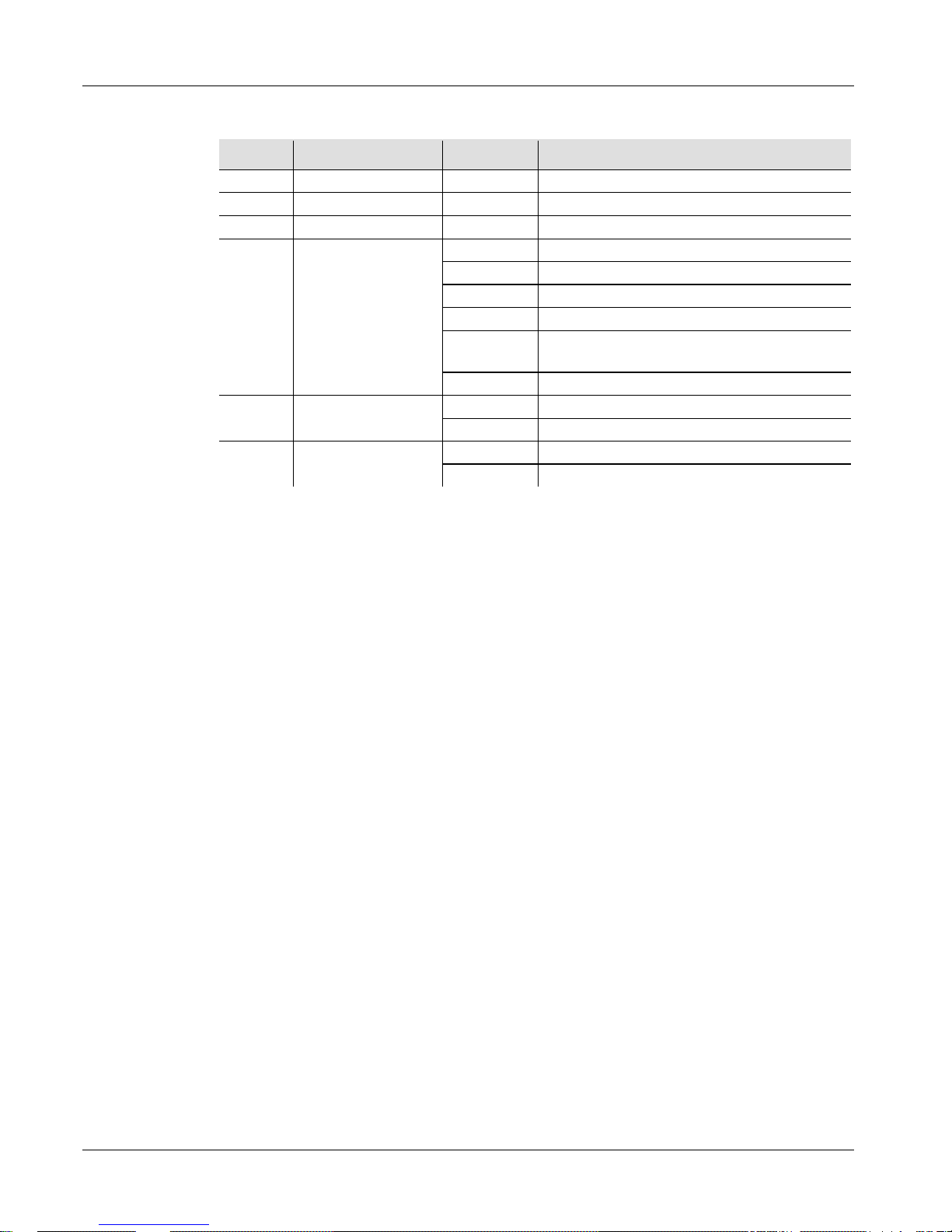
DMX Values
6-CH
Channel Function Value Percent/Setting
1
Red
000 255
0~100%
2
Green
000 255
0~100%
3
Blue
000 255
0~100%
4 Auto Progr ams
000 039
No function
040 079
3 Color Switching
080 119
7 Color Switching
120 159
3 Color Fade
160 199
7 Color Switching, Clockwise &
C ounte r clockw i se Rotati o n
200 255
Sound active
5 Motor Rotation
000 009
No function
010 255
0~100%
6 Strobe
000 009
No function
010 255
1~30 Hz
Page 6
Minisphere™ 3.1 GRR ES
6
Acerca De Esta
Guía
La Guía de Referencia Rápida (GRR) del COLORrail™ IRC IP
contiene información básica sobre el producto, como montaje, opciones
de menú y valores DMX.
Descargue el manual de usuario de
www.chauvetlighting.com para una información más detallada.
Exención de
Responsabilidad
La información y especificaciones contenidas en esta GRR están sujetas
a ca m bio sin pre vio avi so.
Notas de
Seguridad
Estas notas de seguridad incluyen información importante
sobre el
montaje, uso y mantenimiento.
• Est e producto no está concebido para una instalación permanente.
• C onect e est e producto SOLO a un ci rcuito con toma de tierra y
protegido.
• NO mire a la fuente de luz cuando el producto esté encendido.
• Asegúrese de qu e el cabl e de alime ntac i ón no está retorcido ni
estropeado.
•
Nunca desconecte este producto del cable de alimentación agarrando
o tiran do del cable.
• Cuando mon te est e prod ucto en alto, use un cab l e de se guridad.
• NO permita la presencia de materiales inflamables cerca de la
unidad cuando esté en funcionamiento.
•
NO toque este producto cuando esté en funcionamiento, pues podría
estar caliente.
• La tensión del enchufe al que conecte este producto ha de estar en el
ra ngo establ ecido en el graba do o en el panel posterior de producto.
• ¡Este producto es para uso en interiores solamente! (IP20) Para
evi tar r i esgos de incendi o o des c arga, no ex ponga es te producto a la
lluvia o la humedad.
• Monte siempre este produ cto en una ubicación con ventilación
adecuada, al menos a 20'' (50 cm) de superficies adyacentes.
• Asegúrese de que ninguna ranura de ventilación en la carcasa de la
unidad queda bloqueada.
• N unca conecte es t e prod ucto a un ate nuad or o reostat o.
• S u stituya el fusib l e con u no del mi smo ti po y categoría.
•
Use SOLAMENTE el soporte de montaje o la base para mover este
producto.
• La máxima tem perat ura ambiente es de 104º F (40º C ) . N o haga
funcionar este producto a temperaturas más altas.
• En caso de un problema gr ave de funcionamiento, deje de usarlo
inmediatamente.
•
NO abra este producto. No contiene piezas reparables por el usuario.
Contacto
Fuera de EE.UU, Reino Unido o Irlanda, póngase en contacto con su
distribuidor para solicitar asistencia o devolver el producto.
Visite
www.chauvetlighting.com para informac ión de contacto.
Page 7
ES Mi ni sph ere™ 3.1 GRR
7
¿Qué Va
Incluido?
• Minisph e re™ 3. 1
• Cable de alimen tac ión
• Tarjeta de garan t ía
• Guía de Referencia Rápida
Para Empezar
Desembale su Minisphere™ 3.1 y asegúrese de que ha recibido todas las
partes en buen estado. Si la caja o los componentes parecen dañados,
notifíqueselo al transportista inmediatamente, no a CHAUVET®.
Descripción
del Producto
El Minisphere™ 3.1 es un aparato de iluminación central brillante y
compacto con LEDs giratorios y estroboscópicos de color rojo, verde y
azul, que proporcionan una gran cobertura de sala y un ambiente de fiesta
en cualquier evento. Funciones DMX y programas activos por sonido
incorporados proporcionan modos sencillos y personalizables para utilizar
el Minispher e™ 3.1 .
Visión General del
Producto
Vista Panel Posterior
Portafusibles
Display Menú
Salida
DMX
Entrada
DMX
Vista Panel Frontal
Entrada
Alimentación
Page 8
Minisphere™ 3.1 GRR ES
8
Corriente
Alterna
Este producto tiene una fuente de alimentación con detección automática que
puede funcionar con un rango de tensión de entrada de 100~240 VCA,
50/60 Hz.
Sustitución del
Fusible
1. Des conect e el pr od ucto d e la alimenta ci ó n.
2. Haga cuña con la punta de un destornillador plano en la ranura del
portafusibles.
3. Saque la ta pa de segu ridad de la carcas a.
4. Quite el fusible fundido de la sujeción en la parte frontal de la tapa de
seguridad y sustituya el fusible con otro del mis mo t ip o y cate goría.
5. Vuelva a insertar el portafusibles y conecte de nuevo la alimentación.
Descripción
del Pan
el de
Control
Botón Función
<MENU>
Sale d el men ú o función actual
<UP>
Naveg a h aci a ar ri ba por la list a d e m enú y aum en t a el val or
numérico cuando está en una función
<DOWN>
Naveg a h aci a ab ajo por la list a de menú y dism inuye el valor
numérico cuando está en una función
<ENTER>
Habili ta el menú act u al m ente en pant al l a o configur a el val or
selecc i onado actualmente
Montaje
Antes de m ontar e ste produc to, l ea las N otas de Seguridad.
Diagrama
de Montaje
del Pro
ducto
Soportes de Montaje
Page 9
ES Mi ni sph ere™ 3.1 GRR
9
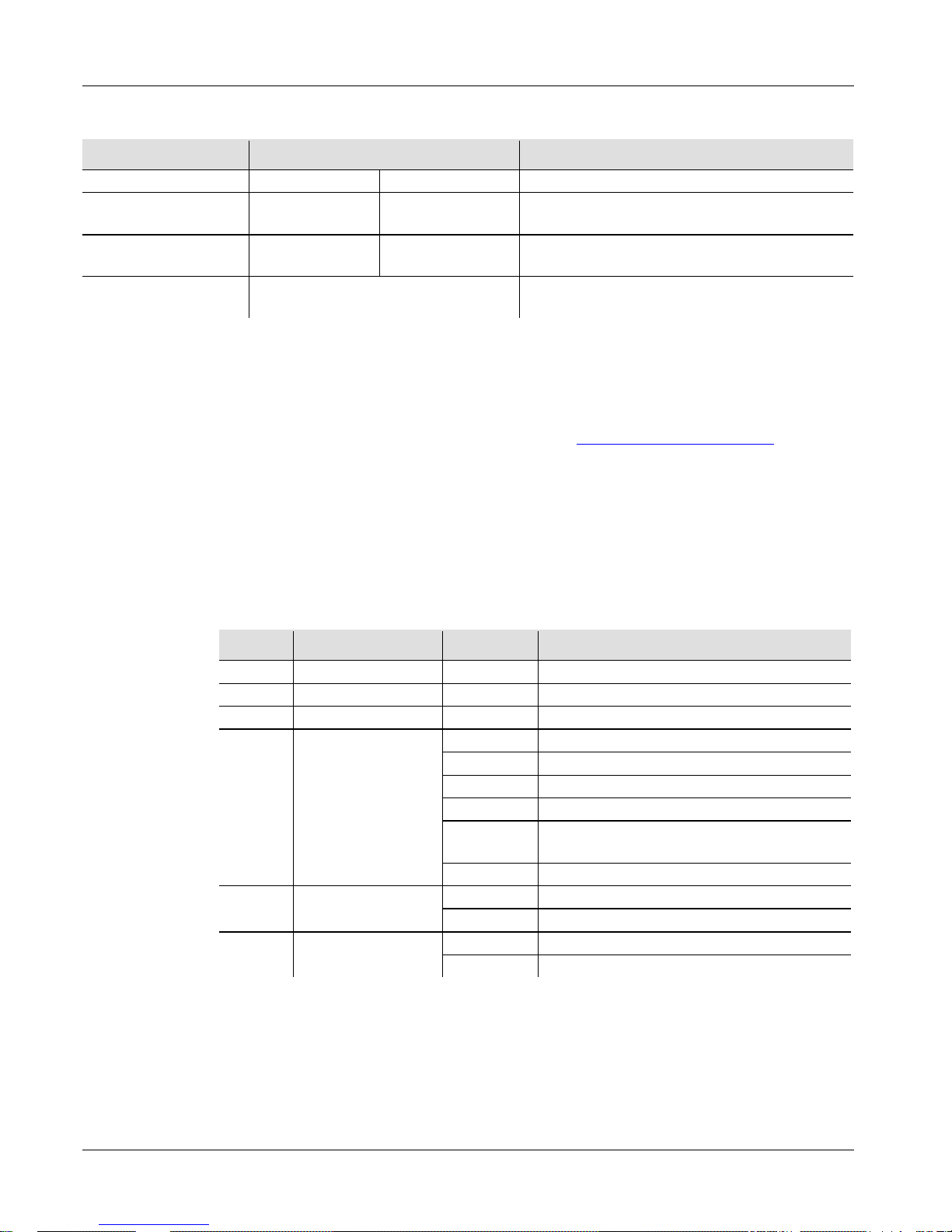
Opciones de Menú
Nivel Principal Niveles de Programación Descripción
Modo DMX
512
d 1-d512
Configura la dirección inicial DMX
Programas
Automáticos
P-- P1-P9 Config ura el programa Automático
Velocidad Pro gr a ma
Automático
S-- S 1-S100
Configura la velocidad del programa
Automático
Modo Activo por
Sonido
SNd Config ura el Mod o Activo por Son i d o
Enlace DMX y
Conexión
El Minisphere™ 3.1 puede funcionar con un controlador DMX cuando se
enlaza por conexiones serie DMX y se encuentra en personalidad de 6
canales.
Las instrucciones para conectar y configurar este producto para
funcionamiento DMX est
án en el Manual de usuario. Si no está familiarizado
con DM X , des cargue el Manual D MX de www.chauvetlighting.com.
Dirección de Inicio
Para asegurarse acceso total a todos los canales en cada modo DMX, la
di recció n DMX más r ecomendabl e es 507.
Conexión
Maestro/Esclavo
El Minisphere™ 3.1 usa la conexión de datos DMX para su modo
Maestro/Esclavo. Las instrucciones para conectar y configur
ar este producto
para funcionamiento Maestro/Esclavo est án en el M an ual de Usuario.
Valores DMX
6-C
Canal Función Valor Porcentaje/Configuración
1
Rojo
000 255
0~100%
2
Verde
000 255
0~100%
3
Azul
000 255
0~100%
4
Programas
Automáticos
000 039
Sin función
040 079
Conmutac ión de 3 Colores
080 119
Conmutac ión de 7 Colores
120 159
Fade de 3 Colores
160 199
Conmutación de 7 Colores, Rotación en
Senti d o Horario y en Sen t i d o Ant ih orario
200 255
Activo por sonido
5
Rotación del
Motor
000 009
Sin función
010 255
0~100%
6 Estroboscopio
000 009
Sin función
010 255
1~30 Hz
Page 10
Minisphere™ 3.1 MdR FR
10
À Propos de ce
Manuel
Le Manuel de Référence du Minisphere™ 3.1 (MdR) reprend des
informations de base sur cet appareil notamment en matière de montage,
d'options de menu et de valeurs DMX. Téléchargez le manuel d'utilisation
sur www.chauvetlighting.com pour de plus amples informations.
Clause de Non-
Responsabilité
Les informations et caractéristiques contenues dans ce manuel sont sujettes
à changement sans préavis.
Consignes de
Sécurité
Ces consignes concernant la sécurité reprennent d'importantes informations
en matière d'installation, d'utilisation et de maintenance.
• Cet appareil n'est pas conçu pour être utilisé dans une installation
permanente.
• C onnectez UNIQU E MENT ce produit à u n circuit prot égé et r el ié à la
terre.
• D ébr an chez t oujours cet appareil avant de procéder à son nettoyage ou
au remplacement de son fusible.
• N e regarde z PAS la source lumineuse lorsq ue le produit fonction ne.
• Ne débranchez jamais cet appareil en tirant sur le cordon.
• U tili sez un câble de sécur i té lorsque vou s mont ez ce produi t e n haute ur.
•
Veillez à ce qu'AUCUNE source inflammable ne se trouve à proximité
de l'unité lors de son fonctionnement.
•
Ne touchez PAS cet appareil lors de son fonctionnement car il pourrait
s'avérer brûlant.
• La tension de la prise à laquelle vous connectez ce cet appareil doit être
comprise dans la plage de tensions reprise sur l'étiquette de l'appareil ou
à l'arrière de ce dernier.
• Cet appareil doit être utilisé en intérieur uniquement. (IP20) Afin
d'éviter tout risque d'incendie ou décharge électrique, veillez à
n'exposer cet app ar ei l ni à la pluie ni à l'humidité.
• Montez tou jours cet appa r eil dans en e ndroit bien ventilé, à au moi ns,
20 pouces (50 cm) des surfaces adjacentes.
• Assurez-vous qu'aucune fente de ventilation sur le boîtier ne soit
obstruée.
• N e connecte z JAMAIS cet appareil ni à un gr adateur ni à un rh éostat.
• Remplacez le fusible avec un de même type et même ampérage.
• Transportez cet appareil UNIQUEMENT en le tenant par sa lyre de
suspension ou sa base.
• La température ambiante maximale suppor t ée par ce p roduit est de
104° F (40° C). Ne le faites pas fonctionner à des températures plus
élevées.
• En cas de sérieux problèmes de fonctionnement, arrêtez le système
immédiatement.
• N’ouvrez PAS ce produit. Il ne contient aucun composant susceptible
d’être rép a r é p ar l’utilisateur.
Page 11
FR Minisphere™ 3.1 MdR
11
Contact
En dehors des États-Unis, du Royaume-Uni et d e l’Irl ande, contact ez vot re
fournisseur si vous avez besoin d'assistance ou de retourner votre produit.
Consultez le site www.chauvetlighting.com pour trouve r nos c oordonnée s .
Ce Qui Est
Inclus
• Un Minisphere™ 3.1
• Un cordon d'alimentation
• Une fiche de garantie
• Un manuel de référence
Débuter
Déballez votre Minisphere™ 3.1 et assurez-vous d'avoir tout reçu et en bon
état. Si l'emballage ou le contenu semblait être endommagé, indiquez-le
imméd ia tement au trans p or te ur et non à CHAUVET®.
Description de
l'Appareil
Le M in isp here ™ 3.1 est une unité d’éclairage central à effets, compacte et
lumineuse, à diodes LED rouges, vertes et bleues
. Combinées à son effet
stroboscopique, l’unité peut couvrir une grande
salle dans son entièreté,
conférant à tous vos événements une ambiance festive. Les fo
nctions DMX
et programmes musicaux intégrés vous permettent de configurer le
Minisp here™ 3.1 de manière à ce qu'il réponde à vos besoins personnels.
Vue D'ensemble
du
Produit
Vue du Panneau Arrière
Porte-Fusible
Sortie DMX
Entrée DMX
Vue du Panneau Avant
Entrée
D'alimentation
Affichage du Menu
Page 12
Minisphere™ 3.1 MdR FR
12
Alimentation
CA
Cet appareil est doté d'une alimentation universelle prenant en charge toute
tension d'ent ré e comprise entre 100 et 240 VCA, 50/60 Hz.
Remplacement du
Fusible
1. Débranchez l'appareil de l'alimentation.
2. Insérez et calez la pointe d'un tournevis à tête plate dans la fente du porte-
fusible.
3. En faisant levier, faites sortir de son emplacement le couvercle du porte-
fusible.
4. Retirez le fusible obsolète du cl ip se t rouva nt à l'a vant du couve rcle de
sé cu rité et remplacez-le par un fusible équivalent.
5. Insérez à nouv eau le porte-fusible puis rebranchez l'appareil.
Description du
Tab
leau de
Commandes
Bouton Fonction
<MENU>
Permet la sortie du menu ou de la fonction en cours
<UP>
Permet de parcourir les listes de menu vers le haut, dans une
fonct i on p er m et d' aug m enter les v al eur s nu m ér iq u es
<DOWN>
Perm et de parcouri r les list es de m enu vers le b as, d ans un e
fonct i on p er m et d e diminuer les valeurs numériques
<ENTER>
Perm et l’af f ic h age du men u en c ours ou p er m et d e c onf i gur er l a
valeur en cours
Installation
Avant de monter cet appareil, lisez et assimilez les consignes de sécurité.
Schém a de
Mo
ntage
de l'Appareil
Supports de Fixation
Page 13
FR Minisphere™ 3.1 MdR
13
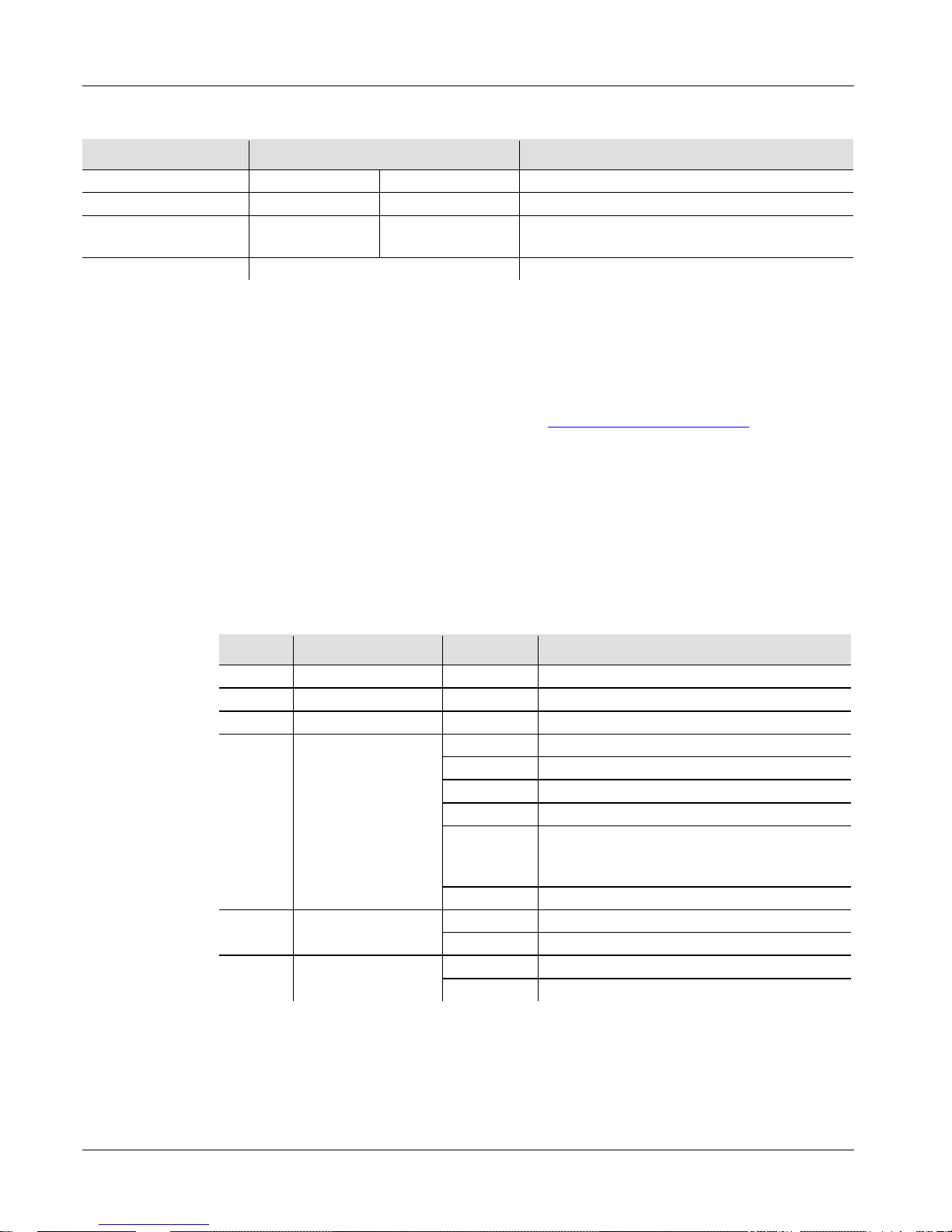
Options du Menu
Niveau Principal Niveaux de Programmation Description
DMX Mode
512
d 1-d512
Configure l'adresse DMX de départ
Auto Progr ams
P--
P1-P9
Config ure le programm e aut om atiqu e
Auto Progr am
Speed
S-- S 1-S100
Configure la vitesse du programme
automatique
Sound Active Mode
SNd
Configure le mode musical
Chaînage DMX
et Connexion
Le Minisphere™ 3.1 peut fonctionner avec un jeu d'orgues DMX quand
raccordé par des connexions DMX en série; il est de plus doté d'une
personnalité à 6
canaux. Vous trouverez les instructions de connexion et
configuration de cet appareil pour un bon fonctionnement en DMX da
ns le
manuel d'utilisation. Si vous n'êtes pas familier avec le DMX, vous pouvez
télécharger l'intr oduction a u DMX sur www.chauvetlighting.com.
Adresse de Départ
Afin d'assurer un accès à tous les canaux dans chaque mode DMX, l'adresse
DMX la plus élevée recommandée est 507.
Connexion
Maître/Esclave
Le M ini spher e™ 3.1 utilise une connexion de données DMX pour son mode
maîtr e/esclave. V ous trouvere z les instructi o
ns de connexion et configuration
de cet appareil pour un bon fonctionnement en maître/esclave dans le manuel
d'utilisation.
Valeurs DMX
6 Canaux
Canal Fonction Valeur Pourcentage/Configuration
1
Rouge
000 255
0 à 100%
2
Vert
000 255
0 à 100%
3
Bleu
000 255
0 à 100%
4
Programmes
Automatiques
000 039
Pas de fonction
040 079
3 couleur s en al t er n ance
080 119
7 couleur s en al t er n ance
120 159
3 couleurs en fondu
160 199
7 couleurs en alternance, rotation dans le
sens des aig uilles d' un e m ontre et leur
contraire
200 255
Musical
5
Rotation du
Moteur
000 009
Pas de fonction
010 255
0 à 100%
6 Stroboscope
000 009
Pas de fonction
010 255
1 à 30 Hz
Page 14
Minisphere™ 3.1 SAL DE
14
Über diese
Schnellan-
leitung
In der Schnellanleitung des Minisphere™ 3.1 finden Sie die wesentlichen
Produktinformationen, wie etwa über die Montage, Menüoptionen und DMXWerte des Geräts.
Laden Sie für weiterführende Informationen unter
www.chauvetlighting.com das Benutzerhandbuch herunter.
Haftungs-
ausschluss
Die Informationen und Spezifikationen dieser Anleitung können ohne vorherige
Ankündigung geändert werden.
Sicherheits
-hinweise
Diese Sicherheitshinweise enthalten wichtige Informationen über die Montage,
Verwendung und Wartung des Geräts.
• Dieses Produkt eignet sich nicht für eine permanente Installation.
• SCHLIESSEN Sie dieses
Produkt nur an einen mit der Masse verbundenen
und abgesicherten Stromkreislauf an.
•
Trennen Sie das Gerät von der Stromquelle, bevor Sie es reinigen oder die
Si cher ung aus w echseln.
• N IEMALS in die Lichtquelle schauen, während das Gerät eingeschaltet ist.
• Stelle n Sie si cher, da ss das Netzkabel ni cht gequets cht oder beschädigt i st.
• Zie hen Sie beim Tr enne n des Geräts von der Str om versorgu ng nie am Kabel.
• Bei Montage über Kopf immer ein Sicherungsseil verwenden.
• KEINE entflammbaren Materialien während des Betrie
bs in der Nähe des
Geräts lagern.
• N IEMALS während des Betriebs das Gehäuse berühren, da dies sehr heiß
wird.
• Die Spannung der Schukosteckdose, an die Sie das Gerät anschließen, muss
sich innerhalb des Sp annu ngsbereiches bef in den, der auf dem Hinweisschild
oder dem rückwärtigen Bedienfeld des Geräts angegeben ist.
• Dieses Gerät darf nur im Innenbereich verwendet werden. (IP20) Um das
Ris iko von B rän den ode r elektrischen Schlägen zu verm eide n, dürfen Sie d as
Gerät ni cht Rege n oder Feuchtigkei t aussetzen.
•
Installieren Sie das Gerät an einem Ort mit ausreichender Belüftung und mit
einem Abstand von 50 cm zu den angrenzenden Flächen.
• St ellen Sie sicher, dass die Lüftungsöffnungen im Gehäuse des Geräts nicht
ver schloss en sind.
• Schließe n Sie die ses Gerät niemal s an einen Dim m er oder Regelwide rst and
an.
• Achten Sie beim Auswechseln der Sicherung darauf, den gleichen Typ mit
den gleichen Werten zu verwenden.
• Das Gerät NUR an den Befestigungsbügeln oder der Grundplatte tragen.
• Die maximal zulässige Umgebun
gstemperatur beträgt 40°C. Nehmen Sie das
Gerät nicht bei höheren Temperaturen in Betrieb.
• Bei ernsthaften Betriebsproblemen stoppen Sie umgehend die Verwendung
des Geräts.
• Dieses Gerät NICHT öffnen. Die eingebauten Komponenten sind für den
Kunden wartungsfrei.
Page 15
DE Mini sph ere™ 3.1 SAL
15
Kontakt
Kunden außerhalb der USA, GB oder Irland wenden sich an ihren
Lieferanten, um den Kundendienst in Anspruch zu nehmen oder ein Gerät
zurückzuschicken. Kontaktinformationen finden Sie unter
www.chauvetlighting.com.
Packungs-
inhalt
• Minisph e re™ 3. 1
• Netzkabel
• Garantiekarte
• Schnellanleitung
Start
Packen Sie Ihren Minisphere™ 3.1 aus und überprüfen Sie, ob Sie alle
Teile unbeschädigt erhalten haben.
Wenn die Verpackung beschädigt ist,
benachrichtigen Sie umgehend das Transportunternehmen, nicht jedoch
CHAUVET®.
Produkt-
beschreibung
Das Minisphere™ 3.1 ist das helle und kompakte Herzstück einer jeden
Beleuchtungsanlage. Seine roten, grünen und blauen rotierenden LEDs mit
Stroboskopeff
ekt decken fast den gesamten Raum ab und erzeugen auf
jeder Veranstaltung eine festliche Atmosphäre. Die DMX-
Funktionen und
integrierten Musiksteuerungs-
Programme bieten eine einfache und
individuell anpassbare Möglichkeit der Nutzung des Minisphere™ 3.1.
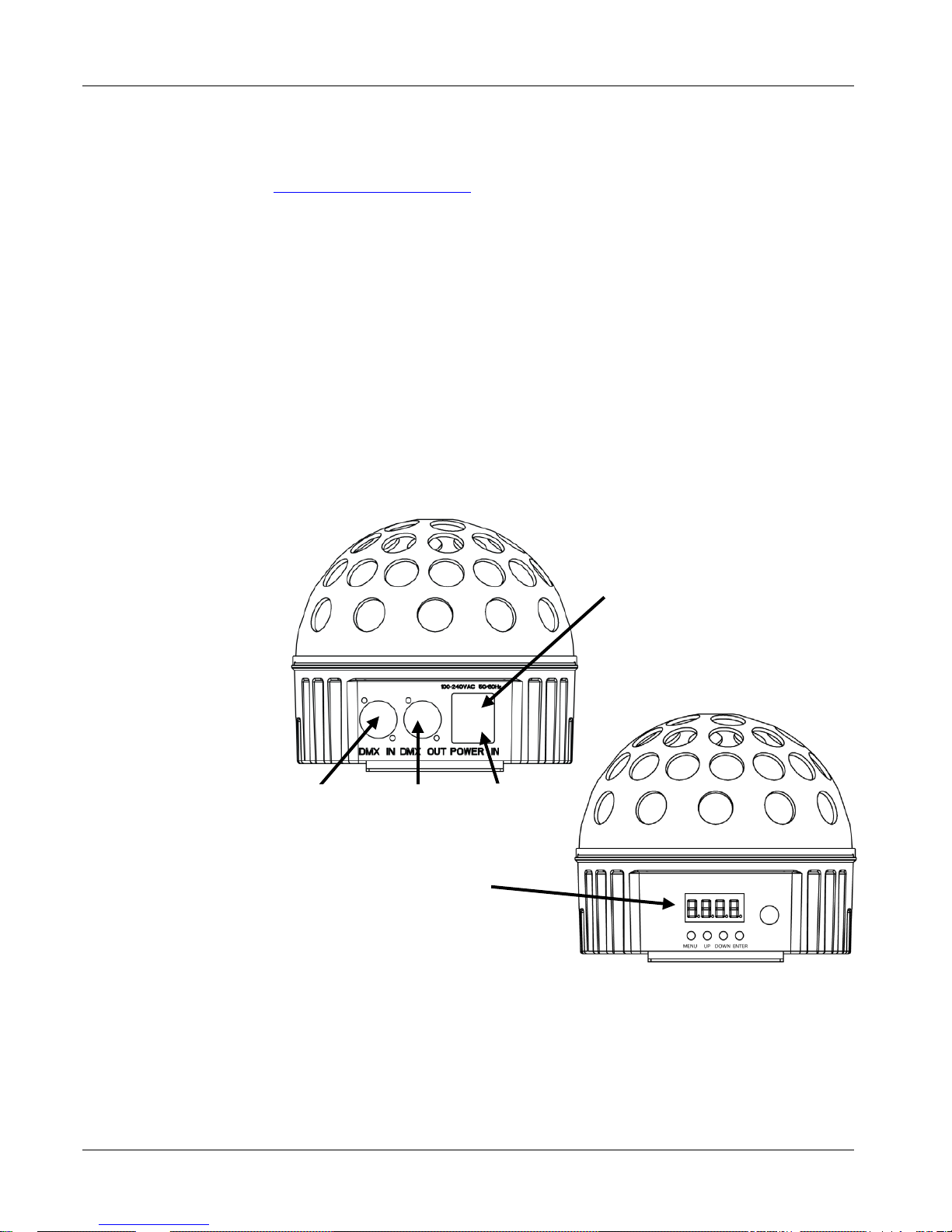
Produktüberblick
Ansicht des Rückwärtigen Bedienfelds
Sicherungshalter
DMX-
Ausgang
DMX-
Eingang
Ansicht des Vorderen Bedienfelds
Stromzufuhr
Menü-Anzeige
Page 16
Minisphere™ 3.1 SAL DE
16
Wechselstrom
Dieses Gerät verfügt über ein V orschaltgerät, das au to matisch die anlieg ende
Spannung erkennt, sobald der Netzstecker in die Schukosteckdose gesteckt
wird, und kann mit einer Eingangsspannung von 100~240 V AC, 50/60 Hz
arbeiten.
Auswechseln der
Sicherung
1. Tr ennen Sie das Gerä t vom Stromnetz.
2.
Klemmen Sie die Spitze eines Flachkopfschraubendrehers in den Schlitz
des Sicherungshalters.
3. Hebeln Sie die Sicherheitsabdeckung vom Gehäuse weg ab.
4. Entfernen Sie die durchgebrannte Sicherung von der Klemme am
Vorderteil der Sicherheitsabdeckung, un d erset zen Sie di ese durch ein e
Si cher ung des glei chen Typs und m i t den gl e iche n Werten.
5. Stecken Sie den Sicherungshalter wieder zurück, und schließen Sie das
Gerät an das Str omnetz a n.
Beschreibung
des
Bedienfeldes
lesen
Taste Funktion
<MENU>
Damit verlassen Sie das aktu elle Menü oder di e Funkti on
<UP>
Damit n avi gieren Si e sic h dur ch die Men ü pu nkte nac h ob en un d
erhöh en den n um er is c h en Wert der ents prechenden Funktionen
<DOWN>
Damit navigieren Sie sich durch die Menüpunkte nach unten und
verrin g er n d en nu m er is c h en Wert der entsprechenden Funktionen
<ENTER>
Damit w ird das aktuell e M enü an g ez eigt oder d er akt u e ll
ausgewählte Wert eingestellt
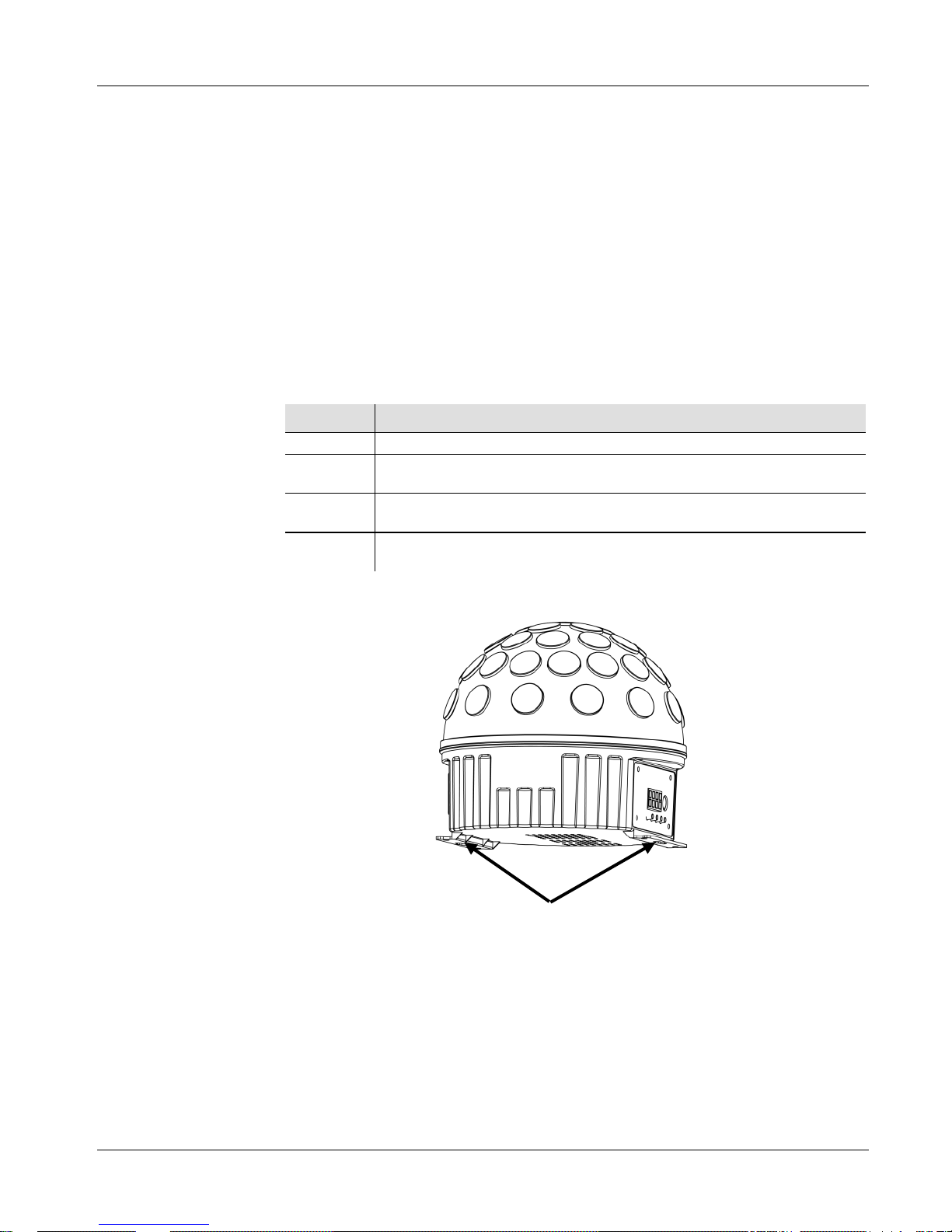
Montage
Lesen Sie vor der Montage dieses Geräts die Sicherheitshinweise durch.
Ansicht Geräte
-
montage
Befestigungsbügel
Page 17
DE Mini sph ere™ 3.1 SAL
17
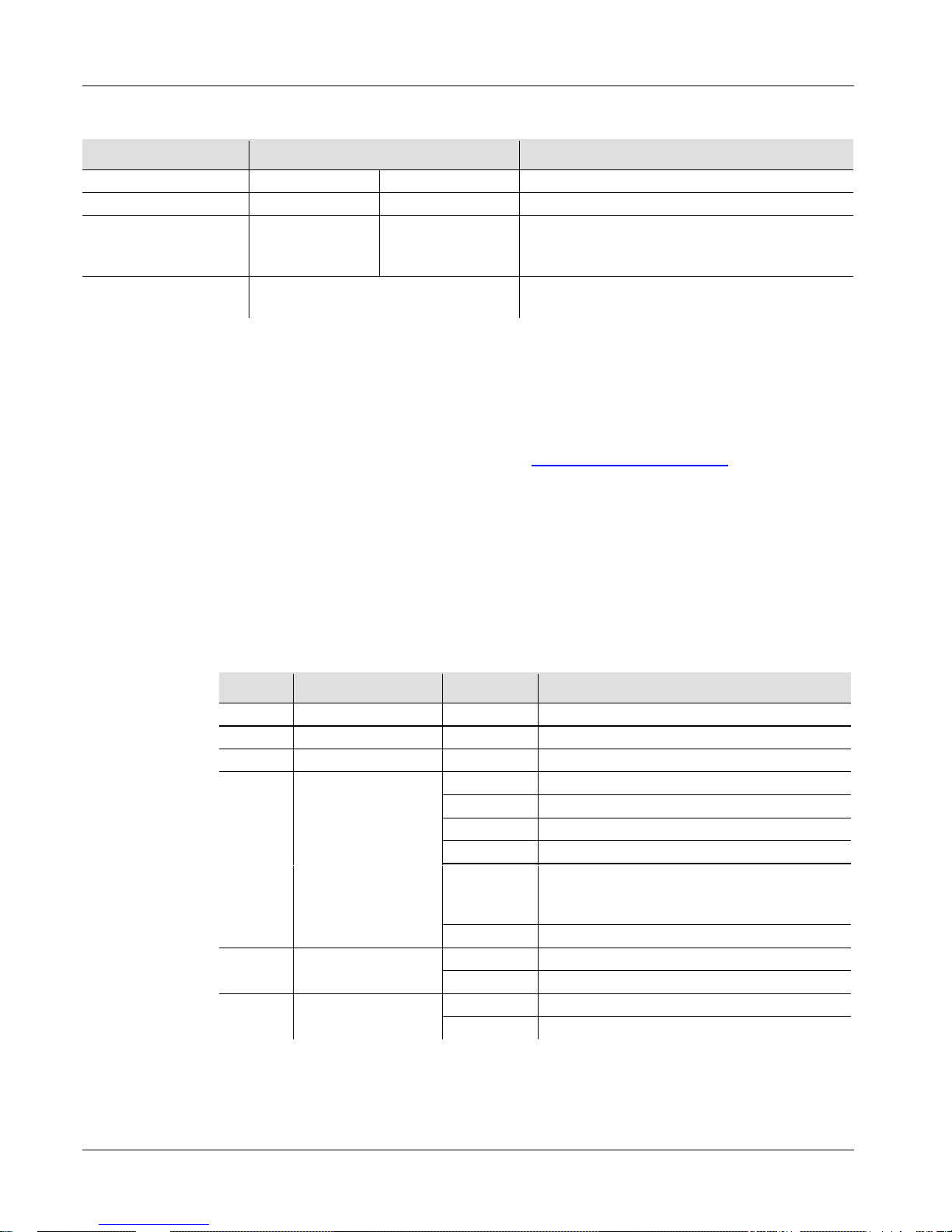
Menüoptionen
Hauptebene Programmierebenen Beschreibung
DMX-Modus
512
d 1-d512
Stellt die DMX-S tart a dr esse ein
Auto-Programme
P--
P1-P9
Stellt Auto-Prog ramm ein
Geschwindigkeit
des Auto-
Programms
S-- S 1-S100
Stellt die Ablaufgeschwindigkeit des AutoProgr am ms ein
Musiksteuerungs-
Modus
SNd Stellt M us iks t eu erungs -M od us ein
DMX-
Reihenschaltung
und
Verbindung
Das Mi nis phe re™ 3. 1 kann mit einem DMX-Controller betrieben werden,
wenn eine DMX-
Reihenschaltung zum Einsatz kommt, und er verfügt über
6 Kanäle.
Anweisungen zum Zusammenschluss und der Konfiguration
dieses Geräts für den Betrieb im DMX-
Modus finden Sie im
Benutzerhandbuch.
Wenn Sie mit DMX nicht vertraut sind, laden Sie
"DMX - Eine Einführung" unter www.chauvetlighting.com herunter.
Startadresse
Um einen vollständigen Zugang zu allen Kanälen in jedem DMX-Modus
zu gewährleisten, beträgt die höchste empfohlene DMX-Adresse 507.
Master/Slave-
Schaltung
Das Minisphere™ 3.1 verwendet für seinen Master/Slave-Modus eine
DMX-Datenverbindung. Anweisungen z
um Zusammenschluss und der
Konfiguration dieses Geräts für den Betrieb im Master/Slave-Modus fi nden
Sie im Benutzerhandbuch.
DMX-Werte
6 Kanäle
Kanal Funktion Wert Prozent/Einstellung
1
Rot
000 255
0 bis 100%
2
Grün
000 255
0 bis 100%
3
Blau
000 255
0 bis 100%
4 Auto-Programme
000 039
Keine Funk tion
040 079
3-Farben-Umschalten
080 119
7-Farben-Umschalten
120 159
3-Farben-Fading
160 199
7-Farben-Umschalten, Rotation im
Uhr z eigersinn und gegen den
Uhrzeigersinn
200 255
Musiksteuerung
5 Motorrotation
000 009
Keine Funk tion
010 255
0 bis 100%
6 Stroboskop
000 009
Keine Funk tion
010 255
1~30 Hz
Page 18
Minisphere™ 3.1 GRR PO
18
Sobre Este Guia
O Guia de Referência Rápida (GRR) do Minisphere™ 3.1 contém
informações básicas sobre o produto tais como instalação, opções de
menu e valores DMX. Transfira o Manual de Utilizador de
www.chauvetlighting.com para obter mais informações.
Exclusão de
Responsabilidade
As informações e especificações contidas neste GRR estão sujeitas a
alteração sem aviso prévio.
Instruções de
Segurança
Esta
s Instruções de Segurança incluem informações importantes sobre a
instalaç ão, utiliz ação e manu tenção.
• Est e produ to não s e destina à instalaçã o perma nent e.
• Ligue este prod uto APEN AS a um circuito prote gido e ligado à
terra.
• Desligue-o sempre da alim entação antes da limpeza ou substituiç ão
do fu sível.
• N Ã O olh e para a fonte de lu z quand o o prod uto está ligado.
• N unca desligue es te produt o da alim entação a o puxar ou esticar o
cabo de alimentação.
• Utilize um cabo de segurança numa instalação suspensa desta
produto.
•
NÃO permita a presença de materiais inflamáveis junto da unidade
durante o seu funcionamento.
• NÃO toque neste produto aquando do funcionamento do mesmo,
pois poderá estar quente.
• A tensão da tom ada à qua l i rá liga r este produto deve estar no
in t erva lo indicado no autocol ant e ou painel p oster ior do p roduto.
• Est e produ to destina-se apena s a ser ut iliz ado no interior! (IP20)
Para evi tar o ri sco de i ncên dio ou ch oque eléct rico, não e xponh a
este produto à chuv a nem hum idade.
• Instale sempre este produto num local com ventilação adequada, a
pelo menos 50 cm (20 pol.) das superfícies adjacentes.
• Certifique-se de que não es t ão obs t ruíd a s quaisquer ranhuras de
ven tilação d o c orpo d a unid ade.
• Nunca ligue este produto a um regulador da intensidade da luz nem
a um reóstato.
• Substitua o fusível por um do mesmo tipo e classificação.
• Tra nspor t e este prod uto APEN AS com as pegas ou supor t es de
montagem.
• A temperatura máxima ambiente é 40 °C (104 °F). Não utilize este
pr odut o em ambi entes com temperaturas superiores.
• Em cas o d e um prob lema de fu ncionamento grave, par e a utilizaçã o
imediatamente.
• N Ã O abr a este produ to. Não contém quaisquer peças passíveis de
manutenção.
Page 19
PO Mini sph ere™ 3.1 GRR
19
Contacto
Fora dos E.U.A., Reino Unido ou Irlanda, entre em contacto
com o seu
distribuidor para solicitar assistência ou devolver um produto.
Aceda a
www.chauvetlighting.com pa ra obter informaçõe s de cont acto.
Conteúdo
• Minisph e re™ 3. 1
• Cabo de alimentação
• Cartão de garantia
• Guia de referência rápida
Para Começar
Desembale o Minisphere™ 3.1 e certifique-se de que recebeu todas as
peças em boas condições. Se a caixa ou conteúdos aparentarem estar
danificados, notifique imediatamente a transportadora e não a
CHAUVET®.
Descrição do
Produto
O Minisphere™ 3.1 é um efeito central brilhante e compacto com LEDs
vermelhos, verdes e azuis rotativos e de sinal de validação que
proporcionam uma enorme cobertura da sala e uma atmosfera festiva em
qualquer evento. As funções DMX e os programas de activação de som
integrados proporcionam formas simples e personalizáveis de utilizar o
Minisp here™ 3.1.
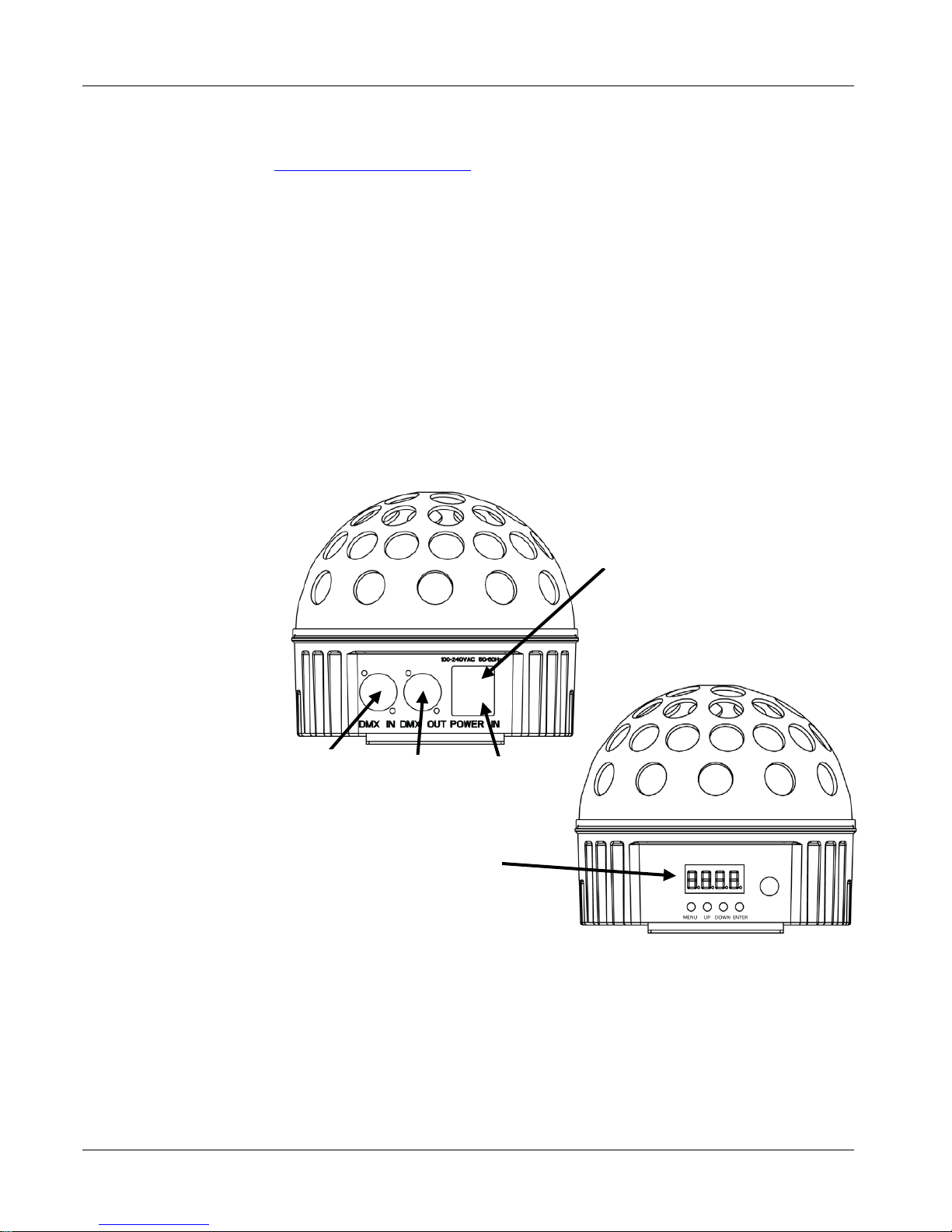
Descrição Geral do
Produto
Vista Posterior do Painel
Sup. Fusíveis
Saída DMX
Entrada
DMX
Vista do Painel Frontal
Entrada
Alim.
Visor do Menu
Page 20
Minisphere™ 3.1 GRR PO
20
Alimentação
CA
Este produto possui uma fonte de alimentação de intervalo automático que
pode funcionar num intervalo de tensão de entrada de 100~240 VCA,
50/60 Hz.
Substituição do
Fusível
1. Desligue o pr odut o da alimentação.
2.
Encaixe a ponta de uma chave de fendas de cabeça chata na ranhura do
suporte de fusíveis.
3. Retire a tampa de s egurança do corpo.
4. Ret ire o fusível qu e imado do gra m po na pa rte frontal da t ampa de
se gura nça e substitua p or um fusível com o mesmo tipo e class ificação.
5. Volte a colocar o su porte de fusíveis e volte a li gar a alime ntação.
Descrição do
Pa
inel de
Controlo
Botão Função
<MENU>
Sai da função ou men u ac tual
<CIMA>
Desloca-se para ci m a na lis t a de m enus e aument a o val or
numér ico numa função
<BAIXO>
Desloca-se para bai x o na lis t a de menus e dimi nui o valor
numérico numa função
<ENTER>
Acti va o m enu e xi bi do actual m ent e ou d ef i n e o val or s elec c i on ado
actualmente
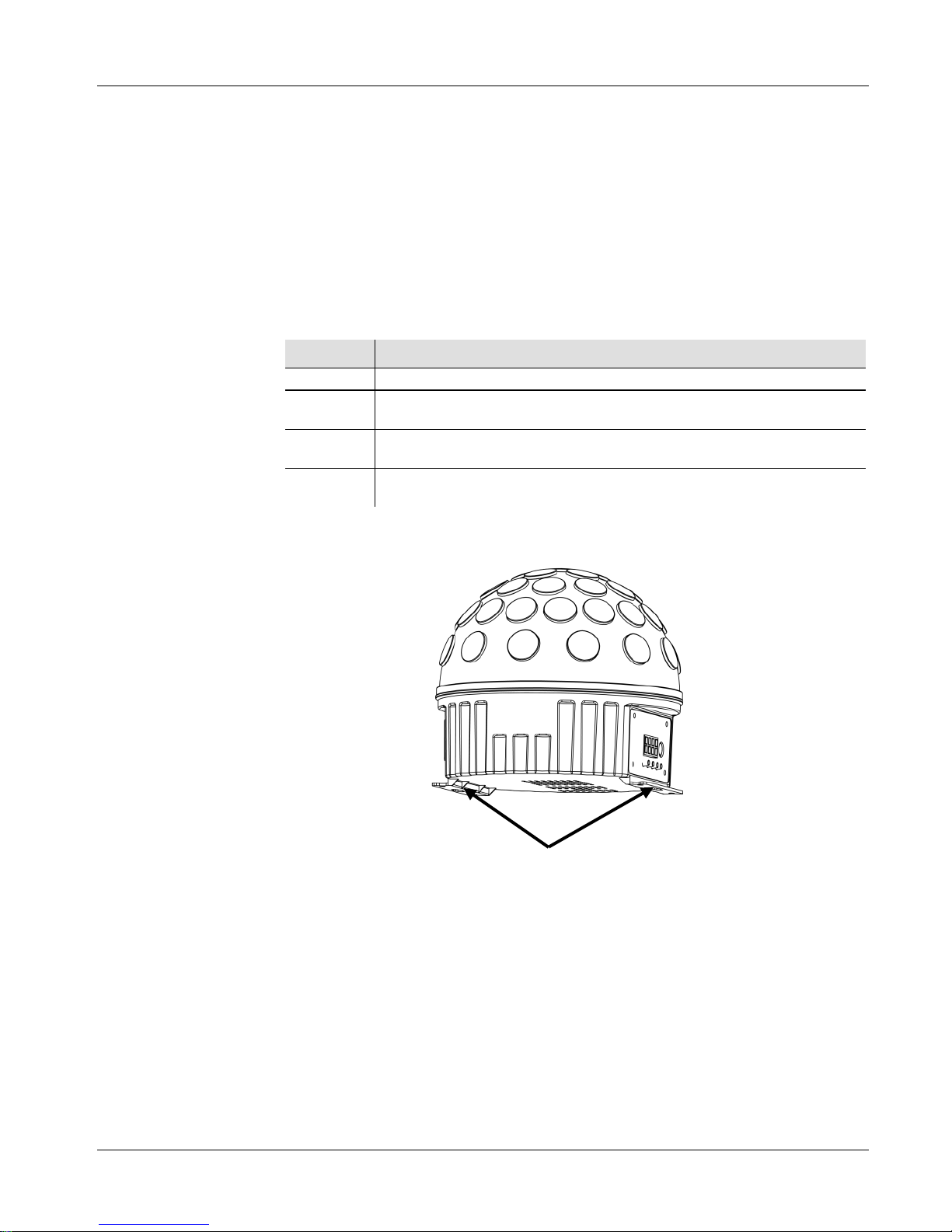
Instalação
Antes de instalar este produto, leia as Instruções de Segurança.
Diagrama de
In
stalação do
Pro
duto
Suportes de Montagem
Page 21
PO Mini sph ere™ 3.1 GRR
21
Opções de Menu
Nível Principal Níveis de Programação Descrição
Modo DMX
512
d 1-d512
Define o endereço de arranque de DMX
Programas
Automáticos
P-- P1-P9 Defin e o pr ograma automático
Velocidade do
Programa
Automático
S-- S 1-S100
Selecc i on a a vel oc i dade do pr ograma
automático
Modo de Activação
de Som
SNd Defin e o mod o de activação de s om
Interligação
DMX
E Ligação
O M inis phere™ 3.1 pode trabalhar com um controlador DMX quando se
encontra ligado a ligações da série DMX e possui uma personalização de
canais. As instruções para a ligação e configuração deste produto para a
operação DMX encontram-se no Manual de Utilizador. Se não estiv
er
familiarizado com o DMX, transfira o DMX Primer a partir de
www.chauvetlighting.com.
Endereço Inicial
Para garantir um acesso total a todos os canais em cada modo DMX, o
endereço DMX mais elevado recomendado é 507.
Ligação
Principal/Secundária
O Minisphere™ 3.1 utiliza a ligação de dados DMX para o seu modo
Principal/Secundário. As instruções para a ligação e configuração deste
produto para a operação Principal/Secundário encontram-
se no Manual de
Utilizador.
Valores DMX
6 Canais
Canal Função Valor Percentagem/Definição
1
Vermelho
000 255
0~100%
2
Verde
000 255
0~100%
3
Azul
000 255
0~100%
4
Programas
Automáticos
000 039
Sem função
040 079
Alternância de 3 cores
080 119
Alternância de 7 cores
120 159
Desvanecimento de 3 cores
160 199
Alternância de 7 cores, rotação p ar a a
direit a e para a esqu erda
200 255
Activação de som
5 Rotação do Motor
000 009
Sem função
010 255
0~100%
6 Sinal de Validação
000 009
Sem função
010 255
1~30 Hz
Page 22
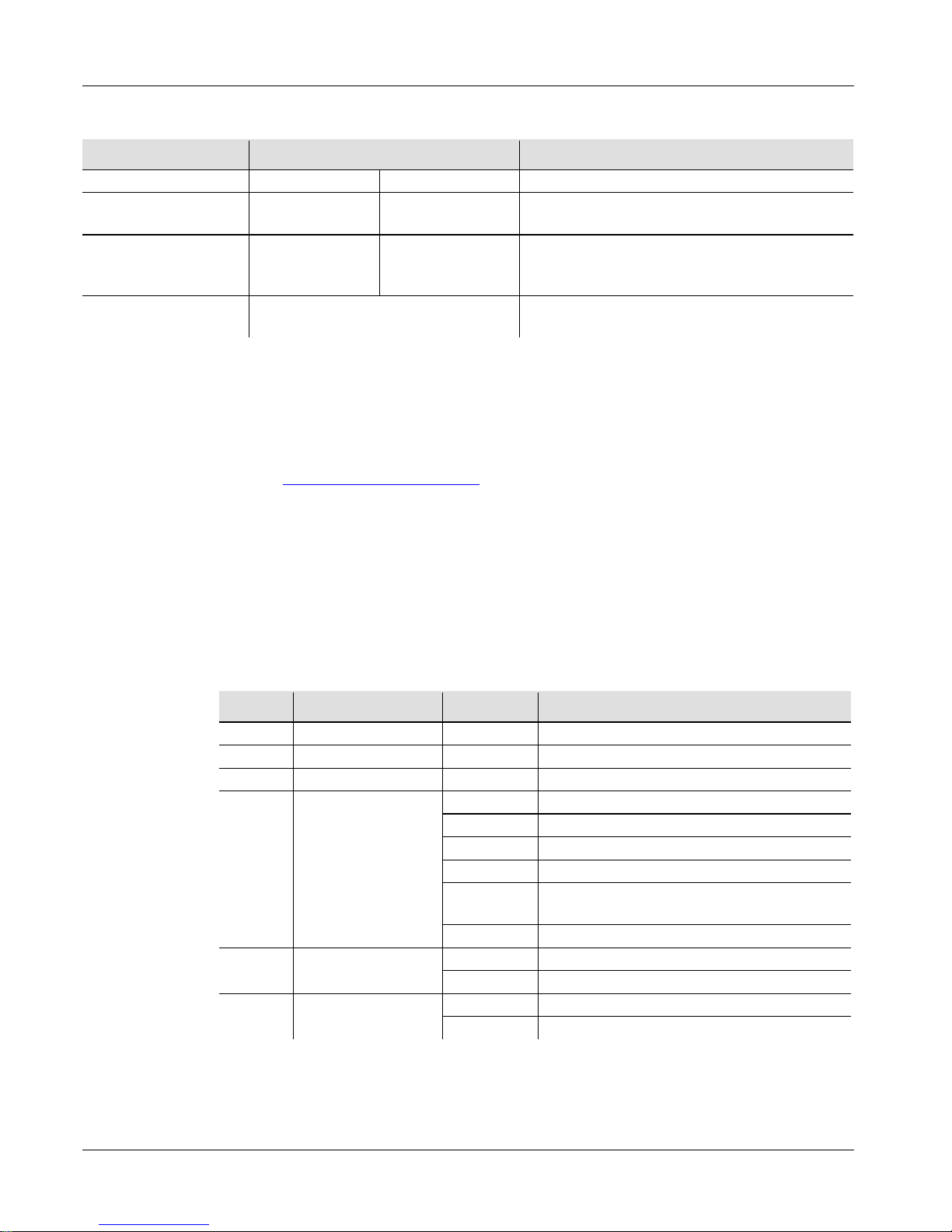
Minisphere™ 3.1 GR IT
22
Informazioni
sulla Guida
La Guida Rapida di Minisphere™ 3.1 contiene informazioni di base sul
prodotto quali montaggio, opzioni menù e valori DMX. Per maggiori
dettagli, scaricare il Manuale Utente dal sito www.chauvetlighting.com
Esclusione di
Responsabilità
Le informazioni e le specifiche contenute in questa guida possono essere
modif icate senza preavviso .
Note di
Sicurezza
Le Note di Sicurezza includono informazioni importanti circa il montaggio,
l'uso e la manutenzione.
• Questa apparecchiatura non è progettata per installazione permanente.
• Coll egare que sta unità SOLTANTO ad un ci rcuito dotato di messa a
te r ra e protetto.
• P rima di effet tu are la pulizia o s ostituire il fusibile, scollegare sempr e
l' u n ità d all'alimentazione elettrica.
• NON guardare la sorgente luminosa quando l'unità è in funzione.
• Assi c ura rsi che il cavo di aliment azione non sia pi egato o danneggi ato.
• N on scollega re mai quest a ap pare cchiat ura da ll'alimentazi on e elettrica
tirand o o stra ttonando i l cavo.
• P er il mon t aggio in alto dell'un ità utili zz are SE MPRE un cavo d i
sicurezza.
• NON collocare materiale infiammabile vicino all'unità mentre è in
funzione.
• NON toccare l'unità durante il funzionamento perché potrebbe essere
molto calda.
• La tension e della p resa a muro cui si collega l'apparecc hiatura dev e
trovarsi entro il campo specificato sull'etichetta o sul pannello
posteriore.
• Q uest a apparecchi atur a deve essere ut i lizza ta soltant o i n i ntern i (IP20)!
Per evitare il r i schio di incendio o di f olgorazion e non esporre
l'apparecchiatura alla pioggia o all'umidità.
• Montare sempre l'unità in posizione ben ventilata, ad almeno 50 cm
(20") da qualsiasi superficie.
• Assicurarsi che nessuna apertura di ventilazione dell'unità sia ostruita.
• N on collega re ma i ad un dimmer o ad un re ostato.
• S os tituir e il fu s ib ile con un altro del lo stesso tipo e cla sse.
•
Prendere e trasportare l'unità SOLTANTO dalla staffa per il montaggio
sospeso.
•
Massima temperatura ambiente ammessa: 40 °C (104 °F). Non utilizzare
l'appa rec chiatura a tem perature superiori.
•
In caso di gravi problemi di funzionamento sospendere immediatamente
l'utilizzo.
• NON aprire l'unità. Non contiene parti riparabili dall'utente.
Page 23
IT Mini sph ere™ 3.1 GR
23
Contatti
Per richiedere assistenza o restituire l'apparecchiatura, al di fuori di Stati
Uniti, Regno Unito o Irlanda, contattare il distributore locale. Per
informazioni sui contatti, visitare il sito Web www.chauvetlighting.com.
Che Cosa è
Incluso
• Minisph e re™ 3. 1
• Cavo di alimentazione
• Scheda di garanzia
• Guida Rapida
Per Iniziare
Disimballare Minisphere™ 3.1 ed accertarsi di aver ricevuto tutti i
componenti integri. Se l'imballo appare danneggiato, farlo immediatamente
presente al trasportatore e non a CHAUVET®.
Descrizione
del Prodotto
Mi nisph ere™ 3. 1 è una brillante e compatta lu ce cent rale con LE D Ross i,
Verdi e Blu rotanti e stroboscopici che assicurano grande copertura
ambiente ed atmosfera festosa per qualsiasi evento. Le funzioni DMX ed in
programmi integrati ad attivazione sonora consentono molte facili
personalizzazioni di Minispher e™ 3. 1.
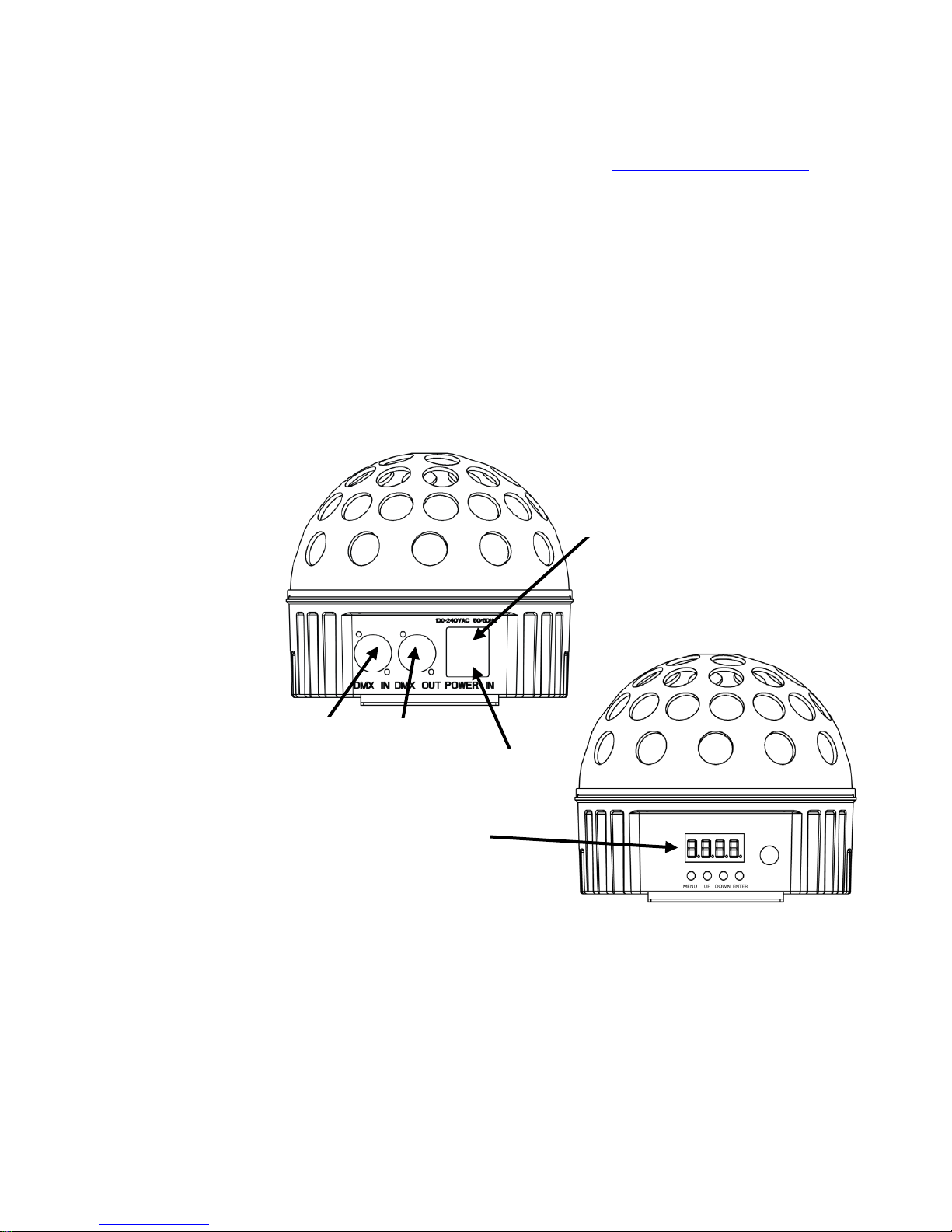
Informazioni Generali
Vista Pannello Posteriore
Portafusibile
Uscita
DMX
Ingresso
DMX
Vista Pannello Anteriore
Display Menù
Ingresso
Alimentazione
Page 24
Minisphere™ 3.1 GR IT
24
Alimentazione
CA
Questa apparecchiatura è dotata di alimentatore a commutazione automatica
con t ensione in ingresso di 100 ~240 V CC - 50/60 Hz.
Sostituzione
Fusibile
1. Scollegare l'un ità dal l 'alimenta zio n e e lettrica.
2. Inserire la punta di un giravite a testa piatta nella fessura
dell'alloggiamento del fusibile.
3. Rimuovere dall'alloggiamento il cappellotto di sicurezza.
4. Rimuovere il fusibile bruciato dalla clip sulla parte anteriore del
cap pellotto di sicurezza e s osti t uirlo con u no iden t ico.
5. Re inser ire il p ortaf u sibi le e rico llegare l'alimentazione elettrica.
Descrizione del
Pa
nnello di
Co
ntrollo
Pulsante Funzione
<MENU>
Cons ent e di us c i r e dal menù o dalla funzione correnti
<UP>
Cons ent e di sp ostarsi verso l'alt o n ell 'elenco m enù e di
aumentare il valore numeric o all'intern o di una funzione
<DOWN>
Consente di spostarsi verso il basso nell'elenco menù e di
diminuire il val ore numerico all'interno di una funzione
<ENTER>
Cons ent e di at t i vare il menù visuali zz at o o imp ostar e il val ore
selezionato
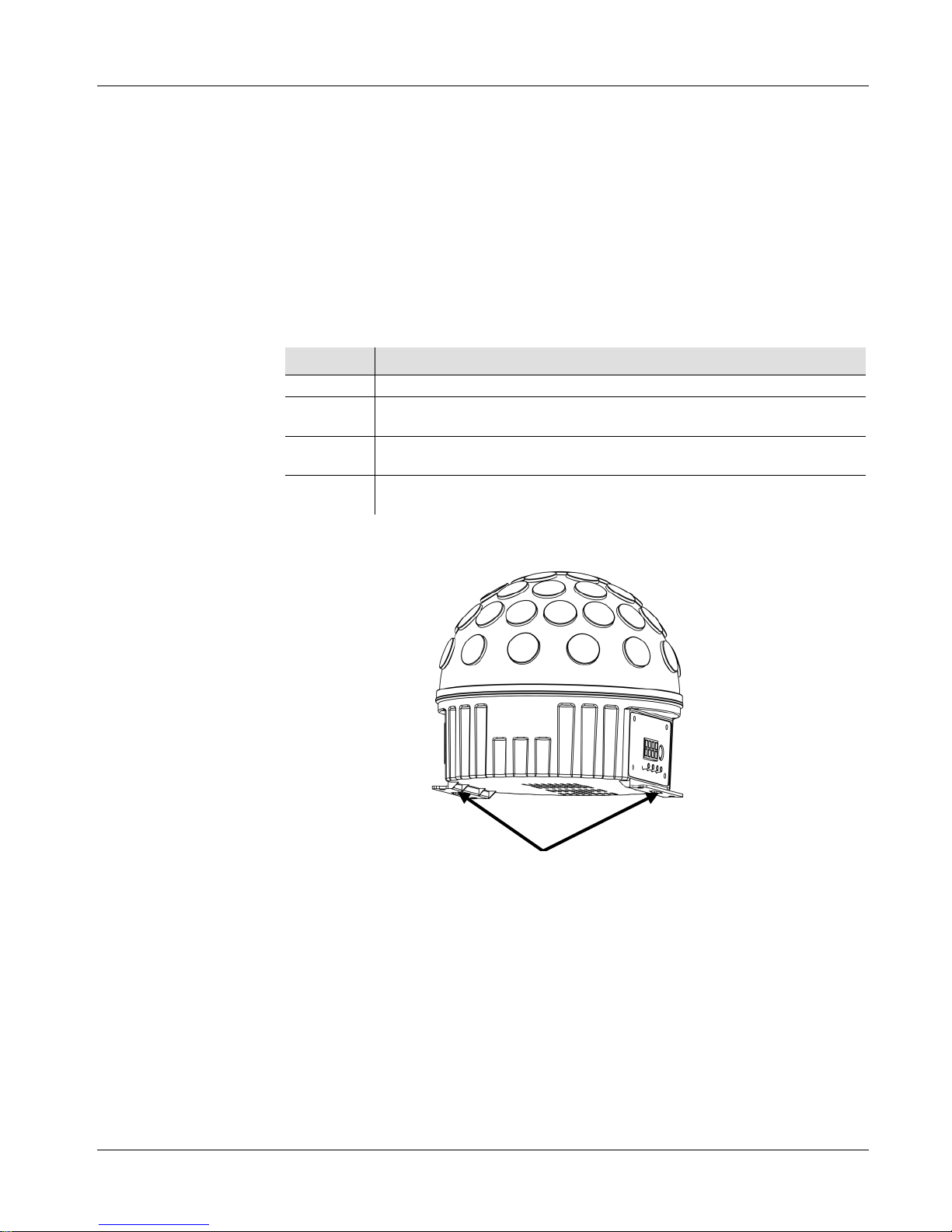
Montaggio
Pri ma di mont a re l'unità, leggere le Note di Sicurezza.
Schema
Di Montaggio
Dell'unità
Staffe Di Montaggio
Page 25
IT Mini sph ere™ 3.1 GR
25
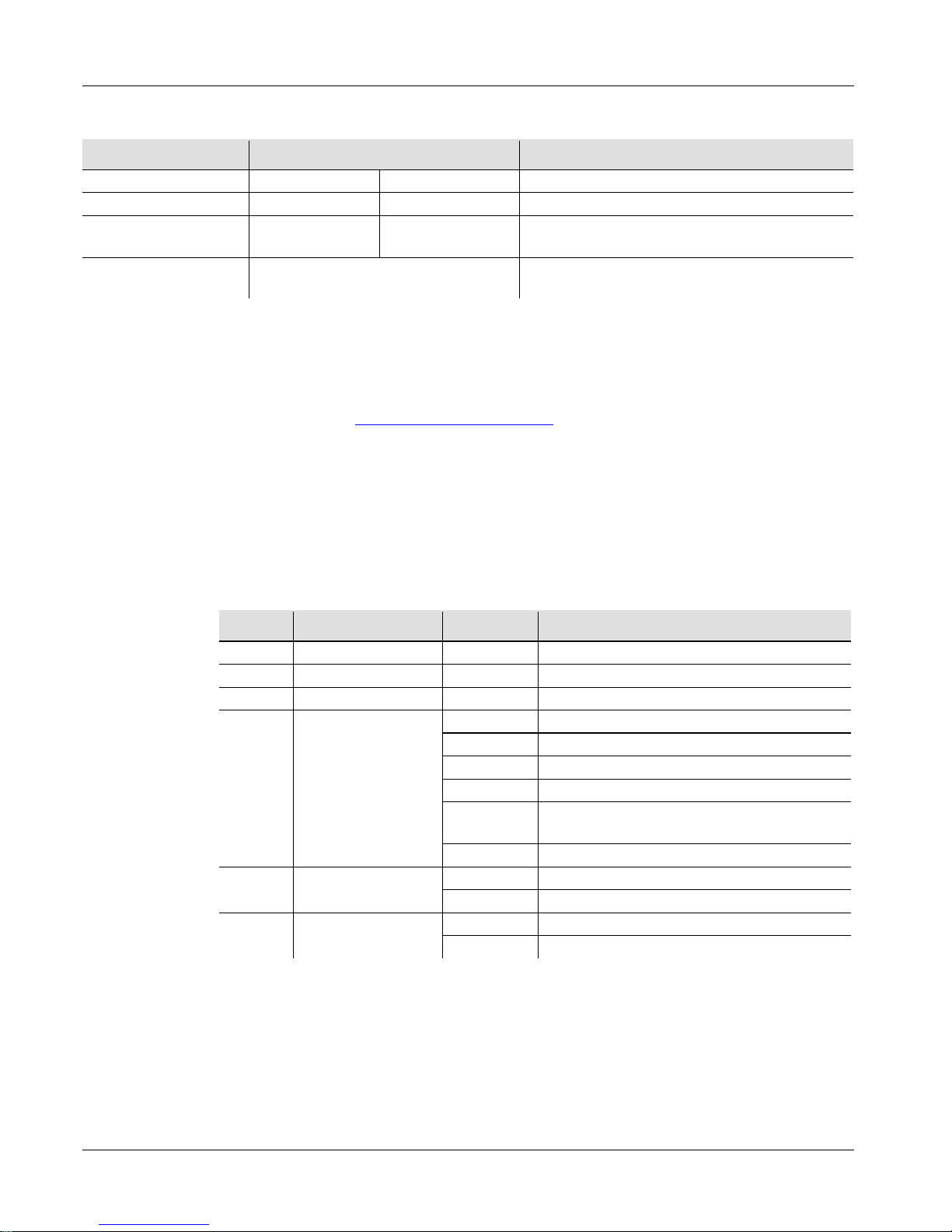
Opzioni del Menù
Livello Principale Livelli di Programmazione Descrizione
Modalità DM X
512
d 1-d512
Imposta gli indirizzi DMX iniziali
Programmi Auto
P--
P1-P9
Imposta il programma Auto
Velocità Programma
Auto
S-- S 1-S100 Imposta la velocità programma Auto
Modalità Sou nd
Active
SNd Imposta la modalità Sound Active
Collegamento
DMX e
Connessioni
Minisphere™ 3.1 può funzionare con un controller DMX quando collegato
tramite connessioni seriali DMX ed ha una funzione a 6
canali. Le istruzi oni
per il collegamento e la configurazione di questa unità sono contenute nel
Manuale Utente. Se non si ha familiarità con il DMX, sca rica re DM X Pri mer
all'indirizzo www.chauvetlighting.com.
Indirizzo Iniziale
Per assicurare il completo accesso a tutti i canali in ciascuna modalità DMX,
l'indirizzo maggiormente raccomandato è 507.
Collegamento
Master/Slave
In modalità Master/Slave, Minisphere™ 3.1 utilizza il collegamento dati
DMX. Le istruzioni per il collegamento e la configurazione di questa unità per
il funzionamento Master/Slave sono contenute nel Manuale Utente.
Valori DMX
6-CH
Canale Funzione Valore Percentuale/Impostazione
1
Rosso
000 255
0~100%
2
Verde
000 255
0~100%
3
Blu
000 255
0~100%
4 Program mi Auto
000 039
Nessuna funzione
040 079
Comm ut az i one a 3 colori
080 119
Comm ut az i one a 7 colori
120 159
Fade a 3 col ori
160 199
Commutazione a 7 colori, rotazione in
sens o or ari o e ant i orario
200 255
Sound Active
5
Rotazione
Motorizzata
000 009
Nessuna funzione
010 255
0~100%
6 Stroboscopio
000 009
Nessuna funzione
010 255
da 1 a 30 Hz
Page 26
Minisphere™ 3.1 QRG PL
26
O Przewodniku
Mi nispher e™ 3.1 Quick Reference Guide (QRG) zawiera podstawowe
informacje o produkcie takie jak montaż, opcje menu oraz wartości
DMX. Szczegółowe informacje znajdują się w instrukcji obsługi na
stronie www.chauvetlighting.com.
Oświdczenie
Infor
macje i specyfikacje zawarte w niniejszym dokumencie (QRG)
podlegają zmianie bez powiadomienia.
Wskazówki
Bezpieczeństwa
Poniższe wskazówki zawierają ważne informacje dotyczące montażu,
użycia i konserwacji.
• Niniejszy produkt nie jest przeznaczony do stałego montażu.
• Produkt należy podłączyć JEDYNIE do uziemionego i
zabezpieczonego obwodu.
• Przed czyszczeniem lub wymianą bezpiecznika należy zawsze
odłączyć produkt od zasilania.
• NIE należy patrzeć na źródło światła, gdy produkt jest włączony.
• Należy u
pewnić się czy przewód zasilający nie jest zagnieciony lub
uszkodzony.
• Nigdy nie należy odłączać produktu od zasilania, ciągnąc lub
szarpiąc za przewód zasilający.
• Podczas montażu produktu na górze należy użyć kabla
bezpieczeństwa.
• NIE należy kłaść materiałów łatwopalnych w pobliżu włączonego
produktu.
• NIE należy dotykać produktu, gdy jest włączony, ponieważ może
być nagrzany.
• Napięcie wyjścia, do którego podłączony jest produkt powinno być
o wartości podanej na naklejce lub panelu tylnym produktu.
• Produkt jest przeznaczony jedynie do obsługi w pomieszczeniach
zamkniętych! (IP20). Aby uniknąć ryzyka pożaru lub porażenia nie
należy wystawiać go na działanie deszczu lub wilgoci.
• Należy zawsze montować produkt w miejscu z odpowiednią
wentylacją przynajmniej 20 cali (50 cm) w odległości od
przyległych powierzchni.
• Należ upewnić się czy żaden z otworów wentylacyjnych na
obudowie produktu nie jest zapchany.
• Nigdy nie należy podłączać produktu do ściemniacza lub rezystora.
• Należy wymienić bezpiecznik o tej samej wartości i rodzaju.
•
Przy przenoszeniu produktu używać JEDYNIE uchwytu mocującego
albo podstawy.
• Maksymalna temperatura otoczenia to 104° F (40° C). Nie należy
używać produktu w wyższych temperaturach.
• W przypadku poważnych problemów z obsługą produktu należy
niezwłocznie zaprzestać jego dalszego użytkowania.
• NIE należy otwierać produktu. Produkt nie zawiera żadnych części
do serwisowania przez użytkownika.
Page 27
PL Minisph ere™ 3.1 QRG
27
Kontakt
Poza Stanami zjednoczonymi, Zjednoczonym Królestwem lub Irlandią w
celu uzyskania pomocy lub zwrotu produktu należy skontaktować się z
dystrybutorem na terenie danego kraju. Dalsze informacje kontaktowe na
stronie www.chauvetlighting.com.
Co Wchodzi W
Skład Zestawu
• Minisph e re™ 3. 1
• Przewód zasilający
• Karta gwarancyjna
• Pra ktyczny prze w odni k
Na Początku
Należy rozpakować Minisphere™ 3.1 i upewnić się czy otrzymaliście
Państwo wszystkie części w dobrym stanie. Jeżeli opakowanie lub jego
zawartość wydają się być uszkodzone, należy niezwłocznie powiadomić o
tym przewoźnika, a nie firmę CHAUVET®.
Opis Produktu
Minisp here™ 3.1 to j asne, k om pakt ow e sk ierow ane do cen trum diody LED
w kolorze czerwonym, zielonym i niebieskim, które strobują i obracają się
zapewniając duże pokrycie pomieszczenia oraz nadzwyczajny efekt.
Funkcje DMX oraz wbudowany program reagujące na dźwięk zapewniają
łatwe i wszechstronne użycie Minisphere™ 3.1.
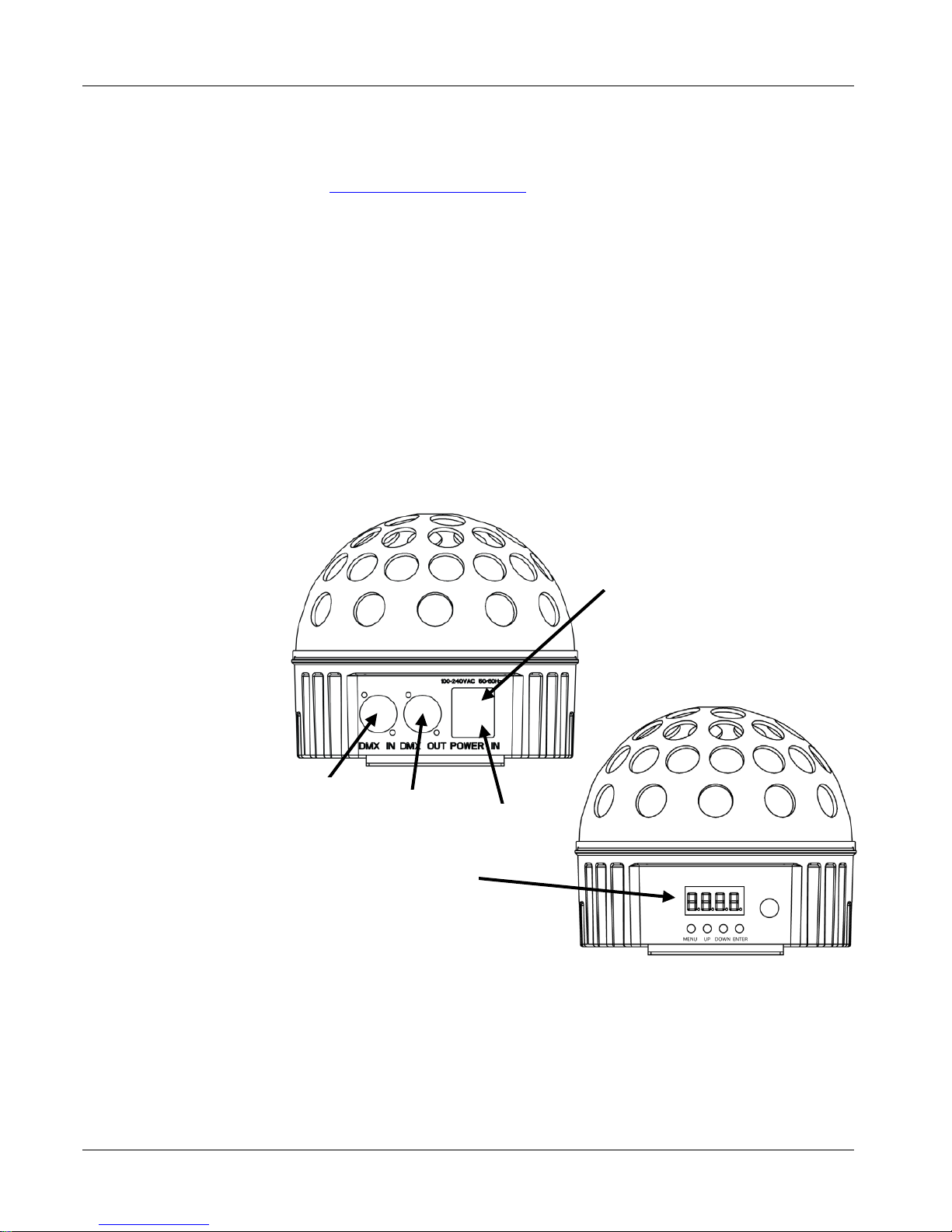
Ogólny Opis Produktu
Widok Panelu Tylnego
Zacisk Bezpiecznika
Wyjście
DMX
Wejście
DMX
Widok Panelu Przedniego
Zasilanie
Wyświetlacz Menu
Page 28
Minisphere™ 3.1 QRG PL
28
Moc AC
Produkt posiada automatyczne przełączanie zakresu zasilania, które pozwala
na działanie produktu przy napięciu wejściowym 100~240 VAC, 50/60 Hz.
Wymiana
Bezpiecznika
1. Odłączyć produkt od zasilania.
2. Włożyć końcówkę śrubokręta z płaską główką do otworu zacisku
bezpiecznika.
3. Wyjąć pokrywę bezpieczeństwa z obudowy.
4. Usunąć spalony bezpiecznik z zacisku z przodu pokrywy
bezpieczeństwa i wymienić na nowy o dokładnie tym samym rodzaju i
wartości.
5. Włożyć uchwyt bezpiecznika i ponownie włączyć zasilanie.
Opis Panelu
Sterowania
Przycisk Funkcja
<MENU>
Wychodzi z bieżącej opcji menu lub funkcji
<UP>
Przechodzi w górę po liście menu oraz zwiększa wartość
numeryczną w funkcji
<DOWN>
Przechodzi w dół po liście menu oraz obniża wartość numeryczną
w funkcji
<ENTER>
Włącza opcję menu lub ustawia wybraną wartość w w ybr anej
funkcji
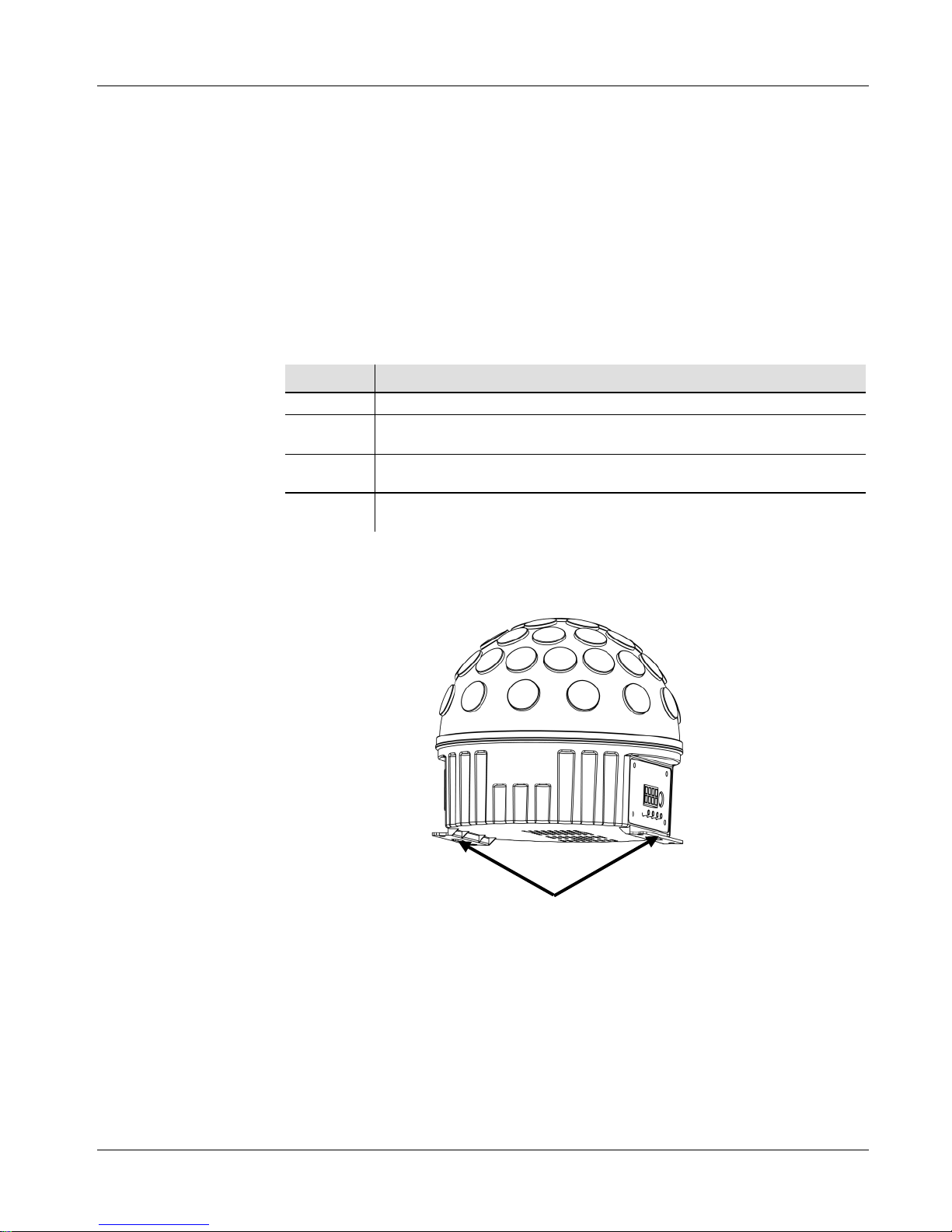
Montaż
Przed zamontowaniem produktu należy przeczytać wskazówki
bezpieczeństwa.
Rysunek Montażu
Produktu
Uchwyty Mocujące
Page 29
PL Minisph ere™ 3.1 QRG
29
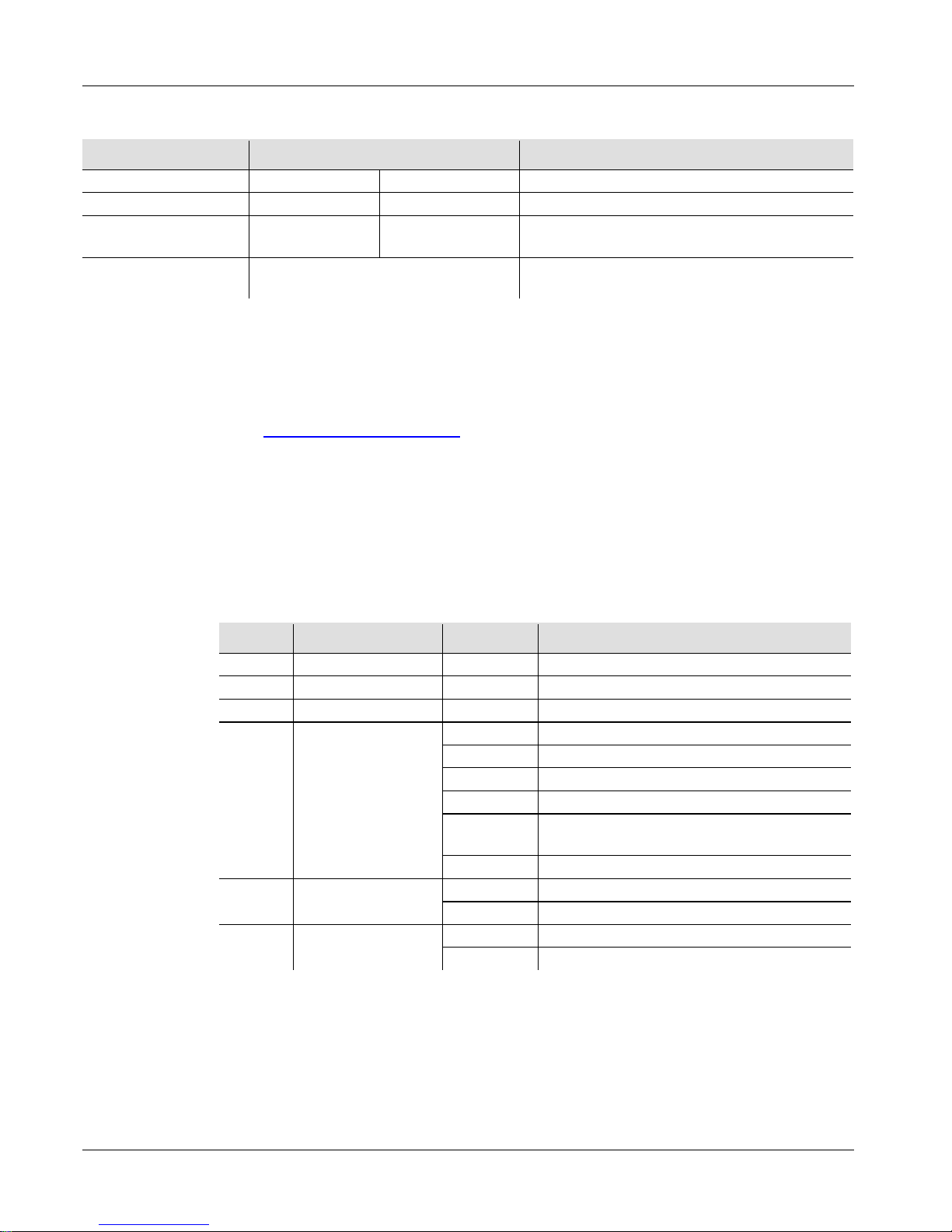
Opcje Menu
Główny Poziom Poziomy Programowania Opis
Tryb DMX
512
d 1-d512
Ustawia adres początkowy DMX
Auto Programy
P--
P1-P9
Ustawia Auto program
Prędkość Auto
Programu
S-- S 1-S100 Ustawia prędkość Auto programu
Tryb Reakcji Na
Dźwięk
SNd Ustawia tryb reakcji na dźwięk
Podłaczenie I
Połaczenie
DMX
Minisphere™ 3.1 może współpracować z kontrolerem DMX, gdy jest
podłączony za pomocą połączeń seryjnych DMX oraz posiada 6-
kanałową
osobowość. Polecenia odnośnie podłączenia i konfiguracji produktu w celu
obsługi system DMX znajdują się w instrukcji obsługi. Jeżeli nie znacie
Państwo systemu DMX, DMX Primer znajduje się na stronie
www.chauvetlighting.com.
Adres Początkowy
W celu zapewnienia pełnego dostępu do wszystkich kanałów w każdym trybie
DMX najbardziej zalecanym adresem DM jest 507.
Połączenie
Master/Slave
Minisphere™ 3.1 wykorzystuje połączenie danych DMX dla swojego trybu
Master/Slave. Polecenia odnośnie podłączenia i konfiguracji produktu w celu
obsługi Master/Slave znajdują się w instrukcji obsługi.
Wartości DMX
6-CH
Kanał Funkcja Wartość Procent/Ustawienie
1
Czerwona
000 255
0~100%
2
Zielona
000 255
0~100%
3
Niebieska
000 255
0~100%
4 Auto Progr amy
000 039
Brak funkcji
040 079
Zmiana 3 kolorów
080 119
Zmiana 7 kolorów
120 159
Płynna zmiana 3 kolorów
160 199
Zmiana 7 kolorów zgodnie i przeciwnie
do ruchów wskazówek zegara
200 255
Aktywowany dźwiękiem
5 Obrót Silnika
000 009
Brak funkcji
010 255
0~100%
6 Strobowanie
000 009
Brak funkcji
010 255
1~30 Hz
Page 30
Minisphere™ 3.1 QRG RU
30
О Данном
руководстве
Краткое руководство (QRG) по Minisphere™ 3.1 содержит базовую
информацию об устройстве, включая вопросы монтажа, настроек
меню и значений DMX. Загрузите Руководство пользователя на сайте
www.chauvetlighting.com.
Отказ от
Ответственности
Информация и спецификации, приведенные в этом руководстве
,
могут меняться без уведомления.
Замечания по
безопасности
Настоящие Замечания по безопасности содержат важную
информацию о монтаже, эксплуатации и техническом обслуживании.
• Это устройство не предназначено для стационарного монтажа.
• Подключать это устройство можно ТОЛЬКО к заземленному и
защищенному контуру.
• Всегда отключайте устройство от питания перед очисткой или
заменой предохранителя.
• НЕ смотрите на источник света, когда устройство включено.
• Убедитесь, что провод электропитания не перегнут и не поврежден.
• Никогда не отключайте это устройство от питания за шнур питания.
• При потолочном монтаже этого устройства пользуйтесь
предохранительным тросом.
• НЕ допускайте размещения рядом с устройством воспламеняющихся
материалов.
• НЕ прикасайтесь к корпусу устройства во время его работы,
поскольку он нагревается.
• Напряжение розетки, к которой подключается это устройство,
должно находиться в диапазоне, указанном на наклейке на задней
панели устройства.
• Данное устройство предназначено только для использования в
помещениях! (IP 20) Чтобы уменьшить риск возгорания и поражения
электрическим током, не подвергайте устройство воздействию дождя
или влаги.
• Монтаж устройства должен выполняться только при наличии
достаточной вентиляции на расстоянии не менее 20 дюймов (50 см)
от соседних поверхностей.
• Убедитесь, что на корпусе устройства нет заблокированных
отверстий.
• Никогда не подключайте это устройство к регулятору яркости или
реостату.
• Заменяйте предохранитель на устройство того же типа и номинала.
• Для перемещения этого устройства беритесь ТОЛЬКО за монтажный
кронштейн или основание.
• Максимальная температура окружающей среды составляет 104° F
(40° C). Не допускайте работы этого устройства при высокой
температуре.
• В случае серьезного нарушения в работе устройства немедленно
прекратите его использование.
• НЕ открывайте это устройство. Оно не содержит деталей,
обслуживаемых пользователем.
Page 31

RU Minisphere™ 3.1 QRG
31
Контакт
За пределами США, Великобритании и Ирландии по вопросам
поддержки или возврата устройства обращайтесь к своему
дистрибьютору. Контактная информация приведена на сайте
www.chauvetlighting.com.
Комплект
Поставки
• Minisph e re™ 3. 1
• Шнур питания
• Гарантийная карта
• Краткое руководство
Начало
Работы
Распакуйте устройство Minisphere™ 3.1 и проверьте исправное
состояние всех полученных деталей. Если коробка или ее содержимое
имеют признаки повреждения, немедленно сообщите об этом не
CHAUVET®, а перевозчику.
Описание
Устройства
Minisphere™ 3.1 – это яркое, компактное центральное осветительное
устройство с красными, зелеными и синими вращающимися и
стробирующими светодиодами, которые обеспечивают большой охват
помещения и праздничную атмосферу на любом мероприятии.
Функции DMX и встроенные программы звуковой активации
обеспечивают простоту использования и индивидуальной настройки
Minisp here™ 3.1.
Page 32
Minisphere™ 3.1 QRG RU
32
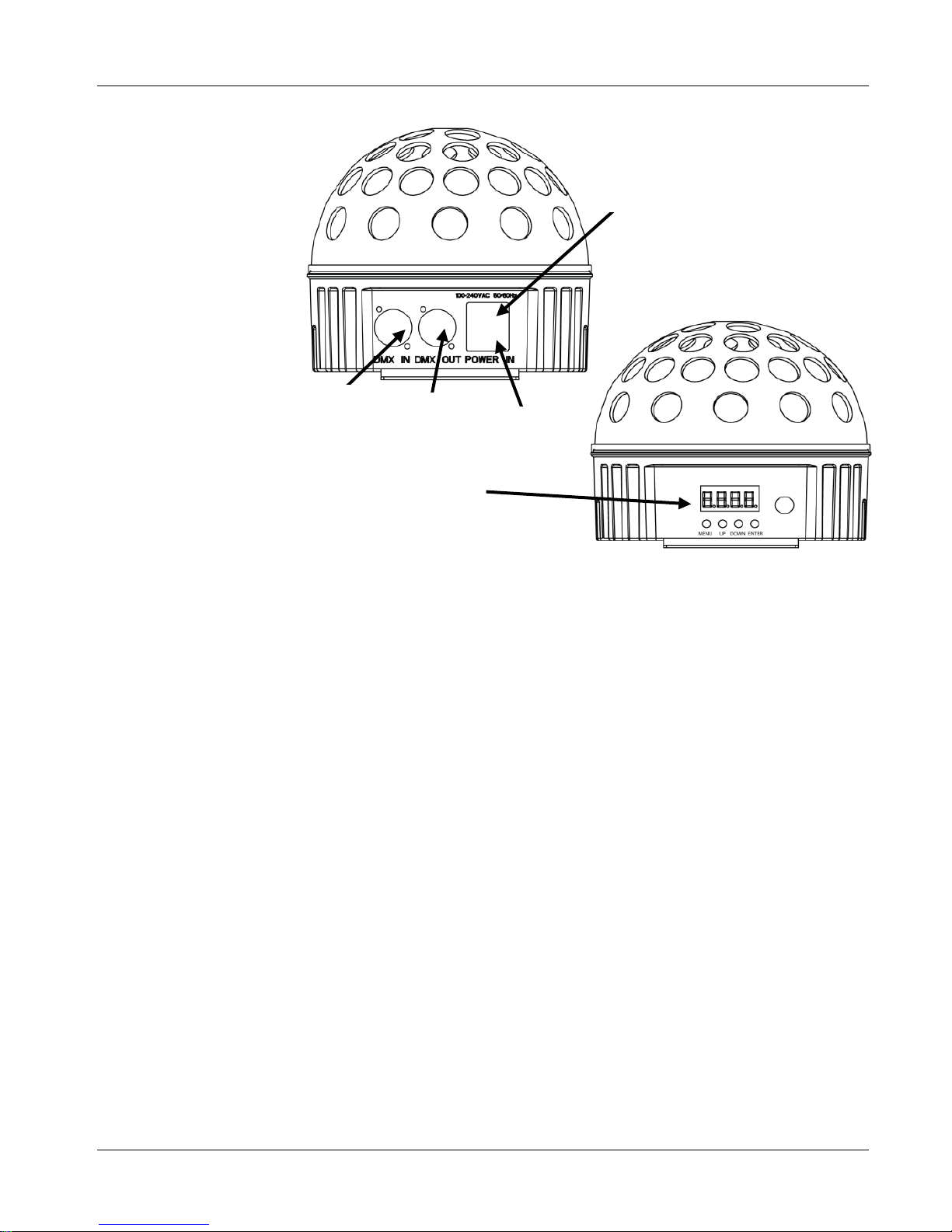
Обзор Устройства
Вид Задней Панели
Держатель
Предохранителя
Дисплей Меню
Выход
DMX
Вход
DMX
Вид Передней Панели
Вход
Питания
Page 33
RU Minisphere™ 3.1 QRG
33
Питание
Переменного
Тока
Это устройство имеет функцию автоматического выбора диапазона
электропитания и может работать со входным напряжением в
диапазоне 100~240 В пер. т, 50/60 Гц.
Замена
Предохранителей
1. Отключите устройство от питания.
2. Вставьте кончик отвертки с плоской головкой в отверстие
держателя предохранителя.
3. Извлеките предохранительный колпачок из корпуса.
4. Извлеките перегоревший предохранитель из зажима спереди
предохранительного колпачка и замените его на предохранитель
того же типа и номинала.
5. Повторно вставьте держатель предохранителя и снова подключите
питание.
Описание
Панели
Управления
Кнопка Функция
<MENU>
Выход из текущего меню или функции.
<UP>
Перемещение вверх по списку меню и увеличение числового
значения при работе.
<DOWN>
Перемещение вниз по списку меню и уменьшение числового
значения при работе.
<ENTER>
Текущее отображаемое меню или настройка текущего
выбранного значения
Page 34
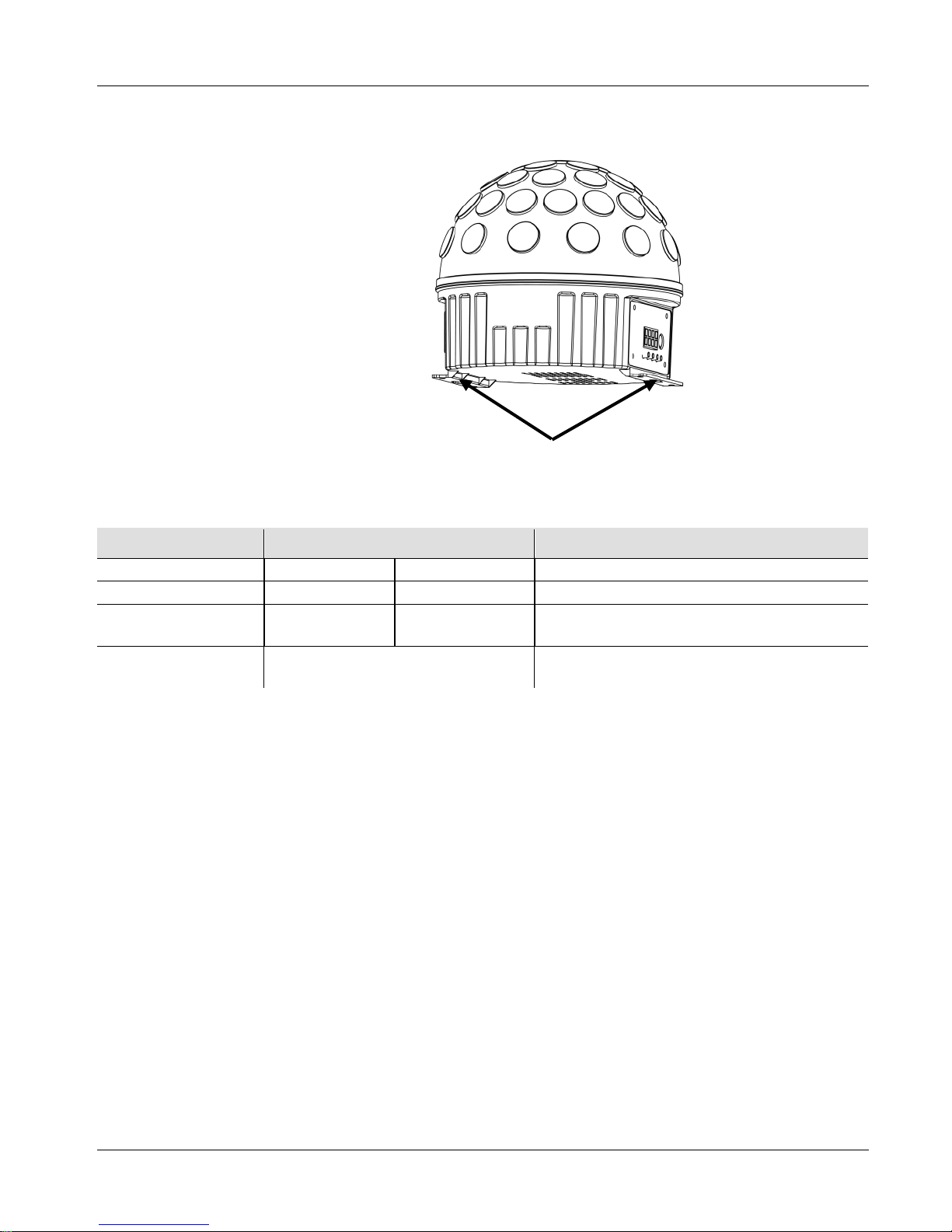
Minisphere™ 3.1 QRG RU
34
Монтаж
Перед монтажом этого устройства прочитайте Замечания по
безопасности.
Схема
Монтажа
Устройства
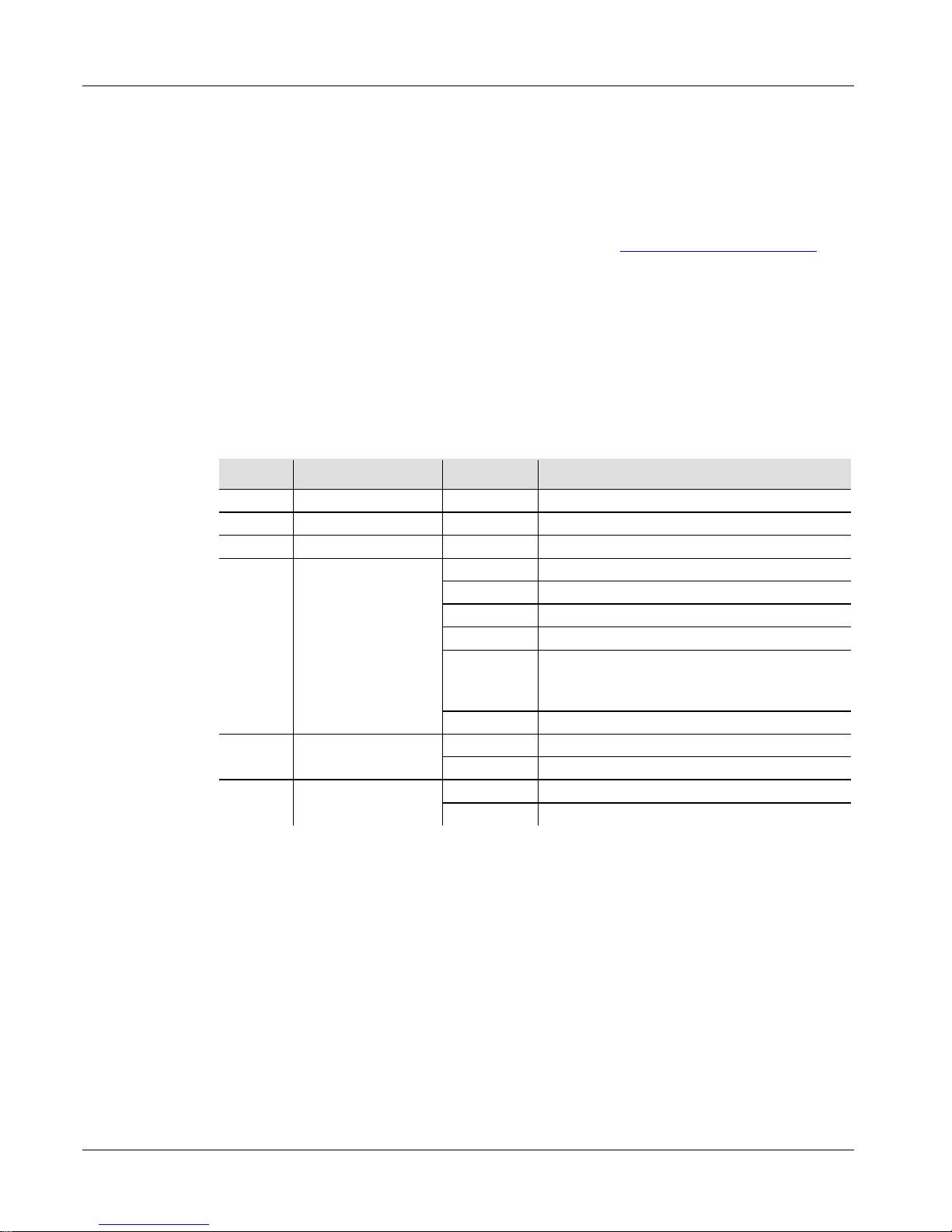
Настройки Меню
Главный Уровень Уровни Программирования Описание
Режим DMX
512
d 1-d512
Настраивает начальный адрес DMX
Автопрограммы
P--
P1-P9
Настройка автопрограмм
Автопрограмма –
Скорость
S-- S 1-S100 Настройка скорости автопрограмм
Режим Звуковой
Активации
SNd Настройка режима звуковой активации
Монтажные Кронштейны
Page 35
RU Minisphere™ 3.1 QRG
35
Объединение
И Соединение
По DMX
Устройство Minisphere™ 3.1 может работать с контроллером DMX при
подключении с помощью последовательных соединений DMX и имеет
6-канальный профиль. Инструкции по подключению и
конфигурированию этого устройства в режиме DMX приведены в
Руководстве пользователя. Если вы не знакомы с DMX, загрузите
вводное руководство DM X Pr i mer на сайте www.chauvetlighting.com.
Начальный Адрес
Для обеспечения полного доступа ко всем каналам в каждом из
режимов DMX максимальный рекомендуемый адрес DMX – 507.
Подключение
Master/Slave
Устройство Minisphere™ 3.1 использует соединение передачи данных
DMX для режима Master/Slave. Инструкции по подключению и
конфигурированию этого устройства в режиме Master/Slave приведены
в Руководстве пользователя.
Значения DMX
6-CH
Канал Функция Значение Процент/уставка
1
Красный
000 255
0~100%
2
Зеленый
000 255
0~100%
3
Синий
000 255
0~100%
4 Автопрограммы
000 039
Нет действия
040 079
Переключение 3 цветов
080 119
Переключение 7 цветов
120 159
Затухание 3 цветов
160 199
Переключение 7 цветов, вращение по
часовой стрелке и против часовой
стрелки
200 255
Звуковая активация
5
Вращение
мотора
000 009
Нет действия
010 255
0~100%
6 Стробоскоп
000 009
Нет действия
010 255
1~30 Гц
Page 36

Minisphere™ 3.1 QRG Multi-Language
36
Contact Us
World Head quart ers
CHAUVET®
General Infor m atio n
Address: 5200 NW 108th Avenue
Sunrise, FL 33351
Voice: (954) 929-1115
Fax: (954) 929-5560
Toll free: (800) 762-1084
United Kingdom and Ireland
CHAUVET® Europe Ltd.
General Infor m atio n
Address: Unit 1C
Brookhill Road Industrial Estate
Pinxton, Nottingham, UK
NG16 6NT
Voice: +44 (0)1773 511115
Fax: +44 (0)1773 511110
Technical Support
Technical Support
Email: [email protected]
World Wide Web
www.chauvetlighting.com
World Wide Web
www.chauvetlighting.co.uk
Minisphere™ 3.1
QRG – Rev. 2 ML
© Copyright 2012 CHAUVET®
All rights reserved.
Printed in the P. R. C.
 Loading...