

Page 1

V2.0
Pro
Page 2

8
Filter Ring
(Accept 49mm Lens)
Underwater Drone
Page 3
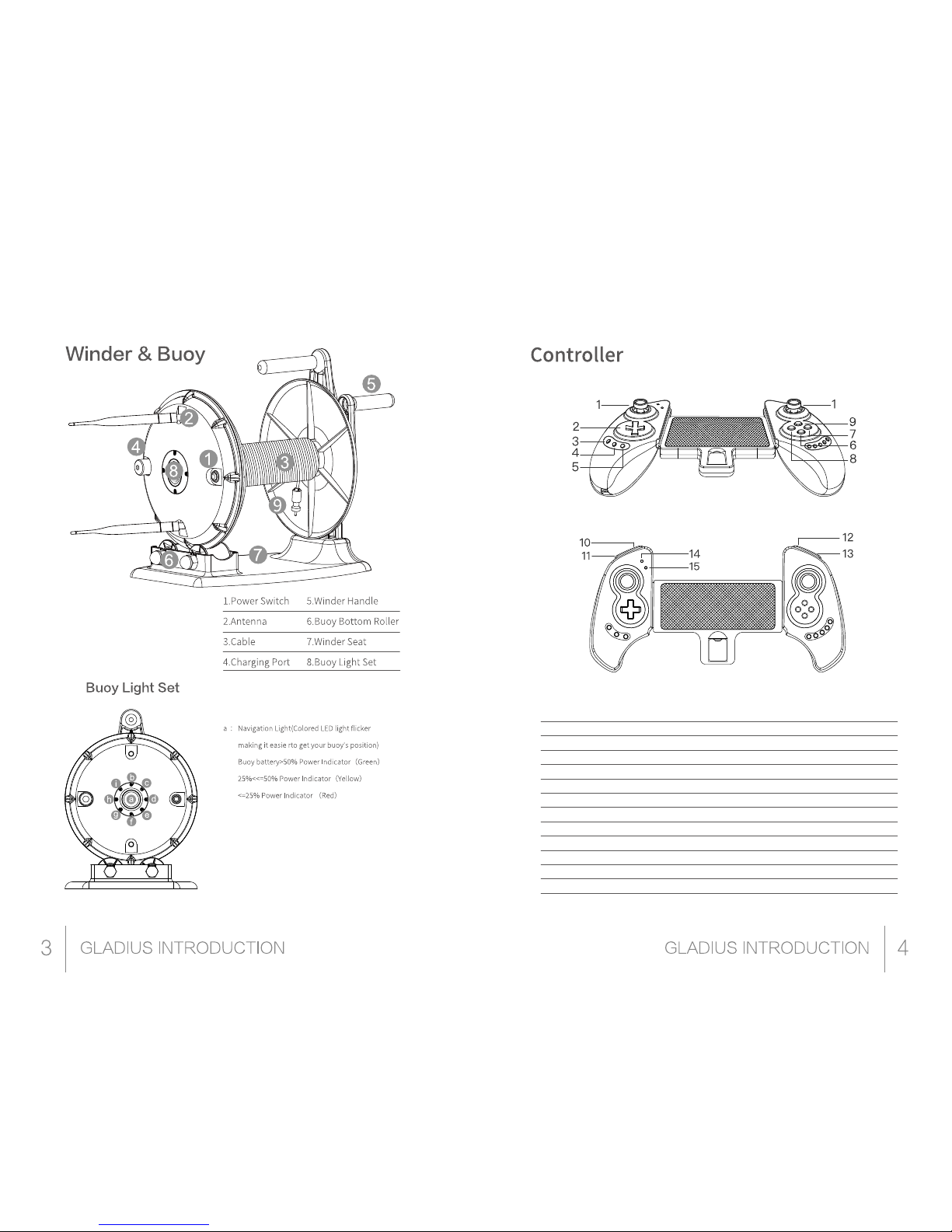
9.Buoy Wire Connector
b : LINK- Wi-Fi connect light
c : PLC-Power cat network lights
d : PWR-Power cat power
e : ETH-Power cat network port indicator
f : 100%-buoy battery g : 75%-buoy battery
h : 50%-buoy battery i : 25%-buoy battery
*Buoy switch waterproof level:IP 67
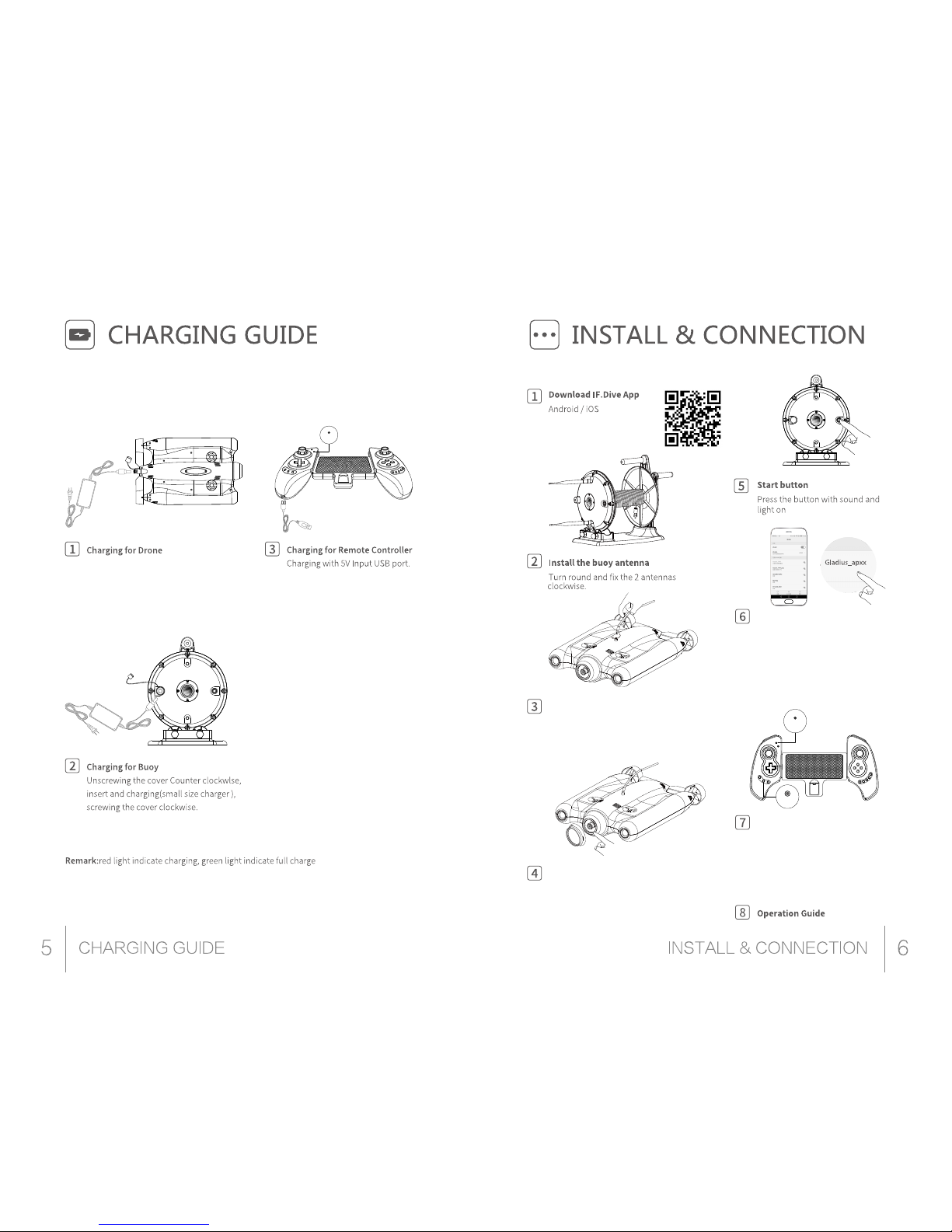
1. Rocker, used to operate the device to move
2. The direction key on the camera page, to switch the
camera / video mode, the left is to eject the video
camera parameter page, the next to switch the
self-stability/manual driving mode, the right to enter
the settings page, the other pages can change the
focus of the current screen
3. SELECT, the default is to switch the self-stabili-
ty/manual driving mode
4. HOME, long press the start/close the handle, if the
handle can not connect you can try long press HOME
to close the handle until the SEARCH light long press
the HOME key to restart the handle
5. START, the default is to unlock / lock the machine
6. A, the default is to confirm the button
7. B, the default is the return button
8. X, the default is not used
9. Y, the default is not used
10. L1, light brightness decreases
11. L2, the default is to switch the camera / video
mode
12. R1, light brightness increases
13. R2, the default for taking pictures/video
14. SEARCH light, shows the current status, light
flash means not connected
15. CHARGE lamp, indicating whether it is
currently charging
Page 4
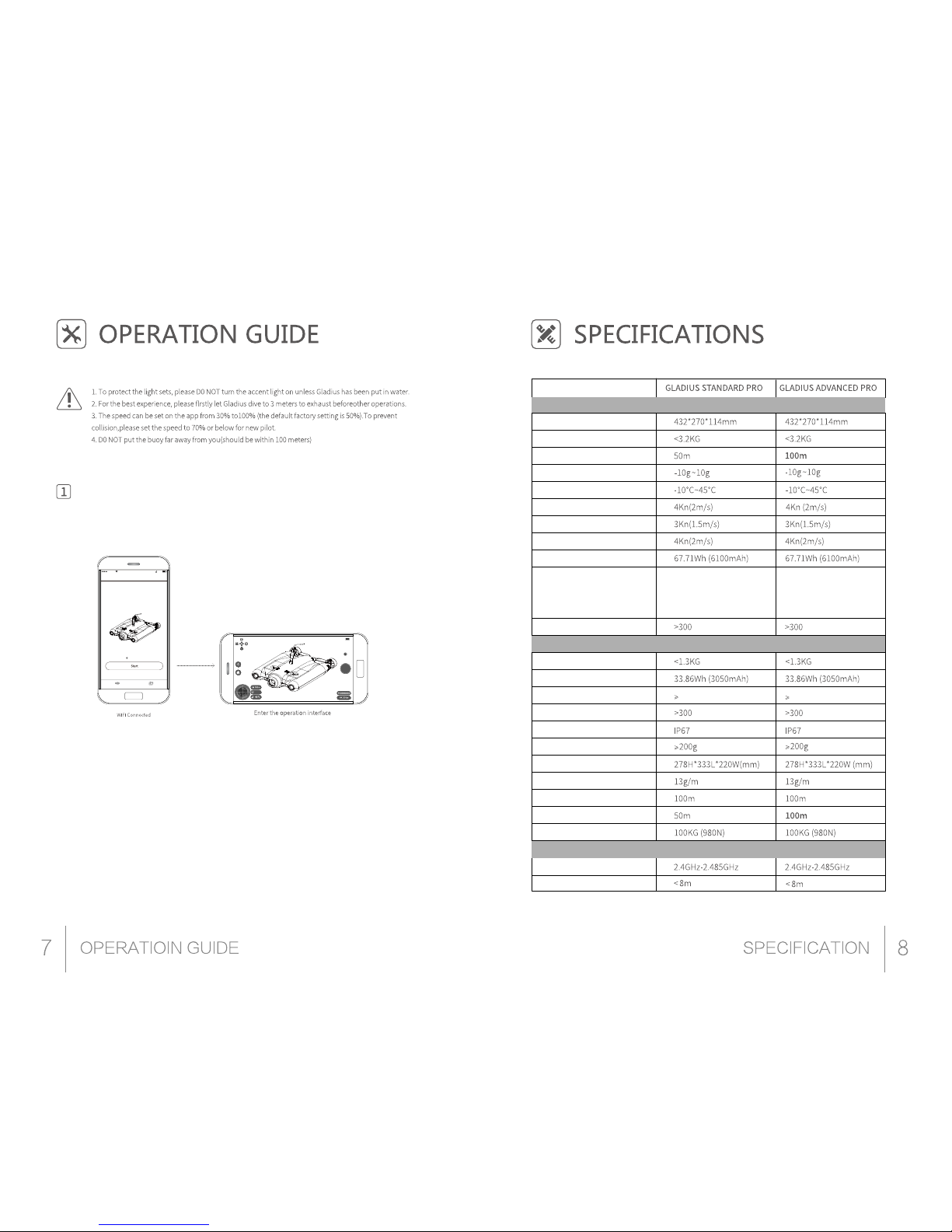
Connect drone and the buoy
Plug in the buoy connector with
thedrone, then screw the
connector clockwise
Unscrewing the cover Counter clockwise,
insert and charging(big size charger).
When charging complete(power
indicator would show green) screwing
the cover clockwise.
Charge
1. Charge indicator will lit on while
charging and will turn off after
fully charged.
2. Sleep/Wake up function:
Gamepad will enter into sleeping
mode if not in use for 5 minute
and long press home button for
wake up and reconnect
automatically.
3.Charge indicator flashing quickly
for low battery remind.
( iOS 9.0 version/Android4.4issuitable)
Scan the QR code to download
or search on ios store/google play
Connect the filter
Unscrew the protect ring of the Len
and screw the filter ring on with
some colorful filters.
WI-FI connection
Open App, click Wi-Fi icon, search
“Gladius_2.4G_apXX”or“Gladi-
us_5G_apXX.Password: 12345678.
Remarks Gladius is built-in dual-band
2.4G +5.8G Wi-Fi module, can choose
any signal access to log in.
Extend the controller and
put phone inside
Long press home button,then get into
App. The search LED Indictor would
always on after controller automatically connected.
Search
Home
Page 5
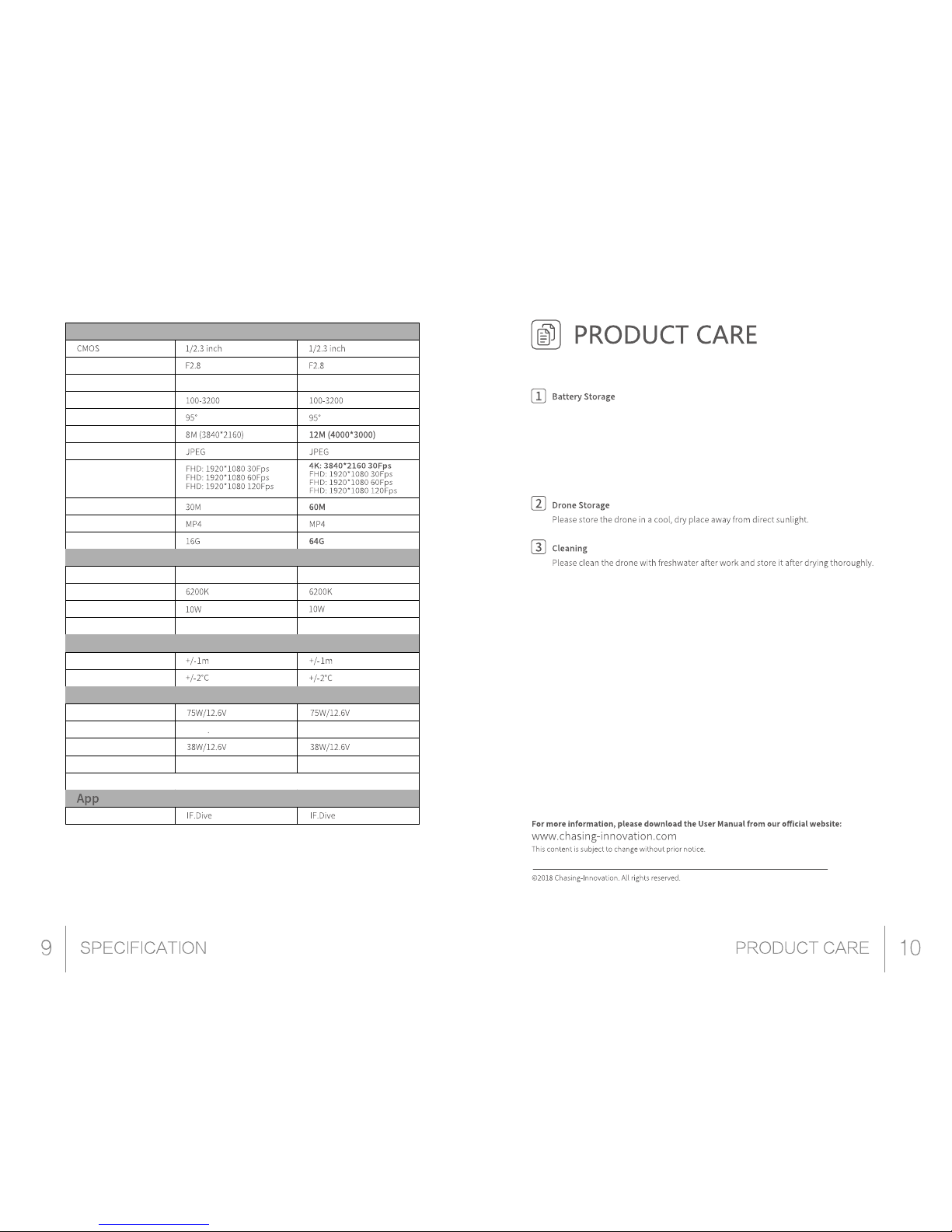
APP usage
IF.Dive App is dedicated for Gladius
Press start to enter the app
Drone
Dimensions
Weight
Max Depth
Operating Temperature
Max Cruise Speed
Max Ascend/Descend Speed
Buoy & Winder
Remote Controller
Flow Resistance
Battery
Dimensions
Max Sailing Time
Battery cycles
4.5h(continuous 30% power, LED
off)
3h(continuous 50% power, LED off)
1h(continuous 100% power, LED off)
4.5h(continuous 30% power, LED
off)
3h(continuous 50% power, LED off)
1h(continuous 100% power, LED off)
6 hrs(Depending on the condition)
6 hrs(Depending on the condition)
Buoy & Winder Weight (without Tether)
Buoy Battery
Max Operation Time
Battery cycles
Waterproof Level
Buoyancy
Buoy & Winder Dimensions
Tether Weight
WIFI Distance
Tether Length
Break Strength
Operating Frequency
Transmitting Distance
For more video,please watch video tutorials on the official website(www.chaslng-innovation.com)
and app before using Gladius for the first time.
5.Chloride or chemical substances will corrode gladius seals, if some of the swimming pool with
high chlorine in which is forbidden to use Gladius.
Device
Bymax 1:20 PM 77%
GLADIUS CHASING
Connected
Device Media
100%
Page 6
1.1 If battery could not charge,please discharge the battery to1%-5%,then charge again。
1.2. For long-term not used Gladius, the battery should be kept in 50%~80% to prolong
battery life. It is recommended to carry out a full charge and discharge of the battery
every 2 months. This can greatly extend the battery life
1.3. When the battery is less than 5%, it is recommended to stop using the machine,
otherwise it may affect the battery life.
Camera
LED Light
Sensor
Charger
Lens
Focus
ISO Range
FOV
Picture Max Resolution
Picture Type
Video Resolution
Video Max Code Flow
Video Type
SD Card Storage
Brightness
Max Power
Temperature
Dimming
Depth Sensor
Temperature Sensor
Charger 1 (Larger Size)
Charging Time
Charger 2 (Smaller Size)
Charging Time
Mobile APP
70mm to Infinity 70mm to Infinity
2X1200LM 2X1200LM
Adjustable Dimming Adjustable Dimming
NOTE: Charger1 charging Gladius, Charger2 charging Buoy..
Drone: 1.5 hrs
Drone: 1.5 hrs
Buoy: 1.5 hrs
Buoy: 1.5 hrs
 Loading...