

Page 1

0
MS 2200
USER MANUAL
Please keep the instruction manual at hand all the time for future reference.
Page 2

1
TABLE OF CONTENTS
PREFACE.....................................................................................................2
GENERAL INFORMATION.......................................................................2
SAFETY INSTRUCTION ...........................................................................2
ENVIROMENTAL.......................................................................................4
CLEANING..................................................................................................4
MAINTENANCE.........................................................................................4
WEIGHING OPERATION ..........................................................................4
WARRANTY-LIABILITY...........................................................................5
DISPOSING OF THE SCALE.....................................................................6
SPECIFICATIONS.......................................................................................7
KEY FUNCTIONS.......................................................................................8
HOW TO USE HOLD FUNCTION.............................................................9
INSTRUCTION FOR POWER SUPPLY....................................................9
ERROR MESSAGE...................................................................................11
Page 3
2
PREFACE
Thank you for choosing CHARDER MEDICAL product. All features of this
product were designed to state of the art and are optimized for simple and
straightforward use. If you have any queries or experience any problems
not addressed in the operating instructions, please contact your
CHARDER MEDICAL service partner, or visit us on the Internet at
www.chardermedical.com
GENERAL INFORMATION
We strongly recommend you use the scales on flat and hard surface. Any
soft surface, like carpet will cause inaccuracy.
SAFETY INSTRUCTION
Before putting the device into use, please read with care the
information given in the Operating Instructions. They contain
important instructions for installation, proper use and maintenance of the
device.
The manufacturer shall not be liable for damages arising out of failure to
heed the following instructions:
When using electrical components under increased safety requirements,
always comply with the appropriate regulations.
Improper installation will render the warranty null and void.
Ensure the voltage marked on the power supply unit matches your
mains power supply.
This device is designed for use indoors.
Observe the permissible ambient temperatures for use
The device meets the requirements for electromagnetic compatibility.
Do not exceed the maximum values specified in the applicable
standards.
If you have any problem, contact your local CHARDER MEDICAL
Page 4

3
service partner.
Page 5

4
ENVIROMENTAL
All batteries contain toxic compounds; disposal of batteries should be
delegated to a competent organization, complying with the deposit of
Poisonous Waste Regulation 1972.
Please do not incinerate batteries.
The optimum operating temperature for the scale is 5℃ to +35℃;
although it will operate at higher and lower temperatures the scales
battery life will be adversely effected.
CLEANING
We would recommend using alcohol based wipes or similar when
cleaning the scales.
Please do not use large amounts of water when cleaning the scales as
this will cause damage to the scales electronics, you should also refrain
from using corrosive liquids or high pressure washers.
Always disconnect the scales from the mains power supply before
cleaning.
MAINTENANCE
The scale does not require any routine maintenance. However, we
recommend checking the scale’s accuracy at regular intervals. The
regularity of these checks is dependent on the level of use and the state
of the scale. If any inaccuracies occur, please contact your local dealer
or CHARDER MEDICAL service partner.
WEIGHING OPERATION
Before reading detailed instructions on how to use all the weighing
functions that are built into your scale, please read the following
important guidelines:
Page 6

5
Always be sure that the display shows `Zero` before use, if it does not
then please press the ZERO key.
The Professional Medical scale is designed to detect when a stable
weight is achieved, the indicator will `bleep` twice to indicate a stable
weight value, your reading should be taken at this point.
WARRANTY-LIABILITY
If a fault or defect is present on receipt of the unit which is within
CHARDER MEDICAL’s scope of responsibility, CHARDER shall have
the right to either repair the fault or supply a replacement unit. Replaced
parts shall be the property of CHARDER. Should the fault repairs or
replacement delivery not be successful, the statutory provisions shall be
valid. The period of warranty shall be two years, beginning on the date
of purchase. Please retain your receipt as proof of purchase. Should
your scale require servicing, please contact your dealer or CHARDER
MEDICAL Customer Service.
No responsibility shall be accepted for damage caused through any of
the following reasons: Unsuitable or improper storage or use, incorrect
installation or commissioning by the owner or third parties, natural wear,
changes or modifications, incorrect or negligent handling , overuse,
chemical, electrochemical or electrical interference or humidity, unless
this is attributable to negligence on the part of CHARDER MEDICAL.
If operating, climatic or any other influences lead to a major change in
conditions or material quality, the treaty for perfect unit functioning shall
be rendered null and void. If CHARDER provides and individual
warranty, this means that the unit supplied will be free of faults for the
length of the warranty period.
Page 7

6
DISPOSING OF THE SCALE
This product is not to be treated as regular household waste, but should
be handed in to an electrical/electronic equipment recycling centre.
You can obtain further details from your local council, your municipal
waste disposal company or the firm which you purchased the product.
Page 8
7
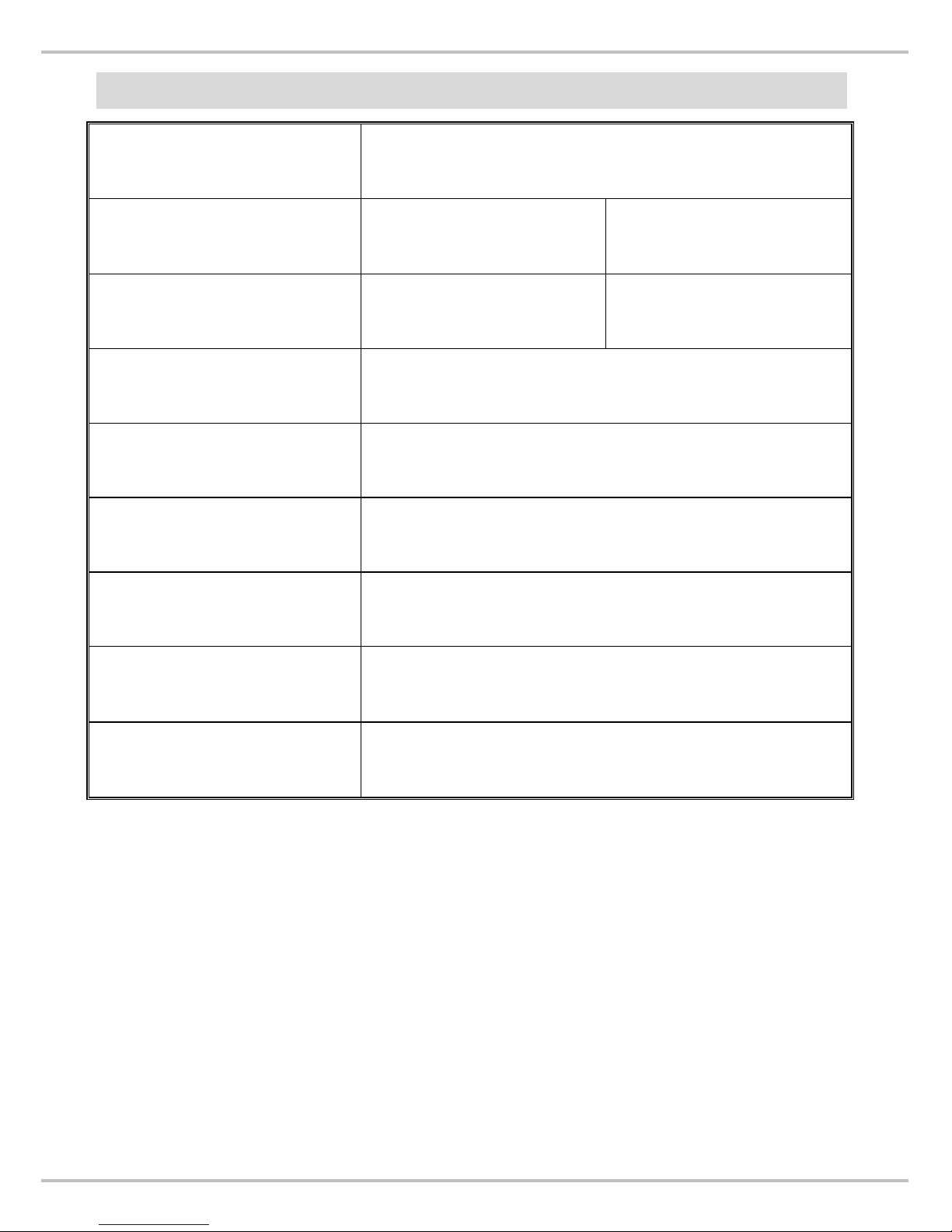
SPECIFICATIONS
Model
MS 2200
Capacity
150kg x50g ;
330lb x 0.1lb
300kg x100g ;
660lb x 0.2lb
Accuracy
±100g ; ±0.2lb ±200g ; ±0.4lb
Measuring Unit
kg / lb
LCD Display
1.0” LCD digital display
Dimension
Platform size: 900 mm x 550 mm x 50 mm
Key Functions
ON/OFF, HOLD, UNIT, TARE
Power Supply
ADAPTOR & 9V battery
Rechargeable battery pack (option)
Operating
Temperature
5 / 35℃ ℃
Page 9
8
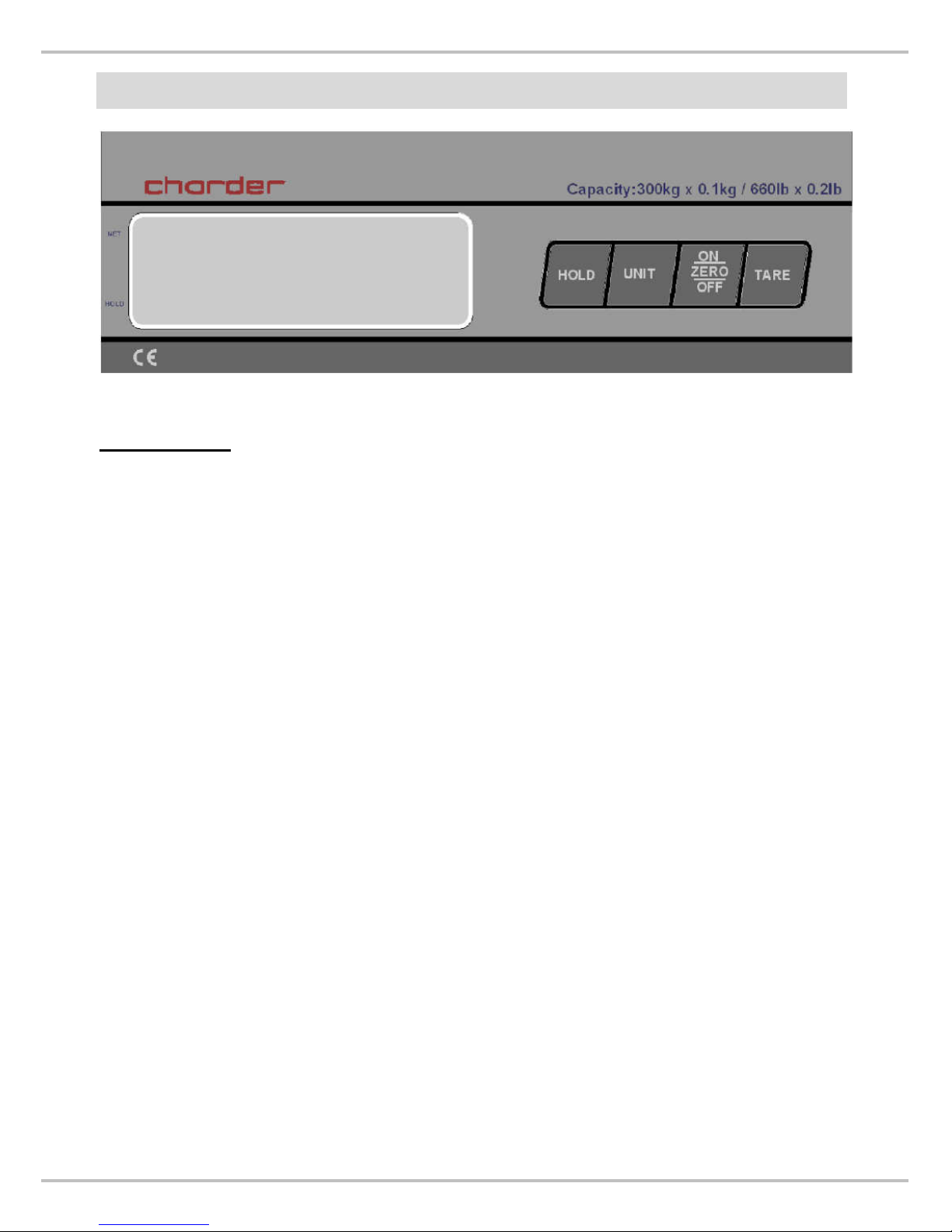
KEY FUNCTIONS
Description:
ON/ZERO/OFF
Press to switch scales ON, OFF and ZERO.
HOLD
Press to lock the weight of subject.
UNIT
Press to switch between kg or lb, oz.
TARE
Press to tare the weight of subject on platform.
*
Tare the weight of subject previously so that the operator can
get the net weight only.
Page 10
9
HOW TO USE HOLD FUNCTION
By using the HOLD function the identified weight will be stored and is
shown on the display even if you stepped already off the scale.
1) Press ON/OFF to power on the scale.
2) Step on the scale to weigh after stable zero symbol appears.
3) Press HOLD key while subject is being weighed.
4) The arrow will indicate the HOLD on the panel.
5) The LCD shows weight after the subject move off the platform.
6) Press HOLD again to disable HOLD feature.
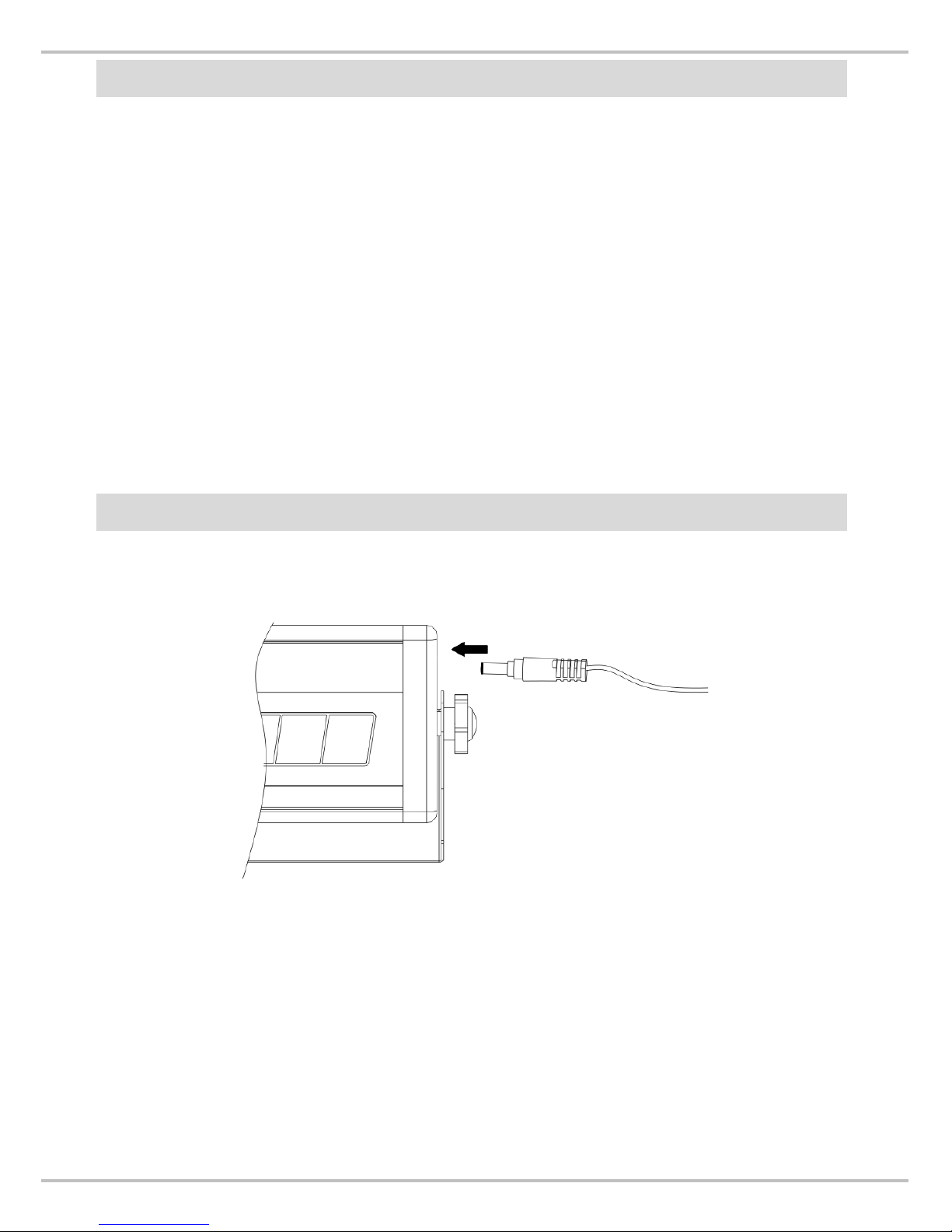
INSTRUCTION FOR POWER SUPPLY
Plug AC adapter into the indicator to supply power to indicator.
*For rechargeable battery, please charge your scale for 14 hours at
least before first use. Fully charged batteries should give
approximately eight hours of continuous use.
Rechargeable battery pack is an optional accessory of MS2200.
Page 11
10
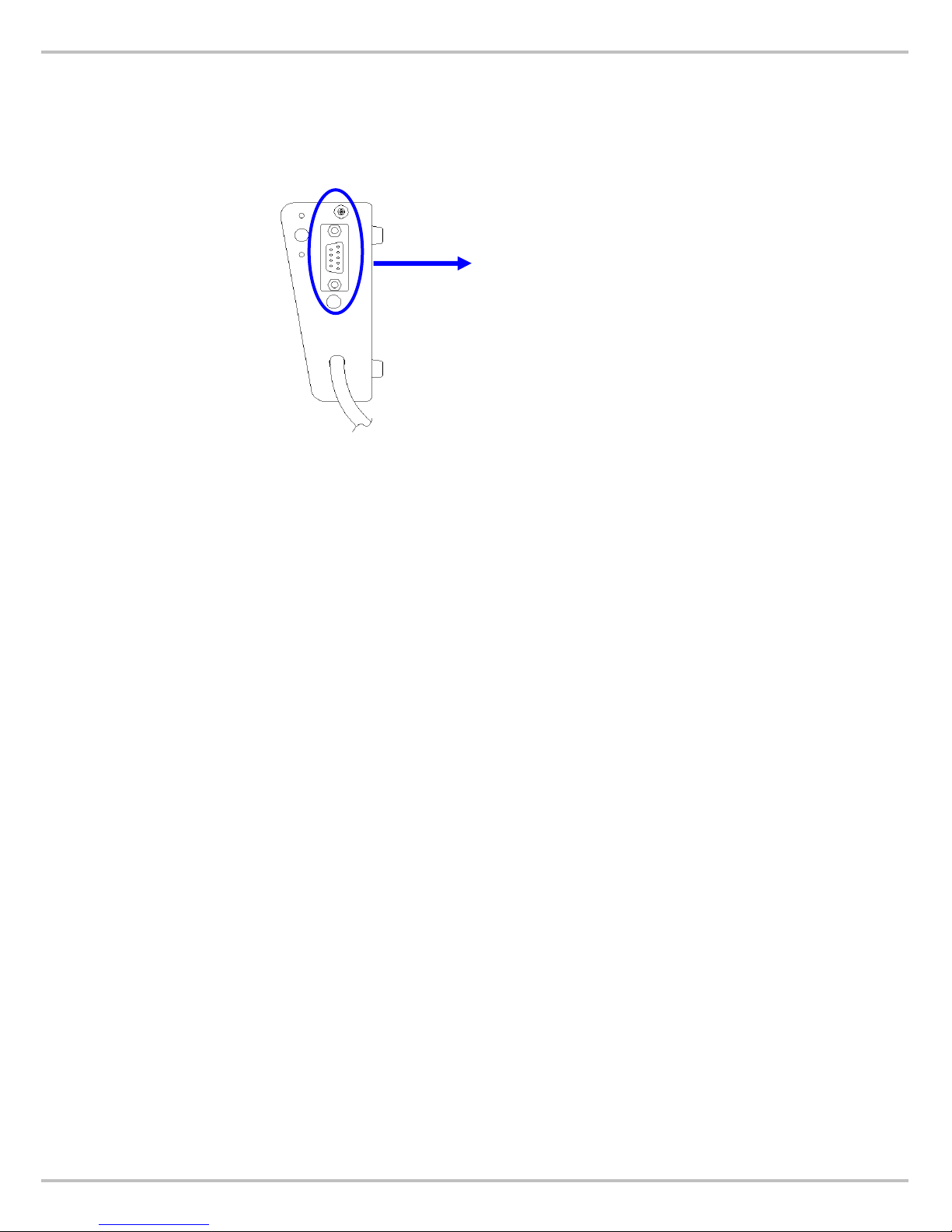
RS232
Plug in the 9D type RS232 ﹐and then print from PC.
RS232 Jack
Page 12
11
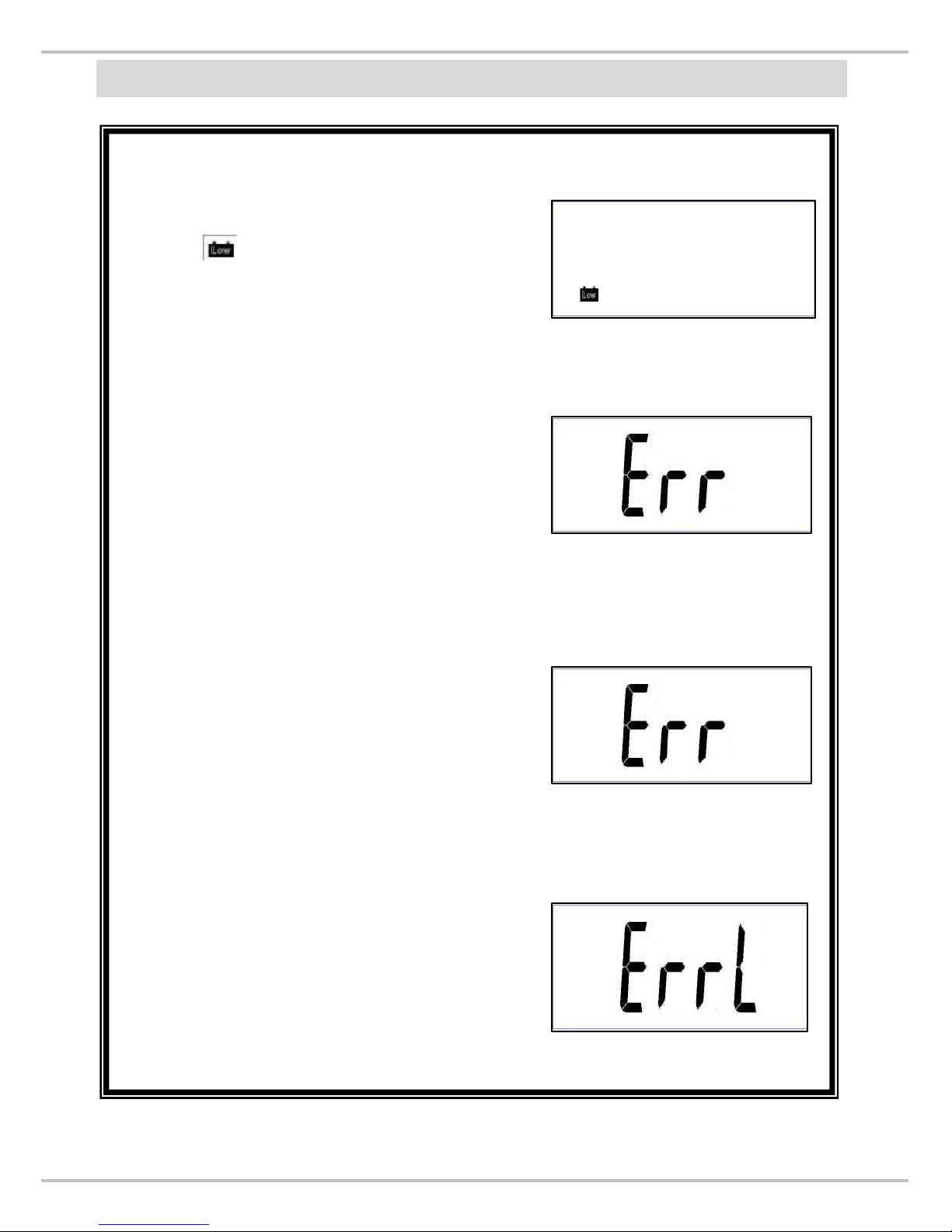
ERROR MESSAGE
Low Battery
If it is running out of battery, the display
shows . Please use AC adaptor as
power supply for operation.
Over Load
If the total load exceeds the maximum
capacity of scale, the display will show
the “Err” message. The weight must be
removed from the platform right away.
Under
Zero
If zero count is below the setting, the
display will show “Errl” message. The
scale will shut off if the status lasts 30
seconds.
Over Zero
If zero count is high than the setting
range, the display will show “Err”
message. The scale will shut off if the
status lasts 30 seconds.
Page 13

12
Manufactured by:
Charder Electronic Co., Ltd.
No.103, Guozhong Rd., Dali Dist.,
Taichung City 412 , Taiwan (R.O.C)
IN-1092 [9066D] 04/2016
 Loading...