

Page 1
T
HIS PA
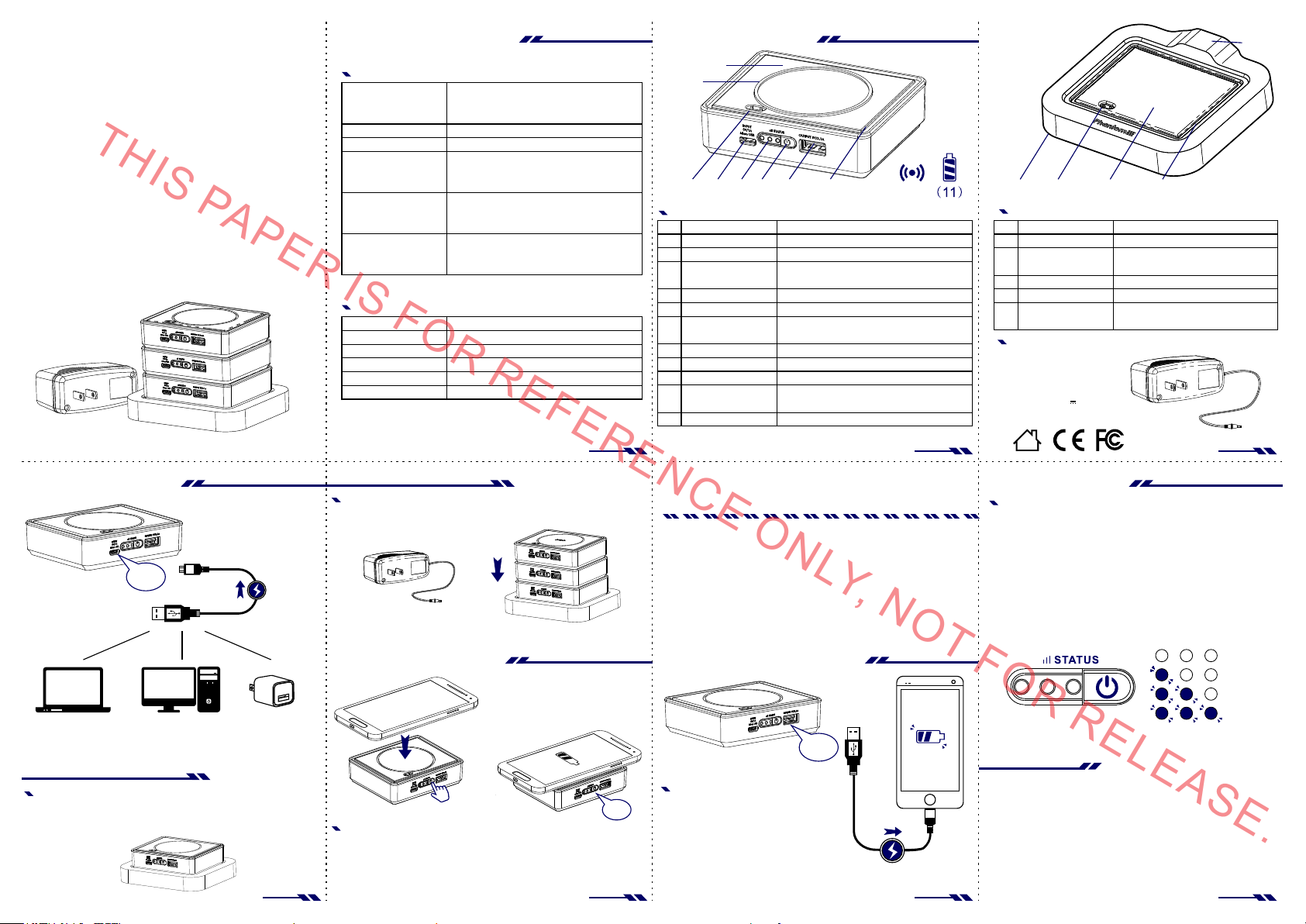
無線充電行動電源
(兼容QI規範裝置)
輸入電源
Micr o USB
筆記型 電腦
USB 接 口
行動電源-快速充電
使用包裝內附的專屬 充電底 座
-將行動 電源放在底 座上,即可 快速充電。
-充電時 請確認行動 電源是否有 亮燈或閃爍 。
桌上型 電腦
or or
USB 接 口
2AAT010B包裝內容物
PER IS FO
WCB005V-無線 充電行 動電源
電源輸 入(Micro USB)
輸出電 源(USB 2. 0)
輸出電 源(無線充電)
行動電源充電
1.0A
(Ma x)
有USB接 口
電源供 應器
行動電源-快速充電
為確保 可在短時間 內充飽行動 電源電量。
同時間 ,建議至多 放置三個行 動電源。
※充電 前,
請確認 電源供應器 是否有連接 至充電底座 。
步驟二
如何使用無線充電?
若你的 隨身智慧型 產品配有符 合Qi規範的接 收裝置。
步驟一:按 壓電源按鈕 。
步驟二:將 產品放置無 線充電感應 區上。
(接收片 與無線充電 感應區需互 相接觸)。
步驟三:聽 見”嗶”一聲,即開 始充電。
型號
產地
製造商
尺寸
重量
包裝內 容
電量容 量
電量額 定容量
電池壽 命
WCB 005V-無 線充電行動 電源
WCH 003A-行 動電源充電 底座
2AB D015B -底座電源供 應器
中國
廣州貴 冠科技有限 公司
90* 75*26 mm-無線充 電行動電源
116 *118* 22mm-行 動電源充電 底座
80* 35*50 mm-底座電 源供應器
180 g-無線充電 行動電源
100 g-行動電源 充電底座
150 g-底座電源 供應器
無線充 電行動電源X 3、行動電源 充電底座X1、
底座電 源供應器X1、 中英文說明 書X1
MIC RO USB 輸出/入 線X1、
5V/1A (Ma x)
5V/2.1 A (Max )
5V/1A (Ma x)
R R
520 0mAh/ per pcs
350 0mAh/ per pcs
依個人 使用情況而 定
EF
ER
P1 P2 P3
EN
3pc s
(Ma x)
無線充電功能
(可兼容Qi 規範裝置)
步驟一
“嗶”
步驟三
P5 P6 P7P4
規格&功能說明包裝內容物
(8 )
(9 )
(1 ) (2)( 3) (4 ) ( 5)(6 )
WCB005V-無線 充電行 動電源
(1)
(2)
(3)
(4)
(5)
(6)
(7)
(8)
(9)
(10 )
(11 )
※以下 所列之智慧 型手機,
其手機 原廠皆有其 配套的無線 充電接收器 模組配件
或已內 建無線充電 功能,詳細 請參閱各品 牌手機的使 用手冊或官 方網站。
Samsun g
Gal axy S 3
Gal axy S 4
Gal axy S 5
Note 2
Note 3
Note 4
如何用"線"充電?
將一端 接行動電源o utput ,
一端接 待充電產品(手 機、平板),
即可充 電。
※右側 手機充電顯 示狀態僅為 示意圖,
詳細請 參閱各品牌 手機的使用 手冊或官方 網站。
位置
Mic ro USB電源輸入
電量顯 示
電源/電量 顯示
USB 2 .0輸出電源
對位框
金屬充 電針
無線充 電感應區
內置磁 鐵
止滑圈
警示聲
電池
C
E O
Goo gle
Nexus 4
Nexus 5
Nexus 7 II
(7 )
(1 0)
5V/ 1.0A( MAX)
顯示行 動電源目前 電量
此按鍵 可啟動充電 功能或啟動 顯示行動電 源
目前電 量。長按2秒可 關閉電源。
5V/ 2.1A( MAX)
導引堆 疊產品能快 速定位
當行動 電源堆疊至 充電底座時 ,
可藉由 此充電針, 達到快速充 電效果。
無線充 電感應區
導引堆 疊產品能快 速定位
讓手機 放置本產品 上時,不會 輕易滑動
當配有 無線充電接 收產品,放 置感應區時 ,
會有” 嗶”的提示 聲,將進行 充電。
內置鋰 電池 5200 mAh
LG
Opt imu s G Pro
NLY, NO
MOT ORO LA
MOT O X
Droid 4
說明
Nokia
Lumia 15 20
Lumia 10 20
Lumia 93 0
Lumia 92 5
Lumia 92 0
Lumia 83 0
Lumia 82 0
Lumia 72 0
HTC
Win dow s Pho ne 8X
Droid DN A
一般充電
電源輸出
USB 2 .0
2.1A
(Ma x)
T F
(1 ) (2 ) (3 )
WCH003A-行 動電源 充電底 座
位置
(1)
(2)
(3)
(4)
(5)
止滑墊
金屬充 電針
(電源輸 出)
放置平 台
對位框
DC JACK輸入電 源
2ABD015B-底 座電源 供應器
Pow er Su ppl y Uni t
Model: 2AB D01 5B
INP UT:10 0-2 40Vac
50- 60H z,0 .7A
OUT PUT:5 V 3.0 A
MAD E IN CH INA
(4 )
在產品 下方放置止 滑墊
當行動 電源堆疊至 充電底座時 ,
可藉由 此充電針, 達到快速充 電效果。
行動電 源放置處
導引堆 疊產品能快 速定位
INP UT :5V/ 3A (Max ),
請搭配 專屬的底座 電源供應器
說明
電量顯示燈號
如判別行動電源電量?
步驟一:按 壓電源按鈕 。
步驟二:請 依左側亮燈 數判別剩餘 電量電量。
※假設 行動電源處 於電量0%的電 量
→正常 使用狀況下 ,連續充電4小 時,
即可將 行動電源由0 %充滿至100 %。
→正常 使用狀況下 ,當連續充 電3小時,
即可將 行動電源由0 %充滿至85%, 三 顆燈號會全 亮。
建議可 繼續充電一 小時,確保 電量更為充 足。
:0%電 力
OR RELEA
:25 %電力
:50 %電力
:85 %電力
注意事項
本產品使用須知與注 意事項
1. 請勿靠近火源和浸泡 於水中 。
2.行 動電源在充電時,請 勿同時 充手機 、平板. ...等其
他產品。
3.若長時間不使用無 線充電 功能, 建議可 長按電源按
鈕2秒鐘。即可關閉無線 充電功 能,減 少電量 耗損。
SE.
(5 )
Page 2
T
HIS PA
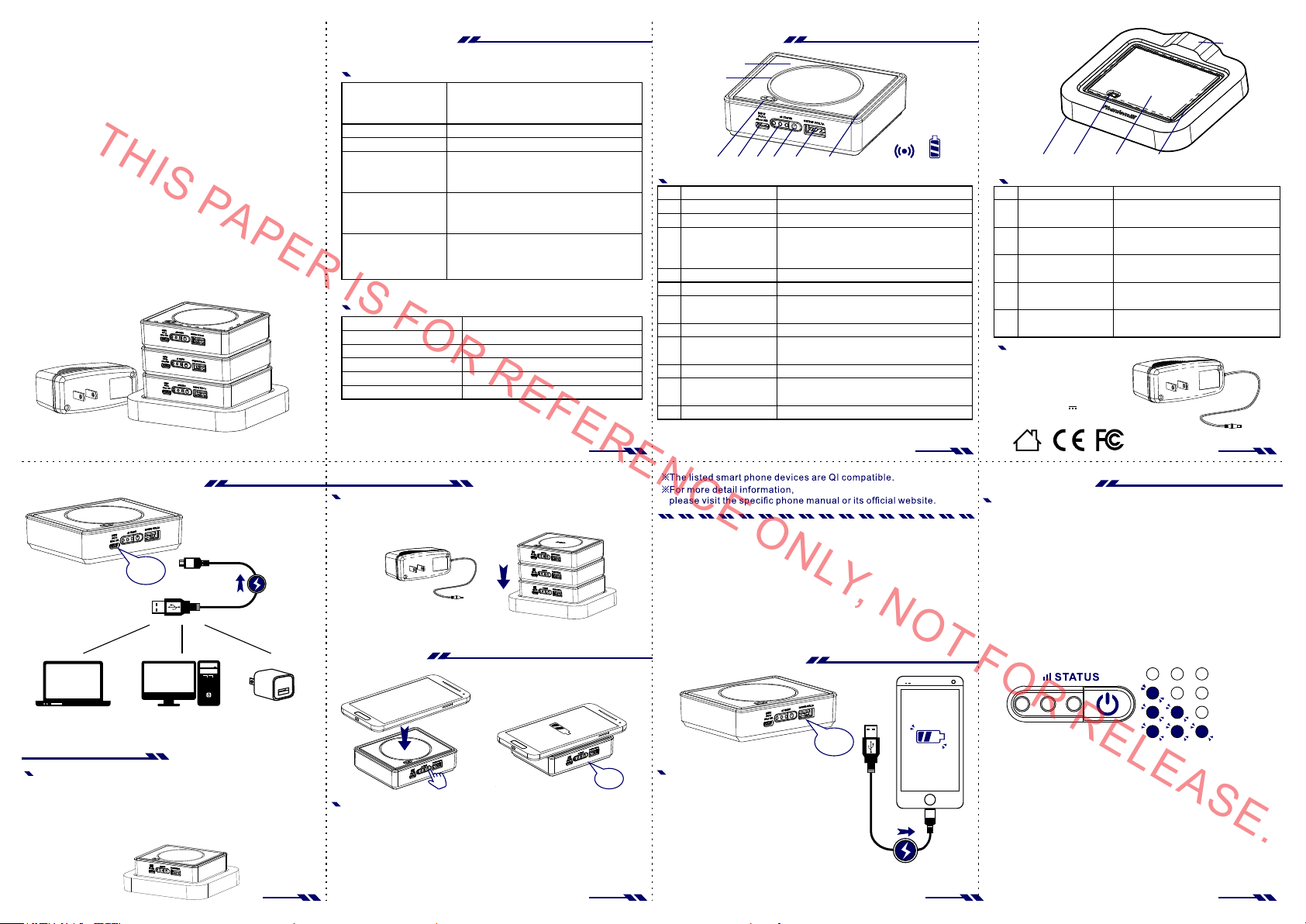
Wireless Chargi ng
(Qi Compatible De vices)
With Power Bank
PER IS FO
Charge In
Inpu t
Micr o USB
(Ma x)
NoteBo ok
USB port
Quick Charge
Apply with co rresponding power supply Unit
within the package
- P lacin g the pow er banks on top of the po wer bank stan d
to receiv e rapid c harging eff ect
- C onfir m if the LE D light s of power bank are on or f lash ing
Comput er
or or
USB port
USB
Power ad apt er
1.0A
2AAT010B Pa cka ge Co ntent s
Mod el
Mad e
Man ufact urer
Siz e
Weight
Package I nclu des
WCB00 5V-W ire less Po wer B ank
Powe r Input (Micr o USB)
Powe r Outpu t(USB 2 .0)
Powe r Outpu t(Wir eless )
Cap acit y
Rat ed Capacity
Bat tery L ife
WCB 005V- Wirel ess Power Bank
WCH 003A- Power Ba nk Stand
2AB D015B -Power S upply U nit
Chi na
Gua ngzho u Gui Gua n Power Pl us Tech.C orp.
90* 75*26 mm-Wi reles s Power B ank
116 *118* 22mm- Power Ba nk Stand
80* 35*50 mm-Pow er Supp ly Unit
180 g-Wir eles s Power Ba nk
100 g-Powe r Bank Stand
150 g-Powe r Suppl y Unit
Wir eless Po wer Ban kX3、Po wer Ban k StandX 1、
Powe r Suppl y UnitX 1、
Chi nese& Engli sh Inst ructi onX1、
Mic ro USB Ou tput/ input W ire X1、
5V/1A (Ma x)
5V/2.1 A (Max )
5V/1A (Ma x)
R R
520 0mAh/ per pcs
350 0mAh/ per pcs
Dep endin g On Personal U se
EF
ER
Quick Charge
To ensu re all p ower banks wi ll be cha rged
wit hin a sho rt period of time,
pla ce 3 powe r banks at the sa me time i s recom mend ed.
3pc s
(Ma x)
※Make s ure the p ower su pply un it
is co nnect ed to the po wer ban k stand c orrec tly bef ore char ging.
Wireless Chargi ng
(Qi Comp atible Devices)
STE P2
STE P1
How to use w ireless power ban k ?
If th e smart devi ce is QI co mpati ble.
Step 1 : Press t he powe r butt on
Step 2 : Place t he devi ce whic h needs t o be charged on t op of
the s ensin g area .( The si gnal re ceivi ng chip s hould
cor respo nd to th e power bank se nsing a rea.)
Step 3 : The dev ice beg ins to be c harged
after the “bee p” sound i s made.
STE P3
(8 )
(9 )
WCB00 5V-W ire less Po wer B ank
(1)
(2)
(3)
(4)
(5)
(6)
(7)
(8)
(9)
(10 )
(11 )
(1 ) (2) (3 ) (4 ) ( 5)(6 )
Loc ation
Inp ut(Mi cro USB )
Bat tery D ispl ay
Power On&Off/
Bat tery D ispl ay
Out put(U SB 2.0)
Fra mes
Pogo P in
Sen sing Ar ea
Bui lt-In Ma gnet
Ski d proof Ring
Bui lt-in Bu zzer
Bat tery
(7 )
5V/ 1.0A( MAX)
Dis play cu rrent batte ry po wer sta tus
Act ivate charging fu nctio n or
to di splay batte ry power. Turn off p ower
by ho lding t he butt on for mo re than 2 sec.
5V/ 2.1A( MAX)
Eas y to stac k power banks o n power bank st and
By at tachi ng the Pog o Pin to re ceiv e
rap id char ging e ffect
Wir eles s Charg ing Sen sing Area
Acc urate ly loca te stacking p ower banks
to de signa ted spots
Pre vent p roduc t bein g charg ed from slidi ng
Whe n senor t ouche d,
the r ecei ver wil l sound
Bui lt-in wi th 5200 mAh Lit hium Ba ttery
Buttons&ControlsPackage Content s
Des cript ion
(1 0) (11)
(1 ) (2 ) (3 )
WCH00 3A- Power Bank S tan d
Loc ation
Ski d proof pa d
(1)
Pogo P in
(2)
(3)
Powe r Bank pl acing
(4)
(5)
Fra mes
Inp ut(DC J ack)
2ABD0 15B -Power Sup ply U nit
Pow er Su ppl y Uni t
Model: 2AB D01 5B
INP UT:10 0-2 40Vac
50- 60H z,0 .7A
OUT PUT:5 V 3.0 A
MAD E IN CH INA
Loc ated un der the p ower bank
sta nd to prevent f rom sliding
By at tachi ng the Pog o Pin
to receiv e rapid c harging eff ect
Loc ation w here po wer ba nks
sho uld be pl aced
Eas y to stac k power banks
on po wer bank stan d
INP UT :5V/ 3A (Max )
App ly with c orresp ondin g Power su pply Un it
(4 )
Des cript ion
(5 )
P1 P2 P3
EN
Battery Indicator
“Be ep”
P5 P6 P7P4
C
E O
Samsun g
Gal axy S 3
Gal axy S 4
Gal axy S 5
Note 2
Note 3
Note 4
※Th e diagr am show n on the ri ght is on ly
for y our ref erence . For mor e detai l infor matio n,
ple ase vis it the sp ecifi c phone m anual o r its off icial websi te.
Goo gle
Nexus 4
Nexus 5
Nexus 7 II
LG
Opt imu s G Pro
NLY, NO
MOT ORO LA
MOT O X
Droid 4
Nokia
Lumia 15 20
Lumia 10 20
Lumia 93 0
Lumia 92 5
Lumia 92 0
Lumia 83 0
Lumia 82 0
Lumia 72 0
Wired Charging
Out pu t
USB 2 .0
How to use power bank with USB wire?
Con nect th e USB wir e to one s ide of
the d evice t o the po wer ban k's outp ut
and t he devi ce bein g charged to th e other.
HTC
Win dow s Pho ne 8X
Droid DN A
(Ma x)
T F
2.1 A
Batte ry In dicator
Step 1 : Press t he powe r butt on
Step 2 : Read the numb er of lights to s how the c urre nt
bat ter y power s tand ings
※ Und er the as sumpt ion if th e batter y of pow er bank is w ith 0% ※
→Und er norm al cond ition s, the ba tter y can be c harg ed
fro m 0% to 10 0% by cha rging 4 conse cutiv e hours .
→Und er norm al cond ition s, the ba tter y can be c harg ed
fro m 0% to 85 % by char ging 3 c onsec utive h ours.
※All 3 b atter y indic ator li ghts wi ll be on, h oweve r to ensu re the bat tery
is fu lly cha rged, a n extra h our to cha rge is re comme nded. ※
OR RELEA
: 0% po wer
:25 % power
:50 % power
:85 % power
SE.
Page 3
Warnings
Product instructions and notes
1. Do Not place close to fire or soak under the water
2. While the power banks are being charged, Do Not charge other devices at the same time
T
3. Do turn off the power bank if not being used. By pressing the power button for 2 sec to lower the battery loss.
Federal Communication Commission Interference Statement
This equipment has been tested and found to comply with the limits for a Class B digital device, pursuant to Part 15 of the FCC Rules.
These limits are designed to provide reasonable protection against harmful interference in a residential installation. This equipment
generates, uses and can radiate radio frequency energy and, if not installed and used in accordance with the instructions, may cause
harmful interference to radio communications. However, there is no guarantee that interference will not occur in a particular installation.
If this equipment does cause harmful interference to radio or television reception, which can be determined by turning the equipment off
and on, the user is encouraged to try to correct the interference by one of the following measures:
HIS PA
PER IS FO
R R
-Reorient or relocate the receiving antenna.
-Increase the separation between the equipment and receiver.
-Connect the equipment into an outlet on a circuit different from that
to which the receiver is connected.
-Consult the dealer or an experienced radio/TV technician for help.
EF
ER
EN
C
FCC Caution: Any changes or modifications not expressly approved by the party responsible for compliance could void the user's
authority to operate this equipment.
E O
NLY, NO
This device complies with Part 15 of the FCC Rules. Operation is subject to the following two conditions: (1) This device may not cause
harmful interference, and (2) this device must accept any interference received, including interference that may cause undesired
operation.
T F
IMPORTANT NOTE:
FCC Radiation Exposure Statement:
The product comply with the US portable RF exposure limit set forth for an uncontrolled environment and are safe for intended operation
as described in this manual. The further RF exposure reduction can be achieved if the product can be kept as far as possible from the
user body or set the device to lower output power if such function is available.
This transmitter must not be co-located or operating in conjunction with any other antenna or transmitter.
OR RELEA
SE.
 Loading...