

Page 1
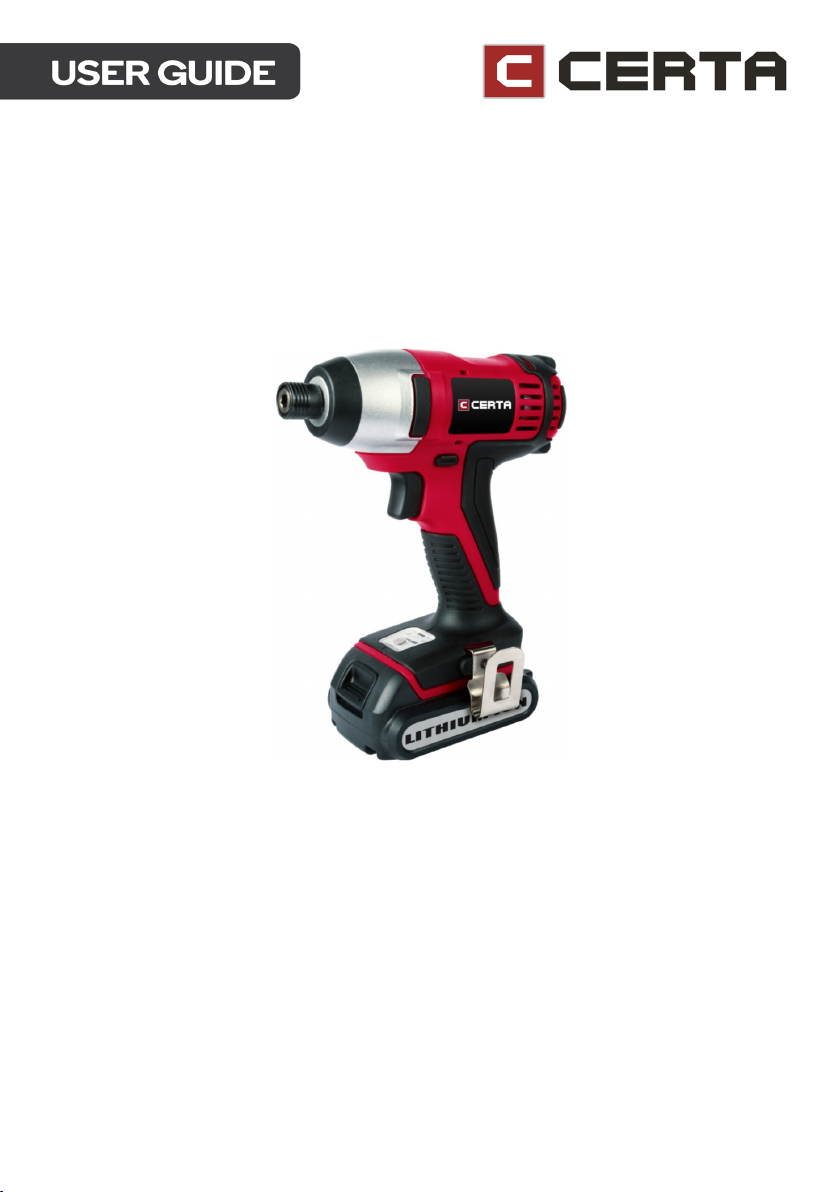
POWERPLUS 20V CORDLESS
IMPACT DRIVER (SKIN ONLY)
CT20VIMPWRB
Page 2

Page 3

Save all warnings and instructions for future reference. The term “power tool” refers to your
mains operated (corded) power tool or battery-operated (cordless) power tool.
Work area
• Keep your work area clean and well lit. Cluttered benches and dark areas invite
accidents.
• Do not operate power tools in explosive atmospheres, such as in the presence of
flammable liquids, gases, or dust. Power tools create sparks which may ignite the
dust or fumes.
• Keep bystanders and children away while operating a power tool. Distractions can
cause you to lose control of the device.
Electrical safety
1. Power tool plugs must match the outlet. Never modify the plug in any way. Do not
use any adapter plugs with earthed (grounded) power tools. Unmodified plugs and
matching outlets will reduce the risk of electric shock.
2. Avoid body contact with grounded surfaces such as pipes, radiators, ranges, and
refrigerators. There is an increased risk of electric shock if your body is grounded.
3. Do not expose power tools to rain or wet conditions. Water entering a power tool
will increase the risk of electric shock.
4. Do not abuse the cord. Never use the cord to carry the tools or pull the plug from an
outlet. Keep cord away from heat, oil, sharp edges or moving parts. Replace
damaged cords immediately. Damaged cords increase the risk of electric shock.
5. When operating a power tool outdoors, use an extension cord suitable for outdoor
use to reduce the risk of electric shock.
6. If operating a power tool in a damp location is unavoidable, use a Ground Fault
Circuit Interrupter (GFCI) protected supply to reduce the risk of electric shock.
Page 4

Personal safety
1. Stay alert, watch what you are doing and use common sense when operating a
power tool. Do not use tool while tired or under the influence of drugs, alcohol, or
medication. A moment of inattention while operating power tools may result in
serious personal injury.
2. Use personal protective equipment. Always wear eye protection. Safety equipment
such as dust mask, non-skid safety shoes, hard hat or hearing protection used for
appropriate conditions will reduce personal injuries.
3. Prevent unintentional starting. Ensure the switch is in the off position before
connecting to a power source and/or battery pack, picking up or carrying the tool.
Carrying power tools with your finger on the switch or energising power tools that
have the switch on invites accidents.
4. Dress properly. Do not wear loose clothing or jewellery. Keep your hair, clothing, and
gloves away from moving parts. Loose clothes, jewellery or long hair can be caught
in moving parts.
5. Remove adjusting keys or wrenches before turning the tool on. A wrench or a key
that is left attached to a rotating part of the tool may result in personal injury.
6. Do not overreach. Always keep proper footing and balance. The enables better
control of the power tool in unexpected situations.
7. Only use safety equipment that has been approved by an appropriate standards
agency. Unapproved safety equipment may not provide adequate protection. Eye
protection must be ANSI-approved and breathing protection must be NIOSHapproved for the specific hazards in the work area.
Power tool use and care
1. Do not force the tool. Use the correct tool for your application. The correct tool will
do the job better and safer at the rate for which it is designed.
2. Do not use the tool if the switch does not turn it on or off. Any power tool that
cannot be controlled with the switch is dangerous and must be repaired.
3. Disconnect the plug from the power source and/or the battery pack from the power
tool before making any adjustments, changing accessories, or storing the tool.
Such preventive safety measures reduce the risk of starting the tool accidentally.
4. Store idle power tools out of the reach of children and other untrained persons.
Power tools are dangerous in the hands of untrained users.
5. Maintain tools with care. Check for misalignment or binding of moving parts,
breakage of parts and any other condition that may affect the power tool’s
operation. If damaged, have the power tool repaired before use. Many accidents
are caused by poorly maintained power tools.
6. Keep cutting tools sharp and clean. Properly maintained tools with sharp cutting
edges are less likely to bind and are easier to control.
7. Use only accessories that are recommended by Kogan.com for your model.
Accessories that may be suitable for one tool may become hazardous when used
on another tool.
Page 5

Battery use and care
1. Ensure the switch is in the off position before inserting the battery pack. Inserting
the battery pack into power tools that have the switch on invites accidents.
2. Recharge only with the charger specified by Kogan.com. A charger that is suitable
for one type of battery pack may create a risk of fire when used with another
battery pack.
3. Use power tools only with specifically designated battery packs. Use of any other
battery packs may create a risk of injury and fire.
4. When the battery pack is not in use, keep it away from other metal objects like
paper clips, coins, keys, nails, screws, or other small metal objects that can make a
connection from one terminal to another. Shorting the battery terminals together
may cause burns or a fire.
5. If the appliance is misused or damaged, liquid may be ejected from the battery;
avoid contact. If contact accidentally occurs, flush with water. If liquid contacts
eyes, seek medical help as well. Liquid ejected from the battery may cause irritation
or burns.
6. If the battery is damaged, vapours may be emitted which can irritate the
respiratory system. Provide fresh air and seek medical help in case of inhalation.
7. Do not open the battery. Keep the battery away from sources of heat, such as fire
or continuous direct sunlight, to avoid the danger of explosion.
Drill use and safety
• Hold the power tool by the insulated gripping surfaces, when performing an
operation where the cutting accessory or fastener may contact hidden wiring.
Cutting accessory and fasteners contacting a “live” wire may make exposed metal
parts of the power tool “live”, which can give the operator an electric shock.
• Use appropriate detectors to determine if utility lines are hidden in the work area or
call the local utility company for assistance. Contact with electric lines can lead to
fire and electric shock. Damaging a gas line can lead to an explosion. Penetrating
a water line may cause property damage or electric shock.
• Switch off the power tool immediately if the tool inserts jam. Be prepared for high
reaction torque that can cause kickback.
• Hold the machine with a firm grip. High reaction torque can briefly occur while
driving in and loosening screws.
• Secure the workpiece. A workpiece clamped with clamping devices or in a vice is
held more securely than by hand.
• Be extra careful when cutting in high or hard-to-reach locations. Avoid sawing
overhead. Be on the lookout for hidden wires and falling debris.
• Keep your workplace clean. Blends of materials are particularly dangerous. Dust
from light alloys can burn or explode.
• Always wait until the machine has come to a complete stop before placing it down.
The tool insert can jam and lead to loss of control over the power tool.
Page 6

Safety instructions for battery charger
• Before using battery or charger, read all instructions and cautionary markings on
the battery charger, battery pack and product using the battery.
• Use only the charger which accompanied your product or direct replacement. Do
not substitute any other charger. Use only the same supplier approved chargers
with your product.
• Do not disassemble or operate the charger if it has received a sharp blow, been
dropped, or otherwise damaged in any way. Incorrect reassembly may result in a
risk of electric shock, electrocution, or fire.
• Do not recharge the battery in a damp or wet environment. Do not expose the
charger to rain or snow. If the battery case is cracked or otherwise damaged, do not
insert into charger. Battery may short or fire may result.
• Charge only supplier approved rechargeable batteries. Other types of batteries
may burst and cause personal injury or damage.
• Charge battery pack in temperatures above 0ºC and below 45ºC. Store the tool
and battery pack in locations where temperatures will not exceed 49ºC. This is
important to prevent serious damage to the battery cells.
• Pull by the plug rather than the cord when disconnecting charger or when
disconnecting cords. This will reduce the risk of damage to the electric plug and
cord.
• Make sure that cord is located so that it will not be stepped on, tripped over or
otherwise subjected to damage or stress.
• Do not use an extension cord unless it is necessary. Use of improper extension cord
could result in a risk of fire, electric shock or electrocution.
• Do not operate charger with damaged cords or plugs - have them replaced
immediately.
• Disconnect the charger from the outlet before attempting any cleaning. This will
reduce the risk of electric shock. Removing the battery pack will not reduce this risk.
Page 7

Safety instructions for the battery pack
• Do not incinerate the battery pack even if it is severely damaged or is completely
worn out. The battery pack can explode in a fire. Toxic fumes and materials are
created when lithium-ion battery packs are burned.
• Do not charge or use the battery in explosive atmospheres, such as in the presence
of flammable liquids, gases, or dust. Inserting or removing the battery from the
charger may ignite the dust or fumes.
• If battery contents come into contact with the skin, immediately wash the area
with mild soap and water. If battery liquid gets into the eye, rinse water over the
open eye for 15 minutes or until irritation ceases. If medical attention is needed, the
battery electrolyte is composed of a mixture of liquid organic carbonates and
lithium salts.
• Contents of opened battery cells may cause respiratory irritation. Provide fresh air. If
symptoms persist, seek medical attention.
• Charge the battery packs only in the charger which accompanied your product.
• Do not splash or immerse in water or other liquids. This may cause premature cell
failure.
• Do not store or use the tool and battery pack in locations where the temperature
may reach or exceed 40°C (such as outside sheds or metal buildings in summer).
• When batteries are not in tool or charger, keep them away from metal objects.
• Do not put batteries into fire or expose to high heat. They may explode.
Page 8
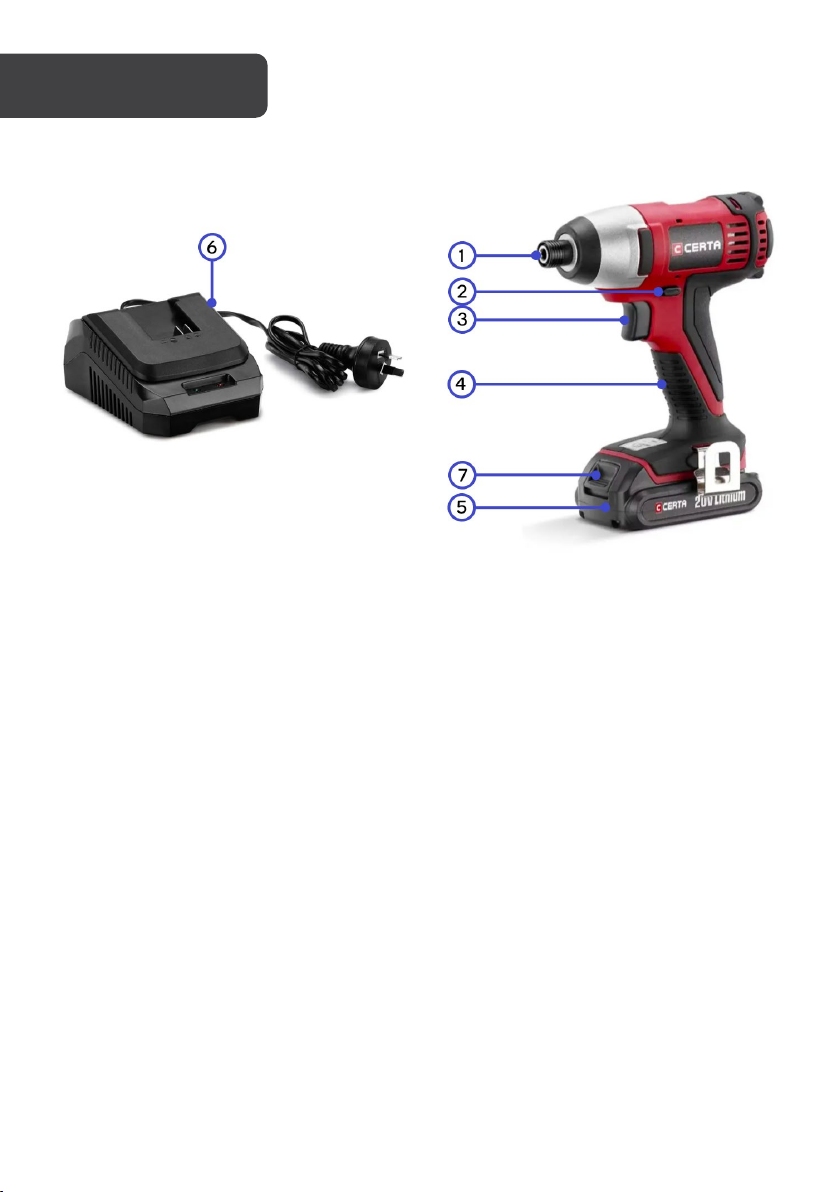
1
Tool Holder
2
Rotational Direction Switch
3
On/Off Switch
4
Handle
5
Battery Pack (Not Included)
6
Battery Charger (Not Included)
7
Push Lock Button
OVERVIEW
Intended use
This tool is intended for driving in and loosening screws as well as for drilling into wood,
metal, ceramic and plastic.
Even when a tool is used as intended, it is not possible to eliminate all residual risk factors.
The following hazards may arise in connection with the tool's construction and design:
• Damage to lungs if an effective dust mask is not worn.
• Damage to hearing if effective hearing protection is not worn.
• Health defects resulting from vibration emission of the power tool when being used
over long periods.
Page 9

Changing the tool
Before performing any work on the power tool (e.g., maintenance, tool change, etc.) as well
as during transport and storage, set the rotational direction switch to the centre position.
Unintentional actuation of the On/Off switch can lead to injuries.
Inserting the battery (not included)
Use only original Certa Li-ion batteries that match the voltage listed on the nameplate of
your power tool. Using other batteries can lead to injuries and pose a fire hazard. Set the
rotational direction switch to the centre position to protect the power tool against accidental
starting before inserting the charged battery.
Do not continue to press the On/Off switch if the machine has been automatically switched
off, as the battery can be damaged.
Reversing the rotational direction
The rotational direction switch is used to reverse the rotational direction of the machine. The
impact driver must be turned off before using the switch.
• Right rotation: For driving in screws and tightening nuts, press the rotational
direction switch through to the left stop.
• Left rotation: For loosening and unscrewing screws and nuts, press the rotational
direction switch through to the right stop.
On/Off switch
To start the driver, press the On/Off switch and keep it pressed in.
To switch off the driver, release the On/Off switch.
Adjusting the speed
The speed of the switched-on power tool can be variably adjusted, depending on how far
the On/Off switch is pressed. Light pressure on the On/Off switch results in a low rotational
speed. Further pressure on the switch results in an increase in speed.
Page 10

Usage advice
Apply the power tool to the screw/nut only when it is switched off. Rotating tool inserts can
slip off the workpiece if applied when in motion.
The maximum torque is achieved after the impact duration of 6–10 seconds. After this
duration, the tightening torque is increased only minimally. The impact duration is to be
determined for each required tightening. The resultant tightening is always to be checked
with a torque wrench. When working with an application tool, pay attention that the
application tool is firmly seated on the tool holder.
Screw applications with a hard, spring-loaded or soft seat
The required torque will depend on the following factors:
• Strength properties of the screws/nuts
• Type of backing (washer, disc spring and seal)
• Strength properties of the material being screwed/bolted together
• Lubrication conditions at the screw/bolt connection
The following application cases result accordingly:
• A hard seat refers to metal-to-metal screw applications with the use of washers.
After a relatively short impact duration, the maximum torque is reached.
Unnecessary long impact durations will only cause damage to the machine.
• A spring-loaded seat refers to metal-to-metal screw applications with the use of
spring washers, disc springs, studs, or screws/nuts with conical seats as well as
when using extensions. The maximum tightening torque is lower than for a hard
seat, and a longer impact duration is required.
• A soft seat refers to screw applications such as metal on wood, or when using
lead/fibre washers as backing. The maximum tightening torque is lower than for a
hard seat, and a longer impact duration is required.
Page 11

Recommendations for optimal battery performance
Note:
Protect the battery against moisture and water. Store the battery within a temperature
range between 0°C and 45°C. As an example, do not leave the battery in a car in summer.
Occasionally clean the venting slots of the battery using a soft, clean and dry brush. A
significantly reduced working period after charging indicates that the battery is used and
must be replaced.
Charging the battery pack (not included)
The battery is supplied partially charged to prevent possible problems and should be
charged before use. Batteries will not reach full charge the first time they are charged.
Allow several charging/discharging cycles for them to fully charge.
1. Remove the battery pack (5) from the handle, pressing the push lock button (7)
downwards to do so.
2. Check that your main voltage is the same as that marked on the rating plate of the
battery.
3. Plug the mains plug of the charger (6) into the mains socket outlet, then turn on the
power and the green LED will illuminate.
4. Push the battery pack onto the battery charger. The green LED will extinguish, and
the red LED will illuminate, indicating that the battery pack is being charged.
5. When the charging period is completed after approx. 1 hour, the green LED will
illuminate, and the red LED will extinguish.
The battery is equipped with an NTC temperature control which allows charging only within
a temperature range between 0°C and 45°C.
If the battery pack fails to become charged, please check:
• Whether there is the voltage at the socket-outlet
• Whether there is proper contact at the charging contacts on the charger
If the battery continues to fail to charge, please contact the Kogan customer support team.
To ensure that the battery pack provides long service you should take care to recharge it as
soon as you notice that the power of the power tool drops.
Never fully discharge the battery pack. This will cause the battery pack to develop a defect.
Page 12
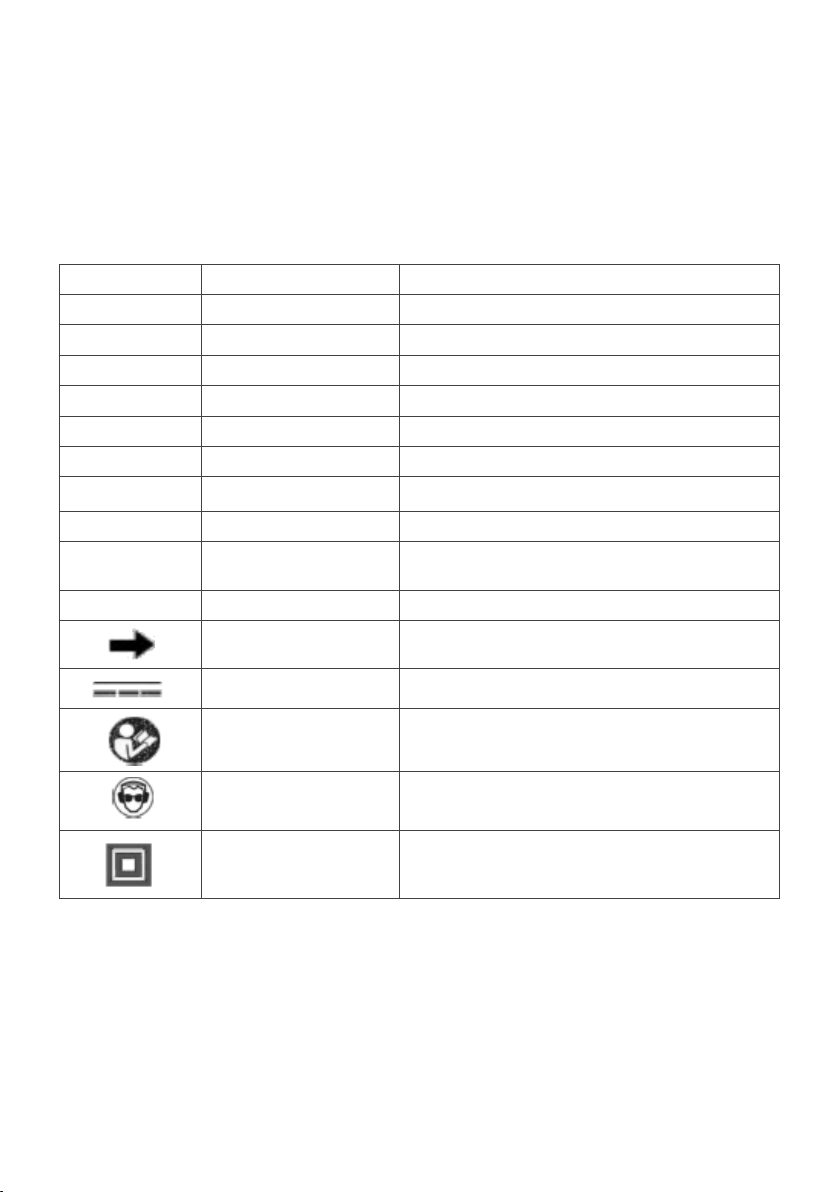
Symbols
Symbol
Name
Designation/explanation
V
Volts
Voltage
A
Amperes
Current
Hz
Hertz
Frequency (cycles per second)
Kg
Kilograms
Weight
Min
Minutes
Time
s
Seconds
Time
Φ
Diameter
Size of bits, grinding wheel etc.
n°
No load speed
Rotational speed at no load
Revolutions, strokes, surface speed, orbits etc.
per minute
0
Off position
Zero speed, zero torque
Direct current
Type or a characteristic of current
The following symbols or initials may be used on the tool. Please see below to learn their
meaning. Proper interpretation of these symbols will allow you to operate the tool better and
safer.
…/min Revolutions per minute
Arrow Action in the direction of the arrow
Read manual symbol Alerts user to refer to the manual
Wear eye protection Alerts user to wear eye protection
Class II construction Double insulated construction tools
Page 13
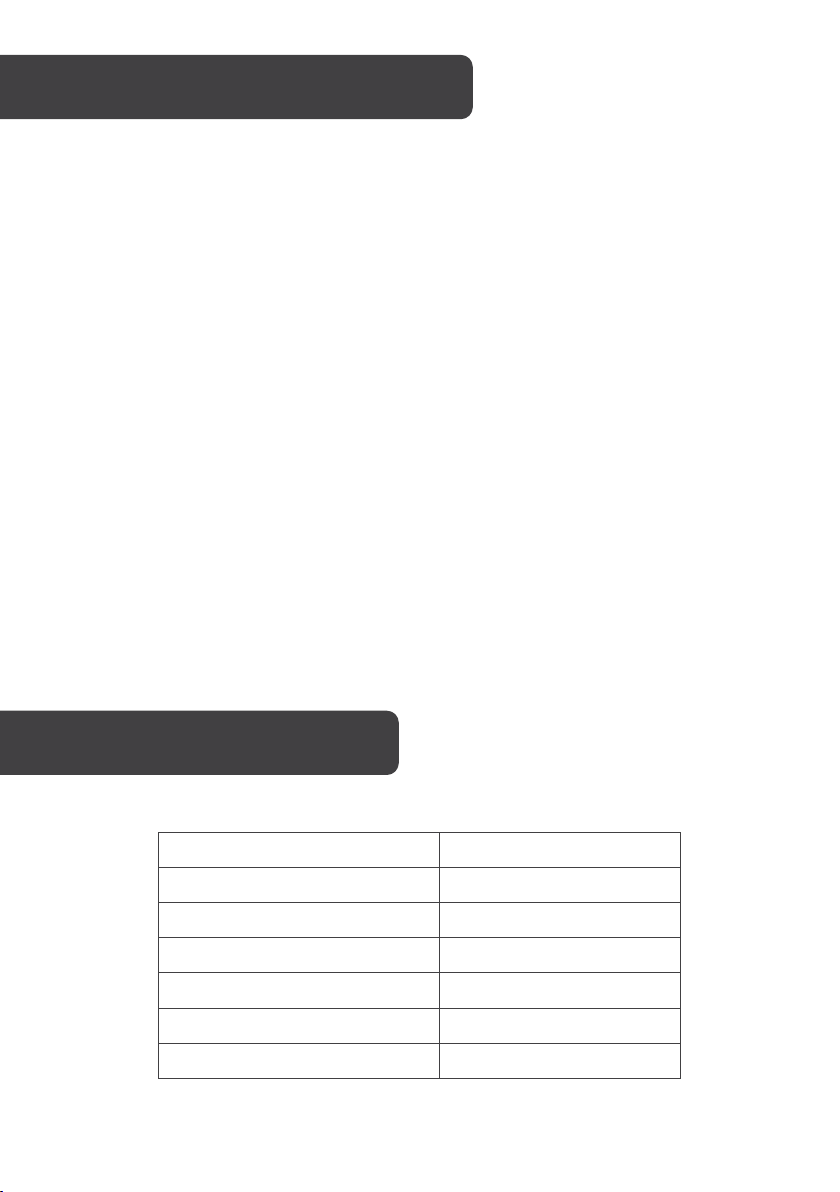
Voltage Supply
DC 20V
No-load speed
0-2400 min-1
Maximum torque
180Nm
Forward & reverse rotation
Yes
Battery capacity
2000mA
Rated voltage for charger
AC 100-240V~/50-60Hz
Charging time
~1 hour
To prevent serious injury or death from accidental operation, turn the power switch of the tool
to its “Off” position and disconnect battery pack from tool before performing any inspection,
maintenance or cleaning procedures.
• Clean out dust and debris from vents and electrical contacts by blowing with
compressed air. Always wear safety goggles when cleaning tools with compressed
air.
• Keep tool handles clean, dry and free of oil or grease.
• Use only mild soap and a damp cloth to clean the tool, keeping away from all
electrical contacts.
Note
Certain cleaning agents and solvents are harmful to plastics and other insulated parts.
Some of these include gasoline, turpentine, lacquer thinner, paint thinner, chlorinated
cleaning solvents, ammonia and household detergents containing ammonia.
Tool maintenance must only be performed by qualified repair personnel. If the tool is not
working properly, do not attempt to repair it yourself. Contact the Kogan customer support
team.
Page 14

Problem
Possible Causes
Likely Solutions
• Battery pack not
charged.
• Insert battery pack into charger
up or cools down.
Tool will not start
Battery pack will not
charge
installed properly.
• Battery pack not
• Battery pack not
inserted into charger.
• Charger not plugged
in.
• Surrounding air
temperature not
suitable.
• Battery pack too hot
or too cold.
• Check battery pack installation.
• Check battery pack charging
requirements.
until red LED appears.
• Plug charger into a working outlet.
Refer to “Charging the battery
pack” for more details.
• Check current at receptacle by
plugging in a lamp or other
appliance.
• Check to see if the receptacle is
connected to a light switch which
turns the power off when you turn
out the lights.
• Move charger and battery to a
surrounding air temperature of
above 4.5°C or below 40.5°C.
• The charger will not charge a
battery pack if the cell
temperature is below
approximately 0°C or above 60°C.
• The battery pack should be left in
the charger and the charger will
begin to charge automatically
when the cell temperature warms
Page 15

NOTES
Page 16

Need more information?
We hope that this user guide has given you
the assistance needed for a simple set-up.
For the most up-to-date guide for your product,
as well as any additional assistance you may require,
head online to help.kogan.com
 Loading...