

Page 1

PA168X SIP Phone User Manual (V1.42)
Beijing Centrality Communication Inc
PA168X SIP Phone User Manual
¾ PA168X IP phone Appearance Introduction:
................................................................... 2
¾ Function Keys of PA168X IP Phone Introduction
.......................................................... 3
¾ Features
................................................................................................................................4
¾ Standard and Protocol
......................................................................................................... 5
¾ Operating requirements
...................................................................................................... 6
¾ Electric requirements
........................................................................................................... 6
¾ Size
........................................................................................................................................ 6
¾ Installation
............................................................................................................................. 6
¾ Configuration
......................................................................................................................... 7
¾ Phone Keypad set
................................................................................................................ 7
¾ Configured by WEB
........................................................................................................... 10
¾ Telnet Configuration
.......................................................................................................... 26
¾ Upgrade PA168X IP phone
.............................................................................................. 45
¾ Usage of the phone
............................................................................................................ 45
Page 2
PA168X SIP Phone User Manual (V1.42)
Beijing Centrality Communication Inc
2
¾ PA168X IP phone Appearance Introduction:
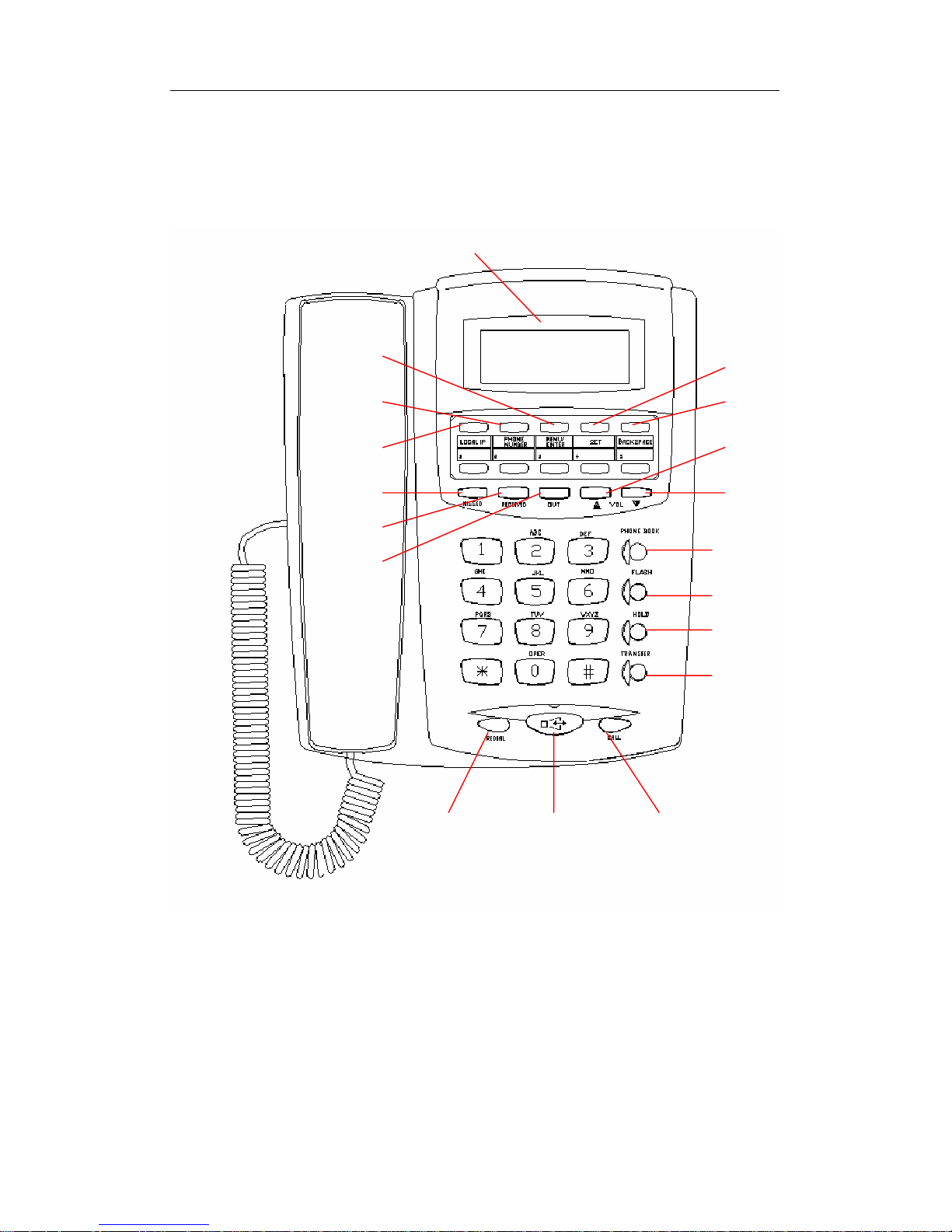
● PA168X IP Phone Front Illustration (Refer to Fig 1.1):
Fig 1.1 PA168X IP Phone Front Illustration
● PA168X IP Phone Back Illustrations(Refer to Fig 1.2 ):
Local IP
Phone Number
Menu/Enter
LCD Display
Set
Missed
Received
Out
Backspace
Vol
+
Vol
-
Phone book
Flash
Hold
Transfer
Redial Speaker Call
Page 3

PA168X SIP Phone User Manual (V1.42)
Beijing Centrality Communication Inc
3
Fig 1.2 PA168X Phone Back Illustration
¾ Function Keys of PA168X IP Phone Introduction:
Keys Function Keys Function
Local IP
With handset hung, press this key
to display local IP address on LCD.
Missed
With handset hung, press this
key to review missed number.
Phone
number
With handset hung, press this key
to display phone number on LCD.
Received
With handset hung, press this
key to review received number.
Menu/
Enter
With handset hung, press this key to
menu mode. Enter the menu mode,
press this key to next menu and confirm.
Out
With handset hung, press this
key to review dialed number.
Set
Enter the menu mode,press this key
becomes to modify the appearance.
Redial
While reviewing missed,
received or dialed number,
press this key to dial current
number.
Backspace
Enter the menu mode; press this key to
back upper menu or delete.
Speaker
Press this key to have a call
without lifting the handset.
Volume+ With handset picked,press this key to Increase the volumes of handset;With pressing
To network To PC
Power Jack
Page 4

PA168X SIP Phone User Manual (V1.42)
Beijing Centrality Communication Inc
4
speaker,press this key to Increase the volumes of speaker.
With pressing “missed” or“received” or “out” and then press this key to turn over the
record backward.
Enter the menu mode; press this key to turn over the item backward.
With handset picked,press this key to decrease the volumes of handset;With pressing
speaker,press this key to decrease the volumes of speaker.
With pressing “missed” or“received” or “out” and then press this key to turn over the
record forward.
Volume -
Enter the menu mode; press this key to turn over the item forward.
¾ Features
¾ Hardware
● Main chip—PA1688 50MHz
● Data Memory—2MB SDRAM
● Program Memory—2 MB Flash memory
● Ethernet Jack—2X 10/100M jacks
● AC/DC adapter—Input AC100--- 230V,Output 9V DC, 1A
¾ Software
● DHCP support for LAN or Cable modem
● PPPoE support for ADSL or Cable modem
● Set phone by HTTP web browser (IE6.0) or Telnet
● Upgrade by FTP
Page 5

PA168X SIP Phone User Manual (V1.42)
Beijing Centrality Communication Inc
5
● Support major G.7XX ;GSM610 audio codec
● VAD(Voice active detect)
● CNG (Comfort noise generation)
● Dynamic voice jitter buffer
● G.168/165 compliant 16ms echo cancellation
● Tone generation and Local DTMF re-generation according with ITU-T
● E.164 dial plan and customized dial rules
● 100 entries for quick dial
● 80 entries each for missed calls, answered calls and dialed calls
● Adjustable volume for both handset and speaker
● Voice prompt
● Hotline
¾ Standard and Protocol
PA168X IP Phone supports following standard and protocol:
● IEEE 802.3 /802.3 u 10 Base T / 100Base TX
● Major G.7XX; GSM610 audio codec
● SIP (RFC 2543;RFC3261)
● TCP/IP: Internet transfer and control protocol
● RTP: Real-time Transport Protocol
● RTCP:Real-time Control Protocol
● VAD/CNG save bandwidth
Page 6

PA168X SIP Phone User Manual (V1.42)
Beijing Centrality Communication Inc
6
● DHCP:Dynamic Host Configuration Protocol
● PPPoE:PPP Protocol over Ethernet
● DNS:Domain Name Server
● Telnet:Internet's remote login protocol
● FTP:File Transfer protocol
● HTTP:Hyper Text Transfer protocol
¾ Operating requirements:
● Operation temperature: 0 to 50° C (32° to 122° F)
● Storage temperature: -30° to 65° C (-22° to 149° F)
● Humidity: 10 to 90% no dew
¾ Electric requirements:
● Voltage: 9V DC
● Power: 9W (max.)
● Power adapter: AC/DC input 100-230V,output 9V 1A
● Network interface:2X RJ-45 Ethernet Connectors
¾ Size:
200 x 180 x 85 mm (L x W x H)
¾ Installation:
1. Connect handset to base: insert handset cord into handset cord jack at the
Page 7

PA168X SIP Phone User Manual (V1.42)
Beijing Centrality Communication Inc
7
left side of the base.
2. Connect IP phone to Internet: plug the RJ-45 Ethernet cable into the
Ethernet Jack. Plug the other end of the cable into HUB switch.
3. Power on IP phone: plug the power cord adapter into the Power Jack. Then
plug the other end of the power cord adapter into the appropriate wall
outlet.
¾ Configuration
Three ways of configuring the PA168X SIP phone are available: phone
keypad, web browser, Telnet commands.
¾ Phone Keypad setup
● Function Keys Introduction: When using keypad and LCD to configure
the settings of IP phone, following keys will be used:
Keys Function Keys Function
Menu/Enter
Enter the menu and
confirm.
Set
Becomes to modify the appearance.
Backspace
Delete and back
upper menu.
Vol+
Turn over menu backward.
Keypads Modify values Vol -
Turn over menu forward.
Refer to above operation; you can reach any menu to modify any value.
Please refer to following structure illustrations to learn the values of each
menu item. As for the meaning of each item and value, please refer to
Web
Browser Setting
chapter.
Page 8
PA168X SIP Phone User Manual (V1.42)
Beijing Centrality Communication Inc
8
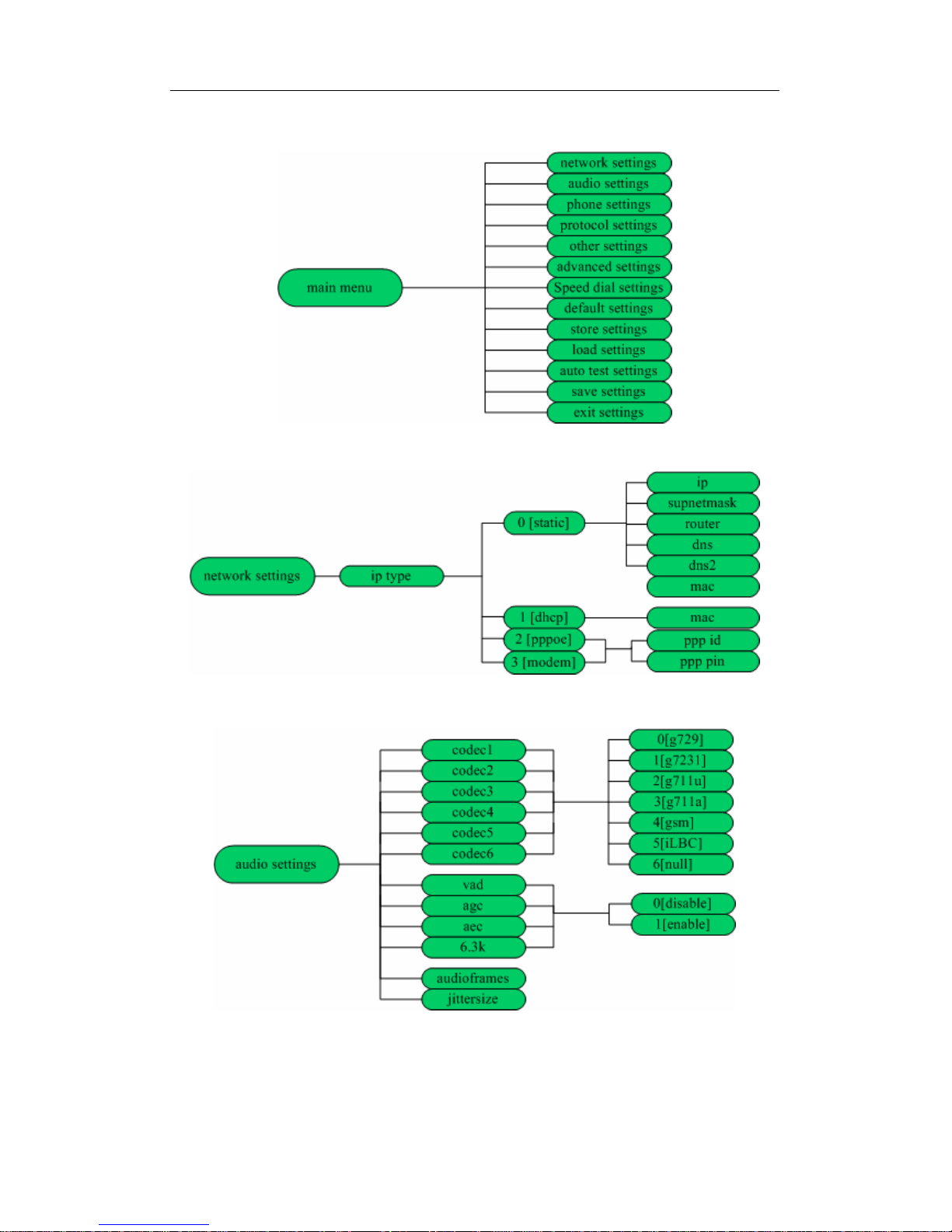
● Menu Structure:
Fig 2.1 Main Menu structure Illustration
Fig 2.2 Network submenu structure Illustration
Fig 2.3 Audio submenu structure Illustration
Page 9
PA168X SIP Phone User Manual (V1.42)
Beijing Centrality Communication Inc
9
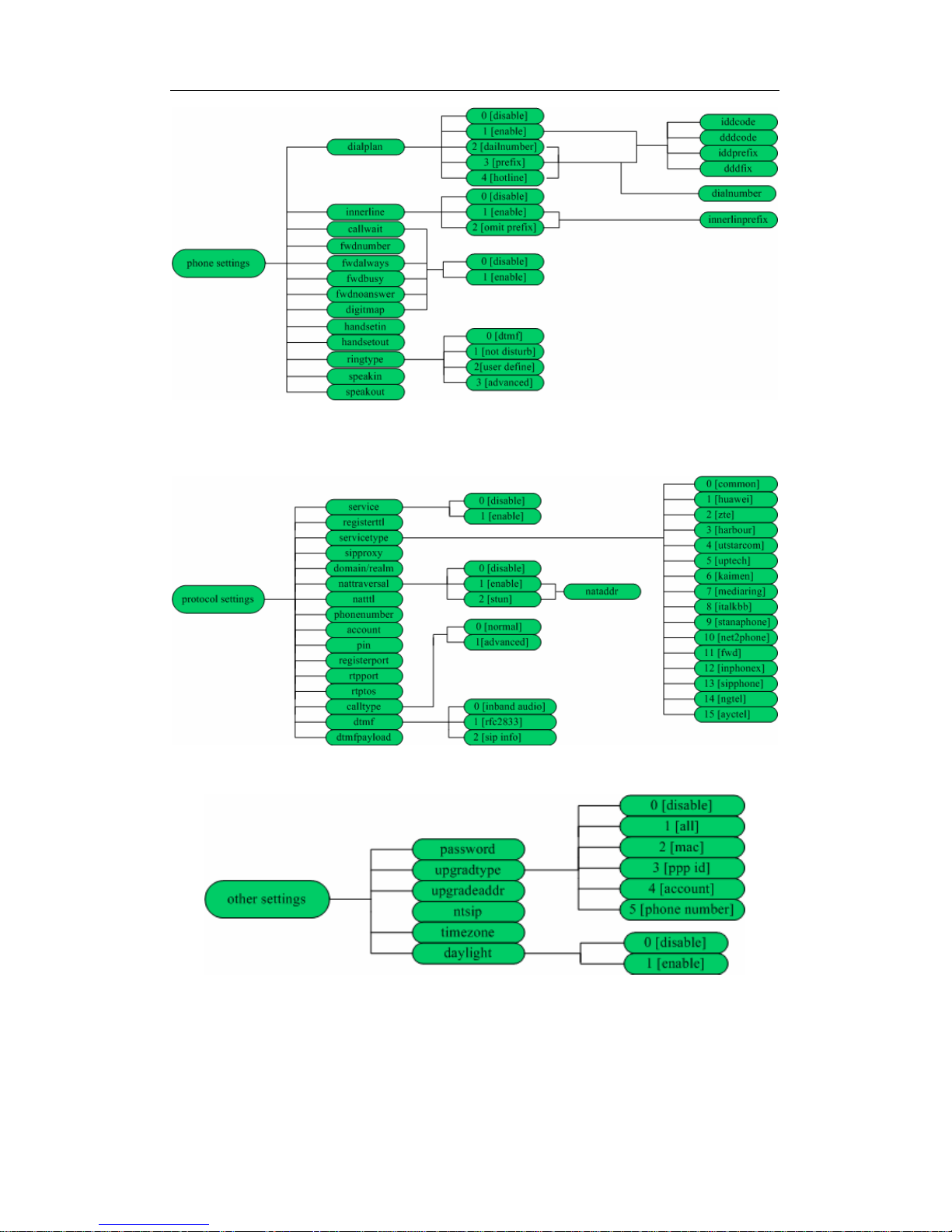
Fig 2.4 Phone submenu structure Illustration
Fig 2.5 Protocol submenu structure Illustration
Fig 2.6 other submenu structure Illustration
Page 10
PA168X SIP Phone User Manual (V1.42)
Beijing Centrality Communication Inc
10
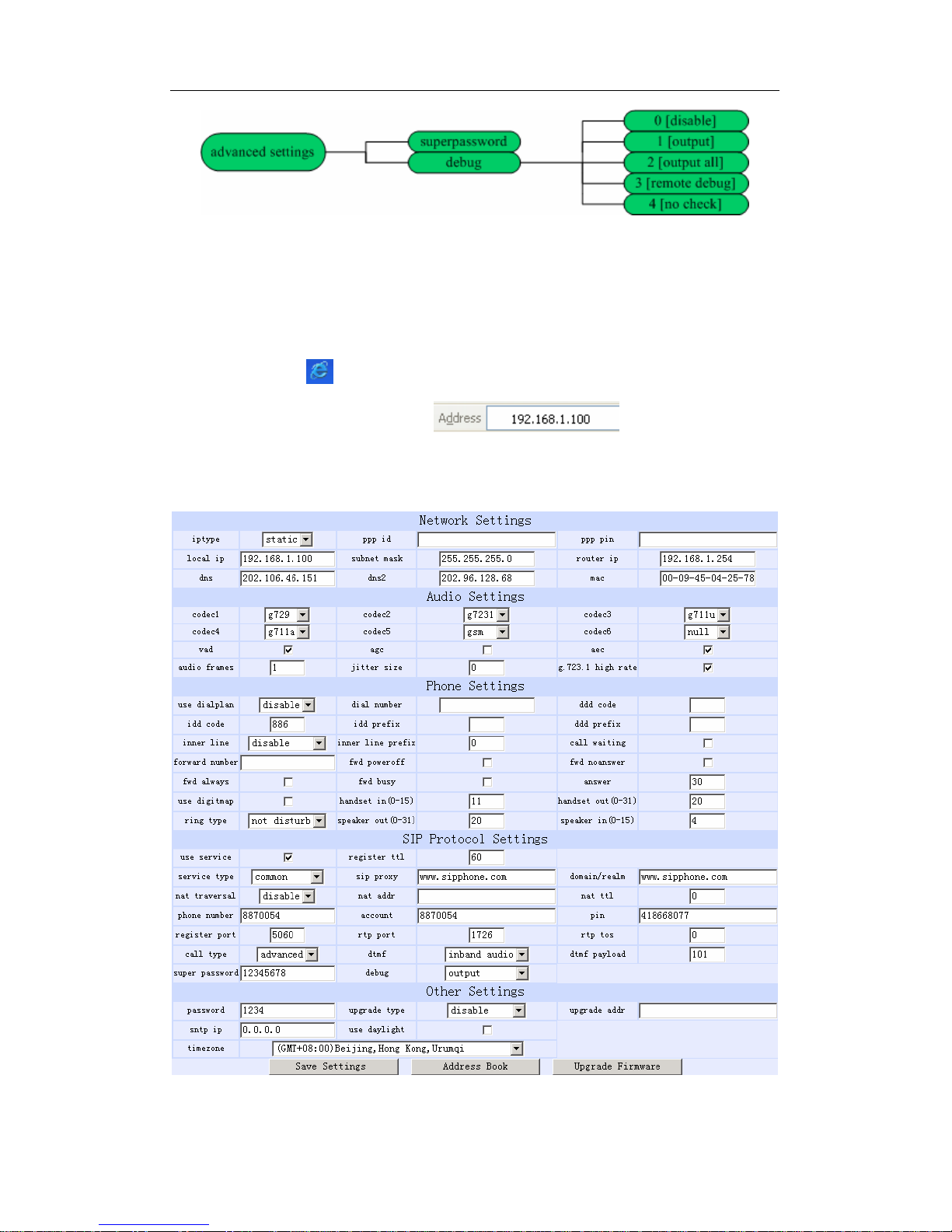
Fig 2.7 advanced submenu structure Illustration
¾ Configured by WEB
Double click icon to open the IE browser. Input the IP address of the
phone into address bar ( ), and then input
password of the phone into the following page.
Fig 3.1 Http Setting
Page 11
PA168X SIP Phone User Manual (V1.42)
Beijing Centrality Communication Inc
11
Default password 1234 is ordinary password and super password is 12345678.
With Debug set 0[disable], please input super password; while Debug is not
set as 0[disable], please input ordinary password. Then click button.
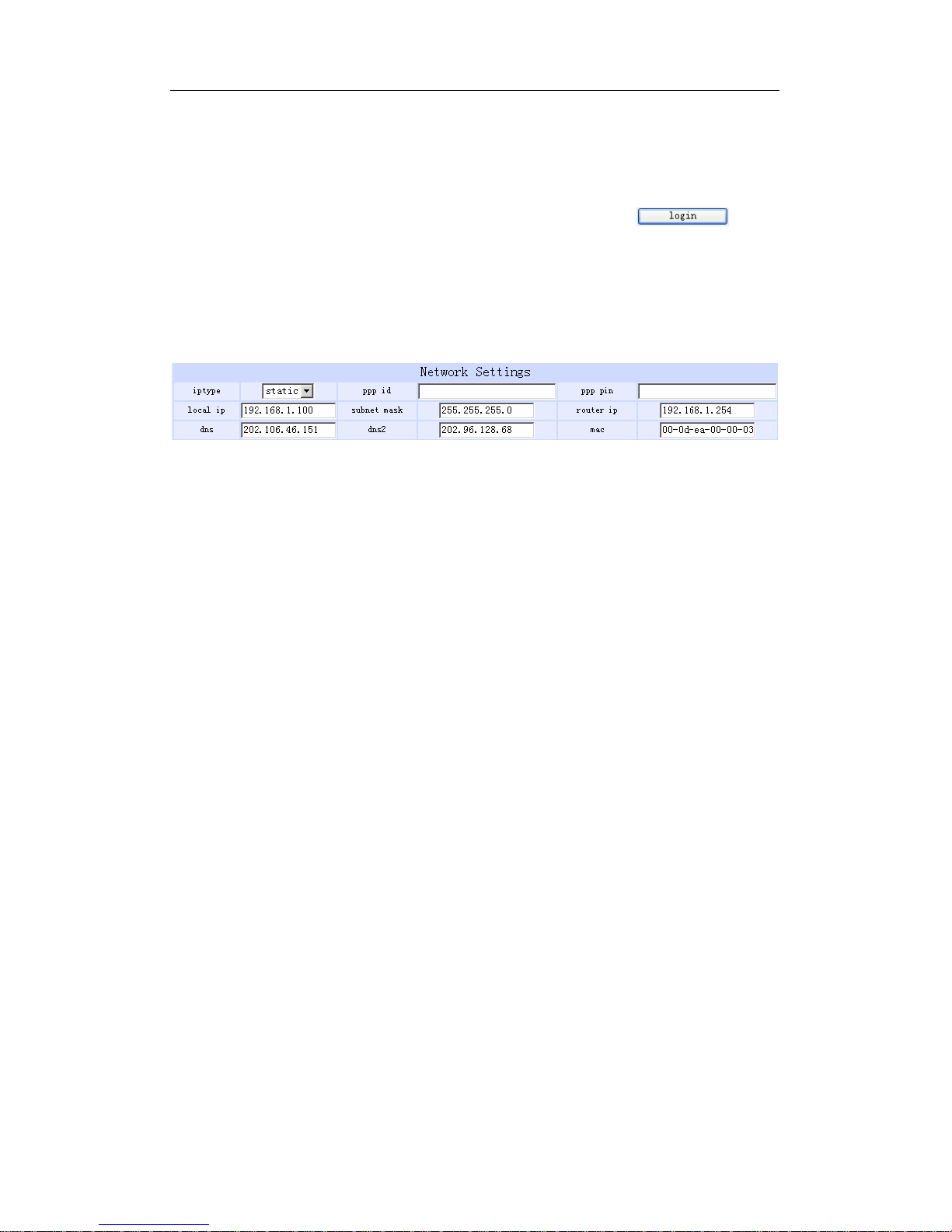
The following configured page wills popup. Refer to Fig 3.1 please.
Network Setting:
Fig 3.2 Network Setting
● iptype: Set how IP phone gets relevant network parameters by selecting
corresponding item from drop down list.
static ip: Select this item to authorize users set IP address, subnet mask
and router IP address of IP phone manually.
dhcp: Select this item to enable DHCP mode. With this system, your
LAN or router automatically assigns all the required network parameters
to any device connected to it when the device log on. PA168X IP phone
is shipped from the factory with DHCP on. So, if your LAN or router is
configured to use DHCP addressing, the IP phone’s LAN parameters
will automatically be configured as soon as it is connected to the LAN or
router and powered up.
pppoe:Those ADSL and Cable Modem users please select this item for
Page 12

PA168X SIP Phone User Manual (V1.42)
Beijing Centrality Communication Inc
12
it is a protocol especially designed for them. With this system, ADSL
ISP automatically assigns all the required IP parameters to any device
connected to it when the device log on.
modem:If the IP phone used with modem, please select this item to get
relevant network parameters auto. Then please fill ID and pin into ppp id
and ppppin fields.
● ppp id: With pppoe or modem selected in iptype drop down list, please
enter the user name here.
● ppp pin: With pppoe or modem selected in iptype drop down list, please
enter the password here.
● local ip: With static ip selected in iptype drop down list, please enter IP
address of IP phone here.
● subnet mask: With static ip selected in iptype drop down list, please enter
subnet mask of IP phone here.
● router ip: With static ip selected in iptype drop down list, please enter
router IP address of IP phone here.
● dns: With static ip selected in iptype drop down list, please enter IP
address of DNS server here.
Page 13
PA168X SIP Phone User Manual (V1.42)
Beijing Centrality Communication Inc
13
● dns 2: With static ip selected in iptype drop down list, please enter IP
address of backup DNS server here.
● mac: MAC address is the physical address supplied by the Ethernet
NIC. PA168X phone is shipped from the factory with a unique algorism
MAC address printed on the back of the base.
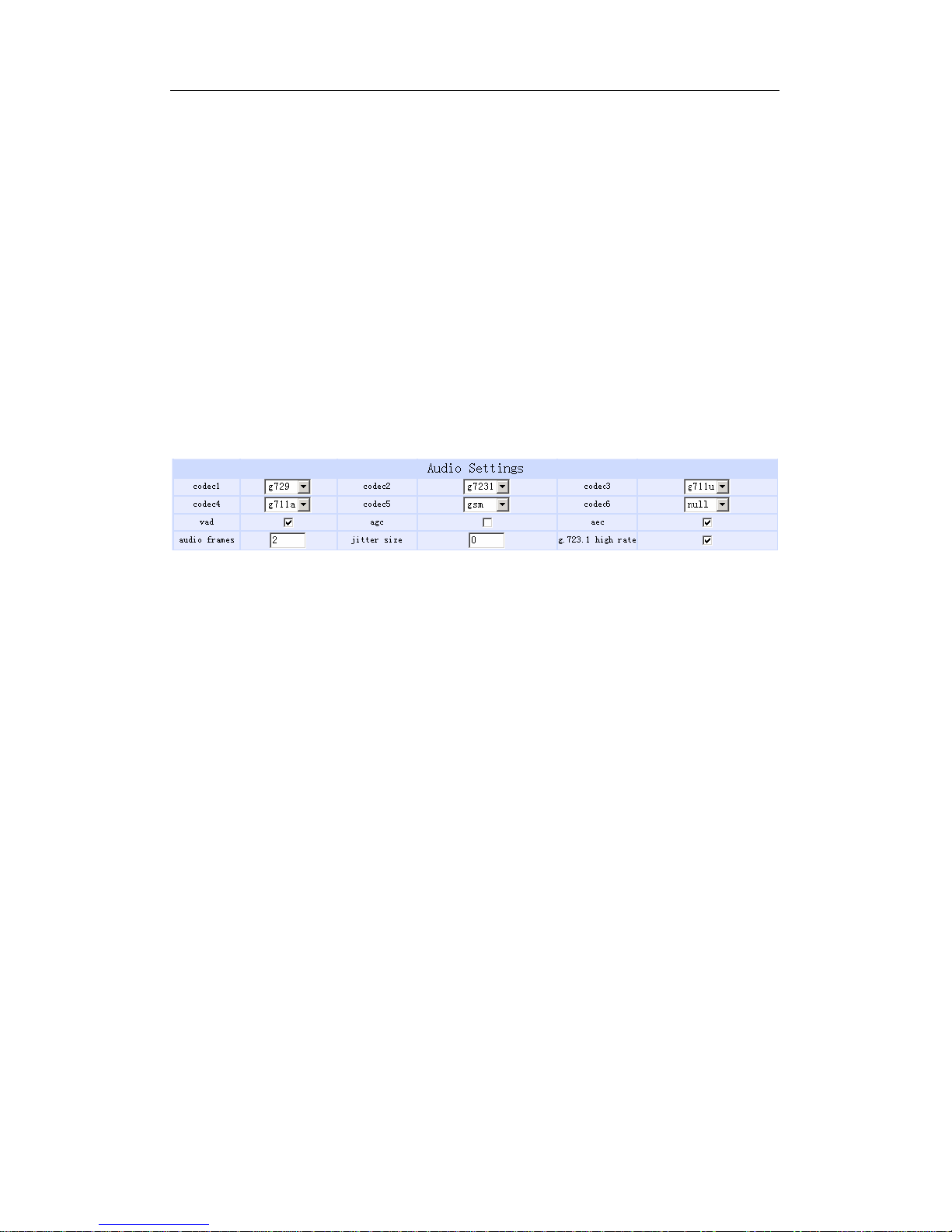
Audio settings:
Fig 3.3 Audio Setting
● codec1: Set the priority 1 of the audio compression algorithm. The
options are g729,g7231,g711u,g711a and gsm.
● codec2: Set the priority 2 of the audio compression algorithm. The
options are g729,g7231,g711u,g711a and gsm.
● codec3: Set the priority 3 of the audio compression algorithm. The
options are g729,g7231,g711u,g711a and gsm.
● codec4: Set the priority 4 of the audio compression algorithm. The
options are g729,g7231,g711u,g711a and gsm.
Page 14
PA168X SIP Phone User Manual (V1.42)
Beijing Centrality Communication Inc
14
● codec5: Set the priority 5 of the audio compression algorithm. The
options are g729,g7231,g711u,g711a and gsm.
● codec6: Set the priority 6 of the audio compression algorithm. The
options are g729,g7231,g711u,g711a and gsm.
● vad: Enable/disable VAD (voice activity detection).
● agc: Enable/disable AGC.
● aec: Enable/disable VEC.
● audio frame: Set audio frames in RTP package. Minimum is 1 and
maximum is 8.
● jitter size : Set buffer size of RTP package. The value range is 0-32.
● g.723.1 high rate: enable/disable g.723.1 high rate. G.723.1 high rate is
6.3kbps, low rate is 5.3kbps.
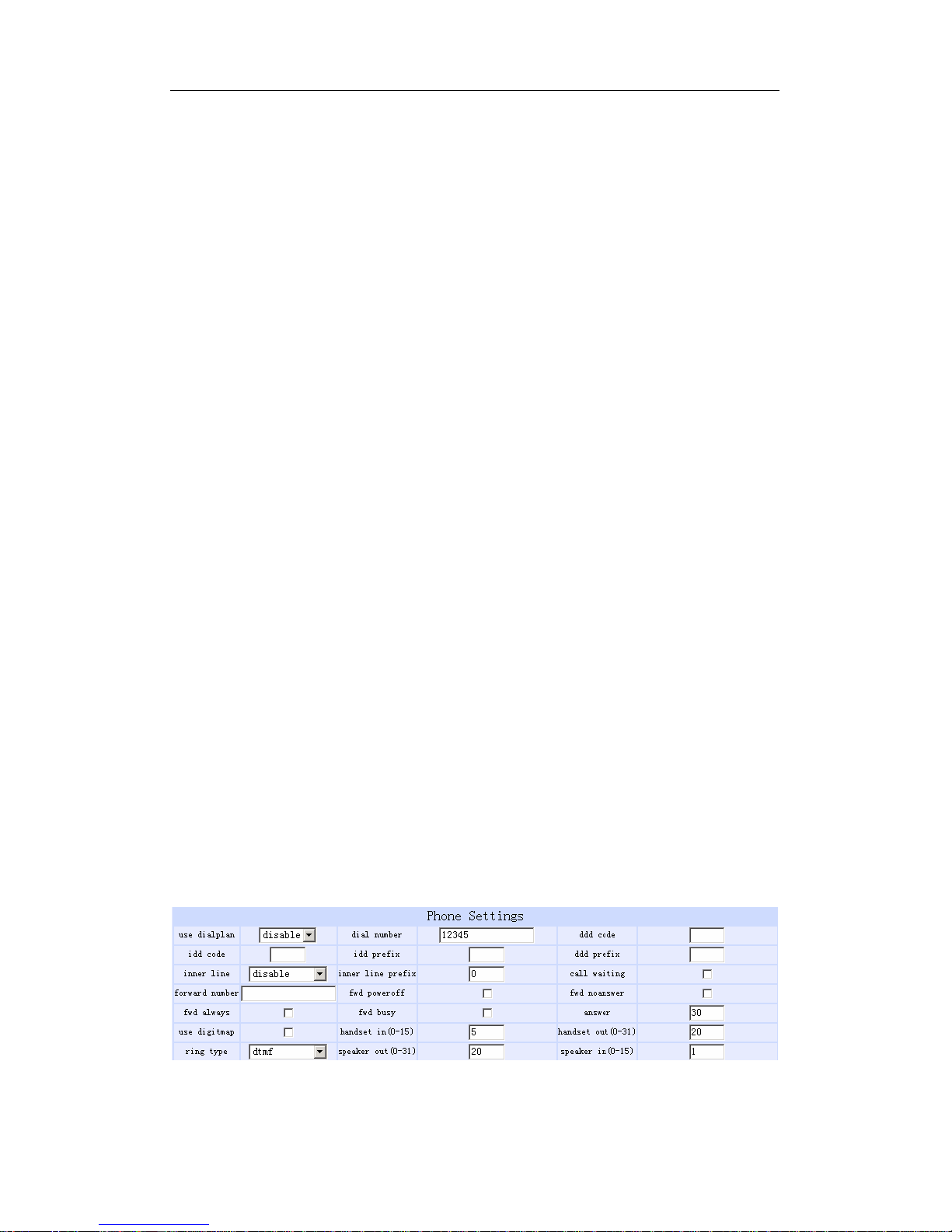
phone settings:
Fig 3.4 Phone Setting
Page 15

PA168X SIP Phone User Manual (V1.42)
Beijing Centrality Communication Inc
15
● use dialplan: Set whether use dial plan or use dial number by selecting
the corresponding item in drop down list.
disable: Do not use dial plan or dial number by selecting this item.
enable: Use dial plan by selecting this item.
dialnum: Use dial number by selecting this item. With this item
selected, please enter the dial prefix into dial number field.
prefix: Use specially service by selecting this item.
Hotline: Use Hotline function by selecting this item. With this item
selected, please enter the hotline number into dial number field.
● dial number: With dialnum selected in use dialplan drop down list,
please enter the dial prefix into this field according to requirement of log
in server.
● ddd code: With enable or dialnum selected in use dialplan drop down
list, set area code according to E.164 dial rule. For example, Beijing is
10; Shanghai is 21.
● idd code: With enable or dialnum selected in use dialplan drop down list,
set country code according to E.164 dial rule. For example, China is 86;
U.S.A is 1.
● idd prefix: With enable or dialnum selected in use dialplan drop down
list, set international call prefix according to E.164 dial rule, such as 00.
● ddd prefix: With enable or dialnum selected in use dialplan drop down
list, set long distance call prefix according to E.164 dial rule, such as 0.
Page 16

PA168X SIP Phone User Manual (V1.42)
Beijing Centrality Communication Inc
16
Note With dialnum seletcted in use dialplan drop down list, you can also set dddcode,
iddcode, iddprefix and dddprefix according to requirement of system.
● innerline: Enable/disable innerline call by selecting corresponding items
from dropdown list.
disable: Disable call innerline by selecting this item.
enable: enable call innerline by selecting this item.
● innerlineprefix: With enable selected in innerline dropdown list, please fill
the prefix number pick up to inner line, such as 0.
● Call waiting: Enable/disable call waiting by checking/unchecking the box.
● forward number: Enter receiving forwarded calls phone number into this
field; If the IP phone used with modem, with modem item selected in
iptype list box, and then fill ISP number into this field.
● fwd noanswer: Forward calls without replying by checking this box.
Please enter receiving forwarded calls phone number into fwd number
field.
● fwd always: Forward all calls by checking this box. Please enter receiving
forwarded calls phone number into fwd number field.
● fwd busy: Forward calls if busy by checking this box. Please enter
Page 17

PA168X SIP Phone User Manual (V1.42)
Beijing Centrality Communication Inc
17
receiving forwarded calls phone number into fwd number field.
● answer: Enter a number from 0 through 60 to set the entries of the
seconds before the phone answer the call auto or forward the calls.
● Use digitmap: Enable/disable digit map by checking/unchecking the box.
● handset in: Set the volume of handset input.
● handset out: Set the volume of handset output.
● ring type: Set ring type by selecting corresponding item from drop down
list.
dtmf : Set ring as ordinary rings in different frequency
not disturb: Set the phone do not ring by selecting this item.
user define:Set ring as music saved by user by selecting this item.
Advanced: Set the ring used the individualized tone provided by system
(need system support).
● speaker out: Set the volume of handfree output.
● speaker in: Set the volume of handfree input.
Protocol Setting:
Page 18

PA168X SIP Phone User Manual (V1.42)
Beijing Centrality Communication Inc
18
Fig 3.5 Protocol Setting
● use service: Enable/disable service by checking/clearing this box. To
make calls through SIP Proxy Server, please check this box; otherwise,
phone can only make IP-to IP calls.
● register ttl : IP phone will send a keep-alive registration message to SIP
proxy server every “register ttl” seconds. The minimum value is 10,
maximum value is 65535. Default is 60.
● service type: This option is used to accommodate the miscellaneous
requirements of the system providers.
Common: no special requirements
Huawei: Use Huawei’s system
zte: Use ZTE’s SIP system
harbour: Use Harbour’s system
utstarcom: Use UtstarCom’s SIP system
Page 19

PA168X SIP Phone User Manual (V1.42)
Beijing Centrality Communication Inc
19
uptech: Use Uptech’s system
keimen: Use Keimen’s system
mediaring: Use Mediaring’s SIP system
italkbb: Use ItalkBB’s SIP system
stanaphone: Use Stanaphone’s SIP system
net2phone: Use Net2phone’s SIP system
Fwd: Free SIP service; please visit www.freeworldialup.com for
more information.
Inphonex: Free SIP service; please visit www.inphonex.com for
more information.
sipphone: Free SIP service ; please visit www.sipphone.com
for
more information.
ngtel: Use NGTEL’s SIP system
ayctel: Use Ayctel’s SIP system
● sip proxy: If “use service” is checked, please set the URI of the SIP proxy
server into “sip proxy”. Set the domain name of the SIP proxy server into
“domain/realm” . If the system has an Outbound Proxy,please set the
Page 20

PA168X SIP Phone User Manual (V1.42)
Beijing Centrality Communication Inc
20
URI of the Outbound proxy into “sip proxy” and set the domain name of
SIP proxy server into “domain/realm”. The default service port is 5060. If
“use service” is not checked, please clear “sip proxy” and “domain/realm”.
● nat traversal: When the IP phone with private IP address need
communicate with other IP phones in a different LAN or on Internet,
please select an item from dropdown list.
disable: Select this item when the sip proxy server and IP phone in
the same LAN, or the sip proxy system supports the IP phone working
behind the LAN.
enable: When the system does not support IP phone working behind
the LAN, please select this item to search public IP address of the
NAT device. With this item selected, “nat addr” field will be activated.
Besides, port mapping (port forwarding) needs to be properly set up
on NAT device.
stun: Select this item with Stun server used according to requirement
of system. With this item selected, nat addr field is activated.
● nat addr: When “nat traversal” is set to “enable”, please put the domain
name of the servers ( These web server helps to find out the public IP of
the NAT device) into “nat addr”, such as www.whatismyip.com.
Page 21

PA168X SIP Phone User Manual (V1.42)
Beijing Centrality Communication Inc
21
When “nat traversal” is set to “stun”, please put the URI of the stun server
into “nat addr”, in the format as “domain name/IP address : service port”.
The default service port for stun is 3478.
● nat ttl: When IP phone sit behind a NAT device, it will send packets to
server every “nat ttl” seconds to keep the port mapping on the NAT
device alive. “nat ttl” is an integer between 10 and 65535, default value is
20.
● phone number: The local phone number or username of this phone,
usually is allocated by system.
● account: With SIP system which requires authentication, please put the
username/account into this field.
● pin: With SIP system which requires authentication, please put the
password into this field.
● register port: The local UDP port registered with server to accept
incoming handshaking messages. The default port number is 5060.
● rtp port: RTP port is the port transferring and receiving voice packets
using UDP protocol. This is an even number between 1024 and 65535.
● rtp tos: Set the TOS field of the IP header of the RTP packets. The bigger
this value is 0, the higher priority the packet is 224.
Page 22

PA168X SIP Phone User Manual (V1.42)
Beijing Centrality Communication Inc
22
● call type: Set call type by selecting the items in drop down list.
normal: When SIP system not support “outbound proxy”, selecting this
item.
advanced: When SIP system support “outbound proxy”, selecting this
item. default setting is this item.
● dtmf: Set DTMF signal sending way by selecting inband audio, rfc 2833
and sip info from list box.
● dtmf payload : When DTMF select rfc 2833.This parameter can be used
indicating type of RTP payload type. The value can be use integer
96-101.
● super password: Set the super password of the phone.(Default super
password is 12345678).
● debug: Set the debug level of the phone.
disable: Disable output the debug message by selecting this item.
output: Output the operation information to the window, such as
register, input by selecting this item.
output all: Output all debug information and data in test window by
selecting this item.
remote debug: Save the debug information in SDRAM of IP phone by
selecting this item.
Page 23
PA168X SIP Phone User Manual (V1.42)
Beijing Centrality Communication Inc
23
no check: Disable checking firmware tags when upgrading. This is not
suggested, because it will increase the risk of upgrading the wrong
firmware into the phone.
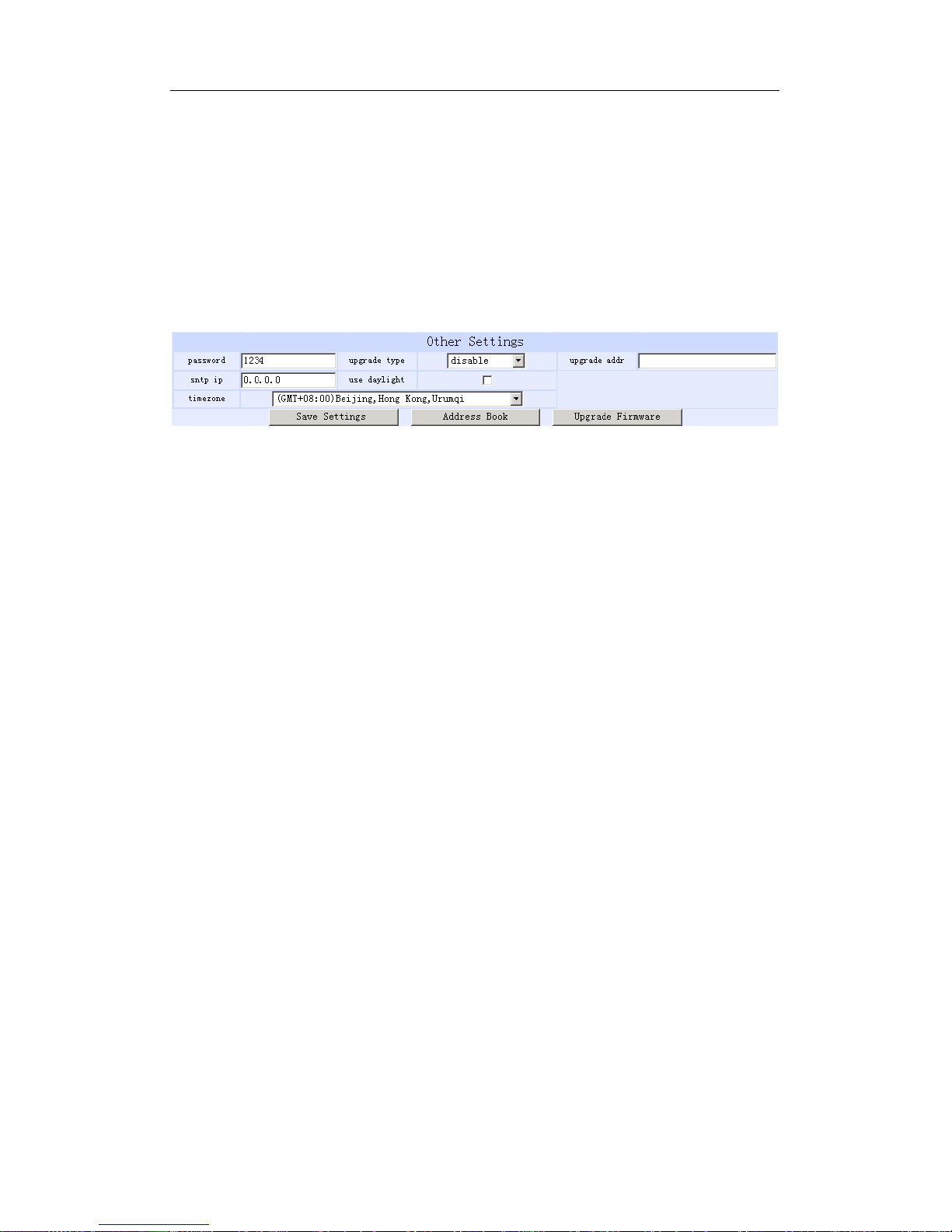
Other settings:
Fig 3.6 Other Setting Page
● password: Set the password of the phone. (Default password is 1234).
● upgradetype: Set the auto-upgrade type of the phone.
disable : Disable auto-upgrade .
all: pa168X phone will find matching firmware binary file and
configuration file of the hardware type only at the FTP server specify
by upgradeaddr item .
mac: pa168X phone will find matching firmware binary file and
configuration file of the MAC address only at the FTP server specify
by upgradeaddr item .
ppp id: pa168X phone will find matching firmware binary file and
configuration file of the ppp id only at the FTP server specify by
upgradeaddr item .
account: pa168X phone will find matching firmware binary file and
Page 24

PA168X SIP Phone User Manual (V1.42)
Beijing Centrality Communication Inc
24
configuration file of the account only at the FTP server specify by
upgradeaddr item .
phonenumber: pa168X phone will find matching firmware binary file
and configuration file of the phone only at the FTP server specify by
upgradeaddr item .
● upgrade addr: Put IP address or domain name obtained by ISP of FTP
server supplying upgrade program into this field.
● nts ip: Fill IP address of time server here. When network without Internet
connect, Fill special IP address 255.255.255.255.
● use daylight: Enable/disable daylight.
● timezone: Select correct time zone in list box.
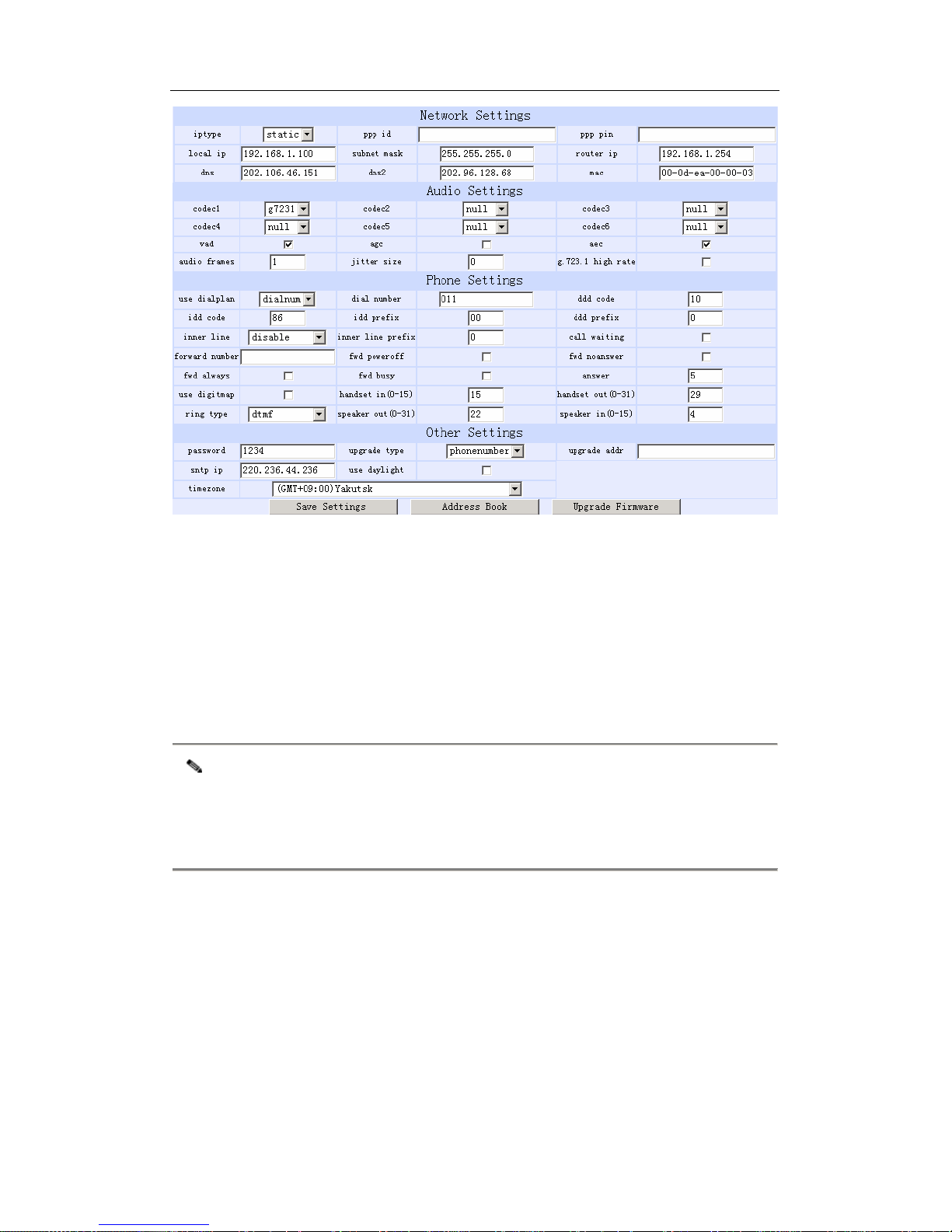
When debug set as 0[disable], if input ordinary password (default one is 1234),
then following page will pop up after clicking . And only those
parameters can be modified.
Page 25
PA168X SIP Phone User Manual (V1.42)
Beijing Centrality Communication Inc
25
Fig 3.7 Setting Page using ordinary pin with Debug set as 0 [disable]
● Update: Click this button to save the configuration and the phone will
reboot. Once the phone reboots successfully, the new configuration is
effective.
Note After entering set page, if Update button is not clicked within 10 minutes, then
when you click it again, the index page asking for pin will pop up again. Then
please input the password again to enter the set page and then click Update
button to confirm the modification.
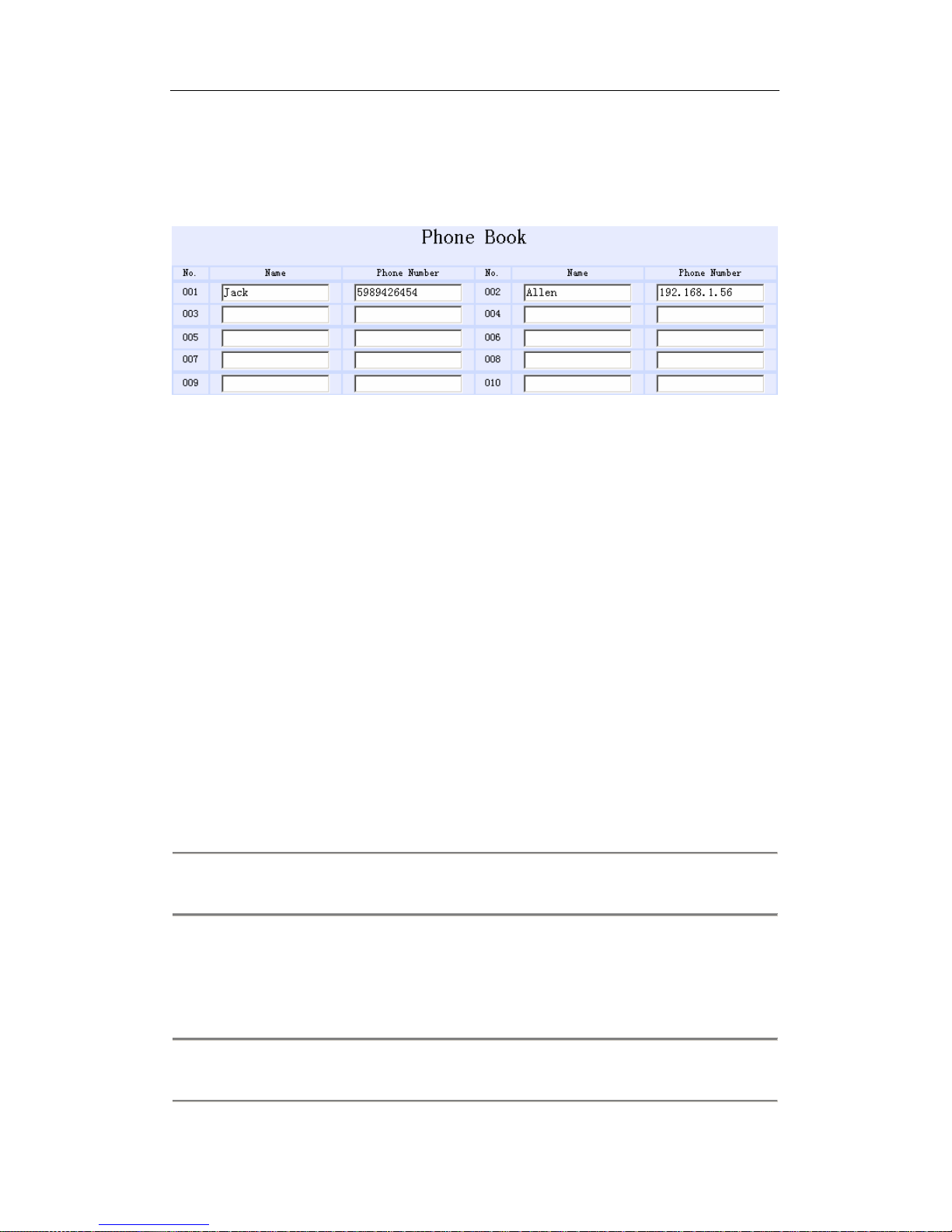
Phone Book: Click this button to open the speed dial settings page. Please
refer to Fig 3.7. In this page, you can set and save the speed dial number by
typing the name into the Name field and then entering the corresponding
number following the name. For example, input Jack in Name field following
001, and then input 5989426454 into Phone number field. Then Jack’s number
Page 26
PA168X SIP Phone User Manual (V1.42)
Beijing Centrality Communication Inc
26
5989426454 is saved in phone book. Then please click Save/Back button. In
normal state, you can use speed dial to call numbers saved in phone book.
Fig 3.8 Phone Book Illustration
Upgrade Program: Click this button to update the program of IP phone.
Update Digitmap: Click this button to update the digitmap of the phone.
¾ Telnet Configuration
● On the PC choose Start>Run, and then type telnet 192.168.1.100 into
Run field in popuping Run dialog. Or input telnet 192.168.1.100 in the
DOS window. Then the following information will be displayed.
PA168X V1.42 settings
Password :
Then please type password. With debug is set as 0[disable], if type ordinary
password (default one is 1234), after Retun, you will see:
Password : ****
P:\>
Page 27

PA168X SIP Phone User Manual (V1.42)
Beijing Centrality Communication Inc
27
If you type super password, then you will see:
Password : ********
P:\>
Above information indicates that IP phone is under setting mode, and then you
can set the PA168X IP phone by using the telnet commands.
¾ PA168X Telnet Commands Explanation
PA168X Telnet Commands
Command Function
? Supply command name and parameters
get Display basic parameters of the PA168X IP phone
set Set parameters of the PA168X IP phone
store Save current settings to designated position
load Load designated settings to current position
exit Exit from the setting mode without saving the configuration
write Exit with saving all configurations and restart PA168X
ping Ping other net parameter
ftp The phone connects to FTP server and then get the files
Detail description of PA168X Telnet commands
Command ?
Syntax description: No optional parameter
Usage: Type command name and parameters following P:\> . Be used
Page 28

PA168X SIP Phone User Manual (V1.42)
Beijing Centrality Communication Inc
28
as the keyword to supply keyword and parameters of the relevant
commands.
Relevant usage: None
Detailed description:
? List help of all commands
For example:
P:\>?
set
get list settings
store x store current to xth settings
load x load xth settings to current
exit
write save settings
Command get
Syntax description: No optional parameter of keywords
Usage: Display basic parameters of the PA168X IP phone
Relevant usage: None
Detailed description:
get Display basic running parameters of the PA168X IP phone.
Input ordinary password without debug being set as 0[disable], or input
super password with debug set as 0[disable], then following parameters
of IP phone will be displayed:
PA168X V1.42 settings
Password: ********
P:\>get
Page 29

PA168X SIP Phone User Manual (V1.42)
Beijing Centrality Communication Inc
29
***************Network Settings***************
iptype 0[static]
ip 192.168.1.100 subnetmask 255.255.255.0 router 192.168.1.254
dns 202.106.196.152 dns 2202.106.196.115 mac 00-09-45-65-a3-e6
***************Audio Settings***************
codec1 0[g729] codec2 1[g7231] codec3 2[g711u]
codec4 3[g711a] codec5 4[gsm] codec6 6[null]
vad 1[enable] agc 0[disable] aec 1[enable]
audioframes 1 jittersize 0 6.3k 1[enable]
***************Phone Settings***************
dialplan 1[enable] dddcode 10
iddcode 86 iddprefix 00 dddprefix 0
innerline 1[enable] innerlineprefix 0 callwaiting 1[disable]
fwdnumber 82378009 fwdpoweroff 1[enable]
fwdalways 1[enable] fwdbusy 1[enable] fwdnoanswer 1[enable]
answer 30
digitmap 1[enable] handsetin 5 handsetout 20
ringtype 0[dtmf] speakerout 20 speakerin 1
***************Protocol Settings***************
service 1[enable] registerttl 60
servicetype 0[common] sipproxy www.iax2.com
domain/realm www.sipphone.com
nattraversal 0[disable]
nataddr [empty] natttl 0
phonenumber 8870054 account 8870054 pin 418668077
registerport 5060 rtpport 1726 rtptos 0
calltype 1[advanced] dtmf 0[inband audio] dtmfpayload 101
***************Other Settings***************
superpassword 12345678 debug 1[output]
password 1234 upgradetype 0[disable]
upgradeaddr [empty]
sntpip 0.0.0.0 daylight 0[disable]
timezone 55[(GMT+08:00)Beijing,Hong Kong,Urumqi]
Input ordinary password with debug set as 0[disable], following information will
be seen:
PA168X V1.42 settings
Password:****
P:\>get
Page 30

PA168X SIP Phone User Manual (V1.42)
Beijing Centrality Communication Inc
30
***************Network Settings***************
iptype 0[static]
ip 192.168.1.100 subnetmask 255.255.255.0 router 192.168.1.254
dns 202.106.46.151 dns2 202.96.128.68 mac 00-0d-ea-00-00-03
***************Audio Settings***************
codec1 0[g729] codec2 1[g7231] codec3 2[g711u]
codec4 3[g711a] codec5 4[gsm] codec6 6[null]
vad 1[enable] agc 0[disable] aec 1[enable]
audioframes 2 jittersize 0 6.3k 1[enable]
***************Phone Settings***************
dialplan 1[enable] dddcode 10
iddcode 86 iddprefix 00 dddprefix 0
innerline 1[enable] innerlineprefix 0 callwaiting 1[enable]
fwdnumber 82378009 fwdpoweroff 1[enable]
fwdalways 1[enable] fwdbusy 1[enable] fwdnoanswer 1[enable]
answer 30
digitmap 1[enable] handsetin 5 handsetout 20
ringtype 0[dtmf] speakerout 20 speakerin 1
***************Other Settings***************
password 1234 upgradetype 0[disable]
upgradeaddr [empty]
sntpip 0.0.0.0 daylight 0[disable]
timezone 55[(GMT+08:00)Beijing,Hong Kong,Urumqi]
Command set
Syntax description: set keywords value
Usage: Used to configure password and other running parameters of
PA168X IP phone.
Detailed description:
set iptype X
Set how IP phone gets relevant network parameters. X ranged
from 0 through 3: 0: authorize users set IP address, subnet mask
and router IP address of IP phone manually; 1: use DHCP mode.
With this system, your LAN or router automatically assigns all the
Page 31

PA168X SIP Phone User Manual (V1.42)
Beijing Centrality Communication Inc
31
required network parameters to any device connected to it when
the device log on. PA168X IP phone is shipped from the factory
with DHCP on. So, if your LAN or router is configured to use
DHCP addressing, the IP phone’s LAN parameters will
automatically be configured as soon as it is connected to the LAN
or router and powered up; 2: use PPPoE mode. Those ADSL and
Cable Modem users please select this item for it is a protocol
especially designed for them. With this system, ADSL ISP
automatically assigns all the required IP parameters to any device
connected to it when the device log on; 3: use modem mode.
Those who use IP phone with modem, please set the value as 3.
set pppid XXX
With iptype set as 2, use this command to set ADSL ID; with iptype
set as 3, use this command to set Modem ID.
set ppppin XXX
With iptype set as 2, use this command to set ADSL pin; with
iptype set as 3, use this command to set Modem pin.
set ip XXX.XXX.XXX.XXX
With iptype set as 0, use this command to set IP address of
PA168X IP phone.
set subnetmask XXX.XXX.XXX.XXX
With iptype set as 0, use this command to set subnet mask of
Page 32

PA168X SIP Phone User Manual (V1.42)
Beijing Centrality Communication Inc
32
PA168X IP phone.
set router XXX.XXX.XXX.XXX
With iptype set as 0, use this command to set router IP of network
with PA168X IP phone.
set dns XXX.XXX.XXX.XXX
With iptype set as 0, use this command to set IP address of DNS
server.
set dns2 XXX.XXX.XXX.XXX
With iptype set as 0, use this command to set IP of backup DNS
server.
set mac XX-XX-XX-XX-XX-XX
Set MAC address of the PA168X IP phone. Parameter
xx-xx-xx-xx-xx-xx must be an HEX number.
set codec1 X
Set the
priority 1of the audio compression algorithm. X is range
from 0 through 4: 0: g729; 1:g7231; 2: g711u; 3: g711a; 4: gsm.
set codec2 X
Set the priority 2 of the audio compression algorithm. X is range
from 0 through 4: 0: g729; 1:g7231; 2: g711u; 3: g711a; 4: gsm.
set codec3 X
Set the priority 3 of the audio compression algorithm. X is range
Page 33

PA168X SIP Phone User Manual (V1.42)
Beijing Centrality Communication Inc
33
from 0 through 4: 0: g729; 1:g7231; 2: g711u; 3: g711a; 4: gsm.
set codec4 X
Set the priority 4 of the audio compression algorithm. X is range
from 0 through 4: 0: g729; 1:g7231; 2: g711u; 3: g711a; 4: gsm.
set codec5 X
Set the priority 5 of the audio compression algorithm. X is range
from 0 through 4: 0: g729; 1:g7231; 2: g711u; 3: g711a; 4: gsm.
set codec6 X
Set the priority 6 of the audio compression algorithm. X is range
from 0 through 4: 0: g729; 1:g7231; 2: g711u; 3: g711a; 4: gsm.
set vad X
Enable/disable VAD. X is ranged from 0 through 1: 0: disable VAD;
1: enable VAD.
set agc X
Enable/disable AGC. X is ranged from 0 through 1: 0: disable AGC;
1: enable AGC.
set aec X
Enable/disable AEC. X is ranged from 0 through 1: 0: disable AEC;
1: disable AEC.
set audioframes X
Set audio frames in RTP package. X is Arabic numerals between
0 and 7.
Page 34

PA168X SIP Phone User Manual (V1.42)
Beijing Centrality Communication Inc
34
set jittersize X
Set buffer size of RTP package. X is range from 0-32.
set 6.3k X
With G.7231, set PA168X IP phone to use 6.3K rate or not. X is
ranged from 0 through 1: 0: use 6.3K rate; 1: use 5.3K rate.
set dialplan X
Enable/disable dial plan and dial number. Parameter X ranged
from 0 through 4: 0: disable dial plan; 1: enable dial plan; 2: use
dial number; 3: use 179XX service.;4: use hotline function.
set dialnumber XX
When set dialplan value set as 2, please use this command to set
dial number. For example, with eTalk card used, please set it as
00. When set dialplan value set as 4, please use this command to
set hotline number.
set dddcode XX
Set the area code when set dialplan value set as 1 or 2. For
example, the area code of Beijing is 10; the area code of Shanghai
is 21, and the area code of Chengdu is 28, etc. Parameter xxx
must be an Arabic numeral and no longer than 3 characters.
set iddcode XXX
Set the country code when set dialplan value set as 1 or 2. For
Page 35

PA168X SIP Phone User Manual (V1.42)
Beijing Centrality Communication Inc
35
example, the country code of China is 86; the country code of USA
is 1, etc. Parameter xxxx must be an Arabic numeral and no longer
than 4 characters.
set iddprefix XX
Set IDD service prefix number when set dialplan value set as 1 or
2. For example, IDD service prefix number of china is 00; IDD
service prefix number of USA is 1, etc. Parameter xxx must be an
Arabic numeral and no longer than 3 characters.
set dddprefix XX
Set DDD service prefix number when set dialplan value set as 1 or
2. For example, DDD service prefix number of china is 0; DDD
service prefix number of USA is 1, etc. Parameter xxx must be an
Arabic numeral and no longer than 3 characters.
set innerline X
Set use innerline call or not. X ranged from 0 through 1: 0: disable;
1: enable innerline call.
set innerlinepreifx X
With innerline set as 1[enable] , please set the prefix to pick up
inner line, such as 0.
set callwait X
Set whether to use call wait. X ranged from 0 to 1: 0: do not use
Page 36

PA168X SIP Phone User Manual (V1.42)
Beijing Centrality Communication Inc
36
call wait; 1: use call wait.
set fwdnumber XXXXXXX
Set receiving forwarded calls phone number. XXXX must be an
Arabic numeral and no longer than 16 characters
set fwdalways X
Enable/disable forward all calls. X is ranged from 0 through 1. 0:
do not forward all calls; 1: forward all calls.
set fwdbusy X
Enable/disable forward calls if busy. X is ranged from 0 through 1.
0: do not forward calls if busy; 1: forward call if busy.
set fwdnoanswer X
Enable/disable forward calls without replying. X is ranged from 0
through 1. 0: do not forward calls without replying; 1: forward call
without replying.
set answer X
Set the ring seconds before the phone answers the call auto or
forward the calls. X is ranged from 0 through 60.
set digitmap X
Set whether to use digitmap. X ranged from 0 to 1: 0: do not use
digitmap; 1: use digitmap.
set handsetin X
Set initial volume of handset. X is ranged from 0 through 15.
Page 37

PA168X SIP Phone User Manual (V1.42)
Beijing Centrality Communication Inc
37
set handsetout X
Set initial volume of handout. X is ranged from 0 through 31.
set ringtype X
Set types of ring. X is ranged from 0 through 3: 0: ring as ordinary
rings in different frequency; 1: do not ring; 2: ring as music saved
by user; 3: Set ring used the individualized tone provided by
system (need system support).
set speakerin X
Set initial volume of microphone of the base. X is ranged from 0
through 15.
set speakerout X
Set initial volume of speaker out. X is ranged from 0 through 31.
set service X
Set register the SIP proxy server or not. X ranged from 0 through 1.
0: do not register; 1: register.
set registerttl X
Set register TTL. X is range from 10 through 65535 Sec. default
value is 60 Sec.
set service type X
Enable/disable the repaid and service system .choose the repaid
server provider. Parameter x ranged from 0 through 15:
Page 38

PA168X SIP Phone User Manual (V1.42)
Beijing Centrality Communication Inc
38
0: common: disable repaid card or specially system ;
1: use huawei’s system;
2: use ZTE’s system;
3: use harbour’s system;
4: use utstarcom’s system;
5:use uptech system;
6: use keimen’s system;
7: use meidaring’s service;
8: use italkBB service;
9: use stanaphone service;
10: use net2phone SIP service;
11: use fwd(freeworlddialup) service;
12: use inphonex system;
13: use sipphone system;
14: use ngtel system ;
15: use ayctel system
set sipproxy XXXX
Set IP address or domain name of SIP Proxy Server.If the system
has an Outbound Proxy,set IP address or domain name of
Outbound Proxy.
set domain/realm XXXXX
Page 39

PA168X SIP Phone User Manual (V1.42)
Beijing Centrality Communication Inc
39
If the system has an Outbound Proxy,Set the domain name of SIP
proxy server such as xxxx.
set nattraversal X
X ranged from 0 through 2: 0: do not use NAT traversal. When the
log in server and IP phone in the same LAN, or the log in system
supports the IP phone working behind the LAN; 1: Use NAT
traversal. When the login system does not support IP phone
working behind the LAN, With this item selected, please make port
mapping on NAT device; 2: stun.
set nataddr XXXXX
When “nattraversal” is set to “1”;set IP address of NAT device wan
port or URI of free assistant service (Such as www.showmyip.com
etc.) in Internet.
When “nattraversal” is set to “2”, set IP address or URI of the stun
server, in the format as “domain name/IP address : service port”.
The default service port for stun is 3478.
NOTE The free service list of Internet:www.ip-calculator.com; www.ipchicken.com;
www.ipchicken.com;www.showmyip.com;www.whatismyip.com;
www.myipaddress.com; www.whatismyipaddress.com; ip.sbbs.net;
www.whatismyipaddress.net;checkip.dyndns.org
set natttl XX
Set NAT TTL XX is an integer between 10 and 65535 sec. default
Page 40

PA168X SIP Phone User Manual (V1.42)
Beijing Centrality Communication Inc
40
value is 20 sec.
set phonenumber XXXXXXXX
Set a local ID of PA168X IP phone. Value xxxxx must be an Arabic
numeral and no longer than 16 characters.
set account XXXXXX
Set the account; Value xxxxxx must be an Arabic numeral and no
longer than 32 characters.
set pin XXXXXXXXXX
Set the account; Value xxxxxx must be an Arabic numeral and no
longer than 32 characters.
set registerport XXXX
Set register port. Value XXXX default is 5060.
set rtpport XXXX
RTP port is the port transferring and receiving voice flow using
UDP protocol. XXXX is an even number between 1024 and 65535.
set rtptos X
Set TOS segment of IP head package in RTP digital follow. X is
range from 0 through 224.
set calltype X
Set call type of the phone. X is ranged from 0 through 1: 0: when
SIP system not support “outbound proxy”; 1:when SIP system not
support “outbound proxy”.
Page 41

PA168X SIP Phone User Manual (V1.42)
Beijing Centrality Communication Inc
41
set dtmf X
Set DTMF relay type. X is ranged form 0 through 2: 0: inband
audio;1: rfc 2833;2: sip info.
set dtmf payload X
When dtmf X select 1(rfc 2833).This parameter can be used
indicating type of RTP payload type. The value can be use integer
96-101.
set password XXXX
Set password of the PA168X IP phone. XXX must be ASCII
characters.
set superpassword XXXX
Set super password of the PA168X IP phone. XXX must be ASCII
characters.
set debug X
Set open debugging message output grade for special tool. X is
ranged from 0 through 5: 0: close debugging output; 1: output the
operation information to the window; 2: output all the bug
information and data in test window; 3: save the bug information
into SDRAM; 4: disable checks the mark.
set upgradetype X
Page 42

PA168X SIP Phone User Manual (V1.42)
Beijing Centrality Communication Inc
42
Set auto-upgrade matching type,X is range from 0 through 5,
0------disable;1------all ;2------ mac;3------ppp id; 4------ account;
5------ phone number。
set upgradeaddr XXX.XXX.XXX.XXX
Set IP address or domain name of FTP server supplying upgraded
program of PA168X IP phone.
set ntsip XXX.XXX.XXX.XXX
Set IP address of timeserver.
set daylight X
Set use daylight or not. X ranged from 0 through 1: 0: do not use
daylight; 1: use daylight.
set timezone XX
Set time zone.
Command store
Syntax description: no keyword. Parameter ranged from 0 through 4.
Usage: Save the current settings to the designated position.
Relevant Usage: store 1
Command
load
Syntax description: no keyword. Parameter ranged from 0 through 4.
Usage: Load the designated settings to the current position.
Page 43

PA168X SIP Phone User Manual (V1.42)
Beijing Centrality Communication Inc
43
Relevant Usage: load 1
Command exit
Syntax description: no keyword and parameter
Usage: Exit from Telnet command window without saving the
configuration.
Relevant usage: None
Command write
Syntax description: No keyword and parameter
Usage: Save the configuration and restart the PA168X IP phone.
Command ping
Syntax description: ping IP address
Usage: ping IP address of other NAT device
Relevant usage: In telnet window, input ping xx.xxx.xx.xx(an IP
address) and return, then the result will be displayed. If the address is
effective, “ping OK” will be seen; if the address is ineffective, nothing
will be seen. Fox example:
P:\>ping 203.93.9.57
P:\>
ping OK
P:\>ping 27.56.120.56
P:\>
Page 44

PA168X SIP Phone User Manual (V1.42)
Beijing Centrality Communication Inc
44
Note Usually, the echo time of ping command is no more than 1 second. So if the
result is not displayed in 5 seconds, ping command is fail.
ftp command
Syntax description: ftp value
Usage: the system connects to the FTP server auto to get the
corresponding file and deal with it.
Relevant usage: ftp X
X ranged from 0 through 2:
X-0: Connect to FTP Server to get the file of updating program and
save it to the SDRAM of the phone. Then the file can be read by
PalmTool. This operation aims at testing.
X-1: Connect to FTP Server to get the file of updating program and
update program Flash. This operation aims at updating program.
X-2: Connect to FTP Server to get the file of updating dial rules and
update program Flash. This operation aims at updating dial rule.
Note When you use ftp 0 and ftp 1 commands, if the file get from FTP server is too
large or the net speed is too slow, then the process will not be seen in telnet
window. Please be patient. Using ftp command in telnet to get file spends almost
same minutes as getting file using phone. So if nothing is displayed after too long
time, it means that ftp is fail.
Note All the Telnet commands of PA168X IP phone should be written in low case and
the password is case sensitive.
Page 45

PA168X SIP Phone User Manual (V1.42)
Beijing Centrality Communication Inc
45
¾ Upgrade PA168X IP phone
¾ Set FTP server
FTP server can be supplied by the server provider as well as setup by the
users in LAN. Please set the IP address of FTP server.
¾ Prepare Updated program
You can ask the server provider for the latest version of program or visit
www.aredfox.com to download the latest version.
¾ Operation
If you have got the IP address of the FTP server from ISP, please do as
follows:
a) Use keypad to enter setting mode
b) Use keypad to input the IP address of FTP server
c) Press , then No19 light will blink twice a second. Once
the phone restarts successfully, the new program is effective.
Note Please do not change the name of the upgraded program, or the
operation will be fail.
¾ Usage of the phone
¾ Receiving calls:
PA168X IP phone can receive incoming calls from other PA168X IP phone
and devices that support the SIP protocol. It works just like an ordinary
8
Local IP
Page 46

PA168X SIP Phone User Manual (V1.42)
Beijing Centrality Communication Inc
46
phone for incoming calls. When it rings, you can receive the call by
following methods:
① Use handset: Lift the handset and begin speaking. When the call is
over, put the handset back.
② Handset to hand free: While receiving call with handset, press
on the keypad and then put down the handset. When the call is over,
press again.
③ Hand free: Press to speak to the other party. When the call
is over, press again.
④ Hand free to handset: While receiving the call with pressed
, pick up the handset to continue the call. When the call is over, put
back the handset.
Note When you communicate with the other party without lifting the handset,
please do not exceed 40 CM from speaker.
¾ Place a call
● Call another PA168 IP phone under the SIP proxy:
1. Handset: Pick up the handset and listen for the Internet dial tone. Then
dial the phone number you wish to call and press or to
end the dialing. Once the call connection has been established and the
ring tone has sounded, wait for the other party to answer. When the
other party answers, you can begin speaking. When the call is over,
put back the handset. The dialed number has been saved into the
Speake
Speake
Speake
Speake
Speake
Call
#
Page 47

PA168X SIP Phone User Manual (V1.42)
Beijing Centrality Communication Inc
47
buffer.
2. Hand free: Press and listen for the Internet dial tone. Then
input the phone number you wish to call and press or to
end the dialing. Once the call connection has been established and the
ring tone has sounded, wait for the other party to answer. When the
other party answers, you can begin speaking. When the call is over,
Press again. The dialed number has been saved into the
buffer.
3. Blind dialing: Use the keypad to enter the phone number you wish to
call and then press or to make the call. Once the call
connection has been established and the ring tone has sounded, wait
for the other party to answer. When the other party answers, you can
begin speaking. When the call is over, Press again. The
dialed number has been saved into the buffer.
● Place a call without login the SIP proxy
If PA168X IP phone does not login the SIP proxy, you can place a call by
lifting the handset or pressing and then inputting the IP
address of the other party, and then pressing or calling.
View Records
● View missed calls
Click ,then you will hear the record of missed call. Click
to turn the numbers orderly; click to turn the
Speaker
Call
#
Speaker
Call
#
Speaker
Speaker
Call
#
Record
Vol+ Vol -
Page 48

PA168X SIP Phone User Manual (V1.42)
Beijing Centrality Communication Inc
48
numbers reservedly. If there is no record, you will hear nothing.
● View received call
Click ,then you will hear the record of the received call.
Click
to turn the number orderly; click to turn the numbers
reservedly. If there is no record, you will hear nothing.
● View dialed number
Click ,then you will hear the record of the dialed call. Click
to turn the number orderly; click to turn the numbers
reservedly. If there is no record, you will hear nothing.
● When you hear the number you want to dial, please press to
place a call directly.
Note PA168X IP phone supports saving 80 entries unanswered call, dialed call
and received call ranged from 1-80 at best. When the entries arrives 80, the
latest record will cover the first one. The record will be lost when the phone
restarts or turned on.
Play
Vol+
Vol-
Play
Vol +
Vol -
#
Page 49

PA168X SIP Phone User Manual (V1.42)
Beijing Centrality Communication Inc
49
Appendix Table: PA168X IP phone digital-character key map:
Keys Press Once Press Twice Press Thrice Press quartic Press quintic
1 1 . , ?/_ !//
2 2 A/a B/b C/c [
3 3 D/d E/e F/f ]
4 4 G/g H/h I/i *
5 5 J/j K/k L/l
6 6 M/m N/n O/o #
7 7 P/p Q/q R/r S/s
8 8 T/t U/u V/v
9 9 W/w X/x Y/y Z/z
* .
0 0 space :/@ ;/- \ /&
#
Case change
Page 50

PA168X SIP Phone User Manual (V1.42)
Beijing Centrality Communication Inc
50
Reserves the right to make changes in technical and product specification
without prior notice.
PA168X SIP Phone User Manual (V1.42)
Copyright© 2003---2005 Beijing Centrality Communication Inc.
All rights reserved
 Loading...