

Page 1
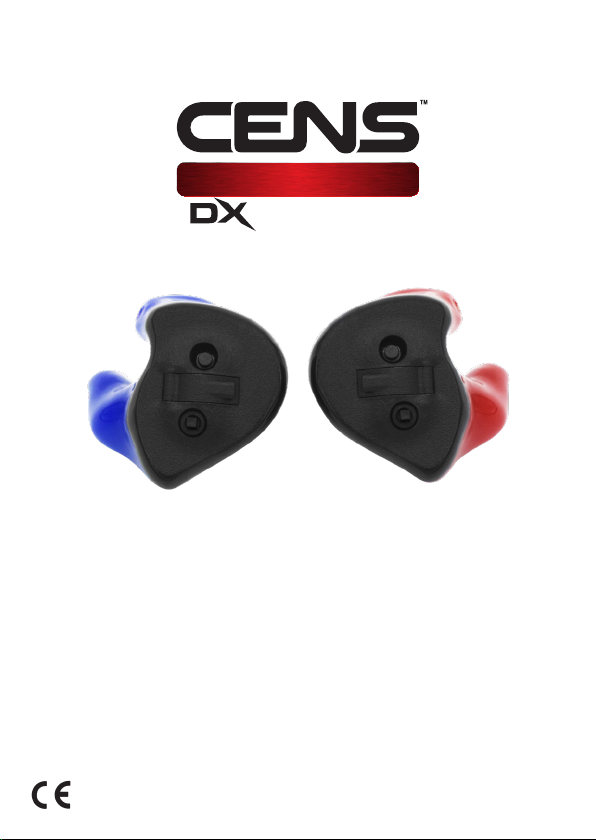
CLASSIC
SERIES
User Guide
Contains important information - do not throw away
Version 1.00
EN3522777
July 2019
Page 2

CENS® Classic
Category III Personal Protective Equipment (PPE) manufactured by Puretone
Ltd for protection against the harmful effects of noise.
EU Type Tested to harmonized standards EN352-2:2002, EN352-7:2002 and
certified in conformity with the provisions of Regulation (EU) 2016/425
including ongoing surveillance (Module D) by SATRA Technology Europe Ltd,
Bracetown Business Park, Clonee, Co. Meath, Ireland D15 YN2P
(Notified Body 2777).
EU declaration of conformity can be accessed at www.puretone.net
Disposal Information
Within the European Union, the marked equipment is covered by “Directive
2002/96/EC of the European Parliament and of the Council of 27 January 2003
on waste electrical and electronic equipment.” Amended by “Directive
2003/108/EC” (WEEE).
Recycle CENS® Classic, batteries and accessories according to national
regulations.
Symbols used in this guide
Be aware of information marked with the warning symbol
WARNING, CAUTION or NOTICE!
!
WARNING points out a situation that could lead to serious injuries.
CAUTION
NOTICE
¡
2.2
CAUTION indicates a situation that could lead to minor and
moderate injuries.
NOTICE indicates possible property damage.
Advice and tips on how to handle your device better.
Instruction. Indicates that something has to be done.
Page 3

Contents
Your CENS Classic
Intended Use
General Notes On Safety
Handling Batteries
Setup
Cleaning & Disinfection
Changing The Wax Guard
Earpiece Insertion
Earpiece Fitting
Earpiece Removal
Turning Your CENS Classic On & Off (All Models)
Adjusting The Volume (DX1)
Adjusting The Volume & Modes (DX3/DX5)
Troubleshooting
Technical Information
4
5
6-7
8
9
10
11
12
13
13
14
15
16
17
18
3.
Page 4
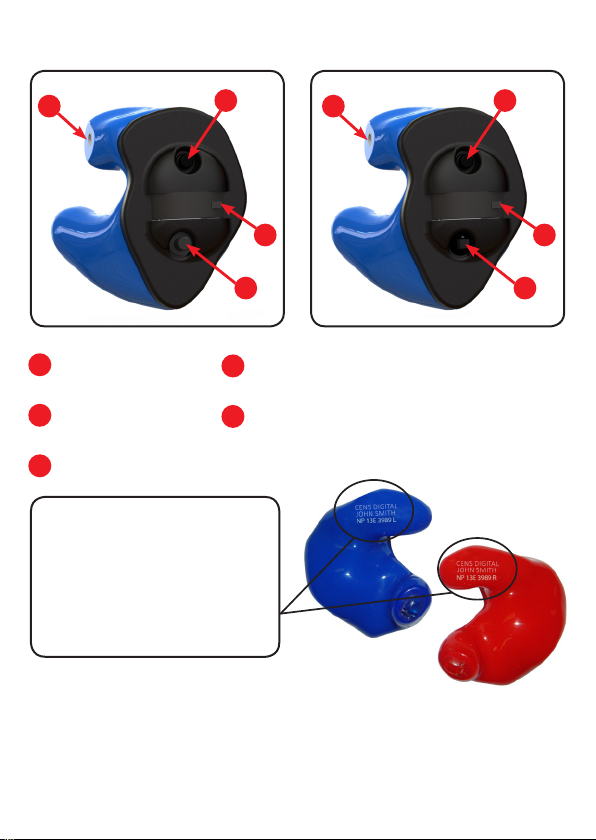
Your CENS Classic
DX1
B
A
On/off button
Microphone
B
Battery tray
C
Every CENS Classic can be
identified by the product ID and
serial number located on the shell.
The intended users name (personal
ID) will be laser marked onto each
earpiece.
A
D
D
E
B
DX3/DX5
C
Digital push button volume control (DX1)
Digital multi-switch volume control &
mode select (DX3/DX5)
A
C
E
This ear-plug is provided with level-dependent attenuation. The wearer should
check correct operation before use. If distortion or failure is detected, the wearer
should refer to the manufacturers advice for maintenance and replacement of
the battery.
4.
Page 5
Intended Use
CENS Classic is intended to protect your hearing while being able to
communicate normally or hear better. To ensure the best possible protection it
has to be used constantly in noisy situations.
CENS Classic are reusable devices with a level dependent function. The volume
control function of CENS Classic is designed to allow a small increase in low level
ambient sound, affording the user increased awareness in sporting situations.
CENS Classic are not intended or suitable for use as a hearing aid or to provide
any correction for hearing loss.
Read and follow the instructions of this user guide before use to avoid possible
injuries or damage.
It is recommended that the wearer should ensure the CENS Classic ear-plugs:
are fitted, adjusted and maintained in accordance with the
manufacturer’s instructions.
are worn at all times in noisy surroundings.
are regularly inspected for serviceability.
!
!
NOTICE
If the above recommendations are not adhered to, the protection
afforded by the CENS Classic will be severely impaired.
For optimal protection CENS Classic should be inserted correctly as
described on page 12.
Always transport and store your CENS Classic in the protective case
supplied.
5.
Page 6
General Notes On Safety
NOTICE
!
!
!
Your CENS Classic is sensitive to extreme heat, high humidity, strong
magnetic fields (>0.1T), X-rays and mechanical stress.
Do not expose your CENS Classic to extreme temperatures or high
humidity.
Do not leave your CENS Classic in direct sunlight.
Do not wear your CENS Classic in the shower or when you apply
make-up, perfume, aftershave, hairspray or suntan lotion.
Do not wear your CENS Classic when you are exposed to short-waves,
a strong magnetic field, a high frequency field or X-rays.
Do not place your CENS Classic in a microwave oven.
Choking hazard posed by small parts.
Performance may deteriorate with battery usage. The typical period
of continuous use that can be expected from the earpiece is up to
200 hours (see page 8 for more information).
The output of the level-dependent circuit of this hearing protector
may exceed the daily limit sound level.
Keep CENS Classic, batteries and accessories out of children’s reach.
If swallowed consult a physician or hospital immediately.
If infants, small children or disabled persons need to wear CENS
Classic ensure adequate supervision.
6.
Page 7
NOTICE
¡
NOTICE
¡
Leaking batteries will damage the CENS Classic.
Turn the CENS Classic off when not in use to preserve the battery.
Remove batteries when the instruments are not in use for a
prolonged period of time.
Batteries contain harmful substances that pollute the environment.
Do not throw used batteries into household waste.
Dispose batteries according to national regulations or return them
to your supplier.
!
!
¡
Hazard of explosion!
Do not use your CENS Classic in areas where there is a danger of
explosions (e.g. mining).
These are reusable devices, and it is strongly recommended that
they are regularly inspected to ensure correct fit and functionality.
If in doubt, return them for a service and check.
Puretone recommend CENS Classic electronic modules should be
returned for manufacturer service and inspection annually.
7.
Page 8

Handling Batteries
Your CENS Classic uses a size 312 Zinc-Air battery.
The packaging/tab for this size battery will usually
be identified by the colour brown.
Typical battery life is up to 200 hours, but will vary depending on ambient sound
levels and environmental conditions such as humidity.
Please note: Once a Zinc-Air battery tab has been removed, battery life will not
typically exceed 45 days. The battery will dry out and no longer be effective.
¡
Always use the correct size of batteries, as supplied with your CENS
Classic model.
Remove the tab on your batteries only when you are ready to use
them.
The positive (+) side of the batteries is always the smooth side.
Always keep spare batteries with you.
¡
8.
Low Battery Warning
DX1 you will hear a series of 3 beeps repeated every 5 minutes until
the device shuts down or the battery is replaced.
DX3/DX5 you will hear a vocal warning “battery low” every 10
minutes. When the battery reaches low you will hear a series of 6
double beeps, this will be followed by the device shutting down.
If the battery fails during use and is not replaced, your protection will
not be compromised, but the ambient awareness will deteriorate.
Page 9
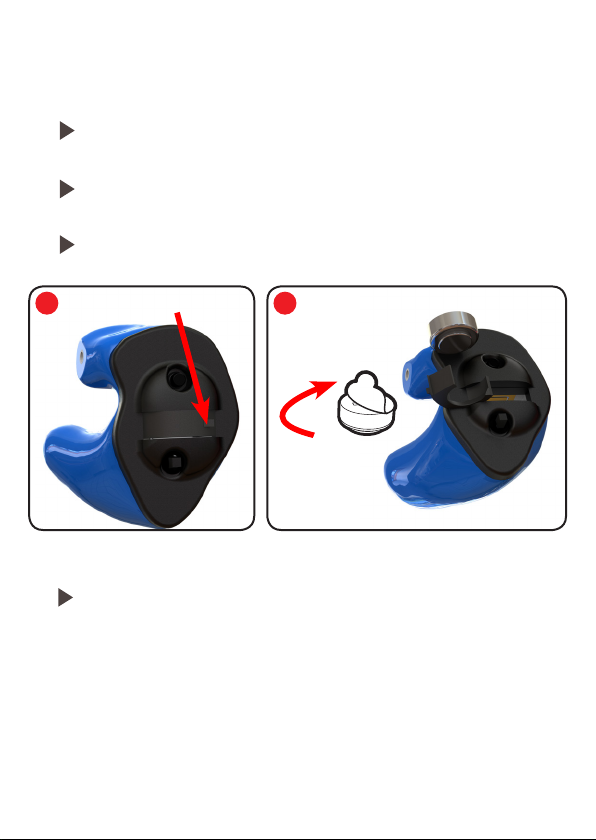
Setup
Inserting The Battery
Open the battery tray using the finger nail notch, as shown in the
diagram.
Remove the battery tab insert the battery into the tray bottom first,
as shown in the diagram.
Finally, close the battery tray.
1 2
Finger Nail Notch
Removing The Battery
Open the battery tray and remove the battery directly out.
9
Page 10
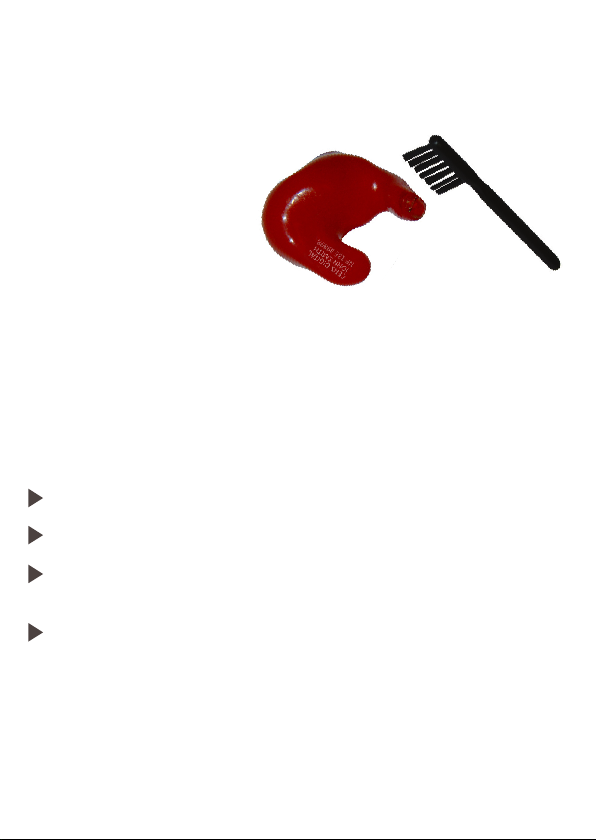
Cleaning & Disinfection
It is recommended that you clean your CENS Classic after every use to keep them
in perfect working condition.
Use the brush to clean the sound hole.
Face the sound hole downwards,
so debris falls away from the device
when cleaning.
Your CENS Classic is a highly sensitive system. Proper care and handling will
ensure the best possible performance. Clean the instrument regularly to prevent
damage to the CENS Classic and to avoid health problems.
NOTICE
Do not put the CENS Classic in water.
Clean your CENS Classic with a soft, damp cloth, as necessary.
Ask your supplier for special care packs and further information on
how to keep your CENS Classic in good condition.
NOTICE
10.
This product may be adversely affected by certain chemical
substances. Further information should be sought from the
manufacturer, e.g insect repellents containing DEET.
Always transport and store your CENS Classic in the
protective case supplied.
Page 11
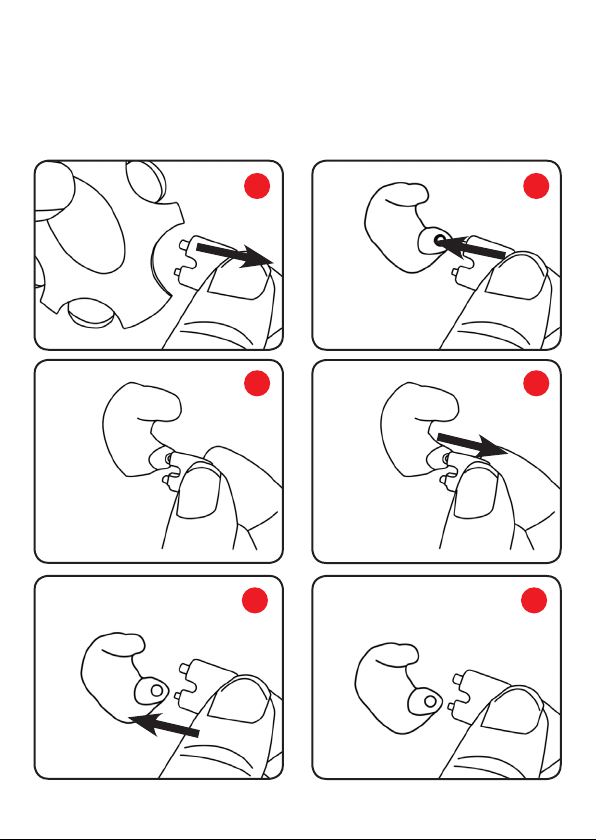
Changing The Wax Guard
To minimise the risk of blocking and damage caused by the build-up of earwax,
your CENS Classic has been fitted with an acoustically transparent ‘NoWax’ wax
guard. Replacement wax guards can be purchased from your supplier.
1 2
3 4
5 6
11.
Page 12
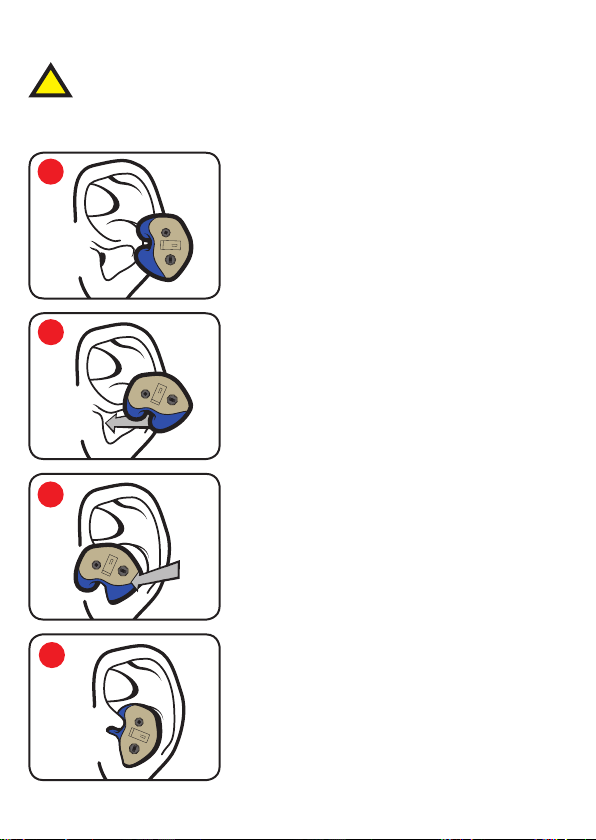
Earpiece Insertion
Acrylic
It is important that each device is fitted correctly to ensure safe and
!
effective use. To check the fit is correct, clap your hands near each ear
(ensure the electronic modules are switched off). You should hear the
sound but at a lower level.
1
Rotate the earpiece forward 45°–90°.
2
Place the earpiece into your ear canal. Pull the
top of your ear with your opposite hand for easier
insertion.
3
Rotate the earpiece backward & inward into
its upright position to fully seat the earpiece in
your ear canal. Make sure the top portion of the
earpiece fits into the helix lock of your ear.
12.
4
You will feel the earpiece lock into place once
properly fitted.
Page 13
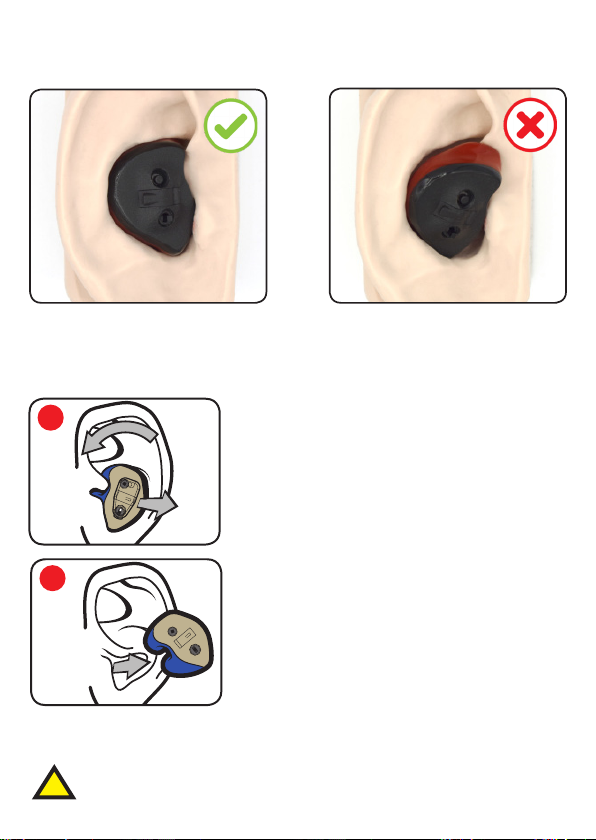
Earpiece Fitting
Acrylic
Correct Fitting Incorrect Fitting
Earpiece is flush and helix is
securely in the ear.
Earpiece Removal
1
2
NOTICE
Never pull on the battery tray or volume controls to remove the
CENS Classic, as this could cause damage.
Sudden or fast removal of ear-plugs from the ear canal
!
may damage the ear drum.
Earpiece is not flush and helix is
not correctly in the ear.
Grasp the earpiece and rotate it forward while
pulling outward. Do not grasp the module.
Pulling the top of the ear slightly may ease
removal.
Remove the earpiece and store safely.
13.
Page 14
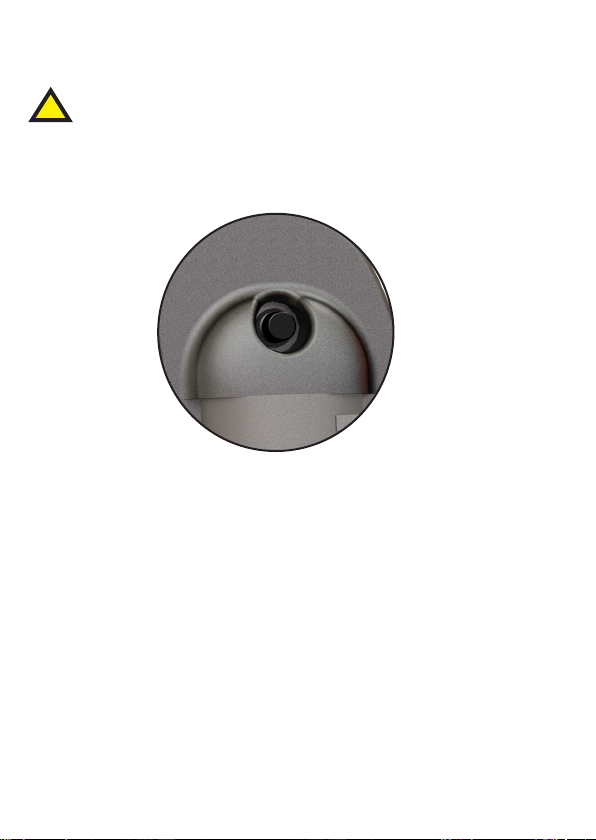
Turning Your CENS Classic On & Off
All controls must be operated with the battery tray closed.
!
The on/off button is located at the top of the device.
Push and release once to toggle on and off.
Once the devices are switched on, you will be able to hear sound
¡
as normal; however, when a loud sound is detected the device
will automatically reduce the volume to a safe and comfortable
level. After the loud sound has passed the volume is automatically
returned to normal.
14.
14
Please note:
DX1 there will be a 0.5s delay followed by a start up melody.
DX3/DX5 instant start followed by voice indicator prompting the
current mode setting.
Page 15
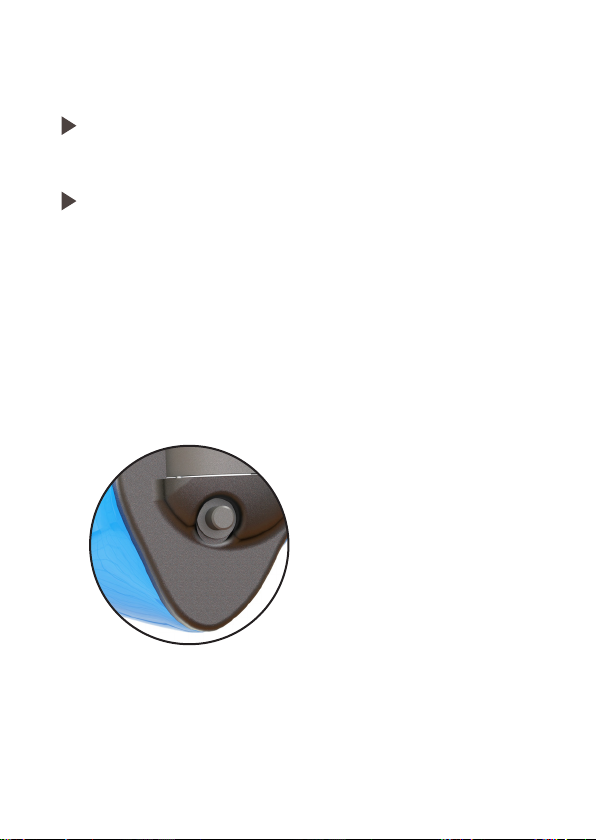
Adjusting The Volume (DX1)
CAUTION
Never use your device on a higher volume setting than is
comfortable.
All controls must be operated with the battery tray closed.
NOTICE
The volume control must only be operated by your finger tips with
light pressure. Applying excessive pressure can result in the volume
control being damaged. This is a precision miniature device that
must be handled with care.
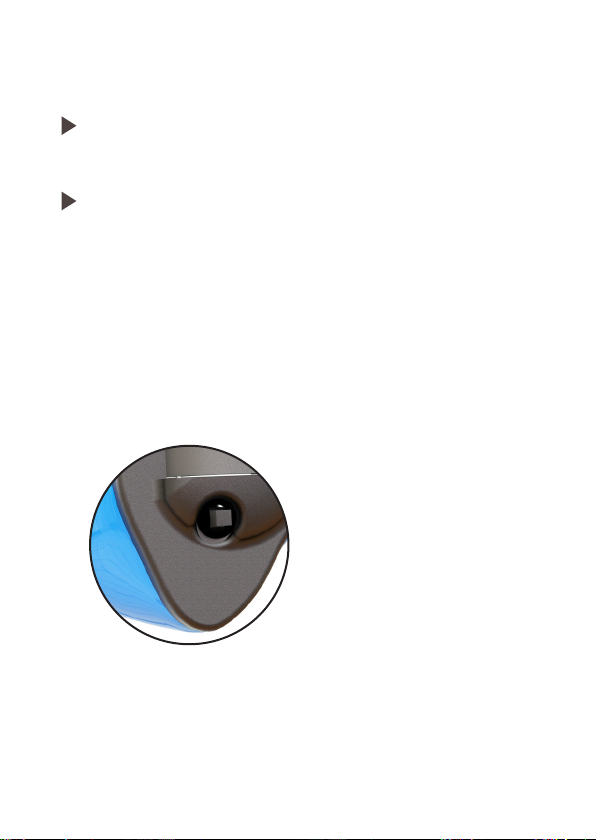
The volume control push button is located at the bottom of the
electronic module.
Short press to cycle through the three volume levels.
15.
Page 16
Adjusting The Volume & Modes (DX3/DX5)
CAUTION
Never use your device on a higher volume setting than is
comfortable.
All controls must be operated with the battery tray closed.
NOTICE
16
The digital multi-switch must only be operated by your finger tips
with light pressure. This is a precision miniature device that must be
handled with care.
The digital multi-switch is located at the bottom of the electronic
module.
Short press up - increases the volume level
Short press down - decreases the volume level
Long press up - increments mode select
Long press down - decrements mode select
Page 17

Troubleshooting
Use these tips to resolve simple issues.
Problem Possible Solution
Sound is weak.
CENS Classic emits whistling
sounds.
Sound is distorted.
CENS Classic emits signal tones.
CENS Classic does not work.
Ambient sound not as expected.
Consult your supplier if you encounter further problems.
Replace empty battery.
Increase volume.
Clean instrument.
Close battery tray completely.
Reinsert the instrument until it fits
securely.
Clean instrument.
Replace empty battery.
Lower volume.
Clean instrument.
Gently close battery tray completely.
Replace empty battery.
Check if the CENS Classic is turned on.
Gently close battery tray completely.
Replace empty battery. Make sure
battery is inserted correctly.
Check same mode selected for left and
right device.
17.
Page 18
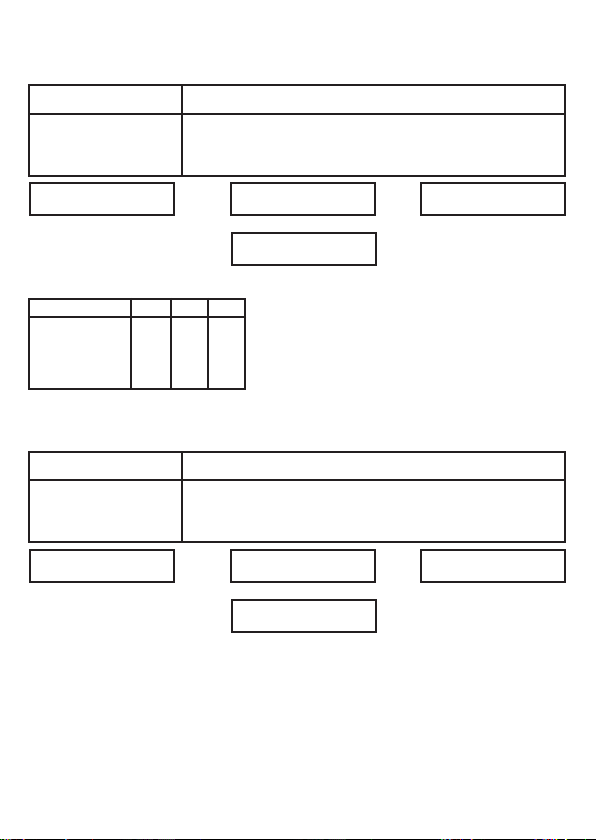
Technical Information (EN352)
Electronic Module - Sound Attenuation
Frequency (Hz)
Mean Attenuation
Standard Deviation
Assumed Protection
H=27 M=21 L=20
Criterion Levels
Mode No.
1
2
3
4
Passive Module - Sound Attenuation
111
112
111
112
63 125 250 500 1000 2000 4000 8000
26.1
24.6
23.2
23.3
6.4
4.6
19.7
H
M
L
105
105
106
105
106
104
106
105
3.8
20.0
19.4
SNR=25
SNR = Single Number Rating attenuation
H = High frequency attenuation
M = Medium frequency attenuation
L = Low frequency attenuation
3.5
19.8
23.4
20.0
3.4
31.6
3.6
28.0
31.8
3.3
28.5
36.4
4.8
31.6
Frequency (Hz)
Mean Attenuation
Standard Deviation
Assumed Protection
H=26 M=21 L=20
63 125 250 500 1000 2000 4000 8000
24.2
23.5
22.3
22.8
23.5
32.1
4.5
19.7
3.6
19.9
2.8
19.5
SNR=25
3.8
19.0
3.4
20.1
3.8
28.3
30.4
3.8
26.6
EN352-2:2002, EN352-7:2002, Regulation (EU)2016/425 Module D by
SATRA Technology Europe Ltd, Bracetown Business Park, Clonee, Co. Meath,
Ireland D15 YN2P (Notified Body 2777)
18.
36.8
5.6
31.2
Page 19

19.
Page 20

Designed and manufactured in the UK
Puretone Ltd, 9-10 Henley Business Park,
Trident Close, Medway City Estate, Rochester,
CENS is a registered trademark of Puretone Ltd
Kent. ME2 4FR. UK.
Page 21
CLASSIC
SERIES
User Guide
Contains important information - do not throw away
EN3522777
Version 1.00
July 2019
Page 22

CENS® Classic
Category III Personal Protective Equipment (PPE) manufactured by Puretone
Ltd for protection against the harmful effects of noise.
EU Type Tested to harmonized standards EN352-2:2002, EN352-7:2002 and
certified in conformity with the provisions of Regulation (EU) 2016/425
including ongoing surveillance (Module D) by SATRA Technology Europe Ltd,
Bracetown Business Park, Clonee, Co. Meath, Ireland D15 YN2P
(Notified Body 2777).
EU declaration of conformity can be accessed at www.puretone.net
Disposal Information
Within the European Union, the marked equipment is covered by “Directive
2002/96/EC of the European Parliament and of the Council of 27 January 2003
on waste electrical and electronic equipment.” Amended by “Directive
2003/108/EC” (WEEE).
Recycle CENS® Classic, batteries and accessories according to national
regulations.
Symbols used in this guide
!
CAUTION
NOTICE
¡
2.2
Be aware of information marked with the warning symbol
WARNING, CAUTION or NOTICE!
WARNING points out a situation that could lead to serious injuries.
CAUTION indicates a situation that could lead to minor and
moderate injuries.
NOTICE indicates possible property damage.
Advice and tips on how to handle your device better.
Instruction. Indicates that something has to be done.
Page 23

Contents
Your CENS Classic
Intended Use
General Notes On Safety
Handling Batteries
Setup
Cleaning & Disinfection
Changing The Wax Guard
Earpiece Insertion
Earpiece Fitting
Earpiece Removal
Turning Your CENS Classic On & Off (All Models)
4
5
6-7
8
9
10
11
12
13
13
14
Adjusting The Volume (DX1)
Adjusting The Volume & Modes (DX3/DX5)
Troubleshooting
Technical Information
15
16
17
18
3.
Page 24
Your CENS Classic
B
A
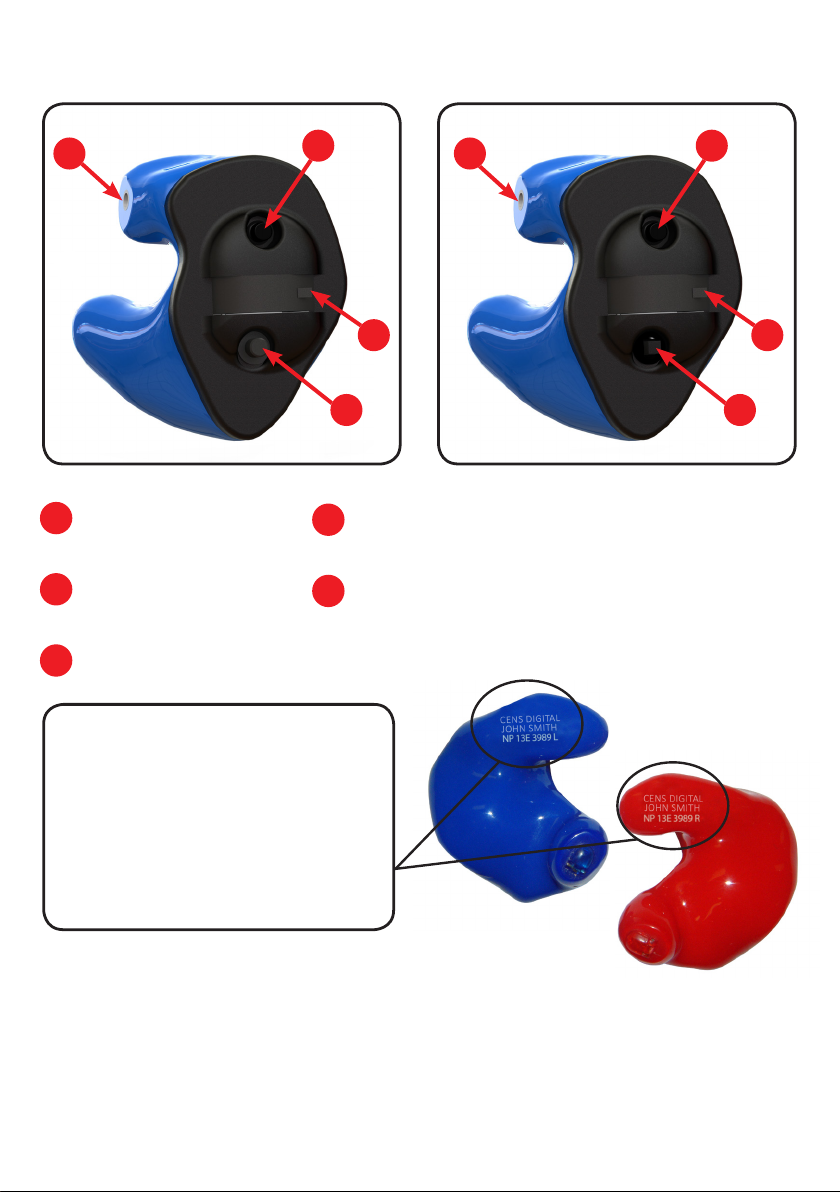
On/off button
Microphone
B
Battery tray
C
DX1
A
C
D
D
Digital push button volume control (DX1)
Digital multi-switch volume control &
E
mode select (DX3/DX5)
B
A
C
E
DX3/DX5
Every CENS Classic can be
identified by the product ID and
serial number located on the shell.
The intended users name (personal
ID) will be laser marked onto each
earpiece.
This ear-plug is provided with level-dependent attenuation. The wearer should
check correct operation before use. If distortion or failure is detected, the wearer
should refer to the manufacturers advice for maintenance and replacement of
the battery.
4.
Page 25
Intended Use
CENS Classic is intended to protect your hearing while being able to
communicate normally or hear better. To ensure the best possible protection it
has to be used constantly in noisy situations.
CENS Classic are reusable devices with a level dependent function. The volume
control function of CENS Classic is designed to allow a small increase in low level
ambient sound, affording the user increased awareness in sporting situations.
CENS Classic are not intended or suitable for use as a hearing aid or to provide
any correction for hearing loss.
Read and follow the instructions of this user guide before use to avoid possible
injuries or damage.
It is recommended that the wearer should ensure the CENS Classic ear-plugs:
are fitted, adjusted and maintained in accordance with the
manufacturer’s instructions.
are worn at all times in noisy surroundings.
!
!
NOTICE
are regularly inspected for serviceability.
If the above recommendations are not adhered to, the protection
afforded by the CENS Classic will be severely impaired.
For optimal protection CENS Classic should be inserted correctly as
described on page 12.
Always transport and store your CENS Classic in the protective case
supplied.
5.
Page 26
General Notes On Safety
NOTICE
!
!
Your CENS Classic is sensitive to extreme heat, high humidity, strong
magnetic fields (>0.1T), X-rays and mechanical stress.
Do not expose your CENS Classic to extreme temperatures or high
humidity.
Do not leave your CENS Classic in direct sunlight.
Do not wear your CENS Classic in the shower or when you apply
make-up, perfume, aftershave, hairspray or suntan lotion.
Do not wear your CENS Classic when you are exposed to short-waves,
a strong magnetic field, a high frequency field or X-rays.
Do not place your CENS Classic in a microwave oven.
Choking hazard posed by small parts.
Performance may deteriorate with battery usage. The typical period
of continuous use that can be expected from the earpiece is up to
200 hours (see page 8 for more information).
6.
The output of the level-dependent circuit of this hearing protector
!
may exceed the daily limit sound level.
Keep CENS Classic, batteries and accessories out of children’s reach.
If swallowed consult a physician or hospital immediately.
If infants, small children or disabled persons need to wear CENS
Classic ensure adequate supervision.
6
Page 27
NOTICE
¡
NOTICE
¡
!
Leaking batteries will damage the CENS Classic.
Turn the CENS Classic off when not in use to preserve the battery.
Remove batteries when the instruments are not in use for a
prolonged period of time.
Batteries contain harmful substances that pollute the environment.
Do not throw used batteries into household waste.
Dispose batteries according to national regulations or return them
to your supplier.
Hazard of explosion!
Do not use your CENS Classic in areas where there is a danger of
explosions (e.g. mining).
These are reusable devices, and it is strongly recommended that
!
¡
they are regularly inspected to ensure correct fit and functionality.
If in doubt, return them for a service and check.
Puretone recommend CENS Classic electronic modules should be
returned for manufacturer service and inspection annually.
7.
Page 28

Handling Batteries
Your CENS Classic uses a size 312 Zinc-Air battery.
The packaging/tab for this size battery will usually
be identified by the colour brown.
Typical battery life is up to 200 hours, but will vary depending on ambient sound
levels and environmental conditions such as humidity.
Please note: Once a Zinc-Air battery tab has been removed, battery life will not
typically exceed 45 days. The battery will dry out and no longer be effective.
¡
Always use the correct size of batteries, as supplied with your CENS
Classic model.
Remove the tab on your batteries only when you are ready to use
them.
The positive (+) side of the batteries is always the smooth side.
8.
Always keep spare batteries with you.
¡
Low Battery Warning
DX1 you will hear a series of 3 beeps repeated every 5 minutes until
the device shuts down or the battery is replaced.
DX3/DX5 you will hear a vocal warning “battery low” every 10
minutes. When the battery reaches low you will hear a series of 6
double beeps, this will be followed by the device shutting down.
If the battery fails during use and is not replaced, your protection will
not be compromised, but the ambient awareness will deteriorate.
Page 29
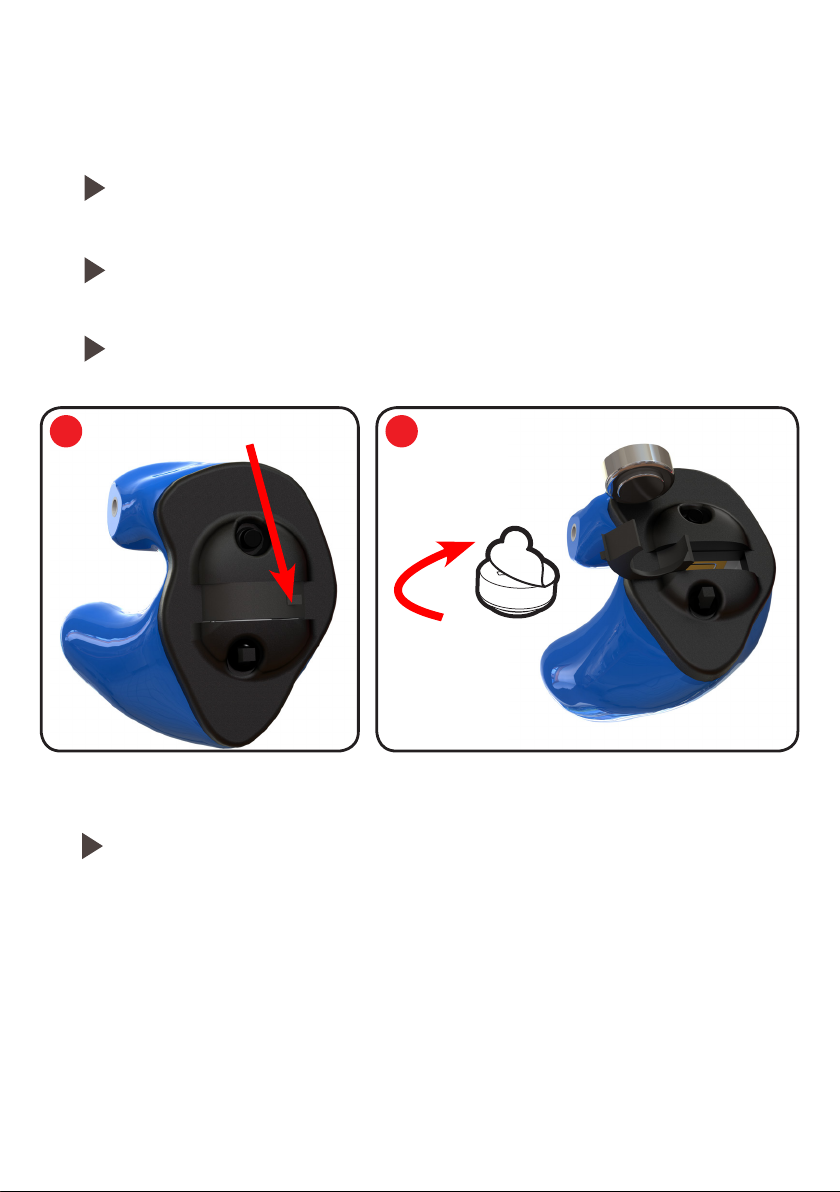
Setup
Inserting The Battery
Open the battery tray using the finger nail notch, as shown in the
diagram.
Remove the battery tab insert the battery into the tray bottom first,
as shown in the diagram.
Finally, close the battery tray.
1 2
Finger Nail Notch
Removing The Battery
Open the battery tray and remove the battery directly out.
9
Page 30
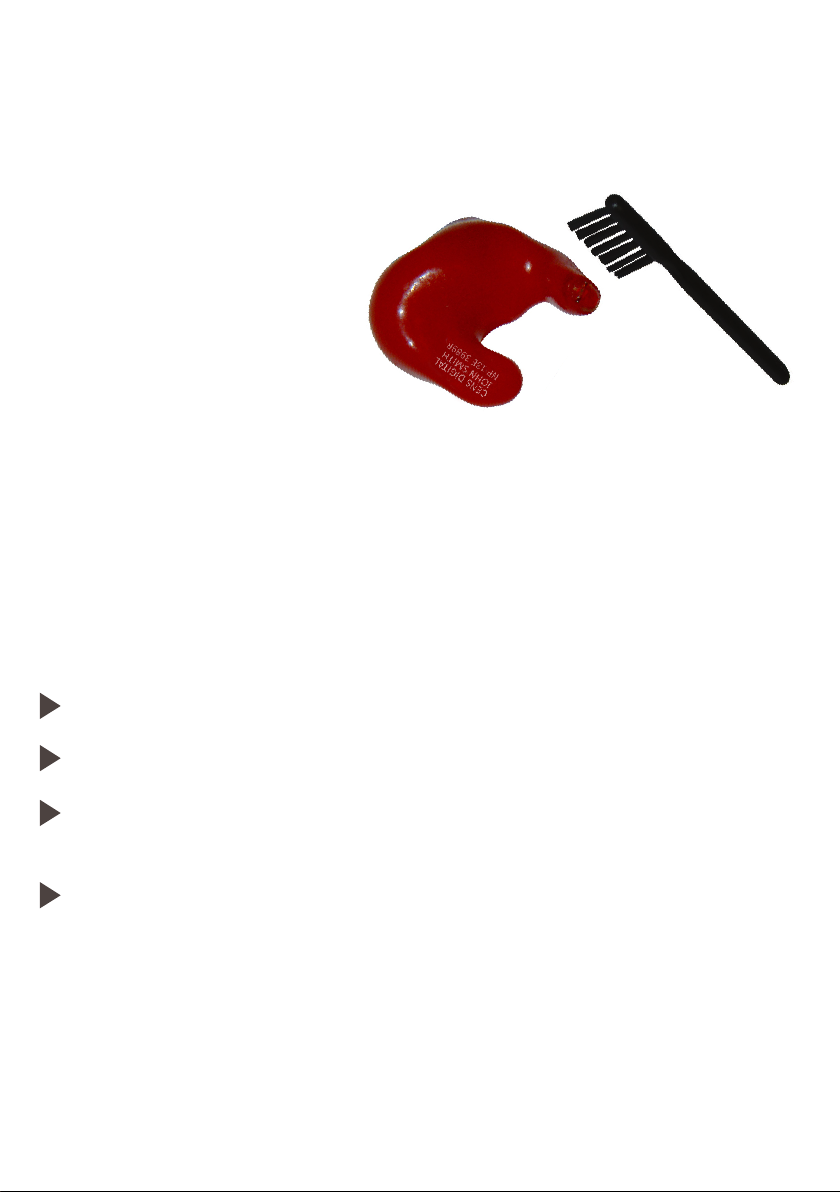
Cleaning & Disinfection
It is recommended that you clean your CENS Classic after every use to keep them
in perfect working condition.
Use the brush to clean the sound hole.
Face the sound hole downwards,
so debris falls away from the device
when cleaning.
Your CENS Classic is a highly sensitive system. Proper care and handling will
ensure the best possible performance. Clean the instrument regularly to prevent
damage to the CENS Classic and to avoid health problems.
NOTICE
NOTICE
10.
Do not put the CENS Classic in water.
Clean your CENS Classic with a soft, damp cloth, as necessary.
Ask your supplier for special care packs and further information on
how to keep your CENS Classic in good condition.
This product may be adversely affected by certain chemical
substances. Further information should be sought from the
manufacturer, e.g insect repellents containing DEET.
Always transport and store your CENS Classic in the
protective case supplied.
Page 31
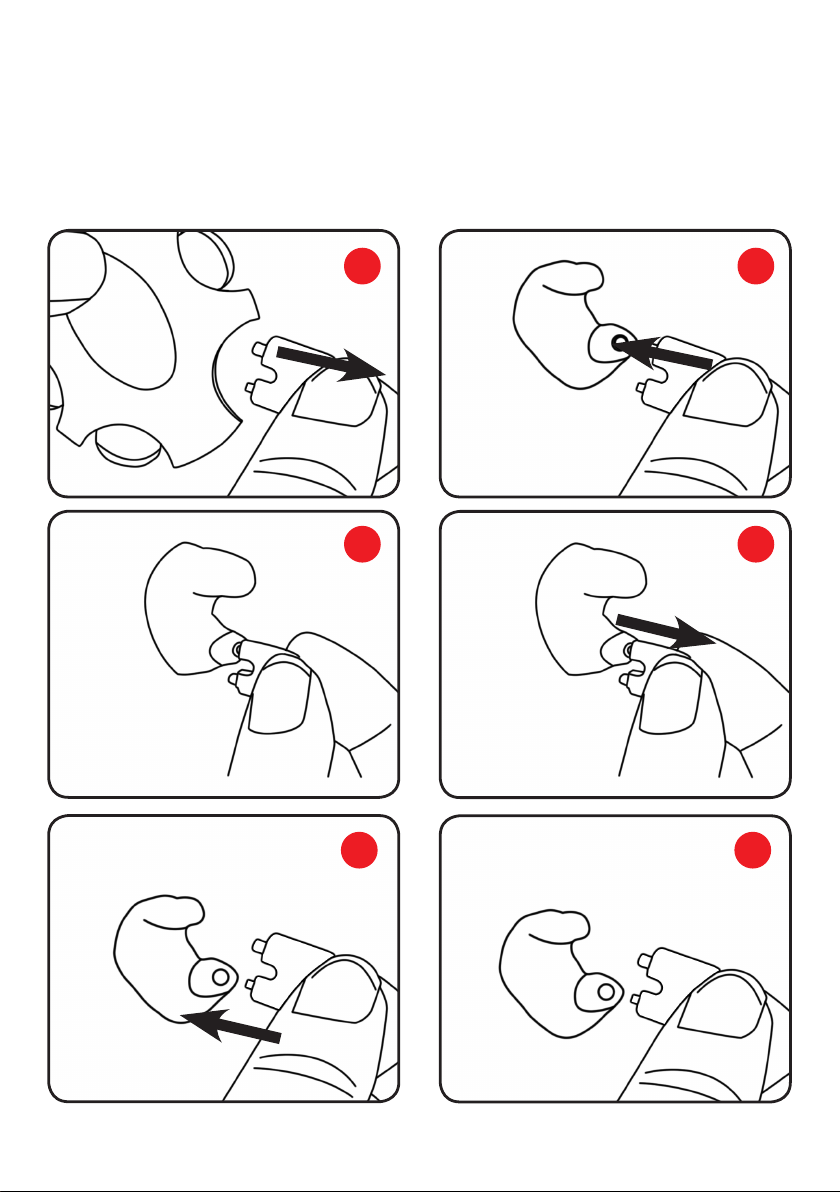
Changing The Wax Guard
To minimise the risk of blocking and damage caused by the build-up of earwax,
your CENS Classic has been fitted with an acoustically transparent ‘NoWax’ wax
guard. Replacement wax guards can be purchased from your supplier.
1 2
3 4
5 6
11.
Page 32
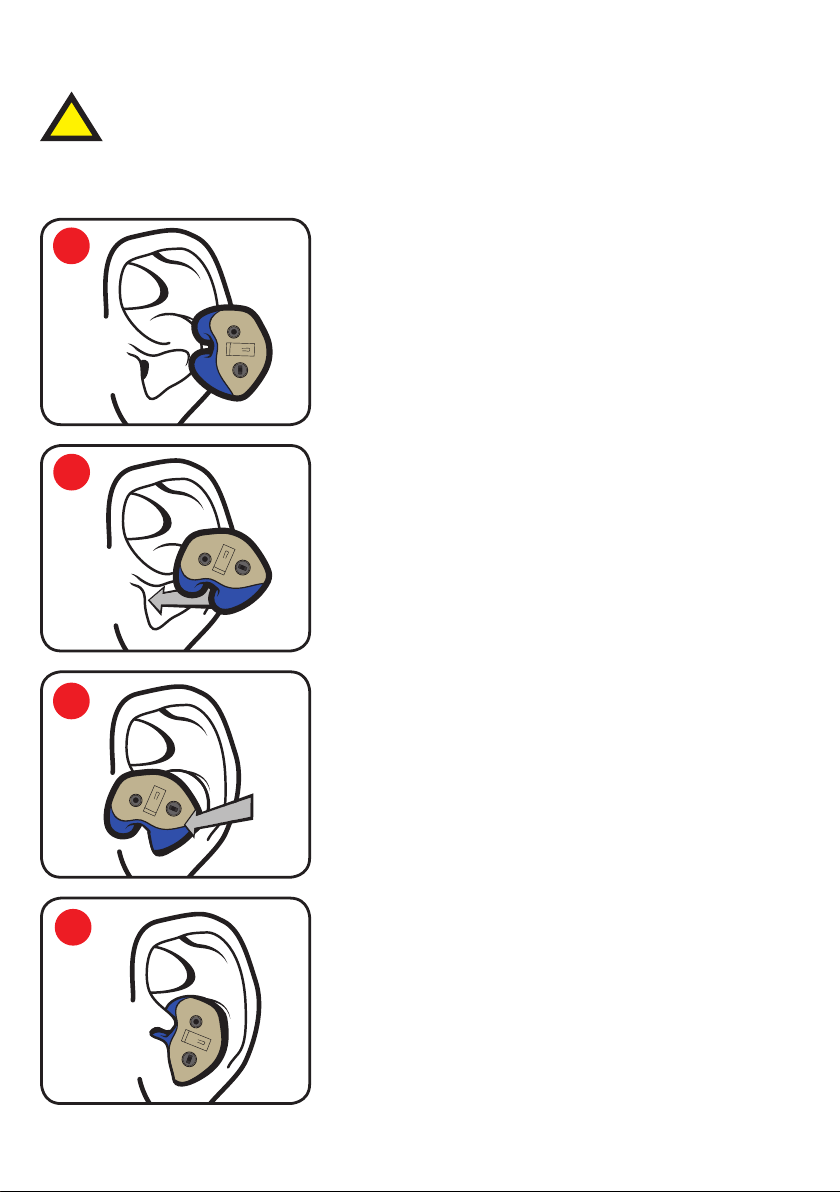
Earpiece Insertion
Acrylic
It is important that each device is fitted correctly to ensure safe and
!
effective use. To check the fit is correct, clap your hands near each ear
(ensure the electronic modules are switched off). You should hear the
sound but at a lower level.
1
Rotate the earpiece forward 45°–90°.
2
Place the earpiece into your ear canal. Pull the
top of your ear with your opposite hand for easier
insertion.
3
Rotate the earpiece backward & inward into
its upright position to fully seat the earpiece in
your ear canal. Make sure the top portion of the
earpiece fits into the helix lock of your ear.
4
12.
You will feel the earpiece lock into place once
properly fitted.
Page 33
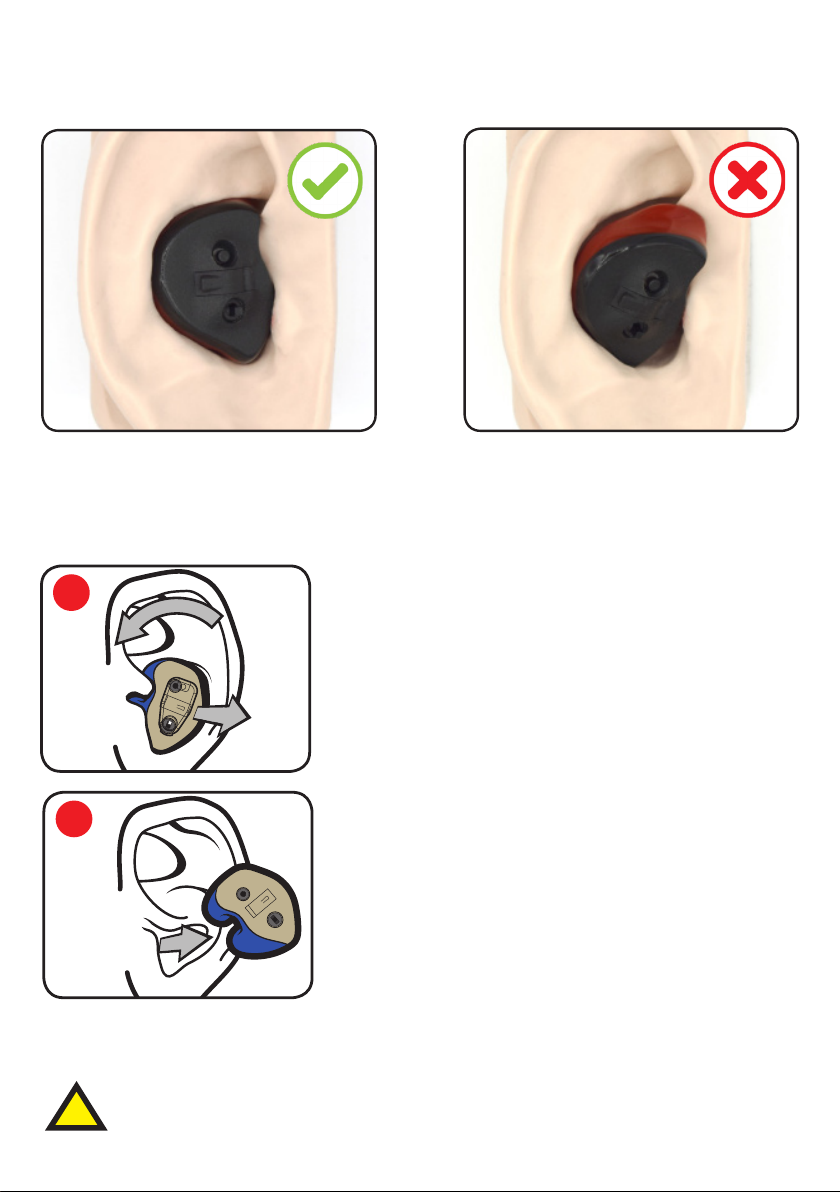
Earpiece Fitting
Acrylic
Correct Fitting Incorrect Fitting
Earpiece is flush and helix is
securely in the ear.
Earpiece Removal
1
2
NOTICE
Never pull on the battery tray or volume controls to remove the
CENS Classic, as this could cause damage.
Earpiece is not flush and helix is
not correctly in the ear.
Grasp the earpiece and rotate it forward while
pulling outward. Do not grasp the module.
Pulling the top of the ear slightly may ease
removal.
Remove the earpiece and store safely.
!
Sudden or fast removal of ear-plugs from the ear canal
may damage the ear drum.
13.
Page 34
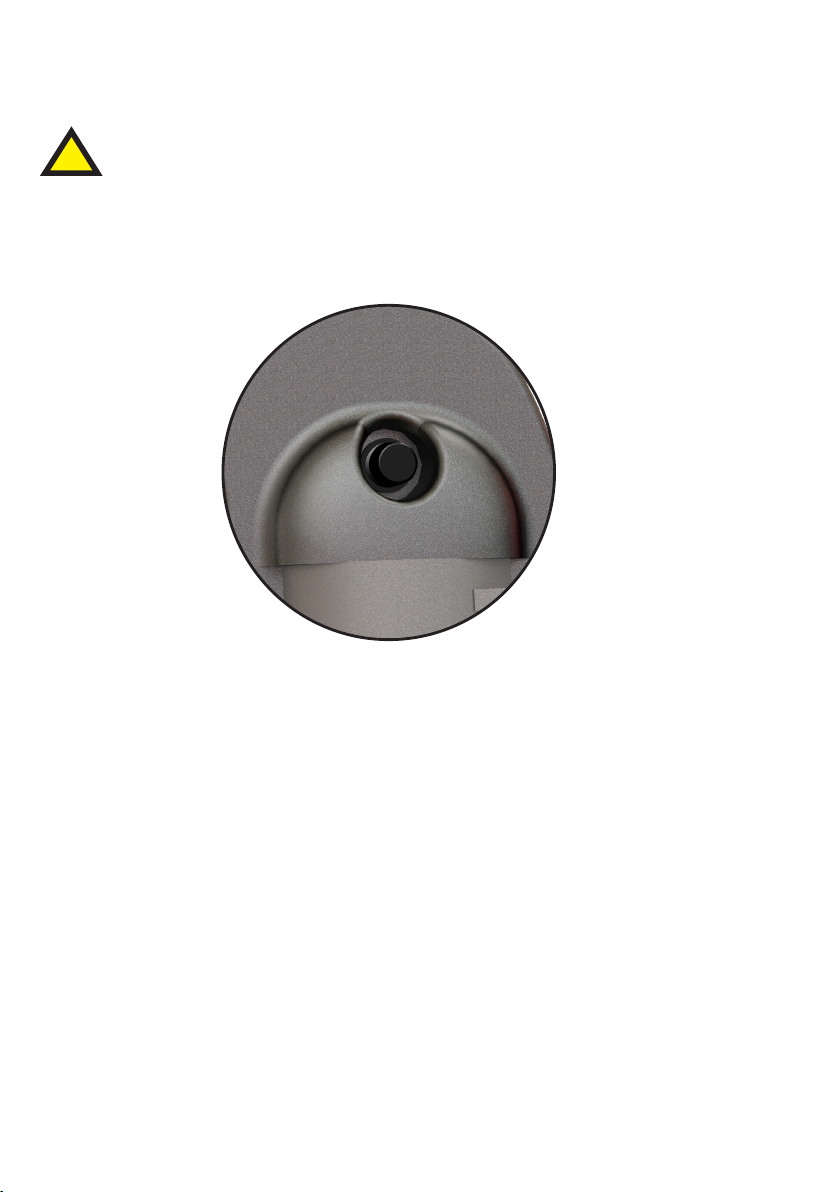
Turning Your CENS Classic On & Off
!
All controls must be operated with the battery tray closed.
The on/off button is located at the top of the device.
Push and release once to toggle on and off.
14
¡
Once the devices are switched on, you will be able to hear sound
as normal; however, when a loud sound is detected the device
will automatically reduce the volume to a safe and comfortable
level. After the loud sound has passed the volume is automatically
returned to normal.
Please note:
14.
DX1 there will be a 0.5s delay followed by a start up melody.
DX3/DX5 instant start followed by voice indicator prompting the
current mode setting.
Page 35
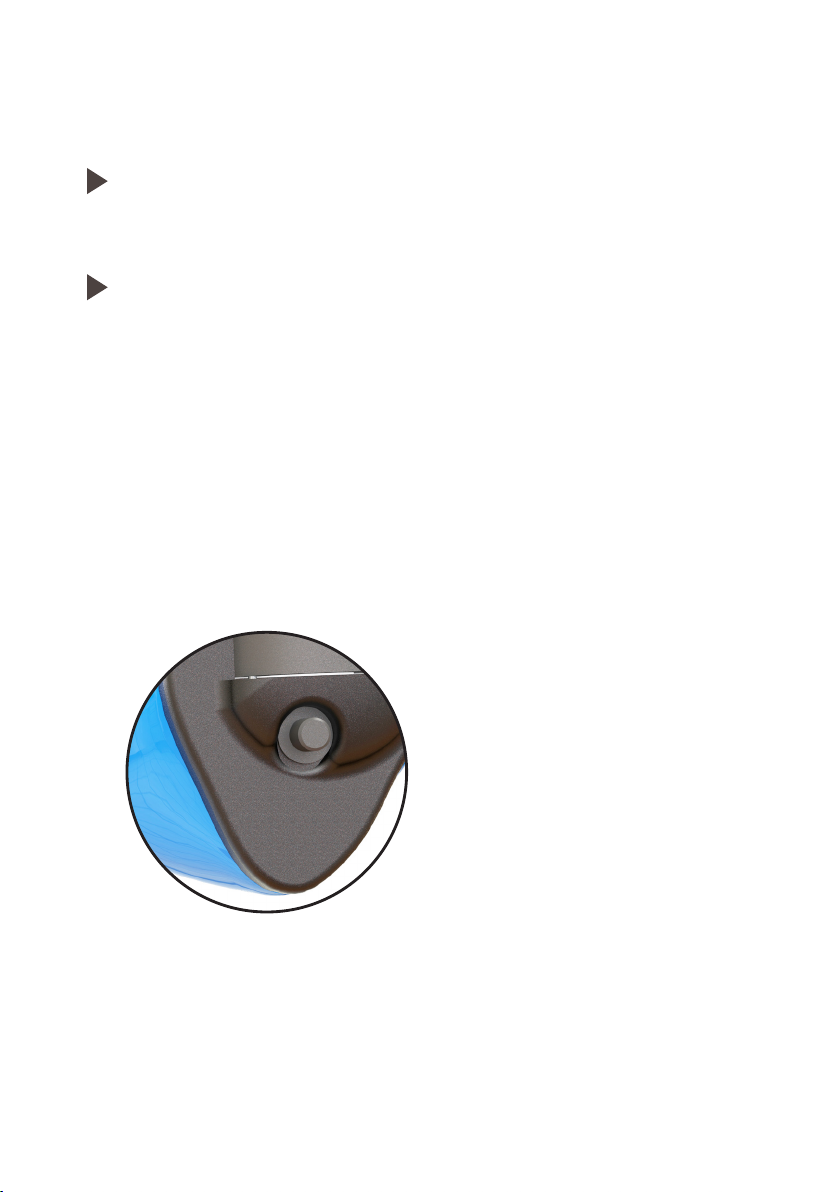
Adjusting The Volume (DX1)
CAUTION
Never use your device on a higher volume setting than is
comfortable.
All controls must be operated with the battery tray closed.
NOTICE
The volume control must only be operated by your finger tips with
light pressure. Applying excessive pressure can result in the volume
control being damaged. This is a precision miniature device that
must be handled with care.
The volume control push button is located at the bottom of the
electronic module.
Short press to cycle through the three volume levels.
15.
Page 36
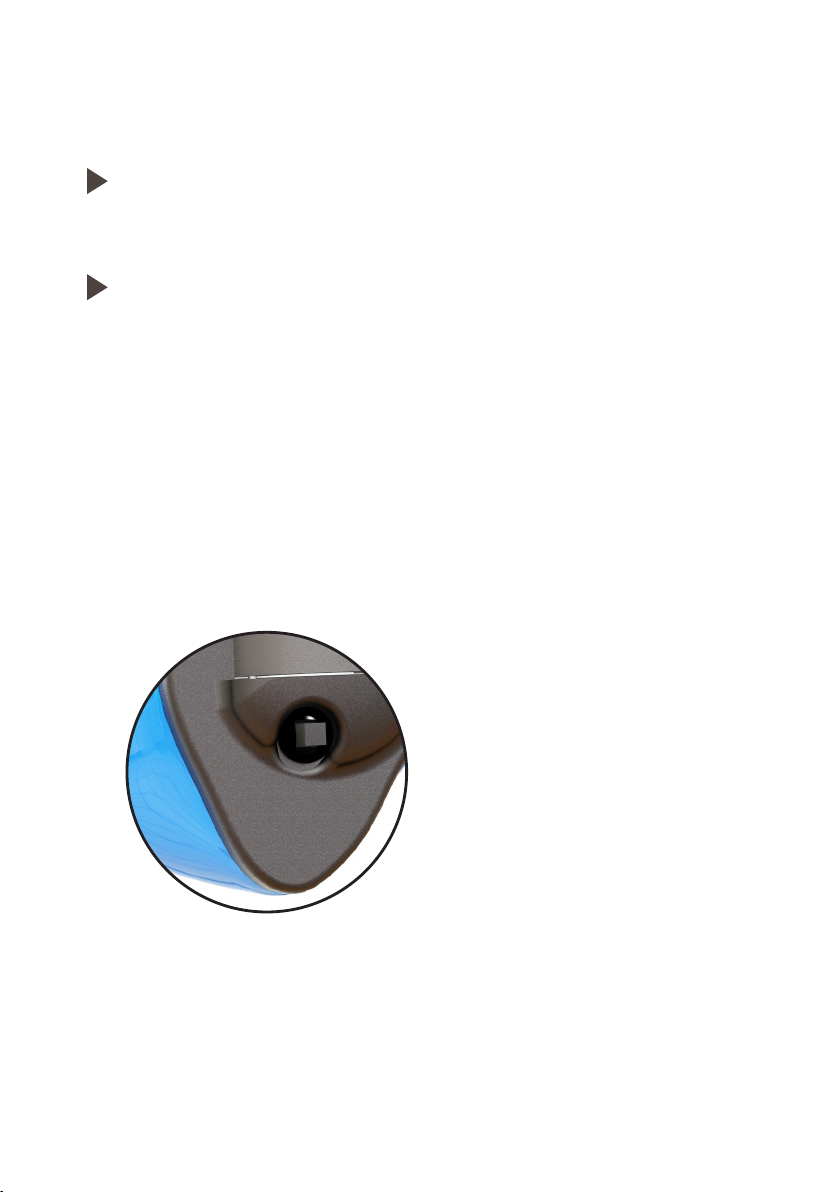
Adjusting The Volume & Modes (DX3/DX5)
CAUTION
Never use your device on a higher volume setting than is
comfortable.
All controls must be operated with the battery tray closed.
NOTICE
The digital multi-switch must only be operated by your finger tips
with light pressure. This is a precision miniature device that must be
handled with care.
The digital multi-switch is located at the bottom of the electronic
module.
16
Short press up - increases the volume level
Short press down - decreases the volume level
Long press up - increments mode select
Long press down - decrements mode select
Page 37

Troubleshooting
Use these tips to resolve simple issues.
Problem Possible Solution
Sound is weak.
CENS Classic emits whistling
sounds.
Sound is distorted.
CENS Classic emits signal tones.
CENS Classic does not work.
Ambient sound not as expected.
Replace empty battery.
Increase volume.
Clean instrument.
Close battery tray completely.
Reinsert the instrument until it fits
securely.
Clean instrument.
Replace empty battery.
Lower volume.
Clean instrument.
Gently close battery tray completely.
Replace empty battery.
Check if the CENS Classic is turned on.
Gently close battery tray completely.
Replace empty battery. Make sure
battery is inserted correctly.
Check same mode selected for left and
right device.
Consult your supplier if you encounter further problems.
17.
Page 38
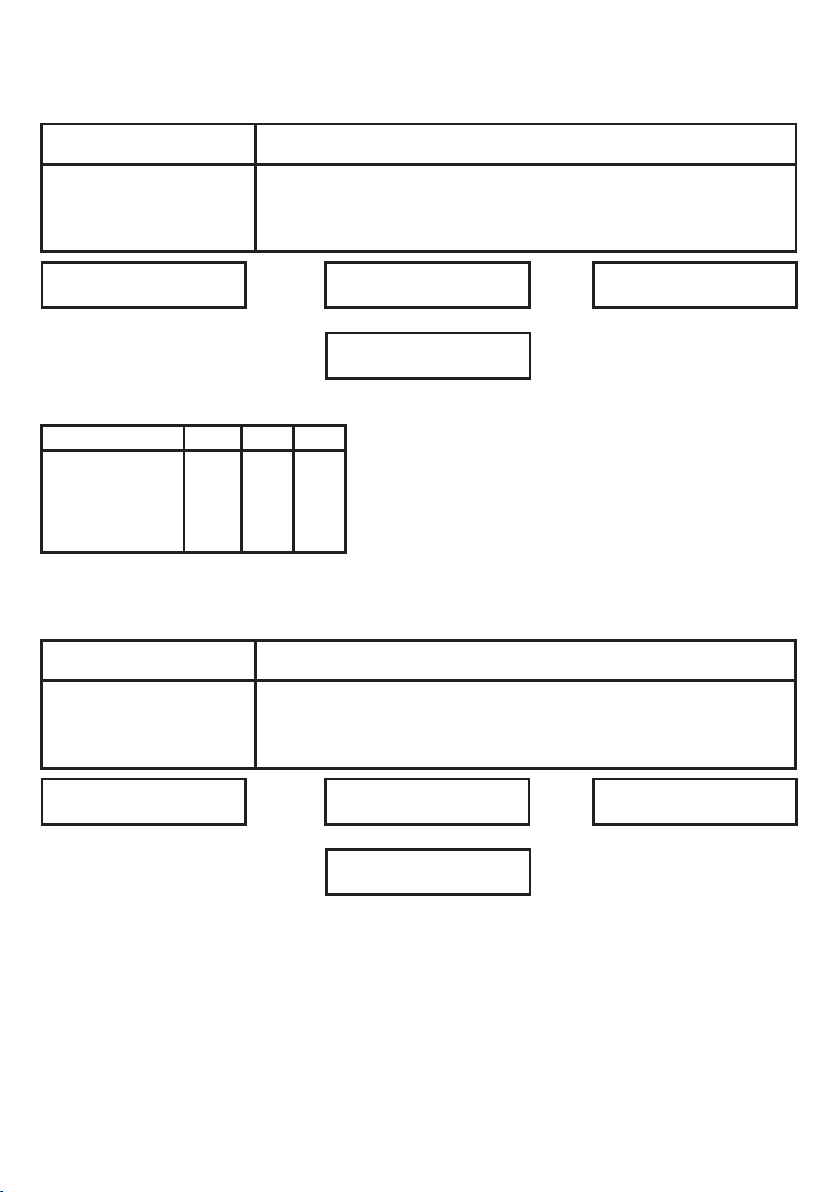
Technical Information (EN352)
Electronic Module - Sound Attenuation
Frequency (Hz)
Mean Attenuation
Standard Deviation
Assumed Protection
H=27 M=21 L=20
Criterion Levels
Mode No.
1
2
3
4
Passive Module - Sound Attenuation
Frequency (Hz)
Mean Attenuation
Standard Deviation
Assumed Protection
H
111
112
111
112
63 125 250 500 1000 2000 4000 8000
26.1
6.4
19.7
M
L
105
105
106
105
106
104
106
105
63 125 250 500 1000 2000 4000 8000
24.2
4.5
19.7
24.6
4.6
20.0
23.2
3.8
19.4
SNR=25
23.3
3.5
19.8
23.4
3.4
20.0
31.6
3.6
28.0
31.8
3.3
28.5
SNR = Single Number Rating attenuation
H = High frequency attenuation
M = Medium frequency attenuation
L = Low frequency attenuation
23.5
3.6
19.9
22.3
2.8
19.5
22.8
3.8
19.0
23.5
3.4
20.1
32.1
3.8
28.3
30.4
3.8
26.6
36.4
4.8
31.6
36.8
5.6
31.2
H=26 M=21 L=20
SNR=25
EN352-2:2002, EN352-7:2002, Regulation (EU)2016/425 Module D by
SATRA Technology Europe Ltd, Bracetown Business Park, Clonee, Co. Meath,
Ireland D15 YN2P (Notified Body 2777)
18.
Page 39

19.
Page 40

Designed and manufactured in the UK
Puretone Ltd, 9-10 Henley Business Park,
Trident Close, Medway City Estate, Rochester,
Kent. ME2 4FR. UK.
CENS is a registered trademark of Puretone Ltd
 Loading...