

Page 1
Page 2

This page is intentionally left blank
Page 3

CAUTION: In order to avoid a hazard due to inadvertent resetting of the
thermal cut-out, this appliance must not be supplied through an external
switching device, such as a timer, or connected to a circuit that is regularly
switched on and off by the utility.
• This appliance is not intended for use by persons (including children) with
reduced physical, sensory or mental capabilities or lack of experience and
knowledge, unless they are supervised or have been given instruction
concerning the use of the appliance by a person responsible for their safety.
• Children should be supervised to ensure that they do not play with the
appliance.
• If the supply cord is damaged, it must be replaced by the manufacturer, its
service agent or similarly qualified persons in order to avoid a hazard.
WARNING: You must not cover this dehumidifier. Covering this
dehumidifier presents fire risk and will activate the safety fuse; permanently
disabling the unit.
WARNING: Do not use this dehumidifier in small rooms when they are
occupied by persons not capable of leaving the room on their own, unless
constant supervision is provided.
WARNING: To reduce the risk of fire, keep textiles, curtains, or any
flammable material a minimum distance of 1 metre from the air outlet.
General Care and Safety Guide
• Use only the voltage specified on the rating label of the appliance.
• The dehumidifier must not be located immediately below a socket outlet.
• Keep all objects at least 1 metre from the front, sides and rear of the appliance.
• This appliance is intended for household use only and not for commercial or industrial use.
• Indoor use only.
• Use this appliance only as described in this manual. Any other use is not recommended by
the manufacturer and may cause fire, electric shock or injury.
• Do not use the dehumidifier if it has been dropped or damaged.
• The common cause of overheating is deposits of dust or fluff in the appliance. Ensure these
deposits are removed regularly by unplugging the appliance and vacuum cleaning the air
vents and grills.
• Always unplug appliance when not in use.
• When the appliance has been unpacked, check it for transport damage and ensure all parts
have been delivered. If parts are missing or the appliance has been damaged, contact the
Customer Services Team.
• Do not use if there are visible signs of damage to the dehumidifier.
YOUR SAFETY IS IMPORTANT TO US. PLEASE ENSURE YOU TAKE NOTE OF THE
INSTRUCTIONS AND WARNINGS OUTLINED IN THIS MANUAL.
Page 4

• Never use the appliance to dry clothes.
• Do not connect the appliance to mains supply until completely assembled and adjusted.
• Ensure hands are dry before handling the plug or main unit.
• Ensure dehumidifier is on a flat, stable, heat-resistant surface.
• Do not operate with cord set coiled up as a heat build up is likely, which could be sufficient to
become a hazard.
• Carry out regular checks of the supply cord to ensure no damage is evident
• Do not operate this appliance with a damaged cord, plug or after the appliance malfunctions
or has been dropped or damaged in any manner. Return to a qualified electrical person for
examination, electrical service or repair.
• Do not twist, kink or wrap the cord around the appliance, as this may cause the insulation to
weaken and split. Always ensure that all cord has been removed from any cord storage area
and is unrolled before use.
• It is recommended that this dehumidifier is plugged directly into the wall socket. Power
boards are not rated to supply power to high wattage appliances.
• A correctly specified, undamaged extension cord may be used with this dehumidifier
provided it is used in a safe manner.
• Do not remove plug from power socket until the appliance has been switched off.
• Do not remove plug from power socket by pulling cord; always grip plug.
• Do not place cord under carpet or cover with rugs or furniture. Arrange the cord so it cannot
be tripped over.
• Don’t place appliance on bedding or on thick & long carpet where the openings may get
blocked.
• Switch off and use handle provided when moving
• Do not place appliance close to radiant heat source.
• Do not insert or allow foreign objects to enter any ventilation or exhaust opening, as this may
cause an electric shock, fire or damage to the appliance.
• Do not sit on the appliance.
• Do not use abrasive cleaning products on this appliance. Clean with a damp cloth (not wet)
rinsed in hot soapy water only. Always remove plug from the mains supply before cleaning.
• Do not operate in areas where petrol, paint or other flammable liquids are used or stored.
• Do not use this appliance in the immediate surrounds of a bath, a shower, or a swimming
pool or other liquids.
• The appliance must not be immersed in any liquids.
• There are no user serviceable parts installed in the unit.
• Do not place the unit in wardrobes or other enclosed spaces as this may cause fire hazards.
• This unit is not supposed to be used in or around locations where foodstuffs, works of art or
delicate articles of science, etc are stored.
• If your appliance does not work, or is not working properly, contact the place of purchase or
the Customer Services Team.
General Care and Safety Guide
Page 5

Operating Your Dehumidifier
WARNING: In order to avoid overheating or fire, do not cover the
dehumidifier.
WARNING: Keep all objects at least 1 metre from the front and 150mm
from the sides of the appliance.
WARNING: Do not use this dehumidifier with a programmer, separate
timer, remote-control system or any other device that switches the
dehumidifier on automatically, since a fire risk exists if the dehumidifier is
covered or positioned incorrectly.
WARNING:Never leave this dehumidifier unattended when in use.
Ensure dehumidifier is on a flat, stable, heat-resistant surface.
Once the dehumidifier is in a safe operating position and all switches are in
the off position, insert the power plug into the mains outlet.
CAUTION: Ensure the power cord is not tight because if pulled it may
partially pull the plug from the socket. A partially inserted plug will overheat
the plug and socket and could result in fire.
Always choose a safe location for the dehumidifier, keeping in mind the safety
precautions outlined. Ensure all packaging has been removed from the unit before use.
Please follow the below instructions.
Page 6
Operating Your Dehumidifier
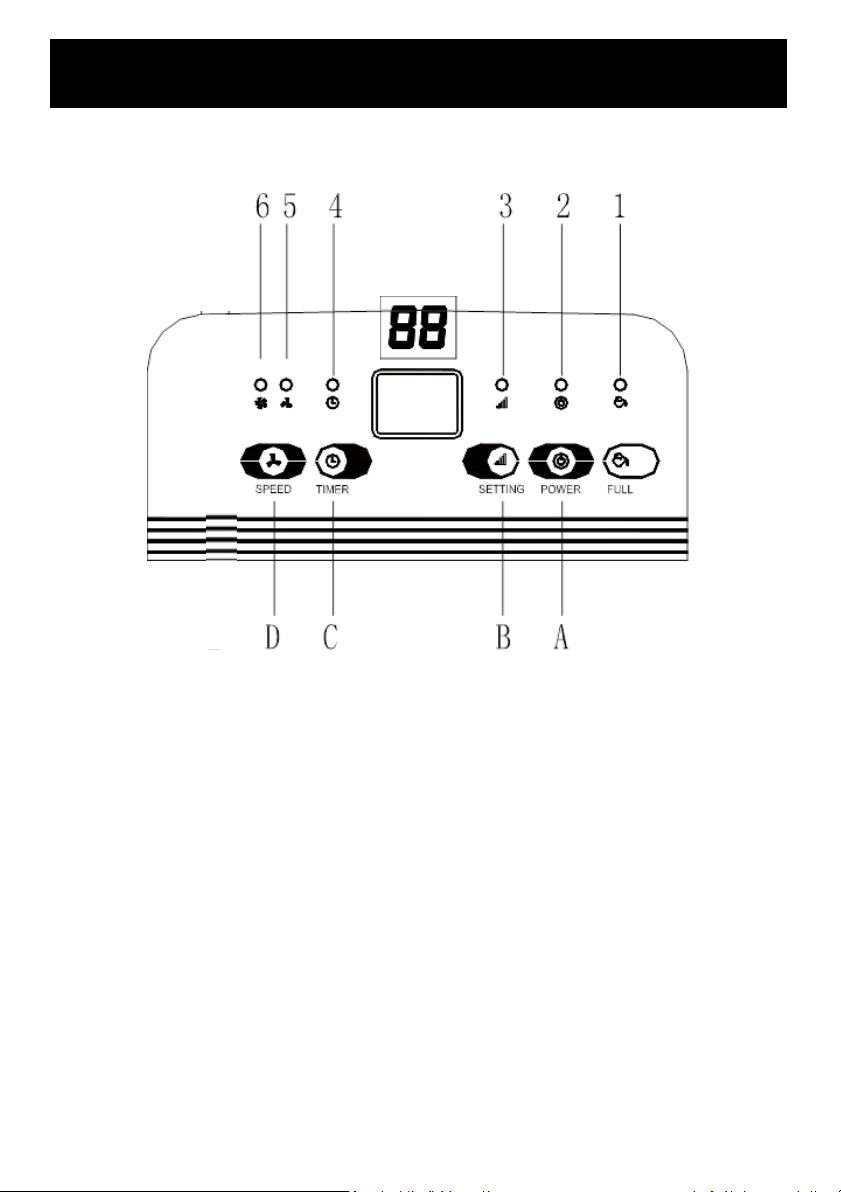
LED INDICATOR LIGHTS
1.WATER FULL
2.POWER
3.SETTING
4.TIMER
5.LOW FAN SPEED
6.HIGH FAN SPEED
DIGITAL DISPLAY
The indicator features 4 functions:
• Indicates the room humidity level – in normal operating mode
• Indicates the humidity that you have selected - when setting the humidity
• Indicates the hours - when programming the time for the unit to turn on and off
• Displays power setting - when the environment humidity is lower than 35%, it will
show “LO”, when the environment humidity is higher than 95%, it will show “HI”.
PUSH BUTTONS
A. Power Button
B. Adjustable Humidity Button
C. Timer Button
D. Fan Speed Button
CONTROL PANEL
Page 7

OPERATING INSTRUCTIONS
Always choose a safe location for the Dehumidifier, keeping in mind the safety precautions
outlined. Ensure all packaging has been removed from the unit before use. This appliance
requires no installation, it should be used solely as a portable appliance. Leave the appliance to
stand for one hour after transport or after the unit has been on its side, before connecting it to
the mains supply to let the refrigerant settle.
1. The Power indicator light will illuminate when the unit is plugged in, regardless of whether
the unit is operating or not.
2. Press Power button once to start operation. Press it again to stop operation.
3. Press Setting button to set the desired humidity level in the room, humidity can be set from
40% to 80% in 5% increments.
Note: When environment humidity is lower than the selected humidity by 2%, the compressor
will stop and the fan will stop working 3 minutes later. When environment humidity is equal to
or higher than the selected humidity by 2%, the compressor will restart (once the 3-minute
compressor protection time has elapsed).
TIMER
1. Press Timer button to set the timer.
2. Use the Timer button to program the time when the unit automatically turns itself on and
off. Press the button, it will be circulate from 00 to 24 in 1 hour increments.
3. The programmed time will be cancelled if the dehumidifier is switched to manual. The
programmed time remains unchanged if the machine stops working due to the water tank
being full or during defrosting. If you want to cancel the timer programming, press the
button and adjust the time to 00.
FAN SPEED
Press Speed button to set the desired fan speed. It can be adjusted between high speed and low
speed.
WHEN THE WATER CONTAINER IS FULL
A beep signal will sound 15 times and the tank full indicator light will illuminate.
The compressor will stop automatically. This will also stop the dehumidification process.
Empty the water container and replace it in the correct position. The Dehumidifier will continue
dehumidifying when the compressor automatically restarts after approximately three minutes.
Note: Do not remove the float from the water tank. The water full sensor will no longer be able
to detect the water level correctly without the float and water may leak from the water tank.
When replacing the drainage tank, press the tank firmly into place with both hands. If the tank is
not positioned properly, the “TANK FULL” sensor will be activated, and the dehumidifier will not
operate.
This Dehumidifier is designed to provide an optimum performance. It is not recommended to
operate in ambient temperature exceeding 35°C or lower than 5°C.
Ensure all external windows and doors are closed before turning on the unit.
Operating Your Dehumidifier
Page 8

Operating Your Dehumidifier
PERMANENT WATER DRAINAGE
It is possible to connect a drainage tube (not supplied) to the unit for permanent water drainage.
If this option is desired, you will need to purchase a suitable tube from your local hardware
retailer.
(Living & Co does not hold tubes as spare parts).
Connect the drainage hose to the drain spout. Ensure that the end of the hose is lower than the
drain opening, otherwise the water will not drain and flooding may occur.
Also ensure the water tank is in position (in the unit) otherwise the continuous drainage will not
operate.
Place the end of the drainage hose in a drainage outlet.
When you no longer wish to use the permanent water drainage, disconnect the drainage tube
from the device.
CLEANING AND MAINTENANCE
• Unplug the Dehumidifier from the mains supply before cleaning.
• Ensure that the Dehumidifier has been allowed to cool down completely before cleaning.
• Use a damp cloth (not wet) to wipe the exterior of the Dehumidifier to remove dust and dirt.
• Use a vacuum cleaner to remove dust and fluff from around the grills.
• Never use solutions such as benzene, thinners or polishing agents.
• Ensure the Dehumidifier is dry before plugging back into the mains supply.
Do not attempt to dismantle the Dehumidifier. There are no user serviceable parts. For service or
repair, contact an authorised electrical service technician.
THE AIR FILTER
Unplug the Dehumidifier from the mains supply.
Remove the filter. Clean the filter with a vacuum or with water. Dry the filter.
Ensure the filter is completely dry before placing back in the unit.
Never use the Dehumidifier without the air filter.
STORAGE
To store the unit, remove the plug from the socket and empty the water container. Allow the
container and the Dehumidifier to dry completely. Clean the air filter. Store the device in a dustfree location, preferably covered with a sheet of plastic.
IMPORTANT: NEVER COVER THIS DEHUMIDIFIER!
Page 9
TROUBLE SHOOTING
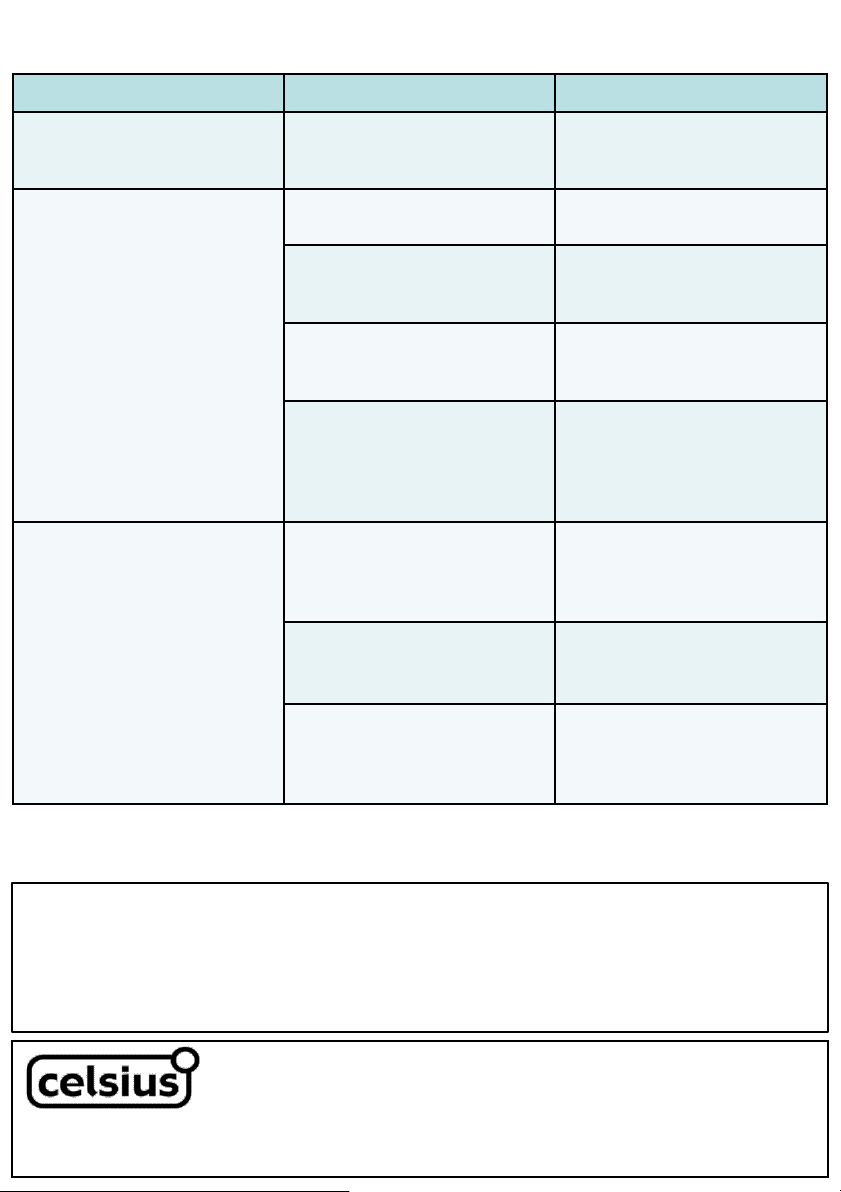
Problem Cause Solution
The Dehumidifier will not turn on The power is not connected
Insert plug into mains power
supply and turn unit on
The Dehumidifier is not
extracting water
The water tank is full
Remove the water tank and
empty water
The water tank is not in its
correct position
Remove water tank and replace it
in its correct position
The air filter is clogged
Clean the air filter as per
instructions in user manual
The temperature or relative
humidity in the room is too low
It is normal for the Dehumidifier
not to operate in low humidity or
low temperatures
The Dehumidifier operates, but
reduces the relative humidity in
the room by small amounts
The room which the Dehumidifier
is operating in is too large
Recommend using a Dehumidifier
with a larger capacity
There are too many sources of
humidity
Recommend using a Dehumidifier
with a larger capacity
The room has too much
ventilation
Reduce the number of ventilation
sources (i.e. close windows,
doors, etc.
TECHNICAL SPECIFICATION
Model: CELDH145
Supply: 220-240VAC 50Hz
Wattage: 245W
Unit Capacity: 10L/day max (30°C/80%RH)
Tank Capacity: 2L
Refrigerant: R134a/130g
SUPPORT AND TECHNICAL ADVICE
Celsius – New Zealand
Monday – Friday 8am-5pm
Phone +64 (0)9 917 4000
Phone 0800 232 633
[email protected]
Celsius – Australia
Monday – Friday 8am-5pm
Phone +61 (0)3 9365 5100
Phone 1300 465 324
PROOF OF PURCHASE
To receive warranty retain receipt as proof of purchase.
Page 10
Thank you for purchasing this Celsius product. Your product is warranted against faults and manufacture when used in normal
domestic use for a period of one year. In non-domestic use Celsius limits the voluntary warranty to three months.
Celsius undertake to repair or replace this product at no charge if found to be defective due to a manufacturing fault during the
warranty period.
This warranty excludes damage caused by misuse, neglect, shipping accident, incorrect installation, or work carried out by anyone
other than a qualified electrical service technician.
PLEASE KEEP YOUR RECEIPT AS THIS WILL HELP VERIFY YOUR WARRANTY.
The benefits given to you by this warranty are in addition to other rights and remedies available to you under law in relation to the
goods or services to which this warranty relates.
In Australia, our goods come with guarantees that cannot be excluded under the Australian Consumer Law. You are entitled to a
replacement or refund for a major failure and compensation for any other reasonably foreseeable loss or damage. You are also
entitled to have the goods repaired or replaced if the goods fail to be of acceptable quality and the failure does not amount to a
major failure.
In New Zealand this warranty is additional to the conditions and guarantees of the Consumers Guarantee Act (1993).
One Year Warranty
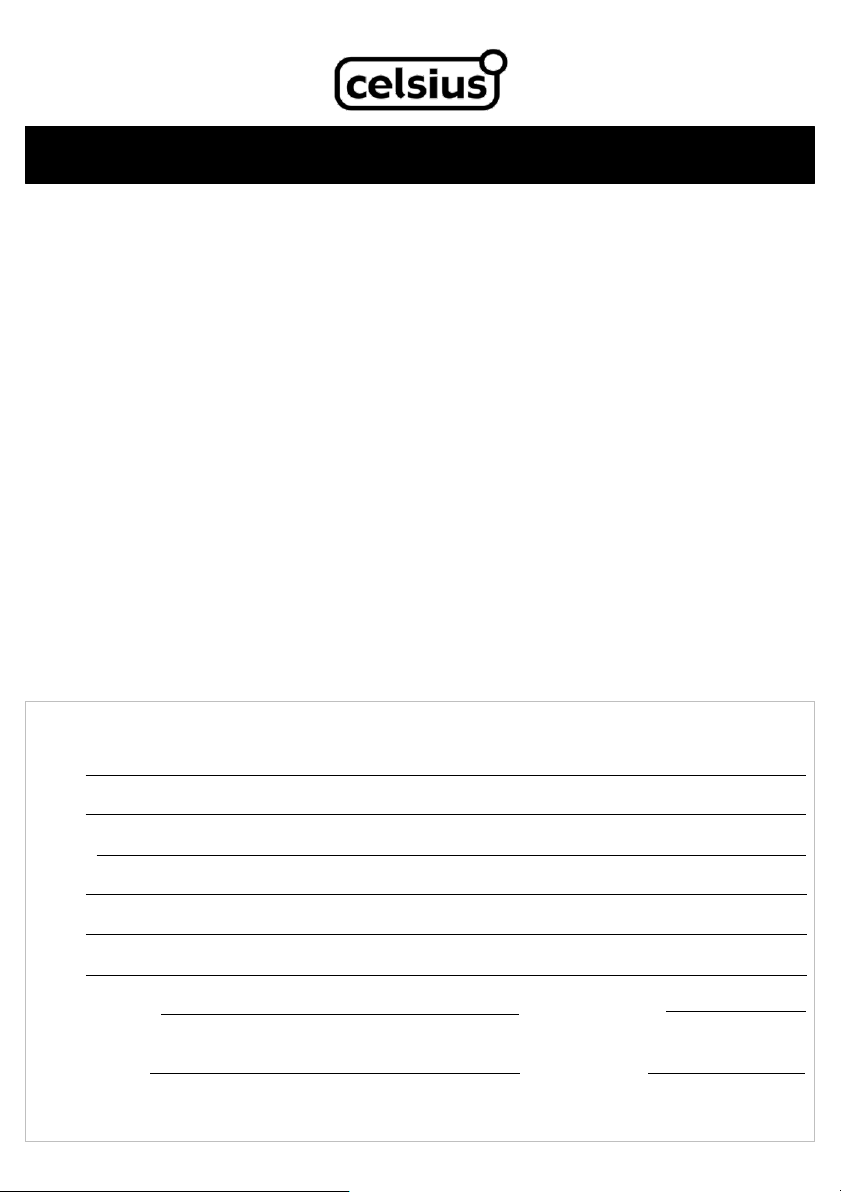
Celsius One Year Warranty (IMPORTANT: Please complete and retain this warranty card)
Name
Address
Place Of Purchase Date Of Purchase
Name Of Product Model Number
Attach a copy of the purchase receipt to this warranty card
Celsius – New Zealand
PO Box 100-707
N.S.M.C
Auckland, 0745
Phone +64 (0)9 917 4000
Phone 0800 232 633
www.celsius.co.nz
Celsius – Australia
PO Box 574
South Morang
Victoria, 3752
Phone +61 (0)3 9365 5100
Phone 1300 465 324
www.celsiusforhome.com.au
Due to continual design improvements, the product illustrated in this User Manual may differ slightly from the actual product.
Page 11

This page is intentionally left blank
Page 12

 Loading...