

Page 1
Page 2

1
Notice Before Using
2
Package Contents List
Item Name
Quantity
1
Thank you for purchasing the Celltronix Bluetooth Headset BTRT2. Please check the
contents of this package to verify the items listed below have been included in your package.
Please read this User's Manual completely before you use the Headset. The BTRT2 has
been developed using Bluetooth wireless technology and is capable of connecting with
Bluetooth devices designed with Audio Gateway. PDAs, Desktop and Notebook computers
can be connected and paired with the Headset using a USB Bluetooth Dongle. Before using
the Headset please verify your Bluetooth device (Phone, PDA) complies with Bluetooth V1.1/
V1.2/V2.0 /2.1 and supports the Bluetooth Headset or Hands-free profile.
Please inspect this package and refer to the package contents list below to verify all items
were included in this package:
A. BTRT2 Bluetooth headset......................................................1
B. AC Travel Charger...................................................................1
C. DC Car Charger........................................................................1
D. USB Charging Cable...............................................................1
E. User's Manual..........................................................................1
F. Ear Pad (Large and Small).........................................................2
Page 3
3
2
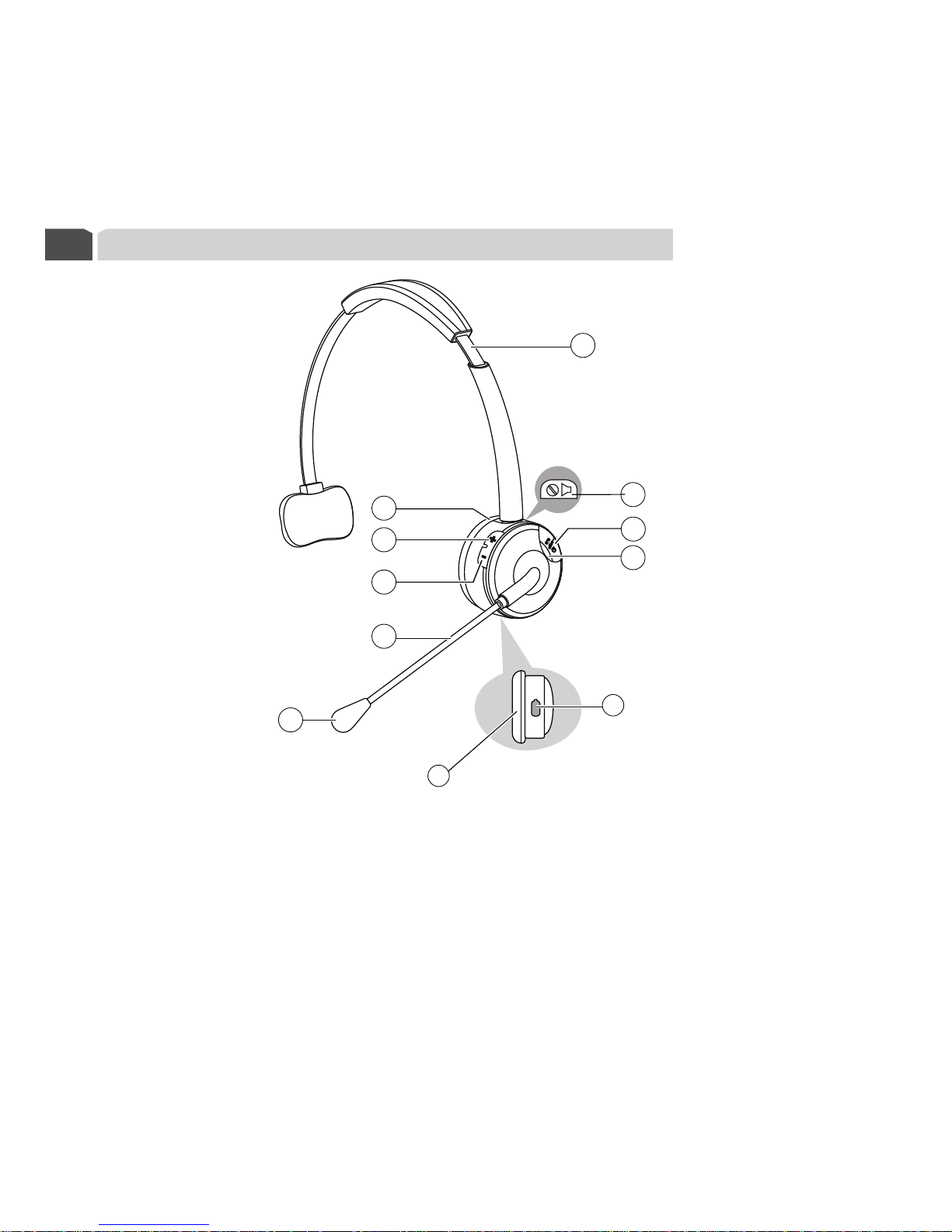
BTRT2 Bluetooth Headset Overview
10
11
1. Adjustable Head Strap
2. Speaker
3. Volume(+)
4. Volume(-)
1
3
4
6
5
2
7
8
5. Flexible Arm
6. Microphone Boom (MIC)
7. Mute Button
8. On/Off Button
9. Indicator Light (LED)
10. Charging Socket (Micro USB)
11. Ear Pad
9
Page 4

Charging the battery
3
4
This headset has an internal, non-removable, rechargeable battery. Do not attempt to
remove the battery from the device as you may damage the device. Please refer to the
following steps to charge the battery:
1. Connect the charger to the correct outlet.
2. When the charger is connected to the headset, the red indicator light will turn on
indicating it is charging. If charging does not start, disconnect the charger, plug it in
again. Charging the battery fully may take up to 2 hours.
3. When the battery is fully charged, the red indicator light will turn off. Disconnect the
charger from the headset and the wall outlet. The headset is ready to use.
NOTE:
lThe fully charged battery has power for up to 13 hours of talk-time or up to 300
hours of standby time. However, the talk and standby times may vary when used
with different mobile phones or other compatible Bluetooth devices, usage
settings, usage styles, and environments.
lWhen the battery power is low, the headset will remind you by beeping every 20
seconds, and the red indicator light starts to flash.
lFor first time use, please charge the headset fully. If you can not see the indicator
light while charging, please leave the headset on the charger for a while, and then
the indicator light will turn on.
Page 5
5
5
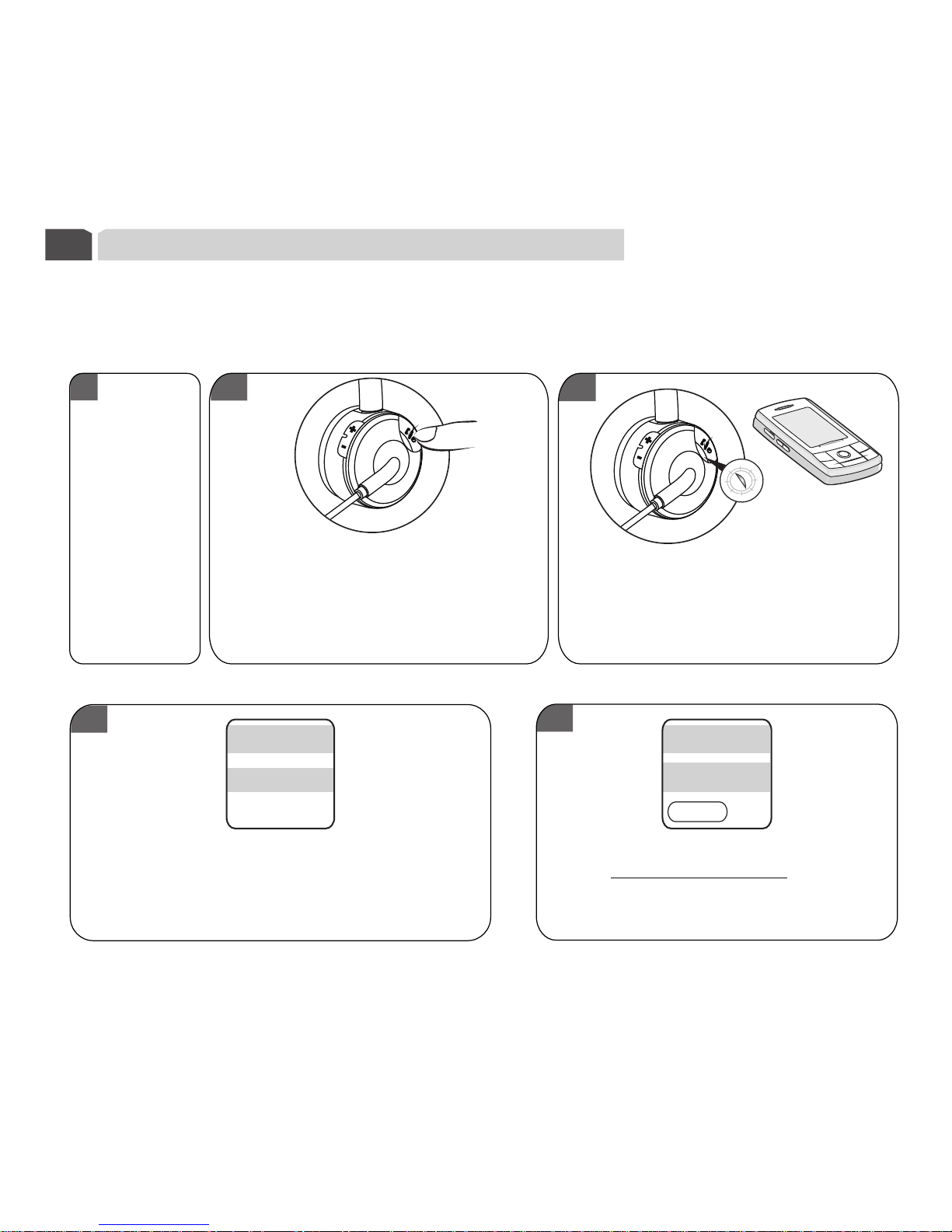
Pair to your Bluetooth phone
4
Enter PIN code as 0000 (4 zeros)
and confirm to complete pairing.
BT R T 2
Bluetooth devices
00 0 0
Scan results
Enter Bluetooth
Passkey
1
2
3
4
Before you use your headset the first time, you must pair the unit with a Bluetooth
enabled mobile phone.
Please refer to the following steps to set up the pairing:
Press and hold the On/Off button on
the edge of the unit for 4 seconds
until you see the LED light flash blue
and red alternately indicating the
unit is in pairing mode.
Following your phone's instruction
guide, set your Bluetooth enabled
phone into search mode
Insure the
headset is off.
Your phone will find the headset and show
the device name on the screen, select the
device name to confirm pairing.
Page 6

NOTE:
lIf the pairing is successful, the headset will connect to your phone automatically.
You may need to confirm the connection.
lWhile the headset is paired with the phone and connected, the ind ica tor light will
flash blue 1 time every 3 seconds. If the pairing operation failed or did not connect
to you phone, the blue indicator light will flash 1 time every 5 seconds.
lOnce you pair the headset with one device or more, the Headset will automatically
connect to the phone you last connected whenever you turn the headset on, as long
as, your phone is within range and has it Bluetooth function enabled.
Battery information
6
5
* Your device is powered by a battery.
The battery can be
charged and discharged hundreds of times, but it will eventually wear out.
* Unplug the charger from the electrical plug and the device when not in use. Do not leave a
fully charged battery connected to a charger, since overcharging may shorten its lifetime.
If left unused, a fully charged battery will lose its charge over time.
* To prevent over discharge endangering the battery, you are recommended to charge the
headset fully each month.
*
rechargable The full performance of a new battery is
achieved only after two or three complete charge and discharge cycles.
If the headset is left un
used for a long period of time, charge it fully and turn it off.
Only used specified charger for charging your Bluetooth device, otherwise damage could
occur and void product warranty.
Page 7

Turning headset on /off
7
*Turning on your headset
While the headset is turned off, press and hold On/Off for 3 seconds until you hear a
tone from low to high. The headset is now on. The Blue indicator light will be solid
for 2 seconds.
*Connecting to a Bluetooth phone
If your headset has completed the pairing operation successfully, when the headset
is turned on, it will connect to the phone you last connected with automatically.
Please ensure your phone's Bluetooth function is active.
*Turning off the headset
At any working state after the headset is powered on, press and hold On/Off for 5
seconds. You will hear a tone from high to low, and the Red indicator light will be
solid for 4 seconds. The headset has now powered off.
Note:
To conserve power, if the headset is not connected to a device for approximately one
(1) hour, the headset will turn off automatically.
6
Page 8
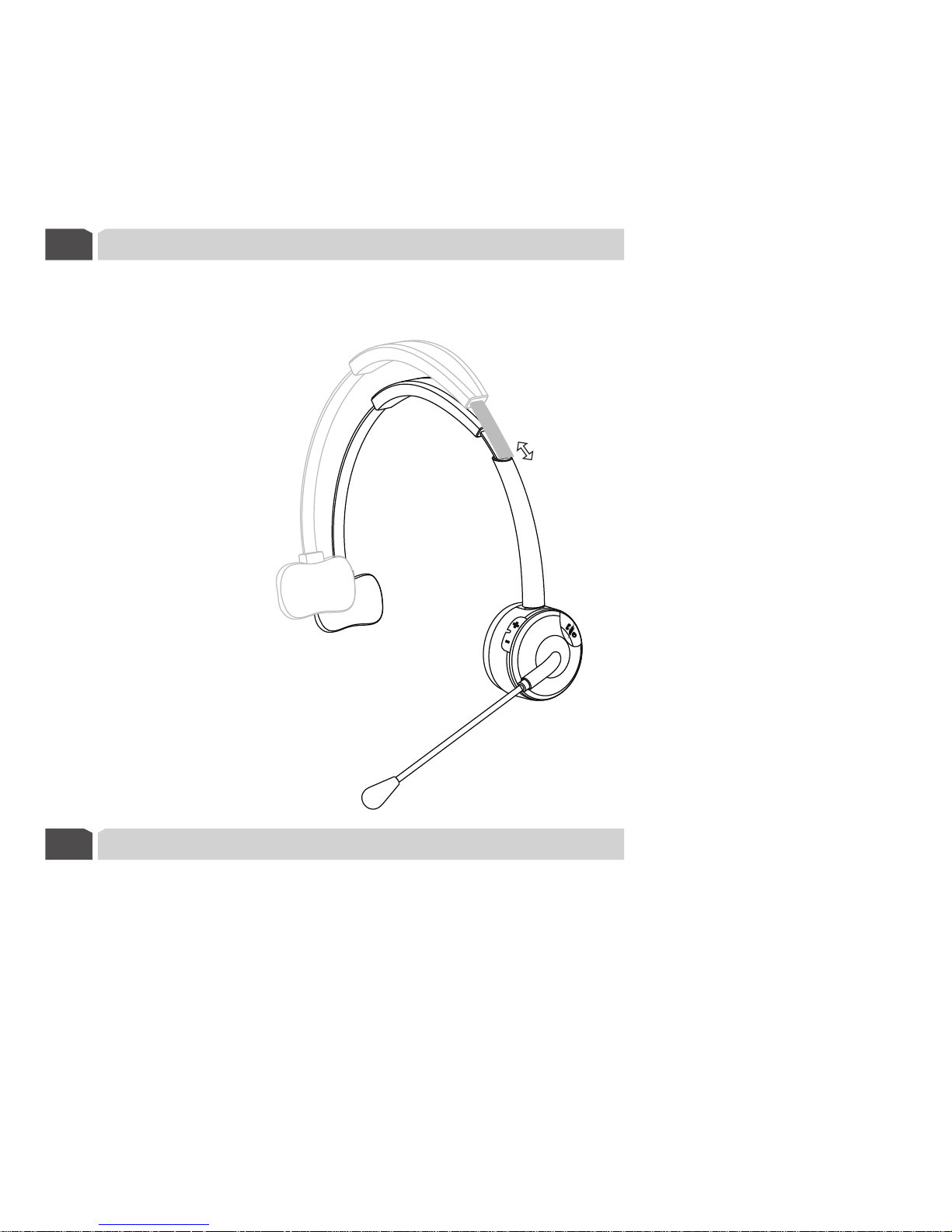
Wearing your headset
8
According to your preference, you can wear the headset on your left or right ear.
The adjustable head strap design allows for a c omfortable fit .
9
Disable/Enable the LED indicators
Press and hold the MUTE button for 3 seconds while the headset is in any powered on
state. The LED indicators will be turned off. Repeat this action to activate the indicators.
The headset will flash BLUE 2 times to confirm re-activation of LED was successful.
7
Page 9

* Using phone's keypad
In stand-by mode, dial the number on your phone's keypad to make a call.
* Use Voice-Dialing
In the stand-by mode, press the On/Off shortly, you will hear a short tone from the headset,
and the phone will prompt you to say the voice tag which you have already attached to your
contact. If the voice tag is identified by the phone, the related number will be dialed.
Please insure that your mobile phone supports this voice dialing function, and voice tags
have been set up on your mobile phone prior to attempting this. Refer to your mobile
phone's user guide or contact your service provider.
* Last number re-dialing
Press and hold the Volume(-) button for 3 seconds. You will hear 2 short tones.
The last number you dialed will be re-dialed.
When you receive an incoming call, press the On/Off button shortly to answer the incoming call;
you can also answer the call on your phones keypad.
11
Answering a call
Reject an incoming call
12
13
Transferring a call
When you receive an incoming call, press and hold On/Off button for 3 seconds to reject the
incoming call.
While a call is in progress on your mobile phone, press and hold Volume (+) for 3 seconds.
The call will be transferred from your mobile phone to your headset. Repeating the operation
can transfer the call between your headset to your mobile phone.
8
Making a call
10
Page 10

14
Call-waiting (Three-Way Calling)
15
Ending a call
While on a call, press the On/Off button shortly to end the call; you can also end the call on
your mobile phone keypad.
Volume control
16
17
While on a call, you can adjust the volume by pressing the Volume(+) and Volume(-)button
or you can adjust the volume on your mobile phone keypad.
Mute
While a call is in progress press the Mute button, you will hear a tone from low to high.
The headset's MIC is now muted. You will hear a remindful tone every 20 seconds, notifying
you that your MIC is still muted and a call is still in progress. Repeat the operation and you
will hear the tone from high to low. The mute function is now cancelled.
Before using the Call-Waiting function on your headset, please ensure that your phone
supports this Hands-free profile and you have access to the service by wireless provider.
* If there is another incoming call while a call is in progress on your mobile phone, press
On/Off shortly. This will accept the waiting call and end current calling.
* If there is an incoming call while a call is in progress on your mobile phone, press and
hold On/Off for 3 seconds to accept the incoming call and place the current call on hold.
* While a call is on hold and you are engaged in an additional call, press On/Off shortly to
end the current call and resume the call holding.
* While a call is on hold and you are engaged in an additional call, press and hold On/Off for
3 seconds to shift the current call to hold and connect you with the previously held call.
* While you are engaged in one call with another call on hold, press the volume -up button
and volume-down button shortly to add the held call to the current conversation
making a three-way call.
* While you engaged in a three-way call, double press On/Off to end all calls.
9
Page 11

10
18
Safety and general information
The battery used in this device may present a risk of fire or chemical burn
if mistreated.
!
CAUTION: ELECTRIC SHOCK HAZARD
1.Please read this guidebook carefully and follow the instructions.
2.
3.Keep device away form humidity, water and any other liquid. If the device is exposed to
water, moisture and other liquid , do not operate it to avoid any electrical shock,
explosion and damage to the device or yourself.
4.Do not place or keep this device near any heat sources, such as, direct sun light, radiators,
stoves or other apparatus which produce heat. It may cause explosion, degrade the
performance and/or reduce battery life.
5.
6.Do not place the heavy objects on the device.
7.Use only supplied and approved charger.
8.Replacement or service must be done by qualified service center or manufacturer.
9.Unplug this device when unused for long periods of time or during lightening storms.
To avoid damage or malfunction do not drop device from high places.
Do not attempt to modify, disassemble or repair device yourself. This could result in
personal injury and it will void the warranty.
Page 12

FCC & IC Statement
19
EU
20
11
Operation is subject to the following two conditions:
(1) This device may not cause harmful interference.
(2) This device must accept any interference received, including interference that may
cause undesired operation.
Note: The manufacturer is not responsible for ANY interference, for example RADIO or
TV interference, caused by unauthorized modifications to this equipment.
Such modifications could void the user's authority to operate the equipment.
This product is CE certified according to the provision of the R&TTE Directive (99/5/EC).
This declares that this product is in compliance with the essential requirements and
other relevant provisions of Directive 1999/5/EC.
Please note that this product uses radio frequency bands not harmonized within EU.
Within the EU this product is intended to be used in Austria, Belgium, Denmark,
Finland, France, Germany, Greece, Ireland, Italy, Luxembourg, The Netherlands,
Portugal, Spain, Sweden, and United Kingdom and within EFTA in Iceland, Norway
and Switzerland.
Bluetooth is a trademark owned by the Bluetooth SIG, Inc.
Page 13

Warranty
21
12
The condition of this warranty and our responsibilities under this warranty are as follows:
Warranty is non-transferable and is limited to the original purchaser only.
* You must be able to prove the date of original purchase of the unit with a dated receipt.
* The warranty is not applicable if the product has been subject to physical abuse,
improper installation, modification or repair by unauthorized third party.
* The responsibility of supplier shall be limited to the repair or replacement of products
deemed defective at the supplier's sole discretion.
* Specifically exempt from any warranty are limited-life consumable components
subject to normal wear and tear such as batteries, decorates and other accessories.
* Supplier is not responsible for failure due to accident, abuse, misuse, or any
unauthorized repair, modification or disassembly.
All repairs must be done by authorized and qualified service center or returned to
the Supplier.
*This warranty gives you specific legal rights, and you may also have other rights which
vary under local laws.
*
Page 14

MADE IN CHINA
Hoffco Brands, Inc.
4860 Ward Road
Wheat Ridge, CO 80033
(877) 292-6454
www.hoffcobrands.com
 Loading...