

Page 1

celexon Laser presenter Expert LP250
User guide
celexon Laser presenter Expert
LP250
Thank you for purchasing this product from celexon.
Please read the user guide carefully and keep for
future reference.
Page 2

celexon Laser presenter Expert LP250
WARNING - RISK OF INJURY!
Laser product class 2M
According to DIN EN 60825-1
Wavelength 650nm
Laser power <1 mW
Laser beams can cause permanent eye
damage. Do not look into the laser beam
and do not direct it at other people or
animals. Keep this device away from
children. This is a working tool and not a
toy and should only be used by adults.
Any use other than that described in this
manual is not permitted and will invalidate
the warranty.
The information in this document is
subject to change without prior notice. No
part of this document may be reproduced
or transmitted in any form or by any
means without the prior consent of the
manufacturer.
The manufacturer assumes no liability for
damage and / or injuries caused by
improper use.
Page 3

celexon Laser presenter Expert LP250
Introduction
I. Key features
1) Supports PowerPoint, Keynote and
Prezi
2) Thanks to the ISM-free 2.4GHz
frequency, this presenter can be used
worldwide without restrictions
3) The omnidirectional emitter allows the
control of devices in other rooms
4) One transmitter can control up to 6
USB receivers
5) Supports the following functions:
Page up / down, full screen, black
screen
6) Supports Hyperlink function in
PowerPoint
7) Volume control via side button
8) The LED flashes when battery is low
9) The receiver can be inserted into the
presenter's housing
10) Safe laser class according to
EN60825-1
11) Compatible with USB3.0, plug and
play
12) Energy-saving with auto standby and
on / off switch
13) Power supply via integrated rechargeable battery
Page 4

celexon Laser presenter Expert LP250
Supported Operating Systems
Windows 7, Windows 8, Windows 10,
Mac OS, Linux, Android 4.3 and later
In the box
1) Laser Presenter Expert LP250
2) User guide
Technical spec
Transmitter
Technology: Radio frequency
Frequency: 2.4GHz
Range control: up to 30m
Laser: Class 2M
Laser power: <1mW
Laser distance: > 200m
Wavelength: 650nm
Battery: 300mAh
Operating Voltage: 1.5V
Weight: 21.7g
Dimensions: 139.2 x 18.2 x
19.7mm
USB receiver
USB version: USB 2.0
Operating voltage: 5V DC
Dimensions: 26.5x12.7x5.5 mm
Weight: 1.9g
Page 5
celexon Laser presenter Expert LP250
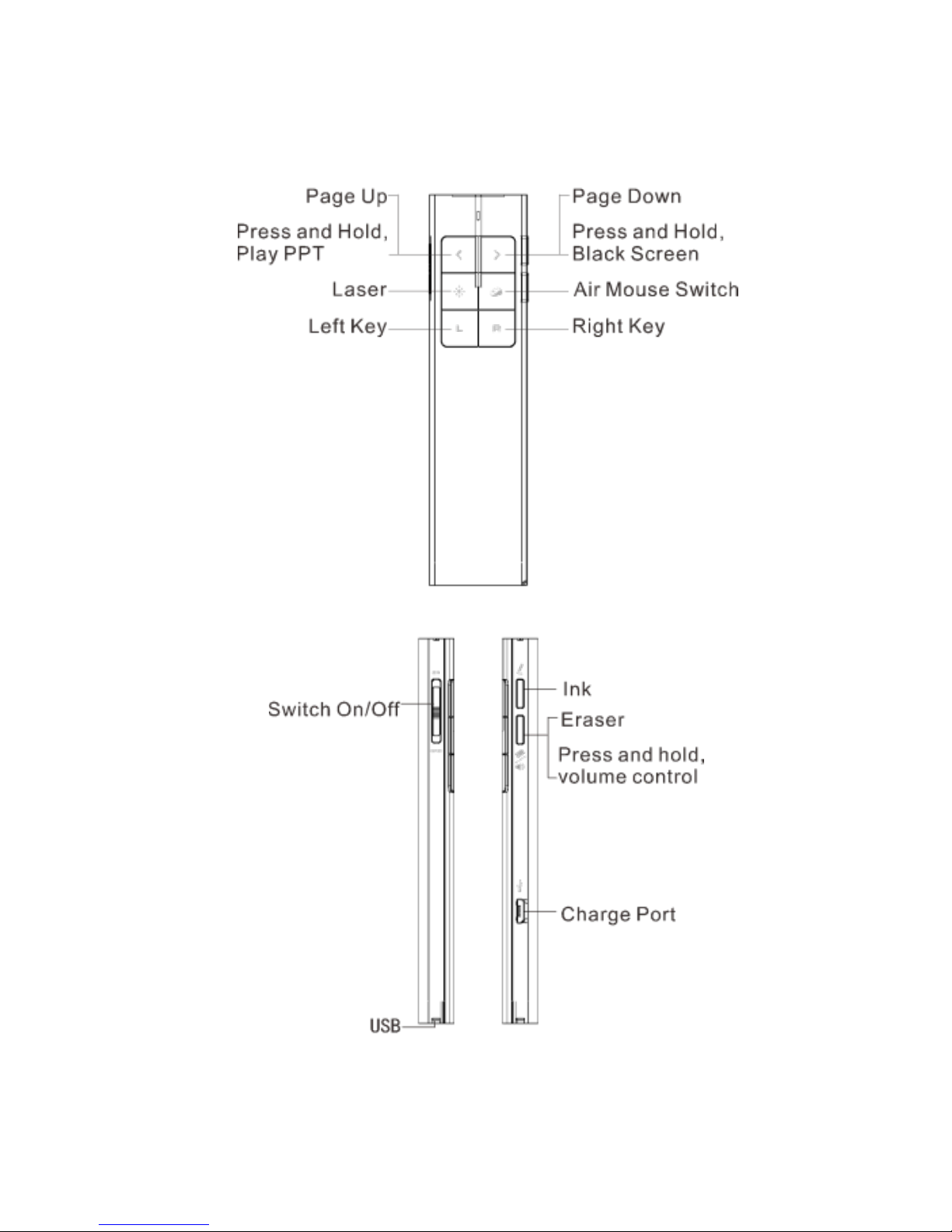
II. Functions - overview
Page 6

celexon Laser presenter Expert LP250
Functions
1) To use the laser pointer on, press and
hold the ‘laser pointer’ button.
2) Press the ‘page up’ button for 2
seconds to view the current slide. If
the button is held for another 2
seconds, the slide will appear in full
screen mode.
3) Press the ‘page down’ button to move
to the next slide during the
presentation. The ‘page up’ takes you
back to the previous slide.
4) To pause the presentation with a
black screen, hold the ‘page down’
button for 2 seconds. If held for
another 2 seconds, the presentation
will continue with the following slide.
5) To move the cursor on the screen,
press the ‘mouse’ button.
6) Press and hold the ‘print’ button: to
record comments during the
presentation.
7) To remove the comments, press the
‘erase’ button.
8) To increase the volume, press the
‘volume’ button and move the pointer
upwards. To lower the volume, move
the pointer downwards.
9) The LP250 supports PowerPoint,
Keynote and Prezi. The presentation
mode can be changed by
simultaneously pressing the ‘page up
/ page down’ buttons. By default, the
up and down buttons on the LP250
have the same function as the up and
down arrows on your keyboard
(PowerPoint / Keynote). If you press
Page 7

celexon Laser presenter Expert LP250
the up and down buttons
simultaneously, they function as left
and right arrows when using Prezi.
When pressed 3 times, the LP250
goes back to its default settings.
Page 8
celexon Laser presenter Expert LP250
Installation
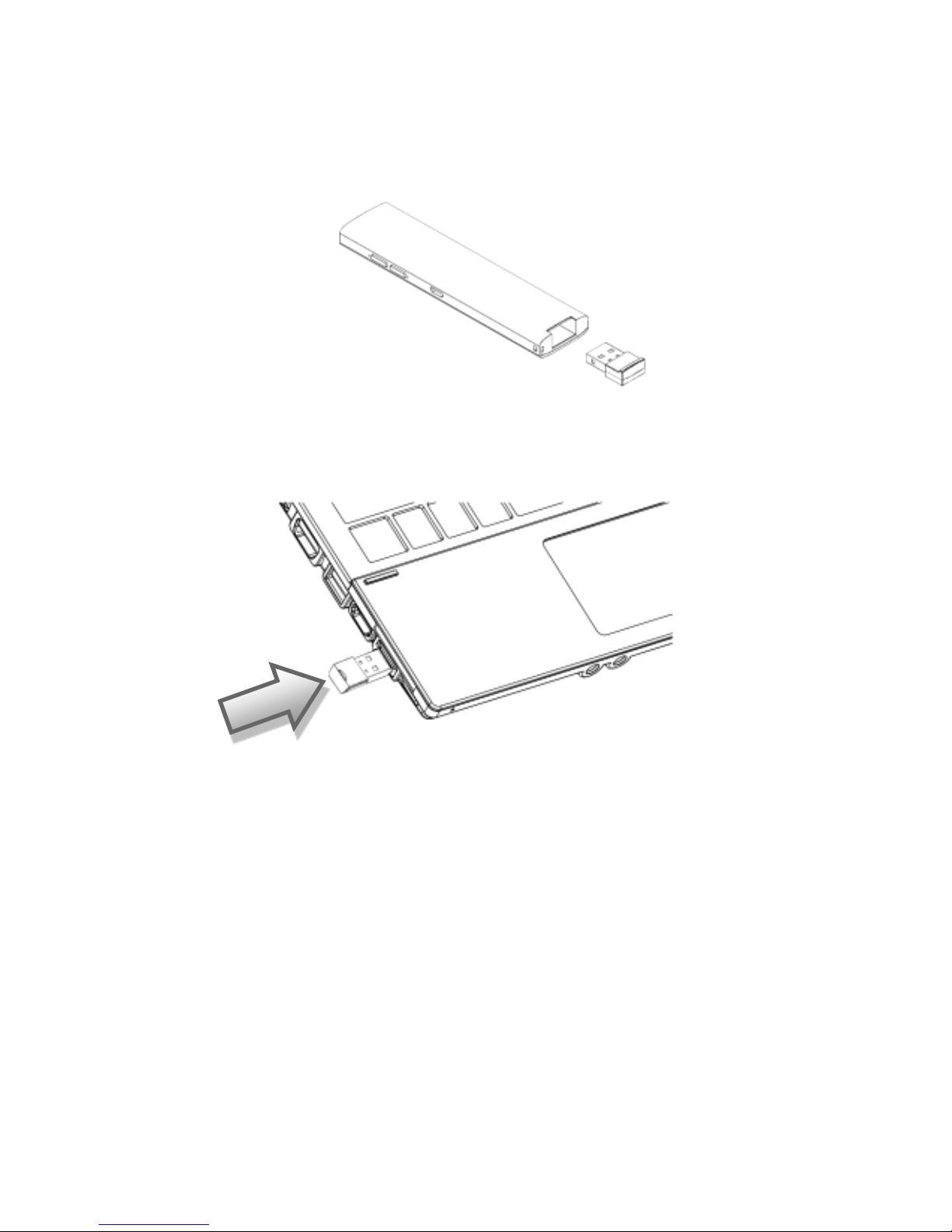
1) Take out the mini USB receiver
from the wireless presenter
2) Insert the USB receiver into a USB
port
Operating systems such as Windows,
Android and Linux automatically install
the driver for the USB receiver.
3) After the automatic installation, the
presenter can be used. The blue LED
will flash with each press of a button.
4) To switch the presenter off, use the
switch on the side.
Page 9
celexon Laser presenter Expert LP250
5) If the LED flashes slowly, the battery
is low and needs to be charged.
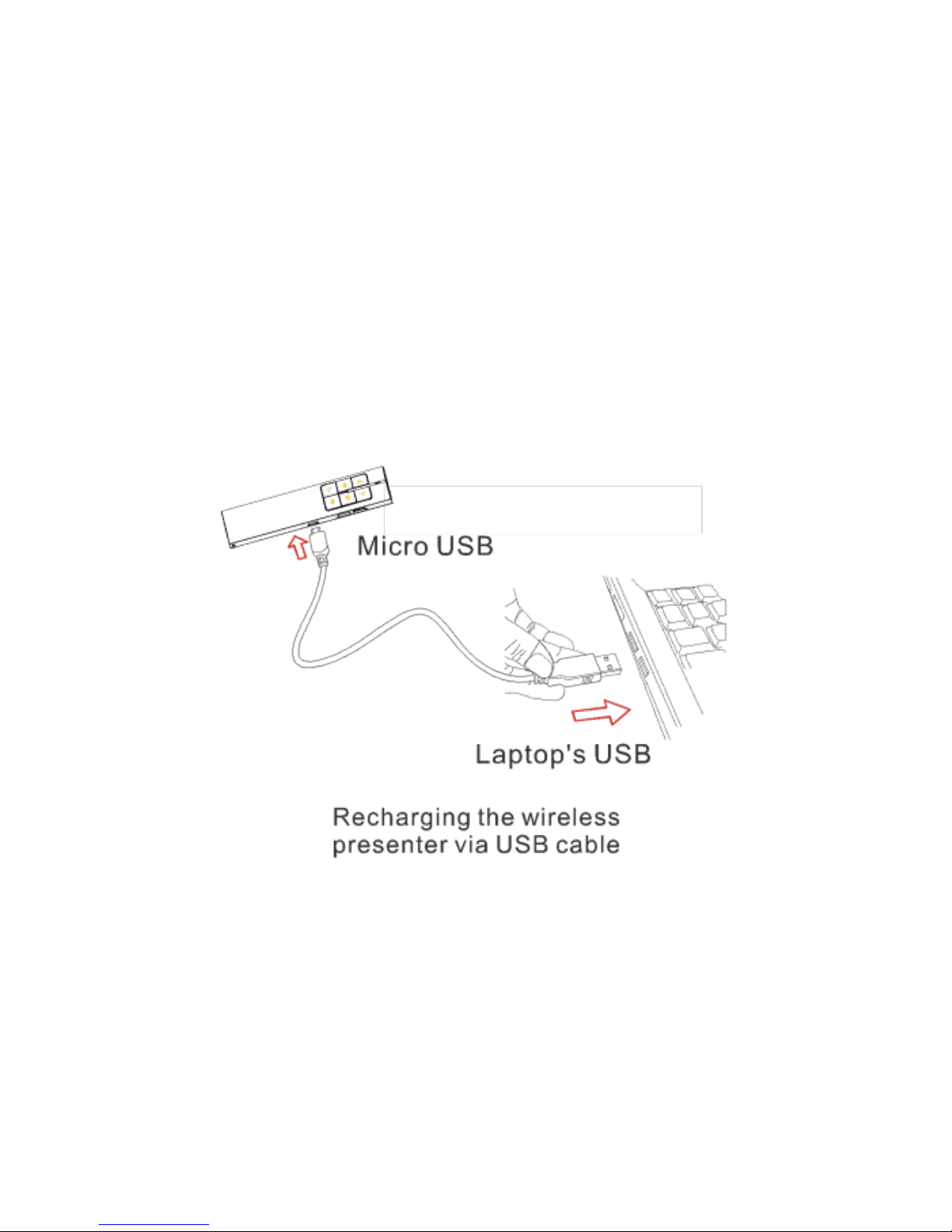
6) To recharge the battery, connect the
LP250 with the USB cable provided to
your computer. The red LED indicates
that it is charging. Once the battery is
fully charged, the LED light goes out
(about 2 hours).
Page 10
celexon Laser presenter Expert LP250
FAQ
1. Why does the laser pointer not
work?
Check whether Presenter is switched on.
If the LED flashes slowly, it means that
the battery is low and needs recharging.
III. Certificates:
CE, ROHS, FDA ,FCC
 Loading...