

Page 1
POWERhandle
Fast Charger
User Manual
PHFC
Technical Specifications
If you experience any problems with this product please contact
email: [email protected]
phone UK: +44 (0) 8453 889769
phone US: +1 800 233 7592
www.cel-global.com
READ INSTRUCTION MANUAL
KEEP DRY
GENERAL HAZARD
SAFETY ALERT
KEEP BYSTANDERS AWAY
© Copyright C Enterprise Limited 2011
C Enterprise Limited www.cel-global.com [email protected]
UK HK USA China Europe Australia Japan• • • • • •
C Enterprise Ltd
Product Code
Charger Input
Charger Output
Boxed Dimensions
Weight
Currently compatible with
- PHFC1
- 110/240v AC 50/60Hz
- 23V DC 2000mA
- 353x266x95mm
- approx (14x10x4")
- 0.45Kg (1lb)
- PH01, PH02, PH03, PH04,
PH10, PH11
FAQ
18V
My battery is not charging, what’s wrong?
Check to make sure the electrical outlet is "live" and that
the air surrounding the battery and charger is between
10ºC and 24ºC (50ºF) and (75ºF). Make sure the
POWERhandle is correctly fitted.
If a Li-ion battery has been subject to an impact, such as being
dropped, the circuit which prevents over discharge can become
damaged, contact your retailer. Extreme impact can cause the
chemicals within the battery to leak, these chemicals are
harmful and should not be touched. Do not charge or attempt to
use the battery. Dispose of appropriately.
Which POWERhandles can I charge with this charger?
See Technical Specifications section, check with your supplier if
unsure.
What is the best way to care for the batteries in my
POWERhandle?
CEL uses several types of battery in its range of
POWERhandles, these require different care. NiCD batteries
will perform best if completely discharged before charging, at
least once every five cycles (charge/discharge cycles). NiMh
batteries should be cared for in a similar way but are more
resilient to the “memory effect” than NiCD, Li-ion batteries have
no memory effect so you can charge them at any time. The
charge will be retained in storage for much longer than other
battery technology but should be topped up occasionally as
over discharge can permanently damage the battery. For more
information see www.cel-global.com
How can I get my charger repaired if it is damaged?
Contact your retailer or visit www.cel-global.com
Where can I get replacement parts, advice or help?
Ask at your retailer or visit www.cel-global.com
Maintenance
Manual Version: 110316 - Designed and edited in the UK - Printed in China
xxxxxx
POWERhandle refers to the battery pack and handle used to
power compatible CEL products, use of the word battery or
batteries refers to the non-removable cells contained within the
POWERhandle.
General inspection
Regularly check that all wires and fittings are present and
correct. Any damage increases the risk of electric shock, fire or
damage to person and property.
Dust
Keep the products air vents unclogged and clean at all
times. Remove dust and dirt regularly. Cleaning is best
done with compressed air or a rag.
Never use caustic agents to clean plastic parts.
CAUTION, Do not use cleaning agents to clean the plastic
parts of this product. A mild detergent on a damp cloth is
recommended. Water must never come into contact with
the charger or POWERhandle.
WARNING, Do not use an extension cord to charge.
WARNING, Charge indoors only.
WARNING, Do not use in wet or damp areas.
Store the product, instruction manual and accessories in a
secure, dry place. In this way you will always have all the
information and parts ready to hand.
This product contains no user serviceable parts. Repairs should
only be carried out by a CEL authorised repairer.
Error codes:
E1: Charging failure for Li-ion POWERhandle
E2: Communication failure for Li-ion POWERhandle
E3: Charging failure of NI/MH-CD POWERhandle
E4: Contact error or open circuit, re-insert POWERhandle.
Page 2
This symbol indicates a battery that is over temperature. The
POWERhandle will not be charged until the temperature drops
below safe limits.
This symbol indicates an error. Allow a hot battery to cool or reset
the system. See the Maintenance section for error codes (eg E1).
If this symbol continues to show and the batteries are not
charging please contact your point of sale or service@cel-
global.com
When charging Li-Ion POWERhandles their LED
display will flash RED then RED+YELLOW then
RED+YELLOW+GREEN and loop until the
POWERhandle is fully charged.
This charger is designed to charge 18 volt POWERhandles only,
using any other battery with this charger could cause serious harm
to persons and property.
Charge only within a temperature range of 0 °C to 45 °C if the battery goes
outside this range while charging it may be damaged or not reach full
capacity.v
Always remove the battery from the tool/charger and store it in a
dry, secure place between 10ºC and 24ºC (50ºF) and (75ºF) when not
in use.
NEVER pull the charger out by the cord or use if the cord is damaged in
any way.
NEVER leave the battery on charge for longer than 24 hours to reduce fire
risk.
NEVER use or charge a battery that is damaged or leaking fluid has
corrosion on the metal contacts. In case of leak dispose of safely and
clean thoroughly.
Features ChargingSafety Notes
To use this product properly, you must observe the safety limitations, the
assembly instructions and the operating instructions to be found in this
manual. All persons who use and service this product must be acquainted
with this manual and must be informed about potential hazards. Children
and infirm people must not use this product. Children should be
supervised at all times if they are in the area in which the product is being
used. It is also imperative that you observe the accident prevention
regulations in force in your area. The same applies for general rules of
occupational health and safety.
The manufacturer shall not be liable for any changes
made to this product nor for any damage resulting from
such changes.
Do not use the product in the rain or in a damp area.
Check for damaged parts. Before using this product,
check that there are no damaged parts or wires.
Defective or damaged parts must be replaced by an
authorised service facility.
Guard against electric shock. Prevent contact with
grounded objects such as water pipes.
WARNING. The use of an accessory or attachment, other
than those recommended in this Instruction Manual, may
present a risk of personal injury.
This product has been designed to charge specific batteries, any use
not specified in this manual will be considered misuse.
The product must be used only for its prescribed purpose. Any use other
than those mentioned in this Manual will be considered a case of misuse.
The user and not the manufacturer shall be liable for any damage or injury
resulting from such cases of misuse.
If the product appears to have any fault or makes any unusual
sounds please consult the manual, a service centre or your retailer
before using.
Conforms to relevant standards for electromagnetic compatibility.
General
Hazard
Keep Dry
POWERhandles are shipped in a low charge condition. You should charge
fully before use and always charge before storage.
WARNING. Do not throw POWERhandles into a fire or water; it could
cause an explosion!
NOTE. It is necessary to slide the product release latches in order to
remove a POWERhandle from the charger dock, or from the tools.
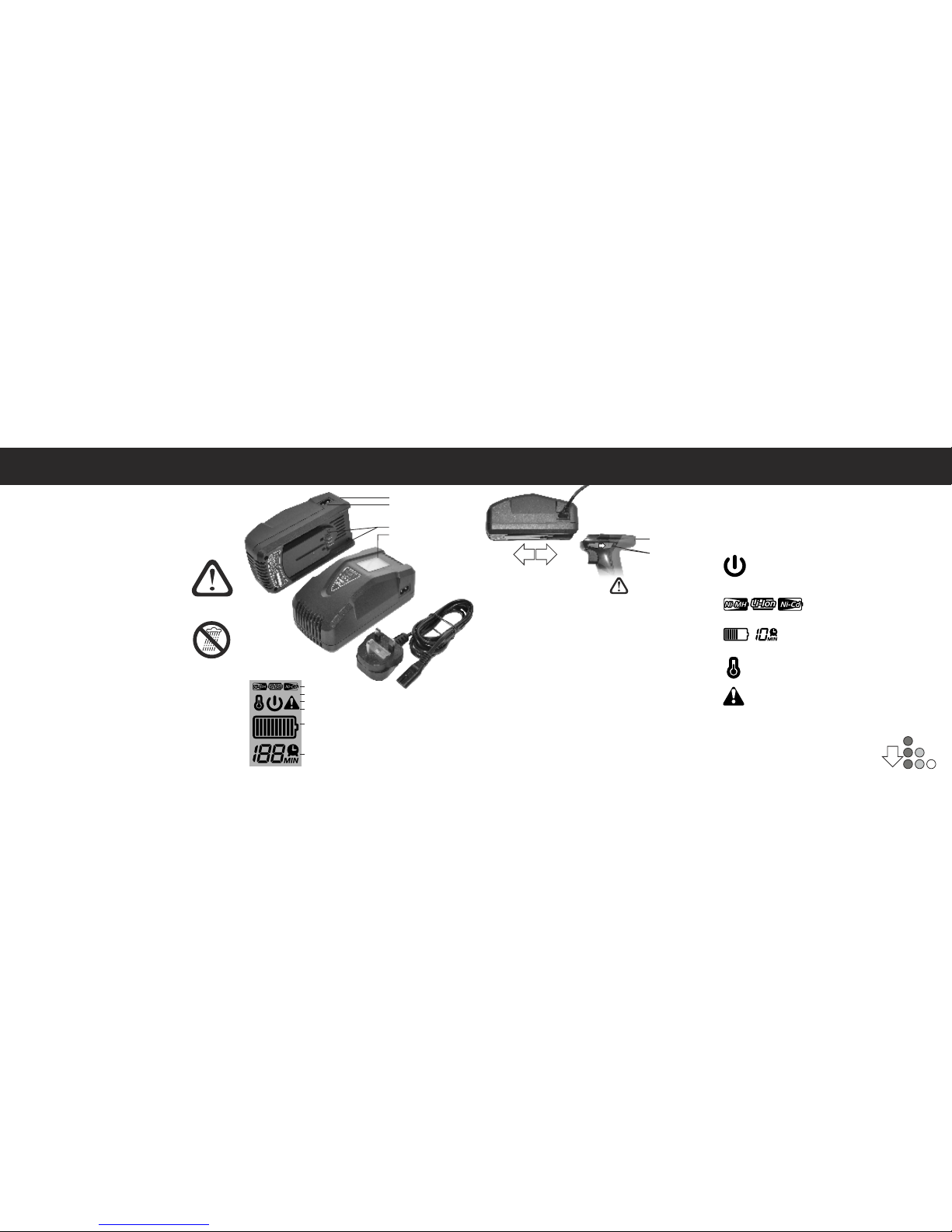
To charge a POWERhandle connect the mains plug to a suitable
mains outlet, power on is indicated by this symbol.
Align the rails of the POWERhandle with the rails of the charger dock.
Slide until it “clicks” into position.
The LCD on the top of the charger dock will indicate the type of battery
connected.
Li-Ion POWERhandles gain 80% of full capacity in
20-30mins then slowly charge to100% capacity.
When charging a Li-Ion battery the time until fully charged will be shown.
loop
RED
YELLOW
GREEN
PHFC1
Mains Input
Rails
LCD Display
If there is any doubt of
normal operation of any
part of this charger, deactivate and remove from any
source of power immediately.
Consult your retailer.
Your product
may differ from
the images and
descriptions in
this manual.
Cell Type Detected
Temperature Warning
AC on Indicator
Warning Indicator
Charging Indicator
F8
Figure of 8 plug
If this plug does
not match your
local supply,
contact your
supplier
immediately.
Time to 100% Charge (Li-Ion only)
Li-Ion POWERhandles will reach 80%
charge in ~30mins full charge will take longer
To fit a POWERhandle for charging
Connect to suitable mains outlet.
Grip the top of the charger firmly.
Align rails of POWERhandle and charger.
Slide in until you hear a “click”.
CONNECT REMOVE
To remove the POWERhandle
Grip the charger firmly
Slide both the release catches
as shown (some models have a
release on the rear) and slide the
POWERhandle away from the
charger as shown.
POWERhandle
(sold separately)
Release catches
(both sides)
 Loading...