

Page 1
quick guide
Pairing Bluetooth® Headsets
jabra bt 2047
jabra steel
www.ceecoach.de/en/help
Page 2 - 4
Page 5 - 7
ceecoach-QG-BT-JB-01
Page 2
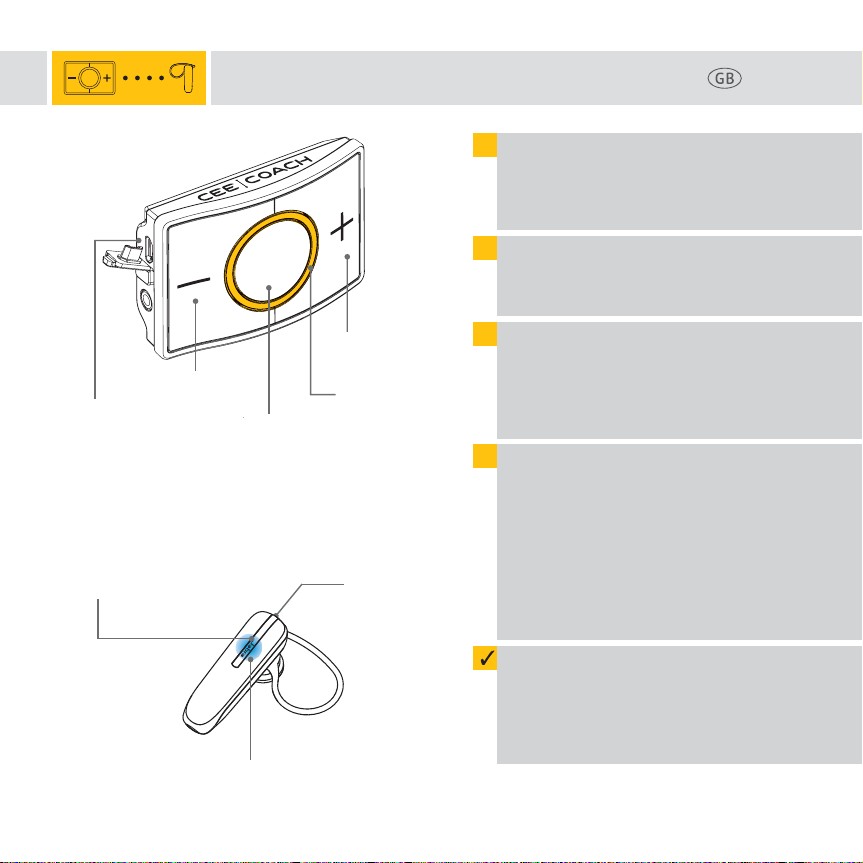
Minus button (-)
USB-charging port
(Charging)
jabra bt 2047
Answer/End button
Pairing CEECOACH 2 with jabra bt 2047
1
Please charge the CEECOACH and the
Jabra BT 2047 headset. If the battery is too
low, pairing might not be possible.
2
Turn on your CEECOACH device first.
Then press the talk button (o) until
the LED starts flashing.
3
Set CEECOACH into pairing-mode by
pressing the plus button (+) and the
minus button (-) simultaneously until
the LED flashes yellow.
4
Turn on the BT 2047 Bluetooth® headset.
This headset is automatically in pairingmode when turned on for the first time.
Please press the Answer/End button to
turn it on until the Bluetooth
flashes blue. In case you want to set the
BT 2047 in pairing-mode again at a later
date, press the Answer/End button for
5 seconds.
Talk button (o)
Plus button (+)
LED light ring
(flashes yellow in
pairing-mode)
USBcharging port
Page 2
®
indicator
Bluetooth® indicator
(flashes blue in pairing-mode)
The pairing between CEECOACH and the
headset is finished in a few seconds.
You can see that the pairing has been
successful when CEECOACH flashes again
in the initial color.
Page 3
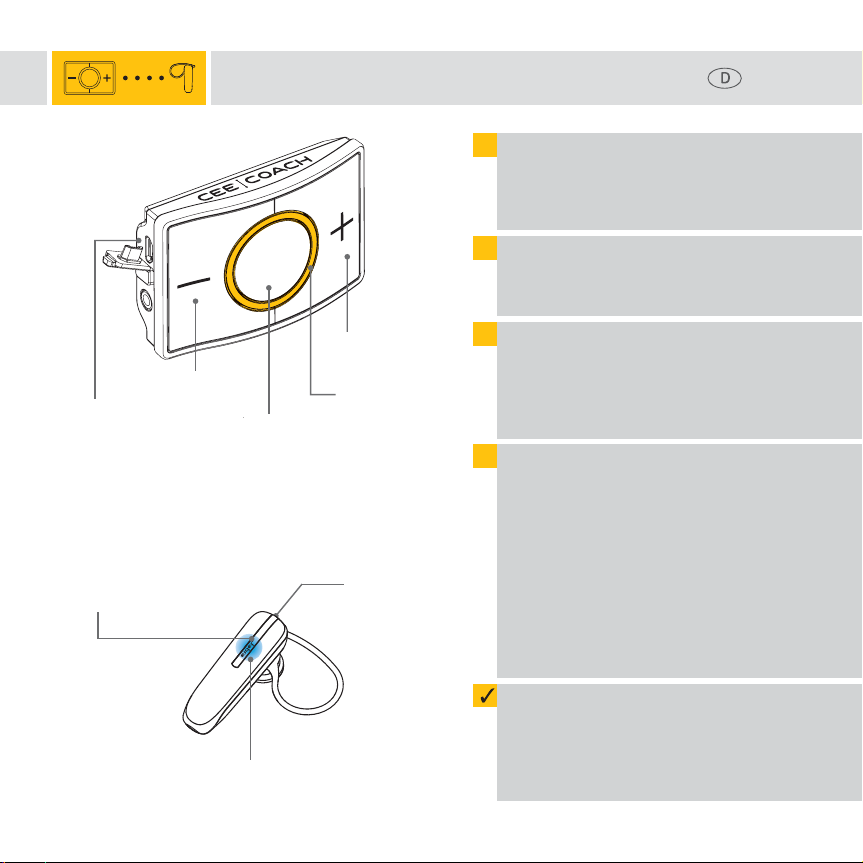
Minustaste (-)
Micro-USB-Anschluss
(Aufladen des Gerätes)
jabra bt 2047
Taste Anruf
annehmen/beenden
Pairing CEECOACH 2 mit jabra bt 2047
1
Laden Sie zunächst den CEECOACH sowie
das BT 2047 auf. Bei zu schwacher Akkuladung kann es vorkommen, dass ein
Pairing nicht möglich ist.
2
Schalten Sie zunächst den CEECOACH ein.
Halten Sie dazu die Sprechtaste (o) solange gedrückt, bis der Leuchtring blinkt.
3
Versetzen Sie CEECOACH in den PairingModus. Halten Sie dazu gleichzeitig die
Plustaste (+) und die Minustaste (-)
solange gedrückt, bis der Leuchtring
gelb blinkt.
4
Schalten Sie nun das Jabra BT 2047 ein.
Beim erstmaligen Einschalten wird das
BT 2047 automatisch in den Pairing-Modus
versetzt. Halten Sie dazu die Taste Anruf
annehmen/beenden gedrückt, bis die
Bluetooth®- Anzeige dauerhaft blau
leuchtet. Möchten Sie das Headset zu
einem späteren Zeitpunkt erneut in den
Pairing-Mode versetzen, so drücken Sie
die Taste Anruf annehmen/beenden
für 5 Sekunden.
Sprechtaste (o)
Plustaste (+)
Leuchtring
(blinkt Gelb im
Pairing-Modus)
Micro-USBLadeanschluss
Seite 3
Bluetooth® Anzeige
(leuchtet Blau im Pairing-Modus)
Das Pairing zwischen CEECOACH und dem
BT 2047 dauert nur wenige Sekunden. Sie
erkennen ein erfolgreiches Pairing daran,
dass CEECOACH wieder in der
ursprünglichen Farbe blinkt.
Page 4
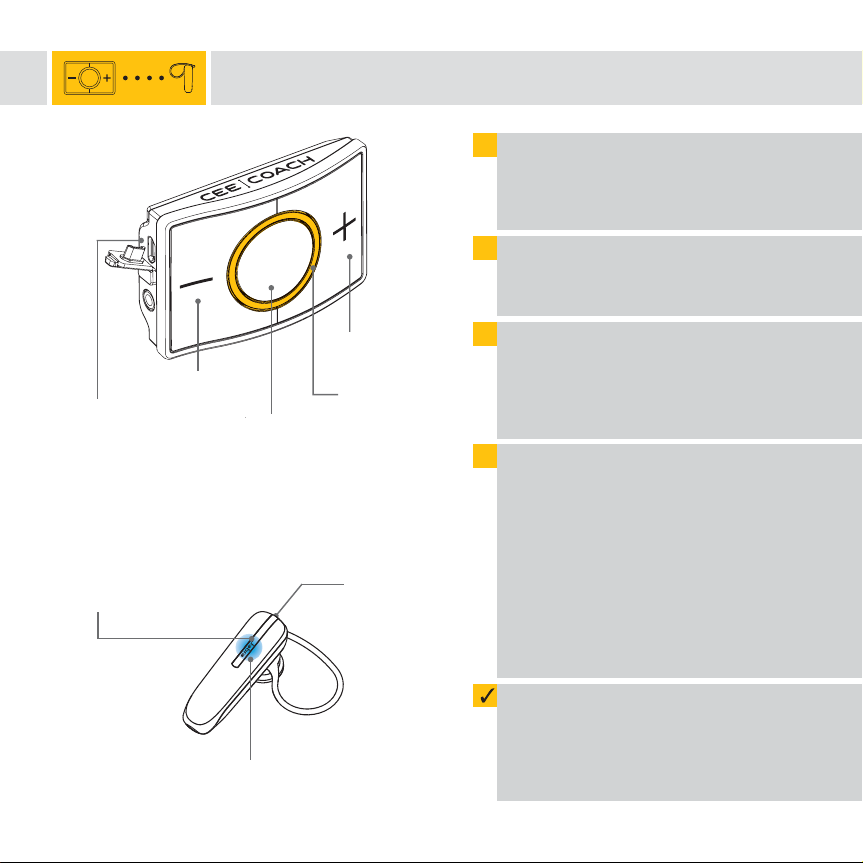
Touch Moins (-)
Connexion
Micro USB
de conversation (o)
jabra bt 2047
Touche
Appel / Fin d‘appel
Couplage de CEECOACH 2 avec le kit jabra bt 2047
1
Bouton
Touche Plus (+)
Anneau
lumineux
(clignote en
jaune en mode
couplage)
Connexion
Micro USB
Rechargez tout d’abord le CEECOACH ainsi
que le kit Jabra BT 2047 Bluetooth
Si la batterie est trop faible, le couplage
ne sera pas possible.
2
Actionnez tout d’abord le CEECOACH.
Maintenez appuyée le Bouton de conver-
sation (o) jusqu’à ce que l’anneau clignote.
3
Actionnez le CEECOACH en mode couplage.
Maintenez appuyées en même temps la
touche Plus (+) et la touche Moins (-)
jusqu’à ce que l’anneau clignote en jaune.
4
Actionnez maintenant le Jabra BT 2047.
Le BT 2047 est mis automatiquement en
mode couplage lorsque vous l’allumez
pour la première fois. Maintenez appuyée
la touche Appel / Fin d’appel jusqu’à ce
que l’indication Bluetooth® s’allume en
continu en bleu.
Si vous souhaitez réactiver ultérieurement
le kit en mode couplage, appuyez 5
secondes sur la touche Appel / Fin d’appel.
®
.
4
Indication Bluetooth
(clignote en bleu en mode couplage)
®
Le couplage entre CEECOACH et Jabra
BT 2047 ne dure que quelques secondes.
Le couplage est réussi lorsque CEECOACH
clignote de nouveau dans la couleur
initiale.
Page 5
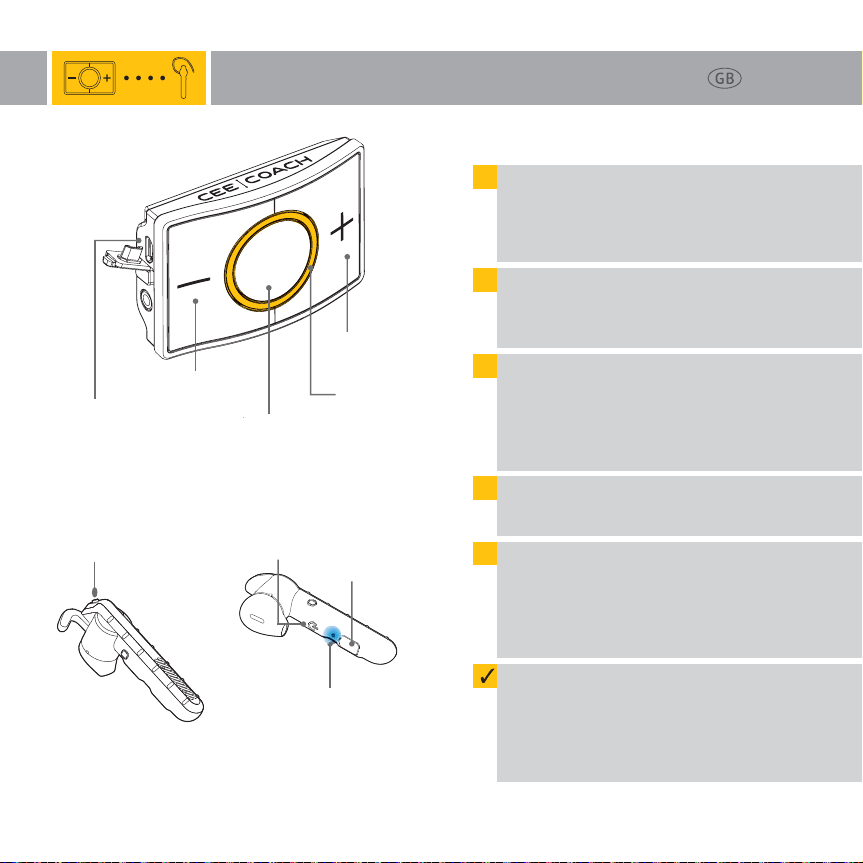
Minus button (-)
USB-charging port
(Charging)
Pairing CEECOACH 2 with jabra steel
1
Please charge the CEECOACH and the
Jabra Steel headset. If the battery is too
low, pairing might not be possible.
2
Turn on your CEECOACH device first.
Then press the talk button (o) until
the LED starts flashing.
3
Set CEECOACH into pairing-mode by
pressing the plus button (+) and the
minus button (-) simultaneously until
the LED flashes yellow.
Talk button (o)
Plus button (+)
LED light ring
(flashes yellow in
pairing-mode)
Page 5
jabra steel
Front view
Answer/end button
TIP:
In the delivery content of the Jabra Steel a windsock
is included. We highly recommend to use this for
reduction of ambient sounds.
Back view
®
indicator
USBcharging port
On/Off button
Bluetooth
(flashes blue in pairing-mode)
4
Turn on the Jabra Steel.
Press the On/Off button to do so.
5
Set Jabra Steel into pairing-mode by pressing the answer/end button for 3 seconds
until the Bluetooth indicator flashes blue.
The pairing between CEECOACH and the
headset is finished in a few seconds.
You can see that the pairing has been
successful when CEECOACH flashes again
in the initial color.
Page 6
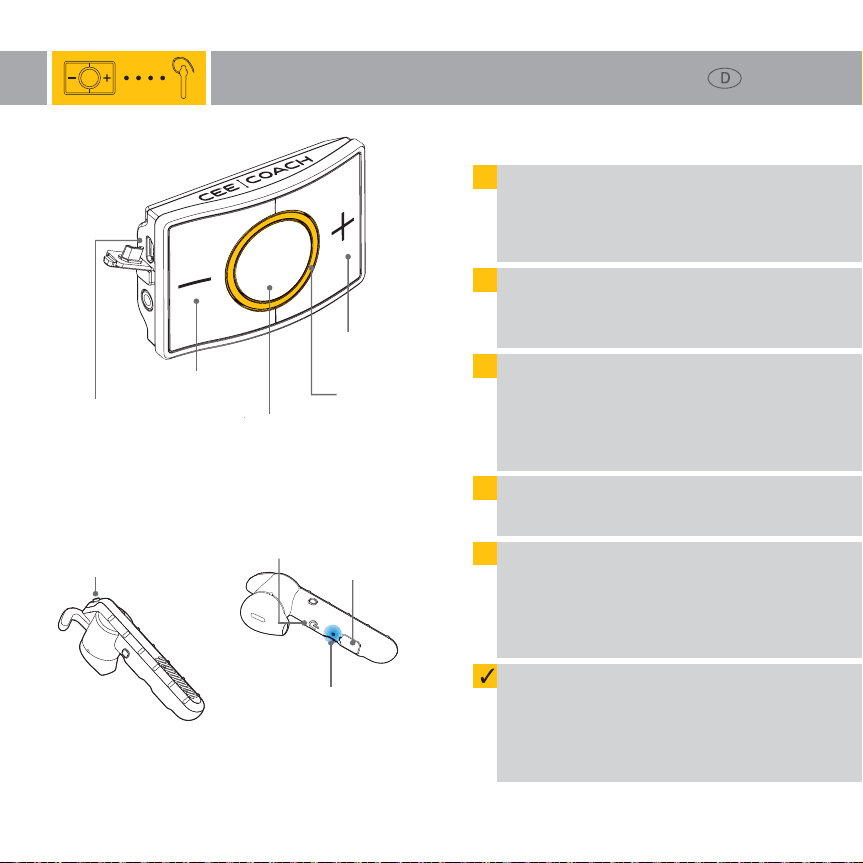
Minustaste (-)
Micro-USB-Anschluss
(Aufladen des Gerätes)
Pairing CEECOACH 2 mit jabra steel
1
Laden Sie zunächst den CEECOACH sowie
das Jabra Steel auf. Bei zu schwacher
Akkuladung kann es vorkommen, dass
ein Pairing nicht möglich ist.
2
Schalten Sie zunächst den CEECOACH ein.
Halten Sie dazu die Sprechtaste (o) solange gedrückt, bis der Leuchtring blinkt.
3
Versetzen Sie CEECOACH in den PairingModus. Halten Sie dazu gleichzeitig die
Plustaste (+) und die Minustaste (-)
solange gedrückt, bis der Leuchtring
gelb blinkt.
Sprechtaste (o)
Plustaste (+)
Leuchtring
(blinkt Gelb im
Pairing-Modus)
Seite 6
jabra steel
Oberseite Unterseite
®
Anzeige
Micro-USBLadeanschluss
Taste Anruf
annehmen/beenden
TIPP:
Im Lieferumfang des Jabra Steel ist ein Windschutz
enthalten, der auf jeden Fall verwendet werden sollte
(Verminderung von Umgebungsgeräuschen).
Ein-/Austaste
Bluetooth
(blinkt Blau im Pairing-Modus)
4
Schalten Sie nun das Jabra Steel ein.
Drücken Sie dazu die Ein-/Austaste.
5
Versetzen Sie das Jabra Steel nun in den
Pairing-Modus. Halten Sie dazu die Taste
Anruf annehmen/beenden ca. 3 Sekun-
den lang gedrückt, bis die Bluetooth®Anzeige blau blinkt.
Das Pairing zwischen CEECOACH und dem
Jabra Steel dauert nur wenige Sekunden.
Sie erkennen ein erfolgreiches Pairing
daran, dass CEECOACH wieder in der
ursprünglichen Farbe blinkt.
Page 7
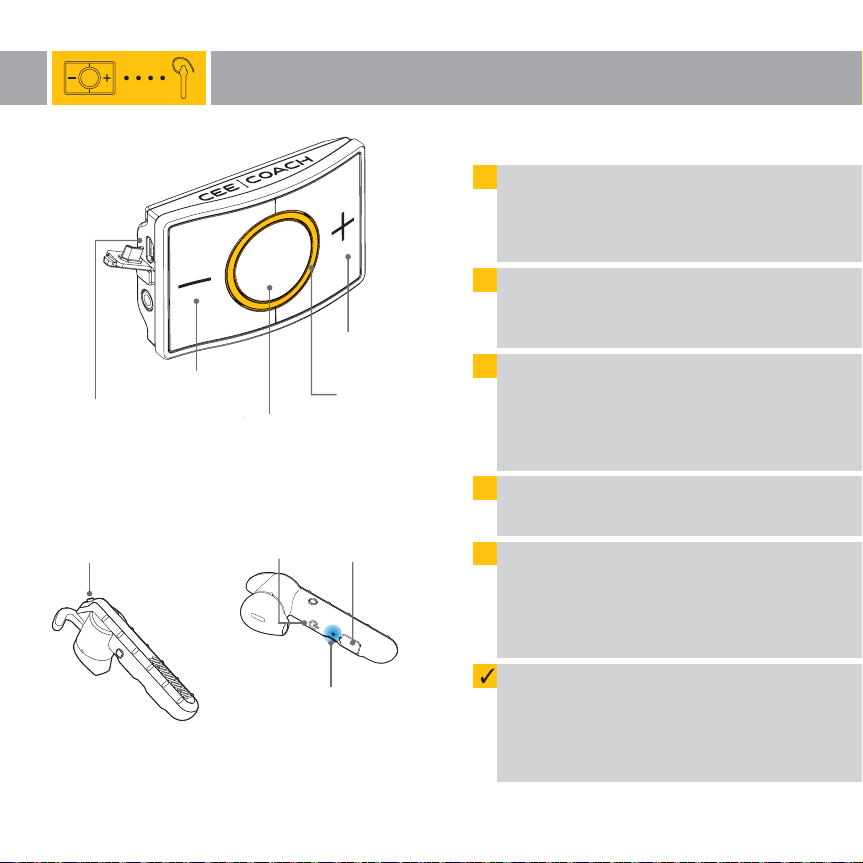
Touch Moins (-)
Connexion
Micro USB
de conversation (o)
jabra steel
Touche
Appel / Fin d‘appel
Couplage de CEECOACH 2 avec le kit jabra steel
1
Bouton
Touche
Marche / Arrêt
Touche Plus (+)
Anneau
lumineux
(clignote en
jaune en mode
couplage)
Connexion
Micro USB
Rechargez tout d’abord le CEECOACH ainsi
que le kit Jabra Steel Blutooth
Si la batterie est trop faible, le couplage
ne sera pas possible.
2
Actionnez tout d’abord le CEECOACH.
Maintenez appuyée le Bouton de conver-
sation (o) jusqu’à ce que l’anneau clignote.
3
Actionnez le CEECOACH en mode couplage.
Maintenez appuyées en même temps la
touche Plus (+) et la touche Moins (-)
jusqu’à ce que l’anneau clignote en jaune.
4
Allumez maintenant le Jabra Steel.
Appuyez sur la touche Marche/Arrêt.
5
Actionnez maintenant le Jabra Steel en
mode couplage en maintenant env.
3 secondes la touche Appel / Fin d’appel
jusqu’à ce que l’indication Bluetooth
clignote en bleu.
®
.
7
®
Indication Bluetooth
(clignote en bleu en mode couplage)
TIP:
Une protection contre les bruits du vent est comprise
dans l‘étendue de livraison qui doit être utilisée
(diminution des bruits alentour).
®
Le couplage entre CEECOACH et Jabra Steel
ne dure que quelques secondes.
Le couplage est réussi lorsque CEECOACH
clignote de nouveau dans la couleur
initiale.
Page 8
jabra bt 2047
Important Wichtig Important
When you have successfully paired a CEECOACH device with a Bluetooth® headset please keep this pair together.
Make sure to use color marking (e.g. rubber bands or sticky dots) to mark those as a device-headset-pair.
If you accidently switch the headsets, disturbances or disconnections can occur.
When you want to pair several devices and headsets, please start with one CEECOACH and one headset and repeat
the steps above with the next pair.
Please make sure that all used CEECOACH devices have the same software version. For pairing of CEECOACH 1
devices with production date of 2017 or older with CEECOACH 2 devices you have to update your existing
CEECOACH 1 devices.
Haben Sie ein CEECOACH mit einem Bluetooth® Headset verbunden, so muss dieses Geräte-Headset-Paar zusammenbleiben. Achten Sie darauf, diese entsprechend zusammen aufzubewahren und ggf. mit einer farblichen Markierung zu versehen (z.B. bunte Gummiringe oder Klebepunkte). Werden die Bluetooth® Headsets vertauscht,
kommt es zu Störungen und Verbindungsabbrüchen.
Möchten Sie mehrere CEECOACH und Headsets miteinander verbinden, so beginnen Sie bitte mit einem Gerät und
einem Headset und wiederholen nach erfolgreichem Pairing die Schritte für das nächste Geräte-Headset-Paar.
Bitte achten Sie darauf, dass alle verwendeten CEECOACH Geräte den gleichen Softwarestand haben. Möchten Sie
einen CEECOACH 1 mit Produktionsdatum 2017 oder älter mit einem CEECOACH 2 zu einem Kommunikationskreis
verbinden, müssen die CEECOACH 1 Geräte ein Update erhalten.
Si vous avez connecté un CEECOACH avec un kit Bluetooth®, conservez-les ensemble. Veillez à ce qu’ils soient
conservés ensemble et, le cas échéant, marquez-les en couleur (p.ex. avec des anneaux ou des points de couleur).
Si les kits Bluetooth® sont échangés, il est possible qu’il y ait des interférences et des coupures de communication.
jabra steel
Si vous souhaitez connecter plusieurs CEECOACH et kits ensemble, commencez par un appareil et un kit,
et répétez l’opération après couplage avec l’appareil et le kit suivant.
Veillez à ce que tous les appareils utilisés aient la même version de logiciel. Si vous souhaitez connecter un
CEECOACH 1 produit en 2017 ou avant 2017 avec un CEECOACH 2, vous devez auparavant recevoir une mise à jour
pour votre CEECOACH 1.
 Loading...