

Page 1
SUBLIM
Group Products
FR
EN
FRANCAIS
ENGLISH
INSTALLATION MANUAL
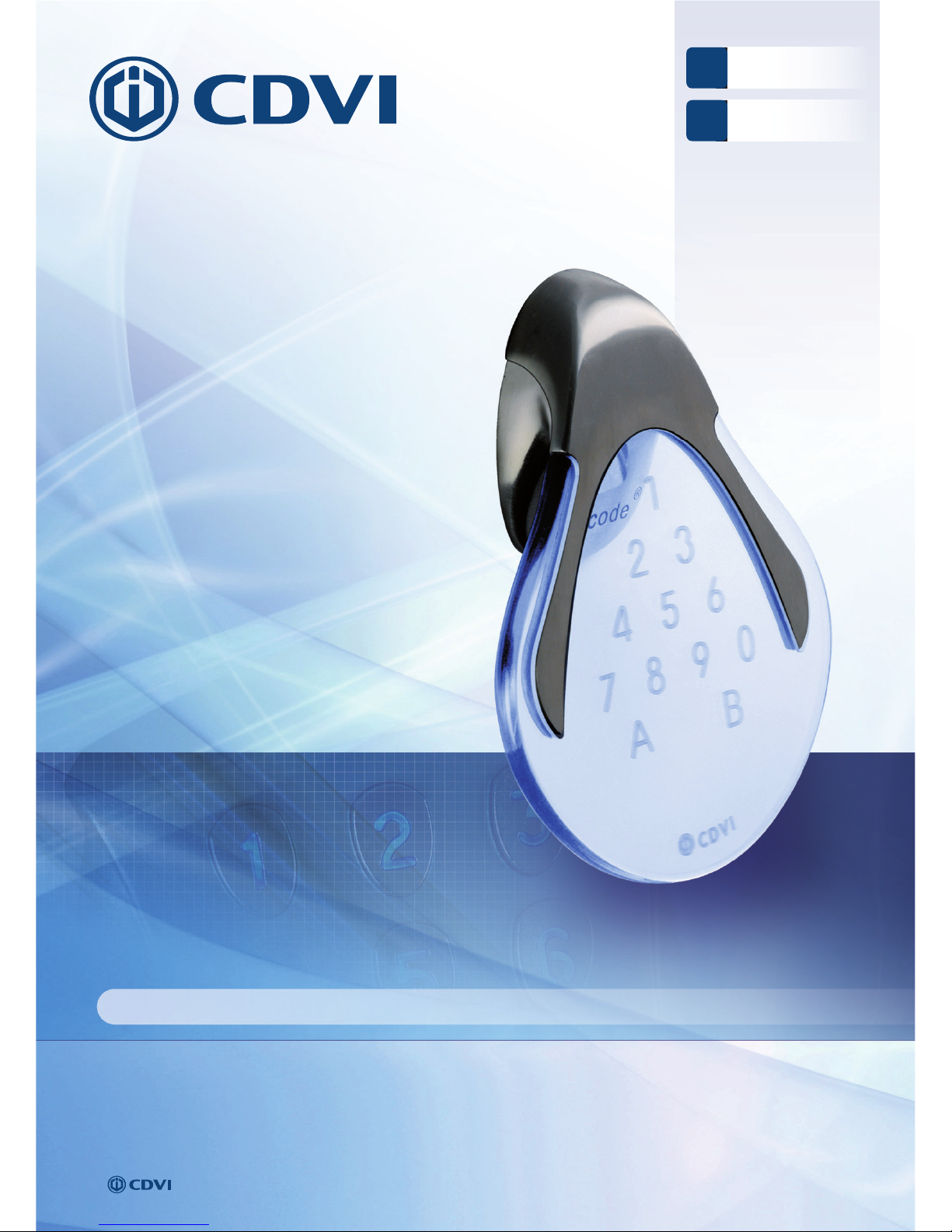
Illuminated Weatherproof Keypad with remote electronics
Range: Digicode® /
MANUEL D’INSTALLATION
Clavier codé rétro-éclairé à électronique déportée
Gamme: Digicode
®
Page 2
1] PRESENTATION DU PRODUIT
Pas de touche mécanique.
Rétro-éclairé.
Inox et polycarbonate.
Gravures laser des chiffres
et lettres à l’intérieur
de la matière en polycarbonate.
Free voltage*.
Montage avec vis Torx
®
Protection de la carte électronique
par tropicalisation.
100 codes utilisateurs.
Signalisation lumineuse et sonore.
Longueur de câble spécifi que fourni (entre
le SUBLIM et l’électronique déportée) : 3 m.
2 relais.
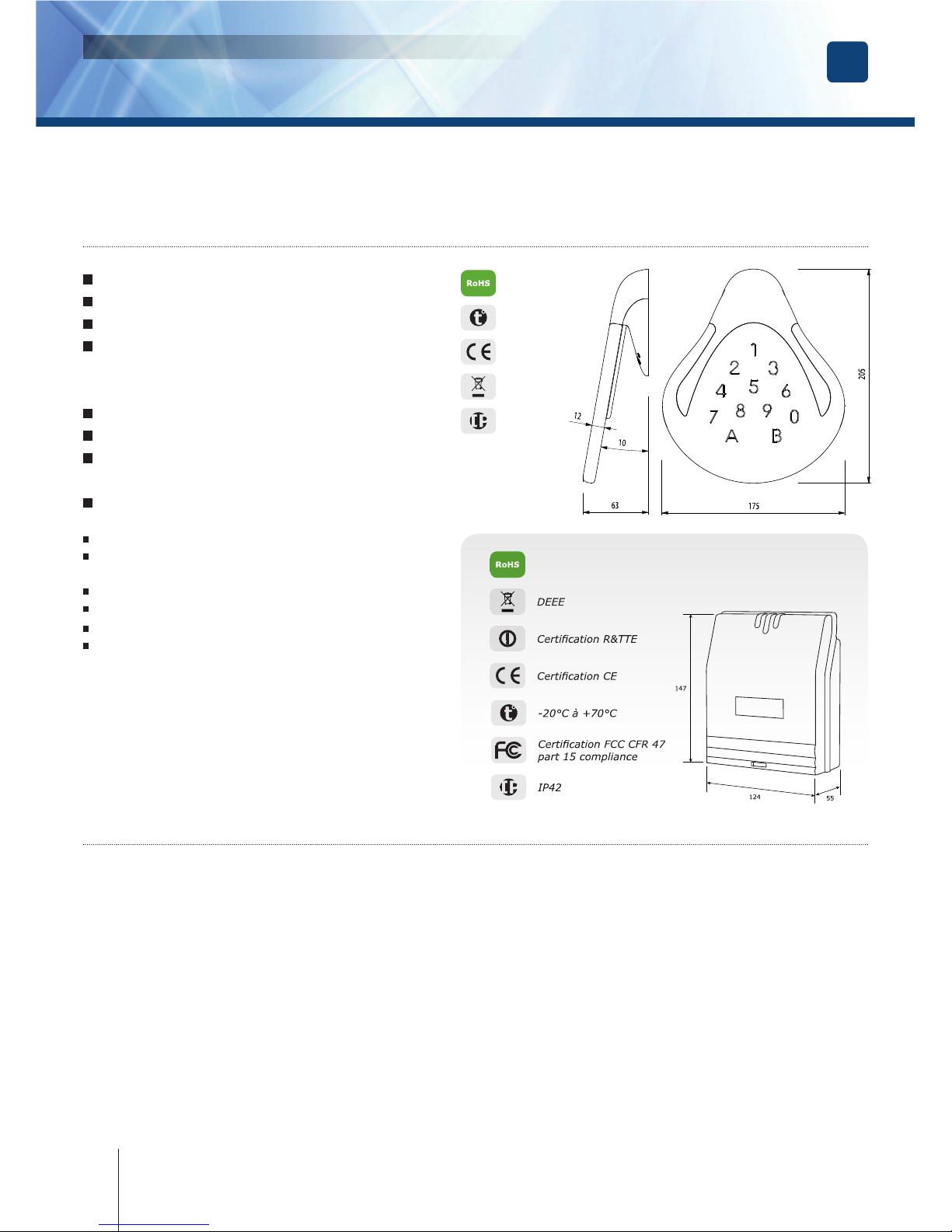
Dimensions (L x l x P) : 205 x 175 x 63 mm.
Alimentation : 12 à 24 V AC ou 12 à 48 V DC.
Consommation (2 relais commandés
+ clavier) :- En 12 V AC > Au repos 200 mA,
- En 12 V AC > 2 relais activés 260 mA,
- En 24 V AC > Au repos 120 mA,
- En 24 V AC > 2 relais activés 150 mA,
- En 12 V DC > Au repos 275 mA,
- En 12 V DC > 2 relais activés 350 mA,
- En 24 V DC > Au repos 140 mA,
- En 24 V DC > 2 relais activés 175 mA.
Electronique déportée, fournie
avec le clavier codé SUBLIM…
2] RAPPELS ET RECOMMANDATIONS
Composition des codes
- L’apprentissage des touches est réalisé en usine,
mais il est impératif de refaire l’apprentissage
sur site après le montage.
- Par souci de sécurité, veillez à modifi er le code
maître usine par celui de votre choix.
- Lors du changement du code maître usine
et de la création des codes utilisateurs, évitez
les codes trop simples (ex: les suites 3 4 5 6 7).
Rappel de câblage
- La distance de câblage entre le SUBLIM et
l’électronique déportée doit être au maximum de 3 m.
- Attention de ne pas passer vos fi ls à proximité
de câbles «Courant fort» (ex: 230 V AC).
Alimentations préconisées
ARD12 et BS60.
Recommandations d’installation
- Pour sécuriser l’installation, n’oubliez pas de placer
la varistance sur le système de verrouillage,
en parallèle, au niveau de l’alimentation.
- L’électronique déportée du SUBLIM doit être
impérativement installée dans un environnement clos
et protégée des conditions climatiques extérieures.
Montage
Afi n d’optimiser le fonctionnement du SUBLIM
et de prévenir les tentatives d’arrachage, privilégiez
les surfaces planes, rigides et non soumises
aux vibrations.
FR
2
cdvi.com
cdvigroup.com
SUBLIM
Clavier codé rétro-éclairé à électronique déportée
INSTALLATION MANUAL
+15°C à +35°C
Certifi cation
CE
DEEE
IP54
-20°C à +70°C
Certifi cation CE
DEEE
Certifi cation R&TTE
Certifi cation FCC CFR 47
part 15 compliance
Merci pour l’achat de ce produit et pour la confi ance que vous accordez
à notre entreprise.
Page 3

Varistance
Vis à
bois TCB
(4.5x35)
Cheville
plastique
S6
VisTF
6 lobes
(M4x8)
Outil
tournevis
T20
Coffret
tournevis
Vis
cruciforme
à tête fraisée
(M4x35)
Cheville
plastique
Passe fi l
Plaque de
fi xation de
l’électronique
déportée
Electronique
déportée
- - - - - - 2 2 2 1
SUBLIM
1 3 3 1 1 1 2 2 - -
3] KIT DE MONTAGE
4] MONTAGE
1
Vérifi ez la distance entre le SUBLIM et
son électronique déportée. A l’aide de
la plaque de fi xation de l’électronique
déportée et du SUBLIM, prenez les
marques et percez les 2 trous de fi xation
(forêt Ø 6 mm et profondeur minimum.
= 35 mm) ainsi que l’ouverture pour
le passage du câble électrique destiné
au clavier.
4
Bloquez le SUBLIM sur son support par
l’intermédiaire de la vis TORX® et de
son outil spécifi que (clé mâle coudée).
Pour fi naliser le montage de ce produit,
placez le cache-vis.
2
Positionnez les 3 chevilles plastiques
dans les trous. Puis Fixez le fond du
SUBLIM sur le support de votre choix,
à l’aide des vis cruciformes à têtes
fraisées.
(x2)
5
Positionnez les 2 chevilles en plastique
dans les trous. Puis fi xez la plaque de
fi xation de l’électronique déportée sur
la surface de votre choix, à l’aide des
vis cruciformes à têtes fraisées. Placez
l’électronique déportée sur son support.
3
Passez le câble électrique du SUBLIM dans
son ouverture et fi xez-le à son support
par le haut avec le crochet supérieur.
(x2)
6
Passez vos fi ls, glissez les passe-fi ls
de l’électronique déportée et faites vos
branchements. Lors de cette opération,
n’oubliez pas de placer la varistance
(Voir page 14).
FR
3
cdvi.com
cdvigroup.com
SUBLIM
Clavier codé rétro-éclairé à électronique déportée
INSTALLATION MANUAL
Page 4
SW3
SW1
I1
SW2
FR
SUBLIM
Clavier codé rétro-éclairé à électronique déportée
MANUEL D’INSTALLATION
5] SCHÉMA DE RACCORDEMENTS
Commande par bouton
poussoir
Le raccordement du bouton
poussoir P1 est prévu
pour commander le relais 1.
Le raccordement du bouton
poussoir P2 est prévu
pour commander le relais 2.
Le mode et la temporisation
sont programmables.
Le contact horloge H
permet l’utilisation
de toutes les touches
comme bouton extérieur.
Si le contact horloge est ouvert,
les touches sont utilisées
comme des termes habituels.
Si le contact horloge est fermé,
toutes les touches sont utilisées
pour l’ouverture libre.
Alimentation
12 à 24 V AC
ou 12 à 48 V DC
Alimentation
côté puissance
de commande Sortie
12/24 V AC/DC
Gâche à rupture
(Contact au repos)
H (Ouvert)
SUBLIM en fonction clavier codé
H (Fermé)
SUBLIM en fonction Bouton Poussoir
Relais
1
Relais
2
Gâche à émission
Varistance
SW1 - RAZ. en position ON :
1. Sous tension, réinitialise
le code maître 1 2 3 4 5.
Hors tension, réinitialise
la mémoire :
- code maître,
- effacement des codes utilisateur,
- paramètres par defaut usine.
3. Modifi cation du code
par l’utilisateur en position ON.
4. Non utilisé.
5. Non utilisé.
SW2 - Mode apprentissage
Doit être positionné sur la position
ON hors tension pour passer
en mode apprentissage.
SW3 - Reset
Ne pas utiliser.
Doit être positionné sur OFF.
I1 Doit être positionné sur ON.
cdvi.com
cdvigroup.com
Bornier Correspondance
1
+ Alimentation 12 V à 24 V AC ou 12 V à 48 V DC
2
- Alimentation 12 V à 24 V AC ou 12 V à 48 V DC
3
Bouton intérieur de sortie relais 2
4
Commun boutons
5
Bouton intérieur de sortie relais 1
6
Contact extension L
7
Commun contacts
8
Contact Horloge
NC
Contact repos du relais 1 (Normally Connected)
C1
Contact Commun du relais 1
NO
Contact travail du relais 1 (Normally Open)
NC
Contact repos du relais 2
C2
Contact commun du relais 2
NO
Contact travail du relais 2
9
Voyants verts clavier (fi l blanc)
10
Voyants bleus clavier (fi l bleu)
11
Buzzer (fi l noir)
12
Détecteur 2 (fi l noir)
13
Détecteur 1 (fi l gris)
14
Commun Détecteur (blindage) Tresse à réunir
15
Commun voyants et buzzer (fi l rouge)
Page 5

FR
6] PROGRAMMATION
SUBLIM
Clavier codé rétro-éclairé à électronique déportée
MANUEL D’INSTALLATION
5
cdvi.com
cdvigroup.com
A. REMISE À ZÉRO DE LA MÉMOIRE
1. Tapez 2 fois le code maître.
- Pour la première utilisation, le code maître
usine est : 1 2 3 4 5.
- Deux bips sonores sont émis pour confi rmer
l’entrée en programmation.
2. Puis tapez A6.
Un bip sonore est émis.
3. Tapez A et B
- La remise à zéro est validée.
- Attendez que deux bips soient émis.
- Le code maître est de nouveau 1 2 3 4 5
et tous les codes sont effacés.
- Le clavier est sorti de programmation
et les valeurs par défaut sont rétablies.
OU
1. Coupez l’alimentation et positionnez
le switch 1 (switch 4 positions SW1)
en position ON
Pour avoir plus de précision sur l’emplacement
du bloc 4 interrupteurs, reportez vous à la page 14.
2. Rétablir l’alimentation.
- Attendre environ 3 secondes.
- 2 bips sonores sont émis pour confi rmer
la remise à zéro.
- Positionnez le switch 1 en position OFF.
- Le code maître est de nouveau 1 2 3 4 5
et tous les codes sont effacés.
- Les valeurs par défaut sont rétablies.
B. PROGRAMMATION DU CODE
MAÎTRE ET DU NOMBRE DE TERMES
1. Tapez 2 fois le code maître.
- Pour la première utilisation, le code maître
usine est : 1 2 3 4 5.
- Deux bips sonores sont émis pour confi rmer
l’entrée en programmation.
2. Tapez A4 pour la saisie du nombre
de termes des codes.
- Un bip est émis.
- Tapez 4 ou 5 pour le nombre de termes.
- Un bip sonore est émis pour confi rmer
la programmation.
Apprentissage des touches
1. Mettez hors tension le clavier.
2. Basculez l’interrupteur SW2
(se reporter à la page 14
pour visualiser sa position)
en position ON.
3. Mettez le clavier sous tension
4. La programmation géographique
des touches se fait par le
clavier dans l’ordre suivant :
1, 2, 3, ...., 8, 9, 0, A et B.
5. Tambouriner avec la pointe
d’un crayon sur le centre de
la touche “1”, jusqu’à ce
qu’un bip long soit émis par
le clavier (un bip court est
émis à chaque frappe de la
touche).
6. Après l’apprentissage de la
touche B, un long bip est émis.
En cas d’erreur, recommencez
toute la procédure. Sinon
basculez l’interrupteur SW2 en
position OFF. Un nouveau long
bip est émis par le clavier.
7. Taper sur chaque touche
pour vérifi er l’apprentissage
du clavier. Un bip est émis
pour chaque touche.
Les valeurs du SUBLIM
sont par défaut:
- Sans code.
- Temporisation éclairage : 10 s.
- Temporisation d’ouverture
pour tous les relais :
1 seconde.
- Nombre de termes : 5.
- Code maître usine : 1 2 3 4 5.
- Temporisation sécurité
programmation : 120 secondes.
- Termes de modifi cation
par utilisateur :
- Relais 1 (Groupe 1) = A et B,
- Relais 2 (Groupe 2) = 1 et 3
Signaux sonores :
- 1 bip court = Mise sous tension.
- 1 bip long = Validation
d’une saisie en programmation
ou ouverture autorisée.
- 2 bips courts = Entrée
ou sortie de programmation.
- 4 bips courts = Erreur de saisie.
Termes utilisés et codes
d’ouverture:
-
Toutes les touches du clavier
sont autorisées pour composer
les codes.
- Le code maître et les codes
d’ouverture de porte doivent
être composés de 4 ou 5 termes.
- Le code maître ne peut pas être
utilisé comme code d’ouverture.
- Les codes 0 0 0 0 0 et 0 0 0 0
servent à annuler un code
existant et ne peuvent
donc pas servir comme code
d’ouverture de porte.
-
Les codes ne peuvent commencer
par B qui est réservé à l’annulation
de la saisie d’un code.
Switch 1 (switch 4 positions
SW1) en position ON
Code maître usine 1 2 3 4 5
(Voir page 14).
Switch 2 (switch 4 positions
SW1) en position ON
Modifi cation des codes
par l’utilisateur.
Page 6

FR
SUBLIM
Clavier codé rétro-éclairé à électronique déportée
MANUEL D’INSTALLATION
6
cdvi.com
cdvigroup.com
3. Tapez A5 pour changer le code maître.
- Un bip est émis.
- Tapez les 4 ou 5 termes du nouveau
code maître.
- Un bip sonore est émis pour confi rmer
la programmation.
4. Tapez B pour sortir de la programmation.
Deux bips sont émis pour confi rmer le retour
au mode normal de fonctionnement.
4 bips indiquent une erreur de saisie
Cas de fi gure :
Vous avez un code maître et des codes utilisateurs
à 5 termes. Vous souhaitez utiliser des codes
à 4 termes. Vous faites donc la démarche
indiquée ci-dessus en modifi ant le code maître.
Lorque le nombre de terme du code maître
est bien passé de 5 à 4 termes, les codes
utilisateurs deviennent simultanément
des codes à 4 termes.
Ex : Si votre code maître ou code utilisateur
est 1 2 3 6 9, il deviendra
après manipulation 2 3 6 9.
Si vous souhaitez passer d’un code maître
(et donc d’un code utilisateur) de 4 termes
à 5 termes suivez la même procédure.
Lors du passage de 4 à 5 termes, le chiffre
«O» sera intégré par défaut devant le code
maître et donc devant les codes utilisateurs.
Ex : le passage du code maître 2 3 6 9
à 4 termes en 5 termes devient 0 2 3 6 9.
Il est conseillé de programmer
les codes en 5 termes puis de modifi er
le nombre de termes.
C. PROGRAMMATION DU CODE MAÎTRE
1. Tapez 2 fois le code maître.
- Pour la première utilisation,
le code maître usine est : 1 2 3 4 5.
- Deux bips sonores sont émis
pour confi rmer l’entrée en programmation.
2. Tapez A5.
- Un bip est émis.
- Tapez les 4 ou 5 termes du nouveau code maître.
- Un bip sonore est émis pour confi rmer
la programmation.
3. Tapez B pour sortir de la programmation.
Deux bips sont émis pour confi rmer le retour
au mode normal de fonctionnement.
D. PROGRAMMATION DES CODES
Les groupes de codes (appelés aussi rangs
pour le classement des codes par individu)
sont différents :
- Relais 1 (Groupe 1 : Du rang 00 au rang 59).
- Relais 2 (Groupe 2 : Du rang 60 au rang 99).
1. Tapez 2 fois le code maître.
- Pour la première utilisation,
le code maître usine est : 1 2 3 4 5.
- Deux bips sonores sont émis pour confi rmer
l’entrée en programmation.
2. Tapez le n° du rang à programmer
- Si le rang est libre, tapez les 4 ou 5 termes
du code.
- Si le rang est occupé, 4 bips sont émis.
- Tapez les 4 ou 5 termes du code ou tapez
0 0 0 0 0 ou 0 0 0 0 pour annuler
le code enregistré.
- Un bip sonore est émis pour confi rmer
la programmation.
- Pour abandonner la saisie sans rien modifi er,
tapez tout de suite B.
3. Tapez B pour sortir de la programmation.
Deux bips sont émis pour confi rmer le retour
au mode normal de fonctionnement.
Si le code composé correspond à un code
existant ou s’il est identique au code maître,
4 bips sonores indiquent une erreur. Les codes
0 0 0 0 0 et 0 0 0 0 servent à annuler un code
existant et ne peuvent donc pas servir comme
code d’ouverture de porte.
E. PROGRAMMATION DES TEMPORISATIONS
1. Tapez 2 fois le code maître.
- Pour la première utilisation, le code maître
usine est : 1 2 3 4 5.
- Deux bips sonores sont émis pour confi rmer
l’entrée en programmation.
2. Tapez A0 pour la temporisation du clavier.
- Un bip sonore est émis.
- Tapez la durée de commande en secondes.
Ex : de 10 pour 10 secondes à 99
pour 99 secondes ou tapez 00 pour obtenir
Page 7

FR
SUBLIM
Clavier codé rétro-éclairé à électronique déportée
MANUEL D’INSTALLATION
7
cdvi.com
cdvigroup.com
un éclairage permanent. Un bip sonore
de validation est émis.
3. Relais 1 (Groupe 1) : Tapez A1.
Relais 2 (Groupe 2) : Tapez A2.
- Cette manipulation vous permet de gérer
la temporisation des relais.
- Vous devez réaliser la démarche pour chacun
des relais de votre SUBLIM
- Un bip sonore est émis.
- Tapez la durée de commande en secondes.
Ex : de 01 pour 1 seconde à 99 pour 99 secondes.
La durée 00 correspond au fonctionnement bistable
du relais. Un bip sonore de validation est émis.
4. Pour sortir de la programmation, tapez B
Deux bips sonores sont émis pour confi rmer
le retour au mode normal de fonctionnement.
4 bips indiquent une erreur de saisie
F. REMISE À ZÉRO DU CODE MAÎTRE
- En fonctionnement normal, positionnez le switch
1 (switch 4 positions, SW1) en position ON.
- Attendre 1 seconde et repositionner le switch 1
en position OFF.
- Un bip est émis.
- Le code maître est de nouveau 1 2 3 4 5
en 5 termes ou 2 3 4 5 en 4 termes.
G. CHANGEMENT DU CODE
D’ENTRÉE PAR L’UTILISATEUR
- L’autorisation de changement de code par
l’utilisateur est déterminée par le positionnement
du switch 2 (switch 4 positions, SW1).
- Positionnez l’interrupteur 2 en position OFF
pour interdire le changement de code,
et en position ON pour autoriser le changement.
1. Composez le code utilisé actuellement.
- Le relais d’ouverture est commandé.
- Un bip sonore est émis.
2. Tapez immédiatement les 2 termes
du code de modifi cation.
- Relais 1, à la première utilisation : A et B.
- Relais 2, à la première utilisation : 1 et 3.
- Un bip sonore est émis pour autoriser le changement.
3. Composez le nouveau code d’ouverture.
Deux bips sonores confi rment la validation
du nouveau code et le retour à un fonctionnement
normal.
4. Vérifi ez la mémorisation du nouveau code
en le composant.
H. PROGRAMMATION DES TERMES
DE MODIFICATIONS
1. Tapez 2 fois le code maître.
- Pour la première utilisation,
le code maître usine est : 1 2 3 4 5.
- Deux bips sont émis pour confi rmer
l’entrée en programmation.
2. Relais 1 (Groupe 1) : Tapez A7.
Relais 2 (Groupe 2) : Tapez A8.
- Cette saisie vous permettra de composer
les nouveaux termes de modifi cations
des codes utilisateurs pour chaque groupe.
- Un bip est émis.
- Tapez les deux termes de modifi cation.
- Un second bip sonore est émis
pour confi rmer la programmation.
Ex: Tapez A7 puis composez les deux termes de
modifi cation. Puis répétez l’opération en tapant A8.
3. Tapez B pour sortir de la programmation.
Deux bips sont émis pour confi rmer le retour
au mode normal de fonctionnement.
I. PROGRAMMATION DU SIGNAL SONORE
- Le signal sonore est toujours audible en programmation.
- Il en est de même lors de la commande d’ouverture,
suite à la reconnaissance d’un code.
- Par défaut, lors de la composition du code
d’ouverture, un bip sonore «touche» est audible.
- Il est possible d’interdire les bips sonores de touches :
1. Tapez 2 fois le code maître.
- Pour la première utilisation, le code maître
usine est : 1 2 3 4 5.
- Deux bips sonores sont émis pour confi rmer
l’entrée en programmation.
2. Tapez AA.
- Un bip est émis.
- Tapez 0 pour supprimer les bips touches
pendant la composition du code d’ouverture.
- Tapez 1 pour autoriser les bips touches
pendant la composition du code d’ouverture.
- Un bip sonore est émis pour
confi rmer la programmation.
3. Tapez B pour sortir de la programmation.
Deux bips sonores sont émis pour confi rmer
le retour au mode normal de fonctionnement.
Page 8
FR
SUBLIM
Clavier codé rétro-éclairé à électronique déportée
MANUEL D’INSTALLATION
8
cdvi.com
cdvigroup.com
A5
Code maître
A0
Temporisation
éclairage
clavier
A1
Temporisation
relais 1
A2
Temporisation
relais 2
A4
Nombre de
termes
Tapez
le code maître
2 x bips
1 x bip 1 x bip1 x bip 1 x bip 1 x bip
10-99 sec.
00 = continue.
10=Défaut.
01-99 sec.
00 = bistable.
01=Défaut.
01-99 sec.
00 = bistable.
01=Défaut.
La valeur
‘4’ ou ‘5’
5= Défaut.
Toutes
les touches
sont valides
12345 = Défaut.
1 x bip = OK
4 bips = erreur
1 x bip = OK
4 bips = erreur
1 x bip = OK
4 bips = erreur
1 x bip = OK
4 bips = erreur
1 x bip = OK
4 bips = erreur
Page 9

FR
SUBLIM
Clavier codé rétro-éclairé à électronique déportée
MANUEL D’INSTALLATION
9
cdvi.com
cdvigroup.com
2 bips
Tapez B pour sortir
de la programmation
A6
Reset
A7
Termes
de modifi cation
relais 1
A8
Termes
de modifi cation
relais 2
AA
Signal sonore
00-99
Programmation
des codes
1 x bip 1 x bip1 x bip 1 x bip
Tapez A
ensuite B
2 Bips
sont émis
1 x bip = OK
4 bips = erreur
1 x bip = OK
4 bips = erreur
1 x bip = OK
4 bips = erreur
1 x bip = OK
2 chiffres.
AB=défaut.
2 chiffres.
13 = défaut
0 = supprimer
les bips.
1 = autoriser
les bips.
‘4’ ou ‘5’ chiffres
4 bips = rang occupé.
1 bip = rang libre.
Tapez ‘B’ pour
abandonner sans
modifi cation.
Page 10

FR
Ci-joint un tableau récapitulatif qui vous servira à indiquer le code attribué à chaque utilisateur
SUBLIM 2 Relais
Groupe 1 : Du rang 00 au rang 59, - Groupe 2 : Du rang 60 au rang 99.
RAPPEL
SUBLIM
Clavier codé rétro-éclairé à électronique déportée
MANUEL D’INSTALLATION
10
cdvi.com
cdvigroup.com
Rangs Code
Nom
Prénom
00
01
02
03
04
05
06
07
08
09
10
11
12
13
14
15
16
17
18
19
20
21
22
23
24
25
26
27
28
29
30
31
32
33
Rangs Code
Nom
Prénom
34
35
36
37
38
39
40
41
42
43
44
45
46
47
48
49
50
51
52
53
54
55
56
57
58
59
60
61
62
63
64
65
66
67
Rangs Code
Nom
Prénom
68
69
70
71
72
73
74
75
76
77
78
79
80
81
82
83
84
85
86
87
88
89
90
91
92
93
94
95
96
97
98
99
Page 11

FR
SUBLIM
Clavier codé rétro-éclairé à électronique déportée
MANUEL D’INSTALLATION
11
Voyant vert
Eteint Fixe Clignotement lent Clignotement rapide
Voyant
rouge
Eteint En attente touche Code en cours Changement code
Mode programmation :
En attente commande
Fixe
Commandes 0 à 99 :
Code utilisateur
Commande A0 :
Tempo clavier
Commande A1 :
Temporisation relais 1
Commande A2 :
Temporisation relais 2
Clignotement
lent
Interrupteur 1 ON :
RAZ code maître
Commande A4 :
Nombre de termes code
Commande A5 :
Code maître
Commande A6 :
RAZ mémoire (A+B)
Clignotement
rapide
Commande A7 :
Code
modifi cation relais 1
commande A8 : Code
modifi cation relais 2
Commande AA :
Avec/sans avertisseur
= 1/0
Si l’électronique déportée est située à proximité du clavier, vous pouvez vous aider des voyants de l’électronique déportée pour programmer votre SUBLIM. En mode apprentissage, le voyant vert clignote lentement en attente de l’appui sur une touche. Pendant l’apprentissage de la touche, le voyant passe fi xe.
A la fi n de l’apprentissage de toutes les touches le voyant vert clignote rapidement.
7] CODES DES VOYANTS DE L’ELECTRONIQUE DEPORTEE
8] NOTES
Page 12

EN
12
cdvi.com
cdvigroup.com
SUBLIM
Illuminated Weatherproof Keypad with remote electronics
INSTALLATION MANUAL
1] PRODUCT PRESENTATION
No mechanical keys.
Backlit.
Stainless steel and polycarbonate.
Laser engraving of the numbers
and letters on the inside
of the polycarbonate material.
Free voltage.
Installation with Torx® screws
Protection of the printed circuit
board by varnish coating.
100 user codes.
Audible and visual feedback.
Length of specifi c cable supplied (between
the SUBLIM and the remote control): 3m.
2 relays.
Dimensions (L x W x D): 205 x 175 x 63mm.
Input voltage : 12 to 24V ac or 12 to 48V dc.
Consumption (3 relays controlled + keypad):
- 12V ac > Standby 90 mA,
- 12V ac > 2 relays activated 260 mA,
- 24V ac > Standby 120 mA,
- 24V ac > 2 relays activated 150 mA,
- 12V dc > Standby 275 mA,
- 12V dc > 2 relays activated 350 mA,
- 24V dc > Standby 140 mA,
- 24V dc > 2 relays activated 175 mA.
Remote controller supplied
with the SUBLIM coded keypad…
2] NOTES AND RECOMMENDATIONS
Wiring reminder
- The wiring distance between the SUBLIM and the
remote controller must be within a maximum of 3 m.
- Take care not to pass your wires close
to «High voltage» cables (e.g.: 230 V AC).
Recommended power supplies
There are two suitable power supplies
for this Digicode
®
keypad: ARD12 or BS60.
Security advice
- The geo-positioning of the digital keys is
programmed at the factory. Once the unit has
been installed on site, repeat the geo-positioning
of the digit keys, as explained in the manual.
- For security advice reasons, change
the factory default master code.
- When selecting a master code and user code
avoid simple codes (example : 3 4 5 6 7).
Installation recommendations
- To optimize the use of Sublim and prevent
unwanted interference, make sure the keypad
is mounted on a fl at, solid surface and not
subject to vibration.
- Mount the keypad on a fl at surface to avoid
any vandalism and to insure the best mounting.
- To secure the system from back electromagnetic
fi elds do not forget to mount the varistor
in parallel on the lock.
- It is essential that the SUBLIM’s remote controller
is installed in an enclosed environment, protected
from external weather conditions.
+15°C to +35°C
Certifi cation
CE
WEEE
IP54
-20°C to +70°C
CE Certifi cation
R&TTE certifi cation
Part 15 compliant
Thank you for buying our products and for the confi dence you placed
in our company.
Page 13

Varistor
TCB
wood
screws
(4.5x35)
S6
plastic
anchor
TF 6
lobe
screw
(M4x8)
T20
screw-
driver
Screw-
driver
case
Countersunk
Phillips
screw
(M4x35)
Plastic
anchor
Wire
sealing
cap
Fixing plate
for the
remote
controller
Remote
controller
- - - - - - 2 2 2 1
SUBLIM
1 3 3 1 1 1 2 2 - -
EN
13
cdvi.com
cdvigroup.com
SUBLIM
Illuminated Weatherproof Keypad with remote electronics
INSTALLATION MANUAL
3] MOUNTING KIT
4] INSTALLATION
Verify the distance between the SUBLIM
keypad and its remote electronic (refer to
page 3). Place the back plate of the SUBLIM
on the wall and the bracket of the remote
electronic then mark with a pen the hole
location then drill the 2 mounting holes
(6mm drill bit Ø and 35mm hole depth)
and the hole wiring access.
Fasten the PROFIL100EC keypad to the
back plate by using the supplied (M4x8)
Torx® screw and Allen spanner hardware.
To fi nalize installation of the product,
insert the screw cap.
Insert the 3 plastic anchors in the holes.
Mount the back plate of the SUBLIM
with the (M4x35) mounting screws.
(x2)
5
Insert the 2 plastic anchors in the
holes. Place the bracket of the electronic
and screw on the wall using the supplied
M4x30 screws. Slide the box from up
to down on the bracket.
3
Insert the cable in the hole access area
of the back plate.Then mount the keypad
on the back plate, placing fi rst the top
in the hooks and then the bottom.
(x2)
Insert the cable in the remote electronic
and wire the cable to the terminals.
Don’t forget to install the varistor on the lock
(refer to page 4, Notes and Recommendations).
Page 14

SW3
SW1
I1
SW2
EN
14
cdvi.com
cdvigroup.com
SUBLIM
Illuminated Weatherproof Keypad with remote electronics
INSTALLATION MANUAL
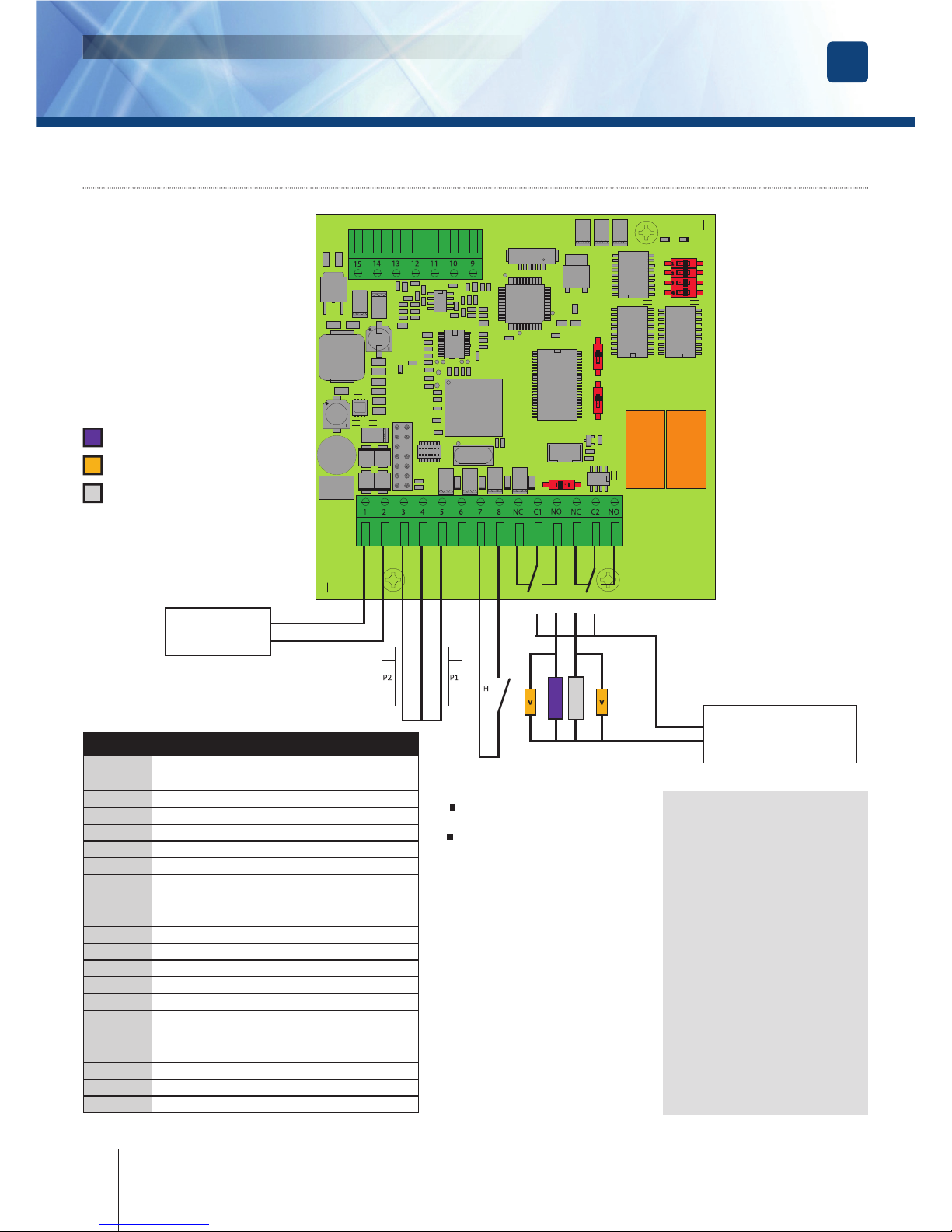
5] SUBLIM 2 RELAYS CONNECTION DIAGRAM
Push button control
Connecting push button P1
is used to control relay 1.
Connecting push button P2
is used to control relay 2.
The mode and timeout
are programmable.
Clock contact H
lets you use all the keys
as external buttons.
If the clock contact is open,
the keys are used as normal
digits. If the clock contact
is closed, all the keys are
used for free access.
Power supply
12 to 24V AC
or 12 to 48V DC
Power supply
power side
of Exit command
12/24/V AC or 12/48/V DC
Fail safe strike
(Contact on standby)
H (Open)
SUBLIM in coded keypad operation
H (Closed)
SUBLIM in Push Button operation
Fail secure strike
Varistor
SW1 - Reset in the ON position:
1.
With the power on,
reinitializes the master
code 1 2 3 4 5.
With the power off,
reinitializes the memory :
- master code,
- deletion of user codes,
- default factory settings.
2. Change of code by the user
in the ON position.
3. Not used.
4. Not used.
SW2 - Training mode
Must be in the ON position with the
power off to switch to training mode.
SW3 - Reset
Do not use. Must be set to OFF.
I1 - Must be set to ON.
Terminal
block
Detail
1
+ Power supply 12V to 24V ac or 12V to 48V dc
2
- Power supply 12V to 24V ac or 12V to 48V dc
3
Exit push button, relay 2
4
Button common
5
Exit push button, relay 1
6
Extension contact L
7
Common contacts
8
Clock switch
NC
Standby switch of relay 1 (Normally Connected)
C1
Common contact of relay 1
NO
Working switch of relay 1 (Normally Open)
NC
Standby switch of relay 2
C2
Common contact of relay 2
NO
Working switch of relay 2
9
keypad green light (white wire)
10
keypad blue light (blue wire)
11
Buzzer (Black wire)
12
Sensor 2 (Black wire)
13
Sensor 1 (Gray wire)
14
Common Sensor (Shield) put together
15
Common LED and buzzer (Red wire)
Relay
1
Relay
2
Page 15

EN
15
cdvi.com
cdvigroup.com
SUBLIM
Illuminated Weatherproof Keypad with remote electronics
INSTALLATION MANUAL
A. RESET MASTER CODE AND USER CODES
1. Enter the master code twice
(1 2 3 4 5 default value master code).
2 beeps are emitted to confi rm entry
in programming mode.
2. Press A6 to reset the Master Code
and the User codes.
- One beep is emitted.
- Press on A and B to confi rm reset
of all memory of the keypad.
- Wait for two beeps.
- The master code is restored to its default
value 1 2 3 4 5 and all the User codes
are deleted from the keypad.
- Once the reset is completed then the keypad
returns to a stand-by operating mode.
OR
1. Switch off the power and set switch 1.
For more information concerning the location
of the 4 switch unit, please refer to page 4.
2. Switch the power on again.
- Wait for about 3 seconds.
- Two beeps are emitted to confi rm reset
of the keypad.
- Set switch 1 to the OFF position.
- The master code is restored to its default
value 1 2 3 4 5 and all the User codes
are deleted from the keypad.
B. SETTING CODE LENGTH
1. Enter the master code twice.
(1 2 3 4 5 default value master code).
2 beeps are emitted to confi rm entry
in programming mode.
2. Press A4 to program the code length.
- One beep is emitted.
- Press 4 or 5 for the digit code.
- One beep is emitted to confi rm
programming of the code length.
3. Press A5 to modify the master code.
- One beep is emitted.
- Enter the new 4 or 5-digits master code.
- One beep is emitted to confi rm
programming of the new master code.
Digit teach programming
1. Switch the keypad off.
2. Set switch SW2 (Refer
to page 4) to the ON position.
3. Switch the keypad on.
4. Keys are programmed
by the keypad in the following
order: 1, 2, 3, 4, 5, 6, 7, 8,
9, 0, A and B.
5. Tap the centre of key “1”
with the point of a pencil until
the keypad emits a long beep
sound (its emits a short beep
every time a key is pressed).
6. After training key B, the keypad
emits a long beep. If an error
occurs, start the procedure
again. Otherwise, move the
switch SW2 to the OFF position.
The keypad emits a long
beep again.
7. Press each key to check the
keypad’s training. A beep
is emitted when each keys
is pressed.
SUBLIM’s default values are:
- No code.
- Lighting timeout: 10s.
- Access timeout for all relays:
1 second.
- Number of digits: 5.
- Factory master code: 1 2 3 4 5.
- Programming security timeout:
120 seconds.
- User change digits:
- Relay 1 (Group 1) = A and B.
- Relay 2 (Group 2) = 1 and 3.
Sound signals:
- 1 short beep = Power on.
- 1 long beep = Validation
of a programming input
or access authorised.
- 2 short beeps =
Programming input or output.
- 4 short beeps = Input error.
Digits used and access codes:
- Any key on the keypad
can be used for entering codes.
- The master code and door
access codes must comprise
4 or 5 digits.
- The master code cannot be
used as an access code.
- The codes 0 0 0 0 0 and 0 0 0 0
are used to cancel an existing
code and therefore cannot be
used as a door access code.
- Codes cannot begin with B
which is reserved for cancelling
code input.
Switch 1 (4 position switch
SW1) in the ON position.
Factory master code 1 2 3 4 5
(See page 4).
Switch 2 (4 position switch
SW1) in the ON position.
Change of codes by the user.
Page 16

EN
SUBLIM
Illuminated Weatherproof Keypad with remote electronics
INSTALLATION MANUAL
4. Press B to exit from programming mode.
2 beeps are emitted to confi rm that the
keypad is in stand-by operating mode.
4 beeps indicate a data computing error.
EXAMPLE:
You have a master code and user codes
using 5 digits. You want to use 4 digit codes.
Carry out the procedure described above
to change the master code. When the
number of master code digits has been
changed from 5 to 4 digits, user codes
become 4 digit codes at the same time.
E.g.: If your master code or user code
is 1 2 3 6 9, afterwards it will become 2 3 6 9.
If you want to change a master code
(and therefore a user code) from 4 digits
to 5 digits, follow the same procedure.
When you change from 4 to 5 digits, the fi gure
“0” will be added at the beginning of the master
code by default and therefore at the beginning
of the user codes.
E.g.: Changing the 4 digit master code
2 3 6 9 into 5 digits becomes 0 2 3 6 9.
We recommend programming
codes in 5 digits and then changing
the number of digits.
C. CHANGING THE MASTER CODE
The master code is used only to enter
in programming mode.
1. Enter the master code twice.
(1 2 3 4 5 default value master code).
2 beeps are emitted to confi rm
entry in programming mode.
2. Press A5 to modify the master code.
- One beep is emitted.
- Enter the new 4 or 5 digits master code.
- One beep is emitted to confi rm
that the master code is programmed.
3. Press B to exit from the programming mode.
2 beeps are emitted to confi rm that
the keypad is in stand-by operating mode.
D. ADDING, CHANGING
OR DELETING A USER CODE
Code groups (also called rows for ranking
codes per individual) are different :
- Relay 1 (Group 1: From address 00
to address 59, relay output 1.
- Relay 2 (Group 2: From address 60
to address 99, relay output 2).
1. Enter the master code twice
(1 2 3 4 5 default value master code).
2 beeps are emitted to confi rm entry
in programming mode.
2. To add a user code, enter the user
location (from 00 to 99).
If the user location is used 4 beeps are emitted,
enter the 4 or 5-digits User code.
3. To Change a User code enter
the user location.
- 4 beeps are emitted to indicate that
the user location is already programmed.
- Enter a new 4 or 5-digits code.
- A beep is emitted to confi rm the new user code.
3. Press B to exit programming.
Two beeps are emitted to confi rm
the return to normal operating mode.
4. To delete a User code enter
the user location.
- 4 beeps are emitted.
- Press 0 0 0 0 0 in 5-digits length code
or 0 0 0 0 in 4-digits length code.
- A beep is emitted to confi rm the user
code has been deleted.
If the code entered corresponds to an
existing code or if it is the same as the
master code, 4 beeps indicate an error.
The codes 0 0 0 0 0 and 0 0 0 0 are used
to cancel an existing code and therefore
cannot be used as door opening codes.
E. TIME OUTPUTS
This section allows to program the illumination
time and the Relay activation time.
1. Enter the master code twice
16
cdvi.com
cdvigroup.com
Page 17

EN
17
cdvi.com
cdvigroup.com
SUBLIM
Illuminated Weatherproof Keypad with remote electronics
INSTALLATION MANUAL
(1 2 3 4 5 default value master code).
2 beeps are emitted to confi rm
entry in programming mode.
2. Press A0 to program the key-in
keypad time and the keys lit time.
- 1 beep is emitted.
- Enter the time in 10th of second – 10
for 10 seconds up to 99 for 99 seconds
The backlighting dims 10 seconds after
the last keypress or switches off after
entering a valid code.
- Press 00 for permanent illumination keys.
- One beep is emitted to validate the time.
3. Press A1 to program relay 1
output time (door release time).
- 1 beep is emitted.
- For a latched output enter the time
in seconds – 01 for 1 second up to 99
for 99 seconds.
- Press 00 for a toggled output.
- One beep is emitted to validate the time.
4. Press B to exit from programming mode.
2 beeps are emitted to confi rm that
the keypad is in stand-by operating mode.
4 beeps indicate a data computing error.
F. RESET MASTER CODE
- On normal operating mode, set switch 1
(4 position switch SW1) to the ON position.
- Wait 1 second and then remove the jumper
by setting switch 1 to the OFF position.
- One beep is emitted.
- The master code is restored to its default
value 1 2 3 4 5 in 5-digits code and 1 2 3 4
in 4-digits code.
G. CHANGING THE ENTRY CODE BY THE USER
- Permission to change the code by the user
is determined by the position of switch 2
(4 position switch SW1).
- Set switch 2 to the OFF position to prevent
codes being changed, and to the ON position
to allow change).
1. Enter the code currently being used.
- The access relay is activated:
- A beep is emitted.
2. Enter the 2-digits sub master code.
- Relay 1, on fi rst use: A and B.
- Relay 2, on fi rst use: 1 and 3.
- A beep is emitted to authorise the change.
3. Enter the new user code.
2 beeps are emitted to confi rm the new code.
4. Check the new user code to be sure
of the modifi cation.
H. SETTING A SUB MASTER CODE
1. Enter the master code twice
(1 2 3 4 5 default value master code). 2 beeps
are emitted to confi rm entry in programming mode.
2. Relay 1 (Group 1): Type A7.
Relay 2 (Group 2): Type A8.
- This input enables you to enter new digits
for changing user codes for each group.
- A beep is emitted.
- Type the two change digits.
- A second beep is emitted to confi rm
the programming.
Eg: Type A7 then enter the two change digits.
Then repeat the operation by typing A8.
3. Press B to exit from the programming mode.
2 beeps are emitted to confi rm that the
keypad is in stand-by operating mode.
I. AUDIBLE FEEDBACK
The audible signal is enabled in programming
mode and when the relay is energised
after a valid code. To enable the audible
feedback on a key press:
1. Enter the master code twice
(1 2 3 4 5 default value master code). 2 beeps
are emitted to confi rm entry in programming mode.
2. Press AA.
- One beep is emitted.
- Press 0 to disable the audible signal
during a keypress.
- Press 1 to enable the audible signal
during a keypress.
- One beep confi rms the new setting.
3. Press B to exit from programming.
2 beeps are emitted to confi rm exit
from programming mode.
Page 18

EN
18
cdvi.com
cdvigroup.com
SUBLIM
Illuminated Weatherproof Keypad with remote electronics
INSTALLATION MANUAL
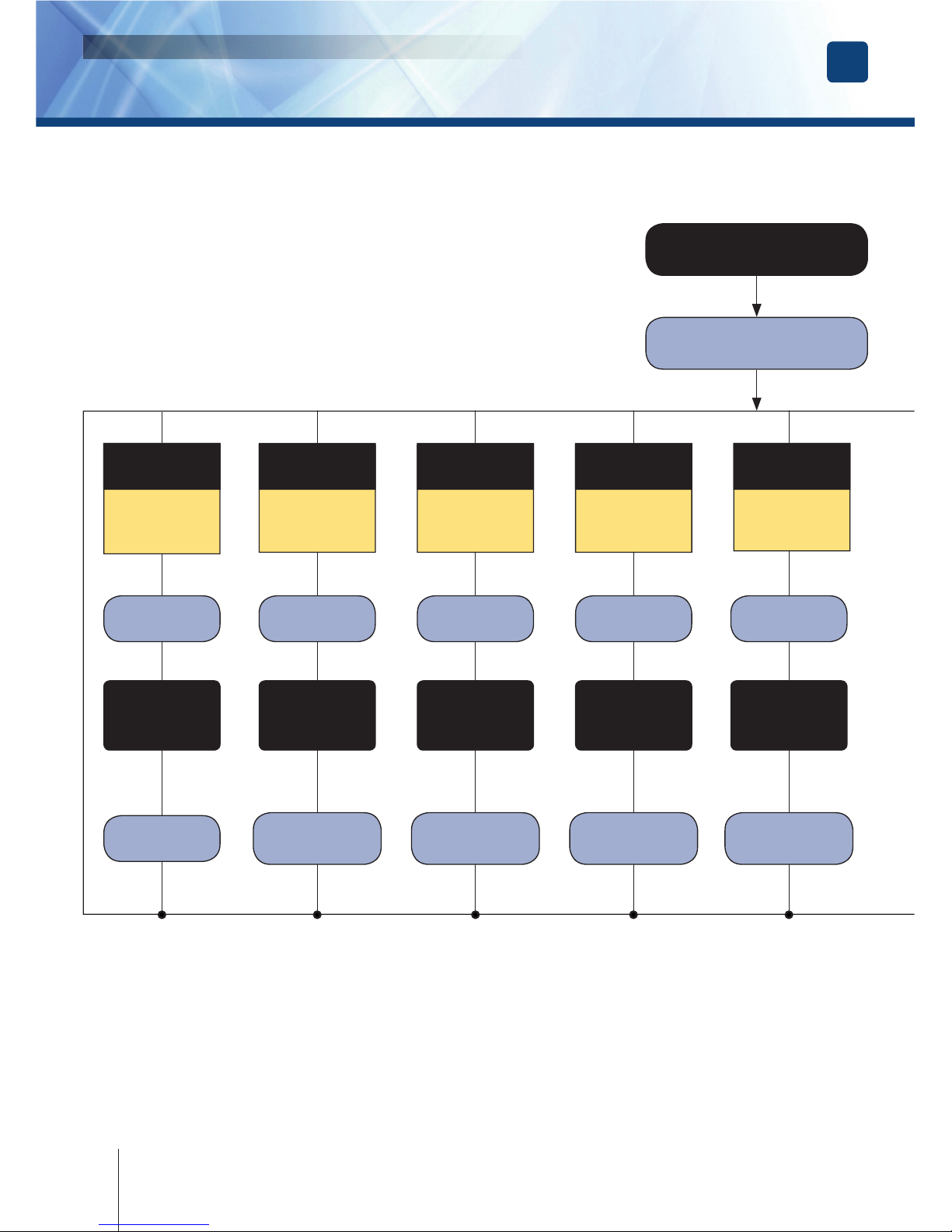
Type the master code
A5
Master code
A0
Keypad lighting
timeout
A1
Relay 1 timeout
A2
Relay 2 timeout
A4
Number of digits
1 x beep 1 x beep 1 x beep
10-99 seconds.
00 = continuous.
10 = Default.
01-99 seconds.
00 = bistable.
01= Default.
01-99 seconds.
00 = bistable.
01=Default.
The value
‘4’ or ‘5’.
5 = Default.
All the keys
are valid.
12345 = Default.
1 x beep = OK,
4 beeps = error
1 x beep = OK,
4 beeps = error
1 x beep = OK,
4 beeps = error
1 x beep = OK,
4 beeps = error
1 x beep = OK,
4 beeps = error
2 x beeps
Page 19

EN
19
cdvi.com
cdvigroup.com
SUBLIM
Illuminated Weatherproof Keypad with remote electronics
INSTALLATION MANUAL
2 beeps
Type B to exit
programming
A6
Reset
A7
Digits
for changing
relay 1
A8
Digits
for changing
relay 2
Sound signal
00-99
1 x beep 1 x beep1 x beep 1 x beep
Press A
then B.
2 Beeps
are emitted.
1 x beep = OK
4 beeps = error
1 x beep = OK
4 beeps = error
1 x beep = OK
2 fi gures.
AB = default.
2
fi gures.
13 = default.
0 = stop the beeps.
1 = permit
the beeps.
‘4’ or ‘5’ fi gures
4 beeps = row occupied.
1 beep = row free.
Press ‘B’ to cancel
without changing.
Page 20

EN
SUBLIM
Illuminated Weatherproof Keypad with remote electronics
INSTALLATION MANUAL
20
cdvi.com
cdvigroup.com
A summary table indicating the code assigned to each user is attached
SUBLIM 2 Relays
Group 1: From row 00 to row 59, - Group 2: From row 60 to row 99.
REMINDER
Digit
place
Code
Name
Forname
00
01
02
03
04
05
06
07
08
09
10
11
12
13
14
15
16
17
18
19
20
21
22
23
24
25
26
27
28
29
30
31
32
33
Digit
place
Code
Name
Forname
34
35
36
37
38
39
40
41
42
43
44
45
46
47
48
49
50
51
52
53
54
55
56
57
58
59
60
61
62
63
64
65
66
67
Digit
place
Code
Name
Forname
68
69
70
71
72
73
74
75
76
77
78
79
80
81
82
83
84
85
86
87
88
89
90
91
92
93
94
95
96
97
98
99
Page 21

EN
SUBLIM
Illuminated Weatherproof Keypad with remote electronics
INSTALLATION MANUAL
21
cdvi.com
cdvigroup.com
Green indicator light
Off On permanently Slow fl ashing Rapid fl ashing
Red
indicator
light
Off
Waiting for a key
depression
Current code Code change
Programming mode:
Waiting for a command
On
permanently
Commands 0 to 99:
User code
Command A0:
Keypad tempo
Command A1:
Relay 1 timeout
Command A2:
Relay 2 timeout
Slow fl ashing
Switch 1 ON:
Master code RESET
Command A4:
Number of code digits
Command A5:
Master code
Command A6:
Memory reset (A+B).
Rapid fl ashing
Command A7:
Relay 1 change code
Command A8:
Relay 2 change code
Cmd AA: with/without
warning buzzer = 1/0
If the remote controller is situated close to the keypad, you can use the remote controller’s
indicator lights to help you programme your SUBLIM.
In training mode, the green indicator
light fl ashes slowly while waiting for a key to be pressed
. While a key is being trained,
the indicator stays on.When all the keys have been trained, the green indicator fl ashes rapidly.
7] REMOTE CONTROLLER INDICATOR LIGHT CODES
8] NOTES
Page 22

FR
SUBLIM
Clavier codé rétro-éclairé à électronique déportée
MANUEL D’INSTALLATION
22
cdvi.com
cdvigroup.com
Page 23

FR
SUBLIM
Clavier codé rétro-éclairé à électronique déportée
MANUEL D’INSTALLATION
23
cdvi.com
cdvigroup.com
Page 24

Reference : G0301FR0297V06
Extranet : EXE-CDVI_IM SUBLIM CMYK A5 EN-FR 06
cdvigroup.com
CDVI Group
FRANCE
(Headquarter/Siège social)
Phone: +33 (0)1 48 91 01 02
Fax: +33 (0)1 48 91 21 21
All the information contained within this document (photos, drawing, features, specifi cations and dimensions)
could be perceptibly different and can be changed without prior notice.
Toutes les informations mentionnées à titre indicatif sur le présent document (photos, dessins, caractéristiques
techniques et dimensions) peuvent varier et sont susceptibles de modifi cations sans notifi cation préalable.
*G0301FR0297V06*
CDVI
FRANCE + EXPORT
Phone: +33 (0)1 48 91 01 02
Fax: +33 (0)1 48 91 21 21
CDVI AMERICAS
[CANADA - USA]
Phone: +1 (450) 682 7945
Fax: +1 (450) 682 9590
CDVI BENELUX
[BELGIUM - NETHERLAND - LUXEMBOURG]
Phone: +32 (0) 56 73 93 00
Fax: +32 (0) 56 73 93 05
CDVI
SUISSE
Phone: +41 (0)21 882 18 41
Fax: +41 (0)21 882 18 42
CDVI
CHINA
Phone: +86 (0)10 62414516
Fax: +86 (0)10 62414519
CDVI IBÉRICA
[SPAIN - PORTUGAL]
Phone: +34 (0)935 390 966
Fax: +34 (0)935 390 970
CDVI
ITALIA
Phone: +39 0321 90573
Fax: +39 0321 908018
CDVI
MAROC
Phone: +212 (0)5 22 48 09 40
Fax: +212 (0)5 22 48 34 69
CDVI SWEDEN
[SWEDEN - DENMARK - NORWAY - FINLAND]
Phone: +46 (0)31 760 19 30
Fax: +46 (0)31 748 09 30
CDVI UK
[UNITED KINGDOM - IRELAND]
Phone: +44 (0)1628 531300
Fax: +44 (0)1628 531003
DIGIT
FRANCE
Phone: +33 (0)1 41 71 06 85
Fax: +33 (0)1 41 71 06 86
 Loading...