

Page 1
BIOSYS 1
Stand alone ngerprint reader
Page 2

2
v
1 1 2 2
1 4 1
1 2 2 2 2
x1 x10
IP52
DEEE
-10°C to +50°C
The BIOSYS 1 product complies with
Directive 1999/5/CE
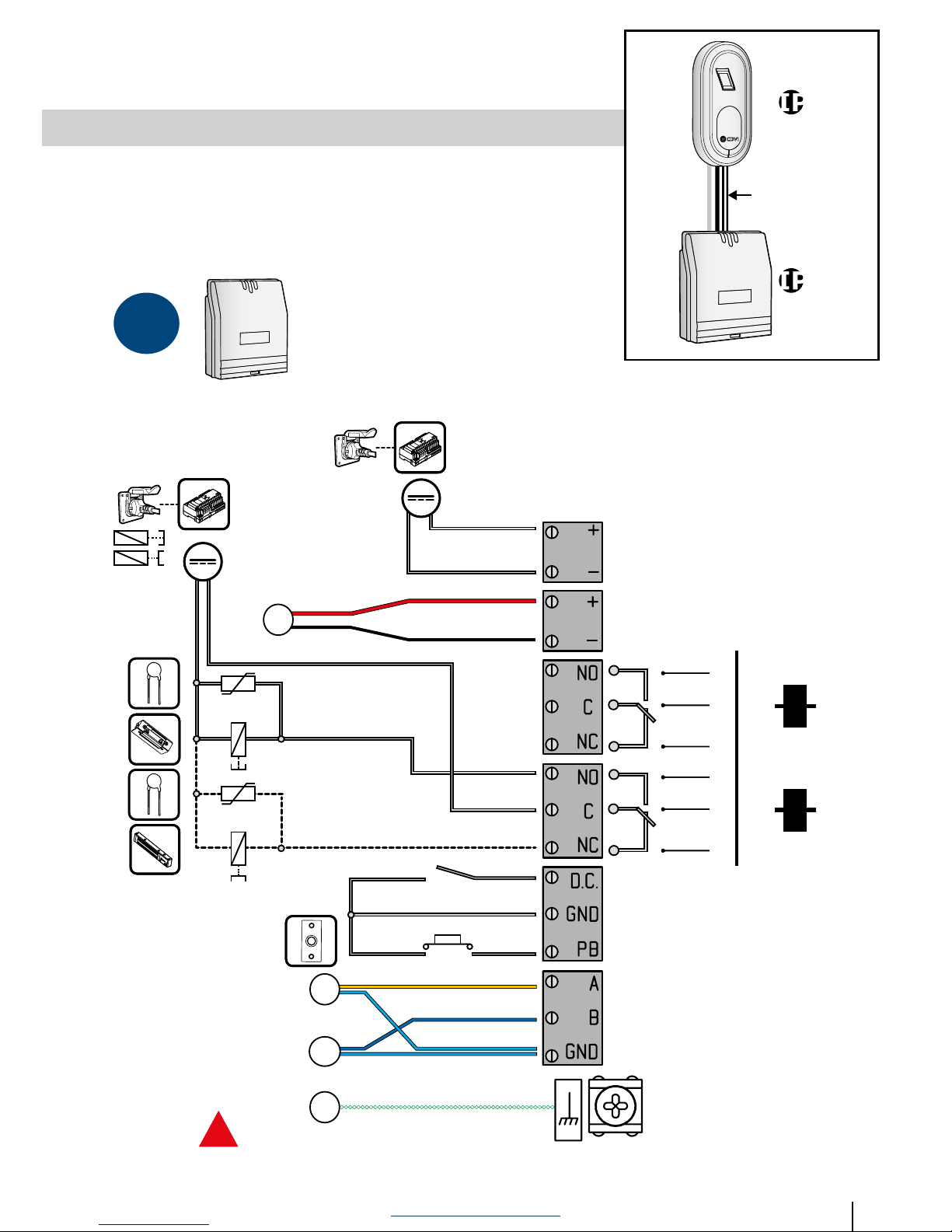
Wiring Reminder
The maximum distance between the controller
and the reader head is 50m.
Beware of mains (240Vac) connections.
Recommended cables> 3 twisted pairs (EIA-485
standard), 3P SYT 24 AWG.
Make sure the drain wire PE is connected.
Environment
The door controller must be installed internally.
The reader head must be installed in a sheltered
location from the weather.
Operating temperature range of -10°C to + 50°C.
Installation Recommendation
To limit back EMF spikes, the varistor must be
installed across the supply terminals of the lock.
Recommended power supplies (12 VDC)
Power supplies must be 12Vdc with a minimum
current provision of 1A. Please ensure you have
taken into account the power requirements of the
lock.
Power must be a limited power source, compliant
with EN 600950-1.
REMINDERS & RECOMMENDATIONS
Master Card
User Card
Part No: MASTERBIO Part No: USERBIO
LED
Colour
MODE
BLUE Standby
WHITE Finger detected
RED Access denied
GREEN Access granted
ORANGE Waiting for command
RED (ashing) Programming error
Surround Indicator LED’s
Page 3

3
www.cdvigroup.com
MOUNTING
¿8
¿5
35 mm
1.38 po
90°
ø5
35 mm
1.38 po
1
1 2 3 4
5 6 7
Page 4
4
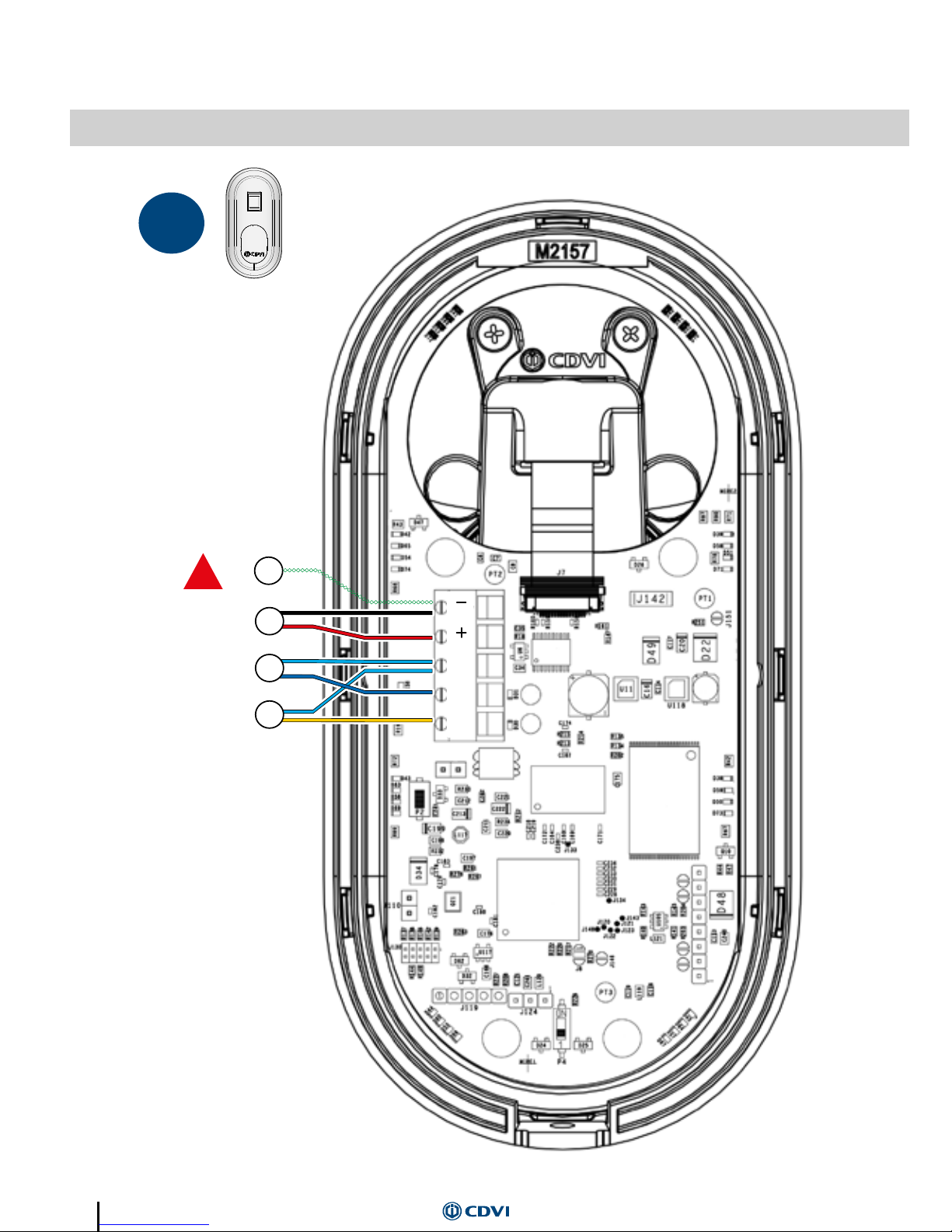
WIRING
2
M
B
A
Pa1
Pa2
Pa3
PE
1
!
Make sure the drain
wire PE is connected
Page 5
5
www.cdvigroup.com
2
< 50 m / 164 ft
SYT 3P 24AWG
IP52
IP52
Pa2
Pa3
RL1
NO C NC
RL2
NO C NC
V
V
12VDC
(-10% / +20%)
12VDC
Alarm
IN
12V
Bus
OUT
12V
Door
Pa1
PE
!
Make sure the drain
wire PE is connected
Page 6
6
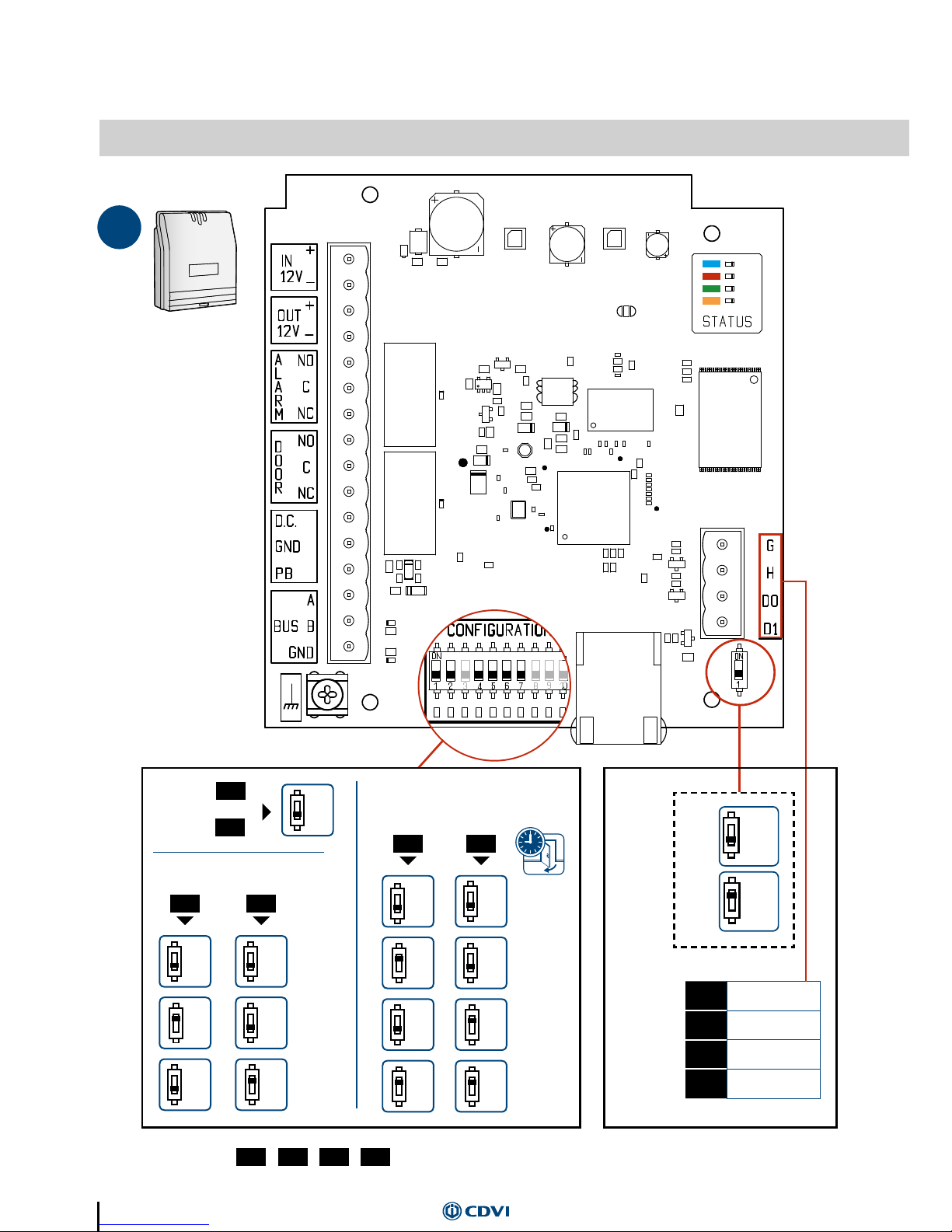
PARAMETERS
3
26 bits
30 bits
44 bits
WIEGAND
ON
ON
OFF
OFF
OFF
OFF
1 sec.
5 V
WIEGAND
5 sec.
12 V
10 sec.
15 sec.
ON
ON
ON
ON
ON
OFF
OFF
OFF
OFF
OFF
4 5
6 7
1
LOCK RELAY TIME
G
Common
Ground
H
Clock
D0
Data 0
D1
Data 1
83 109
DIP switch NOT USED
2
1
OFF
Reset
mastercard
System
default
Page 7
7
www.cdvigroup.com
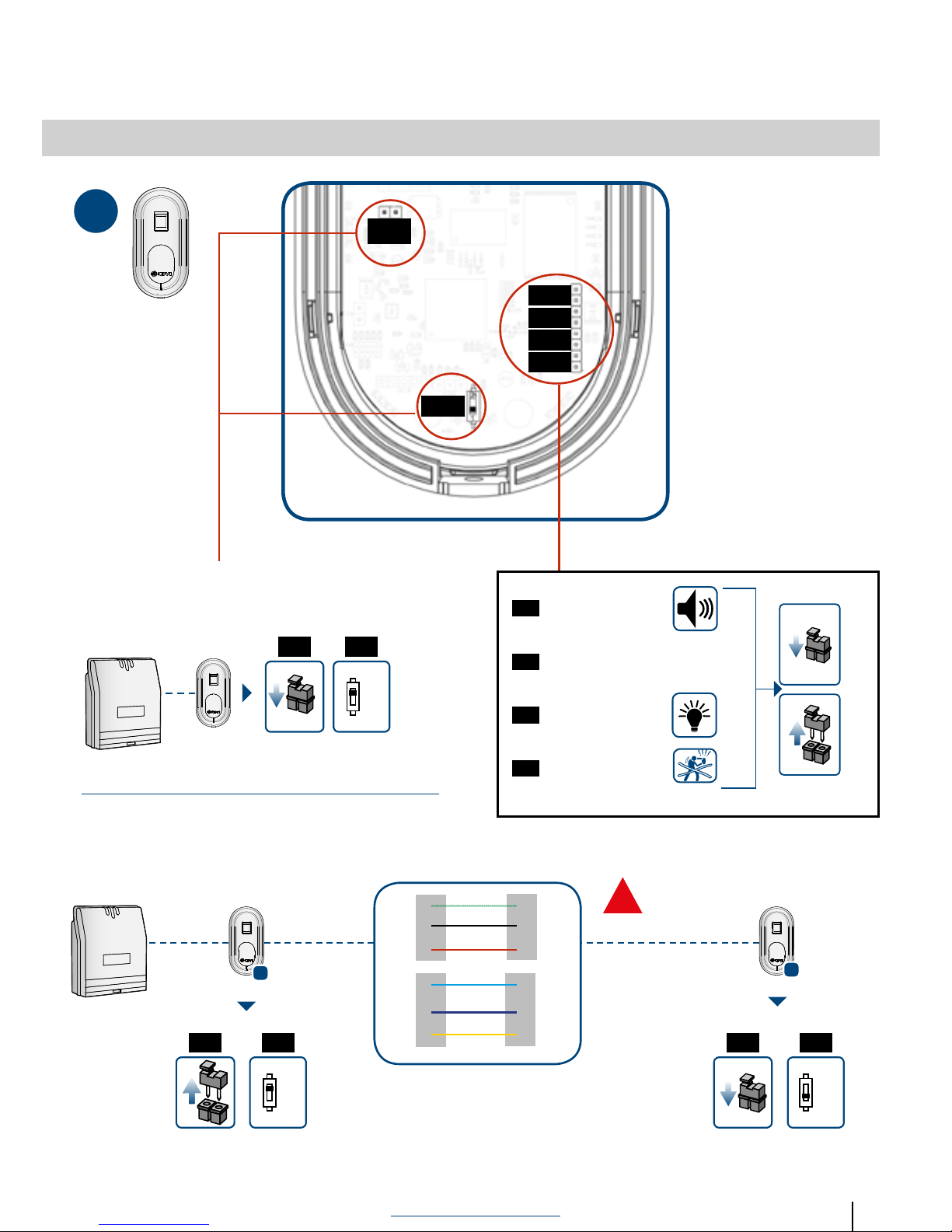
J1
J2
J3
J4
J5
P1
ON
OFF
J2
J3
J4
J5
2
ON
ON
OFF
J1
J1 J1
P1
P1 P1
1
2
INSTALLATION WITH ONE READER HEAD
Buzzer
Permanently lit
Tamper alarm
NOT USED
-
+
M
B
A
M
B
A
-
+
INSTALLATION WITH TWO READER HEADS
PE
PE
!
Make sure the drain
wire PE is connected
Page 8
8
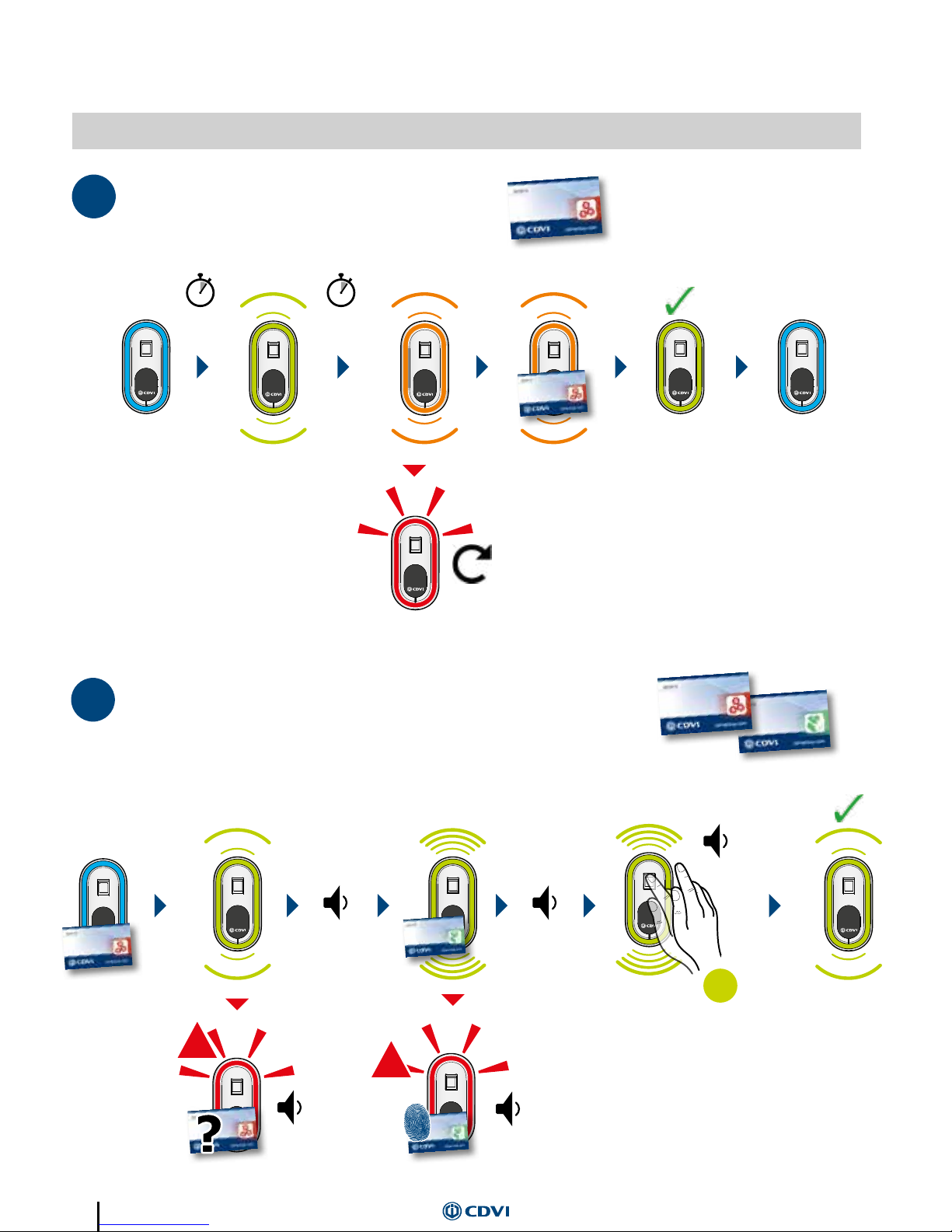
FIRST TIME POWER UP
4
1/2/3
1
START BIOSYS1
2
X1
X1
X1
!
!
X1
X6
REGISTRATION OF FINGERPRINTS
UP TO 500 USERS
User Card already assignedUnknown Master Card
Return to section 1,2 & 3
Place your nger on the
sensor until the unit
BEEPs, remove and place
again - do this 6 times in
total.
X1
20 secs
Master Card
BEEPBEEP BEEP
Master Card
User Card
BEEP
BEEP
BEEP
When the registration of
the user is completed,
the unit will change to
white. At this point the
ngerprint can be veried
- then the unit changes to
blue standby.
If the ngerprint is not
veried, the unit will
change to blue standby
after 10 seconds.
BEEP
BEEP
Note: If registration is not completed within 60 seconds, the unit will revert to standby
Page 9
9
www.cdvigroup.com
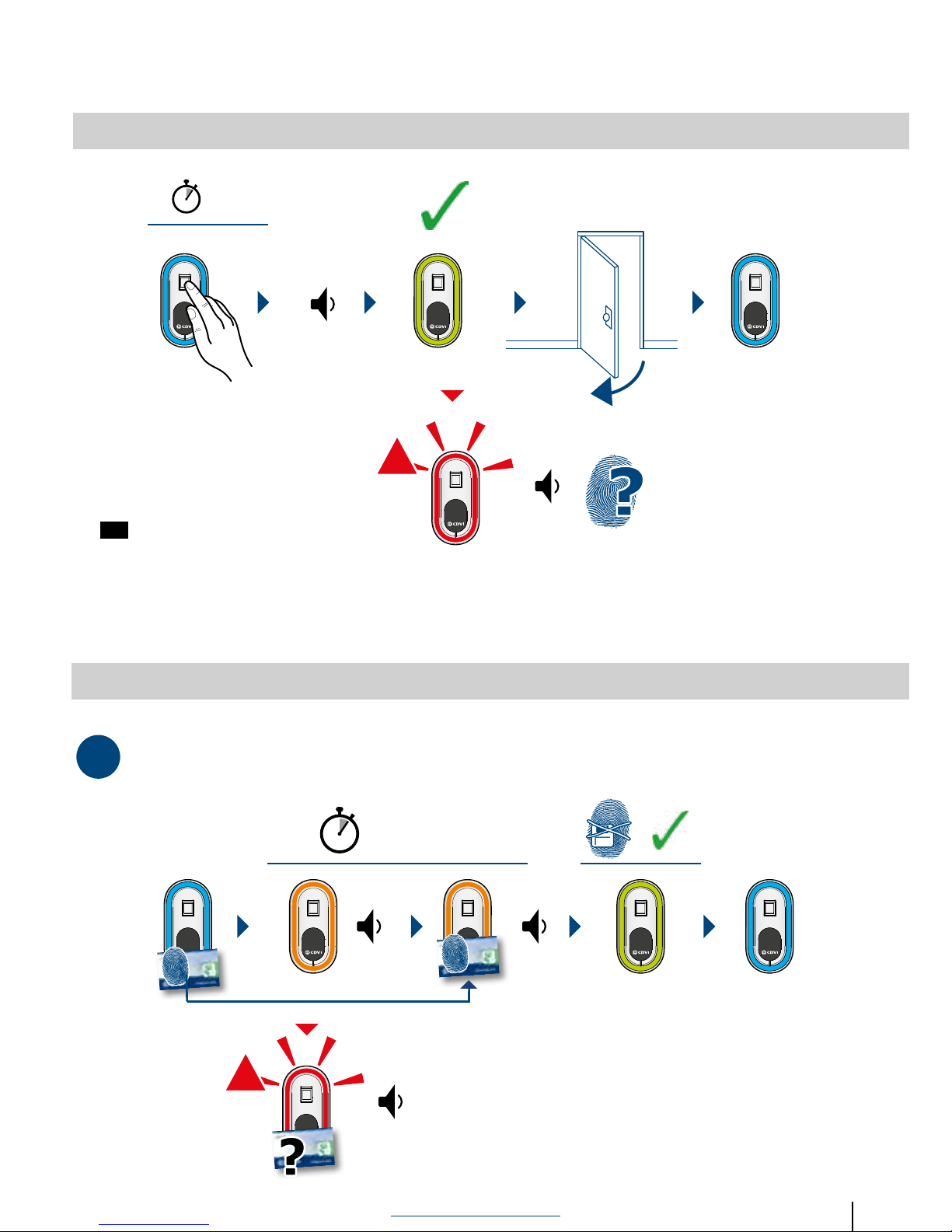
NORMAL USE
5
X1
X1
1S
!
MORE PROGRAMMING
6
1 REMOVING A FINGERPRINT
X1 X1
X1
5S / 8S max.
!
Unrecognised ngerprint
Unknown User Card
BEEP
BEEP
User Card
BEEP
BEEP
BEEP
If “Permanently Lit” is selected, then the
LED surround will indicate all the time.
If “Permanently Lit” is not selected, then
the LED surround will be off, and will only
indicate when it senses a nger present
- with no activity, the LED surround will
remain lit for 30 seconds then switch off.
Preference of surround LED’s is selected by
(see page 7).
J4
Page 10
10
4
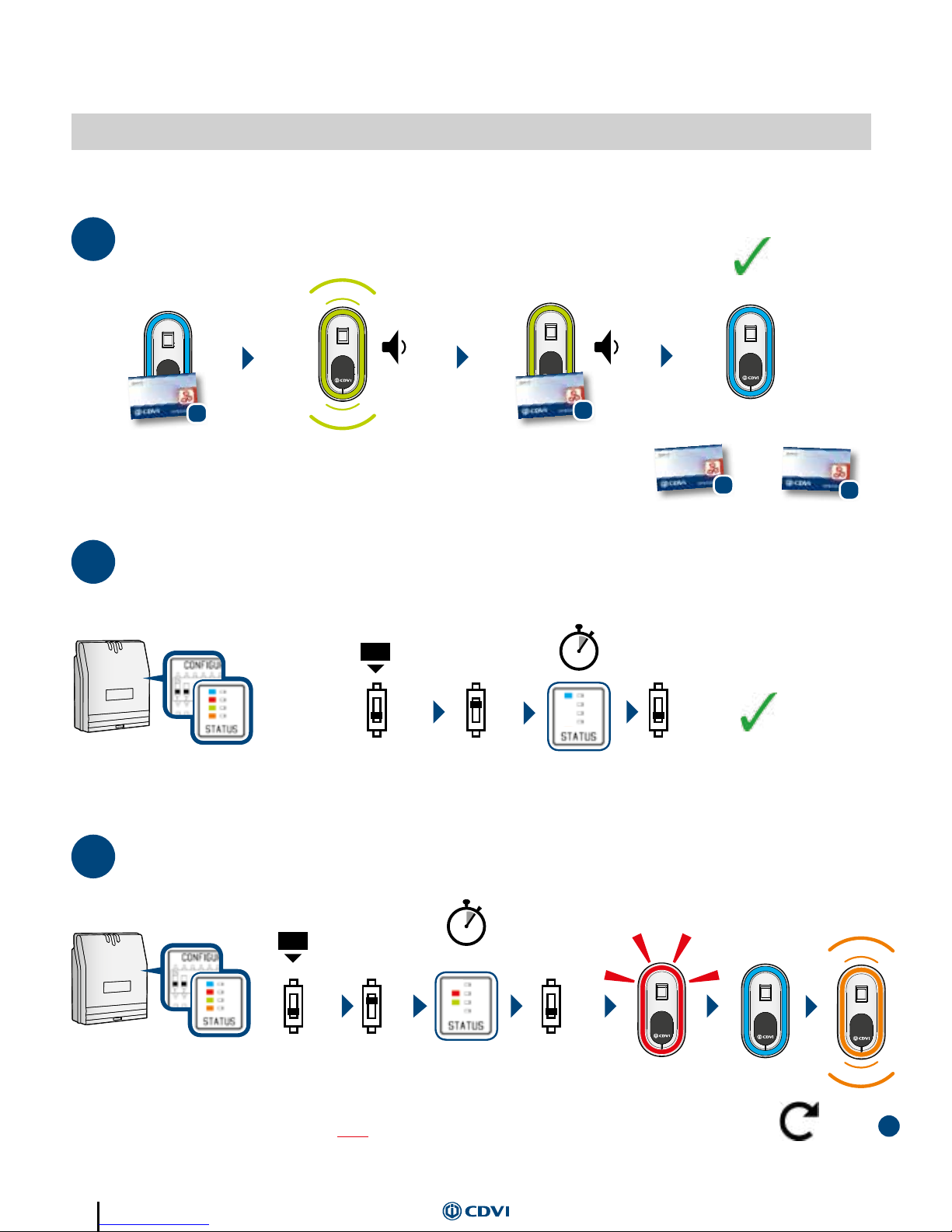
RESET
30S
ON
OFF
OFF
2
4
1
MORE PROGRAMMING
6
3
MASTER CARD CANCELLATION
1S
ON
OFF
OFF
1
X1 X3
2
DUPLICATE THE MASTER CARD
B
A
B
A
=
DIP switch
DIP switch
Return to Section 4.1
Existing Master Card
New Master Card
BEEP
BEEP
Note: After deleting a Master Card, the next Master Card presented will automatically be added - as indicated by the green LED
Note: Leave DIP 2 on until the FIRST red LED ash with an audible “chirp” - turn DIP 2 off.
A further 3 red ashes will occur, followed by blue then ashing orange - a new Master Card can now be added.
Page 11
11
www.cdvigroup.com
A General Alarm will be activated:
• If the door contact (CP) is connected and there has been an attempt to force the door; or the
door was not closed within 60 seconds of a valid transaction.
• If there is loss of communication between the controller and the reader head for more than 25
seconds.
• If there is an attempt to remove the reader head (tamper detection).
While in programming mode, inaction will revert the reader head to sleep mode.
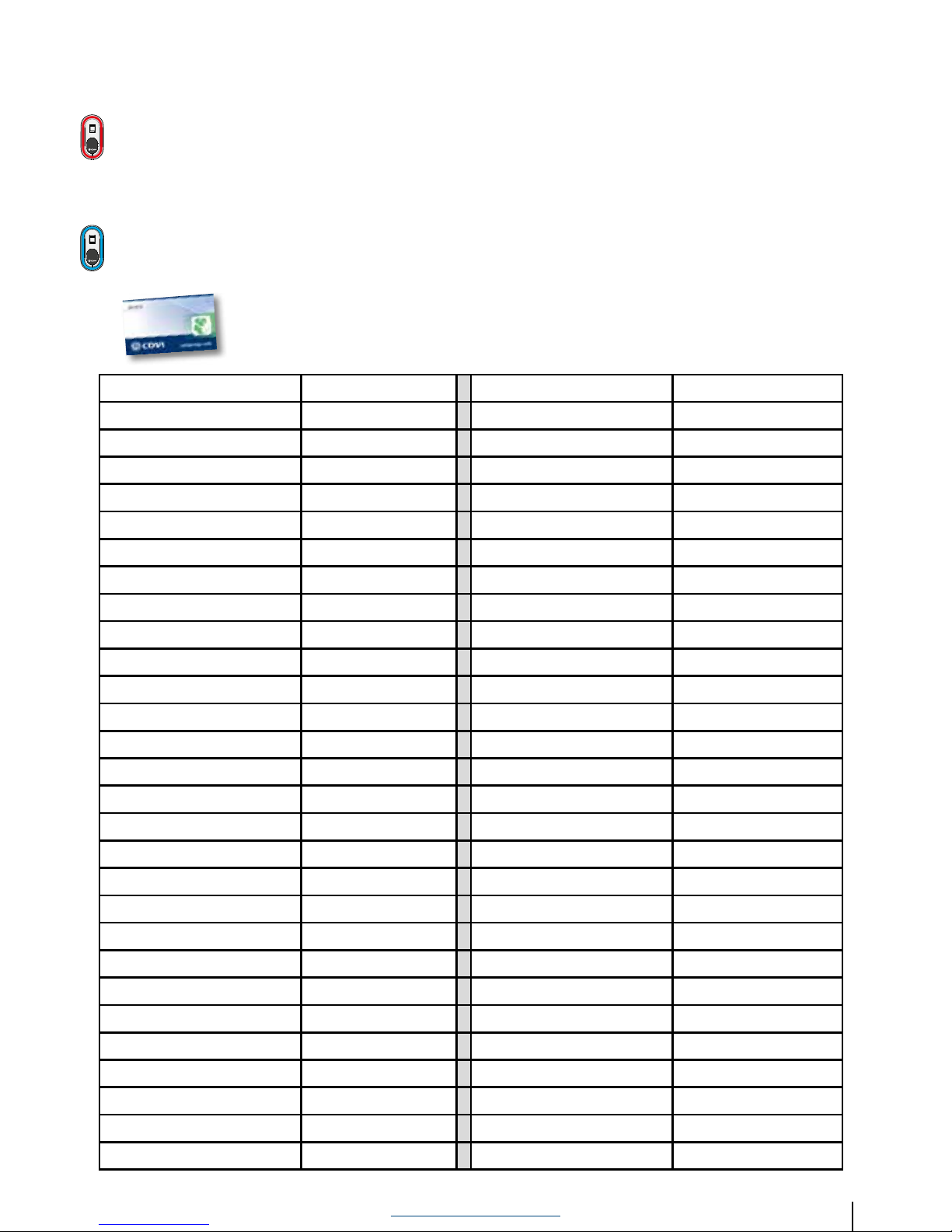
Important note: The user cards are unique, and used for the registration and
deletion of users. It is important to note which user card is registered to which
user, and all cards should be kept in a safe and secure place.
User name User Card No. User name User Card No.
Page 12

CDVI
FRANCE + EXPORT
Phone: +33 (0)1 48 91 01 02
CDVI
AMERICAS
[CANADA - USA]
Phone: +1 (450) 682 7945
CDVI
BENELUX
[BELGIUM - NETHERLAND - LUXEMBOURG]
Phone: +32 (0) 56 73 93 00
CDVI
TAIWAN
Phone: +886 (0)42471 2188
CDVI
SUISSE
Phone: +41 (0)21 882 18 41
CDVI
CHINA
Phone: +86 (0)10 84606132
CDVI
IBÉRICA
[SPAIN - PORTUGAL]
Phone: +34 (0)935 390 966
CDVI
ITALIA
Phone: +39 0321 90 573
CDVI
MAROC
Phone: +212 (0)5 22 48 09 40
CDVI
SWEDEN
[SWEDEN - DENMARK - NORWAY - FINLAND]
Phone: +46 (0)31 760 19 30
CDVI
UK
[UNITED KINGDOM - IRELAND]
Phone: +44 (0)1628 531300
cdvigroup.com
+50° C
-10° C
 Loading...