

Page 1
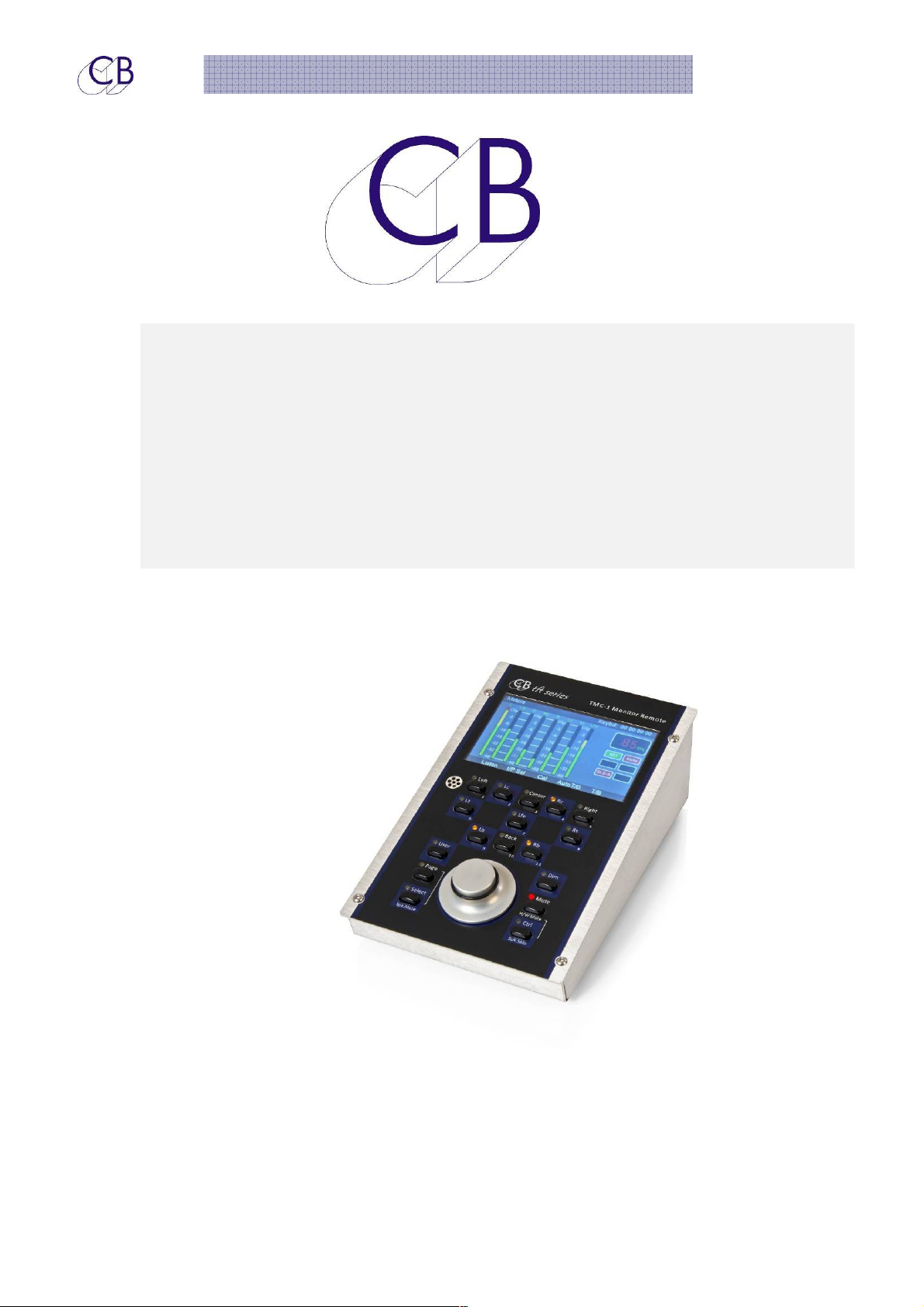
TMC-1-IMon Monitor Controller
CB Electronics
TMC-1-IMon Monitor Remote
Use with the TMC-1Reference
Provisional
2016 CB Electronics 1 Provisional
Page 2

C
C
onntt
o
TMC-1-IMon Monitor Controller
ennttss
e
n................................................................................................................... Error! Bookmark not defined.
IIMMoon
TMC-1-IMon User guide..........................................................................................................................................3
TMC-1-IMon gain Structure....................................................................................................................................3
MMeetteerriinngg CCuuee SSeenndds
SStteerreeoo iinnppuutt ttoo ccuuee sseenndds
MMoonniittoorriinngg CCuuee SSeenndds
BBaassss EExxtteennssiioon
GPO-3........................................................................................................................................................................4
XPand Surround Bass Expansion...........................................................................................................................4
SSuurrrroouunndd SSwwiittcchhiinng
5.1 ...............................................................................................................................................................................5
HHDD1155 CCoonnnneeccttoorr ((LLaabblleedd XX--MMoonn)
TTaallkkbbaacckk MMiiccrroopphhoonnee aanndd HHeeaaddpphhoonne
Internal Talkback Microphone..............................................................................................................................5
s .......................................................................................................................................4
s...............................................................................................................................4
s ....................................................................................................................................4
n.................................................................................................................................................4
g .........................................................................................................................................5
) ..................................................................................................................5
e........................................................................................................5
Talkback and Sate Routing...................................................................................................................................6
Headphone Jack....................................................................................................................................................6
Listen Back Microphones.......................................................................................................................................6
CCoonnnneeccttiinngg tthhee TTMMCC--11 ttoo II--MMoon
RJ45 Breakout card.................................................................................................................................................7
II--MMoonn MMeetteerriinng
II--MMoonn BBlloocckk DDiiaaggrraam
g ...............................................................................................................................................7
m .....................................................................................................................................8
n ....................................................................................................................7
2016 CB Electronics 2 Provisional
Page 3
Moonn
IIM
TMC-1-IMon Monitor Controller
TMC-1-IMon User guide
This document only describes connection details and setup considerations when using I-Mon
and should be used with the TMC-1 User guide.
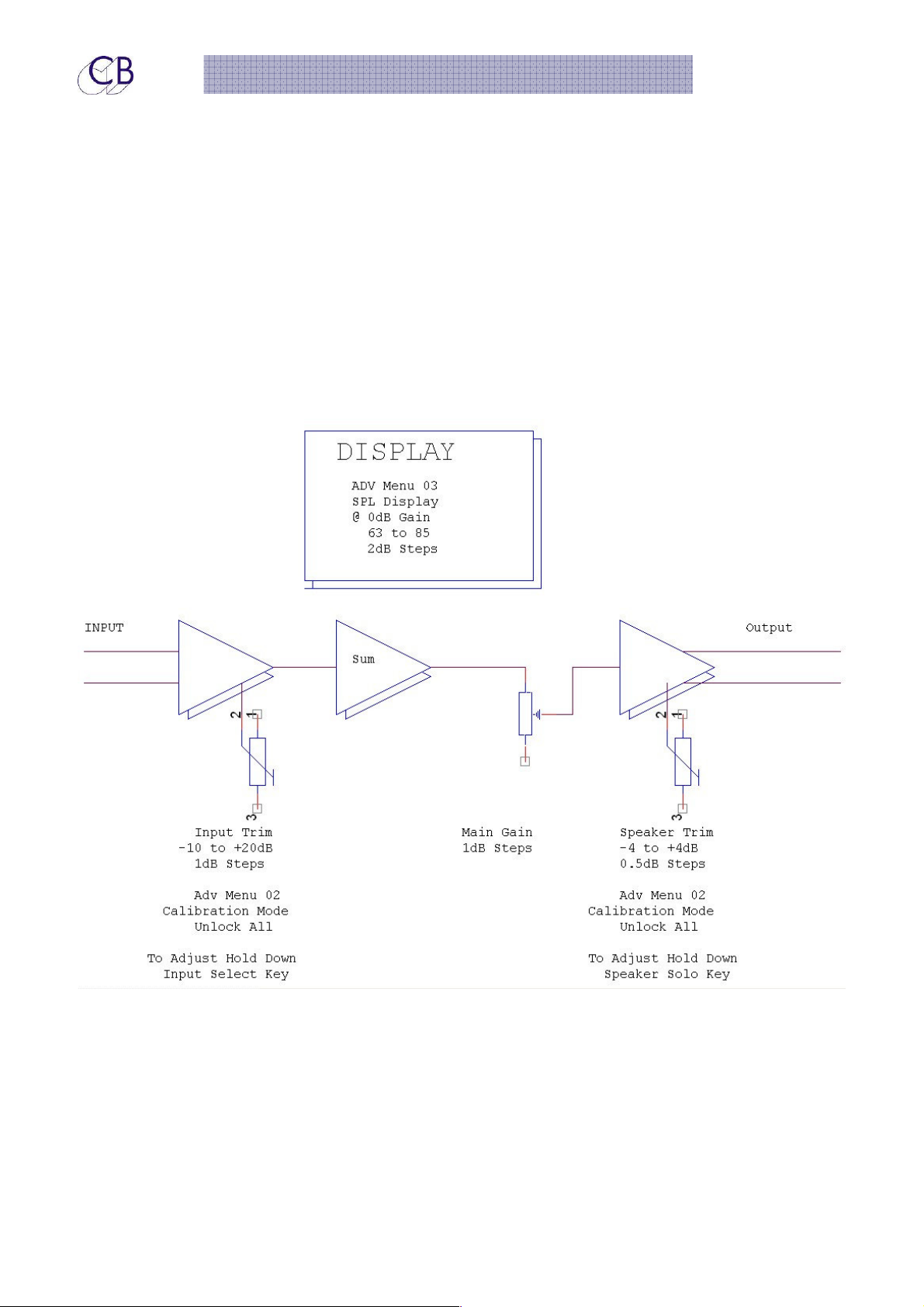
TMC-1-IMon gain Structure
2016 CB Electronics 3 Provisional
Page 4

TMC-1-IMon Monitor Controller
Meetteerriinngg
M
The I-Mon allows for metering of the SLS and H/P Monitor send only, use the [Meter Cues] user
key to access.
Stteerreeoo iinnppuutt ttoo ccuuee sseennddss
S
Apart from the Link to the Monitor output there is no provision on the I-Mon to route a stereo
input independently to the cue sends. One option is to parallel Cue input 3 with Stereo input
3 and name Cue input 3 appropriately.
Moonniittoorriinngg
M
There is no provision on the I-Mon to monitor the cue sends. One option would be to
connect a Cue output to a stereo input and label the input appropriately.
Baassss
B
Exxtteennssiioonn
E
Cuuee
C
Cuuee
C
Seennddss
S
Seennddss
S
The I-Mon provides to separate bass extension options:
Bass-X
Low Pass Filter.
Surr-X
GPO-3
One of our customers used the GPO-3 Output to enable and disable the Bass extension on
his Speakers. He used TMC-1-Win/mac to rename the GPO-3 Indication to Bass-X
XPand Surround Bass Expansion
XPand has built in Summing and filtering for Surround Bass extension
Sum the Left and Right and Centre Outputs and route to the S/W(LFE) output via a
Sum the Surrounds and route to the S/W(LFE) output via a Low Pass Filter.
2016 CB Electronics 4 Provisional
Page 5

TMC-1-IMon Monitor Controller
Suurrrroouunndd
S
The I-Mon will switch the source of the rear surround speakers when 5.1 is selected. The TMC-1
provides a level trim for the Left and Right surround when monitoring 5.1 to allow for the
extra speakers.
5.1
You can set a trim to reduce the surround gain when the Rear Speakers are added to the
surround.
You can assign a GPO to be active when 5.1 is selected and use this to drive a relay to
switch the rear speakers to the side.
H
D1155
H
D
The I-Mon is connected to the TMC-1-IMon via a DCC VGA cable, a 7 Meter cable is
supplied as standard and extra long cables are available to order. Alternatively a pair RJ45
Coonnnneeccttoorr ((LLaabblleedd
C
S
wiittcchhiinngg
S
w
X--
X
Moonn))
M
breakout boards are available with two 0.5 meter DCC VGA cables..
TTaallkkbbaacckk M
Heeaaddpphhoonnee
H
The TMC-1 provides a analogue Talkback Microphone with preamp and Headphone
connection which are connected to the HD15 connector.
Internal Talkback Microphone
An electret microphone and amplifier is provided in the TMC-1, normally connected to the
internal microphone. A 3.5mm Jack on the rear is provided to that a suitable external
“Laptop Microphone” may be used. The microphone output is on the HP15 pin "Xmon"
connector and may be configured with a balanced or unbalanced output.
When using the TMC-1 microphone with the switches on the TMC-1 the mechanical coupling
causes a click on turn off. There are a number of solutions to this
Miiccrroopphhoonnee aanndd
1) Use an external switch connected to the GPIO input on the TMC-1
2) Connect an external Mic to the 3.5mm jack on the rear of the TMC-1 or directly to the I-
Mon
3) Use the Auto-mute commands to disable the Talkback on entering Play and/or Record.
2016 CB Electronics 5 Provisional
Page 6
TMC-1-IMon Monitor Controller
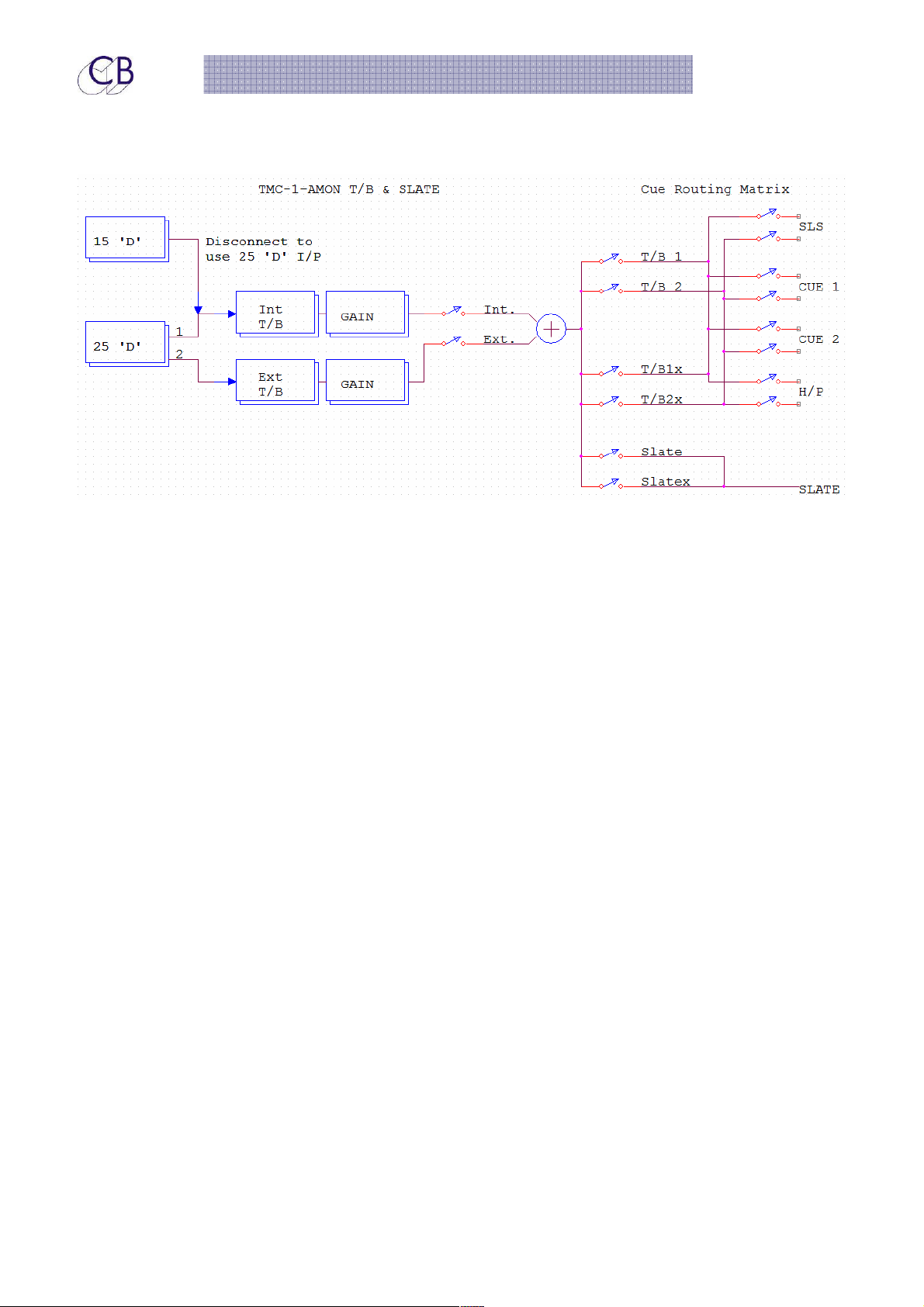
Talkback and Sate Routing
Headphone Jack
The headphone jack is connected directly to the 15 pin "XMon" connector. The input is
unbalanced with two ground returns.
Listen Back Microphones
Use Omni-directional microphones for Listen back, PZM or Boundary effect microphones
should work well.
2016 CB Electronics 6 Provisional
Page 7
TMC-1-IMon Monitor Controller
Coonnnneeccttiinngg tthhee TT
C
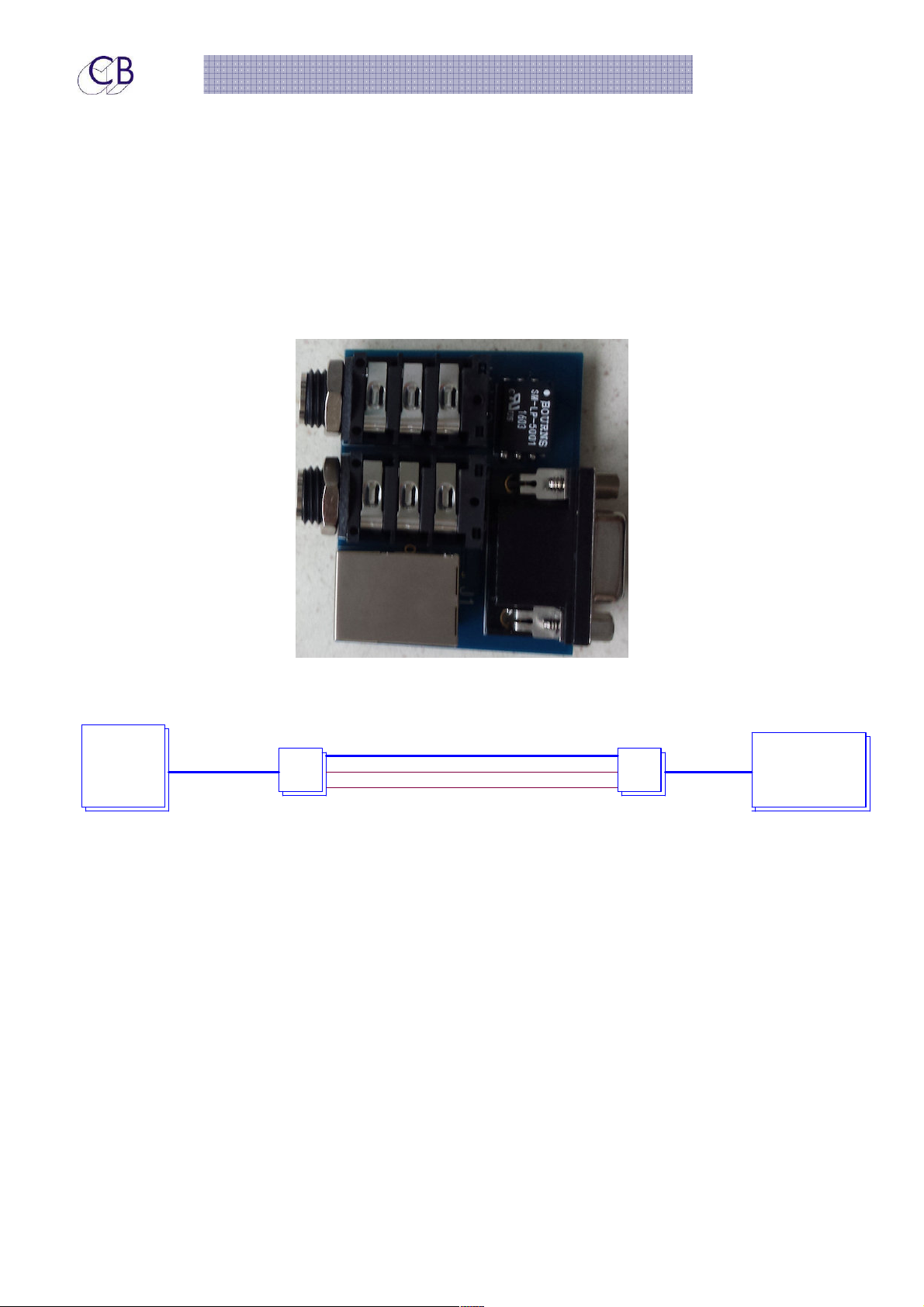
Connecting the TMC-1 to XMon using a long DDC VGA Cable
M
C--11 ttoo II--
M
C
RJ45 Breakout card
A pair of RJ45 breakout boards can be ordered for use with I-Mon
Moonn
M
Connecting the TMC-1 to the I-Mon using a pair of RJ45 breakout boxes
STP CAT6 Cable
TMC-1 A-Mon
RJ45 Breakout
Moonn
II--M
The default setting provides 5dB of analogue headroom above the digital clip point
when set in this mode (IMon clips at approximately +24dBm).
The I-Mon updates a channel every 2.5mSec, all channels are updated in 20mSec.
Meetteerriinngg
M
Mic Cable2m DCC VGA
Headphone Cable
RJ45 Breakout
0.5m DCC VGA
2016 CB Electronics 7 Provisional
Page 8
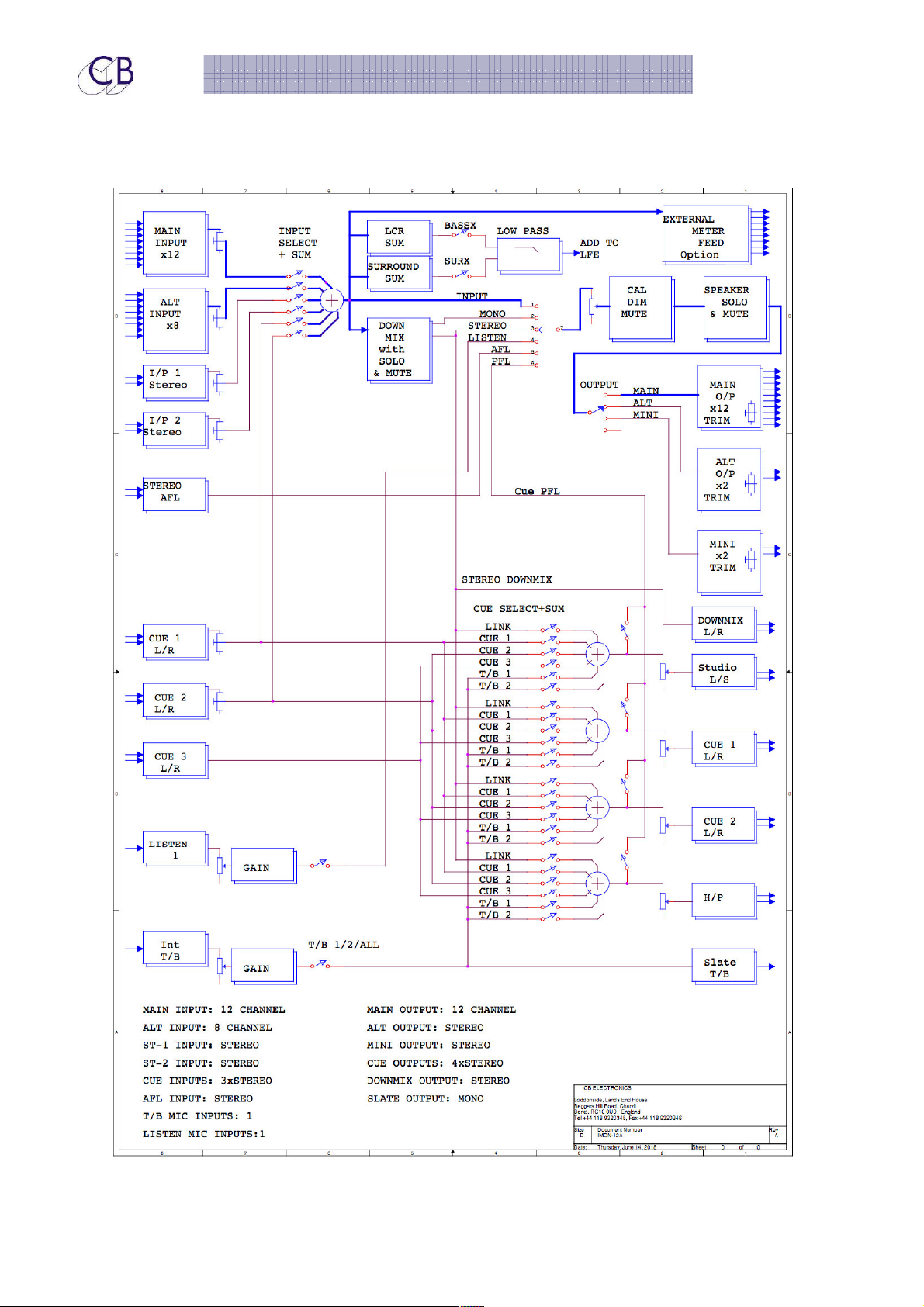
TMC-1-IMon Monitor Controller
Moonn
II--M
Blloocckk
B
Diiaaggrraa
D
m
m
2016 CB Electronics 8 Provisional
Page 9

eff
e
auulltt SS
a
ettttiinn
e
gss
g
TMC-1-IMon Monitor Controller
a
FFa
The factory default settings of the TMC-1 I-Mon controller are as follows:
ctt
c
Main Gain Section +4dB gain.
Speaker Trim -4dB
Overall gain 0dB
Speaker trim range is restricted to +/- 4dB
Input makeup gain +20dB to -10dB
orryy
o
D
D
CBB EEll
C
CB Electronics has made every effort to ensure the accuracy of information contained within this
document, which is nevertheless supplied for information purposes only and does not constitute any
form of warranty or guarantee.
All trademarks acknowledged.
The information in this document is subject to change without notice.
e
e
cttrr
c
onnii
o
css
c
2016 CB Electronics 9 Provisional
Page 10

TMC-1-IMon Monitor Controller
CB Electronics
Loddonside, Lands End House
Beggars Hill Road
Charvil
Berkshire RG10 0UD
Tel: +44 (0)118 9320345
Fax: +44 (0)118 9320346
Email: [email protected]
Tech Support: +44 (0)118 9320345
Web: www.colinbroad.com
2016 CB Electronics 10 Provisional
 Loading...