

Page 1

Page 2

THE MAVERICK
Model: CAV1-PLUS
PORTABLE BLUETOOTH/WIFI SPEAKER SYSTEM
ALEXA VOICE CONTROL BUILT-IN CHARGING BASE
+
Page 3

1
WHATʼS IN THE BOX:
WHAT YOUʼLL NEED:
The Maverick (CAV1-PLUS)
USB–C charging cable
USB wall adapter
Charging Base
Protective Travel Bag
Wi-Fi network transmitting at 2.4GHz
Apple device running iOS 10 or later or
Android device running Lollipop 5.0 or later
connected to your preferred Wi-Fi network
Install the Cavalier app and Amazon Alexa
app (iOS or Android) for setup
and to enable Alexa voice control and Wi-Fi
streaming music services
Questions? www.cavalieraudio.com 1 800 925 6224
• • •
Page 4
2
SETU P OVERVI E W
RESET
RESET
TEST
TEST
OR
Use the Cavalier app to:
∙ CONNECT TO WI-FI
∙ SETUP ALEXA
∙ CUSTOMIZE CONTROLS
∙ AND MORE!
Use the Amazon Alexa app to:
∙ MANAGE AMAZON ACCOUNT
∙ LINK STREAMING SERVICES
∙ ACTIVATE ALEXA SKILLS
∙ AND MORE!
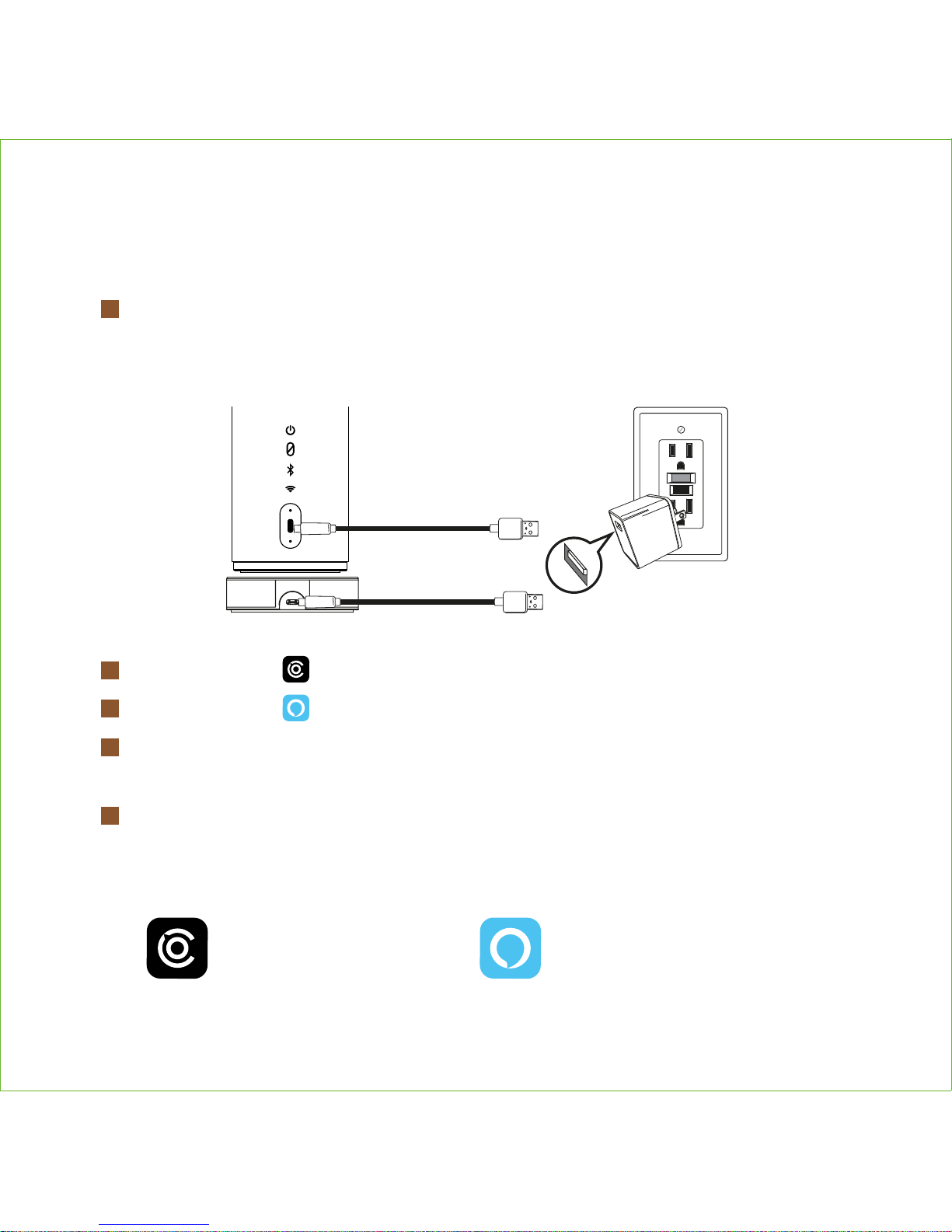
Plug included USB-C cable into USB charging port on back of unit OR on the
charging base. Connect other end of cable to included USB AC adapter and
plug into working wall outlet.
Download the Cavalier app from the App Store or Google Play.
Download the Amazon Alexa app from the App Store or Google Play.
Follow Cavalier in-app instructions for account setup and to establish
your speaker’s Wi-Fi connection.
Connect your Amazon account to enjoy the Alexa voice capability
of your CAV1.
1
2
3
4
5
Page 5
3
The Spotify Software is subject to third party licenses found here: www.spotify.com/connect/third-party-licenses
USING THE AMAZON ALEXA
APP WITH THE MAVERICK
USING SPOTIFY CONNECT
WITH THE MAVERICK
Connect your Maverick to your Wi-Fi network
Open up the Spotify app on your phone, tablet or laptop
using the same Wi-Fi network
Play a song and select Devices Available
Select your Maverick and start listening
1
2
3
4
Open the Amazon Alexa app on your device to activate, access,
and manage Amazon Voice Services
Link Wi-Fi streaming music services (such as Pandora, TuneIn,
iHeartRadio, Spotify, and Amazon Music)
Enable your favorite Alexa Voice Skills
Setup compatible Smart Home devices
1
2
3
4
Page 6
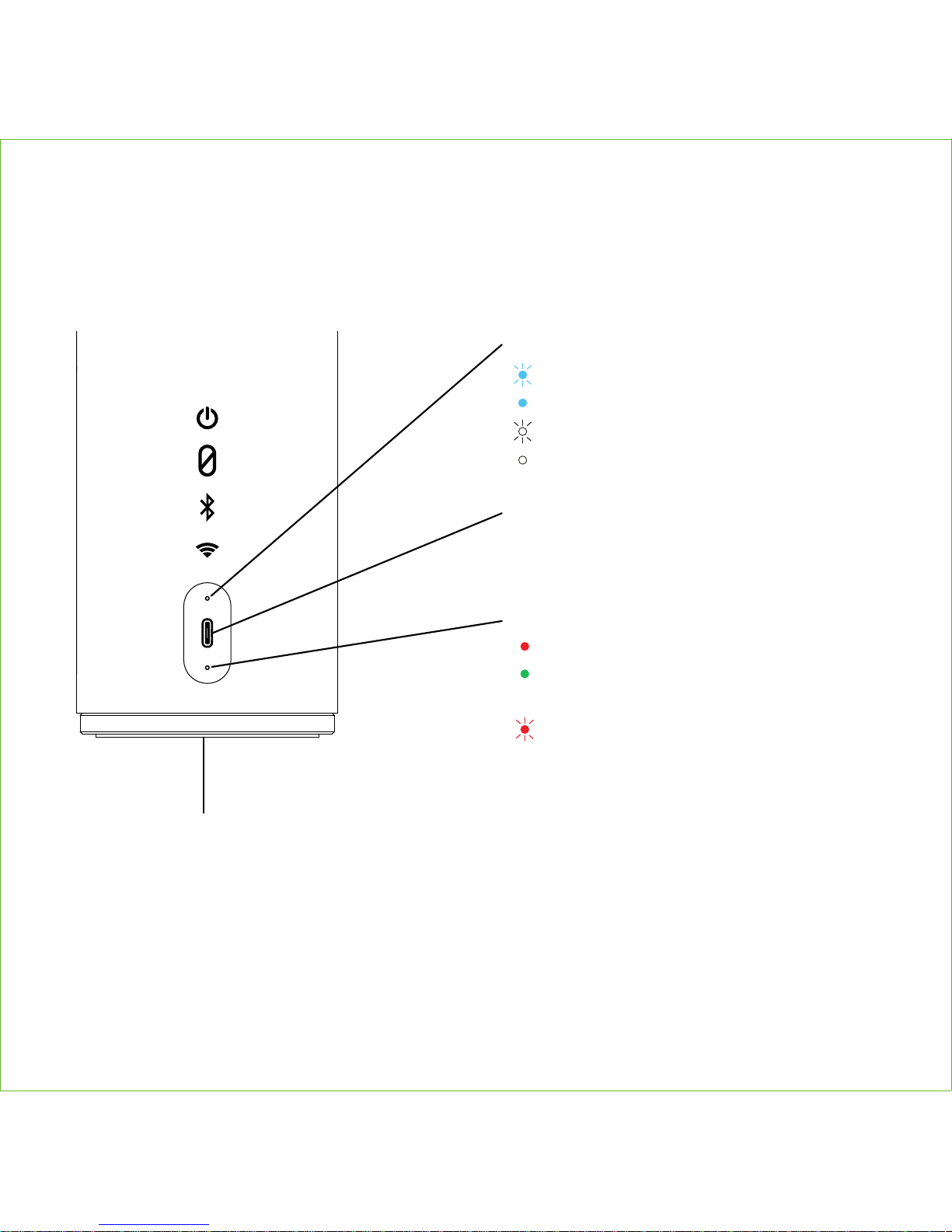
REAR INDICATORS & USB PORT
4
Charging Indicator
Solid red = charging
Solid green = charged
Battery Indicator
Flashing red = low battery
Bluetooth/Wi-Fi Indicator
Flashing blue = pairing
Solid blue = paired
Flashing white = Wi-Fi setup/No Connection
Solid white = Wi-Fi connected
USB-C Charging Port
• To power The Maverick and
charge for portable use
Hardware Reset
If unit is not responding, insert the end of a paper clip or similar into reset port on bottom
of unit.
Page 7
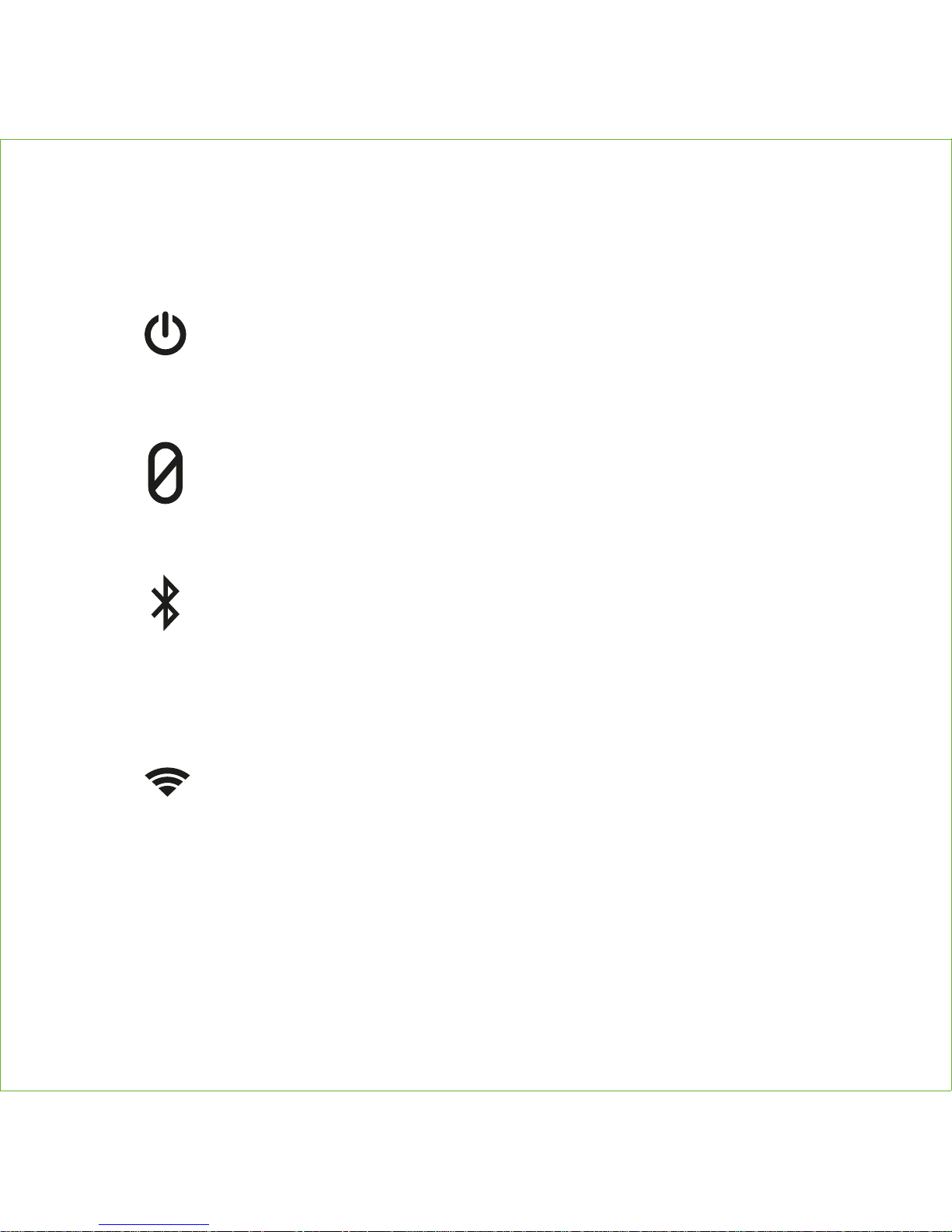
REAR CONTROLS
5
Power Button
Mute Button
• Press and hold for more than 2 seconds to power The Maverick ON.
Press and hold for more than 4 seconds to power OFF.
• Press and release to view battery level
• Press to mute and unmute microphones (enables privacy for both
Alexa and Speakerphone)
Wi-Fi Button
• Press for Wi-Fi mode
• Press and hold for 5 seconds for Wi-Fi setup mode
• Press and hold for 15 seconds to clear/reset Wi-Fi and Alexa
Bluetooth Button
• Press to enter Bluetooth Mode
• Press and hold for 2 seconds to enter Bluetooth Pairing Mode
• Select 'Cavalier Maverick' to pair
• Press and hold for 10 seconds to clear/reset Bluetooth
Page 8
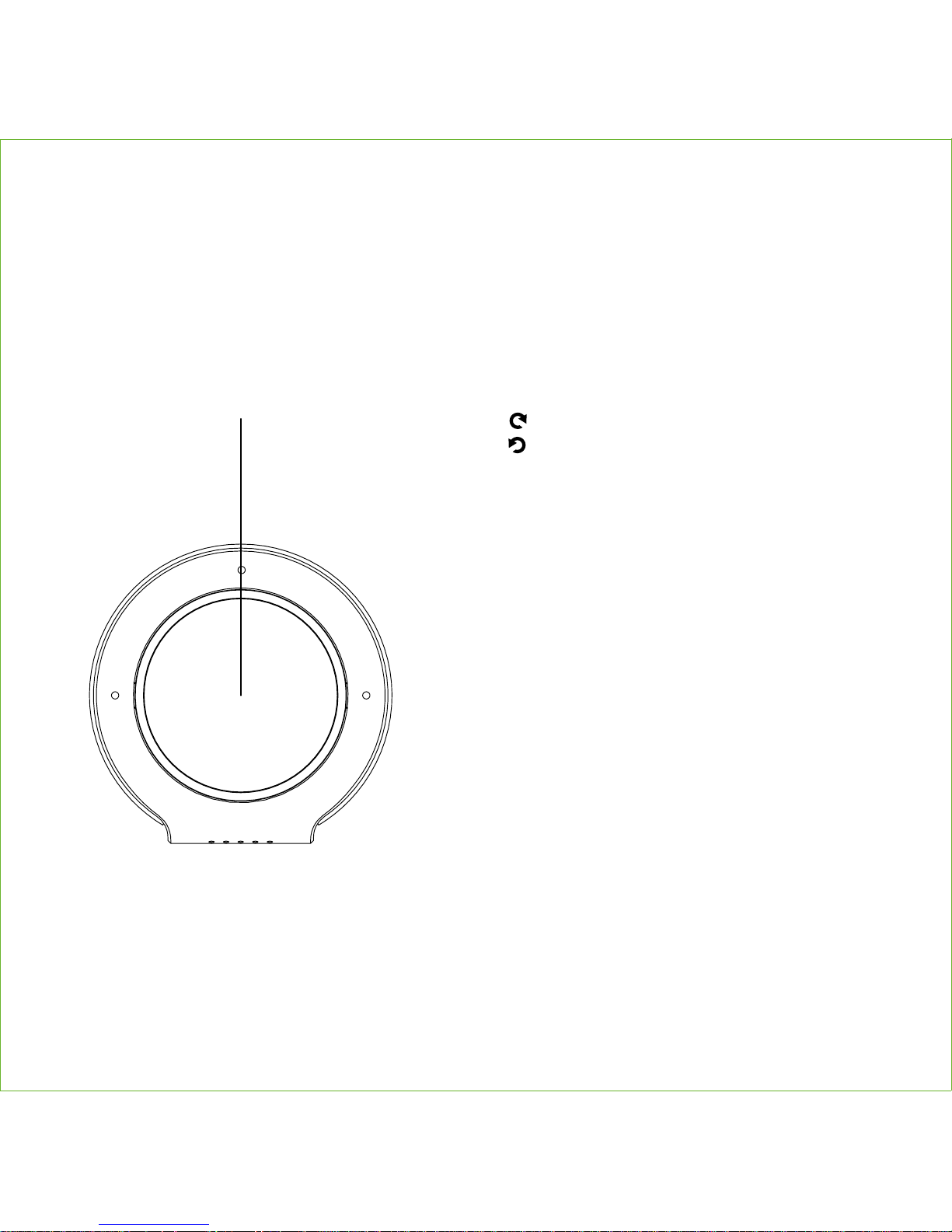
TOP CONTROLS
6
Cavalier Smart Button
VOLUME:
Rotate right to raise volume
Rotate left to lower volume
AUDIO CONTROLS:
• Tap 1x to Play/Pause audio
• Tap 2x to track forward
• Tap 3x to track back
**2x and 3x taps functions can be
programmed via the Cavalier app
AMAZON ALEXA:
• Press and hold to wake Alexa
(overrides Bluetooth)
SPEAKERPHONE:
• Tap 1x to answer a Bluetooth call
• Press and hold to ignore/end call
Page 9
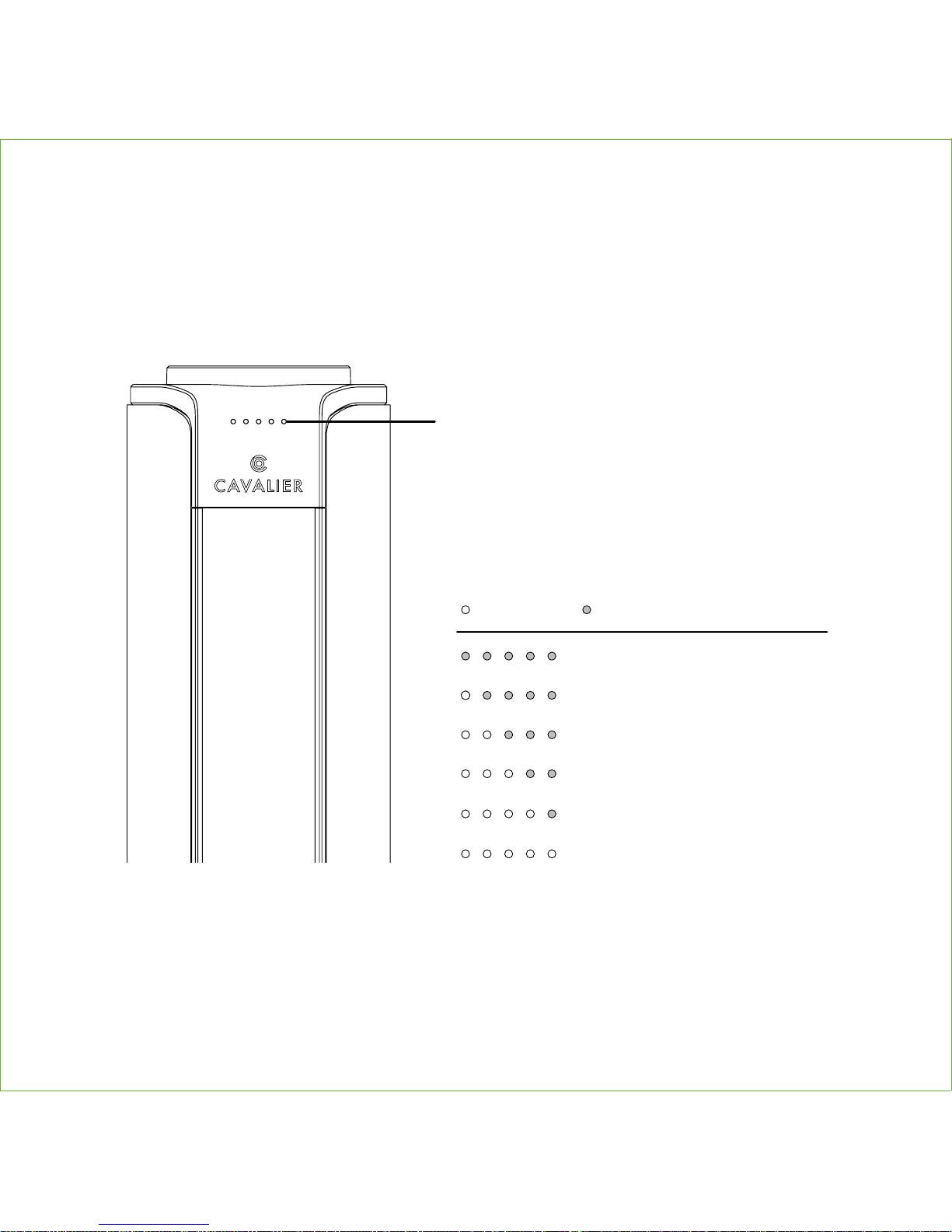
FRONT STATUS LEDS
7
Volume/Alexa/Battery
Level Indicator
Lit indicators match volume level
Red = muted
Battery Level (white LED match battery level)
Press and release Power Button to view
Low battery (charge soon)
No battery (needs charging)
Up to 100 % charged
Up to 85 % charged
Up to 70 % charged
Up to 45 % charged
LED ON LED OFF
NOTE: When operating on battery, unit will power down automatically
after 15 minutes of no audio unless connected to Wi-Fi.
/ Yellow = notification
Page 10

FCC Information
FCC Radiation Exposure Statement
The device has been evaluated to meet general RF exposure requirement.
The device can be used in portable exposure condition without restriction.
• Warning: Changes or modifications to this unit not expressly approved by the party responsible
for compliance could void the user’s authority to operate the equipment.
• NOTE: This equipment has been tested and found to comply with the limits for a Class B digital
device, pursuant to Part 15 of the FCC Rules.
These limits are designed to provide reasonable protection against harmful interference in a residential
installation. This equipment generates, uses and can radiate radio frequency energy and, if not
installed and used in accordance with the instructions, may cause harmful interference to radio
communications.
However, there is no guarantee that interference will not occur in a particular installation. If this
equipment does cause harmful interference to radio or television reception, which can be determined
by turning the equipment off and on, the user is encouraged to try to correct the interference by one
or more of the following measures:
• Reorient or relocate the receiving antenna.
• Increase the separation between the equipment and receiver.
• Connect the equipment into an outlet on a circuit different from that to which the receiver is
connected.
• Consult the dealer or an experienced radio/TV technician for help.
CAN ICES-3 (B)/NMB-3(B)
Canada Statement
This device complies with Industry Canada’s licence-exempt RSS standard(s). Operation is subject to the following two conditions:
(1) This device may not cause interference; and
(2) This device must accept any interference, including interference that may cause undesired operation of the device.
This device complies with Part 15 of the FCC Rules, operation is subject to the following two
conditions: (1) This device may not cause harmful interference, and (2) this device must accept
any interference received, including interference that may cause undesired operation.
Model: CAV1
FCC ID:EMOCAV1
IC:986B-CAV1
8
Page 11

Le présent appareil est conforme aux CNR d’Industrie Canada applicables aux appareils radio
exempts de licence. L’exploitation est autorisée aux deux conditions suivantes :
(1) l’appa reil ne doit pas produire de brouillage;
(2) l’utilisateur de l’appareil doit accepter tout brouillage radioélectrique subi, même si le
brouillage est susceptible d’en compromettre le fonctionnement.
The device has been evaluated to meet general RF exposure requirement.
The device can be used in portable exposure condition without restriction.
le dispositif a été évalué à satisfaire l'exigence générale de l'exposition aux rf. l'appareil peut être
utilisé dans des conditions d'exposition portatif sans restriction.
Internal Rechargeable Lithium-ion Battery
WARNING/DISPOSAL OF UNIT
Do NOT attempt to change the battery. Doing so will void the warranty and could cause injury and
damage to your device.
To dispose of the unit, follow the instructions below:
• Never dispose of used batteries/electronics with ordinary solid wastes, since they contain toxic
substances.
• Always dispose of used batteries/electronics in accordance with the prevailing community
regulations.
• Many electronics retailers now recycle batteries and other electronic components at no charge.
GENERAL BATTERY PRECAUTIONS
• Never use or charge a battery if it appears to be leaking, discolored, deformed, or in any way
abnormal.
• Never disassemble the unit or attempt to remove battery as that could cause leakage of
alkaline solution or other electrolytic substances.
• Avoid charging a rechargeable battery when the temperature is not within 5°C - 35°C (41° -
95° Fahrenheit).
• Never expose a battery to any liquid.
• Never expose a battery to excessive heat such as direct sunlight or fire. Never use a battery
pack in an unventilated vehicle where excessive internal temperatures may be encountered.
• Always keep batteries out of the reach of infants and small children.
This device uses an internal non-replaceable rechargeable lithium-ion battery that should last the
lifetime of the device. If you suspect your battery may be dead, try charging it for an extended
period of time and try resetting the unit. If this fails, contact Customer Service at
1-800-925-6224.
9
Page 12

Printed in ChinaCAV1-PLUS-180706-C Printed in ChinaCAV1-PLUS-180706-C For full warranty and full instructions visit: www.cavalieraudio.com/supportFor full warranty and full instructions visit: www.cavalieraudio.com/support
Questions?
www.cavalieraudio.com
1
800 925 6224
• • •
Questions?
www.cavalieraudio.com
1
800 925 6224
• • •
 Loading...