

Page 1
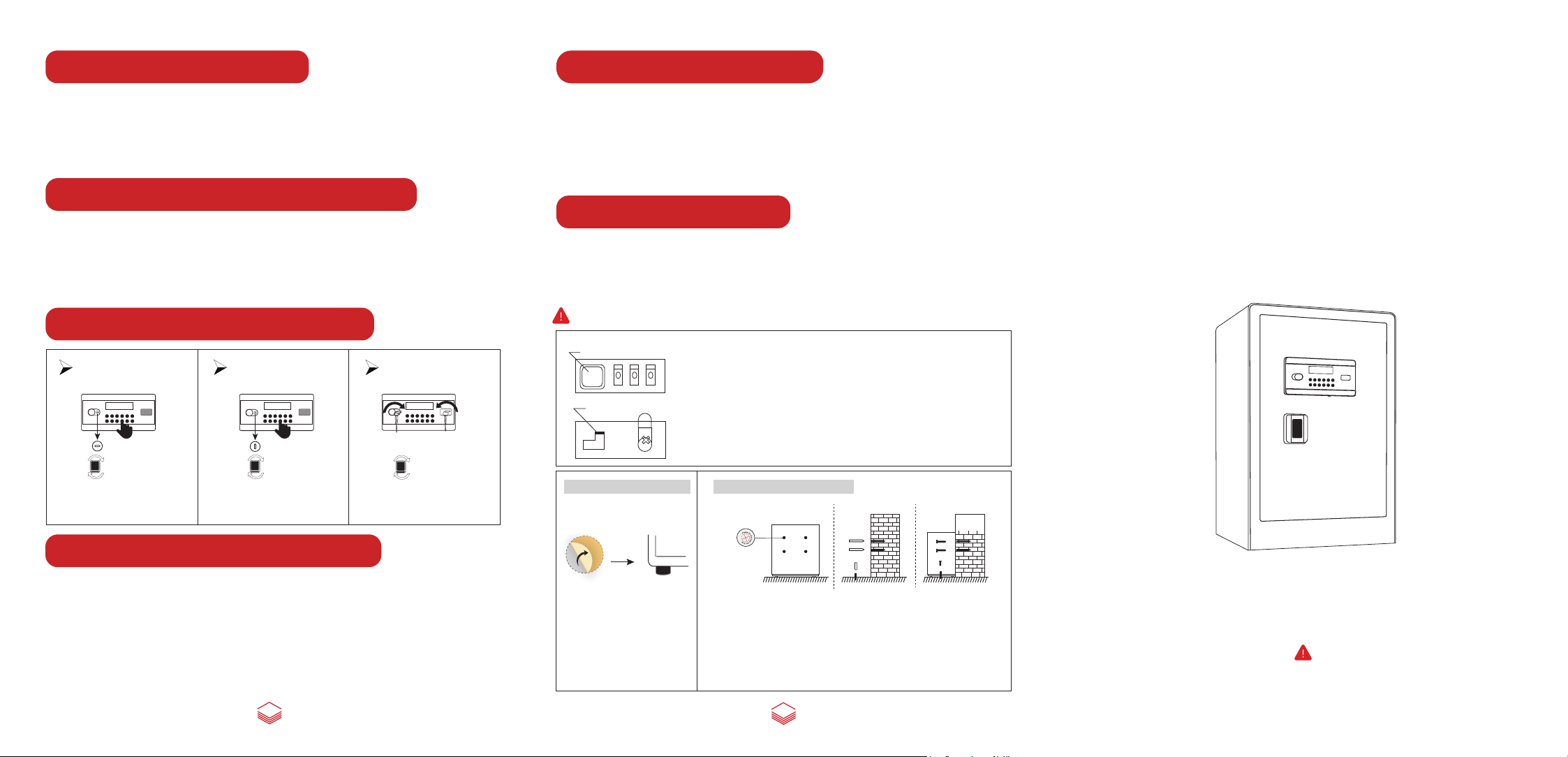
Set the user password
System Date Resetting
To set the new user password, the door must be opend first, then press the setting button to
enter the password setting state (located on the inner left side of the door when its opened).
When the screen displays shows "--------", enter 1-8 digits password, press "#" to confirm. If
the screen displays "Into", it indicates that the password is successfully set, then system
enters the standby state.
Set the administrator password
To set the new administrator password, the door must be opend first, then press the "#" key
to wake up the panel, press the "0" key twice, and then press the setting key to enter the
administrator password resetting state. The screen displays "------", enter 1-8 digits
password, press "#" to confirm. If "Into" is displayed on the screen, the administrator
password is successfully set, and then system enters the standby state.
Three ways to open the door
Methord 1
Password opening
Thu
4
18-05-16
00:00
1
2 3 4 5
*
7 8 9
6
0
#
when you pull out the master key
at horizontal angle, password
only can open the door.
Methord 2
Master key + password opening
18-05-16
Thu
4
00:00
1
2 3 4 5
*
7 8 9
6
0
#
when you pull out the master key
at vertical angle, you can open
with master key + password.
Methord 3
Emergency opening
Thu
4
18-05-16
00:00
1
2 3 4 5
*
6 7 8 9 0
#
Master key+emergency key
can open the door.
(1) In the standby state, press to enter system date resetting. The corresponding parameter will
blink.
"*"
(2) Enter the corresponding number to adjust the date and time, and return to the standby state after
the adjustment.
(3) During the setting, press the key to go back one space and re-enter.
(4) During the setting state, if no key is pressed within 10S, the state will be exited (the modified
"*"
value is invalid). System will return to standby.
Dual Alarm System
① After 3 consecutive time of wrong code, your safe will activate the alarm system, the
alarm will sound, then enter the correct password and the alarm will be cancelled.
② In the standby state press "0", the screen displays "Bell on" and enters the alarm state. In the
alarm status, the safe will alarm if encounters vibration or violent hit)
Note: When the door is opened, the alarm is turned off and needs to be turned on again.
knob
How to install foot mat?
OPEN
Set key
A
B
The front
back
Operation method of internal door password lock
1. Initial password is "000".
2. When adjusting password, first turn to the initial password "000" and turn
clockwise to turn the knob to open the inner door. Adjust the password setting key
on the back of the inner door.
Adjust "A" to "B" (as shown in the figure below), dial the password you need on the
password disk, and then adjust the password setting key to "A". After setting, the
new password is set successfully, and the initial password no longer works.
Note: please remember the password, so as not to bring you unnecessary trouble.
How to mount the safe?
Instruction Manual
SAFE BOX
4
Thu
18-05-16
00:00
213
4
5
*
6
7
8
9
0
#
Review Door Opening Record
1. First, using your password to open the door, while the screen display "OPEN" , press "0"
and "8" button, then you can query the door opening record.
2. The record displays in three parts: Password type(such as PASS-1 user password/-
PASS-2 administration password), number of opening door times(such as NO.01-NO.45),
Door opening time and date. If you don’t press the button in 5 second after your query, the
screen will back to normal. The LCD screen can store 45 door opening records.
4
1. Remove the stickers of the four
foot mats
2. Install the four foot mats on the
bottom of the safe
1. Place the safe at the installation place. Mark the drilling spots on the wall
from the inside pre-drilled holes, then remove safe and drill the holes.
2. Put the expansion bolts into the drilled holes, take the expansion bolt out of
the sleeves, then place the safe and align the pre-drilled holes with drilled
holes, and insert the expansion bolts into its sleeves from inside of the safe.
(This safe has six mounting holes, four are on the back of the safe and the
others are on the bottom of the safe)
5
Please do not lock the emergency key and emergency battery box into the cabinet.
Page 2
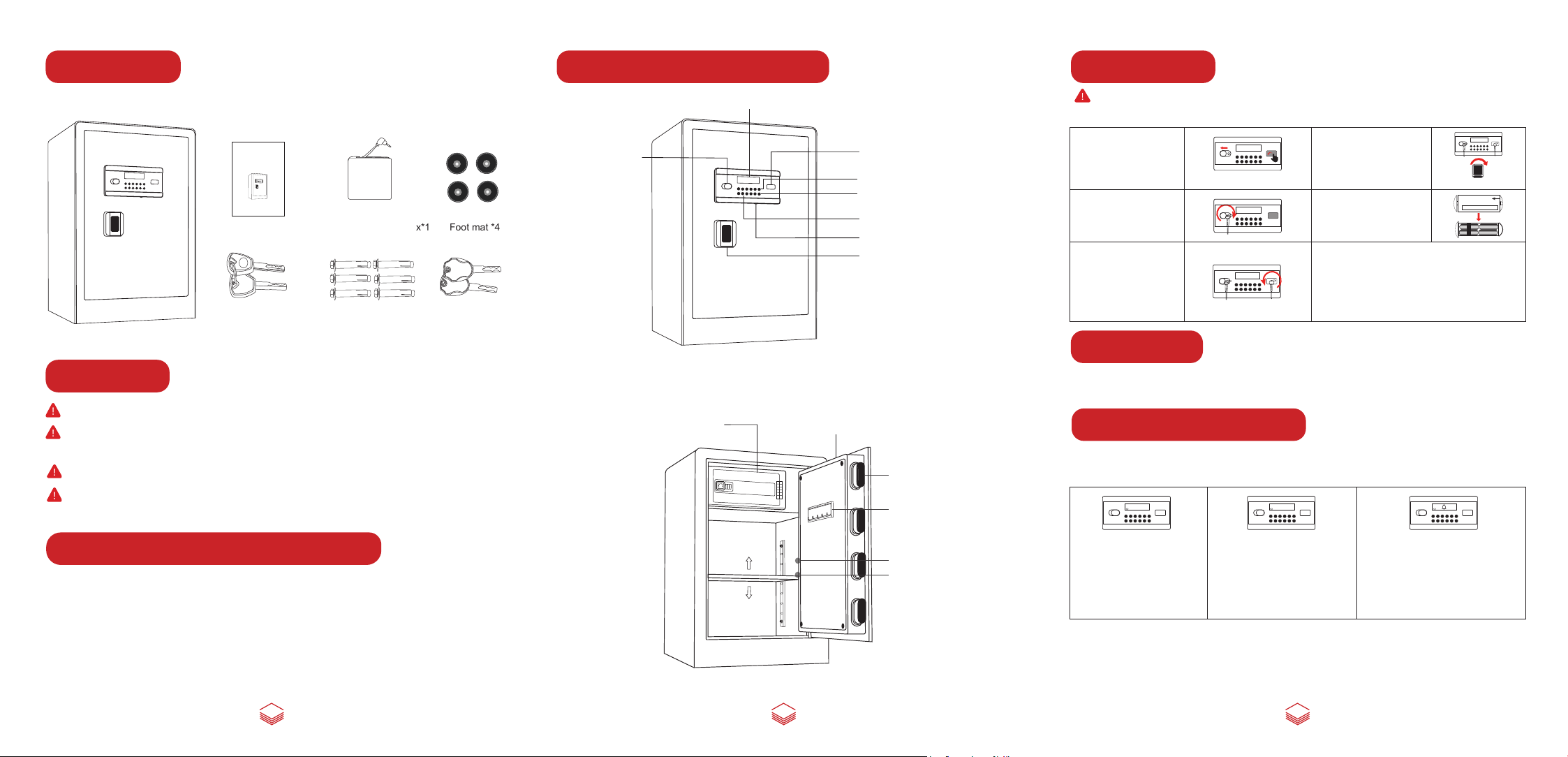
Parts List
Component Description
First Opening
Instruction Manual
6
18-05-16
7
4
Thu
00:00
213
4
5
*
8
9
0
#
SAFE BOX
4
Thu
18-05-16
00:00
213
4
5
*
6
7
8
9
0
#
Please do not lock the emergency key and emergency battery box into the cabinet.
Instruction Manual*1
Emergency battery box*1
Emergency key*2
OPEN
Expansion screws*6
Foot mat *4
Master key*2
Safe box *1
Warnings
1. Do not lock the emergency key or emergency battery box into the cabinet.
2. lf the safe box is not used for a long time, the battery should be removed to
prevent leakage of liquid from damaging the electronic system.
3. Purchase 4 AA batteries in advance, this safe does not contain batteries.
4. System initial user password is "1234", administrator password is "123456", both
need to be modified.
Master Keyhole
Password Inner cabinet
Liquid crystal display
4
Thu
18-05-16
00:00
213
4
5
*
6
7
8
9
0
#
Internal battery case
0
0
0
OPEN
Emergency keyhole
The delete key( )
Confirming button(#)
*
Keypad
External power jack
Knob
Locking bolts
Key Hook
Note: Please use the master key + emergency key to open the safe for the first time.
The operation is as follows:
Thu
4
18-05-16
1. Left slide the keyhole
cover to expose the master
keyhole.Press the right edge
of the emergency keyhole
cover.
2. Insert the master key into
the keyhole, turn clockwise
to the limit.
3. Insert the emergency key
into the emergency keyhole
Turn counterclockwise to the
limit.
Thu
4
18-05-16
00:00
1
2 3 4 5
*
7 8 9
6
0
#
Thu
4
18-05-16
00:00
1
2 3 4 5
*
7 8 9
6
0
#
Thu
4
18-05-16
00:00
1
2 3 4 5
*
7 8 9
6
0
#
4. Turn the knob clockwise to
open the door for the first
time.
5. Remove the internal battery
case cover and install 4 AA
batteries at the right polarity.
The system will be powered
on.
6. Weak current or power off. There are two ways of
emergency opening.
1) Adopting emergency key + master key.
2) Employing emergency battery box (Install four AA
alkaline batteries, insert external power jack, the system
will be energized).
Note: Do not use rechargeable batteries of other brands
batteries.
00:00
2 3 4
5
1
*
7 8 9
6
0
#
Initialization
System initial user password is "1234", administrator password is "123456", date: 00-01- 01,
Saturday, 00 hours 00 minutes 00 seconds.
Door Opening Instruction
(1) Press "#" key to start, enter a password of 1 to 8 digits, and press the "#" key to confirm.
(After entering the 8 digit password, system automatically confirms)
OPEN
1
2 3 4 5
6 7 8 9 0
Thu
4
00:00
*
#
ERROR
1
2 3 4 5
6 7 8 9 0
Thu
4
00:00
*
#
1
2 3 4 5
6 7 8 9 0
Thu
4
00:00
*
#
Power and voltage indication
(1) Power supply: use four 1.5V batteries. When the voltage is full, the solid battery
symbol is displayed. When the voltage is undervoltage, it displays a hollow battery
symbol. The screen displays "LO-BATT" . It reminds user to replace the battery.
(2) Undervoltage reminder: 4.5±0.3V quiescent current: <20uA Maximum current:
<350mA
1 3
Setting button
LED light
(1-1) If the password is
correct, the screendisplays
"OPEN", turn the knob to
open the door.
(1-2) If the password is not
correct, the screen will display
"Error", and then display dash
line "------" again. Then re-enter
password.
(1-3) If the password is entered
incorrectly for 3 consecutive times, the
screen will display the alarm sign and
alarm for 1 minute. During the alarm, if
the correct password is entered, the
alarm will be cancelled and the door will
be opened.
(2) Clear function: When inputting the password, every time user press the key, it will
"*"
clear the last entered number.
(3) Hidden code function: Before entering the password, press the key to switch to the
"*"
hidden code function(Password will not show when enterring).
2
 Loading...