

Page 1
ver.:160218
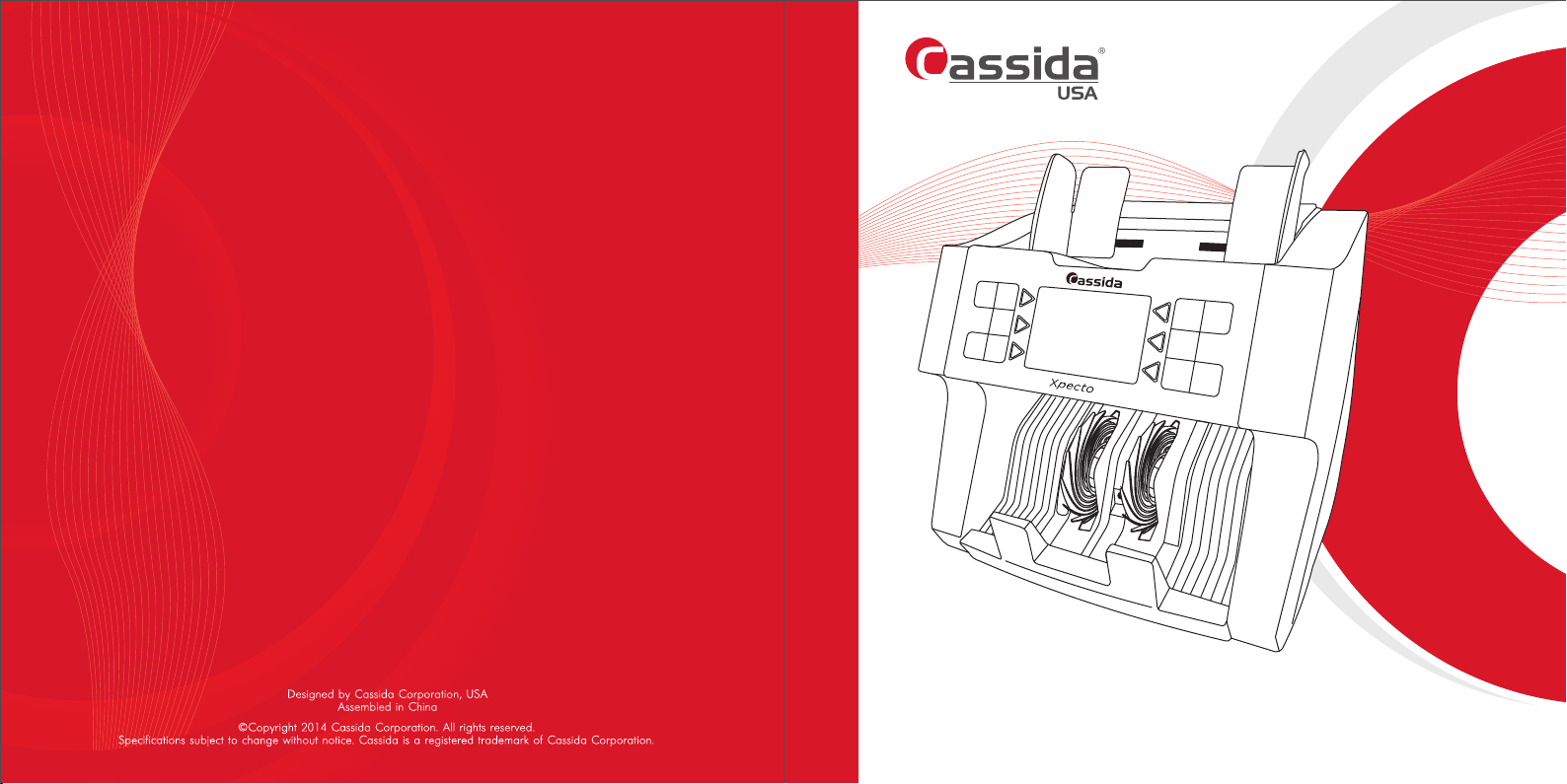
USER MANUAL
CASSIDA XPECTO MULTI-CURRENCY VALUE COUNTER
Page 2

Cassida Xpecto MIX value counter
Th is manual c on ta in s im po rt an t information on sa fe ty
measures and operational features. Please read it carefully
before operating your value counter, and keep it for future
reference.
3
Page 3
Cassida Xpecto MIX value counter
Table of contents:
INTRODUCTION
1. Introduction
1.1 About Cassida Xpecto
1.2 Box contents
1.3 Xpecto overview
1.4 Control panel
1.5 Display
1.6 Specifications
1.7 Important safety notes
2. Operating
2.1 Powering up and loading bills
2.2 Currency selection
2.3 Operating modes
2.3.1 MIX mode
2.3.2 Denomination mode
2.3.3 Count mode
2.3.4 ADD mode
2.3.5 Batch option
2.3.6 Sort by year of issue (ISSUE)
2.3.7 Sort by Orientation mode (ORIENTATION)
2.3.8 Face Sorting Mode (FACE)
2.3.9 Auto ADD mode (A-ADD)
2.3.10 Choosing Speed
2.3.11 Automatic / Manual start
2.3.12 Setting the date and time
3. Maintenance and Troubleshooting
3.1 Maintenance
3.2 Troubleshooting
3.3 Transportation
4. Warranty and Contact Information
5
5
6
8
8
10
11
11
12
13
13
13
14
14
15
16
17
18
19
20
21
22
22
24
24
25
1.1 About Cassida Xpecto
Thank you for choosing . We hope you enjoy using it.Cassida Xpecto
Cassida Xpecto is a professional and reliable mix value counter uniting counterfiet
detection with high performance.
It has a convenient interface that makes it easy for users of various skill levels to
become proficient. Its ergonomic and intuitive control panel provides easy and quick
access to all functions – like counting settings, currency selection, etc. Operations can
start immediately after selecting the currency that the counts in which Cassida Xpecto
it also detects counterfeit currency simultaneously to save time and streamline cash
processing.
1.2 Box contents
• MIX value counter Cassida Xpecto
• Power cable
• Remote display (option)
• User manual
• Maintenance kit - Cleaning brush (option)
moving money forward
4
5
Page 4
Cassida Xpecto MIX value counter
1.3 Xpecto overview
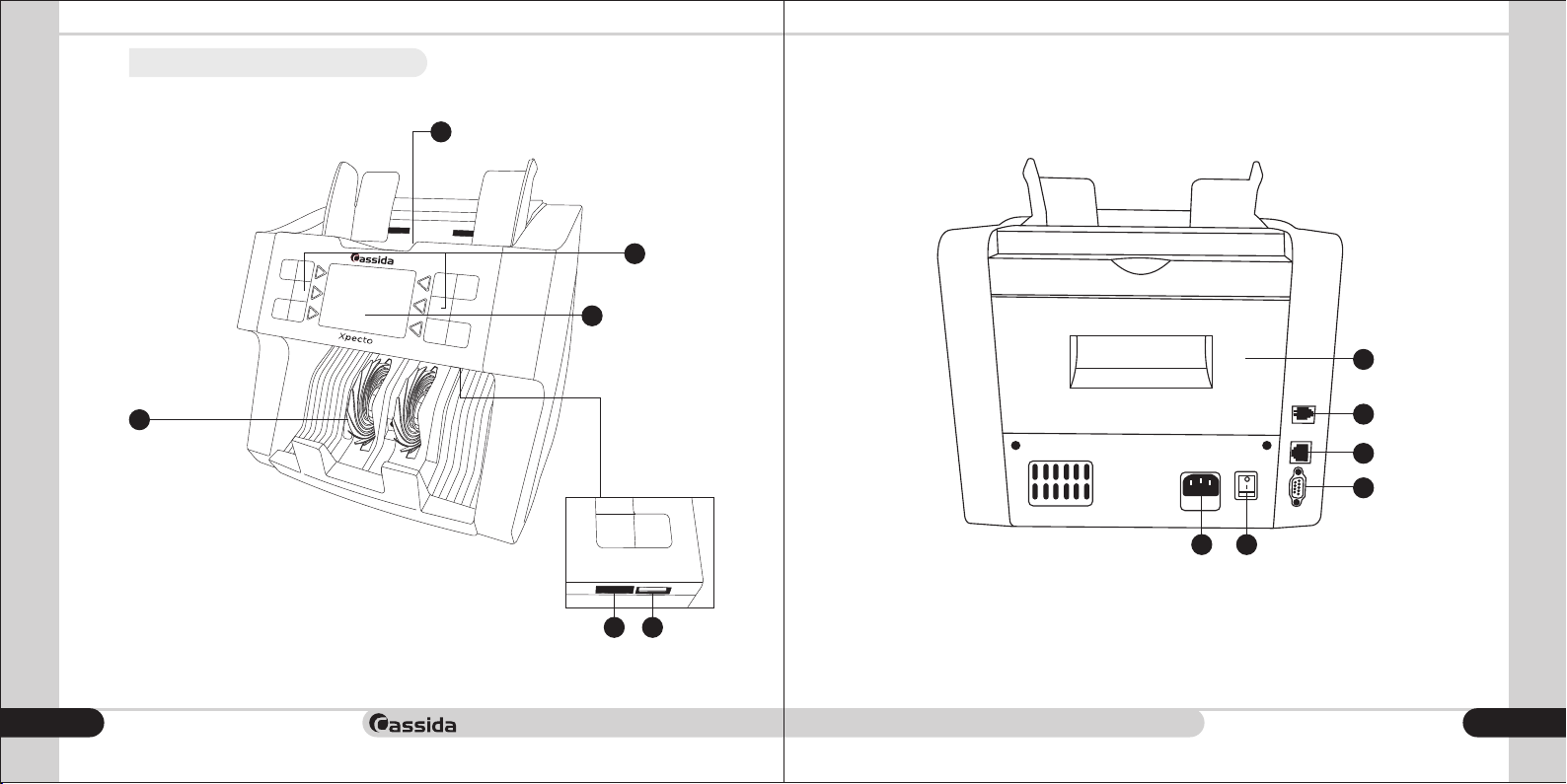
Front view Rear view
1
2
3
1
4
1) Loading pocket (Hopper).
2) Control panel.
3) Display.
4) Receiving pocket (Stacker).
5) USB port for software update.
6) Port for SD card, used to update the display software.
moving money forward
6
4
5
6
2563
1) Rear cover.
2) Power cord.
3) Power switch.
4) RJ port for connecting an external display.
5) LAN port for connection to a computer network.
6) RS232 port for printer connection.
7
Page 5
Cassida Xpecto MIX value counter
1.4 Control panel
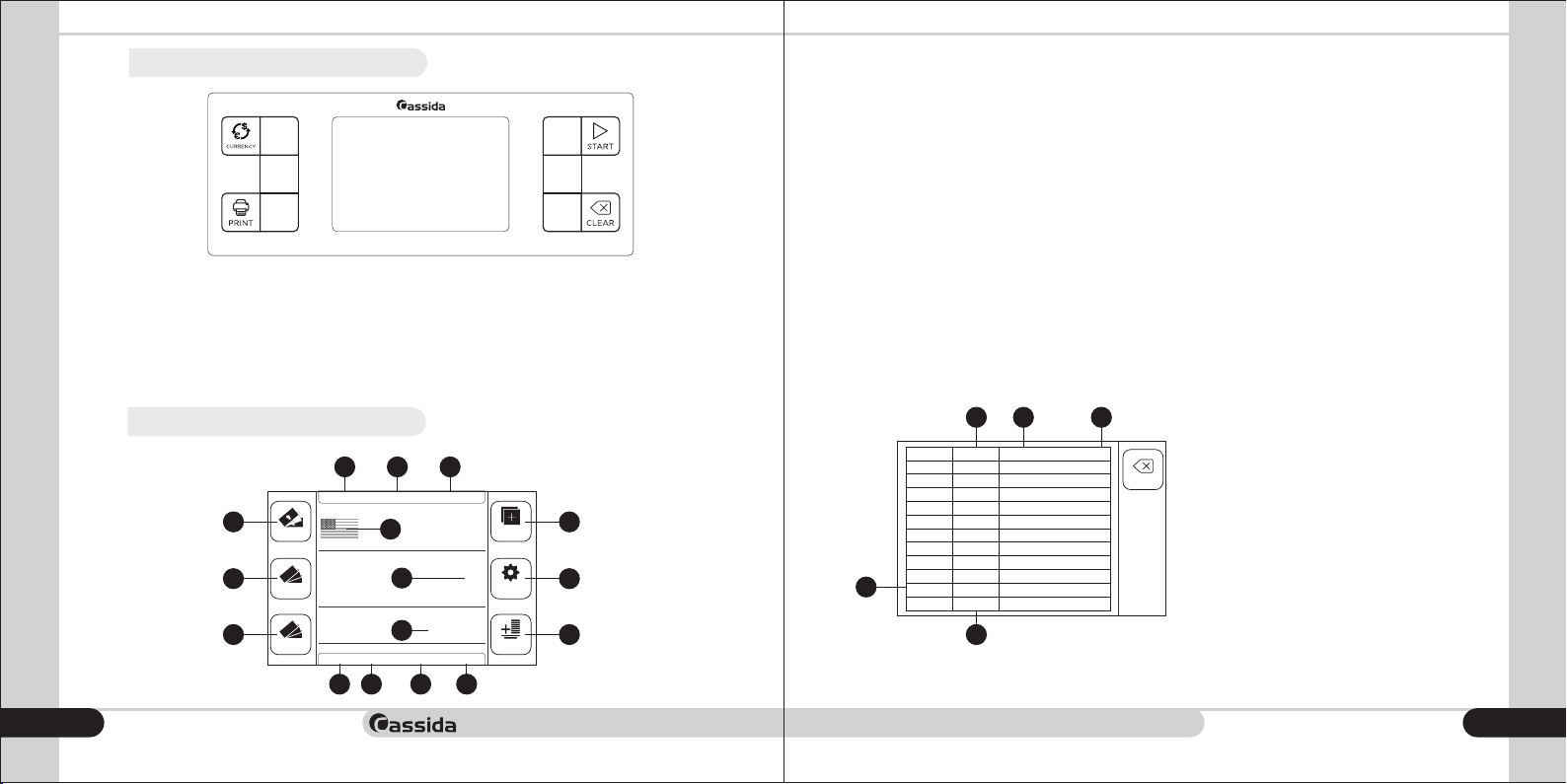
CURRENCY - Currency selection
PRINT - Printing the total of the transaction
START - Start button
CLEAR - Count reset button
1.5 Display
Main display
3
4
5
moving money forward
8
DENOM
COUNT
50
20
10
10
11 12
AUTO SPEED:1200
9
A-ADD
ISSUE ORIENTATION
13
141615
Xpecto
1
2
5006
BATCH
SUM
0
PCS
FACE
ADDMIX
FUNC
TOTAL
1) Total Value of the counted bills.
2) Total number of counted bills.
3) Enable / disable the MIX mode, when the mode is active, the icon is highlighted in blue
4) Enable / disable the DENOM mode, when the mode is active, the icon is highlighted in
blue.
5) Turn on / off the COUNT mode, when the mode is active, the icon is highlighted in blue.
6) Enable / disable the ADD mode, when the mode is active, the icon is highlighted in
blue. This mode is active in the MIX, MIX, DENOM and COUNT modes.
7) Enter the main menu.
8) Report on the counted bills.
9) Flag of the selected currency.
10) Set the Auto / Manual start.
11) Indication of counting Speed.
12) Batch set.
13) ON/OFF Indication of ADD Mode.
14) Enable / disable sorting by year of issue.
15) Enable / disable orientation sorting mode.
16) Enable / disable the sorting according to FACE.
Report on the calculated bills (Total button)
1 2
DENOM
PCS AMOUNT
500
0
200
0
100
0
50
0
20
6
7
5
TOTAL
8
0
10
0
5
0
0
4
3
0
0
0
0
0
0
0
1) The denomination of counted bills.
2) The number of pieces according to
BACK
each denomination.
3) Total amount according to each
denomination.
4) Total number and amount of
counted bills.
5) Return to the main display.
0
0
9
Page 6
Cassida Xpecto MIX value counter
Main menu (FUNC button)
1.Batch
14
2.Speed
3.Orientation
4.Auto ADD
5.Auto start
6.Issue
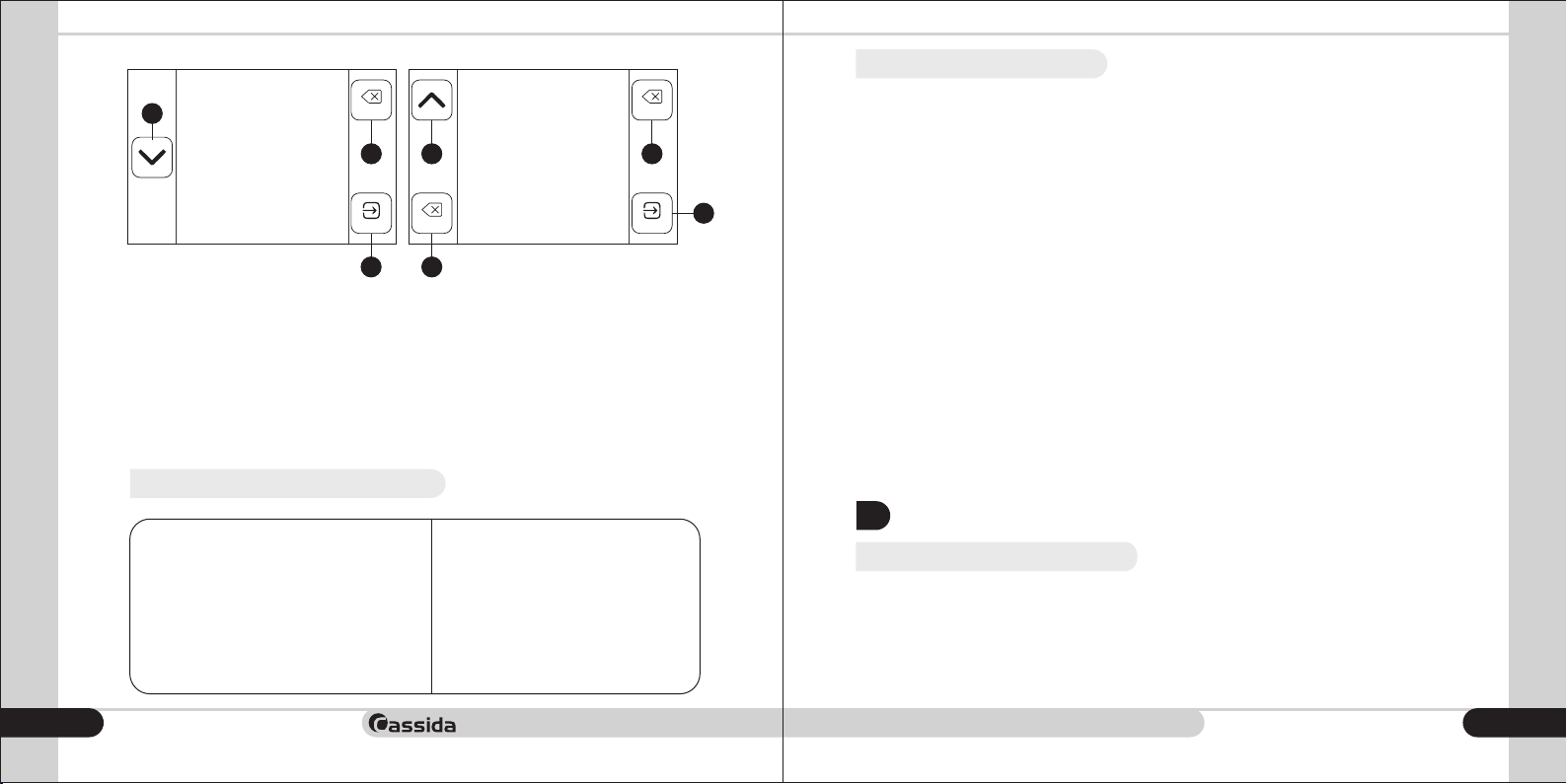
1) Set batch number.
2) Counting speed selection.
3) Enable / disable sorting mode by
orientation.
4) ON/OFF ADD Mode.
5) Auto/manual start selection.
6) Sorting according to the Year of issue.
7) Set date/time.
8) On/OFF beep sound.
1.6 Specifications
Counting speed, bills/minute
moving money forward
10
BACK
16
ENTER
15
Hopper capacity, bills
Stacker capacity, bills
Number of currencies
Counterfeit detections
Display type
Power supply, V/Hz
Power consumption, W
Dimensions (HxWxD), mm
Weight, kgs
7.Time
8.Beeper
9.User Setting
13 16
BACK
10.Service Menu
11.Version
12.Save Image
ENTERBACK
16
9) User settings.
10) Service settings (with password).
11) Software version.
12) IR & MT image save.
13 & 14) Go to next / previous page.
15) “ENTER” for selection.
16) Return to main display.
500
200
800/1000/1200
Up to 6
UV, MG, MT, IR, 2 CIS IR
3,3”, color touchscreen LCD
220/50, 110/60
40
280õ280õ240
5,6
15
1.7 Important safety notes
When using the Cassida Xpecto counter, basic precautions should be followed, including
the following:
1. Do not use this unit in areas where it may be exposed to water or any other liquids.
2. Only use the power cord supplied with the machine. Plug the power cord into a
properly grounded wall outlet. Do not remove the ground pin from the power cord.
Failure to properly ground the machine can result in severe injury or fire.
3. Make it certain that the unit is installed on a flat surface. Do not operate the machine in
areas with high temperature, humidity or smoke, as these conditions may prevent proper
operation.
4. This unit is designed for indoor use in a ventilated environment. Keep the machine away
from direct sunlight and strong magnetic fields. These could interface with the counterfeit
detection sensors.
5. When not using the unit for an extended period of time, disconnect the power cord from
the wall outlet.
6. Unplug the unit from wall outlet before cleaning. Use a damp cloth or specifically
designed maintenance accessories such as air duster, soft bristle brush, or cleaning cards.
7. To avoid the risk of electric shock, do not disassemble the unit. Disassembly will expose
you to dangerous voltage and other safety risks. Also, incorrect reassembly can cause
electrical shock when the unit is subsequently used.
Take the unit to a qualified technician when service or repair is required. Do not try to
replace any parts yourself. Supplied spare parts are intended for use by qualified repair
personnel only.
OPERATING
2.
2.1 Powering up and loading bills
It is very important to place th e bills into the hopper corre ctly, because reco gnition
performance of the bills is highly affected by the arrangement of the bills. Bills should be
placed in a neat stack prior to being placed into the hopper. Please avoid counting bills
that are wet, excessively dirty, spoiled, folded, curled or with foreign materials like clips,
bands, etc.
It will damage and cause malfunction of the machine.
11
Page 7
Cassida Xpecto MIX value counter
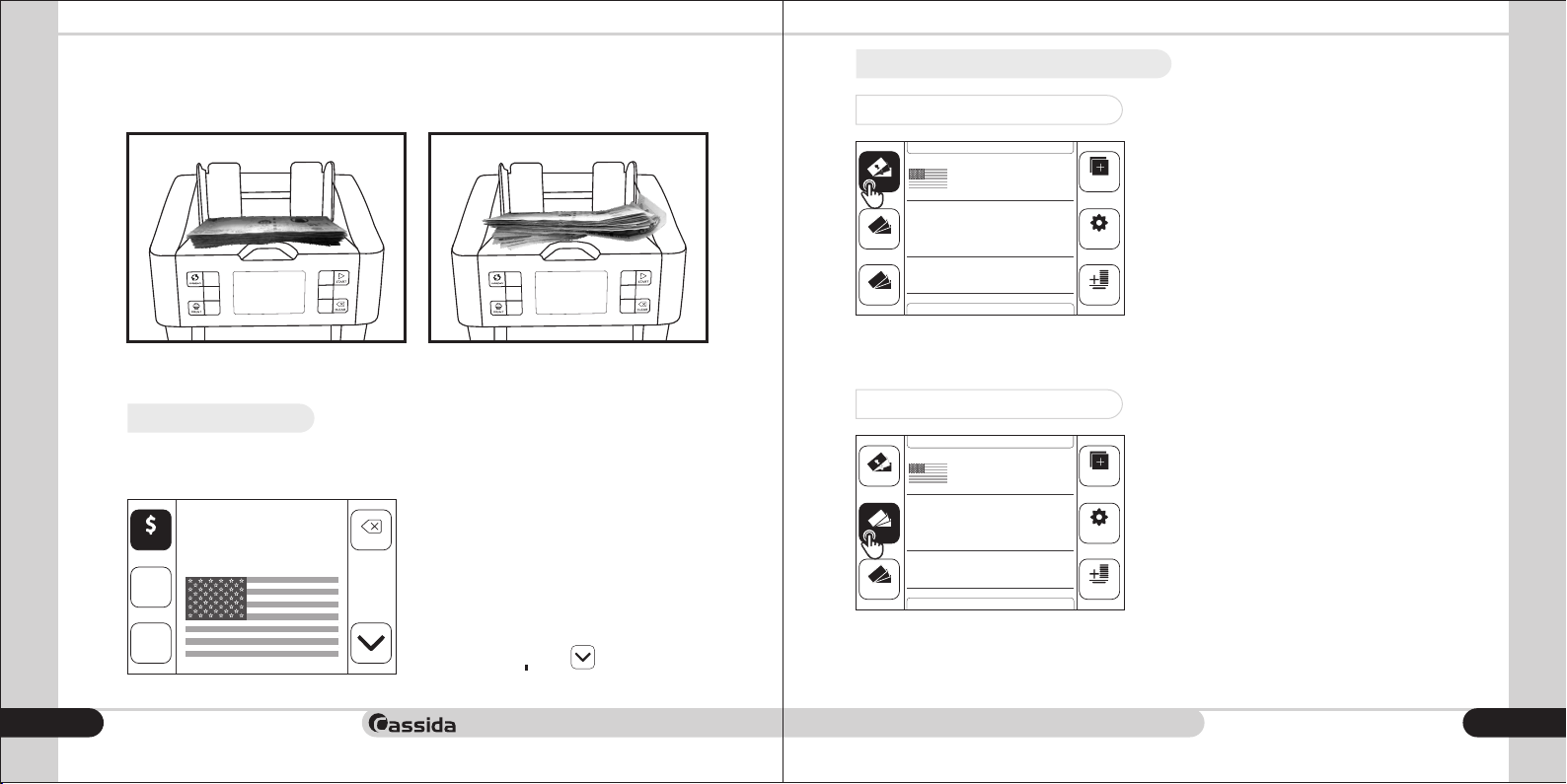
Set the hopper guides acccording to the length of the bill bundle as shown in the below
picture, align the edges of the bundle and gently place the bundle in the middle of the
hopper. Avoiding skewing of the notes.
Correct bills feeding Incorrect bills feeding
Attention! Before placing bills in the hopper, prepare bills accordingly, remove torn, wet,
oily or dirty ones.
2.2 Currency selection
To select a currency, press the button on the control panel. A list of currencies CURRENCY
will appear on the display.
USD
Choose currency
€
EUR
£
GBP
moving money forward
12
2.3 Operating modes
2.3.1 MIX mode
AUTO SPEED:1200
MIX
50
20
10
DENOM
COUNT
A-ADD
pecto
X
Xpecto
ISSUE ORIENTATION
BATCH
USD
0
PCS
0
FACE
2.3.2 Denomination mode
Us ing the p hysical b uttons on t he contro l
p a n el or th e b u t t o n s o n the dis p l a y
BACK
(touchscreen), select th e desired curre ncy.
After you select the currency, the counter will
automatically switch to the main display.
To exit the currency selection menu, press the
MIX
DENOM
COUNT
50
20
10
AUTO SPEED:1200
A-ADD
ISSUE ORIENTATION
BATCH
USD
0
PCS
0
FACE
BACK button. To go to the second page of the
list of currencies,
In order to activate the mode (MIX), click MIX
on t he icon on the di splay o r on the MIX
corresponding button on the control panel.
While the mode is active, the icon on the MIX
display will be highlighted in blue. The MIX
ADD
mo de is used to c ount a st ack of bills of
different denominations pertaining to one
currency. Total number and total value will
FUNC
be displayed on screen.
User may press “ ” button on screen and Total
th e detai led rep ort wil l be disp layed on
TOTAL
screen as a breakdown.
To enable the mode, click on Denomination
the i con on the display or on the DENOM
corresponding button on the control panel.
While the mode is active, the icon DENOM
on the display will be highlighted in blue.
ADD
Thi s mode allows a user to count and sort
bills by one denominati on which is auto-
FUNC
matically determined by the first passing bill.
The f irs t bill in the hopper d etermines the
counting denomination. If the denomination
on the second , or other bil ls in the stack,
TOTAL
differs from the first bill, the machine will stop
the o per a t ion . Rem o ve t h e d iff e ren t
denomination.
click on the down arrow .
13
Page 8
Cassida Xpecto MIX value counter
2.3.3 Count mode
2.3.5 Batch option
AUTO SPEED:1200
MIX
50
20
10
DENOM
COUNT
A-ADD
ISSUE ORIENTATION
2.3.4 ADD mode
AUTO SPEED:1200
MIX
50
20
10
DENOM
COUNT
A-ADD
ISSUE ORIENTATION
moving money forward
14
BATCH
BATCH
USD
0
PCS
FACE
USD
0
PCS
FACE
To activate the mode, click on the COUNT
COU NT ic on on the di sp lay or on the
ADD
corresponding button on the control panel.
While the mode is active, the icon COUNT
on the display will be highlighted in blue.
FUNC
This mode is used to count the total number
of bills, only the number of counted bills will
0
be displayed. There will be no detection.
TOTAL
In order to set the number of stack, press on the main display or select the BATCH BATCH
function in the main menu:
1)
DENOM
COUNT
50
20
10
AUTO SPEED:1200
A-ADD
ISSUE ORIENTATION
BATCH
SUM
0
PCS
FACE
Current Batch is
ADDMIX
FUNC
0
TOTAL
1
10
100
100 pcs
New Batch is
100 pcs
BACK
ON
ENTER
2)
AUTO SPEED:1200
To enable the mode, click on the ADD ADD
icon on the display or on the corresponding
ADD
button on the control panel. While the mode
is active, the icon on the display will be ADD
highlighted in blue. The Summation function
is a vai lab l e i n th e , an d MIX D E NO M
FUNC
COUNT modes.
The m ode i s i nt ended for s ummin g the
0
n u m b e r a n d d e n o m i n a t i o n s o f t h e
TOTAL
ban k no t es, wi t h the res ult of the las t
conversion automatically summed up with
the result of the previous count until the result
is cl eared wit h the but ton on th e CL EAR
control panel.
In order to disable the mode, press the ADD
ADD ic on on th e d isp la y agai n o r the
corresponding button on the control panel.
50
20
10
DENOM
COUNT
A-ADD
ISSUE ORIENTATION
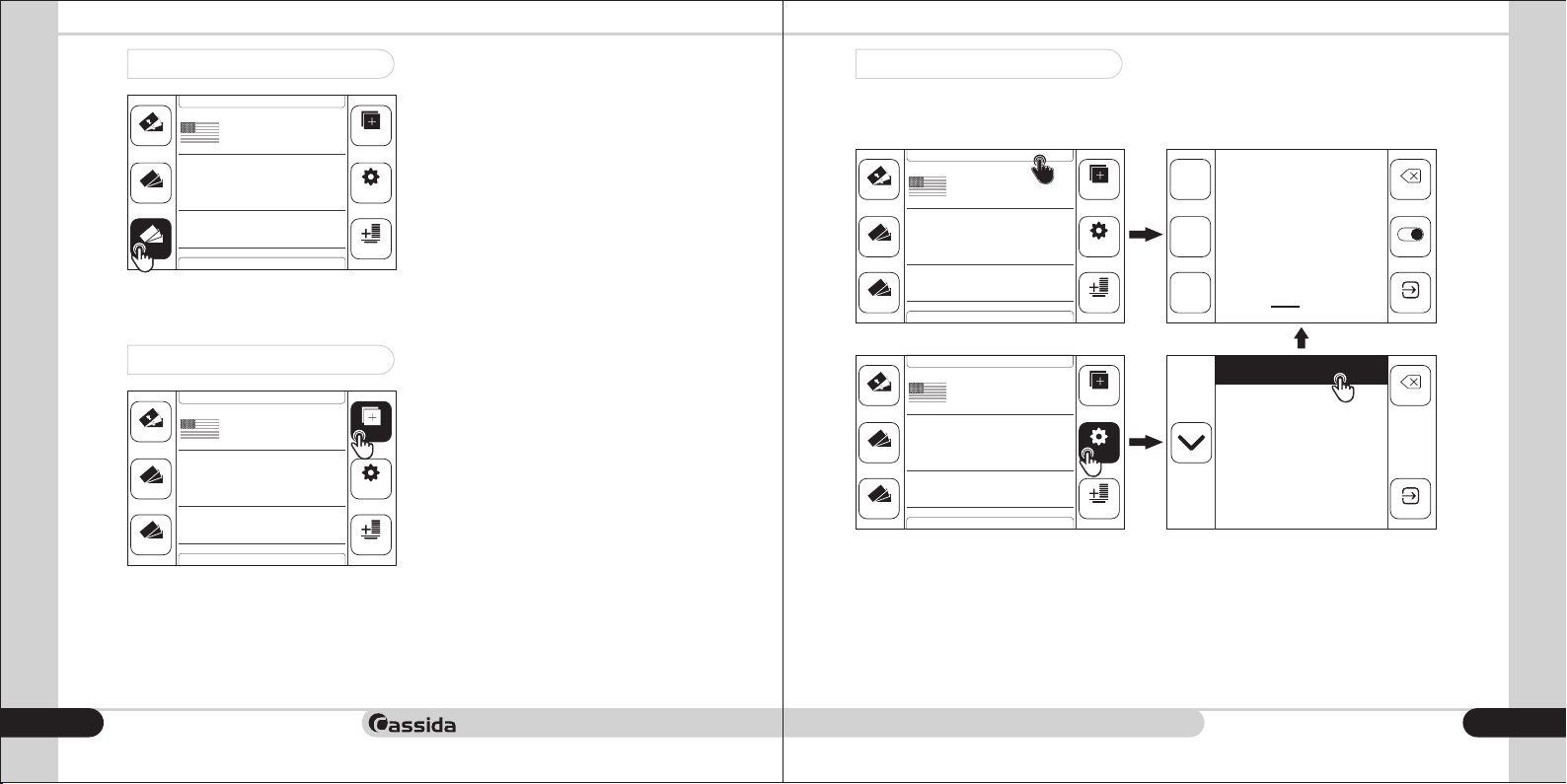
1. Press button to enter the menu options, and then choose .FUNC BATCH
2. Press the button to activate the mode. To turn off the packing mode, press ON BATCH
the button again.ON
3. Set the desired size of the filling with the buttons , , . For example, if you need a 1 10 100
size of packing 355 bills, then press button three times , button five times and 100 10 1
button five times.
To c onfirm the siz e of t he packin g, press the button and t he c ounte r will ENTER
automatically return to the main display. To exit the setting mode, press the button.BACK
BATCH
SUM
0
PCS
FACE
1.Batch
ADDMIX
2.Speed
BACK
3.Orientation
FUNC
0
TOTAL
4.Auto ADD
5.Auto start
6.Issue
ENTER
15
Page 9
Cassida Xpecto MIX value counter
2.3.6 Sort by year of issue (ISSUE)
2.3.7 Sort by Orientation mode (ORIENTATION)
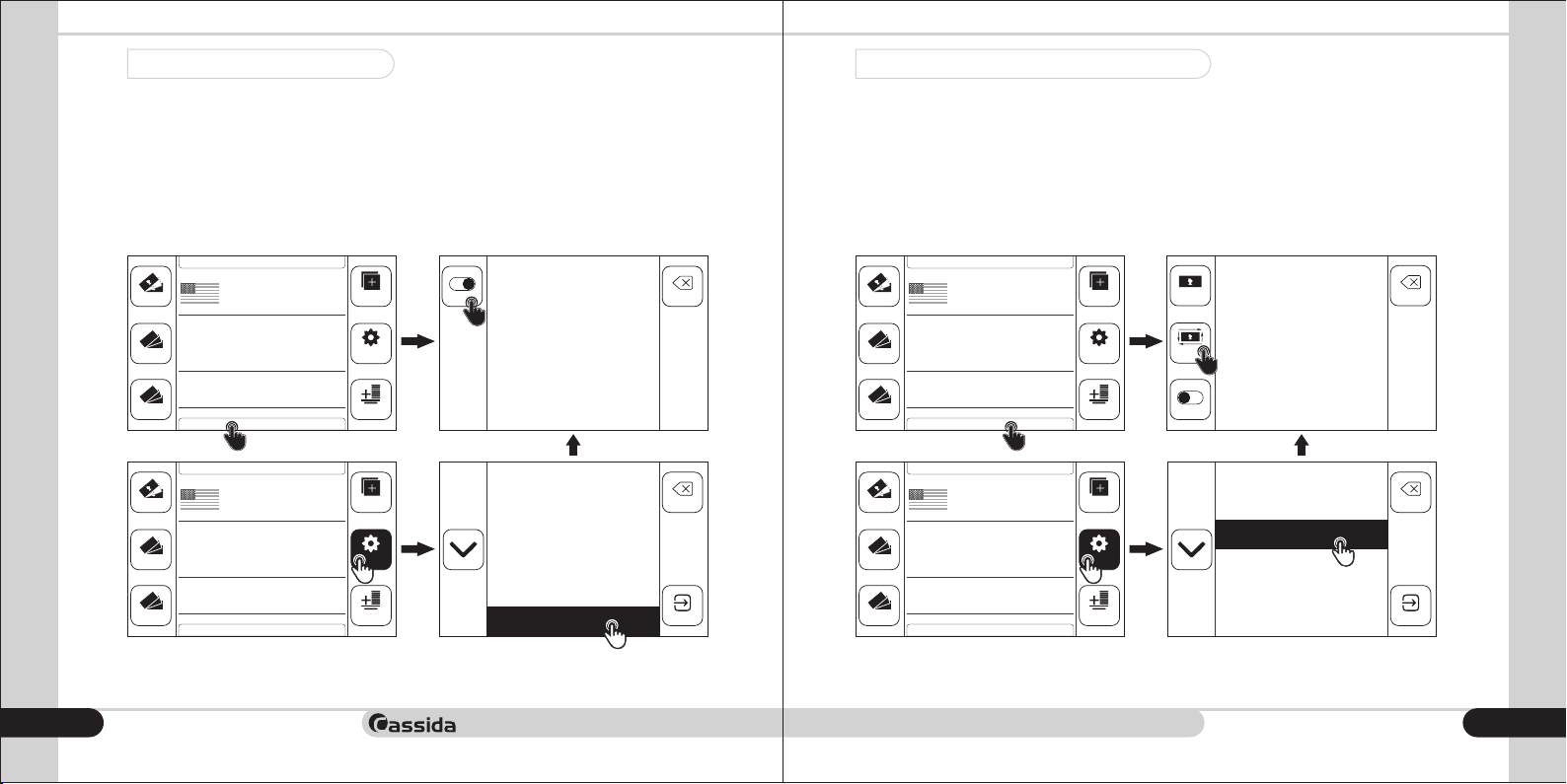
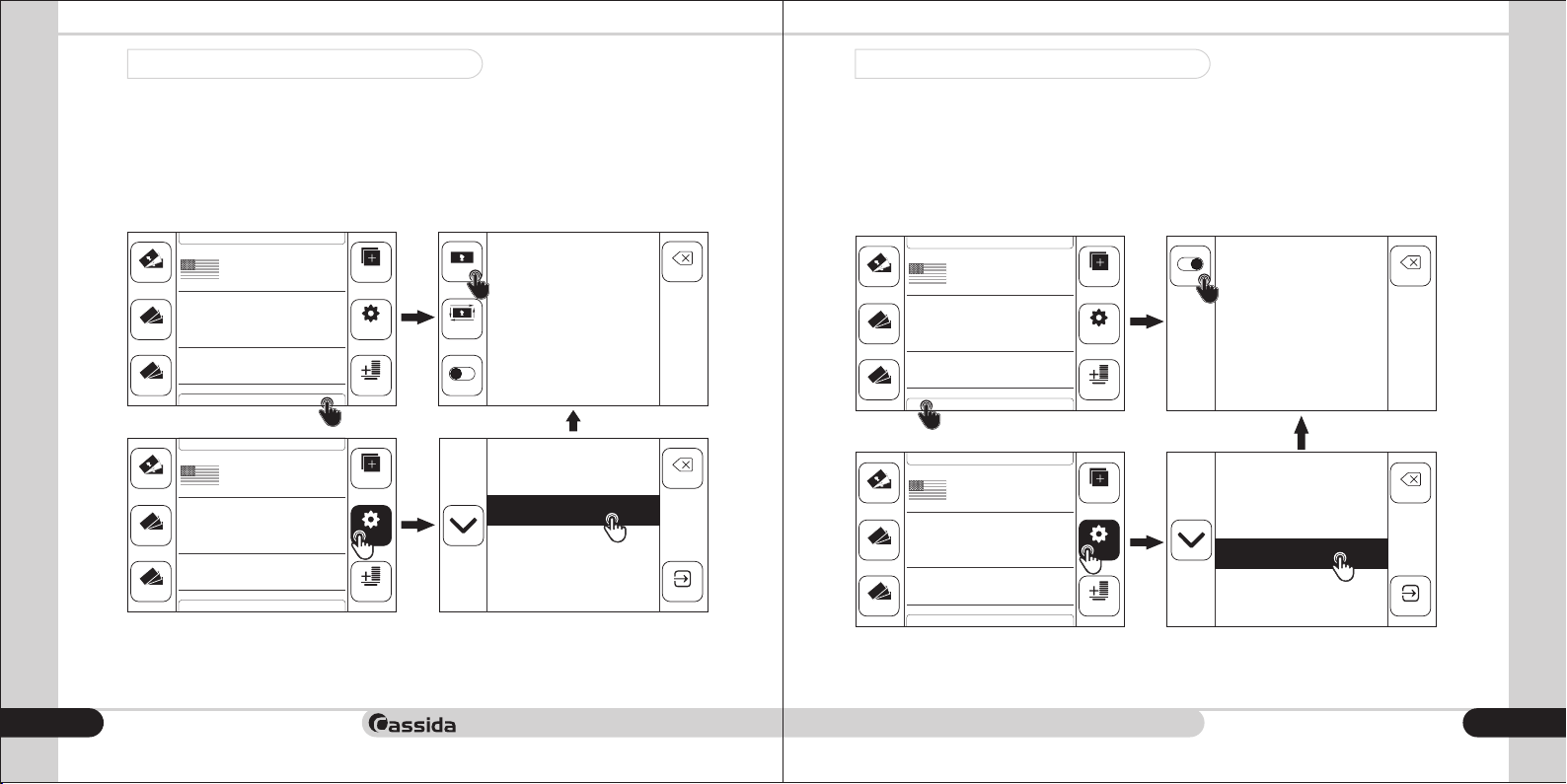
“Sorting by year of release” ( ) is used only to count and sort bills of the same ISSUE
denomination if there is an external difference between the bills according to the year of
issue. The bills of the latest issue year will be counted while the previous issues bills will be
rejected (machine stops operation always when there is an old issue note). Total number
and total valiue of counted bills will be displayed on the main screen.
Ths mode is active only in the Demonination mode.
To turn on the mode, press the button. To turn the mode off, press the button ON ON
again. To exit, press the button. BACK
1)
DENOM
COUNT
50
20
10
AUTO SPEED:1200
A-ADD
ISSUE ORIENTATION
BATCH
SUM
0
PCS
FACE
ADDMIX
ON BACK
This function is
available only in
FUNC
DENOMINATION
mode
0
TOTAL
2)
DENOM
COUNT
50
20
10
AUTO SPEED:1200
A-ADD
ISSUE ORIENTATION
BATCH
SUM
0
PCS
FACE
1.Batch
ADDMIX
2.Speed
BACK
3.Orientation
FUNC
0
TOTAL
4.Auto ADD
5.Auto start
6.Issue
ENTER
The Orientation mode ( ) is used to sort the bills in one orientation. The ORIENTATION
orientation is determined by the first counted bill, which will be considered the reference
note. The counter will stop for an error if a bill orientation is different from the reference
note that was first counted.
This mode is active in the MIX & Denomination mode.
To turn on the mode, press the button. To turn the mode off, press the button ORIENT OFF
again. To exit, press the button. BACK
1)
DENOM
COUNT
50
20
10
AUTO SPEED:1200
A-ADD
ISSUE ORIENTATION
BATCH
SUM
0
PCS
FACE
ADDMIX
FACE
This function is
BACK
available only in
DENOMINATION
FUNC
ORIENT
and MIX modes
0
TOTAL
OFF
2)
DENOM
COUNT
50
20
10
AUTO SPEED:1200
A-ADD
ISSUE ORIENTATION
BATCH
SUM
0
PCS
FACE
1.Batch
ADDMIX
2.Speed
BACK
3.Orientation
FUNC
0
TOTAL
4.Auto ADD
5.Auto start
6.Issue
ENTER
moving money forward
16
17
Page 10
Cassida Xpecto MIX value counter
2.3.8 Face Sorting Mode (FACE)
2.3.9 Auto ADD mode (A-ADD)
The face sort mode ( ) is used to sort bills in orientations A and B or C/D (the front FACE
side/Rear side of the banknote). The orientation is determined by the first counted bill,
which will be considered the reference note. The counter will stop for an error if the
banknote orientation is different from the reference note that was first counted.
This mode is active in MIX & DENOMINATION mode.
To turn on the mode, press the button. To turn the mode off, press the button FACE OFF
again. To exit, press the button.BACK
1)
DENOM
COUNT
50
20
10
AUTO SPEED:1200
A-ADD
ISSUE ORIENTATION
BATCH
SUM
0
PCS
FACE
ADDMIX
FACE
This function is
BACK
available only in
DENOMINATION
FUNC
ORIENT
and MIX modes
0
TOTAL
OFF
2)
DENOM
COUNT
50
20
10
AUTO SPEED:1200
A-ADD
ISSUE ORIENTATION
BATCH
SUM
0
PCS
FACE
1.Batch
ADDMIX
2.Speed
BACK
3.Orientation
FUNC
0
TOTAL
4.Auto ADD
5.Auto start
6.Issue
ENTER
In active (A-ADD) mode counter will count and sum all bills, which placed in AUTO ADD
hopper.
Summation will continue until the hopper contains bills. Once the bills in hopper run out,
next count will start from null. This mode is useful to count several packs of bills to get total
sum of it. You do not need to reset the result of the recalculation. it happens automatically.
To turn on mode press button. To turn the mode off, press the button AUTO ADD ON OFF
again. To exit, press the button.BACK
1)
2)
DENOM
COUNT
DENOM
COUNT
50
20
10
50
20
10
AUTO SPEED:1200
A-ADD
ISSUE ORIENTATION
AUTO SPEED:1200
A-ADD
ISSUE ORIENTATION
BATCH
BATCH
SUM
0
PCS
FACE
SUM
0
PCS
FACE
ADDMIX
ON
BACK
AUTO ADD
FUNC
0
TOTAL
ADDMIX
FUNC
0
TOTAL
function
1.Batch
2.Speed
3.Orientation
4.Auto ADD
5.Auto start
6.Issue
BACK
ENTER
moving money forward
18
19
Page 11
Cassida Xpecto MIX value counter
moving money forward
2.3.10 Choosing Speed
2.3.11 Automatic / Manual start
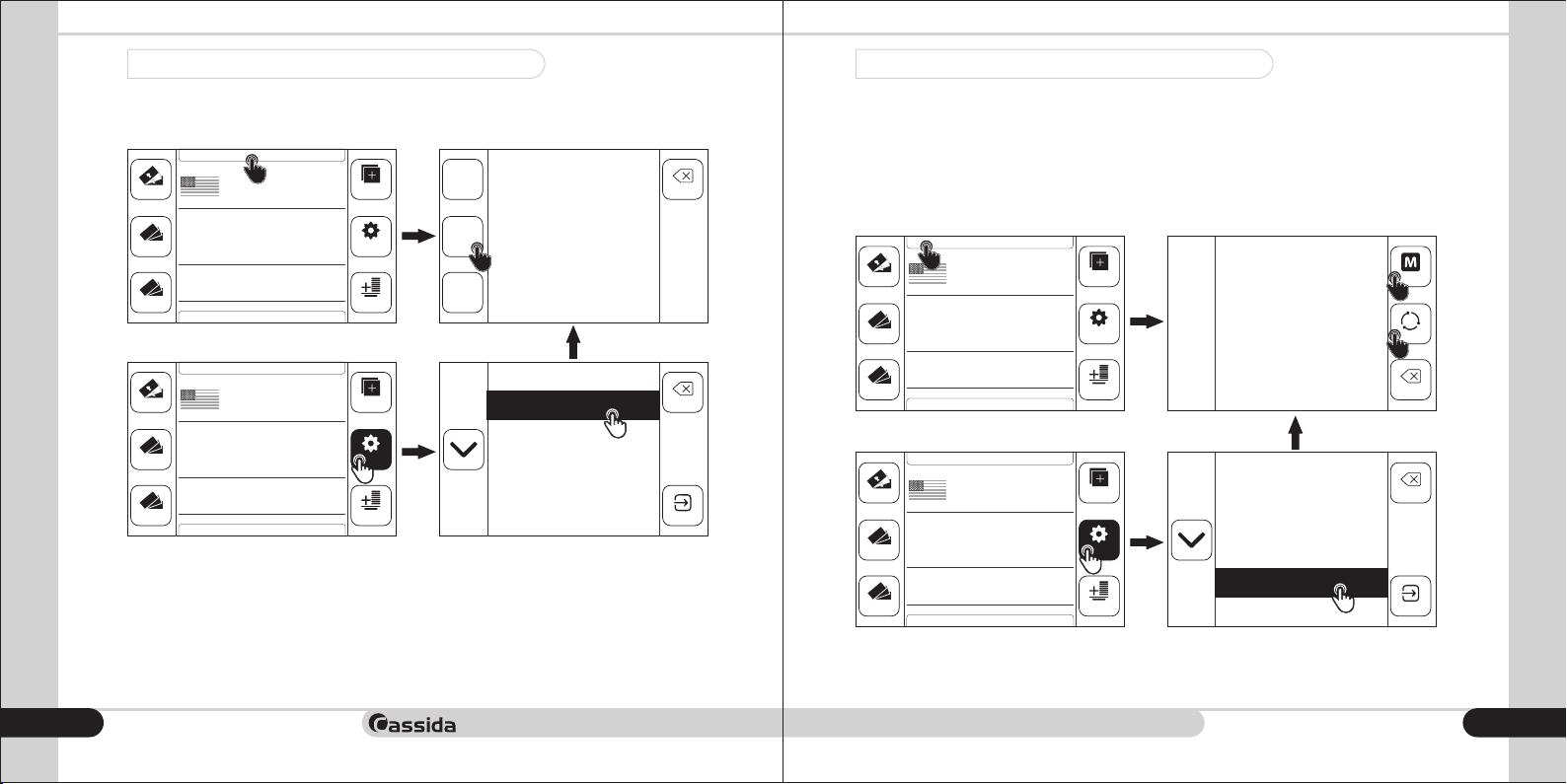
Cassida Xpecto has the ability to switch the counting speed of banknotes.
1)
AUTO SPEED:1200
50
20
10
DENOM
COUNT
A-ADD
ISSUE ORIENTATION
2)
DENOM
COUNT
50
20
10
AUTO SPEED:1200
A-ADD
ISSUE ORIENTATION
Choose one from the three options for speed:
• 800 banknotes / min;
• 1000 banknotes / min;
• 1200 banknotes / min;
To exit the conversion rate selection menu, press BACK.
Attention! The speed above 1000 banknotes / minute is available for the COUNT mode
only.
20
BATCH
BATCH
SUM
0
PCS
FACE
SUM
0
PCS
FACE
Automatic start of counting - the counter will automatically start functioning upon loading
of backnotes to the loading pocket.
Manual start - you must press the button on the control panel after loading the START
banknotes to the loading pocket so that the counter will start functioning.
ADDMIX
FUNC
0
TOTAL
800
1000
1200
Choose
counting speed
BACK
1.Batch
ADDMIX
2.Speed
BACK
3.Orientation
FUNC
0
TOTAL
4.Auto ADD
5.Auto start
6.Issue
ENTER
AUTO – Automatic Start
MANUAL – Manual Start
To exit the menu, press the button. BACK
1)
2)
DENOM
COUNT
DENOM
COUNT
50
20
10
50
20
10
AUTO SPEED:1200
A-ADD
ISSUE ORIENTATION
AUTO SPEED:1200
A-ADD
ISSUE ORIENTATION
BATCH
SUM
FACE
BATCH
SUM
FACE
0
PCS
0
PCS
ADDMIX
Choose type
FUNC
0
TOTAL
of START
MANUAL
A
AUTO
BACK
1.Batch
ADDMIX
2.Speed
BACK
3.Orientation
FUNC
0
TOTAL
4.Auto ADD
5.Auto start
6.Issue
ENTER
21
Page 12
Cassida Xpecto MIX value counter
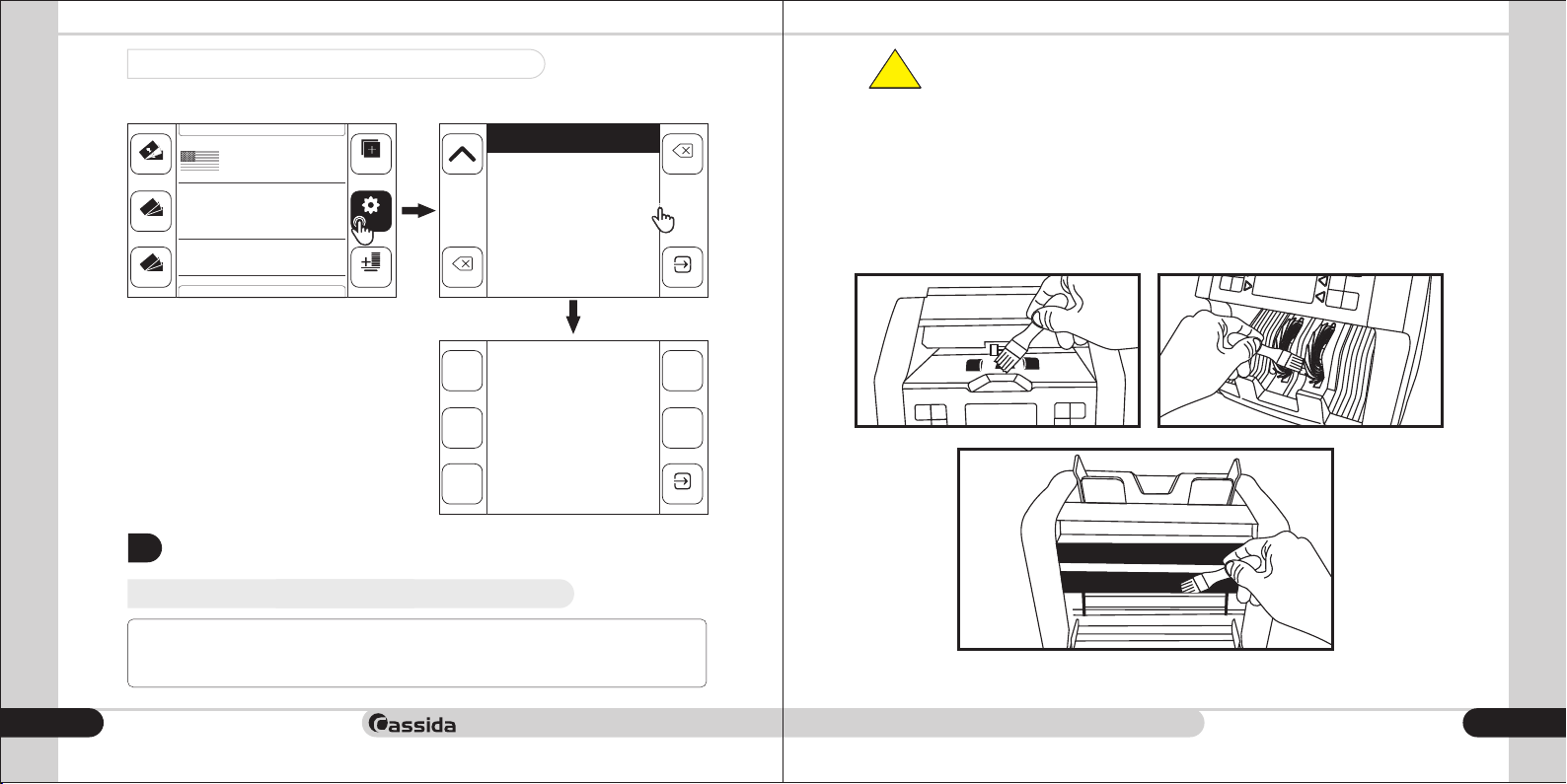
2.3.12 Setting the date and time
To set the date and time in the main menu, select . TIME
DENOM
COUNT
50
20
10
AUTO SPEED:1200
A-ADD
ISSUE ORIENTATION
BATCH
SUM
0
PCS
FACE
7.Time
ADDMIX
8.Beeper
9.User Setting
FUNC
0
TOTAL
10.Service Menu
11.Version
12.Save Image
To set the date, use the DAY / MONTH /
YEAR buttons
.
To set the time, use the HOUR / MINUTE
buttons.
To save the date and time, press the
ENTER button.
Hour
Day
Date:
00/00/00
Time:
00:00
3. MAINTENANCE AND TROUBLESHOOTING
3.1 Maintenance
BACK
ENTERBACK
MonthMinute
Year
ENTER
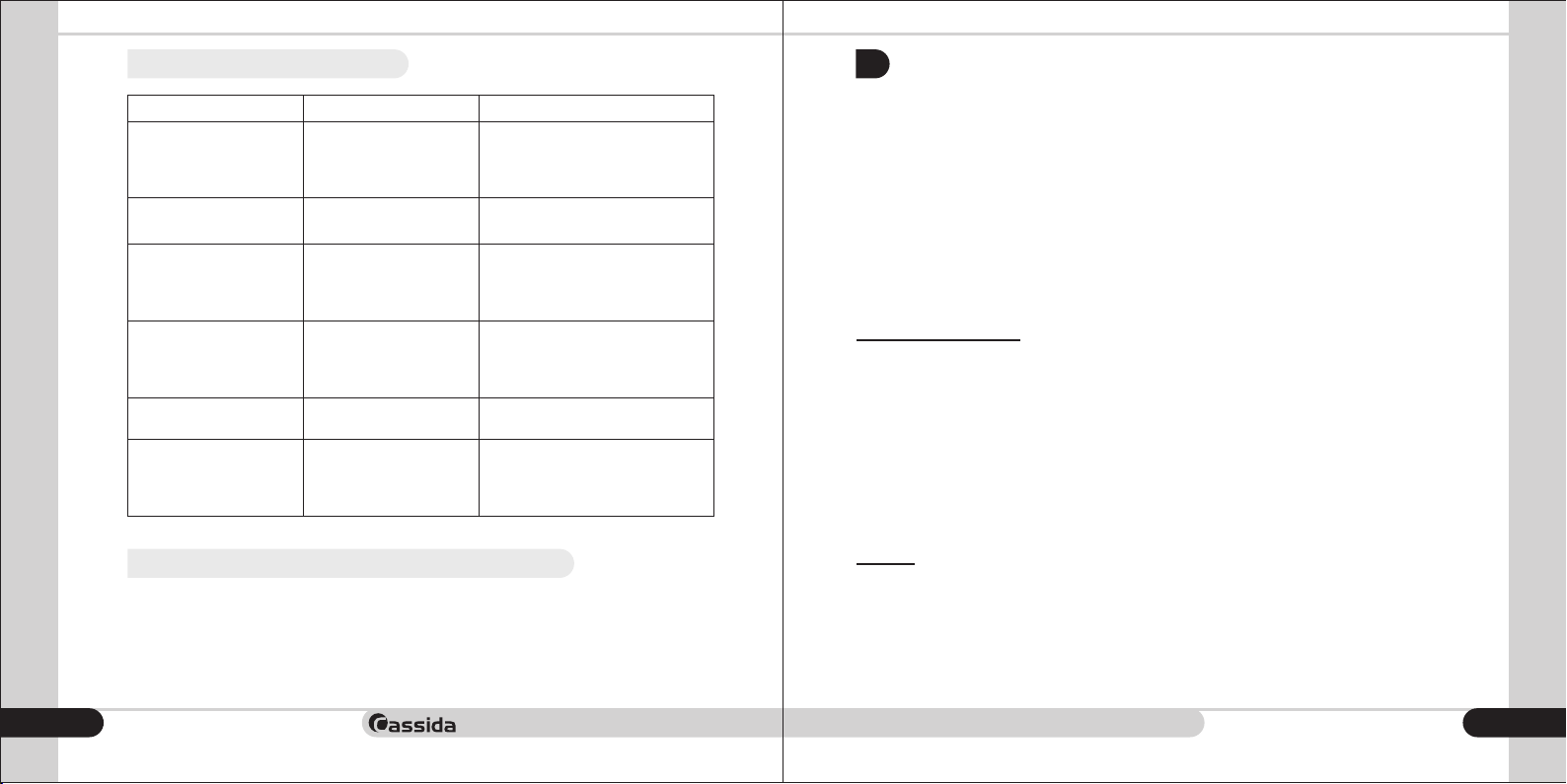
Unplug the machine completely from all electrical sources before
attempting any cleaning process.
!
• We recommend you clean the sensors on a daily basis with a damp cloth or
specifically designed maintenance accessories, such as an air duster, soft bristle brush
or cleaning cards. When cleaning the sensors, please do not use any chemicals or a
wet cloth.
Turn off the power and unplug the power cord from the wall outlet. Clean the machine's
sensors and components with a soft dry cloth or a compressed air jet.
This unit has many sophisticated sensors. To keep the machine running properly, it
requires proper maintenance. If you notice performance has deteriorated, please
clean all sensors prior to calling a service technician.
moving money forward
22
23
Page 13
Cassida Xpecto MIX value counter
moving money forward
3.2 Troubleshooting
WARRANTY AND CONTACT INFORMATION
4.
ERROR
MG ERROR
DOUBLE
UV ERROR
IR ERROR
CHAIN
IMAGE ERROR Suspected to counterfeit
3.3 Transportation
Store and transport the device in a well-packaged form, avoiding impacts and falls.
During transportation, we allow the spread of temperatures from -30 Ñ to +50 Ñ, with a
relative humidity of not more than 80%.
24
DESCRIPTION SOLUTION
Suspected to counterfeit
by MG
2 or more bills have
passed at the same time.
Suspected to counterfeit
by UV
Suspected to counterfeit
by IR
Chain of bills have
passed at the same time.
by CIS
Remove last (suspicious) counted
bill from the stacker. This bill not
included in total count. Press
START to continue the counting.
Remove all bills from the stacker
and count again.
Remove last (suspicious) counted
bill from the stacker. This bill not
included in total count. Press
START to continue the counting.
Remove last (suspicious) counted
bill from the stacker. This bill not
included in total count. Press
START to continue the counting.
Remove all notes from stacker
and count again.
Remove last (suspicious) counted
bill from the stacker. This bill not
included in total count. Press
START to continue the counting.
Warranty for the goods is one year from the date of purchase. The equipment is removed
from the warranty if it does not have a serial number.
Incorrect operation of the device or its mechanical damage caused by improper transportation, storage or operation is not subject to warranty repair.
The guarantee does not cover transportation costs associated with the delivery of the
device to the Technical Service Center and back, as well as spare parts.
List of spare parts:
• Feed Rollers;
• Thinning Rollers;
• Belt.
Technical Service Center:
E-mail: [email protected]
Tel: 042 739 328
www.cassida.me, www.cassidausa.com
When contacting Cassida Technical Support, please have the following:
• Product model – Located at the back side of your currency counter.
• Serial Number – Located at the back side of your currency counter.
• Nature of the problem – what happened and when did it happen? Did the machine
display error messages?
• Steps already taken to resolve the problem, and the results.
Address:
Office # 101,
Biyat Complex (Landmarks: Emirates Billiard Centre)
Hor Al Anz East, Behind Al Mamzar Centre
Dubai, United Arab Emirates
PO Box 454867
25
Page 14

moving money forward
 Loading...