

Page 1
Moving money forward
®
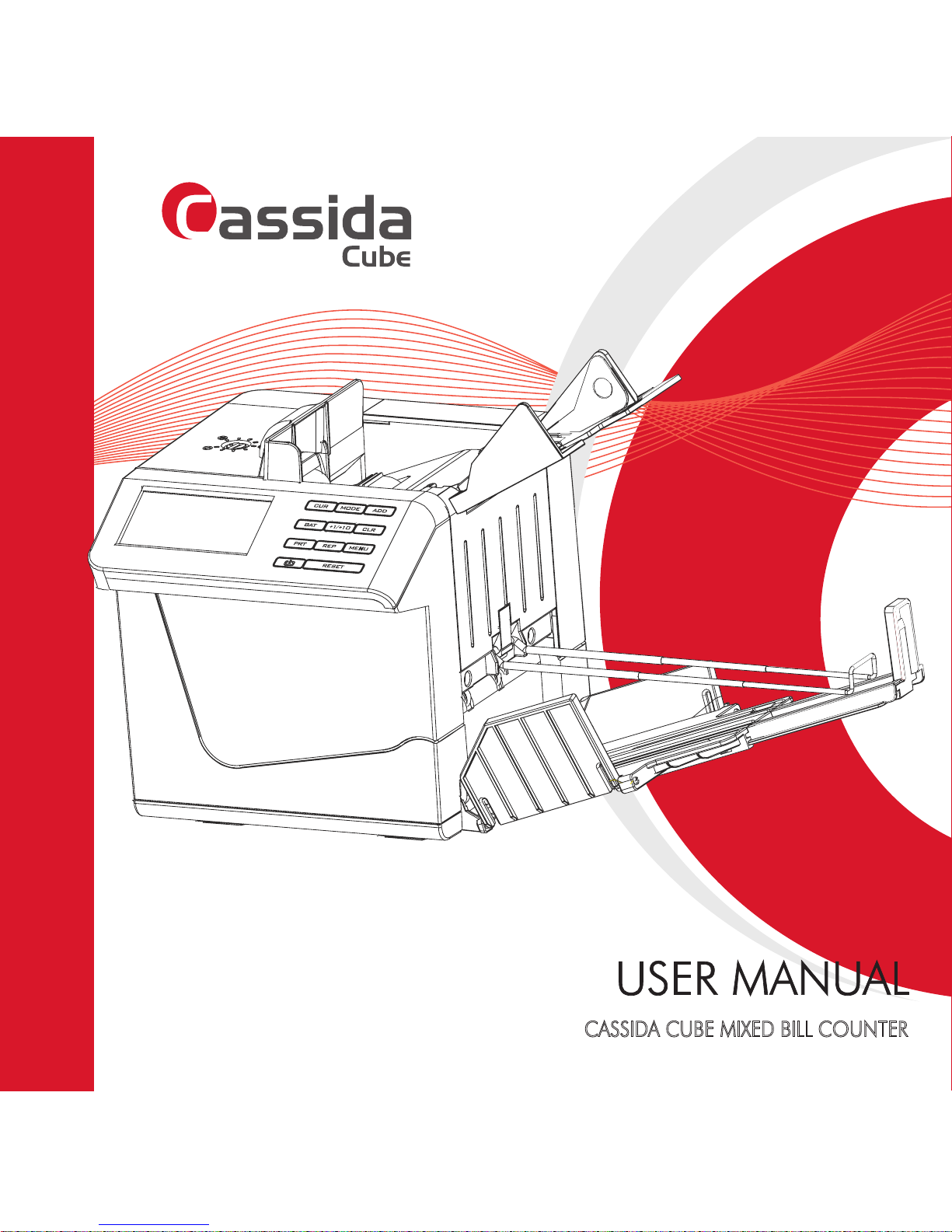
CASSIDA CUBE MIXED BILL COUNTER
Page 2

Page 3

This manual contains important information on safety
measures and operational features of the Cassida
Cube Mixed Bill Counter. Please read it carefully
before operating your mixed bill counter and keep it
handy for future reference.
Page 4

Cassida Cube compact value counter
1
Table of contents:
1. INTRODUCTION ____________________________________________________________2
1.1 About the Cassida Cube ________________________________________________2
1.2 Box contents ____________________________________________________________2
1.3 Front and rear views ____________________________________________________ 3
1.4 Control panel ___________________________________________________________4
1.5 Specications ___________________________________________________________5
1.6 Importand safety notes __________________________________________________6
2. GETTING STARTED _________________________________________________________ 7
2.1 Open the stacker assembly ______________________________________________7
2.2 Open and adjust the hopper ____________________________________________8
2.3 Open tilt stand __________________________________________________________8
2.4 Connect the power source ______________________________________________9
2.5 Install the battery _______________________________________________________ 9
3. LOADING BILLS
___________________________________________________________10
4. OPERATION ______________________________________________________________ 12
4.1 Select Auto/Manual mode _____________________________________________12
4.2 Select counting mode _________________________________________________12
4.3 Printing function _______________________________________________________14
4.4 Select accumulative counting __________________________________________15
4.5 Select batch counting _________________________________________________ 15
5. SLEEP AND TIME SETTINGS _________________________________________________16
6. TROUBLESHOOTING ______________________________________________________17
6.1 Self-test error message display and solutions _____________________________17
6.2 Defective bill error message display and solutions ________________________19
7. MAINTENANCE, WARRANTY AND CONTACT INFORMATION
__________________20
7.1 Maintenance __________________________________________________________20
7.2 Warranty ______________________________________________________________ 20
7.3 Shipping _______________________________________________________________21
7.4 Contact information ___________________________________________________ 21
Page 5

Moving money forward
®
2
INTRODUCTION
1.
1.1 About the Cassida Cube
Thank you for choosing the Cassida Cube compact value counter. We hope you
enjoy using it.
The Cassida Cube is the most sophisticated compact mixed value counter on the
market today. It applies the latest technology to give you the ultimate in counting
performance and counterfeit detection.
1.2 Box contents
• Cassida Cube value counter
• AC/DC power adapter
• User manual and quickstart guide
• Cleaning brush
• Print transfer cable
• 2 calibration cards
• USB download cable (optional)
• Micro-printer (optional)
• Micro SD-card (optional)
• Rechargeable battery (optional)
• External LCD display (optional)
Page 6
Cassida Cube compact value counter
3
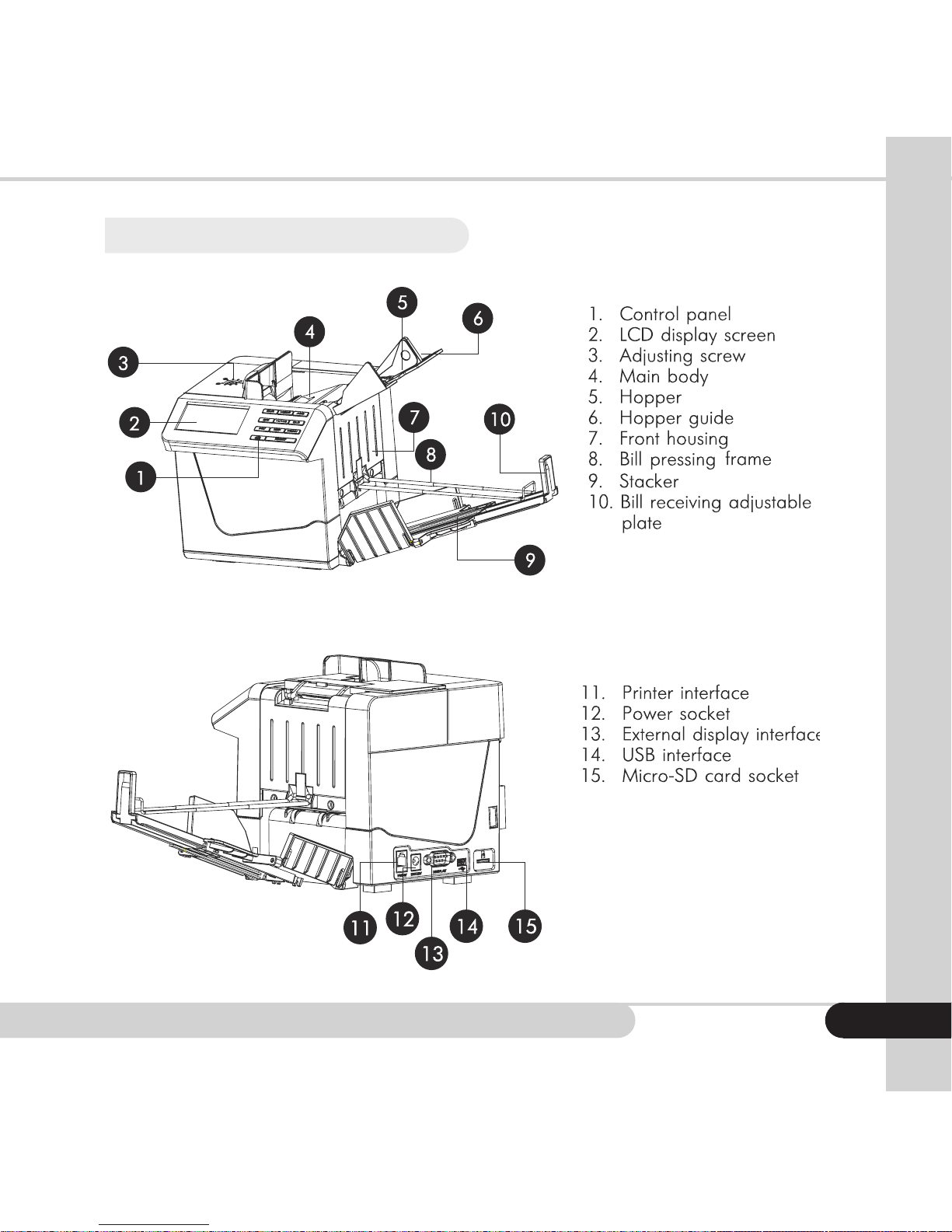
1.3 Front and rear views
Page 7
Moving money forward
®
4
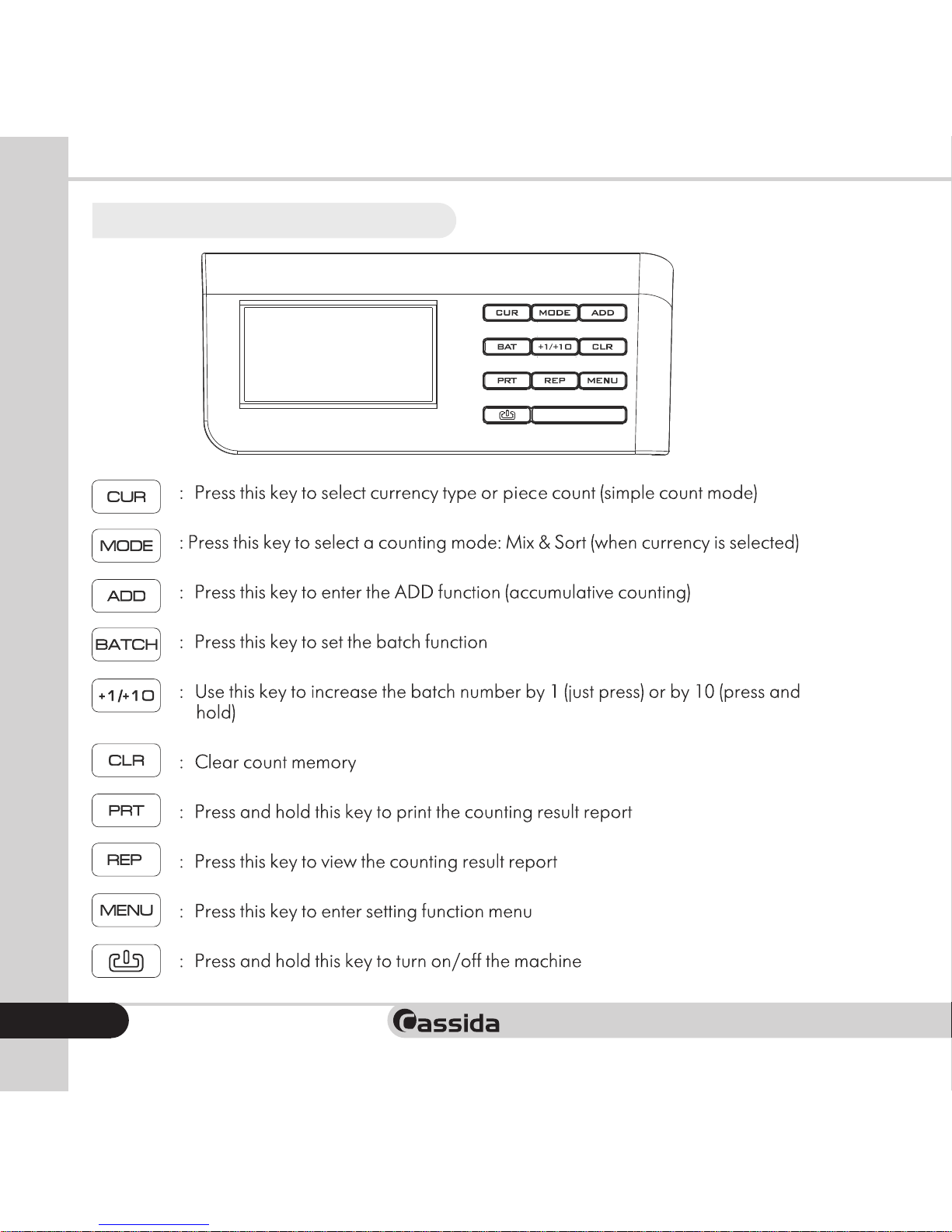
1.4 Control panel
START
Page 8
Cassida Cube compact value counter
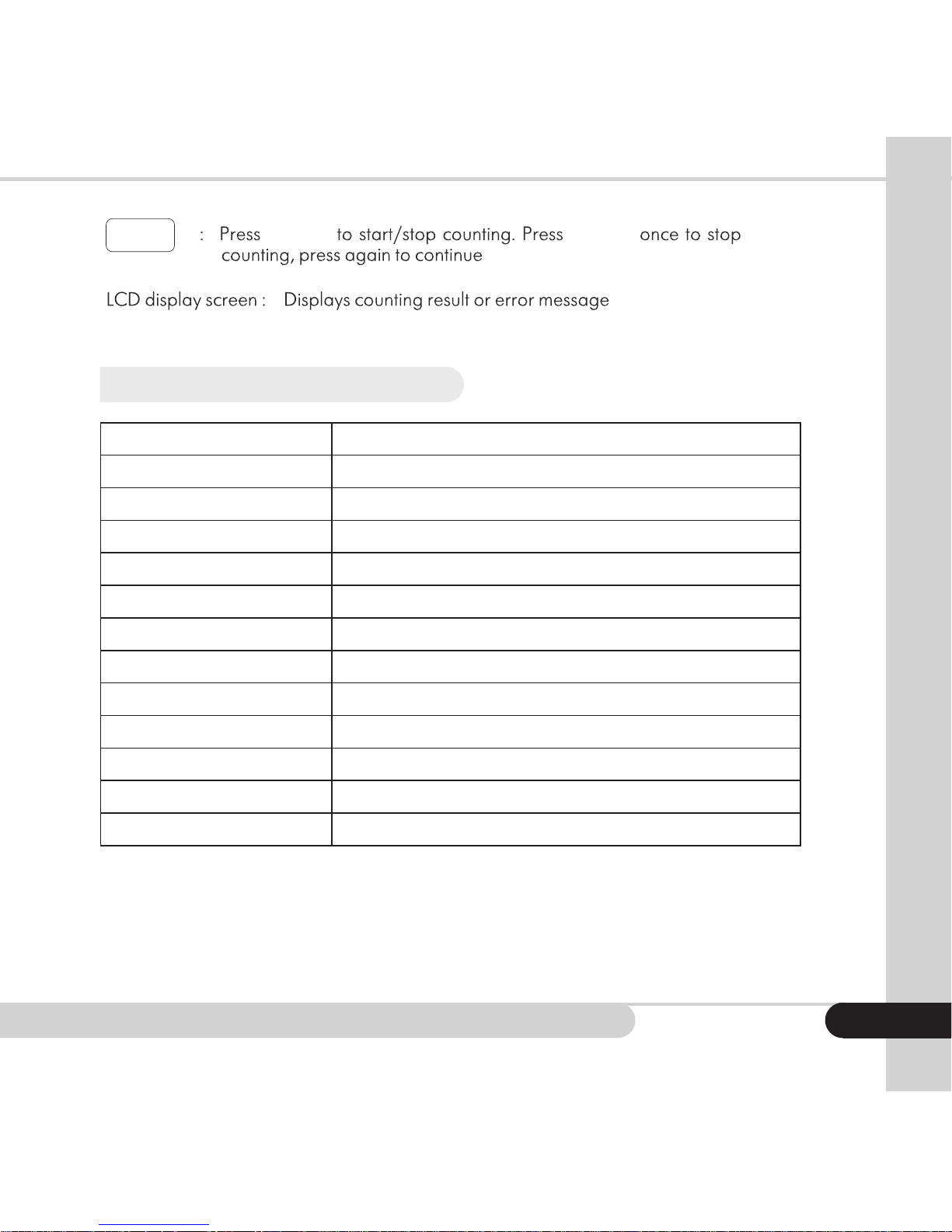
START
START START
1.5 Specications
Counting speed: 250 bills/min
Hopper capaity: 100 bills
Stacker capacity: 100 bills
Batch size: 100, 50, 25, 20,10 or from 1 to 200 with +1/+10
Display: LCD
Detections: 3D, MG, IR, UV, IMG, RGB
Power input: AC100~240VAC, 50/60 Hz
Power output: DC12V 12.0A
Battery: 2000 mAH
Operating temparture: 32 - 104 °F (0-40 °C)
Storage temprature: -13 - 149 °F (-25 - +65 °C)
Size: 6.6” x 5.9”x 5.9” (170x150x150 mm)
Weight: 4.2 lbs (1.9 kg)
5
Page 9

Moving money forward
®
6
1.6 Important safety notes
When using this unit, basic safety precautions should always be observed, including the
following:
• Read this manual before operation
• The manual should be available to operator
• Do not use this unit in areas where it may be exposed to water or any other liquids
• Makecertaintheunitisinstalledonaatsurface.Donotoperatethemachineinareas
with high temperature, humidity or smoke, as these conditions may prevent proper
operation.
• This unit is designed for indoor use in a ventilated environment. Keep the machine
away from direct sunlight or strong directional interior lighting and strong magnetic
elds.Thesecouldinterferewiththecounterfeitdetectionsensors.
• During operation, do not touch the moving parts of the unit
• Avoid foreign objects, paper clips, and staples
• Avoid dropping the unit
• Whennishedbesuretherearenobillsinthehopperortransportsystem
• When not using the unit for an extended period of time, disconnect the power cord
from the wall outlet
• Unplugtheunitfromthewalloutletbeforecleaning.Useadampclothorspecically
designed maintenance accessories such as an air duster, soft bristle brush, or cleaning
cards.
• To avoid the risk of electrical shock, do not disassemble this unit. Disassembly will
expose you to dangerous voltages and other safety risks. Incorrect reassembly can
cause electrical shock when the appliance is subsequently used.
• Clean the unit regularly
• Taketheunittoaqualiedtechnicianwhenserviceorrepairisrequired.Donottryto
replaceanypartsyourself.Suppliedsparepartsareintendedforusebyqualiedrepair
personnel only.
Remember the manufacturer is in no way responsible for damage to the unit or injury to the
operator in the event of incorrect operation/care of the unit.
Page 10
Cassida Cube compact value counter
GETTING STARTED
2.
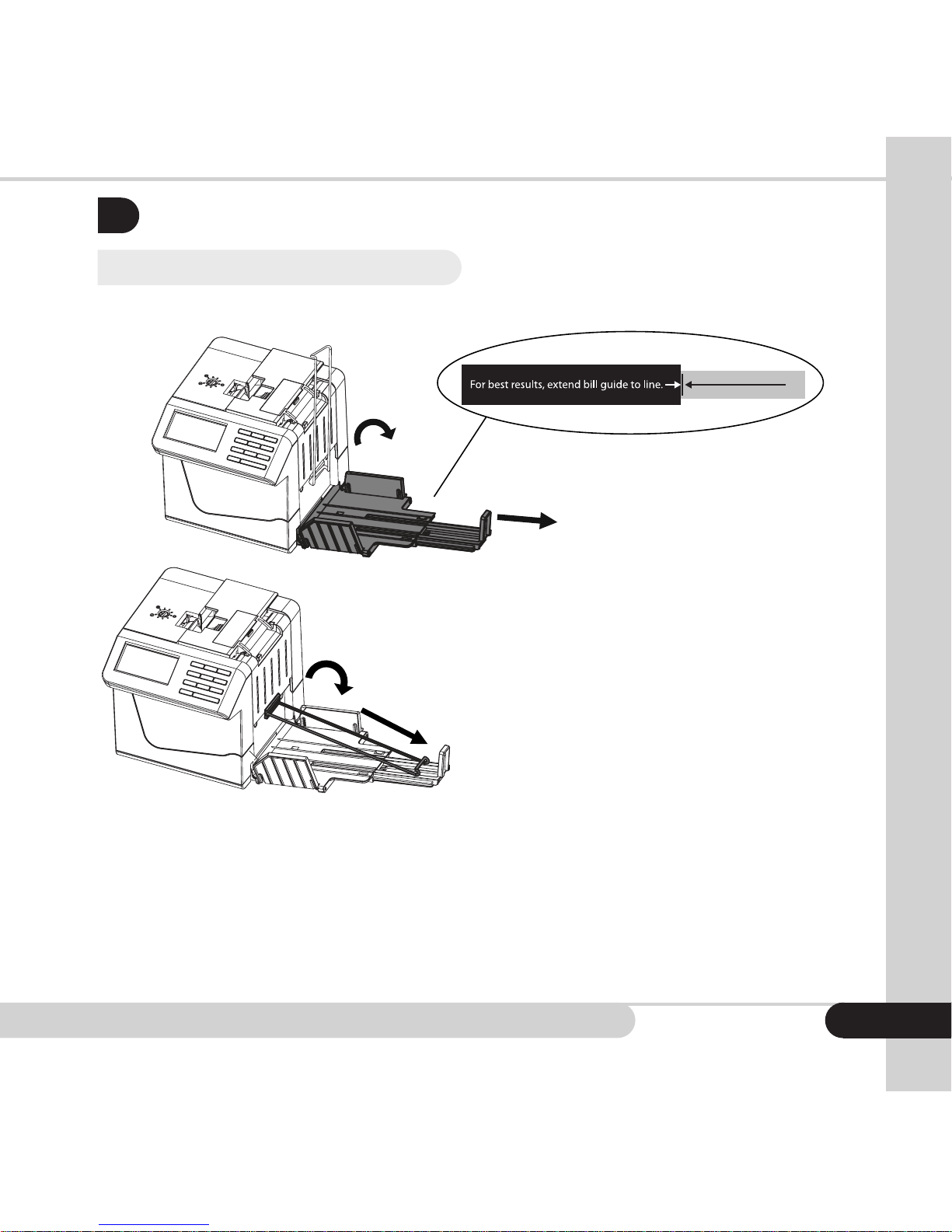
2.1 Open the stacker assembly
3. Open
4. Extend bill pressing wire guide to its full length
1. Open
2. Extend to line on label
NOTE: For optimal counting of US currency, the hopper guide should extend no
farther than 16.5 cm (approximately 6.5 inches) from the edge f the Cube. The
bill pressing wire should be extended to its full length. Please follow guidelines
shownontheafxedstickers.
7
Page 11
Moving money forward
®
8
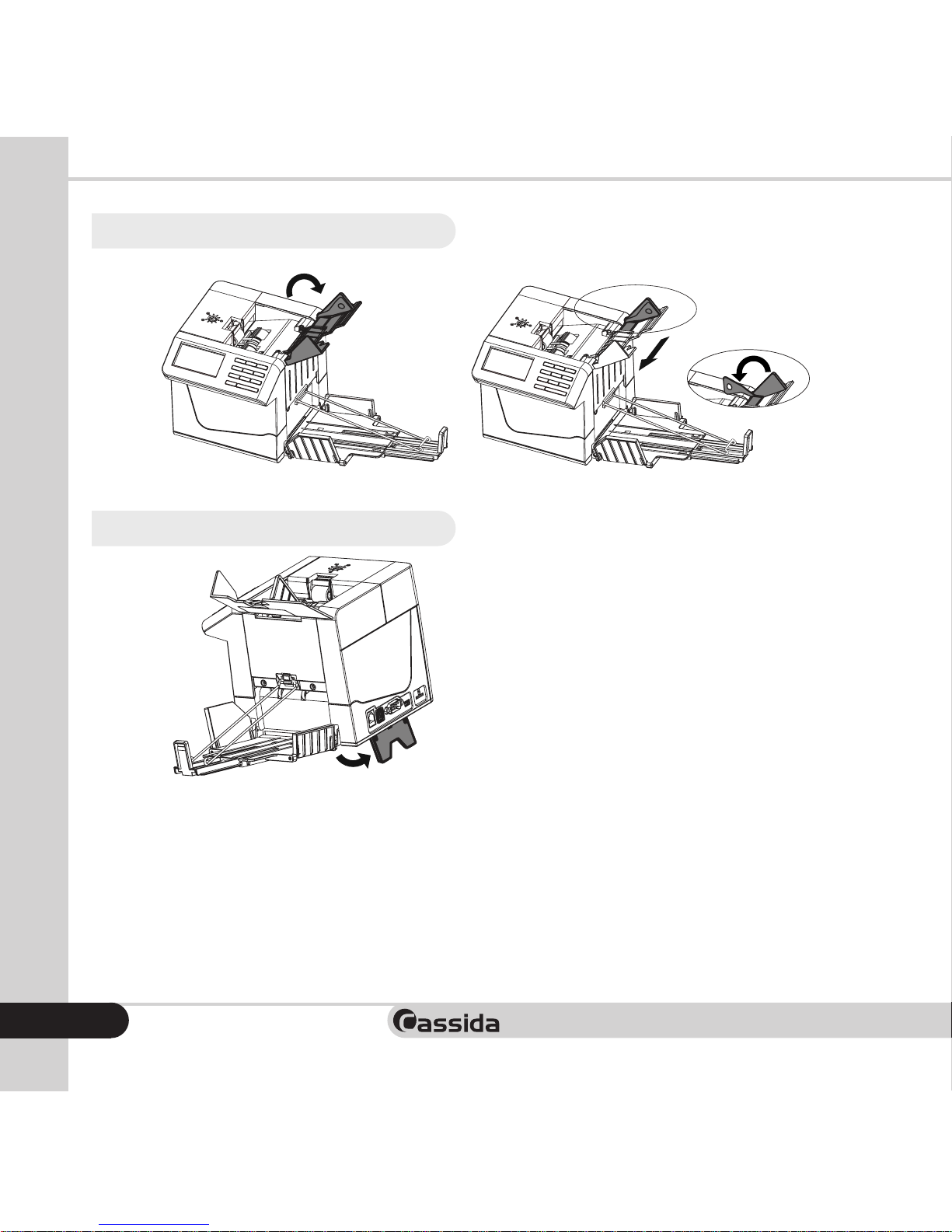
2.2 Open and adjust the hopper
USD=Narrowest setting
1. Open
2.3 Open tilt stand
USD=Narrowest setting
Unfold from bottom rear
(for best performance)
1. Open
Page 12
Cassida Cube compact value counter
2.4 Connect the power source
There are two types of power source can be connected to the counter:
- The AC/DC power adapter: convenient for indoor use
- The battery: convenient for portable use
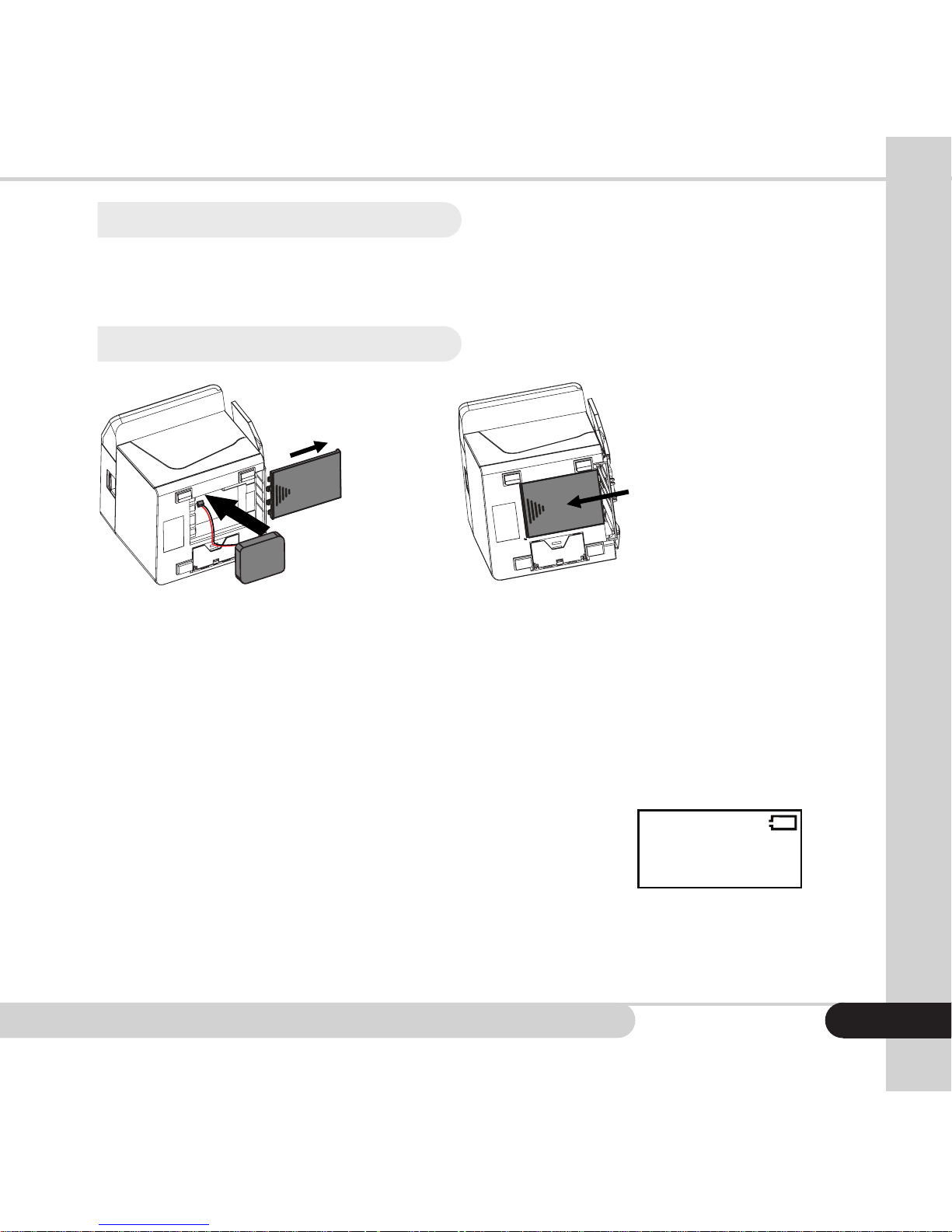
2.5 Install the battery
3. Replace Cover
1. Remove Cover
2. Install Battery
plug in
Beforerstuse,therechargablebatteryshouldbeinstalled
• When the counter connects to the external power supply, it will be charged
automatically. The battery status symbol is displayed on the upper right corner
of the LCD. A solid symbol means the battery is full and an empty symbol means
the battery is insufcient. If the symbol is ashing and changing from solid to
empty, it means the battery is being charged. When the battery is poor, “Low
battery” will be displayed. It means the battery is too low, you should stop
counting and charge the device.
• The battery status symbol will not be displayed
on-screen if a battery is not connected.
• If the device works on a battery, then in working
mode, when the counter idles up to 20 minutes, it will turn off automatically.
Low Battery
9
Page 13
Moving money forward
®
10
LOADING BILLS
3.
Placethemachineonaatsurface,thenopen the tilt stand, ensuring thatno
strongelectromagneticelds,bright lightorsunshinearecontactingtheCube.
Plug the electric socket into AC electric source. If you have purchased an external
display, connect it to the external display interface on the back of the counter.
Press
CUR
Switches between counting currency
USD
and
Free
(for counting coupons or checks)
MODE
Switches between
Mix
and
Sort
ADD
Turns
ADD
mode on or off
BAT
Cycles through the batch amounts
(
100/50/25/20/10
)
+
1/ +10
Increases batch amounts by 1 or
(press and hold)
10
CLR
Clears the batch amount
PRT
Prints a report (with optional printer)
REP
Displays an on-screen report
MENU
Accesses settings
(Time Set, Auto-Start, and Sleep Time)
Powers the Cube on or off (Press and hold)
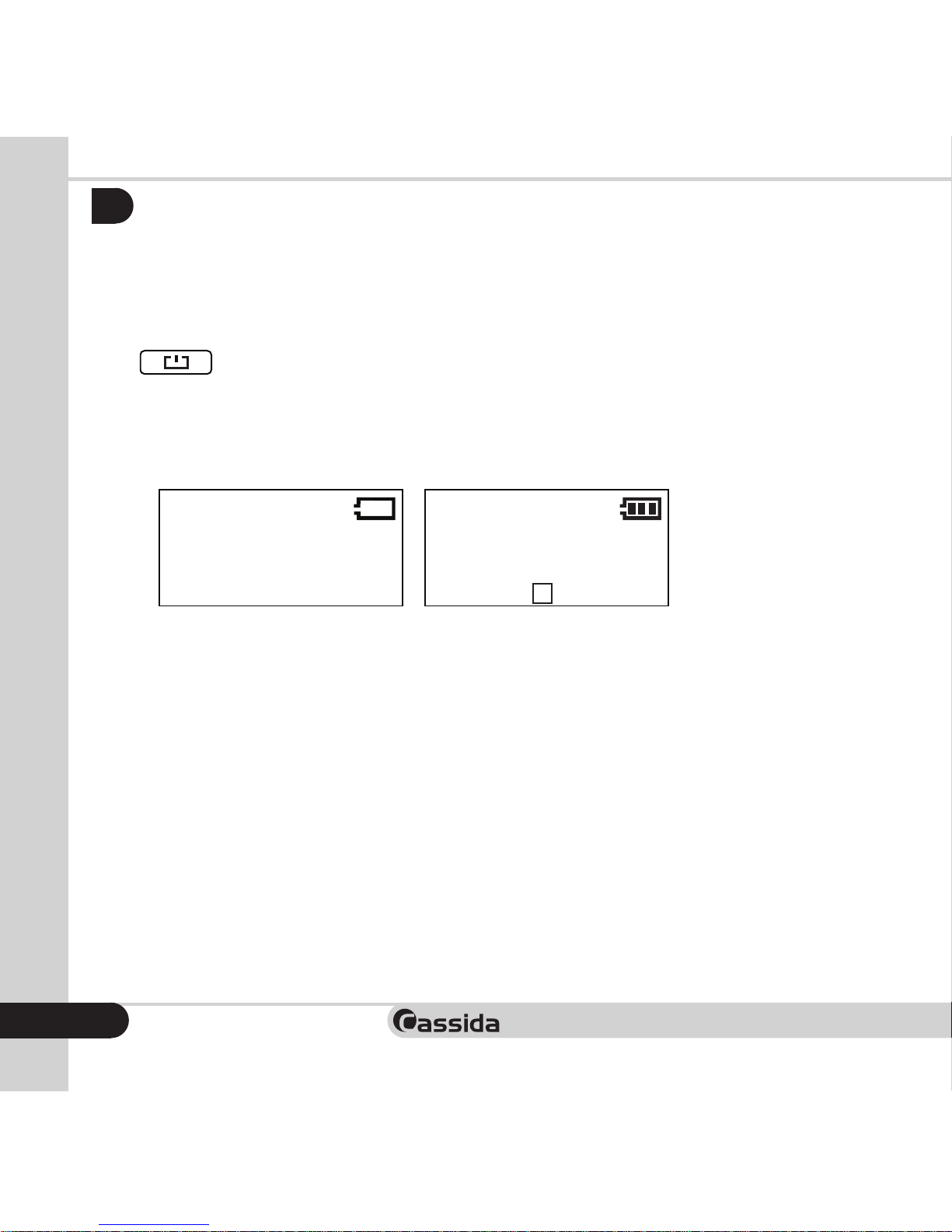
for 2 seconds, machine will perform a self-test (see Figure 3-1).
If the self-test is successful, the machine will enter into ready state (see Figure 3-2),
if some error messages are displayed, please deal with them according to the
Troubleshooting in the manual. See section 6.
Low Battery
Figure 3-1
Figure 3-2
Print...
Ver. 2.10
Self-Test
USD
ADD
PCS:
VAL:
$
0
0
A Bat:---
Mix
Total
Value
Total
Number
Denomination Piece Value
USD
ADD
PCS:
VAL:
$
10
1000
M B:---
Mix
215
100
50
20
20
25
0
10
1
1
1
2
5
0 0
0
Total
100
50
20
10
5
2
1
Plug in
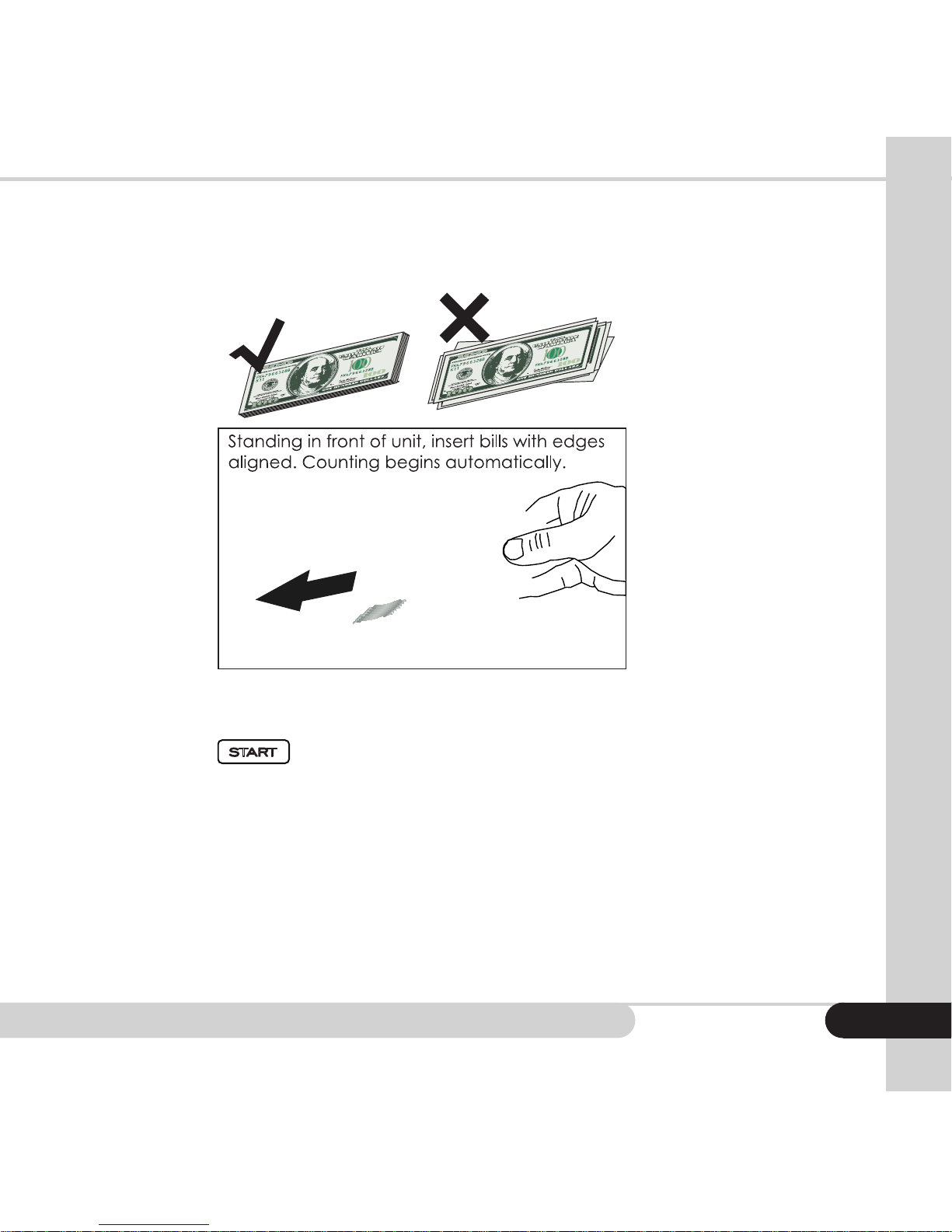
It is very important to place the bills into the hopper correctly, because recognition
performance of the bills is highly affected by the arrangement of the bills. Bills
should be placed in a neat stack prior to being placed into the hopper. Please
avoid counting bills that are wet, excessively dirty, spoiled, folded, curled or with
foreign material like clips, bands, etc. It will damage and cause malfunction of
the machine.
Page 14
Cassida Cube compact value counter
Arrange a stack of bills with smaller denominations in the middle, where possible.
Then set the hopper guide to the position where it just touches the edges of the
bills.Whilestanding infrontof theCube,lay thebillsatly onthehopper. The
Cube will begin counting automatically.
When a suspicious bill is detected, the counter will stop immediately and the
machine will emit a beep. The top bill in the stacker is a suspect bill. Remove the
top bill, press
CUR
Switches between counting currency
USD
and
Free
(for counting coupons or checks)
MODE
Switches between
Mix
and
Sort
ADD
Turns
ADD
mode on or off
BAT
Cycles through the batch amounts
(
100/50/25/20/10
)
+
1/ +10
Increases batch amounts by 1 or
(press and hold)
10
CLR
Clears the batch amount
PRT
Prints a report (with optional printer)
REP
Displays an on-screen report
MENU
Accesses settings
(Time Set, Auto-Start, and Sleep Time)
Powers the Cube on or off (Press and hold)
START
Starts or continues the count
and the machine will continue counting.
NOTE: Certain errors, such as double notes, chain notes and passing errors will
cause the Cube to stop automatically. If this occurs, please recount all bills in
the stack
11
Page 15
Moving money forward
®
12
OPERATION
4.
4.1 Select Auto/Manual mode
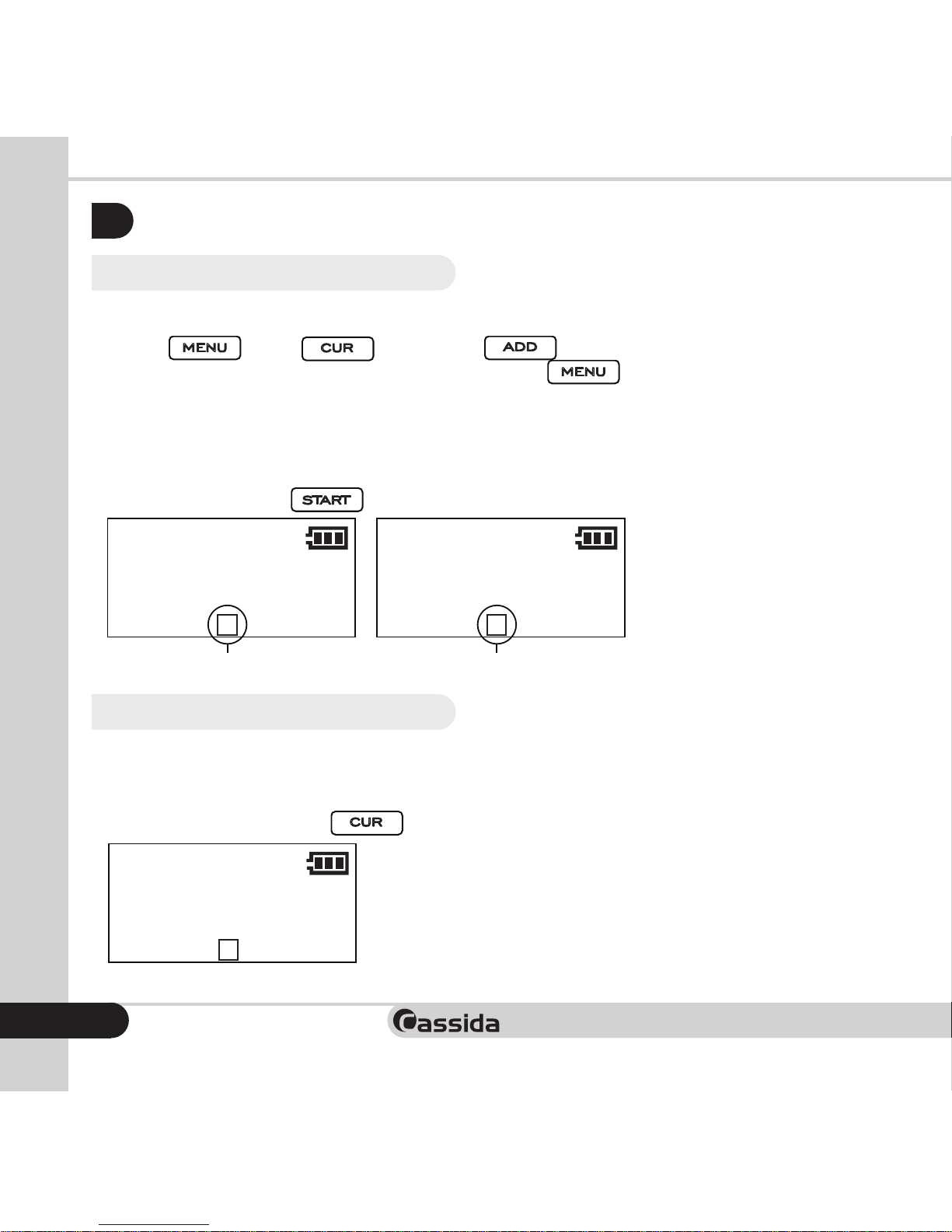
To switch between Auto (A) and Manual (M) start modes, enter setting menu by
pressing
CUR
Switches between counting currency
USD
and
Free
(for counting coupons or checks)
MODE
Switches between
Mix
and
Sort
ADD
Turns
ADD
mode on or off
BAT
Cycles through the batch amounts
(
100/50/25/20/10
)
+
1/ +10
Increases batch amounts by 1 or
(press and hold)
10
CLR
Clears the batch amount
PRT
Prints a report (with optional printer)
REP
Displays an on-screen report
MENU
Accesses settings
(Time Set, Auto-Start, and Sleep Time)
, then
CUR
Switches between counting currency
USD
, then press
CUR
Switches between counting currency
USD
and
Free
(for counting coupons or checks)
MODE
Switches between
Mix
and
Sort
ADD
Turns
ADD
mode on or off
to select Auto mode ON or
OFF.Toconrmandleavethesettingsmenu,press
CUR
Switches between counting currency
USD
and
Free
(for counting coupons or checks)
MODE
Switches between
Mix
and
Sort
ADD
Turns
ADD
mode on or off
BAT
Cycles through the batch amounts
(
100/50/25/20/10
)
+
1/ +10
Increases batch amounts by 1 or
(press and hold)
10
CLR
Clears the batch amount
PRT
Prints a report (with optional printer)
REP
Displays an on-screen report
MENU
Accesses settings
(Time Set, Auto-Start, and Sleep Time)
.
In Auto mode “A” will be displayed on the screen. The machine starts counting
automaticaly, when the bills are placed into the hopper.
In Manual mode “M” will be displayed on the screen. The machine starts counting,
when the user presses
CUR
Switches between counting currency
USD
and
Free
(for counting coupons or checks)
MODE
Switches between
Mix
and
Sort
ADD
Turns
ADD
mode on or off
BAT
Cycles through the batch amounts
(
100/50/25/20/10
)
+
1/ +10
Increases batch amounts by 1 or
(press and hold)
10
CLR
Clears the batch amount
PRT
Prints a report (with optional printer)
REP
Displays an on-screen report
MENU
Accesses settings
(Time Set, Auto-Start, and Sleep Time)
Powers the Cube on or off (Press and hold)
START
Starts or continues the count
.
Low Battery
Figure 3-1
Figure 3-2
Print...
Ver. 2.10
Self-Test
USD
ADD
PCS:
VAL:
$
0
0
A Bat:---
Mix
Auto mode
USD
ADD
PCS:
VAL:
$
0
0
A Bat:---
Mix
USD
ADD
PCS:
VAL:
$
0
0
M Bat:---
Mix
Total
Value
Total
Number
Denomination Piece Value
USD
ADD
PCS:
VAL:
$
10
1000
M B:---
Mix
Manual mode
215
100
50
20
20
25
0
10
1
1
1
2
5
0 0
0
Total
100
50
20
10
5
2
1
Plug in
4.2 Select counting mode
A. Piece Count Mode
This mode is used to count the total number of bills. To start this mode, select
“Piece Count” by pressing
CUR
Switches between counting currency
USD
.
Low Battery
Figure 3-1
Figure 3-2
Print...
Ver. 2.10
Self-Test
USD
ADD
PCS:
VAL:
$
0
0
A Bat:---
Mix
USD
ADD
PCS:
VAL:
$
0
0
A Bat:---
Mix USD
ADD
PCS:
VAL:
$
0
0
M Bat:---
Mix
Total
Value
Total
Number
Denomination Piece Value
USD
ADD
PCS:
VAL:
$
10
1000
M B:---
Mix
Piece
PCS:
0
A Bat:---
Count
215
100
50
20
20
25
0
10
1
1
1
2
5
0 0
0
Total
100
50
20
10
5
2
1
Plug in
Page 16
Cassida Cube compact value counter
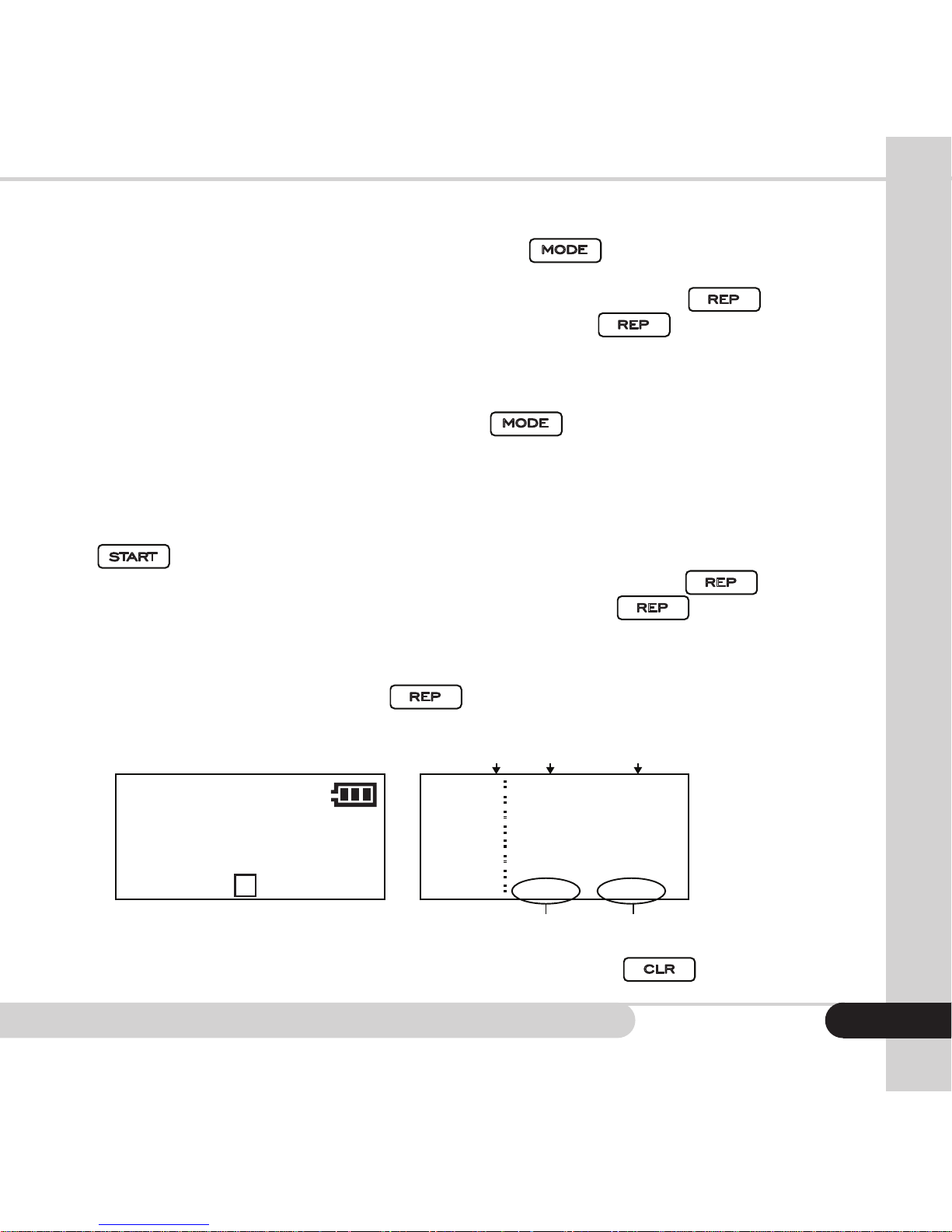
B. Mixed Count Mode
To start MIXED mode, select “MIX” by pressing
CUR
Switches between counting currency
USD
and
Free
(for counting coupons or checks)
MODE
Switches between
Mix
and
Sort
.
This mode is used to
count a stack of mixed denominations. Total number (PCS) and total value (VAL)
will be displayed on the screen. When operation is complete, press
CUR
Switches between counting currency
USD
and
Free
(for counting coupons or checks)
MODE
Switches between
Mix
and
Sort
ADD
Turns
ADD
mode on or off
BAT
Cycles through the batch amounts
(
100/50/25/20/10
)
+
1/ +10
Increases batch amounts by 1 or
(press and hold)
10
CLR
Clears the batch amount
PRT
Prints a report (with optional printer)
REP
Displays an on-screen report
and
the detailed report will be displayed on the screen. Press
CUR
Switches between counting currency
USD
and
Free
(for counting coupons or checks)
MODE
Switches between
Mix
and
Sort
ADD
Turns
ADD
mode on or off
BAT
Cycles through the batch amounts
(
100/50/25/20/10
)
+
1/ +10
Increases batch amounts by 1 or
(press and hold)
10
CLR
Clears the batch amount
PRT
Prints a report (with optional printer)
REP
Displays an on-screen report
once again to
return to the main screen.
C. Sort Count Mode
To start SORT mode, select “Sort” by pressing
CUR
Switches between counting currency
USD
and
Free
(for counting coupons or checks)
MODE
Switches between
Mix
and
Sort
. This mode is used to count
andsortbillsbyonedenominationwhichisautomaticallydeterminedbytherst
passingbill.Therstbillinthehopperdeterminesthesortingdenomination.Ifthe
denominationonthesecondorotherbillsinthestackdiffersfromtherstbill,the
machine will stop and alert the user with a DENOMINATION DIFFERENT warning.
Once the bill with the different denomination is removed from the stacker, press
CUR
Switches between counting currency
USD
and
Free
(for counting coupons or checks)
MODE
Switches between
Mix
and
Sort
ADD
Turns
ADD
mode on or off
BAT
Cycles through the batch amounts
(
100/50/25/20/10
)
+
1/ +10
Increases batch amounts by 1 or
(press and hold)
10
CLR
Clears the batch amount
PRT
Prints a report (with optional printer)
REP
Displays an on-screen report
MENU
Accesses settings
(Time Set, Auto-Start, and Sleep Time)
Powers the Cube on or off (Press and hold)
START
Starts or continues the count
to resume the operation. Total number (PCS) and total value (VAL) will
be displayed on the screen. When operation is complete, press
CUR
Switches between counting currency
USD
and
Free
(for counting coupons or checks)
MODE
Switches between
Mix
and
Sort
ADD
Turns
ADD
mode on or off
BAT
Cycles through the batch amounts
(
100/50/25/20/10
)
+
1/ +10
Increases batch amounts by 1 or
(press and hold)
10
CLR
Clears the batch amount
PRT
Prints a report (with optional printer)
REP
Displays an on-screen report
and
the detailed report will be displayed on the screen. Press
CUR
Switches between counting currency
USD
and
Free
(for counting coupons or checks)
MODE
Switches between
Mix
and
Sort
ADD
Turns
ADD
mode on or off
BAT
Cycles through the batch amounts
(
100/50/25/20/10
)
+
1/ +10
Increases batch amounts by 1 or
(press and hold)
10
CLR
Clears the batch amount
PRT
Prints a report (with optional printer)
REP
Displays an on-screen report
once again
to return to the main screen.
In Mix and Sort modes, after counting is complete, the machine will provide a
report of all counted bills when
CUR
Switches between counting currency
USD
and
Free
(for counting coupons or checks)
MODE
Switches between
Mix
and
Sort
ADD
Turns
ADD
mode on or off
BAT
Cycles through the batch amounts
(
100/50/25/20/10
)
+
1/ +10
Increases batch amounts by 1 or
(press and hold)
10
CLR
Clears the batch amount
PRT
Prints a report (with optional printer)
REP
Displays an on-screen report
is pressed. The detailed report will be
displayed on the screen as follows:
Total
Value
Total
Number
Denomination Piece Value
USD
ADD
PCS:
VAL:
$
10
1000
M B:---
Mix
215
100
50
20
20
25
0
10
1
1
1
2
5
0 0
0
Total
100
50
20
10
5
2
1
Press any key to exit the report mode automatically. Press
CUR
Switches between counting currency
USD
and
Free
(for counting coupons or checks)
MODE
Switches between
Mix
and
Sort
ADD
Turns
ADD
mode on or off
BAT
Cycles through the batch amounts
(
100/50/25/20/10
)
+
1/ +10
Increases batch amounts by 1 or
(press and hold)
10
CLR
Clears the batch amount
to clear the
count memory.
13
Page 17
Moving money forward
®
14
4.3 Printing function
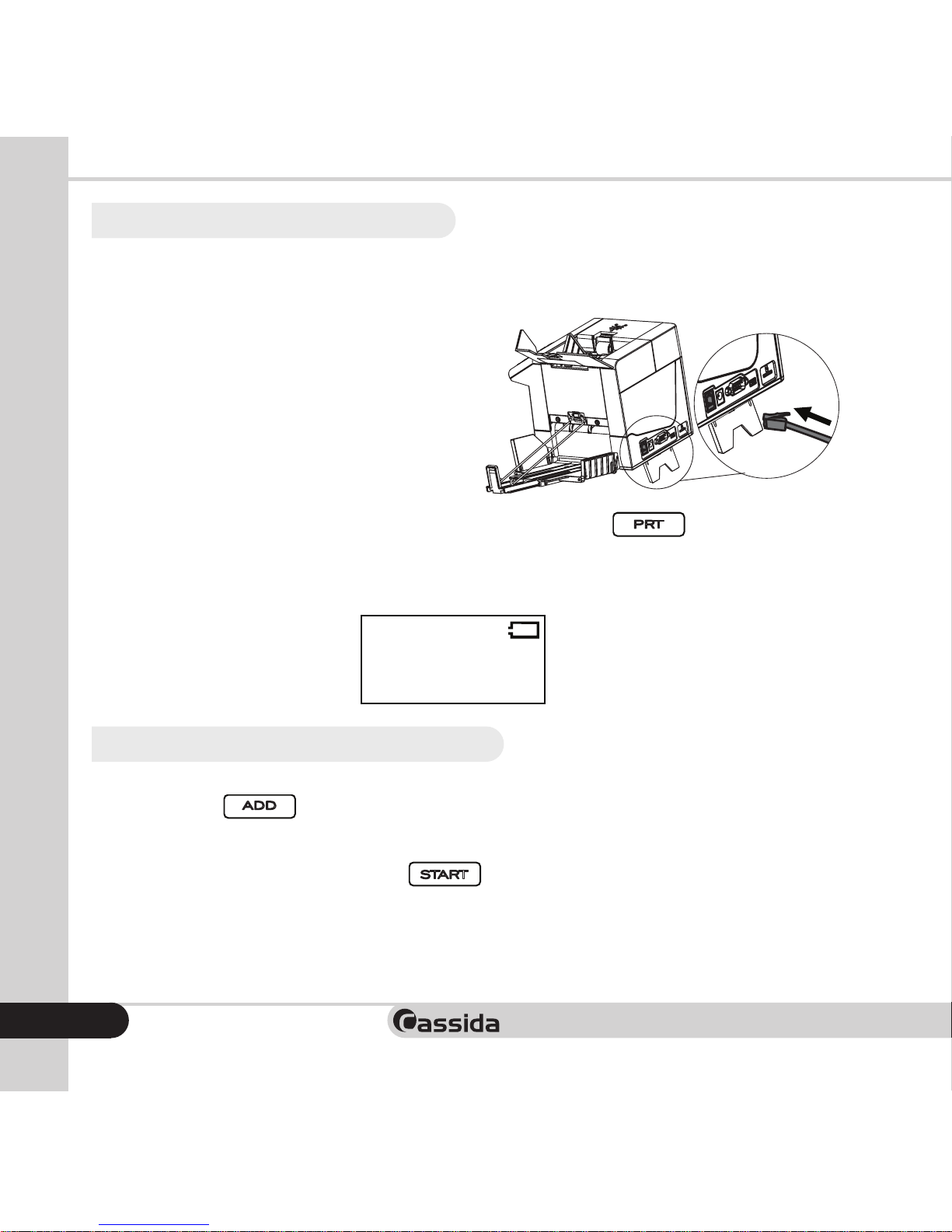
To connect the Cube to a printer, follow the diagram as shown. The Cassida
Cube has a special print cable that is included with your unit.
When the Cube is connected to a printer,
powerontheCuberst,thenturnon the
printer, to assure connectivity.
If the printer is connected to the machine, press and hold
CUR
Switches between counting currency
USD
and
Free
(for counting coupons or checks)
MODE
Switches between
Mix
and
Sort
ADD
Turns
ADD
mode on or off
BAT
Cycles through the batch amounts
(
100/50/25/20/10
)
+
1/ +10
Increases batch amounts by 1 or
(press and hold)
10
CLR
Clears the batch amount
PRT
Prints a report (with optional printer)
, “Print...” will
be displayed on the LCD as shown below and the report will be printed. After
printing is completed, the Cube returns to its ready state.
4.4 Select ADD function
When you need to get an accumulative total of what you’re counting, use this
function. Press
CUR
Switches between counting currency
USD
and
Free
(for counting coupons or checks)
MODE
Switches between
Mix
and
Sort
ADD
Turns
ADD
mode on or off
and “ADD” will be displayed on the lower left side of the
screen. NOTE: Activating ADD zeros out and resets any piece count and value
on screen.
Place bills in the hopper and press
CUR
Switches between counting currency
USD
and
Free
(for counting coupons or checks)
MODE
Switches between
Mix
and
Sort
ADD
Turns
ADD
mode on or off
BAT
Cycles through the batch amounts
(
100/50/25/20/10
)
+
1/ +10
Increases batch amounts by 1 or
(press and hold)
10
CLR
Clears the batch amount
PRT
Prints a report (with optional printer)
REP
Displays an on-screen report
MENU
Accesses settings
(Time Set, Auto-Start, and Sleep Time)
Powers the Cube on or off (Press and hold)
START
Starts or continues the count
to begin counting. The piece count
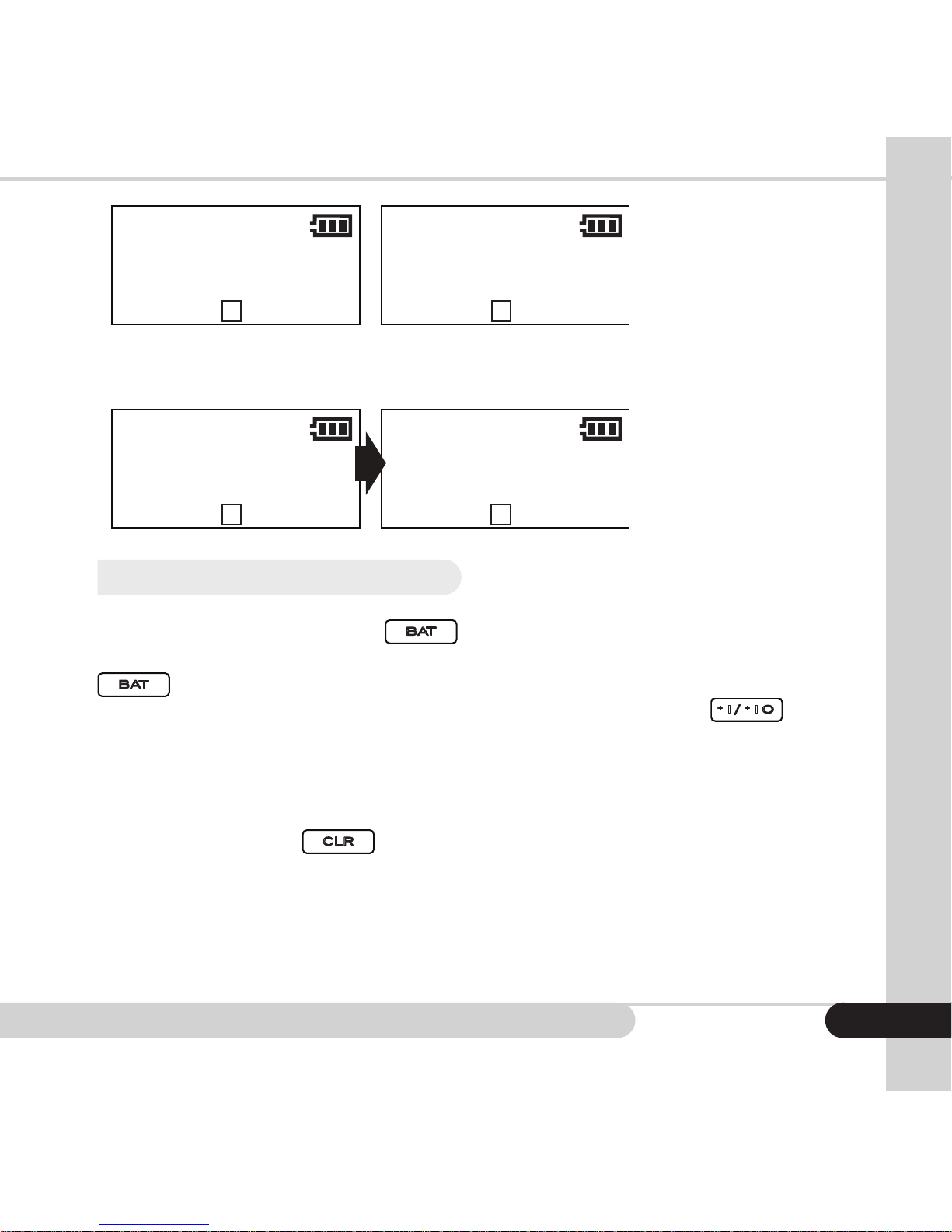
andvaluewilldisplayonscreen(seegure4-1).Addanadditionalstackofbills
to the hopper and the piece count of the bills and value of the bills will be added
tothepreviouscountjustnished.WithADDactivated,thenumberdisplayedon
screenisthesumtotalofseveralcounts(seegure4-2).
Print...
Total
Value
Total
Number
215
100
50
20
20
25
0
10
1
1
1
2
5
0 0
0
5
2
1
Print...
Total
Value
Total
Number
Denomination Piece Value
USD
ADD
PCS:
VAL:
$
10
1000
M B:---
Mix
215
100
50
20
20
25
0
10
1
1
1
2
5
0 0
0
Total
100
50
20
10
5
2
1
Plug in
Page 18
Cassida Cube compact value counter
Low Battery
Figure 3-1
Figure 4-1 Figure 4-2
Figure 3-2
Print...
Ver. 2.10
Self-Test
USD
ADD
PCS:
VAL:
$
0
0
A Bat:---
Mix
Auto mode
USD
ADD
PCS:
VAL:
$
0
0
A Bat:---
Mix USD
ADD
PCS:
VAL:
$
0
0
M Bat:---
Mix
Total
Value
Total
Number
ADD
PCS:
VAL:
$
10
1000
M B:---
Manual mode
USD
ADD
PCS:
VAL:
$
999
999999
A Bat:---
Mix USD
ADD
PCS:
VAL:
$
0
0
M Bat:---
Mix
215
100
50
20
20
25
10
1
1
1
2
5
0 0
Total
100
50
20
10
5
2
Plug in
USD
ADD
PCS:
VAL:
$
35
175
A Bat:---
Mix
USD
ADD
PCS:
VAL:
$
59
384
A Bat:---
Mix
When the piece count reaches 999+1 or the accumulative value reaches
999999+1, the count and value revert to zero.
Low Battery
Figure 3-1
Figure 3-2
Print...
Ver. 2.10
Self-Test
USD
ADD
PCS:
VAL:
$
0
0
A Bat:---
Mix
Auto mode
USD
ADD
PCS:
VAL:
$
0
0
A Bat:---
Mix USD
ADD
PCS:
VAL:
$
0
0
M Bat:---
Mix
Total
Value
Total
Number
Denomination Piece Value
USD
ADD
PCS:
VAL:
$
10
1000
M B:---
Mix
Manual mode
USD
ADD
PCS:
VAL:
$
999
999999
A Bat:---
Mix
USD
ADD
PCS:
VAL:
$
0
0
M Bat:---
Mix
215
100
50
20
20
25
0
10
1
1
1
2
5
0 0
0
Total
100
50
20
10
5
2
1
Plug in
4.5 Select batch counting
To select a batch amount, press
CUR
Switches between counting currency
USD
and
Free
(for counting coupons or checks)
MODE
Switches between
Mix
and
Sort
ADD
Turns
ADD
mode on or off
BAT
Cycles through the batch amounts
(
100/50/25/20/10
)
. When “100” is displayed on the preset
window, it shows the batch function has been turned on. Each time you press
CUR
Switches between counting currency
USD
and
Free
(for counting coupons or checks)
MODE
Switches between
Mix
and
Sort
ADD
Turns
ADD
mode on or off
BAT
Cycles through the batch amounts
(
100/50/25/20/10
)
, 100, 50, 25, 20, and 10 will be displayed in turn. If the LCD displays
“---”, the batch function is disabled. You also can press or hold
CUR
Switches between counting currency
USD
and
Free
(for counting coupons or checks)
MODE
Switches between
Mix
and
Sort
ADD
Turns
ADD
mode on or off
BAT
Cycles through the batch amounts
(
100/50/25/20/10
)
+
1/ +10
Increases batch amounts by 1 or
to
increase the batch number by 1 or 10. The batch number can be selected in
the range of 1~200. After setting the batch number, load bills on the hopper and
begin counting. When the unit reaches its batch number, the machine will stop
automatically so the batched bills may be removed from the stacker. To turn off
batch counting, press
CUR
Switches between counting currency
USD
and
Free
(for counting coupons or checks)
MODE
Switches between
Mix
and
Sort
ADD
Turns
ADD
mode on or off
BAT
Cycles through the batch amounts
(
100/50/25/20/10
)
+
1/ +10
Increases batch amounts by 1 or
(press and hold)
10
CLR
Clears the batch amount
.
Note: Batch counting applies to the number of bills, not the amount.
15
Page 19
Moving money forward
®
16
SLEEP AND TIME SETTINGS
5.
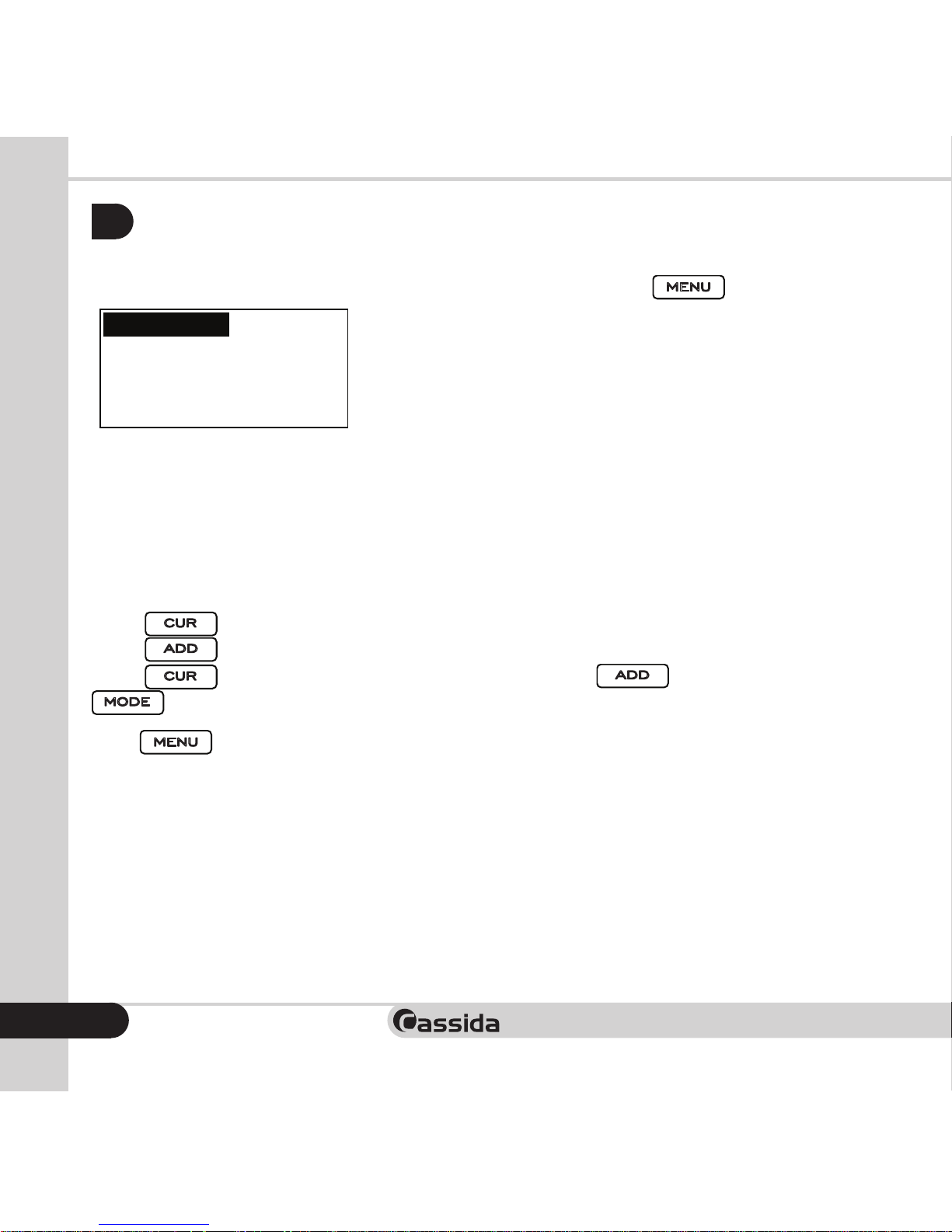
To adjust the time settings, enter the Settings menu by pressing
CUR
Switches between counting currency
USD
and
Free
(for counting coupons or checks)
MODE
Switches between
Mix
and
Sort
ADD
Turns
ADD
mode on or off
BAT
Cycles through the batch amounts
(
100/50/25/20/10
)
+
1/ +10
Increases batch amounts by 1 or
(press and hold)
10
CLR
Clears the batch amount
PRT
Prints a report (with optional printer)
REP
Displays an on-screen report
MENU
Accesses settings
(Time Set, Auto-Start, and Sleep Time)
.
Low Battery
Figure 3-1
Figure 3-2
Print...
Ver. 2.10
Self-Test
USD
ADD
PCS:
VAL:
$
0
0
A Bat:---
Mix
Auto mode
USD
ADD
PCS:
VAL:
$
0
0
A Bat:---
Mix USD
ADD
PCS:
VAL:
$
0
0
M Bat:---
Mix
Total
Value
Total
Number
Denomination Piece Value
USD
ADD
PCS:
VAL:
$
10
1000
M B:---
Mix
Piece
PCS:
0
A Bat:---
Count
Time Set
Auto : ON
Sleep Time : 10M
To Select : CUR
To Change : ADD
Manual mode
USD
ADD
PCS:
VAL:
$
999
999999
A Bat:---
Mix USD
ADD
PCS:
VAL:
$
0
0
M Bat:---
Mix
215
100
50
20
20
25
0
10
1
1
1
2
5
0 0
0
Total
100
50
20
10
5
2
1
Plug in
Time Set: Setting time
Auto: Setting Auto/Manual mode
Sleep Time: Setting sleep time (5 minutes, 10 minutes or off)
Changing the set time:
Press
CUR
Switches between counting currency
USD
to select the desired option.
Press
CUR
Switches between counting currency
USD
and
Free
(for counting coupons or checks)
MODE
Switches between
Mix
and
Sort
ADD
Turns
ADD
mode on or off
to change the parameter.
Press
CUR
Switches between counting currency
USD
toselecttheoptiontobemodied.Press
CUR
Switches between counting currency
USD
and
Free
(for counting coupons or checks)
MODE
Switches between
Mix
and
Sort
ADD
Turns
ADD
mode on or off
(+) and
CUR
Switches between counting currency
USD
and
Free
(for counting coupons or checks)
MODE
Switches between
Mix
and
Sort
(-) to increase or decrease the parameter’s value.
Press
CUR
Switches between counting currency
USD
and
Free
(for counting coupons or checks)
MODE
Switches between
Mix
and
Sort
ADD
Turns
ADD
mode on or off
BAT
Cycles through the batch amounts
(
100/50/25/20/10
)
+
1/ +10
Increases batch amounts by 1 or
(press and hold)
10
CLR
Clears the batch amount
PRT
Prints a report (with optional printer)
REP
Displays an on-screen report
MENU
Accesses settings
(Time Set, Auto-Start, and Sleep Time)
to save the change and exit.
Page 20
Cassida Cube compact value counter
TROUBLESHOOTING
6.
6.1 Self-test error message display and solutions
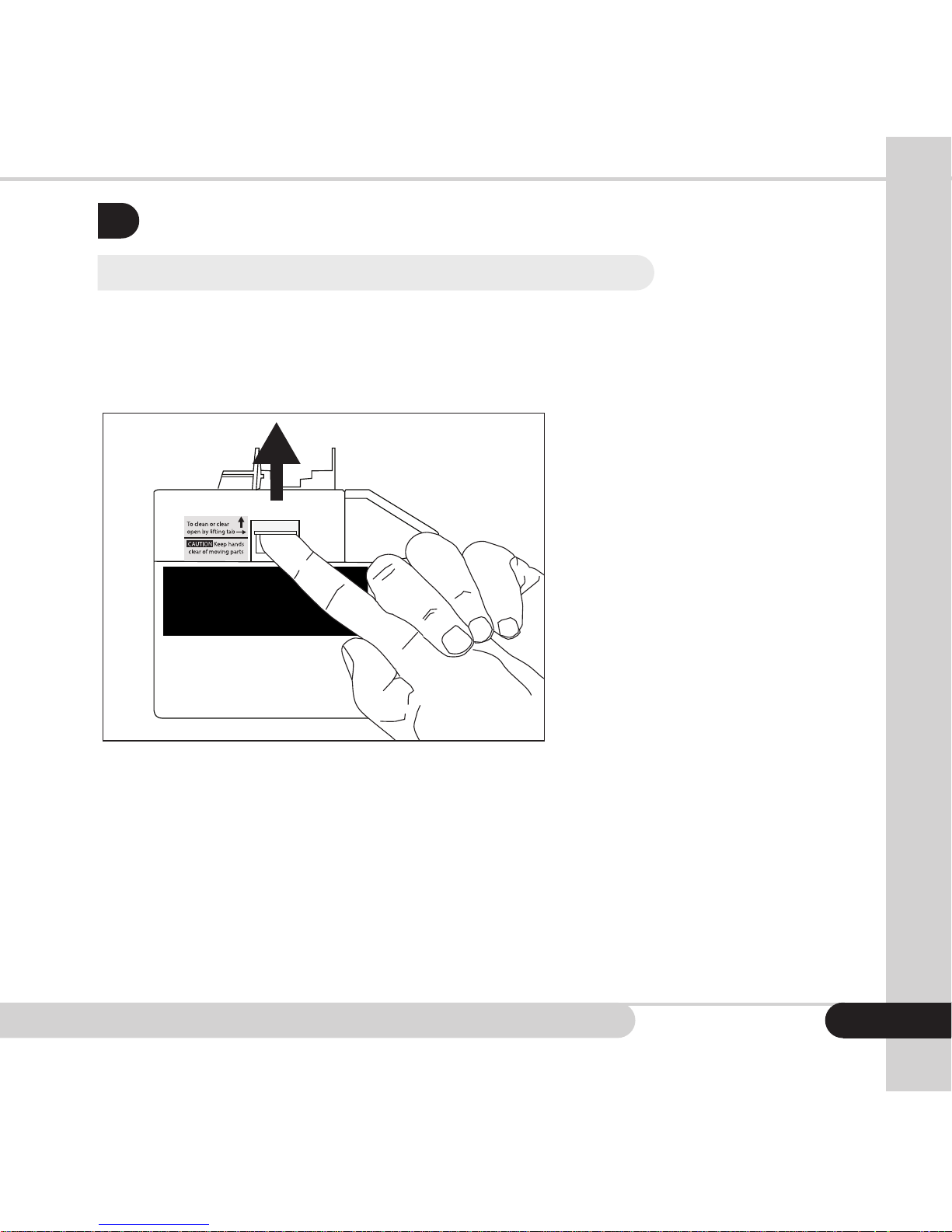
The machine performs a self-test automatically after powering on. If one of the
following error messages is displayed on the LCD, usually it is because the sensor
is blocked by debris, or a jammed bill or. Please use a brush compressed air to
remove dust from the sensor. Remove any jammed bills and restart the machine.
To clean or clear,
turn off machine and
open by lifting tab
17
Page 21
Moving money forward
®
18
ERROR MESSAGE DISPLAY SOLUTION
PassA counting sensor
PassB counting sensor
PassC counting sensor
PassD counting sensor
Remove all bills and clean the counting sensor.
Upper IRA sensor
Upper IRB sensor
Upper IRC sensor
Upper IRD sensor
Lower IRD sensor
Lower IRF sensor
Lower IRG sensor
Lower IRH sensor
Upper color sensor
Lower color sensor
Upper spectrum sensor
Lower spectrum sensor
Remove all bills and clean any sensors.
Banknote feeding sensor Remove all bills and clean the hopper assembly.
Magnetic A sensor
Magnetic B sensor
Magnetic C sensor
Magnetic D sensor
Remove all bills and clean the magnetic sensor
Internal memory fault Reset unit to factory settings by holding both
CUR
Switches between counting currency
USD
and
Free
(for counting coupons or checks)
MODE
Switches between
Mix
and
Sort
ADD
Turns
ADD
mode on or off
BAT
Cycles through the batch amounts
(
100/50/25/20/10
)
+
1/ +10
Increases batch amounts by 1 or
(press and hold)
10
CLR
Clears the batch amount
PRT
Prints a report (with optional printer)
REP
Displays an on-screen report
MENU
Accesses settings
(Time Set, Auto-Start, and Sleep Time)
Powers the Cube on or off (Press and hold)
and
CUR
Switches between counting currency
USD
and
Free
(for counting coupons or checks)
MODE
Switches between
Mix
and
Sort
ADD
Turns
ADD
mode on or off
BAT
Cycles through the batch amounts
(
100/50/25/20/10
)
+
1/ +10
Increases batch amounts by 1 or
(press and hold)
10
CLR
Clears the batch amount
PRT
Prints a report (with optional printer)
REP
Displays an on-screen report
MENU
Accesses settings
(Time Set, Auto-Start, and Sleep Time)
while the unit is off. After a
self test, “Set default parameter” will display. The
unit will return to its normal state within seconds.
Rotate speed sensor Clean the encoder wheel and sensor, or replace
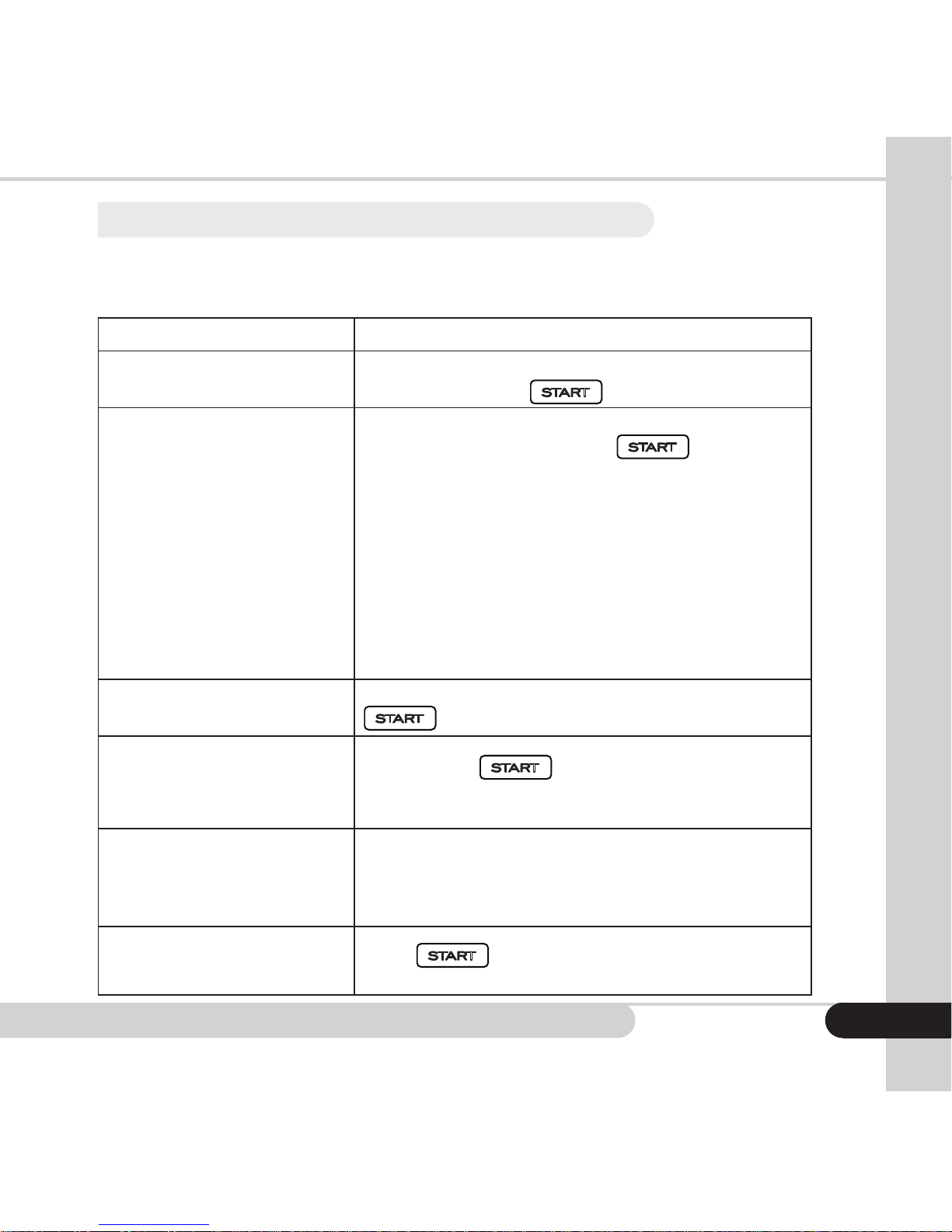
the drive belt. This will need to be done by a
trained specialist. See secton 7.4 for contacting a
Cassida service provider.
Page 22
Cassida Cube compact value counter
6.2 Defective bill error message display and solutions
If any of the following error messages are displayed during counting, use the
following solutions to correct the problems after the machine has stopped.
ERROR MESSAGE DISPLAY SOLUTION
Incomplete notes Half or incomplete bill. Remove the bill from the
stacker and press
CUR
Switches between counting currency
USD
and
Free
(for counting coupons or checks)
MODE
Switches between
Mix
and
Sort
ADD
Turns
ADD
mode on or off
BAT
Cycles through the batch amounts
(
100/50/25/20/10
)
+
1/ +10
Increases batch amounts by 1 or
(press and hold)
10
CLR
Clears the batch amount
PRT
Prints a report (with optional printer)
REP
Displays an on-screen report
MENU
Accesses settings
(Time Set, Auto-Start, and Sleep Time)
Powers the Cube on or off (Press and hold)
START
Starts or continues the count
to continue counting
Magnetic feature fail
IR error
UV error
Image error
Paper error
Spectrum error
Suspect bill MG erro
Suspect bill IR error
Suspect bill UV error
Suspect bill Image error
Suspect bill Paper error
Suspect bill Spectrum error
Counterfeit or suspicious bill. Remove the bill
from the stacker and press
CUR
Switches between counting currency
USD
and
Free
(for counting coupons or checks)
MODE
Switches between
Mix
and
Sort
ADD
Turns
ADD
mode on or off
BAT
Cycles through the batch amounts
(
100/50/25/20/10
)
+
1/ +10
Increases batch amounts by 1 or
(press and hold)
10
CLR
Clears the batch amount
PRT
Prints a report (with optional printer)
REP
Displays an on-screen report
MENU
Accesses settings
(Time Set, Auto-Start, and Sleep Time)
Powers the Cube on or off (Press and hold)
START
Starts or continues the count
to continue
counting.
Denomination different Remove the bill from the stacker and press
CUR
Switches between counting currency
USD
and
Free
(for counting coupons or checks)
MODE
Switches between
Mix
and
Sort
ADD
Turns
ADD
mode on or off
BAT
Cycles through the batch amounts
(
100/50/25/20/10
)
+
1/ +10
Increases batch amounts by 1 or
(press and hold)
10
CLR
Clears the batch amount
PRT
Prints a report (with optional printer)
REP
Displays an on-screen report
MENU
Accesses settings
(Time Set, Auto-Start, and Sleep Time)
Powers the Cube on or off (Press and hold)
START
Starts or continues the count
to continue counting.
Slant notes
Bill tilt. Press
CUR
Switches between counting currency
USD
and
Free
(for counting coupons or checks)
MODE
Switches between
Mix
and
Sort
ADD
Turns
ADD
mode on or off
BAT
Cycles through the batch amounts
(
100/50/25/20/10
)
+
1/ +10
Increases batch amounts by 1 or
(press and hold)
10
CLR
Clears the batch amount
PRT
Prints a report (with optional printer)
REP
Displays an on-screen report
MENU
Accesses settings
(Time Set, Auto-Start, and Sleep Time)
Powers the Cube on or off (Press and hold)
START
Starts or continues the count
to continue counting. If it
occurs frequently, adjust the adjusting screw
toward the counter-clockwise direction.
Double notes
Chained notes
Some bills are stuck together or overlapped.
Remove all bills and recount. If these errors occur
frequently, adjust the adjusting screw slightly
clockwise.
Passing error
Press
CUR
Switches between counting currency
USD
and
Free
(for counting coupons or checks)
MODE
Switches between
Mix
and
Sort
ADD
Turns
ADD
mode on or off
BAT
Cycles through the batch amounts
(
100/50/25/20/10
)
+
1/ +10
Increases batch amounts by 1 or
(press and hold)
10
CLR
Clears the batch amount
PRT
Prints a report (with optional printer)
REP
Displays an on-screen report
MENU
Accesses settings
(Time Set, Auto-Start, and Sleep Time)
Powers the Cube on or off (Press and hold)
START
Starts or continues the count
. Open the bill transport path to
remove the bill and recount all bills.
19
Page 23

Moving money forward
®
20
MAINTENANCE, WARRANTY AND CONTACT INFO
7.
7.1 Maintenance
Regular maintenance will ensure accurate operation of the unit, and will prolong
its service life. Keep the counter in a ventilated place and away from direct
sunshine and strong magnetic elds. Periodically clean all sensors using a soft
brush or compressed air. Keep the surface of sensors away from sharp and hard
articles to avoid damage.
ATTENTION: The Cassida Cube should be cleaned frequently to keep it performing
properly. We suggest opening the unit and using a can of compressed air to
remove dust from interior spaces. Be certain to avoid contact between the
nozzle and any surfaces, to assure no damage occurs to sensors.
Cassida can service your Cube, if necessary, even if the repair is not covered
under than warranty. To get a maintenance or service quote, please log on to
Cassidausa.com/supportandlloutasupportform.
7.2 Warranty
Our goal is to make Cassida your lifetime work partner. That’s why Cassida
products are subject to stringent quality control measures and are backed by a
solid one year parts and labor warranty.
To activate your warranty in the US or Canada, please register you product online
by visiting www.cassidausa.com/register.html.
In many cases a unit malfunction can easily be corrected by performing a
thorough cleaning. This requires disassembly of the unit to clean each individual
sensor. This cleaning is not covered by warranty and should be performed only by
your local dealer or the Cassida Technical Service Center.
Page 24

Cassida Cube compact value counter
Cassida is happy to service your Cube even if is not covered under warranty.
To request service please log on Cassidausa.com/service and ll out a form
requesting service.
7.3 Shipping
The warranty does not cover the cost of shipping to Cassida’s Technical Service
Center.
7.4 Contact information
Technical support contact information:
www.cassidausa.com/support.html
www.cassidausa.com
21
Page 25

Moving money forward
®
22
Page 26

Cassida Cube compact value counter
23
Page 27

Page 28

Cassida Corporation - North America
Printed in China
2015 Cassida Corporation. All rights reserved.
Specicationssubjecttochangewithoutnotice.CassidaisaregisteredtrademarkofCassidaCorporation.
FN CubeREV 0116
 Loading...