

Page 1
CASSIDA C-880 COIN COUNTER/SORTER
USER MANUAL
ver.:251117
Page 2

Cassida C-880 coin counter/sorter/wrapper
This manual contains important information on safety
measures and operational features. Please read it carefully
before operating your coin sorter, and keep it for future
reference.
3
Page 3
Cassida C-880 coin counter/sorter/wrapper
moving money forward
5
Table of contents:
1. Introduction
1.1 About the Cassida C-880
1.2 Box contents
1.3 Front and rear views
1.4 Display & Control panel
1.5 Specifications
1.6 Important safety notes
2. Operating
2.1 The main display
2.2 User menu settings
Backlight
Operator Set
Batch Set
List Mode
Buzzer
Language Select
Port L&R Mode
Port L&R Rate
Printer Control
Upgrade Software
Motor Timeout
Time Format
Total Count
Machine Serial
2.3 Reduce reject rate
2.4 Preset prompt
3. Troubleshooting and warranty
3.1 Troubleshooting
3.2 Warranty
3.3 Contact information
1.1 About the Cassida C-880
1. INTRODUCTION
Thank you for choosing the Cassida C-880 coin sorter. We hope you enjoy using it.
The Cassida C-880 coin counter/sorter is a multifunctional coin processing machine which
incorporates all of the features of a professional coin counter/sorter. Its large hopper is
capable of holding 2000 coins and the coin trays can each accumulate up to 300 coins at a
time.
1.2 Box contents
• Cassida C-880 Coin sorter
• Power cord
• Usermanual
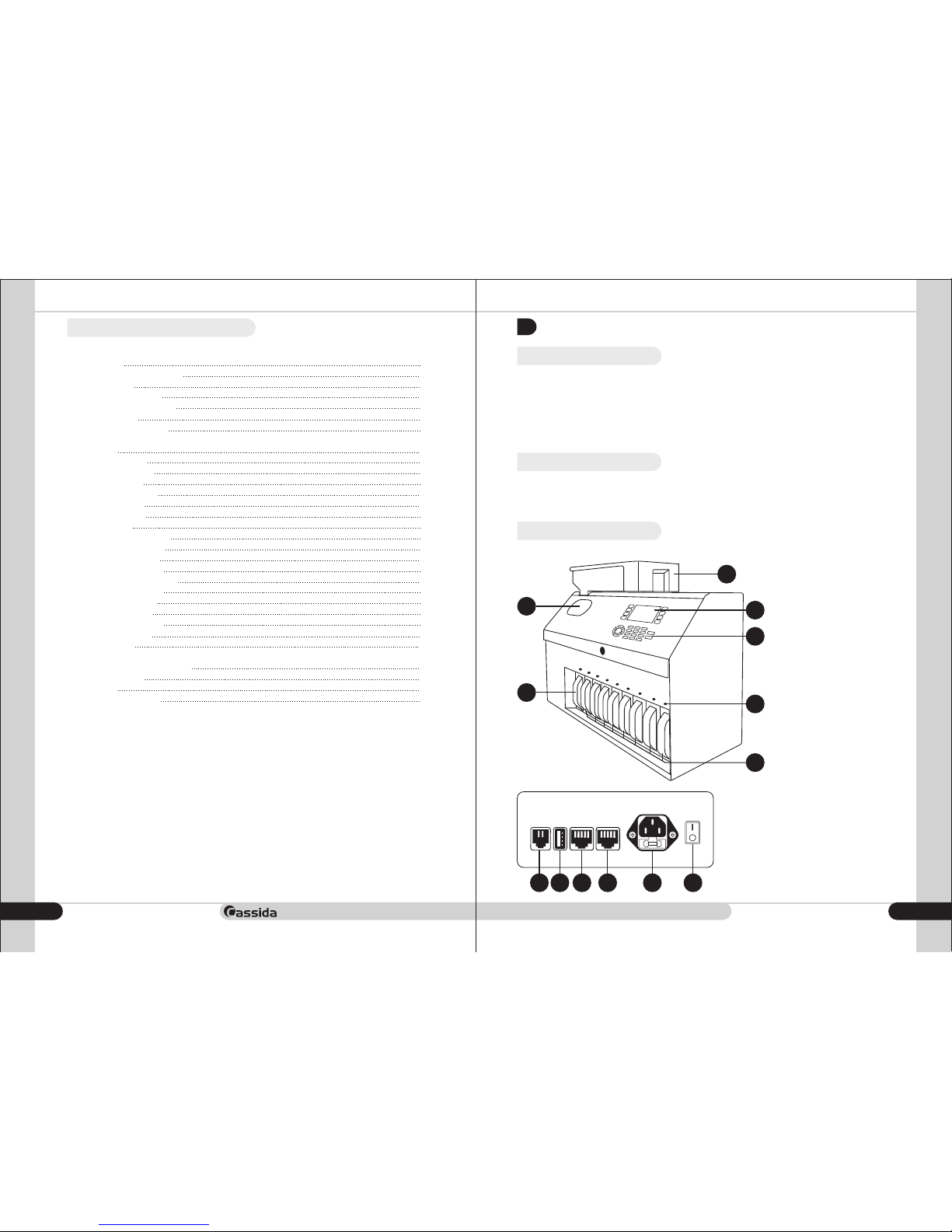
1.3 Front and rear views
1. Coin tray
2. Coin hopper
3. Display
4. Control panel
5. Coin pockets
6. Reject coin pocket
7. Channel indicator light
8. External display
9. USB
10. Right RS232 serial port
11. Left RS232 serial port
12. Power cable
13. Power switch
1
3
2
7
5
6
4
Machine interface
8 9 10 11 12 13
4
5
5
5
5
6
10
10
11
11
11
12
12
12
13
13
14
14
14
15
15
16
16
17
17
17
18
18
18
19
19
Page 4
Cassida C-880 coin counter/sorter/wrapper
moving money forward
7
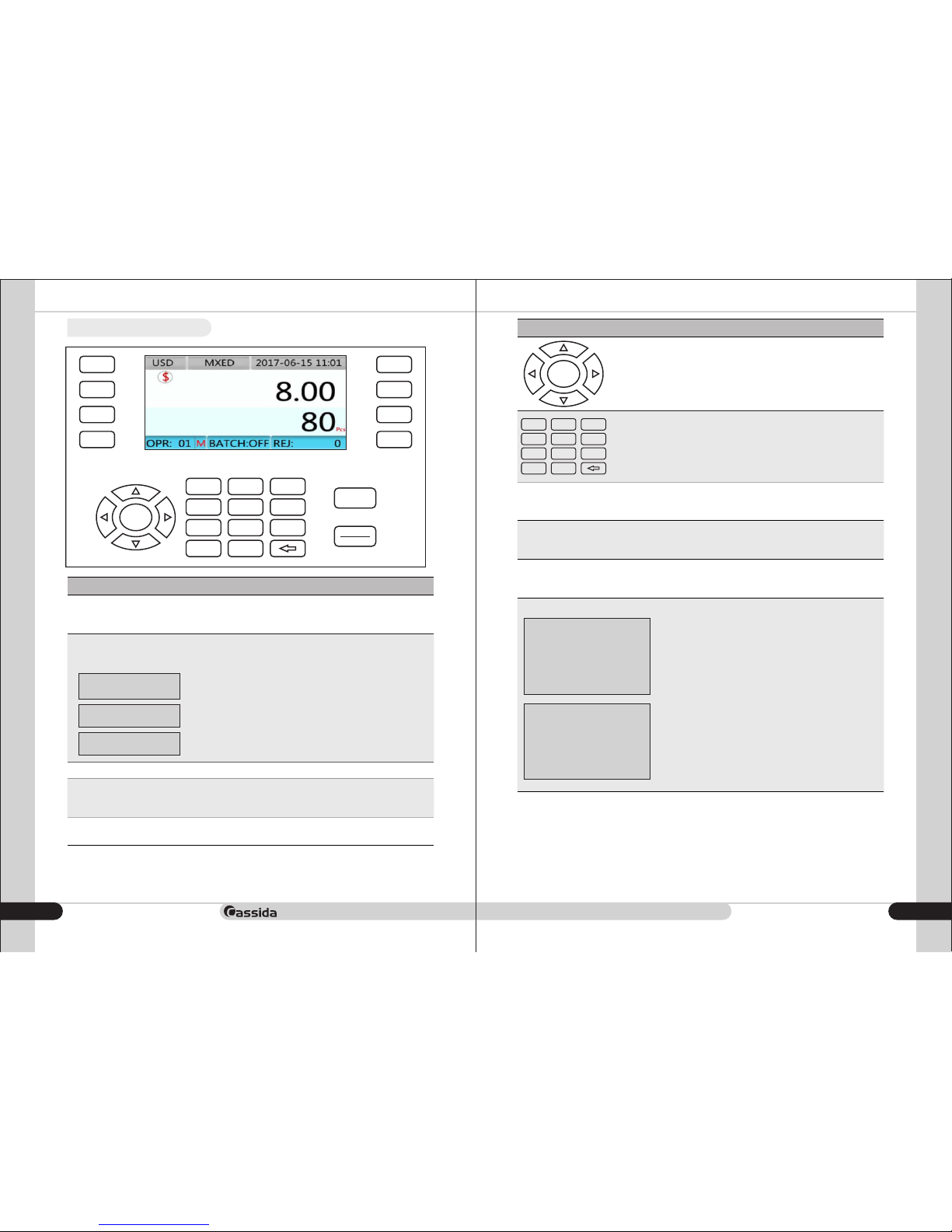
1.4 Display & Control panel
DETAIL
SET
REV
MODE
M+
BATCH
PRINT
MR
CLEAR
STOP
START
7 8 9
5 64
1 2 3
0 .
OK
KEY
Function
M+
Storage key
Stores the current quantity number for the current
operator.
BATCH
Batch function key
Batch function switch, operated as follows,
press 3 times to enable the following:
BATCH 1: ON
BATCH 2: ON
BATCH : OFF
Turn off batch function
Batch 1 function on
Batch 2 function on
MODE
Choose operation mode
REV
Motor reversing key
Press and hold the key, the motor reverses turning,
release the key, motor stops.
PRINT
Print function key
Print list
KEY
Function
Direction key
Operation buttons , , and ,UP DOWN LEFT RIGHT
is the confirmation button.OK
OK
Numeral key area
Numeric keys, preset number settings
7 8 9
5 64
1 2 3
0 .
CLEAR
Return and clear keys
• Return previous menu page
• Clear counting figure
SET
STOP/START
MR
Function settings key
Start and stop key
Read storage key
Enter user menu by long pressing SET
Start and stop count buttons
Function 1:
short press shows the amount and quantity counted
of the operator, Operate:
Press and to select different operators’Up Down
amount and quantity counted, clear by pressing , OK
return by pressing , and print list by pressingCLEAR
PRINT.
Clear current total ?
Operator : 01
Amount : 123.40
Quantity : 123
Y=OK N=RESET
Function 2:
Long press (more than 3 seconds) show all
operators’ quantity and amount in grand total
Buttons function: Same as FUNCTION 1
Clear grand total ?
Operator : 1-10
Amount : 123.40
Quantity : 123
Y=OK N=RESET
6
Page 5
Cassida C-880 coin counter/sorter/wrapper
moving money forward
9
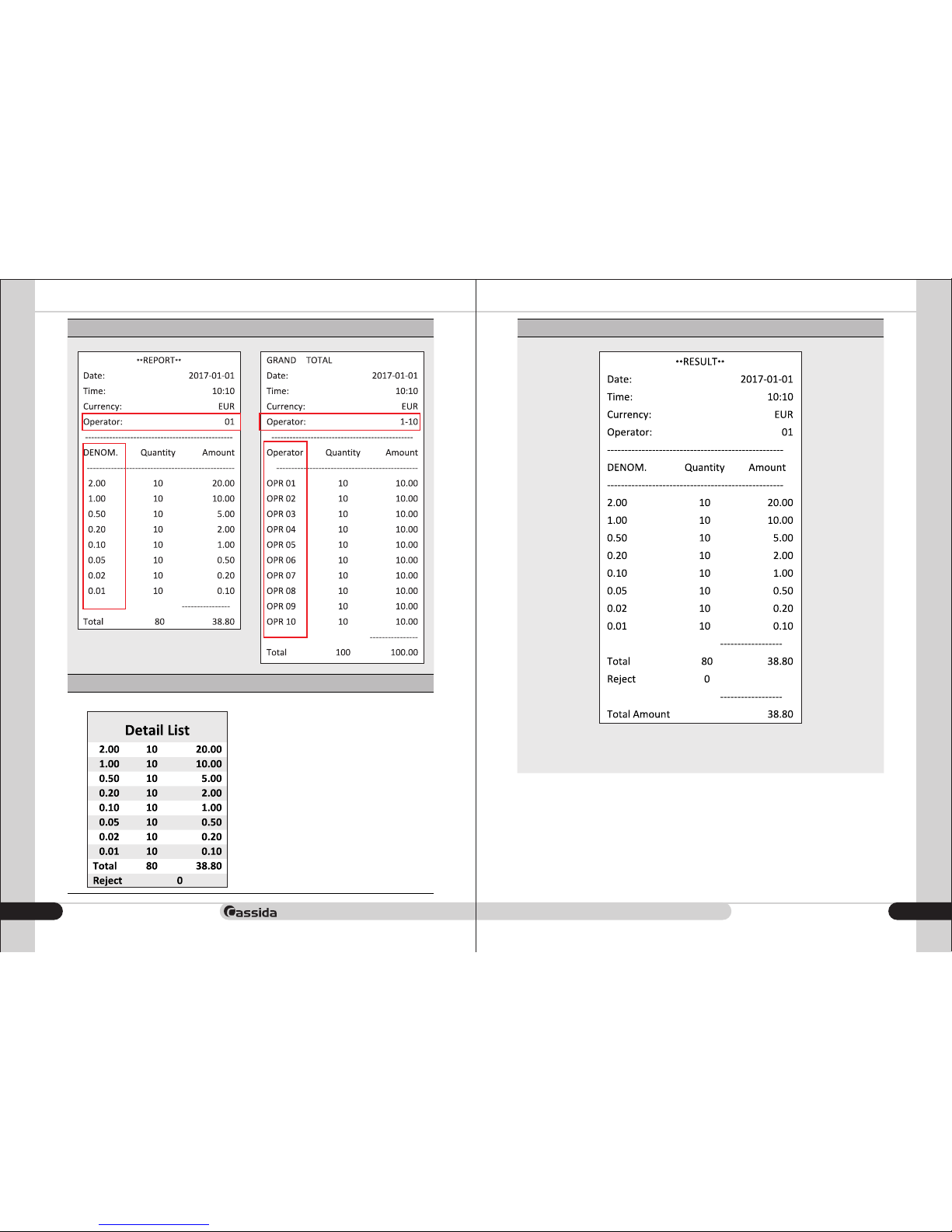
Function 1 Print list
Function 2 Print list
Key
Function
DETAIL
List display key
Press button to enter break down listDETAIL
-press and to scroll pages to seeUP DOWN
other denominations if there are more than
8 denominations.
-press to printPRINT
-press the to return to main screenCLEAR
page.
- Press button, start countingSTART/STOP
Print List
8
Page 6
Cassida C-880 coin counter/sorter/wrapper
moving money forward
11
1.5 Specifications
up to 600 coins / min.
Counting speed
approx. 500 – 600 coins(with a coin diameter
of 21,5 mm and a coin thickness of 1,7 mm
4.3 inch TFT color screen
2xRS232, 1xUSB,1xExternal display
USB disk
630*310*424(with hooper:475) mm
ca. 30 kg
230V 50Hz or 115V 60Hz
60W
10 – 40°C
30 – 75%
Volume coin hopper
Display
Communication port
Upgrade
Dimensions (W*D*H)
Weight
Power supply
Power consumption
Ambient temperature
Ambient Humidity
When using this unit, basic safety precautions should always be observed, including the following:
• Do not use this unit in areas where it may be exposed to water or any other liquids.
• Only use the power cord supplied with the machine. Plug the power cord into a properly grounded
wall outlet. Do not remove the ground pin from the power cord. Failure to properly ground the
machine can result in severe injury or fire.
• Make certain the unit is installed on a flat surface. Do not operate the machine in areas with high
temperature, humidity or smoke, as these conditions may prevent proper operation.
• Do not start the unit when the rear access panel is open. Ensure no coins are in the hopper when the
machine is first turned on.
• When not using the unit for an extended period of time, disconnect the power cord from the wall
outlet.
• Unplug the unit from the wall outlet before cleaning. Use a damp cloth or specifically designed
maintenance accessories such as a Cassida air duster or soft bristle brush.
• To avoid the risk of electrical shock, do not disassemble this unit. Disassembly will expose you to
1.6 Important safety notes
dangerous voltages and other safety risks. Incorrect reassembly can cause electrical shock when the
appliance is subsequently used.
Take the unit to a qualified technician when service or repair is required. Do not try to replace any
parts yourself.
2. OPERATING
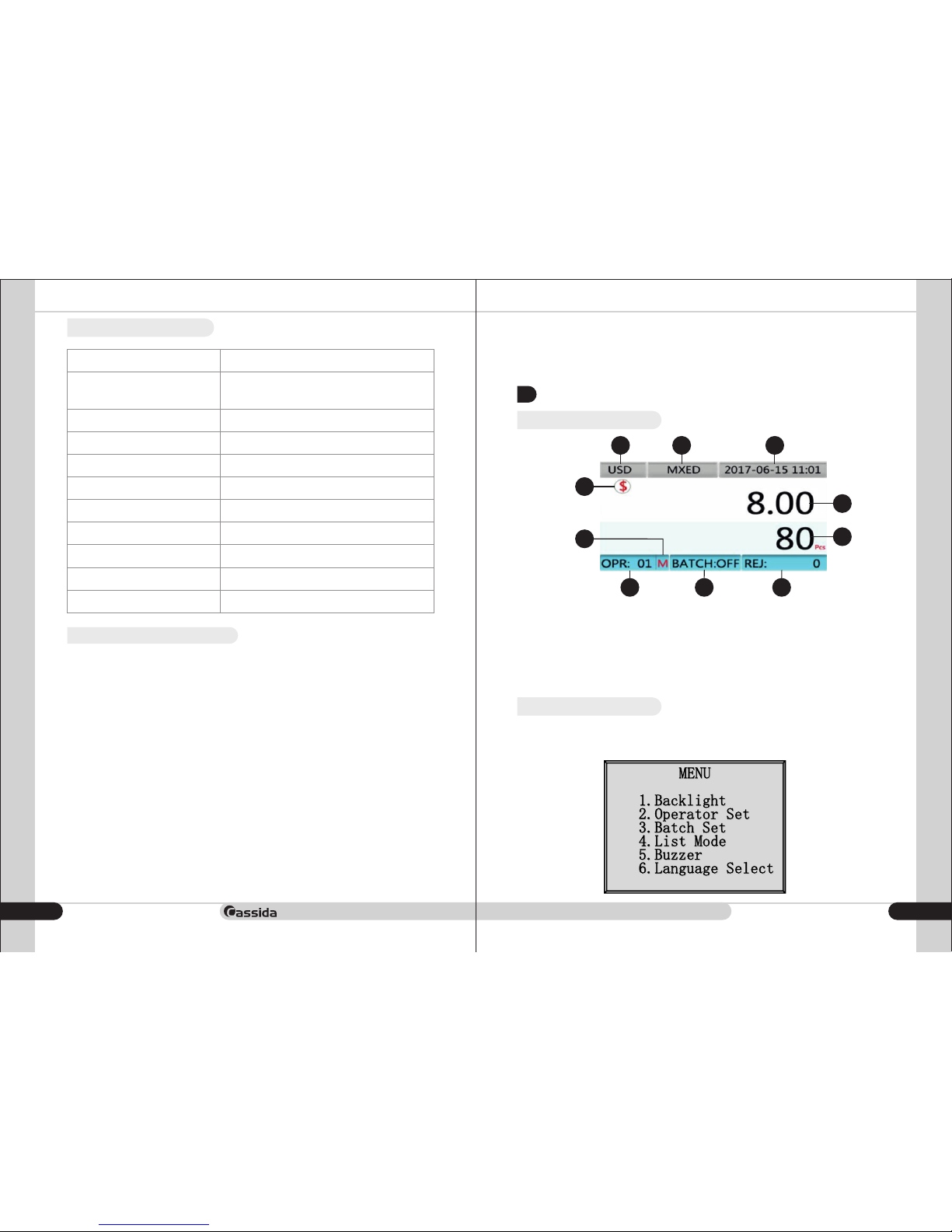
2.1 The main display
1 2 3
4
5
6
8
7 9 10
1. Currency
2. Count mode
3. Date and time
4.Total amount
2.2 User menu settings
At Main screen, long press SET button for 3 seconds, enter USER menu, enter any individual item
through pressing SET, press OK to save the settings, press CLEAR button to exit, each function setting
details as follows:
5. Total count
6. Currency symbol
7.Batch enable or disable
8. There is Data in memory
9. Operator Number
10. Reject Quantity
10
Page 7
Cassida C-880 coin counter/sorter/wrapper
moving money forward
13
MENU ITEM
ACTION
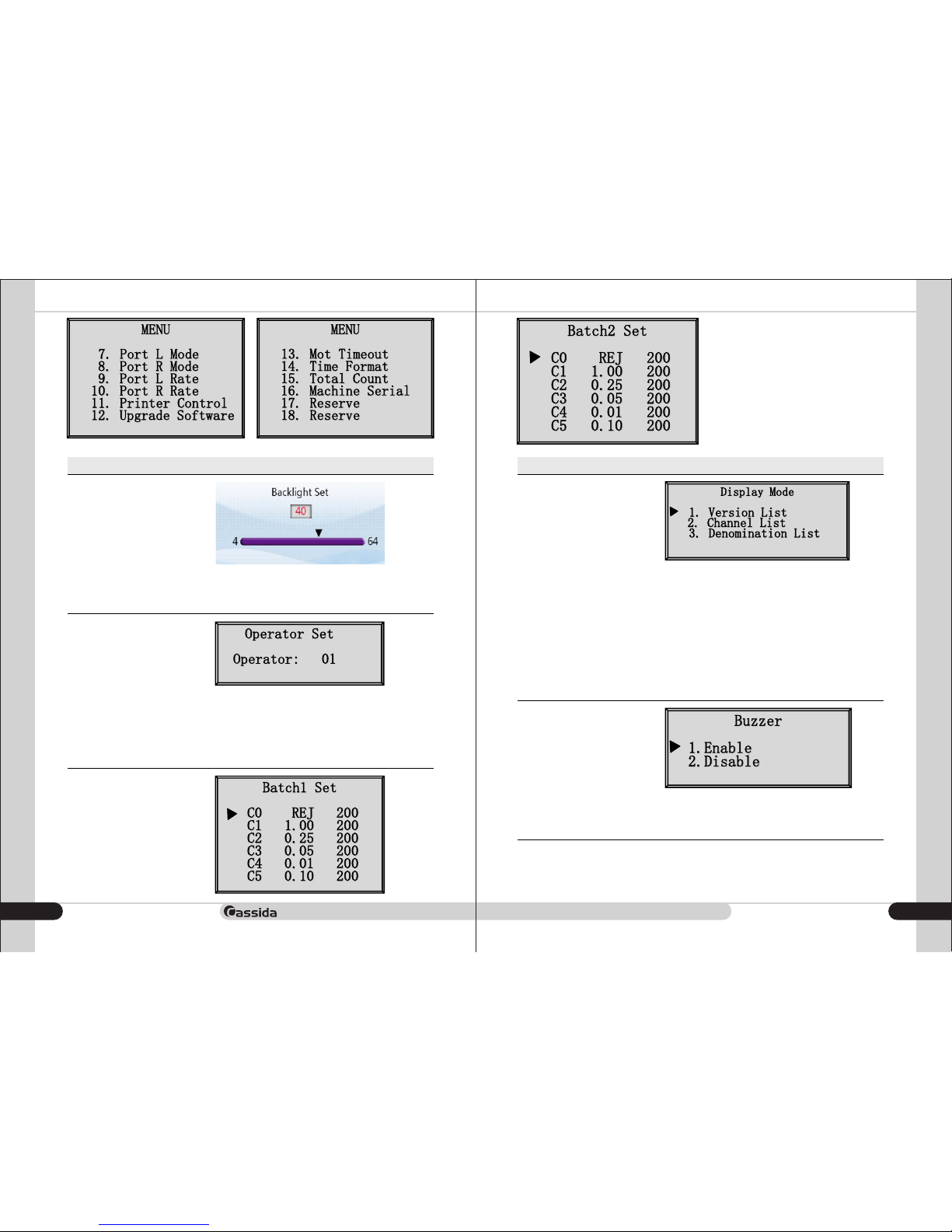
Backlight
Brightness adjustment of display backlight, after entering,
-press and to adjust.LEFT RIGHT
-press the to return to menu.CLEAR
Settings range ( )4-64
Operator Set
Operator selection. After entering,
- press and to select the operator'sUP DOWN
corresponding number.
- press to save setting.OK
- press to return to menu.CLEAR
Settings range ( )1-10
Batch Set
Present batch stop number,
- press and to select denomination,UP DOWN
while the corresponding channel lights flashing,
- press to key to set up,0 9
- press to save setting.OK
- press to toggle between andBACTH Batch1
Batch2.
- press the to return to menu.CLEAR
Settings range ( )0-9999
MENU ITEM
ACTION
List Mode
- press the and to select display modeUP DOWN
- press the to save setting.OK
- press the to return to menu.CLEAR
Specific mode description:
1. Version List
If there are different versions of the same
denomination, it will be shown as: 2.00 A, 2.00 B
2.Channel List
Will list value of each channel
3.Denomination List
Will list values of the same denomination coins into one
value.
Buzzer
- press the and to select enable or disableUP DOWN
- press the to save setting.OK
- press the to return to menu.CLEAR
12
Page 8
Cassida C-880 coin counter/sorter/wrapper
moving money forward
15
MENU ITEM
ACTION
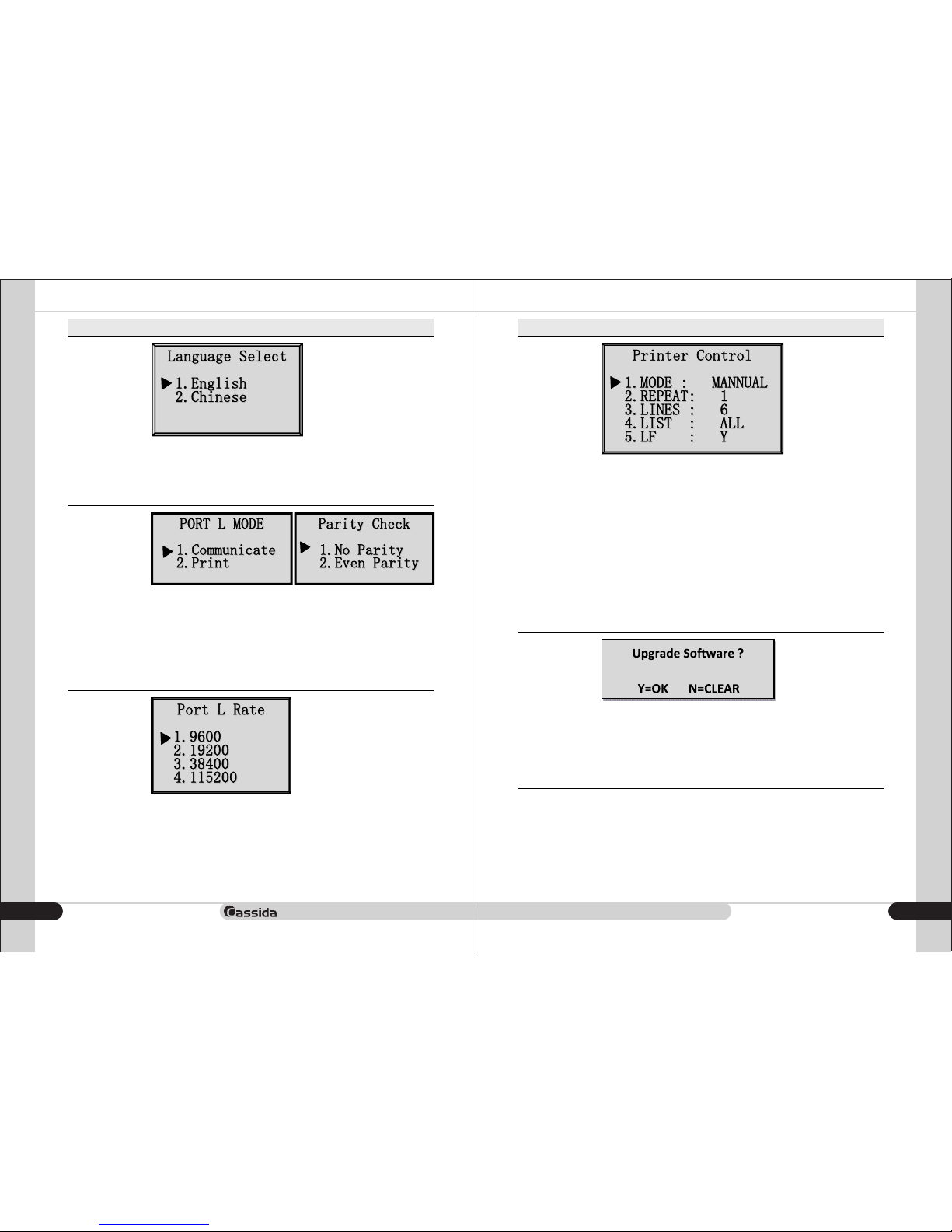
Language Select
- press the and to select languageUP DOWN
- press the to save setting.OK
- press the to return to menu.CLEAR
Port L&R Mode
The RS232 left and right serial port working mode selection. After entering,
- Press and to select the communication or print modeUP DOWN
- Press the to save setting.OK
Select the serial port as the communication port and then pop up. No
checksum parity check or is selected.
Port L&R Rate
The RS232 left and right serial port baud rate is chosen.
A total of 4 baud rates,
- press the and selection,UP DOWN
- press the to save setting.OK
- press the to return to menu.CLEAR
MENU ITEM
ACTION
Printer
Control
Detailed description:
1. MODE: manual or auto print
2. REPEAT: one, duplicate, triplicate and 4 slips
3. LINES: At end of data print, empty lines feed for tearing paper: 1-9 lines
4. LIST: only with value’s denomination to be printed to save paper:
print >0 or print all
5. LF: Each print line end adds line feed command: Yes or no
Operation:
- press and to select the settings option,UP DOWN
- press the and to select the items,LEFT RIGHT
- press the to confirmOK
- press the to return to menu.CLEAR
Upgrade
Software
- Press the to returnCLEAR
- Press the to upgrade.OK
Warn:
Insert the USB flash drive before upgrading, and then select the upgrade
file. Press the OK to save setting.
14
Page 9
Cassida C-880 coin counter/sorter/wrapper
moving money forward
17
MENU ITEM
ACTION
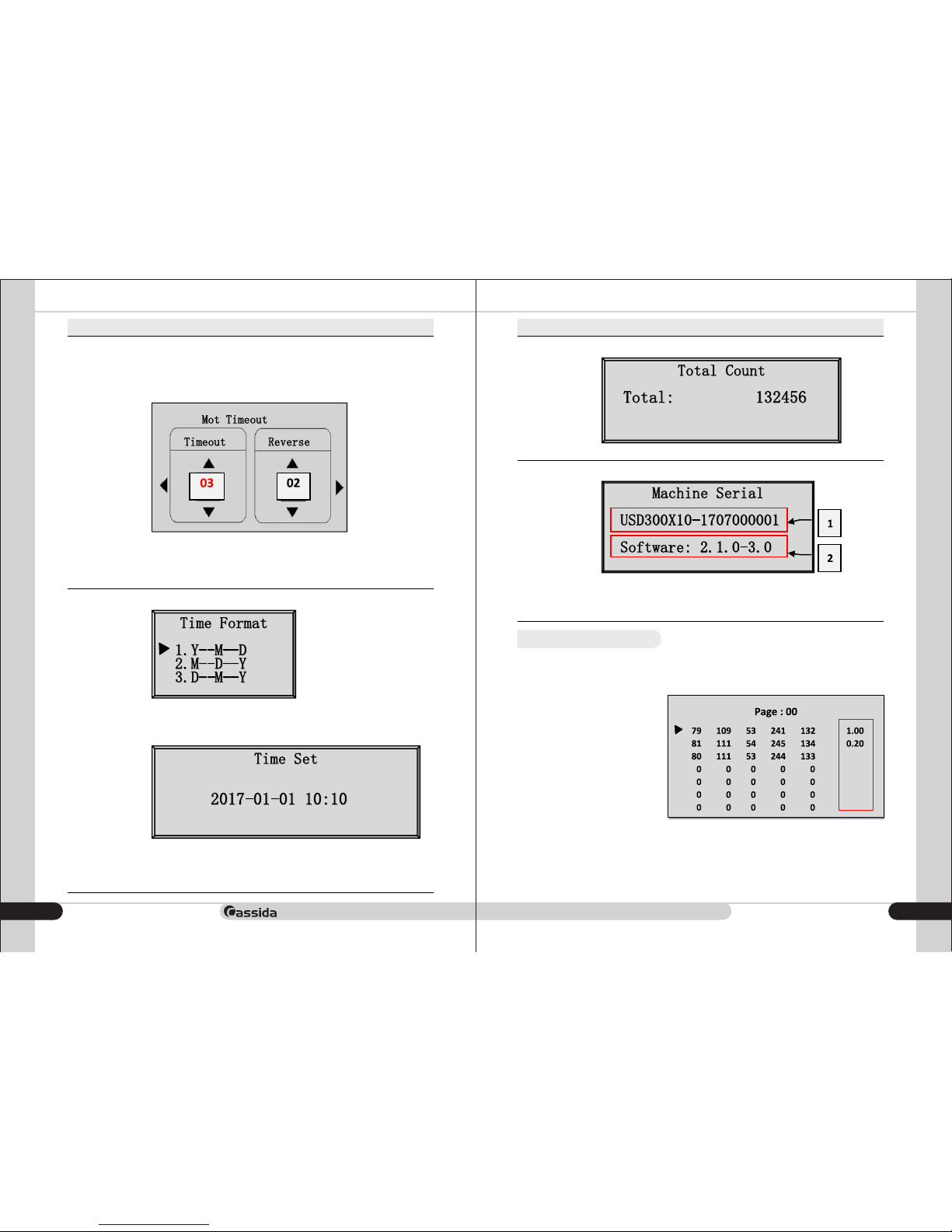
Motor
Timeout
MENU ITEM
ACTION
Total Count
Motor time out is the time the motor keeps running after the last coin is
counted. Time range is from 2 to 8 seconds.
Reverses is the motor reverse several times to check for jammed coins and
remaining coins. Reverse range is from 0 to 2 times. Set reverse to 0 times
for no reversing and stopping.
- Press and to select timeout setting or reverse setting.LEFT RIGHT
- Press and to set the time or reverse.UP DOWN
- Press the to save setting.OK
- Press the to return to menu.CLEAR
Time
Format
After entering, press and to select the time format:UP DOWN
1. year - month - day
2. month - day - year
3. day - month - year
Then press the to confirm the access time settingOK
Move the cursor around the and , press theLEFT RIGHT
and key to add and subtract the numberUP DOWN
- Press to enter and view the total count of the machine. SET
Machine
Serial
- Press to enter and view the serial and software version of the machine.SET
1. Machine serial number
2. Software versioning number
- press the to return to menu.CLEAR
2.3 Reduce reject rate
It is quite usual that sometimes also good quality coins are rejected. If certain good or bad quality
coins are not accepted in the second try, stop the machine, take the following procedure to
accommodate those reject coins into Accept status:
- After counting, long press number 5
button.
- All reject coins list as the following
- Use and button to scroll UP DOWN
reject coin, at each reject coin arrow
pointed to, press button to adapt M+
reject to accept status.
- After finishing process, press to CLEAR
exit.
- Put reject coins into accept coins
pocket and recount again to verify.
- T he mo re r epea ting the abo ve
process, the less reject rate will be
achieved.
16
Page 10
Cassida C-880 coin counter/sorter/wrapper
moving money forward
19
2.4 Preset prompt
It is quite usual that sometimes also good quality coins are rejected. If certain good or bad quality
coins are not accepted in the second try, stop the machine, take the following procedure to
accommodate those reject coins into Accept status:
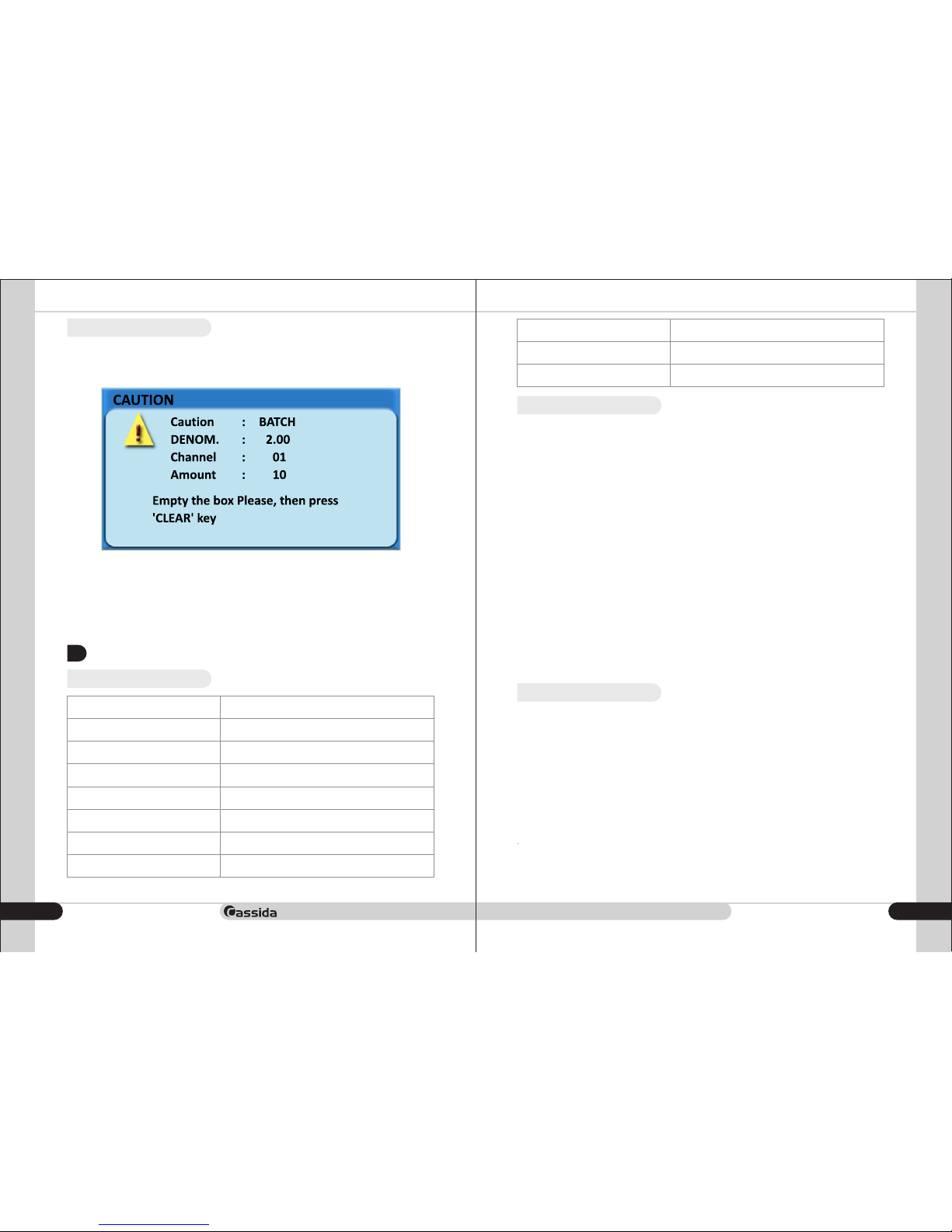
For example, if the batch number of coin channel 01 is preset to 10, as soon as counting number
reaches 10, the machine stops and the prompt page appears, in the meantime, the coin channel 01
corresponding to the coin drawer light flashes, if there are 2.00 value coins still on the rail, theses
coins will be rejected into the Reject drawer to ensure the quantity of the drawer equal to preset batch
number.
- Empty the coins in the coin drawer of the channel 01
- Press the button to return to the home pageCLEAR
3. TROUBLESHOOTING AND WARRANTY
3.1 Troubleshooting
Description
Error
Sensor automatically adjusts the parameter 1 to fail
Sensor automatically adjusts the parameter 2 to fail
Sensor automatically adjusts the parameter 3 to fail
The first infrared sensor has no signal
Failed to communicate with the AD board
Track Card Coin
Count IR 1 without signal
Count IR 2 without signal
PCLEAR to prompt
Error in the coin sorting
{"ERRO : F1 "}
{"ERRO : F2 "}
{"ERRO : F3 "}
{"ERRO : IR "}
{"ERRO : Communicate "}
{"ERRO : STUCK "}
{"ERRO : COUNT1 "}
{"ERRO : COUNT2 "}
{"Caution: BATCH "}
{"ERRO : Sorting "}
3.2 Warranty
Warranty is effective for a period of one year from the date of purchase. In most cases, the
malfunction of the machine can be resolved by cleaning the unit.
• Customer should allow Cassida the time and opportunity to test and diagnose the machine to
determine warranty and non- warranty claims.
• After receiving and unpacking the units, Customer shall keep the package and its user manual.
Warranties are canceled in the event the device is transported in a non-original
packaging or operation/ maintenance conditions are not met.
• Company is not responsible for unit malfunction due to improper maintenance, storage and
transportation including mechanical damage.
• Manufacturer is entitled to introduce updated software, not described in the current user manual.
Non-warranty service:
Cassida can perform maintenance and cleaning for an extra fee. For a non-warranty repair or
maintenance quotation, contact Cassida Technical Support.
Warranty service is not available in the following cases:
• Cleaning of the unit from dust and mud
• Absence of a warranty card or an incorrectly filed warranty card
• Operation or maintenance requirements detailed in the user manual are not met
• There is mechanical damage to the unit or the seal portions of the unit have been opened or
tampered with
• There are foreign objects or liquid inside of the unit.
Shipping:
The warranty does not cover shipping cast to or from Cassida Technical Service Center.
Before shipping the unit to the Cassida Technical Service Center the warranty card must be filled
out with model full name and number, serial number, cause for service, errors occurred.
3.3 Contact information
Technical Support contact information:
e-mail: [email protected]
tel: 042 739 328
www.cassida.me, www.cassidausa.com
When contacting Cassida Technical Support, please have the following:
• Product model – Located on the back side of your currency counter
• Serial number – Located on the back side of your currency counter
• Nature of the problem – What happens, and when did it happen? Did the machine
display an error message?
• Steps already taken to resolve the problem, and the results.
Office # 101,
Biyat Complex (Landmarks: Emirates Billiard Centre)
Hor Al Anz East, Behind Al Mamzar Centre
Dubai - United Arab Emirates
PO box 454867
18
Page 11

Cassida C-880 coin counter/sorter/wrapper
moving money forward
2120
Page 12

moving money forward
2322
 Loading...