

Page 1
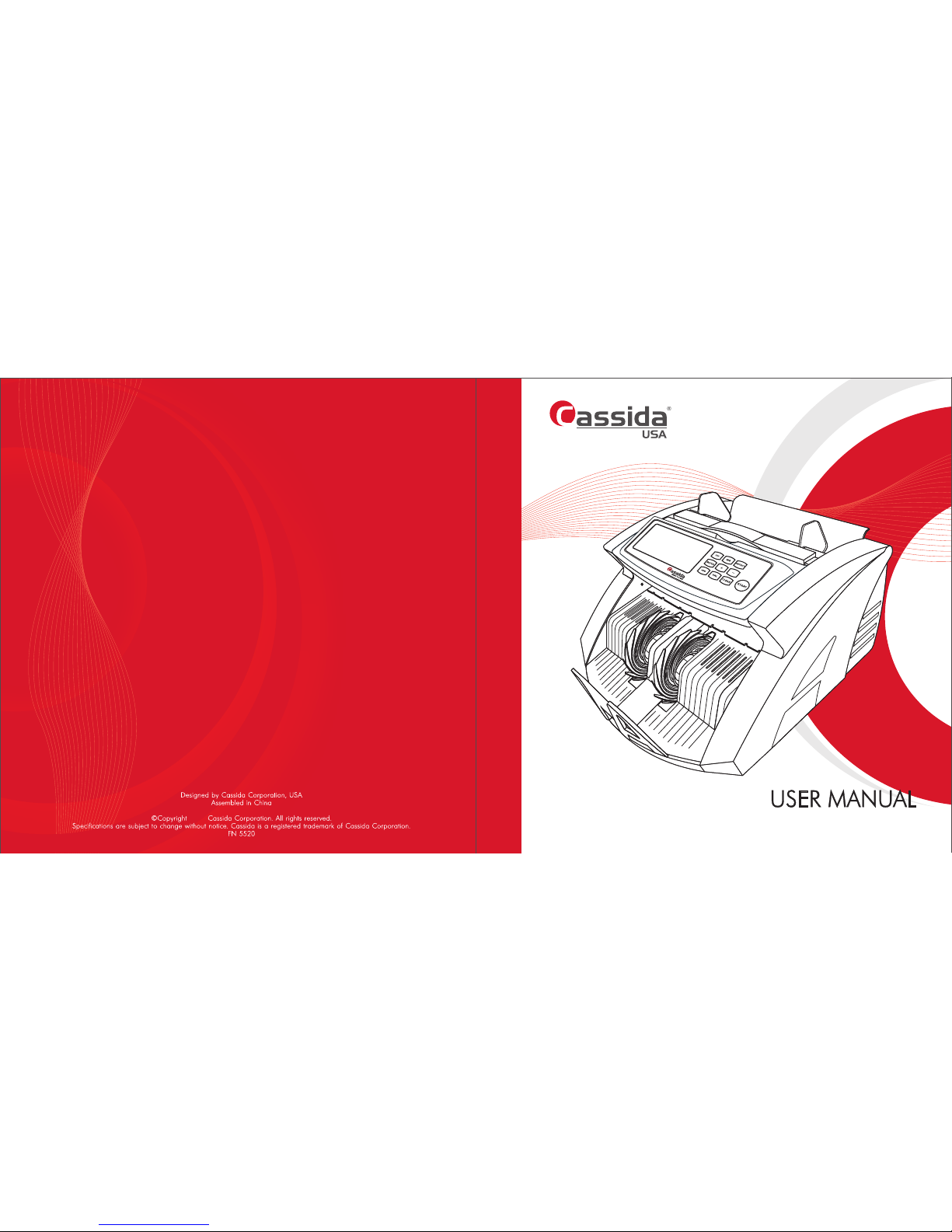
CASSIDA 5520 series (5520 UV, 5520 UV/MG)
2017
Page 2
Cassida 5520 series Single Value Counter
Page 3
Cassida 5520 series Single Value Counter
1. Introduction
1.1 About the Cassida 5520 series
1.2 Box contents
1.3 Front and rear views
1.4 Control panel
1.5 Specification
1.6 Important safety notes
2. Getting started
2.1 Powering up
2.2 Loading bills
2.3 Counting
2.4 ADD mode
2.5 Batch mode
2.6 Value (Calculation) mode
2.7 Counterfeit detection CF
3. MAINTENANCE AND TROUBLESHOOTING
3.1 Maintenance
3.2 Troubleshooting
4. WARRANTY AND CONTACT INFO
4.1 Warranty
4.2 Contact infromation
• Cassida 5520 single value counter
• Power cord
• User manual
• External display (as an option)
• Package (cardboard box with seal)
1.1 About the Cassida 5520 series
Thank you for choosing the single value counter Series. We hope you Cassida 5520
enjoy using it and it will bring convenience in your work with high quality of detection
of the entire service period.
Cassida's 5520 single value counter are sophisticated yet simple to operate money
processing machines. It is econom plus machine that differ with high performance and
reliability. This counter series contains UV detection – 5520 UV and the model with
UV and MG detection – Cassida 5520 UV/MG.
Compact design makes the counter irreplaceable for use in Cassida 5520 series
companies with an average volume of cash, stores, gas stations, retail stores, grocery
outlets and others cash intensive environments.
5
5
6
8
11
11
12
12
13
13
13
14
14
14
16
17
18
moving money forward
1.2 Box contents
Table of contents
Page 4
moving money forward
Cassida 5520 series Single Value Counter
Rear view
3
4
2
1
1
4
3
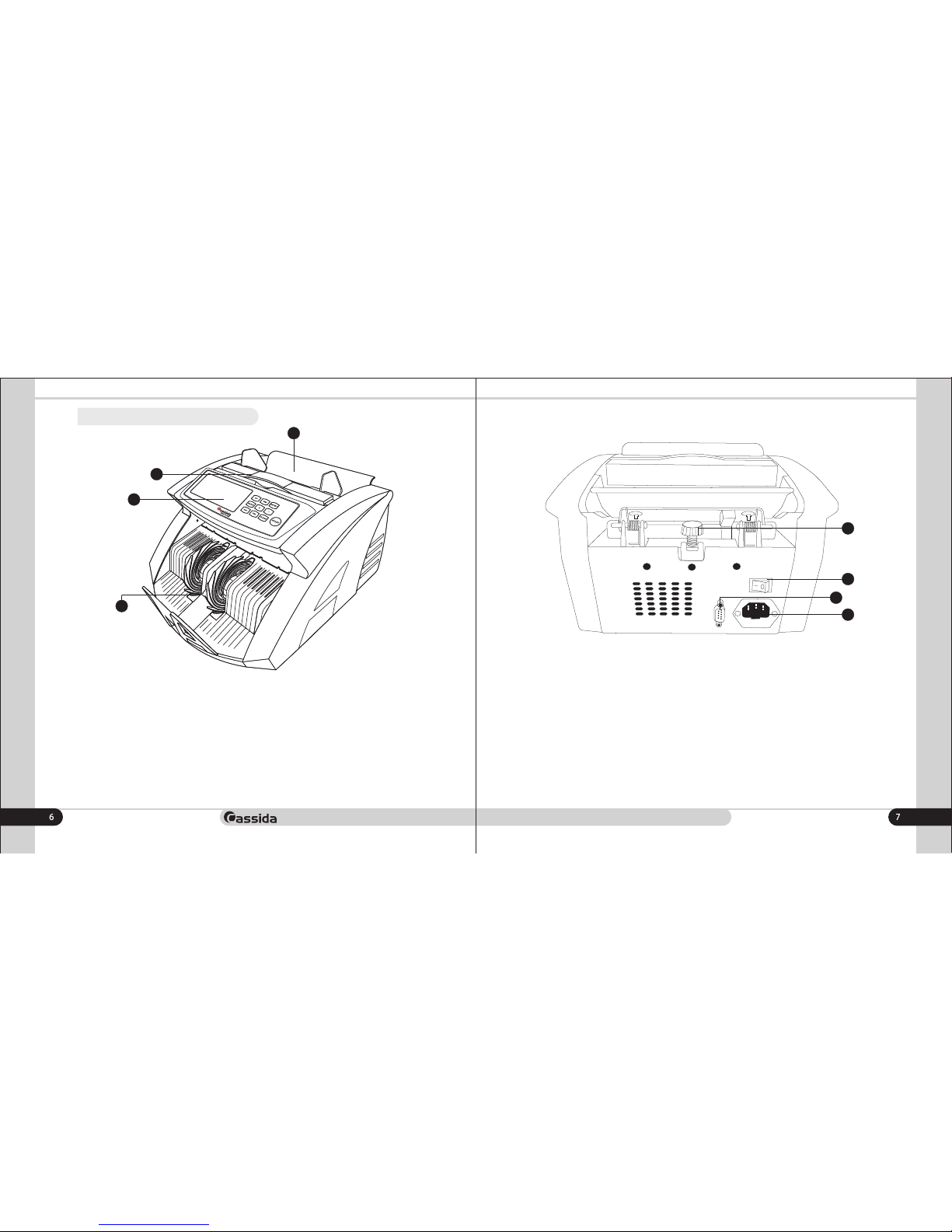
1) Thickness adjustment
2) Power switch
3)External display connection port
4) Power plug
1) Hopper
2) Carrying handle
3) Control panel
4) Stacker
1.3 Front and rear views
2
Front view
Page 5
Cassida 5520 series Single Value Counter
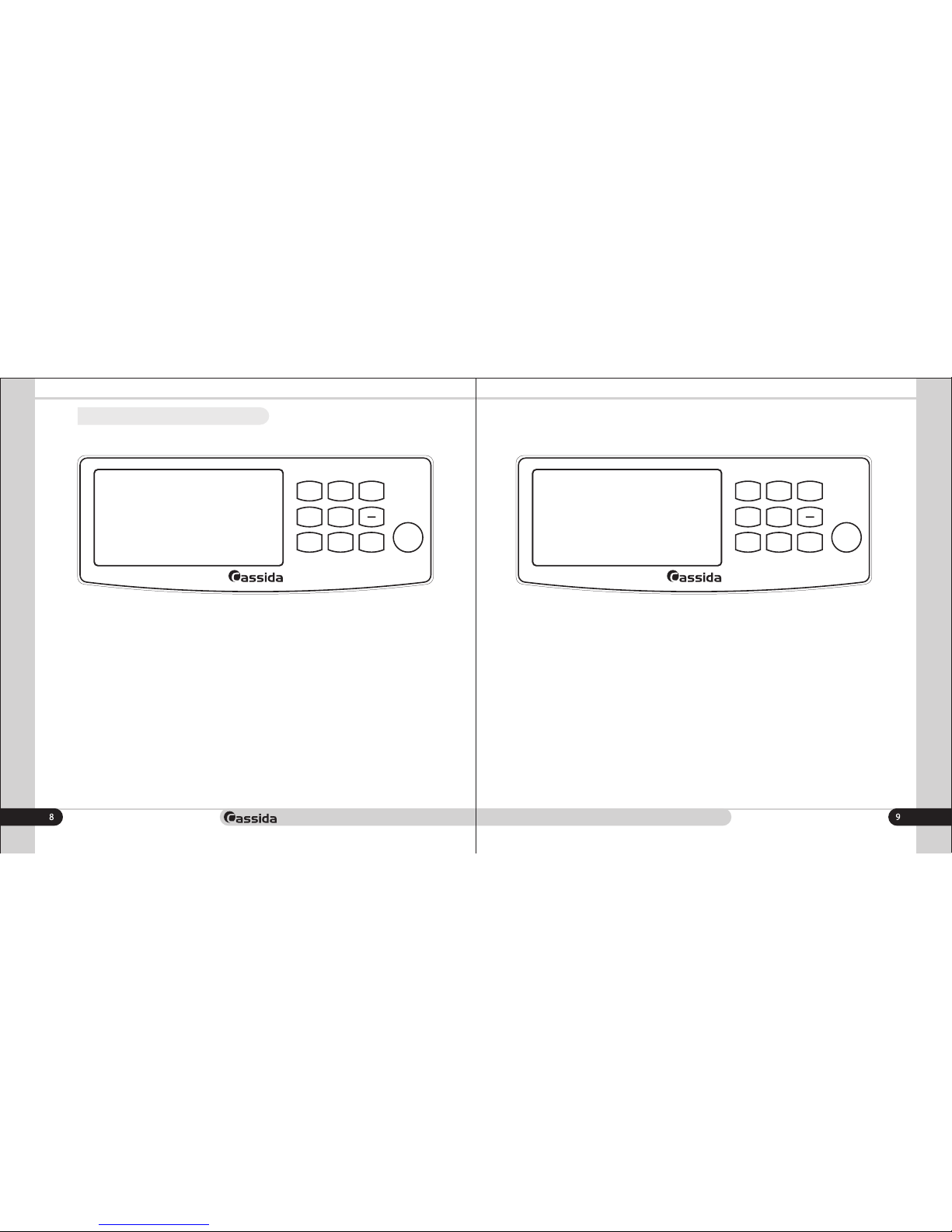
1.4 Control panel
moving money forward
1) UV – On / off ultraviolet detection
2) Detect– adjust the sensitivity level of the detection (1,2,3). 1-weak level, 2-medium
level and 3-high level of banknotes validation
3) À/M Start - switch between manual and automatic start
4) Batch – Activates the batch mode. Preset values of 20, 50 and 100 sheets of
packing with the possibility of increasing and decreasing the packing by using the +/buttons
5) ADD – on/off ADD mode
6) VAL – on/off value (calculation) mode
7) Clear – Clear the recount result
8) Start – start operating key
1) UV – On / off ultraviolet detection
2) MG - On / off magnetic detection (Cassida 5520 UV/MG model )
3) Detect– adjust the sensitivity level of the detection (1,2,3). 1-weak level, 2-medium
level and 3-high level of detection
4) Batch – Activates the batch mode. Preset values of 20, 50 and 100 sheets of
packing with the possibility of increasing and decreasing the packing by using the +/buttons
5) ADD – on/off ADD mode
6) VAL – on/off value (calculation) mode
7) Clear – Clear the recount result
8) Start – 1) start operating key 2) Long press - switch between manual and automatic
start
Cassida 5520 UVCassida 5520 UV/MG
MG
DET ECT
CLE AR
STA RT
552 0 UV/MG
ADD
BAT CH
UV
+
VAL
A/M
STA RT
CLE AR
STA RT
552 0 UV
ADD
BAT CH
UV
+
DET ECT
VAL
Page 6
Cassida 5520 series Single Value Counter
moving money forward
1.5 Specification
Counting speed
Detections
Hopper capacity
Display
Power consumption
Power supply
Size
Weight
1.6 Important safety notes
When using this product, basic safety precautions should always be taken, including
the following:
1.Do not use this product in areas where it may be exposed to water or any metal
parts.
2. Unplug this product from the wall outlet before cleaning. Use a damp cloth and
dont take it out with wet hands.
3. Put out the power cord taking it form the plug.
4. Only use the power cord supplied with the unit.
1300 bills/min
UV - ultraviolet, MG-magnetic (model
Cassida 5520 UV / MG)
100 bills
LED red, yellow
<70 Watts
220+/-10% V /50 Hz
175 õ 240 õ 295 mm
5 kg
Display
8888 888888
COUNT VAL UV
MG
BATCH ADD
A M S
DETEC 1 2 3
T
O
T
A
L
8888
PCS
AED
1
2
345
9
10
11
6
7
8
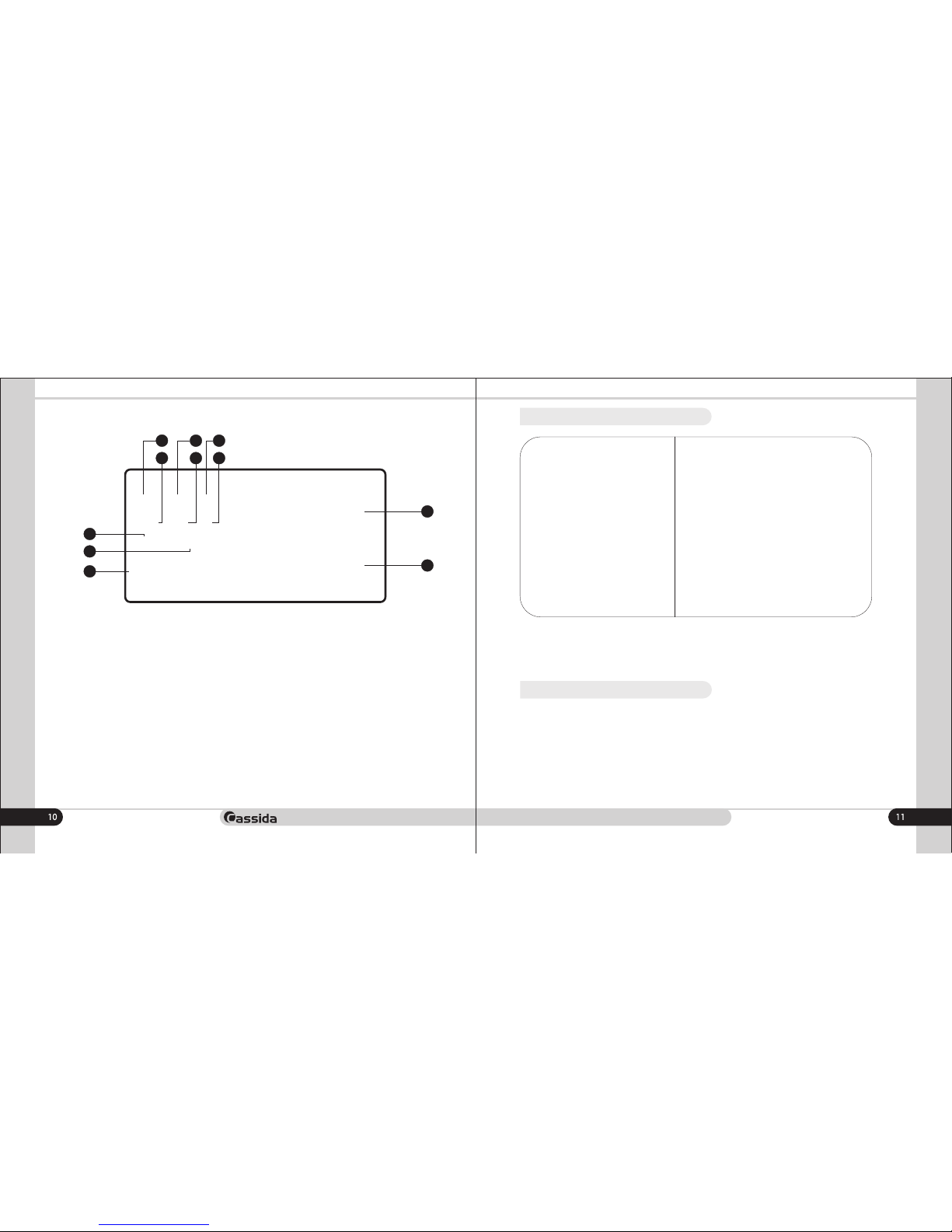
1) The number of counted banknotes
2) The sum of the counted banknotes (in the calculation mode)
3) UV detection is active when the indicator is light up and not active, if the indicator
off
4) MG detection is active if the indicator is light up and not active, if the indicator is off
5) Value (Calculation) mode is on when the indicator is on and not active, if it's off
6) ÀS - auto start mode is enabled, MS - manual start mode is activated
7) Detection sensitivity levels: 1 - minimum detection level, 2 - medium level, 3 - high
detection sensitivity level.
8) A. The denomination of counted banknotes is displayed in Value (Calculation) mode
B. The size of the batch in the batch mode is displayed.
9) The ADD mode is active when the light is on and not active, if indicator is off
10) Simple count mode is active, if the indicator is on and not active, if indicator is off
11) Batch mode is active if the indicator is on and not active, if indicator is off
Page 7
Cassida 5520 series Single Value Counter
To count the bills, place them in hopper. (follow the procedure described in 2.2.
loading bills). The machine will automatically start to count bills when the hopper
sensor detects a bill in the hopper. While counting, the machine will display the
numbers of bills on the LED display. The machine will stop operating and a
confirmation beep.
2.3 Counting
Pressing the button activates the summation mode, and the corresponding ADD
indicator lights up on the display.
Put the banknotes in the loading pocket and start recounting. Each downloadable
bundle of banknotes will be recalculated and each subsequent conversion result will
be added to the previous one.
2.4 ADD mode
moving money forward
5. Carry out the unit only after powering it off.
6. If the unit was kept extended period of time in low temperatures, keep it in normal
temperature conditions at least 2 hour prior powering on.
In order to use the unit without technical support of engineers please follow below
rules:
1. Make sure the device is installed on a flat surface.
2. This product is designed for indoor use in a ventilated environment. Keep the unit
away from direct sunlight and strong magnetic fields which could interfere with the
counterfeit detection sensor.
3. Do not operate the unit in areas with high dust humidity. High dust level may
prevent it proper operation.
2.
GETTING STARTED
2.1 Powering up
Please make sure the hopper is empty and turn the powers switch on. The unit will
conduct a self-check by spinning the counting wheels several times. The screen will
display “0” when the unit is ready.
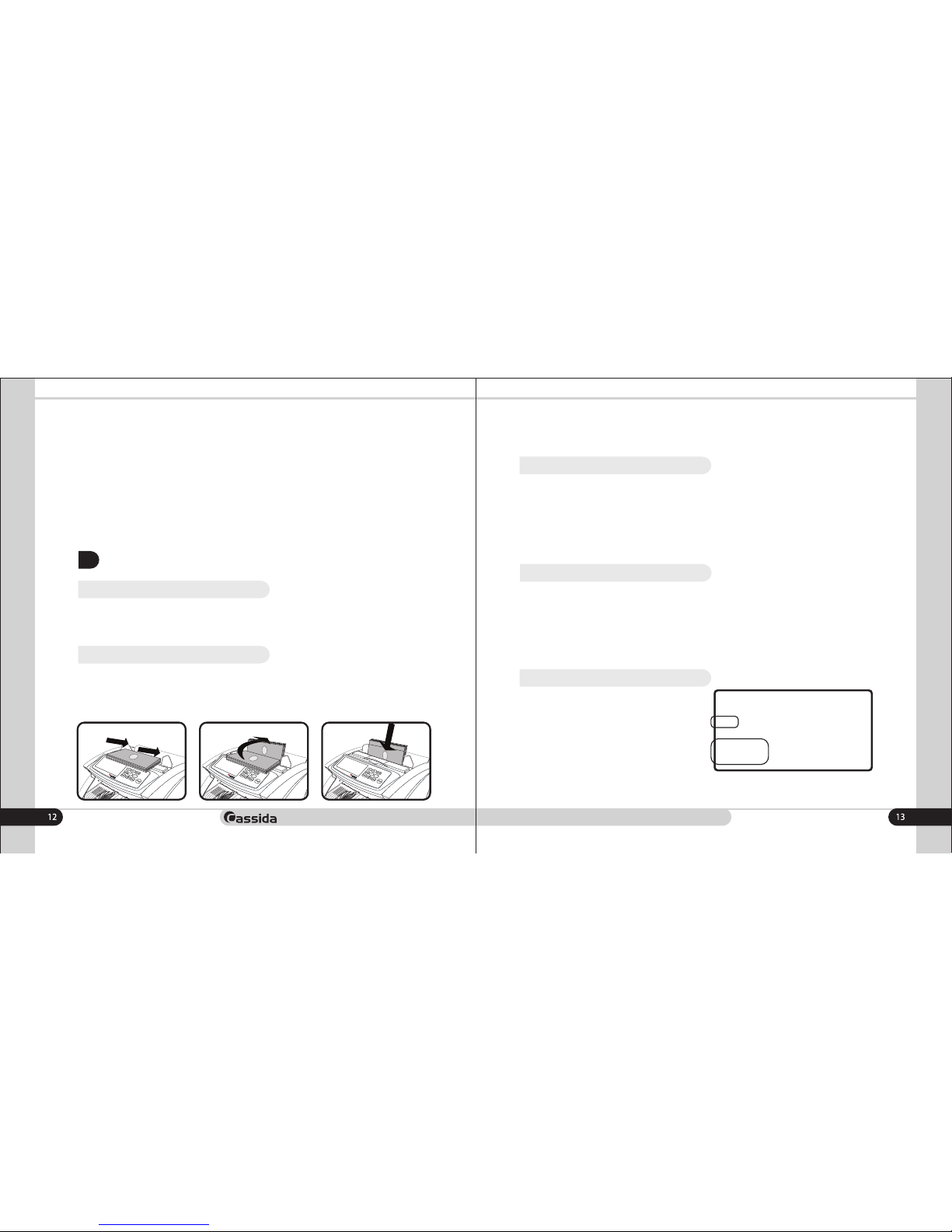
2.2 Loading bills
It is very important to place bills into the hopper correctly, because the counting
process and counting speed is highly affected by the arrangements of the bills. Bills
should be places in a neat stack prior to being placed into the hopper.
Proper hopper loading is shown in the following diagrams.
Depending on the thickness and quality of the banknotes, adjust the loading pocket
gap with the banknote thickness adjuster.
8888 888888
COUNT VAL UV
MG
BATCH ADD
A M S
DETEC 1 2 3
T
O
T
A
L
8888
PCS
AED
When the button is pressed, the BATCH
batch mode is activated, and the
corresponding indicator lights up on the
display.
After the mode is activated, the display
shows the value of the batching in the
lower left corner.
2.5 Batch mode
By successive pressing of the button, select the preset packing values 20, 50, BATCH
100 or enter the desired packing value manually using the " " and " " buttons. + -
Page 8
Cassida 5520 series Single Value Counter
moving money forward
3.
MAINTENANCE AND TROUBLESHOOTING
3.1 Maintenance
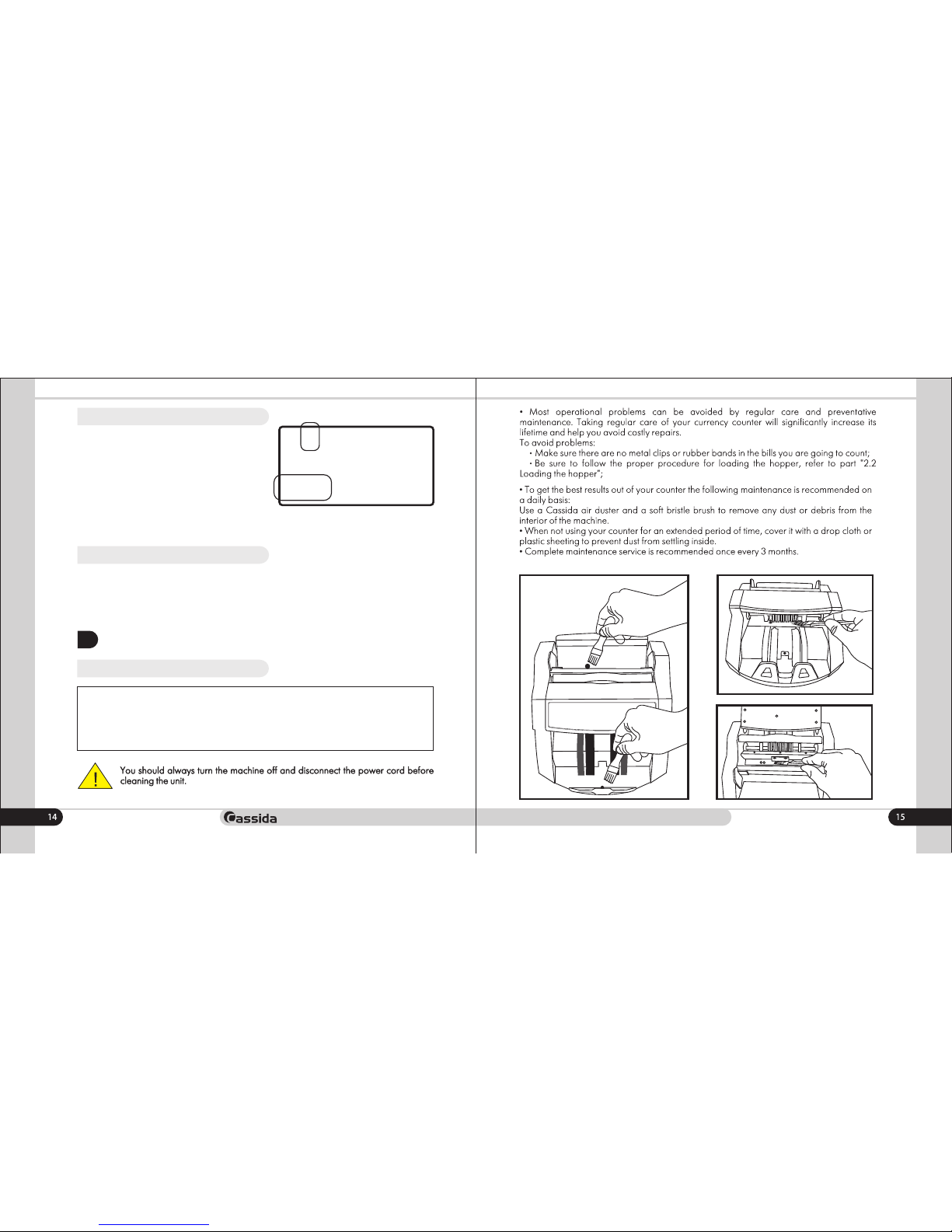
This mode can be used for various
currencies.
This mode is used to count total number of
the bills. Press VAL button on the control
panel to activate calculation mode, and the
corresponding indicator lights up on the
display.
In the lower left corner of the display, the
2.6 Value (Calculation) mode
values will be displayed, by successive clicking on the counting button, select the
required value for the recalculation.
The Cassida 5520 is able to check for counterfeit bills using ultraviolet (UV) light. This
function is available in all modes. Press the UV or UV/MG key until the UV indicators
appears on the LED screen. All models have DD (double bill detection), HLF (half bill
detection) CHN (chain bill detection) and size detection (more than 6 mm).
2.7 Counterfeit detection CF
8888 888888
COUNT UV
MG
BATCH ADD
A M S
DETEC 1 2 3
T
O
T
A
L
8888
PCS
AED
Taking regular care of your currency counter will allow you to
avoid 80% of the problems arising during operation.
VAL
Page 9
Cassida 5520 series Single Value Counter
moving money forward
3.2 Troubleshooting
Error code
UU
MG
DBL
Chn
HLF
ÑÅ1
ÑÅ2
ÑÅ3
ÑÅ4
ÑÅ5
ÑÅ6
ÑÅ7
ÑÅ8
Cause
Suspicious FL level of the bill
Suspicious MG level of the bill
Duplicated bill passed or passed bill was
dirty, glued.
2 or more bills passed at the same time
Half bill passed
UV sensor may have collected dust
Encorder sensor or big motor has problem
Left counting sensor may have collected dust
or out of order
right counting sensor may have collected
dust or out of order
The hopper sensor may have collected dust
or out of order.
The problem with the right and left magnetic
sensors (model Cassida 5520 UV / MG)
The problem with the big MG sensor (model
Cassida 5520 UV/MG)
The stacker sensor may have collected dust
or out of order.
Solution
Remove the last bill from the stacker and press
Start key to continue counting.
Remove the last bill from the stacker and press
Start key to continue counting.
Remove all bills from the counter and count
again by pressing START key.
Remove all bills from the counter and count
again by pressing START key.
Remove all bills from the counter and count
again by pressing START key.
Clean sensor with soft bristle brush and
compressed air. Refer to section 5.1.
Contact the service center
Clean the left counting sensor or replace it
Clean the right counting sensor or replace it
Clean sensor with soft bristle brush and
compressed air. Refer to section 5.1.
Contact the service center
Contact the service center
Clean sensor with soft bristle brush and
compressed air or replace it.
16 17
4.
WARRANTY AND CONTACT INFO
4.1 Warranty
Non-warranty service:
Cassida can perform maintenance and cleaning for an extra fee. For a non-warranty
repair or maintenance quotation, contact Cassida Technical Support.
Warranty is effective for a period of one year from the date of purchase. In most
cases, the malfunction of the machine can be resolved by cleaning the unit.
• Customer should allow Cassida the time and opportunity to test and diagnose the
machine to determine warranty and non-warranty claims.
• After receiving and unpacking the units, Customer shall keep the package and its
user manual. Warranties are canceled in the event the device is transported in a nonorig inal packag ing or operat ion/ mainten ance c ondi tions are not met.
• Company is not responsible for unit malfunction due to improper maintenance,
storage and transportation including mechanical damage.
• Manufacturer is entitled to introduce updated software, not described in the current
user manual.
Warranty service is not available in the following cases:
• Cleaning of the unit from dust and mud
• Absence of a warranty card or an incorrectly filed warranty card
• Operation or maintenance rules requirements set in the user manual are not met
• There is mechanical damage to the unit or the seal portions of the unit have
been opened or tampered with
• There are foreign objects or liquid inside of the unit.
Shipping:
The warranty does not cover shipping cost to or from Cassida's Technical Service
Center. Before shipping the unit to the Cassida’s Technical Service Center the
warranty card must be filled out with model full name and number, serial number,
cause for service, errors occurred.
Page 10
moving money forward
18
4.2 Contact infromation
Technical Support contact information:
e-mail: [email protected]
tel: 042 739 328
www.cassida.me, www.cassidausa.com
When contacting Cassida Technical Support, please have the following:
• Product model – Located on the back side of your currency counter
• Serial number – Located on the back side of your currency counter
• Nature of the problem – What happens, and when did it happen? Did the machine
display an error message?
• Steps already taken to resolve the problem, and the results.
Office # 101,
Biyat Complex (Landmarks: Emirates Billiard Centre)
Hor Al Anz East, Behind Al Mamzar Centre
Dubai - United Arab Emirates
PO box 454867
 Loading...