

Page 1
2
Page 2

3
CONTENTS
PRECAUTIONS.................................................. 4
PREFACE ............................................................... 6
NAMES AND FUNCTIONS.......................... 6
ASSEMBLY METHOD (SW-1W ONLY) .... 7
OPERATIONS...................................................... 8
1. Simple Weighing Mode ..................................... 8
2. Weighing with Tare............................................ 8
3. Changing Unit of Weight .................................. 9
4. Auto-Power Off Function ............................... 10
BATTERY MAINTENACE..........................11
ERROR MESSAGE..........................................11
SPECIFICATIONS .......................................... 12
Page 3
4
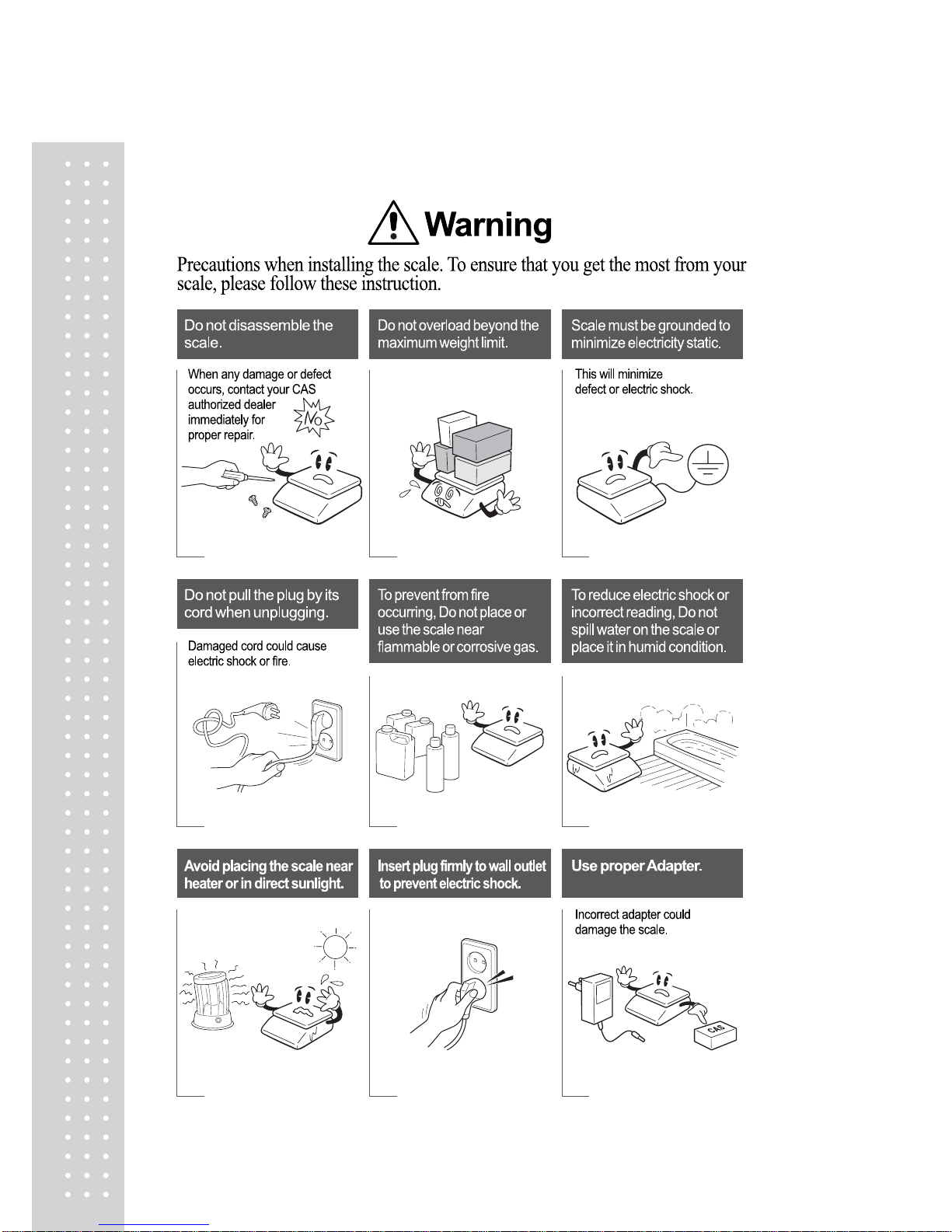
PRECAUTIONS
Page 4
5
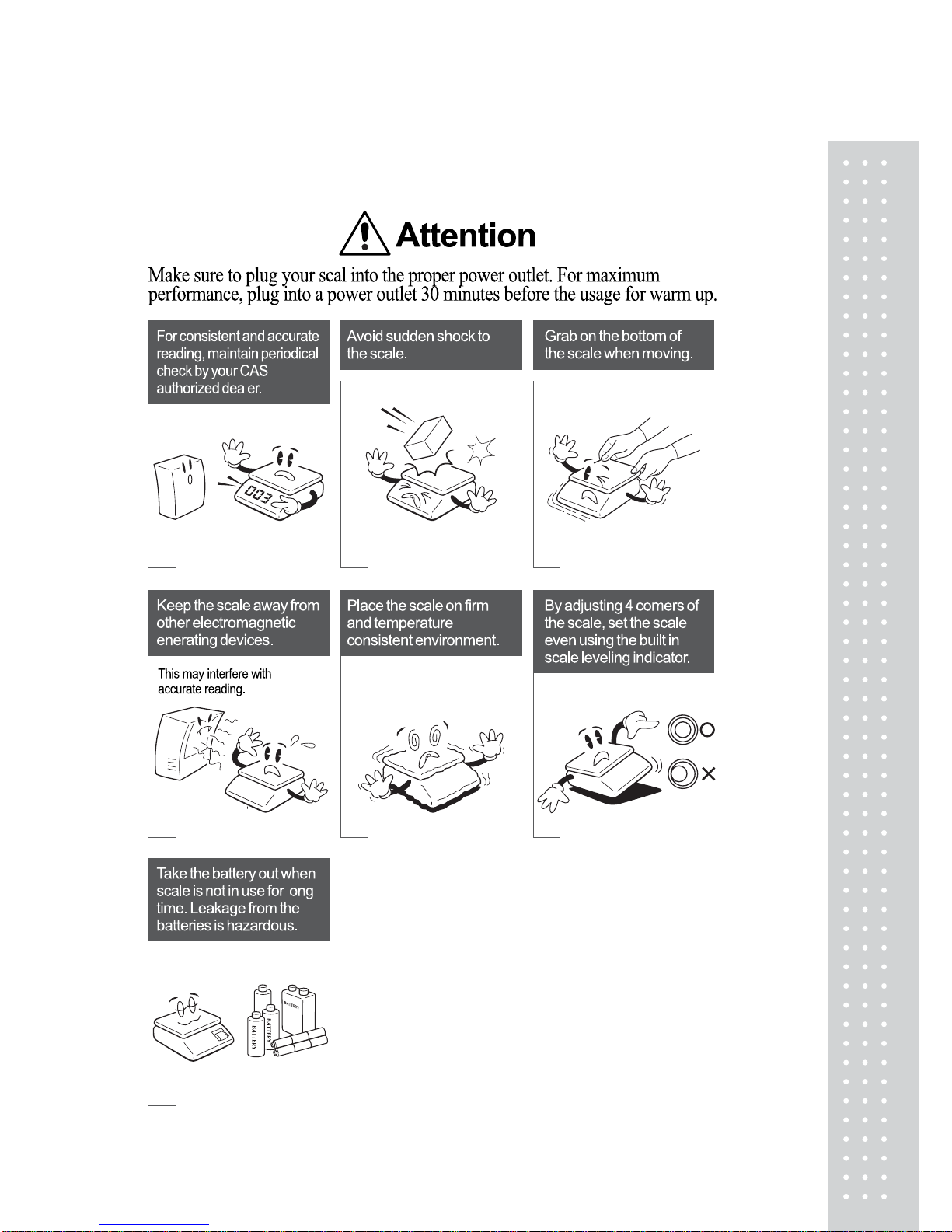
PRECAUTIONS
Page 5
6
PREF ACE
Thank you for purchasing CAS SW-1S/1N/1W series.
These series have been designed with CAS reliability, under rigid quality control and with
outstanding performance. Your specialty departments can enjoy these high quality reliable
CAS products.
We believe that your needs will be satisfied and you will have proper reliability.
This manual will help you with proper operation and care of the SW-1S/1N/1W series.
Please keep it handy for future reference.
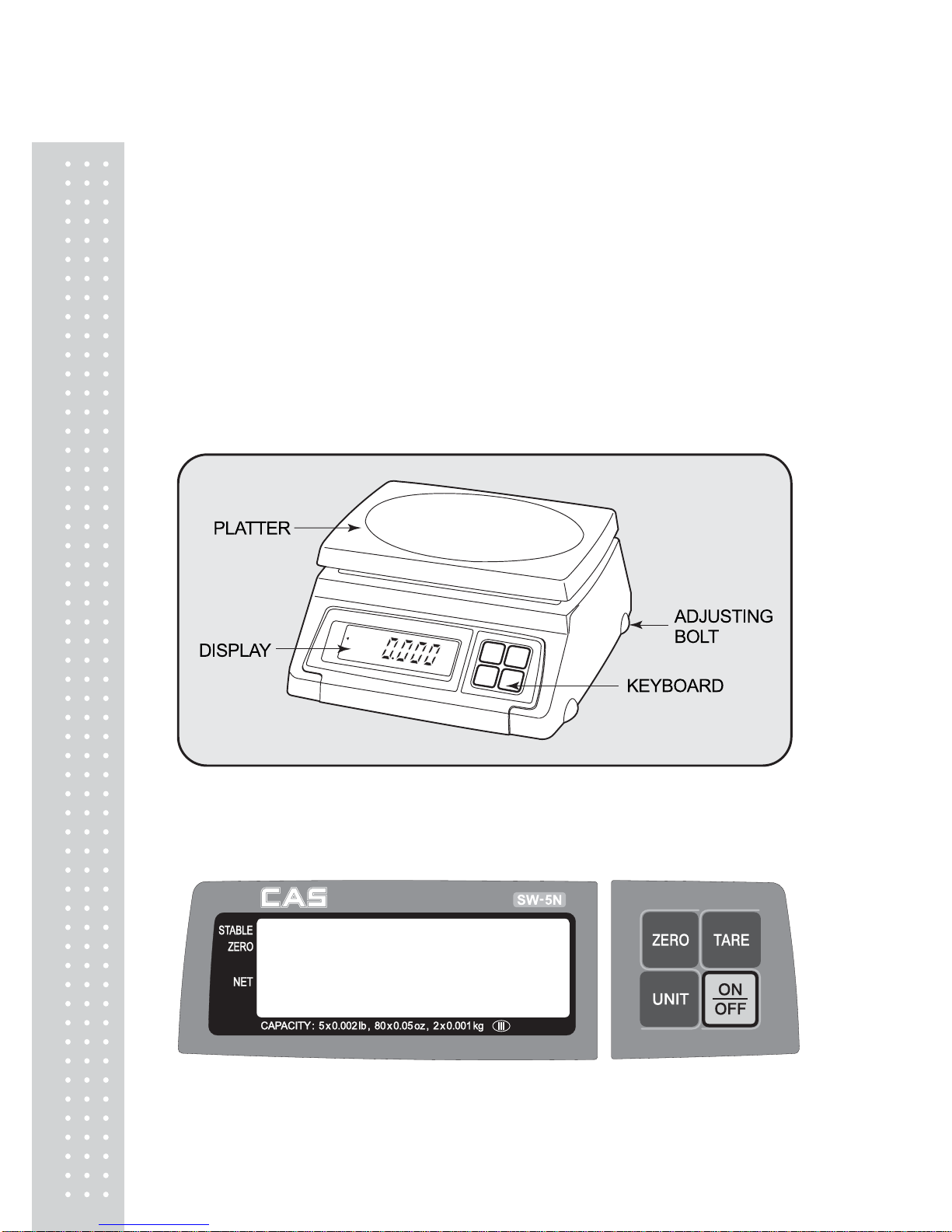
NAMES AND FUNCTIONS
OVERALL VIEW
DISPLAY & KEYBOARD
■ SW-1S/1N/1W
Page 6
7
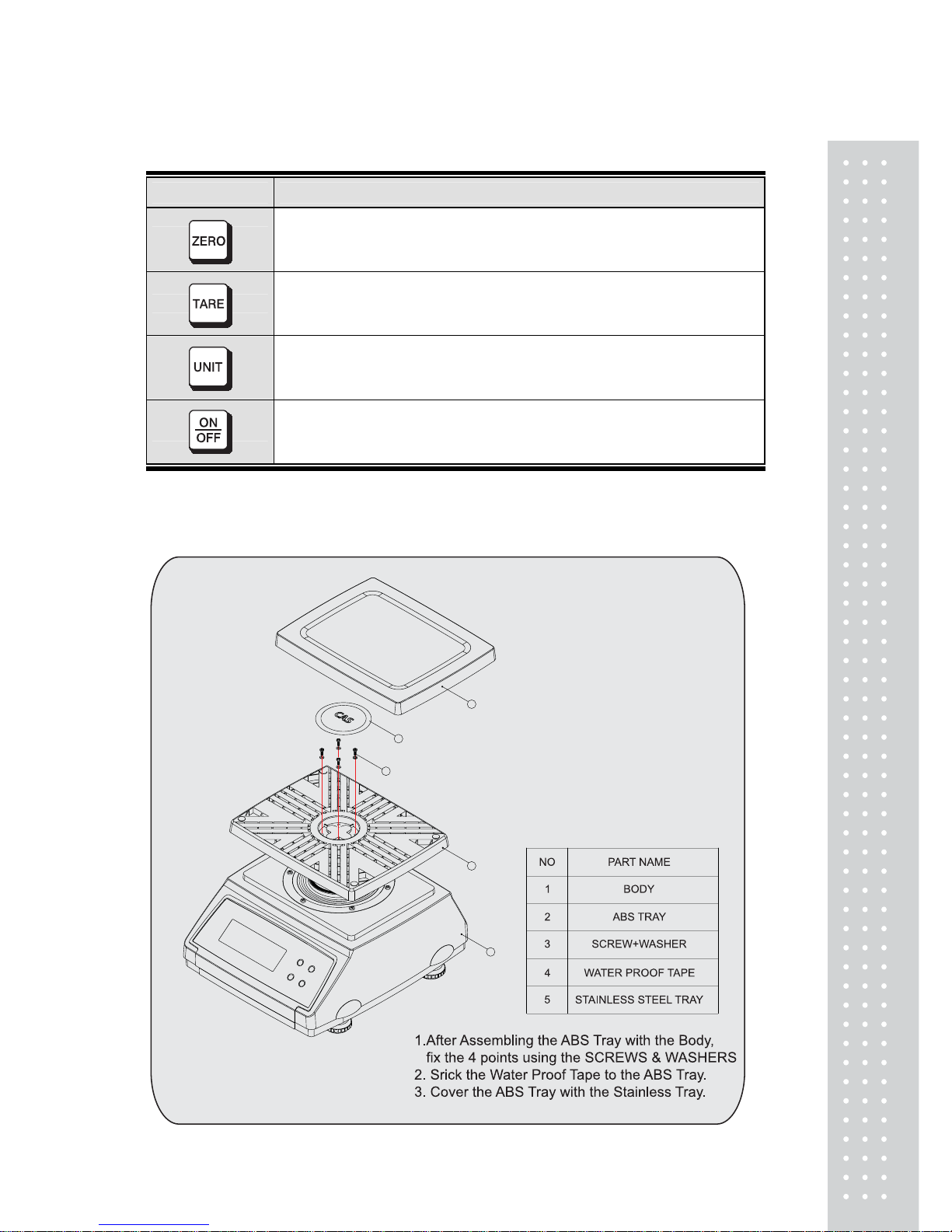
■ KEY FUNCTIONS
KEYS FUNCTIONS
Used to set the zero point.
Used to input or cancel the weight of tare.
Used to convert the unit of weight.
Used to turn on and off the scale.
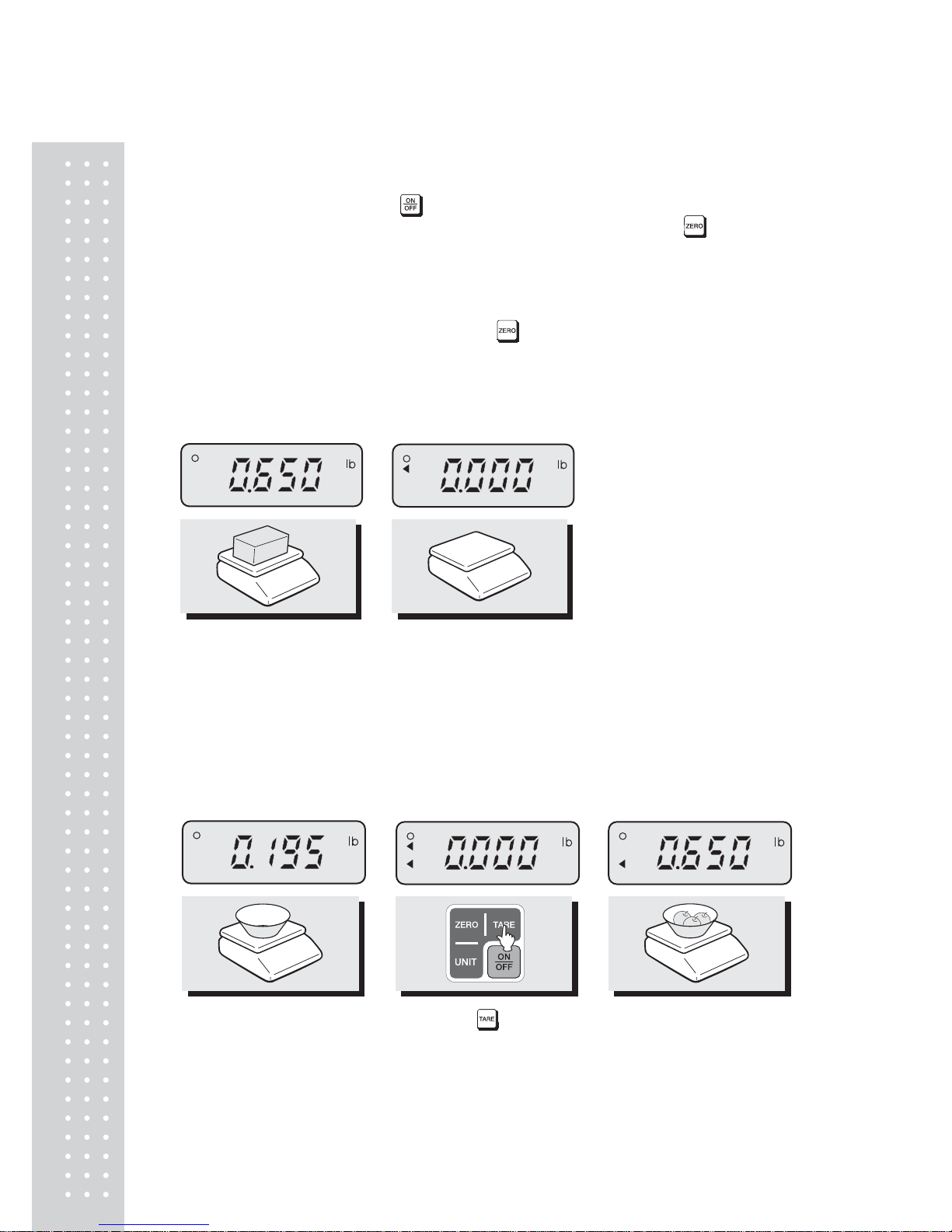
ASSEMBLY METHOD (SW-1W ONLY)
1
2
3
4
5
Page 7
8
OPERATIONS
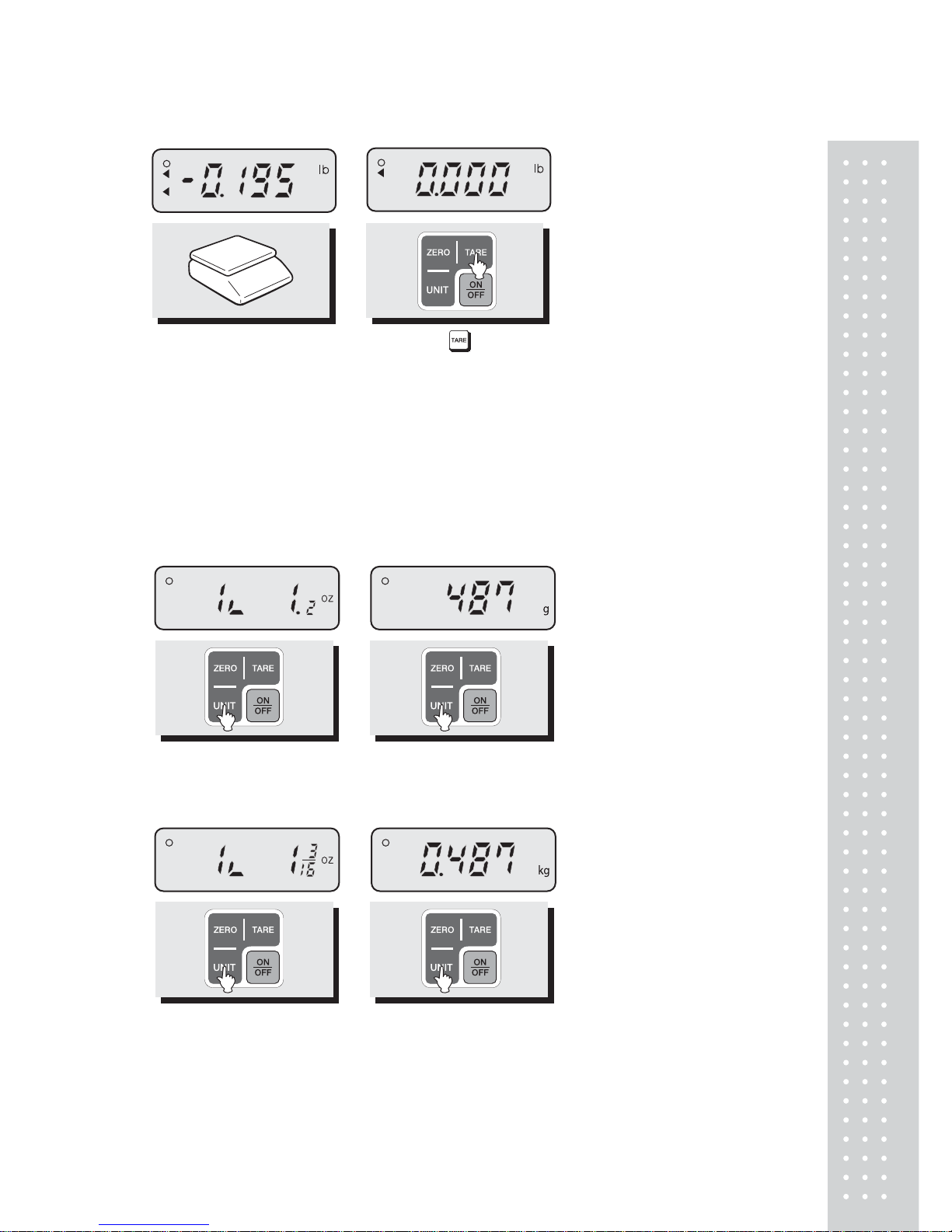
■Turn on the display by pressing key. Then, the display will show all the segments and
count up "0" to "9". You may stop this automatic counting by pressing the key.
■ When you turn on the display, make sure that platter is empty. Otherwise, display will
show "Err 1", an error of initial zero range. Please refer to "ERROR MESSAGE" section
for more information on page 11.
■ When the weight becomes stable the display shows the stable sign ( ○ ) on.
■ You may need to make it "0.000" by pressing key unless the display indicate "0.000"
under the empty platter.
1. Simple Weighing Mode
① Place a commodity on
the platter.
② Remove the commodity
from the platter.
2. Weighing with Tare
■ TARE means the weight of container being used for a commodity.
■ TARE key function is to subtract the weight of the container from full weight loaded.
①Place a container on
the platter.
② Press the key. ③ Place a commodity into
the container, then the
display will show only the
weight of the commodity.
Page 8
9
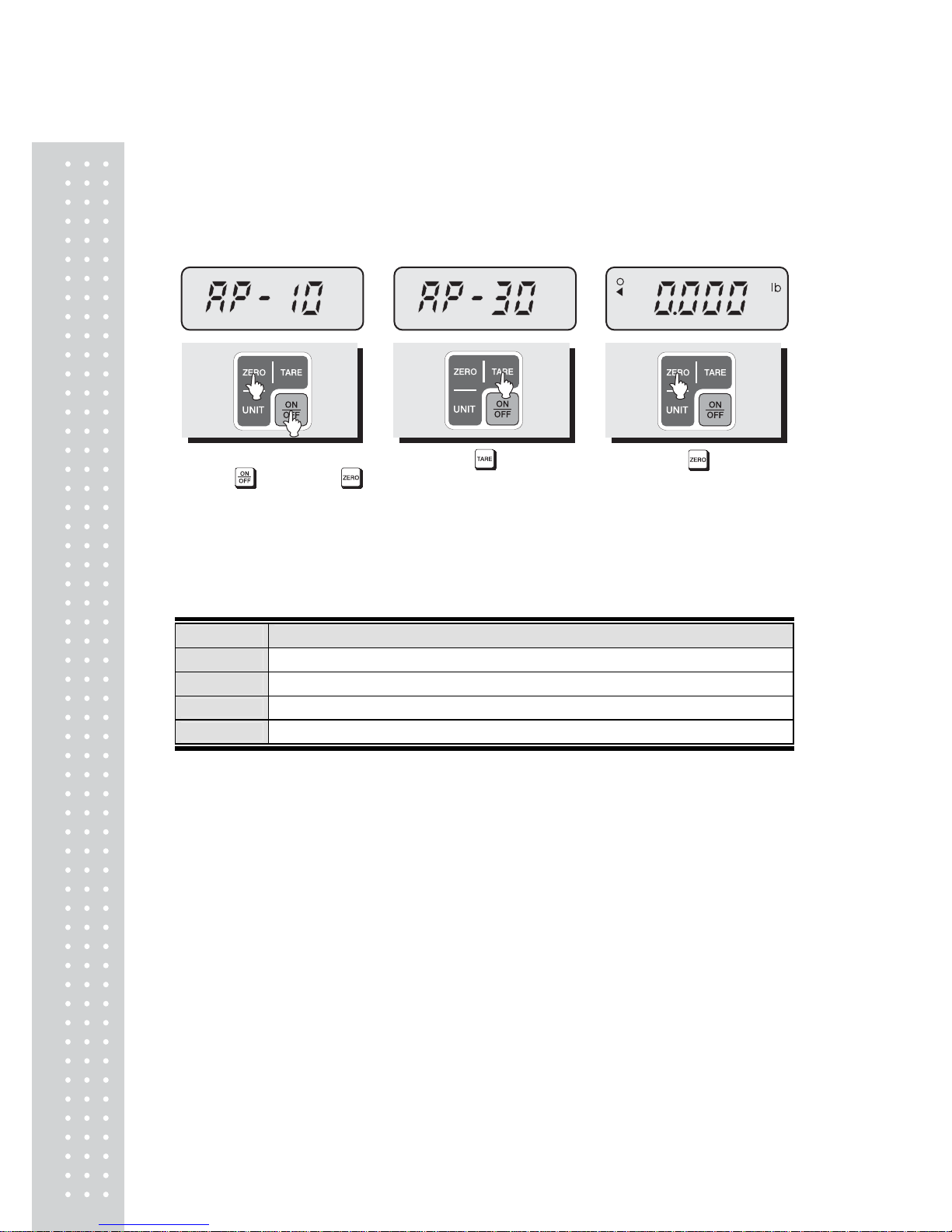
④ Remove container and
commodity, then the display
will show the weight of the
container with "-" symbol.
⑤ Press the key, then
display will show the
"0.000".
3. Changing Unit of Weight ( lb, oz, kg , g)
■ Press the UNIT key in the simple weighing mode.
You may select g, kg, lb, oz as the unit of weight.(SW-1S Unit conversion only)
■ Press the UNIT key in the simple weighing mode.
You may select g, oz(Fraction), kg, lb, oz(Decimal) as the unit of weight.(SW-1N only)
① Press the UNIT key, then
display will show the
“oz(Decimal) ” mode.
② Press the UNIT key, then
display will show the “g” mode.
③ Press the UNIT key, then
display will show the
“oz(Fraction)” mode.
④ Press the UNIT key, then
display will show the
“kg” mode
Page 9
10
4. Auto-Power Off Function
Auto-Power off function is to automatically power off as time is set.
This function is helpful to save battery, which is not in use.
The following is the setting procedure of Auto-power off.
① When the scale is turned
off press ke y, holding
key. Then you will see the
"AP-10".(If you have set this
before, display will show
previous value.)
② Press the key until th e
display shows the "AP-x0"
that you wish to take.
(Refer to TABLE 1.)
③ Press the key, and
then the scale saves what
you programmed and sh ows
all the segments, counting up
"0" to "9".
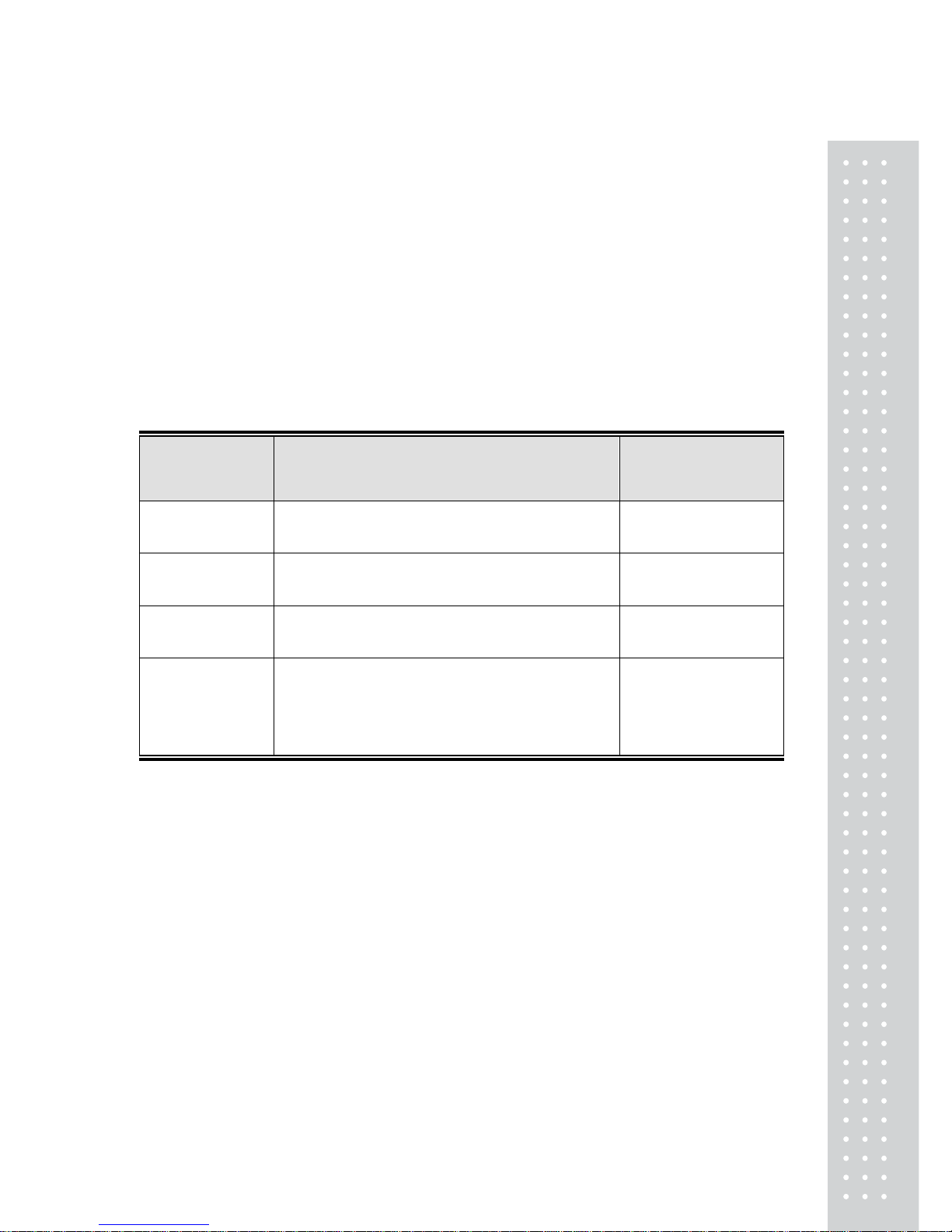
TABLE 1.
DISPLA Y FUNCTION
AP-00 This function does not automatically power off.
AP-10 This function does automatically power off when the scale is not in use for 10 minutes.
AP-20 This function does automatically power off when the scale is not in use for 20 minutes.
AP-30 This function does automatically power off when the scale is not in use for 30 minutes.
* "e" value may be various on capacity of product model.
Please refer to "SPECIFICATION" on page 12. For example, a product model
which capacity is 2.000kg has 1g as "e" value
Page 10
11
BATTERY MAINTENACE
LOW BATTERY WARNING
When the battery is low the display shows the "BATT" sign.
You can replace the battery new one.
If you still use the scale without replacing the battery the scale may provide
incorrect result on measurement.
ERROR MESSAGE
Error Message
on Display
Description Solution
"Err 0" The "Err 0" occurs when scale is not stable.
Remove unstable
facts.
"Err 1"
The "Err 1" occurs when a current zero point has
shifted from the last span calibration.
Please call your CAS
dealer.
"Err 3" The "Err 3" is an overload error.
Please remove the
weight.
"Err 9"
The "Err 9" is no weight error. When scale is in
counting mode, you must load the weight.
If you have no weight on your scale, you can see
this error message.
Please load the
weight on your tray .
Page 11
12
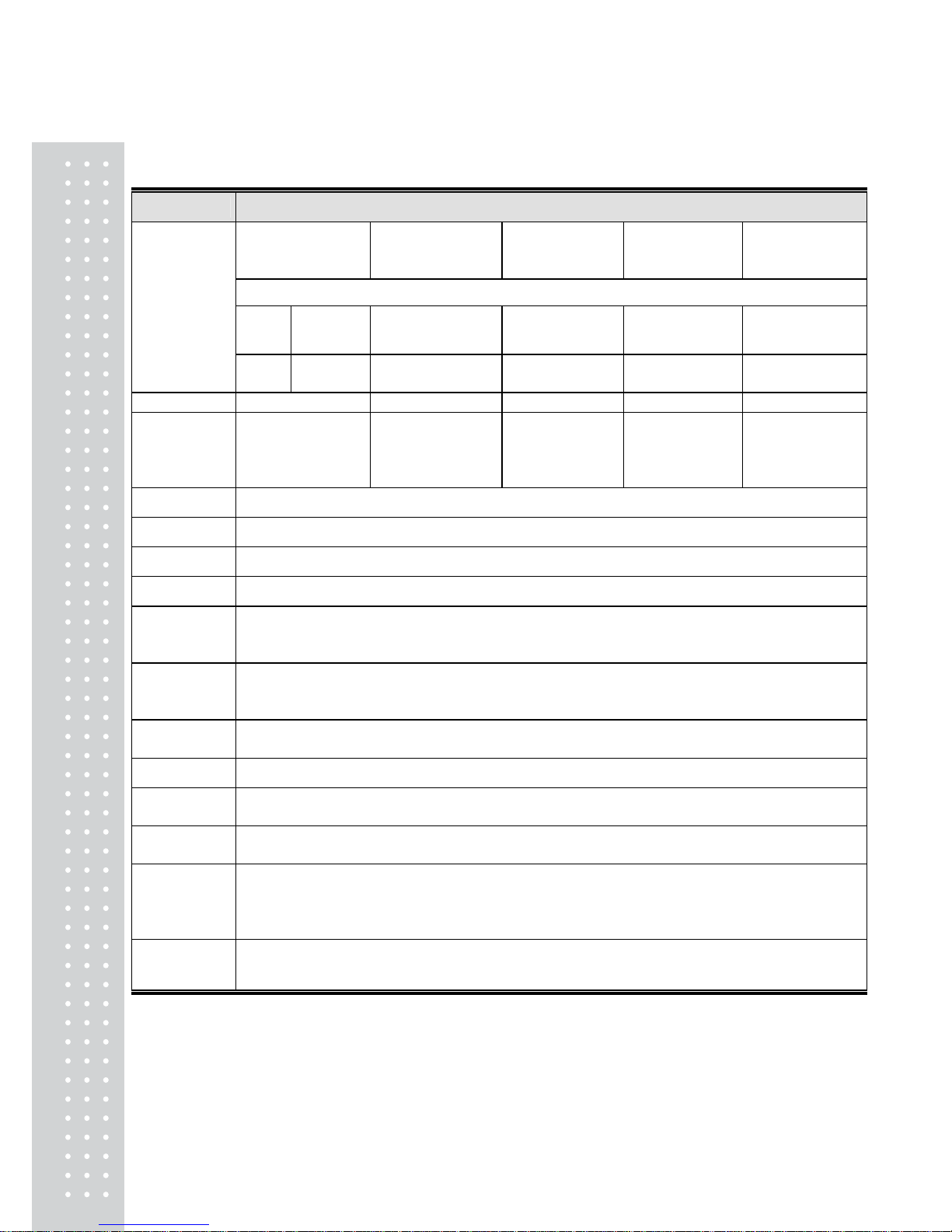
SPECIFICATIONS
MODEL SW-1S/1W/1N
2kg, e = 1g
5lb, e = 0.002lb
80oz, e = 0.05oz
5kg, e = 2g
10lb, e = 0.005lb
160oz, e = 0.1oz
10kg,e = 5g
20lb,e=0.01lb
400oz,e= 0.2oz
20kg,e=10g
50lb,e=0.02lb
800oz,e=0.5oz
30kg,e=10g
60lb,e=0.02lb
1000oz,e=0.5oz
SW-1N only
Dec.
oz
80oz
e=0.05oz
160oz,e=0.1oz 400oz,e= 0.2oz 800oz,e=0.5oz 1000oz,e=0.5oz
Fract.
oz
80oz
e=1/16oz
160oz,e=1/8 400oz,e=1/4oz 800oz,e=1/2oz 1000oz,e=1/2oz
Resolution 1/2000 1/2500 1/2000 1/2000 1/3000
MAX Tare
-2kg
-5lb
-80oz
-5kg
-10lb
-160oz
-10kg
-20lb
-400oz
-20kg
-50lb
-800oz
-30kg
-60lb
-1000oz
Display 1 10 x 35[mm]/43" x 13.8" 5digit LCD (9 digit LCD, SW-1N only)
Symbols ST ABLE, ZERO, TARE, g, kg, lb, oz, Low Battery
Keys ZERO, TARE, UNIT, POWER
Functions Weighing, Unit Conversion, Weighing, WaterProof level IP66(SW-1W only)
Dimensions
260(W) x 287(D) x 1 37( H) [m m ] / 10 2( W) x 113(D) x 54( H)[inch]
278(W) x 317(D) x 1 41( H)[mm] / 109(W) x 125(D) x 56(H)[inch ]
(SW-1W : WaterProof Type)
Platter size
230(W) x 190(D)[mm] / 90.55(W) x 74.80(D)[inch]
247(W) x 195(D)[mm] / 97.24(W) x 76.77(D)[inch]
(SW-1W : WaterProof Type)
Weight
2.8kg
3.7kg(SW-1W : WaterProof T y pe)
Power 1.5V x 6 units (D size Battery) or 9V Adapter
Operation
Time
Approx. 500hours (Manganese battery)/
1000hours (Alkaline at 20°C /68°F)
Operating
Temperature
-10°C ~ +40°C / 14°F ~ 104°F
Minimum
Volt age
Level of The
Battery
About 5.5V
Option 9V Adapter 300mA, Rear Display, Stainless Tray (SW-1S/1N)
Notice: Specifications are subject to change for improvement without notice.
Page 12

13
MEMO
Page 13

1
4
MEMO
Page 14

15
MEMO
Page 15

16
 Loading...