

Page 1
1
Page 2

2
Page 3

PRECAUTIONS
4
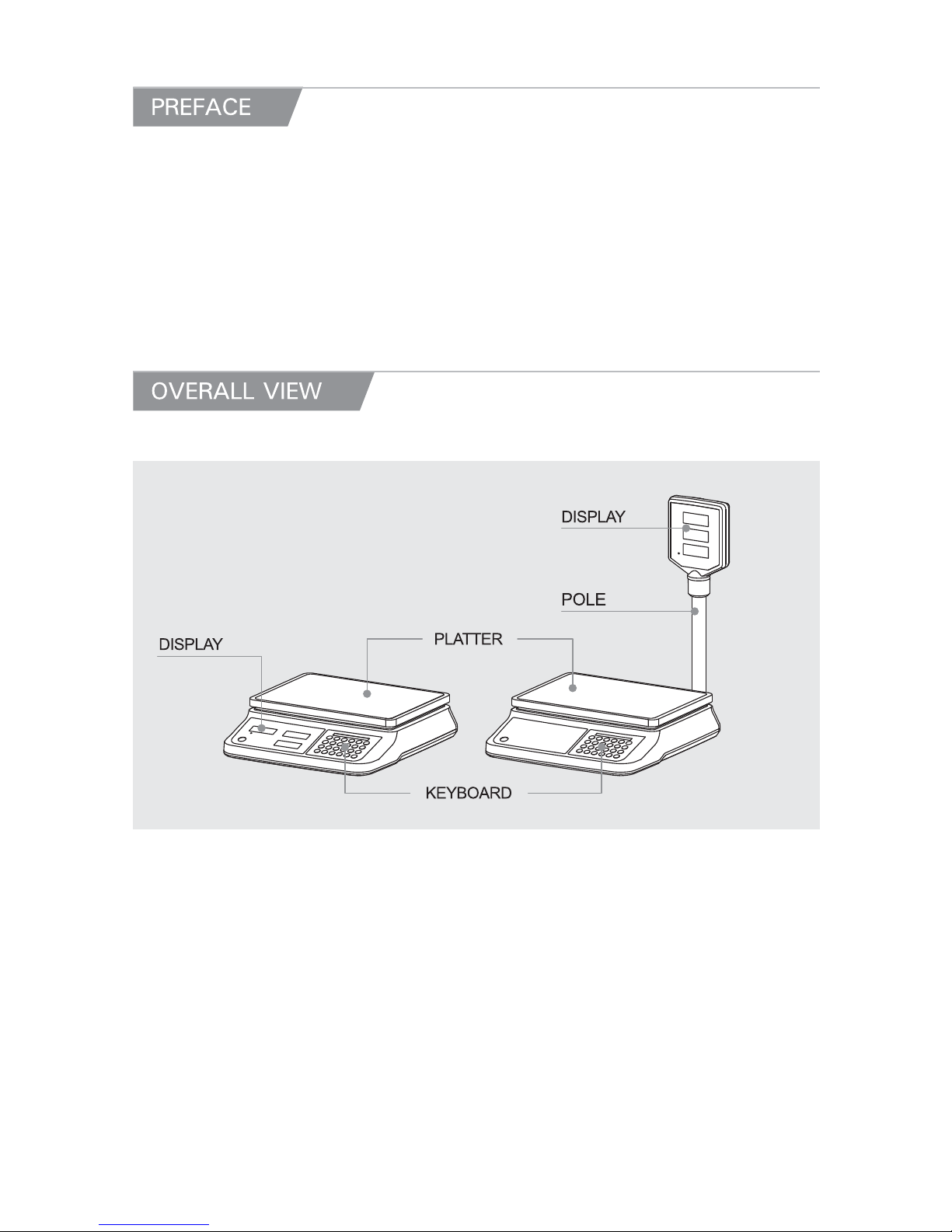
PREFACE, OVERALL VIEW
6
DISPLAY AND KEY BOARD
7
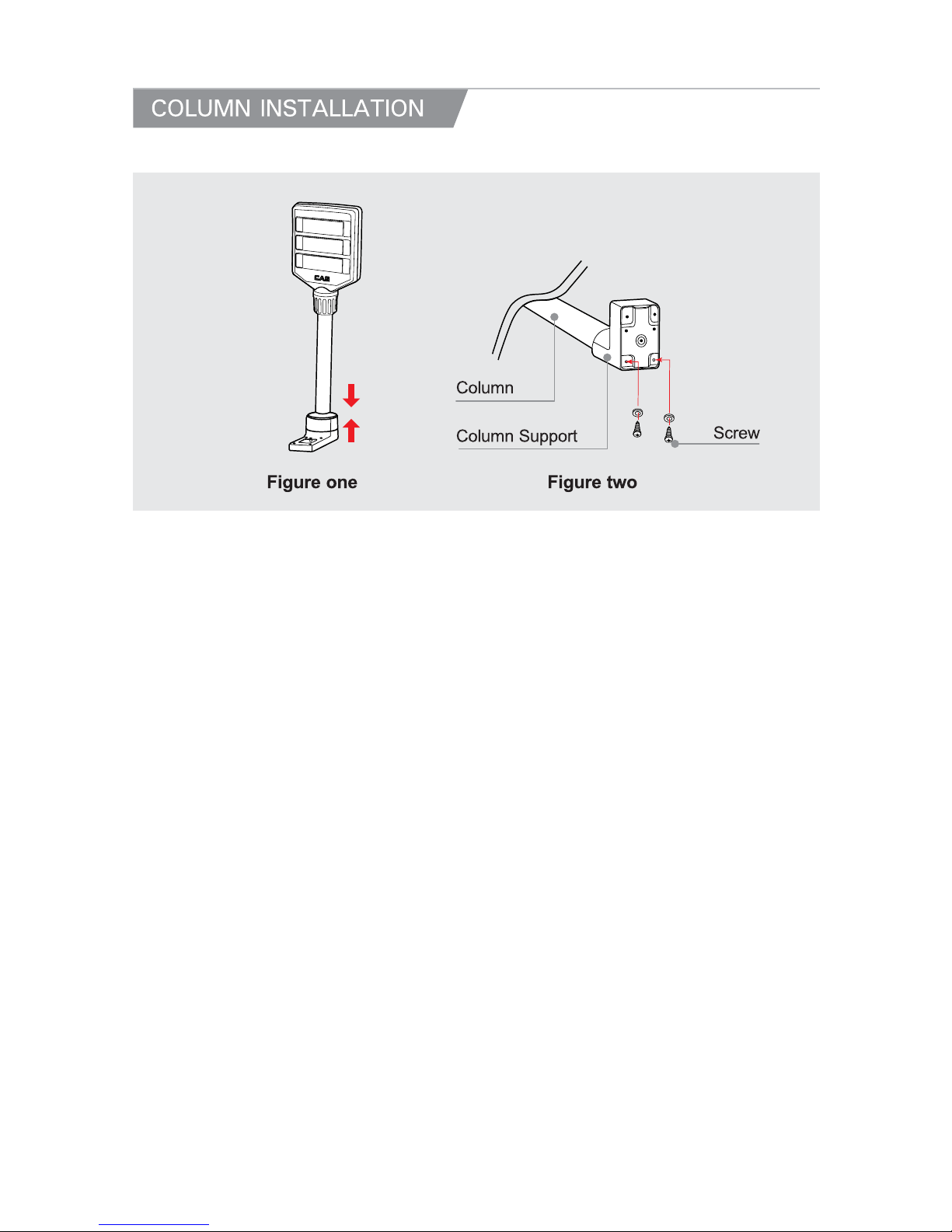
COLUMN INSTALLATION
9
OPERATIONS
10
Chapter 1. Basic Operation
10
Chapter 2. PLU Saving & Calling-up 12
Chapter 3. User's Set-up Mode 13
Chapter 4. Sales transaction 14
Chapter 5. Payment 17
BATTERY MAINTENACE 19
ERROR MESSAGE 19
SPECIFICATIONS 20
3
Page 4
4
Page 5
5
Page 6
Thank you for purchasing CAS PR-ΙΙ series.
These series have been designed with CAS reliability, under rigid quality control
and with outstanding performance. Your special departments can enjoy these
high quality reliable CAS products.
We believe that your needs will be satisfied and you will have proper reliability.
This manual will help you with proper operation and care of the PR-ΙΙ.
Please keep it handy for future reference.
6
Page 7
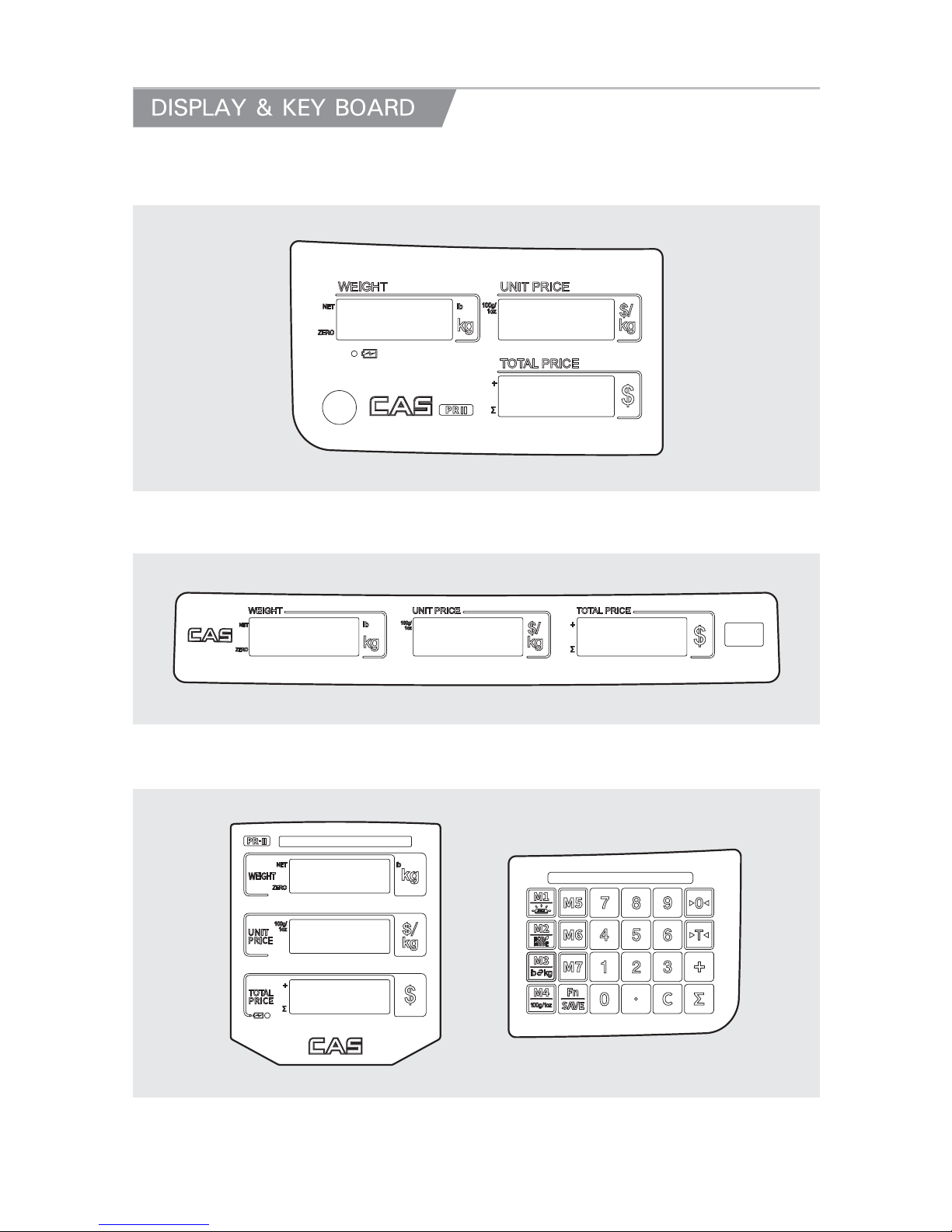
PR II - B Front display
PR II - B Rear display
PR II - P Front cover & key
7
Page 8
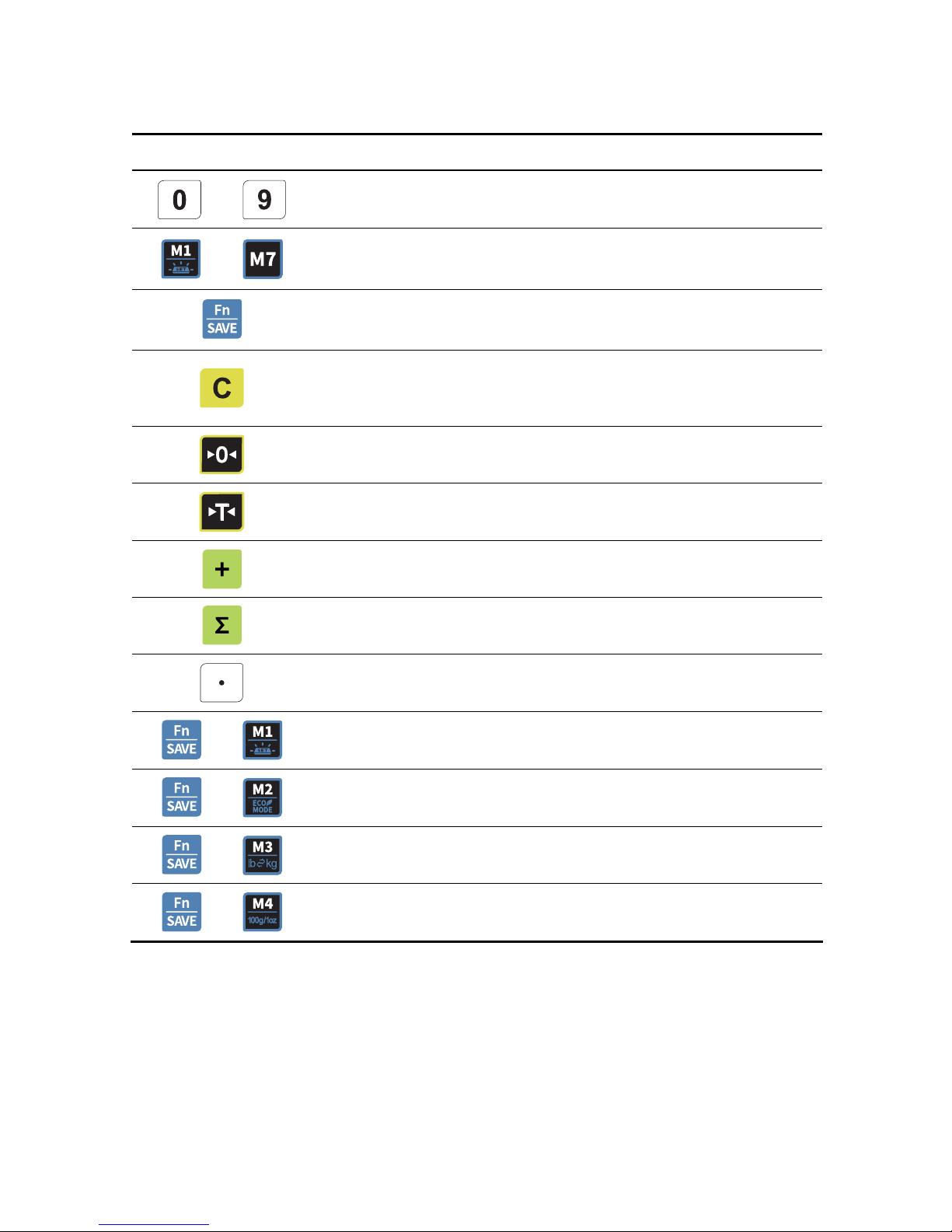
KEY FUNCTIONS
KEYS FUNCTIONS
~
Used to enter all the numeric data
~
PLU key.
Function key(Back-light, Power Save
Used to enter PLU setting
Used to clear all the numeric price display
Used to clear sum total price
Used to clear all the daily total prices
Used to correct the zero point
To set or clear tare value
PLU save key.
To make several sales transaction by adding up.
To check total sales amount or finalize sales transaction.
Used to enter the decimal point when price is entered.
+
Used to change back-light setting.(OFF, ON, AUTO)
+
Power Save Mode
+
Used to change the unit of weight.(kg or lb)
+
Used to price per 100g ($/100g) or 1oz ($/1oz)
8
Page 9
9
Page 10
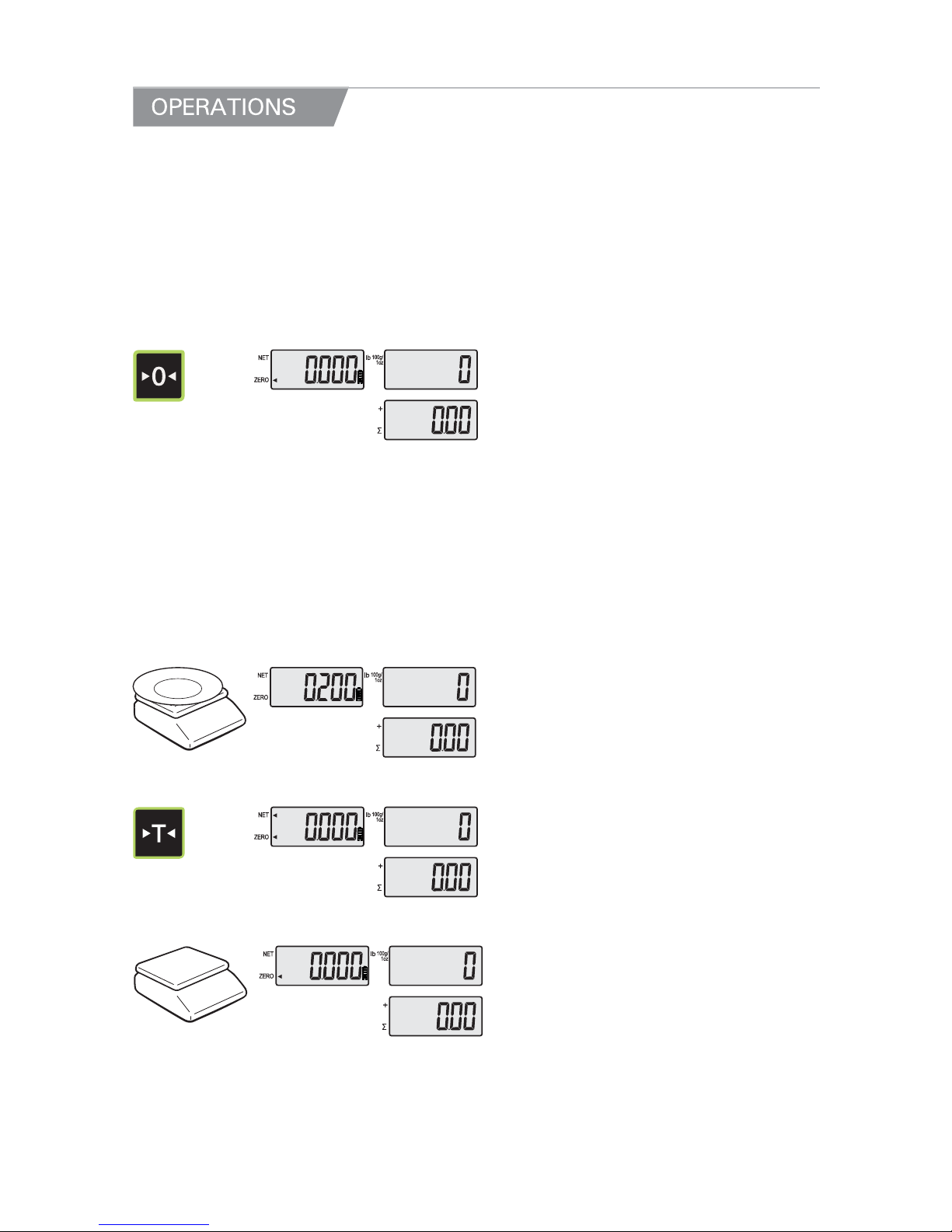
● Turn on the ON/OFF switch. Then, the display will show all the segments and
count up "9" to "0".
Chapter 1. Basic Operation
a. Zero function
① Press ZERO key to set Zero.
b. Tare function
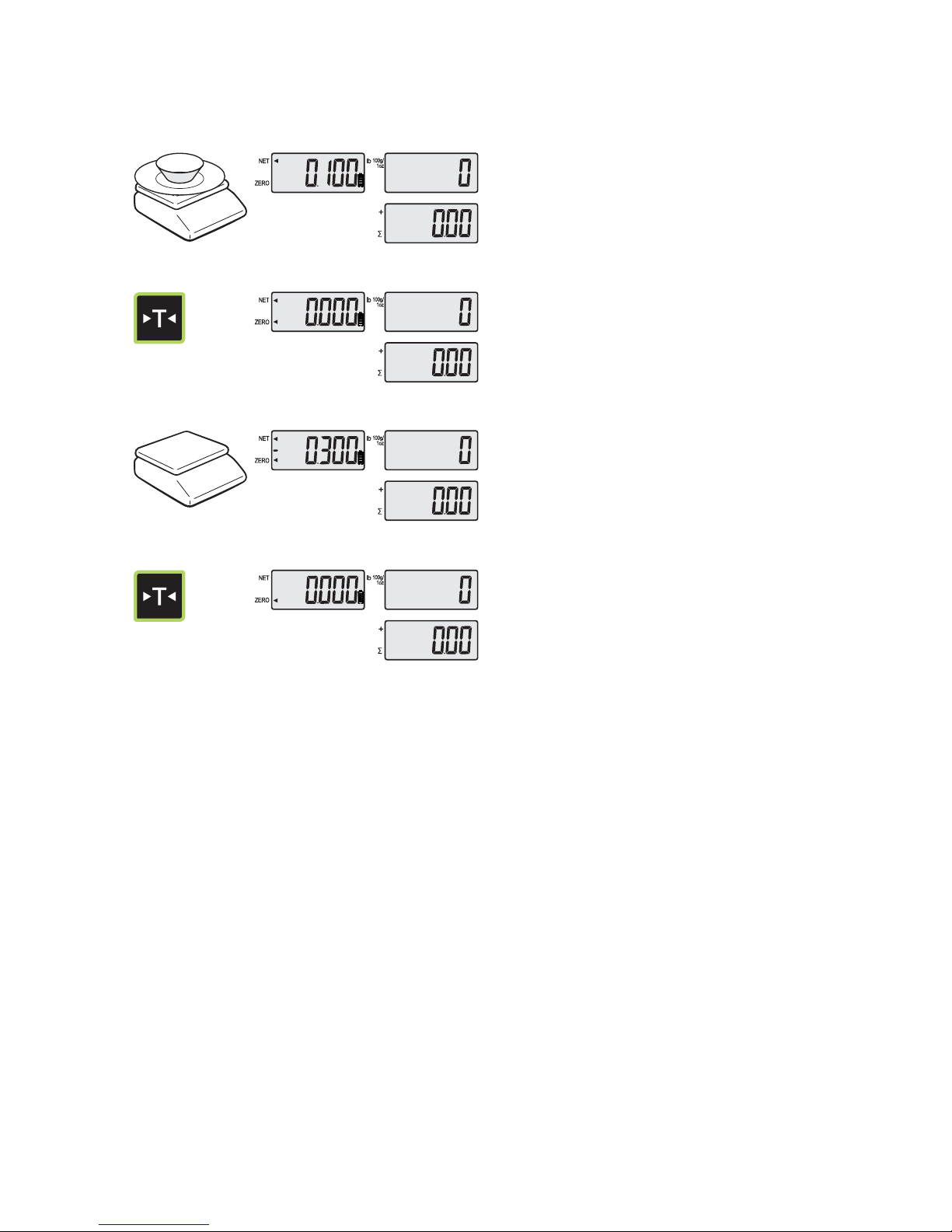
Tare means the weight of container. You may use tare function when you weigh an item
with container and measure only the weight of item.
● One time tare
① Place a container on the platter.
EX) 200g of tare.
Press TARE key to set zero point.②
EX) 200g of tare.
10
Page 11
● Succ
essive tare
③ Place another container on the platter.
EX) 100g of tare.
④ Press TARE key to set zero point.
⑤ After weighing item remove all of the
container from the platter.
⑥ Press TARE key again to set zero.
● NOTICE: To remove TARE funtion press “TARE” Key again after removing the
container from the paltter. Automatic tare clearing function may not be applied to all of PR
series.
11
Page 12
Chapter 2. PLU Saving & Calling-up
a. Saving unit price on PLU
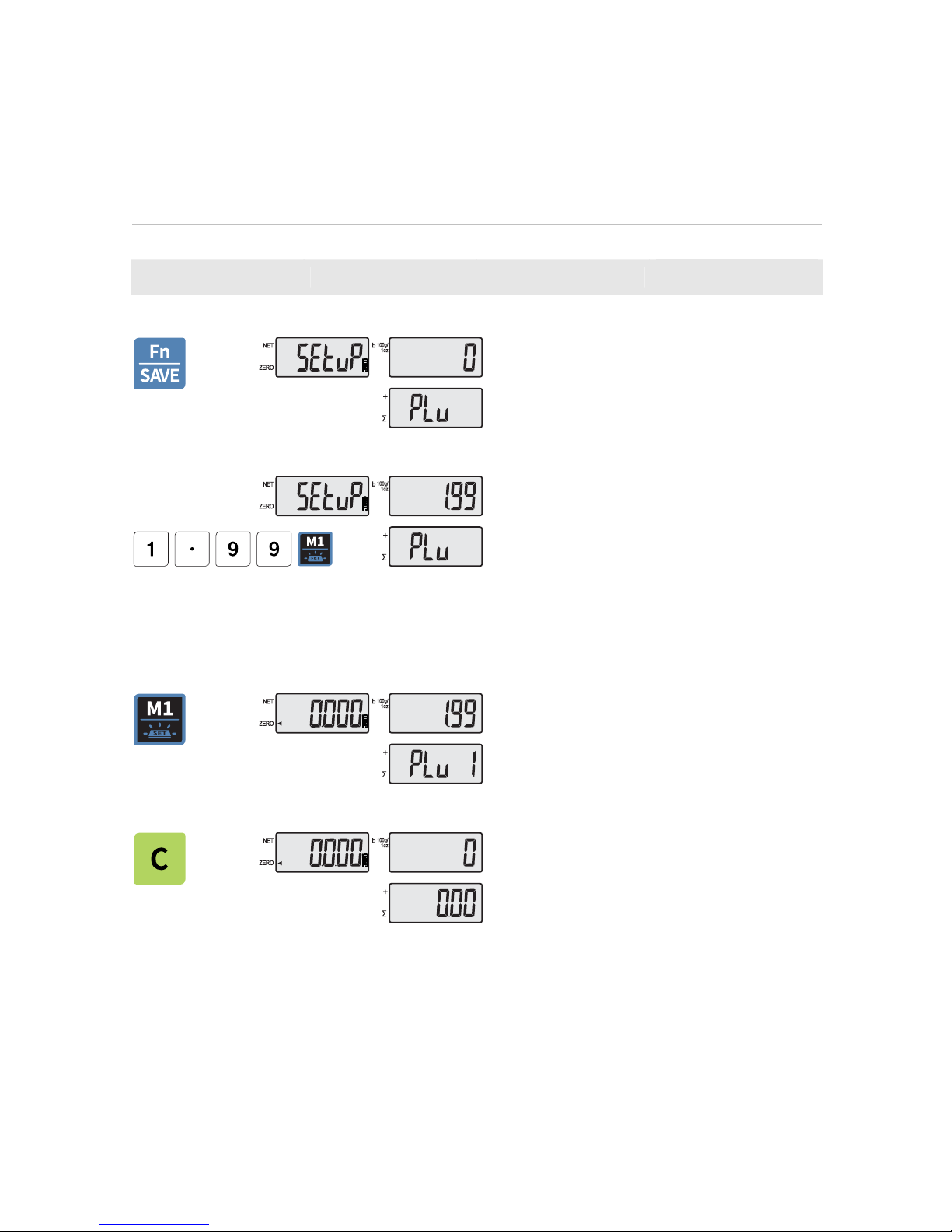
This section explains how to save unit price in PLU.
Number of PLU Range Remarks
PLU NAME 7 1~7
① Press the 'PLU' key for a few seconds
then, Set-up menu will be shown.
② After input unit of price, press number of
PLU that you want to set up.
b. Calling up PLU
① Press M1 ~ M7 key to call up PLU. e,g,
Press M1 key.
Press C key to clear a② nd return to the
normal weighing mode.
12
Page 13
Chapter 3. User’s Set-up Mode
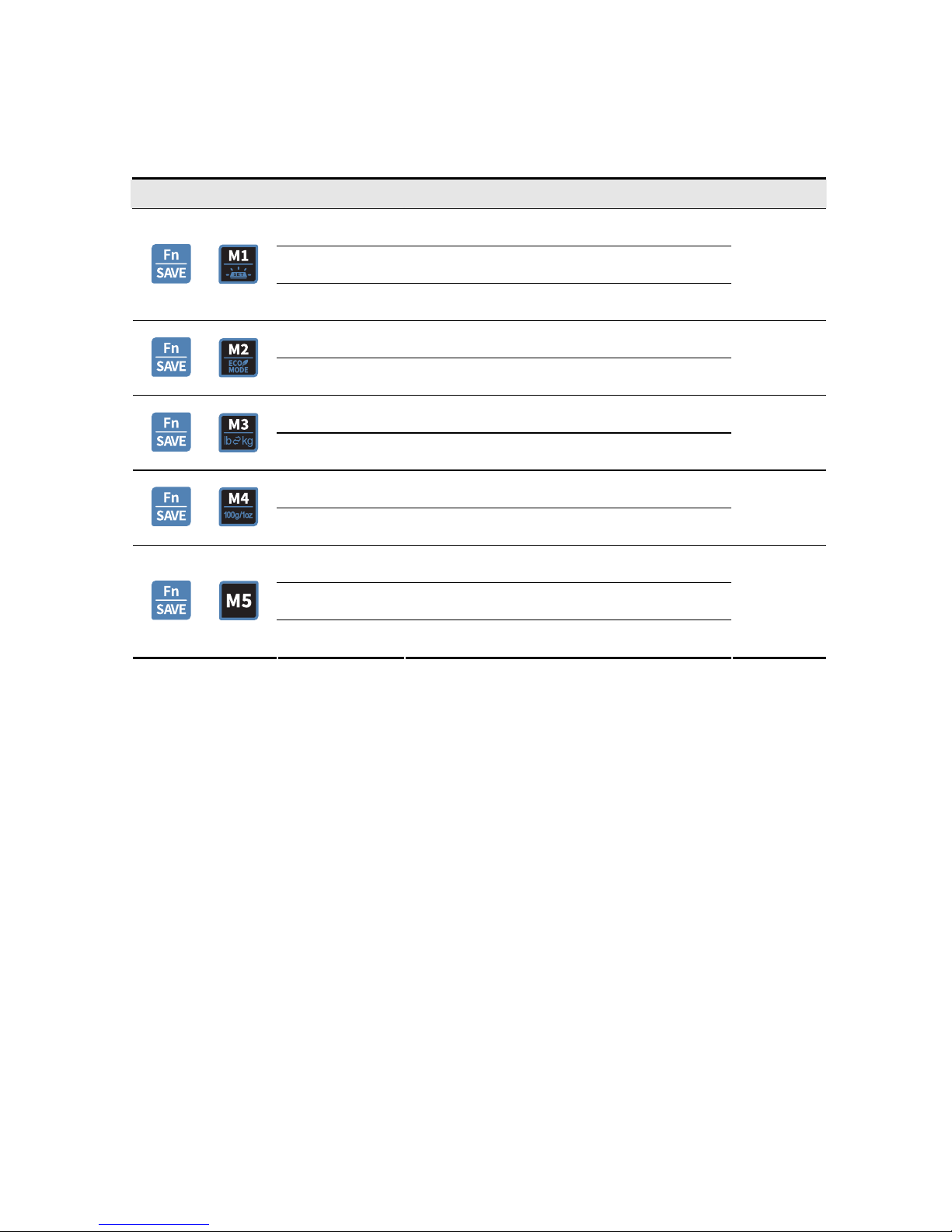
This section explains how to set up the following functions.
KEY Display FUCTION Remarks
bL-At Use back-light when you put on the weight
bL-oFF Do not use a back-light.
+
bL-on Use back-light always
ps - 0 Do not use power save mode.
+
ps - 1 Use power save mode
kg Used to kg units
+
lb Used to lb units
up- kg or lb Used to price per kg or lb
+
up-100g or 1oz Used to price per 100g ($/100g) or 1oz ($/1oz)
rS-Co Continually mode
rS-PC Command mode
+
rS-St Stable mode
13
Page 14
Chapter 4. Sales transaction
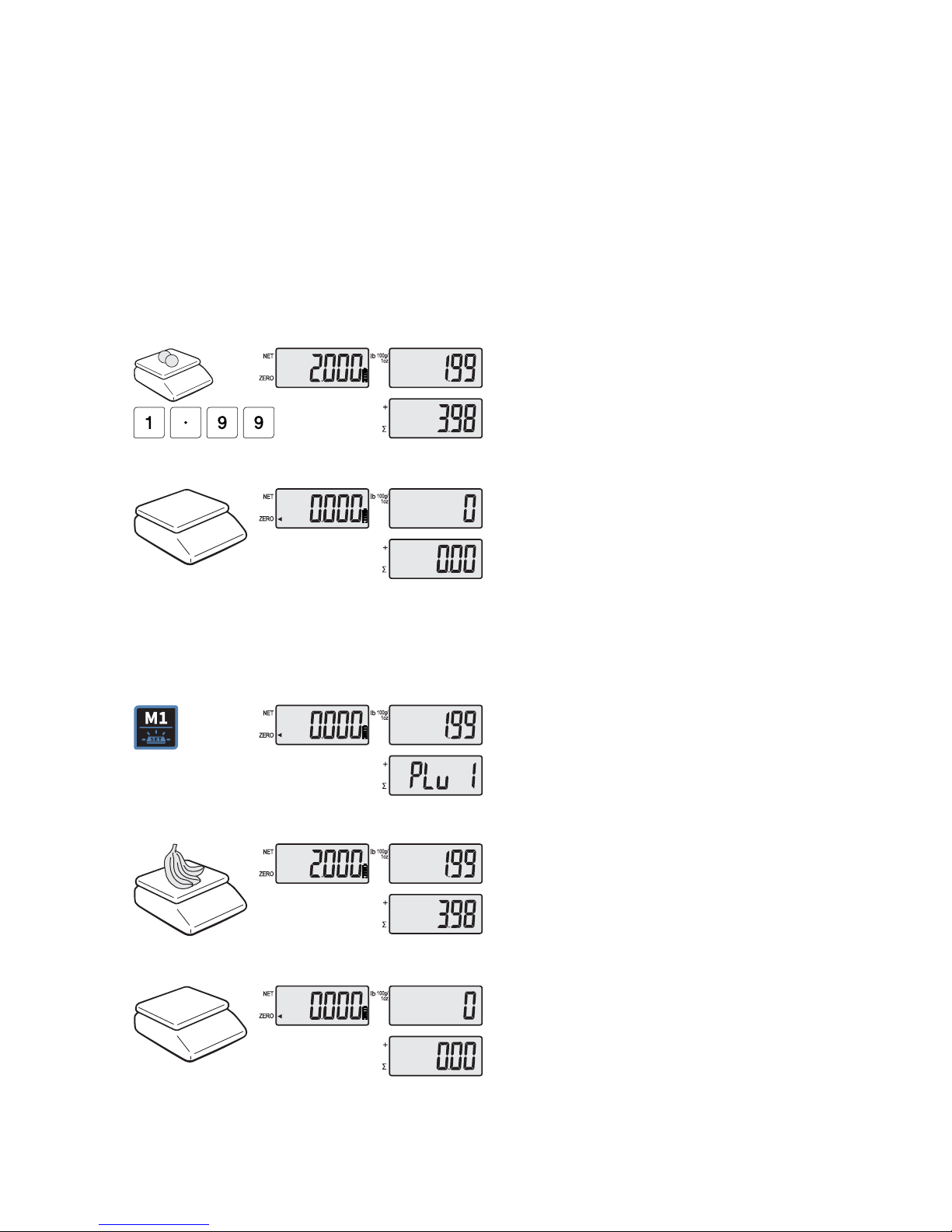
PR-Ⅱ can provide inputting the unit price through the numeric key and calling up
PLU.
a. Input the unit price through the numeric key
This section explains how to input the unit price through the numeric key
and complete the sales transaction.
① Place an item on the platter and press
appropriate numeric keys to input unit
price.
EX) 1.99 for unit price.
② Remove the item from the platter.
b. Input the unit price through calling up PLU
① Press M1~M7 key can call up
the PLU.
EX) M1
② Place an item on the platter.
③ Remove an item on the platter.
14
Page 15
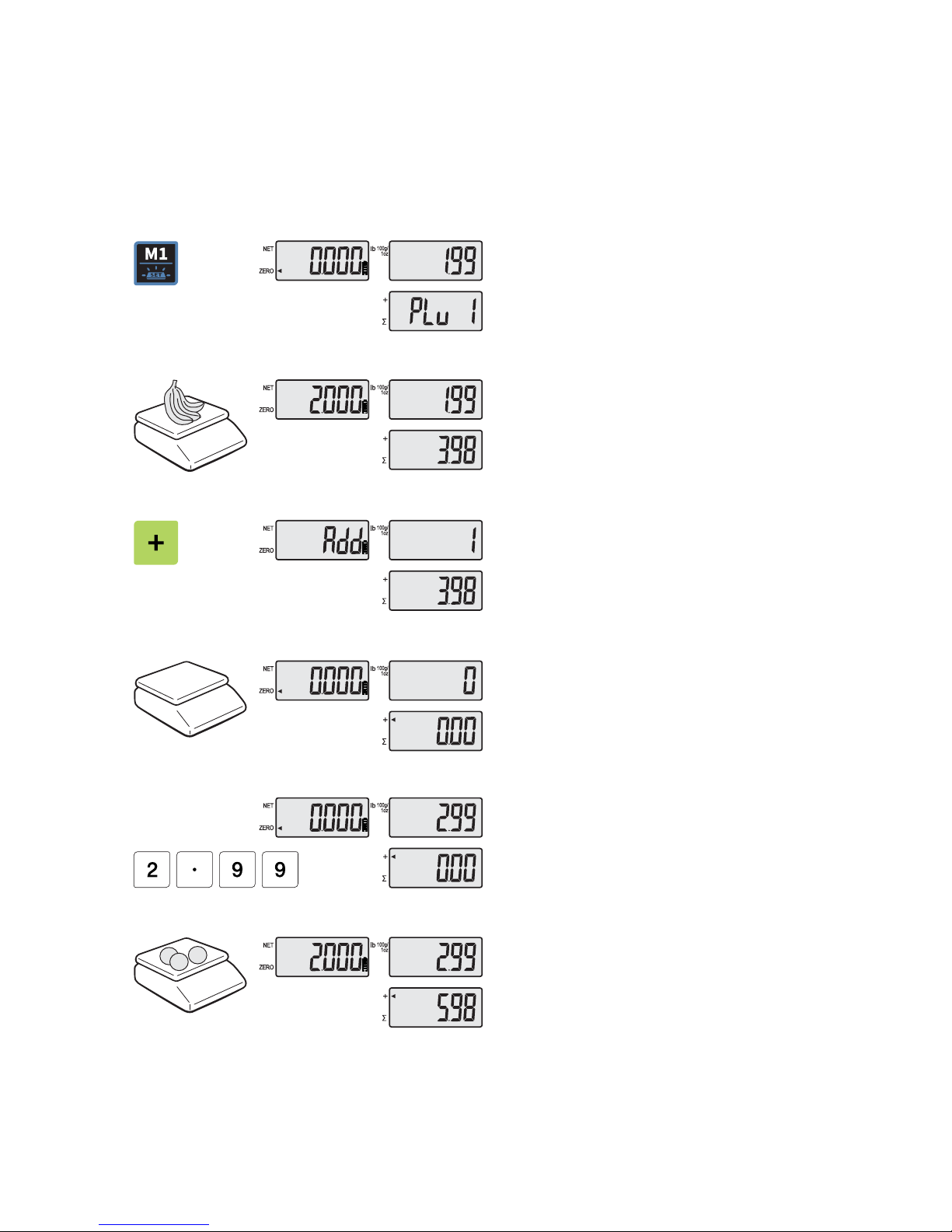
c. Adding up
several sales transactions for weighed items
● Use + key to makes the adding-up transactions.
● You may either call up PLU or just input the unit price.
① Press M1~M7 key can call up
the PLU.
EX) M1
② Place an item on the platter.
③ Press + key.
④ Remove the item from the platter.
Input a unit price.⑤
EX) 2.99 for Honey melon
Place an item on the platter.⑥
15
Page 16
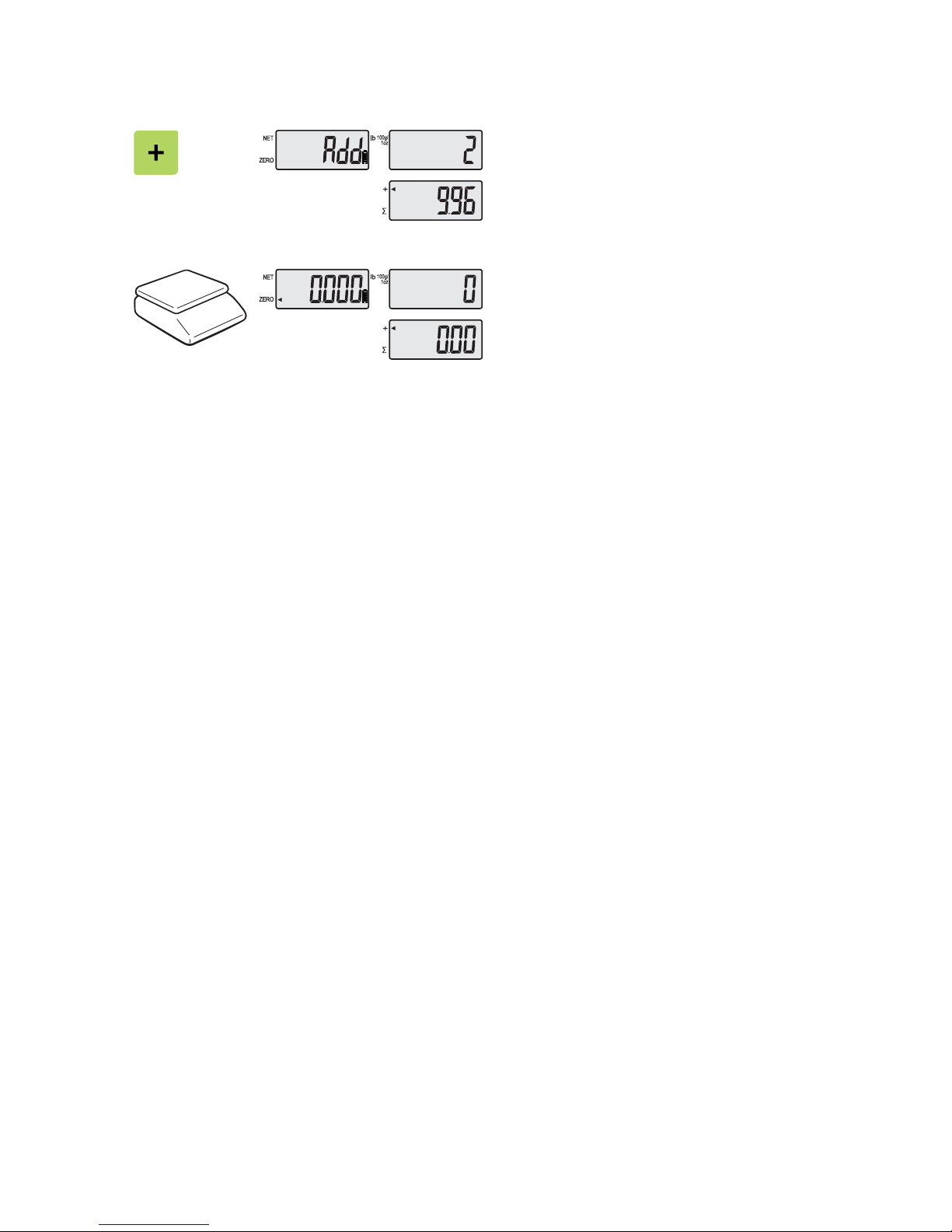
Press + key. “Total Price” display says⑦
total price added, and “Unit Price” display
says the number of sales transactions
added.
⑧ Remove the item from the platter.
● You may also place the item on the platter first and then input unit price in the
scale later.
16
Page 17
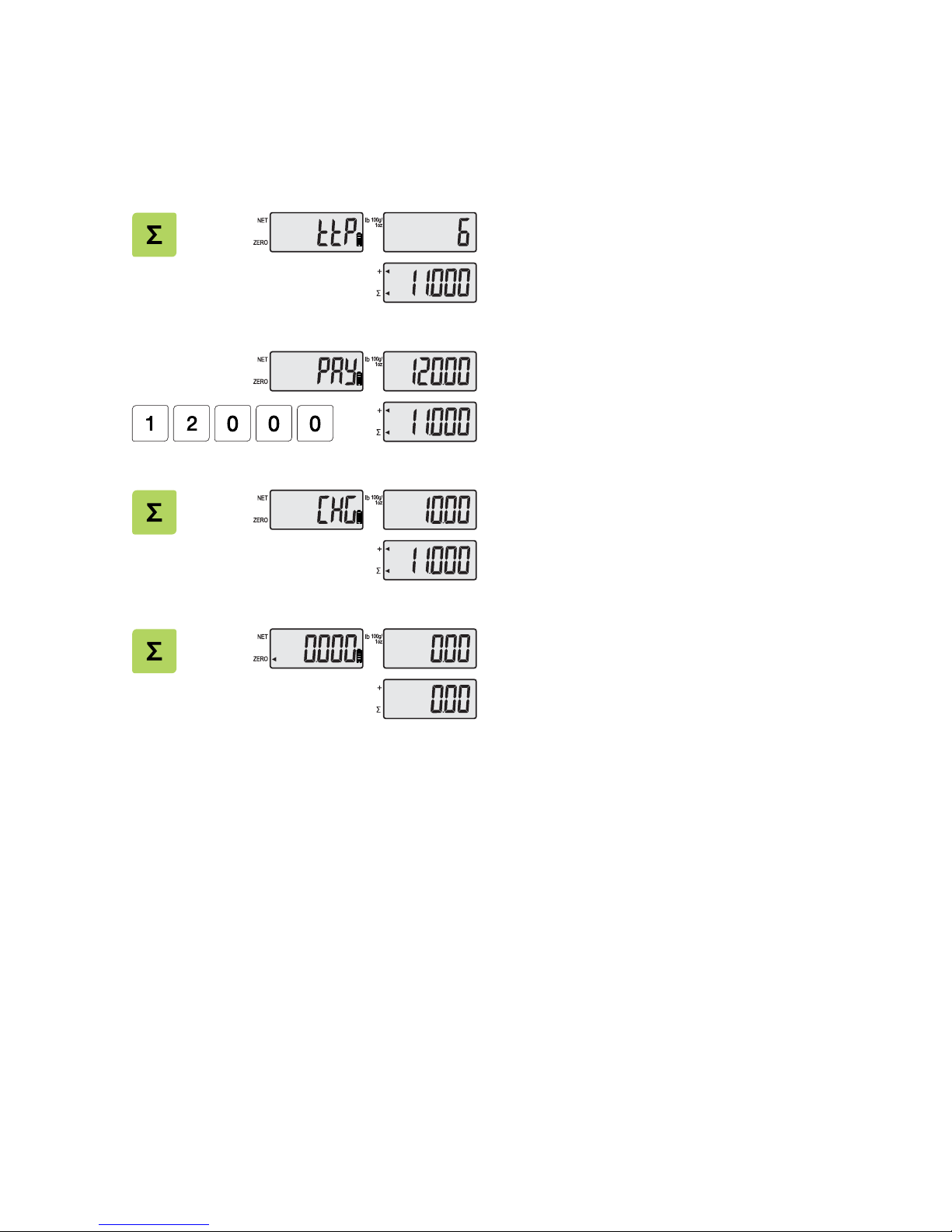
Chapter 5. Payment
a. Payment function on total sales amount
Press ∑ key to call up total price.①
(If you want to go back to sales mode,
press zero key.)
Input payment of consumer by numeric ②
key.
Ex) 120.00 payment
Press Σ key to call up the change ③
amount.
After④ checking the change amount press
Σ key to go back to normal weighing mode.
17
Page 18
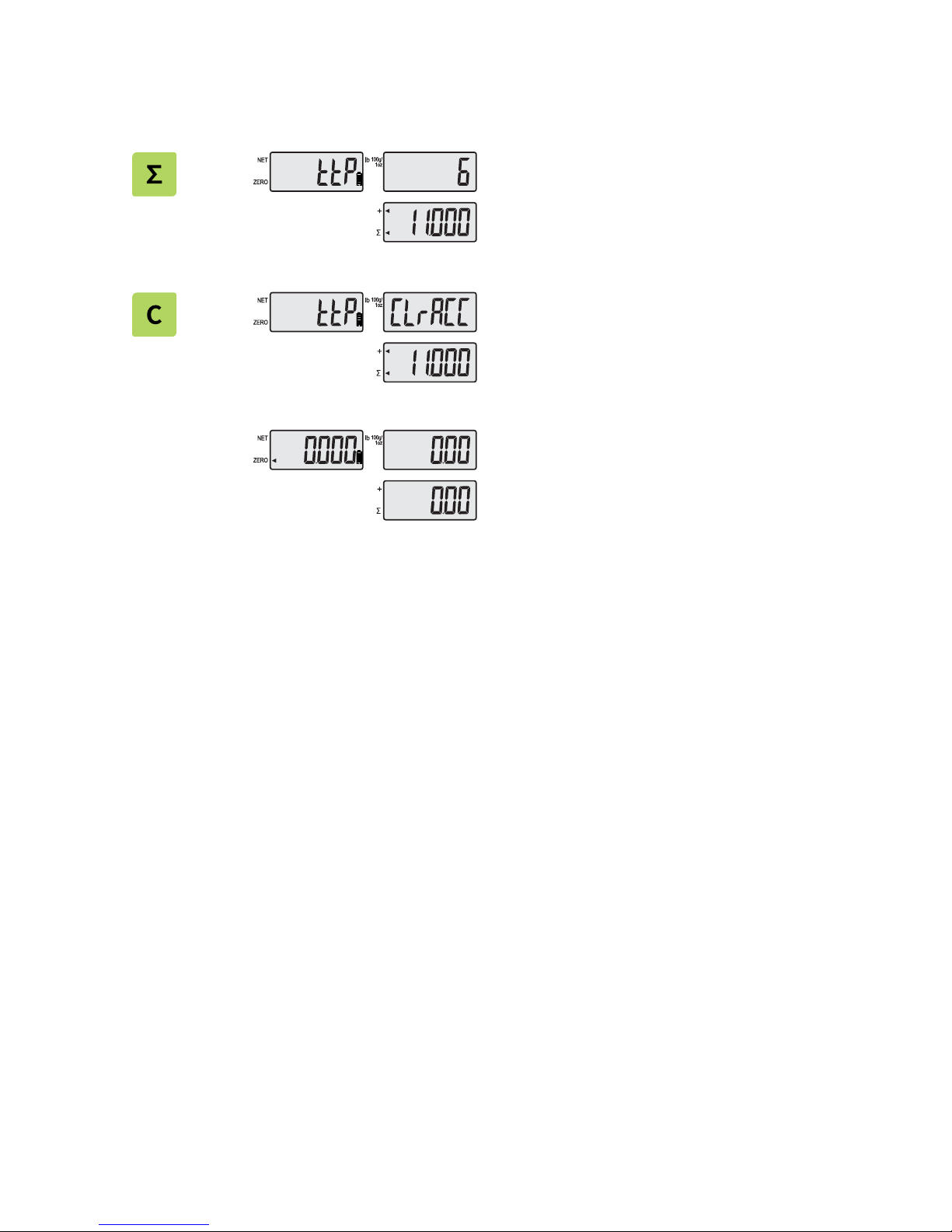
b. Deleting total sales d
ata
① Press ∑ key to call up total price.
(If you want to go back to sales mode,
press zero key.)
Press C key to delete “total sales” data. ②
Clear account message shows up shortly,
and then it goes to normal weighing mode.
And then it goes to normal weighing ③
mode.
18
Page 19
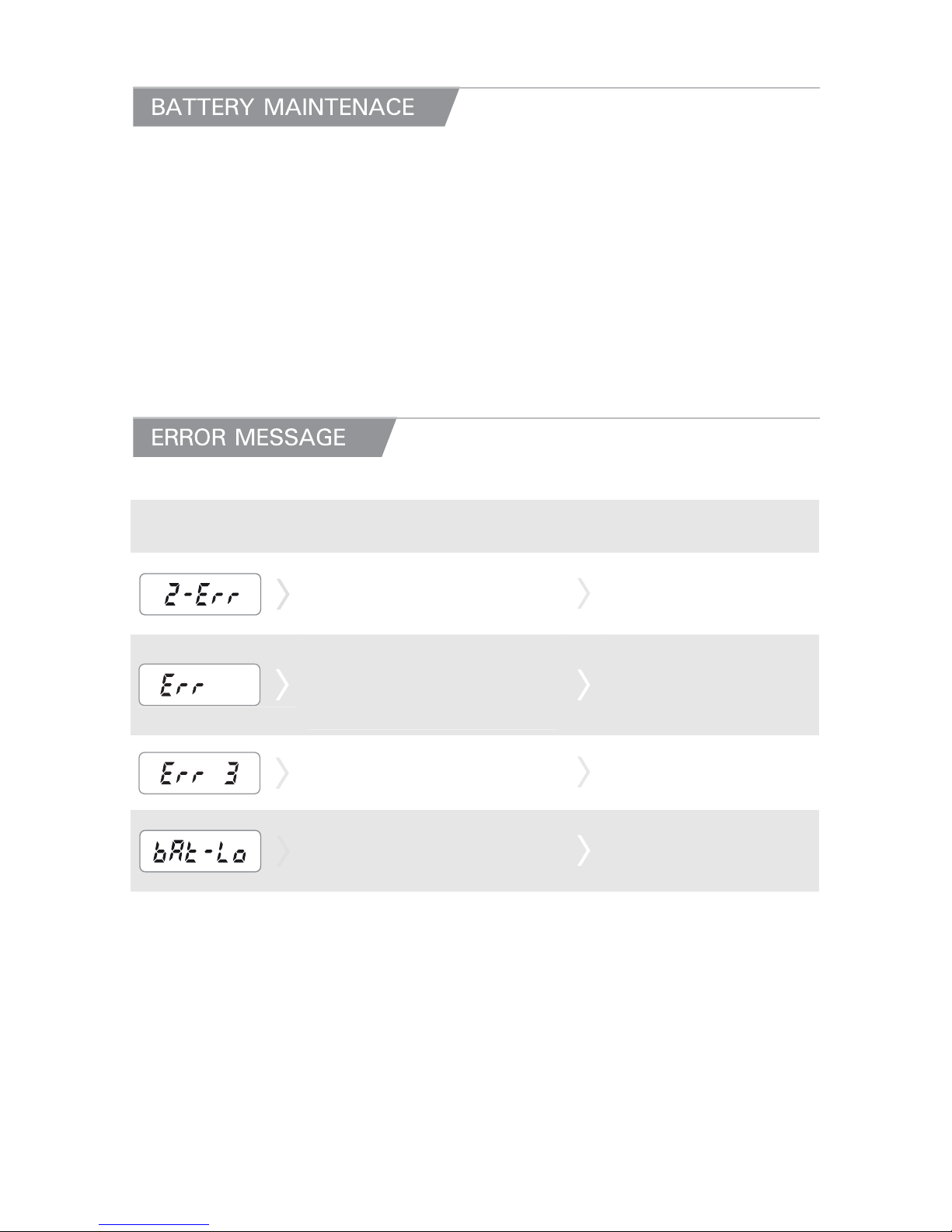
LOW BATTERY WARNING
This product is a combination product dry battery and rechargeable battery.
When the battery is low the display shows the " bAt-Lo " sign.
You can replace the battery new one.
If rechargeable battery, please charge immediately.
You can shorten battery life.
If you still use the scale without replacing the battery the scale may provide
incorrect result on measurement.
Error Message on
Display
Description
Solution
The "Z-Err" occurs when a current
zero point has shifted from the last
span calibration.
Please call your CAS
dealer.
The "Err" message will be shown
when HIGH and LOW limits are
set as the same or above
maximum capacity
Please reset the weight
again.
The "Err 3" is an overload error.
Please remove the weight.
The "bAt-Lo" is battery low.
Please change new battery.
If rechargeable battery,
please charge immediately.
19
Page 20
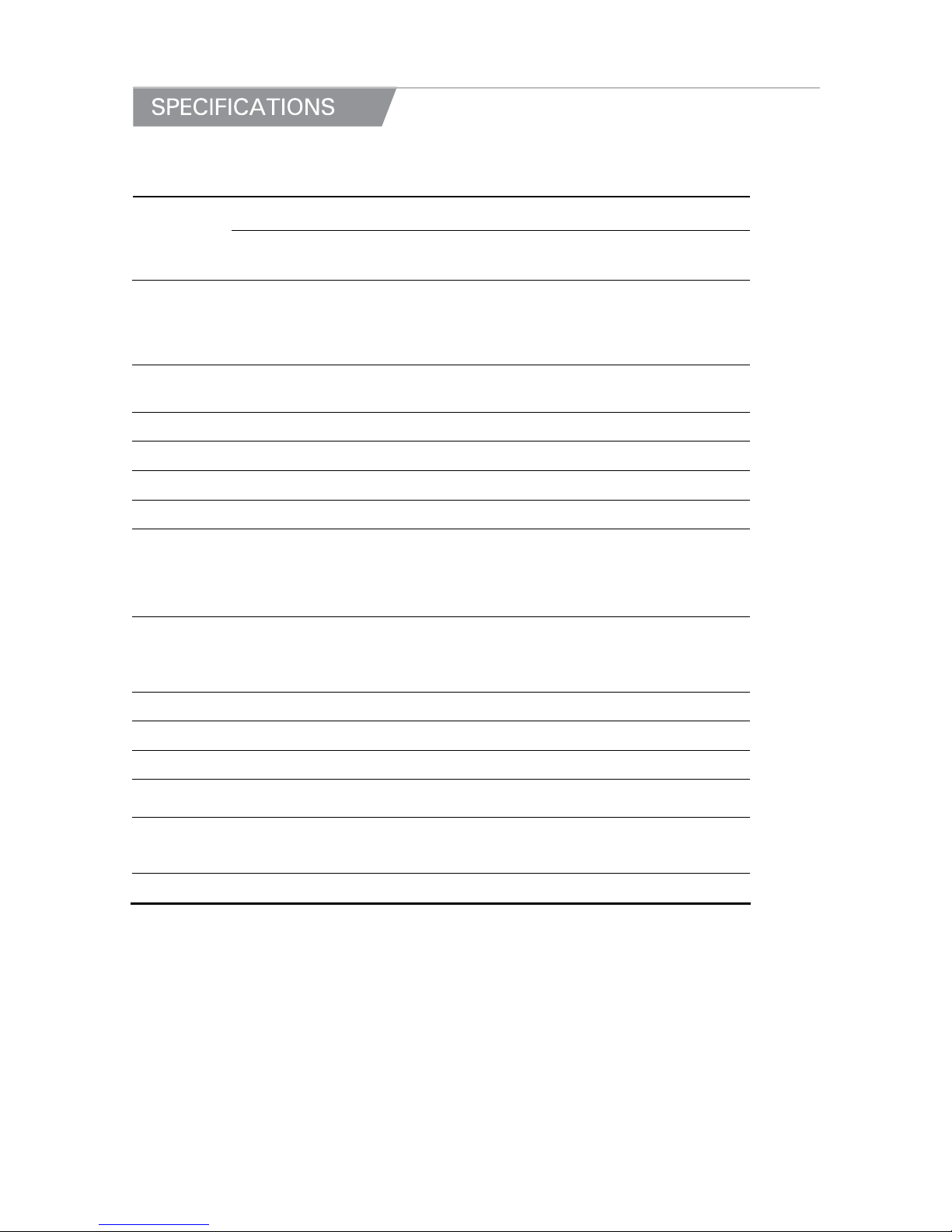
MODEL : PR-ΙΙ
Dual
Interval
Single
Dual
Interval
Single
Dual
Interval
Single
Capacity
Max
3/6kg
Max
6kg
Max
6/15kg
Max
15kg
Max
15/30kg
Max
30kg
e
e=1/2g
e=2g
e=1g
e=0.5g
e=0.2g
e=2/5g
e=5g
e=2g
e=1g
e=0.5g
e=0.5/1g
e=10g
e=5g
e=2g
e=1g
External
Resolution
1/3000
1/3000~
1/30000
1/3000
1/3000~
1/30000
1/3000
1/3000~
1/30000
MAX Tare
- MAX
Display 6/6/6(Weight / Unit price/ Total price)
Symbols ZERO, TARE, kg/lb,100g/1oz, ADD, SUM, Low Battery, AC POWER
Keys ZERO, TARE, M1~M7 KEY, FUCTION, ADD, SUM
Functions
Direct PLU 7
Unit Conversion
Power Save Mode
Back-light ON/OFF Control Function
Dimension
s
P TYPE : 341 (W) x 435 (D) x 474 (H)[mm] / 134 (W) x 171 (D) x 186
(H)[inch]
B TYPE : 341 (W) x 383 (D) x 102 (H)[mm] / 134 (W) x 151 (D) x 40
(H)[inch]
Platter size 330 (W) x 235 (D)[mm] / 129.92 (W) x 92.52 (D)[inch]
Weight 2.8 kg
Power 1.5 V x 3 units (D size Battery), Pb 4V/4Ah, 6 V Adapter
Operation
Time
Approx. 250hours (Manganese Battery) / 500 hours (Alkaline at 20 °C /
68 °F) / Backlight off
Operating
Temperatur
e
-10 °C ~ +40 °C / 14 °F ~ 104 °F
Option RS232, USB, Manganese Battery, Pole Type
※ Notice: Specifications are subject to change for improvement without notice.
20
Page 21

21
Page 22

22
Page 23

23
Page 24
24
 Loading...