

Page 1
500906267 Truck / 500906265 On- Road / 50 0906266 Off-Road // Stand: Juni 2017
Motor-Sound Unit
ALLGEMEIN
Dieses Produkt ist ein leistungsstarkes Fahrzeug Sound-Simulationssystem mit einen effizientem Hochleistungsverstärker. Die besondere Akustik des Lautsprechers erzeugt einen perfekten und
realistischen Simulationseffekt.
LIEFERUMFANG
· Sound-Simulator
· T-Plug- Anschlusskabel
· Tamiya -Anschlusskabel
· Y- Kabel (JR Ste cker/Buchse)
· Klebeband 2x ( Befestigung des Simulators)
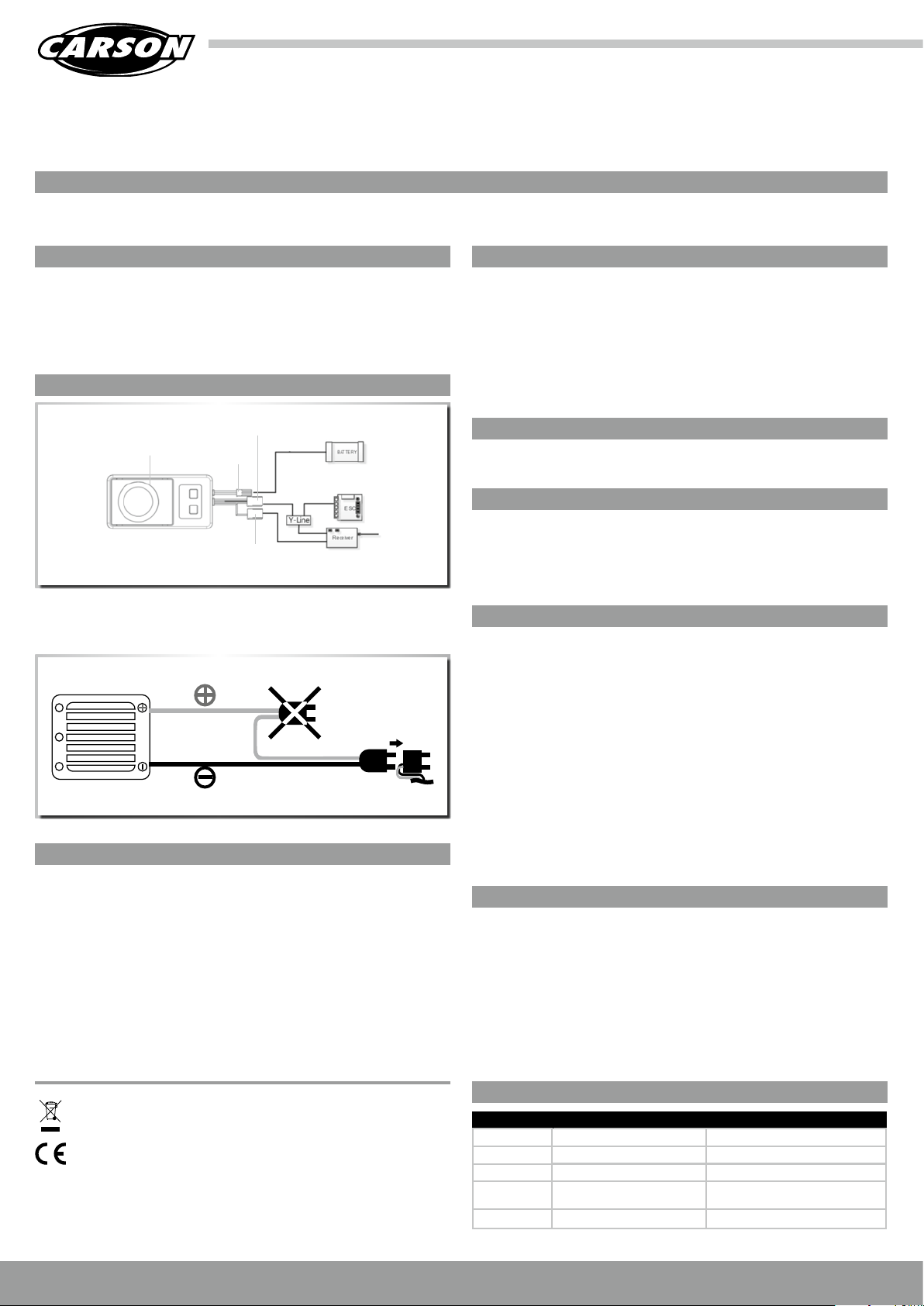
PRODUKTBESCHREIBUNG/ANSCHLUSSPLAN
Ansteuerung Empfänger
Verstärker
Achtung!
Wenn 2 Fahr-Akkus in Reihenschaltung benutzt werden, muss der Motoren-Sound-Simulator am
Stecker der Minus-Leitung des Fahrtreglers angesteckt werden.
BEC Anschluss
(Stromversorgung)
AUX-Anschlusskabel
(3. Kanal)
EINSTELLUNG DER LAUTSTÄRKE
Wichtig !!!
Der Soundsimulator ist grunds ätzlich für den Be trieb mit 2-3 zelligen L iPo oder 5-9 zelligen NiMh
Akkus vorgesehen . Die Verwendung von Akkus mit me hr Zellen bzw. höherer Spannung ist auch
möglich. Hierbei ist aber zu b eachten, dass die Lau tstärkeregelung nur bis ma x. Stufe 5 verwendet werden darf !!!!
· Soundsi mulator durch kurz Betätigun g das Gashebels ak tivieren
· der Simulator besitzt 8 Lautstärkestufen
· Taste “+“ Lautstärke erhöhen
· Taste “-„ Lautstärke redu zieren
Achtung:
Der Simulator verfügt über eine elektronische Temperaturüberwachung. Bei zu großer Hitzeentwicklung, durch zu hoher Lautstärke oder mangelnde Kühlung, kann es zur Abschaltung
kommen.
SICHERHEITSHINWEISE
Dieses Pro dukt ist kein Spielzeug. Die erreichb are Lautstärke dieses Prod uktes kann Schäden
am Gehör verursachen. Bitte beachten, dass ausreichend Abstand zum Lautsprecher eingehalten wird. Bi tte die Anweisungen in der Anlei tung sorgfältig l esen, da falsche Eins tellungen das
Produkt beschädigen könne n. Bitte beachten, dass beim Einbau des Pro dukts ausreiche nde
Belüf tung und Wärmeable itung gegeben ist. Zu hohe Spannung kan n das Produkt zerstören,
bitte die Angaben d es Herstellers b eachten. Bitte bei Lautst ärkeeinstellung beachten, dass
der Ton nicht übersteuer t bzw. verzerrt klingt. (Reduzieren Sie die L autstärke !!!) Bitte bei d er
Programmierung des Simulators Motorkabel abziehen um Verletzungen durch rotierende Teile
zu verhindern. Die Lautstärkeeinstellung ist abhängig von der Eingangsspannung !! (siehe
Einstellung der Lautstärke)
EINBAU
Befestigung des Sound-Simulators erfolgt mit dem im Lieferumfang befindlichen Klebebändern.
Bitte be achten, dass dieser während der Fahrt fest f ixiert ist.
ANSCHLUSS DES SOUNDSIMULATORS
· Fahrakku mit dem BEC Anschluss (Stromversorgung) verbinden. Hierzu wird das Lieferumfang entha ltene Anschlusska bel verwendet. (je nach Akku T-Plug o der Tamiya Anschlusska bel
verwenden)
· Y-Kabel verwenden um Simulator, Fahrregler und Empfänger zu verbinden
· AUX-Anschluss mit freien Steckplatz am Empfänger verbinden (z.B. 3.Kanal)
EINSTELLUNG/PROGRAMMIERUNG
Wichtig !!!
Vor Inbetriebnahme muss der Soundsimulator mit der Fernsteuerung abgeglichen werden.
Programmierschritte:
· Fernsteuerung und Modell einschalten
· Taste „+“ länger als 1 Sek unde gedrückt halten, bis ein Piep Ton zu hören i st
· Simulator befin det sich jetzt im Programmi ermodus
· Programmierung Neutralstellung / Vollgas vorwärts/ Vollgas rückwärts
· Fernsteuerung in Neutralstellung bringen -Taste“+“ drücken – wird mit Piepton bestätigt
· Fernsteuerung in Vollgas vorwärts Position bringen- Taste“+“ drücken- wird mit Piepton
bestätigt
· Fernsteuerung in Vollgas rückwärts Position bringen- Taste“+“ drücken- wird mit Piepton
bestätigt
· Fernsteuerung wieder in Neutralstellung bringen-Programmierung wird mit einen langen
Piepton bestätigt
TECHNISCHE DATEN
· Betriebsspannung: 5 Volt-25Volt
· Ausgangs leistung: max. 30 W ( k urzzeitig)
· Ausgangs leistung: max. 20 W ( b ei 12 V) (ku rzzeitig)
· Lautsprecherimpedanz: 4 Ohm
· Lautstärkeregelung: 8 stufig (ausgeschaltet+7 Stufen)
· Lauts tärkeregelung: 12 V Stufe 1-8
· Lautstärkeregelung: 13-25V Stufe 1-max.5
· Abmessu ngen( L x B x H): 90x40x27mm)
· Gewicht : ca. 70g
Bedeutung des Symbols auf dem Produkt, der Verpackung oder Gebrauchsanleitung:
Elektrogeräte sind Wertstoffe und gehören am Ende der Laufzeit nicht in den Hausmüll!
Helfen Sie uns bei Umweltschutz und Recourcenschonung
bei den entsprechenden Rücknahmestellen ab. Fragen dazu beanwortet Ihnen die für
Abfallbeseitigung zuständige Organisation oder Ihr Fachhändler.
und geben Sie dieses G erät
FEHLERSUCHE
Problem Ursache Lösung
Keine Funktion Akku nicht korrekt angeschlossen Anschluss/Steckverbindung überprüfen
Kein Sound Lautstärke zu gering Lautstärke erhöhen
Schlechter Ton Lautsprecher übersteuert/verzerrt Lautstärke reduzieren
Sound schaltet
von allein e ab
Überhitzung abkühlen lassen
Akku lee r Akku laden
DE // Service-Hotline für Deutschland: 03675 7333 343 // www.carson-modelsport.de
Page 2
500906267 Truck / 500906265 On- Road / 50 0906266 Off-Road // Status: June 2017
Motor Sound Unit
GENERAL
This prod uct is a powerful vehicle sound simulation system with an ef ficient high- power amplifier. The speci al acoustics of the sp eaker create a perf ect and realistic simulation effect.
SCOPE OF SUPPLY
· Sound simulator
· T-Plug connecting cable
· Tamiya connecting cable
· Y-cable (JR connec tor/soc ket)
· Adhesive t ape 2x (for attach ing the simulator)
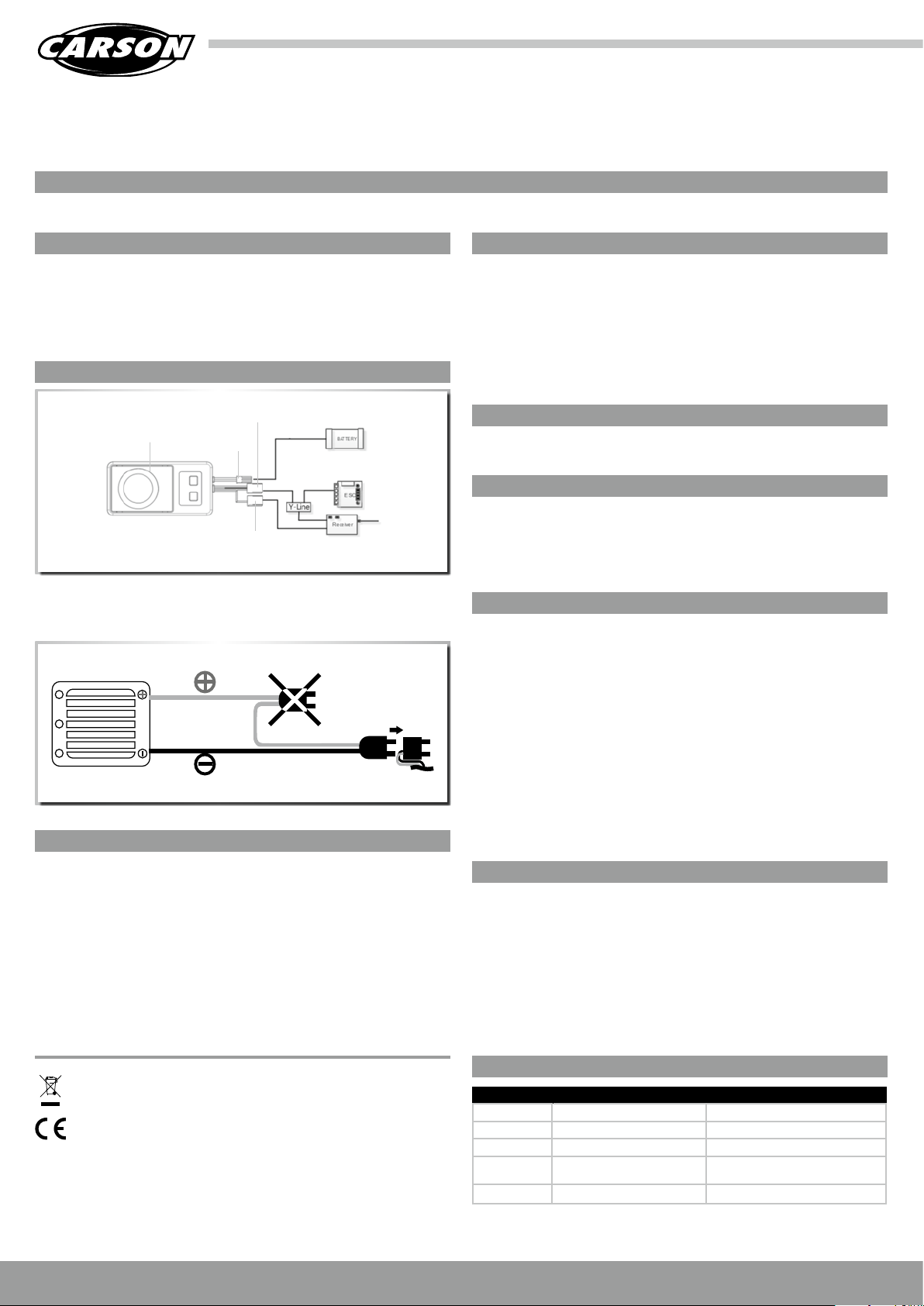
PRODUCT DESCRIPTION/CONNECTION PLAN
Actuation of receiver
Amplifier
Warning!
If 2 drive batteries a re used in series, th e engine sound simulator must be f itted to the conne ctor
of the nega tive lead of the drive controller.
BEC connector
(power supp ly)
AUX connecting cable
(3rd channel)
VOLUME SETTING
Important!!!
The sound simulator is basicall y intended for oper ation with 2-3 cell LiPo or 5-9 cell NiMh b atteries. Bat teries with a greate r number of cells or high er voltage may be used. However, in this c ase
it must be no ted that the volume cont rol may only be used up to level 5 !!!!
· Activate sound simulator by briefly operating the accelerator lever
· The simul ator has 8 volume levels
· Button “+“ increase volume
· Button “+“ reduce volume
Important:
The simula tor has electroni c temperature moni toring. If too much heat builds up, the volume is
too loud or t here is not enough coo ling, the equipmen t will shut off.
SAFETY NOTICES
This prod uct is not a toy. The volume that can be rea ched with this produ ct can cause hearing
damage. Please be sure to maintain a su fficient distance from the speaker. Please read th e
instruc tions in the manual ca refully, since errone ous settings can damage the product . Please
ensure that suffi cient ventilation and heat remov al is provided when th e product is insta lled.
Applyin g too much voltage can d estroy the produc t, please pay atten tion to the manufac turer’s
specifications.
Please ensu re that the sound is not ove rloaded or sound s distorted when a djusting the volume.
(reduce the vo lume !!!) Disconne ct the motor cable to p revent injuries caused by rotati ng parts
when programming the simulato r. The volume set ting depends on the input voltage !! (see
volume setting)
INSTALLATION
The sound simulator is attached using the a dhesive tape inclu ded in the scope of del ivery.
Please ensu re that this is securel y attached during motion.
CONNECTING THE SOUND SIMULATOR
· Connec t battery using t he BEC connection ( power supply). The connectin g cable included
in the scope of supply is u sed for this. (use T-Plug or Tamiya connec ting cable depen ding on
batter y)
· Use Y-cabl e to connect the simul ator, the drive controller and the rece iver
· Connec t AUX connector to free slot of rece iver (e.g. 3rd channel)
SETTING/PROGRAMMING
Important!!!
The sound simulator must be pair ed with the remote control before starting up.
Programming steps:
· Switch on remote contro l and model
· Press but ton “+” for long er than 1 second until a b eep is heard
· Simulator is now in programming mode
· Program ming of neutral posi tion / full speed forwards / full speed revers e
· Move remote control to neutral position and p ress button “+“ – confirmed with beep
· Move remote control to full speed forwar ds position and press button “+“ - confir med with
beep
· Move remote control to full speed reverse position an d press button “+“ - confirme d with
beep
· Move remote control to neutral position aga in - programming is confirme d with a long beep
TECHNICAL DATA
· Operat ing voltage: 5 Volts-25Volt s
· Output : max. 30 W (for a short t ime)
· Output : max. 20 W (with 12 V) (for a shor t time)
· Speaker impedance: 4 Ohms
· Volume contr ol: 8 levels (switched o ff+7 levels)
· Volume contr ol: 12 V Level 1-8
· Volume contr ol: 13-25V leve l 1-ma x.5
· Dimensi ons (L x W x H): 90x40x27mm)
· Weight approx. 70g
Meaning of the symb ol on the product, p ackaging or instr uctions for use: Electric al
appliances contain valuable recyclable materials and should not be discarded in the
domesti c waste at the end of thei r life!
resources
by taking this appliance along to the appropriate local recycling centre. Your
local was te management orga nisation or specia list dealer will be ab le to answer any
queries yo u may have.
Help us protect the e nvironment and conse rve
TROUBLESHOOTING
Problem Cause Solution
Not working Battery not connected properly Check connection/plug connection
No sound Not enough volume Increase volume
Bad sound Speaker overloaded/distorted Reduce volume
Sound switches
off by it self
Overheating Allow to cool down
Battery empty Charge battery
GB // Service-Hotline for Germany: 03675 7333 343 // www.carson-modelsport.de
 Loading...