

Page 1

Ceiling Fan Smart Switch
User Manual
SMART LIFE STAYS IN MOTION
Page 2
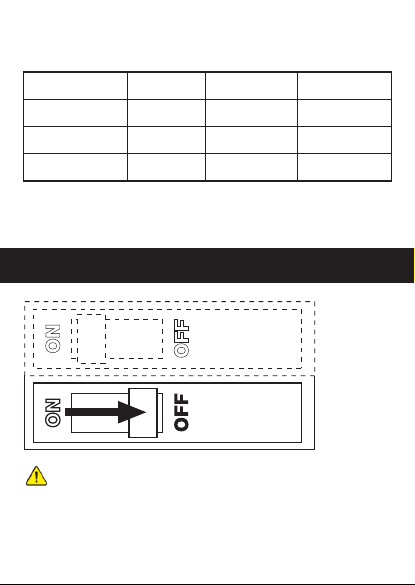
Gen eral Specificatio ns
Mod el
Pow er Supp ly
Max . Curre nt
Wireless Standard
PN-04F02D
AC 12 0V
Fan : 1.5A
Lig ht: 2.5 A
WiF i 2.4GH z
FCC I D
Rated Frequency
Max . Power
WIFI
2AN DL-WB R3
60H z
400 W/gan g
IEEE 802.11b/g/n
Ins talling your switc h
1
Turn p owe r off at c irc uit b rea ker !
WARNING – SHOCK HAZAR D
May r esult i n serio us inju ry or dea th. Turn o ff power a t circu it brea ker
or fu se befo re inst allin g. If you a re unsu re or unc omfor table a bout
per formi ng this i nstal latio n, cons ult a qua lified e lectr ician .
Page 3
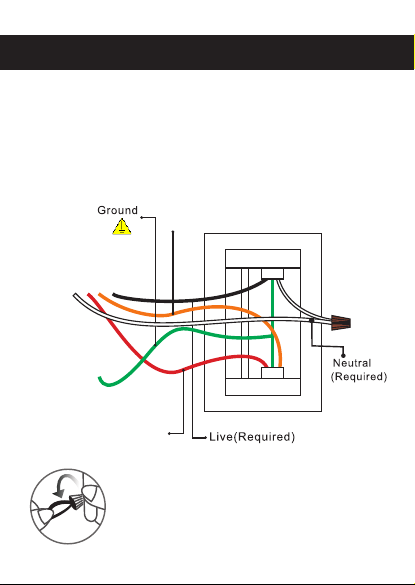
Wir ing S wit ch.
2
Whi te: Neutral (Su ppl ied )
Black: Live
Bare copper or Green : Gro und
Red: Load (Light)
Ora nge: Electric F an
Ele ctric F an
Light
Not e: Make sure all th e wir es ar e con nec ted
with the correct col ors a s sho wn ab ove .
Page 4
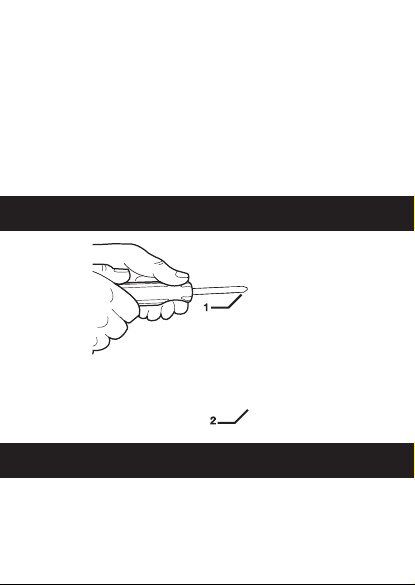
Take ou t the whi te wire a nd wiri ng cap fr om the sc rew bag . S tick th is
whi te wire t o the swi tch usi ng the pr ovide d screw. T hen c onn ect ti ghtly
the w hite wi re to the N eutra l wire fr om the wa ll by wir ing cap .
(If t he leng th of Neu tral wi re from t he wall i s long en ough, c onnec t it
to th e switc h direc tly.)
Con nect ti ghtly t he rema ining w ires fr om the wa ll to the s witch b y the
pro vided s crews a s per the a bove wi ring di agram .
Not e: If the w iring i n your wa ll-bo x does no t resem ble any o f these
con figura tions , consu lt a qual ified el ectri cian.
3
Mou nt the device using th e pro vid ed sc rew s.
Attach the wallplate.
4
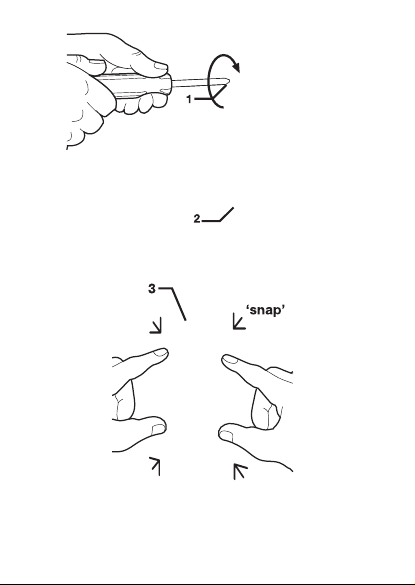
Att ach the a dapte r to the sw itch pa nel usi ng the sc rews pr ovide d and
sna p on the wa llpla te.
Page 5
Ins talla tion of t he Smar t Switc h is now co mplet ed.
Tur n the ci rcuit b reake r back on .
Page 6

Switch can be assembled in several.
5
Swi tch can b e combi ned in 2g ang, 3g ang, or 4 gang bo xes.
The b utton s and swi tch can b e seaml essly c onnec ted tog ether, w hich
ful ly conf orms to t he size o f the hom e switc hbox.
ste p 1 ste p 2
Page 7
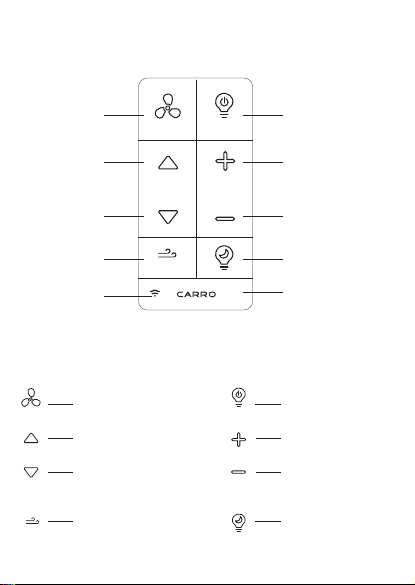
Ope ration
Fan On /Off
Fan Sp eed Up
Fan Sp eed Dow n
Sle ep Bree ze
Fan In dicat or Ligh t
ON/OF F
MINI
ON/O FF
MINI
Turns t he powe r to fan off .
Spee ds up the f an.
Spee ds down t he fan.
Ther e are thr ee gear s of
wind s peed.
Sim ulates a b reeze f or slee p
at the l owest s peed of t he fan.
ON/O FF
ON/O FF
Ligh t On/Off
Ligh t High
Ligh t Low
Nigh t Light
Pair F uncti on,pr ess and
hold b utton f or 5 Seco nds
to re try swit ch and Ap p
conn ectio n.
Turns t he ligh t on and off .
Pre sses to ge t the lig ht
brig hter.
Pre sses to ma ke the li ght
dimm er.
Pre sses to g et a night l ight
at the l owest b right ness of
the li ght.
Page 8

NOT E:If th e fan ind icato r light i s blink ing the n the swi tch is re ady
to pa ir with t he App. If y ou are un able to p air sma rt swit ch with Ap p,
pre ss and ho ld "CAR RO"bu tton fo r 5 Secon ds unti l LED ind icato r
lig ht star ts blin king sl owly on s witch b utton t o pair wi th App aga in.
The f an indi cator l ight is r ed when y ou fail t o conne ct smar t switc h
to App , and gre en when t he conn ectio n is finis hed.
Cle aning : Clean w ith a dam p cloth . DO NOT us e che mica l clea ners .
Page 9

APP cont rol C onn ect ion ( Wifi a nd Bl uet oot h):
1. Fi rst dow nload t he free C arro Ho me app fr om the App S tore or G oogle P lay
or sc an the QR C ode as be low.
2. Op en the Ca rro Hom e app to cr eate yo ur acco unt. Th e accou nt with
“Ca rro Hom e” can be r egist ered th rough E -mail o r Mobil e phone .
3. Co nnect t he devi ce to the C arro Ho me app (F our way s conne ction ):
① Blu etoot h conne ct (WIF I & Bluet ooth on )
a. Pr ess “+” b utton i nto the d evice l ist, th en a wind ow will p op up to sh ow
you s ome dev ices ca n be conn ected .
b. Cl ick “Go t o add” (I f you cli ck “Do no t add” in m istak e, plea se see “D o
not a dd” ste ps).
c. Ch oose th e devic e.
d. Co nnect t o your ho me WIFI , then ba ck to the a pp and wa it
for c onnec ting.
“Do n ot add” s teps:
a. Se lect “E lectr ical” (smar t switc h) or “Ai r Circu latio n”(sm art cei ling fa n) on
the s ideba r menu th en sele ct “Cei ling Fa n Switc h” or “Ce iling F an” and t ap
nex t.
b. Co nnect t o your ho me WIFI a nd tap “N ext” to w ait for c onnec ting.
② Auto S can (WI FI & Blue tooth o n)
a. Pr ess “+” b utton i nto the d evice l ist.
b. Tap “A uto Sca n” on the t op.
c. Wai t for the d evice c omes ou t and tap “ Next” .
d. Pr ess “+” b utton t o add dev ice.
e. Co nnect t o your ho me WIFI .
f. Wai t for con necti ng.
③ WIF I conne ct-EZ M ode (WI FI on & Blu etoot h off)
a. Pr ess “+” b utton t o selec t “Elec trica l”(sm art swi tch) or “ Air Cir culat ion”
(sm art cei ling fa n) on the s ideba r menu th en sele ct “Cei ling Fa n Switc h” or
“Ce iling F an” and t ap next .
b. Co nnect t o your ho me WIFI ( Only fo r 2.4Gh z).
c. EZ M ode is se t as defa ult, ju st tap “N ext” bu tton to w ait for t he conn ectio n
to co mplet e.
④ WIF I conne ct-AP M ode (WI FI on & Blu etoot h off)
a. Sm art cei ling fa n: Pres s and hol d the WIF I butto n on the re mote fo r 5
sec onds in to AP Mode .
Page 10

Sma rt swit ch: Pre ss and ho ld the “C ARRO” b utton f or 5 seco nds til l the
ind icato r light b linki ng slow ly to int o AP Mo de.
b. Pr ess “+” b utton t o selec t “Elec trica l”(sm art swi tch) or “ Air Cir culat ion”
(sm art cei ling fa n) on the s ideba r menu th en sele ct “Cei ling Fa n Switc h” or
“Ce iling F an” and t ap next .
c. Co nnect t o your ho me WIFI ( Only fo r 2.4Gh z).
d. Ch oose AP Mo de.
e. Pr ess “Ne xt” but ton to go t o conne ct the fa n’s WIF I signa l.
f. Ch oose th e fan’s W IFI sig nal “Ca rroHo me-XX XX” the n back to t he app.
g. Wai t for con necti ng.
4. Co nnect t he devi ce to the Al exa:
a. Ma ke sure y ou have c onnec ted the d evice t o the app a nd work ing
nor mally.
b. Op en Alexa a pp, go to t he skil l to sear ch “Car ro Home ” skill .
c. Li nk the sk ill, lo g in with y our Car ro Home a pp acco unt and p asswo rd,
the n autho rize an d conne ct with C arro Ho me app.
d. Th en the Ale xa will fi nd out th e devic e autom atica lly.
5. Co nnect t he devi ce to the G oogle H ome
a. Ma ke sure y ou have c onnec ted the d evice t o the app a nd work ing
nor mally.
b. Op en Goog le Home a pp, Set u p a devic e, choo se “Wor ks with G oogle ”.
c. Se arch “C arro Ho me”, lo g in with y our Car ro Home a pp acco unt and
pas sword , then au thori ze and co nnect w ith Car ro Home a pp.
d. Th en the Go ogle Ass istan t will fin d out the d evice a utoma tical ly.
6. Co nnect t he devi ce to the S iri sho rtcut s
a. Ma ke sure y ou have c onnec ted the d evice t o the app a nd work ing in
fun ction al.
b. Tap “S mart” o n the mai n menu.
c. Tap “+ ” butto n.
d. Tap “l aunch Tap To Run ”.
e. Tap “R un the de vice” .
f. Ch oose th e devic e you wan t to cont rol by Si ri.
g. Se lect th e funct ion you w ant to co ntrol b y Siri.
h. Th en save i t.
I. Add t o Siri, c hoose t he scen e you jus t made, Ad d to Siri .
j. En ter the s enten ce you wa nt to say t o make th e devic e works , Add t o Siri.
Page 11

Troubleshooting
Symptom
Fan a nd ligh t do
not t urn ON an d
no in dicat or
lig hts tur n ON.
Sol ution
• Ens ure Fro nt Acces sible S ervic e Switc h
(FAS S) is ful ly push ed in to th e ON posi tion.
• Ens ure bot h fan and l ight pu ll chai n are set
to hi ghest p ossib le sett ing.
• Lig ht bulb (s) bur ned out a nd the fa n is in
the o ff posit ion. En sure fa n is in the h ighes t
spe ed sett ing and r eplac e light b ulbs as
nee ded.
• Lig ht is not p roper ly inst alled .
• Bre aker is O FF or tri pped (o r fuse bl own).
Res et brea ker or re place f use. If c ondit ion
per sists , conta ct Carr o Home Tech nic al
Sup port Ce nter or a l icens ed elec trici an.
Fan d oes not w ork.
Fan v ibrat es or
wob bles.
Lig ht butt on
con trols f an and
vic e-ver sa.
Fan s peed is t oo
slo w.
Una ble to pa ir
swi tch and a pp
• Fan d irect ion swi tch is be tween f orwar d
and r evers e. Set sw itch to d esire d posit ion.
• Fan b lades a re not pr operl y balan ced.
See f an manu factu rer’ s inst ructi ons.
• Fan a nd ligh t wires a re reve rsed.
Rev iew ins talla tion st eps and r evise w iring .
• Set f an spee d to high .
•Th e WIFI mu st be 2.4 Ghz, in compa tible w ith
5Gh z WIFI.
•Pr ess and h old CAR RO butt on for 5 se conds
unt il LEDs s tart bl inkin g slowl y on swit ch butt on
to pa ir with Ap p again . Use the AP m ode w ill
imp rove yo ur succ ess rat e for the W iFi
con necti on.
Page 12

FCC/IC Information
Thi s devic e compl ies wit h part 15 o f the FCC R ules an d Indus try Can ada
lic ense- exemp t RSS sta ndard (s). Op erati on is sub ject to t he foll owing
two c ondit ions:
(1) T his d evic e may not c ause in terfe rence , and (2) t his dev ice mus t
acc ept any i nterf erenc e, incl uding i nterf erenc e that ma y cause u ndesi red
ope ratio n. Modi ficati ons not e xpres sly app roved b y Carro U SA Inc. co uld
voi d the use r’s au thor ity to op erate t his equ ipmen t.
Not e: This e qui pmen t has bee n teste d and fou nd to com ply wit h the lim its
for a C lass B di gital d evice , pursu ant to pa rt 15 of th e FCC Rul es. The se
lim its are d esign ed to pro vide re asona ble pro tecti on agai nst har mful
int erfer ence in a r eside ntial i nstal latio n.
Thi s equip ment ge nerat es, use s and can r adiat e radio f reque ncy ene rgy
and , if not in stall ed and us ed in acc ordan ce with t he inst ructi ons, ma y
cau se harm ful int erfer ence to r adio co mmuni catio ns.
How ever, th ere is no g uaran tee tha t inter feren ce will n ot occu r in a
par ticul ar inst allat ion. If t his equ ipmen t does ca use har mful in terfe rence
to ra dio or te levis ion rec eptio n, whic h can be de termi ned by tu rning t he
equ ipmen t off and on , the use r is enco urage d to try to c orrec t the
int erfer ence by o ne or mor e of the fo llowi ng meas ures:
—Re orien t or relo cate th e recei ving an tenna .
—In creas e the sep arati on betw een the e quipm ent and r eceiv er.
—Co nnect t he equi pment i nto an ou tlet on a c ircui t differ ent fro m that to
whi ch the re ceive r is conn ected .
—Co nsult t he deal er or an ex perie nced ra dio/T V techn ician f or help .
Car ro Inc .USA
143 1 S.Bak er Ave. On tario C A 917 61
Tel: 88 8-253 -2374
www. carro home. com | cs@ carro home. com
 Loading...