

Page 1
Taiwan Carol Electronics Co., Ltd.
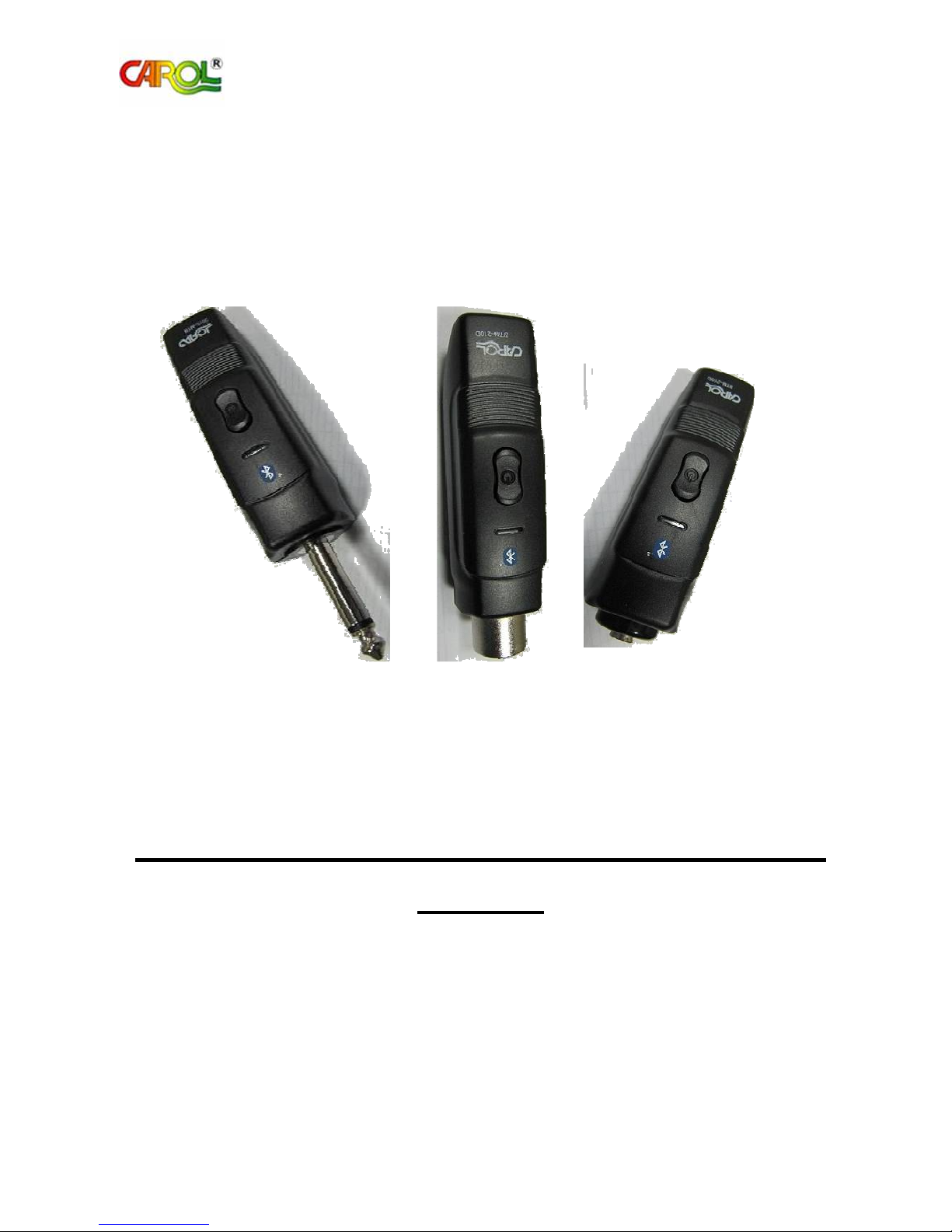
Bluetooth Transmission Adapter BTM-210
Manual
1. Bluetooth D35 Transmitter: Model: BTM-210C, FCC ID: G4RBTM-210C
2. Bluetooth XLRT Transmitter: Model:BTM-210D, FCC ID:G4RBTM-210D
3. Bluetooth Receiver: Model: BTM-210R, FCC ID: G4RBTM-210R
1
Page 2
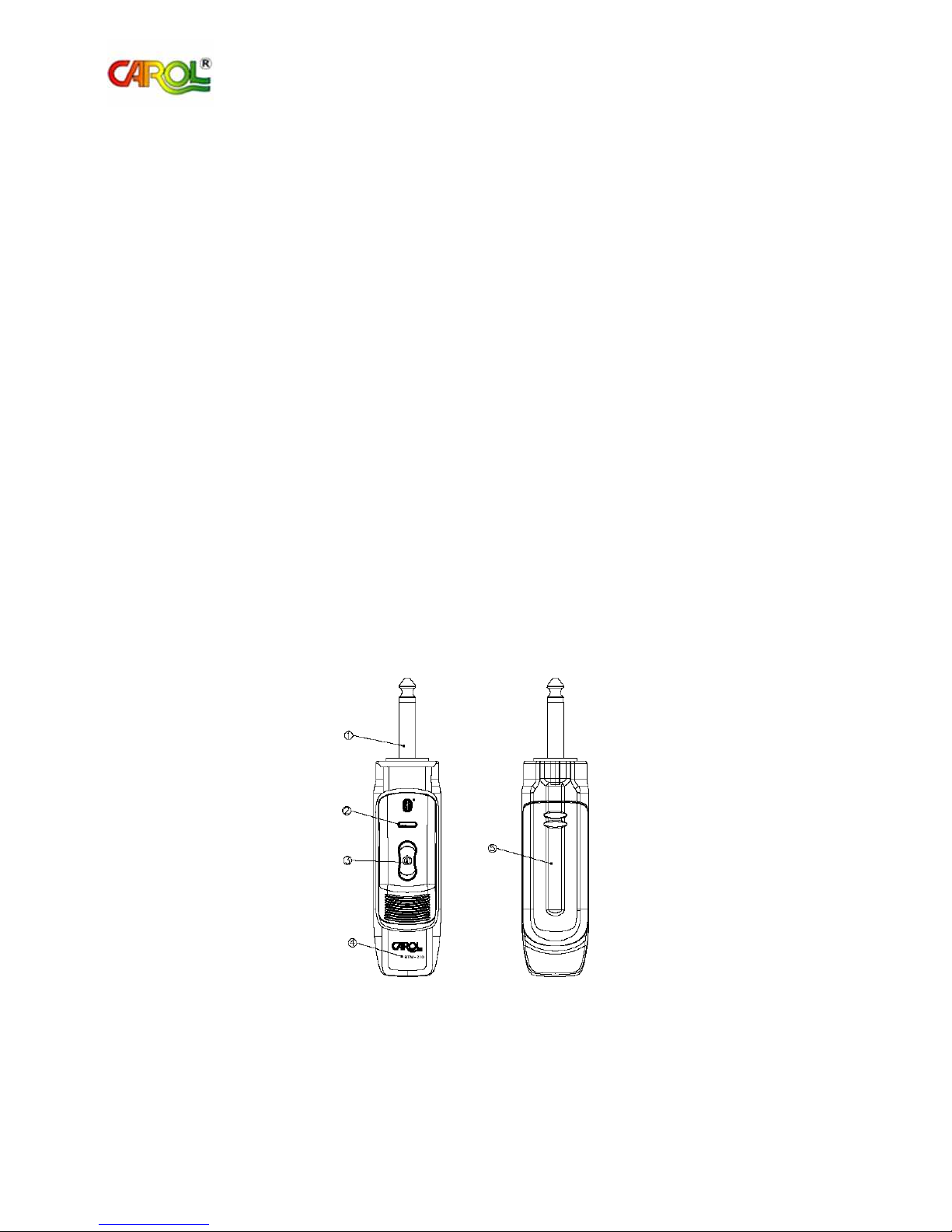
Ø6.3 Male
Plug
: for connecting amplif
ier or output device
LED Indicator
:
for indicating operating status
Taiwan Carol Electronics Co., Ltd.
We appreciate your smart choice for the BTM-210 Bluetooth Transmission Adapter. Before use please
read carefully the manual to obtain the correct operating instructions and the optimal performance.
BTM-210 Bluetooth Transmission Adapter is designed for short distance, high quality, free of
movement restriction, portability and low interference with the latest Bluetooth transmission technology.
The universal voice wireless transmission platform based on dynamic and condenser microphone has
appealing appearance and delicate texture.
1. BTM-210 Bluetooth Transmission Adapter Accessories
1.1 BTM-210R + BTM-210C
Ø6.3 male plug receiver
Ø3.5 female socket transmitter (suitable for condenser microphone)
Manual
1.2 BTM-210R + BTM-210D
Ø6.3 male plug receiver
XLR female socket transmitter (suitable for dynamic microphone)
Manual
2. Components and Function
A Bluetooth transceiver comprises a receiver (RX) and a transmitter (TX).
2.1 Receiver (RX) BTM-210R
Power Switch : for switching power ON/OFF and operating
Model : equipment model
Battery Cover : for protecting battery and positioning replacement
function
battery
2
Page 3
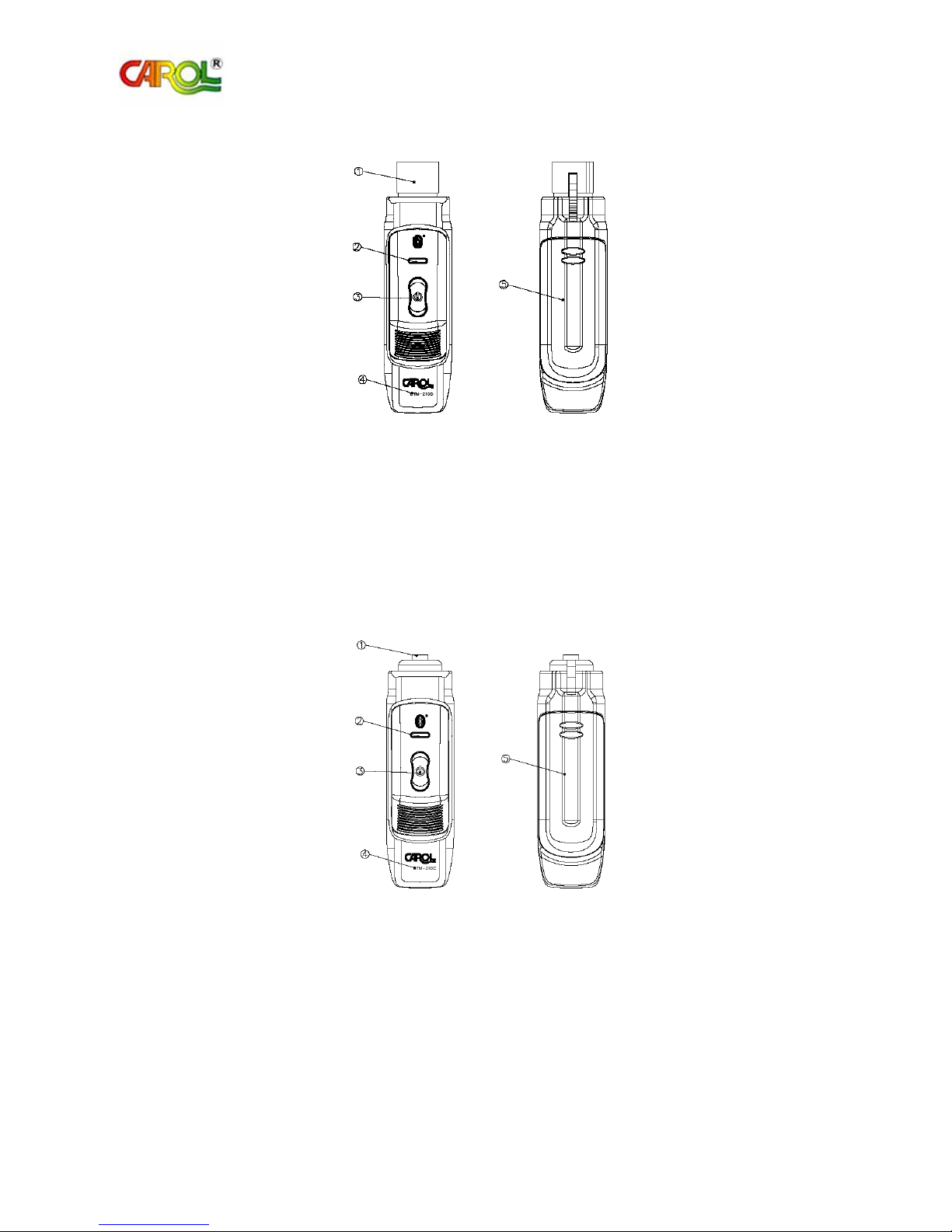
XLR Female Connector
: for connecting microphone with XLR male socket
Ø3.5 Female Socket
:
for connecting microphone with Ø 3.5 male
LED Indicator
:
for indicating operating status and function
Taiwan Carol Electronics Co., Ltd.
2.2 XLR transmitter (TX) BTM-210D
at output end
LED Indicator : for indicating operating status
power Switch : for switching power ON/OFF and operating
function
Model : equipment model
Battery Cover : for protecting battery and positioning replacement
battery
2.3 D35 transmitter (TX) BTM-210C
Power Switch : for switching power ON/OFF
Model : equipment model
Battery Cover : for protecting battery and positioning replacement
connector at output end
battery
3
Page 4

Red light and green light flash once
Taiwan Carol Electronics Co., Ltd.
3. Operating Instructions
3.1 Product Use
3.1.1 By using one receiver (RX) and one transmitter (TX), you will be able to transmit
sound from dynamic (XLR Connector) microphone (Ø3.5 Phone Jack connecting
capacitor microphone) through Bluetooth Transmission Adapter to amplifier.
3.1.2 By using one receiver (RX), you can receive sound signal from computer or mobile
phone and play it to amplifier. The computer or mobile phone needs to have Bluetooth
transmission function. For computer or mobile phone operation, please refer to its
manual.
3.2 Description of Lights
Module Status Light Mode
Power On
Automatic Connection
Sound Transmission
Power Off
Low Batter Power
Green light flashes twice every 1
second.
Red light and green light flash
alternatively once every 1 second.
Green light flashes once every 2
seconds.
Red light flashes once every 0.5
second.
every 2 seconds.
4
Page 5
Taiwan Carol Electronics Co., Ltd.
3.3 Operating Instructions
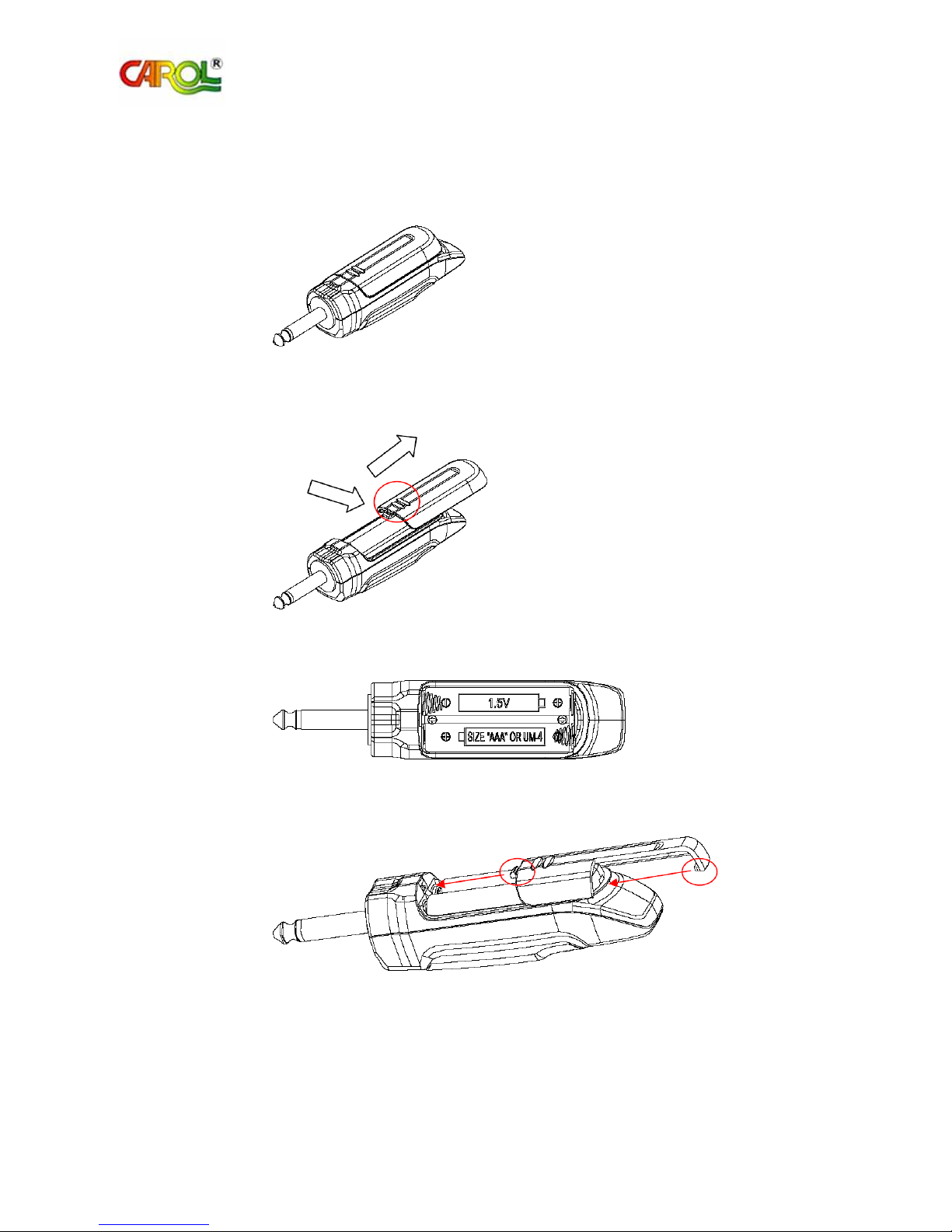
3.3.1 Install and replace battery
(1) Flip Bluetooth receiver (transmitter) for battery cover to face up.
(2) Hold down the bump (as shown inside the circle in Figure 2) and push back and
down to open the battery cover.
Figure 1
Figure 2
(3) Follow the indicated battery direction and put in two AAA batteries.
Figure 3
(4) Put back the battery cover. Make sure that the two latches are in the right place.
Figure 4
5
Page 6

Taiwan Carol Electronics Co., Ltd.
3.3.2 Power On
(1) Put batteries in Bluetooth receiver (transmitter).
(2) Hold down the button for 2 seconds to turn on Bluetooth receiver (transmitter).
(3) Green light will flash twice every 1 second.
(4) Bluetooth receiver (transmitter) will be in automatic connection status.
(5) If the button is held down for 3 seconds and Bluetooth receiver (transmitter) is not
turned on yet, check if the battery still has power. If the battery has power, replace
the battery in 10 seconds and then hold down the button for 3 seconds to turn on
Bluetooth receiver (transmitter).
3.3.3 Automatic Connection
(1) After power is on, the equipment is in automatic connection status.
(2) Bluetooth receiver (transmitter) will search for nearby Bluetooth devices while the
red light and green light flash alternatively once every one second.
(3) Bluetooth receiver (transmitter) can memorize three sets of connection data and
erase the earliest data if exceeded.
3.3.4 Sound Transmission
(1) As Bluetooth receiver (transmitter) in automatic connection status finds Bluetooth
equipment for sound transmission, Bluetooth receiver (transmitter) will
automatically be in sound transmission status.
(2) In sound transmission status, transmitter (TX) can transmit sound signal to receiver
(RX). Green light will flash once every two seconds.
3.3.5 Power Off (Low Power)
(1) When Bluetooth receiver (transmitter) is on, hold down the button for 2 seconds to
turn it off.
(2) When Bluetooth receiver (transmitter) detects low battery power, red light and
green light will flash once every 2 seconds to prompt for battery replacement. If the
user does not replace batteries and Bluetooth receiver (transmitter) detects even
lower power, power supply will be interrupted to prevent permanent damage to
rechargeable batteries due to low voltage.
(3) If Bluetooth receiver (transmitter) cannot find a Bluetooth device after 5 minutes,
Bluetooth receiver (transmitter) will automatically power off.
6
Page 7
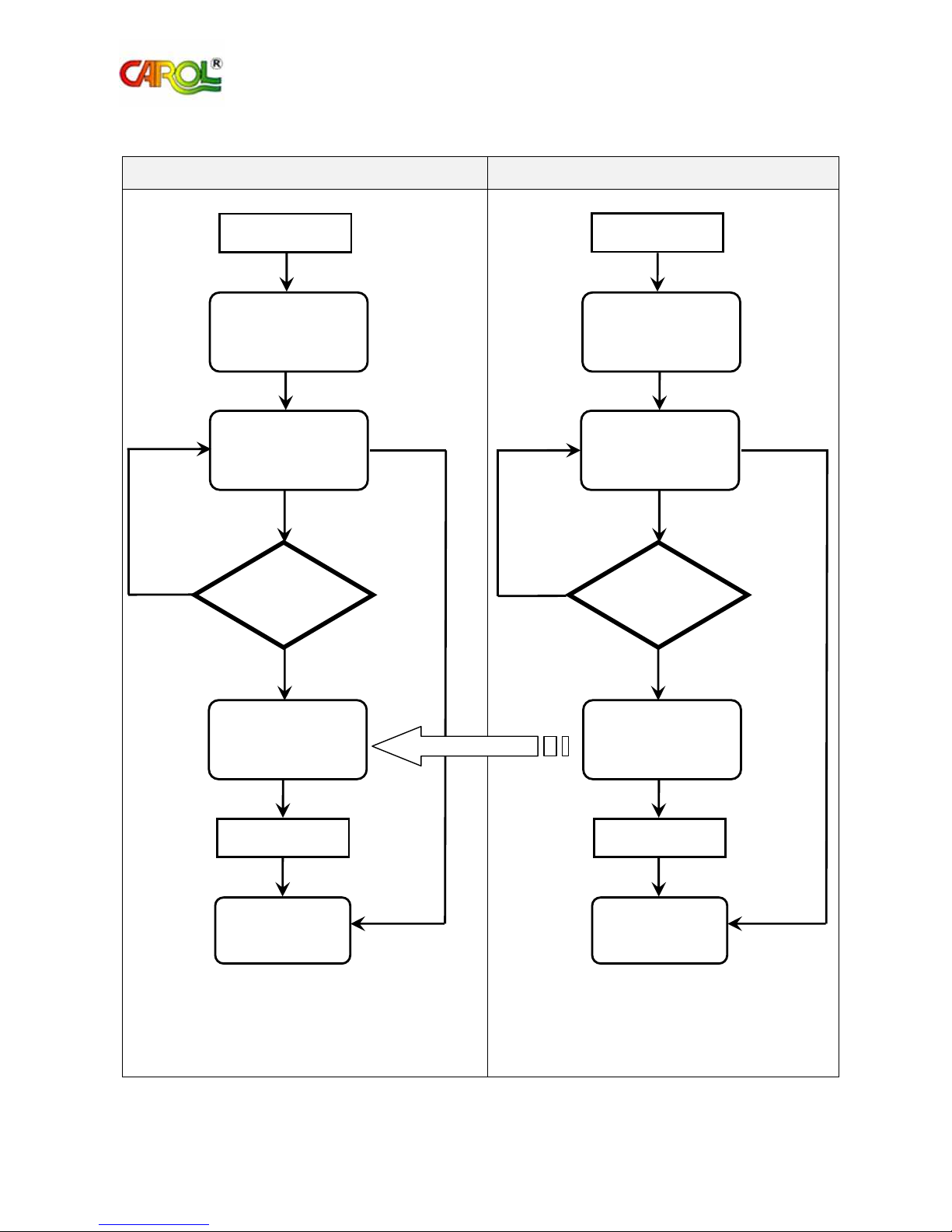
(3.3.3)
(3.3.5)
Connection
(3.3.
4)
(3.3.3)
(3.3.5)
(3.3.
4)
minutes
Sound Signal
Transmission
Connection
minutes
Taiwan Carol Electronics Co., Ltd.
3.3.6 Operating Procedures
Receiver (RX) XLR, D35 Transmitter (TX)
No
Hold down button
Enter in 3 seconds
Power On
(3.3.2)
After 5
Automatic
Connection
No
Successful
Yes
Sound
Transmission
Hold down button
Enter in 2 seconds
Power Off
Hold down button
Transmission
Hold down button
Enter in 3 seconds
Power On
(3.3.2)
After 5
Automatic
Connection
Successful
Yes
Sound
Enter in 2 seconds
Power Off
7
Page 8

C
annot power on
1.
Make sure that battery power is sufficient.
If power still cannot be turned on, remove batteries first and complete
Cannot connect
1.
Turn on rece
iver (RX) first, transmitter (TX) later.
Press the button continuously three times. Red light will flash quickly
Mobile phone an
d receiver
Make sure that the mobile phone has correct music play mode and the
Taiwan Carol Electronics Co., Ltd.
4. Troubleshooting
Problem Solution
Mobile phone and receiver
(RX) are ever connected,
but fail to remain
connected.
2.
cut off the power for Bluetooth receiver (transmitter). After 10
seconds, try it again.
2. Except receiver (RX) and transmitter (TX), turn off all unrelated
Bluetooth devices within effective distance.
3. Press the button continuously five times. Red light will flash quick
five times to clear pairing data (required for all pairing devices
including receiver (RX), transmitter (TX), mobile phone or
computer). Try connecting it again.
4.
three times for manual connection.
It is suggested to clear old paring data record for mobile phone. Repeat
procedures “search>pair>connect”. Similarly, receiver (RX) may also
need to clear pairing data.
(RX) are connected, but
there is no sound.
volume is at adequate level without being muted.
5. Specifications
5.1 Compatibility Standard: Bluetooth specification V2.1 EDR
5.2 Support: Advanced Audio Distribution Profile (A2DP)
5.3 Radiated Power Specification: Class 1
5.4 Communication Distance: at least 20 meters (straight-line distance)
5.5 Battery quantity, specification: AAA size ×4 (TX×2 , RX×2 )
5.6 Battery Life: approximately 8 hours
5.7 Receiver (RX) is equipped with Ø6.3 Phone Plug
5.8 XLR transmitter (TX) is equipped with XLR socket, suitable for dynamic microphone
5.9 Ø3.5 transmitter (TX) is equipped with ø3.5 Phone Jack (socket) suitable for capacitor
microphone
5.10 Carrier Band: ISM band 2.400~2.4835GHz
5.11 Radiation Power: +12dBm
5.12 Radiation Reception Sensitivity: -90 to –20dBm
5.13 Maximum Output Voltage: 100mVrms
5.14 Maximum Current Consumption: 80mA
5.15 Frequency Response: 20~20KHz
8
Page 9

Taiwan Carol Electronics Co., Ltd.
6. Special Notes
6.1 Do not use new and dead batteries together (or use batteries of different specification). The
dead battery (or low power batter) will hinder most power supply and reduce the life of a new
battery, and could even cause leakage or explosion.
6.2 Receiver (RX) can only receive sound signal from one transmitter (TX) and cannot receive
signals simultaneously from two or more transmitters (TX).
6.3 If alkaline battery or others of similar specification, Bluetooth receiver (transmitter) can
operate for approximately 8 hours.
6.4 Connection between mobile phone and receiver (RX):
Set up the receiver (RX) first to automatic connection status. Set up the mobile phone by
referring to mobile phone manual. General mobile phone setup procedure is “search > pair >
connect”. During automatic connection, it probably needs to enter “0000” pairing code in the
mobile phone.
6.5 Connection between Bluetooth computer and receiver (RX):
It is recommended to use the software by IVT Corporation from the following website:
http://www.ivtcorporation.com/download/BlueSoleil_Download.php
Bluetooth computer setup procedure is generally like “search > pair > function search > select
function connection”. Follow computer operating instructions. Remember to set up receiver
(RX) to automatic connection status first with pairing code “0000”. After connection, on
computer select the Bluetooth device as sound output device.
6.6 To connect Bluetooth computer and transmitter (TX), first set the Bluetooth computer to be
available for search and set it to be stereo earphone device. After connection, on computer
select the Bluetooth device as sound input device.
6.7 The name of transmitter (TX) is shown on computer as “CAROL BTM-210D” or “CAROL
BTM-210C”; the name of receiver (RX) is shown on mobile phone or computer as “CAROL
BTM-210R”.
9
Page 10

Taiwan Carol Electronics Co., Ltd.
Bluetooth Transmission Adapter BTM-210 serial
Brand : CAROL
Bluetooth D35 Transmitter: Model: BTM-210C
Bluetooth XLRT Transmitter: Model:BTM-210D
Bluetooth Receiver: Model: BTM-210R
EU Declaration of Conformity and Restrictions
Hereby,
requirements and other relevant provisions of Directive 1999/5/EC.
This equipment is marked with the symbol and can be used throughout the European community.
This indicates compliance with the R&TTE Directive 1999/5/EC and meets the relevant parts of following technical
specifications:
EN 300 328
EN 301 489-1/-17
EN 60950
EN 50371
France - 2.4GHz for Metropolitan France:
In all Metropolitan départements, wireless LAN frequencies can be used under the following conditions, either for
public or private use:
· Indoor use: maximum power (EIRP*) of 100 mW for the entire 2400-2483.5 MHz frequency band
· Outdoor use: maximum power (EIRP*) of 100 mW for the 2400-2454 MHz band and with maximum power
(EIRP*) of 10 mW for the 2454-2483 MHz band
Caution: Exposure to Radio Frequency Radiation.
To comply with RF exposure compliance requirements, for mobile configurations, a separation distance of at least
This device is intended for use in the following European Community countries:
Austria Belgium Czech Republic Cyprus
Denmark Estonia France Finland
Germany Greece Hungary Ireland
Italy Iceland Luxemburg Latvia
Lithuania Malta Norway Netherlands
Portugal Poland Spain Sweden
Slovakia Slovenia United Kingdom
TAIWAN CAROL ELECTRONICS CO., LTD.
20 cm must be maintained between the antenna of this device and all persons.
declares that this equipment complies with the essential
10
Page 11

Taiwan Carol Electronics Co., Ltd.
Brand : CAROL
Model : BTM-210R / BTM-210D / BTM-210C
FCC ID: G4RBTM-210R / G4RBTM-210D / G4RBTM-210C
Bluetooth Transmission Adapter BTM-210 serial
Brand : CAROL
Bluetooth D35 Transmitter: Model: BTM-210C, FCC ID: G4RBTM-210C
Bluetooth XLRT Transmitter: Model:BTM-210D, FCC ID: G4RBTM-210D
Bluetooth Receiver: Model: BTM-210R, FCC ID: G4RBTM-210R
this device complies with Part 15 of the FCC Rules. Operation is subject to the following
two condition: (1)this device may not cause harmful interference, and(2) this device
must accept any interference received, including interference that may cause
undesired operation.
The changes or modifications not expressly approved by the party responsible for
compliance could void the user’s authority to operate the equipment.
To comply with the FCC RF exposure compliance requirements, this device and its
antenna must not be co-located or operating to conjunction with any other antenna or
transmitter.
Note: This equipment has been tested and found to comply with the limits for a Class B
Digital Device, pursuant to part 15 of the FCC Rules. These limits are designed to
provide reasonable protection against harmful interference in a residential installation.
This equipment generates, uses and can radiate radio frequency energy and, if not
installed and used in accordance with the instruction, may cause harmful interference
to radio communication. However, there is no grantee that interference will not occur in
a particular installation. If this equipment dose cause harmful interference to radio or
television reception, which can be determined by turning the equipment off and on, the
user is encouraged to try to correct the interference by one or more of the following
measures:
--Reorient or relocate the receiving antenna.
--Increase the separation between the equipment and receiver.
--Connect the equipment into an outlet on a circuit different from that to which the
receiver is connected.
--Consult the dealer or an experienced radio/TV technician for help.
11
Page 12

Taiwan Carol Electronics Co., Ltd.
TAIWAN CAROL ELECTRONICS CO., LTD.
No. 202 Tung Kuang Road, Taichung, Taiwan.
Tel: +886-4-22347677; Fax: +886-4-22348698
Email: [email protected]
www.taiwancarol.com
12
 Loading...