

Page 1

Instructions for Use
Page 2

TABLE OF CONTENTS
WARNING
Warning.........................................3
Indications for Use..............................4
How it Works.........................................4
What’s Inside.........................................5
Sensor Features...................................6
Getting Started.....................................8
Attaching the Sensor.........................9
Pairing the Sensor.............................10
Using the Sensor................................11
Troubleshooting................................12
An up-to-date version of these instructions can be found online. Please
visit the website listed on the back cover of these instructions.
Understanding Indicator Lights....13
Customizing with Color Bands......14
Cleaning the Sensor..........................14
Detaching the Sensor.......................15
Unpairing the Sensor........................15
Replacing the Sensor Battery.......16
Symbol Denitions...........................18
Sensor Operating & Storage..........19
EMC Statement...................................19
FCC Statement...................................19
CARETRX SENSOR - INSTRUCTIONS FOR USE CARETRX SENSOR - INSTRUCTIONS FOR USE2 3
The CareTRx™ Sensor (“Sensor”) and CareTRx Apps (“App”) are for
informational purposes only, and are not intended to provide diagnostic
or treatment information, nor are they intended to replace advice from
a licensed medical provider. Always consult your personal physician
or other healthcare provider when seeking individualized treatment
regarding any medical condition.
The Sensor records the date and time it is pressed while attached to the
canister, it does not record inhalation of the medication or the quantity of
the dose delivered by the metered-dose inhaler (“MDI” or “inhaler”). Do
not modify use of the prescribed medication based on information from
the Sensor or App. Always consult with your healthcare provider before
making changes to your healthcare regimen. If the Sensor fails to operate
in any way, if the Sensor interferes with use of the prescribed medication,
or if there appears to be any damage to the inhaler, discontinue use of
the Sensor.
The Sensor does not control dispensing of a dosage or otherwise aect
the dosage of a drug. It is not intended to replace an inhaler dose
counter, if present, and it does not indicate the quantity of medication
remaining in an inhaler or administered to a patient. The system is
intended for users of metered-dose inhalers, however, supervision by a
parent or guardian is required if the user is under the age of 14.
Page 3

INDICATIONS FOR USE
CareTRx is intended for use by patients, caregivers, and healthcare
providers to assist in recording usage of metered-dose inhaler
medications and to provide medication reminders. It includes the CareTRx
Sensor - a wireless Sensor for tracking inhaler use - and the CareTRx
Apps.
HOW IT WORKS
WHAT’S INSIDE
The CareTRx Sensor is an electronic, wireless, battery-powered
accessory device intended to assist in recording usage of metereddose inhaler medications. The Sensor needs to be programmed using
the CareTRx App to provide reminders for scheduled doses in the form
of blinking lights. Data collected from the Sensor is transferred via
Bluetooth® to the CareTRx App and then stored on secure servers.
The CareTRx App displays this data to the user and also supports manual
entry of other events related to a patient’s respiratory condition.
CARETRX SENSOR - INSTRUCTIONS FOR USE CARETRX SENSOR - INSTRUCTIONS FOR USE4 5
Instructions for Use
1 CareTRx™ Sensor
(Replaceable battery included)
1 Extra Color Band
Page 4

SENSOR FEATURES
SENSOR FEATURES (continued)
SIDE VIEW
BOTTOM VIEW
SENSOR BUTTON
Records the date and time the Sensor is
pressed while attached to the canister.
INDICATOR LIGHTS
Blinking provides reminders for scheduled
doses and communicates Sensor status.
See Understanding Indicator Lights for
more detail.
SENSOR ID NUMBER
The Sensor ID Number is used to identify
which Sensor is being paired. See Pairing
the Sensor for more detail.
BATTERY DOOR AND BATTERY
Replaceable battery included. See
Replacing the Sensor Battery for more
detail.
INTERCHANGEABLE COLOR BAND
Blue and purple colors available.
See Customizing with Color Bands for
more detail.
ATTACHMENT DETECTOR
Records when the Sensor is attached or
detached from the inhaler canister.
CARETRX SENSOR - INSTRUCTIONS FOR USE CARETRX SENSOR - INSTRUCTIONS FOR USE6 7
SENSOR ID NUMBER
The Sensor ID Number is also located on
the bottom label of the packaging. It is the
last six characters of the MAC address.
Page 5
GETTING STARTED
ATTACHING THE SENSOR
Before attaching the Sensor, follow the instructions below to start using
CareTRx:
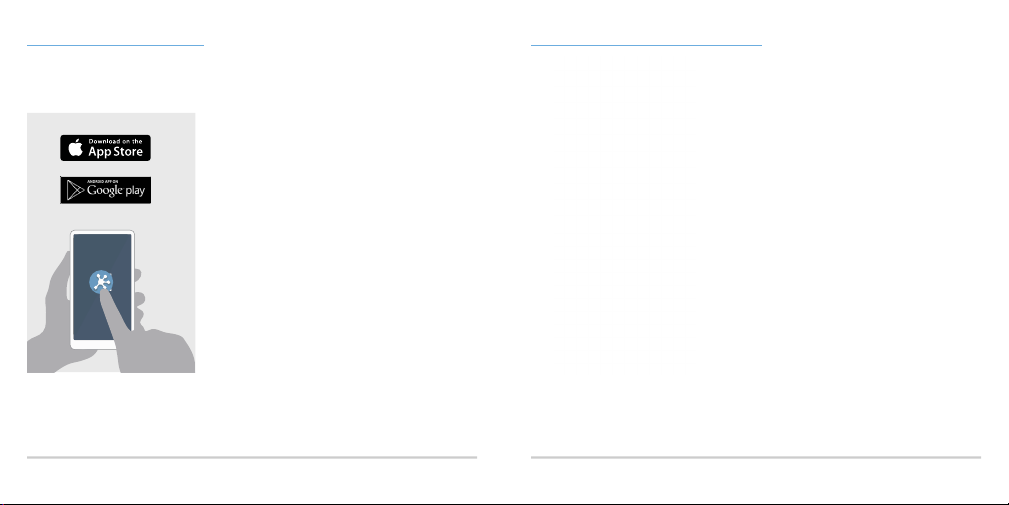
1. Download and open the CareTRx
App from the Apple App Store or
Google Play.
If you received an invitation code,
follow the instructions provided
with the code to download the
invite-only App instead.
2. Follow the on-screen instructions in
the App to:
• Register and create a prole
• Add a medication and set a reminder
schedule if applicable
• Attach and pair a Sensor for each
compatible inhaler
The Sensor uses Bluetooth® Smart wireless technology and requires
activation using the CareTRx App with a compatible mobile device on the
following platforms: AndroidTM 4.3 or later or iOS 8 or later.
CARETRX SENSOR - INSTRUCTIONS FOR USE CARETRX SENSOR - INSTRUCTIONS FOR USE8 9
1. Be sure the mouthpiece is closed or
covered while attaching the Sensor.
Aim the inhaler mouthpiece away
from your face and from others.
2. Press your thumb against the
canister. Next, attach the Sensor by
sliding one side of the elastic base
onto the canister and push until fully
attached.
NOTE: The base of the Sensor is
intentionally smaller than the size
of the canister, so you may need to
apply pressure. This process may
release one or more doses.
3. You may notice the Sensor blink
once. This conrms it is activated
and securely attached.
The Sensor is compatible with some maintenance and rescue metereddose inhalers. For a complete list, please visit the website listed on the
back cover of these instructions.
Page 6

PAIRING THE SENSOR
USING THE SENSOR
Pairing uses Bluetooth® Smart wireless technology to link the Sensor to a
medication added in the CareTRx App.
Pairing is needed to allow the Sensor to automatically transmit inhaler
use data to the App and provide blinking reminders for scheduled doses.
To pair the Sensor, follow the on-screen instructions provided by the App.
You should only have to pair your Sensor to the CareTRx App once.
After the Sensor is paired, it automatically transmits inhaler use data to
the CareTRx App on any compatible mobile device that your account is
signed into.
NOTE: See Unpairing the Sensor for more detail on how to unpair the
Sensor.
CARETRX SENSOR - INSTRUCTIONS FOR USE CARETRX SENSOR - INSTRUCTIONS FOR USE10 11
Once the Sensor is attached to the canister and paired with the CareTRx
App, you can continue to use your inhaler as you normally would by
pressing down on the Sensor (instead of the top of the canister) to release
a dose. If the Sensor interferes with your ability to use the prescribed
medication, discontinue use of the Sensor. See Warning for more detail.
When you press the Sensor, it automatically records the date and time
and displays it in the App. This process is referred to as “syncing”.
Depending on the connection, it can take a few seconds or several
minutes to see the dose event appear in the App.
If you paired the Sensor with an inhaler and have also
set up a daily dose schedule in the App, the Sensor
will blink green as a reminder that a dose is due at the
scheduled time. The Sensor will continue to blink for up
to 20 minutes or until a dose is actuated.
NOTE: The Sensor will only sync data with the App when it is near your
mobile device and Bluetooth® is enabled. If a Sensor is out of range, it
can store up to 400 uses between syncs and will continue to provide
reminders for scheduled doses in the form of blinking lights.
Page 7

TROUBLESHOOTING
UNDERSTANDING INDICATOR LIGHTS
If you are having trouble pairing or syncing your Sensor with the App,
The Sensor uses a ring of green lights to communicate the following:
please check the following:
PROBLEM CAUSES
Unable
to pair a
Sensor with
an inhaler
Unable to
sync events
with the
App
To contact Customer Support, visit the website listed on the back cover of these instructions. Your Sensor will only blink to indicate the events above. It will not blink when it is pressed.
• Your mobile device does not support Bluetooth® Smart
• Bluetooth® is disabled on your mobile device
• For Android devices, your device is not running
Android 4.3 or later
• For iOS devices, your device is not running iOS 8 or
later
• You do not have a network or Wi-Fi connection
• The Sensor is out of range
• Bluetooth® is disabled on your mobile device
• You are logged into an account that is not paired with
the Sensor
• The Sensor is out of range
• The Sensor battery needs replacing - see Replacing
the Sensor Battery for more detail
CARETRX SENSOR - INSTRUCTIONS FOR USE CARETRX SENSOR - INSTRUCTIONS FOR USE12 13
LIGHT PATTERN MEANING
Blinks one (1) time Attachment or
detachment of
Sensor is identied
Rotational blinking Sensor is selected for
pairing
Blinks three (3) times Pairing process is
successful
Blinks four (4) times;
(sequence repeats for
Scheduled dose is
due
up to 20 minutes or
until dose is taken)
Blinks three (3) times Battery replacement
successful
IN-APP
NOTIFICATION
Conrmation of event
Prompt to pair
selected Sensor
Conrmation of
successful pairing
Dose reminder
N/A
Page 8

CUSTOMIZING WITH COLOR BANDS
DETACHING THE SENSOR
If you are using multiple Sensors with dierent inhalers, the dierent color
bands (purple and blue) can be used to easily tell them apart.
1. To remove a color band, pinch
and pull the band until you
can easily take it o.
2. To add another color band,
wrap the band around the
Sensor to t the indent and
then release the band.
CLEANING THE SENSOR
The Sensor operates best when it is clean and free of chemicals, steam,
water, and dust. If needed, detach the Sensor and clean it by wiping it
with a damp cloth. Allow the Sensor to air dry.
Warning: Do not place the Sensor under water, in a dishwasher, or in a sterilizer, as this
could damage the Sensor.
CARETRX SENSOR - INSTRUCTIONS FOR USE CARETRX SENSOR - INSTRUCTIONS FOR USE14 15
To detach the Sensor, follow the instructions below:
1. Press your thumb against the
canister to make sure it stays in the
holder.
2. Pull the Sensor o while rotating it
to one side.
UNPAIRING THE SENSOR
If you are no longer using the Sensor, you can unpair it in the App.
NOTE: If you delete a medication that
will automatically unpair.
is paired to a Sensor, the Sensor
Page 9

REPLACING THE SENSOR BATTERY
The Sensor comes installed with a replaceable battery (CR2032). The
battery lasts for about six (6) to nine (9) months and a notication will be
sent to the App when the battery is low.
To replace the battery, detach the Sensor from the inhaler and follow the
steps below. If the battery is completely drained, the Sensor will not blink
and you will not be notied when it is detached. This will not aect the
functionality of the Sensor after the battery change.
NOTE: During battery replacement, please observe correct battery orientation (step 3).
3. Replace the expired battery
with the new battery, plus
(+) side facing you as shown
above. The Sensor will blink
three times to conrm the
battery is inserted correctly.
4. Align the arrow of the door
as shown above and insert
battery door at an angle.
1. To unlock the battery door, use
a small tool or coin to turn the
door roughly 30 degrees (30o)
counterclockwise until it stops.
2. Place a narrow instrument
between the door and the
edge of the base to lift the
battery door.
CARETRX SENSOR - INSTRUCTIONS FOR USE CARETRX SENSOR - INSTRUCTIONS FOR USE16 17
5. Firmly push the battery door
down to insert.
In the United States, please refer to the link below on how to dispose of used batteries:
https://www.epa.gov/recycle/how-do-i-recycle-common-recyclables#bat
Outside of the United States, follow appropriate local disposal regulations.
Perchlorate Material - special handling may apply. See www.dtsc.ca.gov/hazardouswaste/perchlorate
6. Lock the battery door by
turning clockwise. Attach the
Sensor and resume normal use.
Page 10
SYMBOL DEFINITIONS
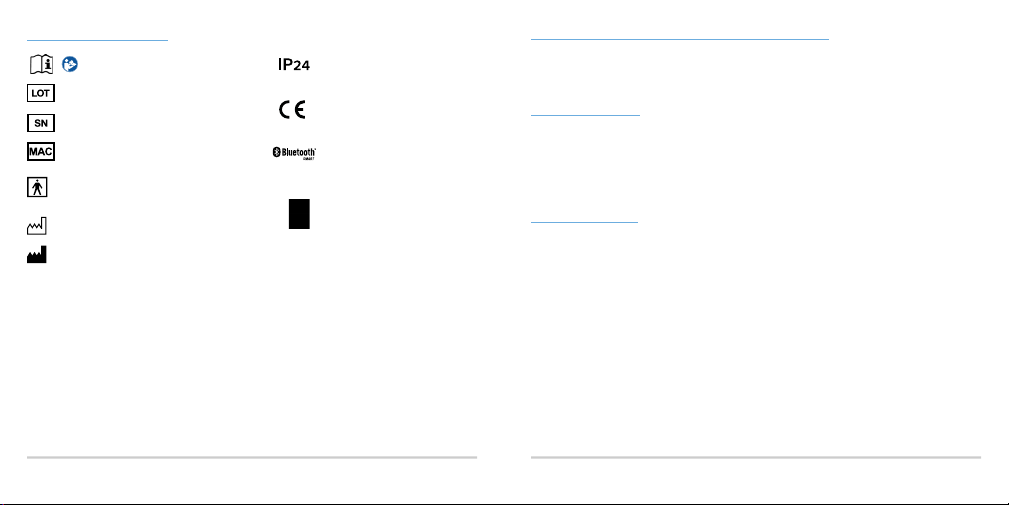
Consult instructions for use
Batch Code
Serial Number
MAC address
The enclosure surface of this CareTRx
Sensor is type BF applied part
Date of Manufacture
Manufacturer
When the CareTRx Sensor is no longer needed, please refer to the link below for ways to properly dispose of used
electronics in the United States: https://www.epa.gov/recycle/electronics-donation-and-recycling
Outside of the United States, follow appropriate local disposal regulations.
The Bluetooth® word mark and logos are registered trademarks owned by Bluetooth SIG, Inc. and any use of such marks
by Gecko Health Innovations, Inc. is under license.
Android, Google Play, and the Google Play logo are trademarks of Google Inc.
Apple, the Apple logo, iPad, and iPhone are trademarks of Apple Inc., registered in the U.S. and other countries. App Store
is a service mark of Apple Inc.
CARETRX SENSOR - INSTRUCTIONS FOR USE CARETRX SENSOR - INSTRUCTIONS FOR USE18 19
Ingress Protection from objects >12.5mm
and splashing water
Manufacturer’s declaration of European
Conformity and freedom to market in
the European Union
Incorporates Bluetooth® Core
Specication Version 4.0 (or higher) with
GATT architecture
The Waste Electrical and Electronic
Equipment Regulations indicate
separate collection for electrical and
electronic equipment
SENSOR OPERATING & STORAGE CONDITIONS
The Sensor operates at temperatures between 15oC and 25oC (59oF and 77oF) and can be stored at temperatures between
-18oC and 49oC (-0.4oF and 120.2oF). The relative levels of humidity range from 10% to 90%.
NOTE: If the Sensor is attached to the inhaler, make sure to also follow the storage instructions of the inhaler.
EMC STATEMENT
The CareTRx Sensor needs special precautions regarding electromagnetic compatibility (EMC) and needs to be installed
and put into service according to the information provided in these instructions.
Portable and mobile radio frequency (RF) communications equipment can aect the CareTRx Sensor.
The CareTRx Sensor may be interfered with by other equipment, even if that other equipment complies with CISPR emission
requirements.
The CareTRx Sensor should not be stacked with other equipment.
Additional EMC information can be obtained by visiting the website listed on the back cover of these instructions.
FCC STATEMENT
Contains FCC ID: QOQBLE113
This device complies with Part 15 of the FCC Rules. Operation is subject to the following two conditions: (1) this device may
not cause harmful interference, and (2) this device must accept any interference received, including interference that may
cause undesired operation.
Sensor Factory Firmware Version 1.14
Expected service life of the Sensor is 2 years from initial use.
© 2016 Gecko Health Innovations, Inc.
All Rights Reserved. CareTRx
engineering without a specic license from Gecko Health Innovations, Inc. or as permitted by applicable law, is strictly
prohibited.
Manufacturer: Gecko Health Innovations, Inc. 101 Main Street, Cambridge, MA, U.S.A., 02142
Authorized Representative: Emergo Europe Molenstraat 15, 2513 BH, The Hague, Netherlands
Rev. 2016-11-28
900450 Rev B.0
TM
is a trademark of Gecko Health Innovations, Inc. Any copying, use, distribution or reverse
Page 11

CONTACT INFORMATION
U.K.
Telephone: 0800 9890043
Website: www.caretrx.co.uk
Email: [email protected]
U.S.
Telephone: 888-482-9522
Website: www.caretrx.com
Designed with Care in Cambridge, MA
 Loading...